Prerequisites
- A TerminusDB Cloud account (sign up)
What you'll achieve By the end of this guide, you will have created a new data product in TerminusDB Cloud.
TerminusDB CMS is decommissioned This page documents TerminusDB CMS (formerly TerminusCMS, later DFRNT Hub), which is retired and kept for historical reference. For hosted TerminusDB, see TerminusDB Cloud. A new modeller ships with TerminusDB 12.1. The open source database is unchanged.
Follow this instructions to create a project/data product in TerminusDB Cloud -
- Login to the dashboard at TerminusDB Cloud.
- Select the team that you want the project to live.
- Choose 'New Data Product' from the top menu.
- Provide your project ID - this can only contain alphanumeric characters and underscores.
- Name your project.
- Provide a description for your project. This is useful if you are collaborating to provide context to other users.
- Select 'Create New Data Product' button.
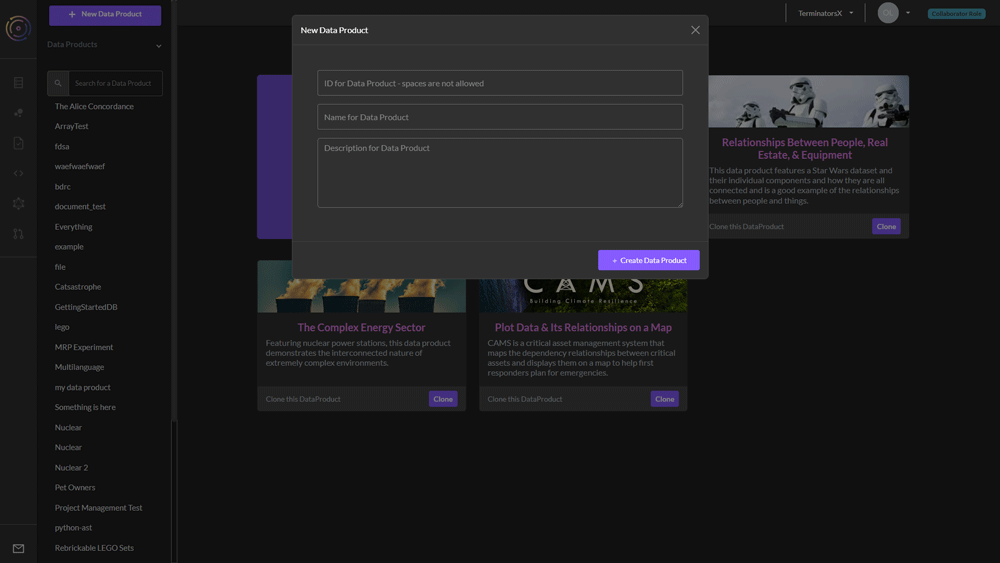
Your project is created and you can now start working with it. To access it at any time, select the project from the list of projects on left of the dashboard.