# TerminusDB — full documentation corpus Source pages: https://terminusdb.com/docs/ Generated at build time from the docs source. --- # Getting Started URL: https://terminusdb.com/docs// ## TerminusDB Documentation TerminusDB is a knowledge graph database with built-in version control. It stores JSON documents as graph structures, tracks every change as an immutable commit, and supports branching, merging, and [time travel queries](/docs/graph-database-with-time-travel-queries/) over your data history. TerminusDB is open source and free to use, maintained by the team at [Gettier](https://gettier.ai) in collaboration with the community. ### Start here - **New to TerminusDB?** — [Get Started tutorial](/docs/get-started/) walks you through installation and your first database. - **Evaluating TerminusDB?** — Read [What is TerminusDB?](/docs/terminusdb-explanation/) for capabilities and architecture, or see [how it compares to MongoDB](/docs/terminusdb-vs-mongodb/). - **Looking for a specific feature?** — [Browse by Topic](/docs/topics/list) to navigate the documentation by subject area. ### Installation 1. Run with [Docker](/docs/install-terminusdb-as-a-docker-container/) (recommended), or see [TerminusDB Cloud](/docs/cloud/) for hosting options. 2. Install a [client library](/docs/install-terminusdb-js-client/) (TypeScript, Python, or Rust). 3. [Connect your client to a TerminusDB Cloud instance](/docs/how-to-connect-terminusdb-cloud/) or your local server. ### Collaborate with teams Use the [TerminusDB Cloud](/docs/cloud/) environment to collaborate on data products in shared instances, push and pull between local and remote databases, and manage change-request workflows — similar to how software teams collaborate on code with Git. --- # Access Control Reference URL: https://terminusdb.com/docs/access-control/ TerminusDB provides role-based access control (RBAC) for managing who can access databases and what operations they can perform. This page is a complete reference for the access control model and its HTTP API. For a step-by-step walkthrough, see the [Access Control Tutorial](/docs/access-control-tutorial). For the JavaScript client API, see the [JavaScript Access Control Reference](/docs/access-control-with-javascript/). ## Access Control Model TerminusDB's access control consists of four concepts: | Concept | Description | |---------|-------------| | **User** | An identity that can authenticate and perform operations | | **Role** | A named set of permitted actions (e.g. "admin", "consumer") | | **Capability** | A grant that links a user to a role on a specific resource (scope) | | **Resource** | The target of a capability — either an organisation or a database | A user can perform an action on a resource only if they have a capability that includes a role containing that action for that resource. ```text User ──→ Capability ──→ Role (contains Actions) └──→ Resource (Organisation or Database) ``` ## Built-in Roles TerminusDB includes two built-in roles: ### Admin Role The admin role grants all available actions. The default `admin` user has this role on the `admin` organisation. **Actions:** `branch`, `class_frame`, `clone`, `commit_read_access`, `commit_write_access`, `create_database`, `delete_database`, `fetch`, `instance_read_access`, `instance_write_access`, `manage_capabilities`, `meta_read_access`, `meta_write_access`, `push`, `rebase`, `schema_read_access`, `schema_write_access` ### Consumer Role The consumer role grants read-only access to instance data and schema. **Actions:** `class_frame`, `instance_read_access`, `schema_read_access` ## All Available Actions | Action | Description | |--------|-------------| | `branch` | Create and manage branches | | `class_frame` | Read class frame information | | `clone` | Clone a database | | `commit_read_access` | Read commit history | | `commit_write_access` | Write commits (required for any data mutation) | | `create_database` | Create new databases in an organisation | | `delete_database` | Delete databases | | `fetch` | Fetch from a remote | | `instance_read_access` | Read instance (document) data | | `instance_write_access` | Write instance (document) data | | `manage_capabilities` | Grant or revoke capabilities for other users over the resource | | `meta_read_access` | Read repository metadata for the resource | | `meta_write_access` | Write repository metadata for the resource | | `push` | Push to a remote | | `rebase` | Rebase branches | | `schema_read_access` | Read schema definitions | | `schema_write_access` | Write schema definitions | ## Capability Inheritance Capabilities granted at the **organisation level** are inherited by all databases within that organisation. You can also grant capabilities at the **database level** to give a user additional permissions on a specific database without affecting their access to other databases in the organisation. Database-level capabilities **add to** (never reduce) organisation-level capabilities. ## HTTP API Reference All access control endpoints require authentication as the `admin` user (or a user with `manage_capabilities` permission). Use Basic Auth with `admin:root` for local installations. ### Users #### List all users ```bash curl -s -u admin:root http://localhost:6363/api/users ``` **Response:** ```json [ { "@id": "User/admin", "@type": "User", "capability": ["Capability/server_access"], "name": "admin" } ] ``` #### Get a user (with capabilities) ```bash curl -s -u admin:root "http://localhost:6363/api/users/admin?capability=true" ``` #### Create a user ```bash curl -s -u admin:root -X POST http://localhost:6363/api/users \ -H "Content-Type: application/json" \ -d '{"name": "alice", "password": "secure-password"}' ``` **Response:** ```json "terminusdb://system/data/User/alice" ``` #### Change a user's password ```bash curl -s -u admin:root -X PUT http://localhost:6363/api/users \ -H "Content-Type: application/json" \ -d '{"name": "alice", "password": "new-secure-password"}' ``` #### Delete a user ```bash curl -s -u admin:root -X DELETE http://localhost:6363/api/users/alice ``` ### Roles #### List all roles ```bash curl -s -u admin:root http://localhost:6363/api/roles ``` **Response:** ```json [ { "@id": "Role/admin", "@type": "Role", "action": ["branch", "class_frame", "clone", "commit_read_access", "..."], "name": "Admin Role" }, { "@id": "Role/consumer", "@type": "Role", "action": ["class_frame", "instance_read_access", "schema_read_access"], "name": "Consumer Role" } ] ``` #### Create a custom role ```bash curl -s -u admin:root -X POST http://localhost:6363/api/roles \ -H "Content-Type: application/json" \ -d '{ "name": "writer", "action": [ "commit_write_access", "instance_read_access", "instance_write_access", "schema_read_access", "class_frame" ] }' ``` **Response:** ```json "terminusdb://system/data/Role/writer" ``` #### Update a role ```bash curl -s -u admin:root -X PUT http://localhost:6363/api/roles \ -H "Content-Type: application/json" \ -d '{ "name": "writer", "action": [ "commit_write_access", "instance_read_access", "instance_write_access", "schema_read_access", "schema_write_access", "class_frame" ] }' ``` #### Delete a role ```bash curl -s -u admin:root -X DELETE http://localhost:6363/api/roles/writer ``` ### Organisations #### List all organisations ```bash curl -s -u admin:root http://localhost:6363/api/organizations ``` #### Create an organisation ```bash curl -s -u admin:root -X POST http://localhost:6363/api/organizations/MyTeam \ -H "Content-Type: application/json" -d '{}' ``` #### Delete an organisation ```bash curl -s -u admin:root -X DELETE http://localhost:6363/api/organizations/MyTeam ``` #### List users in an organisation ```bash curl -s -u admin:root http://localhost:6363/api/organizations/admin/users ``` #### Get a user's databases in an organisation ```bash curl -s -u admin:root http://localhost:6363/api/organizations/admin/users/alice/databases ``` ### Capabilities (Grant and Revoke Access) The `/api/capabilities` endpoint manages the relationship between users, roles, and resources. #### Grant a role to a user on an organisation ```bash curl -s -u admin:root -X POST http://localhost:6363/api/capabilities \ -H "Content-Type: application/json" \ -d '{ "operation": "grant", "scope_type": "organization", "scope": "admin", "user": "alice", "roles": ["Consumer Role"] }' ``` This gives `alice` read-only access to all databases in the `admin` organisation. #### Grant a role to a user on a specific database ```bash curl -s -u admin:root -X POST http://localhost:6363/api/capabilities \ -H "Content-Type: application/json" \ -d '{ "operation": "grant", "scope_type": "database", "scope": "admin/MyDatabase", "user": "alice", "roles": ["writer"] }' ``` This gives `alice` write access specifically to `MyDatabase`, in addition to any organisation-level permissions. #### Revoke a role from a user ```bash curl -s -u admin:root -X POST http://localhost:6363/api/capabilities \ -H "Content-Type: application/json" \ -d '{ "operation": "revoke", "scope_type": "organization", "scope": "admin", "user": "alice", "roles": ["Consumer Role"] }' ``` ### Capabilities Request Body | Field | Type | Required | Description | |-------|------|----------|-------------| | `operation` | `"grant"` or `"revoke"` | Yes | Whether to add or remove the capability | | `scope_type` | `"organization"` or `"database"` | No | Enables name-based lookups (recommended) | | `scope` | string | Yes | Target resource — org name, `"org/db"` format, or full document ID | | `user` | string | Yes | Target user — username (with `scope_type`) or full document ID | | `roles` | string[] | Yes | Roles to grant/revoke — role names (with `scope_type`) or full document IDs | When `scope_type` is provided, you can use human-readable names for `scope`, `user`, and `roles`. Without it, you must use full system document IDs (e.g. `"Organization/abc123..."`, `"User/alice"`, `"Role/consumer"`). ## Common Patterns ### Read-only user for a single database ```bash # 1. Create the user curl -s -u admin:root -X POST http://localhost:6363/api/users \ -H "Content-Type: application/json" \ -d '{"name": "readonly-user", "password": "secure-password"}' # 2. Grant consumer role on the specific database curl -s -u admin:root -X POST http://localhost:6363/api/capabilities \ -H "Content-Type: application/json" \ -d '{ "operation": "grant", "scope_type": "database", "scope": "admin/MyDatabase", "user": "readonly-user", "roles": ["Consumer Role"] }' ``` ### Writer user for an entire organisation ```bash # 1. Create a writer role curl -s -u admin:root -X POST http://localhost:6363/api/roles \ -H "Content-Type: application/json" \ -d '{ "name": "writer", "action": ["commit_write_access", "instance_read_access", "instance_write_access", "schema_read_access", "class_frame"] }' # 2. Create user and grant the role at org level curl -s -u admin:root -X POST http://localhost:6363/api/users \ -H "Content-Type: application/json" \ -d '{"name": "editor", "password": "secure-password"}' curl -s -u admin:root -X POST http://localhost:6363/api/capabilities \ -H "Content-Type: application/json" \ -d '{ "operation": "grant", "scope_type": "organization", "scope": "admin", "user": "editor", "roles": ["writer"] }' ``` ## See Also - [Access Control Tutorial](/docs/access-control-tutorial) — Step-by-step guide with the JavaScript client - [Name Mode vs ID Mode](/docs/capabilities-api-modes) — When to use `scope_type` and how to avoid 500 errors - [JavaScript Access Control Reference](/docs/access-control-with-javascript/) — Full client library API - [Tutorial Source Code](/docs/access-control-tutorial-source/) — Complete JavaScript example - [OpenAPI Specification](/docs/openapi) — Interactive API explorer --- # Manage Access Control with the CLI URL: https://terminusdb.com/docs/access-control-cli/ **What you'll achieve** By the end of this guide, you will have configured access control (users, organisations, capabilities) using the CLI. TerminusDB's CLI provides direct access to the role-based access control system without HTTP requests. Use it to create users, inspect roles, and grant or revoke capabilities from the command line. **Prerequisites** - TerminusDB installed and accessible via the `terminusdb` CLI command. If you are running TerminusDB in Docker, prefix commands with `docker exec terminusdb` (e.g. `docker exec terminusdb terminusdb user get`). - A database to grant access to. This guide uses the canonical `admin/MyDatabase`. For the HTTP API equivalent of these operations, see [Access Control Tutorial (HTTP)](/docs/access-control-tutorial). For the full access control model (roles, capabilities, inheritance), see the [Access Control Reference](/docs/access-control). ## List built-in roles TerminusDB ships with two built-in roles. Inspect them before granting: ```bash terminusdb role get ``` Expected output: ```json [ { "@id": "Role/admin", "name": "admin", "action": ["branch", "class_frame", "clone", "commit_read_access", "commit_write_access", "create_database", "delete_database", "fetch", "instance_read_access", "instance_write_access", "manage_capabilities", "meta_read_access", "meta_write_access", "push", "rebase", "schema_read_access", "schema_write_access"] }, { "@id": "Role/consumer", "name": "consumer", "action": ["class_frame", "clone", "instance_read_access", "meta_read_access", "schema_read_access"] } ] ``` | Role | Purpose | |------|---------| | `admin` | Full read/write access — all actions | | `consumer` | Read-only access — read instance data, schema, metadata, and clone | To inspect a single role by name: ```bash terminusdb role get consumer --json ``` ## Create a custom role The built-in roles cover common cases, but you can create roles with exactly the actions you need: ```bash terminusdb role create ROLE_NAME ACTION_1 ACTION_2 ... ACTION_N ``` Available actions: `create_database`, `delete_database`, `class_frame`, `clone`, `fetch`, `push`, `branch`, `rebase`, `instance_read_access`, `instance_write_access`, `schema_read_access`, `schema_write_access`, `meta_read_access`, `meta_write_access`, `commit_read_access`, `commit_write_access`, `manage_capabilities` ### Example: a clone-only role ```bash terminusdb role create cloner clone commit_read_access ``` This creates a role with the `clone` and `commit_read_access` actions — the minimum required for anonymous public access (see [worked example below](#worked-example-enable-anonymous-cloning)). ### Example: a read-write role without admin powers ```bash terminusdb role create writer instance_read_access instance_write_access schema_read_access commit_read_access commit_write_access branch rebase ``` To delete a custom role: ```bash terminusdb role delete cloner ``` ## Create a user Create a new user with a password: ```bash terminusdb user create alice --password alice-secret ``` To create a user without a password (for token-based or anonymous access): ```bash terminusdb user create anonymous ``` Verify the user exists: ```bash terminusdb user get alice --json ``` To list all users: ```bash terminusdb user get ``` ## Grant a capability Grant one or more roles to a user on a specific scope (database or organisation): ```bash terminusdb capability grant USER SCOPE ROLE ``` **Parameters:** | Parameter | Description | |-----------|-------------| | `USER` | The user name (e.g. `alice`, `anonymous`) | | `SCOPE` | The target database (e.g. `admin/MyDatabase`) or organisation (e.g. `admin`) | | `ROLE` | One or more role names (e.g. `consumer`, `admin`) | **Options:** | Flag | Description | |------|-------------| | `--scope-type database` | Interpret SCOPE as a database path (default) | | `--scope-type organization` | Interpret SCOPE as an organisation name | ### Example: grant read-only access to a database ```bash terminusdb capability grant alice admin/MyDatabase consumer ``` Alice can now read documents and schema from `admin/MyDatabase`, but cannot write, branch, or delete. ### Example: grant admin access to an organisation ```bash terminusdb capability grant alice admin admin --scope-type organization ``` Alice now has full admin access to the `admin` organisation and all databases within it. ## Revoke a capability Remove one or more roles from a user on a scope: ```bash terminusdb capability revoke USER SCOPE ROLE ``` The parameters and options are identical to `capability grant`. ### Example: revoke read-only access ```bash terminusdb capability revoke alice admin/MyDatabase consumer ``` Alice can no longer access `admin/MyDatabase`. ## Verify a user's capabilities Check what capabilities a user has: ```bash terminusdb user get alice --capability --json ``` This returns the user record including all granted capabilities, their scopes, and associated roles. --- ## Worked example: enable anonymous cloning The most common use case for CLI access control is making a database publicly cloneable without authentication. TerminusDB has a built-in `anonymous` user — granting it clone permission on a database allows anyone to clone that database without credentials. ### Why this matters Public datasets, documentation examples, and template databases all need to be cloneable by anyone. Without anonymous access, every `clone` request requires valid credentials — which blocks use cases like: - Documentation quickstarts that clone a pre-built dataset - Public API servers that serve read-only data - Template servers that distribute starter databases ### Step 1 — Create a minimal `cloner` role The built-in `consumer` role grants broader read access (fetch, schema read, instance read) than anonymous users need. Follow the principle of least privilege — create a dedicated role with only the actions required for cloning: ```bash terminusdb role create cloner clone commit_read_access ``` This creates a role with exactly two actions: `clone` (to clone the database) and `commit_read_access` (required by the clone operation). Nothing else. Verify it was created: ```bash terminusdb role get cloner --json ``` Expected output: ```json { "@id": "Role/cloner", "name": "cloner", "action": ["clone", "commit_read_access"] } ``` `consumer` grants `clone`, `fetch`, `instance_read_access`, `schema_read_access`, `meta_read_access`, and `class_frame`. For anonymous public access, that is more than needed. If an anonymous user only needs to clone the database (not browse its documents via the API), `cloner` is the correct, minimal role. Use `consumer` instead if you want anonymous users to also read documents and schema via the HTTP API without cloning. ### Step 2 — Confirm the database exists ```bash terminusdb db list ``` You should see `admin/MyDatabase` (or whichever database you want to make public) in the output. ### Step 3 — Grant clone access to anonymous ```bash terminusdb capability grant anonymous admin/MyDatabase cloner ``` This grants the `anonymous` user the `cloner` role on `admin/MyDatabase`. Anonymous requests can now clone that database — and nothing else. ### Step 4 — Verify the grant ```bash terminusdb user get anonymous --capability --json ``` Expected output includes a capability entry linking `anonymous` to the `cloner` role on your database: ```json { "@id": "User/anonymous", "name": "anonymous", "capability": [ { "@id": "Capability/...", "role": ["Role/cloner"], "scope": "admin/MyDatabase" } ] } ``` ### Step 5 — Test anonymous cloning From a different machine (or without credentials), clone the database: ```bash curl -X POST http://localhost:6363/api/clone/admin/my-local-copy \ -H "Content-Type: application/json" \ -d '{ "remote_url": "http://localhost:6363/admin/MyDatabase", "label": "My Local Copy", "comment": "Cloned without authentication" }' ``` No `-u admin:root` — the request succeeds because `anonymous` has `clone` permission via the `cloner` role. ### Step 6 — Revoke access (if needed) To make the database private again: ```bash terminusdb capability revoke anonymous admin/MyDatabase cloner ``` Anonymous clone requests will now return `401 Unauthorized`. To remove the role entirely (if no longer needed by any user): ```bash terminusdb role delete cloner ``` --- ## Quick reference | Task | Command | |------|---------| | List all roles | `terminusdb role get` | | Create a custom role | `terminusdb role create ROLE_NAME ACTION1 ACTION2 ...` | | Delete a custom role | `terminusdb role delete ROLE_NAME` | | List all users | `terminusdb user get` | | Create a user | `terminusdb user create USER --password PASS` | | Grant a role on a database | `terminusdb capability grant USER DB ROLE` | | Grant a role on an organisation | `terminusdb capability grant USER ORG ROLE --scope-type organization` | | Revoke a role | `terminusdb capability revoke USER SCOPE ROLE` | | Check user capabilities | `terminusdb user get USER --capability --json` | | Enable anonymous cloning | `terminusdb role create cloner clone` then `terminusdb capability grant anonymous admin/DB cloner` | | Disable anonymous cloning | `terminusdb capability revoke anonymous admin/DB cloner` | ## See also - [Access Control Tutorial (HTTP API)](/docs/access-control-tutorial) — same operations using curl - [Access Control Reference](/docs/access-control) — full model: roles, actions, capability inheritance - [CLI Commands Reference](/docs/terminusdb-cli-commands) — complete CLI documentation --- # Access Control Tutorial URL: https://terminusdb.com/docs/access-control-tutorial/ In this tutorial you will create a second user with read-only access to a database. By the end you will have: 1. Created a database and inserted a document 2. Created a new user (`alice`) who can read — but not write — that database 3. Verified that permission enforcement works **Time:** ~10 minutes **Prerequisites:** TerminusDB running on `localhost:6363` ([Install guide →](/docs/install-terminusdb-as-a-docker-container)) If you have trouble connecting, see [Troubleshooting Connection Failures](/docs/troubleshooting-connection) and [Authentication Errors](/docs/troubleshooting-auth). ## Step 1 — Create a database First, create a database that we will protect with access control: ```bash curl -s -u admin:root -X POST "http://localhost:6363/api/db/admin/MyDatabase" \ -H "Content-Type: application/json" \ -d '{"label": "MyDatabase", "comment": "Access control tutorial"}' ``` Expected response: ```json {"@type":"api:DbCreateResponse","api:status":"api:success"} ``` ## Step 2 — Insert a document Now insert a document into the database so we have something to protect: ```bash curl -s -u admin:root -X POST \ "http://localhost:6363/api/document/admin/MyDatabase?author=admin&message=Add+document&raw_json=true" \ -H "Content-Type: application/json" \ -d '{"@id": "terminusdb:///data/jane", "name": "Jane Smith", "email": "jane@example.com"}' ``` Expected response: ```json ["terminusdb:///data/jane"] ``` Verify the document is accessible: ```bash curl -s -u admin:root \ "http://localhost:6363/api/document/admin/MyDatabase?raw_json=true&id=terminusdb:///data/jane" ``` You should see Jane's document returned as JSON. ## Step 3 — Create a new user Create a user called `alice` with a password: ```bash curl -s -u admin:root -X POST http://localhost:6363/api/users \ -H "Content-Type: application/json" \ -d '{"name": "alice", "password": "alice-secret"}' ``` Expected response: ```json "terminusdb://system/data/User/alice" ``` Verify the user exists: ```bash curl -s -u admin:root http://localhost:6363/api/users/alice ``` ## Step 4 — Grant read-only access Grant the built-in "Consumer Role" (read-only) to `alice` on `MyDatabase`: ```bash curl -s -u admin:root -X POST http://localhost:6363/api/capabilities \ -H "Content-Type: application/json" \ -d '{ "operation": "grant", "scope_type": "database", "scope": "admin/MyDatabase", "user": "alice", "roles": ["Consumer Role"] }' ``` The Consumer Role includes three actions: `class_frame`, `instance_read_access`, and `schema_read_access`. This means `alice` can read documents and schema but cannot insert, update, or delete anything. ## Step 5 — Verify read access works Authenticate as `alice` and read the document: ```bash curl -s -u alice:alice-secret \ "http://localhost:6363/api/document/admin/MyDatabase?raw_json=true&id=terminusdb:///data/jane" ``` You should see Jane's document — `alice` has read access. ## Step 6 — Verify write access is denied Now try to insert a document as `alice`: ```bash curl -s -u alice:alice-secret -X POST \ "http://localhost:6363/api/document/admin/MyDatabase?author=alice&message=Attempt+write&raw_json=true" \ -H "Content-Type: application/json" \ -d '{"@id": "terminusdb:///data/bob", "name": "Bob Jones", "email": "bob@example.com"}' ``` You should receive a **403 Forbidden** error: ```json { "@type": "api:ErrorResponse", "api:message": "Insufficient capabilities for this operation", "api:status": "api:forbidden" } ``` This confirms that `alice` cannot write — the access control is working correctly. ## Step 7 — Upgrade to write access (optional) If you want to give `alice` write access, create a custom writer role and grant it: ```bash # Create a writer role curl -s -u admin:root -X POST http://localhost:6363/api/roles \ -H "Content-Type: application/json" \ -d '{ "name": "writer", "action": [ "commit_write_access", "instance_read_access", "instance_write_access", "schema_read_access", "class_frame" ] }' # Grant the writer role to alice on MyDatabase curl -s -u admin:root -X POST http://localhost:6363/api/capabilities \ -H "Content-Type: application/json" \ -d '{ "operation": "grant", "scope_type": "database", "scope": "admin/MyDatabase", "user": "alice", "roles": ["writer"] }' ``` Now `alice` can insert documents: ```bash curl -s -u alice:alice-secret -X POST \ "http://localhost:6363/api/document/admin/MyDatabase?author=alice&message=Add+Bob&raw_json=true" \ -H "Content-Type: application/json" \ -d '{"@id": "terminusdb:///data/bob", "name": "Bob Jones", "email": "bob@example.com"}' ``` ## Step 8 — Clean up (optional) Revoke access and delete the user: ```bash # Revoke the consumer role curl -s -u admin:root -X POST http://localhost:6363/api/capabilities \ -H "Content-Type: application/json" \ -d '{ "operation": "revoke", "scope_type": "database", "scope": "admin/MyDatabase", "user": "alice", "roles": ["Consumer Role"] }' # Delete the user curl -s -u admin:root -X DELETE http://localhost:6363/api/users/alice ``` ## What you learned - **Users** are identities that authenticate with username/password - **Roles** are named sets of actions (the built-in Consumer Role is read-only) - **Capabilities** link users to roles on specific resources (databases or organisations) - The `/api/capabilities` endpoint grants and revokes access - Permissions are enforced — unauthorized operations return 403 ## Next steps - [Access Control Reference](/docs/access-control/) — Full API reference for all endpoints and actions - [JavaScript Client Access Control](/docs/access-control-with-javascript/) — Manage access control programmatically - [Tutorial Source Code](/docs/access-control-tutorial-source/) — Full JavaScript example with custom roles and multiple users --- # Access Control Tutorial Source Code URL: https://terminusdb.com/docs/access-control-tutorial-source/ This page provides a detailed walkthrough of the access control tutorial code. The code uses the `AccessControl` class in the TerminusDB JavaScript Client library to manage user access control for Organizations and databases. ## Setup and Initialization Import the TerminusDB client and set up the configuration: ```javascript /* Import terminusdb */ const TerminusClient = require("@terminusdb/terminusdb-client") /* Import the list of allowed actions */ const { ACTIONS } = TerminusClient.UTILS /* We are using TerminusDB for Authorization so we'll create all the Users with a NO_KEY password */ const NO_KEY = "NO_KEY" /* TerminusDB server host url */ const serverHost = "http://localhost:6363" ``` Initialize the TerminusDB Client with the admin's credentials. Only the global admin can create Teams/Organizations and Users: ```javascript const client = new TerminusClient.WOQLClient(serverHost, {user:"admin", key:"root"}) const accessControl = new TerminusClient.AccessControl(serverHost, {user:"admin", key:"root"}) ``` ## Define Custom Roles Define the role names and their associated actions: ```javascript /* Role names */ const customReaderRole = "reader" const customWriterRole = "writer" const customAppAdmin = "appAdmin" const customSchemaWriter = "schema_writer" const appAdminActions = [ ACTIONS.CREATE_DATABASE, ACTIONS.DELETE_DATABASE, ACTIONS.SCHEMA_READ_ACCESS, ACTIONS.SCHEMA_WRITE_ACCESS, ACTIONS.INSTANCE_READ_ACCESS, ACTIONS.INSTANCE_WRITE_ACCESS, ACTIONS.COMMIT_READ_ACCESS, ACTIONS.COMMIT_WRITE_ACCESS, ACTIONS.META_READ_ACCESS, ACTIONS.META_WRITE_ACCESS, ACTIONS.CLASS_FRAME, ACTIONS.BRANCH, ACTIONS.CLONE, ACTIONS.FETCH, ACTIONS.PUSH, ACTIONS.REBASE ] const readerActions = [ ACTIONS.COMMIT_WRITE_ACCESS, ACTIONS.SCHEMA_READ_ACCESS, ACTIONS.INSTANCE_READ_ACCESS, ACTIONS.CLASS_FRAME ] const writerActions = [ ACTIONS.COMMIT_WRITE_ACCESS, ACTIONS.SCHEMA_READ_ACCESS, ACTIONS.INSTANCE_WRITE_ACCESS, ACTIONS.CLASS_FRAME ] const schemaWriterActions = [ACTIONS.SCHEMA_WRITE_ACCESS] ``` ## Create Custom Roles Roles are sets of actions (permissions) that you can use to grant or restrict access to specific resources and operations. Only the global admin can create Roles: ```javascript async function createCustomRoles() { try { // Create the appAdmin role const roleAppAdminId = await accessControl.createRole(customAppAdmin, appAdminActions) console.log(`The role ${roleAppAdminId} has been created`) // Create the reader role const roleReaderId = await accessControl.createRole(customReaderRole, readerActions) console.log(`The role ${roleReaderId} has been created`) // Create the writer role const roleWriterId = await accessControl.createRole(customWriterRole, writerActions) console.log(`The role ${roleWriterId} has been created`) // Create the schema_writer role const roleSchemaWriterId = await accessControl.createRole(customSchemaWriter, schemaWriterActions) console.log(`The role ${roleSchemaWriterId} has been created`) } catch(err) { const errorType = err.data && err.data["api:error"] ? err.data["api:error"]["@type"] : null if (errorType !== 'api:DocumentIdAlreadyExists') { throw err } console.log(`The Document already exists`) } } ``` ## Define Users, Teams, and Databases The dataproducts (or databases) are created under a Team (or Organization). By linking a User to a Team (capability), the User has access to all the dataproducts under this Team: ```javascript const user__01 = "User__01" const user__02 = "User__02" const user__03 = "User__03" const team__01 = "Team__01" const team__02 = "Team__02" const team__03 = "Team__03" const db__01 = "dataproduct__01" const db__02 = "dataproduct__02" ``` ## Create Teams Using the admin user, we create three different teams. At this moment no user is connected with these teams: ```javascript async function createTeams() { const team_id01 = await accessControl.createOrganization(team__01) console.log("team__01 has been created", team_id01) const team_id02 = await accessControl.createOrganization(team__02) console.log("team__02 has been created", team_id02) const team_id03 = await accessControl.createOrganization(team__03) console.log("team__03 has been created", team_id03) } ``` ## Create Users We create users with the same password `NO_KEY` since we are using TerminusDB for authorization: ```javascript async function createUsers() { const user_id01 = await accessControl.createUser(user__01, NO_KEY) console.log("user__01 has been created", user_id01) const user_id02 = await accessControl.createUser(user__02, NO_KEY) console.log("user__02 has been created", user_id02) const user_id03 = await accessControl.createUser(user__03, NO_KEY) console.log("user__03 has been created", user_id03) } ``` ## Connect Teams with Users The TerminusDB administrator (admin) can create capabilities that let users access specific resources. A capability is a connection between Roles and Resources (teams or dataproducts): ```javascript async function connectTeamsWithUserAppAdminRole() { /* User_01 is the appAdmin of team__01, team__03 and the databases controlled by the team */ const link01 = await accessControl.manageCapability( user__01, team__01, ["appAdmin"], "grant", "organization" ) console.log(`The user ${user__01} has been added to ${team__01} with appAdmin role`) const link03 = await accessControl.manageCapability( user__01, team__03, ["appAdmin"], "grant", "organization" ) console.log(`The user ${user__01} has been added to ${team__03} with appAdmin role`) /* User_02 is the appAdmin of team__02 and the databases controlled by the team */ const link02 = await accessControl.manageCapability( user__02, team__02, ["appAdmin"], "grant", "organization" ) console.log(`The user ${user__02} has been added to ${team__02} with appAdmin role`) } async function connectTeam01WithOtherUsers() { /* Connect User__02 with reader role to access team__01 resources */ const link04 = await accessControl.manageCapability( user__02, team__01, ["reader"], "grant", "organization" ) console.log(`The user ${user__02} has been added to ${team__01} with reader role`) /* Connect User__03 with reader and writer roles */ const link05 = await accessControl.manageCapability( user__03, team__01, ["reader", "writer"], "grant", "organization" ) console.log(`The user ${user__03} has been added to ${team__01} with reader and writer roles`) } ``` ## Create Databases Create a new TerminusDB client instance for User__01. The User can create a database under a team only if they have a Role that allows `create_database`: ```javascript async function createDB() { const clientTeam01 = new TerminusClient.WOQLClient(serverHost, { user: user__01, key: NO_KEY, organization: team__01 }) await clientTeam01.createDatabase(db__01, { label: db__01, comment: "add db", schema: true }) console.log(`The dataproduct ${db__01} has been created by ${user__01}`) await clientTeam01.createDatabase(db__02, { label: db__02, comment: "add db", schema: true }) console.log(`The dataproduct ${db__02} has been created by ${user__01}`) } ``` ## Test Permission Restrictions Test that User__02 does not have permission to create databases under team__01: ```javascript async function errorCreateDatabase() { try { const clientTeamUser02 = new TerminusClient.WOQLClient(serverHost, { user: user__02, key: NO_KEY, organization: team__01 }) const accessControlUser02 = new TerminusClient.AccessControl(serverHost, { user: user__02, key: NO_KEY, organization: team__01 }) /* We can see the list of actions allowed for the connected user */ const roles = await accessControlUser02.getTeamUserRoles(user__02) console.log("user_02 roles", JSON.stringify(roles, null, 4)) /* This user does not have the "create_database" level of access */ await clientTeamUser02.createDatabase("test_db", { label: "test_db", comment: "add db", schema: true }) } catch(err) { const message = err.data ? err.data["api:message"] : err.message console.log("user__02 does not have permission to create databases", message) } } ``` ## Add Roles at Database Level The user has no specific permissions at data product level, but each data product inherits the team access level. You can increase permissions for a User to access a specific dataproduct: ```javascript async function addCapabilityRolesForDataproduct() { /* For database resources, pass the team/dataproduct path */ const link06 = await accessControl.manageCapability( user__02, `${team__01}/${db__02}`, ["writer", "schema_writer"], "grant", "database" ) console.log(`The user ${user__02} has been added to ${team__01}/${db__02} with writer and schema_writer roles`) const accessControl01 = new TerminusClient.AccessControl(serverHost, { user: user__02, key: NO_KEY, organization: team__01 }) /* We can see the updated roles for user__02 */ const roles = await accessControl01.getTeamUserRoles(user__02) console.log("user_02 roles", JSON.stringify(roles, null, 4)) } ``` ## Cleanup: Delete Resources You must be careful when removing dataproducts, teams, and users. For removing a team, you have to first remove all the databases under that team and revoke all user capabilities. ```javascript async function deleteDatabase(db) { try { const clientTeam01 = new TerminusClient.WOQLClient(serverHost, { user: user__01, key: NO_KEY, organization: team__01 }) await clientTeam01.deleteDatabase(db) console.log(`The dataproduct ${db} has been deleted`) } catch(err) { console.log(`The dataproduct ${db} doesn't exist`) } } async function deleteUsersAndTeamsIfExists() { try { /* Important: delete the databases before the User with appAdmin role. If no appAdmin user is related with the Organization you cannot remove the databases */ await deleteDatabase(db__01) await deleteDatabase(db__02) /* The organization cannot be removed as it is referred to by a capability. We have to revoke the capability to the organization before removing. The Users still exist, just not related with the Organization anymore */ await accessControl.manageCapability( user__02, team__01, ["reader"], "revoke", "organization" ) console.log(`${user__02} has been removed from ${team__01}`) await accessControl.manageCapability( user__03, team__01, ["reader", "writer"], "revoke", "organization" ) console.log(`${user__03} has been removed from ${team__01}`) await accessControl.manageCapability( user__01, team__01, ["appAdmin"], "revoke", "organization" ) console.log(`${user__01} has been removed from ${team__01}`) /* Now we can remove team__01 */ await accessControl.deleteOrganization(team__01) console.log(`${team__01} has been deleted`) await accessControl.manageCapability( user__02, team__02, ["appAdmin"], "revoke", "organization" ) console.log(`${user__02} has been removed from ${team__02}`) await accessControl.manageCapability( user__01, team__03, ["appAdmin"], "revoke", "organization" ) console.log(`${user__01} has been removed from ${team__03}`) await accessControl.deleteOrganization(team__02) console.log(`${team__02} has been deleted`) await accessControl.deleteOrganization(team__03) console.log(`${team__03} has been deleted`) await accessControl.deleteUser(user__01) console.log(`${user__01} has been deleted`) await accessControl.deleteUser(user__02) console.log(`${user__02} has been deleted`) await accessControl.deleteUser(user__03) console.log(`${user__03} has been deleted`) } catch(err) { console.log(err.message) } } async function removeRoles() { await accessControl.deleteRole(customAppAdmin) console.log(`The ${customAppAdmin} role has been deleted`) await accessControl.deleteRole(customWriterRole) console.log(`The ${customWriterRole} role has been deleted`) await accessControl.deleteRole(customReaderRole) console.log(`The ${customReaderRole} role has been deleted`) await accessControl.deleteRole(customSchemaWriter) console.log(`The ${customSchemaWriter} role has been deleted`) } ``` ## Run the Tutorial The main function orchestrates all the steps: ```javascript async function run() { try { /* Create custom roles */ await createCustomRoles() console.log("The Roles have been created...") /* Create all the teams */ await createTeams() console.log("The Teams have been created...") /* Create all the users */ await createUsers() console.log("The Users have been created...") /* Connect users with teams assigning specific roles */ await connectTeamsWithUserAppAdminRole() await connectTeam01WithOtherUsers() /* Create dataproducts */ await createDB() console.log("The dataproducts have been created...") /* Check permission - demonstrates no permission for user_02 */ await errorCreateDatabase() console.log("Demonstrated: no permission for user_02 to create database...") /* Update permission for dataproduct The User has a role access level for the team and all databases under it. The admin can assign a different role for a specific database. The role at database level works only if it is higher than team access level */ await addCapabilityRolesForDataproduct() console.log("The permission for a dataproduct has been granted...") /* Cleanup */ await deleteUsersAndTeamsIfExists() console.log("Dataproducts, teams and users have been deleted...") await removeRoles() console.log("Roles have been deleted...") } catch(err) { const data = err.data || {} console.log(err.message) if (data.message) console.log(data.message) } } run() ``` ## Next Steps - Learn more about [WOQL queries](/docs/woql-explanation/) for data operations - Explore the [JavaScript Client Reference](/docs/javascript/) for all available methods - Check out the [Schema Reference Guide](/docs/schema-reference-guide/) for designing your data models --- # Access Control Reference Guide URL: https://terminusdb.com/docs/access-control-with-javascript/ **License**: Apache Version 2 ## new AccessControl() AccessControl is a driver to work with the TerminusDB and TerminusDB Cloud access control API once launched. For credentials, you can use a JWT token, an API token or basic authentication with username and password. **Example** ```javascript //connect with the API token //(to request a token create an account in https://terminusdb.com/) const accessControl = new AccessControl("https://servername.com", {organization:"my_team_name", token:"dGVybWludXNkYjovLy9kYXRhL2tleXNfYXB........"}) accessControl.getOrgUsers().then(result=>{ console.log(result) }) //connect with the jwt token this type of connection is only for the dashboard //or for application integrate with our login workflow const accessControlJwt = new AccessControl("https://servername.com", {organization:"my_team_name", jwt:"eyJhbGciOiJSUzI1NiIsInR5cCI6IkpXVCIsImtpZCI6IkpXUjBIOXYyeTFORUd........"}) accessControlJwt.getOrgUsers().then(result=>{ console.log(result) }) //if the jwt is expired you can change it with accessControlJwt.setJwtToken("eyJhbGciOiJSUzI1NiIsInR5cCI6IkpXVCIsImtpZCI6IkpXUjBIOXYy eTFORUd.......") //connect with the base authentication this type of connection is only for the local installation const accessControlLocal = new AccessControl("http://localhost:6363", {organization:"my_team_name", user:"admin", key:"mykey"}) accessControlLocal.getOrgUsers().then(result=>{ console.log(result) }) ``` ## getDefaultOrganization ### accessControl.getDefaultOrganization(params) ⇒ `string` | `undefined` Get a organization from parameters. **Returns**: `string` | `undefined` - - organization - Param - Type - Description --- - params - `object` - The parameters ## setJwtToken ### accessControl.setJwtToken(jwt) Sets the Jwt token for the object Param Type Description jwt `string` The jwt api token to use ## setApiToken ### accessControl.setApiToken(atokenpi) Sets the API token for the object. Create a TerminusDB Cloud account to [get your API token](/docs/how-to-connect-terminusdb-cloud/). Param Type Description atokenpi `string` The API token to use to connect with TerminusDB Cloud ## setApiKey ### accessControl.setApiKey(atokenpi) Sets the API token for the object, to request a token create an account in https://terminusdb.com/ Param Type Description atokenpi `string` The API token to use to connect with TerminusDB ## getAPIUrl ### accessControl.getAPIUrl(cloudAPIUrl) ⇒ `string` Get a API url from cloudAPIUrl **Returns**: `string` - apiUrl Param Type Description cloudAPIUrl `string` The base url for cloud ## customHeaders ### accessControl.customHeaders(customHeaders) ⇒ `object` add extra headers to your request Param Type customHeaders `object` ## getOrganization ### accessControl.getOrganization(organization) ⇒ `object` \-- TerminusDB API --- Get an organization from the TerminusDB API. **Returns**: `object` - - organization Param Type Description organization `string` The organization ## getAllOrganizations ### accessControl.getAllOrganizations() ⇒ `Promise` \-- TerminusDB API --- This end point works in basic authentication, admin user Get list of organizations **Returns**: `Promise` - A promise that returns the call response object, or an Error if rejected. ## createOrganization ### accessControl.createOrganization(orgName) ⇒ `Promise` \-- TerminusDB API --- This end point works in basic authentication, admin user Create an organization **Returns**: `Promise` - A promise that returns the call response object, or an Error if rejected. Param Type Description orgName `string` The organization name to create **Example** ```javascript accessControl.createOrganization("my_org_name").then(result=>{ console.log(result) }) ``` ## deleteOrganization ### accessControl.deleteOrganization(orgName) ⇒ `Promise` \-- TerminusDB API --- Delete an Organization **Returns**: `Promise` - A promise that returns the call response object, or an Error if rejected. Param Type Description orgName `string` The organization name to delete **Example** ```javascript accessControl.createOrganization("my_org_name").then(result=>{ console.log(result) }) ``` ## createRole ### accessControl.createRole(\[name\], \[actions\]) ⇒ `Promise` \--TerminusDB API --- basic authentication, admin user. Create a new role in the system database. **Returns**: `Promise` - A promise that returns the call response object, or an Error if rejected. Param Type Description \[name\] `string` The role name. \[actions\] `typedef.RolesActions` A list of actions **Example** ```javascript accessControl.createRole("Reader",[ACTIONS.INSTANCE_READ_ACCESS]).then(result=>{ console.log(result) }) ``` ## deleteRole ### accessControl.deleteRole(\[name\]) ⇒ `Promise` \-- TerminusDB API --- basic Authentication, admin user. Delete role in the system database, (this api is enabled only in the local installation) **Returns**: `Promise` - A promise that returns the call response object, or an Error if rejected. Param Type Description \[name\] `string` The role name. **Example** ```javascript accessControl.deleteRole("Reader").then(result=>{ console.log(result) }) ``` ## getAllUsers ### accessControl.getAllUsers() ⇒ `Promise` \-- TerminusDB API --- basic Authentication, admin user. Return the list of all the users (this api is enabled only in the local installation) **Returns**: `Promise` - A promise that returns the call response object, or an Error if rejected. **Example** ```javascript accessControl.getAllUsers().then(result=>{ console.log(result) }) ``` ## createUser ### accessControl.createUser(name, \[password\]) ⇒ `Promise` \-- TerminusDB API --- basic Authentication, admin user. Add the user into the system database **Returns**: `Promise` - A promise that returns the call response object, or an Error if rejected. Param Type Description name `string` the user name \[password\] `string` you need the password for basic authentication **Example** ```javascript accessControl.deleteUser(userId).then(result=>{ console.log(result) }) ``` ## deleteUser ### accessControl.deleteUser(userId) ⇒ `Promise` \-- TerminusDB API --- basic Authentication, admin user. Remove the user from the system database. **Returns**: `Promise` - A promise that returns the call response object, or an Error if rejected. Param Type Description userId `string` the document user id **Example** ```javascript accessControl.deleteUser(userId).then(result=>{ console.log(result) }) ``` ## manageCapability ### accessControl.manageCapability(userName, resourceName, rolesArr, operation, scopeType) ⇒ `Promise` \-- TerminusDB API --- Grant/Revoke Capability **Returns**: `Promise` - A promise that returns the call response object, or an Error if rejected. Param Type Description userName `string` the document user id resourceName `string` the name of a (database or team) rolesArr `array` the roles name list operation `typedef.CapabilityCommand` grant/revoke operation scopeType `typedef.ScopeType` the resource type (database or organization) **Example** ```javascript //we add an user to an organization and manage users' access //the user myUser can access the Organization and all the database under the organization with "reader" Role client.manageCapability(myUser,myteam,[reader],"grant","organization").then(result=>{ console.log(result) }) //the user myUser can access the database db__001 under the organization myteam //with "writer" Role client.manageCapability(myUser,myteam/db__001,[writer],"grant","database").then(result=>{ consol.log(result) }) ``` ## getAccessRoles ### accessControl.getAccessRoles() ⇒ `Promise` \--TerminusDB and TerminusDB API --- Get all the system database roles types. **Returns**: `Promise` - A promise that returns the call response object, or an Error if rejected. ## getOrgUsers ### accessControl.getOrgUsers(\[orgName\]) ⇒ `Promise` \-- TerminusDB and TerminusDB API -- Get all the organization's users and roles, **Returns**: `Promise` - A promise that returns the call response object, or an Error if rejected. Param Type Description \[orgName\] `string` The organization name. **Example** ```javascript accessControl.getOrgUsers().then(result=>{ console.log(result) }) //this function will return an array of capabilities with users and roles //-- TerminusDB -- response array example //[{capability: "Capability/3ea26e1d698821c570afe9cb4fe81a3......" // email: {@type: "xsd:string", @value: "user@terminusdb.com"} // picture: {@type: "xsd:string",…} // role: "Role/dataReader" // scope: "Organization/my_org_name" // user: "User/auth0%7C613f5dnndjdjkTTT"}] // // // -- Local Installation -- response array example //[{ "@id":"User/auth0%7C615462f8ab33f4006a6bee0c", // "capability": [{ // "@id":"Capability/c52af34b71f6f8916ac0115ecb5fe0e31248ead8b1e3d100852015...", // "@type":"Capability", // "role": [{ // "@id":"Role/admin", // "@type":"Role", // "action": ["instance_read_access"], // "name":"Admin Role" // }], // "scope":"Organization/@team"}]] ``` ## getTeamUserRoles ### accessControl.getTeamUserRoles(\[userName\], \[orgName\]) ⇒ `Promise` \-- TerminusDB and TerminusDB API -- Get the user roles for a given organization or the default organization, **Returns**: `Promise` - A promise that returns the call response object, or an Error if rejected. Param Type Description \[userName\] `string` The organization name. \[orgName\] `string` The organization name. **Example** ```javascript accessControl.getTeamUserRole("myUser").then(result=>{ console.log(result) }) //response object example { "@id": "User/myUser", "capability": [ { "@id":"Capability/server_access", "@type":"Capability", "role": [{ "@id":"Role/reader", "@type":"Role", "action": [ "instance_read_access", ], "name":"reader" }], "scope":"Organization/myteam" } ], "name": "myUser" } ``` ## ifOrganizationExists ### accessControl.ifOrganizationExists(orgName) ⇒ `Promise` \-- TerminusDB API --- Check if the organization exists. it is a Head call . IMPORTANT This does not work with the API-TOKEN. **Returns**: `Promise` - A promise that returns the call status object, 200: if the organization exists and 404: if the organization does not exist Param Type Description orgName `string` The organization name to check if exists. ## createOrganizationRemote ### accessControl.createOrganizationRemote(orgName) ⇒ `Promise` \-- TerminusDB API --- IMPORTANT This does not work with the API-TOKEN. Create an organization **Returns**: `Promise` - A promise that returns the call response object, or an Error if rejected. Param Type Description orgName `string` The organization name to create **Example** ```javascript accessControl.createOrganization("my_org_name").then(result=>{ console.log(result) }) ``` ## getPendingOrgInvites ### accessControl.getPendingOrgInvites(\[orgName\]) ⇒ `Promise` \-- TerminusDB API --- Get the pending invitations list. **Returns**: `Promise` - A promise that returns the call response object, or an Error if rejected. Param Type Description \[orgName\] `string` The organization name. **Example** ```javascript const invitationList = accessControl.getPendingOrgInvites().then(result=>{ console.log(invitationList) }) //this will return an array of invitations object like this //[{@id: "Organization/my_team_name/invitations/Invitation/7ad0c9eb82b6175bcda9c0dfc2ac51161ef5ba cb0988d992c4bce82b3fa5d25" // @type: "Invitation" // creation_date: "2021-10-22T11:13:28.762Z" // email_to: "new_user@terminusdb.com" // invited_by: "User/auth0%7C6162f8ab33567406a6bee0c" // role: "Role/dataReader" // status: "needs_invite"}] ``` ## sendOrgInvite ### accessControl.sendOrgInvite(userEmail, role, \[note\], \[orgName\]) ⇒ `Promise` \-- TerminusDB API --- Send a new invitation **Returns**: `Promise` - A promise that returns the call response object, or an Error if rejected. Param Type Description userEmail `string` The email of user. role `string` The role for user. (the document @id role like Role/collaborator) \[note\] `string` The note to send with the invitation. \[orgName\] `string` The organization name. **Example** ```javascript accessControl.sendOrgInvite("new_user@terminusdb.com","Role/admin", "please join myteam").then(result=>{ console.log(result) }) ``` ## getOrgInvite ### accessControl.getOrgInvite(inviteId, \[orgName\]) ⇒ `Promise` \-- TerminusDB API --- Get the invitation info **Returns**: `Promise` - A promise that returns the call response object, or an Error if rejected. Param Type Description inviteId `string` The invite id to retrieve. \[orgName\] `string` The organization name. **Example** ```javascript const fullInviteId="Organization/my_team_name/invitations/Invitation/7ad0c9eb82b6175bcda9c0dfc 2ac51161ef5ba7cb0988d992c4bce82b3fa5d25" accessControl.getOrgInvite(fullInviteId).then(result=>{ console.log(result) }) ``` ## deleteOrgInvite ### accessControl.deleteOrgInvite(inviteId, \[orgName\]) ⇒ `Promise` \-- TerminusDB API --- Delete an invitation **Returns**: `Promise` - A promise that returns the call response object, or an Error if rejected. Param Type Description inviteId `string` The invite id to delete. \[orgName\] `string` The organization name. **Example** ```javascript const fullInviteId="Organization/my_team_name/invitations/Invitation/7ad0c9eb82b6175bcda9 c0dfc2ac51161ef5ba7cb0988d992c4bce82b3fa5d25" accessControl.deleteOrgInvite(fullInviteId).then(result=>{ console.log(result) }) ``` ## updateOrgInviteStatus ### accessControl.updateOrgInviteStatus(inviteId, accepted, \[orgName\]) ⇒ `Promise` \-- TerminusDB API --- Accept /Reject invitation. if the invitation has been accepted we add the current user to the organization. The only user that can accept this invitation is the user registered with the invitation email, we indentify the user with the JWT token **Returns**: `Promise` - A promise that returns the call response object, or an Error if rejected. Param Type Description inviteId `string` The invite id to updated. accepted `boolean` The status of the invitation. \[orgName\] `string` The organization name. **Example** ```javascript const fullInviteId="Organization/my_team_name/invitations/Invitation/7ad0c9eb82b6175bcda9 c0dfc2ac51161ef5ba7cb0988d992c4bce82b3fa5d25" accessControl.updateOrgInviteStatus(fullInviteId,true).then(result=>{ console.log(result) }) ``` ## getTeamUserRole ### accessControl.getTeamUserRole(\[orgName\]) ⇒ `Promise` \-- TerminusDB API --- Get the user role for a given organization or the default organization The user is identified by the jwt or the access token **Returns**: `Promise` - A promise that returns the call response object, or an Error if rejected. Param Type Description \[orgName\] `string` The organization name. **Example** ```javascript accessControl.getTeamUserRole().then(result=>{ console.log(result) }) //response object example {"userRole":"Role/admin"} ``` ## removeUserFromOrg ### accessControl.removeUserFromOrg(userId, \[orgName\]) ⇒ `Promise` \-- TerminusDB API -- Remove an user from an organization, only an admin user can remove an user from an organization **Returns**: `Promise` - A promise that returns the call response object, or an Error if rejected. Param Type Description userId `string` The id of the user to be removed. (this is the document user's @id) \[orgName\] `string` The organization name in which the user is to be removed. **Example** ```javascript accessControl.removeUserFromOrg("User/auth0%7C613f5dnndjdjkTTT","my_org_name").then(result=>{ console.log(result) }) ``` ## getDatabaseRolesOfUser ### accessControl.getDatabaseRolesOfUser(userId, \[orgName\]) ⇒ `Promise` \-- TerminusDB API -- Get the user's role for every databases under the organization **Returns**: `Promise` - A promise that returns the call response object, or an Error if rejected. Param Type Description userId `string` The user's id. \[orgName\] `string` The organization name. **Example** ```javascript accessControl.getDatabaseRolesOfUser('User/auth0%7C61790e366377Yu6596a').then(result=>{ console.log(result) }) //this is a capabilities list of databases and roles //[ {capability: "Capability/b395e8523d509dec6b33aefc9baed3b2e2bfadbd4c79d4ff9b20dce2b14e2edc" //if there is an id we have a user specific capabality for this database // name: {@type: "xsd:string", @value: "profiles_test"} // role: "Role/dataUpdater" // scope: "UserDatabase/7ebdfae5a02bc7e8f6d79sjjjsa4e179b1df9d4576a3b1d2e5ff3b4859" // user: "User/auth0%7C61790e11a3966d006906596a"}, //{ capability: null // if the capability id is null the user level of access for this database is the same of the team //name: {@type: "xsd:string", @value: "Collab002"} //role: "Role/dataReader" // scope: "UserDatabase/acfcc2db02b83792sssb15239ccdf586fc5b176846ffe4878b1aea6a36c8f" //user: "User/auth0%7C61790e11a3966d006906596a"}] ``` ## createUserRole ### accessControl.createUserRole(userId, scope, role, \[orgName\]) ⇒ `Promise` \-- TerminusDB API -- Create a user's a role for a resource (organization/database) **Returns**: `Promise` - A promise that returns the call response object, or an Error if rejected. Param Type Description userId `string` The user's id. scope `string` The resource name/id. role `string` The user role to be assigned. \[orgName\] `string` The organization name. **Example** ```javascript const dbId = "UserDatabase/acfcc2db02b83792sssb15239ccdf586fc5b176846ffe4878b1aea6a36c8f" accessControl.assignUserRole('User/auth0%7C61790e11a3966d006906596a',dbId, "Role/collaborator").then(result=>{ console.log(result) }) ``` ## updateUserRole ### accessControl.updateUserRole(userId, capabilityId, scope, role, \[orgName\]) ⇒ `Promise` \-- TerminusDB API -- Update user's a role for a resource (organization/database), (this api works only in TerminusDB) **Returns**: `Promise` - A promise that returns the call response object, or an Error if rejected. Param Type Description userId `string` The user's id. capabilityId `string` The capability id. scope `string` The resource name/id. role `string` The user role to be updated. \[orgName\] `string` The organization name. **Example** ```javascript const dbId = "UserDatabase/acfcc2db02b83792sssb15239ccdf586fc5b176846ffe4878b1aea6a36c8f" const capId= "Capability/b395e8523d509dec6b33aefc9baed3b2e2bfadbd4c79d4ff9b20dce2b14e2edc" accessControl.updateUserRole('User/auth0%7C61790e11a3966d006906596a',capId,dbId, "Role/dataUpdater").then(result=>{ console.log(result) }) ``` ## accessRequestsList ### accessControl.accessRequestsList(\[orgName\]) ⇒ `Promise` \-- TerminusDB API -- Get all the access request list for a specify organization **Returns**: `Promise` - A promise that returns the call response object, or an Error if rejected. Param Type Description \[orgName\] `string` The organization name. **Example** ```javascript accessControl.accessRequestsList().then(result=>{ console.log(result) }) ``` ## sendAccessRequest ### accessControl.sendAccessRequest(\[email\], \[affiliation\], \[note\], \[orgName\]) ⇒ `Promise` \-- TerminusDB API -- Get all the access request list for a specify organization **Returns**: `Promise` - A promise that returns the call response object, or an Error if rejected. Param Type Description \[email\] `string` the user email. \[affiliation\] `string` the user affiliation, company, university etc.. \[note\] `string` the message for the team admin \[orgName\] `string` The organization name. **Example** ```javascript accessControl.sendAccessRequest("myemail@terminusdb.com", "my_company", "please add me to your team" ).then(result=>{ console.log(result) }) ``` ## deleteAccessRequest ### accessControl.deleteAccessRequest(\[orgName\]) ⇒ `Promise` \-- TerminusDB API -- Delete an access request to join your team, only an admin user can delete it **Returns**: `Promise` - A promise that returns the call response object, or an Error if rejected. Param Type Description \[orgName\] `string` The organization name. **Example** ```javascript accessControl.deleteAccessRequest("djjdshhsuuwewueueuiHYHYYW.......").then(result=>{ console.log(result) }) ``` ## Further reading - [Access Control Reference](/docs/access-control/) — HTTP API reference for users, roles, and capabilities - [RBAC Tutorial](/docs/access-control-tutorial/) — step-by-step walkthrough of setting up roles, users, and permissions - [Tutorial Source Code](/docs/access-control-tutorial-source/) — full JavaScript example with custom roles and multiple users - [Troubleshooting Authentication Errors](/docs/troubleshooting-auth/) — fix 401/403 issues --- # ACID Transactions Explanation URL: https://terminusdb.com/docs/acid-transactions-explanation/ TerminusDB is a fully **ACID-compliant** immutable database — every write is an atomic commit, schema validation ensures consistency, snapshot isolation prevents dirty reads, and the append-only delta layer guarantees durability. This page explains how each ACID property works in TerminusDB. ## What is ACID? ACID ([Atomicity](#atomicity), [Consistency](#consistency), [Isolation](#isolation), [Durability](#durability)) are properties of database transactions that are generally considered desirable for many applications. ### Atomicity Atomicity is an all-or-nothing approach to database transactions. If a transaction starts but does not complete, then all data manipulation or modification operations carried out by that transaction are undone, and any affected data or objects remain unchanged. The database is returned to the state it was in before the transaction started. Atomicity, or atomic transactions, guarantee the consistency and integrity of data and objects, ensuring the database is not left in an inconsistent or partially changed state. #### Atomicity and immutability TerminusDB combines atomicity with [immutability](/docs/immutability-explanation/) to provide atomic transactions. ### Consistency Consistency has multiple forms and can be interpreted in different ways. TerminusDB implements two forms of consistency - full and partial consistency. #### Full consistency Where a schema exists for a TerminusDB database, a transaction will not be completed unless all schema conditions are satisfied. The consistency of the schema is maintained under all conditions. #### Partial consistency When rebasing, transactions that complete under certain **read-conditions** can be _replayed_ by reordering their commits. Schema consistency is maintained but not under all conditions. ### Isolation The isolation property gives a user the impression of being the sole user of a database. The user experiences no currency or conflicts with other users of the database. #### Read isolation TerminusDB uses inherent database [immutability](/docs/immutability-explanation/) to ensure each read query exists at a given layer providing each user with an isolated snapshot of the database. #### Write isolation Similar to read isolation, completing write transactions ensures isolation with optimistic concurrency, simply restarting any transactions failing mid-run. ### Durability TerminusDB is durable. Transactions failing mid-run do not corrupt data. Data is protected from external sources of potential corruption such as operating system bugs. In the unlikely event of a partial commit, previous layers remain unchanged and recoverable. Backups are significantly simplified, requiring copy storage only to ensure a safely recoverable state. ## Further Reading [**Documents in a knowledge graph and how to use them**](/docs/documents-explanation/). --- # Add Documents URL: https://terminusdb.com/docs/add-a-document/ **Prerequisites** - TerminusDB running locally ([install guide](/docs/install-terminusdb-as-a-docker-container/)) - A connected client instance with a schema defined **What you'll achieve** By the end of this guide, you will have inserted documents into your TerminusDB database using either the JavaScript client, the Python client, or the HTTP API directly. After you have connected to a database and [added a schema](/docs/add-a-schema/), you can insert documents that conform to the schema. ## Insert a single document ```typescript const doc = { "@type" : "Player", name : "George", position: "Center Back", } const addDoc = async () => { const result = await client.addDocument(doc) console.log("Document added:", result) } ``` ```python document = {"@type": "Player", "name": "George", "position": "Center Back"} result = client.insert_document(document) ``` ```bash curl -u admin:root -X POST \ "http://localhost:6363/api/document/admin/tdb-example-mydb/local/branch/main?author=admin&message=Add+document" \ -H "Content-Type: application/json" \ -d '{"@type":"Player","name":"George","position":"Center Back"}' ``` ## Insert multiple documents You can insert several documents in a single operation: ```typescript const players = [ { "@type" : "Player", name : "George", position: "Center Back", }, { "@type" : "Player", name : "Doug", position: "Full Back", }, { "@type" : "Player", name : "Karen", position: "Center Forward", }, ] const addDocs = async () => { const result = await client.addDocument(players) console.log("Documents added:", result) } ``` ```python documents = [ {"@type": "Player", "name": "George", "position": "Center Back"}, {"@type": "Player", "name": "Doug", "position": "Full Back"}, {"@type": "Player", "name": "Karen", "position": "Center Forward"}, ] results = client.insert_document(documents) ``` ```bash curl -u admin:root -X POST \ "http://localhost:6363/api/document/admin/tdb-example-mydb/local/branch/main?author=admin&message=Add+documents" \ -H "Content-Type: application/json" \ -d '[ {"@type":"Player","name":"George","position":"Center Back"}, {"@type":"Player","name":"Doug","position":"Full Back"}, {"@type":"Player","name":"Karen","position":"Center Forward"} ]' ``` ## Insert schema documents You can also add schema documents programmatically: ```typescript const schema = { "@type": "Class", "@id": "Player", name: "xsd:string", position: "xsd:string" } const addSchema = async () => { const result = await client.addDocument(schema, { graph_type: "schema" }) console.log("Schema added:", result) } ``` ```python schema = {"@type": "Class", "@id": "Player", "name": "xsd:string", "position": "xsd:string"} result = client.insert_document(schema, graph_type="schema") ``` ```bash curl -u admin:root -X POST \ "http://localhost:6363/api/document/admin/tdb-example-mydb/local/branch/main?author=admin&message=Add+schema&graph_type=schema" \ -H "Content-Type: application/json" \ -d '{"@type":"Class","@id":"Player","name":"xsd:string","position":"xsd:string"}' ``` ## Next steps You've inserted documents into TerminusDB. From here you can: - [**Get documents**](/docs/get-documents/) — retrieve and filter the documents you just added - [**Edit documents**](/docs/edit-a-document/) — update existing documents - [**Add a schema**](/docs/add-a-schema/) — add type validation and constraints to your data --- # Add a Schema URL: https://terminusdb.com/docs/add-a-schema/ - TerminusDB running on `localhost:6363` — see [installation guide](/docs/install-terminusdb-as-a-docker-container/) - A database created: [Create a Database guide](/docs/create-a-database/) - A connected client: [TypeScript](/docs/connect-with-the-javascript-client/) or [Python](/docs/connect-with-python-client/) By the end of this guide, you will have defined a schema (document types) in your TerminusDB database using the HTTP API, TypeScript, or Python. ## Define a schema A schema in TerminusDB defines your document types — their fields, data types, keys, and relationships. Schema documents are JSON objects with `@type: "Class"`. ### HTTP API ```bash curl -u admin:root -X POST \ "http://localhost:6363/api/document/admin/tdb-example-mydb?graph_type=schema&author=admin&message=Add+schema" \ -H "Content-Type: application/json" \ -d '[ {"@type": "Class", "@id": "Country", "@key": {"@type": "Lexical", "@fields": ["name"]}, "name": "xsd:string"}, {"@type": "Class", "@id": "Person", "@key": {"@type": "Lexical", "@fields": ["name"]}, "name": "xsd:string", "nationality": "Country"} ]' ``` **Expected response:** ```json ["terminusdb:///schema#Country", "terminusdb:///schema#Person"] ``` ```typescript const schema = [ { "@type": "Class", "@id": "Country", "@key": { "@type": "Lexical", "@fields": ["name"] }, "name": "xsd:string", }, { "@type": "Class", "@id": "Person", "@key": { "@type": "Lexical", "@fields": ["name"] }, "name": "xsd:string", "nationality": "Country", }, ]; const result = await client.addDocument(schema, { graph_type: "schema" }); console.log("Schema created:", result); // ["terminusdb:///schema#Country", "terminusdb:///schema#Person"] ``` ```python schema = [ {"@type": "Class", "@id": "Country", "@key": {"@type": "Lexical", "@fields": ["name"]}, "name": "xsd:string"}, {"@type": "Class", "@id": "Person", "@key": {"@type": "Lexical", "@fields": ["name"]}, "name": "xsd:string", "nationality": "Country"}, ] results = client.insert_document(schema, graph_type="schema") print("Schema created:", results) # ["terminusdb:///schema#Country", "terminusdb:///schema#Person"] ``` --- ## Schema concepts | Concept | Description | Example | |---------|-------------|---------| | `@type: "Class"` | Declares a document type | `{"@type": "Class", "@id": "Person"}` | | `@key` | Determines how document IDs are generated | `{"@type": "Lexical", "@fields": ["name"]}` | | Field types | Properties use XSD types or references to other classes | `"name": "xsd:string"`, `"nationality": "Country"` | | `@subdocument` | Embedded objects without independent identity | `"@subdocument": []` | ### Key strategies - **Lexical** — deterministic IDs from field values (e.g., `Person/Alice`) - **Hash** — content-addressed IDs from a hash of specified fields - **ValueHash** — IDs derived from all field values (immutable documents) - **Random** — auto-generated unique IDs (default) --- ## Next steps - [Add Documents](/docs/add-a-document/) — insert data conforming to your schema - [Schema Reference](/docs/schema-reference-guide/) — complete schema specification - [Edit Documents](/docs/edit-a-document/) — update existing documents --- # How to add and delete documents and subdocuments using WOQL URL: https://terminusdb.com/docs/add-documents-with-woql/ **What you'll achieve** By the end of this guide, you will know how to insert documents using WOQL queries. > **Prerequisites:** TerminusDB running on `localhost:6363` with the Star Wars dataset cloned. If you haven't done this yet, follow the [Explore a Real Dataset](/docs/explore-a-real-dataset/) tutorial (Steps 1–2), or run: > > ```bash > curl -u admin:root -X POST http://localhost:6363/api/clone/admin/star-wars \ > -H "Content-Type: application/json" \ > -H "Authorization-Remote: Basic cHVibGljOnB1YmxpYw==" \ > -d '{"remote_url": "https://data.terminusdb.org/public/star-wars", "label": "Star Wars", "comment": "Star Wars dataset"}' > ``` ## Add a document in WOQL You can add a document in WOQL using the `insert_document` keyword. ```javascript let v = Vars("id"); insert_document(doc({'@type' : 'Planet', label: 'Planet-X'}), v.id) ``` We can also add documents by using a variable. For instance, we can create a new planet for each individual in the star wars universe as follows: ```javascript let v = Vars("person", "name"); and(isa(v.person, "People"), triple(v.person,"label",v.name), insert_document(doc({'@type' : 'Planet', label: v.name}))) ``` ## Create and link a subdocument in WOQL Subdocuments are linked to their parent document using the `@linked-by` annotation in `insert_document`. This tells TerminusDB which parent document owns the subdocument and which property links them. Simple example for adding a subdocument: ```javascript insert_document( new doc({ "@type": "PersonRole", "@linked-by": { "@id": "Person/John", "@property": "role" } }), "v:SubdocumentId" ) ``` The `@linked-by` annotation specifies that this subdocument is owned by `Person/John` via its `role` property. TerminusDB automatically creates the linking triple when the document is inserted. --- # How to Use the Admin Console URL: https://terminusdb.com/docs/admin-console/ This page documents functionality in the upcoming TerminusDB 12.1 release. Details may change before the final release. By the end of this guide, you will know how to sign in to the Admin Console and manage teams, users, branches, permissions, and data products through a web interface — no command line required. The Admin Console (TDB Admin) is a web-based administration interface bundled with TerminusDB Community Edition. It provides a graphical way to manage your TerminusDB instance: organise users into teams, control access with role-based grants, create and manage data products (databases), and work with branches. - **TerminusDB Community v12.0.6 or later** — the Admin Console ships by default with this version. If you are running an earlier version, [upgrade your installation](/docs/install-terminusdb-as-a-docker-container/). - The Admin Console is available at your TerminusDB host on the `/dashboard/` path (e.g. `http://localhost:6363/dashboard/`). - You need the `admin` username and the password you set when starting TerminusDB. ## Sign in 1. Open your browser and navigate to the Admin Console URL — by default, `http://localhost:6363/dashboard/`. 2. Enter your **Username** (typically `admin` for the initial setup). 3. Enter your **Password** (the password configured when you started TerminusDB). 4. Click **Sign in**. ![The TDB Admin login screen showing username and password fields](/images/admin-console/01-login.png) If you started TerminusDB with Docker using the default configuration, the username is `admin` and the password is `root`. Change this immediately in production — see [Password Reset](#reset-a-users-password) below. ## Manage teams and members Teams are the primary way to organise users and control which data products they can access. Every user belongs to at least one team, and each team has its own set of data products. ### Create a team 1. Click **Teams** in the left sidebar. 2. Click **Create Team** in the top-right corner. 3. Enter a team name (e.g. `Engineering`) and confirm. ### View and manage team members 1. Click **Teams** in the left sidebar. 2. Click a team name to view its members. 3. Each member row shows the username, their assigned role, and a **Remove** action. ![Team membership view showing users with their assigned roles](/images/admin-console/02-team-membership.png) ### Add a member to a team 1. Navigate to the team page. 2. Click **Grant Permissions** in the top-right corner. 3. Select the user, choose a role (e.g. Admin Role or Consumer Role), and confirm. ### Remove a member from a team 1. Navigate to the team page. 2. Click **Remove** next to the member you want to remove. 3. Confirm the removal. ## Manage data products Data products are TerminusDB databases, grouped by team. Each data product has a name, label, description, and one or more branches. ### View data products 1. Click **Data Products** in the left sidebar. 2. Data products are listed grouped by team. Each entry shows the database name, label, and description. ![Data products view showing databases grouped by team](/images/admin-console/05-data-products.png) ### Create a data product 1. Click **Data Products** in the left sidebar. 2. Click **New Data Product** in the top-right corner. 3. Select the owning team, enter a name, label, and description. 4. Click **Create**. ### Delete a data product 1. Navigate to **Data Products**. 2. Click **Delete** next to the data product you want to remove. 3. Confirm the deletion. Deleting a data product permanently removes the database and all its branches, commits, and data. This action cannot be undone. ## Manage branches Branches let you work on data changes in isolation before merging them back. The Admin Console shows all branches for a data product and lets you create or delete them. ### View branches 1. Click **Data Products** in the left sidebar. 2. Click a data product name to open it. 3. The **Branches** section lists all branches. The default branch (`main`) is marked with a badge and cannot be deleted. ![Branch management view for a data product showing main and feature branches](/images/admin-console/03-branches.png) ### Create a branch 1. Open a data product. 2. Click **Create Branch** in the top-right corner. 3. Enter a branch name and confirm. The new branch is created from the current state of `main`. ### Delete a branch 1. Open a data product. 2. Click **Delete** next to the branch you want to remove. 3. Confirm the deletion. The `main` branch cannot be deleted. ## Manage grants and permissions Grants control what users can do within your TerminusDB instance. A grant connects three things: a **user**, a **role** (which defines capabilities), and a **resource** (the team or data product the role applies to). ### View grants 1. Click **Grants** in the left sidebar. 2. Use the tabs to switch between **Team Grants** and **Data Product Grants**. 3. Use the **Team** dropdown to filter grants by team. ![Grants view showing user-role-resource assignments with team and data product tabs](/images/admin-console/04-grants.png) ### Grant access 1. Click **Grants** in the left sidebar. 2. Click **Grant Access** in the top-right corner. 3. Select the user, role, and resource (team or data product). 4. Confirm the grant. ### Revoke access 1. Navigate to **Grants**. 2. Click **Revoke** next to the grant you want to remove. 3. Confirm the revocation. TerminusDB ships with two default roles: - **Admin Role** — full read/write access, can manage users and grants. - **Consumer Role** — read-only access to data products within the granted scope. You can create custom roles via the **Roles** section in the sidebar or the [Capabilities API](/docs/capabilities-api-modes/). ## Reset a user's password 1. Click **Password Reset** in the left sidebar. 2. Select or type the username. 3. Enter the new password and confirm. If you are running TerminusDB in production, change the default `admin` password immediately after first sign-in. Anyone with the admin password has full control of your instance. ## Manage users ### Create a user 1. Click **Users** in the left sidebar. 2. Click **Create User**. 3. Enter the username and password, then confirm. ### Delete a user 1. Click **Users** in the left sidebar. 2. Click **Delete** next to the user you want to remove. 3. Confirm the deletion. ## Next steps - [Access control explanation](/docs/access-control/) — understand the TerminusDB permission model in depth. - [Branch your database](/docs/branch-howto/) — work with branches using the HTTP API and client libraries. - [Capabilities API modes](/docs/capabilities-api-modes/) — programmatic access to roles and grants. - [Install TerminusDB](/docs/install-terminusdb-as-a-docker-container/) — set up a fresh TerminusDB instance with Docker. --- # Advanced Filtering URL: https://terminusdb.com/docs/advanced-filtering-with-graphql/ **What you'll achieve** By the end of this guide, you will know how to use advanced filtering operations in TerminusDB's GraphQL interface. > **Prerequisites:** TerminusDB running on `localhost:6363` with the Star Wars dataset cloned. If you haven't done this yet, follow the [Explore a Real Dataset](/docs/explore-a-real-dataset/) tutorial (Steps 1–2), or run: > > ```bash > curl -u admin:root -X POST http://localhost:6363/api/clone/admin/star-wars \ > -H "Content-Type: application/json" \ > -H "Authorization-Remote: Basic cHVibGljOnB1YmxpYw==" \ > -d '{"remote_url": "https://data.terminusdb.org/public/star-wars", "label": "Star Wars", "comment": "Star Wars dataset"}' > ``` TerminusDB exposes a _filter_ object, which can be used to select specific documents. See here for basic [Filtering](/docs/filter-with-graphql/) Now we can filter the homeworld of the people we are interested in. We will use a `regex` because Tatooine is hard to spell. ```graphql query{ People(filter: { homeworld: { label: { regex : "Tat.*" }}}){ label homeworld{ label } } } ``` You can also find out what fields are available with the same `Ctrl-c` trick. Now, fire off the query above, and you'll see something like: ```json { "data": { "People": [ { "label": "Luke Skywalker", "homeworld": { "label": "Tatooine" } }, { "label": "Anakin Skywalker", "homeworld": { "label": "Tatooine" } }, { "label": "C-3PO", "homeworld": { "label": "Tatooine" } }, { "label": "Darth Vader", "homeworld": { "label": "Tatooine" } }, { "label": "Shmi Skywalker", "homeworld": { "label": "Tatooine" } }, { "label": "Owen Lars", "homeworld": { "label": "Tatooine" } }, { "label": "Cliegg Lars", "homeworld": { "label": "Tatooine" } }, { "label": "Beru Whitesun lars", "homeworld": { "label": "Tatooine" } }, { "label": "R5-D4", "homeworld": { "label": "Tatooine" } }, { "label": "Biggs Darklighter", "homeworld": { "label": "Tatooine" } } ] } } ``` ## Adding conjunctions We can also add other elements to the filter, by using the `_and` keyword. This requires that both filters are true. ```graphql query{ People(filter:{ _and : [ {homeworld : {label : {eq : "Coruscant"}}}, {species : {label : { eq: "Human"}}}, ]}){ label species{ label } homeworld{ label } } } ``` Which yields: ```json { "data": { "People": [ { "label": "Finis Valorum", "species": { "label": "Human" }, "homeworld": { "label": "Coruscant" } }, { "label": "Jocasta Nu", "species": { "label": "Human" }, "homeworld": { "label": "Coruscant" } } ] } } ``` ## `_not` and `_or` You can also use `_not` and `_or` keywords to create even more complex filters. To find all species, excluding droids with a lifespan greater than 500 who don't have a typical sort of skin colour, you can write the following: ```graphql { Species( filter: {_and : [ {_not :{label:{eq:"Droid"}}}, {_or :[ {average_lifespan:{gt : "500"}}, {_not: {skin_colors: {anyOfTerms: ["blue", "black", "white", "green", "grey" "brown", "red", "gray"]}}}] }]} ) { label } } ``` And yields: ```json { "data": { "Species": [ { "label": "Yoda's species" }, { "label": "Pau'an" }, { "label": "Hutt" }, { "label": "Sullustan" }, { "label": "Cerean" }, { "label": "Iktotchi" }, { "label": "Tholothian" } ] } } ``` ## A Bit of GraphQL theory The filter is defined as part of the query for objects. If we look at the `People` query in the Star Wars demo we see the following: ```graphql type Query { People( id: ID ids: [ID!] """skip N elements""" offset: Int """limit results to N elements""" limit: Int filter: People_Filter """order by the given fields""" orderBy: People_Ordering ): [People!]! } ``` This query exposes a `filter` argument, with the type of `People_Filter`. A `People_Filter` in turn looks like: ```graphql input People_Filter { birth_year: StringFilter created: DateTimeFilter desc: CollectionStringFilter edited: DateTimeFilter eye_color: StringFilter film: Film_Collection_Filter gender: StringFilter hair_colors: StringFilter height: StringFilter homeworld: Planet_Filter label: StringFilter mass: StringFilter skin_colors: StringFilter species: Species_Filter starship: Starship_Collection_Filter url: StringFilter vehicle: Vehicle_Collection_Filter _and: [People_Filter!] _or: [People_Filter!] _not: People_Filter } ``` In this way we can recursively qualify all of the objects to which a `People` might point to, terminating at leaves that use the various concrete type filters. For instance, the `StringFilter` looks like: ```graphql input StringFilter { eq: String ne: String lt: String le: String gt: String ge: String regex: String startsWith: String allOfTerms: [String!] anyOfTerms: [String!] } ``` We can specify any of these operands to narrow down our search. For more information on the operations against concrete datatypes, see the [GraphQL Reference](/docs/graphql-query-reference/) section. --- # Array fields in the document UI URL: https://terminusdb.com/docs/array/ This example shows how `` appears for a document `ArrayExamplePerson` with array fields in Create/ Edit or View mode. If a field is described as array it means the field can have more than one value to it in an ordered fashion. The field can also be considered as an optional field meaning it can be empty or filled. ## Demo Take a look at the **[](https://github.com/terminusdb/dashboard-examples-sandbox)**[Demo](https://github.com/terminusdb/dashboard-examples-sandbox) to view `` with Array properties in Create, edit or view mode. ## Frame The below frame consists of an ArrayExamplePerson document ```javascript let frame = { "@context": { "@base": "terminusdb:///data/", "@schema": "terminusdb:///schema#", "@type": "Context", "xsd": "http://www.w3.org/2001/XMLSchema#" }, "Address": { "@documentation": [ { "@comment": "An Address", "@label": "Address", "@language": "en", "@properties": { "AddressLine1": { "@comment": "Address Line one", "@label": "Address Line 1" }, "Country": { "@comment": "A Country ", "@label": "Country" }, "postalCode": { "@comment": "A valid Postal Code", "@label": "Zip Code" } } }, { "@comment": "მისამართი", "@label": "მისამართი", "@language": "ka", "@properties": { "AddressLine1": { "@comment": "მისამართის ხაზი პირველი", "@label": "მისამართის ხაზი 1" }, "Country": { "@comment": "Ქვეყანა", "@label": "ქვეყანა" }, "postalCode": { "@comment": "მოქმედი საფოსტო კოდი", "@label": "Ზიპ კოდი" } } } ], "@key": { "@type": "Random" }, "@subdocument": [], "@type": "Class", "AddressLine1": "xsd:string", "City": { "@class": "xsd:string", "@type": "Optional" }, "Country": "xsd:string", "postalCode": "xsd:string" }, "ArrayExamplePerson": { "@key": { "@type": "Random" }, "@type": "Class", "hangs_out_at": { "@class": { "@class": "Address", "@subdocument": [] }, "@type": "List" }, "likes_color": { "@class": { "@id": "Colors", "@type": "Enum", "@values": [ "Red", "Blue", "Yellow", "Green" ] }, "@type": "List" }, "to_do": { "@class": "xsd:string", "@type": "List" } } } ``` ### Create ```javascript import { FrameViewer } from '@terminusdb/terminusdb-documents-ui' return // type of document ``` ### Edit & View Note - make sure to provide document values for View mode. The form will be in read only mode for View. ```javascript let data = { "@id": "ArrayExamplePerson/c92d269b0dce719299bf86fc19f2065937ec4ef82d8a2a53702867a326d6144b", "@type": "OrderedPerson", "hangs_out_at" : [ { "@id": "ArrayExamplePerson/3ca7d7a9c64ca2bc8319d83bca14b71697528ebb8536024e3e1795cbd049acdf/lived_at/Address/4f4fdae34ab4fa3b6297750917503a7137f75dc11589792de707e7a6d3502db3", "@type": "Address", "AddressLine1": "anywhere", "City": "Nice", "Country": "France", "postalCode": "FR27836" }, { "@id": "ArrayExamplePerson/3ca7d7a9c64ca2bc8319d83bca14b71697528ebb8536024e3e1795cbd049acdf/lived_at/Address/7aaeeb6b983710a0adbc75de8f7d8104278df427124beadc6644b35b9d6c30af", "@type": "Address", "AddressLine1": "somewhere", "City": "Berlin", "Country": "Germany", "postalCode": "GER02398" } ], "likes_color": [ "Blue", "Green", "Red" ], "to_do": [ "First Thing", "Second Thing", "Third Thing" ] } return ``` --- # TerminusDB features at a glance URL: https://terminusdb.com/docs/at-a-glance/ A short, scannable list of what TerminusDB does, with a link to the docs for each feature. Want the full explanation? Read [What is TerminusDB?](/docs/terminusdb-explanation/). New to knowledge graphs? Start with [What is a knowledge graph database?](/docs/knowledge-graph-database/). ## Quick facts | | | |---|---| | **Data model** | [Schema-enforced JSON documents](/docs/documents-explanation/), stored as a [typed graph of RDF triples](/docs/graphs-explanation/) | | **Version control** | [Git-like](/docs/git-for-data-reference/) branch, diff, merge, clone, push and pull, plus [time-travel queries](/docs/knowledge-graph-database-version-control/) | | **Transactions** | [ACID](/docs/acid-transactions-explanation/), on an [immutable storage layer](/docs/immutability-explanation/) | | **Query languages** | [WOQL](/docs/woql-explanation/) (Datalog), [GraphQL](/docs/graphql-query-reference/), and the [HTTP document API](/docs/http-documents-api/) | | **Search** | [Versioned semantic and hybrid search](/docs/versioned-search/) with the VectorLink indexer | | **Clients** | Official: [JavaScript](/docs/use-the-javascript-client/) and [Python](/docs/use-the-python-client/). Community: [Rust](/docs/rust-client-quickstart/) and [Elixir](https://hex.pm/packages/terminusdb_client) | | **License** | Open source, Apache License 2.0 ([GitHub](https://github.com/terminusdb/terminusdb)) | Three things make it distinctive: 1. **Documents + Graph in one** — Write and read JSON documents; under the hood, data is stored as a typed graph of triples. No need to choose between document-store convenience and graph traversal power. See [The Document Model](/docs/documents-explanation/). 2. **Git-for-data** — Branch, merge, diff, reset, and time-travel through your data history. Push and pull between instances. See [Version Control](/docs/use-the-collaboration-features/). 3. **Datalog query engine (WOQL)** — A declarative query language based on Prolog foundations. Pattern-match across documents and relationships without JOINs, with built-in support for aggregation, path queries, and schema-aware traversal. See [WOQL Explained](/docs/woql-explanation/). TerminusDB is maintained by [Gettier](https://gettier.ai) in collaboration with the open-source community. ## Overview of the system * [A versatile knowledge graph database](/docs/terminusdb-explanation/) * [flexible headless content management system](/docs/document-graph-api/) ### Document graph paradigm * [model-based](/docs/schema-reference-guide/) and [structured JSON records](/docs/documents-explanation/) * [git-for-data](/docs/git-for-data-reference/) * [complex content](/docs/python-woql-customer-data-processing-example/) ### ACID RDF graph database with history and branches * [RDF graph database with immutable history](/docs/graphs-explanation/) * [graph database with ACID transactions](/docs/acid-transactions-explanation/) * [full immutable history](/docs/immutability-explanation/) * [advanced type model with inheritance](/docs/schema-reference-guide/) * [taxonomies with both inherited fieldsets and values](/docs/cookbook-taxonomy-inheritance/) ### RDF semantics with a Closed World Assumption (rules engine) * [collaborative semantic infrastructure](/docs/branch-howto/) * [logic reasoning on information models](/docs/woql-basics/) * [rules-engine for complex digital twin graphs](/docs/path-queries-in-woql/) ### Datalog query engine * [logical reasoning](/docs/woql-explanation/) * [immutable history](/docs/graphs-explanation/) built in * [WOQL Abstract Syntax Tree (AST)](/docs/woql-class-reference-guide/) * [how to query with WOQL](/docs/how-to-query-with-woql/) * [Javascript WOQL Client](/docs/run-woql-query/) * [Python WOQL Client](/docs/run-woql-query/) ### Data model and schema management * [schema migration](/docs/schema-migration-reference-guide/) * [XML Datatypes for its data structures](/docs/terminusdb-data-types/) * [schema reference](/docs/schema-reference-guide/) ### Git-for-data * [git-for-data (including push, pull clone and branching)](/docs/git-for-data-reference/) ### Storage engine * [In-memory succinct data structures](/docs/terminusdb-explanation/) — documents decompose into content-addressed, immutable delta layers; all data persists to disk with ACID guarantees, while queries execute in-memory against the succinct representation (roughly 13 bytes per triple on large datasets) * [Delta rollup](/docs/delta-rollup/) — periodic compaction that keeps the in-memory footprint bounded * [Immutable storage layer](/docs/immutability-explanation/) ### Interoperability * [REST (OpenAPI Reference)](/docs/openapi/) * [WOQL datalog query language](/docs/woql-explanation/) * [Rust-based high performance GraphQL Engine](/docs/graphql-query-reference/) * [Javascript Client](/docs/use-the-javascript-client/) * [Python Client](/docs/use-the-python-client/) * [Rust Client](/docs/rust-client-quickstart/) (community) * [Elixir Client](https://hex.pm/packages/terminusdb_client) (community) ### Complete User Interface The [TerminusDB Cloud](/docs/cloud/) offers a commercially packaged solution, with hosting API tokens and collaborative environments, modelling environment and document UI that help you go from idea to prototype and production in a few hours or a few days. --- # Audit Data Changes URL: https://terminusdb.com/docs/audit-tutorial/ Every write in TerminusDB creates an immutable commit that records who made the change, when, and why. This makes the commit log a tamper-evident audit trail — useful for compliance, debugging, and accountability. *The history API was added in [TerminusDB 11.0.4](/docs/releases/11-0-4-document-history-api/), and gained diffs and streaming in [12.0.5](/docs/releases/12-0-5-streaming-history-diffs/).* **Time:** ~10 minutes **Prerequisites:** TerminusDB running on `localhost:6363` ([Install guide →](/docs/install-terminusdb-as-a-docker-container)) ## Setup ```bash export AUTH="admin:root" export SERVER="http://localhost:6363" export DB="admin/MyDatabase" ``` ## Step 1 — Create a database {"label": "MyDatabase", "comment": "Audit tutorial"} ## Step 2 — Insert data with meaningful commit metadata The `author` and `message` query parameters on the Document API are recorded in the commit log. They are the foundation of your audit trail. {"@id": "terminusdb:///data/customer-acme", "name": "ACME Corp", "tier": "standard", "credit_limit": 50000} Use the operator's real identity as `author` and a human-readable description as `message`. These become your audit record — "who did what and why" for every change. The HTTP Basic Auth credentials (`admin:root`) authorise the request. The `author` query parameter records who is *logically responsible* for the change. In production, pass the end user's identity as `author`. ## Step 3 — Make a second change (different author) Another team member updates the customer's credit limit: {"@id": "terminusdb:///data/customer-acme", "name": "ACME Corp", "tier": "standard", "credit_limit": 100000} ## Step 4 — Make a third change (tier upgrade) {"@id": "terminusdb:///data/customer-acme", "name": "ACME Corp", "tier": "premium", "credit_limit": 100000} ## Step 5 — Query the commit log Use the `/api/log/{path}` endpoint to see the full branch history: **Expected output:** ```json [ { "@id": "ValidCommit/", "@type": "ValidCommit", "author": "jane.ops@example.com", "identifier": "", "instance": "layer_data:Layer_", "message": "Upgrade ACME to premium tier", "parent": "ValidCommit/", "schema": "layer_data:Layer_", "timestamp": 1714400200.0 }, { "@id": "ValidCommit/", "@type": "ValidCommit", "author": "bob.finance@example.com", "identifier": "", "instance": "layer_data:Layer_", "message": "Increase ACME credit limit after Q1 review", "parent": "ValidCommit/", "schema": "layer_data:Layer_", "timestamp": 1714400100.0 }, { "@id": "ValidCommit/", "@type": "InitialCommit", "author": "jane.ops@example.com", "identifier": "", "instance": "layer_data:Layer_", "message": "Onboard new customer ACME Corp", "schema": "layer_data:Layer_", "timestamp": 1714400000.0 } ] ``` The log tells you who (`author`), when (`timestamp`), and why (`message`) for every change. This is your complete audit trail. Additional fields provide internal references: `@id` is the commit's full IRI, `instance` and `schema` point to storage layers, and `parent` links to the previous commit (absent on the initial commit which has `@type: "InitialCommit"`). The audit trail query performance shown here scales well for moderate data volumes. The TerminusDB Enterprise Edition includes vastly improved audit trail performance for high-volume production workloads — query millions of commits with sub-second response times. Timestamps are Unix epoch seconds. Convert to human-readable with: `date -d @1714400200` (Linux) or `date -r 1714400200` (macOS). ## Step 6 — Get document-level history The `/api/log` endpoint shows all commits on a branch. For a specific document, use `/api/history/{path}` to see only commits where that document was modified: **Expected output:** ```json [ { "author": "jane.ops@example.com", "identifier": "", "message": "Upgrade ACME to premium tier", "timestamp": 1714400200.0, "user": "terminusdb://system/data/User/admin" }, { "author": "bob.finance@example.com", "identifier": "", "message": "Increase ACME credit limit after Q1 review", "timestamp": 1714400100.0, "user": "terminusdb://system/data/User/admin" }, { "author": "jane.ops@example.com", "identifier": "", "message": "Onboard new customer ACME Corp", "timestamp": 1714400000.0, "user": "terminusdb://system/data/User/admin" } ] ``` This shows only commits where `customer-acme` was modified — filtering out unrelated changes to other documents. The `user` field shows the authenticated system user who performed the HTTP request (distinct from `author`, which records logical responsibility). ## Step 7 — Diff two commits to see exactly what changed Use the `/api/diff` endpoint to see the structural difference between any two points in history. Compare commit 1 (insert) and commit 2 (credit limit increase): ```bash curl -s -u $AUTH -X POST "$SERVER/api/diff/admin/MyDatabase" \ -H "Content-Type: application/json" \ -d '{ "before_data_version": "", "after_data_version": "", "document_id": "terminusdb:///data/customer-acme" }' | jq ``` **Expected output:** ```json { "credit_limit": { "@op": "SwapValue", "@before": 50000, "@after": 100000 } } ``` This tells you the exact field that changed (`credit_limit`), what it was before (`50000`), and what it became (`100000`). The diff is structural — not a line-by-line text comparison. ## Step 8 — Diff the tier upgrade Compare commit 2 and commit 3 to see the tier change: ```bash curl -s -u $AUTH -X POST "$SERVER/api/diff/admin/MyDatabase" \ -H "Content-Type: application/json" \ -d '{ "before_data_version": "", "after_data_version": "", "document_id": "terminusdb:///data/customer-acme" }' | jq ``` **Expected output:** ```json { "tier": { "@op": "SwapValue", "@before": "standard", "@after": "premium" } } ``` ## Cleanup ## What you learned - **The audit trail is automatic** — every write creates an immutable commit with author, timestamp, and message - **Author is application-controlled** — pass the real user's identity in the `author` parameter; TerminusDB records it faithfully - **Messages should explain intent** — "Increase ACME credit limit after Q1 review" is far more useful than "updated document" when auditing six months later - **Diffs are structural** — TerminusDB computes semantic differences (field-level changes with before/after values), not text diffs - **History is immutable** — commits cannot be edited or deleted; the log is a tamper-evident record ## Next steps - [Set Commit Messages](/docs/commit-message-howto/) — quick reference for the `author` and `message` parameters - [Recover Data from Version History](/docs/recovery-tutorial/) — using the log to identify and roll back to a good state - [Diff and Patch Operations](/docs/diff-and-patch-operations/) — advanced diff usage with the JS client --- # Use GraphQL Back Links for easy queries URL: https://terminusdb.com/docs/back-links-in-graphql/ **What you'll achieve** By the end of this guide, you will know how to query back-links (reverse relationships) using GraphQL. *GraphQL backlinks were added in [TerminusDB 10.1.10](/docs/releases/10-1-10-graphql-backlinks-path-queries/).* > **Prerequisites:** TerminusDB running on `localhost:6363` with the Star Wars dataset cloned. If you haven't done this yet, follow the [Explore a Real Dataset](/docs/explore-a-real-dataset/) tutorial (Steps 1–2), or run: > > ```bash > curl -u admin:root -X POST http://localhost:6363/api/clone/admin/star-wars \ > -H "Content-Type: application/json" \ > -H "Authorization-Remote: Basic cHVibGljOnB1YmxpYw==" \ > -d '{"remote_url": "https://data.terminusdb.org/public/star-wars", "label": "Star Wars", "comment": "Star Wars dataset"}' > ``` ## Using a Back Link Many times when we are looking at an object, we are interested in which objects are pointing to it. In the TerminusDB, each object gets a number of extended queries which allows one to discover any objects which point at that object. Once you have cloned the Star Wars demo, go to the [GraphQL query panel](/docs/graphql-basics/) and type: ```graphql query{ People(limit:1) { █ } } ``` We would like to find the first person in the database, and then find out which starships they are the pilot of. A `Starship` has a `pilot` field, and the backlink is automatically constructed as the `pilot_of_Starship` by TerminusDB. ```graphql query{ People(limit:1){ label _pilot_of_Starship{ label } } } ``` This _back link_ will give us back the following: ```json { "data": { "People": [ { "label": "Luke Skywalker", "_pilot_of_Starship": [ { "label": "X-wing" }, { "label": "Imperial shuttle" } ] } ] } } ``` Backlinking allows us to focus on modeling our data in a natural way, while still allowing us to follow the graph in either direction of a field or its opposite without bias. Sometimes these backlinks are called inverseOf or inverse links. --- # Branch a Project with the TerminusDB Dashboard URL: https://terminusdb.com/docs/branch/ **Prerequisites** - TerminusDB running locally — see [Docker setup](/docs/get-started/) for instructions - An existing database **What you'll achieve** By the end of this guide, you will have created and managed branches in TerminusDB. The TerminusDB Cloud dashboard enables you to branch projects and work with the data product in a bitemporal manner, including the revision history. To do this, choose the team and project you want to branch. You will be directed to the project home page. This is where you can branch it. Scroll down to see the manage `branch` section. ![Branch the project](https://assets.terminusdb.com/docs/branch-project.png) Each project can have one or more branches, the default is called main. Each branch contains a snapshot of the data as it was at the time of branching. This is useful for experimenting or providing data to other teams when you want to keep them away from main. ## Create a new branch Click the `new branch` button. ![Create a new project branch in TerminusDB](https://assets.terminusdb.com/docs/branch-new.png) Give the branch and ID. You then have two choices: 1. Branch from the current head to include all of the data 2. Create an empty branch Click `new branch` to create it. You will then be switched to that branch. ## Swap between branches From the manage branch section use the ellipsis symbol next to the branches to switch between branches and main. ![Branch Options](https://assets.terminusdb.com/docs/branch-options.png) --- # How to Branch Your Database URL: https://terminusdb.com/docs/branch-howto/ By the end of this guide, you will know how to create, switch, diff, merge, and delete branches in TerminusDB using the HTTP API, TypeScript, and Python. This guide shows you how to work with branches in TerminusDB — create isolated workspaces, make changes, review diffs, and merge back to main. Every operation includes HTTP API, TypeScript, and Python examples. Branching in TerminusDB works exactly like `git branch` — create a lightweight branch, make changes in isolation, then merge back when ready. Branches share history until they diverge, making them cheap to create. - TerminusDB running on `localhost:6363` — see [installation guide](/docs/install-terminusdb-as-a-docker-container/) - A database with a schema. Examples use `admin/tdb-example-mydb` with a `Product` class. Set up: ```bash # Create the database curl -u admin:root -X POST http://localhost:6363/api/db/admin/tdb-example-mydb \ -H "Content-Type: application/json" \ -d '{"label": "My Database"}' # Add a Product schema class curl -u admin:root -X POST \ "http://localhost:6363/api/document/admin/tdb-example-mydb?graph_type=schema&author=setup&message=Add+schema" \ -H "Content-Type: application/json" \ -d '{"@type": "Class", "@id": "Product", "name": "xsd:string", "price": "xsd:decimal", "category": "xsd:string"}' ``` --- ## 1. Create a new branch Create a branch from the current head of main. The new branch shares all existing history and diverges from this point forward. ### HTTP API ```bash curl -u admin:root -X POST http://localhost:6363/api/branch/admin/tdb-example-mydb/local/branch/feature \ -H "Content-Type: application/json" \ -d '{"origin": "admin/tdb-example-mydb/local/branch/main"}' ``` **Expected response:** ```json {"@type":"api:BranchResponse","api:status":"api:success"} ``` ```typescript import TerminusClient from "@terminusdb/terminusdb-client"; const client = new TerminusClient.WOQLClient("http://localhost:6363", { user: "admin", key: "root", organization: "admin", db: "tdb-example-mydb", }); await client.branch("feature"); // Branch "feature" created from current head of main ``` ```python from terminusdb_client import Client client = Client("http://localhost:6363") client.connect(user="admin", key="root", db="tdb-example-mydb") client.branch("feature") # Branch "feature" created from current head of main ``` --- ## 2. List all branches See all branches in your database. ### HTTP API ```bash curl -u admin:root "http://localhost:6363/api/db/admin/tdb-example-mydb?branches=true" ``` **Expected response:** ```json {"path": "admin/tdb-example-mydb", "branches": ["feature", "main"]} ``` ```typescript // List branches by fetching db info const info = await client.getDatabase("tdb-example-mydb"); console.log(info.branches); // ["feature", "main"] ``` ```python # The Python client provides a branches property branches = client.get_all_branches() for branch in branches: print(branch) # {"name": "main", ...}, {"name": "feature", ...} ``` --- ## 3. Switch to a branch There is no "checkout" command — you simply target a different branch path in your API calls. Every TerminusDB API path includes the branch: - **main:** `/api/document/admin/tdb-example-mydb/local/branch/main` - **feature:** `/api/document/admin/tdb-example-mydb/local/branch/feature` ### HTTP API ```bash # Read documents from main curl -u admin:root "http://localhost:6363/api/document/admin/tdb-example-mydb/local/branch/main?type=Product&as_list=true" # Read documents from feature branch — just change the path curl -u admin:root "http://localhost:6363/api/document/admin/tdb-example-mydb/local/branch/feature?type=Product&as_list=true" ``` ```typescript // Switch branch context for all subsequent operations client.checkout("feature"); // All operations now target the feature branch const docs = await client.getDocument({ type: "Product", as_list: true }); ``` ```python # Switch branch context client.checkout("feature") # All operations now target the feature branch docs = client.get_all_documents() ``` --- ## 4. Make changes on a branch Insert or update documents on your branch. Changes are isolated — main is unaffected until you merge. ### HTTP API ```bash # Insert a new document on the feature branch curl -u admin:root -X POST \ "http://localhost:6363/api/document/admin/tdb-example-mydb/local/branch/feature?author=alice&message=Add+Widget+product" \ -H "Content-Type: application/json" \ -d '{"@id": "Product/Widget", "@type": "Product", "name": "Widget", "price": 9.99, "category": "tools"}' ``` **Expected response:** ```json ["terminusdb:///data/Product/Widget"] ``` ```bash # Update an existing document on the feature branch curl -u admin:root -X PUT \ "http://localhost:6363/api/document/admin/tdb-example-mydb/local/branch/feature?author=alice&message=Update+Widget+price" \ -H "Content-Type: application/json" \ -d '{"@id": "Product/Widget", "@type": "Product", "name": "Widget", "price": 14.99, "category": "tools"}' ``` **Expected response:** ```json ["terminusdb:///data/Product/Widget"] ``` ```typescript client.checkout("feature"); // Insert await client.addDocument( { "@type": "Product", "name": "Widget", "price": 9.99, "category": "tools" }, { author: "alice", message: "Add Widget product" } ); // Update await client.updateDocument( { "@id": "Product/Widget", "@type": "Product", "name": "Widget", "price": 14.99, "category": "tools" }, { author: "alice", message: "Update Widget price" } ); ``` ```python client.checkout("feature") # Insert client.insert_document( {"@type": "Product", "name": "Widget", "price": 9.99, "category": "tools"}, commit_msg="Add Widget product" ) # Update client.update_document( {"@id": "Product/Widget", "@type": "Product", "name": "Widget", "price": 14.99, "category": "tools"}, commit_msg="Update Widget price" ) ``` --- ## 5. Compare a branch to main (diff) See exactly what changed on your branch compared to main — a structural, field-level diff. ### HTTP API ```bash curl -u admin:root -X POST http://localhost:6363/api/diff/admin/tdb-example-mydb \ -H "Content-Type: application/json" \ -d '{"before_data_version": "main", "after_data_version": "feature"}' ``` **Expected response:** ```json [ { "@insert": { "@id": "Product/Widget", "@type": "Product", "name": "Widget", "price": 14.99, "category": "tools" }, "@op": "Insert" } ] ``` The diff shows typed operations: - **Insert** — a new document exists on the branch but not on main - **Delete** — a document exists on main but not on the branch - **SwapValue** — a field value changed (when the document already existed on both branches) ```typescript const diff = await client.getVersionDiff( "admin/tdb-example-mydb/local/branch/main", "admin/tdb-example-mydb/local/branch/feature" ); console.log(JSON.stringify(diff, null, 2)); // Shows field-level changes between branches ``` ```python diff = client.diff_version("main", "feature") for change in diff: print(change) # {"@id": "Product/Widget", "price": {"@op": "SwapValue", "@before": 9.99, "@after": 14.99}} ``` --- ## 6. Merge a branch back to main Apply all changes from your branch onto main. If both branches modified the same field, the merge fails with a conflict report — no silent overwrites. `before_commit` is the **common ancestor** — the commit where `feature` branched off `main`. Find it with `/api/log`: the most recent commit ID that appears in both branches' history. If `feature` was just created and `main` has not moved since, main's head is the common ancestor. `before_commit` and `after_commit` accept a branch name (`"main"`), a commit ID, or a data-version string — `"commit:"` or `"branch:"`, the same format as the `TerminusDB-Data-Version` response header. Do not pass the target branch's own tip as `before_commit`. A branch tip is not a common ancestor — apply then computes a plain two-way diff between the two heads, and changes the target branch made since the divergence are silently reverted or overwritten with `api:status: "api:success"` and no conflict raised. ### HTTP API ```bash curl -u admin:root -X POST http://localhost:6363/api/apply/admin/tdb-example-mydb/local/branch/main \ -H "Content-Type: application/json" \ -d '{ "before_commit": "commit:abc123def456", "after_commit": "feature", "commit_info": { "author": "alice@example.com", "message": "Merge feature branch: add Widget product" } }' ``` **Expected response (success):** ```json {"@type":"api:ApplyResponse","api:status":"api:success"} ``` **If there are conflicts** (HTTP 409): ```json { "@type": "api:ApplyError", "api:status": "api:conflict", "api:witnesses": [ {"@id": "Product/Widget", "price": {"@op": "Conflict", "@expected": 9.99, "@found": 12.99}} ] } ``` `@expected` is the base value the patch expected to find; `@found` is the current value on the target branch. Conflicts must be resolved manually — TerminusDB never silently picks a winner. ```typescript client.checkout("main"); // apply onto main await client.apply( "commit:abc123def456", // common ancestor of main and feature "feature", // source of changes "Merge feature branch" ); ``` ```python client.apply( before_version="commit:abc123def456", # common ancestor of main and feature after_version="feature", # source of changes branch="main", message="Merge feature branch: add Widget product", author="alice@example.com", ) ``` --- ## 7. Delete a branch Remove a branch after merging. The commits remain in the database history but this branch name no longer reaches them. ### HTTP API ```bash curl -u admin:root -X DELETE http://localhost:6363/api/branch/admin/tdb-example-mydb/local/branch/feature ``` **Expected response:** ```json {"@type":"api:BranchResponse","api:status":"api:success"} ``` ```typescript await client.deleteBranch("feature"); ``` ```python client.delete_branch("feature") ``` --- ## Complete workflow example Here is the full branch workflow end-to-end — create, change, review, merge, clean up: ```bash # 1. Create a feature branch curl -u admin:root -X POST http://localhost:6363/api/branch/admin/tdb-example-mydb/local/branch/price-update \ -H "Content-Type: application/json" \ -d '{"origin": "admin/tdb-example-mydb/local/branch/main"}' # 2. Make changes on the branch curl -u admin:root -X POST \ "http://localhost:6363/api/document/admin/tdb-example-mydb/local/branch/price-update?author=alice&message=Add+new+product" \ -H "Content-Type: application/json" \ -d '{"@id": "Product/Gadget", "@type": "Product", "name": "Gadget", "price": 24.99, "category": "electronics"}' # 3. Review what changed (diff against main) curl -u admin:root -X POST http://localhost:6363/api/diff/admin/tdb-example-mydb \ -H "Content-Type: application/json" \ -d '{"before_data_version": "main", "after_data_version": "price-update"}' # 4. Merge into main (before_commit = common ancestor commit from /api/log) curl -u admin:root -X POST http://localhost:6363/api/apply/admin/tdb-example-mydb/local/branch/main \ -H "Content-Type: application/json" \ -d '{"before_commit": "commit:abc123def456", "after_commit": "price-update", "commit_info": {"author": "alice", "message": "Merge price-update into main"}}' # 5. Clean up the branch curl -u admin:root -X DELETE http://localhost:6363/api/branch/admin/tdb-example-mydb/local/branch/price-update ``` --- ## Next steps - [Version Control Operations Reference](/docs/version-control-operations/) — full HTTP API reference for all version control operations - [Diff & Patch](/docs/diff-and-patch-operations/) — deeper dive into structural diffing - [Time Travel](/docs/time-travel-howto/) — query the database at any historical commit - [WOQL Common Patterns](/docs/woql-common-patterns/) — practical query recipes --- # Call TerminusDB from the Browser URL: https://terminusdb.com/docs/browser-cors-howto/ **Prerequisites** - TerminusDB running locally on `localhost:6363` - A web application making cross-origin requests to TerminusDB **What you'll achieve** By the end of this guide, you will have configured CORS to allow browser-based access to your TerminusDB instance. Make HTTP requests to the TerminusDB API from browser JavaScript without CORS errors. **TerminusDB allows all CORS origins by default.** The server reflects the request's `Origin` header back as `Access-Control-Allow-Origin`, so any browser origin can make requests without additional configuration. There is no environment variable to set and no allow-list to configure. ## Step 1 — Verify CORS is working Open your browser's developer console and run: ```javascript const response = await fetch("http://localhost:6363/api/info", { headers: { "Authorization": "Basic " + btoa("admin:root") } }); const data = await response.json(); console.log(data); ``` If you see a JSON response with `"authority": "admin"`, CORS is working. No server configuration needed. ## Step 2 — Fetch documents from your application A minimal example using the Fetch API (works in any framework): ```javascript test-example file="examples/browser-fetch.example.ts" ``` ## Step 3 — Insert a document from the browser ```javascript async function insertDocument(database, doc, message) { const response = await fetch( `${SERVER}/api/document/admin/${database}?author=admin&message=${encodeURIComponent(message)}&raw_json=true`, { method: "POST", headers: { "Authorization": AUTH, "Content-Type": "application/json" }, body: JSON.stringify(doc) } ); if (!response.ok) throw new Error(`${response.status}: ${await response.text()}`); return response.json(); } // Usage const ids = await insertDocument("MyDatabase", { "@id": "terminusdb:///data/item-1", "name": "Widget", "price": 9.99 }, "Add widget from browser app" ); console.log("Inserted:", ids); ``` ## Framework examples ### Angular (HttpClient) ```typescript import { HttpClient, HttpHeaders } from "@angular/common/http"; const headers = new HttpHeaders({ "Authorization": "Basic " + btoa("admin:root"), "Content-Type": "application/json" }); this.http.get("http://localhost:6363/api/document/admin/MyDatabase?type=Product&as_list=true", { headers }).subscribe(data => console.log(data)); ``` No proxy configuration required — TerminusDB handles CORS natively. ### React / Next.js (fetch or axios) Use the Fetch API examples above directly. If using axios: ```typescript import axios from "axios"; const client = axios.create({ baseURL: "http://localhost:6363", headers: { "Authorization": "Basic " + btoa("admin:root") } }); const { data } = await client.get("/api/document/admin/MyDatabase?type=Product&as_list=true"); ``` Check that: (1) TerminusDB is actually running on the URL you are requesting — a connection refused is not a CORS error, even though browsers sometimes report it as one; (2) You are not using a browser extension that strips CORS headers; (3) If you are using a reverse proxy in front of TerminusDB, ensure it forwards the `Origin` header and does not strip the CORS response headers. ## How it works TerminusDB's CORS response headers: ```text Access-Control-Allow-Methods: GET, POST, PUT, DELETE, OPTIONS Access-Control-Allow-Credentials: true Access-Control-Max-Age: 1728000 Access-Control-Allow-Headers: Authorization, Authorization-Remote, Accept, Accept-Encoding, Accept-Language, Host, Origin, Referer, Content-Type, Content-Length, Content-Range, Content-Disposition, Content-Description, X-HTTP-METHOD-OVERRIDE Access-Control-Allow-Origin: ``` The `Authorization` header is explicitly listed in `Access-Control-Allow-Headers`, so Basic auth works from browsers without preflight failures. The `Access-Control-Allow-Credentials: true` header means cookies and auth headers are permitted in cross-origin requests. ## See also - [TypeScript Quickstart](/docs/connect-with-the-javascript-client/) — connect using the official JS client - [HTTP Document API](/docs/http-documents-api/) — full API reference for document operations - [Self-Hosted Installation](/docs/self-hosted-installation/) — deploy TerminusDB with a reverse proxy --- # Access Grant with Capabilities API — Name Mode vs ID Mode URL: https://terminusdb.com/docs/capabilities-api-modes/ The TerminusDB `/api/capabilities` endpoint supports two distinct calling modes. Choosing the wrong mode — or mixing elements from both — yields errors. This guide explains when to use each mode and how to avoid the most common mistakes. For a beginner introduction to access control, see the [Access Control Tutorial](/docs/access-control-tutorial). For the full endpoint reference, see [Access Control Reference](/docs/access-control). ## The two modes | | Name Mode | ID Mode | |---|---|---| | **When to use** | Caller has `manage_capabilities` on SystemDatabase (typically the global admin) | Caller has `manage_capabilities` on a specific organisation only | | **`scope_type` field** | Required (`"organization"` or `"database"`) | Must be omitted | | **`user` field** | Bare username (e.g. `"x_alice"`) | Full document ID (e.g. `"User/x_alice"`) | | **`scope` field** | Bare resource name — org name or `"org/db"` path | Full resource ID (e.g. `"Organization/x_myteam"` or `"UserDatabase/"`) | | **`roles` field** | Role display names (e.g. `["Consumer Role"]`) | Full document IDs (e.g. `["Role/consumer"]`) | | **Permission required** | `manage_capabilities` on `system` (global admin) | `manage_capabilities` on the target resource | If you include `scope_type` but use document IDs for `user` or `roles`, the request will fail. Conversely, if you omit `scope_type` but send bare names, TerminusDB cannot resolve them and returns an error. ## Prerequisites — create the example resources The examples below work with two users (`x_alice`, and `x_orgadmin` who administrates the organisation), a custom `x_writer` role, the organisation `x_myteam`, and its database `x_salesdata`. The `x_` prefix keeps them easy to spot and safe to delete. Use the widget to create (and later delete) them in one click — it talks to `localhost:6363`, or whatever server you have configured in the connection settings: ## Name Mode — global admin Name Mode is the simpler calling convention. TerminusDB resolves human-readable names to internal document IDs on your behalf. It requires the `scope_type` field, and the caller must have `manage_capabilities` on the SystemDatabase — the full global admin capability set. ### Grant a role on an organisation ```bash curl -s -u admin:root -X POST http://localhost:6363/api/capabilities \ -H "Content-Type: application/json" \ -d '{ "operation": "grant", "scope_type": "organization", "scope": "x_myteam", "user": "x_alice", "roles": ["Consumer Role"] }' ``` **Response (200):** ```json {"@type": "api:CapabilityResponse", "api:status": "api:success"} ``` Verify the grant landed: ```bash curl -s -u admin:root "http://localhost:6363/api/users/x_alice?capability=true" # Response lists x_alice's capabilities, including Role/consumer on Organization/x_myteam ``` ### Grant a role on a specific database ```bash curl -s -u admin:root -X POST http://localhost:6363/api/capabilities \ -H "Content-Type: application/json" \ -d '{ "operation": "grant", "scope_type": "database", "scope": "x_myteam/x_salesdata", "user": "x_alice", "roles": ["x_writer"] }' ``` The `scope` field uses the path format `"orgName/dbName"` when `scope_type` is `"database"`. ### Revoke a role ```bash curl -s -u admin:root -X POST http://localhost:6363/api/capabilities \ -H "Content-Type: application/json" \ -d '{ "operation": "revoke", "scope_type": "organization", "scope": "x_myteam", "user": "x_alice", "roles": ["Consumer Role"] }' ``` ## ID Mode — delegated admin ID Mode is required when the caller is not the global admin but has `manage_capabilities` on a specific organisation. Since TerminusDB cannot perform system-wide name resolution for non-global callers, you must provide full document IDs for every field. ### Set up the delegated admin The ID Mode examples authenticate as `x_orgadmin`. As the global admin, give `x_orgadmin` the `Admin Role` (which includes `manage_capabilities`) on `x_myteam` — using Name Mode, since the caller is global admin: ```bash curl -s -u admin:root -X POST http://localhost:6363/api/capabilities \ -H "Content-Type: application/json" \ -d '{ "operation": "grant", "scope_type": "organization", "scope": "x_myteam", "user": "x_orgadmin", "roles": ["Admin Role"] }' ``` ### Find the document IDs you need Before making a grant call in ID Mode, you need the internal IDs. The admin user can look these up: ```bash # Get user ID curl -s -u admin:root http://localhost:6363/api/users/x_alice # Response includes: "@id": "User/x_alice" # Get organisation ID curl -s -u admin:root http://localhost:6363/api/organizations # Response includes: "@id": "Organization/x_myteam" # Get role ID curl -s -u admin:root http://localhost:6363/api/roles # Response includes: "@id": "Role/consumer", "name": "Consumer Role" # Get database ID (for database-scoped grants) curl -s -u admin:root "http://localhost:6363/api/db/x_myteam?verbose=true" # Response includes database objects with "@id": "UserDatabase/UPQP7yxgYzJQfM5p" ``` The database `@id` is a hash that differs between servers — you cannot copy it from the docs. Capture it into a shell variable so the calls below work when pasted verbatim: ```bash DB_ID=$(curl -s -u admin:root "http://localhost:6363/api/db/x_myteam?verbose=true" \ | python3 -c "import json,sys; print(json.load(sys.stdin)[0]['@id'])") echo "$DB_ID" # e.g. UserDatabase/UPQP7yxgYzJQfM5p ``` ### Grant a role on an organisation (ID Mode) ```bash curl -s -u x_orgadmin:password -X POST http://localhost:6363/api/capabilities \ -H "Content-Type: application/json" \ -d '{ "operation": "grant", "scope": "Organization/x_myteam", "user": "User/x_alice", "roles": ["Role/consumer"] }' ``` Notice: **no `scope_type` field**. All identifiers use their full document ID form. ### Grant a role on a database (ID Mode) ```bash curl -s -u x_orgadmin:password -X POST http://localhost:6363/api/capabilities \ -H "Content-Type: application/json" \ -d '{ "operation": "grant", "scope": "'$DB_ID'", "user": "User/x_alice", "roles": ["Role/x_writer"] }' ``` For database scope in ID Mode, the `scope` is the database's internal `@id`, not the `"org/db"` path format. The `'$DB_ID'` quoting expands the variable captured above inside the single-quoted JSON — paste it as-is. ### Revoke a role (ID Mode) ```bash curl -s -u x_orgadmin:password -X POST http://localhost:6363/api/capabilities \ -H "Content-Type: application/json" \ -d '{ "operation": "revoke", "scope": "Organization/x_myteam", "user": "User/x_alice", "roles": ["Role/consumer"] }' ``` ## Error diagnosis ### Errors due to bare names without `scope_type` **Symptom:** You send bare names but omit `scope_type`. ```bash # ❌ BROKEN: bare names without scope_type curl -s -u admin:root -X POST http://localhost:6363/api/capabilities \ -H "Content-Type: application/json" \ -d '{ "operation": "grant", "scope": "x_myteam", "user": "x_alice", "roles": ["Consumer Role"] }' ``` **Why it fails:** Without `scope_type`, TerminusDB treats `"x_alice"` as a document ID. There is no document with `@id` equal to `"x_alice"` — the actual ID is `"User/x_alice"`. The server cannot resolve the reference and returns 500. **Fix:** Either add `scope_type` (Name Mode) or use full document IDs (ID Mode). ### Error with document IDs with `scope_type` **Symptom:** You send `scope_type` but also use document ID format. ```bash # ❌ BROKEN: scope_type present but IDs used instead of names curl -s -u admin:root -X POST http://localhost:6363/api/capabilities \ -H "Content-Type: application/json" \ -d '{ "operation": "grant", "scope_type": "organization", "scope": "Organization/x_myteam", "user": "User/x_alice", "roles": ["Role/consumer"] }' ``` **Why it fails:** With `scope_type`, TerminusDB wraps your values with type prefixes automatically. `"Organization/x_myteam"` becomes `"Organization/Organization/x_myteam"` — which does not exist. **Fix:** Remove the type prefixes — use bare names when `scope_type` is present. ### Schema check failure — an ID that doesn't resolve **Symptom:** In ID Mode, the request fails with `"api:message": "Schema check failure"` and a `system:witnesses` entry like this: ```json { "@type": "references_untyped_object", "object": "terminusdb://system/data/UserDatabase/UPQP7yxgYzJQfM5p", "predicate": "http://terminusdb.com/schema/system#scope", "subject": "terminusdb://system/data/Capability/IBbWIbjbZ44FBq5B" } ``` **Why it fails:** One of your document IDs doesn't point at an existing document. The witness `object` field tells you which reference is dangling — here, the `scope` predicate of the new capability points at a `UserDatabase` that doesn't exist. If the `object` field literally contains `<...>` or a doc example like `01AEV...`, a placeholder was pasted instead of a real ID. This typically happens with `scope`, `user`, or `roles` in ID Mode. **Fix:** Look up the real `@id` values (see [Find the document IDs you need](#find-the-document-ids-you-need)) and substitute them — database IDs are hash-based and differ between servers. ### 403 Forbidden — insufficient capabilities **Symptom:** A non-admin user tries to use Name Mode. ```bash # ❌ FAILS: x_orgadmin does not have manage_capabilities on SystemDatabase curl -s -u x_orgadmin:password -X POST http://localhost:6363/api/capabilities \ -H "Content-Type: application/json" \ -d '{ "operation": "grant", "scope_type": "organization", "scope": "x_myteam", "user": "x_alice", "roles": ["Consumer Role"] }' ``` **Why it fails:** Name-based resolution (`scope_type`) requires `manage_capabilities` on the **SystemDatabase** — a global admin privilege. Organisation-level admins must use ID Mode. **Fix:** Remove `scope_type` and switch to full document IDs. ## Decision guide for application developers When building an application that manages capabilities programmatically: 1. **Determine the caller's privilege level at runtime.** Does the authenticated user have global admin access (e.g. username `"admin"`, or a user with `manage_capabilities` on SystemDatabase)? 2. **Choose the mode based on privilege:** - Global admin → **Name Mode** (simpler, no ID lookups required) - Organisation admin → **ID Mode** (must look up or cache document IDs) 3. **Never default to one mode unconditionally.** If your code always omits `scope_type` but sends bare names, it will break. If it always sends `scope_type` but the user lacks global admin, it will get 403. ```mermaid flowchart TD Q{Is caller a global admin?} Q -->|Yes| NM["Name Mode
scope_type ✓
bare names"] Q -->|No| IM["ID Mode
scope_type ✗
full doc IDs"] ``` ## Summary | Scenario | Mode | `scope_type` | Identifiers | |----------|------|:---:|---| | Admin grants user access to a team | Name | `"organization"` | `user: "x_alice"`, `scope: "x_myteam"` | | Admin grants user access to a database | Name | `"database"` | `user: "x_alice"`, `scope: "x_myteam/x_salesdata"` | | Org admin grants user access to their team | ID | omit | `user: "User/x_alice"`, `scope: "Organization/x_myteam"` | | Org admin grants user access to a database | ID | omit | `user: "User/x_alice"`, `scope: "UserDatabase/"` | | Admin revokes from a team | Name | `"organization"` | `user: "x_alice"`, `scope: "x_myteam"`, `roles: ["Consumer Role"]` | | Org admin revokes from a team | ID | omit | `user: "User/x_alice"`, `scope: "Organization/x_myteam"`, `roles: ["Role/consumer"]` | ## Clean up Once you are done experimenting, remove the resources created in the prerequisites — the widget below (same one as at the top) deletes all of them in one click, including revoking the capabilities granted along the way. The following commands **permanently delete** the `x_salesdata` database (including all documents, schema, and commit history), the `x_myteam` organisation (including all capabilities granted on it), the `x_alice` and `x_orgadmin` user accounts, and the custom `x_writer` role. Run them only against the throwaway resources from this guide — never against production resources. Or delete them with curl. The order matters — grants must be revoked first, because TerminusDB refuses to delete a resource that a capability still references (`DanglingOrganizationReferencedError`), and a database must go before its organisation: ```bash # Capture the database's internal ID (needed for the db-scoped revoke) DB_ID=$(curl -s -u admin:root "http://localhost:6363/api/db/x_myteam?verbose=true" \ | python3 -c "import json,sys; print(json.load(sys.stdin)[0]['@id'])") # Revoke the grants made in this guide (all roles on each user+scope pair) curl -s -u admin:root -X POST http://localhost:6363/api/capabilities \ -H "Content-Type: application/json" \ -d '{"operation": "revoke", "scope": "Organization/x_myteam", "user": "User/x_alice", "roles": ["Role/consumer"]}' curl -s -u admin:root -X POST http://localhost:6363/api/capabilities \ -H "Content-Type: application/json" \ -d '{"operation": "revoke", "scope": "'$DB_ID'", "user": "User/x_alice", "roles": ["Role/x_writer"]}' curl -s -u admin:root -X POST http://localhost:6363/api/capabilities \ -H "Content-Type: application/json" \ -d '{"operation": "revoke", "scope": "Organization/x_myteam", "user": "User/x_orgadmin", "roles": ["Role/admin"]}' # Delete the database curl -s -u admin:root -X DELETE "http://localhost:6363/api/db/x_myteam/x_salesdata" # Delete the organisation curl -s -u admin:root -X DELETE http://localhost:6363/api/organizations/x_myteam # Delete the users curl -s -u admin:root -X DELETE http://localhost:6363/api/users/x_alice curl -s -u admin:root -X DELETE http://localhost:6363/api/users/x_orgadmin # Delete the custom role curl -s -u admin:root -X DELETE http://localhost:6363/api/roles/x_writer ``` ## See Also - [Access Control Reference](/docs/access-control) — Full API reference for users, roles, and capabilities - [Access Control Tutorial](/docs/access-control-tutorial) — Beginner walkthrough - [Troubleshooting Authentication Errors](/docs/troubleshooting-auth) — Connection and auth issue diagnosis --- # Change Request Workflows - TerminusDB Tour URL: https://terminusdb.com/docs/change-request-workflows/ This feature is not actively maintained. The documentation is preserved for historical reference. Community contributions and pull requests are welcome, but no active development is planned. The change request workflow enables safe collaboration by ensuring that changes to data and content are reviewed before being applied. It can be run locally with TerminusDB. ## Creating a Change Request When someone goes to make a change to content and data, TerminusDB automatically opens a change request. This is a branch of the database that does not impact main. Users can make one or many changes within the change request - ![Opening a change request](https://assets.terminusdb.com/docs/open-change-request.png) ## In a Change Request Users will see when they are in a change request. A banner with various options is included at the top of the page and there is also a notice on the left informing the user what they are connected to - ![In a change request](https://assets.terminusdb.com/docs/in-change-request.png) > It is important to submit edits or additions in a change request. Without hitting the submit button, changes will not be saved to the change request. When in a change request a user has three options - 1. Continue to make edits, deletions, and additions to the change request. 2. Exit the change request - This leaves the change request open and available to come back to at a later stage. 3. Submit the change request for review. ## Change Request Admin Change requests are managed from the change request screen. ![TerminusDB change request screen](https://assets.terminusdb.com/docs/change-request-screen.png) The screen has four tabs - 1. Open - Open change requests that can be continued with or submitted for review. 2. Review - Change requests that have been submitted for review. 3. Merged - Previous approved commits to the database. 4. Rejected - Rejected change requests. ## Review Change Requests On the change request screen, select 'review'. Change requests that users have submitted for review are listed in chronological order. ![Change Request diff viewer](https://assets.terminusdb.com/docs/cr-diff.png) _Change requests feature a diff viewer to see what's changed_ ![See messages in a change request for context](https://assets.terminusdb.com/docs/cr-review-messages.png) _Write messages to add more context_ ![List of change requests for review](https://assets.terminusdb.com/docs/cr-review-home.png) ![Change request screen](https://assets.terminusdb.com/docs/cr-review-page.png) To review a change request, do the following - * Click the 'review' button for the corresponding change request. * The next screen has all of the details of the change request with two tabs - * The first is the diff view with drop-down options to display the changes that have been made * The second is the messages tab, this displays the messages entered when creating and submitting the change request and can provide context. * Users can either accept or reject a change request and leave a message explaining their reasoning behind each * Accepted change requests will move the change request into the merged tab - users are able to view the diff to see the changes of past commits * Rejected change requests move into the rejected tab on the change request home screen ## Conflicts & Collaboration In order to avoid changes being squashed by other users when multiple people make changes to data and content, TerminusDB checks the database to see if there have been changes made before a user reviews and merges a change request. In order to proceed. The user must rebase their change request to incorporate the latest changes into their own change request. A prompt tells the user what to do. --- # Choice Document in the Document UI URL: https://terminusdb.com/docs/choice-document/ **TerminusDB CMS is decommissioned** This page documents **TerminusDB CMS** (formerly TerminusCMS, later DFRNT Hub), which is retired and kept for historical reference. For hosted TerminusDB, see [TerminusDB Cloud](/docs/cloud/). A new modeller ships with TerminusDB 12.1. The open source database is unchanged. This example shows how `` appears for a document `Guy` with choice document fields in Create/ Edit or View mode. In this example `Guy` has a mandatory property called `favorite_group` with the choice of documents called Art, Dance or Music, an optional `"second_favorite_group"` property also with the choice Art, Dance or Music, a set `member_of` property with the same choices, and a list `attends_group_in_order` property with the above same choices, in an ordered fashion. ## Demo Take a look at the **[](https://github.com/terminusdb/dashboard-examples-sandbox)**[Demo Playground](https://github.com/terminusdb/dashboard-examples-sandbox) to view `` with Choice properties in Create, edit or view mode. The below Frames show the definition of Art, Dance or Music which are other document classes. ## Frame The below Frame consists of the `Guy` document ```javascript let frame = { "@context": { "@base": "terminusdb:///data/", "@schema": "terminusdb:///schema#", "@type": "Context", "xsd": "http://www.w3.org/2001/XMLSchema#" }, "Guy": { "@key": { "@type": "Random" }, "@type": "Class", "attends_group_in_order": { "@class": "Group", "@type": "List" }, "favorite_group": "Group", "member_of": { "@class": "Group", "@type": "Set" }, "second_favorite_group": { "@class": "Group", "@type": "Optional" } }, "Dance": { "@documentation": [ { "@language": "en", "@properties": { "capacity": { "@comment": "Max number of people in group", "@label": "Capacity" }, "name": { "@comment": "Title of the group", "@label": "Name" } } }, { "@language": "ka", "@properties": { "capacity": { "@comment": "ადამიანების მაქსიმალური რაოდენობა ჯგუფში", "@label": "ტევადობა" }, "name": { "@comment": "ჯგუფის სათაური", "@label": "სახელი" } } } ], "@key": { "@fields": [ "name" ], "@type": "Lexical" }, "@type": "Class", "capacity": "xsd:decimal", "name": "xsd:string" }, "Art": { "@documentation": [ { "@language": "en", "@properties": { "capacity": { "@comment": "Max number of people in group", "@label": "Capacity" }, "name": { "@comment": "Title of the group", "@label": "Name" } } }, { "@language": "ka", "@properties": { "capacity": { "@comment": "ადამიანების მაქსიმალური რაოდენობა ჯგუფში", "@label": "ტევადობა" }, "name": { "@comment": "ჯგუფის სათაური", "@label": "სახელი" } } } ], "@key": { "@fields": [ "name" ], "@type": "Lexical" }, "@type": "Class", "capacity": "xsd:decimal", "name": "xsd:string" }, "Music": { "@documentation": [ { "@language": "en", "@properties": { "capacity": { "@comment": "Max number of people in group", "@label": "Capacity" }, "name": { "@comment": "Title of the group", "@label": "Name" } } }, { "@language": "ka", "@properties": { "capacity": { "@comment": "ადამიანების მაქსიმალური რაოდენობა ჯგუფში", "@label": "ტევადობა" }, "name": { "@comment": "ჯგუფის სათაური", "@label": "სახელი" } } } ], "@key": { "@fields": [ "name" ], "@type": "Lexical" }, "@type": "Class", "capacity": "xsd:decimal", "name": "xsd:string" } } ``` ### Create ```javascript import { FrameViewer } from '@terminusdb/terminusdb-documents-ui' return // type of document ``` ### Edit & View Note - make sure to provide document values for View mode. The form will be in read only mode for View. ```javascript let data = { "@id": "Guy/4489199036b83dbf79a6e7527a1594fbd416d11b9dde2f8a67fe6fa495dae433", "@type": "Guy", "favorite_group": "Art/Charcoal%20Art%20Group", "attends_group_in_order": [ "Dance/Dance%20Everyday", "Art/Pastel%20Art%20Group", "Music/Music%2220Pop" ], "member_of": [ "Art/Pastel%20Art%20Group", "Dance/Dance%20Everyday" ], "second_favorite_group": "Dance/Dance%20Everyday", } return ``` --- # TerminusDB Document UI SDK - Using Choice Subdocuments URL: https://terminusdb.com/docs/choice-subdocuments/ **TerminusDB CMS is decommissioned** This page documents **TerminusDB CMS** (formerly TerminusCMS, later DFRNT Hub), which is retired and kept for historical reference. For hosted TerminusDB, see [TerminusDB Cloud](/docs/cloud/). A new modeller ships with TerminusDB 12.1. The open source database is unchanged. This example shows how `` appears for a document called `Student` with choice subdocument fields in Create/ Edit or View mode. `Student` has a mandatory `favorite_subject` property with the choices of Zoology, Botany or Maths, an optional `"second_favorite_subject"` property with the same document choices, a set `studied` property with the above choices, and a list `study_time_table` property with the same choices in an ordered fashion. ## Demo Take a look at the **[](https://github.com/terminusdb/dashboard-examples-sandbox)**[Demo](https://github.com/terminusdb/dashboard-examples-sandbox) to view `` with Choice subdocuments in Create, edit or view mode. The below Frames show the definition of Zoology, Botany or Maths which are subdocuments. ## Frame The frame below consists of a `Student` document - ```javascript let frame = { "@context": { "@base": "terminusdb:///data/", "@schema": "terminusdb:///schema#", "@type": "Context", "xsd": "http://www.w3.org/2001/XMLSchema#" }, "Student": { "@key": { "@type": "Random" }, "@type": "Class", "favorite_subject": [ { "@class": "Zoology", "@subdocument": [] }, { "@class": "Botany", "@subdocument": [] }, { "@class": "Maths", "@subdocument": [] } ], "second_favorite_subject": { "@class": [ { "@class": "Zoology", "@subdocument": [] }, { "@class": "Botany", "@subdocument": [] }, { "@class": "Maths", "@subdocument": [] } ], "@type": "Optional" }, "studied": { "@class": [ { "@class": "Zoology", "@subdocument": [] }, { "@class": "Botany", "@subdocument": [] }, { "@class": "Maths", "@subdocument": [] } ], "@type": "Set" }, "study_time_table": { "@class": [ { "@class": "Zoology", "@subdocument": [] }, { "@class": "Botany", "@subdocument": [] }, { "@class": "Maths", "@subdocument": [] } ], "@type": "List" } }, "Zoology": { "@documentation": [ { "@language": "en", "@properties": { "Number_of_classes_attended": { "@comment": "Number of Classes Attended", "@label": "Classes Attended" }, "course_start_date": { "@comment": "Course Start Date", "@label": "Start Date" } } }, { "@language": "ka", "@properties": { "Number_of_classes_attended": { "@comment": "კლასების რაოდენობა", "@label": "კლასები დაესწრო" }, "course_start_date": { "@comment": "კურსის დაწყების თარიღი", "@label": "Დაწყების თარიღი" } } } ], "@key": { "@type": "Random" }, "@subdocument": [], "@type": "Class", "Grade": { "@class": "xsd:string", "@type": "Optional" }, "Notes": { "@class": "xsd:string", "@type": "Optional" }, "Number_of_classes_attended": { "@class": "xsd:integer", "@type": "Optional" }, "course_start_date": { "@class": "xsd:dateTime", "@type": "Optional" } }, "Botany": { "@documentation": [ { "@language": "en", "@properties": { "Number_of_classes_attended": { "@comment": "Number of Classes Attended", "@label": "Classes Attended" }, "course_start_date": { "@comment": "Course Start Date", "@label": "Start Date" } } }, { "@language": "ka", "@properties": { "Number_of_classes_attended": { "@comment": "კლასების რაოდენობა", "@label": "კლასები დაესწრო" }, "course_start_date": { "@comment": "კურსის დაწყების თარიღი", "@label": "Დაწყების თარიღი" } } } ], "@key": { "@type": "Random" }, "@subdocument": [], "@type": "Class", "Grade": { "@class": "xsd:string", "@type": "Optional" }, "Number_of_classes_attended": { "@class": "xsd:integer", "@type": "Optional" }, "course_start_date": { "@class": "xsd:dateTime", "@type": "Optional" }, "number_of_assignments": { "@class": "xsd:integer", "@type": "Optional" } }, "Maths": { "@documentation": [ { "@comment": "Maths", "@label": "Maths", "@language": "en", "@properties": { "Number_of_classes_attended": { "@comment": "Number of Classes Attended", "@label": "Classes Attended" }, "course_start_date": { "@comment": "Course Start Date", "@label": "Start Date" }, "level": { "@comment": "Math level", "@label": "Level" }, "love_maths": { "@comment": "a choice to love maths", "@label": "Do you like Maths?" } } }, { "@comment": "მათემატიკა", "@label": "მათემატიკა", "@language": "ka", "@properties": { "Number_of_classes_attended": { "@comment": "კლასების რაოდენობა", "@label": "კლასები დაესწრო" }, "course_start_date": { "@comment": "კურსის დაწყების თარიღი", "@label": "Დაწყების თარიღი" }, "level": { "@comment": "მათემატიკის დონე", "@label": "დონე" }, "love_maths": { "@comment": "არჩევანი გიყვარდეს მათემატიკა", "@label": "მოგწონთ მათემატიკა?" } } } ], "@key": { "@type": "Random" }, "@subdocument": [], "@type": "Class", "Number_of_classes_attended": { "@class": "xsd:integer", "@type": "Optional" }, "course_start_date": { "@class": "xsd:dateTime", "@type": "Optional" }, "level": { "@class": "xsd:string", "@type": "Optional" }, "love_maths": { "@class": "xsd:boolean", "@type": "Optional" } } } ``` ## Create ```javascript import { FrameViewer } from '@terminusdb/terminusdb-documents-ui' return // type of document ``` ## Edit & View Note - make sure the document is filled in View mode. The form will be in read only mode for View. ```javascript let data = { "@id": "Student/6bf39891b3aaab89771cecdd88a7771dad8c613cfc0530d07bb79bdde6d55d51", "@type": "Student", "favorite_subject": { "@id": "Student/6bf39891b3aaab89771cecdd88a7771dad8c613cfc0530d07bb79bdde6d55d51/favorite_subject/Botany/aef9f22fe04ece720d19f6630edcad27f85e546810a907e4724ee0b57aba4b52", "@type": "Botany", "Grade": "A", "Number_of_classes_attended": 4, "course_start_date": "2022-08-17T09:21:09Z", "number_of_assignments": 5 }, "second_favorite_subject": { "@id": "Student/6bf39891b3aaab89771cecdd88a7771dad8c613cfc0530d07bb79bdde6d55d51/second_favorite_subject/Zoology/2f0ab12e837a6d1bdbb15b41e556940b288167e7909061e1b32e56d91005431b", "@type": "Zoology", "Grade": "A", "Notes": "loves zoology", "Number_of_classes_attended": 5, "course_start_date": "2022-08-17T09:21:20Z" }, "studied": [ { "@id": "Student/6bf39891b3aaab89771cecdd88a7771dad8c613cfc0530d07bb79bdde6d55d51/studied/Botany/cc7e311138c8244f9ba043ad5f96e846c6a0961d9190210ee3f297f96976fd00", "@type": "Botany", "Grade": "A", "Number_of_classes_attended": 67, "course_start_date": "2022-08-17T09:21:53Z", "number_of_assignments": 23 }, { "@id": "Student/6bf39891b3aaab89771cecdd88a7771dad8c613cfc0530d07bb79bdde6d55d51/studied/Maths/666ce31233a834b895f4c42e72b0b5250188ea4dcf2f2bb8bc0dc32e710ceb26", "@type": "Maths", "Number_of_classes_attended": 45, "course_start_date": "2022-08-17T09:21:37Z", "level": "Medium", "love_maths": true } ], "study_time_table": [ { "@id": "Student/6bf39891b3aaab89771cecdd88a7771dad8c613cfc0530d07bb79bdde6d55d51/study_time_table/0/Zoology/d0cade9042e0baee8e0b91a8ed0e85ec09db40084d0ff56532d92a454ff67c57", "@type": "Zoology", "Grade": "A", "Notes": "Best student", "Number_of_classes_attended": 5, "course_start_date": "2022-08-17T09:22:06Z" }, { "@id": "Student/6bf39891b3aaab89771cecdd88a7771dad8c613cfc0530d07bb79bdde6d55d51/study_time_table/1/Botany/be10b1f3c70c1fe28eb52ad3113352356ae53d3375436ae6719abe019dc28f76", "@type": "Botany", "Grade": "B", "Number_of_classes_attended": 54, "course_start_date": "2022-08-17T09:22:32Z", "number_of_assignments": 34 } ] } return ``` --- # Clone a Project using the TerminusDB Dashboard URL: https://terminusdb.com/docs/clone/ **Prerequisites** - TerminusDB running locally — see [Docker setup](/docs/get-started/) for instructions - Access to the remote database you want to clone **What you'll achieve** By the end of this guide, you will have cloned a remote database to your local instance. From the project home page, on the right you will see the `Clone Project` section. ![Clone a project from the project home page](https://assets.terminusdb.com/docs/project-admin.png) You can clone the project with - * The same name to another team - choose this from the dropdown menu * A different name to another team * A different name to the same team Press the `Clone` button. You will be directed to the cloned project. If you clone to a different team, you will also move teams. --- # Clone a Demo Database URL: https://terminusdb.com/docs/clone-a-demo-project/ Clone a pre-populated demo database from the public templates server to your local TerminusDB instance. No account required — just a running TerminusDB on `localhost:6363`. ## Available templates The public templates server at `data.terminusdb.org` hosts curated datasets you can clone in one command: | Template | Documents | Use case | |----------|-----------|----------| | **Star Wars** | ~85 (People, Films, Planets, Species, Starships, Vehicles) | Learning WOQL queries and GraphQL, following tutorials | | **Ecommerce** | ~155 (Customers, Orders, OrderLines, Products, Categories) | Business scenario tutorials (branch, diff, merge) | ## Clone Star Wars ```bash curl -u admin:root -X POST http://localhost:6363/api/clone/admin/star-wars \ -H "Content-Type: application/json" \ -H "Authorization-Remote: Basic cHVibGljOnB1YmxpYw==" \ -d '{"remote_url": "https://data.terminusdb.org/public/star-wars", "label": "Star Wars", "comment": "Star Wars demo dataset"}' ``` Then explore it: [Explore a Real Dataset](/docs/explore-a-real-dataset/) ## Clone Ecommerce ```bash curl -u admin:root -X POST http://localhost:6363/api/clone/admin/ecommerce \ -H "Content-Type: application/json" \ -H "Authorization-Remote: Basic cHVibGljOnB1YmxpYw==" \ -d '{"remote_url": "https://data.terminusdb.org/public/ecommerce", "label": "Ecommerce", "comment": "Ecommerce tutorial dataset"}' ``` Then explore it: [Explore an Ecommerce Dataset](/docs/explore-ecommerce-dataset/) ## How it works The clone operation uses TerminusDB's git-for-data architecture: 1. Your local instance contacts `data.terminusdb.org` (authenticated with `public:public` read-only credentials) 2. The entire database — schema, documents, and commit history — is pulled to your local instance 3. The clone is now yours: query it, branch it, modify it. Changes stay local. Cloning is efficient even for large datasets because TerminusDB uses content-addressed storage — only unique data layers are transferred. ## Next steps - [Get Started](/docs/get-started/) — the complete quickstart tutorial - [Explore a Real Dataset](/docs/explore-a-real-dataset/) — Star Wars dataset walkthrough - [Explore an Ecommerce Dataset](/docs/explore-ecommerce-dataset/) — business scenario walkthrough - [WOQL Basics](/docs/woql-basics/) — learn the query language - [GraphQL Basics](/docs/graphql-basics/) — query with GraphQL --- # Clone a Database URL: https://terminusdb.com/docs/clone-a-project/ **Prerequisites** - TerminusDB running locally ([install guide](/docs/install-terminusdb-as-a-docker-container/)) - Access to the remote database you want to clone **What you'll achieve** By the end of this guide, you will have cloned a remote database to your local TerminusDB instance — like `git clone` for databases. Cloning creates a full local copy of a remote database, including all documents, schema, and commit history. You can then modify your clone independently and synchronise changes with [pull](/docs/pull-from-project/) or [push](/docs/push-to-project/). ## Clone a public database Clone the Star Wars database from the public data server: ```typescript const clonePublicDb = async () => { client.remoteAuth({ type: "basic", user: "public", key: "public" }) const cloneDetails = { remote_url: "https://data.terminusdb.org/public/star-wars", label: "Star Wars", comment: "Cloned from public data server", } await client.clonedb(cloneDetails, "star-wars") console.log("Database cloned successfully") } ``` ```python from terminusdb_client import Client client = Client("http://localhost:6363") client.connect(user="admin", key="root", team="admin") client.clone( "https://data.terminusdb.org/public/star-wars", "star-wars", remote_auth={"type": "basic", "user": "public", "key": "public"}, ) ``` ```bash curl -u admin:root -X POST \ "http://localhost:6363/api/clone/admin/star-wars" \ -H "Content-Type: application/json" \ -H "Authorization-Remote: Basic cHVibGljOnB1YmxpYw==" \ -d '{ "remote_url": "https://data.terminusdb.org/public/star-wars", "label": "Star Wars", "comment": "Cloned from public data server" }' ``` You now have a local copy of the Star Wars database with its full commit history. ## Clone a private database If the database is not public, provide an API token. For example, to clone from a TerminusDB Cloud team: ```typescript const clonePrivateDb = async () => { client.remoteAuth({ type: "token", key: "YOUR_API_TOKEN_HERE" }) const cloneDetails = { remote_url: "https://cloud.dfrnt.com/MyTeam/MyTeam/mydb", label: "My Database", comment: "Cloned from TerminusDB Cloud", } await client.clonedb(cloneDetails, "my_local_copy") console.log("Private database cloned successfully") } ``` ```python from terminusdb_client import Client client = Client("http://localhost:6363") client.connect(user="admin", key="root", team="admin") client.clone( "https://cloud.dfrnt.com/MyTeam/MyTeam/mydb", "my_local_copy", remote_auth={"type": "token", "key": "YOUR_API_TOKEN_HERE"}, ) ``` ```bash curl -u admin:root -X POST \ "http://localhost:6363/api/clone/admin/my_local_copy" \ -H "Content-Type: application/json" \ -H "Authorization-Remote: Token YOUR_API_TOKEN_HERE" \ -d '{ "remote_url": "https://cloud.dfrnt.com/MyTeam/MyTeam/mydb", "label": "My Database", "comment": "Cloned from TerminusDB Cloud" }' ``` ## Next steps - [Pull updates](/docs/pull-from-project/) — fetch new commits from the remote - [Push changes](/docs/push-to-project/) — send your local changes to the remote - [Branch](/docs/branch-howto/) — create a feature branch on your clone --- # TerminusDB Cloud URL: https://terminusdb.com/docs/cloud/ TerminusDB runs where you want it: on a cloud marketplace, on your own infrastructure, or as managed hosting. This page collects the hosting options for TerminusDB — formerly DFRNT Hub and TerminusCMS, one service and one lineage, now one product name. ## Hosting options ### Azure Marketplace Coming autumn 2026: TerminusDB on the Azure Marketplace — a VM image that will run in your own Azure subscription and bill through Azure. See [Deploy on Azure](/docs/deploy-on-azure/) for details and the listing preview. ### Self-hosted TerminusDB is open source under Apache 2.0 and runs anywhere Docker does. See the [Docker install](/docs/install-terminusdb-as-a-docker-container/), [self-hosted installation](/docs/self-hosted-installation/), or [Kubernetes](/docs/install-on-kubernetes/) guides. ### Managed TerminusDB Cloud Gettier, the team maintaining TerminusDB since 2025, hosts TerminusDB data products as a managed service — currently in early access. Managed deployments are available on Azure, AWS, or Google Cloud, and other TerminusDB Enterprise purchasing paths are open too: contact the team at Gettier. Already have an account? [Connect a client to your cloud instance](/docs/how-to-connect-terminusdb-cloud/). **Design partners wanted** We are building TerminusDB Cloud with a small group of design partners. If you run versioned or audit-heavy data workloads and want managed hosting that fits them, get in touch — early users shape what ships. --- # Collaboration Features with the TerminusDB Dashboard URL: https://terminusdb.com/docs/collaboration-with-dashboard/ **TerminusDB CMS is decommissioned** This page documents **TerminusDB CMS** (formerly TerminusCMS, later DFRNT Hub), which is retired and kept for historical reference. For hosted TerminusDB, see [TerminusDB Cloud](/docs/cloud/). A new modeller ships with TerminusDB 12.1. The open source database is unchanged. The TerminusDB Cloud dashboard provides a visual interface for TerminusDB's collaboration features. Branch, clone, reset, squash, and time-travel through your data history — all without writing code. * [Branch with Dashboard](/docs/branch/) * [Clone with Dashboard](/docs/clone/) * [Reset with Dashboard](/docs/reset/) * [Squash with Dashboard](/docs/squash/) * [Time Travel with Dashboard](/docs/time-travel/) --- # Collaboration Features with the JavaScript Client URL: https://terminusdb.com/docs/collaboration-with-javascript-client/ The JavaScript/TypeScript client provides full access to TerminusDB's version-control operations — clone, branch, reset, squash, time travel, and diff/patch. Use these guides to manage collaborative workflows programmatically from Node.js or browser environments. * [Clone with JS](/docs/clone-a-project/) * [Branch with JS](/docs/branch-howto/) * [Reset with JS](/docs/reset-a-project/) * [Squash with JS](/docs/squash-projects/) * [Time Travel with JS](/docs/time-travel-howto/) * [Diff & Patch with JS](/docs/diff-and-patch-operations/) --- # Collaboration Features with the Python Client URL: https://terminusdb.com/docs/collaboration-with-python-client/ The Python client gives you full access to TerminusDB's version-control operations — branch, clone, reset, squash, and time travel. Use these guides to manage collaborative data workflows from Python scripts, notebooks, or data pipelines. * [Branch](/docs/branch-howto/) * [Clone](/docs/clone-a-project/) * [Reset](/docs/reset-a-project/) * [Squash](/docs/squash-projects/) * [Time Travel](/docs/time-travel-howto/) --- # Set Commit Messages on Document Operations URL: https://terminusdb.com/docs/commit-message-howto/ **Prerequisites** - TerminusDB running locally — see [Docker setup](/docs/get-started/) for instructions - A database with write access **What you'll achieve** By the end of this guide, you will know how to write effective commit messages for TerminusDB operations. Set an `author` and `message` on any document write so that the commit log records who made the change and why. ## The parameters Every write endpoint on the Document API (`POST`, `PUT`, `DELETE`) accepts two query parameters that are recorded in the commit: | Parameter | Type | Required | Description | |-----------|------|----------|-------------| | `author` | string | Yes | Who made the change — typically a username or email | | `message` | string | Yes | Why the change was made — the commit message | These parameters apply to: - `POST /api/document/{path}` (insert) - `PUT /api/document/{path}` (replace) - `DELETE /api/document/{path}` (delete) The HTTP Basic Auth user (`admin`) authorises the API request. The `author` query parameter records who is *logically responsible* for the change. They serve different purposes — always pass the end user's identity as `author`. ## curl example (insert) ```json {"@id": "terminusdb:///data/product-2001", "name": "Widget Pro", "price": 29.99} ``` The `author` and `message` values are URL-encoded query parameters. Use `+` for spaces or `%20`. ## TypeScript example (JS client) ```typescript test-example file="examples/commit-message-ts.example.ts" ``` The fourth parameter to `addDocument` is the commit message. The author is taken from the client's authenticated user. ## Verify your commit message After writing, confirm the message was recorded: **Expected:** ```json [ { "@id": "ValidCommit/", "@type": "ValidCommit", "author": "jane@example.com", "identifier": "", "instance": "layer_data:Layer_", "message": "Add new product SKU-2001", "parent": "ValidCommit/", "schema": "layer_data:Layer_", "timestamp": 1714400000.0 } ] ``` ## Python example ```python from terminusdb_client import Client client = Client("http://localhost:6363") client.connect(user="admin", key="root", db="MyDatabase") client.insert_document( {"@type": "Product", "name": "Widget Pro", "price": 29.99}, commit_msg="Add new product SKU-2001", last_data_version=None ) ``` The Python client takes `commit_msg` as a named parameter. The author is derived from the authenticated user. ## WOQL commit messages When writing via WOQL queries, the commit message is passed as the second argument to `client.query()`: ```typescript await client.query( WOQL.insert_document({ "@type": "Product", "name": "Widget Pro", "price": 29.99 }, "v:Id"), "Add new product SKU-2001", // commit message undefined, // all_witnesses undefined, // last_data_version "jane@example.com" // author ); ``` ## Best practices - **Use the operator's real identity** as `author` — not a generic "admin" - **Describe intent, not mechanics** — "Increase credit limit after Q1 review" beats "Updated document" - **Include a reference** if applicable — "Fix price per JIRA-1234" - **Keep messages under 100 characters** — they appear in log listings and diffs - **Use present tense** — "Add product" not "Added product" (matches git conventions) ## See also - [Audit Data Changes](/docs/audit-tutorial/) — full tutorial on using the commit log for auditing - [Recover Data from Version History](/docs/recovery-tutorial/) — using commit messages to identify recovery points - [Document API Reference](/docs/document-insertion/) — full parameter reference --- # How to compare values with a CSV file using WOQL URL: https://terminusdb.com/docs/compare-csv-values-with-woql/ **Prerequisites** - TerminusDB running locally — see [Docker setup](/docs/get-started/) for instructions - A database with a schema - A CSV file to compare against - Familiarity with WOQL basics ([getting started](/docs/woql-getting-started/)) **What you'll achieve** By the end of this guide, you will know how to compare CSV data with database values using WOQL. This guide shows you how to compare a list of values against a CSV file using WOQL. This is useful for synchronization tasks where you need to determine what has been added, deleted, or remains unchanged between two data sources. ## The Problem When synchronizing data, you often need to compare: - A list of values you have (e.g., current employee IDs) - A CSV file with reference data (e.g., an HR export) You want to categorize each value as: - **to_add**: Values in your list that are not in the CSV - **to_delete**: Values in the CSV that are not in your list - **no_change**: Values that exist in both ## The Solution: Using Set Operations The most efficient approach uses WOQL's native set operations (`set_difference`, `set_intersection`, `set_union`) which provide O(n log n) performance. These operations can handle 100,000+ elements in under a second. > **See also:** [Integration tests for these patterns](https://github.com/terminusdb/terminusdb/blob/main/tests/test/woql-csv-comparison.js) ### Example CSV File Create a file called `employee-list.csv`: ```csv EmployeeId E001 E002 E003 E005 E007 ``` ### Complete WOQL Query with Set Operations ```javascript WOQL.and( // Step 1: Define your source list using group_by WOQL.group_by( [], ["source_val"], "v:source_list", WOQL.or( WOQL.eq("v:source_val", WOQL.literal("E001", "xsd:string")), WOQL.eq("v:source_val", WOQL.literal("E002", "xsd:string")), WOQL.eq("v:source_val", WOQL.literal("E004", "xsd:string")), WOQL.eq("v:source_val", WOQL.literal("E006", "xsd:string")), ) ), // Step 2: Read CSV once into a list variable WOQL.group_by( [], ["csv_val"], "v:csv_list", WOQL.get(WOQL.as("EmployeeId", "v:csv_val")) .post("employee-list.csv", { type: "csv" }) ), // Step 3: Convert lists to sets (sorts and removes duplicates) WOQL.list_to_set("v:source_list", "v:source_set"), WOQL.list_to_set("v:csv_list", "v:csv_set"), // Step 4: Compute set differences and intersection WOQL.set_difference("v:source_set", "v:csv_set", "v:to_add"), // In source but not CSV WOQL.set_difference("v:csv_set", "v:source_set", "v:to_delete"), // In CSV but not source WOQL.set_intersection("v:source_set", "v:csv_set", "v:no_change"), // In both ) ``` ### Expected Results With the source list `[E001, E002, E004, E006]` and CSV containing `[E001, E002, E003, E005, E007]`: ```json { "to_add": ["E004", "E006"], "to_delete": ["E003", "E005", "E007"], "no_change": ["E001", "E002"] } ``` ### How Set Operations Work | Operation | Description | Complexity | |-----------|-------------|------------| | `list_to_set` | Sorts list and removes duplicates | O(n log n) | | `set_difference(A, B, Result)` | Elements in A but not in B | O(n log n) | | `set_intersection(A, B, Result)` | Elements in both A and B | O(n log n) | | `set_union(A, B, Result)` | All unique elements from A and B | O(n log n) | | `set_member(Element, Set)` | Check if element is in set | O(log n) | ### Performance Benchmarks (for only the set operation itself) | Elements | set_difference | set_intersection | |----------|----------------|------------------| | 1,000 | 7ms | 5ms | | 5,000 | 30ms | 17ms | | 10,000 | 64ms | 66ms | | 100,000 | 577ms | 445ms | --- ## Comparing Database Content with CSV (Large Datasets) When comparing large databases against CSV files, the key is to **stream** through one dataset while using efficient lookups against the other. Never load both datasets entirely into memory. ### Strategy: Stream the Larger Dataset, Index the Smaller | Scenario | Stream through | Index/Set | |----------|---------------|-----------| | Large DB, small CSV | Database triples | CSV as set | | Small DB, large CSV | CSV rows | Database index | ### Finding Database Records Not in CSV When you have a large database and a smaller CSV file, load the CSV into a set and stream through database triples: ```javascript WOQL.and( // Step 1: Load CSV into a set (small, fits in memory) WOQL.group_by( [], ["csv_val"], "v:csv_list", WOQL.get(WOQL.as("EmployeeId", "v:csv_val")) .post("employee-list.csv", { type: "csv" }) ), WOQL.list_to_set("v:csv_list", "v:csv_set"), // Step 2: Stream through database records via backtracking WOQL.triple("v:Employee", "rdf:type", "@schema:Employee"), WOQL.triple("v:Employee", "@schema:employee_id", "v:db_id"), // Step 3: For each DB record, check if NOT in CSV set - O(log n) WOQL.not(WOQL.set_member("v:db_id", "v:csv_set")), ) ``` This streams through database triples one at a time via backtracking. Each `set_member` check is O(log n), making this efficient even with millions of database records. ### Finding CSV Values Not in Database When checking CSV values against a large database, stream through CSV rows and use indexed triple lookups: ```javascript WOQL.and( // Step 1: Stream CSV rows via backtracking WOQL.get(WOQL.as("EmployeeId", "v:csv_id")) .post("employee-list.csv", { type: "csv" }), // Step 2: For each CSV row, check against database index WOQL.not( WOQL.triple("v:AnyEmployee", "@schema:employee_id", "v:csv_id") ), ) ``` The triple lookup uses database indexes, so each check is O(log n). This processes one CSV row at a time without loading the entire database. ### Complete Streaming Comparison To get both directions (what's in DB but not CSV, and what's in CSV but not DB) efficiently: ```javascript // Query 1: Database records not in CSV WOQL.and( WOQL.group_by([], ["csv_val"], "v:csv_list", WOQL.get(WOQL.as("EmployeeId", "v:csv_val")) .post("employee-list.csv", { type: "csv" }) ), WOQL.list_to_set("v:csv_list", "v:csv_set"), WOQL.triple("v:Employee", "rdf:type", "@schema:Employee"), WOQL.triple("v:Employee", "@schema:employee_id", "v:db_id"), WOQL.not(WOQL.set_member("v:db_id", "v:csv_set")), WOQL.eq("v:status", WOQL.literal("to_remove", "xsd:string")), ) // Query 2: CSV values not in database WOQL.and( WOQL.get(WOQL.as("EmployeeId", "v:csv_id")) .post("employee-list.csv", { type: "csv" }), WOQL.not(WOQL.triple("v:AnyEmployee", "@schema:employee_id", "v:csv_id")), WOQL.eq("v:status", WOQL.literal("to_add", "xsd:string")), ) ``` For very large datasets, running these as two separate queries is more memory-efficient than trying to compute both in a single query. --- ## Alternative Approach: Using Member and Not For smaller datasets or when you need row-by-row categorization in the results, the member-based approach provides clear per-value categorization: ### Complete WOQL Query ```javascript WOQL.and( // Step 1: Define your source list using group_by WOQL.group_by( [], ["source_val"], "v:source_list", WOQL.or( WOQL.eq("v:source_val", WOQL.literal("E001", "xsd:string")), WOQL.eq("v:source_val", WOQL.literal("E002", "xsd:string")), WOQL.eq("v:source_val", WOQL.literal("E004", "xsd:string")), WOQL.eq("v:source_val", WOQL.literal("E006", "xsd:string")), ) ), // Step 2: Read CSV once into a list variable WOQL.group_by( [], ["csv_val"], "v:csv_list", WOQL.get(WOQL.as("EmployeeId", "v:csv_val")) .post("employee-list.csv", { type: "csv" }) ), // Step 3: Get all unique values from both sources WOQL.distinct(["v:value"], WOQL.or( WOQL.member("v:value", "v:source_list"), WOQL.member("v:value", "v:csv_list"), ) ), // Step 4: Categorize each value WOQL.or( // to_add: in source_list but NOT in csv_list WOQL.and( WOQL.member("v:value", "v:source_list"), WOQL.not(WOQL.member("v:value", "v:csv_list")), WOQL.eq("v:category", WOQL.literal("to_add", "xsd:string")), ), // to_delete: in csv_list but NOT in source_list WOQL.and( WOQL.member("v:value", "v:csv_list"), WOQL.not(WOQL.member("v:value", "v:source_list")), WOQL.eq("v:category", WOQL.literal("to_delete", "xsd:string")), ), // no_change: in BOTH lists WOQL.and( WOQL.member("v:value", "v:source_list"), WOQL.member("v:value", "v:csv_list"), WOQL.eq("v:category", WOQL.literal("no_change", "xsd:string")), ), ), ) ``` ### Expected Results With the source list `[E001, E002, E004, E006]` and CSV containing `[E001, E002, E003, E005, E007]`: ```json [ { "value": "E004", "category": "to_add" }, { "value": "E006", "category": "to_add" }, { "value": "E003", "category": "to_delete" }, { "value": "E005", "category": "to_delete" }, { "value": "E007", "category": "to_delete" }, { "value": "E001", "category": "no_change" }, { "value": "E002", "category": "no_change" } ] ``` ## Using Set Operations with the JavaScript Client ```javascript const TerminusClient = require('terminusdb') const client = new TerminusClient.WOQLClient('http://localhost:6363', { user: 'admin', key: 'root', }) async function compareWithCSV() { await client.connect() await client.db('tdb-example-mydb') const csvContent = `EmployeeId E001 E002 E003 E005 E007` const query = WOQL.and( WOQL.group_by( [], ["source_val"], "v:source_list", WOQL.or( WOQL.eq("v:source_val", WOQL.literal("E001", "xsd:string")), WOQL.eq("v:source_val", WOQL.literal("E002", "xsd:string")), WOQL.eq("v:source_val", WOQL.literal("E004", "xsd:string")), WOQL.eq("v:source_val", WOQL.literal("E006", "xsd:string")), ) ), WOQL.group_by( [], ["csv_val"], "v:csv_list", WOQL.get(WOQL.as("EmployeeId", "v:csv_val")) .post("employee-list.csv", { type: "csv" }) ), WOQL.list_to_set("v:source_list", "v:source_set"), WOQL.list_to_set("v:csv_list", "v:csv_set"), WOQL.set_difference("v:source_set", "v:csv_set", "v:to_add"), WOQL.set_difference("v:csv_set", "v:source_set", "v:to_delete"), WOQL.set_intersection("v:source_set", "v:csv_set", "v:no_change"), ) const result = await client.query(query, null, null, { files: { 'employee-list.csv': csvContent } }) console.log(result.bindings) } ``` ## Comparing Two CSV Files Compare two CSV files using set operations: ```javascript WOQL.and( // Read first CSV into set A WOQL.group_by( [], ["val_a"], "v:list_a", WOQL.get(WOQL.as("Id", "v:val_a")) .post("file-a.csv", { type: "csv" }) ), WOQL.list_to_set("v:list_a", "v:set_a"), // Read second CSV into set B WOQL.group_by( [], ["val_b"], "v:list_b", WOQL.get(WOQL.as("Id", "v:val_b")) .post("file-b.csv", { type: "csv" }) ), WOQL.list_to_set("v:list_b", "v:set_b"), // Compute differences and intersection WOQL.set_difference("v:set_a", "v:set_b", "v:only_in_a"), WOQL.set_difference("v:set_b", "v:set_a", "v:only_in_b"), WOQL.set_intersection("v:set_a", "v:set_b", "v:in_both"), ) ``` --- ## Performance Considerations ### Set Operations (Recommended) The set operations provide excellent performance for large datasets: | Dataset Size | Performance | Recommendation | |--------------|-------------|----------------| | Up to 10,000 | < 100ms | Use set operations directly | | 10,000-100,000 | 100-600ms | Use set operations directly | | 100,000+ | ~1 second | Consider chunked processing | ### Member-Based Approach The member-based approach has O(n²) complexity and works well for smaller datasets: | Dataset Size | Performance | Recommendation | |--------------|-------------|----------------| | Up to 1,000 | Fast | Works well | | 1,000-5,000 | Several seconds | Consider set operations | | 5,000+ | May timeout | Use set operations instead | ### Very Large Datasets (Millions of Records) For very large databases or CSV files: 1. **Use streaming patterns** - Process CSV rows one at a time with backtracking instead of collecting into lists 2. **Use indexed triple lookups** - Let the database use indexes for individual lookups 3. **Collect CSV into a set, iterate database** - Keep the smaller dataset in memory as a set, iterate the larger one 4. **Consider chunked processing** - Process data in batches of 50,000-100,000 records ## Summary The recommended techniques for CSV comparison in WOQL are: 1. **Use `group_by`** to read CSV data once into a list variable 2. **Use `list_to_set`** to convert lists to sorted sets 3. **Use `set_difference` and `set_intersection`** for O(n log n) comparison 4. **Use `set_member`** for O(log n) membership checks against large sets For comparing database content with CSV: 1. **Use triple patterns** to query database values efficiently 2. **Use backtracking** for memory-efficient processing of large datasets 3. **Collect the smaller dataset** into a set, iterate the larger one The set operations can handle 100,000+ elements in under a second, making them suitable for production synchronization tasks. --- # Connect with Apollo Client to use GraphQL with TerminusDB URL: https://terminusdb.com/docs/connect-with-apollo-client/ **Prerequisites** - TerminusDB running locally — see [Docker setup](/docs/get-started/) for instructions - Node.js and npm installed - An existing database with a schema **What you'll achieve** By the end of this guide, you will have connected Apollo Client to TerminusDB's GraphQL endpoint. 1. Install dependencies ```bash npm install @apollo/client graphql ``` 2. Initialize ApolloClient and Connect with TerminusDB Import the required dependencies needed - ```javascript import { ApolloClient, InMemoryCache, ApolloProvider, gql, HttpLink, ApolloLink, concat } from '@apollo/client'; ``` Or ```javascript const Apollo = require( '@apollo/client'); const { ApolloClient, InMemoryCache, concat, gql,HttpLink,ApolloLink } = Apollo ``` Initialize ApolloClient by passing its constructor with a configuration object with the TerminusDB server endpoint, user credentials and cache fields. > Extra information about the Apollo client cache can be found on their [website](https://www.apollographql.com/docs/react/caching/overview) ## Connect with TerminusDB Local ```javascript const orgName = "myOrganizationName" const dbName = "myDBname" const myBranch = "main" const user = "admin" const password = "mypass" const userPassEnc = btoa(`${user}:${password}`) const terminusdbURL = `http://localhost:6363/api/graphql/${orgName}/${dbName}/local/branch/${myBranch}/` const httpLink = new HttpLink({ uri: terminusdbURL }); const authMiddleware = new ApolloLink((operation, forward) => { // add the authorization to the headers operation.setContext(({ headers = {} }) => ({ headers: { ...headers, authorization: `Basic ${userPassEnc}`} })); return forward(operation); }) const cache = new InMemoryCache({ addTypename: false }); const value = concat(authMiddleware, httpLink) const apolloClient = new ApolloClient({ cache:cache, link: value, }); // Query your database apolloClient .query({ query: gql` query{ Person{ _id name } } `, }) .then((result) => console.log(result.data)) .catch(err =>console.log(err.message)); ``` ## Connect with TerminusDB Cloud > You will need to [get your API key](/docs/how-to-connect-terminusdb-cloud/) to connect with TerminusDB Cloud ```javascript const orgName = "myOrganizationName" const dbName = "myDBname" const myBranch = "main" const myAPIToken = 'replaceYourToken' const terminusdbURL = `https://dfrnt.com/api/hosted/${orgName}/api/graphql/${orgName}/${dbName}/local/branch/${myBranch}/` const httpLink = new HttpLink({ uri: terminusdbURL }); const authMiddleware = new ApolloLink((operation, forward) => { // add the authorization to the headers operation.setContext(({ headers = {} }) => ({ headers: { ...headers, authorization: `Token ${myAPIToken}`} })); return forward(operation); }) const cache = new InMemoryCache({ addTypename: false }); const value = concat(authMiddleware, httpLink) const apolloClient = new ApolloClient({ cache:cache, link: value, }); // Query your database apolloClient .query({ query: gql` query{ Person{ _id name } } `, }) .then((result) => console.log(result.data)) .catch(err =>console.log(err.message)); ``` --- # Python Client — Quickstart URL: https://terminusdb.com/docs/connect-with-python-client/ This guide uses **Python**. Also available in [TypeScript](/docs/connect-with-the-javascript-client/) · [Rust](/docs/rust-client-quickstart/) ## Prerequisites - TerminusDB running locally ([Install guide →](/docs/install-terminusdb-as-a-docker-container)) - Python 3.8+ installed - A terminal If you haven't run the [curl quickstart](/docs/get-started/) yet, do that first — it takes 5 minutes and introduces the branch/diff/merge concepts this guide builds on. This guide assumes TerminusDB is running on `localhost:6363`. If you have trouble connecting, see [Troubleshooting Connection Failures](/docs/troubleshooting-connection) and [Authentication Errors](/docs/troubleshooting-auth). ## Install the client ```bash pip install terminusdb-client ``` Create a file called `quickstart.py`. You will build it up step by step below. ## Connect to TerminusDB ```python test-example id="py-quickstart-connect" file="examples/py-quickstart-connect.example.py" ``` **What you should see:** A dict with server version and storage details. If you see a connection error, check that Docker is running and TerminusDB is on port 6363. ## Create a database and insert a document No schema needed — insert any dict with `raw_json=True` and give it a human-readable ID: ```python test-example id="py-quickstart-create-db" fixture="docs-test" file="examples/py-quickstart-create-db.example.py" ``` **What you should see:** A list containing `"terminusdb:///data/jane"`. The `@id` gives the document a stable, human-readable identifier. Schema comes later when you are ready. ## Create a branch Just like `git branch`, this creates an isolated copy of your data: ```python test-example id="py-quickstart-branch" file="examples/py-quickstart-branch.example.py" ``` **What you should see:** `Now on branch: feature` Everything you do now happens on `feature` — main is untouched. ## Edit the document on the branch ```python test-example id="py-quickstart-edit" file="examples/py-quickstart-edit.example.py" ``` **What you should see:** The document retrieved, then confirmation of the update. The change only exists on `feature` — `main` still has the original email. ## See the diff This is the moment. TerminusDB can show you exactly what changed between branches — structurally, field by field: ```python test-example id="py-quickstart-diff" file="examples/py-quickstart-diff.example.py" ``` **What you should see:** ```json [ { "@id": "terminusdb:///data/jane", "email": { "@op": "SwapValue", "@before": "jane@example.com", "@after": "jane.smith@company.com" } } ] ``` **What just happened?** TerminusDB computed a **structural diff** — not a line-by-line text diff, but a semantic operation (`SwapValue`) that knows exactly which field changed, what the old value was, and what the new value is. This patch can be applied, reversed, or composed with other patches. ## Merge the branch Bring the changes back to `main`: ```python test-example id="py-quickstart-merge" file="examples/py-quickstart-merge.example.py" ``` **What you should see:** `Merged feature into main` ## Verify the merge Confirm the changes are now on `main`: ```python test-example id="py-quickstart-verify" file="examples/py-quickstart-verify.example.py" ``` **What you should see:** Jane Smith with `jane.smith@company.com` — the changes from the feature branch are now on `main`. ## What just happened? You just used your database like a git repository: 1. **Branched** — created an isolated workspace (`feature`) without copying data 2. **Edited** — made changes that only exist on that branch 3. **Diffed** — asked TerminusDB to show exactly what changed, field by field 4. **Merged** — brought changes back to `main` cleanly ## Troubleshooting ### Error: Connection refused **You see:** ``` requests.exceptions.ConnectionError: ... Connection refused ``` **Cause:** TerminusDB is not running, or another process is using port 6363. **Fix:** ```bash # Check if the container is running docker ps | grep terminusdb # If not running, start it docker start terminusdb # If it doesn't exist, create it docker run -d --name terminusdb -p 127.0.0.1:6363:6363 \ -v terminusdb_storage:/app/terminusdb/storage \ terminusdb/terminusdb-server ``` [Troubleshooting Connection Failures →](/docs/troubleshooting-connection) ### Error: 401 Unauthorized **You see:** ``` Exception: 401 ``` or ``` DatabaseError: Unauthorized ``` **Cause:** Wrong username or password. The default local credentials are `admin` / `root`. **Fix:** ```bash # Verify credentials work curl -u admin:root http://localhost:6363/api/info ``` If you set a custom password via `TERMINUSDB_ADMIN_PASS` when creating the container, use that value instead of `root`. [Troubleshooting Authentication Errors →](/docs/troubleshooting-auth) ### Error: Database does not exist (404) **You see:** ``` Exception: 404 - {"@type":"api:ErrorResponse","api:error":{"@type":"api:UnresolvableAbsoluteDescriptor"}} ``` **Cause:** You are trying to read/write a database that has not been created yet, or the path is wrong. **Fix:** ```bash # List existing databases curl -u admin:root http://localhost:6363/api/db # Create the database if missing curl -u admin:root -X POST "http://localhost:6363/api/db/admin/MyDatabase" \ -H "Content-Type: application/json" \ -d '{"label": "MyDatabase", "comment": "My database"}' ``` ### Error: ModuleNotFoundError **You see:** ``` ModuleNotFoundError: No module named 'terminusdb_client' ``` **Cause:** The package is not installed, or you are using a different Python environment than the one you installed it in. **Fix:** ```bash # Install the package pip install terminusdb-client # If you have multiple Python versions, ensure you use the right pip python3 -m pip install terminusdb-client # Verify it is installed python3 -c "import terminusdb_client; print(terminusdb_client.__version__)" ``` ### Error: SSL certificate verify failed **You see:** ``` requests.exceptions.SSLError: ... certificate verify failed ``` **Cause:** Your Python environment cannot verify the server's SSL certificate. This only affects cloud connections, not `localhost`. **Fix:** ```bash # Update certificates (macOS) pip install --upgrade certifi ``` [Certificate Issues →](/docs/python-certificate-issues) ### Error: Database already exists **You see:** ``` Exception: Error 400 - Database already exists ``` **Cause:** You ran this quickstart before and the database still exists. **Fix:** ```python client.delete_database("MyDatabase") ``` ## Next steps - [**Your First Schema**](/docs/schema-reference-guide/) — Add type safety to your documents with schema validation - [**WOQL Query Guide**](/docs/woql-basics/) — Query your data with TerminusDB's pattern-matching query language - [**JSON Diff and Patch**](/docs/json-diff-and-patch/) — Deep dive into structural diff operations - [**API Reference**](/docs/python/) — Full Python client API documentation If you've already run this quickstart, delete the database before running again: ```python client.delete_database("MyDatabase") ``` --- # TypeScript Client — Quickstart URL: https://terminusdb.com/docs/connect-with-the-javascript-client/ **What you'll achieve** By the end of this guide, you will have established a connection to TerminusDB using the JavaScript client. This guide uses **TypeScript**. Also available in [Python](/docs/connect-with-python-client/) · [Rust](/docs/rust-client-quickstart/) ## Prerequisites - TerminusDB running locally ([Install guide →](/docs/install-terminusdb-as-a-docker-container)) - Node.js 20+ installed - A terminal If you haven't run the [curl quickstart](/docs/get-started/) yet, do that first — it takes 5 minutes and introduces the branch/diff/merge concepts this guide builds on. This guide assumes TerminusDB is running on `localhost:6363`. If you have trouble connecting, see [Troubleshooting Connection Failures](/docs/troubleshooting-connection) and [Authentication Errors](/docs/troubleshooting-auth). ## Install the client ```bash mkdir my-terminusdb-app && cd my-terminusdb-app npm init -y npm install terminusdb ``` Create a file called `index.ts`. You will build it up step by step below, or copy the [complete file](#the-complete-indexts) at the end. ## Connect to TerminusDB ```typescript test-example id="ts-quickstart-connect" file="examples/ts-quickstart-connect.example.ts" ``` **What you should see:** A server info object with version and storage details. If you see a connection error, check that Docker is running and TerminusDB is on port 6363. ## Create a database and insert a document No schema needed — insert any JSON document with `raw_json: true` and give it a human-readable ID: ```typescript test-example id="ts-quickstart-create-db" fixture="docs-test" file="examples/ts-quickstart-create-db.example.ts" ``` **What you should see:** `["terminusdb:///data/jane"]`. The `@id` gives the document a stable, human-readable identifier you choose. Schema comes later when you are ready. ## Create a branch Just like `git branch`, this creates an isolated copy of your data: ```typescript test-example id="ts-quickstart-branch" file="examples/ts-quickstart-branch.example.ts" ``` **What you should see:** `Now on branch: feature` Everything you do now happens on `feature` — main is untouched. ## Edit the document on the branch ```typescript test-example id="ts-quickstart-edit" file="examples/ts-quickstart-edit.example.ts" ``` **What you should see:** The document retrieved, then confirmation of the update. The change only exists on `feature` — `main` still has the original email. ## See the diff This is the moment. TerminusDB can show you exactly what changed between branches — structurally, field by field: ```typescript test-example id="ts-quickstart-diff" file="examples/ts-quickstart-diff.example.ts" ``` **What you should see:** ```json [ { "@id": "terminusdb:///data/jane", "email": { "@op": "SwapValue", "@before": "jane@example.com", "@after": "jane.smith@company.com" } } ] ``` **What just happened?** TerminusDB computed a **structural diff** — not a line-by-line text diff, but semantic operations (`SwapValue`) that know exactly which fields changed, what the old values were, and what the new values are. This patch can be applied, reversed, or composed with other patches. ## Merge the branch Bring the changes back to `main`: ```typescript test-example id="ts-quickstart-merge" file="examples/ts-quickstart-merge.example.ts" ``` **What you should see:** `Merged feature into main` ## Verify the merge Confirm the changes are now on `main`: ```typescript test-example id="ts-quickstart-verify" file="examples/ts-quickstart-verify.example.ts" ``` **What you should see:** Jane Smith with `jane.smith@company.com` — the changes from the feature branch are now on `main`. ## What just happened? You just used your database like a git repository: 1. **Branched** — created an isolated workspace (`feature`) without copying data 2. **Edited** — made changes that only exist on that branch 3. **Diffed** — asked TerminusDB to show exactly what changed, field by field 4. **Merged** — brought changes back to `main` cleanly This is the core workflow of TerminusDB. Every change is a commit. Every prior state is recoverable. Multiple branches can exist simultaneously — for testing, staging, feature development, or collaboration. ## The complete `index.ts` Run with `npx tsx index.ts`: ```typescript import TerminusClient from "terminusdb" async function main() { // 1. Connect const client = new TerminusClient.WOQLClient("http://localhost:6363", { user: "admin", organization: "admin", key: "root", }) // 2. Create database + insert document (no schema) await client.createDatabase("MyDatabase", { label: "My Database", comment: "TypeScript quickstart", schema: false, }) const result = await client.addDocument( { "@id": "terminusdb:///data/jane", name: "Jane Smith", email: "jane@example.com", age: 30 }, { raw_json: true }, ) console.log("Document created:", result) // 3. Branch await client.branch("feature") client.checkout("feature") console.log("Now on branch:", client.checkout()) // 4. Edit on branch const person = await client.getDocument({ id: "terminusdb:///data/jane", as_list: true }) await client.updateDocument( { "@id": "terminusdb:///data/jane", name: "Jane Smith", email: "jane.smith@company.com", age: 30 }, { raw_json: true }, "", "Updated Jane's email", ) console.log("Document updated on feature branch") // 5. See the diff const diff = await client.getVersionDiff("main", "feature") console.log("\nChanges between main and feature:") console.log(JSON.stringify(diff, null, 2)) // 6. Merge client.checkout("main") await client.rebase({ rebase_from: "admin/MyDatabase/local/branch/feature", message: "Merge feature: updated Jane's email", }) console.log("\nMerged feature into main") // 7. Verify const updated = await client.getDocument({ id: "terminusdb:///data/jane", as_list: true }) console.log("\nPerson on main after merge:", updated) } main().catch(console.error) ``` If you've already run this quickstart, delete the database before running again: ```typescript await client.deleteDatabase("MyDatabase") ``` ## Troubleshooting ### Error: Connection refused **You see:** ``` Error: connect ECONNREFUSED 127.0.0.1:6363 ``` **Cause:** TerminusDB is not running, or another process is using port 6363. **Fix:** ```bash # Check if the container is running docker ps | grep terminusdb # If not running, start it docker start terminusdb # If it doesn't exist, create it docker run -d --name terminusdb -p 127.0.0.1:6363:6363 \ -v terminusdb_storage:/app/terminusdb/storage \ terminusdb/terminusdb-server ``` [Troubleshooting Connection Failures →](/docs/troubleshooting-connection) ### Error: 401 Unauthorized **You see:** ``` Error: 401 Unauthorized ``` **Cause:** Wrong username or password. The default local credentials are `admin` / `root`. **Fix:** ```bash # Verify credentials work curl -u admin:root http://localhost:6363/api/info ``` If you set a custom password via `TERMINUSDB_ADMIN_PASS` when creating the container, use that value instead of `root`. [Troubleshooting Authentication Errors →](/docs/troubleshooting-auth) ### Error: Database does not exist (404) **You see:** ``` Error: 404 - {"@type":"api:ErrorResponse","api:error":{"@type":"api:UnresolvableAbsoluteDescriptor"}} ``` **Cause:** You are trying to read/write a database that has not been created yet, or the path is wrong. **Fix:** ```bash # List existing databases curl -u admin:root http://localhost:6363/api/db # Create the database if missing curl -u admin:root -X POST "http://localhost:6363/api/db/admin/MyDatabase" \ -H "Content-Type: application/json" \ -d '{"label": "MyDatabase", "comment": "My database"}' ``` ### Error: Cannot find module 'terminusdb' **You see:** ``` Error [ERR_MODULE_NOT_FOUND]: Cannot find module 'terminusdb' ``` or ``` Cannot find module 'terminusdb' or its corresponding type declarations ``` **Cause:** The package is not installed, or you are running from the wrong directory. **Fix:** ```bash # Make sure you are in the project directory cd my-terminusdb-app # Install the package npm install terminusdb ``` ### Error: Cannot use import statement outside a module **You see:** ``` SyntaxError: Cannot use import statement outside a module ``` **Cause:** You are running the file with `node index.ts` without ESM support. **Fix:** Use `npx tsx` (recommended) which handles both TypeScript and ESM: ```bash npx tsx index.ts ``` Alternatively, add `"type": "module"` to your `package.json` if using plain JavaScript. ### Error: Database already exists **You see:** ``` Error: 400 - {"@type":"api:DbCreateErrorResponse","api:error":{"@type":"api:DatabaseAlreadyExists"}} ``` **Cause:** You ran this quickstart before and the database still exists. **Fix:** ```typescript await client.deleteDatabase("MyDatabase") ``` ## Next steps - [**Your First Schema**](/docs/schema-reference-guide/) — Add type safety to your documents with schema validation - [**WOQL Query Guide**](/docs/woql-basics/) — Query your data with TerminusDB's pattern-matching query language - [**JSON Diff and Patch**](/docs/json-diff-and-patch/) — Deep dive into structural diff operations - [**API Reference**](/docs/javascript/) — Full TypeScript/JavaScript client API documentation --- # Connecting to GraphQL Reference Guide URL: https://terminusdb.com/docs/connecting-to-graphql-reference/ This page explains how to connect to TerminusDB's GraphQL endpoint — the URL structure, authentication headers, and how to use interactive tools like GraphiQL. Once connected, you can query and mutate documents using standard GraphQL syntax. ## Endpoint URL TerminusDB hosts a GraphQL endpoint at: ```url SERVERNAME/api/graphql/ORG/DATAPRODUCT ``` For instance, with a data product named `admin/people`, and a locally installed TerminusDB, you can query it at: ```url http://localhost:6363/api/graphql/admin/people ``` For TerminusDB Cloud you can use the following URL: ```url https://dfrnt.com/api/hosted/TEAM/api/graphql/TEAM/DATA_PRODUCT ``` Where `TEAM` is your team/organization (initially the same as your username), and `DATA_PRODUCT` is the name of your data product. ## Authentication Since TerminusDB requires authentication to access data products, you will need to use the authentication method that has been configured for your server. ### Basic Auth Using Basic Auth, the default method in locally installed TerminusDBs, you can supply the Authorization header, with your basic auth. (To generate a Basic Auth string, see [Basic Auth Generator](https://www.blitter.se/utils/basic-authentication-header-generator/)). For example, if you would like to connect to `admin/people` with the apollo client to download the associated GraphQL schema, simply use: ```bash npx apollo client:download-schema --endpoint=http://localhost:6363/api/graphql/admin/people schema.graphql --header='Authorization: Basic YWRtaW46cm9vdA==' ``` ### TerminusDB Cloud For the TerminusDB Cloud hosting, you can use an API key with the following header. For instance, with the apollo client, you can download your schema as follows: ```bash npx apollo client:download-schema --endpoint=https://dfrnt.com/api/hosted/TEAM/api/graphql/TEAM/people schema.graphql --header="Authorization: Token $(cat ~/my_token_file)" ``` Where `my_token_file` contains an API token for TerminusDB Cloud. ## GraphiQL ![GraphiQL interface screen shot](https://assets.terminusdb.com/docs/how-to-query-graphql.png) TerminusDB ships with a GraphiQL graphical GraphQL query interface and schema browser. This is a quick way to get acquainted with GraphQL in TerminusDB. You can reach this browser at: ```url http://localhost:6363/api/graphiql/admin/people ``` You will also need to set your Authorization header in the Header dialog box at the bottom center. For instance, in the default install, as: ```json { "Authorization": "Basic YWRtaW46cm9vdA==" } ``` ## Further reading - [**GraphQL Basics**](/docs/graphql-basics/) — write your first queries with worked examples - [**GraphQL Mutations**](/docs/graphql-mutations/) — insert, replace, and delete documents via GraphQL - [**Connect with Apollo Client**](/docs/connect-with-apollo-client/) — integrate GraphQL into a JavaScript application - [**GraphQL Query Reference**](/docs/graphql-query-reference/) — full reference for types, arguments, and fields --- # Cookbook: Taxonomy Inheritance and Property Inheritance URL: https://terminusdb.com/docs/cookbook-taxonomy-inheritance/ In the enterprise world you’re often faced with digital business information that is hard to process using traditional approaches. Far too many treat their business information as other data without ensuring its structure, context and meaning during processing. We believe that human agency can be improved by offering generic, highly performant and accurate platforms for rapid digital innovation. All images were generated with the TerminusDB Cloud data product builder. It is crucial to have generic problem-solving capabilities at hand. We believe digital exoskeletons is an apt term for what we provide, let us know in the comments below what you think of as more approachable terms! There is a specific challenge that enterprise information architects and information modellers grapple with. It is the information at the heart of every enterprise. It includes product information, legal entity relationships within and beyond the company, and other reference data for classifying and labelling digital twins of phenomena in the enterprise. ## An AI for 100% correct answers, to a set of rules These information structures often require custom-built precise information models tied to the specific competitive edge of the firm, advanced logic for retrieval, and special features such as value inheritance or materialisation between records, either following a taxonomical (classification) structure, or other more complex graph-based relationships. This is not suitable for anything less than 100% quality. Granted, these concepts are not easy, and solving them in extensible ways is also far from easy. Subscriptions to systems to solve these kinds of problems often cost $100k or more, so insights into how to solve such issues is scattered and hard to come by. As a founder building a business that can solve for these kinds of problems I decided to share some of the methods used for implementing value inheritance, methods that enables a large dose of flexibility. ## Examples of hierarchical records with inheritance In my work I regularly encounter challenges related to property inheritance where the lifecycle of the information in the record is important to consider. Records that inherit properties are often highly interlinked, such as the customer and supplier views of a legal entity, where that lifecycle of all three are linked (the company either exists, or it doesn’t). Or, at other times, such reference data records have different lifecycles, such as in a product taxonomy where some categories and labels are either inherited through the tree, or overridden. The linkage must be there to a parent, but each record in the taxonomy enjoys an independent lifecycle. Each of these cases require a specific logic and products that have open modeller and logic engines, where each case can be designed for to the precise needs. We can segregate the above into two cases: * the legal entity challenge, and * the product taxonomy challenge. We will use two different information models and similar logic for implementing their property inheritance. The reason we can use similar logic is that good systems enables information to be traversed regardless of record boundaries, as the information model is used for structural integrity, and can be referenced when needed. ### The legal entity challenge, to be both supplier and customer A few years back in a master-data project we were working on problems related to legal entities where legal entities took on various roles in relation to the group of companies. Some of them were both suppliers and customers, and some even partners and/or part of the group of companies too. Not easy. In essence, what is needed is the ability to build a data structure where you have a Legal Entity record. Many use a DUNS number as identifier across their systems, and some modern organisations are looking to use LEI numbers issued via the GLEIF system. A good practice is for the identifier to be globally unique and understandable at first glance, such as by using a standards-based IRI. The Legal Entity record would then have connected sub-objects for the legal entity’s Supplier Record and Customer Record respectively (and more), that are part of the Legal Entity record. Ideally, they are connected to the lifecycle with the Legal Entity top-level record in the system-of-record. When the Legal Entity record is deleted, the more specific records of it will be deleted as well. Setting up such restrictions is important to support. Below is what a very simplified JSON-LD record of what a Legal Entity could look like. Note the customerEntity and supplierEntity subdocuments in the JSON-LD document that must share their lifecycle with the master record. This would be controlled through for example cascading deletes in a traditional database. ```json { "@type": "LegalEntity", "duns": "351323425", "name": "DFRNT AB", "steward": "Person/JohnDoe", "customerEntity": { "@type": "CustomerEntity", "steward": "Person/JaneSmith" }, "supplierEntity": { "@type": "SupplierEntity" } } ``` Ideally, we should also be able to search for a SupplierEntity and see the duns and name from the LegalEntity main record inherited down, along with specific values on the supplier such as payment terms, that could be different than for the customer. And doing this without copying the value. The record steward in this case is a link to a separate Person record, John Doe — COO, which should be an inherited property value in the Supplier Entity, but overridden by a specific steward, Jane Smith — head of sales, on the customer record. Such logic would entail quite some work to get the information properly represented as a traditional database. Using structure-enforced hypergraphs, the best of both worlds is possible, hierarchical records tied to a model, with an object representation, but also the ability to traverse the records using logic. ### The product taxonomy challenge, inheriting classifications In a product taxonomy, it’s important for all products to be classified in a tree to ensure consistency. Adding facets and structure-enforced relationships that understands the is-a relationships between records enables almost any flexibility. A common challenge to solve for is to tie the internal Linnaean classification view of the products in a taxonomy to a digital customer journey with a personalised experience based on customer characteristics, where such additional logic shines. We have to differentiate between the internal view and the external view. Connecting a personalised customer segmentation, targeting and positioning of our products, will likely rest on both the taxonomy and its faceting. Such as what information should show up in specific experiences. Consider a product taxonomy, here is a generic one with 6 levels that is sane enough, quickly generated using Microsoft Co-pilot as an industry-agnostic one. Such classifications enables easy faceted search and category browsing. 1. Product Category Example: Electronics, Apparel, Furniture, Vehicles 2. Product Subcategory Example for electronics: Smartphones, Laptops, Televisions 3. Product Line Example: Galaxy Series, ThinkPad Series, Bravia Series 4. Product Model Example: Galaxy S21, ThinkPad X1 Carbon, Bravia X90J 5. Product Variant Example: 128GB, 256GB; Black, Silver; 55-inch, 65-inch 6. Stock Keeping Unit (SKU) Example: Galaxy S21 128GB Black Each Stock Keeping Unit would be fantastic to define in the same way, inheriting properties from the taxonomy but also keeping consistency across all SKU. For this example, we keep the Taxonomy Elements and Stock Keeping Units separate, but link them together. A common mistake to make is to not think through the relationship properly, each Taxonomy Element has an is-part-of relationship with the parent, and is not an is-a relationship tied to the type classifications (super-classing, sub-classing). This is why keep each type in a flat list as per below. All sub-classed types of the TaxonomyElements will include all properties from TaxonomyElement, including the faceting properties we want to support. Each SKU should inherit the names of the taxonomy elements of each level, and it should be possible to ask which SKUs are part of a set of classifications in the taxonomy, such as SmartPhones, Galaxy Series etc. By tying a set of taxonomy elements to customer segmentations, it becomes possible to have a narrow working set for further personalisation of product recommendations. Connecting to the journey is for a later article. A category field would enable category managers to be founds easily in the graph by adding category records. And an inheritance override model would enable flexible assignment across the hierarchy that could even be overridden per SKU if they also implement the property. ## Using logic for the inheritance “magic” The ability to support inheritance varies across tools, and is implemented in various ways. Having the ability to implement it using logic makes it possible to change the rules later or add additional rules to the inheritance logic as insights and requirements develop. The model presented hinges on the ability to perform a graph path traversal up the taxonomy tree to find the nearest parent with a value and materialise the record elements. This enables the ability to add additional constraints on the parent that has the value, such as skipping certain levels, or only inherit from parents that have certain properties set. The possibilities are endless by adding logical constructs to the endpoints. A path traversal is specified by sharing which property name to follow in the graph, such as the “parent” property, and optionally how far to travel the graph if necessary, measured in record “hops”. In this simpler example we won’t need that. ### Getting CustomerEntity records from the LegalEntity master The legal entity master contains records that represent all the companies connected to our business, and elegantly, they can have any add-on roles such as Supplier, Customer etc. This is all modelled using structure-enforced hierarchical records using TerminusDB Cloud. In the legal entity example, below logic would bring us information for all customers: filter for all records that are (is-a) of the type CustomerEntity ensure the parent record is-a LegalEntity record get name either from this record, or from parent record, via path get duns either from this record, or from parent record, via path optionally, if defined, get steward either from this record, or from parent record, via path. Limit to the first solution found along the path. By allowing the business logic to be expressed simply and the information, as above, it is easy to understand, and it becomes easier to make a more formal representation. Again, here is the simple model, which can also be exported as JSON Schema for use outside of the system. The duns, name and steward are mandatory on the LegalEntity record information model, to ensure there is at least one value in the hierarchy, and optional in the sub-objects. Illustration is directly from the tool. Below is the equivalent logic expressed as WOQL, that performs a set of unifications on the variable names (prefixed by v:). The path has a direction pointer, and the star (*) means to follow the path 0 or more times, so that the own record is also traversed. The select statements means that the other variables will be discarded in the response and the < means direction of traversal. We add the CustomerEntity manually as @type for clarity. ```woql select("v:name", "v:duns", "v:steward", "v:@type"). and( triple("v:customerId", "rdf:type", "@schema:CustomerEntity"), triple("v:legalEntityId", "customerEntity", "v:customerId"), triple("v:legalEntityId", "rdf:type", "@schema:LegalEntity"), eq("v:@type", "CustomerEntity"), limit(1).and( path("v:customerId", "", "v:parent-category"), triple("v:parent-category", "rdf:type", "@schema:1-ProductCategory"), triple("v:parent-category", "name", "v:productCategory") ), select("productSubcategory").and( path("v:skuId", "parent+>", "v:parent-subcategory"), triple("v:parent-subcategory", "rdf:type", "@schema:2-ProductSubcategory"), triple("v:parent-subcategory", "name", "v:productSubcategory") ), select("productLine").and( path("v:skuId", "parent+>", "v:parent-line"), triple("v:parent-line", "rdf:type", "@schema:3-ProductLine"), triple("v:parent-line", "name", "v:productLine") ), select("productModel").and( path("v:skuId", "parent+>", "v:parent-model"), triple("v:parent-model", "rdf:type", "@schema:4-ProductModel"), triple("v:parent-model", "name", "v:productModel") ), select("productVariant").and( path("v:skuId", "parent+>", "v:parent-variant"), triple("v:parent-variant", "rdf:type", "@schema:5-ProductVariant"), triple("v:parent-variant", "name", "v:productVariant") ), select("steward").limit(1).opt().and( path("v:skuId", "parent*>", "v:host-steward"), triple("v:host-steward", "steward", "v:steward") ) ) ``` And below is the result of the query. Note that we selected a single record, the first SKU, just to see the structure of the inherited records that we materialised. Jane Smith is set as the steward on the 1-ProductCategory level and was just set as a string name to simplify the example. ```json { "skuId": "SKU/00000001", "name": "Bravia X90J - 55-inch", "sku": "00000001", "steward": "Jane Smith", "productCategory": "Electronics", "productSubcategory": "Televisions", "productLine": "Bravia Series", "productModel": "Bravia X90J", "productVariant": "Bravia X90J - 55-inch" } ``` ## Collaboration on business information Working with business information and creating a system of record of companies, products and other reference data and metadata requires accurate information tied to a model and logic. It is hard to store such information in regular databases due to the complexity of the information models. Storing such information in document databases or traditional knowledge graphs without structural enforcement makes record processing, editing and correctness hard to ensure as the structural integrity is hard to uphold in such systems. Many say SHACL (shapes and constraints language for RDF databases) is just painful to author and use, and document databases lack advanced schema and information model capabilities. There is a strong need for a more database-like knowledge graph in the market, and this way of processing information helps engineers, metadata specialists and information professionals a lot. The best systems not only solve for a structure-enforced knowledge graph with datalog logic, but also add version controlled collaboration that supports collaboration processes for such content graphs in a way equivalent to processes that software engineers use to exchange changes and modifications to code. But purpose-built for business information management, including safe roll-back using the version history and the ability to safely test changes in branches and merge them back to the main repository later if proven good. We went so far as to enable collaborative aspects that also enables synchronisation into environments where traditional systems can’t reach, including git-like push and pull synchronisation of content repositories that includes one or more content graphs such as the ones in the examples. ## Conclusion In this article we showed two powerful ways to use logic to perform advanced logic over a content graph to implement record inheritance. The first example shows how to build single representations of complex phenomena, Legal Entities for Suppliers and Customers, with structure-enforced hierarchical records using attached subdocuments tied to a defined schema. The second example built on the foundations to show how a taxonomy can be traversed and constrained using logic to implement inheritance of property values and bring complete records with significant flexibility. The collaborative aspects of structure-enforced knowledge graphs hosted on TerminusDB Cloud enable safe experimentation on critical information, which translates into significantly faster iterations, business innovation and to sharpen our customers’ competitive edge, with a generic ability to process business information into structure-enforced collaborative knowledge graphs. If the schema definitions are interesting as well, add a comment below and I’ll add a second post digging deeper. --- This page was adapted from a Medium article by `@hoijnet` with permission: [Build advanced collaborative taxonomies using hypergraphs](https://medium.com/the-semantic-data-practitioner/build-advanced-collaborative-taxonomies-using-hypergraphs-f752403887db). Images are from the [TerminusDB Cloud](/docs/cloud/) in action, where the WOQL, and solution development was done. --- --- # Cookbook: Leveraging Arrays with WOQL URL: https://terminusdb.com/docs/cookbook-woql-arrays/ ## Overview TerminusDB's multidimensional arrays are powerful structures for storing ordered collections with random access capabilities. This guide teaches you how to effectively query and manipulate arrays using WOQL (Web Object Query Language). Arrays in TerminusDB are implemented using intermediate indexed objects with specific triple patterns that allow for efficient multidimensional data access. Understanding these internal structures is key to writing effective WOQL queries. ## Understanding Array Storage ### Internal Triple Structure TerminusDB stores arrays using a specific triple pattern with intermediate objects: - **`sys:value`**: Contains the actual array element value - **`sys:index`**: First dimension index (0-based) - **`sys:index2`**: Second dimension index (for 2D arrays) - **`sys:indexN`**: Nth dimension index (for N-dimensional arrays) ### Schema Definition Here's how to define an array in your schema: ```json { "@type": "@context", "@base": "http://i/", "@schema": "http://s/" } { "@id": "DataMatrix", "@type": "Class", "@key": {"@type": "Random"}, "name": "xsd:string", "measurements": { "@type": "Array", "@dimensions": 2, "@class": "xsd:decimal" } } ``` ## Basic Array Querying Patterns ### Pattern 1: Finding Array Elements by Value To find array elements with specific values, use the internal storage pattern: ```javascript let v = Vars("element", "index1", "index2", "value") triple(v.element, "sys:value", v.value) .triple(v.element, "sys:index", v.index1) .triple(v.element, "sys:index2", v.index2) .eq(v.value, 42) ``` **What this does**: Finds all array elements where the value equals 42, returning their coordinates. ### Pattern 2: Accessing Elements by Index Array dimensions use a non-negative integer as the data type and needs to be queried explicitly. To retrieve a specific array element by its coordinates, use below snippet. Variables are expressed using the implicit style, with the `v:` prefix in this example. ```javascript triple("v:doc", "measurements", "v:element") .triple("v:element", "sys:index", literal(0, "xsd:nonNegativeInteger")) .triple("v:element", "sys:index2", literal(1, "xsd:nonNegativeInteger")) .triple("v:element", "sys:value", "v:value") ``` **What this does**: Gets the value at position [0,1] in the measurements array. ### Pattern 3: Range Queries on Array Indices For multidimensional range queries: ```javascript let v = Vars("element", "index1", "index2", "value") triple(v.element, "sys:value", v.value) .triple(v.element, "sys:index", v.index1) .triple(v.element, "sys:index2", v.index2) .greater(v.index1, 2) .less(v.index2, 5) .greater(v.value, 10) ``` **What this does**: Finds elements where first index > 2, second index < 5, and value > 10. ## Advanced Array Operations ### Sparse Array Handling Arrays can have gaps (null values). To handle sparse arrays without failing the query or subquery, use the opt(ional) pattern: ```javascript let v = Vars("row", "col", "hasValue") // Check if position [row, col] has a value, if left unbound, will return // null on matches with missing values (given optional pattern) and( triple("v:doc", "measurement", "v:element"), opt(). and( triple(v.element, "sys:index", v.row), triple(v.element, "sys:index2", v.col), triple(v.element, "sys:value", v.hasValue) ) ) ``` ## Practical Example ### Example: 3D Array Navigation Working with 3-dimensional arrays (e.g., time series data): ```javascript let v = Vars("element", "x", "y", "time", "value") triple(v.element, "sys:index", v.x) // X coordinate .triple(v.element, "sys:index2", v.y) // Y coordinate .triple(v.element, "sys:index3", v.time) // Time dimension .triple(v.element, "sys:value", v.value) .eq(v.time, 5) // Specific time slice ``` ## Performance Tips & Best Practices TerminusDB uses auto-indexed values using succinct datastructures and ordered storage which makes lookups very fast. This applies for both arrays and their dimensions and all other data. Because of this, it is not necessary to create specific indexes in TerminusDB, instead in-memory storage techniques are used by the storage engine to quickly find linked values. That said, there are still performance optimizations that are possible to limit the cardinality of the unification by the engine. 1. **Use specific index constraints early** in your query to limit the search space. ### Query Optimization Patterns #### Pattern A: Index-First Querying ```javascript // Good: Start with index constraints triple(v.element, "sys:index", v.targetRow) .triple(v.element, "sys:index2", v.col) .triple(v.element, "sys:value", v.value) ``` #### Pattern B: Value-Based Filtering ```javascript // When searching by value, avoid searches and instead use the exact value search through the succinct auto-indexing, by placing the value search first and constraints later if any. triple(v.element, "sys:value", v.targetValue) .triple(v.element, "sys:index", v.row) .triple(v.element, "sys:index2", v.col) .greater(v.row, 0) // Add meaningful constraints ``` ### Memory Considerations - **Large arrays**: Consider pagination using `limit()` and `start()` - **Sparse arrays**: Use `opt()` patterns to handle missing values gracefully ## Debugging Array Queries ### Inspecting Array Structure To understand how your array is stored: ```javascript let v = Vars("element", "prop", "val") // View all array element properties triple(v.element, v.prop, v.val) .re("sys:(index|value)", v.prop) // Only sys properties ``` ## Error Handling & Edge Cases ### Multiple variables for multiple matches with all of When making an all_of match against values, it may be necessary to use multiple variables, one for each match. The reason for this is that the engine will only match against the first variable which will bind to that subject. The consequence is that it will not match another value. The aim is to have solutions on a single row, which means that every variable need to be bound independently. More avanced solutions are left as an exercise to the reader. ```javascript and( triple("v:doc_subject", "measurements","v:arr_subject1"), triple("v:doc_subject", "measurements","v:arr_subject2"), select(""). and( eq("v:pos_1_1", literal("1,1", "xsd:string")), eq("v:pos_1_2", literal("1,2", "xsd:string")), and( triple("v:arr_subject1", "sys:index", literal(0, "xsd:nonNegativeInteger")), triple("v:arr_subject1", "sys:index2", literal(0, "xsd:nonNegativeInteger")), triple("v:arr_subject1", "sys:index3", literal(0, "xsd:nonNegativeInteger")), triple("v:arr_subject1", "sys:value", "v:pos_1_1"), type_of("v:pos_1_1", "v:v1_type") ), and( triple("v:arr_subject2", "sys:index", literal(1, "xsd:nonNegativeInteger")), triple("v:arr_subject2", "sys:index2", literal(0, "xsd:nonNegativeInteger")), triple("v:arr_subject2", "sys:index3", literal(0, "xsd:nonNegativeInteger")), triple("v:arr_subject2", "sys:value", "v:pos_1_2"), ) ) ) ``` ### Handling Missing Elements Always use optional patterns when element existence is uncertain: ```javascript let v = Vars("doc", "element", "value") triple(v.doc, "@id", "MyDocument") .opt( and( triple(v.doc, "measurements", v.element), triple(v.element, "sys:index", 0), triple(v.element, "sys:index2", 0), triple(v.element, "sys:value", v.value) ) ) ``` ## Summary Working with arrays in WOQL requires understanding the underlying triple storage pattern. Key takeaways: - **Arrays use `sys:value`, `sys:index`, `sys:index2`, etc. for storage** - **Start queries with index constraints for better performance** - **Use optional patterns for sparse arrays** - **Consider memory usage with large multidimensional arrays** - **Debug by examining the raw triple structure** Master these patterns and you'll be able to efficiently query multidimensional array structures in TerminusDB using WOQL. --- # WOQL Cookbook: Finding and matching datatypes URL: https://terminusdb.com/docs/cookbook-woql-type-of-datatype/ This page is intended to show how to accomplish goals with WOQL. Before really "getting" WOQL, it feels counter-intuitive as solutions are generated using patterns. Logicians and people having used prolog, datalog and similar declarative languages will find it easier to understand the core concepts of unification and generator patterns and we hope the examples on this page will help show common solutions. ## How the examples on this page work Most of the work in TerminusDB happens with data that is stored in the instance graph. WOQL is not limited to processing stored graph information, it is also possible to process supplied CSV files and build patterns using the `member()` predicate. The examples on the first section of the page are kept as simple as possible, to enable running them without schema or instance data. The second section will require a schema and instance data with some instructions on how to set it up. You are expected to have instance data to query and a basic understanding of querying triples of the graph and processing documents with knowledge of datatypes, sets, lists, arrays etc. ## Variables Variable unification is core to the WOQL engine. Read up on [unification](/docs/what-is-datalog/#unification-the-key-mechanism) if you are unsure, and play with the examples on this page to learn. ## Understanding value types All values that are processed in TerminusDB are of a certain type. Sometimes it's important to either match a type, understand what datatype a value has, or to match elements in a variable to a datatype. Thanks to pattern matching this can be done with the very same predicate, used in multiple ways. ### Code: Which type a value has The `type_of` predicate can be used to bind a variable to the type of a value, `v:datatype` in this example. This is useful when you want to match values with specific types, such as specific classes of integers, or match all kinds of decimal numbers, floats and doubles. ```woql and( member("v:list", [literal("MyString", "xsd:string"), literal(1, "xsd:integer")]), type_of("v:list", "v:datatype") ) ``` The above yields: - list - datatype --- - MyString - xsd:string --- - 1 - xsd:integer ### Code: Which value is a string? Here we use `type_of()` in a different way, where we instead bind the type parameter to a specific type, `xsd:string`, to constrain the allowed values in `v:list` for the solutions to return. ```woql and( member("v:list", [ literal("MyString1", "xsd:string"), literal(1, "xsd:integer"), literal("MyString2", "xsd:string") ]), type_of("v:list", "xsd:string") ) ``` The above yields: - list --- - MyString1 --- - MyString2 ### Code: Is a specific value a string? In the last example, which is a bit contrived, we check if the literal string is a string, and bind a variable to a value if the comparison is true. What is important in this example is that all statements of the `and()` predicate must resolve to true for it to be a solution. Thus, we know that there must be equality for a solution to be returned. To make this a bit more interesting, we use optionality to offer two variables that are both optional so that only one solution is returned, where one comparison is true, and the other isn't. In order to satisfy the `and()` predicate, the solution result of the literal check needs to be inverted using the `not()` operator, and then the `eq()` operator sets the variable `v:is_integer` to be `false` as the result of the comparison is not true. ```woql and( opt().and( type_of(literal("", "xsd:string"), "xsd:string"), eq("v:is_string", true) ), opt().and( not().type_of(literal("", "xsd:string"), "xsd:integer"), eq("v:is_integer", false) ) ) ``` The above yields: - is_string - is_integer --- - true - false ## Conclusion WOQL predicates can be used in many ways. Through clever use of them, problems that are hard to solve in other ways, often get elegant solutions using WOQL, thanks to the powerful pattern matching capabilities of WOQL and the flexible use of variables. Traditional database query languages like SQL are limited to the data and the columns that are available, which makes it hard to write solutions with declarative logic. The flexibility to use the logical predicates in multiple ways makes it practical to write solutions using declarative logic. --- # Create a Database URL: https://terminusdb.com/docs/create-a-database/ - TerminusDB running on `localhost:6363` — see [installation guide](/docs/install-terminusdb-as-a-docker-container/) - A client SDK installed: [TypeScript](/docs/install-terminusdb-js-client/) or [Python](/docs/install-terminusdb-js-client/) - A connected client instance: [TypeScript](/docs/connect-with-the-javascript-client/) or [Python](/docs/connect-with-python-client/) By the end of this guide, you will have created a new database in TerminusDB using the HTTP API, TypeScript, or Python. ## Create a database A database is the top-level container for your data. It holds a schema, instance data, and a full commit history. Create one with a single call. ### HTTP API ```bash curl -u admin:root -X POST http://localhost:6363/api/db/admin/tdb-example-mydb \ -H "Content-Type: application/json" \ -d '{"label": "My Database", "comment": "A new database for my project", "schema": true}' ``` **Expected response:** ```json {"@type":"api:DbCreateResponse","api:status":"api:success"} ``` ```typescript import TerminusClient from "@terminusdb/terminusdb-client"; const client = new TerminusClient.WOQLClient("http://localhost:6363", { user: "admin", key: "root", organization: "admin", }); await client.createDatabase("tdb-example-mydb", { label: "My Database", comment: "A new database for my project", schema: true, }); // The client is now connected to "tdb-example-mydb" ``` ```python from terminusdb_client import Client client = Client("http://localhost:6363") client.connect(user="admin", key="root") client.create_database( "tdb-example-mydb", "admin", label="My Database", description="A new database for my project", prefixes={ "@base": "terminusdb:///data/", "@schema": "terminusdb:///schema#", }, ) ``` --- ## Parameters | Parameter | Description | Default | |-----------|-------------|---------| | `label` | Human-readable name for the database | Required | | `comment` / `description` | Description of the database | Optional | | `schema` | Whether to create with a schema graph | `true` | | `prefixes` | Custom `@base` and `@schema` IRI prefixes | TerminusDB defaults | --- ## Next steps - [Add a Schema](/docs/add-a-schema/) — define document types in your new database - [Add Documents](/docs/add-a-document/) — insert data once you have a schema - [Connect Guide](/docs/connect-with-the-javascript-client/) — connection options and authentication --- # How to create a project with TerminusDB URL: https://terminusdb.com/docs/create-a-project/ **Prerequisites** - A TerminusDB Cloud account ([sign up](/docs/cloud/)) **What you'll achieve** By the end of this guide, you will have created a new data product in TerminusDB Cloud. **TerminusDB CMS is decommissioned** This page documents **TerminusDB CMS** (formerly TerminusCMS, later DFRNT Hub), which is retired and kept for historical reference. For hosted TerminusDB, see [TerminusDB Cloud](/docs/cloud/). A new modeller ships with TerminusDB 12.1. The open source database is unchanged. Follow this instructions to create a project/data product in TerminusDB Cloud - 1. Login to the dashboard at [TerminusDB Cloud](/docs/cloud/). 2. Select the team that you want the project to live. 3. Choose 'New Data Product' from the top menu. 4. Provide your project ID - this can only contain alphanumeric characters and underscores. 5. Name your project. 6. Provide a description for your project. This is useful if you are collaborating to provide context to other users. 7. Select 'Create New Data Product' button. ![how to create a project in the TerminusDB dashboard](https://assets.terminusdb.com/docs/new-data-product.png) Your project is created and you can now start working with it. To access it at any time, select the project from the list of projects on left of the dashboard. --- # Create teams using TerminusDB URL: https://terminusdb.com/docs/create-a-team/ **Prerequisites** - A TerminusDB Cloud account ([sign up](/docs/cloud/)) **What you'll achieve** By the end of this guide, you will have created a team in TerminusDB Cloud. **TerminusDB CMS is decommissioned** This page documents **TerminusDB CMS** (formerly TerminusCMS, later DFRNT Hub), which is retired and kept for historical reference. For hosted TerminusDB, see [TerminusDB Cloud](/docs/cloud/). A new modeller ships with TerminusDB 12.1. The open source database is unchanged. Follow these instruction to create a new team in the TerminusDB dashboard - > Note, if it is your first time logging in you will see the pricing page. Select Community Package to proceed and follow these instructions.\* 1. In team selection screen, choose the team that was automatically generated upon your sign up (or any other). 2. In the resulting screen, choose profile by selecting the arrow next to your profile avitar/initials. ![select profile from the top menu](https://assets.terminusdb.com/docs/manage-your-projects-create-a-new-team.png) 3. Under your profile details, click the 'Create a New Team' button. ![Name your team and press create new team button](https://assets.terminusdb.com/docs/manage-your-projects-create-a-new-team-2.png) 4. Name your team and press the 'Create a New Team' button. You are now ready to [add projects](/docs/create-a-project/) to your team and [invite collaborators](/docs/invite-users/). --- # How to Curate & Import Data URL: https://terminusdb.com/docs/curate-and-import-data/ **TerminusDB CMS is decommissioned** This page documents **TerminusDB CMS** (formerly TerminusCMS, later DFRNT Hub), which is retired and kept for historical reference. For hosted TerminusDB, see [TerminusDB Cloud](/docs/cloud/). A new modeller ships with TerminusDB 12.1. The open source database is unchanged. TerminusDB supports multiple ways to get data into your database — use the TerminusDB Cloud dashboard for visual curation and CSV import, or the Python client for programmatic bulk loading from scripts and pipelines. * [Curate with Dashboard](/docs/use-the-admin-ui-curate-and-import-data/) * [Import with Python](/docs/import-data-with-python-client/) --- # TerminusDB Dashboard Status URL: https://terminusdb.com/docs/dashboard/ ## Dashboard Discontinuation Notice As of **TerminusDB v11.2**, the built-in dashboard component has been **discontinued** and is no longer included with the core TerminusDB server distribution. The dashboard mounting feature still works perfectly and can be used for mounting either the discontinued dashboard component, or other custom react-style dashboards (see file structure further down). ### Why Was the Dashboard Discontinued? The decision to discontinue the dashboard was made to: - **Inconsistent User Interface**: Features working correctly in the core database did not work properly in the user interface, leaving a bad impression. With significantly better alternatives now on the market (such as TerminusDB Cloud), we recommend to use them instead of the built in dashboard. - **Focus on Core Database Features**: Concentrate development efforts on the database engine, query languages (WOQL, Document API, GraphQL), and performance improvements - **Embrace Modern Development Practices**: Encourage users to build custom interfaces using TerminusDB's powerful APIs rather than maintaining a one-size-fits-all UI - **Reduce Maintenance Burden**: The dashboard required significant maintenance effort that could be better spent on core database functionality - **Better Client Library Support**: Improved JavaScript and Python clients now make it easier to build custom interfaces ### Recommended Alternatives Instead of the built-in dashboard, we recommend: 1. **Use TerminusDB Client Libraries** - [JavaScript Client](/docs/use-the-javascript-client/) - Build custom web interfaces with React, Vue, or vanilla JS - [Python Client](/docs/use-the-python-client/) - Create data management scripts and notebooks 2. **GraphQL Playground Tools** - Use [GraphQL Playground](https://github.com/graphql/graphql-playground) or [GraphiQL](https://github.com/graphql/graphiql) - Connect directly to TerminusDB's GraphQL endpoint 3. **Command Line Interface** - Use the [TerminusDB CLI](/docs/terminusdb-cli-commands/) for database management - Perfect for automation and scripting 4. **TerminusDB Cloud** - For a fully-featured cloud dashboard experience, consider [TerminusDB Cloud](/docs/cloud/) - Includes team management, full localhost modelling experience with self-sovereign data, visual schema modeling, and data curation --- ## Continue Using the Dashboard (Legacy Support) If you still need to use the legacy dashboard component, you can manually download and mount the HTML release to your TerminusDB instance. The dashboard is no longer maintained or supported. It does not receive security updates, bug fixes, or feature additions. Use at your own risk. ### Step 1: Download the Dashboard Download the last stable release (v6.0.10) of the dashboard: ```bash # Download the pre-built dashboard release curl -L https://github.com/terminusdb/terminusdb-dashboard/releases/download/v6.0.10/release.tar.gz -o dashboard.tar.gz # Create dashboard directory and extract the archive into it mkdir -p dashboard tar -xzf dashboard.tar.gz -C dashboard # The dashboard directory now contains all the dashboard files ``` Alternatively, you can download it directly from your browser: [https://github.com/terminusdb/terminusdb-dashboard/releases/download/v6.0.10/release.tar.gz](https://github.com/terminusdb/terminusdb-dashboard/releases/download/v6.0.10/release.tar.gz) This release is already built and ready to use. No need to run npm install or build steps. ### Step 2: Mount to Docker Container If you're running TerminusDB in Docker, mount the dashboard directory: #### Using Docker Run This example references `v11_2_rc2`, a pre-release tag. TerminusDB 12 is the current release. Use `terminusdb/terminusdb-server:v12` or `terminusdb/terminusdb-server:latest` for the current stable version. ```bash docker run -it \ --name terminusdb \ -p 6363:6363 \ -v ~/dashboard:/app/terminusdb/dashboard \ -e TERMINUSDB_DASHBOARD_ENABLED=true \ terminusdb/terminusdb-server:v12 ``` #### Using Docker Compose Create or update your `docker-compose.yml`: ```yaml version: '3' services: terminusdb: image: terminusdb/terminusdb-server:v12 container_name: terminusdb ports: - "6363:6363" volumes: - terminusdb_storage:/app/terminusdb/storage - ./dashboard:/app/terminusdb/dashboard environment: - TERMINUSDB_DASHBOARD_ENABLED=true - TERMINUSDB_ADMIN_PASS=mypassword volumes: terminusdb_storage: ``` Then start the container: ```bash docker-compose up -d ``` ### Step 3: Enable the Dashboard The dashboard must be explicitly enabled via an environment variable: | Environment Variable | Value | Description | |---------------------|-------|-------------| | `TERMINUSDB_DASHBOARD_ENABLED` | `true` | Enables the dashboard component | Without this variable set to `true`, TerminusDB will serve neither the discontinuation notice, nor the dashboard. ### Step 4: Access the Dashboard Once configured, access the dashboard at: ```text http://localhost:6363/dashboard ``` The default credentials are: - **Username**: `admin` - **Password**: The value set in `TERMINUSDB_ADMIN_PASS` (default: `root`) --- ## Directory Structure When mounting the dashboard, use the structure from the release.tar.gz file, and the assets are by default in the right location with no additional directory hierarchy needed. ```text /app/terminusdb/dashboard/ ├── index.html # Main dashboard entry point └── assets/ # CSS, JS, and other assets ├── css/ ├── js/ └── images/ ``` --- ## Troubleshooting ### Dashboard Shows "Discontinued" Message **Cause**: The environment variable is not set correctly. **Solution**: Ensure `TERMINUSDB_DASHBOARD_ENABLED=true` is set in your Docker environment. ### 404 or File Not Found Errors **Cause**: Dashboard files are not mounted correctly. **Solution**: 1. Verify the dashboard files exist: `ls dashboard/index.html` 2. Check the volume mount path in Docker 3. Ensure the container can read the mounted directory ### Assets Not Loading (CSS/JS) **Cause**: Asset paths are incorrect or files are missing. **Solution**: 1. Verify the `assets` directory exists: `ls dashboard/assets` 2. Check browser console for specific file errors 3. Ensure the dashboard was extracted correctly from the release ### Cannot Connect to TerminusDB **Cause**: Server is not running or port is not exposed. **Solution**: 1. Check TerminusDB is running: `docker ps` 2. Verify port 6363 is mapped: `docker port terminusdb` 3. Check firewall settings --- ## Migration Path For users migrating away from the dashboard, here's a typical workflow transition: ### Before (Using Dashboard) 1. Log in to dashboard at `http://localhost:6363/dashboard` 2. Click through UI to create databases 3. Use visual schema builder 4. Use document editor for data entry ### After (Using Client Libraries) 1. **Database Management** - Use CLI or client libraries: ```bash # CLI approach terminusdb db create admin/tdb-example-mydb # Python approach from terminusdb_client import Client client = Client("http://localhost:6363") client.connect(user="admin", key="root") # key= replaced password= in TerminusDB Python client v1.1+ client.create_database("tdb-example-mydb") ``` 2. **Schema Definition** - Define schema in code: ```python # Python schema definition from terminusdb_client.woqlschema import WOQLSchema, DocumentTemplate schema = WOQLSchema() class Person(DocumentTemplate): _schema = schema name: str age: int client.insert_document(schema.to_dict()) ``` 3. **Data Operations** - Use GraphQL or Document API: ```python # Insert documents client.insert_document({ "@type": "Person", "name": "Alice", "age": 30 }) # Query with GraphQL result = client.query_document({ "type": "Person", "query": {"age": {"@gt": 25}} }) ``` --- ## Additional Resources - [JavaScript Client Documentation](/docs/use-the-javascript-client/) - [Python Client Documentation](/docs/use-the-python-client/) - [GraphQL Query Guide](/docs/graphql-basics/) - [WOQL Query Guide](/docs/woql-basics/) - [TerminusDB CLI Reference](/docs/terminusdb-cli-commands/) - [Document API Reference](/docs/document-graph-api/) For questions or support, join our community: - [Discord Community](https://discord.gg/GZ5gaCmBHc) - [GitHub Discussions](https://github.com/terminusdb/terminusdb/discussions) --- TerminusDB development focuses on the core database engine — query performance, version control, and collaboration. See the [changelog](https://github.com/terminusdb/terminusdb/releases) for current capabilities. --- # Queries between Data Products URL: https://terminusdb.com/docs/datalog-queries-between-data-products/ **Prerequisites** - TerminusDB running locally — see [Docker setup](/docs/get-started/) for instructions - Two or more databases (data products) to query across - Familiarity with WOQL basics ([getting started](/docs/woql-getting-started/)) **What you'll achieve** By the end of this guide, you will know how to write WOQL queries that span multiple data products. Knowledge graphs enable domain experts to encode their data in a way that resembles the real world, more than traditional relational databases do out of the box. In general, relational databases get very complex very quickly. Most data storage engine make use of one type of language, datalog, that enables users to assert what they want from a data source, and get that back, usually in a tabular format. A good datalog lets the data engine figure out how to get to the data, not the user. Examples of datalog languages include SQL, Cypher, WOQL (TerminusDB), and others. ## What is the difference between a hypergraph and a knowledge graph? Prolog is a great language to implement a datalog engine in, as it allows formal logic to be expressed. Building Prolog programs however can drive enormous complexity, especially in the industrialization phase of a solution, and to enable users to make safe use of the Prolog engine. By leveraging TerminusDB, an industrialized solution with datalog unification, most of the power is available, in a safe subset of Prolog, a datalog with unification. ## On the information in a semantic knowledge graph In our opinion, the best knowledge graphs for business use work on an object level, instead of a "knowledge atoms" level. When we refer to a "knowledge atom", it's what many call a triple, the smallest unit of knowledge. With a knowledge atom, we can know something specific about something, there is a subject, predicate and an object. Bob is a friend of Alice. What is then an object, or a document? An object is many of these "knowledge atoms" together. Imagine a sales order or an invoice with multiple line items. A sales order line item might even have a sold-to, bill-to and ship-to on line item. We can think of a sales order printed on a paper, it has a unique ID, and connected with that ID, we have a tree of information attached. That tree of information can reference other documents through numeric or formal links, such as a purchase requisition or a contract. All the information elements of the sales order, and the links between the information elements are either a value as the object, or another subject if the chain continues, such as the line item of the sales order. There is an important distinction to be made here, that between the object, and the document. It's subtle, but it's easy to get lost if not making a distinction between the two. An object exists in memory (or stored on disk), and a document is a representation of that object, a copy of it. Think of when you print a file, the file is stored on disk, and the printed copy is a document. A good knowledge graph works on the object level, and prevents stray knowledge atoms to exist. The ability to work both on an object level, and an atom level is a feature we love in TerminusDB. The engine does not allow you to add random atoms, unless you turn off the guardrails (which you should avoid in our opinion). ## Data products and business object collaboration TerminusDB adds an abstraction on top of the object level, the data product level, that contains is expected to hold all information about a slice of the world that we say it is authoritative for. It's really just a fancy way of saying how we want TerminusDB to respond. If it does not find anything in it's data store, it should say there is nothing, which is what we call a closed world assumption, as opposed to an open world assumption where not having a response means it could be there, but we don't know of it. Businesses and enterprises usually prefer closed world assumptions because it makes it easier to build performant and accurate systems, the inaccuracy is to be handled by people, not the system. Combining data products and object information means we have a foundation to build advanced reasoning about business problems. Since TerminusDB allows a data product to be synchronised with clone, push and pull, in a similar fashion as software developers collaborate on code, it becomes possible for data teams to easily collaborate on accurate data. The collaborative aspects of TerminusDB are important in relation to it's datalog engine that can be accessed with the WOQL language. Data products can exist in two places, to be synchronised between organisations or between teams in an enterprise. By allowing this open-ended collaboration, teams can increase the velocity of feedback by accepting change requests on data (by sending a "data patch") back, or creating a branch. ## Using datalog with multiple data products We just talk about the importance of datalog, data objects and data products. Let's combine these into a powerful concept, that of querying information from multiple teams (each having their data product) using one powerful WOQL query across both of them. It's like querying multiple traditional databases in one go, but for knowledge graphs that are synchronizable between teams. Each team would have their own responsibility, but need each other's business information. With the using WOQL keyword, you can reference multiple data products in one logical query. The data model I used here is extremely simplified, but is enough to show the concept in action. I created one data product at first, and added the built-in `Entity` data type to keep things easy and neat. It has just a single property (predicate), label, for object instances created from it. Then I cloned that data product so I had two data products, to not have to duplicate that work and to keep them the same. I then created an instance of `Entity` in each, named `DP1` and `DP2`. And then, with below logic saved in `logic-dp-1`, I query the two data products, that are both located in the same instance, `LogicalTwins`: ```javascript or( using( "LogicalTwins/logic-dp-1/local/branch/main", triple("v:subject", "@schema:label", "v:label"), ), using( "LogicalTwins/logic-dp-2/local/branch/main", triple("v:subject", "@schema:label", "v:label"), ), ) ``` If we look at the logic of the query, we see or which means that we should combine the answers for the variable `v:subject`. The `v:` prefix means that what is between the quotes is a variable. For the first data product we query data from, we have the using keyword refer to the `logic-dp-1` data product in the `LogicalTwins` instance, and the `main` branch. A sidenote on the `main` branch is that it is the default branch that exists in every TerminusDB data product. A branch is like a workspace, and you can not only clone a data product, you can clone a branch within a data product too and keep it synchronized with other branches, between data products or even with a data product on your own laptop! You can even create empty branches to work from that are completely separate from other branches. As said, I'll write more about this! The triple keyword specifies that we want to constrain the variable v:subject to only the triples (knowledge atoms) that have a predicate label, and put the labels of the subject in the variable `v:label`. The result of this query across the two data products is the below one, as created by the just-released Logical Studio in TerminusDB Cloud that allows users to build datalog queries in a user interface and save them as part of the data product itself. What we see above is that each of the objects, one from each data product, were selected by the query and returned. --- This page was adapted from a Medium article by `@hoijnet` with permission: [Datalog with Knowledge Graphs as Data Products in TerminusDB](https://medium.com/the-semantic-data-practitioner/datalog-with-knowledge-graphs-as-data-products-in-terminusdb-3239c800bb98) --- Learn more: * [Datalog explanation](/docs/what-is-datalog/) --- # xdd:dateTimeInterval Semantics URL: https://terminusdb.com/docs/datetime-interval-semantics/ # `xdd:dateTimeInterval` Semantics TerminusDB stores time intervals as `xdd:dateTimeInterval` values. Every interval is a half-open range `[start, end)` — the start point is included, the end point is excluded — and every endpoint is stored as a fully qualified UTC datetime. This page explains the special rule for plain-date endpoints, shows the canonical stored form, and describes how it interacts with `xsd:dateTime` endpoints and typecasting. > **See also:** [WOQL Time Handling](/docs/woql-time-handling/) | [Allen's Interval Algebra](/docs/woql-interval-algebra/) | [Data Types](/docs/xsd-data-types/#xdd-datetimeinterval) --- ## The rule for endpoints of intervals in TerminusDB If an endpoint is written as a plain `xsd:date` without a time component, TerminusDB stores it as the **start of the next calendar day at `00:00:00Z`**. The interval remains half-open, so the stored end is the first instant *after* the intended inclusive end date. This follows the XBRL-JSON standard for financial reporting where periods are represented as start + inclusive end unless fully qualified. The way to think about the end date follows the XBRL convention (XBRL 2.1 spec): xbrli:endDate in a duration context is inclusive of that whole calendar day that marks the end date. Implementers who treat it as an instant boundary at T00:00:00Z of that date (rather than the following day) undercount the period by a day — this is one of the most common XBRL parsing bugs. The internal storage is precise for the start of the next day, being the end of the previous day. | What you write | What TerminusDB stores and retrieves | |---|---| | `2019-01-01/2019-12-31` | `2019-01-01T00:00:00Z/2020-01-01T00:00:00Z` | | `2020-02-01/2020-02-29` | `2020-02-01T00:00:00Z/2020-03-01T00:00:00Z` | | `2020-02-27/2020-02-28` | `2020-02-27T00:00:00Z/2020-02-29T00:00:00Z` | Fully qualified `xsd:dateTime` endpoints are stored exactly as given: | What you write | What TerminusDB stores and retrieves | |---|---| | `2024-03-15T08:00:00Z/2024-03-15T17:00:00Z` | `2024-03-15T08:00:00Z/2024-03-15T17:00:00Z` | The rule applies to every place a date-only endpoint can appear: - `interval(Start, End, Interval)` — when `End` is a `xsd:date` - `interval_start_duration(Start, Duration, Interval)` — when the computed end is a date - `interval_duration_end(Duration, End, Interval)` — when `End` is a `xsd:date` - `typecast` from `xsd:string` or `xdd:dateRange` into `xdd:dateTimeInterval` The conversion uses the existing `day_after` logic, so month and year boundaries — including leap days — are handled correctly. --- ## Why Use the Next Day? Plain dates are ambiguous: does `2025-03-31` mean the end of March 31 or the start of April 1? Storing the date-only end as `2025-04-01T00:00:00Z` keeps the half-open model unambiguous and consistent with: - **XBRL-JSON** and other financial-reporting formats that represent periods as start + inclusive end. - **Allen's Interval Algebra**, which requires the end of one interval to equal the start of the next for a `meets` relation. - **Clean quarter partitioning**: four quarters tile a fiscal year with no gaps and no overlaps. For example, when a user types Q1 2025 as `2025-01-01/2025-03-31`, TerminusDB stores `[2025-01-01T00:00:00Z, 2025-04-01T00:00:00Z`. When a user types Q2 2025 as `2025-04-01/2025-06-30`, TerminusDB stores `[2025-04-01T00:00:00Z, 2025-07-01T00:00:00Z]`. The two stored intervals meet exactly at `2025-04-01T00:00:00Z`. This is due to the ambiguity of ISO8601 where dates are interpreted as the start of the day, and the end of a period is typically the start of the next period. But the standard is unclear there. TerminusDB instead uses the XBRL standard for financial reporting for guidance on how to interpret ISO8601. The end date, if specified as a date and not a timestamp, the interpretation is to reflect the end of that day. This means the timestamp is set to the start of the next day. An alternative is to use 24:00:00Z which is discouraged. --- ## Constructing Intervals ### From two plain dates ```javascript let v = Vars("q1"); WOQL.interval( literal("2025-01-01", "xsd:date"), literal("2025-03-31", "xsd:date"), // inclusive end as written v.q1) // v.q1 = "2025-01-01T00:00:00Z/2025-04-01T00:00:00Z"^^xdd:dateTimeInterval ``` ### From a fully qualified datetime ```javascript let v = Vars("shift"); WOQL.interval( literal("2025-03-15T08:00:00Z", "xsd:dateTime"), literal("2025-03-15T17:00:00Z", "xsd:dateTime"), v.shift) // v.shift = "2025-03-15T08:00:00Z/2025-03-15T17:00:00Z"^^xdd:dateTimeInterval ``` --- ## Typecasting ### String → `xdd:dateTimeInterval` ```javascript WOQL.typecast( literal("2025-01-01/2025-03-31", "xsd:string"), "xdd:dateTimeInterval", v.interval) // v.interval = "2025-01-01T00:00:00Z/2025-04-01T00:00:00Z"^^xdd:dateTimeInterval ``` ### `xdd:dateTimeInterval` → `xdd:dateRange` Because the interval is half-open, the exclusive end is moved back one day to make the date range inclusive: ```javascript WOQL.typecast( literal("2025-01-01T00:00:00Z/2025-04-01T00:00:00Z", "xdd:dateTimeInterval"), "xdd:dateRange", v.range) // v.range = "[2025-01-01, 2025-03-31]"^^xdd:dateRange ``` ### `xdd:dateRange` → `xdd:dateTimeInterval` `xdd:dateRange` uses inclusive dates, so the inclusive end is advanced by one day: ```javascript WOQL.typecast( literal("[2025-01-01, 2025-03-31]", "xdd:dateRange"), "xdd:dateTimeInterval", v.interval) // v.interval = "2025-01-01T00:00:00Z/2025-04-01T00:00:00Z"^^xdd:dateTimeInterval ``` ### `xdd:dateTimeInterval` → `xsd:string` ```javascript WOQL.typecast(v.interval, "xsd:string", v.str) // v.str = "2025-01-01T00:00:00Z/2025-04-01T00:00:00Z" ``` --- ## Quarter Boundaries and Leap Days The next-day rule works across month and year boundaries, including leap years: | Written interval | Stored interval | Duration covered | |---|---|---| | `2024-01-01/2024-03-31` | `2024-01-01T00:00:00Z/2024-04-01T00:00:00Z` | Q1 2024 | | `2024-04-01/2024-06-30` | `2024-04-01T00:00:00Z/2024-07-01T00:00:00Z` | Q2 2024 | | `2024-02-29/2024-03-01` | `2024-02-29T00:00:00Z/2024-03-02T00:00:00Z` | leap day and March 1 | | `2024-12-31/2025-01-01` | `2024-12-31T00:00:00Z/2025-01-02T00:00:00Z` | New Year's Eve | Because the end date is advanced with `day_after`, the 29th of February in a leap year is handled correctly: `2024-02-29` becomes `2024-03-01T00:00:00Z`, not `2024-02-30`. --- ## Deconstructing Intervals When you decompose an interval with `interval(Start, End, Interval)`, the `Start` and `End` variables are always bound to `xsd:dateTime` values — even if the interval was built from plain `xsd:date` inputs. ```javascript let v = Vars("start", "end"); WOQL.interval(v.start, v.end, literal("2025-01-01/2025-03-31", "xdd:dateTimeInterval")) // v.start = "2025-01-01T00:00:00Z"^^xsd:dateTime // v.end = "2025-04-01T00:00:00Z"^^xsd:dateTime (stored half-open end) ``` To convert a single endpoint back to a plain date, use `typecast`: ```javascript WOQL.typecast(v.start, "xsd:date", v.startDate) // v.startDate = "2025-01-01"^^xsd:date ``` ## Displaying Inclusive Dates When you need to show an interval back to a user as inclusive dates, cast the interval to `xdd:dateRange`: ```javascript WOQL.typecast(v.q1, "xdd:dateRange", v.range) // v.range = "[2025-01-01, 2025-03-31]"^^xdd:dateRange ``` This keeps the conversion transparent: inclusive dates go in, half-open intervals are stored and compared, and inclusive dates come back out for display. --- # Delete Documents URL: https://terminusdb.com/docs/delete-a-document/ **Prerequisites** - TerminusDB running locally ([install guide](/docs/install-terminusdb-as-a-docker-container/)) - A connected client instance with documents to delete **What you'll achieve** By the end of this guide, you will have deleted documents from your TerminusDB database using the JavaScript client, the Python client, or the HTTP API. To delete a document you need its document ID (e.g. `Player/George`). ## Delete a document ```typescript const deleteDoc = async () => { const docId = "Player/George" await client.deleteDocument({ id: docId }) console.log(`Deleted ${docId}`) } ``` ```python doc_id = "Player/George" client.delete_document(doc_id) ``` ```bash curl -u admin:root -X DELETE \ "http://localhost:6363/api/document/admin/tdb-example-mydb/local/branch/main?author=admin&message=Delete+document" \ -H "Content-Type: application/json" \ -d '["Player/George"]' ``` Deleting a document is permanent within the current branch. If you need to recover a deleted document, use [time travel](/docs/time-travel-howto/) to access a previous commit. ## Next steps You've learnt the full CRUD lifecycle. To go further: - [**Time travel**](/docs/time-travel-howto/) — recover deleted documents by accessing previous commits - [**Branch and merge**](/docs/branch-howto/) — test destructive changes safely on a branch - [**Query with WOQL**](/docs/run-woql-query/) — find documents using pattern-matching queries --- # How to delete documents using WOQL URL: https://terminusdb.com/docs/delete-documents-with-woql/ **What you'll achieve** By the end of this guide, you will know how to delete documents using WOQL queries. > **Prerequisites:** TerminusDB running on `localhost:6363` with the Star Wars dataset cloned. If you haven't done this yet, follow the [Explore a Real Dataset](/docs/explore-a-real-dataset/) tutorial (Steps 1–2), or run: > > ```bash > curl -u admin:root -X POST http://localhost:6363/api/clone/admin/star-wars \ > -H "Content-Type: application/json" \ > -H "Authorization-Remote: Basic cHVibGljOnB1YmxpYw==" \ > -d '{"remote_url": "https://data.terminusdb.org/public/star-wars", "label": "Star Wars", "comment": "Star Wars dataset"}' > ``` ## Delete a document in WOQL Deleting a document in WOQL is possible using the `delete_document` keyword. First, let's insert a document. ```javascript let v = Vars("id"); insert_document(doc({'@type' : 'Planet', label: 'Planet-X'}), v.id) ``` Supposing we get back the following: ```json "Planet/01dd97a75800f01f43ab7ab55b6dd08f198dd34d2bdbbeeb7bf4edee45111863" ``` Now we can delete it with the following: ```javascript delete_document("Planet/01dd97a75800f01f43ab7ab55b6dd08f198dd34d2bdbbeeb7bf4edee45111863") ``` ## Delete a subdocument in WOQL Subdocuments can be deleted using the `delete_document` keyword, but it's important to also delete the triple that links the subdocument from the parent document. Here we resolve the parent document in the variable `v:parentdoc`. ```javascript and( eq("v:subdoc", "Person/John/role/PersonRole/cxW1Egirxm8-QYrq"), triple("v:parentdoc", "role", "v:subdoc"), delete_document("v:subdoc"), delete_triple("v:parentdoc", "role", "v:subdoc"), ) ``` --- # Perform a Delta Rollup URL: https://terminusdb.com/docs/delta-rollup/ **Prerequisites** - TerminusDB running locally - A database with many delta layers (long history) **What you'll achieve** By the end of this guide, you will have compacted delta layers to improve query performance. A delta rollup compresses the accumulated delta layers in a TerminusDB database into fewer (or a single) flat layer, improving read performance. **In most deployments this happens automatically** — TerminusDB ships with a rollup plugin enabled by default that triggers optimisation after commits. Manual rollups are only needed if you are calling the `optimize` endpoint directly, running a custom deployment without the plugin, or tuning performance in specific scenarios. **Automatic in standard deployments** TerminusDB includes a rollup plugin that is enabled by default. It probabilistically triggers optimisation after commits, so most users never need to run a manual rollup. Continue reading only if you need to trigger optimisation manually, tune the plugin, or understand what it does under the hood. ## Why layers accumulate Every commit in TerminusDB creates a new **delta layer** — an immutable record of additions and deletions relative to the layer beneath it. Over hundreds or thousands of commits, the layer stack grows deep. Without compaction, TerminusDB would have to traverse the parent chain from newest to oldest layer to resolve a triple, checking each layer for the presence or absence of that triple. Delta rollup removes that cost. The auto-optimizer is standard, and in recent releases performance does not degrade as history grows. Rollup layers, together with the layer cache, let TerminusDB load combined layers in one go, so read and write performance stays consistent despite the delta encoding. Every version stays easy to access, and every version is available to hybrid search (vector and full-text). Vector search uses the same storage: documents are referenced efficiently and each document vector is stored only once. The cost is disk storage. TerminusDB keeps some intermediate rollup layers on disk so that combined layers load quickly and storage stays efficient. For a deeper look at how rollup works, see [TerminusDB Internals Part 2 - Change is Gonna Come](/blog/2022-11-14-terminusdb-internals-2/). ## When to perform a rollup **Note:** If you are running a standard TerminusDB installation, the auto-optimize plugin handles this automatically. The scenarios below apply when running manual optimisation or when the plugin is disabled. Run a rollup when: - The auto-optimize plugin is disabled and you have made many commits - You have completed a bulk import (hundreds or thousands of documents) - You observe the layer stack depth exceeding ~50–100 layers - Routine maintenance — for example, nightly or weekly on active databases The standard **auto-optimize plugin** probabilistically triggers optimization after commits, removing the need for manual scheduling in most deployments. ## How to trigger a rollup TerminusDB provides two mechanisms: an HTTP API endpoint and the CLI. ### HTTP API Send a `POST` request to `/api/optimize/` where `` is the database descriptor. **Optimize a branch (most common):** ```bash curl -X POST http://localhost:6363/api/optimize/admin/MyDatabase/local/branch/main \ -u admin:root \ -H "Content-Type: application/json" \ -d '{}' ``` **Optimize the repository layer (commit graph):** ```bash curl -X POST http://localhost:6363/api/optimize/admin/MyDatabase/local \ -u admin:root \ -H "Content-Type: application/json" \ -d '{}' ``` **Optimize the system database:** ```bash curl -X POST http://localhost:6363/api/optimize/_system \ -u admin:root \ -H "Content-Type: application/json" \ -d '{}' ``` A successful response returns: ```json { "@type": "api:OptimizeResponse", "api:status": "api:success" } ``` ### CLI ```bash # Optimize a branch terminusdb optimize admin/MyDatabase/local/branch/main # Optimize the system database terminusdb optimize _system ``` ### Rollup (targeted) The `rollup` command creates an optimisation layer for a specific commit without the full squash behaviour of `optimize`: ```bash terminusdb rollup admin/MyDatabase/local/branch/main ``` ## What rollup does to commit history A rollup **preserves commit history**. It does not remove or rewrite commits — it only flattens the underlying storage layers that hold triple data. After a rollup, time-travel, branching, and the full commit graph remain intact. This is different from a [squash](/docs/squash-projects/), which collapses multiple commits into a single commit and does discard intermediate commit history. ## How the exponential rollup strategy works TerminusDB uses an exponential rollup strategy (base 3) rather than always flattening everything into one layer. This creates a hierarchy of rollup layers at exponentially increasing intervals: - After 3 commits, layers 1–3 are rolled into one. - After 9 commits, three 3-layer rollups are rolled into one. - After 27 commits, three 9-layer rollups are rolled into one. This logarithmic approach means that even a database with thousands of commits will have a maximum traversal depth proportional to log₃(commits) — typically single digits. It balances compaction effort against read performance: each rollup touches only a small proportion of total data. For most users, the `optimize` endpoint handles this automatically. The auto-optimize plugin included in the standard Docker image triggers this strategy probabilistically after commits, so manual intervention is rarely needed. ## Caveats - **Duration** — Rollup time is proportional to the total data size, not the number of layers. Large databases (millions of triples) may take seconds to minutes. - **Concurrent access** — Rollups create parallel files alongside existing layers. Readers are never blocked; they continue using the existing layer chain until the rollup completes. There is no lock contention. - **Idempotency** — Running optimize on an already-optimized database is a no-op and completes immediately. - **Disk space** — Rollup layers are stored on disk alongside the layers they cover. This is the main cost of the approach, and the reason combined layers can be loaded in one go. Every layer is kept, because each one backs a historic view of the data. - **Permissions** — The caller requires `meta_write_access` on the target resource (or must be a super-user for `_system`). ## Further reading - [TerminusDB Internals Part 2 - Change is Gonna Come](/blog/2022-11-14-terminusdb-internals-2/) — how delta encoding and rollup work inside TerminusDB - [Immutability and Concurrency](/docs/immutability-and-concurrency/) — why the layer architecture avoids locks - [ACID Transactions](/docs/acid-transactions-explanation/) — how immutability enables atomic, isolated transactions - [Graphs](/docs/graphs-explanation/) — the full layer and graph hierarchy --- # Deploy TerminusDB on Azure URL: https://terminusdb.com/docs/deploy-on-azure/ TerminusDB is coming to the Azure Marketplace in **autumn 2026** — a VM image that will deploy into your own subscription and bill through Azure. Preview the TerminusDB listing on Azure Marketplace ## Early access to managed deployments For early access to managed TerminusDB deployments — on **Azure**, **AWS**, or **Google Cloud** — and for other ways of running TerminusDB Enterprise in production, contact the team at Gettier. Early access covers: - Managed TerminusDB Enterprise in your preferred cloud and region - [Enterprise document formats](/docs/enterprise-document-formats/) (Turtle, RDF/XML, JSON-LD), [observability](/docs/enterprise-observability/), and [backup tooling](/docs/enterprise-backup-restore/) - Deployment assistance, sizing, and support options **Design partners wanted** We are onboarding a small group of design partners for managed TerminusDB deployments. If your workload needs versioned, auditable data in the cloud, tell us about it — early partners shape the offer. ## Self-managed alternative TerminusDB is open source under Apache 2.0 and runs anywhere Docker does. To run it yourself today, see [self-hosted installation](/docs/self-hosted-installation/) or [Kubernetes](/docs/install-on-kubernetes/). All hosting options are collected on the [TerminusDB Cloud](/docs/cloud/) page. --- # Diff an Object or a Database Branch with the JS Client URL: https://terminusdb.com/docs/diff-and-patch-operations/ **Prerequisites** - TerminusDB running locally — see [Docker setup](/docs/get-started/) for instructions - A database with data (two states to compare) **What you'll achieve** By the end of this guide, you will know how to compute diffs between database states and apply patches. TerminusDB provides **structural diff and patch** operations — compare any two documents, branches, or commits to see exactly what changed at the field level, then apply those changes programmatically. This is git-like version control for data, not line-based text diff. ## Diff an object Return the diff from two objects ```javascript const diffObjects = async () => { const before = { "@id" : "Person/Jane", "@type" : "Person", "name" : "Jane"} const after = { "@id" : "Person/Jane", "@type" : "Person", "name" : "Janine"} const options = {keep:{ "@id" : true }} //in the options you can list the properties that you would like to always include in the diff result. const diffResult = await client.getJSONDiff(before, after, options) console.log("the diff result ", JSON.stringify(diffResult,null,4)) } ``` Here is an example of a diff result between two objects ```json { "name":{ "@op":"ValueSwap", "@before":"Jane", "@after":"Janine" }, "@id":"Person/Jane" } ``` ## Get the patch of differences between branches or commits. ```javascript const diffDocsVersion = async () => { const beforeVersion = "a73ssscfx0kke7z76083cgswszdxy6l" const afterVersion = "73rqpooz65kbsheuno5dsayh71x7wf4" const options = {keep:{ "@id" : true, "name" : true }} const diffResult = await client.getVersionDiff(beforeVersion, afterVersion, null, options) console.log("the diff result ", JSON.stringify(diffResult,null,4)) } ``` Here is the example result ```json [ { "@id":"Person/Jane", "@type":"Person", "name" : "Jane" "age":{ "@after":23, "@before":22, "@op":"SwapValue" } }, { "@id":"Person/Tom", "@type":"Person", "name" : "Tom" "age":{ "@after":10, "@before":null, "@op":"SwapValue" } } ] ``` ## The `unfold` option Added in [TerminusDB 12.0.7](/docs/releases/12-0-7-insert-delete-patches-folded-diffs/). Diffs between commits expand subdocuments inline by default — a change inside a subdocument is reported as a field-level patch on its parent. Pass `unfold: false` in the options to compare documents as stored: a changed subdocument is then reported as a swap of the subdocument ID rather than of its contents. ```javascript const options = { keep: { "@id": true }, unfold: false } const diffResult = await client.getVersionDiff(beforeVersion, afterVersion, null, options) ``` See [Folded diffs](/docs/json-diff-and-patch/#folded-diffs-unfold) for a worked example with real output. ## Get the patch of difference between a document and an object. ```javascript const diffDocToObject = async () => { const jsonObject = { "@id" : "Person/Jane", "@type" : "Person", "name" : "Jannet"} const options = {keep:{ "@id" : true, "name" : true }} //in the options you can list the properties that you would like to see in the diff result. const diffResult = await client.getVersionObjectDiff("main", jsonObject, "Person/Jane", options) console.log("the diff result ", JSON.stringify(diffResult,null,4)) } ``` ## Next steps - [**JSON Diff & Patch reference**](/docs/json-diff-and-patch/) — HTTP API reference for diff and patch endpoints - [**Merge branches**](/docs/merge-howto/) — apply diffs between branches with conflict detection - [**Time travel**](/docs/time-travel-howto/) — query historical states to compare snapshots - [**Branch your database**](/docs/branch-howto/) — create isolated workspaces for safe experimentation --- # Advanced Docker Configuration URL: https://terminusdb.com/docs/docker-advanced-configuration/ **Prerequisites** - TerminusDB running locally via Docker — see [Install with Docker](/docs/install-terminusdb-as-a-docker-container/) This page covers production deployment, environment configuration, CLI access, and migration from legacy setups. ## Environment configuration The container uses environment variables with default values. Override them by creating a `.env` file in the cloned `terminusdb` directory: ```bash # AI indexing (optional) OPENAI_KEY=your-openai-key-here BUFFER_AMOUNT=120000 # Server configuration TERMINUSDB_SERVER_PORT=6363 TERMINUSDB_ADMIN_PASS=root # applied once, at first store init # TERMINUSDB_ADMIN_SET_PASS= # applied on every start # Worker threads (optional) # TERMINUSDB_SERVER_WORKERS=8 # Elaboration workers (default: CPU count) # TERMINUSDB_WORKER_POOL_SIZE=16 # HTTP request workers (default: TERMINUSDB_SERVER_WORKERS or 16) ``` Pass the file to Docker Compose: ```bash docker compose --env-file .env up ``` --- ## Using the CLI Access the TerminusDB command-line interface from the Docker container: ```bash # When container is not running: docker compose run terminusdb-server ./terminusdb # When container is already running: docker compose exec terminusdb-server ./terminusdb ``` For full CLI documentation, see [CLI Reference](/docs/terminusdb-cli-commands/). --- ## Server deployment ### Local deployment (default) By default, the Docker container binds to IP `127.0.0.1`. This prevents insecure deployments and ensures the TerminusDB server is accessible on the local machine only. ### Remote / production deployment To deploy TerminusDB on a remote server: 1. **Enable HTTPS** with a reverse proxy (Nginx, Caddy, or similar) 2. **Do not** use the `X-Forward-Header` ENV variables unless you fully understand the security implications 3. Consider the [Self-Hosted (Production)](/docs/self-hosted-installation/) guide for a comprehensive production setup --- ## Migrating from terminusdb-bootstrap If you previously used `terminusdb-bootstrap` and want to keep your existing data, run Docker Compose with the bootstrap storage overlay: ```bash docker compose -f docker-compose.yml -f distribution/docker-compose/bootstrap_storage.yaml up ``` This mounts the data volumes from your previous installation into the new container setup. --- ## Related guides - [Install with Docker](/docs/install-terminusdb-as-a-docker-container/) — quick start (2 minutes) - [Docker on Windows](/docs/install-terminusdb-docker-windows/) — Windows-specific guide - [Self-Hosted (Production)](/docs/self-hosted-installation/) — full production deployment - [Kubernetes](/docs/install-on-kubernetes/) — orchestrated deployment - [Build from Source](/docs/install-terminusdb-from-source-code/) — compile TerminusDB yourself --- # Multi-Format Document API with curl URL: https://terminusdb.com/docs/document-format-api-curl-tutorial/ Enterprise reference data systems rarely live in isolation. Master data feeds into downstream analytics platforms, regulatory reporting pipelines, and partner integrations — each expecting a different serialization. A product taxonomy might need to be JSON for the internal API, JSON-LD for a linked-data catalog, RDF/XML for a standards body submission, and Turtle for human review or SPARQL tooling — all from the same source of truth. The TerminusDB Enterprise multi-format Document API lets you store reference data once and retrieve or ingest it in any of these formats without writing conversion code. This tutorial walks through a complete round-trip using only `curl`, from database creation through schema design, data entry, multi-format export, and re-import. ## What you will learn By the end of this tutorial you will be able to: - Create a database and schema for operational reference data - Insert documents using the standard JSON API - Retrieve those documents as **JSON**, **JSON-LD**, **RDF/XML**, and **Turtle** - Understand when each format is the right choice - Re-import data from JSON-LD, RDF/XML, and Turtle back into TerminusDB - Verify round-trip integrity across all four formats ## Prerequisites - A running TerminusDB Enterprise Edition instance (Docker or local) on `localhost:6363` - `curl` installed (any recent version) - Basic familiarity with JSON and HTTP All commands in this tutorial use basic authentication with the default `admin:root` credentials. Adjust the password if you have changed it. ## Setup: encode your credentials Every request needs an `Authorization` header. Set it once in your shell session so the remaining commands stay readable: ```bash export BASE64=$(echo -n 'admin:root' | base64) export SERVER="http://localhost:6363" export DB="admin/ProductCatalog" export AUTH="Authorization: Basic $BASE64" ``` The database path `admin/ProductCatalog` represents the `admin` organization and a data product called `ProductCatalog` — a realistic name for a reference data system that governs product master data across an enterprise. --- ## Step 1 — Create the database A reference data system starts with a dedicated data product. Create it with a single POST: ```bash curl -s -X POST \ -H "Content-Type: application/json" \ -H "$AUTH" \ -d '{ "label": "Product Catalog", "comment": "Enterprise product reference data", "schema": true }' \ "$SERVER/api/db/$DB" ``` **Expected response:** ```json {"@type":"api:DbCreateResponse","api:status":"api:success"} ``` **Why this matters:** In an enterprise setting, each reference data domain — products, customers, locations — lives in its own data product. Version control, branching, and access control all operate at this level, giving data stewards an isolated workspace for each domain. --- ## Step 2 — Define the schema A good reference data schema captures both the structure and the business rules. The schema below models a product catalog with categories and products, using subdocuments for nested structures and lexical keys for human-readable identifiers. ```bash curl -s -X POST \ -H "Content-Type: application/json" \ -H "$AUTH" \ -d '[ { "@type": "Class", "@id": "Category", "@key": { "@type": "Lexical", "@fields": ["code"] }, "@documentation": { "@comment": "A product category in the reference taxonomy" }, "code": "xsd:string", "label": "xsd:string", "description": "xsd:string" }, { "@type": "Class", "@id": "UnitOfMeasure", "@key": { "@type": "Lexical", "@fields": ["symbol"] }, "@subdocument": [], "symbol": "xsd:string", "name": "xsd:string" }, { "@type": "Class", "@id": "Product", "@key": { "@type": "Lexical", "@fields": ["sku"] }, "@documentation": { "@comment": "A product in the enterprise catalog" }, "sku": "xsd:string", "name": "xsd:string", "category": "Category", "price": "xsd:decimal", "weight_kg": "xsd:decimal", "unit": "UnitOfMeasure", "active": "xsd:boolean" } ]' \ "$SERVER/api/document/$DB?author=admin&message=Initial+schema&graph_type=schema" ``` **Expected response:** A list of the created schema document IDs. **Design notes:** - **Lexical keys** (`@key`) produce deterministic, human-readable IDs like `Product/SKU-1001` — essential when external systems need stable references (they are full IRIs, with a common base prefix for the data product). - **Subdocuments** (`@subdocument`) like `UnitOfMeasure` are embedded inside their parent and do not have independent lifecycle — perfect for value objects that only make sense in context - **Typed fields** (`xsd:decimal`, `xsd:boolean`) enforce data quality at write time, preventing the "garbage in" problem that plagues loosely-typed reference stores. --- ## Step 3 — Insert reference data Now populate the catalog with a category and two products. In a real system, this is where an ETL pipeline or data steward would load master data: ```bash curl -s -X POST \ -H "Content-Type: application/json" \ -H "$AUTH" \ -d '[ { "@type": "Category", "code": "ELEC", "label": "Electronics", "description": "Consumer and industrial electronic products" }, { "@type": "Product", "sku": "SKU-1001", "name": "Industrial Sensor Module", "category": "Category/ELEC", "price": 249.99, "weight_kg": 0.35, "unit": { "@type": "UnitOfMeasure", "symbol": "pcs", "name": "pieces" }, "active": true }, { "@type": "Product", "sku": "SKU-1002", "name": "Precision Thermocouple", "category": "Category/ELEC", "price": 87.50, "weight_kg": 0.12, "unit": { "@type": "UnitOfMeasure", "symbol": "pcs", "name": "pieces" }, "active": true } ]' \ "$SERVER/api/document/$DB?author=admin&compress_id=true&message=Initial+product+data" ``` **Expected response:** The full IRIs of the three inserted documents: ```json [ "terminusdb:///data/Category/ELEC", "terminusdb:///data/Product/SKU-1001", "terminusdb:///data/Product/SKU-1002" ] ``` The insert endpoint returns full IRIs rather than compressed IDs. The IDs themselves are deterministic and readable because of the lexical key strategy — `Product/SKU-1001` directly encodes the business key. When you retrieve documents with GET, the response uses compressed IDs by default (controlled by the `prefixed` parameter). --- ## Step 4 — Retrieve as JSON (default) The default format is the standard TerminusDB JSON representation — compact, with compressed IRIs relative to the database context. This is the format your internal APIs and applications will typically use. ### Retrieve all products ```bash curl -s -X GET \ -H "$AUTH" \ "$SERVER/api/document/$DB?type=Product&as_list=true" | jq ``` **Expected response:** ```json [ { "@id": "Product/SKU-1001", "@type": "Product", "active": true, "category": "Category/ELEC", "name": "Industrial Sensor Module", "price": 249.99, "sku": "SKU-1001", "unit": { "@id": "Product/SKU-1001/unit/UnitOfMeasure/pcs", "@type": "UnitOfMeasure", "name": "pieces", "symbol": "pcs" }, "weight_kg": 0.35 }, { "@id": "Product/SKU-1002", "@type": "Product", "active": true, "category": "Category/ELEC", "name": "Precision Thermocouple", "price": 87.50, "sku": "SKU-1002", "unit": { "@id": "Product/SKU-1002/unit/UnitOfMeasure/pcs", "@type": "UnitOfMeasure", "name": "pieces", "symbol": "pcs" }, "weight_kg": 0.12 } ] ``` ### Retrieve a single document by ID ```bash curl -s -X GET \ -H "$AUTH" \ "$SERVER/api/document/$DB?id=Product/SKU-1001" | jq ``` **When to use JSON:** Internal microservices, REST API consumers, front-end applications, and any system that speaks idiomatic JSON. This is the leanest format with the smallest payload size. --- ## Step 5 — Retrieve as JSON-LD JSON-LD adds semantic context to the same data, making it self-describing. Each document carries an `@context` that maps short property names to full IRIs — turning your product data into linked data without changing its shape. ### Stream mode (one context per document) ```bash curl -s -X GET \ -H "$AUTH" \ "$SERVER/api/document/$DB?type=Product&format=jsonld" | jq ``` Each document in the response is a self-contained JSON-LD object: ```json { "@context": { "@base": "terminusdb:///data/", "@vocab": "terminusdb:///schema#" }, "@id": "Product/SKU-1001", "@type": "Product", "active": true, "category": "Category/ELEC", "name": "Industrial Sensor Module", "price": 249.99, "sku": "SKU-1001", "unit": { "@id": "Product/SKU-1001/unit/UnitOfMeasure/pcs", "@type": "UnitOfMeasure", "name": "pieces", "symbol": "pcs" }, "weight_kg": 0.35 } ``` ### List mode (shared context with @graph) For batch processing, the list mode wraps all documents in a single JSON-LD envelope with a shared `@context`: ```bash curl -s -X GET \ -H "$AUTH" \ "$SERVER/api/document/$DB?type=Product&format=jsonld&as_list=true" | jq ``` **Expected response:** ```json { "@context": { "@base": "terminusdb:///data/", "@vocab": "terminusdb:///schema#" }, "@graph": [ { "@id": "Product/SKU-1001", "@type": "Product", "active": true, "category": "Category/ELEC", "name": "Industrial Sensor Module", "price": 249.99, "sku": "SKU-1001", "unit": { "@id": "Product/SKU-1001/unit/UnitOfMeasure/pcs", "@type": "UnitOfMeasure", "name": "pieces", "symbol": "pcs" }, "weight_kg": 0.35 }, { "@id": "Product/SKU-1002", "@type": "Product", "active": true, "category": "Category/ELEC", "name": "Precision Thermocouple", "price": 87.50, "sku": "SKU-1002", "unit": { "@id": "Product/SKU-1002/unit/UnitOfMeasure/pcs", "@type": "UnitOfMeasure", "name": "pieces", "symbol": "pcs" }, "weight_kg": 0.12 } ] } ``` ### Using the Accept header instead You can also request JSON-LD through content negotiation rather than the query parameter: ```bash curl -s -X GET \ -H "$AUTH" \ -H "Accept: application/ld+json" \ "$SERVER/api/document/$DB?type=Product&as_list=true" | jq ``` The result is identical. The `format=` query parameter takes precedence if both are present. **When to use JSON-LD:** Data catalog registration, linked-data publishing, semantic web integrations, and any scenario where the consumer needs to resolve property names to globally unique IRIs. JSON-LD is also the format of choice when submitting reference data to industry consortia or standards bodies that require RDF-compatible metadata. --- ## Step 6 — Retrieve as RDF/XML RDF/XML is the classic serialization for the Resource Description Framework, still required by many regulatory and standards-based systems. TerminusDB Enterprise serializes your documents directly into well-formed RDF/XML with proper namespace declarations. ```bash curl -s -X GET \ -H "$AUTH" \ "$SERVER/api/document/$DB?type=Product&format=rdfxml" ``` **Expected response:** ```xml true Industrial Sensor Module 249.99 SKU-1001 pieces pcs 0.35 true Precision Thermocouple 87.50 SKU-1002 pieces pcs 0.12 ``` You can also use the Accept header: ```bash curl -s -X GET \ -H "$AUTH" \ -H "Accept: application/rdf+xml" \ "$SERVER/api/document/$DB?type=Product" ``` **Key observations about the RDF/XML output:** - **Namespace declarations** (`xmlns:schema`, `xmlns:rdf`, `xmlns:xsd`) are generated from your database context - **Typed literals** carry `rdf:datatype` attributes — `xsd:decimal` for prices, `xsd:boolean` for flags - **String values** omit the datatype (the RDF default) - **References** to other documents use `rdf:resource` (e.g., the `category` link) - **Subdocuments** are nested inline as child elements **When to use RDF/XML:** Regulatory submissions (pharmaceutical, financial, government data standards), SKOS taxonomy exchange, OWL ontology alignment, and integration with legacy triple stores or SPARQL endpoints that require RDF/XML as their ingest format. --- ## Step 7 — Retrieve as Turtle Turtle (Terse RDF Triple Language) is a compact, human-readable RDF serialization. Where RDF/XML is verbose and XML-centric, Turtle uses prefixed names, semicolons for predicate grouping, and square brackets for blank nodes — making it easy to read, diff, and hand-edit. ```bash curl -s -X GET \ -H "$AUTH" \ "$SERVER/api/document/$DB?type=Product&format=turtle" ``` **Expected response:** ```turtle @base . @prefix schema: . @prefix xsd: . @prefix rdf: . a schema:Product ; schema:active "true"^^xsd:boolean ; schema:category ; schema:name "Industrial Sensor Module" ; schema:price "249.99"^^xsd:decimal ; schema:sku "SKU-1001" ; schema:unit [ a schema:UnitOfMeasure ; schema:name "pieces" ; schema:symbol "pcs" ] ; schema:weight_kg "0.35"^^xsd:decimal . a schema:Product ; schema:active "true"^^xsd:boolean ; schema:category ; schema:name "Precision Thermocouple" ; schema:price "87.50"^^xsd:decimal ; schema:sku "SKU-1002" ; schema:unit [ a schema:UnitOfMeasure ; schema:name "pieces" ; schema:symbol "pcs" ] ; schema:weight_kg "0.12"^^xsd:decimal . ``` You can also use the Accept header: ```bash curl -s -X GET \ -H "$AUTH" \ -H "Accept: text/turtle" \ "$SERVER/api/document/$DB?type=Product" ``` **Key observations about the Turtle output:** - **`@prefix` declarations** map short prefixes to full IRIs — the same role as JSON-LD `@context` and RDF/XML `xmlns:` - **`@base`** sets the base IRI for resolving relative references - **`a`** is Turtle shorthand for `rdf:type` - **Typed literals** use `^^` notation — `"249.99"^^xsd:decimal`, `"true"^^xsd:boolean` - **String values** are plain quoted literals without a datatype - **References** to other documents use full IRIs in angle brackets - **Subdocuments** are nested as blank node blocks using `[ ... ]` **When to use Turtle:** Human review of RDF data, version control diffs where line-oriented output makes changes easy to spot, SPARQL tooling, academic data exchange, and debugging scenarios where compact readable output helps trace data issues. --- ## Step 8 — Import from JSON-LD The round-trip works in both directions. You can POST documents as JSON-LD and TerminusDB will parse the `@context`, resolve IRIs, and insert them into the instance graph. Here we are also remapping `@id` and `@type` into `id` and `type` using the context, to enable easier document exchange with other systems. First, let's create a new product by submitting JSON-LD: ```bash curl -s -X POST \ -H "Content-Type: application/ld+json" \ -H "$AUTH" \ -d '{ "@context": { "@base": "terminusdb:///data/", "@vocab": "terminusdb:///schema#", "id": "@id", "type": "@type" }, "type": "Product", "id": "Product/SKU-2001", "sku": "SKU-2001", "name": "Fiber Optic Transceiver", "category": "Category/ELEC", "price": 189.00, "weight_kg": 0.08, "unit": { "type": "UnitOfMeasure", "symbol": "pcs", "name": "pieces" }, "active": true }' \ "$SERVER/api/document/$DB?author=admin&message=Import+from+JSON-LD" ``` **Expected response:** ```json ["terminusdb:///data/Product/SKU-2001"] ``` The `Content-Type: application/ld+json` header tells TerminusDB to parse the body as JSON-LD. The `@context` in the payload is used to resolve any prefixed or relative IRIs back to full identifiers. **Why this matters:** When a partner sends you their product master data as JSON-LD (perhaps exported from their own linked-data platform), you can ingest it directly without pre-processing. The semantic context travels with the data. --- ## Step 9 — Import from RDF/XML You can also submit documents as RDF/XML. This is particularly valuable when receiving data from systems that only export in RDF formats — common in government, healthcare, and standards bodies. TerminusDB automatically reflows the document to match the internal structure of the document and its subdocuments. ```bash curl -s -X POST \ -H "Content-Type: application/rdf+xml" \ -H "$AUTH" \ -d ' SKU-3001 Calibration Reference Standard 425.00 1.20 pcs pieces true ' \ "$SERVER/api/document/$DB?author=admin&message=Import+from+RDF/XML" ``` **Expected response:** ```json ["terminusdb:///data/Product/SKU-3001"] ``` The `Content-Type: application/rdf+xml` header triggers the RDF/XML parser. TerminusDB reads the namespace declarations, resolves `rdf:about` URIs to document IDs, maps `rdf:datatype` to schema types, and inserts the documents into the instance graph — all validated against your schema. **Why this matters:** Consider a regulatory agency that publishes approved product classifications as RDF/XML. Instead of writing a custom parser, you POST the file directly into your reference data system. Schema validation catches any structural issues immediately, and the data is instantly queryable alongside your existing catalog. --- ## Step 10 — Import from Turtle Turtle input works the same way. Set `Content-Type: text/turtle` and submit a Turtle document with `@prefix` declarations and typed literals: ```bash echo '@prefix schema: . @prefix xsd: . a schema:Product ; schema:sku "SKU-4001" ; schema:name "RF Signal Analyzer" ; schema:category ; schema:price "1850.00"^^xsd:decimal ; schema:weight_kg "3.40"^^xsd:decimal ; schema:unit [ a schema:UnitOfMeasure ; schema:symbol "pcs" ; schema:name "pieces" ] ; schema:active "true"^^xsd:boolean .' | \ curl -s -X POST \ -H "Content-Type: text/turtle" \ -H "$AUTH" \ --data-binary @- \ "$SERVER/api/document/$DB?author=admin&message=Import+from+Turtle" ``` The reason for the odd syntax is that the document starts with `@` which is treated as a file reference by `curl`, so we use stdin here instead. **Expected response:** ```json ["terminusdb:///data/Product/SKU-4001"] ``` The `Content-Type: text/turtle` header triggers the Turtle parser. TerminusDB reads the `@prefix` declarations, resolves prefixed names to full IRIs, maps `^^xsd:decimal` to schema types, and inserts the documents into the instance graph — all validated against your schema. **Why this matters:** Turtle is the format most commonly produced by SPARQL `CONSTRUCT` queries, academic data repositories, and linked-data tooling. Being able to ingest Turtle directly means you can integrate data from these sources without an intermediate conversion step. --- ## Step 11 — Verify the round-trip Now confirm that all six products — the original two, the JSON-LD import, the RDF/XML import, and the Turtle import — are in the database and structurally consistent: ```bash curl -s -X GET \ -H "$AUTH" \ "$SERVER/api/document/$DB?type=Product&as_list=true" | jq ``` You should see six Product documents. Let's verify the imported ones individually: ### Check the JSON-LD import ```bash curl -s -X GET \ -H "$AUTH" \ "$SERVER/api/document/$DB?id=Product/SKU-2001" | jq ``` ### Check the RDF/XML import ```bash curl -s -X GET \ -H "$AUTH" \ "$SERVER/api/document/$DB?id=Product/SKU-3001" | jq ``` ### Check the Turtle import ```bash curl -s -X GET \ -H "$AUTH" \ "$SERVER/api/document/$DB?id=Product/SKU-4001" | jq ``` All three imports should have the same structure as the originals — the same fields, the same types, the same subdocument nesting. The format used for insertion is transparent; once stored, every document is a first-class citizen regardless of how it arrived. ### Full-format cross-check For a thorough verification, retrieve the same document in all four formats and confirm the data is identical: ```bash echo "=== JSON ===" curl -s -X GET -H "$AUTH" "$SERVER/api/document/$DB?id=Product/SKU-4001" echo "" echo "=== JSON-LD ===" curl -s -X GET -H "$AUTH" "$SERVER/api/document/$DB?id=Product/SKU-4001&format=jsonld" echo "" echo "=== RDF/XML ===" curl -s -X GET -H "$AUTH" "$SERVER/api/document/$DB?id=Product/SKU-4001&format=rdfxml" echo "" echo "=== Turtle ===" curl -s -X GET -H "$AUTH" "$SERVER/api/document/$DB?id=Product/SKU-4001&format=turtle" ``` All four representations describe the same underlying graph — a single product with its properties, types, and relationships. The format is just a view over the immutable, versioned data. --- ## Step 12 — Replace a document using JSON-LD Multi-format support extends to updates as well. Use PUT with `Content-Type: application/ld+json` to replace a document: ```bash curl -s -X PUT \ -H "Content-Type: application/ld+json" \ -H "$AUTH" \ -d '{ "@context": { "@base": "terminusdb:///data/", "@vocab": "terminusdb:///schema#" }, "@id": "Product/SKU-2001", "@type": "Product", "sku": "SKU-2001", "name": "Fiber Optic Transceiver (Gen 2)", "category": "Category/ELEC", "price": 199.00, "weight_kg": 0.07, "unit": { "@type": "UnitOfMeasure", "symbol": "pcs", "name": "pieces" }, "active": true }' \ "$SERVER/api/document/$DB?author=admin&message=Update+via+JSON-LD" ``` The document is replaced in place. Because TerminusDB is immutable under the hood, the previous version remains in the commit history — retrievable at any time through the version control endpoints. --- ## Step 13 — Clean up When you are done experimenting, remove the test database: ```bash curl -s -X DELETE \ -H "$AUTH" \ "$SERVER/api/db/$DB" ``` --- ## Format selection guide Choosing the right format depends on who is consuming the data and what they need: - Scenario - Format - Reason --- - Internal REST API - JSON - Smallest payload, fastest parsing, native to most frameworks --- - Data catalog or metadata registry - JSON-LD - Self-describing with semantic context, compatible with linked-data tooling --- - Regulatory or standards submission - RDF/XML - Required by many government and industry bodies, compatible with SPARQL endpoints --- - Partner data exchange (inbound) - JSON-LD, RDF/XML, or Turtle - Accept whatever your partner produces, no custom parser needed --- - Backup and migration - JSON - Compact, easy to diff, works with TerminusDB version control --- - Knowledge graph federation - JSON-LD - Context enables merging data from multiple sources without IRI conflicts --- - Human review and debugging - Turtle - Compact, line-oriented, easy to read and hand-edit --- - Version control diffs - Turtle - Line-oriented format produces clean, readable diffs in pull requests --- - SPARQL tooling - Turtle - Native format for SPARQL CONSTRUCT output and academic data exchange ## Key takeaways Multi-format support in TerminusDB Enterprise means your reference data system speaks the language of every downstream consumer. A few points worth remembering: - **The data is format-independent.** Documents are stored as typed, schema-validated graphs. JSON, JSON-LD, RDF/XML, and Turtle are just views over that graph. - **Round-trips are lossless.** Export as Turtle, send it to a partner, receive their edits back as JSON-LD, and import — nothing is lost or distorted. - **Schema validation applies to every format.** Whether you POST JSON, JSON-LD, RDF/XML, or Turtle, the data is checked against the schema before it is committed. Bad data is rejected with a clear error regardless of the input format. - **Content negotiation is standard HTTP.** Use the `Accept` header or the `format` query parameter — both work, and the query parameter takes precedence when both are present. - **Version control covers everything.** Every insert, update, and replace — in any format — creates an immutable commit in the history. You can always go back to see exactly what was submitted and when. ## Further reading - [Document API Reference Guide](/docs/document-insertion/) — full parameter reference for the document endpoint - [How to use the HTTP Documents API](/docs/http-documents-api/) — authentication and connection examples - [Document Graph API Howto](/docs/document-graph-api/) — overview of the document and schema endpoints - [Documents in a knowledge graph](/docs/documents-explanation/) — how documents and graphs work together in TerminusDB - [Immutability and version control](/docs/immutability-explanation/) — how commits and branches provide an audit trail --- # Document Graph API Howto URL: https://terminusdb.com/docs/document-graph-api/ This page explains how TerminusDB's document interface combines the convenience of a JSON document store with the traversal power of a knowledge graph. You write and read familiar JSON objects; the database stores them as a typed, schema-enforced graph — giving you both document simplicity and graph relationships in one system. Documents in TerminusDB follow a strict schema which makes document modelling both precise and easy. The JSON syntax is extended with types and identifiers for precise handling of both top-level documents and subdocuments. ## Documents offers the best of graph, documents and relations The document interface implements an opionionated subset of the JSON-LD standard, with automatic ID generation and schemaful handling of documents and subdocuments, to form a special-purpose database for closed world assumption knowledge graph processesing. The document interface consists of two endpoints. The first endpoint, `document`, is how we get documents into and out of TerminusDB. Since schemas consist of documents too, this is also how you'd update the schema, they use the same semantics. The second endpoint, `schema`, is how we can easily get schema information out of TerminusDB. While technically it is possible to get all schema information through the document interface, the schema interface is more convenient for this purpose, as it takes class inheritance into account to give a complete image of all the properties that are usable on a certain class. ## Using the document API The easiest way to get started with the document API is to use the TerminusDB client libraries, which provide a high-level interface to the document API: * [Javascript](/docs/use-the-javascript-client/) * [Python](/docs/use-the-python-client/) ## Further Reading * [Document Insertion Reference Guide](/docs/document-insertion/) * [Documents in a knowledge graph and how to use them](/docs/documents-explanation/) * [Immutability, version history, and revision control](/docs/immutability-explanation/) * [GraphQL API](/docs/how-to-query-with-graphql/) --- # Document API Reference Guide URL: https://terminusdb.com/docs/document-insertion/ This page is the HTTP API reference for TerminusDB's document interface — the REST endpoints you use to create, read, update, and delete documents and schema. If you are using a client SDK, you won't call these endpoints directly, but understanding them helps you debug and write advanced integrations. TerminusDB exposes two endpoints: - **`/api/document/`** — CRUD operations on instance documents and schema documents. All documents are validated against the schema on every write. - **`/api/schema/`** — A convenience endpoint for reading schema information with inheritance resolved (shows all properties available on a class, including inherited ones). ## The document endpoint ### Getting documents All document retrieval is done through GET requests on the following endpoint: ```http GET /api/document/ ``` Where resource path is the usual strings like `admin/foo` for database foo, or `_system` for the system graph, or `admin/foo/_meta` for the metadata graph of the foo database, etc. By default, this will return a stream of all documents to be found at this location. What exactly is returned can be modified using parameters, which are to be provided as query parameters. #### Parameters - parameter - default - explanation --- - graph\_type - - either instance or schema. Used to switch between getting documents from the instance or the schema graph. --- - type - - If given, only documents of the given type are returned. --- - id - - If given, only the document with the given ID is returned. --- - ids - - A JSON array of document IDs to retrieve. Example: `["Person/Alice","Person/Bob"]`. Takes precedence over `type`. --- - compress\_ids - true - If true (the default), compress all IDs and type names using the prefixes defined in the database. Replaces the deprecated `prefixed` parameter. --- - minimized - true - If true (the default), forego pretty printing, and return the documents with very little whitespace. Each json document will be on its own line. --- - unfold - true - If true (the default), any subdocuments contained in the returned document are returned too. If false, these are referred to by their ID instead. --- - skip - 0 - How many results to skip --- - count - - How many results to return. If this option is absent, all results are returned. --- - as\_list - false - If true, don't return a stream of json objects, but a list. This makes parsing the json easier in some environments. --- - format - json - Output serialization format. `json` is available in all editions. `jsonld`, `rdfxml`, and `turtle` are enterprise-only and return HTTP 400 on community editions. The format can also be requested via the `Accept` header; the query parameter takes precedence. #### Alternate query mechanism The above table shows parameters that are supposed to be provided as query parameters. There's however another mechanism, where instead, the parameters are passed in as a posted JSON document. In this calling style, an additional parameter is allowed, `"query"`, by which the returned documents are filtered by matching against some template. The alternative method uses a POST rather than a get, specifies the header `X-HTTP-Method-Override: GET`, and posts a JSON document with the various query parameters instead: ```json { "@rdf:type": "Person", "count": 10, "query": { "age": 42 }, } ``` The above example would find the first 10 documents of class `Person`, whose age is 42. This may provide a more convenient style for querying from a library, especially when a (large) query document has to be provided for filtering purposes. However, unlike a pure GET request with query parameters, a POST with a method override does not result in a page that can be bookmarked in a browser. If that is desirable, the GET style is better. ### Posting documents All new document submission is done through POST requests on the following endpoint: ```http POST /api/document/ ``` Where resource path is the usual strings like `admin/foo` for database foo, or `_system` for the system graph, or `admin/foo/_meta` for the metadata graph of the foo database, etc. The documents to be submitted are given as post data. Multiple documents can be specified at once, either as a stream of JSON objects or as a JSON list containing the documents to be inserted. If a document is specified that already exists, and overwrite is false (the default), an error is returned. #### Parameters - parameter - default - explanation --- - author - - The commit author --- - message - - The commit message --- - graph\_type - instance - either instance or schema. Used to switch between submitting to the instance or the schema graph. --- - full\_replace - false - If true, all existing documents are deleted before inserting the posted documents. This allows the full replacement of the contents of a database. This is especially useful for replacing the schema. --- - raw\_json - false - If true, the input documents are treated as raw JSON , inserted as type `sys:JSONDocument` and are not subject to schema restrictions. --- - require\_migration - false - If true, require that a schema migration is specified when the schema changes. --- - merge\_repeats - false - If true, duplicate document IDs in the same request are silently merged instead of causing an error. --- - overwrite - false - If true, existing documents with the same ID will be overwritten instead of causing an error. This enables upsert behavior. --- - allow\_destructive\_migration - false - If true, allow schema migrations that delete or change existing data. #### Result After a successful post, the result is a list of the IDs of the inserted documents. ### Replacing documents Existing documents can be replaced through a PUT request on the following endpoint: ```http PUT /api/document/ ``` Where resource path is the usual strings like `admin/foo` for database foo, or `_system` for the system graph, or `admin/foo/_meta` for the metadata graph of the foo database, etc. The documents to be submitted are given as post data. Multiple documents can be specified at once, either as a stream of JSON objects or as a JSON list containing the documents to be replaced. If a document is specified that does not exist in the database, an error is returned unless `create` is set to `true` in which case it is inserted. #### Parameters - parameter - default - explanation --- - author - - The commit author --- - message - - The commit message --- - graph\_type - instance - either instance or schema. Used to switch between submitting to the instance or the schema graph. --- - create - false - insert if the document was not already in the database. --- - raw\_json - false - If true, the replaced documents are treated as raw JSON , they must be replacing a document of type `sys:JSONDocument` and they are not subject to schema restrictions. --- - require\_migration - false - If true, require that a schema migration is specified when the schema changes. --- - merge\_repeats - false - If true, duplicate document IDs in the same request are silently merged instead of causing an error. --- - allow\_destructive\_migration - false - If true, allow schema migrations that delete or change existing data. ### Deleting documents Existing documents can be deleted through a DELETE request on the following endpoint: ```http DELETE /api/document/ ``` Where resource path is the usual strings like `admin/foo` for database foo, or `_system` for the system graph, or `admin/foo/_meta` for the metadata graph of the foo database, etc. #### Parameters - parameter - default - explanation --- - author - - The commit author --- - message - - The commit message --- - graph\_type - instance - either instance or schema. Used to switch between submitting to the instance or the schema graph. --- - id - - If given, the document to delete. If not given, it is expected that the post data will contain a list of ids to delete. --- - nuke - false - If true, delete everything at this resource location (dangerous!). #### Specifying what documents to delete As shown above, deleting a single document can be done through query parameters alone. If multiple documents are to be deleted at once, a document has to be posted of the following format: ```json [ "..id 1..", "..id 2..", ... ] ``` In other words, a JSON list of document IDs. ### ID Capture for Doc Insert & Replace When inserting or replacing several documents at once, it may occur that some of these documents need to refer to each other. However, at insertion time, you may not know what the IDs of the new documents are going to be. This is especially the case for document types that generate their identifier randomly, but even for non-random key types, it may be convenient to rely on the server's ID generation algorithm, rather than trying to predict what IDs will get generated. Therefore, in order to support cross-references between inserted documents, the document interface allows you to capture generated document IDs in a variable, and then refer to that variable later in other documents. #### Capturing an identifier into a variable When inserting or replacing a document that you want to refer to in another document inserted in the same operation, use a `@capture` key in the document to associate the generated identifier with a variable. For example, ```json { "@type": "Person", "@capture": "Id_Tom", "name": "Tom" } ``` This stores the generated ID in a variable called `ID_Tom` for the duration of the document insert/replace operation. It is allowed to capture an ID and then never actually refer to it. It is an error to capture the same variable twice. Doing so will result in a `api:CaptureIdAlreadyBound` error with the following shape: ```json {"@type": "api:CaptureIdAlreadyBound", "api:capture": "..capture id..", "api:document": {..document where previously captured variable was captured again..} ``` #### Referring to an identifier using a variable When inserting or replacing a document that needs to refer to another document inserted in the same operation, you can use a json dictionary of the form `{"@ref": "..id.."}` in place of an ordinary id. For example, ```json { "@type": "Person", "name": "Jerry", "rival": {"@ref": "Id_Tom"} } ``` It is an error to refer to a variable that is never captured. Doing so will result in a `api:NotAllCapturesFound` error of the following shape: ```json { "@type": "api:NotAllCapturesFound", "api:captures": [..list of capture ids that were referenced but not found..] } ``` #### Ordering of documents ID captures and ID references can be done in any order. That means that when you are submitting several documents, you're allowed to refer to a captured ID in an earlier document. This also allows you to do cross-references, where two documents refer to each other: ```json { "@type": "Person", "@capture": "Id_Tom", "name": "Tom", "rival": {"@ref": "Id_Jerry"} } { "@type": "Person", "@capture": "Id_Jerry", "name": "Jerry", "rival": {"@ref": "Id_Tom"} } ``` In this example, Tom refers to Jerry, even though at that point in the submitted document stream, Jerry has not yet been processed. This is not a problem - both Tom and Jerry will get inserted referring to each other. #### Self-reference Using ID capture, it is possible to create a document that refers to itself: ```json { "@type": "Person", "@capture": "Captured_Id", "name": "Elmo", "friend": {"@ref": "Captured_Id"} } ``` This will make Elmo be his own friend. #### ID capture only works within a single operation It is important to keep in mind that the ID capture mechanism only works within a single call to the document api. It is not possible to capture an ID in one operation, and then refer to it in a second operation. The `@capture` and `@ref` instructions do not get saved into the database. They are processed immediately and are then forgotten. If you need to refer to a document already in the database, the only way to do so is by referring to its ID. ## The schema endpoint The schema endpoint can be used to query information about classes in a resource. These queries happen through a GET on the following endpoint: ```http GET /api/schema/ ``` Where resource path is the usual strings like `admin/foo` for database foo, or `_system` for the system graph, or `admin/foo/_meta` for the metadata graph of the foo database, etc. The purpose of this endpoint is to quickly discover the supported fields of a particular type. The primary envisioned use case for this is the automatic generation of forms and other UI elements, as well as client code generation. ### Parameters - parameter - default - explanation --- - type - - If given, the type to get information for. If omitted, information for all types is returned. #### Result The result of this GET is a stream of documents describing all the types in a particular resource. ### Schema-checking and schemaless mode The schema endpoint can also be used to switch between schema checking and schemaless mode. Switching between checking or not checking does not delete the schema itself. After disabling schema checking it is still possible to update the schema or to query it through the schema endpoint. However, when disabled, it is possible to submit documents that do not match the schema. Re-enabling schema checking is only possible if all the documents in the given resource match the current schema. ```http POST /api/schema/ ``` #### Parameters - parameter - default - explanation --- author - author - - The commit author --- - message - - The commit message --- - schema\_checking - - Value should be either enabled or disabled ## The apply endpoint The apply endpoint takes the difference between any two commits and applies it to a branch. This is useful for cherry-picking changes or squash-merging between branches. ```http POST /api/apply/ ``` Where resource path is the usual strings like `admin/foo` for database foo, or `admin/foo/local/branch/dev` for the `dev` branch of `admin/foo`. The request body is a JSON document containing the following fields: ### Parameters - parameter - default - explanation --- - before\_commit - - The first commit to compare in order to produce a diff --- - after\_commit - - The last commit to compare in order to produce a diff --- - commit\_info - - A JSON document with author and message --- - match\_final\_state - false - If true, ignores conflicts when the final state would be the same regardless. --- - keep - - A JSON object specifying which fields to keep from the target branch on conflict. Example: `{"@id": true}` #### Result The result of this POST request is either an updated branch with a successful application of the difference between two commits, or an error giving the reason for an unresolvable conflict. ## Version control commit id feedback When a commit is made, the `TerminusDB-Data-Version` header is returned, which is the reference to the commit made in the [version history](/docs/immutability-explanation/). This header can be used to retrieve the exact copy of the document from the specific version in the immutable history. To get the specific version, use the branchspec `org/dataproduct/local/commit/:commitId` where `:commitId` is the value of the right hand side of the colon separated value in the `TerminusDB-Data-Version` header. Each commit references a specific layer version of one or more branches of a specific data product. Practically, the layer that is referenced by the commit could be part of multiple data products follwing a clone, push or pull process. ## Further Reading * [Documents in a knowledge graph and how to use them](/docs/documents-explanation/) * [Immutability, version history, and revision control](/docs/immutability-explanation/) --- # TerminusDB Document Types Compared URL: https://terminusdb.com/docs/document-types-comparison/ ## Document types at a glance The `@shared` document type described on this page is available from TerminusDB **12.0.6**. If you are running an earlier version, only regular documents and subdocuments are available. TerminusDB offers several RDF graph document types, each with different ownership, lifecycle, and identity semantics. Choosing the right type shapes how your linked data behaves when documents are created, shared between parents, and deleted. This page compares the types side by side to help you choose the right one for your use case. ## Comparison table | Property | Regular document | Shared document (`@shared`) | Subdocument (`@subdocument`) | |----------|-----------------|----------------------------|------------------------------| | **Identity** | Own IRI (`Class/id`) | Own IRI (`Class/id`) | Nested IRI (parent path) | | **Key types** | Any (`Lexical`, `Hash`, `ValueHash`, `Random`) | Any (`Lexical`, `Hash`, `ValueHash`, `Random`) | Any (`Lexical`, `Hash`, `ValueHash`, `Random`) | | **Ownership** | Independent | Independent (but lifecycle-managed) | Owned by exactly one parent document/subdocument | | **Can be referenced by** | Any number of documents | Any number of documents | Only its containing document | | **Lifecycle** | Manual deletion only | Automatic cascade deletion when zero references remain, or manually | Only deleted when parent is deleted | | **Standalone creation** | Yes | Yes | No (must be nested in a parent) | | **Standalone retrieval** | Yes (by IRI) | Yes (by IRI) | Yes (by its nested IRI) | | **Unfolding** | By IRI reference (unless `@unfoldable`) | By IRI reference (unless `@unfoldable`) | Always unfolded inline | ## Regular documents Regular documents are the default. They have their own IRI, can be referenced/linked by any number of other documents, and are never deleted automatically. Use them when documents have an independent lifecycle. ```json { "@type" : "Class", "@id" : "Person", "@key" : { "@type": "Lexical", "@fields": ["name"] }, "name" : "xsd:string", "email" : "xsd:string" } ``` **When to use:** The document exists independently, is shared across many contexts, and should never be automatically deleted. Examples: users, products, reference data. ## Subdocuments (`@subdocument`) A subdocument is wholly owned by its containing document. It cannot exist independently and is always created, retrieved, and deleted together with its parent. ```json { "@type" : "Class", "@id" : "Address", "@subdocument" : [], "@key" : { "@type": "Random" }, "street" : "xsd:string", "city" : "xsd:string", "postal_code" : "xsd:string" } ``` **When to use:** The data is internal to a parent document and never needs to be shared or referenced from elsewhere. Examples: addresses embedded in a person, configuration nested in a service, line items in an order. All documents that belong only to one particular parent document. **Constraints:** - Only one parent can point to a given subdocument instance - Cannot be retrieved or updated independently (only through the parent) ## Shared documents (`@shared`) A shared document is a regular document (own IRI, any key type) that participates in automatic lifecycle management. When a `@shared` document is no longer referenced by any other document, it is automatically cascade-deleted at commit time. ```json { "@type" : "Class", "@id" : "Footnote", "@shared" : [], "@key" : { "@type": "Lexical", "@fields": ["label"] }, "label" : "xsd:string", "content" : "xsd:string" } ``` **When to use:** The document may be shared across multiple parents, but once nothing references it, it should be automatically cleaned up. Examples: footnotes shared between articles, tags used by multiple resources, shared configuration blocks. **Constraints:** - Cannot also be `@subdocument` (mutual exclusion) - Liveness is determined at commit time by counting all triples pointing to the document - Explicit deletion is still permitted (behaves like a regular document delete) ### How `@shared` liveness works When any reference to a `@shared` document is removed (through parent deletion, field update, or triple removal), the engine checks at commit time whether any triples remain that point to the target. If zero references remain, the document is automatically cascade-deleted. The liveness check counts **all** triples pointing to the target document, regardless of which field or class they originate from. Any reference from any document keeps the `@shared` document alive. ``` Article A ──notes──► Footnote/1 (@shared) Article B ──notes──► Footnote/1 Delete Article A → Footnote/1 still alive (Article B references it) Delete Article B → Footnote/1 has zero references → cascade-deleted ``` ### Cascade is recursive If a cascade-deleted `@shared` document itself has fields pointing to other `@shared` documents, those targets are checked in turn. A visited set prevents infinite loops on circular references. If two `@shared` documents reference only each other (a circular island) and all external references are removed, both are cascade-deleted. ### Standalone creation `@shared` documents can be created independently with no parent referencing them. They are not immediately deleted upon creation; the liveness check only fires when a reference is **removed**, not when a document has never been referenced. ### Worked example: full lifecycle Using the Footnote/Article schema from above, this example walks through creation, sharing, and cascade deletion. **Step 1 — Define the schema:** ```json { "@type": "Class", "@id": "Footnote", "@shared": [], "@key": { "@type": "Lexical", "@fields": ["label"] }, "label": "xsd:string", "content": "xsd:string" } { "@type": "Class", "@id": "Article", "@key": { "@type": "Lexical", "@fields": ["title"] }, "title": "xsd:string", "notes": { "@type": "Set", "@class": "Footnote" } } ``` **Step 2 — Create a `@shared` footnote standalone (no parent yet):** ```json { "@type": "Footnote", "label": "fn1", "content": "See appendix A." } ``` Result: `Footnote/fn1` exists. No cascade check fires — it has never been referenced. **Step 3 — Insert two articles that reference the footnote:** ```json { "@type": "Article", "title": "intro", "notes": ["Footnote/fn1"] } { "@type": "Article", "title": "appendix", "notes": ["Footnote/fn1"] } ``` Result: `Footnote/fn1` is now referenced by two parents. **Step 4 — Delete one parent:** ```json DELETE Article/intro ``` Result: `Article/intro` is deleted. The engine checks `Footnote/fn1` — `Article/appendix` still references it. **Target survives.** **Step 5 — Delete the second parent:** ```json DELETE Article/appendix ``` Result: `Article/appendix` is deleted. The engine checks `Footnote/fn1` — zero references remain. **Target is cascade-deleted automatically.** After step 5, querying for `Footnote/fn1` returns nothing — it was cleaned up without an explicit delete call. ## Unfoldable documents (`@unfoldable` / `@unfold`) Unfolding is orthogonal to lifecycle and ownership. It controls how a document appears **on retrieval** - whether it is returned as a full inline object or as an IRI reference. | Annotation | Level | Purpose | |-----------|-------|---------| | `@unfoldable` | Class-level | All references to this class unfold inline | | `@unfold` | Field-level | Only this specific field unfolds its target inline | Unfolding can be combined with any document type. A `@shared` document may also be `@unfoldable` if you want it to appear inline when retrieved. The annotations address different concerns: - **Lifecycle:** `@shared`, `@subdocument` (when is the document deleted?) - **Retrieval:** `@unfoldable`, `@unfold` (how is the document represented in API responses?) See the [Document Unfolding Reference](/docs/document-unfolding-reference/) for details on cycle detection and performance. ## Decision flowchart Use the following questions to choose the right document type: 1. **Does this data belong exclusively to one parent?** - Yes → **Subdocument** (`@subdocument`) - No → Continue 2. **Should multiple documents reference this data?** - No → **Regular document** (or subdocument if exclusively owned) - Yes → Continue 3. **Should the document be automatically deleted when nothing references it?** - Yes → **Shared document** (`@shared`) - No → **Regular document** 4. **Should the document appear inline when retrieved (regardless of type)?** - Yes → Add `@unfoldable` to the class, or `@unfold` to specific fields ## Migration notes ### Adding `@shared` to an existing class No data migration is needed. Adding `@shared` to a class definition enables the cascade semantics from that point forward. Existing documents are unaffected until a reference to them is removed. ### Removing `@shared` from a class The cascade semantics stop immediately. Previously-shared documents become regular documents with no automatic lifecycle management. No data changes are required. ### Moving from `@subdocument` to `@shared` This is a breaking schema change. Subdocuments have nested IRIs and restricted key types; shared documents have independent IRIs. Migration requires: 1. Create new shared document instances with their own IRIs 2. Update all parent references to point to the new IRIs 3. Remove the old subdocument instances 4. Update the schema (remove `@subdocument`, add `@shared`) This cannot currently be done in a single transaction without data restructuring. ## Further reading - [**The document model**](/docs/documents-explanation/) — how documents, subdocuments, and references work in the graph - [**Schema reference guide**](/docs/schema-reference-guide/) — full syntax for `@subdocument`, `@shared`, and key strategies - [**Add a schema**](/docs/add-a-schema/) — define document types with practical examples - [**Schema migration**](/docs/schema-migration-reference-guide/) — change document types with data transformation --- # How to use the TerminusDB Document UI SDK URL: https://terminusdb.com/docs/document-ui-sdk/ **Prerequisites** - Node.js and npm installed - React application set up - TerminusDB running locally — see [Docker setup](/docs/get-started/) for instructions **What you'll achieve** By the end of this guide, you will have integrated the Document UI SDK into your React application. These packages (`@terminusdb/terminusdb-documents-ui` etc.) were last published December 2023 and are no longer actively maintained. The documentation is preserved for reference. Community contributions and pull requests are welcome. Use the TerminusDB documents User Interface (UI) utility `terminusdb-documents-ui` to automatically generate user interfaces for the document definitions in your TerminusDB schema. The utility takes frames as input and outputs forms in HTML format. A frame is the JSON structure of a JSON document, including the document's inherited properties and IRIs. ## Install and import Install the utility from `npm`: ```bash npm install @terminusdb/terminusdb-documents-ui --save ``` Import the `FrameViewer` component into your code: ```javascript import {FrameViewer} from '@terminusdb/terminusdb-documents-ui' ``` Import the `FrameViewer` css into your code: For dark mode include the below css ```javascript import '@terminusdb/terminusdb-documents-ui/dist/css/terminusdb__darkly.css' ``` light mode ```javascript import '@terminusdb/terminusdb-documents-ui/dist/css/terminusdb__light.css' ``` ### The FrameViewer object Use the `FrameViewer` object of `terminusdb-documents-ui` to configure and display your forms. `FrameViewer` supports several parameters and functions. #### FrameViewer parameters - **Parameter** - **Description** --- - `frame` - The JSON frame structure of a TerminusDB schema. --- - `mode` - Form modes - `Create`, `Edit`, or `View`. --- - `formData` - The data entered into or provided for a form. Specify `formData` in `Edit` and `View` modes to display data. --- - `type` - document type of interest to be displayed in form. --- - `language` - language code parameters to support a wide variety of languages in UI as defined in schema #### FrameViewer functions - **Function** - **Description** --- - `onSubmit` - A customizable JavaScrpt (JS) callback function to process data submitted via a form. --- - `onSelect` - JS callback function to retrieve the selected values from a `Select` component. --- - `onTraverse` - Return the ID of a document on a click event. Useful for binding an `onClick` event with a document. #### FrameViewer Mandatory props - props - Mandatory --- - frame - true --- - type - true --- - mode - true --- - formData - formData has to be mandatory in Edit or View mode. If nothing to display then pass empty json {} ### FrameViewer common usage A common use of `terminusdb-documents-ui` is as follows: 1. Set up a Webpack. 2. Use the [TerminusDB JavaScript client](/docs/javascript/). 3. Use the client function `getSchemaFrame` to retrieve frame data from a TerminusDB database. 4. Set custom values and behaviour for `FrameViewer` parameters and functions as required. 5. Call `FrameViewer` to display frame data in the specified form. ### Get schema frame data from a database A basic example below to get started with a TerminusDB JavaScript client. ```javascript const TerminusDBClient = require("terminusdb"); import '@terminusdb/terminusdb-documents-ui/dist/css/terminusdb__darkly.css' import {FrameViewer} from '@terminusdb/terminusdb-documents-ui' try { let type = "Person" // type is the a document class of interest let frames = await woqlClient.getSchemaFrame(type, woqlClient.db()) console.log(`Frames generated from ${woqlClient.db()}`, frames) } catch(err) { console.log("Error fetching frames", err) } ``` ### FrameViewer usage step-by-step Use three simple steps - input, configure, and output: [Step 1. Create frame data](#step1createframedata) [Step 2. Configure properties and functions](#step2configurepropertiesandfunctions) [Step 3. Generate the form](#step3generatetheform) #### Step 1. Create frame data For simplicity, all examples use the `frames` definition below consisting of one document `Person`. ```javascript let frames = { "@context": { "@base": "terminusdb:///data/", "@schema": "terminusdb:///schema#", "@type": "@context" }, "Person": { "@key": { "@type": "Random" }, "@type": "Class", "DOB": "xsd:dateTime", "active": "xsd:boolean", "age": "xsd:decimal", "name": "xsd:string" } } // The document to display the frame for. let type = "Person" ``` #### Step 2. Configure properties and functions The example below generates an empty frame for the attributes of the `Person` document. The callback function `handleSubmit` displays any user-entered form data. Add functionality to `handleSubmit` to suit your requirements. ```javascript // Mode "Create" displays an empty frame. let mode = "Create" // Callback to display form data. function handleSubmit(data) { console.log("Form data: ", data) } ``` #### Step 3. Generate the form Generate the form using the properties and functions defined in the previous step. ```jsx // Generate the form. return ``` ### FrameViewer modes The `FrameViewer` object supports three modes: * [Create](#createmode) * [Edit](#editmode) * [View](#viewmode) #### Create mode The `Create` mode displays an empty frame as demonstrated in the previous example. #### Edit mode The `Edit` mode displays populated and empty frames. This mode requires the `formData` parameter. ```javascript // Mode "Edit" displays a frame with editable data. let mode = "Edit" // Add form data to populate the frame. let formData = { "@id": "Person/John%20Doe", "@type": "Person", first_name: "John", last_name: "Doe", age: "17", active: true, DOB: "2022-03-31T10:01:11.000Z" } // Callback to display form data. function handleSubmit(data) { console.log("Form data: ", data) } // Generate the form with formData paramter. return ``` #### View Mode The `View` mode displays populated frames for view-only - the **Submit** button is automatically hidden. If the `formData` parameter is omitted, an empty form is displayed. ```javascript // Mode "View" displays populated frames. let mode = "View" // Add form data to populate the frame. let formData = { "@id": "Person/John%20Doe", "@type": "Person", first_name: "John", last_name: "Doe", age: "17", active: true, DOB: "2022-03-31T10:01:11.000Z" } // Callback to display form data. function handleSubmit(data) { console.log("Form data: ", data) } // Generate the form with formData paramter. return ``` ## Document UI SDK Examples [Document UI SDK Playground](https://github.com/terminusdb/dashboard-examples-sandbox) - An interactive example of document properties in add, edit, and view modes with example schema and code. [Lego Data Product UI CodeSandbox Example](https://codesandbox.io/s/github/terminusdb/dashboard-examples-sandbox/tree/main/terminusdb-documents-ui-examples/lego-dataproduct-npm) --- # Documents UI SDK Data Types URL: https://terminusdb.com/docs/document-ui-sdk-data-types/ These packages (`@terminusdb/terminusdb-documents-ui` etc.) were last published December 2023 and are no longer actively maintained. The documentation is preserved for reference. Community contributions and pull requests are welcome. The TerminusDB documents user interface generates forms representing the properties or fields of document/s in your schema. For data entry, each field is one of several data types and is mandatory by default. Schema definitions enable the linking of documents and the specification of sets. [**Click here to find out how to get started with the Document UI SDK**](/docs/document-ui-sdk/) ## Demo Take a look at the [**Document UI SDK Playground**](https://github.com/terminusdb/dashboard-examples-sandbox) to view the `` demo in Create, edit or view mode. ## Data types ### Basic data types The table below lists the basic data types supported and their specifications. - **Data type** - **Declaration** - **Example** --- - Boolean - `"xsd:boolean"` - `"active": "xsd:boolean"` --- - Decimal - `"xsd:decimal"` - `"age": "xsd:decimal"` --- - Enum - `"@type: "Enum"` - `"@values": ["red", "blue", "yellow", "green"]` --- - Integer - `"xsd:integer"` - `"age": "xsd:integer"` --- - Decimal - `"xsd:decimal"` - `"age": "xsd:decimal"` --- - String - `"xsd:string"` - `"name": "xsd:string"` --- - Temporal - `"xsd:dateTime"` - `"DOB": "xsd:dateTime"` ### Data value optionality If a property in the Form is displayed with a (Required) tab, that means the property is mandatory & has to be filled in order to submit the form. To define a property as optional, use the `"@type": "Optional"` declaration meaning the property is optional. A property can also be defined as an array in the following ways - * `"@type": "Set"` - property can hold multiple values in an unordered fashion & can be optional * `"@type": "List"` - property can hold multiple values in an ordered fashion & requires at least one entry ### An example of all basic types **Enum** The `"Enum"` data type in the example below specifies the colors a person likes - `"@id": "Colors`, `"Person"`, `"likes"`. This is rendered as a dropdown menu with the colors specified in the `"@values"` list. **Optional** The `"age"` of a `"Person"` is declared `"Optional"` ```javascript let frames = { "@context": { "@base": "terminusdb:///data/", "@schema": "terminusdb:///schema#", "@type": "@context" }, "Person": { "@key": { "@type": "Random" }, "@type": "Class", "DOB": "xsd:dateTime", "active": "xsd:boolean", "age": { "@class": "xsd:decimal", "@type": "Optional" }, "name": "xsd:string", "likes": { "@id": "Colors", "@type": "Enum", "@values": [ "red", "blue", "yellow", "green" ] } } } let type = "Person" let mode = "Create" return ``` ## Link Properties Link properties enable links to other document or subdocument classes and are displayed as `Select` components. ### Link Properties Example The example below demonstrates: * The property `work_as` linked to document class `Job` * The property `lives_in` linked to a subdocument class `Address` ```javascript let frames = { "@context": { "@base": "terminusdb:///data/", "@schema": "terminusdb:///schema#", "@type": "@context" }, "Person": { "@key": { "@type": "Random" }, "@type": "Class", "works_as": "Job", // Link to subdocument Job "lives_in": "Address" // Link to subdocument Address }, "Job": { "@key": { "@type": "Random" }, "@type": "Class", "title": "xsd:string" }, "Address": { "@key": { "@type": "Random" }, "@subdocument": [], "@type": "Class", "Address Line 1": "xsd:string", "Code": "xsd:decimal", "Country": "xsd:string" } } let type = "Person" let mode = "Create" return ``` ## Set properties A set specifies an **unordered set** of values of a class or data type. ### Set property example In the example below, the document `Person` consists of several nicknames - property `"nickName"` of `"@type": "Set"`. A set consists of zero, one or multiple items. ```javascript let frames = { "@context": { "@base": "terminusdb:///data/", "@schema": "terminusdb:///schema#", "@type": "@context" }, "Person": { "@key": { "@type": "Random" }, "@type": "Class", "name": "xsd:string", "nickName": { "@class": "xsd:string", "@type": "Set" } } } let type = "Person" let mode = "Create" return ``` ### Document Class Set Example In the example below, a `Person` has a property `works_as` defined as a set that links to the document `Job`, representing a person with multiple jobs. ```javascript let frames = { "@context": { "@base": "terminusdb:///data/", "@schema": "terminusdb:///schema#", "@type": "@context" }, "Person": { "@key": { "@type": "Random" }, "@type": "Class", "name": "xsd:string", "works_as": { "@class": "Job", "@type": "Set" } }, "Job": { "@key": { "@type": "Random" }, "@type": "Class", "title": "xsd:string" } } let type = "Person" let mode = "Create" return ``` ### Subdocument Class Set Example In the example below, a `Person` has a property `lived` defined as a set that links to the subdocument `Address`, representing a person's address history. ```javascript let frames = { "@context": { "@base": "terminusdb:///data/", "@schema": "terminusdb:///schema#", "@type": "@context" }, "Person": { "@key": { "@type": "Random" }, "@type": "Class", "name": "xsd:string", "lived": { "@class": { "@class": "Address", "@subdocument": [] }, "@type": "Set" } }, "Address": { "@key": { "@type": "Random" }, "@subdocument": [], "@type": "Class", "Address Line 1": "xsd:string", "Code": "xsd:decimal", "Country": "xsd:string" } } let type = "Person" let mode = "Create" return ``` ## List Properties A list specifies an **ordered collection** of values of a class or data type. An ordered collection means values are displayed in the order they are entered in the form. ### List property example In the example below, a `Person` has two properties, `ordered_property` (a string data type) and `has_task` (a subdocument of type `"List"`.) ```javascript let frames = { "@context": { "@base": "terminusdb:///data/", "@schema": "terminusdb:///schema#", "@type": "@context" }, "Person": { "@key": { "@type": "Random" }, "@type": "Class", "ordered_property": { "@class": "xsd:string", "@type": "List" }, "has_task": { "@class": "Tasks", "@type": "List" } }, "Tasks": { "@key": { "@type": "Random" }, "@subdocument": [], "@type": "Class", "Address Line 1": "xsd:string", "Code": "xsd:decimal", "Country": "xsd:string" } } let type = "Person" let mode = "Create" // call FrameViewer return ``` For more information on data types, take a look at the individual types in more details: * [Array](/docs/array/) * [Choice Document](/docs/choice-document/) * [Choice Sub Document](/docs/choice-subdocuments/) * [List](/docs/list/) * [Mandatory](/docs/mandatory/) * [One Of](/docs/oneof/) * [Optional](/docs/optional/) * [Order By](/docs/orderby/) * [Render As](/docs/render-as/) * [Set](/docs/set/) * [sysJSON](/docs/sysjson/) ## Document UI SDK Examples [Document UI SDK Playground](https://github.com/terminusdb/dashboard-examples-sandbox) - An interactive example of document properties in add, edit, and view modes with example schema and code. [Lego Data Product UI CodeSandbox Example](https://codesandbox.io/s/github/terminusdb/dashboard-examples-sandbox/tree/main/terminusdb-documents-ui-examples/lego-dataproduct-npm) --- # Document UI Template URL: https://terminusdb.com/docs/document-ui-template/ These packages (`@terminusdb/terminusdb-documents-ui` etc.) were last published December 2023 and are no longer actively maintained. The documentation is preserved for reference. Community contributions and pull requests are welcome. A Software Development Kit (SDK) to build a UI from @terminusdb/terminusdb-documents-ui and the @terminusdb/terminusdb-react-table. This template has components to assemble a dashboard quickly. You also have the option to use our base components like the FramesViewer and TDBReactTable. ## Installation Install the dependencies from npm ```bash npm install @terminusdb/terminusdb-documents-ui npm install @terminusdb/terminusdb-react-table npm install @terminusdb/terminusdb-documents-ui-templates ``` ## Run a Dashboard Example in Code Sandbox `terminusdb-documents-ui-templates` are a collection of hooks to connect with the TerminusDB server and a number of templates (components) for building a dashboard. The sandbox features an example and how to use the components and hooks to assemble your pages. [Source Code](https://github.com/terminusdb/dashboard-examples-sandbox/tree/main/terminusdb-documents-ui-template-example/dashboard-demo) [Code Sandbox](https://codesandbox.io/s/github/terminusdb/dashboard-examples-sandbox/tree/main/terminusdb-documents-ui-template-example/dashboard-demo) --- # Document Unfolding and Cycle Detection Reference URL: https://terminusdb.com/docs/document-unfolding-reference/ TerminusDB provides automatic document unfolding for linked documents through two mechanisms: class-level `@unfoldable` and field-level `@unfold` annotations. This reference guide explains how unfolding works, how cycle detection prevents infinite recursion, and performance characteristics of the implementation. *`@unfoldable` was added in [TerminusDB 10.1.2](/docs/releases/10-1-2-dashboard-users-history-api/), made safe for cyclical types in [11.1.3](/docs/releases/11-1-3-unfold-cyclical-types/), and field-level `@unfold` came in [12.0.1](/docs/releases/12-0-1-graphql-count-woql-set-operators/).* --> Valid as of the v12 release. ## What is Document Unfolding? Document unfolding is the process of automatically expanding referenced documents when retrieving data through the Document API, GraphQL, or WOQL. There are two ways to enable unfolding: 1. **Class-level `@unfoldable`**: Mark a class with `@unfoldable: []` to automatically expand all references to documents of that class 2. **Field-level `@unfold`**: Add `@unfold: true` to individual properties to selectively enable expansion for specific relationships ### Example Schema ```json { "@type": "Class", "@id": "Person", "@unfoldable": [], "name": "xsd:string", "friend": { "@type": "Set", "@class": "Person" } } ``` ### Unfolded vs Non-Unfolded Results **Without `@unfoldable` (Reference Only):** ```json { "@id": "Person/Alice", "@type": "Person", "name": "Alice", "friend": "Person/Bob" // Just an ID string } ``` **With `@unfoldable` (Automatically Expanded):** ```json { "@id": "Person/Alice", "@type": "Person", "name": "Alice", "friend": [ { "@id": "Person/Bob", "@type": "Person", "name": "Bob" } ] } ``` ## Field-Level @unfold In addition to class-level `@unfoldable`, you can enable unfolding on individual properties using `@unfold: true`. This provides fine-grained control when you need different unfolding behavior for different relationships to the same class. ### Field-Level @unfold Example ```json { "@type": "Class", "@id": "Order", "orderNumber": "xsd:string", "customer": { "@type": "Optional", "@class": "Customer", "@unfold": true }, "product": { "@type": "Optional", "@class": "Product" } } ``` **Result when retrieving an Order:** ```json { "@id": "Order/123", "@type": "Order", "orderNumber": "ORD-123", "customer": { "@id": "Customer/alice", "@type": "Customer", "name": "Alice", "email": "alice@example.com" }, "product": "Product/widget" } ``` The `customer` is unfolded inline while `product` remains as an ID reference. ### When to Use Field-Level vs Class-Level | Scenario | Recommendation | |----------|----------------| | All references to a class should unfold | Use class-level `@unfoldable` | | Different properties need different behavior | Use field-level `@unfold` | | Target class is external/unmodifiable | Use field-level `@unfold` | | Mixed use cases for same class | Use field-level `@unfold` on specific properties | ### Interaction Between @unfoldable and @unfold | Class `@unfoldable` | Property `@unfold` | Behavior | |---------------------|-------------------|----------| | No | No | Return ID reference | | No | Yes | Unfold inline | | Yes | No | Unfold inline | | Yes | Yes | Unfold inline | The property-level `@unfold: true` acts as an **override** to enable unfolding for properties pointing to non-unfoldable classes. ### Supported Property Types The `@unfold` annotation works with all property type families: | Property Type | Example Syntax | |---------------|----------------| | Optional | `{ "@type": "Optional", "@class": "Customer", "@unfold": true }` | | Set | `{ "@type": "Set", "@class": "Customer", "@unfold": true }` | | Array | `{ "@type": "Array", "@class": "Customer", "@unfold": true }` | | List | `{ "@type": "List", "@class": "Customer", "@unfold": true }` | | Cardinality | `{ "@type": "Cardinality", "@class": "Customer", "min": 1, "max": 5, "@unfold": true }` | ### Mixed Unfold Behavior Example ```json [ { "@type": "Class", "@id": "UnfoldableClass", "@unfoldable": [], "data": "xsd:string" }, { "@type": "Class", "@id": "RegularClass", "value": "xsd:string" }, { "@type": "Class", "@id": "TestClass", "unfoldableRef": { "@type": "Optional", "@class": "UnfoldableClass" }, "regularWithUnfold": { "@type": "Optional", "@class": "RegularClass", "@unfold": true }, "regularWithoutUnfold": { "@type": "Optional", "@class": "RegularClass" } } ] ``` When retrieving a `TestClass` document with `unfold=true`: ```json { "@id": "TestClass/test1", "@type": "TestClass", "unfoldableRef": { "@id": "UnfoldableClass/u1", "@type": "UnfoldableClass", "data": "unfoldable data" }, "regularWithUnfold": { "@id": "RegularClass/r1", "@type": "RegularClass", "value": "regular value 1" }, "regularWithoutUnfold": "RegularClass/r2" } ``` - `unfoldableRef` is unfolded because `UnfoldableClass` has `@unfoldable: []` - `regularWithUnfold` is unfolded because the property has `@unfold: true` - `regularWithoutUnfold` returns just the ID because neither condition is met ### Best Practices for Field-Level @unfold **1. Use for Context-Specific Expansion:** ```json { "@type": "Class", "@id": "Invoice", "billingAddress": { "@type": "Optional", "@class": "Address", "@unfold": true }, "shippingAddress": { "@type": "Optional", "@class": "Address" } } ``` Billing address is always needed inline, but shipping address can be fetched separately. **2. Combine with @unfoldable for Default Behavior:** Use `@unfoldable` for classes that should always be expanded, and `@unfold` for context-specific overrides. **3. Consider Performance:** Each unfolded property adds to the response size. Only use `@unfold` for properties that are frequently accessed together with the parent document. **4. Avoid Deep Unfold Chains:** Be cautious with nested `@unfold` chains that create 4+ levels of automatic expansion. ## Cycle Detection When documents reference themselves directly or indirectly, TerminusDB's cycle detection mechanism prevents infinite recursion while ensuring all nodes are properly rendered. ### How Cycle Detection Works The unfolding implementation uses a **path stack** to track the current traversal from root to the current node. When a document ID is encountered that's already in the current path, a cycle is detected: 1. **Path Stack Maintained**: As traversal descends into children, document IDs are pushed onto the stack 2. **Cycle Check**: Before expanding a document, check if its ID is already in the current path 3. **ID Reference Returned**: If a cycle is detected, return just the `@id` string instead of expanding 4. **Backtrack**: When returning from a child, pop its ID from the stack ### Cycle Detection Behavior Examples #### Direct Self-Reference **Schema:** ```json { "@type": "Class", "@id": "LinguisticObject", "@unfoldable": [], "name": "xsd:string", "partOf": { "@type": "Set", "@class": "LinguisticObject" } } ``` **Data:** ```json { "@id": "LinguisticObject/self", "@type": "LinguisticObject", "name": "Self Referencing", "partOf": ["LinguisticObject/self"] // Points to itself } ``` **Result:** ```json { "@id": "LinguisticObject/self", "@type": "LinguisticObject", "name": "Self Referencing", "partOf": ["LinguisticObject/self"] // ID string, not expanded } ``` #### Circular Reference Chain (A→B→A) **Data:** ```json [ { "@id": "Node/A", "@type": "Node", "name": "Node A", "next": "Node/B" }, { "@id": "Node/B", "@type": "Node", "name": "Node B", "next": "Node/A" // Back to A } ] ``` **Result (retrieving Node/A):** ```json { "@id": "Node/A", "@type": "Node", "name": "Node A", "next": { "@id": "Node/B", "@type": "Node", "name": "Node B", "next": "Node/A" // Cycle detected, ID string returned } } ``` #### Multiple Circular Paths For complex graphs with multiple interconnected cycles, each path is tracked independently. Nodes are expanded until they appear again in the current traversal path. **Graph:** ``` A → B → C → A (cycle) A → D → A (cycle) B → D ``` The cycle detection ensures no node is expanded more than once per path, preventing infinite recursion while rendering all reachable nodes. ### Deep Nested Structures For long chains (e.g., 100+ nodes without cycles), TerminusDB traverses the entire structure: ```json { "@id": "ChainNode/0", "value": 0, "next": { "@id": "ChainNode/1", "value": 1, "next": { "@id": "ChainNode/2", "value": 2, // ... continues for all 100 nodes } } } ``` ## Work Limit Protection To prevent excessive resource consumption during document unfolding, TerminusDB implements a work limit that caps the total number of operations during traversal. ### Configuration **Environment Variable:** `TERMINUSDB_DOC_WORK_LIMIT` **Default:** 500,000 operations **Setting Custom Limit:** ```bash # Linux/macOS export TERMINUSDB_DOC_WORK_LIMIT=1000000 # Docker docker run -e TERMINUSDB_DOC_WORK_LIMIT=1000000 terminusdb/terminusdb-server:latest # Kubernetes ConfigMap env: - name: TERMINUSDB_DOC_WORK_LIMIT value: "1000000" ``` ### When Work Limit is Exceeded If document traversal exceeds the work limit: 1. **Traversal Terminates**: Document retrieval stops 2. **Error Returned**: Returns `DocRetrievalError::LimitExceeded` 3. **Partial Results**: No partial data is returned 4. **Document IRI Included**: Error message includes the document IRI that triggered the limit **Recommended Limits by Use Case:** | Use Case | Recommended Limit | Rationale | |----------|-------------------|-----------| | Simple documents | 100,000 | Default for most use cases | | Complex hierarchies | 500,000 (default) | Balanced performance/safety | | Large knowledge graphs | 1,000,000 - 5,000,000 | Deep traversals needed | | Real-time APIs | 50,000 - 100,000 | Prioritize response time | ## Performance Characteristics ### Path Stack Implementation TerminusDB uses a **Vec-based path stack** for cycle detection, which is optimal for this use case: **Why Vec (not HashSet):** - **Path stack semantics**: The `visited` collection tracks the current DFS path, not all visited nodes - **Small size**: Path depth is typically 10-50 nodes, not thousands - **Cache-friendly**: Sequential access pattern - **Stack mirroring**: Push/pop operations naturally mirror traversal stack Performance benchmarks show approx double speed of Vec across both small and large documents. **Empirical Results:** - For path depth < 100: Vec is faster than HashSet (no hash overhead) - For path depth > 100: Difference is negligible in practice - Real-world path depths: typically 10-50 nodes ### Schema Design Recommendations **1. Limit Depth:** ```json { "@type": "Class", "@id": "Category", "@unfoldable": [], "name": "xsd:string", "parent": { "@type": "Optional", "@class": "Category" // Parent-child hierarchy }, "subcategories": { "@type": "Set", "@class": "SubCategory" // Use different class for children } } ``` **2. Separate Unfoldable and Non-Unfoldable Relationships:** ```json { "@type": "Class", "@id": "Person", "@unfoldable": [], "name": "xsd:string", "profile": { "@type": "Optional", "@class": "Profile" // Profile is @unfoldable }, "posts": { "@type": "Set", "@class": "Post" // Post is NOT @unfoldable (too many) } } ``` **3. Use Optional or Set/Cardinality for Potentially Circular References:** ```json { "@type": "Class", "@id": "Node", "@unfoldable": [], "next": { "@type": "Optional", // Allows termination, similar to Set/Cardinality "@class": "Node" } } ``` ## Troubleshooting ### Document Retrieval Returns Just IDs **Symptom:** Expected nested objects, got ID strings **Cause:** Cycle detected or class not marked `@unfoldable` **Solution:** 1. Verify class has `@unfoldable: []` annotation 2. Check if circular reference exists (expected behavior) 3. Review schema for proper unfoldable annotations ### Work Limit Exceeded Errors **Symptom:** `DocRetrievalError::LimitExceeded` during retrieval **Cause:** Document graph too large or deeply nested **Solutions:** 1. **Increase limit**: Set `TERMINUSDB_DOC_WORK_LIMIT` environment variable 2. **Reduce unfoldable depth**: Mark fewer classes as `@unfoldable` 3. **Break circular references**: Ensure proper data structure 4. **Use pagination**: Fetch large collections separately ### Performance Degradation **Symptom:** Slow document retrieval **Cause:** Large unfoldable graphs **Solutions:** 1. **Profile query**: Check path depth and node count 2. **Reduce unfoldable scope**: Only unfold necessary relationships ## API Examples ### Document API ```bash # Retrieve with automatic unfolding (default) curl -X GET "http://localhost:6363/api/document/admin/tdb-example-mydb" \ -H "Authorization: Basic YWRtaW46cm9vdA==" \ -d '{"graph_type": "instance", "id": "Person/Alice", "as_list": true}' ``` ### GraphQL ```graphql # Unfolding happens automatically for @unfoldable classes query { Person { name friend { # Automatically expanded name friend { # Nested expansion name } } } } ``` ### WOQL ```javascript // Using WOQL to read documents with unfolding WOQL.read_document("Person/Alice", "v:Doc") ``` ## Related Documentation - [Schema Reference Guide](/docs/schema-reference-guide) - Complete schema annotation reference - [Document API Reference](/docs/document-insertion) - HTTP API for documents - [GraphQL Reference](/docs/graphql-query-reference) - GraphQL query syntax - [Path Queries](/docs/path-query-reference-guide) - Advanced path traversal ## Summary **Key Takeaways:** - `@unfoldable` (class-level) automatically expands all references to a class - `@unfold: true` (field-level) selectively enables expansion for specific properties - Cycle detection prevents infinite recursion using ancestor path tracking - Vec-based implementation is optimal for path-bounded traversal - `TERMINUSDB_DOC_WORK_LIMIT` protects against excessive operations - ID references returned when cycles detected (not an error) - Path depth typically 10-50 nodes (not total document count) **Performance Notes:** - Vec path stack: O(d) lookup where d = depth (typically < 50) - Work limit default: 500,000 operations - Memory overhead: 8 bytes per path depth level - Cache-friendly sequential access pattern --- **Last Updated:** October 31, 2025 **Applies to:** TerminusDB 11.2+ --- # DocumentClassesSummary Component URL: https://terminusdb.com/docs/documentclassessummary/ **TerminusDB CMS is decommissioned** This page documents **TerminusDB CMS** (formerly TerminusCMS, later DFRNT Hub), which is retired and kept for historical reference. For hosted TerminusDB, see [TerminusDB Cloud](/docs/cloud/). A new modeller ships with TerminusDB 12.1. The open source database is unchanged. These packages (`@terminusdb/terminusdb-documents-ui` etc.) were last published December 2023 and are no longer actively maintained. The documentation is preserved for reference. Community contributions and pull requests are welcome. The `DocumentClassesSummary` component allows you to visualize document classes using interactive cards. ## Installation Install the dependencies from npm ```bash npm install @terminusdb/terminusdb-documents-ui npm install @terminusdb/terminusdb-react-table npm install @terminusdb/terminusdb-documents-ui-templates ``` ## Properties - Properties - Description --- - `totalDocumentCount` - The total number of documents --- - `perDocumentCount` - The number of documents for a type --- - `onDocumentClick` - A function that acts as a callback when the document class card is clicked ## Example ```javascript import React, {useEffect} from "react" import {DocumentClassesSummary,useTDBDocuments} from "@terminusdb/terminusdb-documents-ui-template" export const Documents = ({tdbClient}) => { const {perDocumentCount, totalDocumentCount, getDocumentNumbers, setError, loading, error}=useTDBDocuments(tdbClient) useEffect(() => { if(tdbClient)getDocumentNumbers() }, [tdbClient]) function handleCardClick (doc) { // do something after click the card, // maybe navigate in the document list page } if(!frames) return
{`Fetching frames for document type ${type} ...`}
const errorMessage = typeof error === "object" ? JSON.stringify(error,null,4) : error return
{error &&
Server Error: {errorMessage}
}
} ``` View the DocumentClassesSummary integrated inside a dashboard here [DocumentClassesSummary full example JS code](https://github.com/terminusdb/dashboard-examples-sandbox/blob/main/terminusdb-documents-ui-template-example/dashboard-demo/src/pages/Documents.js) [Code Sandbox](https://codesandbox.io/s/github/terminusdb/dashboard-examples-sandbox/tree/main/terminusdb-documents-ui-template-example/dashboard-demo) --- # TerminusDB Document Model — Documents, Subdocuments, and Graph Relationships URL: https://terminusdb.com/docs/documents-explanation/ TerminusDB combines the developer experience of a JSON document store with the traversal power of a knowledge graph. You write and read JSON documents; under the hood, TerminusDB decomposes them into a typed, schema-enforced graph of triples. This means you get document-store convenience (insert a JSON object, get a JSON object back) *and* graph-database power (traverse relationships across documents without JOINs, query patterns across the entire dataset). A pure document store (MongoDB, CouchDB) gives you flexible JSON but no enforced relationships between documents. A pure graph database (Neo4j, RDF stores) gives you traversal but forces you to think in triples or nodes-and-edges. As a **knowledge graph database**, TerminusDB gives you both: documents *are* the interface, the graph *is* the engine. ## The document model TerminusDB [schemata](/docs/schema-reference-guide/) define document types as classes. Each class specifies the shape of a JSON document — its fields, their types, and their relationships to other documents. The database enforces this schema on every transaction: you cannot insert a document that violates its class definition. Documents are stored as JSON-LD internally and are accessible as plain JSON through the [document API](/docs/document-insertion/). ### TerminusDB storage structure The underlying storage structure of TerminusDB is a **labeled**, **directed**, and **edge-labeled** graph. Each source and target node has a distinct name, and every edge has a name and a direction. #### Graph segments as documents Segments of the graph are **documents**. Documents can be extracted as JSON objects, providing a convenient data package for applications. JSON objects can be updated by submitting modified versions. The graph's entire document segment can be deleted by deleting the document. However, the full graph structure is retained, allowing sophisticated search and traversal. #### Subdocuments overview Documents can contain **subdocuments**. A subdocument: * Is owned by its containing document. * Is a segment of the graph which is solely pointed to by the containing document. * Can have any number of outgoing links to other documents or subdocuments. See the [Subdocuments](#subdocuments) section for more information. #### Shared documents overview Documents can also be **shared documents** (annotated with `@shared`). A shared document: * Is a regular document with its own IRI (not a subdocument). * Can be referenced by any number of other documents. * Is automatically cascade-deleted when no other document references it. Shared documents combine the multi-parent referencing of regular documents with the lifecycle management of subdocuments. See [Document Types Compared](/docs/document-types-comparison/) for a full comparison of all document types. ### Simple documents Documents are described by creating a class definition in the [schema](/docs/schema-reference-guide/). The simplest document definition contains properties with data elements only. #### A simple document example The [Football roster CSV file](#datafootballrostercsvfile) is loaded using the [Football roster class definition](#codefootballrosterclassdefinition) below. This class definition describes the JSON document that can be submitted or retrieved from the graph. A valid [Football roster JSON document definition](#codefootballrosterjsondocumentdefinition), which corresponds to a row in the CSV file, is also shown below. #### Data: Football roster CSV file ```csv name, position George, Centre Back Doug, Full Back Karen, Centre Forward ``` #### Code: Football roster class definition ```json { "@type" : "@context", "@schema" : "terminusdb://Roster/schema#", "@base" : "terminusdb://Roster/document" } { "@type" : "Class", "@id" : "Player", "name" : "xsd:string", "position": "xsd:string" } ``` #### Code: Football roster JSON document definition ```json { "@type" : "Player", "@id" : "Player/George", "@base" : "terminusdb://Roster/document", "name" : "George", "position": "Centre Back" } ``` #### The JSON document definition The following table describes the properties of the JSON document definition above. #### Table: Properties of the JSON document definition - Property - Value - Description --- - `@type` - `Player` - The type of data held - a football player --- - `@id` - `Player/George` - The address of the document used for retrieval, update, or deletion, or as a reference used in other documents. If the address in `@id` is **unambiguous**, for example, when used in the same collection, then `@id` can be used as-is, i.e., as `Player/George`. Otherwise, the `@base` property is required. --- - `@base` - `terminusdb://Roster/schema#` - The **fully qualified** address for `Player/George` expanding to `terminusdb://Roster/document/Player/George`. #### Unique document @id It is important to ensure a unique document `@id`. The parameters `@key` and `@base` are available in the class definition, enabling you to use a calculated `@id`. Refer to the [Schema reference](/docs/schema-reference-guide/) for more information. ### Documents with references TerminusDB enables references to other documents, forming a **graph of documents**. #### Create objects from data The [simple document example](#asimpledocumentexample) introduced above is convertible to an object that refers to each player, as demonstrated in the code-snippet [Player and roster classes](#codeplayerandrosterclasses). In this snippet, the `Roster` class points to a `Set` of `Player`s (or `Player` classes.) #### The Set property The `Set` property in the code-snippet is a _type family_ allowing us to state that the `player` property can have any number of `Player`s attached. `Set` does not provide ordering or multiplicity; a `Player` is either connected or not connected. For ordering and multiplicity, use `@type` `List` or `Array`. #### Code: Player and roster classes ```json { "@type" : "@context", "@schema": "terminusdb://Roster/schema#", "@base" : "terminusdb://Roster/document" } { "@type" : "Class", "@id" : "Player", "name" : "xsd:string", "position": "xsd:string" } { "@type" : "Class", "@id" : "Roster", "player" : { "@type" : "Set", "@class": "Player" } } ``` #### Create documents from class specifications A set of documents that meets the above specification and that represents the data in the [Football roster CSV file](#datafootballrostercsvfile) can be defined as: #### Code: CSV roster data in document form ```json { "@type" : "Roster", "@id" : "Roster/Wolves", "player": [ "Player/George", "Player/Karen", "Player/Doug" ] } { "@type" : "Player", "@id" : "Player/George", "name" : "George", "position": "Centre Back" } { "@type" : "Player", "@id" : "Player/Doug", "name" : "Doug", "position": "Full Back" } { "@type" : "Player", "@id" : "Player/Karen", "name" : "Karen", "position": "Centre Forward" } ``` The `Roster` points to the various `Player` documents. When requesting the document `Roster/Wolves`, each player in the `player` array is retrieved. Each identifier can be queried in a similar way to retrieve all associated documents. ### Subdocuments A subdocument can only be pointed to by its containing document. It is information internal to the identity of a document and not intended to be shared. This designation enables deeply nested JSON documents that are self-contained and retrievable using the TerminusDB [document interface](/docs/document-insertion/). #### A subdocument example In the subdocument example below, the schema specification defines players with a subdocument of `stats`. `Stats` is declared a subdocument using the `@subdocument` property and the special value `[]`. Also, it has a `Random` key, meaning the key is automatically generated if not provided. #### Code: An example of a player stats subdocument ```json { "@type" : "@context", "@schema": "terminusdb://Roster/schema#", "@base" : "terminusdb://Roster/document" } { "@type" : "Class", "@id" : "Stats", "@subdocument": [], "@key" : { "@type" : "Random" }, "strength" : "xsd:integer", "intelligence": "xsd:integer", "dexterity" : "xsd:integer", "charisma" : "xsd:integer", "wisdom" : "xsd:integer", "constitution": "xsd:integer" } { "@type": "Class", "@id" : "Player", "name" : "xsd:string", "stats": "Stats" } ``` In the example below, the subdocument enables sending and retrieving `Stats` with the `Player` object. It is also possible for subdocuments to point recursively to other subdocuments or documents. #### Code: Stats with the player object ```json { "@type" : "Player", "@id" : "Player/Hieronymous", "stats" : { "@type" : "Stats", "strength" : 14, "intelligence": 10, "dexterity" : 14, "charisma" : 8, "wisdom" : 12, "constitution": 9 } } ``` ### Visualizing the Graph Documents and subdocuments, and references to other documents, provide the best of both worlds: document storage and knowledge graphs. However, visualizing what this means requires a bit of experience. #### A graph visualization example The following Contact graph diagram illustrates the boundaries around what constitutes a document and a subdocument. An example schema representing this scenario is provided in the code-snippet [Contact graph schema](#codecontactgraphschema) further below with an example of a corresponding [Contact graph document](#codecontactgraph-document) definition. With a bit of practice, designing your knowledge graphs in TerminusDB will become second nature. #### Diagram: Contact graph ![](https://assets.terminusdb.com/docs/terminusdb-contact-graph-diagram.png) #### Code: Contact graph schema ```json { "@type" : "@context", "@schema": "terminusdb://Roster/schema#", "@base" : "terminusdb://Roster/document" } { "@type" : "Class", "@id" : "Coordinate", "@subdocument": [], "@key" : { "@type" : "Random" }, "lat" : "xsd:decimal", "long" : "xsd:decimal" } { "@type" : "Class", "@id" : "Map", "coordinates": { "@type" : "Array", "@class": "Coordinate" } } { "@type": "Class", "@id" : "Country", "name" : "xsd:string", "map" : "Map" } { "@type" : "Class", "@id" : "Address", "@subdocument": [], "@key" : { "@type" : "Random" }, "country" : "Country", "street" : "xsd:string" } { "@type" : "Class", "@id" : "Person", "name" : "xsd:string", "address": "Address", "friend" : "Person" } ``` #### Code: Contact graph document ```json { "@type" : "Person", "@id" : "Person/Joe", "name" : "Joe Bloggs", "address": { "@type" : "Address", "@id" : "Address/aa1264e404a5b34381abc37cad83fabd", "street" : "Elm St.", "country": "Country/USA" }, "friend" : [ "Person/Jill" ] } { "@type" : "Person", "@id" : "Person/Jill", "name" : "Jill Smith", "address": { "@type" : "Address", "@id" : "Address/5fba7438dc2b23258d304bb8cd1222bd", "street" : "Main St.", "country": "Country/Ireland" }, "friend" : [ "Person/Joe" ] } { "@type" : "Country", "@id" : "Country/USA", "name" : "USA", "coordinates": [ ... ] } { "@type" : "Country", "@id" : "Country/Ireland", "name" : "Ireland", "coordinates": [ ... ] } ``` ## Further reading - [Get Started](/docs/get-started/) — create your first database and insert documents in under 10 minutes - [Schema Reference](/docs/schema-reference-guide/) — complete reference for types, keys, and constraints - [Document Types Comparison](/docs/document-types-comparison/) — when to use documents, subdocuments, or shared documents - [Insert Documents via API](/docs/document-insertion/) — the HTTP document API for CRUD operations - [WOQL Basics](/docs/woql-basics/) — query across documents using pattern matching and graph traversal - [What is TerminusDB?](/docs/terminusdb-explanation/) — architecture and how the document-graph model works under the hood - [Version Control for Data](/docs/git-for-data-reference/) — how branching, diffing, and merging work with documents --- # DocumentsGraphqlTable Component URL: https://terminusdb.com/docs/documentsgraphqltable/ The `DocumentsGraphqlTable` component allows you to use GraphQL queries and visualize the results in a the [TDBReactTable](/docs/tdb-react-table/), you need to pass your instace of ApolloClient, the GraphQL query and the table and advanced search configuration. [Read here for the configuration documentation](/docs/tdb-react-table/). ## Installation Install the dependencies from npm ```bash npm install @terminusdb/terminusdb-documents-ui npm install @terminusdb/terminusdb-react-table npm install @terminusdb/terminusdb-documents-ui-templates ``` ## Properties - Properties - Description --- - `type` - The document type --- - `gqlQuery` - The GraphQL query --- - `apolloClient` - An apollo client instance - [Apollo Client documentation](https://www.apollographql.com/docs/react/) --- - `tableConfig` - An object with the table configuration to pass to the [TDBReactTable Component](/docs/tdb-react-table/) --- - `advancedSearchConfig` - An object with the advancedSearch configuration to pass to the [AdvancedSearch Component](/docs/tdb-react-table/#advancedsearch) --- - `onRowClick` - A function that acts as a callback when the table row is clicked --- - `onViewButtonClick` - A function that acts as a callback when the table row view button is clicked --- - `onEditButtonClick` - A function that acts as a callback when the table row edit button is clicked --- - `onDeleteButtonClick` - A function that acts as a callback when the table row delete button is clicked --- - `showGraphqlTab` - A boolean property to enable the GraphQL query view tab ## Example ```javascript import React,{useEffect} from "react" import {DocumentsGraphqlTable,useTDBDocuments} from "@terminusdb/terminusdb-documents-ui-template" import {gql} from "@apollo/client" /** * * @param {*} setSelected function to get selected document link by user * @param {*} doctype document type selected * @returns */ export const DocumentSearchComponent = ({setSelected, doctype,apolloClient,tdbClient}) => { const {documentTablesConfig,getGraphqlTablesConfig} = useTDBDocuments(tdbClient) useEffect(() => { if(doctype){ getGraphqlTablesConfig() } },[doctype]); const querystr = documentTablesConfig && documentTablesConfig.objQuery ? documentTablesConfig.objQuery[doctype].query : null const gqlQuery = querystr ? gql`${querystr}` : null const tableConfig = documentTablesConfig && documentTablesConfig.tablesColumnsConfig ? documentTablesConfig.tablesColumnsConfig[doctype] : [] const advancedSearchConfig = documentTablesConfig && documentTablesConfig.advancedSearchObj ? documentTablesConfig.advancedSearchObj[doctype] : null if(!gqlQuery || !tableConfig) return
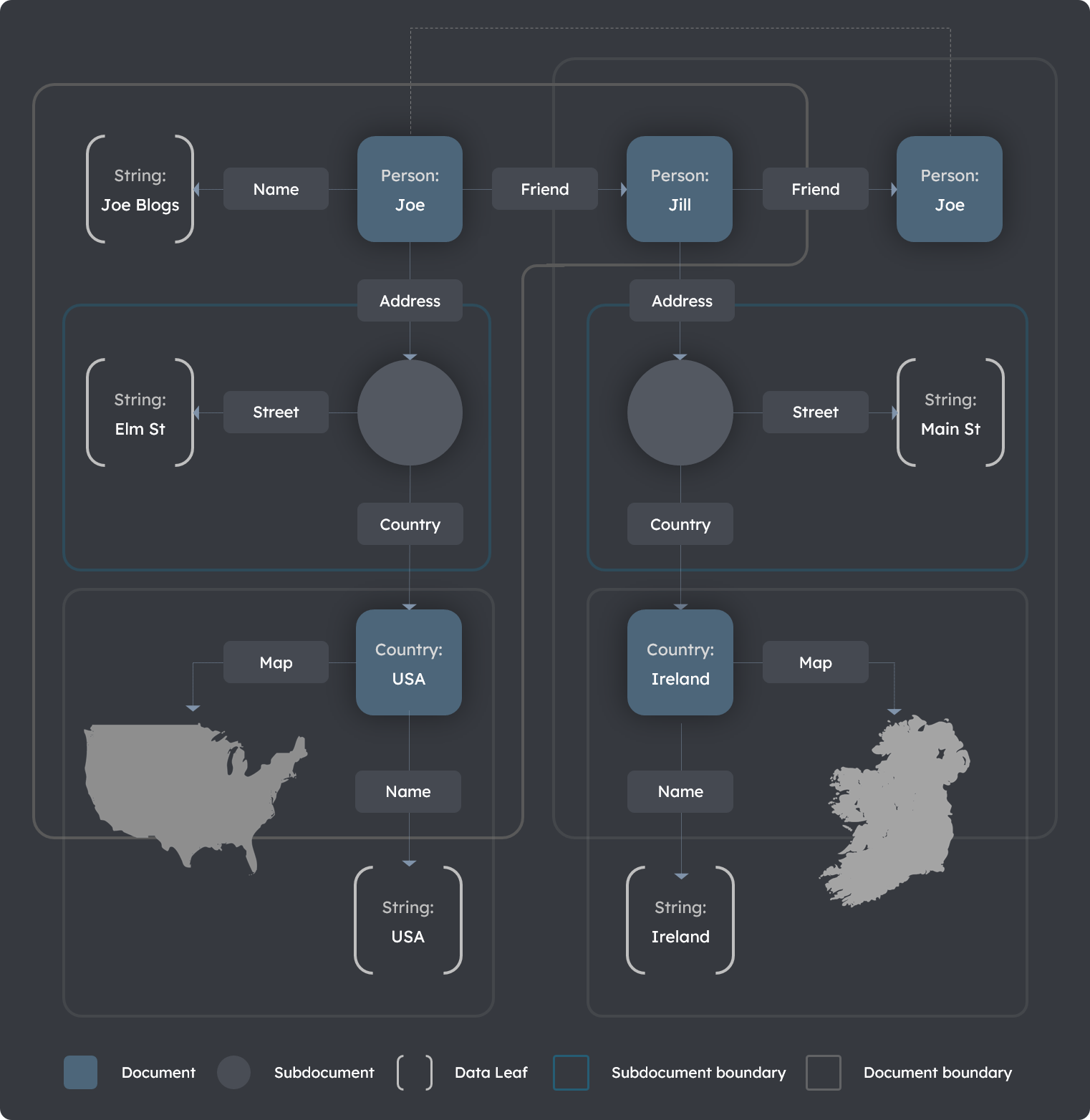
return } ``` View the DocumentsGraphqlTable component integrated inside a dashboard here [DocumentSearchComponent full example JS code](https://github.com/terminusdb/dashboard-examples-sandbox/blob/main/terminusdb-documents-ui-template-example/dashboard-demo/src/components/DocumentSearchComponent.js) [Code Sandbox](https://codesandbox.io/s/github/terminusdb/dashboard-examples-sandbox/tree/main/terminusdb-documents-ui-template-example/dashboard-demo) --- # Edit Documents URL: https://terminusdb.com/docs/edit-a-document/ **Prerequisites** - TerminusDB running locally ([install guide](/docs/install-terminusdb-as-a-docker-container/)) - A connected client instance with existing documents **What you'll achieve** By the end of this guide, you will have updated existing documents in your TerminusDB database using the JavaScript client, the Python client, or the HTTP API. To update a document, first [retrieve it](/docs/get-documents/), make your changes, then submit the update. The document must include its `@id` and `@type` so TerminusDB knows which record to replace. ## Update a document ```typescript const doc = { "@id" : "Player/George", "@type" : "Player", name : "George", position: "Center Back", } doc.position = "Full Back" const updateDoc = async () => { const result = await client.updateDocument(doc) console.log("Updated document:", result) } ``` ```python doc = { "@id" : "Player/George", "@type" : "Player", "name" : "George", "position" : "Center Back", } doc["position"] = "Full Back" client.update_document(doc) ``` ```bash curl -u admin:root -X PUT \ "http://localhost:6363/api/document/admin/tdb-example-mydb/local/branch/main?author=admin&message=Update+document" \ -H "Content-Type: application/json" \ -d '{"@id":"Player/George","@type":"Player","name":"George","position":"Full Back"}' ``` The update operation replaces the entire document. Include all fields — any field omitted from the update payload will be removed from the stored document. ## Next steps You've updated documents in TerminusDB. From here you can: - [**JSON Diff and Patch**](/docs/json-diff-and-patch/) — see exactly what changed between document versions - [**Branch your database**](/docs/branch-howto/) — make changes on an isolated branch before merging - [**Delete documents**](/docs/delete-a-document/) — remove documents you no longer need --- # EditDocumentComponent URL: https://terminusdb.com/docs/edit-document-component/ These packages (`@terminusdb/terminusdb-documents-ui` etc.) were last published December 2023 and are no longer actively maintained. The documentation is preserved for reference. Community contributions and pull requests are welcome. The `EditDocumentComponent` allows you to edit an existing document using the [FrameViewer](/docs/document-ui-sdk/) component. ## Installation Install the dependencies from npm ```bash npm install @terminusdb/terminusdb-documents-ui npm install @terminusdb/terminusdb-react-table npm install @terminusdb/terminusdb-documents-ui-templates ``` ## Properties - Properties - Description --- - `type` - The document type --- - `documentJson` - The document object --- - `documentID` - The document ID --- - `frames` - The database Class Frame, or object of all class frames --- - `closeButtonClick` - A function that acts as a callback when the panel exit `x` button is clicked --- - `updateDocument` - A function that acts as a callback when the `submit` button is clicked --- - `SearchComponent` - A react component used as search component ## Example ```python import React, {useEffect} from "react"; import {EditDocumentComponent,useTDBDocuments} from "@terminusdb/terminusdb-documents-ui-template" export const DocumentEdit = ({type, documentID, tdbClient}) => { const { updateDocument, getDocument, selectedDocument, getDocumentFrames, frames, error, setError } = useTDBDocuments(tdbClient) const updateDocumentHandler = async (jsonDoc) =>{ const docUp = await updateDocument(jsonDoc) if(docUp){ getDocument(documentID) // do somethig after update document } } // implement the chage method useEffect(() => { getDocumentFrames() getDocument(documentID) },[]) const closeButtonClick = () =>{ // do something after click the close panel button the interface } const DocumentSearchComponent = () =>{ //make you document search component return
} if(!frames) return
{`Fetching frames for document type ${type} ...`}
const errorMessage = typeof error === "object" ? JSON.stringify(error,null,4) : error return {error &&
Server Error: {errorMessage}
}
} ``` View the EditDocumentComponent component integrated inside a dashboard here [EditDocumentComponent full example JS code](https://github.com/terminusdb/dashboard-examples-sandbox/blob/main/terminusdb-documents-ui-template-example/dashboard-demo/src/pages/DocumentEdit.js) [Code Sandbox](https://codesandbox.io/s/github/terminusdb/dashboard-examples-sandbox/tree/main/terminusdb-documents-ui-template-example/dashboard-demo) --- # Edit Documents using WOQL URL: https://terminusdb.com/docs/edit-documents-with-woql/ **What you'll achieve** By the end of this guide, you will know how to update documents using WOQL queries. > **Prerequisites:** TerminusDB running on `localhost:6363` with the Star Wars dataset cloned. If you haven't done this yet, follow the [Explore a Real Dataset](/docs/explore-a-real-dataset/) tutorial (Steps 1–2), or run: > > ```bash > curl -u admin:root -X POST http://localhost:6363/api/clone/admin/star-wars \ > -H "Content-Type: application/json" \ > -H "Authorization-Remote: Basic cHVibGljOnB1YmxpYw==" \ > -d '{"remote_url": "https://data.terminusdb.org/public/star-wars", "label": "Star Wars", "comment": "Star Wars dataset"}' > ``` We can get a document by Id, by using `read_document`. For instance, we can write: ```javascript let v = Vars("doc", "id"); and(isa(v.id, "People"), triple(v.id, "label", string("Bossk")), read_document(v.id, v.doc)) ``` We can also add documents by using a variable. For instance, we can create a new planet for each individual in the star wars universe as follows: ```javascript let v = Vars("person", "name"); and(isa(v.person, "People"), triple(v.person,"label",v.name), insert_document(doc({'@type' : 'Planet', label: v.name}))) ``` ## Update a document in WOQL You can update a document in WOQL using the `update_document` keyword. ```javascript let v = Vars("id"); and( eq(v.id, "Planet/01dd97a75800f01f43ab7ab55b6dd08f198dd34d2bdbbeeb7bf4edee45111863"), update_document(doc({'@type' : 'Planet', label: 'Planet-X'}), v.id) ) ``` ## Update a subdocument in WOQL Let's combine creating and deleting a document into a single query to update the subdocument. Subdocuments can't be updated in place using the `update_document` keyword which exists only for top level documents. You can update a subdocument by deleting the old subdocument and creating a new one with the updated content, including the `@linked-by` property, and updating the triple that links the subdocument. This in place operation is only possible using random keyed identifiers on the subdocument. The alternative is to update the top level document. ```javascript select("v:oldsubdoc", "v:newsubdoc"). and( eq("v:subdoc", "Person/John/role/PersonRole/cxW1Egirxm8-QYrq"), and( triple("v:parentdoc", "role", "v:oldsubdoc"), delete_document("v:oldsubdoc"), insert_document(new doc({"@type": "PersonRole", "@linked-by": {"@id": "v:parentdoc", "@property": "role"}}),"v:newsubdoc"), update_triple("v:parentdoc", "role", "v:newsubdoc", "v:oldsubdoc"), ) ) ``` The parent document is resolved for the specific predicate, the old document gets deleted and a new document is created, linked to the parent document and the triple that links from the parent document is updated. The old and new subdocuments are provided in the returned bindings via the selections of variables to return. --- # TerminusDB Enterprise Edition URL: https://terminusdb.com/docs/enterprise/ TerminusDB Enterprise extends TerminusDB with increased performance and additional capabilities for organizations that need multi-format data exchange, standards-compliant linked data context processing, operational backup and restore, and production observability. All enterprise features are additive — they extend the open-source TerminusDB core without changing its behavior. Existing databases, queries, and client integrations work unchanged. [Contact Gettier](https://gettier.ai/connect?utm_source=terminusdb) for more information on how to deploy the enterprise version. ## What Enterprise adds Enterprise unlocks several areas that matter when TerminusDB moves from development into production and cross-system integration: - **Multi-format document API** — Read and write documents as JSON, JSON-LD, RDF/XML, or Turtle through the document API endpoint, using query parameters or HTTP content negotiation - **W3C JSON-LD processing** — Full `@context` support for expansion and compaction, including remote URL contexts like schema.org - **Context caching** — Pre-seeded local cache for remote JSON-LD contexts, eliminating network dependencies in production - **RDF/XML serialization** — Standards-compliant RDF/XML output with proper namespace declarations, typed literals, and subdocument nesting - **Turtle serialization** — Compact, human-readable RDF output with prefix declarations, blank node nesting, and typed literals - **Backup and restore** — Binary bundle/unbundle API for database snapshots, migration, and high resolution disaster recovery - **Prometheus metrics** — Production-grade observability with memory, cache, and request metrics in Prometheus exposition format - **High resolution history** — which documents changed how and when is available as a knowledge graph, enabling very fast document history - **Enterprise configuration** — Environment variables for tuning cache behavior, context resolution, and LRU eviction ## Getting started If you are new to Enterprise, the [Multi-Format Document API Tutorial](/docs/enterprise-document-formats/) walks through a complete round-trip with `curl` — from database creation through JSON-LD and RDF/XML export and re-import. For specific topics: - [Document Formats & Content Negotiation](/docs/enterprise-document-formats/) — how to request and submit data in different formats - [JSON-LD Context Processing](/docs/enterprise-jsonld-context/) — how `@context` works for input and output - [Context Cache](/docs/enterprise-context-cache/) — pre-seeded contexts and the disk cache architecture - [RDF/XML Support](/docs/enterprise-rdfxml/) — namespace handling, typed literals, and subdocument serialization - [Turtle Support](/docs/enterprise-turtle/) — compact, human-readable RDF with prefix declarations and blank node nesting - [Backup & Restore](/docs/enterprise-backup-restore/) — the bundle/unbundle API - [Prometheus Observability](/docs/enterprise-observability/) — metrics endpoint and available gauges - [Configuration Reference](/docs/enterprise-configuration/) — all enterprise environment variables ## Enabling Enterprise In Docker, the enterprise configuration is enabled automatically when using the enterprise image. For local builds, see the [build documentation](/docs/install-terminusdb-from-source-code/). ```bash export TERMINUSDB_ENTERPRISE=true ./terminusdb serve ``` --- # Backup & Restore URL: https://terminusdb.com/docs/enterprise-backup-restore/ **Prerequisites** - TerminusDB Enterprise edition running - Access to the backup/restore CLI or API - Sufficient storage for backup files **What you'll achieve** By the end of this guide, you will know how to back up and restore TerminusDB Enterprise databases. Enterprise provides binary bundle and unbundle API endpoints for database backup, migration between servers, and disaster recovery. A bundle captures the complete state of a database — schema, data, and commit history — in a single binary payload. ## Bundle (export) Create a bundle of an entire database: ```bash curl -s -X POST \ -H "$AUTH" \ "$SERVER/api/bundle/admin/MyDatabase" \ --output MyDatabase-backup.bundle ``` The response is a binary payload containing the full database state. Save it to a file for later restoration or transfer to another server. ### What a bundle contains A bundle is a self-contained snapshot that includes: - All documents in the instance graph - The complete schema - The full commit history (all branches, all commits) - Layer data from the underlying immutable store Bundles are deterministic — bundling the same database state twice produces the same binary output. ## Unbundle (import) Restore a bundle into a new data product. First create the target database, then unbundle into it: ```bash # Create a new data product for the restore curl -s -X POST \ -H "Content-Type: application/json" \ -H "$AUTH" \ -d '{"label": "My Database (restored)", "comment": "Restored from backup"}' \ "$SERVER/api/db/admin/MyDatabase-restored" # Restore the bundle into the new data product curl -s -X POST \ -H "Content-Type: application/octets" \ -H "$AUTH" \ --data-binary @MyDatabase-backup.bundle \ "$SERVER/api/unbundle/admin/MyDatabase-restored" ``` The target database must already exist before unbundling. The unbundle operation replaces the database contents with the bundle's state, including all history. Restoring to a separate data product lets you verify the backup before replacing the original. ## Use cases ### Scheduled backups Run a cron job to create nightly backups: ```bash #!/bin/bash DATE=$(date +%Y%m%d) curl -s -X POST -H "Authorization: Basic $AUTH_TOKEN" \ "http://localhost:6363/api/bundle/admin/production" \ --output "/backups/production-${DATE}.bundle" ``` ### Server migration Move a database between servers: ```bash # On the source server curl -s -X POST -H "$AUTH" \ "$SOURCE_SERVER/api/bundle/admin/MyDatabase" \ --output MyDatabase.bundle # On the target server curl -s -X POST -H "Content-Type: application/json" -H "$AUTH" \ -d '{"label": "My Database"}' \ "$TARGET_SERVER/api/db/admin/MyDatabase" curl -s -X POST -H "Content-Type: application/octets" -H "$AUTH" \ --data-binary @MyDatabase.bundle \ "$TARGET_SERVER/api/unbundle/admin/MyDatabase" ``` ### Disaster recovery Store bundles in an object store (S3, GCS, Azure Blob) for off-site recovery. Bundles are binary files that use succinct data structure which makes them very compact. ## API reference ### POST /api/bundle/{path} Creates a binary bundle of the database at `{path}`. - **Authentication:** Required - **Response Content-Type:** `application/octets` - **Response:** Binary bundle payload ### POST /api/unbundle/{path} Restores a binary bundle into the database at `{path}`. - **Authentication:** Required - **Request Content-Type:** `application/octets` - **Request body:** Binary bundle payload - **Response:** JSON success confirmation ## Further reading - [Enterprise Overview](/docs/enterprise/) — all enterprise features - [Configuration Reference](/docs/enterprise-configuration/) — environment variables --- # Enterprise Configuration Reference URL: https://terminusdb.com/docs/enterprise-configuration/ Enterprise adds several environment variables for controlling features, caching behavior, and performance tuning. These variables are read at server startup and apply to all requests. ## Feature activation - Variable - Default - Description --- - `TERMINUSDB_ENTERPRISE` - `false` - Set to `true` to enable enterprise features. In Docker enterprise images, this is set automatically. ## Context caching These variables control how remote JSON-LD contexts are cached and resolved. See [Context Cache](/docs/enterprise-context-cache/) for architecture details. - Variable - Default - Description --- - `TERMINUSDB_CONTEXT_CACHE_PATH` - `/context_cache` - Directory for the context cache. Contains the catalog subdirectory (plain files) and the HTTP cache subdirectory for processing JSON-LD. The default is derived from the parent of the database path. This enables to have known good contexts and avoid dynamic resolution which both increases latency and can increase the attack surface where 3rd party HTTP connections are made. --- - `TERMINUSDB_ALLOW_REMOTE_CONTEXT` - `false` - When `true`, cache misses for remote URL contexts trigger an HTTP fetch. When `false`, only pre-seeded and previously cached contexts are available. Set to `false` in production for deterministic behavior. ### Context cache path resolution The default cache path is computed as follows: 1. If `TERMINUSDB_CONTEXT_CACHE_PATH` is set, use it directly 2. Otherwise, take the database path (from `TERMINUSDB_SERVER_DB_PATH`, default `./storage/db`) 3. Go up one directory to the storage root (e.g., `./storage/`) 4. Append `context_cache` (e.g., `./storage/context_cache`) Inside the cache directory, two subdirectories are created automatically: - `catalog/` — plain inspectable files, index, and SGML catalog - `http-cache/` — RFC-compliant HTTP response cache ### Seed file directory The context cache looks for pre-seeded context files at startup. It searches for a `data/context-seeds/` directory relative to the enterprise module path. In Docker, this is `terminusdb-enterprise/data/context-seeds/`. Seed files are copied into the catalog directory on first use. ## LRU cache tuning The LRU cache manages eviction of graph layers from memory. These variables control its behavior. - Variable - Default - Description --- - `TERMINUSDB_LRU_CACHE_SIZE` - `1073741824` (1 GB) - Maximum size in bytes for the in-memory layer cache. Layers beyond this limit are evicted least-recently-used first. --- - `TERMINUSDB_LRU_EVICTION_PERCENT` - `10` - Percentage of the cache to evict when the limit is reached. A higher value means fewer but larger eviction passes. Enterprise default is 10%. ### Tuning guidance - **Small datasets, fast queries** — keep the default. 1 GB is generous for most workloads. - **Large datasets, memory pressure** — reduce `TERMINUSDB_LRU_CACHE_SIZE` to leave headroom for the Prolog stack and OS caches. - **Many concurrent databases** — increase the cache size if you see frequent evictions in the [Prometheus metrics](/docs/enterprise-observability/) (`terminusdb_lru_cache_used_bytes` staying near `terminusdb_lru_cache_limit_bytes`). - **Eviction granularity** — the default 10% eviction percentage is a good balance. Lower values (e.g., 5%) mean more frequent but smaller evictions and a leaner memory usage. ## Metrics prefix - Variable - Default - Description --- - `TERMINUSDB_METRICS_PREFIX` - `terminusdb` - Prefix for all Prometheus metric names. Change this if you run multiple TerminusDB instances and want to distinguish them in your monitoring stack. ## Standard TerminusDB variables Enterprise inherits all standard TerminusDB environment variables. The most commonly used ones alongside enterprise features: - Variable - Default - Description --- - `TERMINUSDB_SERVER_DB_PATH` - `./storage/db` - Database storage path. Also determines the default context cache path. --- - `TERMINUSDB_SERVER_PORT` - `6363` - HTTP server port. --- - `TERMINUSDB_ADMIN_PASS` - `root` - Admin user password for basic authentication. --- - `TERMINUSDB_JWT_ENABLED` - `true` (Docker) - Enable JWT authentication. Set to `false` for local development with basic auth only. --- - `TERMINUSDB_PLUGINS_PATH` - `/plugins` - Directory for server plugins (e.g., auto-optimize). --- - `TERMINUSDB_SERVER_WORKERS` - CPU count - Number of elaboration worker threads for commit processing. CPU-bound — match to available cores. --- - `TERMINUSDB_WORKER_POOL_SIZE` - `TERMINUSDB_SERVER_WORKERS` or `16` - Number of HTTP request worker threads. I/O-bound — can exceed `TERMINUSDB_SERVER_WORKERS` for high-concurrency API workloads. ## Example: production configuration A typical production setup with all enterprise variables: ```bash export TERMINUSDB_ENTERPRISE=true export TERMINUSDB_SERVER_DB_PATH=/data/terminusdb/db export TERMINUSDB_SERVER_PORT=6363 export TERMINUSDB_CONTEXT_CACHE_PATH=/data/terminusdb/context_cache export TERMINUSDB_ALLOW_REMOTE_CONTEXT=false export TERMINUSDB_LRU_CACHE_SIZE=2147483648 # 2 GB export TERMINUSDB_LRU_EVICTION_PERCENT=10 export TERMINUSDB_ADMIN_PASS=your-secure-password ``` ## Example: Docker Compose ```yaml services: terminusdb: image: terminusdb/terminusdb:enterprise ports: - "6363:6363" environment: TERMINUSDB_ENTERPRISE: "true" TERMINUSDB_ADMIN_PASS: "your-secure-password" TERMINUSDB_LRU_CACHE_SIZE: "2147483648" TERMINUSDB_ALLOW_REMOTE_CONTEXT: "false" volumes: - terminusdb-data:/app/terminusdb/storage volumes: terminusdb-data: ``` ## Further reading - [Context Cache](/docs/enterprise-context-cache/) — cache architecture and seed file management - [Prometheus Observability](/docs/enterprise-observability/) — monitoring cache and memory metrics - [Enterprise Overview](/docs/enterprise/) — all enterprise features --- # Context Cache URL: https://terminusdb.com/docs/enterprise-context-cache/ Remote JSON-LD contexts like `https://schema.org/` are large files that change infrequently. Fetching them on every request would add latency and create a network dependency in production. Enterprise solves this with a two-layer disk cache that serves pre-seeded contexts instantly and caches any new remote contexts for future use. ## Architecture The context cache uses two storage locations under a single configurable path: ``` / ├── catalog/ # Catalog directory (plain files) │ ├── catalog # SWI-Prolog SGML Open catalog │ ├── index.json # URL → filename mapping │ └── 63403d...01.jsonld # Cached context files (SHA-1 hash of URL) └── http-cache/ # HTTP cache (managed by cacache) └── ... # Automatic HTTP cache entries ``` **Catalog directory** — contains plain, inspectable JSON-LD files keyed by the SHA-1 hash of the source URL. A human-readable `index.json` maps URLs to filenames. This is the primary lookup layer. **HTTP cache** — This provides RFC-compliant HTTP caching with proper `Cache-Control` and `ETag` handling for network fetches. ## Pre-seeded contexts Enterprise ships with pre-seeded context files for commonly used vocabularies. These are plain files in the repository at `terminusdb-enterprise/data/context-seeds/` and are copied into the catalog directory on first use. Currently pre-seeded: - URL - Description --- - `https://schema.org/` - Schema.org vocabulary (~210 KB) Pre-seeded contexts resolve instantly from disk without any network access. This means schema.org-based JSON-LD processing works out of the box, even in air-gapped environments. ### Adding custom seed files To pre-seed additional contexts: 1. Download the context file 2. Compute the SHA-1 hash of the URL (not the file content) 3. Save as `.jsonld` in the seed directory 4. Add the mapping to `index.json` For example, to pre-seed `https://example.org/context.jsonld`: ```bash # Compute the SHA-1 hash of the URL string echo -n "https://example.org/context.jsonld" | shasum -a 1 # Output: a1b2c3d4... (40 hex characters) # Download and save with the hash as filename curl -sL "https://example.org/context.jsonld" \ -o terminusdb-enterprise/data/context-seeds/a1b2c3d4....jsonld ``` Then add to `index.json`: ```json { "https://schema.org/": "63403d88865650fff3d3159efe7ec3b01e9d3401.jsonld", "https://example.org/context.jsonld": "a1b2c3d4....jsonld" } ``` ## Cache lookup order When the JSON-LD processor encounters a remote URL context, the cache resolves it in this order: 1. **Catalog directory** — check if a file exists for this URL's SHA-1 hash. If found, read and return it immediately. 2. **HTTP cache** — if remote fetching is allowed, send an HTTP request through the caching middleware. The middleware checks its disk cache first and only makes a network request if needed. 3. **Dual-write** — if a network fetch succeeds, the response is written to both the HTTP cache (automatic) and the catalog directory (explicit), so future lookups hit the fast catalog path. If remote fetching is disabled and the context is not in the catalog, the request fails with an error. ## Cache path configuration The cache directory defaults to `/context_cache`, where `` is the parent of the database path (typically `./storage/`). Override it with the `TERMINUSDB_CONTEXT_CACHE_PATH` environment variable: ```bash export TERMINUSDB_CONTEXT_CACHE_PATH=/var/cache/terminusdb/contexts ``` ## Remote fetching control By default, the cache only serves pre-seeded and previously cached contexts. To allow fetching new remote contexts over the network: ```bash export TERMINUSDB_ALLOW_REMOTE_CONTEXT=true ``` When set to `true`, cache misses trigger an HTTP fetch. When `false` (the default), only locally available contexts are served. For production deployments, the recommended approach is to pre-seed all required contexts and leave remote fetching disabled. This eliminates network dependencies and ensures deterministic behavior. ## Docker considerations In Docker enterprise images, the seed files are copied into the image at build time. The cache directory is created under the `storage/` volume, so cached contexts persist across container restarts. If you mount a custom storage volume, the cache will be populated on first use from the seed files bundled in the image. ## Further reading - [JSON-LD Context Processing](/docs/enterprise-jsonld-context/) — how `@context` works in the processing pipeline - [Configuration Reference](/docs/enterprise-configuration/) — all cache-related environment variables --- # Document Formats & Content Negotiation URL: https://terminusdb.com/docs/enterprise-document-formats/ The Enterprise document endpoint supports four serialization formats for the same underlying data. You choose the format per request — the storage layer is format-independent. ## Supported formats - Format - Content-Type - Query parameter - Use case --- - JSON (default) - `application/json` - `format=json` - Internal APIs, front-end applications, smallest payload --- - JSON-LD - `application/ld+json` - `format=jsonld` - Linked data publishing, semantic interoperability, context-aware exchange --- - RDF/XML - `application/rdf+xml` - `format=rdfxml` - Regulatory submissions, SPARQL endpoints, legacy triple stores --- - Turtle - `text/turtle` - `format=turtle` - Human-readable RDF, version control diffs, SPARQL tooling, debugging ## Requesting a format (output) There are two ways to request a specific output format when retrieving documents. ### Query parameter Add `format=` to the GET request: ```bash # JSON-LD curl -s -H "$AUTH" "$SERVER/api/document/$DB?type=Product&format=jsonld" # RDF/XML curl -s -H "$AUTH" "$SERVER/api/document/$DB?type=Product&format=rdfxml" # Turtle curl -s -H "$AUTH" "$SERVER/api/document/$DB?type=Product&format=turtle" ``` ### Accept header Use standard HTTP content negotiation: ```bash # JSON-LD via Accept header curl -s -H "$AUTH" -H "Accept: application/ld+json" \ "$SERVER/api/document/$DB?type=Product" # RDF/XML via Accept header curl -s -H "$AUTH" -H "Accept: application/rdf+xml" \ "$SERVER/api/document/$DB?type=Product" # Turtle via Accept header curl -s -H "$AUTH" -H "Accept: text/turtle" \ "$SERVER/api/document/$DB?type=Product" ``` The `format=` query parameter takes precedence if both are present. ## Submitting a format (input) Set the `Content-Type` header when POSTing or PUTting documents: ```bash # Submit JSON-LD curl -s -X POST \ -H "Content-Type: application/ld+json" \ -H "$AUTH" \ -d '{"@context": {"@base": "terminusdb:///data/", "@vocab": "terminusdb:///schema#"}, ...}' \ "$SERVER/api/document/$DB?author=admin&message=import" # Submit RDF/XML curl -s -X POST \ -H "Content-Type: application/rdf+xml" \ -H "$AUTH" \ -d '...' \ "$SERVER/api/document/$DB?author=admin&message=import" # Submit Turtle curl -s -X POST \ -H "Content-Type: text/turtle" \ -H "$AUTH" \ -d '@prefix schema: . a schema:Product ; ...' \ "$SERVER/api/document/$DB?author=admin&message=import" ``` The server parses the body according to the declared Content-Type, resolves IRIs against the document's context, namespace declarations, or prefix declarations, validates against the schema, and inserts the documents, folding their subdocuments correctly into the complete JSON-LD documents. Blank nodes are used to ensure the correct shapes of documents to be imported. Note that the blank nodes are not stored in the graph, and are only used to facilitate transportation of the document structure. The schema holds the shape of the documents. TerminusDB Enterprise Edition uses explicit id:s for subdocument structures that share their lifecycle with the "parent" document. ## JSON-LD output modes JSON-LD output has two modes controlled by the `as_list` parameter: **Stream mode** (default) — each document, if more than one, is a self-contained JSON-LD object served with its own `@context`: ```bash curl -s -H "$AUTH" "$SERVER/api/document/$DB?type=Product&format=jsonld" ``` ```json {"@context": {"@base": "terminusdb:///data/", "@vocab": "terminusdb:///schema#"}, "@id": "Product/SKU-1001", "@type": "Product", ...} {"@context": {"@base": "terminusdb:///data/", "@vocab": "terminusdb:///schema#"}, "@id": "Product/SKU-1002", "@type": "Product", ...} ``` **List mode** — all documents wrapped in a single `@graph` envelope with a shared `@context`: ```bash curl -s -H "$AUTH" "$SERVER/api/document/$DB?type=Product&format=jsonld&as_list=true" ``` ```json { "@context": {"@base": "terminusdb:///data/", "@vocab": "terminusdb:///schema#"}, "@graph": [ {"@id": "Product/SKU-1001", "@type": "Product", ...}, {"@id": "Product/SKU-1002", "@type": "Product", ...} ] } ``` List mode is more efficient for batch processing since the context is not repeated. ## Schema @context for output remapping When a database schema includes a custom `@context`, JSON-LD output uses that context instead of the default internal one. This lets you control how output documents look to consumers without changing the stored data. A common example is to remap `@id` to `id` in the external json-ld, and `@type` to `type`, which is how schema.org aliasing is done. Set a schema-level `@context` by including it in a schema update: ```bash curl -s -X POST -H "Content-Type: application/json" -H "$AUTH" \ -d '[{"@type": "@context", "@schema": "terminusdb:///schema#", "@base": "terminusdb:///data/", "@context": "https://schema.org/"}]' \ "$SERVER/api/document/$DB?graph_type=schema&author=admin&message=set+context&full_replace=true" ``` After this, JSON-LD output for documents in this database will carry the schema.org context, and property names will be compacted using schema.org's vocabulary. ## Round-trip integrity Data survives format conversion without loss. You can: 1. Export as Turtle or RDF/XML 2. Send it to a partner 3. Receive their edits back as JSON-LD, Turtle, or RDF/XML 4. Import — nothing is lost or distorted All four formats describe the same underlying RDF graph. You can insert a document as Turtle, retrieve it as RDF/XML, send it to a partner who edits it as JSON-LD, and re-import — the data round-trips without loss. Schema validation applies to every format. Whether you POST JSON, JSON-LD, RDF/XML, or Turtle, the data is checked against the schema before it is committed. ## Hands-on tutorial For a complete walkthrough with `curl` examples covering all formats, see the [Multi-Format Document API Tutorial](/docs/document-format-api-curl-tutorial/). ## Further reading - [JSON-LD Context Processing](/docs/enterprise-jsonld-context/) — how `@context` works for expansion and compaction - [RDF/XML Support](/docs/enterprise-rdfxml/) — namespace handling and typed literals - [Turtle Support](/docs/enterprise-turtle/) — prefix declarations, blank node nesting, and human-readable RDF - [Document API Reference](/docs/document-insertion/) — full parameter reference --- # JSON-LD Context Processing URL: https://terminusdb.com/docs/enterprise-jsonld-context/ Enterprise processes JSON-LD `@context` using the W3C JSON-LD 1.1 specification, powered by the Rust `json-ld` crate. This gives you standards-compliant expansion and compaction without writing any conversion code. ## How context processing works TerminusDB stores documents internally using an internal context — `terminusdb:///schema#` for types and properties, `terminusdb:///data/` for document IDs. When documents arrive or leave with a different `@context`, the JSON-LD processor bridges between the two: **Input pipeline:** expand (resolve using document's `@context`) → compact (rewrite using internal context) → store **Output pipeline:** load (internal context) → expand (resolve to absolute IRIs) → compact (rewrite using output `@context`) → stream This means you can submit documents authored with any valid JSON-LD context and retrieve them in any other context, and the data round-trips without loss. ## Supported @context forms The `@context` value in a JSON-LD document can take several forms, and Enterprise handles all of them. ### Inline object The most common form — a JSON object mapping prefixes and keywords: ```json { "@context": { "@base": "terminusdb:///data/", "@vocab": "terminusdb:///schema#" }, "@type": "Person", "@id": "Person/alice", "name": "Alice" } ``` ### Remote URL A URL pointing to a context definition hosted elsewhere. Enterprise fetches and caches these automatically: ```json { "@context": "https://schema.org/", "type": "Person", "id": "https://example.com/person/alice", "name": "Alice" } ``` Schema.org is pre-seeded in the [context cache](/docs/enterprise-context-cache/), so it resolves instantly without network access. ### Array of contexts Multiple context entries in an array. Later entries take precedence for conflicting definitions: ```json { "@context": [ {"@base": "https://mydomain.com/data/Person/"}, "https://schema.org/" ], "@type": "Person", "@id": "bob", "name": "Bob" } ``` This is useful when you need to combine a remote vocabulary with local overrides — for instance, setting a custom `@base` for document IDs while using schema.org for property names. ### Mixed URL and inline Combine a remote URL with inline overrides in an array: ```json { "@context": [ "https://schema.org/", { "@base": "terminusdb:///data/", "name": "terminusdb:///schema#name", "age": "terminusdb:///schema#age" } ], "@type": "Person", "@id": "Person/remote_1", "name": "Remote Context", "age": 28 } ``` The inline entries override schema.org's definitions for the listed properties, letting you map schema.org-style documents into your internal schema. ## Schema-level @context You can set a custom `@context` on the database schema itself. This controls what context appears in JSON-LD output for all documents in that database. ### Setting a schema @context Include a `@context` document in a schema update: ```json [ { "@type": "@context", "@schema": "http://schema.org/", "@base": "terminusdb:///data/", "@context": "https://schema.org/" }, { "@type": "Class", "@id": "Person", "name": "xsd:string", "description": "xsd:string" } ] ``` After this, when you retrieve documents as JSON-LD, the output `@context` will be `"https://schema.org/"` and property names will be compacted using schema.org's vocabulary. ### How schema @context affects output Without a schema `@context`, output uses the default internal context: ```json { "@context": { "@base": "terminusdb:///data/", "@vocab": "terminusdb:///schema#" }, "@type": "Person", "name": "Alice" } ``` With a schema.org `@context`, the same document comes out as: ```json { "@context": "https://schema.org/", "type": "Person", "name": "Alice", "id": "https://mydomain.com/data/Person/alice" } ``` Notice that `@type` becomes `type` and `@id` becomes `id` — these are aliases defined by the schema.org context. ### Schema array @context The schema `@context` can also be an array, giving you the same multi-tranche control for output: ```json { "@type": "@context", "@schema": "terminusdb:///schema#", "@base": "terminusdb:///data/", "@context": [ {"ex": "http://example.org/", "title": "ex:title"}, {"@vocab": "terminusdb:///schema#"} ] } ``` ## Input without @context Documents submitted without any `@context` are treated as plain JSON using the database's default internal context. Property names map directly to `terminusdb:///schema#` and IDs to `terminusdb:///data/`: ```json { "@type": "Person", "@id": "Person/alice", "name": "Alice" } ``` This is the standard TerminusDB behavior and works identically in both community and enterprise editions. ## Context and RDF/XML RDF/XML uses XML namespace declarations instead of JSON-LD `@context`, but the underlying semantics are identical. When you set a schema `@context`, it affects JSON-LD output only — RDF/XML output always generates proper `xmlns:` declarations from the resolved namespace IRIs. However, the context processing pipeline is the same for both formats. A document submitted as RDF/XML with `xmlns:schema="http://schema.org/"` goes through the same IRI resolution as a JSON-LD document with `"@context": "https://schema.org/"`. See [RDF/XML Support](/docs/enterprise-rdfxml/) for details on namespace handling. ## Further reading - [Context Cache](/docs/enterprise-context-cache/) — how remote contexts are cached locally - [Document Formats & Content Negotiation](/docs/enterprise-document-formats/) — format selection for input and output - [Turtle Support](/docs/enterprise-turtle/) — the compact, human-readable RDF counterpart - [Configuration Reference](/docs/enterprise-configuration/) — environment variables that control context behavior --- # Prometheus Observability URL: https://terminusdb.com/docs/enterprise-observability/ Enterprise exposes a Prometheus-compatible metrics endpoint for production monitoring. The endpoint serves metrics in the standard Prometheus exposition format, ready for scraping by Prometheus, Grafana Agent, or any compatible collector. ## Metrics endpoint ```text GET /api/metrics ``` The endpoint **requires authentication**. The caller must hold `meta_read_access` on the system store (`SystemDatabase/system`) through a capability assigned to their own user — capabilities held by organizations or teams the user belongs to do not count on their own; the grant must sit on the user. - The built-in `admin` user already satisfies the check via its `Capability/server_access` grant on `Organization/admin`, which subsumes the system store. - Requests without the capability receive `403` — including credential-less requests, which authenticate as `User/anonymous`. - Malformed credentials receive `401`. ```bash curl -s -u admin:root http://localhost:6363/api/metrics ``` ### Granting a scrape account For production monitoring, prefer a dedicated user over the admin account. The narrowest grant is a custom role carrying only `meta_read_access`, assigned on the `admin` organization (the scope that contains the system store). Note that an organization-scoped grant also covers the databases under that organization — capability scope checks follow the resource hierarchy. ```bash # 1. Create the scrape user curl -s -u admin:root -X POST http://localhost:6363/api/users \ -H "Content-Type: application/json" \ -d '{"name": "metrics-scraper", "password": "change-me"}' # 2. Create a role with only meta_read_access curl -s -u admin:root -X POST http://localhost:6363/api/roles \ -H "Content-Type: application/json" \ -d '{"name": "metrics-reader", "action": ["meta_read_access"]}' # 3. Grant the role to the user on the admin organization curl -s -u admin:root -X POST http://localhost:6363/api/capabilities \ -H "Content-Type: application/json" \ -d '{ "operation": "grant", "scope_type": "organization", "scope": "admin", "user": "metrics-scraper", "roles": ["metrics-reader"] }' ``` See [Capabilities API modes](/docs/capabilities-api-modes/) for the grant/revoke payload reference. ### Example response ```text # HELP build_info Server version and build information # TYPE build_info gauge build_info{version="12.0.7",git_hash="abc1234",store_version="0.19.8",edition="enterprise"} 1 # HELP uptime_seconds Time since the server process started # TYPE uptime_seconds gauge uptime_seconds 3842.7 # HELP atoms Number of atoms in the Prolog atom table # TYPE atoms gauge atoms 29510 # HELP layer_cache_entries_total Total entries in the layer object cache # TYPE layer_cache_entries_total gauge layer_cache_entries_total 42 # HELP layer_cache_entries_live Live (in use) layer cache entries # TYPE layer_cache_entries_live gauge layer_cache_entries_live 38 # HELP layer_cache_entries_dead Dead (evicted, not yet freed) layer cache entries # TYPE layer_cache_entries_dead gauge layer_cache_entries_dead 4 # HELP worker_pool_busy Number of worker threads currently processing requests # TYPE worker_pool_busy gauge worker_pool_busy 2 # HELP lru_cache_limit_bytes Configured LRU archive cache limit # TYPE lru_cache_limit_bytes gauge lru_cache_limit_bytes 536870912 # HELP lru_cache_used_bytes Current LRU archive cache usage # TYPE lru_cache_used_bytes gauge lru_cache_used_bytes 8388608 ``` Metric names have no prefix by default; a prefix can be configured in the enterprise config (`metrics_prefix/1`). ## Available metrics ### Server information - Metric - Type - Description --- - `build_info` - gauge - Always 1. Labels carry `version`, `git_hash`, `store_version`, and `edition` --- - `uptime_seconds` - gauge - Seconds since server start --- - `start_time_seconds` - gauge - Unix timestamp of server start --- - `http_requests_active` - gauge - Number of HTTP requests currently being processed --- - `http_connections_active` - gauge - Number of active HTTP connections in the Rust webserver ### Memory and stack - Metric - Type - Description --- - `stack_used_bytes` - gauge - SWI-Prolog stack memory in use (global + local + trail) --- - `process_rss_bytes` - gauge - Process resident set size (physical memory) --- - `heap_used_bytes` - gauge - Process heap memory — omitted if 0 (deprecated in SWI-Prolog 10.x) --- - `atom_space_used_bytes` - gauge - Memory used by the atom table --- - `functor_space_used_bytes` - gauge - Memory used by the functor table --- - `table_space_used_bytes` - gauge - Memory used by tabling (memoization of pinned graphs, config) --- - `global_stack_allocated_bytes` / `global_stack_used_bytes` - gauge - Global (term) stack allocated vs in use --- - `local_stack_allocated_bytes` / `local_stack_used_bytes` - gauge - Local (environment) stack allocated vs in use --- - `trail_stack_allocated_bytes` / `trail_stack_used_bytes` - gauge - Trail stack allocated vs in use ### Code and atoms Growth in these metrics without matching traffic indicates retained data — asserted clauses pinning atoms, for example. - Metric - Type - Description --- - `atoms` - gauge - Atoms in the Prolog atom table --- - `inferences_total` - counter - Total Prolog inferences --- - `clauses` - gauge - Total clauses across all predicates --- - `predicates` - gauge - Total defined predicates --- - `dynamic_clauses` - gauge - Clauses held by dynamic predicates — growth here without traffic means a dynamic predicate accumulating clauses per request or transaction --- - `atom_gc_events_total` - counter - Completed atom garbage collection passes --- - `atom_gc_atoms_reclaimed_total` - counter - Atoms reclaimed by atom GC — if `atoms` climbs while this stays flat, reachable data is pinning atoms ### Worker pool and threads - Metric - Type - Description --- - `worker_pool_total` - gauge - Worker threads in the request pool --- - `worker_pool_idle` - gauge - Idle workers available for request processing --- - `worker_pool_busy` - gauge - Workers currently processing requests --- - `worker_busy_seconds` - gauge - Per-worker busy duration, labelled by worker `alias` — a worker stuck at high values indicates a long-running or hung request --- - `threads_by_type` - gauge - Prolog threads by type label: `worker`, `watchdog`, `indexer`, `commits`, `other` ### Foreign blobs Each foreign blob atom can pin native memory (buffers, layer handles) that is invisible to the Prolog space metrics. Growth in a blob type without matching traffic means retained references. - Metric - Type - Description --- - `blobs` - gauge - Foreign blob atoms by type label, e.g. `memory_file`, `layer`, `named_graph`, `stream`, `text`, `trie` ### Layer cache The layer cache stores graph layers in memory for fast access. These metrics help you understand cache pressure and tune the LRU eviction policy. - Metric - Type - Description --- - `layer_cache_entries_total` - gauge - Total entries in the layer object cache --- - `layer_cache_entries_live` - gauge - Live (in use) cache entries --- - `layer_cache_entries_dead` - gauge - Dead (evicted, not yet freed) cache entries --- - `layer_cache_bytes_total` - gauge - Backing bytes for all cache entries --- - `layer_cache_bytes_live` - gauge - Backing bytes for live entries --- - `layer_cache_bytes_dead` - gauge - Backing bytes for dead entries --- - `layer_cache_pinned_databases` - gauge - Databases pinned in the layer cache --- - `layer_cache_pinned_organizations` - gauge - Organizations with pinned databases --- - `layer_cache_pinned_bytes` - gauge - Backing bytes for pinned database layers ### LRU cache The LRU (Least Recently Used) cache manages eviction of graph layers when memory pressure increases. - Metric - Type - Description --- - `lru_cache_limit_bytes` - gauge - Configured maximum cache size --- - `lru_cache_used_bytes` - gauge - Current cache usage ## Prometheus scrape configuration Add TerminusDB to your Prometheus `scrape_configs`. The endpoint requires authentication, so provide credentials for a user holding `meta_read_access` on the system store: ```yaml scrape_configs: - job_name: 'terminusdb' scrape_interval: 15s metrics_path: '/api/metrics' basic_auth: username: metrics-scraper password_file: /etc/prometheus/secrets/terminusdb-metrics-password static_configs: - targets: ['localhost:6363'] ``` ## Grafana dashboard tips Useful panels for a TerminusDB Grafana dashboard: - **Uptime** — `uptime_seconds` - **Cache pressure** — `layer_cache_entries_dead` climbing relative to `layer_cache_entries_total` - **Memory pressure** — `lru_cache_used_bytes / lru_cache_limit_bytes` - **Pool saturation** — `worker_pool_busy` against `worker_pool_total`, plus `worker_busy_seconds` for stuck requests - **Atom growth** — `atoms` alongside `atom_gc_atoms_reclaimed_total` to distinguish reachable data from an AGC backlog - **Active requests** — `http_requests_active` and `http_connections_active` for concurrency monitoring - **Cache eviction headroom** — `lru_cache_limit_bytes - lru_cache_used_bytes` ## Further reading - [Configuration Reference](/docs/enterprise-configuration/) — LRU cache tuning variables - [Capabilities API modes](/docs/capabilities-api-modes/) — granting roles and capabilities - [Enterprise Overview](/docs/enterprise/) — all enterprise features --- # RDF/XML Support URL: https://terminusdb.com/docs/enterprise-rdfxml/ Enterprise adds full RDF/XML serialization and parsing to the document endpoint. Documents stored in TerminusDB can be retrieved as well-formed RDF/XML, and RDF/XML documents can be submitted for import — both validated against the database schema. ## RDF/XML output Request RDF/XML output with the `format=rdfxml` query parameter or the `Accept: application/rdf+xml` header: ```bash curl -s -H "$AUTH" "$SERVER/api/document/$DB?type=Product&format=rdfxml" ``` The output is a complete RDF/XML document with proper XML declarations and namespace bindings: ```xml Industrial Sensor Module 249.99 true pcs pieces ``` ### Namespace declarations Namespace prefixes are generated from the database context. The standard RDF and XSD namespaces are always included. Schema-specific namespaces (`terminusdb:///schema#`) appear as the prefix used for types and properties. ### Typed literals Typed values carry `rdf:datatype` attributes matching their XSD types: - **`xsd:decimal`** for decimal numbers (e.g., prices, weights) - **`xsd:boolean`** for boolean values - **`xsd:integer`** for integer values - **`xsd:dateTime`** for date-time values - **Strings** omit the datatype attribute (the RDF default) ### Document references References to other documents use `rdf:resource` with the full IRI: ```xml ``` ### Subdocument nesting Subdocuments (classes with `@subdocument`) are serialized as nested child elements rather than flat references. This preserves the hierarchical structure and makes the XML more natural to process with XPath or XSLT: ```xml pcs pieces ``` ## RDF/XML input Submit RDF/XML documents with the `Content-Type: application/rdf+xml` header: ```bash curl -s -X POST \ -H "Content-Type: application/rdf+xml" \ -H "$AUTH" \ -d ' SKU-3003 Calibration Standard 425.00 true pieces pcs 0.12 ' \ "$SERVER/api/document/$DB?author=admin&message=import" ``` The parser reads namespace declarations, resolves `rdf:about` URIs to document IDs, maps `rdf:datatype` to schema types, and inserts documents — all validated against the schema. ### Supported reference styles RDF/XML input supports multiple ways to reference documents and subdocuments: - **Nested elements** — subdocuments as inline child elements (hierarchical style) - **`rdf:resource`** — IRI references to other top-level documents - **`rdf:nodeID`** — blank node references for subdocuments defined elsewhere in the same document - **Element order independence** — referenced subdocuments can appear before or after the referencing parent ## Context and namespace relationship RDF/XML namespace declarations serve the same purpose as JSON-LD `@context` — they map short prefixes to full IRIs. The key difference is in syntax: - Concept - JSON-LD - RDF/XML --- - Prefix mapping - `"@context": {"schema": "http://schema.org/"}` - `xmlns:schema="http://schema.org/"` --- - Base IRI - `"@base": "terminusdb:///data/"` - `xml:base="terminusdb:///data/"` --- - Type declaration - `"@type": "Product"` - `` --- - Property - `"name": "Alice"` - `Alice` When a database has a custom schema `@context`, it affects JSON-LD output only. RDF/XML output always generates `xmlns:` declarations from the resolved namespace IRIs regardless of the schema `@context` setting. ## Use cases for RDF/XML RDF/XML is the right format choice when integrating with: - **Regulatory systems** that require RDF/XML submissions (pharmaceutical, financial, government) - **SKOS taxonomy** exchange between classification systems - **OWL ontology** alignment and federation - **Legacy triple stores** and SPARQL endpoints that accept RDF/XML as their ingest format - **XSLT pipelines** that transform RDF/XML into other XML formats for downstream systems ## Further reading - [Document Formats & Content Negotiation](/docs/enterprise-document-formats/) — how to select formats - [Turtle Support](/docs/enterprise-turtle/) — the compact, human-readable RDF counterpart - [JSON-LD Context Processing](/docs/enterprise-jsonld-context/) — the JSON-LD counterpart - [Multi-Format Document API Tutorial](/docs/document-format-api-curl-tutorial/) — hands-on round-trip walkthrough --- # Turtle Support URL: https://terminusdb.com/docs/enterprise-turtle/ Enterprise adds full Turtle serialization and parsing to the document endpoint. Documents stored in TerminusDB can be retrieved as well-formed Turtle, and Turtle documents can be submitted for import — both validated against the database schema. Turtle (Terse RDF Triple Language) is a compact, human-readable RDF serialization. It uses prefixed names, semicolons for predicate grouping, and square brackets for blank nodes — making it considerably more readable than RDF/XML for the same data. ## Turtle output Request Turtle output with the `format=turtle` query parameter or the `Accept: text/turtle` header: ```bash curl -s -H "$AUTH" "$SERVER/api/document/$DB?type=Product&format=turtle" ``` The output is a valid Turtle document with `@base` and `@prefix` declarations followed by the document triples: ```turtle @base . @prefix schema: . @prefix xsd: . @prefix rdf: . a schema:Product ; schema:name "Industrial Sensor Module" ; schema:price "249.99"^^xsd:decimal ; schema:active "true"^^xsd:boolean ; schema:category ; schema:unit [ a schema:UnitOfMeasure ; schema:symbol "pcs" ; schema:name "pieces" ] . ``` ### Prefix declarations Prefix declarations are generated from the database context. The standard RDF and XSD namespaces are always included. The `@base` declaration provides the base IRI for resolving relative references. Schema-specific namespaces (`terminusdb:///schema#`) appear as the prefix used for types and properties. ### Typed literals Typed values carry `^^` datatype annotations matching their XSD types: - **`xsd:decimal`** for decimal numbers (e.g., prices, weights) - **`xsd:boolean`** for boolean values - **`xsd:integer`** for integer values - **`xsd:dateTime`** for date-time values - **Strings** are plain double-quoted literals without a datatype annotation ### Document references References to other documents use full IRIs in angle brackets: ```turtle schema:category . ``` ### Subdocument nesting Subdocuments (classes with `@subdocument`) are serialized as blank node blocks using the `[ ... ]` syntax rather than flat references. This preserves the hierarchical structure and keeps related data together: ```turtle schema:unit [ a schema:UnitOfMeasure ; schema:symbol "pcs" ; schema:name "pieces" ] . ``` The blank node syntax is the Turtle equivalent of nested child elements in RDF/XML or embedded objects in JSON — it expresses the same containment relationship in a compact, readable form. ## Turtle input Submit Turtle documents with the `Content-Type: text/turtle` header: ```bash echo '@prefix schema: . @prefix xsd: . a schema:Product ; schema:sku "SKU-3001" ; schema:name "Calibration Standard" ; schema:category ; schema:price "425.00"^^xsd:decimal ; schema:weight_kg "0.15"^^xsd:decimal ; schema:unit [ a schema:UnitOfMeasure ; schema:symbol "pcs" ; schema:name "pieces" ] ; schema:active "true"^^xsd:boolean .' | \ curl -s -X POST \ -H "Content-Type: text/turtle" \ -H "$AUTH" \ --data-binary @- \ "$SERVER/api/document/$DB?author=admin&message=import" ``` The `echo | --data-binary @-` pattern is necessary because Turtle starts with `@prefix`, and curl interprets a leading `@` as a filename reference. Using `--data-binary` (rather than `-d`) also preserves newlines, which Turtle syntax relies on. The parser reads prefix declarations, resolves prefixed names to full IRIs, maps `^^` datatype annotations to schema types, and inserts documents — all validated against the schema. ### Supported reference styles Turtle input supports multiple ways to reference documents and subdocuments: - **Blank node blocks** — subdocuments as inline `[ ... ]` blocks (hierarchical style) - **Full IRI references** — `` references to other top-level documents - **Blank node labels** — `_:label` references for subdocuments defined elsewhere in the same document - **Statement order independence** — referenced subdocuments can appear before or after the referencing parent ## Context and prefix relationship Turtle `@prefix` declarations serve the same purpose as JSON-LD `@context` and RDF/XML `xmlns:` — they map short prefixes to full IRIs. The key difference is in syntax: - Concept - JSON-LD - RDF/XML - Turtle --- - Prefix mapping - `"@context": {"schema": "http://schema.org/"}` - `xmlns:schema="http://schema.org/"` - `@prefix schema: .` --- - Base IRI - `"@base": "terminusdb:///data/"` - `xml:base="terminusdb:///data/"` - `@base .` --- - Type declaration - `"@type": "Product"` - `` - `a schema:Product` --- - Property - `"name": "Alice"` - `Alice` - `schema:name "Alice"` --- - Typed literal - `"price": 249.99` - `249.99` - `schema:price "249.99"^^xsd:decimal` When a database has a custom schema `@context`, it affects JSON-LD output only. Turtle output always generates `@prefix` declarations from the resolved namespace IRIs regardless of the schema `@context` setting. ## Turtle compared to RDF/XML Turtle and RDF/XML express exactly the same RDF graph — they are alternative serializations of the same data model. The choice between them is primarily about readability and tooling: - Aspect - Turtle - RDF/XML --- - Readability - Compact, line-oriented, easy to scan - Verbose, requires XML familiarity --- - Editability - Easy to hand-edit in any text editor - Error-prone without XML tooling --- - Tooling - Text processing, grep, diff - XSLT, XPath, XML Schema validation --- - Blank nodes - `[ ... ]` inline or `_:label` - `rdf:nodeID` or nested elements --- - Multiple values - Repeat the predicate or use `,` separator - Repeat the element --- - Typical use - Human review, version control diffs, debugging - XSLT pipelines, regulatory XML submissions ## Use cases for Turtle Turtle is the right format choice when working with: - **Human review workflows** where data stewards need to read and verify RDF content - **Version control** where line-oriented diffs make changes easy to review in pull requests - **SPARQL tooling** that accepts Turtle as a data exchange format - **Academic and research** data exchange where Turtle is the de facto standard - **Debugging and diagnostics** where compact, readable output helps trace data issues - **Configuration-as-code** pipelines where RDF data is committed alongside application code ## Further reading - [Document Formats & Content Negotiation](/docs/enterprise-document-formats/) — how to select formats - [RDF/XML Support](/docs/enterprise-rdfxml/) — the XML-based counterpart - [JSON-LD Context Processing](/docs/enterprise-jsonld-context/) — the JSON-LD counterpart - [Multi-Format Document API Tutorial](/docs/document-format-api-curl-tutorial/) — hands-on round-trip walkthrough --- # Explore a Real Dataset — Star Wars Tutorial URL: https://terminusdb.com/docs/explore-a-real-dataset/ Clone a pre-populated Star Wars database to your local TerminusDB instance and explore it with queries, branches, and diffs — in 15 minutes. This tutorial focuses on **querying relationships** across documents — something the [10 Minute quickstart](/docs/get-started/) does not cover. **Prerequisites** - **TerminusDB running on localhost:6363.** Verify: `curl -s -u admin:root http://localhost:6363/api/info` should return JSON containing `"authority": "admin"`. If you get "connection refused", [start TerminusDB first](/docs/get-started/#step-1). - **Completed the [First 10 Minutes quickstart](/docs/get-started/)** — you should be comfortable with branches and diffs. This tutorial builds on those concepts with a richer dataset. - **[Your First 10 Minutes](/docs/get-started/)** teaches the branch/diff/merge workflow on a cloned dataset. - **[Your First 15 Minutes](/docs/first-15-minutes/)** builds a database from scratch — schema, insert, branch, diff, merge. - **This tutorial** adds WOQL queries that traverse relationships between documents (films → characters, characters → planets) — showing the graph query power that distinguishes TerminusDB from a plain document store. ## What you will build You will clone a complete Star Wars database (characters, films, planets, starships, species) from a public server, run queries that traverse document relationships, create a speculative branch ("what if Anakin turned to the Dark Side?"), and see a field-level structural diff of your changes. ## Step 1 — Clone the Star Wars database Pull the entire Star Wars dataset from the public templates server to your local instance: You just pulled a complete Star Wars database — characters, films, planets, starships — from a public TerminusDB server to your local instance. No account needed, no sign-up, no credentials. The data is now yours to query, branch, and modify. ## Step 2 — Explore what you have List the document types defined in the schema: The response lists 4 document types — `Film`, `Person`, `Planet`, and `Species`. List the first few characters: You see 5 Person documents (limited by `count=5`). The database has 20 characters total, plus films, planets, and species. All of Star Wars, versioned and queryable. Let's ask it some questions. ## Step 3 — Query the data Which characters appear in "A New Hope" (Episode IV)? In a relational database, you would write a JOIN across a junction table: `SELECT c.name FROM characters c JOIN film_characters fc ON ... JOIN films f ON ... WHERE f.title = 'A New Hope'`. In TerminusDB, documents link directly to other documents — a Film has a `characters` property that points to Person documents. You traverse the link, not a junction table: import TerminusClient from "@terminusdb/terminusdb-client"; const client = new TerminusClient.WOQLClient("http://localhost:6363", { user: "admin", organization: "admin", key: "root", }); client.db("star-wars"); const WOQL = TerminusClient.WOQL; const query = WOQL.and( WOQL.triple("v:Film", "title", WOQL.string("A New Hope")), WOQL.triple("v:Film", "characters", "v:Character"), WOQL.triple("v:Character", "name", "v:CharacterName") ); const result = await client.query(query); console.log(result.bindings.map((b) => b["CharacterName"]["@value"])); ```json {"query": {"@type": "And", "and": [{"@type": "Triple", "subject": {"@type": "NodeValue", "variable": "Film"}, "predicate": {"@type": "NodeValue", "node": "title"}, "object": {"@type": "DataValue", "data": "A New Hope"}}, {"@type": "Triple", "subject": {"@type": "NodeValue", "variable": "Film"}, "predicate": {"@type": "NodeValue", "node": "characters"}, "object": {"@type": "NodeValue", "variable": "Character"}}, {"@type": "Triple", "subject": {"@type": "NodeValue", "variable": "Character"}, "predicate": {"@type": "NodeValue", "node": "name"}, "object": {"@type": "DataValue", "variable": "CharacterName"}}]}} ``` Expected output includes character names: Luke Skywalker, Leia Organa, Han Solo, Obi-Wan Kenobi, Chewbacca, R2-D2, C-3PO, and more (17 characters total). Notice what happened: the query says "find a Film with this title, follow its `characters` link to Person documents, then get their `name`." Three hops through the graph — Film → characters → Person → name. No junction tables, no foreign key declarations, no JOINs. The relationships are part of the data structure itself, and traversing them is how you query. ## Step 4 — Branch and modify What if Anakin Skywalker had turned to the Dark Side? Let's update his record on a branch and see what TerminusDB tracks. Create a branch called `what-if`: {"origin": "admin/star-wars/local/branch/main"} {"@type":"api:BranchResponse","api:status":"api:success"} Now modify Anakin Skywalker's record on the branch — rewriting him as if he fell to the Dark Side. First, fetch his full document: Now change four fields to tell the Dark Side story and PUT the modified document back: - `"eye_color"`: `"blue"` → `"yellow"` - `"mass"`: `84` → `120` - `"side"`: `"Light Side"` → `"Dark Side"` - `"faction"`: `"Jedi Order"` → `"Sith Order"` {"@id": "Person/Anakin%20Skywalker", "@type": "Person", "birth_year": "41.9BBY", "eye_color": "yellow", "faction": "Sith Order", "films": ["Film/Attack%20of%20the%20Clones", "Film/Revenge%20of%20the%20Sith", "Film/The%20Phantom%20Menace"], "gender": "male", "hair_color": "blond", "height": 188, "homeworld": "Planet/Tatooine", "mass": 120, "name": "Anakin Skywalker", "quote": "You underestimate my power!", "side": "Dark Side", "species": ["Species/Human"]} ["terminusdb:///data/Person/Anakin%20Skywalker"] You just rewrote history — on a branch. Main still has Anakin Skywalker (blue eyes, Light Side, mass 84, Jedi Order). Your `what-if` branch has him turned Dark (yellow eyes, Dark Side, mass 120, Sith Order). The `@id` stays the same (`Person/Anakin%20Skywalker`) — TerminusDB tracks object identity through changes, not content. Let's see exactly what changed. ## Step 5 — See what changed (the diff) This is the moment. In any other database, answering "what changed between these two versions?" means writing audit triggers, maintaining changelog tables, or exporting both states and diffing them externally. In TerminusDB, you ask the database directly: {"before_data_version": "main", "after_data_version": "what-if"} [{"@id": "Person/Anakin%20Skywalker", "eye_color": {"@op": "SwapValue", "@before": "blue", "@after": "yellow"}, "faction": {"@op": "SwapValue", "@before": "Jedi Order", "@after": "Sith Order"}, "mass": {"@op": "SwapValue", "@before": 84, "@after": 120}, "quote": {"@op": "SwapValue", "@before": "This is where the fun begins.", "@after": "You underestimate my power!"}, "side": {"@op": "SwapValue", "@before": "Light Side", "@after": "Dark Side"}}] This diff is **structural, not textual**. TerminusDB is not comparing strings line by line — it knows the document schema, understands which field changed, what the old value was, and what the new value is. Each change is a typed operation (`SwapValue`) that can be applied, reversed, or composed with other patches programmatically. You sent a full document replacement, but TerminusDB detected only the five fields that actually changed: `eye_color`, `faction`, `mass`, `quote`, and `side`. Compare this to the alternative: export both database states as JSON, run a generic diff tool, then parse the text output to figure out what actually changed. Or maintain an audit table with triggers that fire on every update. Or write custom comparison logic in your application. TerminusDB replaces all of that with one API call. The database *is* the version history — diffs are a native operation, not an afterthought bolted on top. --- ## Clean up This deletes the **star-wars** data product permanently. Only run this when you are finished experimenting. --- ## What you just did In 15 minutes, you: 1. **Cloned** a complete Star Wars database from a public server — one command, no account 2. **Queried** relationships across documents (films → characters) using WOQL 3. **Branched** the database and made a speculative change ("what if Anakin turned to the Dark Side?") 4. **Diffed** the branch against main and saw field-level structural changes These four operations — clone, query, branch, diff — are the core of TerminusDB. Every operation you just ran works at any scale: 20 documents or 2 million. Try [Explore an Ecommerce Dataset →](/docs/explore-ecommerce-dataset) — the same workflow with customers, orders, and products. ## Next steps - [Merge your branch back to main](/docs/first-15-minutes/#step-7--merge-the-branch) — complete the git-for-data cycle - [Write your own schema](/docs/schema-reference-guide/) — add validation and type safety - [Time-travel to previous commits](/docs/time-travel-howto/) — view any previous state of your database - [WOQL query language](/docs/woql-getting-started/) — learn the full query language - [Connect with TypeScript](/docs/connect-with-the-javascript-client/) — use the SDK in your application --- # Explore an Ecommerce Dataset URL: https://terminusdb.com/docs/explore-ecommerce-dataset/ Clone a pre-populated ecommerce database to your local TerminusDB instance, query orders across customers and products, update an order status on a branch, and see a field-level structural diff — in 15 minutes. **Prerequisites** - **TerminusDB running on localhost:6363.** Verify: `curl -s -u admin:root http://localhost:6363/api/info` should return JSON containing `"authority": "admin"`. If you get "connection refused", [start TerminusDB first](/docs/get-started/#step-1). - **Completed the [First 10 Minutes quickstart](/docs/get-started/)** — you should be comfortable with branches and diffs. This tutorial builds on those concepts with a business dataset. ## What you will build You will clone a complete ecommerce database (customers, orders, order lines, products, categories) from a public server, run a query that traverses document relationships without JOINs, create a business-scenario branch ("fulfil an order"), and see a field-level structural diff of the change. **The dataset:** | Document type | Count | Key relationships | |---------------|-------|-------------------| | Category | 6 | Hierarchical (parent → child) | | Product | 20 | Belongs to Category | | Customer | 15 | — | | Order | 30 | Placed by Customer | | OrderLine | 84 | Belongs to Order, references Product | **Relationship graph:** Customer ← Order ← OrderLine → Product → Category ## Step 1 — Clone the ecommerce database Pull the entire ecommerce dataset from the public templates server to your local instance: You just pulled ~155 documents — customers, orders, products, and their relationships — from a public TerminusDB server to your local instance. The data is now yours to query, branch, and modify. ## Step 2 — Explore what you have List the document types defined in the schema: The response lists 5 document types — `Category`, `Customer`, `Order`, `OrderLine`, and `Product`. List all orders: You see 30 Order documents. The database has 15 customers, 20 products, and 84 order lines — all interconnected, all versioned. Order totals are stored as `xsd:decimal` — arbitrary-precision exact arithmetic, not floating-point. Financial figures stay exact across every query, branch, and diff. ## Step 3 — Query: find processing orders with customer details Show all orders still in "processing" status, with the customer's name and country. In a relational database, this requires a JOIN: `SELECT o.order_id, o.total, c.name, c.country FROM orders o JOIN customers c ON o.customer_id = c.id WHERE o.status = 'processing'`. You declare the relationship in the query because the database does not know it intrinsically. In TerminusDB, an Order document has a `customer` field that *is* the link to a Customer document — you simply follow it: import TerminusClient from "@terminusdb/terminusdb-client"; const client = new TerminusClient.WOQLClient("http://localhost:6363", { user: "admin", organization: "admin", key: "root", }); client.db("ecommerce"); const WOQL = TerminusClient.WOQL; const query = WOQL.and( WOQL.triple("v:Order", "status", WOQL.string("processing")), WOQL.triple("v:Order", "order_id", "v:OrderId"), WOQL.triple("v:Order", "total", "v:Total"), WOQL.triple("v:Order", "customer", "v:Customer"), WOQL.triple("v:Customer", "name", "v:CustomerName"), WOQL.triple("v:Customer", "country", "v:Country") ); const result = await client.query(query); console.log(result.bindings); ```json {"query": {"@type": "And", "and": [{"@type": "Triple", "subject": {"@type": "NodeValue", "variable": "Order"}, "predicate": {"@type": "NodeValue", "node": "status"}, "object": {"@type": "DataValue", "data": "processing"}}, {"@type": "Triple", "subject": {"@type": "NodeValue", "variable": "Order"}, "predicate": {"@type": "NodeValue", "node": "order_id"}, "object": {"@type": "DataValue", "variable": "OrderId"}}, {"@type": "Triple", "subject": {"@type": "NodeValue", "variable": "Order"}, "predicate": {"@type": "NodeValue", "node": "total"}, "object": {"@type": "DataValue", "variable": "Total"}}, {"@type": "Triple", "subject": {"@type": "NodeValue", "variable": "Order"}, "predicate": {"@type": "NodeValue", "node": "customer"}, "object": {"@type": "NodeValue", "variable": "Customer"}}, {"@type": "Triple", "subject": {"@type": "NodeValue", "variable": "Customer"}, "predicate": {"@type": "NodeValue", "node": "name"}, "object": {"@type": "DataValue", "variable": "CustomerName"}}, {"@type": "Triple", "subject": {"@type": "NodeValue", "variable": "Customer"}, "predicate": {"@type": "NodeValue", "node": "country"}, "object": {"@type": "DataValue", "variable": "Country"}}]}} ``` [{"OrderId": "ORD-0002", "Total": 5235.93, "CustomerName": "Hana Tanaka", "Country": "Japan"}, {"OrderId": "ORD-0019", "Total": 1094.95, "CustomerName": "Leila Okafor", "Country": "Nigeria"}, {"OrderId": "ORD-0030", "Total": 649.91, "CustomerName": "Erik Lindström", "Country": "Sweden"}] You just traversed Order → Customer in a single query — no JOIN syntax, no ON clause, no foreign key declaration. TerminusDB follows document links natively. The `customer` field in Order *is* the link; the query simply walks it. ## Step 4 — Branch and modify (fulfil an order) A processing order has been shipped. Update its status on a branch and see what TerminusDB tracks. Create a branch called `fulfillment`: {"origin": "admin/ecommerce/local/branch/main"} {"@type":"api:BranchResponse","api:status":"api:success"} Update order ORD-0002 to "shipped" on the branch: {"@id": "Order/ORD-0002", "@type": "Order", "order_id": "ORD-0002", "customer": "Customer/hana.tanaka@example.com", "order_date": "2024-03-19T03:10:07.294Z", "status": "shipped", "total": 5235.93} ["terminusdb:///data/Order/ORD-0002"] You just updated one field — `status` from "processing" to "shipped" — on an isolated branch. Main still has the original state. Let's see exactly what changed. ## Step 5 — See what changed (the diff) In any other database, answering "what exactly changed in this order?" means querying an audit table, parsing CDC events, or comparing snapshots you exported. In TerminusDB, you ask the database directly — compare your `fulfillment` branch against `main`: {"before_data_version": "main", "after_data_version": "fulfillment"} [{"@id": "Order/ORD-0002", "status": {"@op": "SwapValue", "@before": "processing", "@after": "shipped"}}] One field changed. TerminusDB knows it was `status`, knows the old value ("processing") and the new value ("shipped"), and confirms nothing else was touched — not the customer reference, not the total, not the order date. This is **structural, not textual** — the database understands the document schema and reports typed operations (`SwapValue`), not line diffs. This is your audit trail — automatic, precise, and queryable. No trigger tables writing to a separate audit schema. No CDC pipeline capturing change events. No application-level event sourcing. The database *is* the changelog, and this diff can be applied, reversed, or forwarded to any system that needs to know what happened. ## Step 6 — Merge back to main When you are satisfied with the change, merge the fulfillment branch back: {"before_commit": "main", "after_commit": "fulfillment", "commit_info": {"author": "warehouse@example.com", "message": "Merge fulfillment into main"}} {"@type":"api:ApplyResponse","api:status":"api:success"} The order status change is now on main. The branch remains as a record of who changed what and when. --- ## Clean up This deletes the **ecommerce** data product permanently. Only run this when you are finished experimenting. --- ## What you just did In 15 minutes, you: 1. **Cloned** a complete ecommerce database from a public server — one command, no account 2. **Queried** relationships across documents (orders to customers) without JOINs 3. **Branched** the database, updated an order status (a real business scenario) 4. **Diffed** the branch against main and saw a single field-level change 5. **Merged** the change back to main — completing the workflow These operations — clone, query, branch, diff, merge — are the core of TerminusDB. Every operation you just ran works at any scale: 155 documents or 1.5 million. ## Next steps - [Explore the Star Wars dataset](/docs/explore-a-real-dataset/) — the same workflow with a fun dataset - [Write your own schema](/docs/schema-reference-guide/) — add validation and type safety to your documents - [Time-travel to previous commits](/docs/time-travel-howto/) — view any previous state of your database - [WOQL query language](/docs/woql-getting-started/) — learn the full query language - [Connect with TypeScript](/docs/connect-with-the-javascript-client/) — use the SDK in your application --- # How to extract tabular data from JSON with WOQL URL: https://terminusdb.com/docs/extract-table-from-json-with-woql/ **Prerequisites** - TerminusDB running locally — see [Docker setup](/docs/get-started/) for instructions - A database with JSON documents - Familiarity with WOQL basics ([getting started](/docs/woql-getting-started/)) **What you'll achieve** By the end of this guide, you will know how to extract tabular data from JSON documents using WOQL. This guide shows you how to extract tabular data from JSON structures using WOQL. This is useful when you have JSON data with arrays of objects and want to query it like a table with rows and columns. ## The Pattern Use the `dot` operator to navigate JSON structures and `member` to iterate over arrays: ```javascript select("a", "b").and( eq("v:val", new Doc({ val: [{ a: "1", b: "2" }, { a: "2", b: "3" }] })), dot("v:val", "val", "v:list"), member("v:member", "v:list"), dot("v:member", "a", "v:a"), dot("v:member", "b", "v:b") ) ``` This returns: | a | b | |---|---| | 1 | 2 | | 2 | 3 | ## How It Works ### Step 1: Define the JSON Data ```javascript eq("v:val", new Doc({ val: [ { a: "1", b: "2" }, { a: "2", b: "3" } ] })) ``` The `new Doc()` wrapper creates a `sys:Dictionary` structure that WOQL can traverse. This is the key to working with arbitrary JSON in queries. ### Step 2: Navigate to the Array ```javascript dot("v:val", "val", "v:list") ``` The `dot` operator accesses the `val` property, binding the array to `v:list`. ### Step 3: Iterate Over Rows ```javascript member("v:member", "v:list") ``` The `member` predicate iterates over each element in the array, binding each object to `v:member` in turn. ### Step 4: Extract Columns ```javascript dot("v:member", "a", "v:a"), dot("v:member", "b", "v:b") ``` Use `dot` again to extract specific fields from each row object. ### Step 5: Select Output Columns ```javascript select("a", "b") ``` The `select` at the start specifies which variables to return in the result. ## Complete Example: Employee Data ```javascript let v = Vars("data", "employees", "emp", "id", "name", "department", "salary") select(v.id, v.name, v.department, v.salary) .and( eq(v.data, new Doc({ employees: [ { id: "E001", name: "Alice", department: "Engineering", salary: 75000 }, { id: "E002", name: "Bob", department: "Sales", salary: 65000 }, { id: "E003", name: "Carol", department: "Engineering", salary: 80000 }, { id: "E004", name: "Dave", department: "Marketing", salary: 70000 }, ] })), dot(v.data, "employees", v.employees), member(v.emp, v.employees), dot(v.emp, "id", v.id), dot(v.emp, "name", v.name), dot(v.emp, "department", v.department), dot(v.emp, "salary", v.salary) ) ``` Result: ```json [ { "id": "E001", "name": "Alice", "department": "Engineering", "salary": 75000 }, { "id": "E002", "name": "Bob", "department": "Sales", "salary": 65000 }, { "id": "E003", "name": "Carol", "department": "Engineering", "salary": 80000 }, { "id": "E004", "name": "Dave", "department": "Marketing", "salary": 70000 } ] ``` ## Filtering Rows Add constraints to filter the data: ```javascript let v = Vars("data", "employees", "emp", "id", "name", "department", "salary") select(v.id, v.name, v.salary) .and( eq(v.data, new Doc({ employees: [ { id: "E001", name: "Alice", department: "Engineering", salary: 75000 }, { id: "E002", name: "Bob", department: "Sales", salary: 65000 }, { id: "E003", name: "Carol", department: "Engineering", salary: 80000 }, ] })), dot(v.data, "employees", v.employees), member(v.emp, v.employees), dot(v.emp, "id", v.id), dot(v.emp, "name", v.name), dot(v.emp, "department", v.department), dot(v.emp, "salary", v.salary), // Filter: only Engineering department eq(v.department, string("Engineering")) ) ``` Result: ```json [ { "id": "E001", "name": "Alice", "salary": 75000 }, { "id": "E003", "name": "Carol", "salary": 80000 } ] ``` ## Nested JSON Structures The `dot` operator works with nested objects too: ```javascript let v = Vars("data", "users", "user", "name", "address", "city", "country") select(v.name, v.city, v.country) .and( eq(v.data, new Doc({ users: [ { name: "Alice", address: { city: "London", country: "UK" } }, { name: "Bob", address: { city: "Paris", country: "France" } }, ] })), dot(v.data, "users", v.users), member(v.user, v.users), dot(v.user, "name", v.name), dot(v.user, "address", v.address), dot(v.address, "city", v.city), dot(v.address, "country", v.country) ) ``` Result: ```json [ { "name": "Alice", "city": "London", "country": "UK" }, { "name": "Bob", "city": "Paris", "country": "France" } ] ``` ## Comparing JSON Tables Combine with the [CSV comparison pattern](/docs/compare-csv-values-with-woql/) to compare two JSON datasets: ```javascript let v = Vars("source", "target", "source_list", "target_list", "s_item", "t_item", "s_id", "t_id", "value", "category") and( // Source JSON table eq(v.source, new Doc({ items: [{ id: "1" }, { id: "2" }, { id: "3" }] })), dot(v.source, "items", v.source_list), // Target JSON table eq(v.target, new Doc({ items: [{ id: "2" }, { id: "3" }, { id: "4" }] })), dot(v.target, "items", v.target_list), // Get all unique IDs distinct(["value"], or( and(member(v.s_item, v.source_list), dot(v.s_item, "id", v.value)), and(member(v.t_item, v.target_list), dot(v.t_item, "id", v.value)) ) ), // Categorize or( // In source only and( once(and(member(v.s_item, v.source_list), dot(v.s_item, "id", v.value))), not(once(and(member(v.t_item, v.target_list), dot(v.t_item, "id", v.value)))), eq(v.category, string("to_add")) ), // In target only and( not(once(and(member(v.s_item, v.source_list), dot(v.s_item, "id", v.value)))), once(and(member(v.t_item, v.target_list), dot(v.t_item, "id", v.value))), eq(v.category, string("to_delete")) ), // In both and( once(and(member(v.s_item, v.source_list), dot(v.s_item, "id", v.value))), once(and(member(v.t_item, v.target_list), dot(v.t_item, "id", v.value))), eq(v.category, string("no_change")) ) ) ) ``` ## Using with the JavaScript Client ```javascript const TerminusClient = require('terminusdb') const { WOQL, Vars, Doc } = TerminusClient const client = new TerminusClient.WOQLClient('http://localhost:6363', { user: 'admin', key: 'root', }) async function queryJsonTable() { await client.connect() await client.db('tdb-example-mydb') let v = Vars("data", "items", "item", "id", "name") const query = WOQL.select(v.id, v.name) .and( WOQL.eq(v.data, new Doc({ items: [ { id: "1", name: "First" }, { id: "2", name: "Second" }, ] })), WOQL.dot(v.data, "items", v.items), WOQL.member(v.item, v.items), WOQL.dot(v.item, "id", v.id), WOQL.dot(v.item, "name", v.name) ) const result = await client.query(query) console.log(result.bindings) } ``` ## JSON-LD Equivalent The raw JSON-LD structure for the `dot` operator: ```json { "@type": "Dot", "dictionary": { "@type": "Value", "variable": "data" }, "key": { "@type": "DataValue", "data": "employees" }, "value": { "@type": "Value", "variable": "employees" } } ``` ## Performance Considerations - **Small datasets (< 1000 rows)**: This pattern works efficiently - **Medium datasets (1000-5000 rows)**: May take a few seconds - **Large datasets (5000+ rows)**: Consider importing as documents for indexed queries The `dot` + `member` pattern is ideal for: - API response data - Configuration files - Test fixtures - Small lookup tables ## Summary The key techniques for extracting tabular data from JSON in WOQL are: 1. **Use `new Doc()`** to wrap JSON data as a `sys:Dictionary` 2. **Use `dot`** to navigate to arrays and extract fields 3. **Use `member`** to iterate over array elements 4. **Use `select`** to specify output columns 5. **Add constraints** with `eq`, `greater`, etc. to filter rows This pattern provides a powerful way to query JSON data directly in WOQL without needing to import it into the database first. --- # Filter with GraphQL URL: https://terminusdb.com/docs/filter-with-graphql/ **What you'll achieve** By the end of this guide, you will know how to filter query results using TerminusDB's GraphQL interface. > **Prerequisites:** TerminusDB running on `localhost:6363` with the Star Wars dataset cloned. If you haven't done this yet, follow the [Explore a Real Dataset](/docs/explore-a-real-dataset/) tutorial (Steps 1–2), or run: > > ```bash > curl -u admin:root -X POST http://localhost:6363/api/clone/admin/star-wars \ > -H "Content-Type: application/json" \ > -H "Authorization-Remote: Basic cHVibGljOnB1YmxpYw==" \ > -d '{"remote_url": "https://data.terminusdb.org/public/star-wars", "label": "Star Wars", "comment": "Star Wars dataset"}' > ``` ## Using a Filter Once you have Star Wars, you can enter into the data product and you can type the following in the [GraphQL query panel](/docs/graphql-basics/): Let's choose `homeworld` ```graphql query{ People(filter: { label : { █ }}){ } } ``` Type `Ctrl-c` and you'll be given some filters which can be used to constrain the label field. Let's choose a regex which demonstrates the fondness the creators of Star Wars had for the 'oo' sound. ```graphql query{ People(filter:{ label : {regex: ".*oo.*"}}){ label homeworld{ label } } } ``` This results in: ```json { "data": { "People": [ { "label": "Roos Tarpals", "homeworld": { "label": "Naboo" } }, { "label": "Yarael Poof", "homeworld": { "label": "Quermia" } }, { "label": "Plo Koon", "homeworld": { "label": "Dorin" } }, { "label": "Dooku", "homeworld": { "label": "Serenno" } }, { "label": "Sly Moore", "homeworld": { "label": "Umbara" } } ] } } ``` ## Next steps - [**Advanced filtering**](/docs/advanced-filtering-with-graphql/) — combine filters with `_and`, `_or`, and `_not` logic - [**Limit and paginate**](/docs/limit-results-in-graphql/) — control how many results are returned - [**Order results**](/docs/order-by-in-graphql/) — sort query results by field values - [**Path queries**](/docs/path-queries-in-graphql/) — traverse relationships across multiple hops --- # How to filter with WOQL URL: https://terminusdb.com/docs/filter-with-woql/ **What you'll achieve** By the end of this guide, you will know how to filter query results using WOQL. > **Prerequisites:** TerminusDB running on `localhost:6363` with the Star Wars dataset cloned. If you haven't done this yet, follow the [Explore a Real Dataset](/docs/explore-a-real-dataset/) tutorial (Steps 1–2), or run: > > ```bash > curl -u admin:root -X POST http://localhost:6363/api/clone/admin/star-wars \ > -H "Content-Type: application/json" \ > -H "Authorization-Remote: Basic cHVibGljOnB1YmxpYw==" \ > -d '{"remote_url": "https://data.terminusdb.org/public/star-wars", "label": "Star Wars", "comment": "Star Wars dataset"}' > ``` Since WOQL is a datalog, filters are just part of the query. You can express negative information, or constraints on the variables in order to get a restriction down to the things you want. For instance, we can write the following query in the query panel for the Star Wars demo: ```javascript let v = Vars("person","person_name","vehicle","vehicle_name"); limit(10) .select(v.person_name, v.vehicle_name) .and(triple(v.vehicle, "pilot", v.person), triple(v.vehicle, "label", v.vehicle_name), triple(v.person, "label", v.person_name)) ``` This results in: ```json [ {"person_name": {"@type":"xsd:string", "@value":"Chewbacca"}, "vehicle_name": {"@type":"xsd:string", "@value":"Millennium Falcon"}}, {"person_name": {"@type":"xsd:string", "@value":"Han Solo"}, "vehicle_name": {"@type":"xsd:string", "@value":"Millennium Falcon"}}, {"person_name": {"@type":"xsd:string", "@value":"Lando Calrissian"}, "vehicle_name": {"@type":"xsd:string", "@value":"Millennium Falcon"}}, {"person_name": {"@type":"xsd:string", "@value":"Nien Nunb"}, "vehicle_name": {"@type":"xsd:string", "@value":"Millennium Falcon"}}, {"person_name": {"@type":"xsd:string", "@value":"Luke Skywalker"}, "vehicle_name": {"@type":"xsd:string", "@value":"X-wing"}}, {"person_name": {"@type":"xsd:string", "@value":"Wedge Antilles"}, "vehicle_name": {"@type":"xsd:string", "@value":"X-wing"}}, {"person_name": {"@type":"xsd:string", "@value":"Jek Tono Porkins"}, "vehicle_name": {"@type":"xsd:string", "@value":"X-wing"}}, {"person_name": {"@type":"xsd:string", "@value":"Biggs Darklighter"}, "vehicle_name": {"@type":"xsd:string", "@value":"X-wing"}}, {"person_name": {"@type":"xsd:string", "@value":"Darth Vader"}, "vehicle_name": {"@type":"xsd:string", "@value":"TIE Advanced x1"}}, {"person_name": {"@type":"xsd:string", "@value":"Boba Fett"}, "vehicle_name": {"@type":"xsd:string", "@value":"Slave 1"}} ] ``` We can ask for a _specific_ example of a vehicle name by filtering on equality. For instance: ```javascript let v = Vars("person","person_name","vehicle","vehicle_name"); select(v.person_name, v.vehicle_name) .and(triple(v.vehicle, "pilot", v.person), triple(v.vehicle, "label", v.vehicle_name), triple(v.person, "label", v.person_name), eq(v.vehicle_name, string("Millennium Falcon"))) ``` Which results in: ```json [ {"person_name": {"@type":"xsd:string", "@value":"Chewbacca"}, "vehicle_name": {"@type":"xsd:string", "@value":"Millennium Falcon"}}, {"person_name": {"@type":"xsd:string", "@value":"Han Solo"}, "vehicle_name": {"@type":"xsd:string", "@value":"Millennium Falcon"}}, {"person_name": {"@type":"xsd:string", "@value":"Lando Calrissian"}, "vehicle_name": {"@type":"xsd:string", "@value":"Millennium Falcon"}}, {"person_name": {"@type":"xsd:string", "@value":"Nien Nunb"}, "vehicle_name": {"@type":"xsd:string", "@value":"Millennium Falcon"}} ] ``` We can also write: ```javascript let v = Vars("person","person_name","vehicle","vehicle_name"); select(v.person_name, v.vehicle_name) .and(triple(v.vehicle, "pilot", v.person), triple(v.vehicle, "label", v.vehicle_name), triple(v.person, "label", v.person_name), not(eq(v.vehicle_name, string("Millennium Falcon")))) ``` In which we get the complement of the above. Or, we can use the regex operator to get a wider variety, for instance: ```javascript let v = Vars("person","person_name","vehicle","vehicle_name","pattern"); select(v.person_name, v.vehicle_name) .and(triple(v.vehicle, "pilot", v.person), triple(v.vehicle, "label", v.vehicle_name), triple(v.person, "label", v.person_name), regex(".*wing", v.vehicle_name, [v.pattern])) ``` In this case, we get all vehicles whose names end in "wing" — the PCRE pattern `.*wing` matches any string ending with "wing": ```json [ {"person_name": {"@type":"xsd:string", "@value":"Luke Skywalker"}, "vehicle_name": {"@type":"xsd:string", "@value":"X-wing"}}, {"person_name": {"@type":"xsd:string", "@value":"Wedge Antilles"}, "vehicle_name": {"@type":"xsd:string", "@value":"X-wing"}}, {"person_name": {"@type":"xsd:string", "@value":"Jek Tono Porkins"}, "vehicle_name": {"@type":"xsd:string", "@value":"X-wing"}}, {"person_name": {"@type":"xsd:string", "@value":"Biggs Darklighter"}, "vehicle_name": {"@type":"xsd:string", "@value":"X-wing"}}, {"person_name": {"@type":"xsd:string", "@value":"Arvel Crynyd"}, "vehicle_name": {"@type":"xsd:string", "@value":"A-wing"}} ] ``` --- # Your First 15 Minutes — Build from Scratch URL: https://terminusdb.com/docs/first-15-minutes/ Build the entire git-for-data workflow from scratch. You will create a database, insert a document, branch, edit on the branch, diff the two branches, and merge — all with curl. No schema, no SDK. **Want the 10-minute path instead?** If you want to skip the manual setup and start exploring immediately, use the [clone-based quickstart](/docs/get-started/) — it gives you a pre-populated database in one click. ## Step 1 — Start TerminusDB Pull and run TerminusDB in one command: ```bash docker run --pull always -d -p 127.0.0.1:6363:6363 \ -v terminusdb_storage:/app/terminusdb/storage \ --name terminusdb terminusdb/terminusdb-server:v12 ``` Wait a few seconds for the server to start, then confirm it is running: ```bash curl -s -u admin:root http://localhost:6363/api/info ``` You should see a JSON response with `"authority": "admin"` confirming the server is ready. If the command hangs or returns a connection error: Docker may not be running, port 6363 may already be in use, or a previous container named `terminusdb` may already exist. See [Troubleshooting Connection Failures](/docs/troubleshooting-connection) and [Authentication Errors](/docs/troubleshooting-auth) for solutions. ## Step 2 — Create a database {"label": "MyDatabase", "comment": "My first TerminusDB database"} {"@type":"api:DbCreateResponse","api:status":"api:success"} ## Step 3 — Define a schema and insert a document TerminusDB is primarily a typed database, with some vanilla JSON handling too. Define a simple `Person` schema class, then insert a document: {"@type": "Class", "@id": "Person", "name": "xsd:string", "email": "xsd:string", "age": "xsd:integer"} Expected output: ```json ["Person"] ``` Now insert a person: {"@type": "Person", "@id": "Person/jane", "name": "Jane Smith", "email": "jane@example.com", "age": 30} Expected output: ```json ["terminusdb:///data/Person/jane"] ``` ## Step 4 — Create a branch {"origin": "admin/MyDatabase/local/branch/main"} Expected output: ```json {"@type":"api:BranchResponse","api:status":"api:success"} ``` You now have two branches: `main` (unchanged) and `feature` (a copy, ready for edits). ## Step 5 — Edit the document on the branch Update Jane's email on the `feature` branch only: {"@type": "Person", "@id": "Person/jane", "name": "Jane Smith", "email": "jane.smith@company.com", "age": 30} Expected output: ```json ["terminusdb:///data/Person/jane"] ``` The edit lives only on `feature`. The `main` branch still has the original email. ## Step 6 — Diff the branches This is the moment. TerminusDB computes a structural, semantic diff between any two branches: {"before_data_version": "main", "after_data_version": "feature"} [{"@id": "Person/jane", "email": {"@op": "SwapValue", "@before": "jane@example.com", "@after": "jane.smith@company.com"}}] **What just happened?** TerminusDB computed a **structural diff** between two branches — not a line-by-line text diff, but a semantic operation (`SwapValue`) that knows exactly which field changed, what the old value was, and what the new value is. This patch can be applied, reversed, or composed with other patches. The URL path (`/api/diff/admin/MyDatabase`) identifies the database; the body specifies which branches to compare. You can also diff a single document by adding `"document_id": "Person/jane"` to the request body. ## Step 7 — Merge the branch Apply the changes from `feature` onto `main`: {"before_commit": "main", "after_commit": "feature", "commit_info": {"author": "admin", "message": "Merge feature into main"}} Expected output: ```json {"@type":"api:ApplyResponse","api:status":"api:success"} ``` Verify the merge — `main` now has the updated email: ```json {"@id":"Person/jane","@type":"Person","age":30,"email":"jane.smith@company.com","name":"Jane Smith"} ``` --- ## What you just built In 7 commands you used the full git-for-data workflow: | Step | Git equivalent | TerminusDB API | |------|---------------|----------------| | Create database | `git init` | `POST /api/db` | | Define schema + insert | first commit | `POST /api/document` with `graph_type=schema` | | Create branch | `git branch` | `POST /api/branch` | | Edit on branch | commit on branch | `PUT /api/document` | | Diff branches | `git diff main..feature` | `POST /api/diff/{org}/{db}` with `before_data_version` / `after_data_version` | | Merge | `git merge --squash` | `POST /api/apply` with `before_commit` / `after_commit` | ## Troubleshooting ### Error: Connection refused **You see:** ```text curl: (7) Failed to connect to localhost port 6363 after 0 ms: Connection refused ``` **Cause:** TerminusDB is not running, or another process is using port 6363. **Fix:** ```bash # Check if the container is running docker ps | grep terminusdb # If not running, start it docker start terminusdb # If it doesn't exist, create it docker run -d --name terminusdb -p 127.0.0.1:6363:6363 \ -v terminusdb_storage:/app/terminusdb/storage \ terminusdb/terminusdb-server ``` [Troubleshooting Connection Failures →](/docs/troubleshooting-connection) ### Error: 401 Unauthorized **You see:** ```json {"@type":"api:ErrorResponse","api:error":{"@type":"api:IncorrectAuthenticationError"},"api:status":"api:failure"} ``` **Cause:** Wrong username or password. The default local credentials are `admin` / `root`. **Fix:** ```bash # Verify credentials work curl -u admin:root http://localhost:6363/api/info ``` If you set a custom password via `TERMINUSDB_ADMIN_PASS` when creating the container, use that value instead of `root`. [Troubleshooting Authentication Errors →](/docs/troubleshooting-auth) ### Error: Database does not exist (404) **You see:** ```json {"@type":"api:ErrorResponse","api:error":{"@type":"api:UnresolvableAbsoluteDescriptor"},"api:status":"api:failure"} ``` **Cause:** You are trying to read/write a database that has not been created yet, or the path is wrong. **Fix:** ```bash # List existing databases curl -u admin:root http://localhost:6363/api/db # Create the database if missing curl -u admin:root -X POST "http://localhost:6363/api/db/admin/MyDatabase" \ -H "Content-Type: application/json" \ -d '{"label": "MyDatabase", "comment": "My database"}' ``` Common path mistakes: using `MyDatabase` instead of `admin/MyDatabase` in the URL, or forgetting that the database was deleted in a previous tutorial run. ### Error: "jq: command not found" **You see:** ```text bash: jq: command not found ``` **Cause:** The `jq` JSON formatter is not installed. All `| jq` commands in this tutorial are optional — they format the output for readability. **Fix:** Either install jq or remove `| jq` from the commands: ```bash # macOS brew install jq # Ubuntu/Debian sudo apt-get install jq # Or just skip it — the commands work without jq, output is just unformatted ``` ### Error: Database already exists **You see:** ```json {"@type":"api:DbCreateErrorResponse","api:error":{"@type":"api:DatabaseAlreadyExists"},"api:status":"api:failure"} ``` **Cause:** You ran this quickstart before and the database still exists. **Fix:** ```bash # Delete the old database, then re-run from Step 2 curl -u admin:root -X DELETE "http://localhost:6363/api/db/admin/MyDatabase" ``` ## Next steps - [Explore a Real Dataset](/docs/explore-a-real-dataset/) — clone a Star Wars database and query relationships, branch, and diff on rich data - [TypeScript Client Quickstart](/docs/connect-with-the-javascript-client/) — same workflow using the TypeScript SDK - [Python Client Quickstart](/docs/connect-with-python-client/) — same workflow using the Python SDK - [Your First Schema](/docs/schema-reference-guide/) — add type safety when you are ready - [JSON Diff and Patch](/docs/json-diff-and-patch/) — deep dive into structural diff operations - [What is TerminusDB?](/docs/terminusdb-explanation/) — understand the architecture behind what you just did - [WOQL Basics](/docs/woql-basics/) — query your data with the Datalog-based query language ## Frequently Asked Questions ### Q: Do I need to define a schema before inserting data? **A:** No. Using `?raw_json=true` on the document endpoint lets you insert any valid JSON without a schema. TerminusDB stores it as-is. When you are ready for type safety, add a schema later — TerminusDB will validate all future inserts against it. See [Schema Reference](/docs/schema-reference-guide/) for details. ### Q: Can I use TerminusDB without Docker? **A:** Yes. You can [build from source](/docs/install-terminusdb-from-source-code/) on Linux or macOS, or run on [Kubernetes](/docs/install-on-kubernetes/). Docker is the recommended path because it requires no dependencies and works on all platforms, but it is not the only option. ### Q: What happens if Docker is not running or port 6363 is in use? **A:** You will see a "connection refused" error from curl. Check that Docker Desktop is running (`docker info`), that no other process is using port 6363 (`lsof -i :6363`), and that no previous container named `terminusdb` exists (`docker rm terminusdb`). See [Troubleshooting Connection Failures](/docs/troubleshooting-connection/) for a complete guide. ### Q: How is TerminusDB diff different from git diff? **A:** Git diff compares text files line by line. TerminusDB diff compares structured JSON documents field by field, producing semantic operations like `SwapValue`, `InsertList`, and `PatchList`. The result is a machine-readable patch that can be applied, reversed, or composed — not a human-readable text diff. See [JSON Diff and Patch](/docs/json-diff-and-patch/) for the full specification. ### Q: Can I use this quickstart on Windows? **A:** Yes. Install Docker Desktop for Windows and run the same commands in PowerShell or WSL2. All curl commands work identically. If you prefer a graphical interface, the documentation site's "Run" buttons execute each command in your browser against your local TerminusDB instance — no terminal needed. ### Q: What is the default username and password? **A:** The default credentials are `admin` / `root`. These are set when the Docker container first initialises. To change them, set the `TERMINUSDB_ADMIN_PASS` environment variable when starting the container: `docker run -e TERMINUSDB_ADMIN_PASS=mysecretpass ...`. See [Authentication Errors](/docs/troubleshooting-auth/) for troubleshooting. ### Q: How do I reset and start fresh? **A:** Stop and remove the container (`docker stop terminusdb && docker rm terminusdb`), then remove the storage volume (`docker volume rm terminusdb_storage`). Restart with the original `docker run` command. This gives you a clean instance with no databases. ### Q: Can I connect to this database from my application code? **A:** Yes. After completing this quickstart, try the [TypeScript SDK Quickstart](/docs/connect-with-the-javascript-client/) or [Python SDK Quickstart](/docs/connect-with-python-client/) — they use the same local instance you just created. Any HTTP client that can send JSON to `localhost:6363` works too. ## Clean up This deletes the **MyDatabase** data product permanently. Only run this when you are finished experimenting. Your TerminusDB instance is still running. To stop it entirely: ```bash docker stop terminusdb && docker rm terminusdb ``` Your data persists in the `terminusdb_storage` Docker volume. To remove it entirely: `docker volume rm terminusdb_storage`. --- # Get Documents URL: https://terminusdb.com/docs/get-documents/ **Prerequisites** - TerminusDB running locally ([install guide](/docs/install-terminusdb-as-a-docker-container/)) - A database with existing documents **What you'll achieve** By the end of this guide, you will have retrieved documents from your TerminusDB database using the JavaScript client, the Python client, or the HTTP API. ## Get a single document Retrieve a document by its ID: ```typescript const getDoc = async () => { const doc = await client.getDocument({ id: "Player/Doug" }) console.log("Player/Doug:", doc) } ``` Returns: ```json { "@id" : "Player/Doug", "@type" : "Player", "name" : "Doug", "position": "Full Back" } ``` ```python document = client.get_document("Player/Doug") ``` Returns: ```json { "@id" : "Player/Doug", "@type" : "Player", "name" : "Doug", "position": "Full Back" } ``` ```bash curl -u admin:root \ "http://localhost:6363/api/document/admin/tdb-example-mydb/local/branch/main?id=Player/Doug" ``` Returns: ```json { "@id" : "Player/Doug", "@type" : "Player", "name" : "Doug", "position": "Full Back" } ``` ## Get all documents Retrieve every document in the database: ```typescript const getDocs = async () => { const documents = await client.getDocument({ as_list: "true" }) console.log("All documents:", documents) } ``` Returns: ```json [ { "@id" : "Player/Doug", "@type" : "Player", "name" : "Doug", "position": "Full Back" }, { "@id" : "Player/George", "@type" : "Player", "name" : "George", "position": "Center Back" }, { "@id" : "Player/Karen", "@type" : "Player", "name" : "Karen", "position": "Center Forward" } ] ``` ```python documents = list(client.get_all_documents()) ``` `get_all_documents` returns a generator — wrap it with `list()` if you need to iterate more than once. ```json [ { "@id" : "Player/Doug", "@type" : "Player", "name" : "Doug", "position": "Full Back" }, { "@id" : "Player/George", "@type" : "Player", "name" : "George", "position": "Center Back" }, { "@id" : "Player/Karen", "@type" : "Player", "name" : "Karen", "position": "Center Forward" } ] ``` ```bash curl -u admin:root \ "http://localhost:6363/api/document/admin/tdb-example-mydb/local/branch/main?as_list=true" ``` Returns: ```json [ { "@id" : "Player/Doug", "@type" : "Player", "name" : "Doug", "position": "Full Back" }, { "@id" : "Player/George", "@type" : "Player", "name" : "George", "position": "Center Back" }, { "@id" : "Player/Karen", "@type" : "Player", "name" : "Karen", "position": "Center Forward" } ] ``` ## Next steps You've retrieved documents from TerminusDB. Next, you might want to: - [**Edit documents**](/docs/edit-a-document/) — update the documents you just fetched - [**Query with WOQL**](/docs/run-woql-query/) — use pattern-matching queries for complex filtering - [**Delete documents**](/docs/delete-a-document/) — remove documents you no longer need --- # Your First 10 Minutes with TerminusDB URL: https://terminusdb.com/docs/get-started/ TerminusDB is a database built for collaboration. In this quickstart you will clone a pre-populated dataset and immediately use the git-for-data workflow: branch, edit, diff, and merge. No schema to write, no data to invent. ## Set it up with an AI agent TerminusDB is local-first: the database runs on your own machine, and with [Versioned Search](/docs/versioned-search-quickstart/) (12.1 release candidate) the embeddings can run on your own hardware too, with no API key. If you use an AI coding agent such as Claude Code, Codex or Cursor, you can paste this prompt and let it do the setup for you. It uses the `docker-compose.yml` in the [vectorsearch folder](https://github.com/terminusdb/terminusdb/tree/main/vectorsearch) of the TerminusDB repository. That is the 12.1 release candidate, with built-in vector search and local embeddings (no API key). Read the steps before you run them, as the agent will run commands on your machine. ```text copyEvent="agent_prompt_copy" Set up a local TerminusDB for me and check that it works. Use Docker Compose. 1. Make a new empty folder called terminusdb-local and work in it. 2. Download these three files from the terminusdb/terminusdb repository, main branch, folder vectorsearch: https://raw.githubusercontent.com/terminusdb/terminusdb/main/vectorsearch/docker-compose.yml https://raw.githubusercontent.com/terminusdb/terminusdb/main/vectorsearch/.env.example https://raw.githubusercontent.com/terminusdb/terminusdb/main/vectorsearch/README.md 3. Copy .env.example to .env. Set TERMINUSDB_ADMIN_PASS to a new random password. Leave OPENAI_KEY empty. Do not print the password in your answer. 4. Run: docker compose up -d Then run: docker compose ps 5. Wait until http://localhost:6363/api/info answers with HTTP 200 using basic auth admin:. Try for up to 60 seconds. Then wait until the embeddings model is ready — docker compose logs embeddings-init should end with "Model ready." This can take a few minutes on first start. 6. Create a database: POST /api/db/admin/agent_demo body: {"label": "Agent demo", "comment": "Made by my AI agent"} 7. Add a tiny schema. The @metadata.embedding block is what makes documents searchable — the query fetches the fields, the template renders them into text: POST /api/document/admin/agent_demo?graph_type=schema&author=agent&message=Add+schema body: {"@type": "Class", "@id": "Person", "name": "xsd:string", "friends": {"@type": "Set", "@class": "Person"}, "@metadata": {"embedding": { "query": "query($id: ID){ Person(id: $id) { name } }", "template": "{{name}}"}}} 8. Insert two documents: POST /api/document/admin/agent_demo?author=agent&message=Add+people body: [{"@type": "Person", "@id": "Person/ada", "name": "Ada", "friends": []}, {"@type": "Person", "@id": "Person/alan", "name": "Alan", "friends": ["Person/ada"]}] 9. Run one query with GraphQL: POST /api/graphql/admin/agent_demo body: {"query": "{ Person { name friends { name } } }"} 10. Index and run one vector search: POST /api/index/admin/agent_demo (empty body) then GET /api/search/admin/agent_demo?q=person+named+Ada&count=2 Check the index status with GET /api/index/admin/agent_demo: searchable_documents should be 2, not 0. 11. Report back to me: which commands you ran, the HTTP status of each call, the GraphQL result, the search hits, and how to stop everything (docker compose down). If a step failed, show the error and stop. Do not guess. Docs: https://terminusdb.com/docs/get-started/ and https://terminusdb.com/llms.txt ``` The 12.1 release candidate image reports `"version": "12.0.8"` in `/api/info`. That is expected. Step 10 (the manual index call) is optional. It makes the index ready before the first search. Without it, the first search starts the catch-up and may return no results at first. Automatic embeddings only work when: - the server runs with `TERMINUSDB_INDEXER_BACKEND=vectorlink` (the vectorsearch `docker-compose.yml` sets this for you), - the class has an `@metadata.embedding` block with a `query` and a `template`, as in step 7, - and the documents were committed after both were in place. Documents that already exist are indexed on the first search. This can take a moment, so retry if the first search is empty. To do it in advance, run `POST /api/index/{org}/{db}` once. See [How automatic indexing works](/docs/versioned-search-automatic-indexing/) for the details and a troubleshooting list. The rest of this page does the same kind of thing by hand, with a single `docker run` command. ## Step 1 — Start TerminusDB Pull and run TerminusDB in one command: ```bash docker run --pull always -d -p 127.0.0.1:6363:6363 \ -v terminusdb_storage:/app/terminusdb/storage \ --name terminusdb terminusdb/terminusdb-server:v12 ``` Wait a few seconds for the server to start, then confirm it is running: You should see a JSON response with `"authority": "terminusdb://system/data/User/admin"` confirming the server is ready. If the command hangs or returns a connection error: Docker may not be running, port 6363 may already be in use, or a previous container named `terminusdb` may already exist. See [Troubleshooting Connection Failures](/docs/troubleshooting-connection) and [Authentication Errors](/docs/troubleshooting-auth) for solutions. ## Step 2 — Clone a ready-made dataset Skip the manual database creation and start with real data immediately by cloning a data product to your local terminusdb running in docker: You now have a fully populated Star Wars database ready to explore — characters, films, planets, starships, and species. Use it to try the full git-for-data workflow: what would have changed if Anakin Skywalker had turned to the Dark Side? ## Step 3 — Create a branch Create a `what-if` branch to experiment without affecting the original data: {"origin": "admin/star-wars/local/branch/main"} {"@type":"api:BranchResponse","api:status":"api:success"} You now have two branches: `main` (the cloned data, unchanged) and `what-if` (a copy, ready for edits). ## Step 4 — Edit on the branch Pose a "what if" — what if Anakin Skywalker fell to the Dark Side? First, fetch his current document: Now PUT it back with four fields changed to tell the Dark Side story: `eye_color` → yellow, `mass` → 120, `quote` → "I am your father.", `side` → Dark Side: {"@type":"Person","@id":"Person/Anakin%20Skywalker","name":"Anakin Skywalker","eye_color":"yellow","mass":120,"quote":"I am your father.","side":"Dark Side","birth_year":"41.9BBY","faction":"Jedi Order","films":["Film/Attack%20of%20the%20Clones","Film/Revenge%20of%20the%20Sith","Film/The%20Phantom%20Menace"],"gender":"male","hair_color":"blond","height":188,"homeworld":"Planet/Tatooine","species":["Species/Human"]} ["terminusdb:///data/Person/Anakin%20Skywalker"] TerminusDB's PUT replaces the entire document. If you omit optional fields, they become null — and will appear in the diff. By sending the full document with only target fields changed, the diff shows exactly what you intended. TerminusDB detects which fields actually changed, regardless of what you sent. The edit lives only on `what-if`. On `main`, Anakin is still himself — blue eyes, Light Side, mass 84, original quote. The branch is your sandbox. ## Step 5 — Diff the branches This is the moment. See exactly what changed between `main` and `what-if`: {"before_data_version": "main", "after_data_version": "what-if"} [{"@id": "Person/Anakin%20Skywalker", "eye_color": {"@op": "SwapValue", "@before": "blue", "@after": "yellow"}, "mass": {"@op": "SwapValue", "@before": 84, "@after": 120}, "quote": {"@op": "SwapValue", "@before": "This is where the fun begins.", "@after": "I am your father."}, "side": {"@op": "SwapValue", "@before": "Light Side", "@after": "Dark Side"}}] **What just happened?** TerminusDB computed a **structural diff** between two branches. This is not a line-by-line text diff — it is a semantic patch that knows exactly which fields changed, what the old values were, and what the new values are. Each change is a `SwapValue` operation that can be applied, reversed, or composed with other patches. Four fields changed: `eye_color`, `mass`, `quote`, and `side`. You sent the full document, but TerminusDB detected only the differences — no manual tracking, no event sourcing, no change-data-capture pipeline. The database does it natively. ## Step 6 — Merge the branch Apply the changes from `what-if` back to `main`: {"before_commit": "main", "after_commit": "what-if", "commit_info": {"author": "admin", "message": "Merge what-if: Anakin turns to the Dark Side"}} {"@type":"api:ApplyResponse","api:status":"api:success"} Done. The `main` branch now reflects the "what if" scenario — Anakin has turned to the Dark Side. --- ## What you just did In 6 steps you used the full git-for-data workflow: | Step | Git equivalent | TerminusDB API | |------|---------------|----------------| | Clone dataset | `git clone` | `POST /api/clone` | | Create branch | `git branch` | `POST /api/branch` | | Edit on branch | commit on branch | `PUT /api/document` | | Diff branches | `git diff main..what-if` | `POST /api/diff/{org}/{db}` with `before_data_version` / `after_data_version` | | Merge | `git merge --squash` | `POST /api/apply` with `before_commit` / `after_commit` | ## Step 7 — Clean up Delete the cloned database when you are done experimenting: To stop TerminusDB entirely: ```bash docker stop terminusdb && docker rm terminusdb ``` Your data persists in the `terminusdb_storage` Docker volume. To remove it entirely: `docker volume rm terminusdb_storage`. ## Next steps - **[Build from scratch (15 min)](/docs/first-15-minutes/)** — Create a database, insert data, branch, diff, and merge manually — the full walkthrough - [Explore a Real Dataset](/docs/explore-a-real-dataset/) — Clone a Star Wars database and query relationships, branch, and diff on rich data - [TypeScript Client Quickstart](/docs/connect-with-the-javascript-client/) — Same workflow using the TypeScript SDK - [Python Client Quickstart](/docs/connect-with-python-client/) — Same workflow using the Python SDK - [Your First Schema](/docs/schema-reference-guide/) — Add type safety when you are ready - [JSON Diff and Patch](/docs/json-diff-and-patch/) — Deep dive into structural diff operations - [What is TerminusDB?](/docs/terminusdb-explanation/) — Understand the architecture behind what you just did ### Other ways to run and use TerminusDB - [Install from source code](/docs/install-terminusdb-from-source-code/) — build the server yourself from [GitHub](https://github.com/terminusdb/terminusdb) - [Docker container install](/docs/install-terminusdb-as-a-docker-container/) — more options for the Docker setup you used above - [GraphQL reference](/docs/graphql-query-reference/) — query your data with the GraphQL schema that TerminusDB makes for you - [CLI commands](/docs/terminusdb-cli-commands/) — work with databases from the command line - [WOQL](/docs/woql-explanation/) — the datalog query language of TerminusDB - [TerminusDB Cloud](/docs/cloud/) — a hosted server with a visual dashboard ## Troubleshooting ### Error: Connection refused **You see:** ```text curl: (7) Failed to connect to localhost port 6363 after 0 ms: Connection refused ``` **Cause:** TerminusDB is not running, or another process is using port 6363. **Fix:** ```bash # Check if the container is running docker ps | grep terminusdb # If not running, start it docker start terminusdb # If it doesn't exist, create it docker run -d --name terminusdb -p 127.0.0.1:6363:6363 \ -v terminusdb_storage:/app/terminusdb/storage \ terminusdb/terminusdb-server ``` [Troubleshooting Connection Failures →](/docs/troubleshooting-connection) ### Error: 401 Unauthorized **You see:** ```json {"@type":"api:ErrorResponse","api:error":{"@type":"api:IncorrectAuthenticationError"},"api:status":"api:failure"} ``` **Cause:** Wrong username or password. The default local credentials are `admin` / `root`. **Fix:** ```bash # Verify credentials work curl -u admin:root http://localhost:6363/api/info ``` If you set a custom password via `TERMINUSDB_ADMIN_PASS` when creating the container, use that value instead of `root`. [Troubleshooting Authentication Errors →](/docs/troubleshooting-auth) ## Frequently Asked Questions ### Q: Do I need to define a schema before inserting data? **A:** No. Using `?raw_json=true` on the document endpoint lets you insert any valid JSON without a schema. TerminusDB stores it as-is. When you are ready for type safety, add a schema later — TerminusDB will validate all future inserts against it. See [Schema Reference](/docs/schema-reference-guide/) for details. ### Q: Can I use TerminusDB without Docker? **A:** Yes. You can [build from source](/docs/install-terminusdb-from-source-code/) on Linux or macOS, or run on [Kubernetes](/docs/install-on-kubernetes/). Docker is the recommended path because it requires no dependencies and works on all platforms, but it is not the only option. ### Q: How do I reset and start fresh? **A:** Stop and remove the container (`docker stop terminusdb && docker rm terminusdb`), then remove the storage volume (`docker volume rm terminusdb_storage`). Restart with the original `docker run` command. This gives you a clean instance with no databases. --- # How to get your API key using TerminusDB Cloud URL: https://terminusdb.com/docs/get-your-api-key/ **Prerequisites** - A TerminusDB Cloud account ([sign up](/docs/cloud/)) **What you'll achieve** By the end of this guide, you will have generated an API key for programmatic access to TerminusDB Cloud. ## Generate your API key To use the Python or JavaScript client with TerminusDB, an API key is required. The API key is obtained in TerminusDB Cloud by using the steps below. **1\. Log in** Log in to the modeller user interface [TerminusDB Cloud](/docs/cloud/) **2\. Select a Team** The teams are listed in the settings section after logging in (and selecting a plan if you have not already done so). This will be the team in which the API key will be generated. **3\. Select your profile** Select your `API Tokens` in the menu. **4\. Generate a Personal Access Token** Enter a description in `Add a Token Description` then click `Generate New Token`. Copy the token generated. **5\. Copy the required code snippet** Select the `Python` or `JavaScript` tab then copy the code snippet. ## Set up your environment Assign your token to the environment variable `TERMINUSDB_ACCESS_TOKEN` in your code snippet. The example below is in `bash`. ### Code: API key environment configuration ```bash export TERMINUSDB_ACCESS_TOKEN="my API key here" ``` You are now ready to start with a client - [Connect to JavaScript Client](/docs/connect-with-the-javascript-client/) [Connect to Python Client](/docs/connect-with-python-client/) --- # Git-for-Data Reference URL: https://terminusdb.com/docs/git-for-data-reference/ By the end of this guide, you will know how to push, pull, fetch, and clone data between TerminusDB instances — and how to manage remotes, rebase branches, and resolve diverged histories. **Git-for-Data** lets you transport data between TerminusDB instances using operations that mirror git: `clone`, `push`, `pull`, and `fetch`. You can collaborate on structured data by synchronising content repositories across cloud-hosted and local TerminusDB instances. For the bigger picture of database version control in TerminusDB, read [a graph database with git-like version control](/docs/graph-database-with-git-like-version-control/). - Two TerminusDB instances running (examples use `localhost:6363` as local and `localhost:6364` as remote) - A database on the remote instance to clone from, or a local database with a remote configured - Examples use `admin/tdb-example-mydb` with basic authentication --- ## Remotes Git-for-data operations use **remotes** — stored references to remote databases including branch information and layer state. One or more remotes can be added to a database. ### Add a remote Register a remote TerminusDB instance for push/pull operations: ```bash curl -u admin:root -X POST http://localhost:6363/api/remote/admin/tdb-example-mydb \ -H "Content-Type: application/json" \ -d '{"remote_name": "origin", "remote_location": "http://localhost:6364/admin/tdb-example-mydb"}' ``` **Expected response:** ```json {"@type": "api:RemoteResponse", "api:status": "api:success"} ``` ```typescript import TerminusClient from "@terminusdb/terminusdb-client"; const client = new TerminusClient.WOQLClient("http://localhost:6363", { user: "admin", key: "root", organization: "admin", db: "tdb-example-mydb", }); await client.addRemote("origin", "http://localhost:6364/admin/tdb-example-mydb"); ``` ```python from terminusdb_client import Client client = Client("http://localhost:6363") client.connect(user="admin", key="root", db="tdb-example-mydb") client.add_remote("origin", "http://localhost:6364/admin/tdb-example-mydb") ``` ### List remotes ```bash curl -u admin:root "http://localhost:6363/api/remote/admin/tdb-example-mydb" ``` **Expected response:** ```json {"@type": "api:RemoteResponse", "api:remote_names": ["origin"], "api:status": "api:success"} ``` ### Show remote details ```bash curl -u admin:root "http://localhost:6363/api/remote/admin/tdb-example-mydb?remote_name=origin" ``` **Expected response:** ```json {"@type": "api:RemoteResponse", "api:remote_name": "origin", "api:remote_url": "http://localhost:6364/admin/tdb-example-mydb", "api:status": "api:success"} ``` ### Update a remote URL ```bash curl -u admin:root -X PUT http://localhost:6363/api/remote/admin/tdb-example-mydb \ -H "Content-Type: application/json" \ -d '{"remote_name": "origin", "remote_location": "http://newhost:6363/admin/tdb-example-mydb"}' ``` **Expected response:** ```json {"@type": "api:RemoteResponse", "api:status": "api:success"} ``` ### Delete a remote ```bash curl -u admin:root -X DELETE "http://localhost:6363/api/remote/admin/tdb-example-mydb?remote_name=origin" ``` **Expected response:** ```json {"@type": "api:RemoteResponse", "api:status": "api:success"} ``` --- ## Clone a database Clone creates a full copy of a database (schema, all branches, all layers) from one TerminusDB instance to another. A remote named `origin` is automatically configured in the new database. ```bash curl -u admin:root -X POST http://localhost:6363/api/clone/admin/tdb-example-mydb \ -H "Content-Type: application/json" \ -H "Authorization-Remote: Basic YWRtaW46cm9vdA==" \ -d '{ "comment": "Clone of remote tdb-example-mydb", "label": "My Database", "remote_url": "http://localhost:6364/admin/tdb-example-mydb" }' ``` **Expected response:** ```json {"@type": "api:CloneResponse", "api:status": "api:success"} ``` The `Authorization-Remote` header provides credentials for the **remote** instance. The `-u admin:root` authenticates against the **local** instance. ```typescript await client.clonedb({ comment: "Clone of remote tdb-example-mydb", label: "My Database", remote_url: "http://localhost:6364/admin/tdb-example-mydb", }, "admin", "tdb-example-mydb"); ``` ```python client.clonedb("http://localhost:6364/admin/tdb-example-mydb", label="My Database") ``` Clone pulls data **from** the `remote_url` **into** the local instance. If the remote cannot reach your local instance (e.g. behind a firewall), use [reverse branch cloning](/docs/manual-reverse-branch-cloning/) instead. --- ## Fetch Fetch retrieves layer information from a remote and updates local references — without changing any local branch data. This tells your local instance what the remote looks like. ```bash curl -u admin:root -X POST http://localhost:6363/api/fetch/admin/tdb-example-mydb/origin/_commits \ -H "Authorization-Remote: Basic YWRtaW46cm9vdA==" ``` **Expected response:** ```json {"@type": "api:FetchRequest", "api:status": "api:success", "api:head_has_changed": true, "api:head": "Layer_ID_abc123"} ``` The path format is: `/api/fetch/{organization}/{db}/{remote_name}/_commits` The `Authorization-Remote` header authenticates against the remote instance. The `-u` flag authenticates against the local instance. ```typescript const result = await client.fetch("origin"); console.log(result); // { head_has_changed: true, head: "Layer_ID_abc123" } ``` ```python result = client.fetch("origin") print(result) # {"head_has_changed": True, "head": "Layer_ID_abc123"} ``` --- ## Pull Pull fetches remote changes **and** applies them to a local branch. Missing layers from the remote branch are transported and appended to the local branch. ```bash curl -u admin:root -X POST http://localhost:6363/api/pull/admin/tdb-example-mydb \ -H "Content-Type: application/json" \ -H "Authorization-Remote: Basic YWRtaW46cm9vdA==" \ -d '{"remote": "origin", "remote_branch": "main"}' ``` **Expected response (new data pulled):** ```json {"@type": "api:PullResponse", "api:status": "api:success", "api:head_has_changed": true, "api:head": "Layer_ID_def456"} ``` **Expected response (already up to date):** ```json {"@type": "api:PullResponse", "api:status": "api:success", "api:head_has_changed": false} ``` ```typescript const result = await client.pull({ remote: "origin", remote_branch: "main", }); console.log(result); // { head_has_changed: true, head: "Layer_ID_def456" } ``` ```python result = client.pull(remote="origin", remote_branch="main") print(result) # {"head_has_changed": True, "head": "Layer_ID_def456"} ``` Pull succeeds only if the history has not diverged. If both local and remote have commits the other does not, the pull fails. Use [rebase](#rebase) or [merge](/docs/merge-howto/) to resolve diverged histories first. --- ## Push Push sends local branch changes to a remote branch. Missing layers from the local branch are transported and appended to the remote. ```bash curl -u admin:root -X POST http://localhost:6363/api/push/admin/tdb-example-mydb \ -H "Content-Type: application/json" \ -H "Authorization-Remote: Basic YWRtaW46cm9vdA==" \ -d '{"remote": "origin", "remote_branch": "main"}' ``` **Expected response (new data pushed):** ```json {"@type": "api:PushResponse", "api:status": "api:success", "api:repo_head_updated": true, "api:repo_head": "Layer_ID_ghi789"} ``` **Expected response (already up to date):** ```json {"@type": "api:PushResponse", "api:status": "api:success", "api:repo_head_updated": false, "api:repo_head": "Layer_ID_current"} ``` ```typescript const result = await client.push({ remote: "origin", remote_branch: "main", }); console.log(result); // { repo_head_updated: true, repo_head: "Layer_ID_ghi789" } ``` ```python result = client.push(remote="origin", remote_branch="main") print(result) # {"repo_head_updated": True, "repo_head": "Layer_ID_ghi789"} ``` Push succeeds only if the remote branch history is a strict ancestor of the local branch. If the remote has diverged (someone else pushed), you must pull and resolve first. ### Push with prefixes To also push prefix/context mappings along with data: ```bash curl -u admin:root -X POST http://localhost:6363/api/push/admin/tdb-example-mydb \ -H "Content-Type: application/json" \ -H "Authorization-Remote: Basic YWRtaW46cm9vdA==" \ -d '{"remote": "origin", "remote_branch": "main", "push_prefixes": true}' ``` --- ## Rebase Rebase replays commits from one branch onto another. Both branches must share a common ancestor commit. Commit messages are retained. ```bash curl -u admin:root -X POST http://localhost:6363/api/rebase/admin/tdb-example-mydb/local/branch/main \ -H "Content-Type: application/json" \ -d '{"author": "alice@example.com", "rebase_from": "admin/tdb-example-mydb/local/branch/feature"}' ``` **Expected response:** ```json { "@type": "api:RebaseResponse", "api:status": "api:success", "api:forwarded_commits": ["commit/abc123", "commit/def456"], "api:rebase_report": [], "api:common_commit_id": "commit/ancestor789" } ``` This replays all commits from `feature` onto `main`, starting from the common ancestor. ```typescript const result = await client.rebase({ rebase_from: "admin/tdb-example-mydb/local/branch/feature", author: "alice@example.com", }); console.log(result.forwarded_commits); // ["commit/abc123", "commit/def456"] ``` ```python result = client.rebase( "admin/tdb-example-mydb/local/branch/feature", author="alice@example.com" ) print(result["forwarded_commits"]) # ["commit/abc123", "commit/def456"] ``` --- ## Complete workflow: clone, edit, push This workflow demonstrates a full collaboration cycle — clone a database, make changes locally, and push them back: ```bash # 1. Clone the remote database curl -u admin:root -X POST http://localhost:6363/api/clone/admin/tdb-example-mydb \ -H "Content-Type: application/json" \ -H "Authorization-Remote: Basic YWRtaW46cm9vdA==" \ -d '{"comment": "Working copy", "label": "My Database", "remote_url": "http://remote:6363/admin/tdb-example-mydb"}' # 2. Add a document locally curl -u admin:root -X POST \ "http://localhost:6363/api/document/admin/tdb-example-mydb?author=alice&message=Add+new+product" \ -H "Content-Type: application/json" \ -d '{"@type": "Product", "name": "Widget", "price": 9.99}' # 3. Push changes to remote curl -u admin:root -X POST http://localhost:6363/api/push/admin/tdb-example-mydb \ -H "Content-Type: application/json" \ -H "Authorization-Remote: Basic YWRtaW46cm9vdA==" \ -d '{"remote": "origin", "remote_branch": "main"}' ``` ## Complete workflow: pull remote changes ```bash # 1. Fetch to see if remote has changed curl -u admin:root -X POST http://localhost:6363/api/fetch/admin/tdb-example-mydb/origin/_commits \ -H "Authorization-Remote: Basic YWRtaW46cm9vdA==" # 2. Pull changes into local main curl -u admin:root -X POST http://localhost:6363/api/pull/admin/tdb-example-mydb \ -H "Content-Type: application/json" \ -H "Authorization-Remote: Basic YWRtaW46cm9vdA==" \ -d '{"remote": "origin", "remote_branch": "main"}' # 3. Verify the new data is present curl -u admin:root "http://localhost:6363/api/document/admin/tdb-example-mydb?type=Product&as_list=true" ``` --- ## Schema and instance separation Push and pull transport **instance data only** — schema changes are not synchronised automatically. You must maintain schema consistency manually across instances. To push schemas along with instance data, pass `"push_prefixes": true` in the push request (see [Push with prefixes](#push-with-prefixes)). --- ## Operational technology environments Git-for-Data is useful in environments with strict network segmentation (IEC 62443, Purdue model) where databases cannot maintain persistent connections. You can: 1. Clone a database to an isolated environment 2. Make changes offline 3. Push changes back when connectivity is available For environments where the cloud instance cannot reach the local instance, see [Manual Reverse Branch Cloning](/docs/manual-reverse-branch-cloning/) and [Transfer Data in Operational Technologies Landscapes](/docs/operational-technologies-transfer/). --- ## Next steps - [How to Branch](/docs/branch-howto/) — create and manage branches locally - [How to Merge](/docs/merge-howto/) — merge branches with conflict detection - [Manual Reverse Branch Cloning](/docs/manual-reverse-branch-cloning/) — clone when cloud cannot reach local - [Transfer Data in OT Landscapes](/docs/operational-technologies-transfer/) — network-segmented environments - [Version Control Operations Reference](/docs/version-control-operations/) — complete API reference --- # Glossary of Terms for TerminusDB URL: https://terminusdb.com/docs/glossary/ This glossary defines key terms used throughout the TerminusDB documentation — from graph database concepts to version-control operations. Use it when you encounter an unfamiliar term in the docs. > **Context:** Unless otherwise stated, the context for all definitions is computer, data, or information science. > > **Source:** Unless otherwise stated, the source of all definitions is [Wikipedia](https://en.wikipedia.org/wiki/Main_Page) ## Graph concepts ### Knowledge Graph There are numerous definitions of knowledge graphs. One one the simpler definitions is: A digital structure that represents knowledge as concepts and the relationships between them (facts.) A knowledge graph can include an [ontology](#ontology) that allows both humans and machines to understand and reason about its contents. [Read more](https://en.wikipedia.org/wiki/Knowledge_graph#Definitions) ### Graph database A database that uses [graph structures](#graphstructure) for [semantic queries](#semanticquery) with [nodes](#node), [edges](#edge), and [properties](#property) to represent and store data. The edges form the graph. The graph relates the data items in the store to a collection of nodes and edges, the edges representing the relationships between the nodes. The relationships allow data in the store to be linked together directly and, in many cases, retrieved with one operation. Graph databases hold the relationships between data as a priority. Querying relationships is fast because they are perpetually stored in the database. Relationships can be intuitively visualized using graph databases, making them useful for heavily inter-connected data [Read more](https://en.wikipedia.org/wiki/Graph_database) ### Graph Structure An abstract data type for implementing the graph theory concepts of [Undirected](#undirectedgraph) and [Directed](#directedgraph) graphs. The former concept consists of **unordered pairs** of vertices (also called [nodes](#node) or points.) The latter consists of **ordered pairs** of vertices. A graph data structure consists of a finite set of vertices, together with a set of unordered or ordered pairs of these vertices as defined above. These pairs are known as [edges](#edge) (also called links or lines, and sometimes called arrows or arcs for a directed graph.) The vertices may be part of the graph structure, or may be external [entities](#entity) represented by integer indices or references. A graph data structure may also associate an edge value to each edge, such as a symbolic label or a numeric attribute (cost, capacity, length, etc.) [Read more](https://en.wikipedia.org/wiki/Graph_\(abstract_data_type\)) ### Directed Graph A directed graph (or **digraph**) is a graph made up of vertices connected by directed [edges](#edge) often called **arcs**. [Read more](https://en.wikipedia.org/wiki/Directed_graph) ### Ontology A way of showing the properties of a subject area and how they are related, by defining a set of concepts and categories that represent the subject. An ontology encompasses a representation, formal naming and definition of the categories, properties and relations between the concepts, data and entities that substantiate one, many, or all [domains](#domain) of discourse. [Read more](https://en.wikipedia.org/wiki/Ontology_\(information_science\)) ### Semantic Query Semantic queries allow for queries and analytics of an associative and contextual nature. Semantic queries enable the retrieval of both explicitly and implicitly derived information based on syntactic, semantic and structural information contained in data. They are designed to deliver precise results (possibly the distinctive selection of one single piece of information) or to answer more fuzzy and wide-open questions through pattern matching and digital reasoning. [Read more](https://en.wikipedia.org/wiki/Semantic_query) ### Node A **vertex** (plural vertices) or **node** is the fundamental unit of which graphs are formed: an undirected graph consists of a set of vertices and a set of [edges](#edge) (unordered pairs of vertices), while a directed graph consists of a set of vertices and a set of **arcs** (ordered pairs of vertices). In a diagram of a graph, a vertex is usually represented by a circle with a label, and an edge is represented by a line or arrow extending from one vertex to another. [Read more](https://en.wikipedia.org/wiki/Vertex_\(graph_theory\)) ### Edge An edge (together with [vertices](#node)) is one of the two basic units out of which graphs are constructed. Each edge has two (or in hypergraphs, more) vertices to which it is attached, called its **endpoints**. Edges may be [directed](#directedgraph) or undirected; undirected edges are also called **lines** and directed edges are also called **arcs** or **arrows**. In an undirected simple graph, an edge may be represented as the set of its [vertices](#node), and in a directed simple graph it may be represented as an ordered pair of its vertices. An edge that connects vertices x and y is sometimes written xy. [Read more](https://en.wikipedia.org/wiki/Glossary_of_graph_theory#edge) ## Data ### Delta Encoding A way of storing and transmitting data in the form of **deltas** (differences) between sequential data rather than complete files; sometimes referred to as data differencing. Delta encoding is sometimes called delta compression, particularly where archival histories of changes are required, for example, in revision control systems such as [GitHub](https://github.com) and the **TerminusDB** version-controlled graph databases. [Read more](https://en.wikipedia.org/wiki/Delta_encoding) ### Metadata Metadata is data that provides information about other data, but not the content of the data, such as the text of a message or an image. There are many distinct types of metadata. [Read more](https://en.wikipedia.org/wiki/Metadata) ### RDF The **Resource Description Framework** (RDF) is a family of **W3C** specifications used as a general method for conceptual description or modeling of information that is implemented in web resources, using a variety of syntax notations and data [serialization](#serialization) formats. ### Triple A **semantic triple**, or **RDF triple** or simply **triple**, is the atomic data entity in the [RDF](#rdf) data model. A triple is a set of three entities that codifies a statement about [semantic data](#semantic-data) in the form of [subject](#subject)–[predicate](#predicate)–[object](#object) expressions. Examples: #### Table: Subject-Predicate-Object examples - Subject - Predicate - Object --- - Bob - knows - John --- - Bob - is - 35 This format enables knowledge to be represented in a machine-readable way. Every part of an RDF triple is individually addressable via unique URIs. For example, the statement "Bob knows John" might be represented in RDF as: ```rdf http://example.name#Bob12 http://xmlns.com/foaf/0.1/knows http://example.name#John34 ``` [Read more](https://en.wikipedia.org/wiki/Semantic_triple) ### Semantic Data Semantic data or **Semantic Data Model** (SDM) is a high-level semantics-based database description or model. This database model is designed to capture more of the meaning of an application environment than is possible with contemporary database models. [Read more](https://en.wikipedia.org/wiki/Semantic_data_model) ### Serialization The process of translating a data structure or object state into a format that can be stored (for example, in a file or memory) or transmitted (for example, over a computer network) and reconstructed later (possibly in a different computer environment.) [Read more](https://en.wikipedia.org/wiki/Serialization) ### Schema The organization of data as a blueprint of how the database is constructed. [Read more](https://en.wikipedia.org/wiki/Database_schema) ### Attribute The columns of a table in relational databases. Similar to properties in graph databases. ### Entity Tables in relational databases. Similar to nodes in graph databases. ### Relationship The relationships between two tables in relational databases. In graph databases, relationships are directed and named connections between two nodes. ## TerminusDB specific ### Database In TerminusDB, a **database** is the fundamental storage unit — a named container that holds JSON documents with graph relationships, maintains a full commit history, and supports branching and merging. You interact with databases through the API (creating, querying, cloning, pushing, pulling). Every database has at least one branch (typically `main`) and every write creates an immutable commit. ### Data product A **data product** is the higher-level concept for a database that is published, shared, or collaborated on within an organisation. When you clone a database from a remote, push changes to a team, or browse available datasets in TerminusDB Cloud, you are working with data products. In practice, "database" and "data product" often refer to the same underlying object — the distinction is one of perspective: *database* emphasises the storage engine and API operations, while *data product* emphasises collaboration, discovery, and organisational ownership. ### WOQL WOQL (**Web Object Query Language**) is TerminusDB's query language for querying complex data patterns and structures. WOQL is based on three fundamental concepts: WOQL [triples](#triples), WOQL **variables** and WOQL **operators**. WOQL also provides [PCRE](#pcre). > WOQL does not use the [SPARQL](https://en.wikipedia.org/wiki/SPARQL) protocol. ### Immutable In programming, the state of an immutable object is unchangeable, i.e., its state cannot be modified after it is created. In TerminusDB, **immutable data** means an instance of data that cannot be changed after it is created. Newer instances or versions of that data can be created, but the tat version is immutable. [Read more](https://en.wikipedia.org/wiki/Immutable_object) ### Mutable In contrast to an [immutable](#immutable) object, a mutable object is changeable. [Read more](https://en.wikipedia.org/wiki/Immutable_object) ### PCRE **Perl Compatible Regular Expressions** (PCRE) is a library that implements a regular expression engine, inspired by the capabilities of the Perl programming language. PCRE's syntax is more powerful and flexible than many other regular-expression libraries. [Read more](https://en.wikipedia.org/wiki/Perl_Compatible_Regular_Expressions) ### IRI The **Internationalized Resource Identifier** (IRI) is an internet protocol standard that builds on the Uniform Resource Identifier (URI) protocol by greatly expanding the set of permitted characters. IRIs extend URIs by using the Universal Character Set, where URIs were limited to ASCII, with far fewer characters. IRIs may be represented by a sequence of octets but by definition are defined as a sequence of characters, because IRIs may be spoken or written by hand. [Read more](https://en.wikipedia.org/wiki/Internationalized_Resource_Identifier) ## Schema annotations ### @shared A **class-level** schema annotation (`"@shared": []`) that marks a document class as reference-counted. Instances of a `@shared` class are regular documents with their own IRI, but are automatically cascade-deleted when no other document references them. Mutually exclusive with `@subdocument`. See [Document Types Compared](/docs/document-types-comparison/) and the [Schema Reference Guide](/docs/schema-reference-guide/). ### @subdocument A **class-level** schema annotation (`"@subdocument": []`) that marks a class as wholly owned by its containing document. Subdocuments cannot exist independently, are created/deleted with their parent, and can only be referenced by a single parent. Keys must be `Random` or `ValueHash`. See the [Schema Reference Guide](/docs/schema-reference-guide/). ### @unfoldable A **class-level** schema annotation (`"@unfoldable": []`) that causes all references to the annotated class to be expanded inline during document retrieval. Orthogonal to lifecycle annotations (`@shared`, `@subdocument`). See the [Document Unfolding Reference](/docs/document-unfolding-reference/). ### @unfold A **field-level** schema annotation (`"@unfold": true`) that causes a specific property to expand its target inline during retrieval, regardless of whether the target class is `@unfoldable`. See the [Document Unfolding Reference](/docs/document-unfolding-reference/). --- # A Graph Database with Git-like Version Control for Production Data URL: https://terminusdb.com/docs/graph-database-with-git-like-version-control/ TerminusDB is a git-like database: a graph database with version control built into its storage engine rather than layered on top. It stores production data as linked JSON documents, and every write — insert, update, delete, schema change — becomes an immutable commit with an author, timestamp and message. Branches, structural diffs, merges, time travel and clone/push/pull between servers all work the way a Git user expects, but on live application data. If you are evaluating database version control for production, this is the model implemented end to end. ## What "Git-like version control" should mean for a database Many tools claim version control for data; few deliver the parts that matter in production. A reasonable checklist: - **Immutable commits** — every change is appended, never overwritten, so history cannot be silently rewritten. - **Cheap branches** — a branch isolates in-flight work without copying the dataset. - **Structural diff and merge** — changes are compared at the field level and merged three-way, with genuine conflict detection. - **Provenance** — each commit records who changed what, when and why, which doubles as an audit trail. - **Time travel** — any earlier commit is directly readable, for reports, debugging and reproducible pipelines. - **Distribution** — databases clone, push and pull between instances the way Git repositories do. TerminusDB implements all six — as properties of the storage engine, not application code or triggers. ## How TerminusDB maps to Git | Git concept | TerminusDB equivalent | |---|---| | Repository | Database — a versioned container of JSON documents | | Commit | Immutable commit on an append-only layer store | | Branch | Named line of history, addressed in the API path | | `git diff` | Structural diff of documents and triples | | `git merge` | `apply` — three-way merge with conflict reports | | `git log` | Commit log — queryable history per branch | | `git clone` / `push` / `pull` | Clone, push and pull between TerminusDB instances | The one deliberate difference is granularity: Git versions lines in files, TerminusDB versions individual fields and graph edges. A diff tells you *which fact changed*, not which line moved. ## A production workflow in seven calls The examples below run unchanged against a local TerminusDB — the same operations your application would issue in production: schema, write, branch, change, review, merge. ### 1. Create a database {"label": "MyDatabase", "comment": "Production versioning demo"} {"@type":"api:DbCreateResponse","api:status":"api:success"} ### 2. Define a schema Production data carries a schema: a `Product` class with typed fields. Schema writes are commits too — they appear in the same history and diff the same way. {"@type": "Class", "@id": "Product", "name": "xsd:string", "price": "xsd:decimal", "stock": "xsd:integer"} ["Product"] Three-way merge (`apply`, step 7) schema-checks the result. On a schemaless `raw_json` database the merge fails validation because documents have no class — define a schema before relying on merges in production. ### 3. Write data — every write is a commit {"@id": "Product/SKU-001", "@type": "Product", "name": "Mechanical Keyboard", "price": 149.99, "stock": 42} ["terminusdb:///data/Product/SKU-001"] Each response carries a `TerminusDB-Data-Version` header with the resulting commit ID — capture it if you need a merge base later. ### 4. Branch before changing production data {"origin": "admin/MyDatabase/local/branch/main"} {"@type":"api:BranchResponse","api:status":"api:success"} ### 5. Change data on the branch — main is untouched {"@id": "Product/SKU-001", "@type": "Product", "name": "Mechanical Keyboard", "price": 179.99, "stock": 42} ["terminusdb:///data/Product/SKU-001"] ### 6. Review the diff before merging {"before_data_version": "main", "after_data_version": "reprice"} [{"@id":"Product/SKU-001","price":{"@after":179.99,"@before":149.99,"@op":"SwapValue"}}] ### 7. Merge the branch into main `apply` performs a three-way merge. `before_commit` is the common ancestor — here `main` has not moved since the branch was created, so its head is the correct merge base. In a live application, capture the head commit at branch-creation time rather than re-reading `main`. {"before_commit": "main", "after_commit": "reprice", "commit_info": {"author": "ops@example.com", "message": "Merge reprice into main"}} {"@type":"api:ApplyResponse","api:status":"api:success"} If two branches had changed the same field, `apply` would return HTTP 409 with a conflict report — TerminusDB never silently picks a winner. Verify the merge landed on main: ```json {"@id":"Product/SKU-001","@type":"Product","name":"Mechanical Keyboard","price":179.99,"stock":42} ``` ### Same workflow in TypeScript ```typescript test-example file="examples/production-workflow.example.ts" ``` ### Clean up ## Built for production, not just demos The version control model is backed by properties production systems need: - **ACID transactions** — a commit either lands in full or not at all; concurrent writers never produce partial states. - **Schema when you want it** — store schemaless JSON, or enforce classes, types and cardinality; schema changes are versioned commits too. - **Queryable graph** — the same documents form a knowledge graph you can traverse with WOQL, GraphQL or path queries. - **Rollback and recovery** — reset a branch to any earlier commit to undo a bad deploy or a bad batch. - **Space-efficient history** — content-addressed, deduplicated storage keeps long histories compact. ## Where it runs TerminusDB is open source and self-hostable — a single Docker container gives you the full versioned database locally or on your own infrastructure: see [Docker installation](/docs/install-terminusdb-as-a-docker-container/). For a managed service, contact [Gettier](https://gettier.ai) who host TerminusDB data products with the same API. ## When it is not the right tool Version control for data pays off when your JSON documents are connected, change over time, and carry audit or collaboration requirements. It is not a replacement for a blob store, a fast-moving metrics timeseries database beyond 10-20k docs per second, or a high-throughput append-only log — those workloads do not need this kind of history, branching or merges. We suggest InfluxDB and ClickHouse for time-series data, and S3 or similar for blob storage. ## See also - [Knowledge Graph Database with Git-like Version Control](/docs/knowledge-graph-database-version-control/) — the underlying concepts in more depth - [How to Version JSON Data](/docs/how-to-version-json-data/) — step-by-step versioning how-to - [Merge How-To](/docs/merge-howto/) — merge strategies, rebase and conflict handling - [Clone, Push, Pull](/docs/use-the-collaboration-features/) — distributing databases between instances - [ACID Transactions](/docs/acid-transactions-explanation/) — the transactional guarantees behind each commit --- # A Graph Database with Time Travel Queries URL: https://terminusdb.com/docs/graph-database-with-time-travel-queries/ In TerminusDB, every write is an immutable commit. So you can query the database as it was at any commit or on any branch, with the same API you use for live data. That is what we mean by "time travel queries". You do not need backups, log replay or extra history tables. The past is just another path you can read. ## How commits make it work TerminusDB does not change data in place. Each write adds a new layer on top of the old ones: - **Immutable layers.** A commit adds a layer with the triples it added and removed. Older layers stay as they were. See [Immutability](/docs/immutability-explanation/) for more detail. - **Commit IDs.** Each commit has an `identifier`, plus an author, a timestamp and a message. You get these from the commit log. - **Branches.** A branch is a name that points to the newest commit in a line of history. Reading a branch gives you the current state. Reading a commit gives you the state at that moment. Because old layers never change, a read at an old commit is a normal read. TerminusDB does not rebuild the past from a log. ## A short example These calls use a database `admin/tdb-example-mydb` on `localhost:6363`. First, get the recent commits on `main`: ```bash curl -u admin:root "http://localhost:6363/api/log/admin/tdb-example-mydb/local/branch/main?count=5" ``` Each entry in the response has an `identifier`. Then, to read the data as it was at one of those commits, replace `local/branch/main` with `local/commit/` in the path: ```bash curl -u admin:root "http://localhost:6363/api/document/admin/tdb-example-mydb/local/commit/789xyz012345?type=Product&as_list=true" ``` You get the `Product` documents exactly as they were at that commit. This is read-only, so the current branch does not change. The [time travel how-to](/docs/time-travel-howto/) shows the same steps in TypeScript and Python, and how to diff and restore. ## When it helps Some common reasons to query the past: - **Debugging.** See what the data looked like just before a bad import or a bug. - **Audits.** Show what a record said on a given day, and who changed it. - **Reports you can repeat.** Run a report against a fixed commit, so the numbers do not move. - **Machine learning.** Train or test on the exact data snapshot you used before. - **Safe restore.** Read an old version of a document and write it back as a new commit. ## How it compares We try to keep this fair. Other tools solve parts of this problem well. | | TerminusDB | SQL temporal tables | Neo4j | |---|---|---|---| | Where history lives | The whole database, per commit | Per table that you turn it on for | Not built in | | How you ask for the past | Use a commit or branch in the path | `FOR SYSTEM_TIME AS OF` on each table | Model it yourself, for example with timestamps on nodes | | Branches | Yes | No | No | | Who changed what | Author and message on each commit | Not by default | Not by default | - **SQL temporal tables** (system-versioned tables) are good at "what did this row look like at time T". You turn them on per table, and each table keeps its own history. TerminusDB versions the whole graph at once, so one commit is one consistent state of all your data. - **Neo4j** is a strong graph database for traversal. As far as we know, it does not keep a version history of the graph out of the box. Teams often add timestamps or history nodes in their own model. ## Limits Time travel is not free, and it is good to know the costs: - **History uses storage.** Old layers are kept, so storage grows as you commit more changes. - **You can shorten history.** If you do not need every step on a branch, you can [squash](/docs/undo-reset-howto/) its commits into one. Then the steps in between are no longer there to query on that branch. - **It is not a time-series database.** If you need high-rate metrics, a time-series tool is a better fit. Read speed is not one of the costs. Changes are stored as delta layers, and [delta rollup](/docs/delta-rollup/) runs automatically in standard setups to compact them. Together with the layer cache, this keeps reads at near-constant time as history grows. The effect of deep history on read speed is negligible. ## See also - [How to Time-Travel](/docs/time-travel-howto/) — query, compare and restore past states, step by step - [Time Travel in the Dashboard](/docs/time-travel/) — do the same thing in TerminusDB Cloud - [Immutability](/docs/immutability-explanation/) — why TerminusDB never changes data in place - [A Graph Database with Git-like Version Control](/docs/graph-database-with-git-like-version-control/) — commits, branches, diffs and merges --- # Database Path Identifiers Reference URL: https://terminusdb.com/docs/graph-spec-db-spec-database-path-identifiers/ Understanding how to address specific databases, branches, commits, and graphs is fundamental to working with TerminusDB. Whether you're using the CLI, REST API, or client libraries, you'll encounter **DB_SPEC** and **GRAPH_SPEC** identifiers. This reference guide explains these identifiers in plain language with practical examples. ## What is a DB_SPEC? A **DB_SPEC** (Database Specification) is a path-based identifier that precisely locates a database, branch, or commit within TerminusDB. Think of it as an address that tells TerminusDB exactly which version of which database you want to access. ### Basic DB_SPEC Structure The general format follows this pattern: ```text //// ``` ### DB_SPEC Components Explained 1. **Organization** - Your team or organization (e.g., `admin`, `my_team`) 2. **Database** - The name of your data product or database 3. **Repository** - Usually `local` (or a remote name if configured) 4. **Reference Type** - Either `branch` or `commit` 5. **Reference Name** - The branch name (e.g., `main`) or commit ID ### Common DB_SPEC Patterns Here are the most frequently used DB_SPEC formats, and special ones: #### Simple Database Reference (Default Branch) ```text / ``` **Example:** `admin/MyDatabase` This is shorthand for `admin/MyDatabase/local/branch/main` - it automatically points to the main branch of the local repository. #### Specific Branch ```text //local/branch/ ``` **Examples:** - `admin/MyDatabase/local/branch/main` - `my_team/products/local/branch/development` - `admin/customers/local/branch/feature-updates` #### Specific Commit ```text //local/commit/ ``` **Example:** `admin/MyDatabase/local/commit/9w8hk3y6rb8tjdy961ed3i536ntkqd8` Use this for time-travel queries or to reference a specific point in history. #### Repository Metadata ```text //_meta ``` **Example:** `admin/MyDatabase/_meta` Access the repository graph containing information about the local repository and all known remotes. #### Commit Graph ```text ///_commits ``` **Example:** `admin/MyDatabase/local/_commits` Access the commit graph containing branch histories, commit objects, authorship, and timestamps. #### Remote Repository ```text ///branch/ ``` **Example:** `admin/MyDatabase/origin/branch/main` Reference a branch on a configured remote repository. #### System Database ```text _system ``` Access the system metadata containing user information, organization data, and database records (requires system administrator permissions). ## What is a GRAPH_SPEC? A **GRAPH_SPEC** (Graph Specification) extends a DB_SPEC to point to a specific graph within a database. TerminusDB stores data in multiple graphs - primarily **instance** data and **schema** definitions. ### GRAPH_SPEC Structure ```text / ``` Where `` is one of: - `instance` - Your actual data documents - `schema` - Your data model and type definitions ### GRAPH_SPEC Examples #### Access Schema Graph ```text admin/MyDatabase/local/branch/main/schema ``` Read or modify the schema (data model) for the employees database. #### Access Instance Graph ```text admin/MyDatabase/local/branch/main/instance ``` Query or update the actual data documents in the employees database. #### Schema on Specific Commit ```text admin/products/local/commit/abc123def456/schema ``` View the schema as it existed at a specific commit. ## Practical Usage Examples ### CLI Usage #### Query a Database ```bash terminusdb query admin/MyDatabase "select([X], t(X, rdf:type, Y))" ``` #### Optimize a Specific Branch ```bash terminusdb optimize admin/MyDatabase/local/branch/main ``` #### Dump Triples from Schema ```bash terminusdb triples dump admin/people/local/branch/main/schema ``` #### Load Triples into Instance Graph ```bash terminusdb triples load admin/people/local/branch/development/instance data.ttl ``` ### REST API Usage In REST API endpoints, the DB_SPEC appears directly in the URL path structure: #### Insert Document ```bash POST http://localhost:6363/api/document/admin/MyDatabase/local/branch/main ``` The path structure breaks down as: - `admin` - organization - `MyDatabase` - database - `local` - repository - `branch/main` - branch reference #### Query Schema Graph ```bash GET http://localhost:6363/api/document/admin/MyDatabase/local/branch/main?graph_type=schema ``` ### Client Library Usage #### JavaScript Client ```javascript const client = new TerminusClient.Client('http://localhost:6363', { organization: 'admin', db: 'MyDatabase', branch: 'main' // Optional, defaults to 'main' }); // The client constructs DB_SPEC internally as: admin/MyDatabase/local/branch/main ``` #### Python Client ```python client = Client("http://localhost:6363") client.connect(team="admin", db="MyDatabase", branch="main") # The client uses: admin/MyDatabase/local/branch/main ``` ## Special Cases and Edge Scenarios ### Default Values When components are omitted, TerminusDB applies these defaults: - **No repository specified:** Defaults to `local` - **No branch specified:** Defaults to `branch/main` - **No graph_type specified:** Typically defaults to `instance` (context-dependent) ### Examples with Defaults ```text admin/MyDatabase ↓ Expands to ↓ admin/MyDatabase/local/branch/main ``` ### Working with Remotes After adding a remote: ```bash terminusdb remote add admin/MyDatabase origin https://example.terminusdb.com/MyTeam/MyDatabase ``` You can reference the remote: ```bash terminusdb pull admin/MyDatabase/origin/branch/main ``` ## Common Patterns and Use Cases ### Time Travel Queries Access historical data by referencing a specific commit: ```bash terminusdb query admin/MyDatabase/local/commit/abc123 "select([X], t(X, rdf:type, Y))" ``` ### Multi-Branch Development Work with feature branches: ```bash # Create feature branch terminusdb branch create admin/products/local/branch/feature-new-fields # Query feature branch terminusdb query admin/products/local/branch/feature-new-fields "select([X], t(X, rdf:type, Y))" # Push to remote terminusdb push admin/products/local/branch/feature-new-fields ``` ### Schema Evolution View schema changes across commits: ```bash # Current schema terminusdb triples dump admin/inventory/local/branch/main/schema # Schema at previous commit terminusdb triples dump admin/inventory/local/commit/previous123/schema ``` ## Use _system Carefully The `_system` database contains critical metadata: ```bash # ⚠️ Be extremely careful with write operations terminusdb query _system "..." ``` ## Quick Reference Table | Format | Example | Use Case | |--------|---------|----------| | `_system` | `_system` | Access system metadata | | `/` | `admin/MyDatabase` | Quick access to main branch | | `//local/branch/` | `admin/emp/local/branch/dev` | Specific branch | | `//local/commit/` | `admin/emp/local/commit/abc123` | Specific commit (time travel) | | `//_meta` | `admin/MyDatabase/_meta` | Repository metadata | | `//local/_commits` | `admin/emp/local/_commits` | Commit history graph | | `/schema` | `admin/emp/local/branch/main/schema` | Schema graph | | `/instance` | `admin/emp/local/branch/main/instance` | Instance data graph | ## Related Documentation - [CLI Commands Reference](/docs/terminusdb-cli-commands/) - Complete CLI command documentation - [CLI Query Interface](/docs/terminusdb-db-cli-querying/) - WOQL syntax for CLI - [HTTP Documents API](/docs/http-documents-api/) - REST API examples with path identifiers - [JavaScript Client](/docs/javascript/) - Client library documentation - [Python Client](/docs/python/) - Python client documentation ## Getting Help If you're struggling to construct the right DB_SPEC or GRAPH_SPEC: 1. **List your databases:** `terminusdb db list` 2. **Check branches:** `terminusdb db list / --branches` 3. **View commit history:** `terminusdb log /` 4. **Test with simple queries:** Start with `_system` to verify syntax For community support, visit the [TerminusDB Discord](https://discord.gg/GZ5gaCmBHc) or [GitHub Discussions](https://github.com/terminusdb/terminusdb/discussions). --- # Learn the GraphQL Basics for TerminusDB URL: https://terminusdb.com/docs/graphql-basics/ This guide teaches you the basics of querying TerminusDB with GraphQL. You will learn how to write queries, select fields, and traverse document relationships — all using a Star Wars dataset as a worked example. *The GraphQL endpoint was added in [TerminusDB 10.1.8](/docs/releases/10-1-8-graphql-endpoint/).* > **Prerequisites:** TerminusDB running on `localhost:6363` with the Star Wars dataset cloned. If you haven't done this yet, follow the [Explore a Real Dataset](/docs/explore-a-real-dataset/) tutorial (Steps 1–2), or run: > > ```bash > curl -u admin:root -X POST http://localhost:6363/api/clone/admin/star-wars \ > -H "Content-Type: application/json" \ > -H "Authorization-Remote: Basic cHVibGljOnB1YmxpYw==" \ > -d '{"remote_url": "https://data.terminusdb.org/public/star-wars", "label": "Star Wars", "comment": "Star Wars dataset"}' > ``` You can run GraphQL queries against your local instance at `http://localhost:6363/api/graphql/admin/star-wars`. Now you have two panels, one on the left for query, and one on the right for results. ## Entering a query First type `query{` into the query panel. It should look like this: ```graphql query{ █ } ``` If at the cursor point you type: `Ctrl-c` you'll get a list of options you can choose from. These options are legal GraphQL syntax according to your provided schema. Let's search for people from the Star Wars universe. ```graphql query{ People{ label } } ``` The `label` property in this schema, supplies the name of the person we are interested in. Of course this query might give us a bit too much, so let us also limit it. ```graphql query{ People(limit: 5){ label } } ``` This should result in: ```json { "data": { "People": [ { "label": "Luke Skywalker" }, { "label": "Obi-Wan Kenobi" }, { "label": "Anakin Skywalker" }, { "label": "Wilhuff Tarkin" }, { "label": "Chewbacca" } ] } } ``` To get more fields in our query, we can just add words, using `Ctrl-c` if we are stuck for names of fields. ```graphql query{ People(limit: 5){ label } } ``` When following links to other objects, we have to embed a query inside our query. So, for instance, if we want to know the homeworld that each of these people come from we can write: ```graphql query{ People(limit: 2){ label homeworld{ label } } } ``` This will get us: ```json { "data": { "People": [ { "label": "Luke Skywalker", "homeworld": { "label": "Tatooine" } }, { "label": "Obi-Wan Kenobi", "homeworld": { "label": "Stewjon" } } ] } } ``` ## Paging If we want to page the results, we can also add an offset to our query, and we'll get _the next_ results. ```graphql query{ People(limit: 2, offset:2){ label homeworld{ label } } } ``` And now we get two more: ```json { "data": { "People": [ { "label": "Anakin Skywalker", "homeworld": { "label": "Tatooine" } }, { "label": "Wilhuff Tarkin", "homeworld": { "label": "Eriadu" } } ] } } ``` ## Next steps - [**Filter results**](/docs/filter-with-graphql/) — use `_filter` arguments to narrow queries - [**GraphQL mutations**](/docs/graphql-mutations/) — insert, replace, and delete documents via GraphQL - [**Path queries in GraphQL**](/docs/path-queries-in-graphql/) — traverse relationships across document types - [**Connect with Apollo Client**](/docs/connect-with-apollo-client/) — integrate TerminusDB GraphQL into a JavaScript application - [**GraphQL query reference**](/docs/graphql-query-reference/) — full reference for types, arguments, and fields --- # GraphQL Mutations Reference URL: https://terminusdb.com/docs/graphql-mutations/ GraphQL mutations in TerminusDB allow you to modify data by inserting, replacing, and deleting documents. Mutations can be wrapped with commit information to create a new version in your database's commit history. ## Overview TerminusDB provides three main mutation operations: - **`_insertDocuments`** - Insert new documents into your database - **`_replaceDocuments`** - Replace existing documents or create new ones - **`_deleteDocuments`** - Delete documents by their IDs All mutations may include commit metadata (`_commitInfo`) to track changes and must be executed together in a single GraphQL mutation operation. ## Quick Start: curl Example GraphQL mutations are sent as plain HTTP POST requests to the `/api/graphql` endpoint. The query and variables are JSON fields in the request body — no special client library required: ```bash curl -X POST http://localhost:6363/api/graphql/MyOrg/MyDatabase \ -H "Content-Type: application/json" \ -d '{ "query": "mutation($input: JSON!, $author: String!, $message: String!) { _commitInfo(author: $author, message: $message) _insertDocuments(json: $input) }", "variables": { "author": "alice", "message": "Add person", "input": { "@type": "Person", "name": "Alice", "age": 30 } } }' ``` The response is standard JSON: ```json { "data": { "_insertDocuments": ["Person/abc123"] } } ``` ## Commit Information Mutation accept `_commitInfo` to record the author and message for the commit: ```graphql mutation { _commitInfo(author: "your-name", message: "Describe your changes") # Your mutation operations here } ``` **Parameters:** - `author` (required): The name or identifier of the person making the change - `message` (required): A descriptive message explaining what was changed and why ## Insert Documents The `_insertDocuments` mutation creates new documents in your database. ### Syntax ```graphql mutation($input: JSON!) { _commitInfo(author: "alice", message: "Add new person") _insertDocuments(json: $input) } ``` With variables: ```json { "input": { "@type": "Person", "name": "Alice", "age": 30 } } ``` ### Parameters - **`json`** (required): A JSON document or array of documents passed as a GraphQL variable of type `JSON`. Native JSON objects are recommended; stringified JSON strings are supported for backward compatibility. - **`graph_type`** (optional): Either `InstanceGraph` (default) for data or `SchemaGraph` for schema definitions. - **`raw_json`** (optional, unsupported): When `true`, inserts raw JSON without schema validation (as a JSON doc). Default is `false`. ### Example: Insert a Single Document ```graphql mutation($input: JSON!) { _commitInfo(author: "alice", message: "Add new person Alice") _insertDocuments(json: $input) } ``` With variables: ```json { "input": { "@type": "Person", "name": "Alice", "age": 30 } } ``` ### Example: Insert Multiple Documents ```graphql mutation($input: JSON!) { _commitInfo(author: "bob", message: "Bulk import people") _insertDocuments(json: $input) } ``` With variables: ```json { "input": [ {"@type": "Person", "name": "Bob", "age": 25}, {"@type": "Person", "name": "Charlie", "age": 35} ] } ``` ### Precision Preservation Native JSON variables preserve full decimal precision end-to-end. When you pass a decimal as a string (e.g. `"0.98765432109876543219"`), the entire precision is retained without truncation. The JSON protocol in TerminusDB also supports arbitrary precision numbers in the wire format, but most language clients will truncate to 64-bit IEEE 754 double precision, beware! ### Backward Compatibility Stringified JSON can be used inline in the mutation or as a variable. Inline usage requires escaping quotes with backslashes: ```graphql mutation { _commitInfo(author: "alice", message: "Add person") _insertDocuments( json: "{\"@type\": \"Person\", \"name\": \"Alice\", \"age\": 30}" ) } ``` Or as a stringified JSON variable: ```json { "input": "{\"@type\": \"Person\", \"name\": \"Alice\", \"age\": 30}" } ``` Native JSON objects are recommended for new code since they avoid escaping and preserve numeric precision. ### Response The mutation returns an array of document IDs for the inserted documents: ```json { "data": { "_insertDocuments": [ "Person/abc123", "Person/def456" ] } } ``` ## Replace Documents The `_replaceDocuments` mutation updates existing documents or creates new ones if they don't exist (when `create: true`). ### Syntax ```graphql mutation($input: JSON!) { _commitInfo(author: "alice", message: "Update person details") _replaceDocuments( json: $input graph_type: InstanceGraph create: false ) } ``` With variables: ```json { "input": { "@type": "Person", "@id": "Person/alice", "name": "Alice", "age": 31 } } ``` ### Parameters - **`json`** (required): A JSON document or array of documents passed as a GraphQL variable of type `JSON`. Must include `@id` field for each document. - **`graph_type`** (optional): Either `InstanceGraph` (default) for data or `SchemaGraph` for schema. - **`create`** (optional): When `true`, creates the document if it doesn't exist. Default is `false`. ### Example: Replace an Existing Document ```graphql mutation($input: JSON!) { _commitInfo(author: "alice", message: "Update Alice's age") _replaceDocuments(json: $input) } ``` With variables: ```json { "input": { "@type": "Person", "@id": "Person/alice", "name": "Alice", "age": 31 } } ``` ### Example: Replace or Create Document ```graphql mutation($input: JSON!) { _commitInfo(author: "bob", message: "Upsert person record") _replaceDocuments( json: $input create: true ) } ``` With variables: ```json { "input": { "@type": "Person", "@id": "Person/david", "name": "David", "age": 28 } } ``` ### Response Returns an array of IDs for the replaced/created documents: ```json { "data": { "_replaceDocuments": [ "Person/alice" ] } } ``` ## Delete Documents The `_deleteDocuments` mutation removes documents from your database by their IDs. ### Syntax ```graphql mutation { _commitInfo(author: "alice", message: "Remove old records") _deleteDocuments( ids: ["ID1", "ID2"] graph_type: InstanceGraph ) } ``` ### Parameters - **`ids`** (required): An array of document IDs to delete. - **`graph_type`** (optional): Either `InstanceGraph` (default) for data or `SchemaGraph` for schema. ### Example: Delete Single Document ```graphql mutation { _commitInfo(author: "alice", message: "Remove person Alice") _deleteDocuments( ids: ["Person/alice"] ) } ``` ### Example: Delete Multiple Documents ```graphql mutation { _commitInfo(author: "admin", message: "Clean up test data") _deleteDocuments( ids: ["Person/test1", "Person/test2", "Person/test3"] ) } ``` ### Response Returns the array of deleted document IDs: ```json { "data": { "_deleteDocuments": [ "Person/alice", "Person/bob" ] } } ``` ## Combining Multiple Mutations You can combine multiple mutation operations in a single GraphQL mutation: ```graphql mutation($new: JSON!, $update: JSON!) { _commitInfo(author: "alice", message: "Update database with multiple changes") # Insert new documents _insertDocuments(json: $new) # Update existing documents _replaceDocuments(json: $update) # Delete unwanted documents _deleteDocuments( ids: ["Person/old_record"] ) } ``` With variables: ```json { "new": {"@type": "Person", "name": "Eve", "age": 29}, "update": {"@type": "Person", "@id": "Person/alice", "name": "Alice Smith", "age": 31} } ``` ## Working with Schema Mutations You can also modify your database schema using mutations with `graph_type: SchemaGraph`: ```graphql mutation($schema: JSON!) { _commitInfo(author: "admin", message: "Add new class to schema") _insertDocuments( json: $schema graph_type: SchemaGraph ) } ``` With variables: ```json { "schema": { "@type": "Class", "@id": "Company", "name": "xsd:string", "employees": {"@type": "Set", "@class": "Person"} } } ``` ## Best Practices 1. **Always use meaningful commit messages** - Explain what changed and why for better version history. 2. **Include the `@type` field** - Always specify the document type when inserting or replacing. 3. **Use `@id` for replace operations** - Ensure your documents have explicit IDs when replacing to avoid ambiguity. 4. **Batch operations when possible** - Insert or delete multiple documents in a single mutation for better performance. 5. **Use GraphQL variables for JSON documents** - Pass documents as `JSON` type variables instead of inline stringified JSON to avoid escaping errors and preserve numeric precision. 6. **Handle errors gracefully** - Check the response for errors and handle them appropriately in your application. 7. **Use `create: true` carefully** - Only use this option when you explicitly want upsert behavior. ## Error Handling If a mutation fails, you'll receive an error response: ```json { "data": null, "errors": [ { "message": "Document with id 'Person/unknown' not found", "path": ["_replaceDocuments"] } ] } ``` Common errors include: - **Document not found**: Attempting to replace a document that doesn't exist (without `create: true`) - **Schema validation errors**: Inserting documents that don't match the schema - **Missing required fields**: Not providing required fields like `@type` or `@id` - **Invalid JSON**: Malformed JSON in the `json` parameter ## Versions * v12.0 series and before only support `json` documents in string format * v12.1 onward support `json` documents as a JSON object too ## See Also - [GraphQL Query Reference](/docs/graphql-query-reference/) - Learn how to query your data - [GraphQL Basics](/docs/graphql-basics/) - Get started with GraphQL queries - [Connecting to GraphQL](/docs/connecting-to-graphql-reference/) - Set up your GraphQL endpoint - [Document API Reference](/docs/document-insertion/) - Alternative HTTP API for document operations - [Schema Reference](/docs/schema-reference-guide/) - Learn about TerminusDB schema design --- # GraphQL Naming Conventions Reference Guide URL: https://terminusdb.com/docs/graphql-naming-conventions-reference/ This page documents how TerminusDB translates its schema class and property names into valid GraphQL identifiers. Because TerminusDB's schema language supports the full IRI character set (including colons, slashes, and accented characters) while GraphQL restricts names to `[A-Z][a-z][0-9][_]`, an automatic translation layer maps between the two. Understanding these conventions helps you predict what your GraphQL types and fields will be called. TerminusDB auto-generates a complete GraphQL schema from your document classes. For each class, it creates query types, filter types, and mutation types — all following the naming rules described below. ## Underscore as reserved When names are likely to create conflicts with user-defined names, TerminusDB will typically use an `_` at the beginning to avoid naming conflicts. This is done on filter fields that share the same object level with user-defined properties for instance: `_and`, `_or` and `_not`. ## Translation All names of GraphQL classes in TerminusDB and all properties of TerminusDB classes, as well as all enums, are translated to viable GraphQL names. This is done by replacing each non-representable character with an `_`. In addition, underscores at the beginning of a class name or property are disallowed. This is to ensure there are no collisions with TerminusDB's own auto-generated properties and classes. Should a collision arise, TerminusDB should give a GraphQL error on retrieval of the schema. In future, we will allow this check to occur at schema submission time, and will also allow explicit renaming in TerminusDB classes. For instance, the TerminusDB class is defined as: ```json { "@type" : "Class", "@id" : "Galactic-Civilisation", "name" : "xsd:string", "kardashev-scale" : "xsd:integer" } ``` will be translated to: ```graphql type Query { Galactic_Civilisation( id: ID """skip N elements""" offset: Int """limit results to N elements""" limit: Int filter: Galactic_Civilisation_Filter """order by the given fields""" orderBy: Galactic_Civilisation_Ordering ): [Galactic_Civilisation!]! } type Galactic_Civilisation { name: String! kardashev_scale: BigInt! } ``` --- # GraphQL Query Reference Guide URL: https://terminusdb.com/docs/graphql-query-reference/ This page is the complete reference for querying TerminusDB with GraphQL. It covers query structure, argument types, field resolution, filtering, pagination, and path queries. TerminusDB auto-generates a full GraphQL schema from your document classes — every class becomes a queryable type, every property becomes both a field and a filter argument. For a hands-on introduction, see [GraphQL Basics](/docs/graphql-basics/). For data modifications, see [GraphQL Mutations](/docs/graphql-mutations/). ## Query structure GraphQL queries in TerminusDB are composed of **queries**, **arguments**, and **fields**. Each class generates a top-level query. Each property generates both arguments (for filtering) and fields (for selection). Property names follow [automatic naming conventions](/docs/graphql-naming-conventions-reference/). Each property that links to another document class generates a nested field with its own arguments, enabling deep traversal without explicit joins. ## Example For example, using the following TerminusDB schema: ```json { "@type" : "Class", "@id" : "Person", "name" : "xsd:string", "dob" : "xsd:dateTime", "friend" : {"@type" : "Set", "@class" : "Person" }} ``` TerminusDB will generate the following GraphQL class. ```graphql type Query { Person( id: ID """skip N elements""" offset: Int """limit results to N elements""" limit: Int filter: Person_Filter """order by the given fields""" orderBy: Person_Ordering ): [Person!]! } type Person { dob: DateTime! friend( id: ID """skip N elements""" offset: Int """limit results to N elements""" limit: Int filter: Person_Filter """order by the given fields""" orderBy: Person_Ordering ): [Person!]! name: String! id: ID! } ``` The `Person` query, allows you to query for a person at the top level, along with a number of arguments, including: a `filter` (for search), a `limit` for reducing to a defined length of results, an `offset`, for obtaining results starting from some offset (for use in _paging_) and an `orderBy` to obtain the results in a defined order. In addition, we have the various _fields_ of a `Person` object, each of which may have arguments if they are objects or simple data types for terminal fields. One can use such a query by using the [GraphQL endpoint](/docs/connecting-to-graphql-reference/). ## Arguments Arguments are restrictions or meta-fields about the query. These can be used to limit results, or filter to specific results, as well as perform ordering. ### `id` The id of an object can be directly supplied, in order to ensure that we only obtain the specific object of interest. A person might be retrieved by supplying the id as a variable in the following way: ```graphql query getPerson($id: ID) { Person(id: $id) { name } } ``` ### `offset` GraphQL will retrieve all objects in the database for a given class type, unless `offset` and `limit` are supplied. `offset` will start a query from a given result offset, allowing the query user to _page_ results. ```graphql query { Person(limit: 3, offset: 3){ name } } ``` This query retrieves the second page of a 3-object page of persons. ### `limit` GraphQL will retrieve all objects in the database for a given class type, unless `offset` and `limit` are supplied. `limit` will only find the limit-number of results, allowing the query user to _page_ results. ```graphql query Person(limit: 3 offset: 3){ name } ``` This query retrieves the second page of a 3-object page of persons. ### `orderBy` The orderBy filter allows the user to order results according to some data in the object. For instance, to create an ordering on people, we might write: ```graphql query Person(limit: 3 offset: 3, orderBy: { dob: DESC, name: ASC}){ name dob } ``` This will yield Persons from youngest to oldest, ordering by name in the event of a "tie" on date of birth. ## `filter` Filters allow you to restrict to specific results by reducing the set to those objects which match the filter fields. Each filter is an input object, defined for the specific class and generated automatically by TerminusDB. The `Person` object defined above gets the input objects: ```graphql input Person_Filter { dob: DateTimeFilterInputObject friend: Person_Collection_Filter name: StringFilterInputObject _and: [Person_Filter!] _or: [Person_Filter!] _not: Person_Filter } input Person_Collection_Filter { someHave: Person_Filter allHave: Person_Filter } input StringFilterInputObject { eq: String ne: String lt: String le: String gt: String ge: String regex: String startsWith: String allOfTerms: [String!] anyOfTerms: [String!] } input DateTimeFilterInputObject { eq: DateTime ne: DateTime lt: DateTime le: DateTime gt: DateTime ge: DateTime } ``` Filters can apply to immediate values, such as the `dob` (date of birth), which can be restricted using a time comparison, or they can be filters on linked objects, such as the `Person_Collection_Filter` which allows us to compare with our friends. In GraphQL we might write a simple query over people as: ```graphql query Person(orderBy: { name: ASC}, filter: { name: {regex: "(Joe|Joseph)"}, _and: [{friend: {someHave: {name: {regex: "(Jim|James)"}}}}]}){ name dob } ``` This finds name and date of birth of all people who have a name which contains "Joe" or "Joesph" and who are friends with someone named "Jim" or "James", in order of ascending name. ## Filter Builtin Types Filters have to work with all of the GraphQL base types, along with the extensions which TerminusDB currently supports (`DateTime`, and `BigInt`). ### BigIntFilterInputObject Big integers use the widely available `BigInt` type extension to GraphQL. The Filters available for BigInt are: * `eq`: Equality * `ne`: disequality * `lt`: Less than * `le`: Less than or equal * `gt`: Greater than * `ge`: Greater than or equal When a field of an object refers to a `BigInt`, we can filter it by writing a query along the following lines: ```graphql query { Event(filter : { years_since_big_bang : { ge : "8000000000"}}){ event_name years_since_big_bang } } ``` ### DateTimeFilterInputObject Date time objects use the widely available `DateTime` type extension to GraphQL. The Filters available for BigInt are: * `eq`: Equality * `ne`: disequality * `lt`: Less than * `le`: Less than or equal * `gt`: Greater than * `ge`: Greater than or equal ```graphql query { Event(filter : { date_of_event : { ge : "2000-01-01T00:00:00Z"}}){ event_name date_of_event } } ``` ### StringFilterInputObject Strings are native GraphQL types. TerminusDB exposes the following filter options for strings: * `eq`: Equality * `ne`: Disequality * `lt`: Less than * `le`: Less than or equal * `gt`: Greater than * `ge`: Greater than or equal * `regex`: Matches regex * `startsWith`: Matches the string prefix * `allOfTerms`: Contains all terms in the list of terms * `anyOfTerms`: Contains any of the terms in the list of terms A query filter using strings could be written as follows: ```graphql query { Event(filter : { event_name : { regex : "[Cc]elstial [Ee]vent"}}){ event_name } } ``` ### BooleanFilterInputObject Booleans are native GraphQL types. TerminusDB exposes the following filter options: * `eq`: Equality * `ne`: Disequality A query filter using booleans could be written as follows: ```graphql query { Event(filter : { is_super_nova : { eq : true}}){ event_name } } ``` ### SmallIntegerFilterInputObject Integers (signed, 32-bit integers) are native GraphQL types. TerminusDB exposes the following filter options: * `eq`: Equality * `ne`: disequality * `lt`: Less than * `le`: Less than or equal * `gt`: Greater than * `ge`: Greater than or equal A query filter using booleans could be written as follows: ```graphql query { Civilization(filter : { kardashev_scale : { ge : 3}}){ name kardashev_scale } } ``` ### `_and` The `_and` filter combinator allows us to chain constraints. It takes two filter objects relevant at the current level. We can find all civilizations of a high Kardashev scale using a query such as: ```graphql query { Civilization(filter : {_and : [{ kardashev_scale : { le : 5}} { kardashev_scale : { ge : 3}}]){ name kardashev_scale } } ``` ### `_or` The `_or` filter combinator allows us to make choices of constraints. It takes two filter objects relevant at the current level. It is implicitly combined as if with `_and`, with any filters at the current level. We can find all civilizations of a high Kardashev scale, which is also a galactic civilisation using a query such as: ```graphql query { Civilization(filter : { galactic_scale : {eq : true}, _or : [{ kardashev_scale : { eq : 2}} { kardashev_scale : { eq : 3}}]){ name kardashev_scale } } ``` ### `_not` The `_not` operator allows us to combine other constraints with _dis-constraints_, which remove any elements which match its sub-filter. We can ask for galactic civilizations which have not mastered energy acquisition at level 3 on the Kardashev scale. ```graphql query { Civilization(filter : { galactic_scale : {eq : true}, _not : { kardashev_scale : { eq : 3}}}){ name kardashev_scale } } ``` ## Fields Each TerminusDB class has associated with it, some number of fields. These fields include each field that is defined in the class. For instance, given the TerminusDB class: ```json { "@type" : "Class", "@id" : "Person", "name" : "xsd:string", "dob" : "xsd:dateTime", "friend" : {"@type" : "Set", "@class" : "Person" }} ``` We have a query field for each of `name`, `dob` and `friend`. However we also have the following specially defined fields: ### `_id` This returns the fully qualified URI of the given instance of the `Person` class being returned. ### `_type` This returns the class at which this instance is instantiated. This is useful when a super-class is queried, as we can obtain what concrete subclass it corresponds to. ### _backlink Backlinks `_PROPERTY_of_CLASS` The _backlink_ is a way to find all instances that _point_ to a given class. The backlink is generated automatically for every edge which terminates at the current class. For example, with the Person class: ```json { "@type" : "Class", "@id" : "Person", "name" : "xsd:string", "dob" : "xsd:dateTime", "friend" : {"@type" : "Set", "@class" : "Person" }} ``` We automatically get the backlink `_friend_of_Person` that says which people view us as their friends. For instance, we can construct the following query: ```graphql { Person{ name _friend_of_Person{ name } } } ``` This will find the name of every person who views the top level `Person` us as their friend (i.e. has a `friend` link to the current person). ### _path Path Queries `_path_to_CLASS` A path query allows us to use regular graph expressions to follow links from the current object to another object of `CLASS`. Using the `Person` example: ```json { "@type" : "Class", "@id" : "Person", "name" : "xsd:string", "dob" : "xsd:dateTime", "friend" : {"@type" : "Set", "@class" : "Person" }} ``` We can find everyone within 2-degrees of separation with the following path query: ```graphql { Person{ name _path_to_Person(path: "friend{1,3}"){ name } } } ``` See the [complete syntax for path queries](/docs/path-query-reference-guide/) for more details on the semantics of the path argument. ### _count Count Queries `_count` The `_count` field returns the number of documents in the result set. ```graphql query { _count (Person:{name:{startsWith:"Alice"}}) } ``` --- # GraphQL Subscriptions Reference URL: https://terminusdb.com/docs/graphql-subscriptions/ This page documents functionality in the upcoming TerminusDB 12.1 release. Details may change before the final release. GraphQL subscriptions let you stream real-time updates from TerminusDB over Server-Sent Events (SSE). When a document is inserted, updated, or deleted, the server pushes an event to every active subscriber matching that change. This page is the complete reference for the subscription protocol, event formats, error handling, and client integration. ## How subscriptions work TerminusDB implements GraphQL subscriptions using the [graphql-sse protocol](https://github.com/enisdenjo/graphql-sse/blob/master/PROTOCOL.md) in distinct connections mode. Each subscription request opens a long-lived HTTP connection (with keepalive) that the server keeps open and writes SSE events to as data changes. The flow is straightforward: 1. Your client sends a `POST` request with `Accept: text/event-stream` and a GraphQL subscription query in the body. 2. The server validates the query, resolves the target data product, and registers the subscription. 3. The server sends a `connected` event (a TerminusDB extension — see below). 4. When a commit matching the subscription occurs, the server sends a `next` event with the result payload. 5. When the subscription ends — either because the server closes the stream or a validation error occurs — the server sends a `complete` event. With Websockets, you often get into issues where authentication needs to be passed within messages, which is often messy in practice, including firewall piercing which is often less than trivial and requires special configuration. SSE is often easier to work with than websockets in these scenarios, even if you may need to ensure that the path is not buffering to get the best performance. ## Endpoint URL Subscriptions use the same GraphQL endpoint as regular queries, but with a different `Accept` header: ```url SERVERNAME/api/graphql/ORG/DATAPRODUCT ``` For a local instance with a data product named `admin/people`: ```url http://localhost:6363/api/graphql/admin/people ``` The difference is in the request headers. A subscription request looks like this: ```http POST /api/graphql/admin/people HTTP/1.1 Host: localhost:6363 Content-Type: application/json Accept: text/event-stream Authorization: Basic YWRtaW46cm9vdA== {"query": "subscription { Person_added { _id name } }"} ``` ## Authentication Subscriptions use the same authentication as regular GraphQL requests. See [Connecting to GraphQL](/docs/connecting-to-graphql-reference/) for details on Basic Auth and TerminusDB Cloud token authentication. ## Subscription queries A subscription query starts with the `subscription` keyword followed by a selection set. TerminusDB generates subscription fields from your schema — one field per document type per change type. ### Change types Each document class generates three subscription fields: - **`_added`** — fires when a new document of that type is inserted - **`_updated`** — fires when an existing document of that type is replaced - **`_deleted`** — fires when a document of that type is deleted For example, with a `Person` class in your schema: ```graphql subscription { Person_added { _id name } } ``` This subscription streams an event every time a new `Person` document is inserted. The selection set (`_id name`) determines which fields are included in each event payload. ### Filtering Subscription fields accept a `filter` argument, using the same filter types as regular GraphQL queries: ```graphql subscription { Person_added(filter: { name: { eq: "Alice" } }) { _id name } } ``` Only inserts where `name` equals `"Alice"` will produce events. See [Filter with GraphQL](/docs/filter-with-graphql/) for the full filter syntax. ### Commit metadata Each event includes a `_CommitMetadata` object when explicitly requested in the selection set: ```graphql subscription { Person_added { _id name _CommitMetadata { _id _timestamp _datetime _change_type } } } ``` The `_CommitMetadata` field provides: - **`_id`** — the commit identifier - **`_timestamp`** — the commit timestamp as a Unix epoch value - **`_datetime`** — the commit timestamp as an ISO 8601 string - **`_change_type`** — the type of change (`added`, `updated`, or `deleted`) ### Subclass matching Subscriptions respect inheritance. If `Dog` inherits from `Animal`, subscribing to `Animal_added` will receive events for both `Animal` and `Dog` documents. This applies to per-document subscriptions and `_ChangeSet` alike. For `_ChangeSet` subscriptions, you can control this behavior with the `include_children` argument. It defaults to `true`, meaning subclass documents are included. Set it to `false` at the top level to exclude subclass documents from all fields: ```graphql subscription { _ChangeSet(include_children: false) { Animal_added { _id name } } } ``` With `include_children: false`, only direct `Animal` documents appear in `Animal_added` — `Dog` instances are excluded. You can also override the top-level setting on individual fields: ```graphql subscription { _ChangeSet(include_children: false) { Animal_added(include_children: true) { _id name } Dog_added { _id name } } } ``` Here `Animal_added` includes subclass documents (per-field override), while `Dog_added` respects the top-level `false`. ## `_ChangeSet` subscriptions Per-document subscriptions (`Person_added`, `Person_deleted`, etc.) fire once per changed document. When a single commit touches many documents, that means many events. `_ChangeSet` solves this by firing **once per commit** with all changes batched into a single payload. ### Query syntax ```graphql subscription { _ChangeSet { Person_added { _id name } Person_changed { _id name } Person_deleted { _id name } _CommitMetadata { _id _timestamp _datetime _change_type } } } ``` Each field under `_ChangeSet` follows the same `{Class}_{operation}` naming as per-document subscriptions, but returns a **list** of documents instead of a single document. The selection set on each field determines which fields are returned per document — same resolution mechanism, same security guarantees. ### Event shape ```json { "data": { "_ChangeSet": { "Person_added": [ {"_id": "Person/alice", "name": "Alice"}, {"_id": "Person/bob", "name": "Bob"} ], "Person_changed": [], "Person_deleted": [ {"_id": "Person/charlie", "name": "Charlie"} ], "_CommitMetadata": { "_id": "commit123", "_timestamp": 1722528000.0, "_datetime": "2024-08-01T16:00:00Z", "_change_type": "commit" } } } } ``` The `_change_type` for `_ChangeSet` events is `"commit"` (not `added`/`changed`/`deleted`) because the event represents the entire commit, not an individual document change. ### Deleted document resolution Deleted documents are resolved from the **pre-commit layer** — the state of the database before the commit was applied. This means you get the full document data (all fields that existed before deletion), not just the `_id`. The server obtains the parent layer internally; no extra configuration is needed. ### On-demand querying `_ChangeSet` is also available on the Query root, so you can request the changes of the current commit on demand: ```graphql query { _ChangeSet { Person_added { _id name } } } ``` This returns the changes from the current transaction context. Note that deleted documents may not resolve fully on the Query root since they no longer exist in the current instance layer — full deleted resolution works only in the subscription context where the pre-commit layer is available. ### Coexistence with per-document subscriptions `_ChangeSet` and per-document subscriptions are independent. You can subscribe to both on the same connection (or separate connections) and receive events from both. `_ChangeSet` fires once with the batch; per-document fields fire once per document. Neither interferes with the other. ### When to use `_ChangeSet` vs per-document | Use case | Recommended subscription | |----------|------------------------| | React to individual document changes in real time | Per-document (`Person_added`) | | Batch processing — process all changes from a commit at once | `_ChangeSet` | | Audit log — record every change with commit metadata | `_ChangeSet` with `_CommitMetadata` | | Selective — only care about one type | Per-document with filter | | Multiple types in one event | `_ChangeSet` | ## SSE event types TerminusDB sends three types of SSE events (plus one non-standard extension). Each event follows the standard SSE format with `event:` and `data:` fields separated by a blank line. ### `connected` (TerminusDB extension) After a subscription is accepted, the server sends a `connected` event before any `next` events. This is not part of the graphql-sse protocol — it is a TerminusDB extension. ``` event: connected data: null ``` The purpose is to signal subscription readiness. Without it, clients cannot know when it is safe to trigger data operations that should produce subscription events, creating a race condition between subscribing and the first mutation. Strict SSE clients ignore unknown event types per the SSE specification, so this event is safe to ignore if your client does not need it. ### `next` A `next` event carries a subscription result — the data payload for a matching change. The `data` field contains a JSON object with the selected fields: ``` event: next data: {"Person_added":{"_id":"Person/alice","name":"Alice"}} ``` A `_ChangeSet` event looks like: ``` event: next data: {"_ChangeSet":{"Person_added":[{"_id":"Person/alice","name":"Alice"}],"_CommitMetadata":{"_id":"commit123","_change_type":"commit"}}} ``` Multiple `next` events can be sent over the lifetime of a single subscription, one for each matching commit. ### `complete` A `complete` event signals that the subscription is done and no more events will follow. The `data` field is empty: ``` event: complete data: ``` After sending `complete`, the server closes the SSE stream. This event is sent when: - A validation error occurs (the query fails to parse) - A finite operation (query or mutation) is executed over SSE - The server initiates a stream close during cleanup ### Error events Validation errors are reported as `next` events containing a GraphQL errors object, followed by a `complete` event. The HTTP status code is always `200` with `text/event-stream` content type — errors are never sent as HTTP 4xx responses for SSE connections. ``` event: next data: {"errors":[{"message":"Failed to parse subscription query"}]} event: complete data: ``` This follows the graphql-sse protocol, which requires validation errors to be reported through an accepted SSE connection rather than as HTTP error responses. ## Finite operations over SSE TerminusDB also supports executing regular queries and mutations over an SSE connection. If you send a query or mutation (rather than a subscription) with `Accept: text/event-stream`, the server executes it, returns the result as a single `next` event, and then sends `complete`: ``` event: next data: {"data":{"Person":[{"_id":"Person/alice","name":"Alice"}]}} event: complete data: ``` This is useful when you want a uniform SSE-based interface for all GraphQL operations — subscriptions and finite operations alike. The server detects the operation type by checking whether the query starts with `subscription`. Queries and mutations are executed with the same authentication and access control as regular GraphQL requests. ## NDJSON mode TerminusDB also supports NDJSON (newline-delimited JSON) as an alternative to SSE. To use NDJSON, send `Accept: application/x-ndjson` instead of `text/event-stream`: ```http POST /api/graphql/admin/people HTTP/1.1 Host: localhost:6363 Content-Type: application/json Accept: application/x-ndjson Authorization: Basic YWRtaW46cm9vdA== {"query": "subscription { Person_added { _id name } }"} ``` In NDJSON mode, events are sent as plain JSON lines without `event:` prefixes: - **`connected`** → `null` - **`next`** → `{"Person_added":{"_id":"Person/alice","name":"Alice"}}` or `{"_ChangeSet":{"Person_added":[...]}}` - **`complete`** → (empty line) ## System database subscriptions You can subscribe to changes in the system database to monitor database lifecycle events. The system database endpoint is `/api/graphql/_system`: ```http POST /api/graphql/_system HTTP/1.1 Host: localhost:6363 Content-Type: application/json Accept: text/event-stream Authorization: Basic YWRtaW46cm9vdA== {"query": "subscription { UserDatabase_added { _id name } }"} ``` This streams an event whenever a new database is created. System database subscriptions require admin authentication. ## CORS SSE endpoints support standard CORS headers. The server reflects the `Origin` request header in `Access-Control-Allow-Origin` and responds to `OPTIONS` preflight requests with `204 No Content`. See [Browser CORS](/docs/browser-cors-howto/) for details. ## Client integration ### Using fetch and EventSource The most direct way to consume SSE subscriptions in JavaScript is with the `fetch` API and a streaming body reader: ```javascript const response = await fetch('http://localhost:6363/api/graphql/admin/people', { method: 'POST', headers: { 'Content-Type': 'application/json', 'Accept': 'text/event-stream', 'Authorization': 'Basic ' + btoa('admin:root'), }, body: JSON.stringify({ query: 'subscription { Person_added { _id name } }', }), }) const reader = response.body.getReader() const decoder = new TextDecoder() let buffer = '' while (true) { const { done, value } = await reader.read() if (done) break buffer += decoder.decode(value, { stream: true }) // Split on double newline to get SSE event blocks const blocks = buffer.split('\n\n') buffer = blocks.pop() for (const block of blocks) { if (!block.trim()) continue const event = parseSSEBlock(block) if (event) console.log(event) } } function parseSSEBlock(block) { let eventType = 'message' let dataLine = null for (const line of block.split('\n')) { if (line.startsWith('event: ')) eventType = line.slice(7).trim() else if (line.startsWith('data: ')) dataLine = line.slice(6) else if (line.startsWith('data:')) dataLine = line.slice(5) } if (dataLine === null) return null if (dataLine.trim() === '') return { _eventType: eventType, data: null } try { const parsed = JSON.parse(dataLine) if (typeof parsed === 'object' && parsed !== null) parsed._eventType = eventType return { _eventType: eventType, data: parsed } } catch { return null } } ``` ### Using the graphql-sse client The [`graphql-sse`](https://www.npmjs.com/package/graphql-sse) npm package provides a ready-made client for the graphql-sse protocol. Since TerminusDB sends a non-standard `connected` event, configure the client to ignore unknown event types (which is the default behavior per the SSE specification): ```javascript import { createClient } from 'graphql-sse' const client = createClient({ url: 'http://localhost:6363/api/graphql/admin/people', headers: { Authorization: 'Basic ' + btoa('admin:root'), }, }) const unsubscribe = client.subscribe( { query: 'subscription { Person_added { _id name } }' }, { next: (data) => console.log('Event:', data), error: (err) => console.error('Error:', err), complete: () => console.log('Subscription closed'), } ) ``` ### Using Apollo Client Apollo Client supports subscriptions via WebSocket by default. To use SSE instead, you can use the [`graphql-sse` transport](https://www.apollographql.com/docs/react/data/subscriptions/) with a custom link. See [Connect with Apollo Client](/docs/connect-with-apollo-client/) for setup instructions. ## Protocol reference ### Request format | Field | Value | |-------|-------| | Method | `POST` | | URL | `/api/graphql/ORG/DATAPRODUCT` | | `Content-Type` | `application/json` | | `Accept` | `text/event-stream` or `application/x-ndjson` | | `Authorization` | Basic Auth or TerminusDB Cloud token | | Body | `{"query": "subscription { ... }"}` | ### Response headers | Header | Value | |--------|-------| | `Content-Type` | `text/event-stream` (SSE) or `application/x-ndjson` (NDJSON) | | `Cache-Control` | `no-cache` | | `Connection` | `keep-alive` | | `X-Accel-Buffering` | `no` | | `Access-Control-Allow-Origin` | Reflected from `Origin` request header | ### SSE event format Each event is a block of lines separated by a blank line (`\n\n`). Within a block: | Line | Description | |------|-------------| | `event: ` | Event type: `connected`, `next`, or `complete` | | `data: ` | JSON payload (empty for `complete`) | ### NDJSON event format Each event is a single JSON line followed by a blank line: | Event | Line | |-------|------| | `connected` | `null` | | `next` | `{"_": {...}}` | | `complete` | (empty line) | ## Versions * v12.1 onwards support GraphQL subscriptions with SSE (Server-Sent Events) ## See also - [**GraphQL Basics**](/docs/graphql-basics/) — write your first queries with worked examples - [**GraphQL Mutations**](/docs/graphql-mutations/) — insert, replace, and delete documents via GraphQL - [**Connecting to GraphQL**](/docs/connecting-to-graphql-reference/) — endpoint URL and authentication setup - [**GraphQL Query Reference**](/docs/graphql-query-reference/) — full reference for types, arguments, and fields - [**Filter with GraphQL**](/docs/filter-with-graphql/) — filter syntax for queries and subscriptions - [**Browser CORS**](/docs/browser-cors-howto/) — CORS configuration for browser-based clients --- # GraphQL with RDF URI/IRI URL: https://terminusdb.com/docs/graphql-with-rdf-iri/ **Prerequisites** - TerminusDB running locally — see [Docker setup](/docs/get-started/) for instructions - A database with RDF-style data (custom IRIs) - Familiarity with GraphQL basics ([getting started](/docs/graphql-basics/)) **What you'll achieve** By the end of this guide, you will know how to query documents with custom RDF IRIs using GraphQL. GraphQL is a data-oriented language with queries composed of queries, arguments and fields. TerminusDB on the other hand is an RDF Knowledge Graph database with classes and properties, and with IRIs (URIs) as identifiers to connect JSON documents, JSON subdocuments and managing database IDs. The TerminusDB GraphQL endpoint enables a data-informed ability to process typed RDF knowledge graphs with IRIs as identifiers, using GraphQL. This enables a fantastic interoperability between the worlds of graphs and traditional databases. This means that id:s will not have the prefixed shorthand IRIs that are seen in the regular document interface of TerminusDB, but the fully qualified IRIs that uses the `@base` prefix. For instance, a document might be retrieved by supplying the id as a variable in the following way, expecting the full IRI: ```graphql query getPerson($id: ID) { Person(id: $id) { name } } ``` With variables: ```json { "id": "terminusdb:///data/Person/Luke%20Skywalker" } ``` Note that the `id` value must use the full IRI (starting with the `@base` prefix, typically `terminusdb:///data/`), not the short-form document identifier used in the document API. ## IRI handling in results When querying documents via GraphQL, the `_id` field returns the full IRI of each document: ```graphql query { Person(limit: 2) { _id name } } ``` This returns fully qualified IRIs such as `terminusdb:///data/Person/Luke%20Skywalker` rather than the shortened `Person/Luke%20Skywalker` form seen in the document interface. ## Relationship with WOQL The same IRI behaviour is present in WOQL queries, where identifiers are full IRIs. Read more about [prefixed IRIs and RDF contexts](/docs/graphs-explanation/) to understand how TerminusDB manages document identifiers across its interfaces. --- # Graphs Explanation URL: https://terminusdb.com/docs/graphs-explanation/ This page explains how TerminusDB organises data internally as a hierarchy of graphs. Understanding this structure helps you reason about where your data lives, how version control works, and why operations like branching and time travel are efficient. ## Graph hierarchy A TerminusDB database is a hierarchical collection of [data graphs](#datagraphs) and [control graphs](#controlgraphs). These graphs are key to providing a graph database system with **collaboration** and **revision control**. ### Data graphs Data graphs keep track of data and information about data. Each level of the database hierarchy is a combination of the following data graphs. * **Instance graphs** contain data for a given level in a hierarchy. * **Schema graphs** contain information about what data is allowed and how to interpret it. * **Inference graphs** enable facts to be inferred about the data. ### Control graphs Control graphs govern data graphs and database functionality. Each level of the control graph hierarchy, listed below, consists of one or more data graphs. The remainder of this article explains each control graph and the lowest level of the hierarchy - layers. * **Repository graphs** for collaboration. * **Commit graphs** for revision control. * **Branch graphs** for data storage and correctness. * **Layers** for storing data changes. ## Repository graphs Repository graphs provide collaboration and communication with other TerminusDB instances and keep track of other TerminusDB repositories. ### Referencing repository graphs Repository graphs are referenced using the name `_meta` which contains links with various repositories. ### Repository naming A repository is addressed by specifying its organization and name. For example, organization `admin`, database name `foo` expressed as `admin/foo`. ### Local repositories The identifier `local` is used for specifying local repositories, for example, `admin/foo/local`. A local repository in the repository instance data has **layer identifiers** that point to associated commit graphs. ### Remote repositories An identifier other than `local` is used for specifying remote repositories (or remotes.) For example `admin/foo/origin`. A remote in the repository instance data has layer identifiers **and** the URL of the remote. The URL enables communication with the remote and enables push and pull from various remotes to update and synchronize with the local repository. ## Commit graphs Commit graphs provide revision control. They contain the information required for time-travel, branch, squash, reset and rebase operations. Commit graphs hold information about branches and all commits on them. ### Referencing commit graphs Commit graphs are referenced by appending the name `_commits` to the database identifier, for example: `admin/foo/local/_commits`. Commits are trackable on local and remote TerminusDB instances enabling synchronization with different instances. ### Branch objects in commit graphs Branch objects in a commit-graph point to a commit object. A commit object is associated with layers representing the branch of interest. A commit object also has parent commits if the commit has a history. ## Branch graphs Branch graphs store data in a queryable format and ensure the correctness of data by maintaining a schema. ### Referencing branch graphs Branch graphs are referenced with the name `branch` followed by the branch of interest. The default is `main`. For example `admin/foo/local/branch/main`. ## Layers The lowest level of the hierarchy is a single graph composed of a sequence of layers. Layers specify each change to data such as additions and deletions. ## Transactions in graphs A transaction in a graph is also a hierarchical operation, ensuring [ACID transactions](/docs/acid-transactions-explanation/). An update transaction has the following stages: * The layers of a branch graph are updated, resulting in the addition of new layers. * A schema check is performed. If the check succeeds, the layer names of the updated graphs are obtained (an update can affect several graphs simultaneously.) * New layers are written as commit objects in the commit instance graph, and the head of the branch is moved, resulting in a new instance graph for the commit-graph. * The layer name of the new instance graph is written to the repository graph, enabling the identification of the current, most recent state of the repository. * The layer name of the repository graph is labeled as the newest version and kept in the layer store as a named pointer to a layer. ## Further Reading * [Querying layers with GraphQL](/docs/querying-layers-with-graphql/) * [System Graph Interface using GraphQL](/docs/system-graph-graphql-interface-reference/) * [Documents in a knowledge graph and how to use them](/docs/documents-explanation/) --- # How to Group Results in WOQL URL: https://terminusdb.com/docs/group-query-results/ **What you'll achieve** By the end of this guide, you will know how to group and aggregate query results using WOQL. > **Prerequisites:** TerminusDB running on `localhost:6363` with the Star Wars dataset cloned. If you haven't done this yet, follow the [Explore a Real Dataset](/docs/explore-a-real-dataset/) tutorial (Steps 1–2), or run: > > ```bash > curl -u admin:root -X POST http://localhost:6363/api/clone/admin/star-wars \ > -H "Content-Type: application/json" \ > -H "Authorization-Remote: Basic cHVibGljOnB1YmxpYw==" \ > -d '{"remote_url": "https://data.terminusdb.org/public/star-wars", "label": "Star Wars", "comment": "Star Wars dataset"}' > ``` ## How to use Group By If we need to group variables according to some criteria, we can create an aggregate of solutions using `group_by`. A group by is composed of a _focus_, a _template_, and a _group_ together with a query. ### Single Variable Template (Flat Array) When grouping a single variable, the template produces a **flat array** of values: ```javascript let v = Vars("person", "label", "eyes", "group", "member"); limit(1) .group_by( "eyes", ["label"], v.group, and(triple(v.person, "rdf:type", "@schema:People"), triple(v.person, "label", v.label), triple(v.person, "eye_color", v.eyes))) ``` The first argument, here `"eyes"` refers to the eyes variable, and is the variable around which to form the group, the _focus_. The second `["label"]` is the _template_, which refers to the variable `"label"`. Since the template contains only one variable, the results will be collected as a **flat array**. The third variable `v.group`, is the _group_ variable, which will include groups of templates for each set of solutions which shares a _focus_. This raw query output will be: ```json { "eyes": { "@type": "xsd:string", "@value": "black" }, "group": [ { "@type": "xsd:string", "@value": "Greedo" }, { "@type": "xsd:string", "@value": "Nien Nunb" }, { "@type": "xsd:string", "@value": "Gasgano" }, { "@type": "xsd:string", "@value": "Kit Fisto" }, { "@type": "xsd:string", "@value": "Plo Koon" }, { "@type": "xsd:string", "@value": "Lama Su" }, { "@type": "xsd:string", "@value": "Taun We" }, { "@type": "xsd:string", "@value": "Shaak Ti" }, { "@type": "xsd:string", "@value": "Tion Medon" }, { "@type": "xsd:string", "@value": "BB8" } ], "label": null, "person": null } ``` Notice how each result is a flat array of values, not nested arrays. To make this into individual solutions, use the `member` operator: `member(v.member, v.group)`, which will expand the `group` array into individual elements in the v.member variable. ### Multiple Variable Template (Array of Tuples) When grouping multiple variables, the template produces an **array of tuples**: ```javascript let v = Vars("person", "label", "eyes", "group"); limit(1) .group_by( "eyes", ["label", "eyes"], v.group, and(triple(v.person, "rdf:type", "@schema:People"), triple(v.person, "label", v.label), triple(v.person, "eye_color", v.eyes))) ``` Now the template `["label", "eyes"]` includes two variables, so each result will be a tuple (array) containing both values: ```json { "eyes": { "@type": "xsd:string", "@value": "black" }, "group": [ [ { "@type": "xsd:string", "@value": "Greedo" }, { "@type": "xsd:string", "@value": "black" } ], [ { "@type": "xsd:string", "@value": "Nien Nunb" }, { "@type": "xsd:string", "@value": "black" } ], [ { "@type": "xsd:string", "@value": "Gasgano" }, { "@type": "xsd:string", "@value": "black" } ], [ { "@type": "xsd:string", "@value": "Kit Fisto" }, { "@type": "xsd:string", "@value": "black" } ], [ { "@type": "xsd:string", "@value": "Plo Koon" }, { "@type": "xsd:string", "@value": "black" } ] ], "label": null, "person": null } ``` Each element in the `group` array is now a tuple `[label, eyes]` containing both values. --- # How to connect to TerminusDB URL: https://terminusdb.com/docs/how-to-connect-terminusdb-cloud/ **Prerequisites** - A TerminusDB Cloud account - An API key ([get one](/docs/get-your-api-key/)) **What you'll achieve** By the end of this guide, you will have connected to TerminusDB Cloud programmatically. Hosted TerminusDB is available as [TerminusDB Cloud](/docs/cloud/), currently in early access. [Request access](/docs/cloud/) if you don't have an account yet. TerminusDB Cloud is offered as a SaaS platform with the full TerminusDB data product API. API tokens are generated in the settings section of your cloud instance, and git-for-data actions (clone, push, pull, merge, rebase) work the same as on a self-hosted server. [Read more about TerminusDB Cloud](/docs/cloud/). ## Next steps You're connected to TerminusDB Cloud. Now start building: - [**Get your API key**](/docs/get-your-api-key/) — mint a token to authenticate programmatically - [**TypeScript quickstart**](/docs/connect-with-the-javascript-client/) — build, branch, and query with the JS client - [**HTTP Documents API**](/docs/http-documents-api/) — CRUD operations using curl or any HTTP client --- # How to Query with GraphQL URL: https://terminusdb.com/docs/how-to-query-with-graphql/ GraphQL provides a powerful and flexible way to interact with your TerminusDB data. This guide covers everything from basic queries to advanced filtering and data mutations. ## Getting Started * [GraphQL Basics](/docs/graphql-basics/) - Learn the fundamentals of querying with GraphQL ## Data Modifications * [GraphQL Mutations](/docs/graphql-mutations/) - Insert, replace, and delete documents using mutations ## Querying and Filtering * [GraphQL Filter](/docs/filter-with-graphql/) - Filter query results with basic conditions * [GraphQL Advanced Filter](/docs/advanced-filtering-with-graphql/) - Use complex filtering logic * [GraphQL Limit](/docs/limit-results-in-graphql/) - Limit the number of results returned * [GraphQL Order By](/docs/order-by-in-graphql/) - Sort query results * [GraphQL Offset](/docs/offset-to-provide-paging/) - Implement pagination with offset ## Advanced Topics * [GraphQL Path Queries](/docs/path-queries-in-graphql/) - Query relationships and paths * [GraphQL Back Links](/docs/back-links-in-graphql/) - Navigate reverse relationships * [GraphQL IDs and RDF IRIs](/docs/graphql-with-rdf-iri/) - Work with identifiers and RDF ## Reference For detailed API documentation, see the [GraphQL Query Reference](/docs/graphql-query-reference/). --- # How to query with datalog (WOQL) URL: https://terminusdb.com/docs/how-to-query-with-woql/ WOQL (Web Object Query Language) is a declarative query language built on datalog foundations. This tutorial teaches you WOQL through hands-on JavaScript examples that you can run against your local TerminusDB instance. Individual deep dive sections: * [WOQL Basics](/docs/woql-basics/) * [WOQL Add Docs](/docs/add-documents-with-woql/) * [WOQL Edit Docs](/docs/edit-documents-with-woql/) * [WOQL Delete Docs](/docs/delete-documents-with-woql/) * [WOQL Read Docs](/docs/read-documents-with-woql/) * [WOQL Filter](/docs/filter-with-woql/) * [WOQL Order By](/docs/order-by-with-woql/) * [WOQL Query Arrays](/docs/query-arrays-and-sets-in-woql/) * [WOQL Group Results](/docs/group-query-results/) * [WOQL Path Queries](/docs/path-queries-in-woql/) * [WOQL Math Queries](/docs/maths-based-queries-in-woql/) * [WOQL Schema Queries](/docs/schema-queries-with-woql/) ## What You'll Learn By the end of this tutorial, you'll understand: - How declarative thinking differs from imperative programming - Variable binding and unification in WOQL - Reading, filtering, and transforming data - Building complex queries step by step ## Prerequisites - TerminusDB server running locally (default: `http://localhost:6363`) - See [Docker installation guide](/docs/install-terminusdb-as-a-docker-container/) - [Node.js](https://nodejs.org/en/download/) installed on your system - Basic JavaScript knowledge --- Complete this tutorial to learn WOQL through hands-on JavaScript examples. Check off each step as you complete it! Create Your Tutorial File First, create a new directory and install the TerminusDB JavaScript client: ```bash mkdir woql-tutorial cd woql-tutorial npm init -y npm install terminusdb ``` Create a file named `woql-tutorial.js` and copy all the examples below into it. The `main()` function accepts arguments so you can easily run specific steps or all steps. --- ## The Complete Tutorial Code Below is the complete tutorial code. Copy this into your `woql-tutorial.js` file and follow along section by section. We suggest copying each section step by step for maximum learning. On macOS, you can use the `pbpaste` command to paste the code into your file, like this: `pbpaste > woql-tutorial.js`. On other platforms, you can use `cat > woql-tutorial.js` and then paste the code into the file. Or just use a standard text editor. ```javascript const TerminusClient = require('terminusdb'); const { WOQL } = TerminusClient; // Configuration const SERVER_URL = 'http://localhost:6363'; const ACCOUNT = 'admin'; const DB_NAME = 'woql_tutorial'; const DB_LABEL = 'WOQL Tutorial Database'; const DB_DESCRIPTION = 'A hands-on tutorial database for learning WOQL'; // Initialize client with API key const client = new TerminusClient.WOQLClient(SERVER_URL, { user: ACCOUNT, organization: ACCOUNT, key: 'root' // Default password - change if you've set a different password }); /** * Main Function * * Accepts command-line arguments to control which steps to run. * * Usage: * node woql-tutorial.js # Run all steps * node woql-tutorial.js setup # Run steps 1-3 (setup only) * node woql-tutorial.js queries # Run steps 4-11 (queries only) * node woql-tutorial.js step5 # Run specific step * node woql-tutorial.js step5-8 # Run range of steps */ async function main() { const args = process.argv.slice(2); const mode = args[0] || 'all'; console.log('='.repeat(60)); console.log(' WOQL Tutorial: Learn by Doing'); console.log('='.repeat(60)); // Map of available steps const steps = { 1: step1_initializeDatabase, 2: step2_defineSchema, 3: step3_insertDocuments, 4: step4_readAllDocuments, 5: step5_filterByAge, 6: step6_multipleVariables, 7: step7_complexAnd, 8: step8_orQuery, 9: step9_optionalData, 10: step10_orderAndLimit, 11: step11_groupAndAggregate, 12: step12_deleteDocuments }; try { let stepsToRun = []; if (mode === 'all') { // Run all steps except delete stepsToRun = [1, 2, 3, 4, 5, 6, 7, 8, 9, 10, 11]; } else if (mode === 'setup') { // Run setup steps only stepsToRun = [1, 2, 3]; } else if (mode === 'queries') { // Run query steps only stepsToRun = [4, 5, 6, 7, 8, 9, 10, 11]; } else if (mode.startsWith('step')) { // Run specific step(s) const stepMatch = mode.match(/step(\d+)(?:-(\d+))?/); if (stepMatch) { const start = parseInt(stepMatch[1]); const end = stepMatch[2] ? parseInt(stepMatch[2]) : start; for (let i = start; i <= end; i++) { if (steps[i]) stepsToRun.push(i); } } } else { console.log('\nUsage:'); console.log(' node woql-tutorial.js # Run all steps'); console.log(' node woql-tutorial.js setup # Run setup (steps 1-3)'); console.log(' node woql-tutorial.js queries # Run queries (steps 4-11)'); console.log(' node woql-tutorial.js step5 # Run specific step'); console.log(' node woql-tutorial.js step5-8 # Run range of steps'); process.exit(0); } console.log(`\nRunning steps: ${stepsToRun.join(', ')}\n`); for (const stepNum of stepsToRun) { await steps[stepNum](); } console.log('\n' + '='.repeat(60)); console.log(' Tutorial Complete! 🎉'); console.log('='.repeat(60)); console.log('\nNext steps:'); console.log(' - Modify the queries to experiment'); console.log(' - Try adding your own functions'); console.log(' - Explore the advanced guides below'); console.log(''); } catch (error) { console.error('\n❌ Tutorial failed:', error); process.exit(1); } } /** * STEP 1: Initialize Database * * This function creates the database if it doesn't exist. * This is your entry point - run this first! */ async function step1_initializeDatabase() { console.log('\n=== STEP 1: Initialize Database ==='); try { // Check if database exists const databases = await client.getDatabases(); const dbExists = databases.some(db => db.name === DB_NAME || db.id === DB_NAME); if (!dbExists) { console.log(`Creating database: ${DB_NAME}`); await client.createDatabase(DB_NAME, { label: DB_LABEL, comment: DB_DESCRIPTION, schema: true }); console.log('✓ Database created successfully'); } else { console.log('✓ Database already exists'); } // Connect to the database client.db(DB_NAME); console.log('✓ Connected to database'); } catch (error) { console.error('Error initializing database:', error.message); throw error; } } /** * STEP 2: Define Schema * * We'll create a simple schema with Person documents. * Each Person has a name, age, and optional city. */ async function step2_defineSchema() { console.log('\n=== STEP 2: Define Schema ==='); try { client.db(DB_NAME); // Check if Person class already exists try { const existingSchema = await client.getDocument({ id: 'Person', graph_type: 'schema' }); if (existingSchema) { console.log('✓ Schema already exists'); console.log(' - Person class with name, age, city, email'); return; } } catch (e) { // Schema doesn't exist, continue to create it } const schema = { "@type": "Class", "@id": "Person", "@key": { "@type": "Random" }, "name": "xsd:string", "age": "xsd:integer", "city": { "@type": "Optional", "@class": "xsd:string" }, "email": { "@type": "Optional", "@class": "xsd:string" } }; await client.addDocument(schema, { graph_type: "schema" }); console.log('✓ Schema defined successfully'); console.log(' - Person class with name, age, city, email'); } catch (error) { console.error('Error defining schema:', error.message); throw error; } } /** * STEP 3: Insert Sample Documents * * Let's add some people to our database. * We'll use different ages and cities for interesting queries later. */ async function step3_insertDocuments() { console.log('\n=== STEP 3: Insert Sample Documents ==='); try { client.db(DB_NAME); // Check if documents already exist const existing = await client.getDocument({ type: "Person" }); const existingDocs = Array.isArray(existing) ? existing : (existing ? [existing] : []); if (existingDocs.length >= 5) { console.log(`✓ Documents already exist (${existingDocs.length} found)`); console.log(' Skipping insertion to avoid duplicates'); return; } const people = [ { "@id": "Person/1", "@type": "Person", "name": "Alice Johnson", "age": 28, "city": "New York", "email": "alice@example.com" }, { "@id": "Person/2", "@type": "Person", "name": "Bob Smith", "age": 35, "city": "San Francisco", "email": "bob@example.com" }, { "@id": "Person/3", "@type": "Person", "name": "Carol Williams", "age": 28, "city": "New York" }, { "@id": "Person/4", "@type": "Person", "name": "David Brown", "age": 42, "city": "Austin", "email": "david@example.com" }, { "@id": "Person/5", "@type": "Person", "name": "Eve Davis", "age": 31, "city": "San Francisco" } ]; for (const person of people) { await client.addDocument(person); console.log(`✓ Inserted: ${person.name}`); } console.log(`\n✓ Total documents inserted: ${people.length}`); } catch (error) { console.error('Error inserting documents:', error.message); throw error; } } /** * STEP 4: Read All Documents * * Let's learn our first WOQL query! * * CONCEPT: Variable Binding and Type Checking * - Variables in WOQL start with "v:" * - isa() checks if a document is of a specific type * - read_document() reads the full document into a variable * - select() chooses which variables to return */ async function step4_readAllDocuments() { console.log('\n=== STEP 4: Read All Documents ==='); try { client.db(DB_NAME); // Get all Person documents using WOQL const query = WOQL.and( WOQL.isa("v:docid", "Person"), WOQL.read_document("v:docid", "v:doc") ); const results = await client.query(query); console.log(`\n✓ Found ${results.bindings.length} documents:`); results.bindings.forEach((binding, index) => { const doc = binding.doc; // Note: binding keys don't include "v:" prefix console.log(` ${index + 1}. ${doc.name} (${doc.age} years old) - ${doc.city || 'no city'}`); }); } catch (error) { console.error('Error reading documents:', error.message); throw error; } } /** * STEP 5: Filter Documents with triple() * * CONCEPT: Property Filtering with Triples * - triple() matches property values * - Use literal() to create typed values for matching * - literal(value, type) ensures type compatibility with stored data * - Combines isa() for type checking with property filters * - read_document() retrieves the full document after filtering */ async function step5_filterByAge() { console.log('\n=== STEP 5: Filter by Age ==='); try { client.db(DB_NAME); // Find all people aged 28 using WOQL const query = WOQL.and( WOQL.isa("v:docid", "Person"), WOQL.triple("v:docid", "age", WOQL.literal(28, "xsd:integer")), WOQL.read_document("v:docid", "v:doc") ); const results = await client.query(query); console.log(`✓ Found ${results.bindings.length} people aged 28:`); results.bindings.forEach(binding => { const doc = binding.doc; console.log(` - ${doc.name} from ${doc.city || 'unknown city'}`); }); } catch (error) { console.error('Error filtering documents:', error.message); throw error; } } /** * STEP 6: Extract Multiple Properties with Triples * * CONCEPT: Multiple Property Extraction * - Use multiple triple() calls to extract different properties * - Variables bind to actual values from the document * - Can filter to only documents with all required properties */ async function step6_multipleVariables() { console.log('\n=== STEP 6: Extract Specific Fields ==='); try { client.db(DB_NAME); // Get name, age, and city for all people who have a city const query = WOQL.and( WOQL.isa("v:docid", "Person"), WOQL.triple("v:docid", "name", "v:name"), WOQL.triple("v:docid", "age", "v:age"), WOQL.triple("v:docid", "city", "v:city") ); const results = await client.query(query); console.log(`✓ Found ${results.bindings.length} people with cities:`); results.bindings.forEach(binding => { console.log(` - ${binding.name['@value']}, age ${binding.age['@value']}, lives in ${binding.city['@value']}`); }); } catch (error) { console.error('Error with multiple variables:', error.message); throw error; } } /** * STEP 7: Complex Filtering with Comparisons * * CONCEPT: Combining Filters with Comparisons * - greater() checks if a value is greater than another * - literal() creates a typed value for matching concrete data * - Why literal()? Properties are stored as typed RDF literals (xsd:string, xsd:integer) * - Plain strings/numbers won't match - need proper type wrapping * - Combine property matches with comparison operators * - All conditions in and() must be satisfied */ async function step7_complexAnd() { console.log('\n=== STEP 7: Complex AND Query ==='); try { client.db(DB_NAME); // Find people over 30 in San Francisco const query = WOQL.and( WOQL.isa("v:docid", "Person"), WOQL.triple("v:docid", "age", "v:age"), WOQL.triple("v:docid", "city", WOQL.literal("San Francisco", "xsd:string")), WOQL.triple("v:docid", "name", "v:name"), WOQL.greater("v:age", 30) ); const results = await client.query(query); console.log(`✓ Found ${results.bindings.length} people over 30 in San Francisco:`); results.bindings.forEach(binding => { console.log(` - ${binding.name['@value']}, age ${binding.age['@value']}`); }); } catch (error) { console.error('Error with AND query:', error.message); throw error; } } /** * STEP 8: Alternative Queries with or() * * CONCEPT: Disjunction (OR logic) * - or() means AT LEAST ONE condition must be true * - Each alternative branch can succeed independently * - Useful for matching multiple possible values */ async function step8_orQuery() { console.log('\n=== STEP 8: OR Query ==='); try { client.db(DB_NAME); // Find people in New York OR San Francisco const query = WOQL.and( WOQL.isa("v:docid", "Person"), WOQL.triple("v:docid", "name", "v:name"), WOQL.or( WOQL.triple("v:docid", "city", WOQL.literal("New York", "xsd:string")), WOQL.triple("v:docid", "city", WOQL.literal("San Francisco", "xsd:string")) ) ); const results = await client.query(query); console.log(`✓ Found ${results.bindings.length} people in NY or SF:`); results.bindings.forEach(binding => { console.log(` - ${binding.name['@value']}`); }); } catch (error) { console.error('Error with OR query:', error.message); throw error; } } /** * STEP 9: Optional Data with opt() * * CONCEPT: Optional Patterns * - opt() tries to match, but doesn't fail if it can't * - Essential for optional properties (like email) * - Query succeeds even when optional part fails */ async function step9_optionalData() { console.log('\n=== STEP 9: Optional Data ==='); try { client.db(DB_NAME); // Get all people, with email if available const query = WOQL.and( WOQL.isa("v:docid", "Person"), WOQL.triple("v:docid", "name", "v:name"), WOQL.opt(WOQL.triple("v:docid", "email", "v:email")) ); const results = await client.query(query); console.log(`✓ Found ${results.bindings.length} people:`); results.bindings.forEach(binding => { const email = binding.email ? binding.email['@value'] : 'no email'; console.log(` - ${binding.name['@value']}: ${email}`); }); } catch (error) { console.error('Error with optional query:', error.message); throw error; } } /** * STEP 10: Order and Limit Results * * CONCEPT: Result Ordering and Limiting * - Extract properties as variables for sorting * - order_by() sorts results by a variable (ascending/descending) * - limit() restricts the number of results returned * - These operations compose with triple patterns */ async function step10_orderAndLimit() { console.log('\n=== STEP 10: Order and Limit ==='); try { client.db(DB_NAME); // Get the 3 youngest people const query = WOQL.limit(3, WOQL.order_by("v:age", "asc", WOQL.and( WOQL.isa("v:docid", "Person"), WOQL.triple("v:docid", "name", "v:name"), WOQL.triple("v:docid", "age", "v:age") ) ) ); const results = await client.query(query); console.log('✓ The 3 youngest people:'); results.bindings.forEach((binding, index) => { console.log(` ${index + 1}. ${binding.name['@value']}, age ${binding.age['@value']}`); }); } catch (error) { console.error('Error with order/limit:', error.message); throw error; } } /** * STEP 11: Group and Aggregate * * CONCEPT: Aggregation and Grouping in WOQL * - group_by(GroupVars, TemplateVars, OutputVar, Query) groups results * - GroupVars: variables to group by (e.g., ["v:city"]) * - TemplateVars: what to collect in each group (e.g., ["v:docid"]) * - OutputVar: list variable holding all items in each group * - Query: the query pattern to execute and group * - length() counts elements in the grouped list * - member() can iterate over each group member if needed * - This is pure WOQL aggregation, no JavaScript needed */ async function step11_groupAndAggregate() { console.log('\n=== STEP 11: Group and Aggregate ==='); try { client.db(DB_NAME); // Group people by city and count each group const query = WOQL.and( WOQL.group_by( ["city"], // Group by city ["docid"], // Collect docids in each group "v:city_group", // Output variable for grouped list WOQL.and( WOQL.isa("v:docid", "Person"), WOQL.triple("v:docid", "city", "v:city") ) ), WOQL.length("v:city_group", "v:count") ); const results = await client.query(query); console.log('✓ People per city:'); results.bindings.forEach(binding => { console.log(` - ${binding.city['@value']}: ${binding.count['@value']} people`); }); } catch (error) { console.error('Error with grouping:', error.message); throw error; } } /** * STEP 12: Negation with not() and Document Deletion * * CONCEPT: Declarative Deletion * - not() operator succeeds when inner pattern fails * - Use to find documents MISSING properties * - delete_document() as part of WOQL query (not JavaScript loop) * - Demonstrates complete CRUD operations declaratively */ async function step12_deleteDocuments() { console.log('\n=== STEP 12: Negation and Deletion ==='); try { client.db(DB_NAME); // Find and delete people WITHOUT an email address using not() const deleteQuery = WOQL.and( WOQL.isa("v:docid", "Person"), WOQL.not(WOQL.triple("v:docid", "email", "v:email")), // Negation: no email WOQL.delete_document("v:docid") // Delete matched documents ); const results = await client.query(deleteQuery); console.log(`✓ Deleted ${results.bindings.length} people without email`); } catch (error) { console.error('Error deleting documents:', error.message); throw error; } } // Run the tutorial main(); ``` --- ## Running the Tutorial Save the code above to `woql-tutorial.js` and run: ```bash node woql-tutorial.js ``` You should see output for each step showing the queries being executed and their results. --- ## Understanding Each Step Now let's build the tutorial step by step! We'll start with the boilerplate code that sets up your file, then add each step function one at a time. Boilerplate Code **Learning Objective**: Set up the foundation file structure that all tutorial steps will build upon. **What This Does**: This boilerplate code provides the imports, configuration, and main function that orchestrates running your tutorial steps. You'll paste this first, then add each step function below it. **Start your `woql-tutorial.js` file with this:** ```javascript const TerminusClient = require('terminusdb'); const { WOQL } = TerminusClient; // Configuration - adjust these if your setup differs const SERVER_URL = 'http://localhost:6363'; const ACCOUNT = 'admin'; const DB_NAME = 'woql_tutorial'; const DB_LABEL = 'WOQL Tutorial Database'; const DB_DESCRIPTION = 'A hands-on tutorial database for learning WOQL'; // Initialize client with API key const client = new TerminusClient.WOQLClient(SERVER_URL, { user: ACCOUNT, organization: ACCOUNT, key: 'root' // Default password - change if you've set a different password }); /** * Main Function - Orchestrates tutorial steps * * Usage examples: * node woql-tutorial.js # Run all steps * node woql-tutorial.js setup # Run steps 1-3 only * node woql-tutorial.js step5 # Run specific step * node woql-tutorial.js step5-8 # Run range of steps */ async function main() { const args = process.argv.slice(2); const mode = args[0] || 'all'; console.log('='.repeat(60)); console.log(' WOQL Tutorial: Learn by Doing'); console.log('='.repeat(60)); // Map of available steps (you'll add these functions below) const steps = { 1: step1_initializeDatabase, 2: step2_defineSchema, 3: step3_insertDocuments, 4: step4_readAllDocuments, 5: step5_filterByAge, 6: step6_multipleVariables, 7: step7_complexAnd, 8: step8_orQuery, 9: step9_optionalData, 10: step10_orderAndLimit, 11: step11_groupAndAggregate }; try { let stepsToRun = []; if (mode === 'all') { stepsToRun = [1, 2, 3, 4, 5, 6, 7, 8, 9, 10, 11]; } else if (mode === 'setup') { stepsToRun = [1, 2, 3]; } else if (mode === 'queries') { stepsToRun = [4, 5, 6, 7, 8, 9, 10, 11]; } else if (mode.startsWith('step')) { const stepMatch = mode.match(/step(\d+)(?:-(\d+))?/); if (stepMatch) { const start = parseInt(stepMatch[1]); const end = stepMatch[2] ? parseInt(stepMatch[2]) : start; for (let i = start; i <= end; i++) { if (steps[i]) stepsToRun.push(i); } } } console.log(`\nRunning steps: ${stepsToRun.join(', ')}\n`); for (const stepNum of stepsToRun) { await steps[stepNum](); } console.log('\n' + '='.repeat(60)); console.log(' Tutorial Complete! 🎉'); console.log('='.repeat(60)); console.log('\nNext: Try modifying queries or add your own!'); } catch (error) { console.error('\n❌ Tutorial failed:', error.message); process.exit(1); } } // Add your step functions below this line // Each section below will show you what to add // Run the tutorial main(); ``` **What's in the Boilerplate**: 1. **Imports** - TerminusClient and WOQL from the client library 2. **Configuration** - Server URL, credentials, database name 3. **Client initialization** - Connected and ready to use 4. **Main function** - Handles command-line arguments and runs your steps 5. **Steps map** - References to functions you'll add below **Next Steps**: After pasting this boilerplate, you'll add each step function below it. Start with Step 1! --- Initialize Database **Learning Objective**: Understand how to create and connect to a TerminusDB database programmatically. **Concept**: While WOQL can be even be used to reason without a database, most TerminusDB workflows starts with database initialization, or connecting to a database. This step creates a new database (if it doesn't exist) and establishes a connection for subsequent operations. **Key Operations**: - Check if database already exists - Create database with metadata (label, description) - Connect client to the database **Code**: ```javascript async function step1_initializeDatabase() { console.log('\n=== STEP 1: Initialize Database ==='); try { // Check if database already exists const databases = await client.getDatabaseList(ACCOUNT); const exists = databases.some(db => db.name === DB_NAME); if (exists) { console.log(`✓ Database '${DB_NAME}' already exists`); } else { // Create new database console.log(`Creating database: ${DB_NAME}`); await client.createDatabase(DB_NAME, { label: DB_LABEL, comment: DB_DESCRIPTION }); console.log('✓ Database created successfully'); } // Connect to the database client.db(DB_NAME); console.log('✓ Connected to database'); } catch (error) { console.error('Error initializing database:', error.message); throw error; } } ``` **What's Happening**: 1. `getDatabaseList()` retrieves all databases for your account 2. Check if our tutorial database already exists to avoid errors 3. `createDatabase()` creates a new database with metadata 4. `client.db()` connects the client to work with this specific database Define Schema **Learning Objective**: Learn how to define document classes with typed properties and optional fields. **Concept**: Most of the time a schema is used to define the structure of your documents. Schemas provide type safety, validation, and enable powerful querying capabilities. TerminusDB can be used schemaless too with pure JSON objects, or in hybrid mode. **Key Schema Features**: - `@type: "Class"` - Defines a document class - `@key` - Specifies how document IDs are generated (Random, Lexical, Hash) - Typed properties (`xsd:string`, `xsd:integer`) - Optional fields using `@type: "Optional"` **Code**: ```javascript async function step2_defineSchema() { console.log('\n=== STEP 2: Define Schema ==='); try { client.db(DB_NAME); // Check if schema already exists try { const existingSchema = await client.getDocument({ id: 'Person', graph_type: 'schema' }); if (existingSchema) { console.log('✓ Schema already exists'); return; } } catch (e) { // Schema doesn't exist, continue to create it } const schema = { "@type": "Class", "@id": "Person", "@key": { "@type": "Random" }, "name": "xsd:string", "age": "xsd:integer", "city": { "@type": "Optional", "@class": "xsd:string" }, "email": { "@type": "Optional", "@class": "xsd:string" } }; await client.addDocument(schema, { graph_type: 'schema' }); console.log('✓ Schema defined successfully'); console.log(' - Person class with name, age, city, email'); } catch (error) { console.error('Error defining schema:', error.message); throw error; } } ``` **What's Happening**: 1. Check if schema already exists to avoid error from adding it twice 2. Define Person class with required properties (name, age) 3. Add optional properties (city, email) that may be omitted 4. Use `graph_type: 'schema'` to store in schema graph (not instance data) Insert Sample Documents **Learning Objective**: Understand how to insert documents with explicit IDs and handle duplicate prevention. **Concept**: With your schema defined, you can now insert documents. Documents must conform to the schema. We use explicit `@id` values here for predictable, stable document identifiers. **Key Operations**: - Explicit `@id` assignment for stable identifiers - Document validation against schema - Duplicate prevention checks - Batch insertion patterns **Code**: ```javascript async function step3_insertDocuments() { console.log('\n=== STEP 3: Insert Sample Documents ==='); try { client.db(DB_NAME); // Check if documents already exist const existing = await client.getDocument({ id: 'Person/1' }); if (existing) { console.log('✓ Documents already exist (5 found)'); console.log(' Skipping insertion to avoid duplicates'); return; } } catch (e) { // Documents don't exist, proceed with insertion } const people = [ { "@id": "Person/1", "@type": "Person", "name": "Alice Johnson", "age": 28, "city": "New York", "email": "alice@example.com" }, { "@id": "Person/2", "@type": "Person", "name": "Bob Smith", "age": 35, "city": "San Francisco", "email": "bob@example.com" }, { "@id": "Person/3", "@type": "Person", "name": "Carol Williams", "age": 28, "city": "New York" }, { "@id": "Person/4", "@type": "Person", "name": "David Brown", "age": 42, "city": "Austin", "email": "david@example.com" }, { "@id": "Person/5", "@type": "Person", "name": "Eve Davis", "age": 31, "city": "San Francisco" } ]; await client.addDocument(people); console.log(`✓ Inserted: ${people}`); console.log(`\n✓ Total documents inserted: ${people.length}`); } ``` **What's Happening**: 1. Check if documents exist to prevent duplicates on repeated runs 2. Define array of Person documents with varied data 3. Use explicit IDs (`Person/1`, `Person/2`, etc.) for predictable references 4. Notice Carol and Eve omit `email` field (allowed by Optional schema) 5. Insert all documents at once with `addDocument(people)` - the client accepts arrays for batch insertion Read All Documents **Learning Objective**: Master the fundamental WOQL pattern for reading documents using type checking and document retrieval. **Concept: Variable Binding and Type Checking** WOQL is a declarative query language based on datalog. Instead of telling the system *how* to find data, you describe *what* you want: - Variables start with `v:` prefix (e.g., `v:docid`, `v:doc`) - `isa(Variable, Type)` checks if a document is of a specific type - `read_document(IDVar, DocVar)` retrieves the full document - Variables bind to values that satisfy the query conditions **Key WOQL Operations**: - `and()` - Combines multiple conditions (all must be true) - `isa()` - Type checking predicate - `read_document()` - Document retrieval predicate **Code**: ```javascript async function step4_readAllDocuments() { console.log('\n=== STEP 4: Read All Documents ==='); try { client.db(DB_NAME); // Get all Person documents using WOQL const query = WOQL.and( WOQL.isa("v:docid", "Person"), WOQL.read_document("v:docid", "v:doc") ); const results = await client.query(query); console.log(`\n✓ Found ${results.bindings.length} documents:`); results.bindings.forEach((binding, index) => { const doc = binding.doc; // Note: binding keys don't include "v:" prefix console.log(` ${index + 1}. ${doc.name} (${doc.age} years old) - ${doc.city || 'no city'}`); }); } catch (error) { console.error('Error reading documents:', error.message); throw error; } } ``` **What's Happening**: 1. `isa("v:docid", "Person")` - Finds all document IDs where type is a Person, or a subclass of Person 2. `read_document("v:docid", "v:doc")` - For each ID, retrieves the full document 3. `and()` - Both conditions must be satisfied 4. Results in `bindings` array where each binding has `docid` and `doc` properties 5. Access bound variables **without** the `v:` prefix in results **Declarative Thinking**: We didn't write a loop or filtering logic. We declared "find documents of type Person and read them" - the query engine figures out how. Filter Documents with triple() **Learning Objective**: Learn to filter documents by property values using triple patterns and typed literals. **Concept: Triple Patterns and Typed Literals** Under the hood, TerminusDB stores all data as RDF triples: `(subject, predicate, object)`. The `triple()` predicate lets you match specific property patterns: - `triple(Subject, Property, Value)` - Matches subject-property-value patterns - Properties are stored as **typed RDF literals** (e.g., `28^^xsd:integer`) - Use `literal(value, type)` to specify typed values for matching - Combine with `isa()` for type-safe filtering **Key Operations**: - `triple()` - Property pattern matching - `literal()` - Specifies typed literal values - Combining type checking (`isa`) with property filters (`triple`) **Code**: ```javascript async function step5_filterByAge() { console.log('\n=== STEP 5: Filter by Age ==='); try { client.db(DB_NAME); // Find all people aged 28 const query = WOQL.and( WOQL.isa("v:docid", "Person"), WOQL.triple("v:docid", "age", WOQL.literal("28", "xsd:integer")), WOQL.read_document("v:docid", "v:doc") ); const results = await client.query(query); console.log(`✓ Found ${results.bindings.length} people aged 28:`); results.bindings.forEach(binding => { const doc = binding.doc; console.log(` - ${doc.name} from ${doc.city}`); }); } catch (error) { console.error('Error filtering documents:', error.message); throw error; } } ``` **What's Happening**: 1. `isa("v:docid", "Person")` - Start with all Person documents 2. `triple("v:docid", "age", literal(28, "xsd:integer"))` - Filter to only those with age=28 3. `literal(28, "xsd:integer")` - Creates a typed literal that matches stored data 4. `read_document()` - Retrieves full document for matched IDs 5. **Only** documents satisfying ALL three conditions are returned **Why `literal()`?** Plain `28` would be interpreted as a URI. Properties are stored as typed literals (`28^^xsd:integer`), so we need `literal()` to specify matching typed values. When high precision is needed, submitting a string is preferred over submitting a number due to many clients having narrow precision limits in computing numbers (floats and doubles, vs use of decimals and rationals in TerminusDB). Work with Multiple Variables **Learning Objective**: Extract multiple properties from documents and understand variable unification in WOQL. **Concept: Multiple Property Extraction and Unification** When you use multiple `triple()` patterns with the same subject variable, you're extracting multiple properties from each document. This demonstrates a key datalog principle: **unification**. - Same variable appearing multiple times must bind to the same value - `v:docid` unifies across all triple patterns - same document for all properties - Only documents with **all** specified properties will match - Each property binds to a separate variable **Key Pattern**: ```woql triple("v:docid", "property1", "v:var1"), triple("v:docid", "property2", "v:var2"), triple("v:docid", "property3", "v:var3") ``` **Code**: ```javascript async function step6_multipleVariables() { console.log('\n=== STEP 6: Extract Specific Fields ==='); try { client.db(DB_NAME); // Get name, age, and city for all people who have a city const query = WOQL.and( WOQL.isa("v:docid", "Person"), WOQL.triple("v:docid", "name", "v:name"), WOQL.triple("v:docid", "age", "v:age"), WOQL.triple("v:docid", "city", "v:city") ); const results = await client.query(query); console.log(`✓ Found ${results.bindings.length} people with cities:`); results.bindings.forEach(binding => { console.log(` - ${binding.name['@value']}, age ${binding.age['@value']}, lives in ${binding.city['@value']}`); }); } catch (error) { console.error('Error with multiple variables:', error.message); throw error; } } ``` **What's Happening**: 1. Four patterns all use `v:docid` - must be the same document for all 2. Extract three separate properties into three variables 3. `triple("v:docid", "city", "v:city")` - Only matches documents that **have** a city property 4. Result bindings contain `name`, `age`, and `city` as separate values 5. Access typed literals with `['@value']` to get the actual value **Unification in Action**: Since `v:docid` appears in all patterns, WOQL ensures all properties come from the **same** document, for each document where all constraints are fulfilled. This is automatic constraint enforcement! Think of each possible solution (each docid) as it's own "world", where variables get bound to possible value(s). Complex Queries with and() **Learning Objective**: Combine multiple filter conditions using comparisons and typed literals. **Concept: Complex Filtering with Comparisons** Building on what we've learned, we can combine property matching with comparison operators for powerful filtering: - `greater(Var, Value)` - Checks if variable value is greater than another - `less(Var, Value)` - Checks if variable value is less than another - Mix property filters with comparisons in `and()` blocks - All conditions must be satisfied simultaneously **Key Operations**: - Comparison operators (`greater`, `less`, `equals`) - Combining `literal()` matching with comparisons - Multiple property constraints **Code**: ```javascript async function step7_complexAnd() { console.log('\n=== STEP 7: Complex AND Query ==='); try { client.db(DB_NAME); // Find people over 30 in San Francisco const query = WOQL.and( WOQL.isa("v:docid", "Person"), WOQL.triple("v:docid", "age", "v:age"), WOQL.triple("v:docid", "city", WOQL.literal("San Francisco", "xsd:string")), WOQL.triple("v:docid", "name", "v:name"), WOQL.greater("v:age", 30) ); const results = await client.query(query); console.log(`✓ Found ${results.bindings.length} people over 30 in San Francisco:`); results.bindings.forEach(binding => { console.log(` - ${binding.name['@value']}, age ${binding.age['@value']}`); }); } catch (error) { console.error('Error with AND query:', error.message); throw error; } } ``` **What's Happening**: 1. `isa("v:docid", "Person")` - Type constraint 2. `triple("v:docid", "age", "v:age")` - Extract age for comparison 3. `triple("v:docid", "city", literal("San Francisco", "xsd:string"))` - City filter using typed literal 4. `greater("v:age", 30)` - Age comparison constraint 5. All five conditions must be true for a match **Why This Pattern**: Extract value to variable (`v:age`), then use comparison operator on that variable. This is more flexible than inline comparisons. **Why use `literal()`?** When you write a plain string in a WOQL triple like `"San Francisco"`, the system interprets it as a URI, prefixed by the base IRI configured in your graph (e.g., `http://mybase.com/San Francisco`). Properties in TerminusDB are stored as typed RDF literals with explicit datatypes: - Strings: `"San Francisco"^^xsd:string` - Integers: `28^^xsd:integer` - Decimals: `3.14^^xsd:decimal` Use `WOQL.literal(value, type)` to create properly typed literals that match your stored data. Without it, plain values won't match because they're interpreted as URIs instead of typed literals. Alternative Queries with or() **Learning Objective**: Use disjunction (OR logic) to match documents satisfying any of multiple conditions. **Concept: Disjunction in WOQL** While `and()` requires **all** conditions to be true, `or()` succeeds if **at least one** condition is true: - Each branch of `or()` is evaluated independently (own "world") - A document matches if it satisfies any branch - Useful for matching multiple possible values - Can combine with `and()` for complex logic **Code**: ```javascript async function step8_orQuery() { console.log('\n=== STEP 8: OR Query ==='); try { client.db(DB_NAME); // Find people in New York OR San Francisco const query = WOQL.and( WOQL.isa("v:docid", "Person"), WOQL.triple("v:docid", "name", "v:name"), WOQL.or( WOQL.triple("v:docid", "city", WOQL.literal("New York", "xsd:string")), WOQL.triple("v:docid", "city", WOQL.literal("San Francisco", "xsd:string")) ) ); const results = await client.query(query); console.log(`✓ Found ${results.bindings.length} people in NY or SF:`); results.bindings.forEach(binding => { console.log(` - ${binding.name['@value']}`); }); } catch (error) { console.error('Error with OR query:', error.message); throw error; } } ``` **What's Happening**: 1. `and()` wrapper ensures ALL outer conditions are met 2. `or()` nested inside - city must be "New York" **OR** "San Francisco" 3. Document matches if city equals either value 4. Both branches use `literal()` for proper type matching 5. Results include people from both cities **Logical Structure**: `and(type=Person, has_name, (city=NY or city=SF))` - combination of conjunction (and) and disjunction (or). Optional Data with opt() **Learning Objective**: Handle optional fields gracefully using WOQL's `opt()` operator. **Concept: Optional Patterns** Not all documents have all properties (e.g., some people don't have email addresses). The `opt()` operator handles this: - `opt(Pattern)` - Tries to match the pattern - If it succeeds: variable is bound to the value - If it fails: query continues (doesn't fail), variable remains unbound - Essential for queries that should succeed regardless of optional field presence **Without `opt()`**: Query fails if any document lacks the property **With `opt()`**: Query succeeds, variable is `undefined` if property is missing **Code**: ```javascript async function step9_optionalData() { console.log('\n=== STEP 9: Optional Data ==='); try { client.db(DB_NAME); // Get all people, with email if it exists const query = WOQL.and( WOQL.isa("v:docid", "Person"), WOQL.triple("v:docid", "name", "v:name"), WOQL.opt( WOQL.triple("v:docid", "email", "v:email") ) ); const results = await client.query(query); console.log(`✓ Found ${results.bindings.length} people:`); results.bindings.forEach(binding => { const email = binding.email ? binding.email['@value'] : 'no email'; console.log(` - ${binding.name['@value']}: ${email}`); }); } catch (error) { console.error('Error with optional data:', error.message); throw error; } } ``` **What's Happening**: 1. `isa()` and first `triple()` are required - must match 2. `opt(triple("v:docid", "email", "v:email"))` - Email triple is optional 3. If document has email: `binding.email` is bound to the email value 4. If document lacks email: `binding.email` is `undefined`, query still succeeds 5. Check `binding.email` existence before accessing to avoid errors **Use Case**: Query all people, showing email when available, without filtering out people without emails. Order and Limit Results **Learning Objective**: Control result ordering and quantity using WOQL's ordering and limiting operators. **Concept: Result Ordering and Limiting** Once you've matched documents, you often want to control **how many** results and in what **order**: - `order_by(Variable, Direction, Query)` - Sorts results by a variable - Direction: `"asc"` (ascending) or `"desc"` (descending) - `limit(Count, Query)` - Returns only the first N results - These compose: `limit(3, order_by("v:age", "asc", ...))` = "3 youngest" **Pattern**: Extract the property to sort by, then order and limit: ``` limit(N, order_by("v:property", "asc", and( isa(...), triple("v:docid", "property", "v:property"), ... ) ) ) ``` **Code**: ```javascript async function step10_orderAndLimit() { console.log('\n=== STEP 10: Order and Limit ==='); try { client.db(DB_NAME); // Get the 3 youngest people const query = WOQL.limit(3, WOQL.order_by("v:age", "asc", WOQL.and( WOQL.isa("v:docid", "Person"), WOQL.triple("v:docid", "name", "v:name"), WOQL.triple("v:docid", "age", "v:age") ) ) ); const results = await client.query(query); console.log('✓ The 3 youngest people:'); results.bindings.forEach((binding, index) => { console.log(` ${index + 1}. ${binding.name['@value']}, age ${binding.age['@value']}`); }); } catch (error) { console.error('Error with order/limit:', error.message); throw error; } } ``` **What's Happening**: 1. Inner `and()` - Match all Persons, extract name and age 2. `order_by("v:age", "asc", ...)` - Sort results by age in ascending order (youngest first) 3. `limit(3, ...)` - Take only the first 3 results after sorting 4. Result: 3 youngest people in order **Composition**: WOQL operators wrap each other like functions. Read inside-out: match → sort → limit. Group and Aggregate **Learning Objective**: Perform aggregations by grouping documents and counting group members using pure WOQL. **Concept: Grouping and Aggregation** WOQL provides powerful aggregation through `group_by()` - think SQL's GROUP BY: - `group_by(GroupVars, TemplateVars, OutputVar, Query)` groups results - **GroupVars**: Array of variables to group by (e.g., `["city"]`) - **TemplateVars**: Array of variables to collect in each group (e.g., `["docid"]`) - **OutputVar**: Variable holding the list of collected items per group - **Query**: The pattern to execute and group - `length(ListVar, CountVar)` - Counts elements in a list - Combine them for "count by category" queries **Pattern**: Group → Count ``` and( group_by(["v:category"], ["v:item"], "v:group", query_pattern ), length("v:group", "v:count") ) ``` **Code**: ```javascript async function step11_groupAndAggregate() { console.log('\n=== STEP 11: Group and Aggregate ==='); try { client.db(DB_NAME); // Group people by city and count each group const query = WOQL.and( WOQL.group_by( ["city"], // Group by city ["docid"], // Collect docids in each group "v:city_group", // Output variable for grouped list WOQL.and( WOQL.isa("v:docid", "Person"), WOQL.triple("v:docid", "city", "v:city") ) ), WOQL.length("v:city_group", "v:count") ); const results = await client.query(query); console.log('✓ People per city:'); results.bindings.forEach(binding => { console.log(` - ${binding.city['@value']}: ${binding.count['@value']} people`); }); } catch (error) { console.error('Error with grouping:', error.message); throw error; } } ``` **What's Happening**: 1. Inner query finds all Persons with cities 2. `group_by(["city"], ["docid"], "v:city_group", ...)` groups results: - For each unique `v:city` value (specifies the variable name) - Collect all `docid` values into a list (variable name) - Store list in `v:city_group` variable 3. `length("v:city_group", "v:count")` - Count items in each group's list 4. Results: One binding per city with count **Pure WOQL Aggregation**: No JavaScript loops or counting needed. The query engine handles all aggregation. This is the declarative power of datalog! **Concept: Aggregation** - `group_by()` groups results by a variable - `count()` gives us the number in each group Negation with not() and Document Deletion **Learning Objective**: Use negation to find documents that DON'T match a pattern, then delete them based on that criteria. **Concept: Negation in WOQL** WOQL supports logical negation with `not()`, which succeeds when the inner pattern **fails to match**: - `not(Pattern)` - True when Pattern is false - Use to find documents **missing** properties - Combine with deletion to remove incomplete records - Demonstrates complete CRUD operations (Create, Read, Update, Delete) **Key Operations**: - `not()` - Logical negation operator - `triple()` inside `not()` - Tests for absence of a property - Query to find, then delete by ID - Clean ID extraction (remove prefix) **Code**: ```javascript async function step12_deleteDocuments() { console.log('\n=== STEP 12: Negation and Deletion ==='); try { client.db(DB_NAME); // Find and delete people WITHOUT an email address using not() const deleteQuery = WOQL.and( WOQL.isa("v:docid", "Person"), WOQL.not(WOQL.triple("v:docid", "email", "v:email")), // Negation: no email WOQL.delete_document("v:docid") // Delete matched documents ); const results = await client.query(deleteQuery); console.log(`✓ Deleted ${results.bindings.length} people without email`); } catch (error) { console.error('Error deleting documents:', error.message); throw error; } } ``` **What's Happening**: 1. `isa("v:docid", "Person")` - Find all Person documents 2. `not(triple("v:docid", "email", "v:email"))` - **Key**: Matches documents that DON'T have an email property 3. `delete_document("v:docid")` - Deletes all matched documents in one declarative operation 4. No JavaScript loops needed - WOQL handles the iteration **Negation Logic**: - `triple("v:docid", "email", "v:email")` succeeds if email exists - `not(triple(...))` inverts: succeeds if email does NOT exist - `delete_document()` operates on all bindings that satisfy the negation **Declarative Deletion**: Unlike imperative loops, `delete_document()` is part of the WOQL query itself. The query finds and deletes in a single operation - this is the power of declarative data modification! **Why This Pattern**: Negation with `delete_document()` is powerful for data cleanup - find and remove incomplete records, test for missing relationships, or implement "must not have" constraints, all in pure WOQL. --- ## Key WOQL Concepts Explained ### 1. Variables and Binding Variables in WOQL use the `v:` prefix. When a variable appears in multiple predicates, it must unify to the same value: ```javascript WOQL.and( WOQL.triple("v:person", "@schema:age", "v:age"), // Binds v:age WOQL.greater("v:age", 30) // Uses bound v:age ) ``` ### 2. Triple Patterns TerminusDB stores data as triples (subject, predicate, object). You query by matching patterns: ```javascript // Match: subject=v:person, predicate=@schema:name, object=v:name WOQL.triple("v:person", "@schema:name", "v:name") ``` ### 3. Declarative vs Imperative **Imperative** (JavaScript): "Do these steps in order" ```javascript const people = await fetchPeople(); const filtered = people.filter(p => p.age > 30); const names = filtered.map(p => p.name); ``` **Declarative** (WOQL): "Describe the logic of what you want" ```javascript WOQL.and( WOQL.triple("v:person", "@schema:age", "v:age"), WOQL.greater("v:age", 30), WOQL.triple("v:person", "@schema:name", "v:name") ) ``` ### 4. Unification When the same variable appears multiple times, WOQL ensures it has the same value everywhere: ```javascript // Find two people with the same age WOQL.and( WOQL.triple("v:person1", "@schema:age", "v:age"), WOQL.triple("v:person2", "@schema:age", "v:age"), // Same v:age! WOQL.not().eq("v:person1", "v:person2") // But different people ) ``` --- ## Experiment and Extend Now that you've completed the tutorial, try these challenges: 1. **Add more fields**: Extend the Person schema with `occupation` and `country` 2. **Complex filters**: Find people aged 25-35 in specific cities 3. **Update documents**: Create a function that updates a person's age 4. **Relationships**: Add a `Friend` class connecting people together 5. **Path queries**: Find friends of friends using WOQL's path capabilities --- ## Advanced WOQL Guides Ready to go deeper? Explore these specialized guides: ### Core Operations * [WOQL Basics](/docs/woql-basics/) - Comprehensive language reference * [WOQL Add Docs](/docs/add-documents-with-woql/) - Document creation patterns * [WOQL Edit Docs](/docs/edit-documents-with-woql/) - Update strategies * [WOQL Delete Docs](/docs/delete-documents-with-woql/) - Safe deletion patterns * [WOQL Read Docs](/docs/read-documents-with-woql/) - Advanced reading techniques ### Advanced Queries * [WOQL Filter](/docs/filter-with-woql/) - Complex filtering patterns * [WOQL Order By](/docs/order-by-with-woql/) - Sorting and pagination * [WOQL Query Arrays](/docs/query-arrays-and-sets-in-woql/) - Working with collections * [WOQL Group Results](/docs/group-query-results/) - Aggregation and analytics * [WOQL Path Queries](/docs/path-queries-in-woql/) - Graph traversal * [WOQL Math Queries](/docs/maths-based-queries-in-woql/) - Calculations and expressions * [WOQL Schema Queries](/docs/schema-queries-with-woql/) - Querying your schema --- ## Troubleshooting ### Connection Errors If you can't connect to TerminusDB: ```javascript // Check your server URL const SERVER_URL = 'http://localhost:6363'; // Verify authentication client.setApiKey('root'); // Default password ``` ### Schema Errors If schema creation fails, the fastest way is to fix it might be to recreate the database: ```javascript await client.deleteDatabase(DB_NAME); await client.createDatabase(DB_NAME, { label: DB_LABEL }); ``` ### Empty Results If queries return no results: 1. Check that you've run steps 1-3 first 2. Verify documents exist: `await step4_readAllDocuments()` 3. Check variable names match exactly (case-sensitive) --- ## Understanding the Output When you run a WOQL query, you get back bindings - solutions that satisfy your query: ```javascript { bindings: [ { "v:name": "Alice Johnson", "v:age": 28 }, { "v:name": "Carol Williams", "v:age": 28 } ] } ``` Each binding is one complete solution. Multiple bindings mean multiple solutions were found. --- ## Cleanup After completing the tutorial, you may want to clean up the test database and data. **Be Careful with Deletion** Deleting a database or documents is permanent and cannot be undone. Make sure you're targeting the correct database before running cleanup commands. ### Remove Tutorial Documents To remove the specific documents created in this tutorial: ```bash # Delete all Person documents created in the tutorial curl -X DELETE "http://localhost:6363/api/document/admin/woql_tutorial?author=admin&message=Cleanup%20tutorial%20documents" \ -u "admin:root" \ -H "Content-Type: application/json" \ -d '["Person/1", "Person/2", "Person/3", "Person/4", "Person/5"]' ``` Or delete documents individually: ```bash # Delete one document at a time curl -X DELETE "http://localhost:6363/api/document/admin/woql_tutorial?id=Person/1&author=admin&message=Delete%20Person1" \ -u "admin:root" curl -X DELETE "http://localhost:6363/api/document/admin/woql_tutorial?id=Person/2&author=admin&message=Delete%20Person2" \ -u "admin:root" # ... and so on for Person/3, Person/4, Person/5 ``` ### Delete the Tutorial Database To completely remove the tutorial database: ```javascript const TerminusClient = require('terminusdb'); const client = new TerminusClient.WOQLClient('http://localhost:6363', { user: 'admin', organization: 'admin', key: 'root' }); // Delete the tutorial database await client.deleteDatabase('woql_tutorial'); console.log('✓ Tutorial database deleted'); ``` Or run from command line: ```bash curl -X DELETE "http://localhost:6363/api/db/admin/woql_tutorial" \ -u "admin:root" ``` --- ## Next Steps 1. ✅ Complete this hands-on tutorial 2. 📖 Read [WOQL Explanation](/docs/woql-explanation/) for deeper concepts 3. 🔧 Explore the [JavaScript Client API](/docs/javascript/) 4. 🐍 Try the [Python Client](/docs/python/) for Python developers 5. 🎯 Build your first real application with TerminusDB --- **Congratulations!** You've learned the fundamentals of WOQL through hands-on practice. You now understand variable binding, unification, triple patterns, and how to build complex declarative queries. Keep experimenting and building! --- # How to Version JSON Data in an Application Database URL: https://terminusdb.com/docs/how-to-version-json-data/ The most reliable way to version JSON data in an application database is to store it in a database that versions every write for you. In TerminusDB, each insert, update and delete becomes an immutable commit — with an author, a timestamp and a message — so you can view the full history of a document, diff any two states, branch for safe changes, and roll back, without writing any versioning code yourself. ## Your options for versioning JSON Three patterns cover nearly every approach to versioning JSON in an application: - **Audit columns or history tables** — you copy old versions into a shadow table or a `previous_version` column yourself. It works, but every query and migration carries the extra schema, and computing diffs is your problem. - **Event sourcing** — you store every change as an event and rebuild state by replaying them. Powerful, but you now maintain an event store, projections and replay logic on top of the database. - **A versioned database** — the database keeps the history for you. TerminusDB takes this path: writes are commits on an append-only store, so versioning is a property of the storage engine rather than your application code. This guide walks through the third option end to end — create a database, version a JSON document, inspect its history, and diff two versions. Every curl command runs as-is against a local TerminusDB. ## 1. Create a database A TerminusDB database is a versioned container for JSON documents — the rough equivalent of a Git repository. {"label": "MyDatabase", "comment": "JSON versioning demo"} {"@type":"api:DbCreateResponse","api:status":"api:success"} ## 2. Insert a JSON document — your first commit Every write to TerminusDB is a commit. The `raw_json=true` parameter accepts any valid JSON document — no schema required — and the `author` and `message` parameters are recorded in the commit log, exactly like `git commit -m`. {"@id": "product/SKU-001", "name": "Mechanical Keyboard", "price": 149.99, "stock": 42} ["terminusdb:///data/product/SKU-001"] The `@id` gives the document a stable identity across versions — the response echoes it back as a full IRI. Omit `@id` and the server mints a random ID instead; the versioning works the same either way. ## 3. Update the document — a second version Replace the document with a new state. TerminusDB stores the new version alongside the old one rather than overwriting it. {"@id": "product/SKU-001", "name": "Mechanical Keyboard", "price": 149.99, "stock": 87} ["product/SKU-001"] The document now reads `stock: 87`, and the previous version (`stock: 42`) remains in history — permanently retrievable. Updates return the short `@id` form rather than the full IRI. ## 4. Read the commit history The commit log lists every version of the database, newest first — the equivalent of `git log`. Example output — one entry per commit, each with author, message, timestamp and the commit's identifier: ```json [ { "@type": "ValidCommit", "author": "jane@example.com", "identifier": "rlg1k3q...", "message": "Restock SKU-001", "timestamp": 1760000000.0 }, { "@type": "ValidCommit", "author": "jane@example.com", "identifier": "9fhw2a1...", "message": "Add first product", "timestamp": 1760000001.0 } ] ``` A commit identifier can be pinned into any API path as `local/commit/` for time-travel reads — see [Time Travel](/docs/time-travel-howto/) for the full pattern. ## 5. Isolate a change on a branch Branches let you stage JSON changes without touching production state — the equivalent of `git branch`. Create a `reprice` branch, then write to it by putting the branch name in the API path. {"origin": "admin/MyDatabase/local/branch/main"} {"@type":"api:BranchResponse","api:status":"api:success"} {"@id": "product/SKU-001", "name": "Mechanical Keyboard", "price": 179.99, "stock": 87} ["product/SKU-001"] The price change lives only on `reprice`. `main` still shows the old price. ## 6. Diff two versions The diff endpoint compares any two states — two branches, two commits, or a branch and a commit — and returns the precise field-level changes. {"before_data_version": "main", "after_data_version": "reprice"} [{"@id":"terminusdb:///data/product/SKU-001","price":{"@after":179.99,"@before":149.99,"@op":"SwapValue"}}] The diff is a structural operation, not a text diff: it reports `price` as a `SwapValue` from 149.99 to 179.99 and says nothing about fields that did not change. `before_data_version` and `after_data_version` also accept commit IDs as `"commit:"` — the format returned in the `TerminusDB-Data-Version` response header on every write. ## 7. Same workflow in TypeScript The JavaScript client exposes the same operations — insert, update, history, branch and diff — as method calls. ```typescript test-example file="examples/version-json-data.example.ts" ``` ## 8. Clean up Delete the demo database — including its history — when you are done. ## What you get for free Versioning JSON in TerminusDB brings properties that hand-rolled approaches rarely reach: provenance on every commit (author, message, timestamp — a built-in audit trail), time-travel reads at any commit identifier, three-way merges via `POST /api/apply` that report conflicts instead of silently overwriting, content-addressed deduplication that keeps long histories compact, and clone/push/pull between instances. The full model is covered in [A Graph Database with Git-like Version Control](/docs/graph-database-with-git-like-version-control/). ## See also - [Git-like Version Control for JSON](/docs/version-controlled-json/) — the concept tutorial, including schemaless storage in more depth - [How to Branch Your Database](/docs/branch-howto/) — branch, merge and delete with curl, TypeScript and Python - [Diff & Patch Operations](/docs/diff-and-patch-operations/) — the diff and patch endpoints in detail - [Time Travel How-To](/docs/time-travel-howto/) — query the database at any historical commit - [Version Control Operations Reference](/docs/version-control-operations/) — the full HTTP API surface --- # How to use the HTTP Documents API URL: https://terminusdb.com/docs/http-documents-api/ **Prerequisites** - TerminusDB running on `localhost:6363` - An HTTP client (curl, Postman, or similar) - A database created **What you'll achieve** By the end of this guide, you will know how to perform CRUD operations using the TerminusDB HTTP document API. TerminusDB exposes a REST API for documents, a WOQL query interface with a datalog interface to the database and a GraphQL API, and several endpoints described in the [TerminusDB OpenAPI specification](/docs/openapi/). The purpose of this guide is to show how to connect with both cloud and local TerminusDB instances. This is a simple way to interact with the database, without using the client libraries. There are two main ways to authenticate with TerminusDB: 1. API token (for cloud instances) 2. Basic authentication (when connecting to a local TerminusDB instance, such as in [Docker](/docs/install-terminusdb-as-a-docker-container/)) ## Localhost TerminusDB Here is a tutorial to connect to TerminusDB in docker or on localhost. ### Updating a document on localhost * Instance name: admin * Database name: MyDatabase * Graph: schema * Branch name: main * Schema document: Role * User: admin * Password: root * Provider: localhost:6363 ```bash curl -u admin:root -X POST \ "http://localhost:6363/api/document/admin/MyDatabase/local/branch/main?author=admin%40example.com&message=InsertedDocument&graph_type=schema" \ -H "Content-Type: application/json" \ -d '{"@type":"Class","@id":"Role","name":"xsd:string"}' ``` If you already have the schema element and want to update it, use the `PUT` keyword. ### Creating a document on localhost * Instance name: admin * Database name: MyDatabase * Branch name: main * Document type: Role * Document id: Role/ContentProducer * User: admin * Password: root * Provider: localhost:6363 ```bash curl -u admin:root -X POST \ "http://localhost:6363/api/document/admin/MyDatabase/local/branch/main?author=admin%40example.com&message=InsertedDocument" \ -H "Content-Type: application/json" \ -d '{"@type":"Role","@id":"Role/ContentProducer","name":"ContentProducer"}' ``` ### Deleting a document on localhost ```bash curl -u admin:root -X DELETE \ "http://localhost:6363/api/document/admin/MyDatabase/local/branch/main?author=admin%40example.com&message=DeletedDocument" \ -H "Content-Type: application/json" \ -d '["Role/ContentProducer"]' ``` ## The `raw_json` query parameter By default, the Document API expects and returns documents with `@type` and `@id` metadata fields that conform to the database schema. The `raw_json=true` query parameter bypasses schema validation and allows you to insert, retrieve, and update arbitrary JSON documents without defining a schema first. This is particularly useful for: - **Rapid prototyping** — insert data immediately without designing a schema upfront - **Schemaless documents** — store arbitrary JSON structures alongside typed documents - **Simpler integrations** — accept JSON from external systems without mapping to a schema ### Inserting a document without a schema Add `raw_json=true` to the query string when posting documents: ```bash curl -s -u admin:root -X POST \ "http://localhost:6363/api/document/admin/MyDatabase/local/branch/main?author=admin&message=Add+document&raw_json=true" \ -H "Content-Type: application/json" \ -d '{"name":"Jane Smith","email":"jane@example.com","age":30}' ``` The response is a list of the document IDs created, for example `["JSONDocument/pyfUo_jV10Sbvj-2"]`. `@id` is optional. If you supply one, it becomes the document's stable identifier (any suffix is allowed, for example `product/SKU-001`). If you omit it, the server mints a random ID under the `JSONDocument/` prefix, as above. ### Inserting many documents at once A top-level JSON array creates one document per element: ```bash curl -s -u admin:root -X POST \ "http://localhost:6363/api/document/admin/MyDatabase/local/branch/main?author=admin&message=Add+documents&raw_json=true" \ -H "Content-Type: application/json" \ -d '[{"name":"Jane"},{"name":"Bob"},{"name":"Ada"}]' ``` returns three IDs, one per element. A top-level object always creates exactly one document — to store an array as a single document, wrap it: `{"data": [...]}`. For bulk loads, split large arrays into batches rather than posting hundreds of megabytes in one request. A batch of a few thousand small documents per request is a good starting point; a single large JSON object (tens of MB) also works but is stored as one document. ### Retrieving a raw JSON document When fetching documents that were inserted with `raw_json=true`, include the same parameter to get the raw form back: ```bash curl -s -u admin:root \ "http://localhost:6363/api/document/admin/MyDatabase/local/branch/main?id=terminusdb:///data/jane&raw_json=true" ``` The returned document always includes its `@id` — it is the document's identity in the store and cannot be omitted. If your application needs the bare object, remove the `@id` field client-side. Without `raw_json=true`, the server may attempt to interpret the document against the schema and return an error if no matching type exists. ### Updating a raw JSON document Use `PUT` with `raw_json=true` to replace an existing document: ```bash curl -s -u admin:root -X PUT \ "http://localhost:6363/api/document/admin/MyDatabase/local/branch/main?author=admin&message=Update+document&raw_json=true" \ -H "Content-Type: application/json" \ -d '{"@id":"terminusdb:///data/jane","name":"Jane Smith","email":"jane@newdomain.com","age":31}' ``` The `raw_json` flag is ideal for getting started quickly or for data that does not fit a fixed schema. For production use with validation, define a schema and omit `raw_json` — the database will then enforce type constraints on all document operations. ## Cloud TerminusDB To connect to a cloud TerminusDB instance, such as with [TerminusDB Cloud](/docs/cloud/), you need to mint an API token to your instance to get access to your data products, and documents stored in the branches of the data product. To connect to a cloud environment, we will assume you are connecting to TerminusDB Cloud. ### How to connect to cloud Below is how to use an API token to connect to a cloud TerminusDB instance on TerminusDB Cloud. Note that there is a two-part to the api endpoints: 1. api/hosted (can also be /api/dfrnt for instances connected via other API tokens) 2. 000000000000-0000-0000-0000-00000001 (instance name) Then, instead of the `admin` organization, you will have a team that you connect to, which is a guid unless you have a team plan and share an instance. ### Fetching a document (on a cloud instance with an API token) Example of how to fetch information about the ContentProducer Role in TerminusDB. The location of the document: * Instance name: 000000000000-0000-0000-0000-00000001 (it should be put twice) * Database name: MyDatabase * Branch name: main * Document type: Role * Document id: Role/ContentProducer * Token: 000000000000-0000-0000-0000-00000001-000000000000-0000-0000-0000-00000001 * Provider: https://dfrnt.com ```bash curl -X GET \ -H "Authorization: Token 000000000000-0000-0000-0000-00000001-000000000000-0000-0000-0000-00000001" \ "https://dfrnt.com/api/hosted/000000000000-0000-0000-0000-00000001/api/document/000000000000-0000-0000-0000-00000001/MyDatabase/local/branch/main?id=Role/ContentProducer" ``` For more information about connecting to cloud instances, read [how to connect to the DFRNT API](https://support.dfrnt.com/portal/en/kb/articles/api). ## Next steps You've seen the HTTP document endpoints. To go further: - [**Document API curl tutorial**](/docs/document-format-api-curl-tutorial/) — worked examples of every operation - [**Schema reference**](/docs/schema-reference-guide/) — define types and constraints for your documents - [**WOQL query language**](/docs/woql-getting-started/) — query your data with pattern matching --- # Immutability and Concurrency URL: https://terminusdb.com/docs/immutability-and-concurrency/ Traditional databases use locks to prevent concurrent readers and writers from corrupting shared state. TerminusDB takes a fundamentally different approach: by making all committed data immutable, it eliminates the need for locks entirely. ## The problem with locks In a conventional database, a write transaction must acquire an exclusive lock on the rows or pages it modifies. This creates three well-known problems: 1. **Readers block writers** — a long-running read query holds a shared lock that prevents writes from proceeding until it completes. 2. **Writers block readers** — a write transaction holds an exclusive lock that forces all readers to wait until the write commits or aborts. 3. **Deadlocks** — when two transactions each hold a lock the other needs, neither can proceed. The database must detect the deadlock and abort one transaction, wasting work. These problems grow worse under load. Lock contention becomes the bottleneck long before CPU or I/O are saturated. In systems that serve both real-time queries and batch writes (a common pattern in reporting and analytics), lock-based concurrency forces architects to separate read replicas from write primaries — adding operational complexity and introducing replication lag. ## How immutable layers avoid locks TerminusDB stores data as a stack of **immutable delta layers**. Each layer records the additions and deletions made by a single commit relative to the layer beneath it. Once written, a layer is never modified — it is an append-only, content-addressed file on disk. This architecture has a critical consequence: **readers never conflict with writers.** - A reader opens a transaction at a specific layer (the current head of a branch). That layer and its entire parent chain are immutable — no writer can change what the reader sees, regardless of how long the read takes. - A writer creates a *new* layer on top of the current head. It does not touch the layers that existing readers hold open. When the writer commits, a new head pointer is published atomically. Because readers and writers operate on disjoint, immutable data, no locks are needed to coordinate them. There is no "dirty read" risk, no "phantom read" anomaly, and no isolation level to configure — every reader sees a perfectly consistent snapshot by construction, not by careful configuration. ## Multi-version concurrency control This design implements a form of **MVCC** (multi-version concurrency control) — the same principle used by PostgreSQL's snapshots and Git's commit graph, but at the storage layer itself. Every open transaction holds a reference to a point-in-time snapshot (a specific layer). Multiple readers can hold different snapshots simultaneously — one reader might see commit 47, another commit 52. Both see a consistent, isolated view without blocking each other or any concurrent writer. Write transactions use **optimistic concurrency**: they proceed without acquiring locks, then check at commit time whether the branch head has moved since they started. If it has, the transaction retries against the new head. The server performs up to three retries by default (configurable via `TERMINUSDB_SERVER_MAX_TRANSACTION_RETRIES`). Because reads are never blocked and write conflicts are detected only at commit time, throughput remains high even under concurrent load. The system degrades gracefully: under extreme write contention to the same branch, the retry count increases, but readers are never affected. ## What this means in practice | Operation | Traditional DB | TerminusDB | |-----------|---------------|------------| | Long read query during writes | Blocks or sees inconsistent data | Sees a stable snapshot, unaffected by writes | | Concurrent writes to same branch | Lock contention, possible deadlocks | Optimistic retry — no locks, no deadlocks | | Read-heavy workload | Lock overhead on every read | Zero coordination cost for reads | | Time-travel queries | Expensive reconstruction | Instant — just open the historical layer | ## How branches interact with concurrency Branches in TerminusDB are lightweight pointers to a head layer. Creating a branch is instantaneous — it simply records a new pointer to the same layer. This means: - Multiple branches can exist simultaneously, each with independent writers, without any coordination between them. - A writer on branch A never conflicts with a writer on branch B, even if both are modifying the same document type — they are appending layers to different branch heads. - Merging branches is a structured operation that compares layer stacks and produces a new layer representing the combined changes. Conflicts are detected structurally (at the field level), not by lock timing. This contrasts sharply with traditional databases, where "branching" data typically means copying entire tables or creating schema-level partitions — expensive operations that consume storage proportional to the dataset size. ## Why this matters for applications For application developers, the practical implications are: - **No connection pooling bottlenecks** — read connections never contend with write connections, so you can scale read throughput by simply opening more connections without risking deadlocks or timeouts. - **Safe long-running analytics** — a report that takes minutes to generate holds a snapshot that is never invalidated by concurrent writes. The report sees a consistent point-in-time view from start to finish. - **Predictable latency** — because reads require no coordination, their latency is determined only by the layer traversal depth (bounded by rollup) and I/O speed, not by how many writers are active. - **Simplified error handling** — the only failure mode for writes is an optimistic concurrency conflict, which the server retries automatically (up to a configurable limit). Applications never need to implement retry-on-deadlock logic. ## Layers and rollup Every commit adds a layer, so layers accumulate. Reads do not slow down because of this. [Delta rollup](/docs/delta-rollup/) compacts layers into fewer, flatter layers without changing semantics or commit history, and the auto-optimizer that runs it is standard. Together with the layer cache, rollup keeps read and write performance consistent as history grows. The exponential strategy (base 3) means that even workloads with thousands of commits only have a logarithmic number of layers to combine. The real cost is disk storage. TerminusDB keeps every layer, because each one backs a historic view, plus some intermediate rollup layers so combined layers load in one go. For how this works inside, see [TerminusDB Internals Part 2 - Change is Gonna Come](/blog/2022-11-14-terminusdb-internals-2/). ## Comparison with PostgreSQL MVCC PostgreSQL also implements MVCC, but with a critical difference: old row versions (dead tuples) occupy space in the same table until `VACUUM` reclaims them. Under write-heavy workloads, table bloat and vacuum contention become operational concerns. TerminusDB's layers are separate, content-addressed files — they never bloat existing structures, and compaction (rollup) creates new files alongside existing ones without touching live data. Additionally, PostgreSQL's MVCC still requires locks for DDL operations (schema changes), certain index operations, and explicit `SELECT FOR UPDATE` patterns. TerminusDB schema changes are themselves versioned commits — they follow the same immutable-layer pattern as data, so even schema modifications never lock readers. This makes TerminusDB particularly well-suited to environments where schemas evolve frequently alongside data. ## Summary TerminusDB's immutable delta architecture eliminates the fundamental tension between readers and writers. Readers always see a consistent snapshot. Writers append new layers without disturbing existing data. No locks means no contention, no deadlocks, and predictable performance under concurrent load. The cost is disk storage for the layers that keep every version available. The net result is an architecture where concurrency is not a problem to be managed — it is a natural consequence of the storage model. ## Further reading - [Immutability](/docs/immutability-explanation/) — how TerminusDB implements immutable storage - [ACID Transactions](/docs/acid-transactions-explanation/) — atomicity, consistency, isolation, and durability guarantees - [Perform a Delta Rollup](/docs/delta-rollup/) — the maintenance operation that manages layer accumulation --- # Immutable Database Explanation URL: https://terminusdb.com/docs/immutability-explanation/ TerminusDB is an immutable database with git-like version control for its RDF document graph — it never modifies data in place. When you write, new data layers are appended on top of existing ones; when you delete, a mask layer hides the removed triples. The original data remains intact underneath. This append-only architecture is what makes branching, time travel, and safe concurrent access possible. ## Advantages of immutability ### Transaction safety Transactions are safer and more reliable in an immutable data store and any issues during transactions are easier to handle. In most cases, even in system crashes, TerminusDB resumes operation with data integrity intact and any incomplete transactions are undone. ### Lock-free concurrency TerminusDB uses immutable data structures making it lock-free in most cases. The query engine uses optimistic concurrency allowing transactions to retry if their state changed while executing. The lack of locking simplifies the engine and makes deadlocks very unlikely while providing [ACID](/docs/acid-transactions-explanation/) guarantees. ### Commit and branch time travel The transaction history of TerminusDB databases is preserved. It is easy to travel back in time to a commit or branch and create a new database starting at any commit. All data and information at a commit point are immediately available, eliminating the requirement to rebuild the state of a past commit. ### Change audit Time travel is supplemented with information about what was committed, at what date and time, and by whom. Data provenance is reliably tracked adding significant value to data in regulated environments and for records management. ### Collaboration and synchronization Historical commit information is also required for TerminusDB collaboration functionality. The state of two databases that share a common lineage can be compared. Commits made by different authors can be rerun on the current database using a rebase operation, enabling the synchronization of both databases. ## Further reading - [**ACID transactions**](/docs/acid-transactions-explanation/) — how immutability enables atomic, consistent operations - [**Time travel**](/docs/time-travel-howto/) — query your database at any historical point - [**Time travel queries**](/docs/graph-database-with-time-travel-queries/) — an overview, with a comparison to temporal tables and Neo4j - [**Graphs explained**](/docs/graphs-explanation/) — the layer hierarchy that makes immutability efficient - [**Delta rollup**](/docs/delta-rollup/) — compact accumulated layers for performance --- # Import Data with the Python Client URL: https://terminusdb.com/docs/import-data-with-python-client/ **Prerequisites** - TerminusDB running locally — see [Docker setup](/docs/get-started/) for instructions - The TerminusDB Python client installed ([installation guide](/docs/install-terminusdb-js-client/)) - A database with a schema defined - Data to import (CSV, JSON, or DataFrame) **What you'll achieve** By the end of this guide, you will have imported data from an external source into your TerminusDB database using the Python client. This how-to assumes that you are already connected to a database and have a schema that matches the CSV you want to import. ## Importing a CSV file You can import CSV files easily by importing them into dictionaries using Python's built-in libraries. Those dictionary objects can be inserted into the database using the `insert_document` function. ```python import csv objects = [] with open('test.csv', 'r') as f: csv_reader = csv.DictReader(f) objects = list(csv_reader) # Add @type to each row to match your schema class for obj in objects: obj['@type'] = 'YourClassName' client.insert_document(objects) ``` If your database has only one document class, TerminusDB can infer the `@type` automatically. When you have multiple classes, you must set `@type` on each document explicitly. ## Next steps - [**Get documents**](/docs/get-documents/) — verify your imported data by retrieving documents - [**Add a schema**](/docs/add-a-schema/) — define your document types before importing - [**WOQL queries**](/docs/run-woql-query/) — query and transform imported data with Datalog - [**Branch your database**](/docs/branch-howto/) — import data on a branch, then merge once validated --- # Import JSON-LD Documents with WOQL URL: https://terminusdb.com/docs/import-jsonld-woql/ **Prerequisites** - TerminusDB running locally — see [Docker setup](/docs/get-started/) for instructions - A database with a schema - JSON-LD data to import - Familiarity with WOQL basics ([getting started](/docs/woql-getting-started/)) **What you'll achieve** By the end of this guide, you will know how to import JSON-LD data into TerminusDB using WOQL. TerminusDB stores all data natively as RDF triples and presents it as JSON-LD — inserting a JSON-LD document is the standard write operation, not a special import step. This guide covers how to bring in existing JSON-LD data from external sources: files, APIs, or other TerminusDB instances. Native `@context` processing for JSON-LD is available in the TerminusDB Enterprise Edition, together with Turtle and XML document interface support. The standard edition supports JSON-LD documents without custom `@context` declarations. ## Method 1: HTTP Document API (recommended) The simplest way to import JSON-LD documents is the Document API. Each document must have `@type` and `@id` fields matching your schema: ```bash # Insert a single JSON-LD document curl -s -u admin:root -X POST \ "http://localhost:6363/api/document/admin/MyDatabase?author=admin&message=Import+documents" \ -H "Content-Type: application/json" \ -d '{ "@type": "Person", "@id": "Person/jane", "name": "Jane Smith", "email": "jane@example.com" }' ``` For multiple documents, send a JSON array: ```bash # Import multiple documents at once curl -s -u admin:root -X POST \ "http://localhost:6363/api/document/admin/MyDatabase?author=admin&message=Bulk+import" \ -H "Content-Type: application/json" \ -d '[ {"@type": "Person", "@id": "Person/jane", "name": "Jane Smith", "email": "jane@example.com"}, {"@type": "Person", "@id": "Person/joe", "name": "Joe Bloggs", "email": "joe@example.com"} ]' ``` ## Method 2: Schemaless import with raw_json If your JSON-LD does not match an existing schema — or you want to import it without defining a schema first — use `raw_json=true`: ```bash # Import arbitrary JSON-LD without schema validation curl -s -u admin:root -X POST \ "http://localhost:6363/api/document/admin/MyDatabase?author=admin&message=Import+raw&raw_json=true" \ -H "Content-Type: application/json" \ -d '{ "@id": "terminusdb:///data/org/acme", "@type": "http://schema.org/Organization", "http://schema.org/name": "Acme Corp", "http://schema.org/url": "https://acme.example.com" }' ``` This preserves the full JSON-LD structure including external vocabulary IRIs. ## Method 3: WOQL insert_document Use `insert_document` in WOQL when you need to programmatically generate documents or transform data during import: ```typescript import TerminusClient from "terminusdb" const client = new TerminusClient.WOQLClient("http://localhost:6363", { user: "admin", organization: "admin", key: "root", }) await client.connect() client.db("MyDatabase") // Import documents using WOQL insert_document const WOQL = TerminusClient.WOQL const people = [ { "@type": "Person", "name": "Jane Smith", "email": "jane@example.com" }, { "@type": "Person", "name": "Joe Bloggs", "email": "joe@example.com" }, ] for (const person of people) { await client.query( WOQL.insert_document(person, "v:Id"), `Import ${person.name}` ) } ``` ## Method 4: Import from a file (Python) Read a JSON-LD file and insert all documents: ```python import json from terminusdb_client import Client client = Client("http://localhost:6363") client.connect(user="admin", key="root", db="MyDatabase") # Read JSON-LD file (array of documents) with open("people.jsonld", "r") as f: documents = json.load(f) # Insert all documents in one commit result = client.insert_document( documents, commit_msg="Import from people.jsonld" ) print(f"Imported {len(result)} documents") ``` ## Tips - **Schema first:** Define your schema before importing typed documents. The database rejects documents that do not match the schema unless you use `raw_json=true`. - **Batch size:** For large imports (thousands of documents), send batches of 100–500 documents per request to avoid timeouts. - **Idempotency:** If a document with the same `@id` already exists, use `PUT` (replace) instead of `POST` (insert) to update it. - **Context handling:** TerminusDB uses its own `@context` for prefix mappings. External JSON-LD `@context` fields are not preserved — map external IRIs to your schema types before import. --- # Index Your Data URL: https://terminusdb.com/docs/index-your-data/ **Prerequisites** - TerminusDB running locally — see [Docker setup](/docs/get-started/) for instructions - A database with a schema and data **What you'll achieve** By the end of this guide, you will have configured indexes on your TerminusDB data for faster queries. Once you have configured OpenAI, you can index your data. Indexing happens on a commit level so to start indexing you need a new commit. To do this, create and approve a change request. The indexing process will begin. You can see the commit index history by clicking on the cog symbol on the left. Here you can also restart indexing processes. Once you have indexed your data, you can ask the semantic index server questions about your data and content. To submit prompts about your data, select the magnifying glass icon from the left and fill in the form with your prompts. --- # Install on Kubernetes URL: https://terminusdb.com/docs/install-on-kubernetes/ **What you'll achieve** By the end of this guide, you will have TerminusDB deployed and running on your Kubernetes cluster. TerminusDB can also be deployed on Kubernetes. There are several strategies to do this. One is a high-availability solution using shared storage like NFS and one is a more simple strategy that is more performant on reads/writes by using one deployment at the cost of scalability. In this document, we will guide you on how to deploy using the latter strategy with a very minimal example. ## Prerequisites We assume that you have `minikube` set up locally or have a Kubernetes cluster set up somewhere else that you can reach through `kubectl`. Therefore, when you run `kubectl apply -f some_yaml_file.yaml` we assume that it will deploy on a cluster, locally or remotely on a cloud provider. ## Creating a TerminusDB deployment ```yaml apiVersion: apps/v1 # for versions before 1.9.0 use apps/v1beta2 kind: Deployment metadata: name: terminusdb-server spec: selector: matchLabels: app: terminusdb-server replicas: 1 template: metadata: labels: app: terminusdb-server spec: terminationGracePeriodSeconds: 30 nodeSelector: organization: terminusdb containers: - name: terminusdb-server image: terminusdb/terminusdb-server:latest tty: true stdin: true livenessProbe: httpGet: path: /api/ok port: 6363 initialDelaySeconds: 30 periodSeconds: 180 ports: - containerPort: 6363 envFrom: - secretRef: name: db-user-pass env: - name: TERMINUSDB_SERVER_PORT value: "6363" - name: TERMINUSDB_ENABLE_DASHBOARD value: "false" - name: TERMINUSDB_SERVER_NAME valueFrom: fieldRef: fieldPath: metadata.name - name: TERMINUSDB_LOG_LEVEL value: DEBUG - name: TERMINUSDB_LOG_FORMAT value: json - name: TERMINUSDB_LRU_CACHE_SIZE value: "1200" volumeMounts: - name: pvc-storage mountPath: "/app/terminusdb/storage" volumes: - name: pvc-storage persistentVolumeClaim: claimName: pv-claim ``` Some interesting things to note in this example are that we set `TERMINUSDB_ENABLE_DASHBOARD` to false. If you are using TerminusDB in a Kubernetes deployment, you probably don’t want to expose the dashboard to other applications, unless you want your users to use the dashboard themselves. The `LOG_FORMAT` is set to `json` because this makes the logs easier to parse and search for in different cloud logging environments. We also inherit the ENV variables from a secret called `db-user-pass`. We assume that the environment variable `TERMINUSDB_ADMIN_PASS` is set to the appropriate password. If you are just playing around with this deployment, you could leave it out and it will default as `root`. But don’t do this for any application. The livenessProbe will take every 180 seconds whether TerminusDB is still up by calling the `ok` endpoint. This is a lightweight endpoint that just returns 200 if the request succeeds. We assume that a volume claim has been created for a specific cloud environment or for Minikube using the hostPath option. ## Creating a service for the deployment In order to make the deployment easily available for other Kubernetes applications, we have to create a service. The service can look like this: ```yaml apiVersion: v1 kind: Service metadata: name: terminusdb-server spec: selector: app: terminusdb-server ports: - protocol: TCP port: 6363 targetPort: 6363 ``` It will expose the TerminusDB server deployment on port 6363 with the DNS name http://terminusdb-server:6363. Any Kubernetes application in the same namespace will be able to access TerminusDB server this way. ## Testing the deployment To test whether the deployment is available, we will be using the port-forwarding features of `kubectl`. To expose the TerminusDB service to your local computer, run: `kubectl port-forward service/terminusdb-server 6363:6363` This will expose TerminusDB locally on your computer on `localhost:6363`. You can see whether the deployment is successful by running `curl http://localhost:6363/api/info`. If the deployment is successful, it will return information about the version of TerminusDB running on the cluster. For instance: ```json {"@type":"api:InfoResponse", "api:info": {"authority":"terminusdb://system/data/User/anonymous", "storage": {"version":"2"}, "terminusdb": {"git_hash":"19029acffcd25c9277451aa30ee0ff4c3029ae67", "version":"12.0.5"}, "terminusdb_store": {"version":"0.19.8"}}, "api:status":"api:success"} ``` ## Next steps You've deployed TerminusDB on Kubernetes. To continue building your setup: - [**Advanced Docker configuration**](/docs/docker-advanced-configuration/) — environment variables, CLI access, and production hardening - [**Self-hosted production deployment**](/docs/self-hosted-installation/) — full guide for running TerminusDB in production - [**Connect with an API key**](/docs/how-to-connect-terminusdb-cloud/) — connect clients to your deployed instance programmatically --- # Install TerminusDB with Docker URL: https://terminusdb.com/docs/install-terminusdb-as-a-docker-container/ **Prerequisites** - Docker installed on your system ([get Docker](https://docs.docker.com/get-docker/)) - A terminal or command prompt **What you'll achieve** By the end of this guide, you will have TerminusDB running in a Docker container on your machine — ready to accept queries on `localhost:6363`. ## Quick start (2 minutes) Clone the repository and start the container: ```bash git clone https://github.com/terminusdb/terminusdb cd terminusdb docker compose up ``` That's it. TerminusDB is now running at **http://localhost:6363**. ### Verify it works Open the dashboard in your browser: ```bash http://127.0.0.1:6363/dashboard/ ``` Or test with curl: ```bash curl -u admin:root http://localhost:6363/api/info ``` You should see a JSON response with the server version. --- ## What's included The Docker Compose stack gives you: | Service | URL | Purpose | |---------|-----|---------| | TerminusDB | `http://localhost:6363` | Database server + HTTP API | | Dashboard | `http://localhost:6363/dashboard/` | Visual UI for data modelling and queries | | GraphiQL | `http://localhost:6363/api/graphiql/admin/{db}` | Interactive GraphQL query browser | Default credentials: **admin** / **root** --- ## Stop and restart ```bash # Stop docker compose down # Restart (data persists in Docker volumes) docker compose up ``` Adding `-v` to `docker compose down -v` **deletes all data** by removing Docker volumes. Only use this if you want a fresh start. --- ## Optional: AI indexing To enable AI-powered vector indexing, create a `.env` file before starting: ```bash OPENAI_KEY=your-openai-key-here BUFFER_AMOUNT=120000 ``` The OpenAI key is optional — all database features work without it. --- ## Windows users On Windows, the default Docker memory is **2 GB**. TerminusDB benefits from more memory — increase it in Docker Desktop settings. For a detailed Windows guide, see [Install TerminusDB with Docker on Windows](/docs/install-terminusdb-docker-windows/). --- ## Next steps **Tutorials (pick one):** - [JSON Version Control in 5 Minutes](/docs/version-controlled-json/) — store schemaless JSON with branches, diffs, and patches - [Your First 10 Minutes](/docs/get-started/) — clone a dataset and explore it (recommended first tutorial) - [Your First 15 Minutes](/docs/first-15-minutes/) — build a schema, insert documents, branch and merge **Reference:** - [Create a Database](/docs/create-a-database/) — your first database in under a minute - [TypeScript Quickstart](/docs/connect-with-the-javascript-client/) — connect and start querying - [Python Quickstart](/docs/connect-with-python-client/) — connect with the Python client - [Advanced Docker Configuration](/docs/docker-advanced-configuration/) — production deployment, CLI access, migration from bootstrap --- # Install TerminusDB with Docker on Windows URL: https://terminusdb.com/docs/install-terminusdb-docker-windows/ **What you'll achieve** By the end of this guide, you will have TerminusDB running in Docker on Windows. This guide provides step-by-step instructions for running TerminusDB on Windows using Docker, including how to set up persistent storage and create backups. ## Prerequisites Before you begin, ensure you have: - Docker Desktop for Windows installed and running - Basic familiarity with Windows Command Prompt or PowerShell - At least 4GB of RAM allocated to Docker (recommended) > **Important:** On Windows, the default memory allocated for Docker is 2GB. Since TerminusDB is an in-memory database, it's recommended to increase this allocation in Docker Desktop settings to at least 4GB for optimal performance. ## Step 1: Set Up TerminusDB with Docker Volume In this section, we'll create a directory structure, configure Docker Compose, and set up persistent storage for TerminusDB. ### Create the Project Directory Create a directory to keep your TerminusDB-related files: ```bash mkdir terminusdbLocalhost cd terminusdbLocalhost ``` ### Create docker-compose.yml Create a file called `docker-compose.yml` in the `terminusdbLocalhost` directory: ```bash echo > docker-compose.yml ``` Open the file with Notepad and add the following contents: ```yaml services: terminusdb-server: image: terminusdb/terminusdb-server:latest restart: unless-stopped ports: - "127.0.0.1:6363:6363" environment: - "TERMINUSDB_SERVER_PORT=6363" - "TERMINUSDB_ADMIN_PASS=$TERMINUSDB_ADMIN_PASS" volumes: - terminusdb_volume:/app/terminusdb/storage volumes: terminusdb_volume: external: true ``` > **Important:** Make sure the file has a `.yml` extension only, not `.yml.txt`, as it will not work otherwise. When running `docker compose` commands, you need to be located in the `terminusdbLocalhost` directory. This configuration tells Docker to: - Create a container from the latest TerminusDB image - Attach it to network port 6363 on localhost - Start automatically when Docker starts (unless manually stopped) - Read the admin password from an environment variable - Store data in a persistent Docker volume ### Create .env File for Password Create a `.env` file in the same directory to store your admin password: ```bash TERMINUSDB_ADMIN_PASS=your_secure_password_here ``` Replace `your_secure_password_here` with your desired password. > **Security Note:** If you use Git to version your files, create a `.gitignore` file immediately and add `.env` to it to prevent accidentally committing your password: ```bash # .gitignore .env ``` ### Create the Docker Volume Create a persistent data storage volume for TerminusDB: ```bash docker volume create terminusdb_volume ``` You should see the output: ``` terminusdb_volume ``` Verify the volume was created: ```bash docker volume ls ``` You should see: ``` DRIVER VOLUME NAME local terminusdb_volume ``` ### Start TerminusDB Start TerminusDB using Docker Compose: ```bash docker compose up -d ``` Wait for TerminusDB to start, then open your browser and navigate to: ``` http://localhost:6363/ ``` Login with: - Username: `admin` - Password: The password you set in the `.env` file ### Verify Persistent Storage To verify that your data is stored in the persistent volume, stop and restart the container: ```bash docker compose down docker compose up -d ``` Your data should persist across container restarts. ## Step 2: Backup and Restore TerminusDB When running TerminusDB on localhost, it's important to keep backup copies of your data to protect against failures. > **Important:** The backup and restore instructions assume TerminusDB is offline when copying for consistency. Always verify that backup procedures work for your use case before relying on them. ### View Volume Contents You can inspect the contents of your TerminusDB volume using an Ubuntu container: ```bash docker run --rm -it -v terminusdb_volume:/terminusdb ubuntu ls -l ./terminusdb/db ``` The `--rm` flag ensures the temporary Ubuntu container is deleted after the command completes. ### Create a Compressed Backup To create a backup, stop TerminusDB, create a compressed archive, and restart: **For Command Prompt or PowerShell:** ```bash docker compose stop terminusdb-server docker run --rm -it -v "%CD%":/backup -v terminusdb_volume:/terminusdb ubuntu tar cfz /backup/backup.tar.gz /terminusdb docker compose up -d terminusdb-server ``` **For Git Bash:** ```bash docker compose stop terminusdb-server MSYS_NO_PATHCONV=1 docker run --rm -it -v "$PWD":/backup -v terminusdb_volume:/terminusdb ubuntu tar cfz /backup/backup.tar.gz /terminusdb docker compose up -d terminusdb-server ``` This creates a `backup.tar.gz` file in your current directory. ### Restore to a Separate Instance To restore your backup to a new TerminusDB instance running on a different port: 1. Update your `docker-compose.yml` to add a second service: ```yaml services: terminusdb-server: image: terminusdb/terminusdb-server:latest restart: unless-stopped ports: - "127.0.0.1:6363:6363" environment: - "TERMINUSDB_SERVER_PORT=6363" - "TERMINUSDB_ADMIN_PASS=$TERMINUSDB_ADMIN_PASS" volumes: - terminusdb_volume:/app/terminusdb/storage terminusdb-restored: image: terminusdb/terminusdb-server:latest restart: unless-stopped ports: - "127.0.0.1:6364:6363" environment: - "TERMINUSDB_SERVER_PORT=6363" - "TERMINUSDB_ADMIN_PASS=$TERMINUSDB_ADMIN_PASS" volumes: - terminusdb_restored:/app/terminusdb/storage volumes: terminusdb_volume: external: true terminusdb_restored: external: true ``` 2. Create the restore volume and restore the backup: **For Command Prompt or PowerShell:** ```bash docker volume create terminusdb_restored docker run --rm -it -v "%CD%":/restore -v terminusdb_restored:/terminusdb ubuntu tar xvfz /restore/backup.tar.gz docker run --rm -it -v terminusdb_restored:/terminusdb ubuntu ls -l ./terminusdb/db docker compose up -d terminusdb-restored ``` **For Git Bash:** ```bash docker volume create terminusdb_restored MSYS_NO_PATHCONV=1 docker run --rm -it -v "$PWD":/restore -v terminusdb_restored:/terminusdb ubuntu tar xvfz /restore/backup.tar.gz MSYS_NO_PATHCONV=1 docker run --rm -it -v terminusdb_restored:/terminusdb ubuntu ls -l ./terminusdb/db docker compose up -d terminusdb-restored ``` The restored instance will be available at: ``` http://localhost:6364/ ``` ## Git Bash Considerations When using Git Bash to run Docker on Windows, path conversion can cause issues. The `MSYS_NO_PATHCONV=1` prefix prevents automatic path conversion for Docker commands. If you encounter path-related errors, ensure you're using the correct command format for your shell environment. ## Next Steps Now that you have TerminusDB running on Windows: - [Connect with the JavaScript Client](/docs/connect-with-the-javascript-client) - [Connect with the Python Client](/docs/connect-with-python-client) - [Learn about Documents & Schema](/docs/documents-explanation) - [Explore GraphQL Queries](/docs/how-to-query-with-graphql) ## Additional Resources - [General Docker Installation Guide](/docs/install-terminusdb-as-a-docker-container) - [TerminusDB GitHub Repository](https://github.com/terminusdb/terminusdb) - [TerminusDB Cloud Service](/docs/cloud/) --- # Install TerminusDB from Source Code URL: https://terminusdb.com/docs/install-terminusdb-from-source-code/ **Prerequisites** - SWI-Prolog installed (version 8.4+) - Rust toolchain installed - Git installed - A Unix-like environment (Linux or macOS) **What you'll achieve** By the end of this guide, you will have TerminusDB compiled from source and running on your machine. ## Install steps Install, build and run TerminusDB from source code with the following steps. - [Install steps](#install-steps) - [Install SWI-Prolog, Rust and clang](#install-swi-prolog-rust-and-clang) - [Linux](#linux) - [macOS](#macos) - [Clone the TerminusDB repository](#clone-the-terminusdb-repository) - [Make the TerminusDB Command Line Interface](#make-the-terminusdb-command-line-interface) - [Linux](#linux-1) - [macOS](#macos-1) - [Run the TerminusDB system database](#run-the-terminusdb-system-database) - [Linux](#linux-2) - [macOS](#macos-2) - [Further Reading](#further-reading) > **Install from source code on Windows:** > > Install [WSL](https://ubuntu.com/wsl) and [Ubuntu](https://ubuntu.com/#download) > > In Ubuntu terminal: `sudo apt install make libgmp-dev` > > In Ubuntu terminal: `curl --proto '=https' --tlsv1.2 -sSf https://sh.rustup.rs | sh` > > Follow the install steps below for **Debian or Ubuntu** ## Install SWI-Prolog, Rust and clang ### Linux Install [Rust](https://www.rust-lang.org/tools/install) by following the Rust installation guide. * * * **Arch Linux** Install all dependencies of all the required libraries using [sudo](https://www.sudo.ws/download.html) and [git](https://git-scm.com/downloads). ```bash sudo pacman -S git swi-prolog make automake autoconf libtool zlib pkgconf gcc clang gmp ``` * * * **Debian or Ubuntu** Install using the apt package manager. ```bash cat /etc/*release | grep ubuntu > /dev/null && (sudo apt-get install software-properties-common; sudo apt-add-repository ppa:swi-prolog/stable) sudo apt-get update sudo apt install swi-prolog clang libgmp-dev ``` * * * **Fedora or Red Hat** Install using [sudo](https://www.sudo.ws/download.html). ```bash sudo dnf install pl pl-devel clang gmp-devel ``` ### macOS Install `swi-prolog` and `rust` using [homebrew](https://brew.sh). ```bash brew install gmp brew install swi-prolog brew install rust ``` ## Clone the TerminusDB repository Identical for all operating systems: Clone the `terminusdb` repository from GitHub. ```bash git clone https://github.com/terminusdb/terminusdb ``` ## Make the TerminusDB Command Line Interface `make` the `terminusdb` [Command Line Interface (CLI)](/docs/terminusdb-cli-commands/) binary. ### Linux ```bash cd terminusdb make install-tus make ``` ### macOS ```bash cd terminusdb make install-tus make ``` ## Run the TerminusDB system database ### Linux Initialize the system database and choose a password for the admin user. * Server starts on `http://127.0.0.1:6363` ```bash ./terminusdb store init --key "my_password_here" ./terminusdb serve ``` ### macOS * Initialize the system database. * Server starts on `http://127.0.0.1:6363` ```bash ./terminusdb store init --key root ./terminusdb serve ``` ## Further Reading [**The TerminusDB Command Line Interface**](/docs/terminusdb-cli-commands/) --- # Install a TerminusDB Client Library URL: https://terminusdb.com/docs/install-terminusdb-js-client/ **What you'll achieve** By the end of this guide, you will have the TerminusDB client library installed and ready to use in your project. This page covers installing the **client library** — the SDK you use to talk to TerminusDB from your application code. If you need to install the TerminusDB **server** itself, see [Install TerminusDB (Docker)](/docs/install-terminusdb-as-a-docker-container/). ## Install the client **Requirements:** Node.js 18+ ```bash npm install terminusdb ``` This adds `terminusdb` to your `package.json`. You can also use it in a browser via CDN: ```html ``` **Verify:** ```bash node -e "const T = require('terminusdb'); console.log('terminusdb', T.version || 'installed')" ``` **Requirements:** Python 3.9+ It is recommended to install in a virtual environment: ```bash python3 -m venv ~/.virtualenvs/terminusdb source ~/.virtualenvs/terminusdb/bin/activate ``` Then install: ```bash python3 -m pip install terminusdb-client ``` **Verify:** ```bash python3 -c "import terminusdb_client; print('terminusdb-client', terminusdb_client.__version__)" ``` **Requirements:** Rust nightly toolchain ```bash rustup install nightly && rustup default nightly ``` Add to your `Cargo.toml`: ```toml [dependencies] terminusdb-client = { git = "https://github.com/ParapluOU/terminusdb-rs" } tokio = { version = "1", features = ["full"] } anyhow = "1" ``` Add a `rust-toolchain.toml` to your project root: ```toml [toolchain] channel = "nightly" ``` ## Next steps - [**TypeScript Quickstart**](/docs/connect-with-the-javascript-client/) — Branch, edit, diff, and merge documents - [**Python Quickstart**](/docs/connect-with-python-client/) — Same workflow in Python - [**Rust Quickstart**](/docs/rust-client-quickstart/) — Connect and query from Rust - [**First 10 Minutes (curl)**](/docs/get-started/) — Try TerminusDB without installing any SDK --- # Invite Users to Your Team URL: https://terminusdb.com/docs/invite-users/ **Prerequisites** - A TerminusDB Cloud account with admin privileges - A team already created **What you'll achieve** By the end of this guide, you will have invited users to your TerminusDB Cloud team. **TerminusDB CMS is decommissioned** This page documents **TerminusDB CMS** (formerly TerminusCMS, later DFRNT Hub), which is retired and kept for historical reference. For hosted TerminusDB, see [TerminusDB Cloud](/docs/cloud/). A new modeller ships with TerminusDB 12.1. The open source database is unchanged. To invite team members and manage the team, do the following: 1. Click the arrow next to your profile icon in the top right corner. 2. Select 'Team Members'. 3. In the following screen, select 'Invite a Member'. ![add a new user to your team](https://assets.terminusdb.com/docs/manage-your-projects-add-a-new-user.png)5. In the pop-up window, enter the user’s email address and select one of the following access permissions - \_this will be applied to team-level permissions so will apply to all data products within your team. If you want to only give read-write access to a specific data product, it makes sense to give the user low-level permissions and assign higher permissions for that data product only - we will explain this next * Admin - can add and remove users and permissions and has total access to data products. * Collaborator - Able to access data products. * Data Updater - Read and write access to data products. * Data Reader - Read-only access to data products. * Info Reader - Schema-level access but not data-level access. 7. The user will be sent an email with a link they need to click (if they don’t receive it, tell them to check their spam folder). 8. When the user has accepted the invitation, their details will display within the Team Members section. ## **Editing & Removing Users** To edit the role given to a user: 1. Navigate to the Team Members section from the profile dropdown. 2. Find the user to change from the list and click on the second icon. 3. From the pop-up window, select the new role to give them. To delete a user from a team, do the same as above, but select the third icon in red. > Hover over the icons for information about what they do. ## **Granular Permissions** Grant different permissions for different data products/projects. To do this do the following: 1. Navigate to the Team Members section from the profile dropdown. 2. Find the user to add specific data product permissions for and click on the first icon. 3. The resulting table below will list all of the data products in the team. 4. Choose the data product to change the user’s role for by clicking on the edit permissions icon. 5. Choose from the list of permissions > Users can only have permissions higher than the team permissions, so if someone needs read/write permissions for only one data product, ensure that the team permissions are set at a lower level. ## Manage Access Control with the JS Client [Access Control with the JavaScript Client, Reference Guide](/docs/js-access-control/) --- # Access Control with the JavaScript Client Reference Guide URL: https://terminusdb.com/docs/js-access-control/ **License**: Apache Version 2 ## new AccessControl() The AccessControl is a driver to work with TerminusDB and TerminusDB access control api for the credential you can use the JWT token, the API token or the basic authentication with username and password **Example** ```javascript //connect with the API token //(to request a token create an account in https://terminusdb.com/) const accessContol = new AccessControl("https://servername.com", {organization:"my_team_name", token:"dGVybWludXNkYjovLy9kYXRhL2tleXNfYXB........"}) accessControl.getOrgUsers().then(result=>{ console.log(result) }) //connect with the jwt token this type of connection is only for the dashboard //or for application integrate with our login workflow const accessContol = new AccessControl("https://servername.com", {organization:"my_team_name", jwt:"eyJhbGciOiJSUzI1NiIsInR5cCI6IkpXVCIsImtpZCI6IkpXUjBIOXYyeTFORUd........"}) accessControl.getOrgUsers().then(result=>{ console.log(result) }) //if the jwt is expired you can change it with accessControl.setJwtToken("eyJhbGciOiJSUzI1NiIsInR5cCI6IkpXVCIsImtpZCI6IkpXUjBIOXYy eTFORUd.......") //connect with the base authentication this type of connection is only for the local installation const accessContol = new AccessControl("http://localhost:6363", {organization:"my_team_name", user:"admin" key:"mykey"}) accessControl.getOrgUsers().then(result=>{ console.log(result) }) ``` ## getDefaultOrganization ### accessControl.getDefaultOrganization(params) ⇒ `string` | `undefined` Get a organization from parameters. **Returns**: `string` | `undefined` - - organization - Param - Type - Description --- - params - `object` - The parameters ## setJwtToken ### accessControl.setJwtToken(jwt) Sets the Jwt token for the object - Param - Type - Description --- - jwt - `string` - The jwt api token to use ## setApiToken ### accessControl.setApiToken(atokenpi) Sets the API token for the object, to request a token create an account in https://terminusdb.com/ - Param - Type - Description --- - atokenpi - `string` - The API token to use to connect with TerminusDB ## setApiKey ### accessControl.setApiKey(atokenpi) Sets the API token for the object, to request a token create an account in https://terminusdb.com/ - Param - Type - Description --- - atokenpi - `string` - The API token to use to connect with TerminusDB ## getAPIUrl ### accessControl.getAPIUrl(cloudAPIUrl) ⇒ `string` Get a API url from cloudAPIUrl **Returns**: `string` - apiUrl - Param - Type - Description --- - cloudAPIUrl - `string` - The base url for cloud ## customHeaders ### accessControl.customHeaders(customHeaders) ⇒ `object` add extra headers to your request - Param - Type --- - customHeaders - `object` ## getOrganization ### accessControl.getOrganization(organization) ⇒ `object` \-- TerminusDB API --- Get an organization from the TerminusDB API. **Returns**: `object` - - organization - Param - Type - Description --- - organization - `string` - The organization ## getAllOrganizations ### accessControl.getAllOrganizations() ⇒ `Promise` \-- TerminusDB API --- This end point works in basic authentication, admin user Get list of organizations **Returns**: `Promise` - A promise that returns the call response object, or an Error if rejected. ## createOrganization ### accessControl.createOrganization(orgName) ⇒ `Promise` \-- TerminusDB API --- This end point works in basic authentication, admin user Create an organization **Returns**: `Promise` - A promise that returns the call response object, or an Error if rejected. - Param - Type - Description --- - orgName - `string` - The organization name to create **Example** ```javascript accessControl.createOrganization("my_org_name").then(result=>{ console.log(result) }) ``` ## deleteOrganization ### accessControl.deleteOrganization(orgName) ⇒ `Promise` \-- TerminusDB API --- Delete an Organization **Returns**: `Promise` - A promise that returns the call response object, or an Error if rejected. - Param - Type - Description --- - orgName - `string` - The organization name to delete **Example** ```javascript accessControl.createOrganization("my_org_name").then(result=>{ console.log(result) }) ``` ## createRole ### accessControl.createRole(\[name\], \[actions\]) ⇒ `Promise` \--TerminusDB API --- basic authentication, admin user. Create a new role in the system database. **Returns**: `Promise` - A promise that returns the call response object, or an Error if rejected. - Param - Type - Description --- - \[name\] - `string` - The role name. --- - \[actions\] - `typedef.RolesActions` - A list of actions **Example** ```javascript accessControl.createRole("Reader",[ACTIONS.INSTANCE_READ_ACCESS]).then(result=>{ console.log(result) }) ``` ## deleteRole ### accessControl.deleteRole(\[name\]) ⇒ `Promise` \-- TerminusdDB API --- basic Authentication, admin user. Delete role in the system database, (this api is enabled only in the local installation) **Returns**: `Promise` - A promise that returns the call response object, or an Error if rejected. - Param - Type - Description --- - \[name\] - `string` - The role name. **Example** ```javascript accessControl.deleteRole("Reader").then(result=>{ console.log(result) }) ``` ## getAllUsers ### accessControl.getAllUsers() ⇒ `Promise` \-- TerminusdDB API --- basic Authentication, admin user. Return the list of all the users (this api is enabled only in the local installation) **Returns**: `Promise` - A promise that returns the call response object, or an Error if rejected. **Example** ```javascript accessControl.getAllUsers().then(result=>{ console.log(result) }) ``` ## createUser ### accessControl.createUser(name, \[password\]) ⇒ `Promise` \-- TerminusdDB API --- basic Authentication, admin user. Add the user into the system database **Returns**: `Promise` - A promise that returns the call response object, or an Error if rejected. - Param - Type - Description --- - name - `string` - the user name --- - \[password\] - `string` - you need the password for basic authentication **Example** ```javascript accessControl.createUser("myuser", "my_password").then(result=>{ console.log(result) }) ``` ## deleteUser ### accessControl.deleteUser(userId) ⇒ `Promise` \-- TerminusdDB API --- basic Authentication, admin user. Remove the user from the system database. **Returns**: `Promise` - A promise that returns the call response object, or an Error if rejected. - Param - Type - Description --- - userId - `string` - the document user id **Example** ```javascript accessControl.deleteUser(userId).then(result=>{ console.log(result) }) ``` ## manageCapability ### accessControl.manageCapability(userName, resourceName, rolesArr, operation, scopeType) ⇒ `Promise` \-- TerminusdDB API --- Grant/Revoke Capability **Returns**: `Promise` - A promise that returns the call response object, or an Error if rejected. - Param - Type - Description --- - userName - `string` - the document user id --- - resourceName - `string` - the name of a (database or team) --- - rolesArr - `array` - the roles name list --- - operation - `typedef.CapabilityCommand` - grant/revoke operation --- - scopeType - `typedef.ScopeType` - the resource type (database or organization) **Example** ```javascript //we add an user to an organization and manage users' access //the user myUser can access the Organization and all the database under the organization with "reader" Role client.manageCapability(myUser,myteam,[reader],"grant","organization").then(result=>{ consol.log(result) }) //the user myUser can access the database db__001 under the organization myteam //with "writer" Role client.manageCapability(myUser,myteam/db__001,[writer],"grant","database").then(result=>{ consol.log(result) }) ``` ## getAccessRoles ### accessControl.getAccessRoles() ⇒ `Promise` \--TerminusDB and TerminusDB API --- Get all the system database roles types. **Returns**: `Promise` - A promise that returns the call response object, or an Error if rejected. ## getOrgUsers ### accessControl.getOrgUsers(\[orgName\]) ⇒ `Promise` \-- TerminusDB and TerminusDB API -- Get all the organization's users and roles, **Returns**: `Promise` - A promise that returns the call response object, or an Error if rejected. - Param - Type - Description --- - \[orgName\] - `string` - The organization name. **Example** ```javascript accessControl.getOrgUsers().then(result=>{ console.log(result) }) //this function will return an array of capabilities with users and roles //-- TerminusDB -- response array example //[{capability: "Capability/3ea26e1d698821c570afe9cb4fe81a3......" // email: {@type: "xsd:string", @value: "user@terminusdb.com"} // picture: {@type: "xsd:string",…} // role: "Role/dataReader" // scope: "Organization/my_org_name" // user: "User/auth0%7C613f5dnndjdjkTTT"}] // // // -- Local Installation -- response array example //[{ "@id":"User/auth0%7C615462f8ab33f4006a6bee0c", // "capability": [{ // "@id":"Capability/c52af34b71f6f8916ac0115ecb5fe0e31248ead8b1e3d100852015...", // "@type":"Capability", // "role": [{ // "@id":"Role/admin", // "@type":"Role", // "action": ["instance_read_access"], // "name":"Admin Role" // }], // "scope":"Organization/@team"}]] ``` ## getTeamUserRoles ### accessControl.getTeamUserRoles(\[userName\], \[orgName\]) ⇒ `Promise` \-- TerminusDB and TerminusDB API -- Get the user roles for a given organization or the default organization, **Returns**: `Promise` - A promise that returns the call response object, or an Error if rejected. - Param - Type - Description --- - \[userName\] - `string` - The user name. --- - \[orgName\] - `string` - The organization name. **Example** ```javascript accessControl.getTeamUserRole("myUser").then(result=>{ console.log(result) }) //response object example { "@id": "User/myUser", "capability": [ { "@id":"Capability/server_access", "@type":"Capability", "role": [{ "@id":"Role/reader", "@type":"Role", "action": [ "instance_read_access", ], "name":"reader" }], "scope":"Organization/myteam" } ], "name": "myUser" } ``` ## ifOrganizationExists ### accessControl.ifOrganizationExists(orgName) ⇒ `Promise` \-- TerminusDB API --- Check if the organization exists. it is a Head call . IMPORTANT This does not work with the API-TOKEN. **Returns**: `Promise` - A promise that returns the call status object, 200: if the organization exists and 404: if the organization does not exist - Param - Type - Description --- - orgName - `string` - The organization name to check if exists. ## createOrganizationRemote ### accessControl.createOrganizationRemote(orgName) ⇒ `Promise` \-- TerminusDB API --- IMPORTANT This does not work with the API-TOKEN. Create an organization **Returns**: `Promise` - A promise that returns the call response object, or an Error if rejected. - Param - Type - Description --- - orgName - `string` - The organization name to create **Example** ```javascript accessControl.createOrganization("my_org_name").then(result=>{ console.log(result) }) ``` ## getPendingOrgInvites ### accessControl.getPendingOrgInvites(\[orgName\]) ⇒ `Promise` \-- TerminusDB API --- Get the pending invitations list. **Returns**: `Promise` - A promise that returns the call response object, or an Error if rejected. - Param - Type - Description --- - \[orgName\] - `string` - The organization name. **Example** ```javascript const invitationList = accessControl.getPendingOrgInvites().then(result=>{ console.log(invitationList) }) //this will return an array of invitations object like this //[{@id: "Organization/my_team_name/invitations/Invitation/7ad0c9eb82b6175bcda9c0dfc2ac51161ef5ba cb0988d992c4bce82b3fa5d25" // @type: "Invitation" // creation_date: "2021-10-22T11:13:28.762Z" // email_to: "new_user@terminusdb.com" // invited_by: "User/auth0%7C6162f8ab33567406a6bee0c" // role: "Role/dataReader" // status: "needs_invite"}] ``` ## sendOrgInvite ### accessControl.sendOrgInvite(userEmail, role, \[note\], \[orgName\]) ⇒ `Promise` \-- TerminusDB API --- Send a new invitation **Returns**: `Promise` - A promise that returns the call response object, or an Error if rejected. - Param - Type - Description --- - userEmail - `string` - The email of user. --- - role - `string` - The role for user. (the document @id role like Role/collaborator) --- - \[note\] - `string` - The note to send with the invitation. --- - \[orgName\] - `string` - The organization name. **Example** ```javascript accessControl.sendOrgInvite("new_user@terminusdb.com","Role/admin", "please join myteam").then(result=>{ console.log(result) }) ``` ## getOrgInvite ### accessControl.getOrgInvite(inviteId, \[orgName\]) ⇒ `Promise` \-- TerminusDB API --- Get the invitation info **Returns**: `Promise` - A promise that returns the call response object, or an Error if rejected. - Param - Type - Description --- - inviteId - `string` - The invite id to retrieve. --- - \[orgName\] - `string` - The organization name. **Example** ```javascript const fullInviteId="Organization/my_team_name/invitations/Invitation/7ad0c9eb82b6175bcda9c0dfc 2ac51161ef5ba7cb0988d992c4bce82b3fa5d25" accessControl.getOrgInvite(fullInviteId).then(result=>{ console.log(result) }) ``` ## deleteOrgInvite ### accessControl.deleteOrgInvite(inviteId, \[orgName\]) ⇒ `Promise` \-- TerminusDB API --- Delete an invitation **Returns**: `Promise` - A promise that returns the call response object, or an Error if rejected. - Param - Type - Description --- - inviteId - `string` - The invite id to delete. --- - \[orgName\] - `string` - The organization name. **Example** ```javascript const fullInviteId="Organization/my_team_name/invitations/Invitation/7ad0c9eb82b6175bcda9 c0dfc2ac51161ef5ba7cb0988d992c4bce82b3fa5d25" accessControl.deleteOrgInvite(fullInviteId).then(result=>{ console.log(result) }) ``` ## updateOrgInviteStatus ### accessControl.updateOrgInviteStatus(inviteId, accepted, \[orgName\]) ⇒ `Promise` \-- TerminusDB API --- Accept/Reject invitation. If the invitation has been accepted we add the current user to the organization. The only user that can accept this invitation is the user registered with the invitation email. We identify the user with the jwt token. **Returns**: `Promise` - A promise that returns the call response object, or an Error if rejected. - Param - Type - Description --- - inviteId - `string` - The invite id to update. --- - accepted - `boolean` - The status of the invitation. --- - \[orgName\] - `string` - The organization name. **Example** ```javascript const fullInviteId="Organization/my_team_name/invitations/Invitation/7ad0c9eb82b6175bcda9 c0dfc2ac51161ef5ba7cb0988d992c4bce82b3fa5d25" accessControl.updateOrgInviteStatus(fullInviteId,true).then(result=>{ console.log(result) }) ``` ## getTeamUserRole ### accessControl.getTeamUserRole(\[orgName\]) ⇒ `Promise` \-- TerminusDB API --- Get the user role for a given organization or the default organization. The user is identified by the jwt or the access token. **Returns**: `Promise` - A promise that returns the call response object, or an Error if rejected. - Param - Type - Description --- - \[orgName\] - `string` - The organization name. **Example** ```javascript accessControl.getTeamUserRole().then(result=>{ console.log(result) }) //response object example {"userRole":"Role/admin"} ``` ## removeUserFromOrg ### accessControl.removeUserFromOrg(userId, \[orgName\]) ⇒ `Promise` \-- TerminusDB API -- Remove a user from an organization. Only an admin user can remove a user from an organization. **Returns**: `Promise` - A promise that returns the call response object, or an Error if rejected. - Param - Type - Description --- - userId - `string` - The id of the user to be removed. (this is the document user's @id) --- - \[orgName\] - `string` - The organization name in which the user is to be removed. **Example** ```javascript accessControl.removeUserFromOrg("User/auth0%7C613f5dnndjdjkTTT","my_org_name").then(result=>{ console.log(result) }) ``` ## getDatabaseRolesOfUser ### accessControl.getDatabaseRolesOfUser(userId, \[orgName\]) ⇒ `Promise` \-- TerminusDB API -- Get the user's role for every database under the organization. **Returns**: `Promise` - A promise that returns the call response object, or an Error if rejected. - Param - Type - Description --- - userId - `string` - The user's id. --- - \[orgName\] - `string` - The organization name. **Example** ```javascript accessControl.getDatabaseRolesOfUser('User/auth0%7C61790e366377Yu6596a').then(result=>{ console.log(result) }) //this is a capabilities list of databases and roles //[ {capability: "Capability/b395e8523d509dec6b33aefc9baed3b2e2bfadbd4c79d4ff9b20dce2b14e2edc" //if there is an id we have a user specific capabality for this database // name: {@type: "xsd:string", @value: "profiles_test"} // role: "Role/dataUpdater" // scope: "UserDatabase/7ebdfae5a02bc7e8f6d79sjjjsa4e179b1df9d4576a3b1d2e5ff3b4859" // user: "User/auth0%7C61790e11a3966d006906596a"}, //{ capability: null // if the capability id is null the user level of access for this database is the same of the team //name: {@type: "xsd:string", @value: "Collab002"} //role: "Role/dataReader" // scope: "UserDatabase/acfcc2db02b83792sssb15239ccdf586fc5b176846ffe4878b1aea6a36c8f" //user: "User/auth0%7C61790e11a3966d006906596a"}] ``` ## createUserRole ### accessControl.createUserRole(userId, scope, role, \[orgName\]) ⇒ `Promise` \-- TerminusDB API -- Create a user's role for a resource (organization/database). **Returns**: `Promise` - A promise that returns the call response object, or an Error if rejected. - Param - Type - Description --- - userId - `string` - The user's id. --- - scope - `string` - The resource name/id. --- - role - `string` - The user role to be assigned. --- - \[orgName\] - `string` - The organization name. **Example** ```javascript const dbId = "UserDatabase/acfcc2db02b83792sssb15239ccdf586fc5b176846ffe4878b1aea6a36c8f" accessControl.assignUserRole('User/auth0%7C61790e11a3966d006906596a',dbId, "Role/collaborator").then(result=>{ console.log(result) }) ``` ## updateUserRole ### accessControl.updateUserRole(userId, capabilityId, scope, role, \[orgName\]) ⇒ `Promise` \-- TerminusDB API -- Update user's role for a resource (organization/database). This API works only in TerminusDB. **Returns**: `Promise` - A promise that returns the call response object, or an Error if rejected. - Param - Type - Description --- - userId - `string` - The user's id. --- - capabilityId - `string` - The capability id. --- - scope - `string` - The resource name/id. --- - role - `string` - The user role to be updated. --- - \[orgName\] - `string` - The organization name. **Example** ```javascript const dbId = "UserDatabase/acfcc2db02b83792sssb15239ccdf586fc5b176846ffe4878b1aea6a36c8f" const capId= "Capability/b395e8523d509dec6b33aefc9baed3b2e2bfadbd4c79d4ff9b20dce2b14e2edc" accessControl.updateUserRole('User/auth0%7C61790e11a3966d006906596a',capId,dbId, "Role/dataUpdater").then(result=>{ console.log(result) }) ``` ## accessRequestsList ### accessControl.accessRequestsList(\[orgName\]) ⇒ `Promise` \-- TerminusDB API -- Get all the access request list for a specified organization. **Returns**: `Promise` - A promise that returns the call response object, or an Error if rejected. - Param - Type - Description --- - \[orgName\] - `string` - The organization name. **Example** ```javascript accessControl.accessRequestsList().then(result=>{ console.log(result) }) ``` ## sendAccessRequest ### accessControl.sendAccessRequest(\[email\], \[affiliation\], \[note\], \[orgName\]) ⇒ `Promise` \-- TerminusDB API -- Send an access request to join an organization. **Returns**: `Promise` - A promise that returns the call response object, or an Error if rejected. - Param - Type - Description --- - \[email\] - `string` - The user email. --- - \[affiliation\] - `string` - The user affiliation, company, university etc. --- - \[note\] - `string` - The message for the team admin. --- - \[orgName\] - `string` - The organization name. **Example** ```javascript accessControl.sendAccessRequest("myemail@terminusdb.com", "my_company", "please add me to your team" ).then(result=>{ console.log(result) }) ``` ## deleteAccessRequest ### accessControl.deleteAccessRequest(\[orgName\]) ⇒ `Promise` \-- TerminusDB API -- Delete an access request to join your team. Only an admin user can delete it. **Returns**: `Promise` - A promise that returns the call response object, or an Error if rejected. - Param - Type - Description --- - \[orgName\] - `string` - The organization name. **Example** ```javascript accessControl.deleteAccessRequest("djjdshhsuuwewueueuiHYHYYW.......").then(result=>{ console.log(result) }) ``` --- # JSON Diff and Patch with TerminusDB URL: https://terminusdb.com/docs/json-diff-and-patch/ **Prerequisites** - TerminusDB running on `localhost:6363` - An HTTP client (curl, Postman, or similar) **What you'll achieve** By the end of this guide, you will know how to compute JSON diffs and apply patches via the HTTP API. TerminusDB provides a **JSON Diff and Patch API** that computes structural differences between JSON documents and applies those differences as patches. Use it to compare document versions, audit changes, synchronise distributed copies, or build collaborative editing workflows. **Diff** computes what changed between two JSON objects. **Patch** applies a previously computed diff to transform one object into another. The API works in two modes: - **Standalone** — compare any two JSON documents you supply directly in the request. No database required; useful for comparing snapshots from any source. - **Versioned** — compare a stored document, or every document, between two points in TerminusDB's immutable history. The database holds the *before* state for you, so you can ask for the difference between two commits, branches, or layers without keeping copies of the old data yourself. If you want to see it running before reading further, jump to the [Quickstart](#quickstart-try-it-without-installation). ## How diff and patch work ### Diff: identify what changed A **diff** takes two JSON objects and presents any differences between them. Diff has several uses. A key use is displaying a clear summary of differences between large objects, enhancing the visibility of changes. This enables manual, user-interface assisted, or client actions to resolve differences. Actions include: * Retain the original object. * Change to the new (or latest) version of the object. * Create a new version of the object. ### Patch: apply a change A **patch** applies a diff to two objects to obtain a new object with any differences highlighted. A patch is applied individually or in bulk to a patch endpoint that will apply the patch to the specified data product. ## Quickstart — try it without installation The diff and patch endpoints are available anonymously on the public data server at `data.terminusdb.org` — no authentication required: The endpoint at data.terminusdb.org is for non-production and exploratory use only. It is deployed with very limited memory to prevent abuse and is provided without any guarantees whatsoever. Do not rely on it for production applications. Availability is not guaranteed. It also scales to zero to save energy and can take a few seconds to spin back up when idle. ```bash test-example id="diff-public-demo" file="examples/diff-public-demo.example.sh" ``` Expected output: ```json {"name": {"@after":"Bob", "@before":"Alice", "@op":"SwapValue"}} ``` ```bash test-example id="patch-public-demo" file="examples/patch-public-demo.example.sh" ``` Expected output: ```json {"name": "Bob"} ``` ## Diff and Patch Endpoints The Patch and Diff endpoints are available on any TerminusDB instance. Use your local server endpoint for each operation: **JSON Diff** ```text http://localhost:6363/api/diff ``` **JSON Patch** ```text http://localhost:6363/api/patch ``` > **Note:** The former cloud endpoints (`cloud.terminusdb.org/jsondiff` and `cloud.terminusdb.org/jsonpatch`) are no longer available. Use your own TerminusDB instance or [request early access](/docs/cloud/) for hosted access. ### Diff The diff endpoint takes a POST of two JSON documents, _before_, and _after_. This endpoint then returns a 200 and a patch which takes _before_ to _after_ if applied using the patch interface. The payload is structured as a JSON document with one of the following forms: * With `"before"` and `"after"`, pointing to the documents you would like to diff. * With `"before_data_version"`, `"after"` and `"document_id"`, specifying the data version or commit ID with which to compare the given _after_ document. * With `"before_data_version"`, `"after_data_version"` and `"document_id"` specifying the data version or commit ID with which to compare the document given by `"document_id"` * With `"before_data_version"`, `"after_data_version"`, meaning that we would like to get a diff for _all_ documents between the two specified data versions. There are also these options: * `keep`: A dictionary which has keys which need to be copied * `copy_value`: Which specifies that we should make _explicit_ which values existed during a list copy. * `unfold`: Whether to expand subdocuments inline before comparing. Defaults to `true`. See [Folded diffs](#folded-diffs-unfold) below. _Added in [TerminusDB 12.0.7](/docs/releases/12-0-7-insert-delete-patches-folded-diffs/)._ An example of the payload: ```json { "before" : { "@id" : "Person/Jane", "@type" : "Person", "name" : "Jane"}, "after" : { "@id" : "Person/Jane", "@type" : "Person", "name" : "Janine"}} ``` Which would result in the following patch: ```json { "name" : { "@op" : "SwapValue", "@before" : "Jane", "@after": "Janine" }} ``` An example of a payload comparing commits or dataversions: ```json { "before_data_version" : "branch:s7dde27gyj8ezat3itw5nr3peu1lymh", "document_id" : "terminusdb:///data/test/665df8a9c3a58be6db622be4b37a76bea46c3e5e3cd2db923e708e574d1566be", "after" : { "@id" : "Person/Jane", "@type" : "Person", "name" : "Janine"}} ``` An example of a payload comparing only dataversions: ```json { "before_data_version" : "branch:s7dde27gyj8ezat3itw5nr3peu1lymh", "after_data_version" : "branch:jb81rgx9lzow35r3pkrsvdf5l75kaq", "document_id" : "terminusdb:///data/test/665df8a9c3a58be6db622be4b37a76bea46c3e5e3cd2db923e708e574d1566be"} ``` #### Folded diffs (`unfold`) Added in [TerminusDB 12.0.7](/docs/releases/12-0-7-insert-delete-patches-folded-diffs/). The CLI has a matching `--unfold` flag (default `true`). By default, diffs between commits expand subdocuments inline — a change inside a subdocument shows up as a field-level patch on the parent. Set `"unfold": false` to compare documents as they are stored: a changed subdocument then appears as a swap of the subdocument ID, not of its contents. Given `House/Villa` whose `address` subdocument changed `city` from `Paris` to `Lyon`: ```json { "before_data_version" : "commit:dxfebts1uq4xilqmxywr3gk6dznqkut", "after_data_version" : "commit:leonn5n090wxwk8qf9nmknefr8iyulk", "document_id" : "terminusdb:///data/House/Villa", "unfold" : true } ``` ```json { "@id" : "House/Villa", "address" : { "city" : { "@op" : "SwapValue", "@before" : "Paris", "@after" : "Lyon" } } } ``` With `"unfold": false`, the same diff is reported as a swap of the whole subdocument: ```json { "@id" : "House/Villa", "address" : { "@op" : "SwapValue", "@before" : "House/Villa/address/Address/5cDEiMhi_iSFy5tV", "@after" : "House/Villa/address/Address/OI3KNPsYVskjBKy5" } } ``` #### Diff examples using curl ```bash test-example id="diff-swap-with-keep" file="examples/diff-swap-with-keep.example.sh" ``` Expected output: ```json { "asdf": {"@after":"bar", "@before":"foo", "@op":"SwapValue"}, "fdsa":"bar" } ``` ```bash test-example id="diff-array-object-swap" file="examples/diff-array-object-swap.example.sh" ``` Expected output: ```json [{"asdf": {"@after":"bar", "@before":"foo", "@op":"SwapValue"}}] ``` ```bash test-example id="diff-list-append" file="examples/diff-list-append.example.sh" ``` Expected output: ```json { "@op":"CopyList", "@rest": { "@after": [3 ], "@before": [], "@op":"SwapList", "@rest": {"@op":"KeepList"} }, "@to":3 } ``` ```bash test-example id="diff-list-append-copy-value" file="examples/diff-list-append-copy-value.example.sh" ``` Expected output: ```json { "@op":"CopyList", "@rest": { "@after": [3 ], "@before": [], "@op":"SwapList", "@rest": {"@op":"KeepList", "@value": []} }, "@to":3, "@value": [0, 1, 2 ] } ``` ```bash test-example id="diff-nested-object-swap" file="examples/diff-nested-object-swap.example.sh" ``` Expected output: ```json { "asdf": {"fdsa": {"@after":"quuz", "@before":"quux", "@op":"SwapValue"}} } ``` ### Patch Patch takes a POST with a _before_ document and a _patch_ and produces an _after_ document. ```json { "before" : { "@id" : "Person/Jane", "@type" : "Person", "name" : "Jane"} "patch" : {"name" : { "@op" : "SwapValue", "@before" : "Jane", "@after": "Janine" }}} ``` Resulting in the following document: ```json { "@id" : "Person/Jane", "@type" : "Person", "name" : "Janine"} ``` #### Patch examples using curl Apply a patch that swaps a nested field value: ```bash test-example id="patch-nested-object" file="examples/patch-nested-object.example.sh" ``` Expected output: ```json {"alpha":1, "asdf": {"fdsa":"quuz"}} ``` Append an element to a list using a `CopyList` + `SwapList` patch: ```bash test-example id="patch-list-append" file="examples/patch-list-append.example.sh" ``` Expected output: ```json [0, 1, 2, 3] ``` ## Use the hosted endpoint The diff and patch endpoints can be used directly as an API without running your own TerminusDB instance, using the [TerminusDB Cloud](/docs/cloud/) cloud hosting. Use the hosted endpoint for each operation. Have your API token ready to run the commands below. **JSON Diff example** Take your token and your username — both available in the profile section — and use them with the example below, which calls the cloud diff operation. ```bash TOKEN=01234567-0123-0123-0123... DFRNT_USER=00000000-0000-0000... curl -H "Authorization: Token $TOKEN" -X POST -H "Content-Type: application/json" "https://dfrnt.com/api/hosted/${DFRNT_USER}/api/diff" -d \ '{ "before" : { "asdf" : "foo", "fdsa" : "bar"}, "after" : { "asdf" : "bar", "fdsa" : "bar"}, "keep" : { "fdsa" : true}}' ``` Result: ```json {"asdf": {"@after":"bar", "@before":"foo", "@op":"SwapValue"},"fdsa":"bar"} ``` **JSON Patch example** Take your token and your username — both available in the profile section — and use them with the example below, which calls the cloud patch operation. ```bash TOKEN=01234567-0123-0123-0123... DFRNT_USER=00000000-0000-0000... curl -H "Authorization: Token $TOKEN" -X POST -H "Content-Type: application/json" "https://dfrnt.com/api/hosted/${DFRNT_USER}/api/patch" -d \ '{ "before" : { "alpha" : 1, "asdf" : { "fdsa" : "quux"}}, "patch" : { "asdf": {"fdsa": {"@after":"quuz", "@before":"quux", "@op":"SwapValue"}} }}' ``` Result: ```json {"alpha":1, "asdf": {"fdsa":"quuz"}} ``` See [Diff and Patch Endpoints](#diff-and-patch-endpoints) for the full request specification, and examples of [diff](#diff-examples-using-curl) and [patch](#patch-examples-using-curl) using curl. ## Use a TerminusDB client library Use JSON Diff and Patch from a TerminusDB JavaScript or Python client to find and handle changes in TerminusDB schemas and documents, JSON schemas, and other document databases such as MongoDB. ### Requirements Install a [JavaScript](/docs/install-terminusdb-js-client/) or [Python](/docs/install-terminusdb-js-client/) TerminusDB client. ### Get started Follow the simple steps below. > If using **TerminusDB with Python**, connect to your TerminusDB cloud instance first — see [Connect with the Python Client](/docs/connect-with-python-client/) for instructions if required. 1. [Create an endpoint](#create-an-endpoint) 2. [Compute a diff](#compute-a-diff) 3. [Review the patch](#review-the-patch) 4. [Apply the patch](#apply-the-patch) ### Create an endpoint Create a client endpoint with `WOQLClient`. #### Create an endpoint with the JavaScript Client ```javascript const TerminusClient = require("@terminusdb/terminusdb-client"); var client = new TerminusClient.WOQLClient("http://localhost:6363") ``` #### Create an endpoint with the Python Client ```python from terminusdb_client import WOQLClient client = WOQLClient("http://localhost:6363/") ``` ### Compute a diff Compute the difference between two hypothetical documents — `Doc1` and `Doc2` — to produce a patch. #### Compute a diff — JS Use `getJSONDiff`: ```javascript let result_patch = await client.getJSONDiff(Doc1, Doc2) ``` #### Compute a diff — Python Use `diff`: ```text result_patch = client.diff(Doc1, Doc2) ``` ### Review the patch Print the contents of a patch. #### Review — JS ```javascript console.log(result_patch) ``` #### Review — Python Example uses `pprint` (`from pprint import pprint`): ```python pprint(result_patch.content) ``` ### Apply the patch Apply the patch to `Doc1`. #### Apply — JS ```javascript let after_patch = await client.patch(Doc1, result_patch); ``` #### Apply — Python ```python after_patch = client.patch(Doc1, result_patch) ``` ## Patch operation types A patch is a JSON document made up of one or more **operation entries**. Each entry tells the patch engine what to do at a given location — swap a value, copy a list segment, modify a table region, and so on. The sections below catalogue every operation type the API understands. Diff itself accepts two parameters that influence which operations appear in the output: `keep`, a document describing which fields *must* be copied in the final object, and a `copy_value` boolean flag that specifies whether to record the exact value in a copy operation. ### Copy Copy is implicit. All properties which are not specifically mentioned will be considered part of an implicit copy. This will make patches more compressed and easier to specify by hand. ### Mandatory `@before`/`@after` instructions contain objects specified as tightly as required to obtain ids, or as ids. ```typescript { '@id' : "Person/jim", 'date_of_birth' : { '@op' : 'SwapValue', '@before' : "1928-03-05", '@after' : "1938-03-05" }} ``` ### Optional Optional diffs also contain `@before`/`@after` designations, but potentially `null` fields to describe missing elements. ```typescript { '@id' : "Object/my_object", 'name' : { '@op' : 'SwapValue', '@before' : null, '@after' : "Jim" }} ``` When using the [patch endpoint](/docs/patch-endpoint/), `SwapValue` operations also support `@ref` in `@before` and `@after` to reference captures from same-transaction inserts. See the [patch endpoint documentation](/docs/patch-endpoint/#ref-in-field-level-patches) for details. ### Set / Cardinality Set requires the ability to explicitly remove or add elements — we can do this by maintaining a `@before`/`@after` with a list of those which exist *only* on the left, and *only* on the right. ### List The list diff requires swaps at a position. We use `@copy`, `@swap` and `@keep`. #### Copy List Copy the previous list from `From_Position` to `To_Position`. ```typescript { "@op" : "CopyList", "@to" : To_Position, "@rest" : Diff } ``` #### Swap List Swap out the list starting from the current point from `Previous` to `Next`. This can be used to extend, or drop elements as well as do full replacement. ```typescript { "@op" : "SwapList", "@before" : Previous, "@after" : Next, "@rest" : Diff } ``` #### Patch List Patch the list starting from the current point with the patch list in `"@patch"`. The patch must be less than or equal to the length of the list. ```typescript { "@op" : "PatchList", "@patch" : Patch, "@rest" : Diff } ``` #### List operation example ```javascript var Patch = { '@id' : "TaskList/my_tasks", 'tasks' : { '@op' : "CopyList", // Replace List '@to' : 2, '@rest' : { '@op' : "PatchList", '@patch' : [{ '@op' : "SwapValue", '@before' : "Task/shopping", '@after' : "Task/climbing"}, { '@op' : "SwapValue", '@before' : "Task/cleaning", '@after' : "Task/dining"}, { '@op' : "SwapValue", '@before' : "Task/fishing", '@after' : "Task/travelling"}], '@rest' : { '@op' : "KeepList" } } }} var Before = { '@id' : "TaskList/my_tasks", 'tasks' : ["Task/driving", "Task/reading", "Task/shopping", "Task/cleaning","Task/fishing", "Task/arguing"] } var After = { '@id' : "TaskList/my_tasks", 'tasks' : ["Task/driving", "Task/reading", "Task/climbing", "Task/dining", "Task/travelling", "Task/arguing"] } ``` ### Array Arrays allow index swapping or "shrink" and "grow". ### Force A **force** patch (`ForceValue`) sets the value of a location regardless of the current read-state. This is a potentially unsafe operation as there is no guarantee we are seeing the object state version we think we are. ```typescript { '@id' : "Employee/012" , 'name' : { '@op' : 'ForceValue', '@after' : "Jake" }} ``` ### Insert and Delete Added in [TerminusDB 12.0.7](/docs/releases/12-0-7-insert-delete-patches-folded-diffs/). Besides field-level operations, the `patch` array accepted by the [patch endpoint](/docs/patch-endpoint/) can insert and delete whole documents. These two operations use the same format the diff endpoint produces, which enables a diff → pick → apply workflow for resolving merge conflicts: ```typescript { '@op' : 'Insert', '@insert' : { ...document... } } { '@op' : 'Delete', '@delete' : { '@id' : 'Document/id' } } ``` A patch that inserts `Person/Bob`, deletes `Person/Old`, and links `Person/Jane` to the new document in one commit: ```json { "author" : "admin", "message" : "insert, delete and link", "patch" : [ { "@op" : "Insert", "@insert" : { "@type" : "Person", "@id" : "Person/Bob", "@capture" : "B", "name" : "Bob" } }, { "@op" : "Delete", "@delete" : { "@id" : "Person/Old" } }, { "@id" : "Person/Jane", "friend" : { "@op" : "SwapValue", "@before" : null, "@after" : { "@ref" : "B" } } } ] } ``` `@capture` names an inserted document so other entries in the same patch can reference it with `{"@ref" : "B"}` — including `SwapValue` `@after` values, as above. The patch is atomic: if any entry conflicts with the stored state (for example a `@before` that does not match), the whole call fails and nothing is written. **Read more:** [Insert, Delete, `@capture` and `@ref` on the patch endpoint](/docs/patch-endpoint/) ### Table A table diff specifies the differences and similarities between two tables. The tables *need not* have the same dimensions. To describe these differences, we use a `ModifyTable` patch. The `ModifyTable` patch is comprised of: - **`copies`** — sections of the table which can be copied verbatim. - **`deletes`** — segments which are to be removed from the original. - **`inserts`** — segments which are to be inserted into the new table. - **`moves`** — segments that are the same in both tables, but have moved location. This is particularly useful as moving rows and columns is a typical operation in a table (such as a CSV or Excel document). #### Table operation example Given the following table: ```typescript [['Job Title','Company','Location','Company Size','Company Industry'], ['Sr. Mgt.','Boeing','USA','Large','Aerospace'], ['Data Architect','Airbus','France','Large','Aerospace'], ['Founder','Ellie Tech','Sweden','Startup','AI'], ['Platform Engineer','Adidas','Germany','Large','Apparel']] ``` And a sorted version of the same (sorting on the first column): ```typescript [['Job Title','Company','Location','Company Size','Company Industry'], ['Data Architect','Airbus','France','Large','Aerospace'], ['Founder','Ellie Tech','Sweden','Startup','AI'], ['Platform Engineer','Adidas','Germany','Large','Apparel'], ['Sr. Mgt.','Boeing','USA','Large','Aerospace']] ``` We have the following patch resulting from the diff: ```typescript {'@op':"ModifyTable", dimensions:{'@after':[5,5],'@before':[5,5]}, deletes:[], inserts:[], copies:[{'@at':{'@height':1,'@width':5,'@x':0,'@y':0},'@value':[['Job Title','Company','Location','Company Size','Company Industry']]}], moves:[{'@from':{'@height':1,'@width':5,'@x':0,'@y':1}, '@to':{'@height':1,'@width':5,'@x':0,'@y':4}, '@value':[['Sr. Mgt.','Boeing','USA','Large','Aerospace']]}, {'@from':{'@height':1,'@width':5,'@x':0,'@y':2}, '@to':{'@height':1,'@width':5,'@x':0,'@y':1}, '@value':[['Data Architect','Airbus','France','Large','Aerospace']]}, {'@from':{'@height':1,'@width':5,'@x':0,'@y':3}, '@to':{'@height':1,'@width':5,'@x':0,'@y':2}, '@value':[['Founder','Ellie Tech','Sweden','Startup','AI']]}, {'@from':{'@height':1,'@width':5,'@x':0,'@y':4}, '@to':{'@height':1,'@width':5,'@x':0,'@y':3}, '@value':[['Platform Engineer','Adidas','Germany','Large','Apparel']]}]} ``` ## Further Reading **Client libraries:** - JavaScript client [diff](/docs/javascript/#getjsondiffbeforeafteroptions) and [patch](/docs/javascript/#patchbeforepatch) - Python client [diff](/docs/python/#diff) and [patch](/docs/python/#patchbeforepatch) **Related guides:** - [Git-like Version Control for JSON](/docs/version-controlled-json/) — Tutorial using diff and patch in a branching workflow - [Patch Endpoint](/docs/patch-endpoint/) — Apply patches to documents via the HTTP API - [Diff and Patch Operations](/docs/diff-and-patch-operations/) — API reference for diff and patch endpoints - [How to Time-Travel](/docs/time-travel-howto/) — Query historical data and compare points in time - [How to Branch](/docs/branch-howto/) — Create branches and compare them with diff - [How to Merge](/docs/merge-howto/) — Merge branches with conflict handling - [Version Control Operations](/docs/version-control-operations/) — Complete reference for all versioning endpoints --- # The Open Source Knowledge Graph Database URL: https://terminusdb.com/docs/knowledge-graph-database/ A knowledge graph database stores facts as a connected graph and keeps them consistent with a schema. This page explains the idea in general, and how TerminusDB does it. TerminusDB is an **open source knowledge graph database**: a NoSQL graph database that stores JSON and JSON-LD documents as [RDF triples](/docs/graphs-explanation/), enforces a schema over those triples, and gives every change an [immutable](/docs/immutability-explanation/), [ACID-transactional](/docs/acid-transactions-explanation/) history. It is designed for the case that traditional triple stores and traditional databases each leave open — storing **complex, consistent, version-controlled information records** at graph scale. This page introduces the foundations: what a knowledge graph database is, how the closed world assumption changes how data behaves, and how the TerminusDB class system — including `@subdocument` and `@shared` — lets you model rich documents on top of a triple-level store without losing referential integrity. You partition your data into data products (databases) in the data mesh processing style. Looking for the product overview? See [What is TerminusDB?](/docs/terminusdb-explanation/). Quick facts: [TerminusDB features at a glance](/docs/at-a-glance/). ## What is a knowledge graph database? A **knowledge graph database** is a graph database that does three things at the same time: 1. **Stores facts as a graph** — typed connections between entities, in TerminusDB's case as RDF subject–predicate–object triples. 2. **Enforces a schema** — every entity belongs to a class, every class declares which properties it can have, and the database refuses writes that violate the model. 3. **Treats related triples as a single information record** — the triples that describe one entity share a lifecycle, so they are created, updated, and deleted together. That third property is what separates a knowledge graph database from a pure triple store, and what makes it usable as a system of record rather than only a search index. Traditionally, a Knowledge Graph was distinct from a Graph Database. With TerminusDB, you get both an RDF Knowledge Graph, and a Graph Database, all in one. With [ACID transactions](/docs/acid-transactions-explanation/) and [full version control](/docs/knowledge-graph-database-version-control/). ## The two ends of the spectrum it sits between Most databases sit at one of two extremes. A knowledge graph database is the middle ground that takes the strengths of each. ### Traditional triple stores: triples without consistency Classical RDF triple stores accept any triple you give them. They operate under the **open world assumption** — the idea, inherited from formal semantics on the web, that anything not stated may still be true somewhere else. That is excellent for federating public data, but it is a poor fit for an operational system, because: - A document with missing fields is *not* invalid — it is just incomplete. - A class with no schema is *not* an error — it is just under-described. - Deleting one triple does not delete the rest of the entity it described — they survive as orphans. - Two contradicting statements both stand, because closing them out would require knowing the universe. You can store triples this way, but you cannot trust the result as a record. ### Traditional databases: consistency without complex records Relational and document databases enforce strong consistency, but make complex, deeply linked records expensive. Modelling a contract that has parties, clauses, schedules, signatures, and amendments — each with their own sub-entities and cross-references — typically means a sprawl of join tables, denormalised JSON blobs, or both. Migrations are painful, audit history is bolted on, and graph traversals are awkward. You can keep things consistent this way, but the structures you actually want to store fight the model. ### The knowledge graph database: both TerminusDB takes the **closed world assumption** instead: if a fact is not in the database, it is not true. A property that the schema declares as mandatory must be present, or the transaction is rejected. A reference must point to a real entity, or the transaction is rejected. A class can be checked exhaustively, because the database knows it has seen everything there is to see about it. That gives you the consistency guarantees of a relational system on top of the expressive structure of a graph. Layered on top, [**immutable history**](/docs/immutability-explanation/) means past states are never destroyed, and [**ACID transactions**](/docs/acid-transactions-explanation/) mean each commit is atomic, consistent, isolated, and durable. The result is an information store where accuracy and provenance are properties of the database, not of a discipline you have to enforce in application code. ## NoSQL, but schema-enforced TerminusDB is a **NoSQL graph database** — there are no tables, no fixed row width, and no SQL — but it is not schemaless. Schema is expressed as documents that describe classes, properties, types, and relationships, and is itself stored as triples in the graph. You get the flexibility of a document database (nested structures, lists, optionals, unions) with the integrity of a typed schema, and you can [evolve the schema](/docs/schema-migration-reference-guide/) with the same version-controlled commits that change the data. ## From tables to class frames If you come from a relational background, the easiest way into the model is to think of a class as a **frame** — a term borrowed from frame theory in cognitive science, where a frame is a structured template for a kind of thing, with named slots that get filled in for each instance. A class frame in TerminusDB plays roughly the role a table plays in a relational schema: it names the kind of thing, lists the slots (properties), and constrains their types. An instance of the class is, by analogy, like a row — a particular filling-in of those slots. The leap is what happens *between* frames. In a relational schema, a row is confined to its table; anything more complex than a single record has to be reconstructed by joining across tables on foreign keys, with the application or the query stitching the result back together from the client's perspective. In a knowledge graph database, a **document is not confined to one frame**. A document instance is filled out against the `Document` frame, but its clauses are filled out against the `Clause` frame, its parties against `Party`, its amendments against `Amendment` — and all of those triples are part of the same document, on the same lifecycle, retrievable as one nested structure. The frame describes the *shape* of one slice; the document is the *whole structure* that spans many frames. That is what `@subdocument` and `@shared` are for. They tell the database which of those cross-frame links are part of a single document's lifecycle and which point out to independently-living entities. The frames stay clean and reusable, the documents stay whole, and the joins that you would have written in SQL are already implicit in the graph. ## The class system Every entity in TerminusDB is an instance of a [class](/docs/schema-reference-guide/). A class declares its properties, each with a type — a primitive like `xsd:string`, a [collection](/docs/terminusdb-data-types/) like `Set` or `List`, an [optional](/docs/optional/) or [mandatory](/docs/mandatory/) field, a [`@oneof`](/docs/oneof/) choice, or a link to another class. Inheritance is supported, so common properties can live on a parent class. Because the schema is itself a graph, you can [query the schema with WOQL](/docs/schema-queries-with-woql/) the same way you query the data. ## `@subdocument` and `@shared`: the lifecycle annotations The two annotations that make complex documents practical in a triple store are `@subdocument` and `@shared`. They answer a single question for every linked entity: **does this thing have its own lifecycle, or does it live and die with its parent?** ### `@subdocument` — composition A class marked `@subdocument` is **owned** by its parent. Its triples are part of the parent's information record. You cannot reference it from elsewhere; it has no independent identity outside the parent; and when the parent is deleted, the subdocument is deleted with it. That is how a contract owns its clauses, an order owns its line items, an invoice owns its tax breakdown. The practical consequence is that **cascading deletes are trivial**. There is no `ON DELETE CASCADE` to remember to add, no application-side cleanup, no orphaned rows. Deleting the root deletes the whole tree, by construction, because the subdocument triples are part of the parent's lifecycle. See [**The Document Model**](/docs/documents-explanation/) and [**Choice Subdocuments**](/docs/choice-subdocuments/) for the full mechanics. ### `@shared` — reference-counted lifecycle A class marked `@shared` has its own identity and can exist on its own, exactly like a regular document. What makes it different is **reference-counted delete semantics**: while at least one document still links to it, the shared document stays alive; the moment the last reference is removed, it is cleaned up automatically. That is how a footnote lives as long as some article cites it, how an address lives as long as some order ships to it, how a tag lives as long as something is tagged with it. The bookkeeping happens at commit time and counts every inbound reference, no matter which parent, class, or field it comes from. Cascades are recursive — a reaped shared document can itself release the last reference to another, and even circular islands of mutually-referencing shared documents are collected together once nothing outside the island points in. The practical consequence is that **shared entities never become orphans**, and you never have to remember to delete them. The graph stays free of dangling value-like objects by construction, the same way `@subdocument` keeps deeply nested records from being half-deleted. See [**Shared documents in Document Types Compared**](/docs/document-types-comparison/#shared-documents-shared) and the [**`@shared` section of the schema reference**](/docs/schema-reference-guide/) for the full semantics, including a worked lifecycle example. ### Why this matters With these two annotations, the same store handles both worlds at once: **deeply nested documents** that behave like JSON, and **richly linked entities** that behave like a graph — with the database itself, not the application, responsible for getting the lifecycle right. The triples that compose one record share that record's fate (`@subdocument`); the triples that describe a shared entity live as long as anything references them and are reaped the moment nothing does (`@shared`). Either way, the database — not your application code — is the thing that keeps the graph free of orphans. That is what we mean by a knowledge graph database where **triples share a lifecycle**. For a deeper comparison of the document shapes available, see [**Document Types Compared**](/docs/document-types-comparison/). ## What this combination gives you Putting the pieces together, TerminusDB is an **open source, immutable, ACID-transactional, schema-enforced knowledge graph database** in which: - Information is stored as RDF triples, accessible through the [**REST JSON linked-data document interface**](/docs/http-documents-api/) and queryable with [**WOQL**](/docs/woql-explanation/) and [**GraphQL**](/docs/graphql-basics/). Additional [**document formats**](/docs/enterprise-document-formats/) — [JSON-LD](/docs/enterprise-jsonld-context/), [RDF/XML](/docs/enterprise-rdfxml/), and [Turtle](/docs/enterprise-turtle/) — are available for interoperability with the wider semantic-web ecosystem. - The closed world assumption makes consistency provable, not aspirational. - The class system, with `@subdocument` and `@shared`, lets complex records exist as first-class citizens. - Every change is a [**versioned commit**](/docs/knowledge-graph-database-version-control/) you can branch, merge, diff, audit, and roll back. - The history is [**immutable**](/docs/immutability-and-concurrency/), which is what makes lock-free concurrency and time-travel queries possible at the same time. ## Where to go next - [**What is TerminusDB?**](/docs/terminusdb-explanation/) — the product-level introduction - [**TerminusDB features at a glance**](/docs/at-a-glance/) — a quick fact sheet - [**The Document Model**](/docs/documents-explanation/) — how json documents map onto triples - [**Schema Reference**](/docs/schema-reference-guide/) — the full class system - [**Document Types Compared**](/docs/document-types-comparison/) — when to use subdocument, shared, and ordinary documents - [**Immutability**](/docs/immutability-explanation/) and [**ACID Transactions**](/docs/acid-transactions-explanation/) — the transactional guarantees - [**Knowledge Graph Database with Git-like Version Control**](/docs/knowledge-graph-database-version-control/) — the version-control model on top - [**Graphs explained**](/docs/graphs-explanation/) — the underlying triple architecture If you want to see all of this in action on a real dataset, the [**explore a real dataset quickstart**](/docs/explore-a-real-dataset/) walks through a schema-enforced knowledge graph end to end. --- # Knowledge Graph Database with Git-like Version Control URL: https://terminusdb.com/docs/knowledge-graph-database-version-control/ TerminusDB is a **knowledge graph database with git-like version control**. It stores data as a connected graph of [RDF triples](/docs/graphs-explanation/) and treats every change to that graph the same way Git treats changes to source code: as an immutable, attributable, branchable, and reversible commit. If you have ever used Git to clone a repository, create a branch, commit a change, or roll back a mistake, you already understand most of how TerminusDB manages data. This page introduces the core concepts of **git-for-data** version control in TerminusDB, maps each one to its Git counterpart, and points you to the deeper guides for each operation. ## Why version-control a knowledge graph? A traditional database overwrites data in place. The previous state is lost the moment you `UPDATE`. That is fine for transactional bookkeeping, but it is a poor fit for the way modern teams actually work with data: - Analysts need to reproduce results from last quarter, not just today's snapshot. - Auditors need to know who changed what, and when. - Data engineers need a safe place to try a transformation before it touches production. - Collaborators need to merge contributions from different sources without trampling each other. A **version-controlled knowledge graph database** solves all four. TerminusDB keeps every commit, every branch, and every author on an [immutable](/docs/immutability-explanation/) append-only store, so the full history of your data is queryable, reversible, and shareable — just like a Git repository, but for facts instead of files. ## The mental model: Git for data If you replace "file" with "RDF triple" and "repository" with "knowledge graph", the Git mental model carries over almost line for line. | Git concept | TerminusDB equivalent | What it means for data | |---|---|---| | Repository | Database | A versioned container of triples and schema | | Working tree | Current branch HEAD | The live state your queries see | | Commit | Commit | An atomic, signed change to the graph | | Branch | Branch | A named line of history you can write to | | Merge | Merge / rebase | Combine changes from two branches | | `git diff` | Diff | A structured patch describing what changed | | `git revert` / `reset` | Reset / undo | Move HEAD back to an earlier commit | | `git log` | Commit log / audit | Who changed what, when, and why | | `git clone` / `push` / `pull` | Clone / push / pull | Synchronize databases across machines | | Remote | Remote | Another TerminusDB instance you collaborate with | The crucial difference is **granularity**. Git versions text lines inside files. TerminusDB versions individual **subject–predicate–object** triples inside a knowledge graph. That means a TerminusDB diff is not a textual hunk that you have to re-parse — it is a structured, semantic description of which facts were added, removed, or changed. Every atomic commit records added and removed triples in records that were added, modified, or deleted (including nested objects and arrays). ## Core concepts, one by one ### Clone, push, and pull TerminusDB databases can be copied between instances exactly the way Git repositories are. You [clone](/docs/clone-a-project/) a remote database to get a full local copy with its entire history, [pull](/docs/pull-from-project/) to fetch new commits from upstream, and [push](/docs/push-to-project/) to publish your local commits back. See [**Clone, push, and pull**](/docs/use-the-collaboration-features/) for the full collaboration model. **Like Git:** the transfer protocol is commit-based, so you only move what is new. **Unlike Git:** the unit being transferred is a layer of triples, not a pack of file deltas, so you can reason about the change semantically as soon as it lands. ### Commits and the immutable history Every write to a TerminusDB database produces a [commit](/docs/commit-message-howto/) with an author, a timestamp, a message, and a content-addressed identifier. Commits are stacked into [immutable layers](/docs/immutability-explanation/), and nothing is ever overwritten — new data is appended, deletions are recorded as masks. This is what makes **commit-and-rollback** safe: rolling back is just moving a branch pointer, never destroying data. ### Branches A branch in TerminusDB is a named pointer to a commit, exactly as in Git. You create a branch to try out a schema change, run an experimental migration, or stage a release without disturbing `main`. See [**Branch how-to**](/docs/branch-howto/) for the operations and [**Operations reference**](/docs/version-control-operations/) for the underlying API. **Like Git:** branches are cheap, named, and movable. **Unlike Git:** because branches live inside a database engine, you can query any branch with [WOQL](/docs/woql-explanation/) or [GraphQL](/docs/graphql-basics/) directly — no `checkout` required. ### Merge When two branches diverge, you reconcile them with a [merge](/docs/merge-howto/). TerminusDB replays the commits of one branch onto another, detecting conflicts at the triple level rather than the line level. Because conflicts are described as competing facts, they are usually easier to resolve than textual merge conflicts in code. ### Diff and patch A [diff](/docs/diff-and-patch-operations/) between two commits, branches, or documents produces a structured patch — a JSON description of which triples or document fields were inserted, deleted, or modified. You can apply that patch to another branch, send it over the wire, or store it as a record of intent. The full grammar is documented in the [**JSON diff and patch reference**](/docs/json-diff-and-patch/). You can even use the powerful json diff and patch engine on two submitted documents without storing the data in TerminusDB first. **Like Git:** patches can be inspected, transported, and replayed. **Unlike Git:** patches are semantic JSON, not textual hunks, so they survive reformatting, renaming, and reordering without spurious conflicts. ### Time travel Because history is immutable, every past commit is still a live, queryable database. [**Time-travel queries**](/docs/time-travel-howto/) let you ask "what did the graph look like at commit X?" or "what changed between Monday and Friday?" with no replay, no restore, and no extra storage strategy. ### Undo and reset Mistakes happen. [**Undo and reset**](/docs/undo-reset-howto/) walks through how to move a branch back to a previous commit when you need to discard the last few changes — the data-graph equivalent of `git reset --hard`. Because the discarded commits remain in the immutable store, "undo" is reversible: you can re-point the branch forward again if you change your mind. ### Recover data Even when a branch has moved past a commit, the underlying layers are still there. The [**recovery tutorial**](/docs/recovery-tutorial/) shows how to find and restore data that looks lost — typically a one-step operation, because nothing was ever truly deleted. ### Audit changes Every commit carries author, timestamp, and message metadata. The [**audit tutorial**](/docs/audit-tutorial/) shows how to turn that metadata into a compliance-ready change log: who modified which entity, when, and why. This is the same information `git log` and `git blame` give you for code, but applied to facts in your knowledge graph. ### Reset, squash, and rebase For day-to-day cleanup, you can [reset a branch](/docs/reset-a-project/) to a specific commit and [squash](/docs/squash-projects/) a long chain of small commits into a single tidy one before sharing. These operations behave just like their Git namesakes. ## Similarities and differences with Git, in one paragraph TerminusDB borrows Git's **commit graph**, **branching model**, **clone/push/pull workflow**, and **immutable object store**, and applies all of it to a [knowledge graph](/docs/graphs-explanation/) of RDF triples instead of a tree of text files. The differences are mostly upgrades for a database setting: changes are tracked at the **triple level** rather than the line level, every historical commit is **immediately queryable** via the [REST document API](/docs/http-documents-api/), [WOQL](/docs/woql-explanation/) datalog language and [GraphQL](/docs/graphql-basics/), diffs are **semantic JSON patches** rather than textual hunks, transactions are [**ACID**](/docs/acid-transactions-explanation/), and the underlying [immutable layer architecture](/docs/immutability-and-concurrency/) gives you lock-free concurrency on top of full history. ## Where to go next - [**Clone, push, and pull**](/docs/use-the-collaboration-features/) — the full collaboration workflow - [**Merge how-to**](/docs/merge-howto/) — combine branches and resolve conflicts - [**Time-travel how-to**](/docs/time-travel-howto/) — query the past - [**Undo and reset how-to**](/docs/undo-reset-howto/) — move HEAD safely - [**Diff and patch**](/docs/diff-and-patch-operations/) — structured, semantic change records - [**Recover data**](/docs/recovery-tutorial/) — restore from immutable history - [**Audit changes**](/docs/audit-tutorial/) — turn commit metadata into compliance evidence - [**Operations reference**](/docs/version-control-operations/) — every version-control API call - [**Git-for-data reference**](/docs/git-for-data-reference/) — the canonical reference for the model If you are new to TerminusDB, the fastest way to feel the Git-like version-control model in practice is the [**first 15 minutes quickstart**](/docs/first-15-minutes/), which walks you through commits, branches, and a merge on a fresh database. --- # Language-Tagged RDF Strings with curl URL: https://terminusdb.com/docs/language-strings-with-curl/ **What you'll achieve** By the end of this guide, you will know how to store and query multilingual (language-tagged) strings via the HTTP API. TerminusDB supports language-tagged strings through the `rdf:langString` data type. This lets you attach a language tag to any text value, which is useful for multilingual content, localized labels, or any field where the language of the text matters. This guide walks through the full lifecycle: creating a schema with language-tagged fields, inserting documents with language values, and retrieving them — all using curl against the HTTP API. ## Prerequisites - A running TerminusDB instance on `localhost:6363` - Default credentials `admin:root` (adjust to match your setup) - `curl` installed ## What you will build A `Greeting` class with two language-tagged fields, then insert and retrieve a multilingual greeting document. --- ## Step 1: Create a database ```bash curl -u admin:root -X POST "http://localhost:6363/api/db/admin/greetings" \ -H "Content-Type: application/json" \ -d '{"label": "Greetings DB", "comment": "Multilingual greetings"}' ``` You should see a success response: ```json {"@type":"api:DbCreateResponse", "api:status":"api:success", ...} ``` ## Step 2: Define the schema The schema needs two things to support `rdf:langString`: - **Declare the `rdf` and `rdfs` prefixes** in the `@context` so TerminusDB can resolve the type and property IRIs. - **Use `"rdf:langString"` as the field type** for any property that should hold language-tagged text. Since we are replacing the default context document with one that includes custom prefixes, we need `full_replace=true`. ```bash curl -u admin:root -X POST \ "http://localhost:6363/api/document/admin/greetings?graph_type=schema&author=admin&message=Add+schema&full_replace=true" \ -H "Content-Type: application/json" \ -d '[ { "@type": "@context", "@base": "terminusdb:///data/", "@schema": "terminusdb:///schema#", "rdf": "http://www.w3.org/1999/02/22-rdf-syntax-ns#", "rdfs": "http://www.w3.org/2000/01/rdf-schema#" }, { "@type": "Class", "@id": "Greeting", "rdfs:label": "rdf:langString", "message": "rdf:langString" } ]' ``` This creates a `Greeting` class with two language-tagged fields: - **`rdfs:label`** — a standard RDF label, useful for display names - **`message`** — a custom field for the greeting text Both use `rdf:langString`, which means every value must include a language tag. ## Step 3: Insert a document Language-tagged values use the `@lang` and `@value` keys. The `@lang` value must be a valid [IANA language tag](https://www.iana.org/assignments/language-subtag-registry/) such as `en`, `fr`, `de`, or `es`. ```bash curl -u admin:root -X POST \ "http://localhost:6363/api/document/admin/greetings?author=admin&message=Add+greeting" \ -H "Content-Type: application/json" \ -d '{ "@type": "Greeting", "@id": "Greeting/hello", "rdfs:label": {"@lang": "en", "@value": "Hello World"}, "message": {"@lang": "fr", "@value": "Bonjour le monde"} }' ``` The response returns the full document ID: ```json ["terminusdb:///data/Greeting/hello"] ``` ### What happens with invalid language tags? TerminusDB validates language tags against the IANA registry. If you try a tag like `"foobar"`, the insert will fail with an `unknown_language_tag` error. Standard subtags like `en`, `en-GB`, `fr`, `de`, `zh-Hans` all work. ## Step 4: Retrieve the document ```bash curl -u admin:root \ "http://localhost:6363/api/document/admin/greetings?id=Greeting/hello&minimized=false" ``` The response preserves the language tags: ```json { "@id": "Greeting/hello", "@type": "Greeting", "rdfs:label": { "@lang": "en", "@value": "Hello World" }, "message": { "@lang": "fr", "@value": "Bonjour le monde" } } ``` ## Step 5: Update the document To change the language or text, replace the full document with PUT. Every field must be included — omitted fields are removed. ```bash curl -u admin:root -X PUT \ "http://localhost:6363/api/document/admin/greetings?author=admin&message=Update+greeting" \ -H "Content-Type: application/json" \ -d '{ "@type": "Greeting", "@id": "Greeting/hello", "rdfs:label": {"@lang": "de", "@value": "Hallo Welt"}, "message": {"@lang": "es", "@value": "Hola Mundo"} }' ``` ## Step 6: Retrieve all documents To list all `Greeting` documents, omit the `id` parameter: ```bash curl -u admin:root \ "http://localhost:6363/api/document/admin/greetings?type=Greeting&as_list=true&minimized=false" ``` --- ## Multiple languages per field The schema above uses mandatory (single-value) fields, so each field holds exactly one language-tagged string. If you need to store the same field in several languages — for example, a label in English, French, and German — use a `Set` cardinality instead. ### Update the schema to use Set ```bash curl -u admin:root -X POST \ "http://localhost:6363/api/document/admin/greetings?graph_type=schema&author=admin&message=Update+schema&full_replace=true" \ -H "Content-Type: application/json" \ -d '[ { "@type": "@context", "@base": "terminusdb:///data/", "@schema": "terminusdb:///schema#", "rdf": "http://www.w3.org/1999/02/22-rdf-syntax-ns#", "rdfs": "http://www.w3.org/2000/01/rdf-schema#" }, { "@type": "Class", "@id": "Greeting", "rdfs:label": {"@type": "Set", "@class": "rdf:langString"}, "message": "rdf:langString" } ]' ``` Now `rdfs:label` accepts an array of language-tagged values while `message` remains single-valued. ### Insert a document with multiple labels ```bash curl -u admin:root -X POST \ "http://localhost:6363/api/document/admin/greetings?author=admin&message=Add+multilingual" \ -H "Content-Type: application/json" \ -d '{ "@type": "Greeting", "@id": "Greeting/world", "rdfs:label": [ {"@lang": "en", "@value": "Hello World"}, {"@lang": "fr", "@value": "Bonjour le monde"}, {"@lang": "de", "@value": "Hallo Welt"} ], "message": {"@lang": "en", "@value": "A greeting in many languages"} }' ``` ### Retrieve and inspect ```bash curl -u admin:root \ "http://localhost:6363/api/document/admin/greetings?id=Greeting/world&minimized=false" ``` The Set field comes back as an array: ```json { "@id": "Greeting/world", "@type": "Greeting", "rdfs:label": [ {"@lang": "en", "@value": "Hello World"}, {"@lang": "fr", "@value": "Bonjour le monde"}, {"@lang": "de", "@value": "Hallo Welt"} ], "message": { "@lang": "en", "@value": "A greeting in many languages" } } ``` ### Cardinality options for language strings | Cardinality | Schema syntax | Multiple values? | Retrieval shape | |---|---|---|---| | Mandatory | `"rdf:langString"` | No — array is rejected | Single `{@lang, @value}` object | | Optional | `{"@type":"Optional","@class":"rdf:langString"}` | No | Single object or absent | | Set | `{"@type":"Set","@class":"rdf:langString"}` | Yes (unordered) | Array of objects | | List | `{"@type":"List","@class":"rdf:langString"}` | Yes (ordered) | Array preserving insertion order | Use **Set** when you want translations in any order, or **List** when insertion order matters (for example, a priority-ranked list of translations). ## Cleanup When you are done experimenting, delete the database: ```bash curl -u admin:root -X DELETE "http://localhost:6363/api/db/admin/greetings" ``` --- ## Key points - **Schema**: Declare `rdf` and `rdfs` prefixes in `@context`, use `"rdf:langString"` as the field type - **Values**: Use `{"@lang": "", "@value": ""}` for each language-tagged string - **Validation**: Language tags are validated against the IANA registry — invalid tags are rejected - **Round-trip**: Language tags are preserved exactly through insert and retrieval ## Further reading - [Data Types Reference](/docs/xsd-data-types/) — full list of supported types including `rdf:langString` - [Document API Reference](/docs/document-insertion/) — complete HTTP API parameter reference - [Curl Quickstart](/docs/quickstart-example/) — broader introduction to the HTTP API - [Schema Reference](/docs/schema-reference-guide/) — how to define classes and properties --- # Limit Results with GraphQL URL: https://terminusdb.com/docs/limit-results-in-graphql/ **What you'll achieve** By the end of this guide, you will know how to limit and paginate results in GraphQL queries. > **Prerequisites:** TerminusDB running on `localhost:6363` with the Star Wars dataset cloned. If you haven't done this yet, follow the [Explore a Real Dataset](/docs/explore-a-real-dataset/) tutorial (Steps 1–2), or run: > > ```bash > curl -u admin:root -X POST http://localhost:6363/api/clone/admin/star-wars \ > -H "Content-Type: application/json" \ > -H "Authorization-Remote: Basic cHVibGljOnB1YmxpYw==" \ > -d '{"remote_url": "https://data.terminusdb.org/public/star-wars", "label": "Star Wars", "comment": "Star Wars dataset"}' > ``` Once you have cloned the database, go to the GraphQL icon (triangle in hexagon) on the left hand side and select the filing cabinet icon. ![GraphQL query playground in TerminusDB](https://assets.terminusdb.com/docs/how-to-query-graphql.png) There are two panels, one on the left for query, and one on the right for results. ## Adding a limit The `limit` keyword is an argument which can be passed to a query to restrict the number of results to precisely the number supplied by the argument. For instance we can get exactly 5 people from the Star Wars universe by specifying the query here: ```graphql query{ People(limit: 5){ label } } ``` This will result in ```json { "data": { "People": [ { "label": "Luke Skywalker" }, { "label": "Obi-Wan Kenobi" }, { "label": "Anakin Skywalker" }, { "label": "Wilhuff Tarkin" }, { "label": "Chewbacca" } ] } } ``` If you want to page, to get the next results, you can use an [offset](/docs/offset-to-provide-paging/) --- # List Properties in the Document UI URL: https://terminusdb.com/docs/list/ This example shows how `` appears for a document called `OrderedPerson` with list fields in Create/ Edit and View mode. If a field is described as a List it means the field can have one or more values and is ordered. The field must have at least one entry. ## Demo Take a look at the [**Demo Playground**](https://github.com/terminusdb/dashboard-examples-sandbox) to view the `` with list properties in Create, Edit and View mode. ## Frame The below frame consists of an `OrderedPerson` document ```javascript let frame = { "@context": { "@base": "terminusdb:///data/", "@schema": "terminusdb:///schema#", "@type": "Context", "xsd": "http://www.w3.org/2001/XMLSchema#" }, "Address": { "@documentation": [ { "@comment": "An Address", "@label": "Address", "@language": "en", "@properties": { "AddressLine1": { "@comment": "Address Line one", "@label": "Address Line 1" }, "Country": { "@comment": "A Country ", "@label": "Country" }, "postalCode": { "@comment": "A valid Postal Code", "@label": "Zip Code" } } }, { "@comment": "მისამართი", "@label": "მისამართი", "@language": "ka", "@properties": { "AddressLine1": { "@comment": "მისამართის ხაზი პირველი", "@label": "მისამართის ხაზი 1" }, "Country": { "@comment": "Ქვეყანა", "@label": "ქვეყანა" }, "postalCode": { "@comment": "მოქმედი საფოსტო კოდი", "@label": "Ზიპ კოდი" } } } ], "@key": { "@type": "Random" }, "@subdocument": [], "@type": "Class", "AddressLine1": "xsd:string", "City": { "@class": "xsd:string", "@type": "Optional" }, "Country": "xsd:string", "postalCode": "xsd:string" }, "OrderedPerson": { "@key": { "@type": "Random" }, "@type": "Class", "hangs_out_at": { "@class": { "@class": "Address", "@subdocument": [] }, "@type": "List" }, "likes_color": { "@class": { "@id": "Colors", "@type": "Enum", "@values": [ "Red", "Blue", "Yellow", "Green" ] }, "@type": "List" }, "to_do": { "@class": "xsd:string", "@type": "List" } } } ``` ### Create ```javascript import { FrameViewer } from '@terminusdb/terminusdb-documents-ui' return // type of document ``` ### Edit & View Note - make sure to provide document values for View mode. The form will be in read only mode for View. ```javascript let data = { "@id": "OrderedPerson/c92d269b0dce719299bf86fc19f2065937ec4ef82d8a2a53702867a326d6144b", "@type": "OrderedPerson", "hangs_out_at" : [ { "@id": "OrderedPerson/3ca7d7a9c64ca2bc8319d83bca14b71697528ebb8536024e3e1795cbd049acdf/lived_at/Address/4f4fdae34ab4fa3b6297750917503a7137f75dc11589792de707e7a6d3502db3", "@type": "Address", "AddressLine1": "anywhere", "City": "Nice", "Country": "France", "postalCode": "FR27836" }, { "@id": "OrderedPerson/3ca7d7a9c64ca2bc8319d83bca14b71697528ebb8536024e3e1795cbd049acdf/lived_at/Address/7aaeeb6b983710a0adbc75de8f7d8104278df427124beadc6644b35b9d6c30af", "@type": "Address", "AddressLine1": "somewhere", "City": "Berlin", "Country": "Germany", "postalCode": "GER02398" } ], "likes_color": [ "Blue", "Green", "Red" ], "to_do": [ "First Thing", "Second Thing", "Third Thing" ] } return ``` --- # ListDocumentsComponent URL: https://terminusdb.com/docs/list-documents-component/ These packages (`@terminusdb/terminusdb-documents-ui` etc.) were last published December 2023 and are no longer actively maintained. The documentation is preserved for reference. Community contributions and pull requests are welcome. The `ListDocumentsComponent` element allows you to visualize the documents inside the [TDBReactTable](/docs/tdb-react-table/) and query the documents using the advanced search component. ## Installation Install the dependencies from npm ```bash npm install @terminusdb/terminusdb-documents-ui npm install @terminusdb/terminusdb-react-table npm install @terminusdb/terminusdb-documents-ui-templates ``` ## Properties - Properties - Description --- - `type` - The document type --- - `gqlQuery` - The graphql query --- - `apolloClient` - An apollo client instance - [documentation](https://www.apollographql.com/docs/react/) --- - `tableConfig` - An object with the table configuration to pass to the [TDBReactTable Component](/docs/tdb-react-table/) --- - `advancedSearchConfig` - An object with the advancedSearch configuration to pass to the [Advanced Search Component](/docs/tdb-react-table/#advancedsearch) --- - `onRowClick` - A function that acts as a callback when the table row is clicked --- - `onViewButtonClick` - A function that acts as a callback when the table row view button is clicked --- - `onEditButtonClick` - A function that acts as a callback when the table row edit button is clicked --- - `onDeleteButtonClick` - A function that acts as a callback when the table row delete button is clicked --- - `onCreateButtonClick` - A function that acts as a callback when the create button is clicked --- - `showGraphqlTab` - A boolean property that enables the GraphQL query view tab ## Example ```python import React, {useEffect} from "react"; import {gql} from "@apollo/client"; import { ListDocumentsComponent,useTDBDocuments } from "@terminusdb/terminusdb-documents-ui-template"; // I pass this so I'm sure it exists before loading the component export const ListDocuments = ({type,apolloClient,tdbClient}) => { const {deleteDocument, loading, error, getGraphqlTablesConfig, documentTablesConfig, setError} = useTDBDocuments(tdbClient) const navigate = useNavigate() useEffect(() => { getGraphqlTablesConfig() },[tdbClient]) async function callDeleteDocument(row){ var answer = window.confirm("Are you sure you want to delete this document"); if (answer) { let fullId = row['id'] const delCall = await deleteDocument(fullId) if(delCall){ //do something after delete } } } const onViewClick = (row) =>{ let fullId = row['id'] let fullIdEncode = btoa(fullId) //do something after row view button click } const onEditClick = (row) =>{ let fullId = row['id'] let fullIdEncode = btoa(fullId) //do something after row edit button click } function handleCreate(e) { //do something after create button click } if(loading) return
{`Fetching ${type} ...`}>
const querystr = documentTablesConfig ? documentTablesConfig.objQuery[type].query : null const query = querystr ? gql`${querystr}` : false const tableConfig = documentTablesConfig && documentTablesConfig.tablesColumnsConfig ? documentTablesConfig.tablesColumnsConfig[type] : [] const advancedSearchConfig = documentTablesConfig && documentTablesConfig.advancedSearchObj ? documentTablesConfig.advancedSearchObj[type] : null const errorMessage = typeof error === "object" ? JSON.stringify(error,null,4) : error return {errorMessage &&
Server Error: {errorMessage}
}} {query && tableConfig && }
} ``` View the ListDocumentsComponent integrated inside a dashboard here [ListDocumentsComponent full example JS code](https://github.com/terminusdb/dashboard-examples-sandbox/blob/main/terminusdb-documents-ui-template-example/dashboard-demo/src/pages/ListDocuments.js) [Code Sandbox](https://codesandbox.io/s/github/terminusdb/dashboard-examples-sandbox/tree/main/terminusdb-documents-ui-template-example/dashboard-demo) --- # How to Manage Projects with TerminusDB URL: https://terminusdb.com/docs/manage-projects/ **TerminusDB CMS is decommissioned** This page documents **TerminusDB CMS** (formerly TerminusCMS, later DFRNT Hub), which is retired and kept for historical reference. For hosted TerminusDB, see [TerminusDB Cloud](/docs/cloud/). A new modeller ships with TerminusDB 12.1. The open source database is unchanged. The TerminusDB Cloud dashboard lets you manage the administrative side of your TerminusDB projects — create teams, set up new projects, invite collaborators, and generate API keys for programmatic access. * [Create Teams with UI](/docs/create-a-team/) * [Create Projects with UI](/docs/create-a-project/) * [Invite Users with UI](/docs/invite-users/) * [Get API Key](/docs/get-your-api-key/) --- # Managing Users and Invitations in TerminusDB URL: https://terminusdb.com/docs/managing-users-and-invitations/ This guide demonstrates how to manage users, organizations, and authorization in TerminusDB. You'll learn how to invite users to organizations and data products with specific capabilities, creating a complete authorization hierarchy. ## Understanding TerminusDB Authorization TerminusDB uses a **capability-based authorization system** with three core concepts: - **Users**: Individual accounts that can authenticate with TerminusDB - **Organizations**: Top-level containers that own data products - **Roles**: Collections of actions (permissions) like `Role/admin` or `Role/consumer` - **Capabilities**: Grant specific roles to users for a given scope (organization or data product) ### Key Roles TerminusDB includes two default built-in roles: **Role/admin** (referred to as `"Admin Role"` in API calls) - Full administrative access over a scope (database or organization) including: - Create and delete databases (in an organization) - Read and write schema, instance data, and metadata - Manage capabilities (invite/remove users in an organization) - Clone, fetch, push, branch, and rebase operations on a database **Role/consumer** (referred to as `"Consumer Role"` in API calls) - Read-only access over a scope (database or organization) including: - Read schema and instance data - Read database metadata - Clone and fetch operations on a database - Class frame queries ### Understanding Access Levels **Organization-level capabilities** grant: - Ability to create databases - Manage users and capabilities within the organization - Access to organization metadata and databases **Database-level capabilities** grant: - Operational access: documents, queries (WOQL, GraphQL), schema - Grants access to database metadata endpoints - Scoped to a specific database only For a comprehensive overview of TerminusDB's role-based access control model, see the [Access Control Tutorial](/docs/access-control-tutorial/). ## Prerequisites Before starting, ensure you have: - A running TerminusDB instance (default: `http://localhost:6363`) - see [Install TerminusDB as a Docker Container](/docs/install-terminusdb-as-a-docker-container/) for setup instructions - Admin credentials (default: username `admin`, password `root`) - `curl` and `jq` installed for making API requests ## Setup: Environment Variables Let's set up environment variables for easier command execution: ```bash # TerminusDB server configuration export TERMINUSDB_URL="http://localhost:6363" export ADMIN_USER="admin" export ADMIN_PASS="root" # Generate a unique suffix for this tutorial (avoids conflicts) export TUTORIAL_ID=$(date +%s) # Organization and user names export ORG_NAME="acme_corp_${TUTORIAL_ID}" export ORG_ADMIN_USER="alice_${TUTORIAL_ID}" export ORG_ADMIN_PASS="alice_password_123" export REGULAR_USER="bob_${TUTORIAL_ID}" export REGULAR_PASS="bob_password_456" export DB_USER="charlie_${TUTORIAL_ID}" export DB_USER_PASS="charlie_password_789" export DB_NAME="products" ``` ## Part 1: Creating an Organization Only system administrators can create organizations. Let's create an organization called "Acme Corp" using the admin account: ```bash curl -X POST "${TERMINUSDB_URL}/api/organizations/${ORG_NAME}" \ -u "${ADMIN_USER}:${ADMIN_PASS}" \ -H "Content-Type: application/json" \ -d '{}' ``` **Expected Response:** ```json "terminusdb://system/data/Organization/acme_corp_1234567890" ``` This returns the organization's unique identifier. The organization exists but has no users yet. ### Verify Organization Creation ```bash curl -s -X GET "${TERMINUSDB_URL}/api/organizations/${ORG_NAME}" \ -u "${ADMIN_USER}:${ADMIN_PASS}" \ -H "Content-Type: application/json" | jq ``` **Expected Response:** ```json { "@id": "Organization/acme_corp_1234567890", "@type": "Organization", "name": "acme_corp_1234567890" } ``` ## Part 2: Creating Users Now let's create three users who will have different roles in our organization: ### Create Alice (Future Organization Admin) ```bash curl -X POST "${TERMINUSDB_URL}/api/users" \ -u "${ADMIN_USER}:${ADMIN_PASS}" \ -H "Content-Type: application/json" \ -d "{ \"name\": \"${ORG_ADMIN_USER}\", \"password\": \"${ORG_ADMIN_PASS}\" }" ``` **Expected Response:** ```json "terminusdb://system/data/User/alice_1234567890" ``` ### Create Bob (Future Organization Admin via Invitation) ```bash curl -X POST "${TERMINUSDB_URL}/api/users" \ -u "${ADMIN_USER}:${ADMIN_PASS}" \ -H "Content-Type: application/json" \ -d "{ \"name\": \"${REGULAR_USER}\", \"password\": \"${REGULAR_PASS}\" }" ``` ### Create Charlie (Future Data Product User) ```bash curl -X POST "${TERMINUSDB_URL}/api/users" \ -u "${ADMIN_USER}:${ADMIN_PASS}" \ -H "Content-Type: application/json" \ -d "{ \"name\": \"${DB_USER}\", \"password\": \"${DB_USER_PASS}\" }" ``` ### Verify Users Have No Capabilities Yet Let's check Alice's current capabilities, try manually with the other roles (switch environment variable in the command): ```bash curl -s -X GET "${TERMINUSDB_URL}/api/users/${ORG_ADMIN_USER}?capability=true" \ -u "${ADMIN_USER}:${ADMIN_PASS}" \ -H "Content-Type: application/json" | jq ``` **Expected Response:** ```json { "@id": "User/alice_1234567890", "@type": "User", "name": "alice_1234567890", "capability": [] } ``` Notice the `capability` array is empty - Alice has no permissions yet. ## Part 3: Granting Organization Admin to Alice As system admin, let's grant Alice administrative access to the Acme Corp organization. With this permission, Alice can manage the organization (also known as a "team" or "project"): ```bash curl -X POST "${TERMINUSDB_URL}/api/capabilities" \ -u "${ADMIN_USER}:${ADMIN_PASS}" \ -H "Content-Type: application/json" \ -d "{ \"operation\": \"grant\", \"scope\": \"${ORG_NAME}\", \"user\": \"${ORG_ADMIN_USER}\", \"roles\": [\"Admin Role\"], \"scope_type\": \"organization\" }" ``` **Expected Response:** ```json { "@type": "api:CapabilityResponse", "api:status": "api:success" } ``` ### Verify Alice's New Capabilities ```bash curl -s -X GET "${TERMINUSDB_URL}/api/users/${ORG_ADMIN_USER}?capability=true" \ -u "${ADMIN_USER}:${ADMIN_PASS}" \ -H "Content-Type: application/json" | jq ``` **Expected Response:** ```json { "@id": "User/alice_1234567890", "@type": "User", "name": "alice_1234567890", "capability": [ { "@id": "Capability/...", "@type": "Capability", "role": [ { "@id": "Admin Role", "@type": "Role", "name": "Admin Role", "action": [ "create_database", "delete_database", "instance_read_access", "instance_write_access", "schema_read_access", "schema_write_access", "manage_capabilities", ... ] } ], "scope": { "@id": "Organization/acme_corp_1234567890", "@type": "Organization", "name": "acme_corp_1234567890" } } ] } ``` Alice now has the `Admin Role` role for the organization, including the crucial `manage_capabilities` action that enables her to grant other users capabilities on the organization and their databases. ## Part 4: Alice Invites Bob as Organization Admin Now Alice can use her organization admin privileges to invite Bob. Organization admins can grant capabilities using resource IDs (without needing system admin access): ```bash curl -X POST "${TERMINUSDB_URL}/api/capabilities" \ -u "${ORG_ADMIN_USER}:${ORG_ADMIN_PASS}" \ -H "Content-Type: application/json" \ -d "{ \"operation\": \"grant\", \"scope\": \"Organization/${ORG_NAME}\", \"user\": \"User/${REGULAR_USER}\", \"roles\": [\"Role/admin\"] }" ``` **Key Points:** - Alice authenticates using her credentials (not system admin) - Uses resource IDs: `Organization/{name}`, `User/{name}`, `Role/admin` - No `scope_type` parameter needed when using IDs - This demonstrates delegated capability management **Expected Response:** ```json { "@type": "api:CapabilityResponse", "api:status": "api:success" } ``` ### Verify Bob's Capabilities Alice can now verify Bob's capabilities using the organization-scoped endpoint (organization admins can query users about the capabilities they hold in their organization): ```bash curl -s -X GET "${TERMINUSDB_URL}/api/organizations/${ORG_NAME}/users/${REGULAR_USER}" \ -u "${ORG_ADMIN_USER}:${ORG_ADMIN_PASS}" | jq '.capability[0].role[0].name' ``` **Expected Response:** ```json "Admin Role" ``` **Key Points:** - Organization admins can query capabilities for users **within their organization** using `/api/organizations/{org}/users/{user}` - The global `/api/users/{user}?capability=true` endpoint requires system admin access (reads from SystemDatabase) - This allows Alice to manage and audit capabilities she has granted Bob now has organization admin privileges, granted by Alice (not the system admin). ## Part 5: Bob Creates a Data Product (Database) Now let's demonstrate that Bob can exercise his organization admin privileges by creating a database. Bob has the `create_database` permission from the Admin Role that Alice granted him: ```bash curl -X POST "${TERMINUSDB_URL}/api/db/${ORG_NAME}/${DB_NAME}" \ -u "${REGULAR_USER}:${REGULAR_PASS}" \ -H "Content-Type: application/json" \ -d '{ "label": "Products Database", "comment": "Database for product information", "schema": true }' ``` **Expected Response:** ```json { "@type": "api:DbCreateResponse", "api:status": "api:success" } ``` ### Verify Database Creation ```bash curl -s -X GET "${TERMINUSDB_URL}/api/db/${ORG_NAME}/${DB_NAME}" \ -u "${ORG_ADMIN_USER}:${ORG_ADMIN_PASS}" \ -H "Content-Type: application/json" | jq ``` ## Part 6: Alice Invites Charlie to the Data Product Now Alice will grant Charlie access to just the `products` database (not the entire organization) using the ID-based API. ### Get the Database Resource ID First, Alice needs to get the database's resource ID: ```bash DB_RESOURCE_ID=$(curl -s -X GET "${TERMINUSDB_URL}/api/db/${ORG_NAME}/${DB_NAME}?verbose=true" \ -u "${ORG_ADMIN_USER}:${ORG_ADMIN_PASS}" | jq -r '."@id"') echo "Database Resource ID: ${DB_RESOURCE_ID}" ``` **Example Output:** ``` Database Resource ID: UserDatabase/SsGIjJtbWy0tHzBf ``` ### Grant Charlie Access Using Resource ID Now use the resource ID to grant Charlie admin access to the database: ```bash curl -X POST "${TERMINUSDB_URL}/api/capabilities" \ -u "${ORG_ADMIN_USER}:${ORG_ADMIN_PASS}" \ -H "Content-Type: application/json" \ -d "{ \"operation\": \"grant\", \"scope\": \"${DB_RESOURCE_ID}\", \"user\": \"User/${DB_USER}\", \"roles\": [\"Role/admin\"] }" ``` **Key Points:** - Database resource IDs are hashes (e.g., `UserDatabase/SsGIjJtbWy0tHzBf`), not database names - Get the resource ID from the database metadata endpoint with `?verbose=true` - User format: `User/{username}` (not hashed) - Role format: `Role/admin` (built-in role names) - No `scope_type` parameter (only system admin can use that) **Expected Response:** ```json { "@type": "api:CapabilityResponse", "api:status": "api:success" } ``` ### Alice Audits Database Access Alice can audit which users have access to databases in her organization by listing all organization users. This shows all capabilities including database-level grants: ```bash curl -s -X GET "${TERMINUSDB_URL}/api/organizations/${ORG_NAME}/users" \ -u "${ORG_ADMIN_USER}:${ORG_ADMIN_PASS}" | jq ``` **Expected Response:** Alice can see all users and their capabilities. Charlie's entry will show database-level access: ```json [ { "@id": "User/charlie_...", "name": "charlie_...", "capability": [ { "@id": "Capability/...", "scope": "UserDatabase/...", "role": [ { "name": "Admin Role", "action": ["instance_read_access", "schema_read_access", ...] } ] } ] } ] ``` **Key Points:** - Organization admins can see **all users and their capabilities** in the organization - This includes both organization-level and database-level grants - Allows auditing who has access to specific databases - Can be filtered using `jq` to find users with access to a specific database ## Part 6.5: Creating Custom Roles While TerminusDB provides built-in roles (`Admin Role` and `Consumer Role`), you can create custom roles tailored to specific use cases. Let's create a custom "Database Analyst" role for users who need read-only access plus metadata viewing. ### Create a Custom Role Custom roles allow you to grant precisely the permissions your users need. Remember that creating roles require system administrator access: ```bash curl -X POST "${TERMINUSDB_URL}/api/roles" \ -u "${ADMIN_USER}:${ADMIN_PASS}" \ -H "Content-Type: application/json" \ -d '{ "name": "Database Analyst", "action": [ "instance_read_access", "schema_read_access", "meta_read_access", "commit_read_access", "class_frame" ] }' ``` **Expected Response:** Role ID ```json "terminusdb://system/data/Role/Database%20Analyst" ``` ### Understanding Role Permissions The custom "Database Analyst" role includes: - **`instance_read_access`**: Required to read documents and query instance data - **`schema_read_access`**: Access to schema definitions - **`meta_read_access`**: Access to database metadata - **`commit_read_access`**: View commit history - **`class_frame`**: Query class structure **Note:** The `/api/db/{org}/{db}` metadata endpoint checks for `instance_read_access` permission. However, at the database level (not organization level), capabilities grant **operational access** to documents and queries, but metadata endpoints typically require organization-level permissions for full access when users are not granted instance access to database contents. ### Bob Changes Charlie's Role Now Bob exercises his organization admin privileges to change Charlie's access from Admin Role to the custom Database Analyst role, providing more restricted database-level access. First, Bob gets the database resource ID: ```bash DB_RESOURCE_ID=$(curl -s -X GET "${TERMINUSDB_URL}/api/db/${ORG_NAME}/${DB_NAME}?verbose=true" \ -u "${REGULAR_USER}:${REGULAR_PASS}" | jq -r '."@id"') echo "Database Resource ID: ${DB_RESOURCE_ID}" ``` Revoke Charlie's Admin Role on the database: ```bash curl -X POST "${TERMINUSDB_URL}/api/capabilities" \ -u "${REGULAR_USER}:${REGULAR_PASS}" \ -H "Content-Type: application/json" \ -d "{ \"operation\": \"revoke\", \"scope\": \"${DB_RESOURCE_ID}\", \"user\": \"User/${DB_USER}\", \"roles\": [\"Role/admin\"] }" ``` Now grant the Database Analyst role to Charlie: ```bash curl -X POST "${TERMINUSDB_URL}/api/capabilities" \ -u "${REGULAR_USER}:${REGULAR_PASS}" \ -H "Content-Type: application/json" \ -d "{ \"operation\": \"grant\", \"scope\": \"${DB_RESOURCE_ID}\", \"user\": \"User/${DB_USER}\", \"roles\": [\"Role/Database%20Analyst\"] }" ``` **Key Points:** - Bob authenticates with his organization admin credentials - Gets database resource ID first (databases use hashed IDs) - Revokes Admin Role before granting Database Analyst (role transition) - Uses ID-based format: `${DB_RESOURCE_ID}`, `User/{username}`, `Role/{rolename}` - Role name is URL-encoded: `Database%20Analyst` - No `scope_type` parameter needed - Demonstrates Bob can manage database-level access **Expected Response:** ```json { "@type": "api:CapabilityResponse", "api:status": "api:success" } ``` ### Bob Verifies Custom Role Assignment Bob can verify Charlie's new capability using the organization users endpoint: ```bash curl -s -X GET "${TERMINUSDB_URL}/api/organizations/${ORG_NAME}/users/${DB_USER}" \ -u "${REGULAR_USER}:${REGULAR_PASS}" | jq '.capability[] | {role: .role[].name, scope: .scope}' ``` **Expected Response:** ```json { "role": "Database Analyst", "scope": "products" } ``` ### View All Available Roles System administrators can list all roles (built-in and custom) in the system. Other users must know the specific role identifiers or names. The system administrators can list the roles using the /api/roles endpoint. Ask your system administrator to get the list of roles in your system: ```bash curl -s -X GET "${TERMINUSDB_URL}/api/roles" \ -u "${ADMIN_USER}:${ADMIN_PASS}" | jq '.[] | {name: .name, actions: .action}' ``` This returns all roles with their associated permissions, helping you choose or design the right role for each user. ## Part 7: Testing Authorization Boundaries Now let's verify that users can only perform actions they're authorized for. ### Test 1: Charlie Cannot Create Databases in the Organization Charlie has admin access to the `products` database but NOT the organization. He should **not** be able to create new databases: ```bash curl -X POST "${TERMINUSDB_URL}/api/db/${ORG_NAME}/unauthorized_db" \ -u "${DB_USER}:${DB_USER_PASS}" \ -H "Content-Type: application/json" \ -d '{ "label": "Unauthorized Database", "schema": true }' ``` **Expected Response:** Error 403 (Forbidden) ```json { "@type": "api:DbCreateErrorResponse", "api:status": "api:not_found", "api:error": { "@type": "api:UnknownOrganization", "api:organization_name": "acme_corp_1234567890" } } ``` This demonstrates that Charlie's capabilities are limited to the specific database scope. ### Test 2: Charlie Cannot Invite Users to the Organization Charlie should not be able to grant capabilities at the organization level: ```bash curl -X POST "${TERMINUSDB_URL}/api/capabilities" \ -u "${DB_USER}:${DB_USER_PASS}" \ -H "Content-Type: application/json" \ -d "{ \"operation\": \"grant\", \"scope\": \"${ORG_NAME}\", \"user\": \"${REGULAR_USER}\", \"roles\": [\"Consumer Role\"], \"scope_type\": \"organization\" }" ``` **Expected Response:** Error 403 (Forbidden) Charlie doesn't have `manage_capabilities` permission at the organization level. ### Test 3: Charlie CAN Access His Authorized Database Charlie should be able to access database operations (documents and queries) for the products database: **Test 3a: Access Document Schema** ```bash curl -s -X GET "${TERMINUSDB_URL}/api/document/${ORG_NAME}/${DB_NAME}?graph_type=schema" \ -u "${DB_USER}:${DB_USER_PASS}" \ -H "Content-Type: application/json" | jq ``` **Expected Response:** Schema context ```json { "@base": "terminusdb:///data/", "@schema": "terminusdb:///schema#", "@type": "@context" } ``` **Test 3b: Access via GraphQL** ```bash curl -s -X POST "${TERMINUSDB_URL}/api/graphql/${ORG_NAME}/${DB_NAME}" \ -u "${DB_USER}:${DB_USER_PASS}" \ -H "Content-Type: application/json" \ -d '{"query": "{ __schema { types { name } } }"}' | jq '.data.__schema.types[0].name' ``` **Expected Response:** Returns schema type name ```json "GraphType" ``` ### Verify Charlie Can List His Database Let's verify Charlie can now see the organization's database he was invited, in the list of databases he has access to: ```bash curl -s -X GET "${TERMINUSDB_URL}/api/db" \ -u "${DB_USER}:${DB_USER_PASS}" | jq ``` **Expected Response:** Charlie should see the database he has access to: ```json [ { "path": "acme_corp_1234567890/products" } ] ``` ### Verify Charlie Can Access Database Metadata Charlie can also access the metadata endpoint for his database. By default, it returns minimal information: ```bash curl -s -X GET "${TERMINUSDB_URL}/api/db/${ORG_NAME}/${DB_NAME}" \ -u "${DB_USER}:${DB_USER_PASS}" | jq ``` **Expected Response:** ```json { "path": "acme_corp_1234567890/products" } ``` To see full metadata (label, comment, creation date), add the `verbose=true` parameter: ```bash curl -s -X GET "${TERMINUSDB_URL}/api/db/${ORG_NAME}/${DB_NAME}?verbose=true" \ -u "${DB_USER}:${DB_USER_PASS}" | jq ``` **Expected Response:** ```json { "@id": "UserDatabase/...", "@type": "UserDatabase", "comment": "Database for product information", "creation_date": "2026-01-04T11:16:08.219Z", "label": "Products Database", "name": "products", "path": "acme_corp_1234567890/products", "state": "finalized" } ``` **What Charlie Can and Cannot Do:** With database-level `instance_read_access`, Charlie can: - List his accessible database in the organization - View metadata for his database - Read documents and query data - Read schema definitions - Cannot see or access other databases in the organization - Cannot create new databases (requires organization-level permissions) Compare this to Alice and Bob (organization admins) who can see and access **all** databases in the organization. ### Test 4: Bob (Org Admin) CAN Create Databases Bob has organization admin privileges, so he should be able to create databases: ```bash curl -X POST "${TERMINUSDB_URL}/api/db/${ORG_NAME}/inventory" \ -u "${REGULAR_USER}:${REGULAR_PASS}" \ -H "Content-Type: application/json" \ -d '{ "label": "Inventory Database", "schema": true }' ``` **Expected Response:** ```json { "@type": "api:DbCreateResponse", "api:status": "api:success" } ``` ### Test 5: Bob CAN Invite Users Bob should be able to grant capabilities since he's an organization admin. First, get the inventory database resource ID: ```bash INVENTORY_RESOURCE_ID=$(curl -s -X GET "${TERMINUSDB_URL}/api/db/${ORG_NAME}/inventory?verbose=true" \ -u "${REGULAR_USER}:${REGULAR_PASS}" | jq -r '."@id"') echo "Inventory Database Resource ID: ${INVENTORY_RESOURCE_ID}" ``` Now Bob grants Charlie the consumer role on the inventory database: ```bash curl -X POST "${TERMINUSDB_URL}/api/capabilities" \ -u "${REGULAR_USER}:${REGULAR_PASS}" \ -H "Content-Type: application/json" \ -d "{ \"operation\": \"grant\", \"scope\": \"${INVENTORY_RESOURCE_ID}\", \"user\": \"User/${DB_USER}\", \"roles\": [\"Role/consumer\"] }" ``` **Key Points:** - Bob uses his organization admin credentials - Gets inventory database resource ID first (databases use hashed IDs) - ID-based format: `${INVENTORY_RESOURCE_ID}`, `User/{username}`, `Role/consumer` - No `scope_type` parameter (only system admin can use that) **Expected Response:** ```json { "@type": "api:CapabilityResponse", "api:status": "api:success" } ``` ## Part 8: Understanding Permission Hierarchy Let's understand how organization-level and database-level permissions interact. ### Verify Bob's Write Access Still Works Bob has organization-level Admin Role. Let's verify he still has write access to the products database: ```bash curl -s -X GET "${TERMINUSDB_URL}/api/organizations/${ORG_NAME}/users/${REGULAR_USER}" \ -u "${ORG_ADMIN_USER}:${ORG_ADMIN_PASS}" | jq '.capability[] | {role: .role[].name, scope: .scope}' ``` **Expected Response:** ```json { "role": "Admin Role", "scope": "Organization/acme_corp_1234567890" } ``` Bob's organization-level Admin Role includes `instance_write_access`, which applies to **all** databases in the organization. **Important:** Organization-level permissions are **broader** than database-level permissions. If a user has organization-level access, database-level grants don't reduce their permissions—they already have access to all databases. ### Consumer Role Demonstration with Charlie To properly demonstrate read-only Consumer Role access, let's verify Charlie's access with his Database Analyst role (which includes read and write permissions): ## Part 9: Listing Users in an Organization Alice and Bob can see all users with capabilities in their organization: ```bash curl -s -X GET "${TERMINUSDB_URL}/api/organizations/${ORG_NAME}/users/" \ -u "${ORG_ADMIN_USER}:${ORG_ADMIN_PASS}" \ -H "Content-Type: application/json" | jq ``` **Expected Response:** ```json [ { "@id": "User/alice_1234567890", "name": "alice_1234567890", "capability": [...] }, { "@id": "User/bob_1234567890", "name": "bob_1234567890", "capability": [...] }, { "@id": "User/charlie_1234567890", "name": "charlie_1234567890", "capability": [...] } ] ``` ## Part 10: Revoking Access Alice can revoke Charlie's access to the products database using the ID-based API. First, get the products database resource ID (if continuing from Part 6, this is already in `DB_RESOURCE_ID`): ```bash DB_RESOURCE_ID=$(curl -s -X GET "${TERMINUSDB_URL}/api/db/${ORG_NAME}/${DB_NAME}?verbose=true" \ -u "${ORG_ADMIN_USER}:${ORG_ADMIN_PASS}" | jq -r '."@id"') echo "Database Resource ID: ${DB_RESOURCE_ID}" ``` Now revoke Charlie's Database Analyst role: ```bash curl -X POST "${TERMINUSDB_URL}/api/capabilities" \ -u "${ORG_ADMIN_USER}:${ORG_ADMIN_PASS}" \ -H "Content-Type: application/json" \ -d "{ \"operation\": \"revoke\", \"scope\": \"${DB_RESOURCE_ID}\", \"user\": \"User/${DB_USER}\", \"roles\": [\"Role/Database%20Analyst\"] }" ``` **Expected Response:** ```json { "@type": "api:CapabilityResponse", "api:status": "api:success" } ``` ### Verify Revocation Charlie should no longer be able to access documents in the products database: ```bash curl -s -X GET "${TERMINUSDB_URL}/api/document/${ORG_NAME}/${DB_NAME}" \ -u "${DB_USER}:${DB_USER_PASS}" | jq ``` **Expected Response:** 403 Forbidden ```json { "api:status": "api:forbidden", "api:message": "Access to 'UserDatabase/...' is not authorised with action 'instance_read_access'", "action": "'@schema':'Action/instance_read_access'" } ``` **Note:** Charlie can still access the metadata endpoint (`GET /api/db/{org}/{db}`) because he retains organization-level Metadata Viewer role. The revocation only removed his database-level Database Analyst role. ## Summary This tutorial demonstrated: 1. **System Admin Powers**: Only system administrators can create organizations 2. **Organization Admins**: Can create databases and invite users to the organization 3. **Capability Delegation**: Organization admins can grant capabilities without system admin involvement 4. **Scope Hierarchy**: Users can have different roles at organization vs. database level 5. **Capability Precedence**: Organization-level capabilities are broader than database-level capabilities—if a user has organization-level admin access, database-level grants don't reduce their permissions 6. **Authorization Boundaries**: Users cannot perform actions outside their granted capabilities 7. **Role Differences**: Admin role includes `manage_capabilities`, consumer role provides read-only access ### Key Takeaways - **Capabilities** = User + Role + Scope (where scope is organization or database) - **Organization admins** have the `manage_capabilities` action, allowing them to invite users - **Database admins** can manage the database but cannot create new databases or invite org-level users - **Consumer role** provides read-only access - **Delegation works**: Org admins can grant capabilities without requiring system admin intervention ## Cleanup To remove all resources created in this tutorial: ```bash # Delete databases curl -X DELETE "${TERMINUSDB_URL}/api/db/${ORG_NAME}/${DB_NAME}" \ -u "${ADMIN_USER}:${ADMIN_PASS}" curl -X DELETE "${TERMINUSDB_URL}/api/db/${ORG_NAME}/inventory" \ -u "${ADMIN_USER}:${ADMIN_PASS}" # Delete organization (must be empty first) curl -X DELETE "${TERMINUSDB_URL}/api/organizations/${ORG_NAME}" \ -u "${ADMIN_USER}:${ADMIN_PASS}" # Delete users curl -X DELETE "${TERMINUSDB_URL}/api/users/${ORG_ADMIN_USER}" \ -u "${ADMIN_USER}:${ADMIN_PASS}" curl -X DELETE "${TERMINUSDB_URL}/api/users/${REGULAR_USER}" \ -u "${ADMIN_USER}:${ADMIN_PASS}" curl -X DELETE "${TERMINUSDB_URL}/api/users/${DB_USER}" \ -u "${ADMIN_USER}:${ADMIN_PASS}" # Delete custom role curl -X DELETE "${TERMINUSDB_URL}/api/roles/Database%20Analyst" \ -u "${ADMIN_USER}:${ADMIN_PASS}" ``` ## Next Steps - Explore [TerminusDB Explanation](/docs/terminusdb-explanation/) for understanding database concepts - Learn about [WOQL Queries](/docs/how-to-query-with-woql) for querying your databases - Review [Access Control](/docs/access-control/) for complete list of permissions --- # Mandatory Properties in the Document UI URL: https://terminusdb.com/docs/mandatory/ This example shows how `` appears for a document called `Person` with mandatory fields in Create/ Edit and View mode. A required tag will appear against every mandatory field. ## Demo Take a look at the [**Demo Playground**](https://github.com/terminusdb/dashboard-examples-sandbox) to view the `` with mandatory properties in Create, Edit and View mode. ## Frame The below frame consists of a `Person` document with mandatory fields - ```javascript let frame = { "@context": { "@base": "terminusdb:///data/", "@schema": "terminusdb:///schema#", "@type": "Context", "xsd": "http://www.w3.org/2001/XMLSchema#" }, "Address": { "@documentation": [ { "@comment": "An Address", "@label": "Address", "@language": "en", "@properties": { "AddressLine1": { "@comment": "Address Line one", "@label": "Address Line 1" }, "Country": { "@comment": "A Country ", "@label": "Country" }, "postalCode": { "@comment": "A valid Postal Code", "@label": "Zip Code" } } }, { "@comment": "მისამართი", "@label": "მისამართი", "@language": "ka", "@properties": { "AddressLine1": { "@comment": "მისამართის ხაზი პირველი", "@label": "მისამართის ხაზი 1" }, "Country": { "@comment": "Ქვეყანა", "@label": "ქვეყანა" }, "postalCode": { "@comment": "მოქმედი საფოსტო კოდი", "@label": "Ზიპ კოდი" } } } ], "@key": { "@type": "Random" }, "@subdocument": [], "@type": "Class", "AddressLine1": "xsd:string", "City": { "@class": "xsd:string", "@type": "Optional" }, "Country": "xsd:string", "postalCode": "xsd:string" }, "Person": { "@documentation": { "@comment": "", "@properties": { "above18": "18 plus", "permanentAddress": "Permanent Address" } }, "@key": { "@type": "Random" }, "@type": "Class", "Birthday": "xsd:dateTime", "PhoneNumber": "xsd:decimal", "Today": "xsd:dateTime", "above18": "xsd:boolean", "age": "xsd:decimal", "email": "xsd:string", "name": "xsd:string", "permanentAddress": { "@class": "Address", "@subdocument": [] }, "website": "xsd:string" } } ``` ### Create ```javascript import { FrameViewer } from '@terminusdb/terminusdb-documents-ui' return // type of document ``` ### Edit & View Note - make sure to provide document values for View mode. The form will be in read only mode for View. ```javascript let data = { "@id": "Person/72a8a2778bafbc4290f59ca851e0307c6918f7205207d93ac1b2a1f796a94587", "@type": "Person", "Birthday": "2022-08-15T12:59:46Z", "PhoneNumber": 353912839283123140, "Today": "2022-08-15T12:59:50Z", "above18": true, "age": 22, "email": "rack@gmail.com", "name": "John Rock", "permanentAddress": { "@id": "Person/72a8a2778bafbc4290f59ca851e0307c6918f7205207d93ac1b2a1f796a94587/permanentAddress/Address/5879ec85b65bb0caaa03f48e99073a9d4302c31ec3c3a382889a12980899e95f", "@type": "Address", "AddressLine1": "somewhere in Europe", "Country": "New Zealand", "City": "City", "postalCode": "NZ29038" }, "website": "rack@rocking.com" } return ``` --- # Manual reverse branch cloning URL: https://terminusdb.com/docs/manual-reverse-branch-cloning/ **Prerequisites** - TerminusDB running locally - Two databases or branches to synchronise **What you'll achieve** By the end of this guide, you will have cloned data between branches using manual reverse-clone techniques. ## Reverse Branch Cloning Reverse branch clonings is useful when the basic clone command can't be used, such as when the source TerminusDB instance is in a location that a cloud instance can't connect to. Another reason could be that just a branch should be moved between two data products and not the entire data product. In most circumstances, the `clone` command can be used to move a data product branch from a cloud TerminusDB instance to a localhost instance, or from a cloud instance to another cloud instance or team. How to reverse clone a data product branch from a localhost instance to a cloud instance, is described here. The baseic procedure goes like this: 1. If the cloud data product does not exist, create a new empty one 1. Setup a remote in the localhost data product from the cloud instance 1. Fetch the remote data product from the cloud instance 1. Push the relevant branch, such as `main` from localhost to the remote data product `main` branch 1. Move any additional branches that should be moved 1. Copy title, description and other attributes of the data product to the cloud version. Read more about [git-for-data](/docs/git-for-data-reference/) for more information on how to use TerminusDB and git-for-data. --- # Mathematical Operations in WOQL URL: https://terminusdb.com/docs/maths-based-queries-in-woql/ **Prerequisites** - TerminusDB running locally — see [Docker setup](/docs/get-started/) for instructions - A database with numeric data - Familiarity with WOQL basics ([getting started](/docs/woql-getting-started/)) **What you'll achieve** By the end of this guide, you will know how to perform mathematical operations in WOQL queries. WOQL has a number of mathematical operations that can be performed. These include, `plus`, `minus`, `divide`, `times`, `div` (for integer division), `exp` and `floor`. To use these operations you need to `evaluate` an arithmetic expression, and then you will be able to bind the result to a variable. For instance: ```javascript let v = Vars("result"); evaluate(times(2,3), v.result) ``` This will store the value of 2 times 3 in the variable `result`. The bindings which result from this query are: ```json [ {"result": {"@type":"xsd:decimal", "@value":6}} ] ``` You can also chain these together, to build up more complicated computations, or use the results obtained by queries to derive new values. ```javascript let v = Vars("result1", "result2"); and(evaluate(times(2,3), v.result1), evaluate(times(v.result1,3), v.result2)) ``` Which results in: ```json [ {"result1": {"@type":"xsd:decimal", "@value":6}, "result2": {"@type":"xsd:decimal", "@value":18}} ] ``` --- # How to Merge Branches URL: https://terminusdb.com/docs/merge-howto/ By the end of this guide, you will know how to merge branches, detect conflicts, resolve them, and roll back failed merges in TerminusDB. **Merging** in TerminusDB applies changes from one branch onto another — like `git merge`. TerminusDB uses a three-way merge that detects conflicts at the field level. If both branches modified the same field on the same document, the merge fails with a precise conflict report — no silent data loss. TerminusDB never silently resolves conflicts — provided `before_commit` is the true common ancestor of the two branches. If two branches changed the same field, the merge fails and reports exactly what conflicted. You decide which value wins. - TerminusDB running on `localhost:6363` - A database with at least two branches. See [How to Branch](/docs/branch-howto/) to create one. - Examples use `admin/tdb-example-mydb` with branches `main` and `feature`. --- ## 1. Merge a branch into main Apply all changes from `feature` onto `main`. This is the most common merge operation. `before_commit` is the **common ancestor** — the commit where the two branches diverged. Find it with the [commit log](/docs/version-control-operations/#get-commit-history): the most recent commit ID that appears in both branches' history. If `feature` was just created and `main` has not moved since, main's head is the common ancestor. `before_commit` and `after_commit` accept a branch name (`"main"`), a commit ID, or a data-version string — `"commit:"` or `"branch:"`, the same format as the `TerminusDB-Data-Version` response header. ### HTTP API ```bash curl -u admin:root -X POST http://localhost:6363/api/apply/admin/tdb-example-mydb/local/branch/main \ -H "Content-Type: application/json" \ -d '{ "before_commit": "commit:abc123def456", "after_commit": "feature", "commit_info": { "author": "alice@example.com", "message": "Merge feature into main" } }' ``` **Expected response (success):** ```json {"@type": "api:ApplyResponse", "api:status": "api:success"} ``` Do not pass the target branch's own tip as `before_commit`. A branch tip is not a common ancestor — apply then computes a plain two-way diff between the two heads, and changes the target branch made since the divergence are silently reverted or overwritten with `api:status: "api:success"` and no conflict raised. ### TypeScript ```typescript import TerminusClient from "@terminusdb/terminusdb-client"; const client = new TerminusClient.WOQLClient("http://localhost:6363", { user: "admin", key: "root", organization: "admin", db: "tdb-example-mydb", }); client.checkout("main"); // apply onto main await client.apply( "commit:abc123def456", // common ancestor of main and feature "feature", // source of changes "Merge feature into main" ); ``` ### Python ```python from terminusdb_client import Client client = Client("http://localhost:6363") client.connect(user="admin", key="root", db="tdb-example-mydb") client.apply( before_version="commit:abc123def456", # common ancestor of main and feature after_version="feature", # source of changes branch="main", message="Merge feature into main", author="alice@example.com" ) ``` --- ## 2. Preview changes before merging (diff) Always review what will change before merging. The diff shows exactly which documents and fields were modified. ### HTTP API ```bash curl -u admin:root -X POST http://localhost:6363/api/diff/admin/tdb-example-mydb \ -H "Content-Type: application/json" \ -d '{"before_data_version": "main", "after_data_version": "feature"}' ``` **Expected response:** ```json [ {"@id": "terminusdb:///data/Product/Widget", "price": {"@op": "SwapValue", "@before": 9.99, "@after": 14.99}}, {"@id": "terminusdb:///data/Product/Gadget", "@op": "Insert"} ] ``` **Operations explained:** - `SwapValue` — a field value changed (shows before and after) - `Insert` — a new document exists on the source branch but not on the target - `Delete` — a document exists on the target but not on the source branch --- ## 3. Handle merge conflicts A conflict occurs when both branches changed the same field on the same document. TerminusDB detects this and rejects the merge. ### Conflict response The apply endpoint rejects a conflicting merge with **HTTP 409** and `api:status: "api:conflict"`: ```json { "@type": "api:ApplyError", "api:status": "api:conflict", "api:witnesses": [ { "@id": "Product/Widget", "price": { "@op": "Conflict", "@expected": 9.99, "@found": 12.99 } } ] } ``` This tells you: - **Document:** `Product/Widget` - **Field:** `price` - **Expected value:** 9.99 (`@expected`) — the base value the patch expected to find - **Found value:** 12.99 (`@found`) — the value currently on the target branch The witness does not contain the source branch's value. Run a diff (step 2) against the common ancestor and `feature` to see what `feature` was trying to write. ### Resolving conflicts To resolve, you must decide which value wins and apply it manually: ```bash # Option A: Accept the feature branch value (14.99) curl -u admin:root -X PUT \ "http://localhost:6363/api/document/admin/tdb-example-mydb/local/branch/main?author=alice&message=Resolve+conflict:+accept+feature+price" \ -H "Content-Type: application/json" \ -d '{"@id": "Product/Widget", "@type": "Product", "name": "Widget", "price": 14.99}' # Then retry the merge (remaining non-conflicting changes will apply) ``` ```bash # Option B: Keep main's value (12.99) — no action needed on main # Just update the feature branch to match main before re-merging: curl -u admin:root -X PUT \ "http://localhost:6363/api/document/admin/tdb-example-mydb/local/branch/feature?author=alice&message=Resolve+conflict:+accept+main+price" \ -H "Content-Type: application/json" \ -d '{"@id": "Product/Widget", "@type": "Product", "name": "Widget", "price": 12.99}' ``` --- ## 4. Squash before merging Collapse all commits on a branch into a single commit — useful for cleaning up history before merging. ### HTTP API ```bash curl -u admin:root -X POST http://localhost:6363/api/squash/admin/tdb-example-mydb/local/branch/feature \ -H "Content-Type: application/json" \ -d '{"commit_info": {"author": "alice@example.com", "message": "Squash feature branch"}}' ``` **Expected response:** ```json {"@type": "api:SquashResponse", "api:status": "api:success", "api:commit": "system:data/admin/tdb-example-mydb/local/branch/feature/commit/abc123"} ``` After squashing, the feature branch has one clean commit that you can merge into main. --- ## 5. Merge from main into feature (rebase pattern) Keep your feature branch up-to-date with main by merging main's changes into your branch: ### HTTP API ```bash curl -u admin:root -X POST http://localhost:6363/api/apply/admin/tdb-example-mydb/local/branch/feature \ -H "Content-Type: application/json" \ -d '{ "before_commit": "commit:abc123def456", "after_commit": "main", "commit_info": { "author": "alice@example.com", "message": "Merge latest main into feature" } }' ``` This brings your feature branch up-to-date with main's latest changes, reducing the chance of conflicts when you later merge back. --- ## Complete merge workflow ```bash # 1. Check what changed on feature vs main curl -u admin:root -X POST http://localhost:6363/api/diff/admin/tdb-example-mydb \ -H "Content-Type: application/json" \ -d '{"before_data_version": "main", "after_data_version": "feature"}' # 2. Squash feature branch for clean history curl -u admin:root -X POST http://localhost:6363/api/squash/admin/tdb-example-mydb/local/branch/feature \ -H "Content-Type: application/json" \ -d '{"commit_info": {"author": "alice", "message": "Feature: add Widget product"}}' # 3. Merge into main (before_commit = common ancestor commit from /api/log) curl -u admin:root -X POST http://localhost:6363/api/apply/admin/tdb-example-mydb/local/branch/main \ -H "Content-Type: application/json" \ -d '{"before_commit": "commit:abc123def456", "after_commit": "feature", "commit_info": {"author": "alice", "message": "Merge feature: add Widget product"}}' # 4. Clean up the branch curl -u admin:root -X DELETE http://localhost:6363/api/branch/admin/tdb-example-mydb/local/branch/feature ``` --- ## Next steps - [How to Branch](/docs/branch-howto/) — create and manage branches - [How to Undo Changes](/docs/undo-reset-howto/) — reset, revert, and rollback - [Version Control Operations Reference](/docs/version-control-operations/) — complete API reference - [Diff & Patch](/docs/diff-and-patch-operations/) — advanced structural diffing --- # How to Model Schema URL: https://terminusdb.com/docs/model-schema/ TerminusDB schemas define the structure of your documents — their types, fields, and relationships. You can design schemas visually using the TerminusDB Cloud model builder, or edit the JSON-LD schema definition directly in the JSON editor. * [Model Schema UI](/docs/use-the-model-builder-ui/) * [JSON Editor](/docs/use-the-json-editor/) --- # NewDocumentComponent URL: https://terminusdb.com/docs/newdocumentcomponent/ These packages (`@terminusdb/terminusdb-documents-ui` etc.) were last published December 2023 and are no longer actively maintained. The documentation is preserved for reference. Community contributions and pull requests are welcome. The `NewDocumentComponent` allows you to create new documents using the [FrameViewer](/docs/document-ui-sdk/). ## Installation Install the dependencies from npm ```bash npm install @terminusdb/terminusdb-documents-ui npm install @terminusdb/terminusdb-react-table npm install @terminusdb/terminusdb-documents-ui-templates ``` ## Properties - Properties - Description --- - `type` - The document type --- - `documentJson` - The document object, it is empty ({}) for new --- - `createDocument` - A function that acts as a callback when the `submit` button is clicked --- - `frames` - The database Class Frame, or object of all class frames --- - `closeButtonClick` - A function that acts as a callback when the panel exit `x` button is clicked --- - `SearchComponent` - A react component used as search component ## Example ```python //This is use the NewDocumentComponent template to create a new document type import React, {useEffect} from "react"; //we import the NewDocumentComponent and the useTDBDocuments from the terminusdb-documents-ui-template //you need to pass your terminusdb-client instance and the document type import {NewDocumentComponent,useTDBDocuments} from "@terminusdb/terminusdb-documents-ui-template" export const DocumentNew = ({type,tdbClient}) => { const { frames, error, getDocumentFrames, createDocument, setError } = useTDBDocuments(tdbClient) useEffect(() => { getDocumentFrames() },[]) const callCreateDocument = async (jsonDocument) =>{ const created = await createDocument(jsonDocument) if(created){ //do something after create a new element } } const closeButtonClick = () =>{ // do something after click the close panel button the interface } const DocumentSearchComponent = () =>{ //make you document search component return } if(!frames) return
{`Fetching frames for document type ${type} ...`}
const errorMessage = typeof error === "object" ? JSON.stringify(error,null,4) : error return {error &&
Server Error: {errorMessage}
}
} ``` View the NewDocumentComponent integrated inside a dashboard here [NewDocumentComponent full example JS code](https://github.com/terminusdb/dashboard-examples-sandbox/blob/main/terminusdb-documents-ui-template-example/dashboard-demo/src/pages/DocumentNew.js) [Code Sandbox](https://codesandbox.io/s/github/terminusdb/dashboard-examples-sandbox/tree/main/terminusdb-documents-ui-template-example/dashboard-demo) --- # Numeric Types and Precision Reference URL: https://terminusdb.com/docs/numeric-precision-reference/ TerminusDB provides precise control over numeric types and arithmetic operations, following W3C XSD standards and Prolog's natural semantics. This guide explains how numeric types work, when precision is preserved, and how to choose the right type for your use case. --> Valid as of the 11.2 release. ## Numeric Type Overview TerminusDB supports four primary numeric types for storage, and performs arithmetic operations using two families of xsd:decimal and xsd:double: - **Type** - **Storage** - **Precision** - **Use Case** --- - `xsd:decimal` - Rational number - **Exact** (arbitrary size and precision, capped at 20 decimals) - Financial calculations, exact arithmetic --- - `xsd:integer` - Rational number (subset) - **Exact** (arbitrary size) - Counting, indexing, exact integers --- - `xsd:double` - IEEE 754 64-bit float - **Approximate** (15-17 digits) - Scientific calculations, measurements --- - `xsd:float` - IEEE 754 32-bit float - **Approximate** (6-9 digits) - Low-precision measurements ## Type Inference Rules When performing arithmetic operations, TerminusDB follows **Prolog's natural semantics**, where floating point numbers are "contagious." ### Pure Type Operations during arithmetic - **Operation** - **Result Type** - **Example** --- - `xsd:decimal + xsd:decimal` - `xsd:decimal` - Exact: `0.1 + 0.2 = 0.3` --- - `xsd:integer + xsd:integer` - `xsd:decimal` - Exact: `5 + 3 = 8` --- - `xsd:double + xsd:double` - `xsd:double` - IEEE 754: `0.1 + 0.2 = 0.30000000000000004` --- - `xsd:float + xsd:float` - `xsd:double` - Promoted to double precision ### Mixed Type Operations (Floats Are Contagious) **Rule**: If ANY operand is `xsd:double` or `xsd:float`, the result is `xsd:double`. - **Operation** - **Result Type** - **Rationale** --- - `xsd:double + xsd:decimal` - `xsd:double` - Float "infects" the operation --- - `xsd:double + xsd:integer` - `xsd:double` - Float takes precedence --- - `xsd:float + xsd:decimal` - `xsd:double` - Float promoted to double **Why are floats contagious?** This follows Prolog's arithmetic semantics, ensuring consistent and predictable behavior. When you mix approximate (float) with exact (rational) types, the result must be approximate since the float has already lost precision during parsing. ## Division Operations Division behavior depends on operand types: - **Operands** - **Operator Used** - **Result** --- - Both `xsd:decimal` or `xsd:integer` - `rdiv` (rational division) - Exact: `1/3` stays as `1 rdiv 3` during evaluation, stored as xsd:decimal --- - Any `xsd:double` or `xsd:float` - `/` (IEEE 754 division) - IEEE 754: `1.0/3.0 = 0.3333333333333333` ### Examples Looking at the pure WOQL AST helps show the evaluation structure. ```javascript // Rational division (exact) { "@type": "Eval", "expression": { "@type": "Divide", "left": { "@type": "ArithmeticValue", "data": { "@type": "xsd:decimal", "@value": "1" } }, "right": { "@type": "ArithmeticValue", "data": { "@type": "xsd:decimal", "@value": "3" } } }, "result": { "@type": "ArithmeticValue", "variable": "Result" } } // Result: { "@type": "xsd:decimal", "@value": "0.3333333..." } (processed as 1/3 rational, stored as decimal if persisted) // IEEE 754 division (approximate) { "@type": "Eval", "expression": { "@type": "Divide", "left": { "@type": "ArithmeticValue", "data": { "@type": "xsd:double", "@value": "1.0" } }, "right": { "@type": "ArithmeticValue", "data": { "@type": "xsd:double", "@value": "3.0" } } }, "result": { "@type": "ArithmeticValue", "variable": "Result" } } // Result: { "@type": "xsd:double", "@value": 0.3333333333333333 } ``` ## Precision Loss: When and Why Precision is lost at *parse time*, not during arithmetic! ### Example: The 0.1 + 0.2 Problem ```javascript // Using xsd:double (precision lost at parse time) { "@type": "Eval", "expression": { "@type": "Plus", "left": { "@type": "ArithmeticValue", "data": { "@type": "xsd:double", "@value": "0.1" } }, "right": { "@type": "ArithmeticValue", "data": { "@type": "xsd:double", "@value": "0.2" } } }, "result": { "@type": "ArithmeticValue", "variable": "Result" } } // Result: { "@type": "xsd:double", "@value": 0.30000000000000004 } // Why? "0.1" cannot be represented exactly in binary floating point! // Using xsd:decimal (exact) { "@type": "Eval", "expression": { "@type": "Plus", "left": { "@type": "ArithmeticValue", "data": { "@type": "xsd:decimal", "@value": "0.1" } }, "right": { "@type": "ArithmeticValue", "data": { "@type": "xsd:decimal", "@value": "0.2" } } }, "result": { "@type": "ArithmeticValue", "variable": "Result" } } // Result: { "@type": "xsd:decimal", "@value": "0.3" } (exact!) ``` ### Why Mixing Doesn't Help ```javascript // Mixed types: precision ALREADY lost { "@type": "Eval", "expression": { "@type": "Plus", "left": { "@type": "ArithmeticValue", "data": { "@type": "xsd:double", "@value": "0.1" } }, "right": { "@type": "ArithmeticValue", "data": { "@type": "xsd:decimal", "@value": "0.2" } } }, "result": { "@type": "ArithmeticValue", "variable": "Result" } } // Result: { "@type": "xsd:double", "@value": 0.30000000000000004 } // Why? The xsd:double(0.1) was already imprecise before arithmetic! ``` ## Best Practices ### Use `xsd:decimal` When - Financial calculations (money, prices, invoices) - Exact arithmetic required (inventory, quantities) - Precision matters more than performance - Regulatory compliance required ```javascript // Good: Financial calculation, make sure to handle JSON correctly // Be especially careful with javascript, you can always send as strings // Ensure to use the "reviver" pattern and leverage Decimal.js or equivalent! { price: { "@type": "xsd:decimal", "@value": "99.99" }, tax: { "@type": "xsd:decimal", "@value": "0.08" }, total: { "@type": "xsd:decimal", "@value": "107.99" } } ``` ### Use `xsd:double` When - Scientific measurements - Statistical calculations - Approximate values (sensor readings) - Performance-critical operations - Interoperability with IEEE 754 systems ```javascript // Good: Scientific measurement { temperature: { "@type": "xsd:double", "@value": 98.6 }, coordinates: { latitude: { "@type": "xsd:double", "@value": 51.5074 }, longitude: { "@type": "xsd:double", "@value": -0.1278 } } } ``` ### Use `xsd:integer` When - Counting (items, users, events) - IDs and identifiers - Array indices - Exact whole numbers ```javascript // Good: Counting { quantity: { "@type": "xsd:integer", "@value": "42" }, userId: { "@type": "xsd:integer", "@value": "12345" } } ``` ## Variable Arithmetic Variables preserve their types during arithmetic: ```javascript // Variables maintain their types { "@type": "And", "and": [ { "@type": "Equals", "left": { "variable": "x" }, "right": { "data": { "@type": "xsd:double", "@value": "0.1" } } }, { "@type": "Equals", "left": { "variable": "y" }, "right": { "data": { "@type": "xsd:double", "@value": "0.2" } } }, { "@type": "Eval", "expression": { "@type": "Plus", "left": { "variable": "x" }, "right": { "variable": "y" } }, "result": { "variable": "result" } } ] } // Result: { "@type": "xsd:double", "@value": 0.30000000000000004 } // The variables x and y are xsd:double, so result is xsd:double ``` ## Common Pitfalls ### Pitfall 1: Assuming Mixed Types Preserve Precision ❌ **Wrong Assumption:** ```javascript // "If I add xsd:double to xsd:decimal, I'll get exact result" xsd:double(0.1) + xsd:decimal(0.2) // Hoping for 0.3 ``` ✅ **Reality:** ```javascript // Result is 0.30000000000000004 (xsd:double) // Precision was ALREADY lost when parsing "0.1" as xsd:double ``` ### Pitfall 2: Using xsd:double for Money ❌ **Wrong:** ```javascript { price: { "@type": "xsd:double", "@value": "19.99" }, tax: { "@type": "xsd:double", "@value": "0.08" } } // Can lead to rounding errors in financial calculations! ``` ✅ **Right:** ```javascript { price: { "@type": "xsd:decimal", "@value": "19.99" }, tax: { "@type": "xsd:decimal", "@value": "0.08" } } ``` ### Pitfall 3: Comparing Floats for Equality ❌ **Problematic:** ```javascript 0.1 + 0.2 == 0.3 // false with xsd:double! ``` ✅ **Better:** ```javascript // Use xsd:decimal for exact comparisons 0.1 + 0.2 == 0.3 // true with xsd:decimal! ``` ## Technical Details ### Internal Representation - **Type** - **Prolog Processing** - **Storage** - **Example** --- - `xsd:decimal` - Rational (`numerator rdiv denominator`) - TerminusDB Storage: 0.3 - `3r10` (represents 0.3) --- - `xsd:decimal` - Rational (denominator = 1) - TerminusDB Storage: 42 (not 42.0) - `42` --- - `xsd:integer` - Rational (denominator = 1) - TerminusDB Storage: 42 - `42` --- - `xsd:double` - IEEE 754 float (64 bit) - TerminusDB Storage: 0.30000000000000004 (64 bit) - `0.30000000000000004` ### Type Checking at Runtime TerminusDB uses Prolog's type predicates to determine result types: ```prolog % Type inference (simplified) infer_result_type(Value, 'xsd:decimal') :- rational(Value), % Check if it's a rational number !. infer_result_type(_Value, 'xsd:double'). % Otherwise it's a float ``` ### Comparing Different Types When comparing different types, use `typecast` to convert one or both operands to the same type family (xsd:decimal, xsd:integer, xsd:double or xsd:float). ## Performance Considerations - **Aspect** - **xsd:decimal** - **xsd:double** --- - **Storage** - Variable memory (rational representation) - 8 bytes fixed --- - **Arithmetic Speed** - Slower (rational arithmetic) - Faster (hardware floats) --- - **Precision** - ✅ Exact (arbitrary precision, capped at 20 decimals) - ⚠️ Approximate (15-17 digits precision) --- - **Range** - ✅ Unlimited - ±1.7 × 10^308 ### When Performance Matters For performance-critical operations with millions of calculations: - Use `xsd:double` if approximate results are acceptable - Use `xsd:decimal` if precision is non-negotiable - Consider pre-rounding to reduce decimal precision when possible ## Migration Guide ### Converting Existing Data ```javascript // From xsd:double to xsd:decimal (be aware of precision loss) { "@type": "Cast", "value": { "@type": "xsd:double", "@value": 0.30000000000000004 }, "type": "xsd:decimal" } // Result: Best-fit decimal representation // From xsd:decimal to xsd:double (safe but loses exactness) { "@type": "Cast", "value": { "@type": "xsd:decimal", "@value": "0.3" }, "type": "xsd:double" } // Result: 0.3 (may not be exact due to IEEE 754) ``` ## Summary 1. **Use `xsd:decimal` for exact arithmetic** (especially money) 2. **Floats are contagious** - any float makes the result a float 3. **Precision is lost at parse time**, not during arithmetic 4. **Division uses `rdiv` for rationals**, `/` for floats 5. **Follow Prolog's natural semantics** - consistent and predictable ## See Also - [Supported Data Types](/docs/terminusdb-data-types) - Complete list of XSD types - [WOQL Math Queries](/docs/maths-based-queries-in-woql) - Arithmetic operations in WOQL - [Schema Reference Guide](/docs/schema-reference-guide) - Defining numeric properties in schemas --- # Offset to Provide Paging URL: https://terminusdb.com/docs/offset-to-provide-paging/ **What you'll achieve** By the end of this guide, you will know how to use offset-based pagination in GraphQL queries. > **Prerequisites:** TerminusDB running on `localhost:6363` with the Star Wars dataset cloned. If you haven't done this yet, follow the [Explore a Real Dataset](/docs/explore-a-real-dataset/) tutorial (Steps 1–2), or run: > > ```bash > curl -u admin:root -X POST http://localhost:6363/api/clone/admin/star-wars \ > -H "Content-Type: application/json" \ > -H "Authorization-Remote: Basic cHVibGljOnB1YmxpYw==" \ > -d '{"remote_url": "https://data.terminusdb.org/public/star-wars", "label": "Star Wars", "comment": "Star Wars dataset"}' > ``` Once you have cloned the database, go to the GraphQL icon (triangle in hexagon) on the left hand side and select the filing cabinet icon. ![GraphQL query playground in TerminusDB](https://assets.terminusdb.com/docs/how-to-query-graphql.png) There are two panels, one on the left for query, and one on the right for results. ## Adding an offset The `offset` keyword is most often used with the [limit](/docs/limit-results-in-graphql/) keyword which when used together enable paging of results. For instance, we can get exactly 5 people from the star-wars universe by specifying the query here: ```graphql query{ People(limit: 5){ label } } ``` This will result in ```json { "data": { "People": [ { "label": "Luke Skywalker" }, { "label": "Obi-Wan Kenobi" }, { "label": "Anakin Skywalker" }, { "label": "Wilhuff Tarkin" }, { "label": "Chewbacca" } ] } } ``` If we then want to get the _next_ page of data we can write: ```graphql query{ People(limit: 5, offset: 5){ label } } ``` This will result in: ```json { "data": { "People": [ { "label": "Han Solo" }, { "label": "Greedo" }, { "label": "Jabba Desilijic Tiure" }, { "label": "Wedge Antilles" }, { "label": "Jek Tono Porkins" } ] } } ``` --- # One Of for mutually disjoint properties (@oneof) URL: https://terminusdb.com/docs/oneof/ This example shows how `` appears for a document called `Graduate` with a one of field in Create/ Edit and View mode. The value of the @oneOf field is a set, so can be any number of documents all of which have mutually disjointed properties, but which can coexist. In this example `Graduate` has a property `scored` that points to `Grades`. `Grades` is defined as @oneOf that is an array of documents which can take any choice within. In this example, `Grades` can take any choice from `grade`, `marks` or `report`. ## Demo Take a look at the [**Demo Playground**](https://github.com/terminusdb/dashboard-examples-sandbox) to view the `` with the OneOfs properties in Create, Edit and View mode. ## Frame This frame consists of a Graduate document - ```javascript let frame = { "@context": { "@base": "terminusdb:///data/", "@schema": "terminusdb:///schema#", "@type": "Context", "xsd": "http://www.w3.org/2001/XMLSchema#" }, "Grades": { "@documentation": [ { "@comment": "Grades of a person", "@label": "Grades", "@language": "en", "@properties": { "grade": { "@comment": "Grades achieved", "@label": "Grade" }, "marks": { "@comment": "Marks achieved", "@label": "Marks" }, "report": { "@comment": "Report Card", "@label": "Report" } } }, { "@comment": "პიროვნების კლასები", "@label": "შეფასებები", "@language": "ka", "@properties": { "grade": { "@comment": "მიღწეული ქულები", "@label": "შეფასება" }, "marks": { "@comment": "მიღწეული ნიშნები", "@label": "ნიშნები" }, "report": { "@comment": "მოსწრების ფურცელი", "@label": "ანგარიში" } } } ], "@key": { "@type": "Random" }, "@oneOf": [ { "grade": "xsd:string", "marks": "xsd:decimal", "report": { "@class": "GradeReport", "@subdocument": [] } } ], "@subdocument": [], "@type": "Class" }, "Graduate": { "@key": { "@type": "Random" }, "@type": "Class", "scored": { "@class": { "@class": "Grades", "@subdocument": [] }, "@type": "Optional" } } } ``` ### Create ```javascript import { FrameViewer } from '@terminusdb/terminusdb-documents-ui' return // type of document ``` ### Edit & View Note - make sure to provide document values for View mode. The form will be in read only mode for View. ```javascript let data = { "@id": "Graduate/efb4f89c825dd2c6404b5998b0d170b1df9a250103d7556833c3017e2107da23", "@type": "Graduate", "scored": { "@id": "Graduate/efb4f89c825dd2c6404b5998b0d170b1df9a250103d7556833c3017e2107da23/scored/Grades/8079b8089b18a97dab9d4af3bffd496f744841bf7b72caaa4a2a2f189fc496b7", "@type": "Grades", "report": { "@id": "Graduate/efb4f89c825dd2c6404b5998b0d170b1df9a250103d7556833c3017e2107da23/scored/Graduate/efb4f89c825dd2c6404b5998b0d170b1df9a250103d7556833c3017e2107da23/scored/Grades/8079b8089b18a97dab9d4af3bffd496f744841bf7b72caaa4a2a2f189fc496b7/report/GradeReport/d947ef4e4a261ef6e469b9e24c944c58405e49952fe45b8f50852b650481aec1", "@type": "GradeReport", "comments": "Outstanding ", "score": "Outstanding" } } } return ``` --- # An Open-Source Graph Database with ACID Transactions URL: https://terminusdb.com/docs/open-source-graph-database-with-acid-transactions/ TerminusDB is an open-source graph database — Apache 2.0 licensed — with full ACID transactions on every write. It stores linked JSON documents as a property graph, and each insert, update or delete lands as a single atomic commit: schema-validated, isolated from concurrent readers, and durable on an append-only layer store. As a bonus, the same commit machinery gives you Git-style branching, diffs and history on your data. ## Why ACID matters for a graph database Graph writes rarely touch one record — a realistic update spans several documents and the edges between them. Without atomicity, a write that fails halfway leaves dangling relationships: an order without its customer, a membership edge pointing at a deleted node. Without schema-checked consistency, invalid documents accumulate until queries return garbage. ACID is what lets you treat a multi-document graph update as one operation instead of a cleanup job. ## How TerminusDB delivers each property | Property | Mechanism | |---|---| | **Atomicity** | Every request is one commit — a new immutable layer containing the complete change, applied all at once. A rejected request stores nothing. | | **Consistency** | When a schema exists, every commit is validated against it: types, required fields and cardinality are enforced before the commit lands. | | **Isolation** | Readers see the immutable layer at commit boundaries — snapshot isolation by construction, so long-running reads never observe a half-written state. | | **Durability** | Commits are appended to a content-addressed layer store; a failed or partial commit never modifies existing layers, so prior states stay intact and recoverable. | For the internals, see [ACID Transactions](/docs/acid-transactions-explanation/) — this page demonstrates the behaviour instead. ## Prove atomicity in five calls The steps below run unchanged against a local TerminusDB. The demonstration: a batch insert where one document violates the schema — the whole request is rejected and *nothing* is stored. ### 1. Create a database {"label": "MyDatabase", "comment": "ACID demo"} {"@type":"api:DbCreateResponse","api:status":"api:success"} ### 2. Define a schema with a required field A `Product` class where `price` is mandatory — this is the consistency rule the transaction will be checked against. {"@type": "Class", "@id": "Product", "name": "xsd:string", "price": "xsd:decimal", "stock": "xsd:integer"} ["Product"] ### 3. Send a batch where one document violates the schema `Product/A` is valid; `Product/B` is missing the required `price`. One request, two documents — the invalid one rejects the whole commit. [ {"@id": "Product/A", "@type": "Product", "name": "Gadget A", "price": 10, "stock": 1}, {"@id": "Product/B", "@type": "Product", "name": "Gadget B", "stock": 2} ] { "@type": "api:InsertDocumentErrorResponse", "api:status": "api:failure", "api:message": "Schema check failure", "api:error": { "@type": "api:SchemaCheckFailure", "api:witnesses": [ { "@type": "required_field_does_not_exist_in_document", "document": {"@id": "terminusdb:///data/Product/B"}, "field": "terminusdb:///schema#price" } ] } } The request fails with a schema-check failure naming the offending document and field. ### 4. Verify nothing landed — including the valid document This is the atomicity guarantee: the valid `Product/A` was not stored either. { "@type": "api:GetDocumentErrorResponse", "api:status": "api:not_found", "api:error": {"@type": "api:DocumentNotFound", "api:document_id": "Product/A"}, "api:message": "Document not found: 'Product/A'" } HTTP 404 — the database is exactly as it was before the batch. No partial state, no cleanup query. ### 5. Retry with a valid batch — one commit, both documents [ {"@id": "Product/A", "@type": "Product", "name": "Gadget A", "price": 10, "stock": 1}, {"@id": "Product/B", "@type": "Product", "name": "Gadget B", "price": 20, "stock": 2} ] ["terminusdb:///data/Product/A","terminusdb:///data/Product/B"] Both documents now exist — written in a single commit, so a reader never sees `Product/A` without `Product/B`. ### Clean up ## Same demo in TypeScript The JavaScript client surfaces the same guarantee — a rejected `addDocument` throws, and the earlier state is untouched. ```typescript test-example file="examples/acid-atomicity.example.ts" ``` ## What else the commit model gives you Because every ACID commit is also a named point in history, the same machinery provides branches, time travel, a per-commit audit trail, and clone/push/pull between instances — the Git-like version control model covered in [A Graph Database with Git-like Version Control](/docs/graph-database-with-git-like-version-control/). ## Where it runs TerminusDB runs as a single Docker container or a compiled binary — see [Docker installation](/docs/install-terminusdb-as-a-docker-container/) — and the [source is on GitHub](https://github.com/terminusdb/terminusdb) under Apache 2.0. For managed hosting, contact [Gettier](https://gettier.ai/connect) to host TerminusDB data products with the same API. ## See also - [ACID Transactions](/docs/acid-transactions-explanation/) — how each property is implemented internally - [Immutability](/docs/immutability-explanation/) — the append-only layer store that makes snapshot isolation free - [A Graph Database with Git-like Version Control](/docs/graph-database-with-git-like-version-control/) — branching and merging on production data - [How to Version JSON Data](/docs/how-to-version-json-data/) — the versioning workflow step by step - [Document Insertion](/docs/document-insertion/) — full Document API reference --- # OpenAI and Handlebars Configuration URL: https://terminusdb.com/docs/openai-handlebars-config/ **Prerequisites** - TerminusDB running locally — see [Docker setup](/docs/get-started/) for instructions - VectorLink set up ([setup guide](/docs/set-up-vectorlink/)) - An OpenAI API key **What you'll achieve** By the end of this guide, you will have configured Handlebars templates for OpenAI-powered document generation. To use VectorLink’s semantic search you first need to configure the Handlebars semantic templates to generate the vector embeddings in a word-based query format for OpenAI. ![High quality text embeddings for OpenAI using GraphQL query with Handlebars templates](https://assets.terminusdb.com/docs/vectorlink-text-embeddings.png) ## Quick Guide You need to create a Handlebars embedding for each document class that you want to index. Assuming you have logged into TerminusDB, selected a team and data product, do the following - 1. Choose the OpenAI icon from the menu on the left 2. Using the dropdown menu, select the document class you want to generate an embedding for. 3. Check the GraphQL query - ensure that all properties that you want to include in your embedding are there. 4. Write your Handlebars template and press preview. 5. Check the preview pane to ensure the embedding is as it should be. 6. When done, press save. 7. Repeat the process for all the document classes you want indexing. ## Choose your Document Class From the dropdown menu, choose the document class you want to index. This generates the GraphQL query to include in the template. Check that all of the document properties you want to index are there. In some cases, it is more useful to choose a property label rather than an ID. ## Write Handlebars Semantic Templates > If you clone the Star Wars database from `data.terminusdb.org` (see [Explore a Real Dataset](/docs/explore-a-real-dataset/)), it comes with a working Handlebars template for you to copy. This is currently a manual process. The templates are written in an easy-to-understand way. Using the Star Wars dataset as an example, this shows the structure of a semantic template for the People class in Star Wars, as part of the `@metadata` section of the class definition: ```json { // Part of the Class definition in the TerminusDB schema "@metadata": { "embedding": { "query": "query($id: ID){ People(id : $id) { birth_year, created, desc, edited, eye_color, gender, hair_colors, height, homeworld { label }, label, mass, skin_colors, species { label }, url } }", "template": "The person's name is {{label}}.{{#if desc}} They are described with the following synopsis: {{#each desc}} *{{this}} {{/each}}.{{/if}}{{#if gender}} Their gender is {{gender}}.{{/if}}{{#if hair_colors}} They have the following hair colours: {{hair_colors}}.{{/if}}{{#if mass}} They have a mass of {{mass}}.{{/if}}{{#if skin_colors}} Their skin colours are {{skin_colors}}.{{/if}}{{#if species}} Their species is {{species.label}}.{{/if}}{{#if homeworld}} Their homeworld is {{homeworld.label}}.{{/if}}" } } } ``` The query parameters use the document properties. This information is used in the template. Additional information is then added to give each property some context. Notice that a link document property can reference the linked document and its properties, for example - ```handlebars {{homeworld.label}} ``` More information about Handlebars can be found here - [Handlebars documentation](https://handlebarsjs.com/guide/). ## Preview & Save Config Preview your template by pressing the Preview button on the right. Adjust your template if it needs it. Press save. The template will be saved for that document class. Repeat these steps for each class you want to be indexed. --- # Operational Technologies Information Transfer URL: https://terminusdb.com/docs/operational-technologies-transfer/ ## Transfer data in operational technologies landscapes TerminusDB is designed for many different kinds of environments, including cloud, local, firewalled, DMZ and airgapped environments. The git-for-data features enables knowledge graphs stored in TerminusDB to be transferred between environments that have special communications requirements. In IEC62443, purdue network and other environments, communications are only allowed to move outwards in an onion-layered model, where the outermost layer of the operational technology environment is a DMZ that only allows inbound communications both from an IT environment and the OT environments, preventing all outbound communications. TerminusDB is well positioned for data transports in such environments thanks to the bidirectional `push` and `pull` protocols to transport the latest information as layer updates and where necessary also specific branches. An analytics data product can be pushed in layers (between TerminusDB instances) all the way to a DMZ network handoff point, and then `pull`ed from the DMZ into the IT environment. This prevents any outbound communication from the DMZ environment, whilst the information can flow as part of a digital twin of the operational environment. Read more about the git-for-data of knowledge graphs in the [Git-for-Data Reference](/docs/git-for-data-reference/) page. --- # Optional Properties URL: https://terminusdb.com/docs/optional/ This example shows how `` appears for a document `Person_Optional` with optional fields in Create/ Edit and View mode. ## Demo Take a look at the [**Demo Playground**](https://github.com/terminusdb/dashboard-examples-sandbox) to view `` with Optional properties in Create, Edit and View mode. ## Frame This frame consists of a `Person` document ```javascript let frame = { "@context": { "@base": "terminusdb:///data/", "@schema": "terminusdb:///schema#", "@type": "Context", "xsd": "http://www.w3.org/2001/XMLSchema#" }, "Address": { "@documentation": [ { "@comment": "An Address", "@label": "Address", "@language": "en", "@properties": { "AddressLine1": { "@comment": "Address Line one", "@label": "Address Line 1" }, "Country": { "@comment": "A Country ", "@label": "Country" }, "postalCode": { "@comment": "A valid Postal Code", "@label": "Zip Code" } } }, { "@comment": "მისამართი", "@label": "მისამართი", "@language": "ka", "@properties": { "AddressLine1": { "@comment": "მისამართის ხაზი პირველი", "@label": "მისამართის ხაზი 1" }, "Country": { "@comment": "Ქვეყანა", "@label": "ქვეყანა" }, "postalCode": { "@comment": "მოქმედი საფოსტო კოდი", "@label": "Ზიპ კოდი" } } } ], "@key": { "@type": "Random" }, "@subdocument": [], "@type": "Class", "AddressLine1": "xsd:string", "City": { "@class": "xsd:string", "@type": "Optional" }, "Country": "xsd:string", "postalCode": "xsd:string" }, "Person_Optional": { "@documentation": { "@comment": "", "@properties": { "above18": "18 plus", "permanentAddress": "Permanent Address" } }, "@key": { "@type": "Random" }, "@type": "Class", "Birthday": { "@class": "xsd:dateTime", "@type": "Optional" }, "PhoneNumber": { "@class": "xsd:decimal", "@type": "Optional" }, "Today": { "@class": "xsd:dateTime", "@type": "Optional" }, "above18": { "@class": "xsd:boolean", "@type": "Optional" }, "age": { "@class": "xsd:decimal", "@type": "Optional" }, "email": { "@class": "xsd:string", "@type": "Optional" }, "name": { "@class": "xsd:string", "@type": "Optional" }, "permanentAddress": { "@class": { "@class": "Address", "@subdocument": [] }, "@type": "Optional" }, "website": { "@class": "xsd:string", "@type": "Optional" } } } ``` ### Create ```javascript import { FrameViewer } from '@terminusdb/terminusdb-documents-ui' return // type of document ``` ### Edit & View Note - make sure to provide document values for View mode. The form will be in read only mode for View. ```javascript let data = { "@id": "Person_Optional/72a8a2778bafbc4290f59ca851e0307c6918f7205207d93ac1b2a1f796a94587", "@type": "Person_Optional", "Birthday": "2022-08-15T12:59:46Z", "PhoneNumber": 353912839283123140, "Today": "2022-08-15T12:59:50Z", "above18": true, "age": 22, "email": "rack@gmail.com", "name": "John Rock", "permanentAddress": { "@id": "Person_Optional/72a8a2778bafbc4290f59ca851e0307c6918f7205207d93ac1b2a1f796a94587/permanentAddress/Address/5879ec85b65bb0caaa03f48e99073a9d4302c31ec3c3a382889a12980899e95f", "@type": "Address", "AddressLine1": "somewhere in Europe", "Country": "New Zealand", "City": "City", "postalCode": "NZ29038" }, "website": "rack@rocking.com" } return ``` --- # Order By in GraphQL URL: https://terminusdb.com/docs/order-by-in-graphql/ **What you'll achieve** By the end of this guide, you will know how to sort and order results in GraphQL queries. > **Prerequisites:** TerminusDB running on `localhost:6363` with the Star Wars dataset cloned. If you haven't done this yet, follow the [Explore a Real Dataset](/docs/explore-a-real-dataset/) tutorial (Steps 1–2), or run: > > ```bash > curl -u admin:root -X POST http://localhost:6363/api/clone/admin/star-wars \ > -H "Content-Type: application/json" \ > -H "Authorization-Remote: Basic cHVibGljOnB1YmxpYw==" \ > -d '{"remote_url": "https://data.terminusdb.org/public/star-wars", "label": "Star Wars", "comment": "Star Wars dataset"}' > ``` ## Ordering results of a GraphQL query By default, results in GraphQL will choose an implementation specific order which may not even be stable between invocations. If you need results in a _specific order_ then you need to supply an `orderBy` argument. We can search for the names of people in reverse alphabetical order such that we only recover the first 5 results in the following way: ```graphql query{ People(limit:5, orderBy:{label:DESC}){ label } } ``` This will give us the following people: ```json { "data": { "People": [ { "label": "Zam Wesell" }, { "label": "Yoda" }, { "label": "Yarael Poof" }, { "label": "Wilhuff Tarkin" }, { "label": "Wicket Systri Warrick" } ] } } ``` Order by can also take more than one argument, allowing us to order on more than one value using the remaining arguments when there is a tie in the preceding (lexicographic ordering). We can see this by searching for species, and which language they speak and their name. Since many will share the same language, we can see the ordering of the fields independently. ```graphql query{ Species(offset:8, limit:5, orderBy:{language:ASC, label:ASC}){ label language } } ``` And here we have a number of Galactic Basic speakers who nevertheless are ordered by species name. ```json { "data": { "Species": [ { "label": "Ewok", "language": "Ewokese" }, { "label": "Human", "language": "Galactic Basic" }, { "label": "Rodian", "language": "Galactic Basic" }, { "label": "Yoda's species", "language": "Galactic basic" }, { "label": "Geonosian", "language": "Geonosian" } ] } } ``` --- # How to Order Results in WOQL URL: https://terminusdb.com/docs/order-by-with-woql/ **What you'll achieve** By the end of this guide, you will know how to sort and order query results using WOQL. > **Prerequisites:** TerminusDB running on `localhost:6363` with the Star Wars dataset cloned. If you haven't done this yet, follow the [Explore a Real Dataset](/docs/explore-a-real-dataset/) tutorial (Steps 1–2), or run: > > ```bash > curl -u admin:root -X POST http://localhost:6363/api/clone/admin/star-wars \ > -H "Content-Type: application/json" \ > -H "Authorization-Remote: Basic cHVibGljOnB1YmxpYw==" \ > -d '{"remote_url": "https://data.terminusdb.org/public/star-wars", "label": "Star Wars", "comment": "Star Wars dataset"}' > ``` ## Ordering results using `order_by` The `order_by` keyword will allow you to sort results. ```javascript let v = Vars("person", "label", "eyes", "group"); limit(2) .order_by(["eyes", "desc"]) .select(v.eyes, v.group) .group_by( "eyes", ["label"], v.group, and(triple(v.person, "rdf:type", "@schema:People"), triple(v.person, "label", v.label), triple(v.person, "eye_color", v.eyes))) ``` This returns the first two results of people, who have a given eye color, sorted by eye color, in reverse order. To get the alternative order, you can write: ```javascript let v = Vars("person", "label", "eyes", "group"); limit(2) .order_by(["eyes", "asc"]) .select(v.eyes, v.group) .group_by( "eyes", ["label"], v.group, and(triple(v.person, "rdf:type", "@schema:People"), triple(v.person, "label", v.label), triple(v.person, "eye_color", v.eyes))) ``` Or simply: ```javascript let v = Vars("person", "label", "eyes", "group"); limit(2) .order_by("eyes") .select(v.eyes, v.group) .group_by( "eyes", ["label"], v.group, and(triple(v.person, "rdf:type", "@schema:People"), triple(v.person, "label", v.label), triple(v.person, "eye_color", v.eyes))) ``` --- # Order By Using @metadata URL: https://terminusdb.com/docs/orderby/ This example shows how `` appears for a document `OrderByExample` in Create/ Edit and View mode. The Frame below to shows `@metadata` with an `order_by` tag which tells `` to order fields according to the `order_by` array. Note there is a `@metadata` tag in the `SubBody` class definition which also tells `` to order the subdocument's internal fields in the order included in the `@metadata` `order_by` array. ## Demo Take a look at the [**Demo Playground**](https://github.com/terminusdb/dashboard-examples-sandbox) to view `` with properties where order\_by is defined in the `@metadata` tag - in Create, Edit and view mode. ## Frame This frame consists of an `OrderByExample` document ```javascript let frame = { "@context": { "@base": "terminusdb:///data/", "@schema": "terminusdb:///schema#", "@type": "Context", "xsd": "http://www.w3.org/2001/XMLSchema#" }, "OrderByExample": { "@key": { "@fields": [ "title" ], "@type": "Lexical", }, "@type": "Class", "@metadata": { "order_by": [ "num_lines", "paragh", "body", "title" ] }, "paragh": "xsd:string", "title": "xsd:string", "num_lines": "xsd:decimal", "body": { "@class": "SubBody", "@subdocument": [] } }, "SubBody": { "@key": { "@type": "Random" }, "@metadata": { "order_by": [ "section", "url", "text" ] }, "@subdocument": [], "@type": "Class", "text": "xsd:string", "section": "xsd:string", "url": "xdd:url" } } ``` ### Create ```javascript import { FrameViewer } from '@terminusdb/terminusdb-documents-ui' return // type of document ``` ### Edit & View Note - make sure to provide document values for View mode. The form will be in read only mode for View. ```javascript let data = { "@id": "OrderByExample/431b3406a64d99714b57133019408a16a6a514755fb229aff01419b4b423cb62", "@type": "OrderByExample", "paragh": "An example showing field ordered", "title": "ordering example", "num_lines": "23", "body": { "@id": "SubBody/72a8a2778bafbc4290f59ca851e0307c6918f7205207d93ac1b2a1f796a94587/body/SubBody/5879ec85b65bb0caaa03f48e99073a9d4302c31ec3c3a382889a12980899e95f", "@type": "SubBody", "text": "sample text", "section": "a section", "url": "https://terminusdb.com/" }, } return ``` --- # Patch Endpoint — Apply Structural Patches to Documents URL: https://terminusdb.com/docs/patch-endpoint/ The endpoint at data.terminusdb.org is for non-production and exploratory use only. It is deployed with very limited memory to prevent abuse and is provided without any guarantees whatsoever. Do not rely on it for production applications. Availability is not guaranteed. TerminusDB provides two patch operations for applying structural changes to documents: - **`patch`** — Apply a patch to a specific document you supply (client-side before + patch) - **`patchResource`** — Apply patches to documents already stored in a branch (server-side, by `@id`) Both use the same [patch format](/docs/json-diff-and-patch/) produced by TerminusDB's diff operations. *The patch endpoint was added in [TerminusDB 11.0.3](/docs/releases/11-0-3-patch-endpoint/).* ## Patch a single document Use `client.patch(before, patch)` when you have the original document and a patch object. TerminusDB applies the patch and returns the result — no database write occurs. ```javascript const before = { "@id": "Person/Jane", "@type": "Person", name: "Jane", } const patch = { name: { "@op": "SwapValue", "@before": "Jane", "@after": "Janine" }, } const result = await client.patch(before, patch) console.log(result) // { "@id": "Person/Jane", "@type": "Person", "name": "Janine" } ``` This is useful for previewing what a patch would produce before committing it to a branch. ## Patch documents in a branch Use `client.patchResource(patch, message)` to apply patches directly to documents stored in the current branch. Insert and Delete operations were added in [TerminusDB 12.0.7](/docs/releases/12-0-7-insert-delete-patches-folded-diffs/) — they are what make resolving merge conflicts through the patch endpoint possible. The `patch` array accepts three types of operations: - **Field-level patch**: `{"@id":"...","field":{"@op":"SwapValue","@before":"...","@after":"..."}}` - **Insert**: `{"@op":"Insert","@insert":{"@id":"...","@type":"...","field":"value"}}` - **Delete**: `{"@op":"Delete","@delete":{"@id":"..."}}` or `{"@op":"Delete","@delete":"Document/ID"}` Insert and Delete operations use the same format as the diff endpoint output, enabling a diff→filter→patch workflow. Insert requires either `@id` or `@capture` to be present in the `@insert` document. ### Captures and cross-references Insert operations support `@capture` and `@ref` for cross-referencing documents within a single patch transaction. A document with `@capture:"name"` can be referenced by another document using `{"@ref":"name"}`. This is useful for creating linked documents in one atomic operation: ```json [ {"@op":"Insert","@insert":{"@id":"Person/Alice","@type":"Person","@capture":"A","name":"Alice","friend":{"@ref":"B"}}}, {"@op":"Insert","@insert":{"@id":"Person/Bob","@type":"Person","@capture":"B","name":"Bob","friend":{"@ref":"A"}}} ] ``` A document may have both `@id` and `@capture` — `@id` assigns the document ID, while `@capture` registers a name for use in `@ref` cross-references. ### @ref in field-level patches The `@ref` mechanism also works in field-level `SwapValue` operations. A `SwapValue` `@before` or `@after` value can use `{"@ref":"name"}` to reference a capture from the same patch transaction. This allows swapping a document's reference field to a newly inserted document: ```json [ {"@op":"Insert","@insert":{"@id":"Person/Alice","@type":"Person","@capture":"A","name":"Alice"}}, {"@id":"Person/Charlie","friend":{"@op":"SwapValue","@before":null,"@after":{"@ref":"A"}}} ] ``` Note that field-level patches operate on documents from the previous committed layer — you cannot patch a document that was inserted in the same patch transaction. However, `@ref` in a field-level patch can reference captures from same-transaction inserts. URI comparisons are performed on fully expanded canonical IRIs, so compressed IDs (e.g. `Person/Bob`) and full IRIs (e.g. `http://example.com/document/Person/Bob`) are treated as equal. ### Patch format Supply an array of patch objects, each with `@id` set to the document to modify: ```json [ { "@id": "Obj/id1", "name": { "@op": "SwapValue", "@before": "foo", "@after": "bar" } }, { "@id": "Obj/id2", "name": { "@op": "SwapValue", "@before": "foo", "@after": "bar" } } ] ``` ### Apply the patch ```javascript client.db("tdb-example-mydb") client.checkout("mybranch") const patch = [ { "@id": "Obj/id1", "name": { "@op": "SwapValue", "@before": "foo", "@after": "bar" }, }, { "@op": "Insert", "@insert": { "@id": "Obj/id3", "@type": "Class", name: "baz" }, }, { "@op": "Delete", "@delete": { "@id": "Obj/id2" }, }, ] const patchResult = await client.patchResource(patch, "apply patch to mybranch") console.log(patchResult) // ["Obj/id1", "Obj/id3"] ``` ### Conflict errors If a patch cannot be applied (for example, the `@before` value does not match the current document state), TerminusDB returns a **409 Conflict** response: ```json { "@type": "api:PatchError", "api:status": "api:conflict", "api:witnesses": [ { "@op": "InsertConflict", "@id_already_exists": "Person/Jane" } ] } ``` ## Related - [JSON Diff and Patch](/docs/json-diff-and-patch/) — How to generate patches using diff operations - [JavaScript Client API — `patch`](/docs/javascript/#woqlclient-patch) — Full method signature - [JavaScript Client API — `patchResource`](/docs/javascript/#woqlclient-patchresource) — Full method signature --- # Path Queries in GraphQL URL: https://terminusdb.com/docs/path-queries-in-graphql/ **What you'll achieve** By the end of this guide, you will know how to traverse graph paths using TerminusDB's GraphQL path queries. *Path queries in GraphQL were added in [TerminusDB 10.1.10](/docs/releases/10-1-10-graphql-backlinks-path-queries/); whitespace in patterns was allowed from [11.1.9](/docs/releases/11-1-9-graphql-path-whitespace/).* > **Prerequisites:** TerminusDB running on `localhost:6363` with the Star Wars dataset cloned. If you haven't done this yet, follow the [Explore a Real Dataset](/docs/explore-a-real-dataset/) tutorial (Steps 1–2), or run: > > ```bash > curl -u admin:root -X POST http://localhost:6363/api/clone/admin/star-wars \ > -H "Content-Type: application/json" \ > -H "Authorization-Remote: Basic cHVibGljOnB1YmxpYw==" \ > -d '{"remote_url": "https://data.terminusdb.org/public/star-wars", "label": "Star Wars", "comment": "Star Wars dataset"}' > ``` ## Using a Path Query Sometimes we want to search for links that are not immediate, but need to follow a chain of links to get the object of interest. TerminusDB gives us [path queries](/docs/path-query-reference-guide/) which allow us to succinctly express this. We can find a path in GraphQL by using the `_path_to_CLASS` query, where CLASS is the name of one of our classes. One path should be populated for each of the available classes. To find everyone who was in a film with Chewbacca, we can write: ```graphql query{ People(filter:{label:{eq:"Chewbacca"}}){ label _path_to_People(path:"film, **Prerequisites:** TerminusDB running on `localhost:6363` with the Star Wars dataset cloned. If you haven't done this yet, follow the [Explore a Real Dataset](/docs/explore-a-real-dataset/) tutorial (Steps 1–2), or run: > > ```bash > curl -u admin:root -X POST http://localhost:6363/api/clone/admin/star-wars \ > -H "Content-Type: application/json" \ > -H "Authorization-Remote: Basic cHVibGljOnB1YmxpYw==" \ > -d '{"remote_url": "https://data.terminusdb.org/public/star-wars", "label": "Star Wars", "comment": "Star Wars dataset"}' > ``` ## How to use `path` TerminusDB gives us [path queries](/docs/path-query-reference-guide/) which allow us to succinctly express chains of relationships. The `path` keyword allows you to find a path through the graph traversing intermediate edges. An example would be finding a group of individuals who have at some point shared a vehicle as a pilot or piloted another vehicle that in turn was shared with someone. This is a _transitive_ relationship and will explore the entire graph. For instance ```javascript let v = Vars("person1", "person2"); path(v.person1, "()+", v.person2) ``` This `path` means we follow the `pilot` field _backwards_ (because of the `<` arrow), to the vehicle of which the person is a pilot and then follow it forwards `pilot>` any number of times _but at least once_ which is what the `+` means. The path itself can also be returned by adding another field, as so: ```javascript let v = Vars("person1", "person2", "path"); path(v.person1, "()+", v.person2, v.path) ``` This can be inspected to understand the manner in which we got from `person1` to `person2`. --- # TerminusDB Path Query Reference Guide URL: https://terminusdb.com/docs/path-query-reference-guide/ This page documents path query syntax — a concise way to express multi-hop graph traversals in WOQL. Path queries let you follow chains of relationships (e.g., "find all ancestors" or "shortest path between two nodes") without writing recursive joins manually. They use a regular-expression-like syntax over property names. > For guidance on back-links and path queries using GraphQL visit the [GraphQL reference guide](/docs/graphql-query-reference/#backlinks) The syntax of path expressions, for expressions `A`, `B` and fields `F` is as follows: - Expression - Example - Name - Description --- - `A,B` - `friend,name` - Sequence - First follow expression `A`, then from that node expression `B` --- - `A|B` - `friend|foe` - Choice - Follow expression `A` or expression `B` --- - `F+` - `friend+` - Plus - Follow the field `F` any number of times, but at least once --- - `F*` - `friend*` - Star - Follow the field `F` any number of times, including zero --- - `.` - `.` - Any - Follow any field regardless of name --- - `F` - `friend` - Field - Follow the field `F` --- - `F{n,m}` - `friend{1,3}` - Times - Follow the field `F` between `n` and `m` times --- - `(A)` - `(friend|foe)` - Group - Group the expression for inclusion in a larger expression --- - `F>` - `friend>` - Forward - Follow the field `F` forward. This is the same as `F`. --- - ` { client.remoteAuth({ type: "basic", user: "public", key: "public" }) const result = await client.pull({ remote: "origin", remote_branch: "enriched", message: "Pull enriched branch with starship data", }) console.log("Pull result:", result) } ``` ```python client.connect(user="admin", key="root", team="admin", db="star-wars") result = client.pull( remote="origin", remote_branch="enriched", message="Pull enriched branch with starship data", remote_auth={"type": "basic", "user": "public", "key": "public"}, ) print("Pull result:", result) ``` ```bash curl -u admin:root -X POST \ "http://localhost:6363/api/pull/admin/star-wars/local/branch/main" \ -H "Content-Type: application/json" \ -H "Authorization-Remote: Basic cHVibGljOnB1YmxpYw==" \ -d '{ "remote": "origin", "remote_branch": "enriched" }' ``` After pulling, your local `main` branch now includes the Starship schema and data from the remote `enriched` branch. ## Inspect what changed After pulling, inspect the new data that arrived: ```typescript const inspectChanges = async () => { // Get recent commits to see what was pulled const log = await client.getCommitHistory() console.log("Recent commits:", log.slice(0, 3)) // Get all documents to see new starship data const docs = await client.getDocument({ as_list: "true", type: "Starship" }) console.log("Starships:", docs) } ``` ```python # View recent commits commits = client.log(count=3) print("Recent commits:", commits) # Query the new Starship documents starships = list(client.get_all_documents(graph_type="instance", type="Starship")) print("Starships:", starships) ``` ```bash # View recent commit log curl -u admin:root \ "http://localhost:6363/api/log/admin/star-wars/local/branch/main?count=3" # Get Starship documents curl -u admin:root \ "http://localhost:6363/api/document/admin/star-wars/local/branch/main?type=Starship&as_list=true" ``` ## Next steps - [Push changes](/docs/push-to-project/) — send your local modifications to a remote - [Time travel](/docs/time-travel-howto/) — inspect the state before the pull - [Reset](/docs/reset-a-project/) — undo the pull by resetting to a previous commit --- # Push Changes to Remote URL: https://terminusdb.com/docs/push-to-project/ **Prerequisites** - TerminusDB running locally ([install guide](/docs/install-terminusdb-as-a-docker-container/)) - A cloned database with local changes ([clone guide](/docs/clone-a-project/)) - Write access to the remote database **What you'll achieve** By the end of this guide, you will have pushed local commits to a remote TerminusDB server — like `git push` for databases. After making changes to your local clone, push sends those commits to the remote so others can access them. ## Push to a remote Push your local `main` branch to the remote `origin`: ```typescript const pushToRemote = async () => { client.remoteAuth({ type: "token", key: "YOUR_API_TOKEN_HERE" }) const result = await client.push({ remote: "origin", remote_branch: "main", message: "Push local changes to remote", }) console.log("Push result:", result) } ``` ```python client.connect(user="admin", key="root", team="admin", db="my_local_copy") result = client.push( remote="origin", remote_branch="main", message="Push local changes to remote", remote_auth={"type": "token", "key": "YOUR_API_TOKEN_HERE"}, ) print("Push result:", result) ``` ```bash curl -u admin:root -X POST \ "http://localhost:6363/api/push/admin/my_local_copy/local/branch/main" \ -H "Content-Type: application/json" \ -H "Authorization-Remote: Token YOUR_API_TOKEN_HERE" \ -d '{ "remote": "origin", "remote_branch": "main" }' ``` Push requires **write access** to the remote database. For public data servers (like `data.terminusdb.org`), you can only pull — not push. Push works with your own TerminusDB Cloud databases or self-hosted remotes where you have credentials. ## Push a specific branch Push a feature branch to a new remote branch: ```typescript const pushFeatureBranch = async () => { client.remoteAuth({ type: "token", key: "YOUR_API_TOKEN_HERE" }) client.checkout("feature") const result = await client.push({ remote: "origin", remote_branch: "feature", message: "Push feature branch for review", }) console.log("Feature branch pushed:", result) } ``` ```python client.checkout("feature") result = client.push( remote="origin", remote_branch="feature", message="Push feature branch for review", remote_auth={"type": "token", "key": "YOUR_API_TOKEN_HERE"}, ) print("Feature branch pushed:", result) ``` ```bash curl -u admin:root -X POST \ "http://localhost:6363/api/push/admin/my_local_copy/local/branch/feature" \ -H "Content-Type: application/json" \ -H "Authorization-Remote: Token YOUR_API_TOKEN_HERE" \ -d '{ "remote": "origin", "remote_branch": "feature" }' ``` ## Next steps - [Pull updates](/docs/pull-from-project/) — fetch changes others have pushed - [Branch](/docs/branch-howto/) — create a feature branch before pushing - [Clone](/docs/clone-a-project/) — start from a fresh clone of a remote database --- # Handle SSL Certificate Errors in the Python Client URL: https://terminusdb.com/docs/python-certificate-issues/ When connecting the Python client to a TerminusDB instance using a self-signed certificate or a local TLS proxy, you may see errors like `SSLCertVerificationError` or `CERTIFICATE_VERIFY_FAILED`. This guide shows how to handle them. ## Disable certificate verification Pass `verify=False` to skip SSL certificate validation entirely: ```python from terminusdb_client import Client client = Client("https://localhost:6363", verify=False) client.connect(user="admin", key="root") ``` Disabling certificate verification makes the connection vulnerable to man-in-the-middle attacks. Only use `verify=False` for local development or testing — **never in production**. ## Use a custom CA bundle If your instance uses a self-signed certificate that you trust, point `verify` to your CA bundle file instead of disabling verification: ```python from terminusdb_client import Client client = Client("https://my-terminusdb.internal:6363", verify="/path/to/ca-bundle.crt") client.connect(user="admin", key="root") ``` This validates the server certificate against your custom CA while maintaining TLS security. ## Export your self-signed certificate If you generated a self-signed certificate for your TerminusDB instance and want to use it as a trusted CA bundle, export it: ```bash # Extract the certificate from a running server (Linux/macOS) openssl s_client -connect my-terminusdb.internal:6363 < /dev/null 2>/dev/null \ | openssl x509 -outform PEM > terminusdb-cert.pem ``` Then reference the exported file: ```python client = Client("https://my-terminusdb.internal:6363", verify="./terminusdb-cert.pem") client.connect(user="admin", key="root") ``` ## Set certificate path via environment variable For CI/CD pipelines or containerised applications, you can set the certificate path without modifying code: ```bash export REQUESTS_CA_BUNDLE=/path/to/ca-bundle.crt python my_app.py ``` The Python `requests` library (used internally by the TerminusDB client) reads this variable automatically. No code changes needed. ## Troubleshooting **Error:** `SSLCertVerificationError: certificate verify failed: unable to get local issuer certificate` This means the server's certificate was signed by a CA that your system does not trust. Solutions: 1. Add your organisation's CA certificate to the system trust store 2. Pass the CA bundle path to `verify=` 3. Set `REQUESTS_CA_BUNDLE` environment variable **Error:** `SSLCertVerificationError: certificate verify failed: self-signed certificate` The server is using a self-signed certificate. Either export it and pass it to `verify=`, or use `verify=False` for development only. **Error:** `ConnectionError: Max retries exceeded` (after disabling verify) This is not a certificate error — the server is unreachable. Check that TerminusDB is running and the hostname/port are correct. ## When to use each approach | Scenario | Recommendation | |----------|---------------| | Local Docker with `localhost` | Use `http://localhost:6363` (no TLS needed) | | Self-signed cert in development | `verify=False` is acceptable | | Internal CA in staging/production | Point `verify` to your CA bundle | | CI/CD pipeline with internal CA | Set `REQUESTS_CA_BUNDLE` env var | | Public TerminusDB Cloud | No action needed — certificates are valid | ## See also - [Python Quickstart](/docs/connect-with-python-client/) — connect to TerminusDB with the Python client - [Self-Hosted Installation](/docs/self-hosted-installation/) — deploy with TLS reverse proxy - [Troubleshooting Connection Failures](/docs/troubleshooting-connection/) — other connectivity issues --- # Python WOQL Customer Data Processing Example URL: https://terminusdb.com/docs/python-woql-customer-data-processing-example/ Use WOQL in the Python flavour for customer data processing  Documentation contributed from the TerminusDB community by Dinis Bessa de Sousa, thank you! ## The problem In the context of online customer development, we are storing data from purchases made by customers, where each purchase is made by a user at some (valid) time (that might be different from the time it was stored) through an online platform. The attributes associated with a purchase include metrics closely related to the purchase itself, such as the number of articles bought and the total amount of the purchase, but also metrics related to the activity while on the website, such as the number of clicks, duration of time on the website, etc. ## Creating / changing a schema In some past sections, we have seen how to set up a schema by having it defined as a class in Python. You can also do a [schema migration](/docs/schema-migration-reference-guide/) from an existing one via the [TerminusDB API](/docs/openapi/). Below, we add classes to an existing schema by using the following script: ```python #Define the operations to alter the schema schema = { "author": "admin", "message": "updating schema", "operations": [ { "@type": "CreateClass", "class_document": { "@id": "Attributes", "@type": "Class", "@key": { "@type": "Random" }, "@subdocument": [] } } , { "@type": "CreateClass", "class_document": { "@id": "Purchase", "@type": "Class", "userId": { "@type" : "Optional", "@class" : "xsd:string" }, "attributes": "Attributes", "at": "xsd:integer" } } ] } #Add some attributes to the Attributes subdocument attributes = ["articles_bought", "n_clicks", "duration", "total"] for attr_name in attributes: schema["operations"][0]["class_document"][attr_name] = { "@type" : "Optional", "@class" : "xsd:double" } #POST the changes to the TerminusDB API url = "http://localhost:6363/api/migration/admin/your_db" headers = { 'Content-Type': 'application/json' } payload = json.dumps(schema) username = os.getenv("TERMINUS_USER") #default is admin password = os.getenv("TERMINUS_KEY") #default is root response = requests.request("POST", url, headers=headers, data=payload, auth=HTTPBasicAuth(username, password)) ``` This script modifies the schema by adding an Attributes class and a Purchase class. These two classes are linked, as the Attributes class is said to be a subdocument of Purchase. A [subdocument](/docs/documents-explanation/#subdocuments) can only be pointed to by its containing document, it's a kind of fieldset. Its information is internal to the identity of the document and not intended to be shared. This designation enables deeply nested JSON documents that are self-contained and retrievable using the TerminusDB document interface. ## Querying in WOQL with the Python Client The main information need for this setting is to get all the purchases made by a certain customer (represented by a certain identifier) `userId` up to a certain date (represented by a `timestamp`). Using the Python client, we can do that using the following query: ```python from terminusdb_client import WOQLQuery as wq from terminusdb_client import WOQLClient (purchase, user_id, attributes_id, attributes, at) = wq().vars('purchase', 'user_id', 'attributes_id', 'attributes', 'at') client = WOQLClient("http://localhost:6363/") client.connect(db="...") customer_id = "greatUserId" # String for a given userId timestamp = 1735732800 # Wednesday, 1 January 2025 12:00:00 GMT+00:00 query = wq().select(attributes, at, wq().woql_and( wq().select(attributes_id, at, wq().woql_and( wq().triple(purchase, "rdf:type", "@schema:Purchase"), wq().triple(purchase, "userId", wq().string(customer_id)), wq().triple(purchase, "attributes", attributes_id), wq().triple(purchase, "at", at), wq().woql_not( wq().greater(at, timestamp) ), ), ), wq().read_document(attributes_id, attributes), wq().order_by(at, order="asc") ) ) result = client.query(query) purchases = None if result["bindings"]: purchases = result["bindings"] else: print("Cannot find result.") ``` Now, to better understand what all this means, let's break it down into smaller parts! > Note: WOQL allows fluent and functional (and even mixed) style of querying. In the functional style, subqueries are arguments for other queries, and triples can be linked by the `woql_and` function. However, we have noted that the fluent style may not always work as expected, so the functional style is advised. Learn more about WOQL and its styles and more [here](/docs/woql-explanation/). ### Initialise variables In WOQL, variables and other strings have to have a prefix before them, to indicate what their use is. For example, all variables must be written as `v:variable_name` and if you are referencing a class from your schema you should write `@schema:ClassName`. [Reference](https://github.com/terminusdb/terminusdb-tutorials/blob/main/getting_started/python-client/lesson_7.md#woqlquery---making-logical-queries-with-triples). The WOQL Query library makes it possible to use variables such as `v:purchase`, by using a proper variable and by using the `vars()` function, both work well. ```python (purchase, user_id, attributes_id, attributes, at) = wq().vars('purchase', 'user_id', 'attributes_id', 'attributes', 'at') ``` ### Filtering and Selecting Firstly, we have to filter the purchases based on the `timestamp` and `customer_id`, both defined by us. The userId must be equal to `customer_id`, and the purchase must have happened before the given `timestamp`. Since the attributes are stored as a subdocument fieldset, we first retrieve their document IDs before extracting details. This inner query is used then both to filter purchases and select the id of the corresponding attribute subdocuments and the time of purchase. ```python customer_id = "greatUserId" # String for a given userId timestamp = 1735732800 # Wednesday, 1 January 2025 12:00:00 GMT+00:00 (...) wq().select(attributes_id, at, wq().woql_and( wq().triple(purchase, "rdf:type", "@schema:Purchase"), wq().triple(purchase, "userId", wq().string(customer_id)), wq().triple(purchase, "attributes", attributes_id), wq().triple(purchase, "at", at), wq().woql_not( wq().greater(at, timestamp) ) ), ), ``` The `triple()` function is used to query triples from the information in the database. Note that it uses the unification approach to variables, borrowed from the logical Prolog engine you may already know. This means that the following approaches are equivalent in WOQL: **Extract and check if equal:** ```python wq().triple(purchase, "userId", user_id), wq().eq(user_id, wq().string(customer_id)) ``` **Do both in one single command:** ```python wq().triple(purchase, "userId", wq().string(customer_id)) ``` Then we filter by the time, using the WOQL query functions for comparisons. We can retrieve all that happened before a certain timestamp as timestamps that are not greater than it (or that are less than or equal to it). **Not greater than:** ```python wq().woql_not( wq().greater(at, timestamp) ), ``` **Less than or equal to:** ```python wq().woql_or( wq().less(at, timestamp), wq().equal(at, timestamp) ), ``` Now, we have successfully collected all the IDs for the attribute subdocuments of the purchases, as well as the time they were made. ### Reading documents and ordering The query is completed by reading the attributes given the attribute\_id and ordering the purchases by the time they were made: ```python query = wq().select(attributes, at, wq().woql_and( wq().select(attributes_id, at, wq().woql_and( wq().triple(purchase, "rdf:type", "@schema:Purchase"), wq().triple(purchase, "userId", wq().string(customer_id)), wq().triple(purchase, "attributes", attributes_id), wq().triple(purchase, "at", at), wq().woql_not( wq().greater(at, timestamp) ), ), ), wq().read_document(attributes_id, attributes), wq().order_by(at, order="asc") ) ) ``` All of the attributes from the attribute subdocument can be retrieved with the `read_document()` function. This function fetches the entire subdocument for a given attribute ID, allowing us to access all stored details of the purchase in this case. Use the `order_by()` function to order the results in order to some variable, supporting both ascending (asc) and descending (desc) ordering. ```python #Order by one attribute, ascending. wq().order_by(at, order="asc") #Order by more than one attribute, with different orderings. wq().order_by(at, other_attribute, order=["asc", "desc"]) ``` ### Running the query and using the results Now that the query is constructed and we have covered all of its parts, we only have to run the query! ```python query = ... result = client.query(query) #or result = query.execute(client) purchases = None if result["bindings"]: purchases = result["bindings"] else: print("Cannot find result.") ``` Below there is an example of a response document, where the resulting documents are found on the `bindings` attribute of the respose document. ```json { '@type': 'api:WoqlResponse', 'api:status': 'api:success', 'api:variable_names': ['attributes', 'at'], 'bindings': [ { 'at': { '@type': 'xsd:integer', '@value': 1700732800 }, 'attributes': { '@id': 'Purchase/f4edb522-9814-4658-9c24-0e49eb3bcdfa/attributes/Attributes/oBhtnc9pSmTvCSfN', '@type': 'Attributes', 'articles_bought': 1.0, 'n_clicks': 30.0, 'total': 5.0 } }, { 'at': { '@type': 'xsd:integer', '@value': 1725732800 }, 'attributes': { '@id': 'Purchase/f4edb522-9814-4658-9c24-0e49eb3bcdfa/attributes/Attributes/oBhtnc9pSmTvCSfN', '@type': 'Attributes', 'articles_bought': 1.0, 'duration': 400.2, 'total': 10.0, } }, ], 'deletes': 0, 'inserts': 0, 'transaction_retry_count': 0 } ``` > Note 2: The TerminusDB Python client's documentation is still under development. You can contribute to it by creating a pull request. In the meantime, check out the [TerminusDB Python client's repo](https://github.com/terminusdb/terminusdb-client-python/tree/main), were some more useful information can be found! --- # Query Arrays and Sets with WOQL URL: https://terminusdb.com/docs/query-arrays-and-sets-in-woql/ **Prerequisites** - TerminusDB running locally — see [Docker setup](/docs/get-started/) for instructions - A database with documents containing Array or Set fields - Familiarity with WOQL basics ([getting started](/docs/woql-getting-started/)) **What you'll achieve** By the end of this guide, you will know how to query Array and Set properties in documents using WOQL. In TerminusDB there are a number of collection types, including `List`, `Set`, and `Array`. While these all generate JSON lists through the document interface, they have different semantics due to their different realisation in the graph. ## Sets Sets are the simplest objects in TerminusDB. They are simply edges with the same name that leads to more than one object. For instance, an example of the document: ```json { "@type" : "Class", "@id" : "Person", "name" : "xsd:string", "friends" : { "@type" : "Set", "@class" : "Person" } } ``` To search for the results of friends in WOQL, we can simply use `triple`. ```javascript let v = Vars("id", "friend") triple(v.id, "friends", v.friend) ``` If you want to get back the values in a specific order, you can use an `order_by` clause. ## Lists To search a list of objects, you need to traverse the intermediate _cons cells_. The list is actually a graph structure shaped like: ```text ∘ → ∘ rest→ ∘ rest→ ∘ rest→ rdf:nil ↓ first ↓ first ↓ first v0 v1 v2 ``` This can be traversed using a [path query](/docs/query-arrays-and-sets-in-woql/) as follows: ```javascript let v = Vars("queue", "person") path(v.queue, "contacts,rdf:rest*,rdf:first", v.person) ``` ## Arrays To search an array, you can use select, and group by. ```javascript let v = Vars("queue", "arr", "person", "index") order_by(v.index) .select(v.queue, v.person, v.index) .and(triple(v.queue, "contacts", v.arr), triple(v.arr, "sys:index", v.index), triple(v.arr, "sys:value", v.person)) ``` This will give you back the array value (a person) as well as the index in the array, in order. --- # Query Documents using the JavaScript Client URL: https://terminusdb.com/docs/query-documents/ **Prerequisites** - TerminusDB running locally — see [Docker setup](/docs/get-started/) for instructions - The TerminusDB JavaScript client installed ([installation guide](/docs/install-terminusdb-js-client/)) - A database with existing documents **What you'll achieve** By the end of this guide, you will have queried documents from your database using the JavaScript client's document interface. Get a list of documents matching a query. For more advanced queries, take a look at the GraphQL and WOQL how-to guides. ```javascript const queryDocuments = async () => { const queryTemplate = { "@type": "Player", "position": "Full Back" } const result = await client.getDocument({"as_list":true,"query":queryTemplate}); console.log("Query Documents",result) } ``` ```json [{"@type" : "Player", "name" : "Doug", "position" : "Full Back"}] ``` ## Next steps - [**GraphQL queries**](/docs/graphql-basics/) — query with field selection, filtering, and nested traversal - [**WOQL queries**](/docs/woql-basics/) — pattern-match across documents and relationships using Datalog - [**Edit documents**](/docs/edit-a-document/) — update documents you've retrieved - [**Get documents**](/docs/get-documents/) — retrieve documents by ID or type (without a query template) --- # Querying Layers with GraphQL URL: https://terminusdb.com/docs/querying-layers-with-graphql/ **Prerequisites** - TerminusDB running locally — see [Docker setup](/docs/get-started/) for instructions - A database with a schema and data - Familiarity with GraphQL basics ([getting started](/docs/graphql-basics/)) **What you'll achieve** By the end of this guide, you will know how to query TerminusDB layers using the GraphQL interface. TerminusDB stores version control information in internal system graphs that can be queried using GraphQL. This guide explains how to access and query layer objects, which represent specific versions of your data and schema at different points in time. ## Understanding Layers Layers are the fundamental storage units in TerminusDB's version control system. Each layer represents an immutable snapshot of your data or schema at a specific point in time. Layers are content-addressed using a SHA-1 hash identifier, which allows TerminusDB to deduplicate storage and efficiently track changes. ### Layer Properties The `layer:Layer` class has the following structure: - **`layer_identifier`** - The SHA-1 hash that uniquely identifies the layer content (40 hexadecimal characters) Note: In GraphQL queries, the field is named `layer_identifier` because it derives from the `layer:identifier` property in the RDF schema. ## Accessing Layers through System Graphs Layers can be queried through three different system graph endpoints: ### Meta Graph To access repository and layer information for a specific data product: ```url http://localhost:6363/api/graphql/ORG/DATA_PRODUCT/_meta ``` ### Commit Graph To access commit history, branches, and their associated layers: ```url http://localhost:6363/api/graphql/ORG/DATA_PRODUCT/local/_commits ``` ### System Graph For instance, to get _only_ system graph access, you can use the following endpoint: ```url http://localhost:6363/api/graphql/_system ``` ## Querying Layers through Repositories The most common way to access layer information is through repository objects. Repositories have a `head` property that points to the current layer. ### Query Repository Head Layer Here's how to query repository head layers using `curl` with basic authentication: ```bash curl -X POST "http://localhost:6363/api/graphql/admin/MyDatabase/_meta" \ -u admin:root \ -H "Content-Type: application/json" \ -d '{"query":"query { Local { name head { layer_identifier } } }"}' ``` Replace `MyDatabase` with your actual database name. The equivalent GraphQL query is: ```graphql query { Local { name head { layer_identifier } } } ``` This query returns the current head layer for all local repositories: ```json { "data": { "Local": [ { "name": "local", "head": { "layer_identifier": "2da4448a794d8f60bee0ffbca7330c0f2288461d" } } ] } } ``` The `name` field typically returns `"local"` for the local repository, and the `layer_identifier` is the SHA-1 hash of the current head layer. ### Understanding the Identifier The `layer_identifier` field contains the layer's SHA-1 hash. This is the same identifier used internally by TerminusDB for storage. The hash is computed from the layer's content, making it: - **Content-addressable** - The same content always produces the same identifier - **Immutable** - Once created, a layer's identifier never changes - **Verifiable** - The integrity of the layer can be cryptographically verified This identifier is what you might see in other parts of TerminusDB, such as: - Storage file names (`.larch` files) - Pack files used for remote synchronization - Commit objects that reference schema and instance layers ## Querying Layers through Commits Commits contain references to both schema and instance layers. This allows you to see exactly which versions of your schema and data existed at any commit. ### Query Commit Layers ```graphql query { Commit { identifier message author timestamp schema { layer_identifier } instance { layer_identifier } } } ``` Example response: ```json { "data": { "Commit": [ { "identifier": "abc123...", "message": "Added new person records", "author": "admin", "timestamp": "1701234567.890", "schema": { "layer_identifier": "d4e5f6a7b8c9d0e1f2a3b4c5d6e7f8a9b0c1d2e3" }, "instance": { "layer_identifier": "e5f6a7b8c9d0e1f2a3b4c5d6e7f8a9b0c1d2e3f4" } } ] } } ``` ### Schema vs Instance Layers TerminusDB maintains separate layers for schema and instance data: - **Schema Layer** - Contains your class definitions, properties, and relationships - **Instance Layer** - Contains your actual document data This separation allows schema changes without affecting instance data, and vice versa. Both layers are optional in a commit - a commit might only update the schema while keeping the same instance layer. ## Filtering Layer Queries You can filter commits to find layers from specific points in time or with specific characteristics. ### Find Layers by Author ```graphql query { Commit(filter: { author: { eq: "admin" } }) { identifier author schema { layer_identifier } instance { layer_identifier } } } ``` ### Find Latest Commits ```graphql query { Commit(orderBy: { timestamp: DESC }, limit: 5) { identifier message timestamp schema { layer_identifier } instance { layer_identifier } } } ``` ## Navigating Layer History You can traverse commit history to see how layers evolved over time. ### Query Parent Commits ```graphql query { Commit { identifier message schema { layer_identifier } parent { identifier message schema { layer_identifier } } } } ``` This query shows you the lineage of commits and their associated schema layers. By comparing `schema.layer_identifier` values between a commit and its parent, you can determine if the schema changed between commits. ### Detecting Layer Changes If the schema identifier is the same between a commit and its parent, the schema did not change: ```json { "identifier": "commit1", "schema": { "layer_identifier": "layer_abc123..." }, "parent": { "identifier": "commit0", "schema": { "layer_identifier": "layer_abc123..." // Same layer = no schema change } } } ``` If the identifier differs, the schema was modified: ```json { "identifier": "commit2", "schema": { "layer_identifier": "layer_def456..." // Different layer = schema changed }, "parent": { "identifier": "commit1", "schema": { "layer_identifier": "layer_abc123..." } } } ``` ## Querying Branches and Their Layers Branches point to commits, which in turn reference layers. You can query branch heads to find the current layer state for any branch. ### Query Branch Head Layers ```graphql query { Branch { name head { identifier schema { layer_identifier } instance { layer_identifier } } } } ``` Example response: ```json { "data": { "Branch": [ { "name": "main", "head": { "identifier": "commit_xyz789...", "schema": { "layer_identifier": "layer_abc123..." }, "instance": { "layer_identifier": "layer_def456..." } } }, { "name": "development", "head": { "identifier": "commit_uvw456...", "schema": { "layer_identifier": "layer_ghi789..." }, "instance": { "layer_identifier": "layer_jkl012..." } } } ] } } ``` This allows you to compare layer identifiers across branches to understand how different branches have diverged. If two branches have the same `layer_identifier` values, they share identical content in those layers. ## Practical Use Cases ### Audit Layer Changes Track when and why specific layers were created: ```graphql query { Commit(orderBy: { timestamp: DESC }) { identifier message author timestamp schema { layer_identifier } instance { layer_identifier } } } ``` ### Find Commits Using a Specific Layer Identify all commits that reference a particular layer identifier: ```graphql query { Commit(filter: { schema: { layer_identifier: { eq: "a3f5e7b2c4d1f8e9a6b3c5d2e4f1a7b9c2d5e8f1" } } }) { identifier message author timestamp } } ``` ### Compare Layer States Across Branches Determine if two branches share the same schema or instance layers: ```graphql query { Branch { name head { schema { layer_identifier } instance { layer_identifier } } } } ``` If two branches have the same `schema.layer_identifier` or `instance.layer_identifier`, they share that layer and have identical content in that graph. ## Working with Layer Identifiers ### Layer Identifier Format Layer identifiers are always 40 hexadecimal characters (160 bits), representing a SHA-1 hash: ``` a3f5e7b2c4d1f8e9a6b3c5d2e4f1a7b9c2d5e8f1 ``` ### Storage Location While you typically work with layer identifiers through GraphQL, TerminusDB stores the actual layer data in `.larch` files under the storage directory, organized by the first three characters of the identifier as a prefix: ``` storage/db_hash/a3f/a3f5e7b2c4d1f8e9a6b3c5d2e4f1a7b9c2d5e8f1.larch ``` ### Content Addressing Layer identifiers are SHA-1 hashes of the layer's logical content. TerminusDB's storage engine computes these identifiers when finalizing layers, providing: 1. **Deduplication** - Layers with identical content share the same identifier and storage 2. **Content Integrity** - The identifier serves as a cryptographic fingerprint 3. **Efficient References** - Multiple commits can reference the same layer without duplication *Note: The identifier is computed from the layer's logical structure (RDF triples and dictionary), not from the serialized `.larch` file format.* ## Best Practices ### Performance Considerations - Layer queries through the meta and commit graphs are generally fast because these graphs are small compared to your main data - When querying commit history, use `limit` and `offset` to paginate results rather than loading all commits at once - Layer identifiers are indexed, making filtering by identifier very efficient ### Using Layer Information Layer identifiers are useful for: - **Debugging** - Understanding what changed between versions - **Auditing** - Tracking data and schema lineage - **Integration** - Coordinating with external systems that need to track TerminusDB state - **Optimization** - Identifying shared layers to understand storage efficiency ### Monitoring Repository Health Query repository heads can be checked to know which layer is used to detect changes: ```graphql query { Local { name head { layer_identifier } } } ``` ## Summary Layer objects are the foundation of TerminusDB's version control system. Through GraphQL queries on the `_meta` and `_commits` system graphs, you can: - Navigate repository structure and current state - Traverse commit history to understand changes over time - Compare layer identifiers to detect schema and data changes - Track lineage across branches - Audit when and why layers were created By understanding how to query and interpret layer identifiers, you gain insight into TerminusDB's immutable storage model and can leverage insights from the version control metadata. ## See also * [System Graph Interface to GraphQL](/docs/system-graph-graphql-interface-reference) --- # Choosing a Query Interface: WOQL, GraphQL, or HTTP API URL: https://terminusdb.com/docs/querying-terminusdb/ TerminusDB exposes three query interfaces. The **HTTP Document API** handles CRUD without a query language — fetch, create, update, and delete documents by ID using any HTTP client. **GraphQL** provides typed, declarative reads ideal for nested document retrieval and frontend integrations. **WOQL** (Web Object Query Language) is a Datalog-based query language for complex graph traversal, pattern matching, aggregation, and schema-aware operations. All three operate on the same versioned data — choose by task complexity, not by capability silo. ## The three interfaces ### HTTP Document API The simplest way to interact with TerminusDB. Send JSON documents over HTTP to create, read, update, or delete them by ID. No query language to learn — if you can use `curl` or `fetch`, you can use the Document API. Supports bulk operations, raw JSON mode (no schema required), and full version control (every write is a commit with author and message). **Best for:** CRUD operations, bulk imports, form submissions, any client that speaks HTTP. [Document API Reference →](/docs/document-format-api-curl-tutorial) ### GraphQL TerminusDB auto-generates a GraphQL schema from your document schema. Query documents with field selection, nested object traversal, filtering, ordering, and pagination — all using standard GraphQL syntax. Works with Apollo, urql, Relay, and any GraphQL client. Type-safe codegen available. **Best for:** Frontend integrations, dashboards, nested document reads, teams already using GraphQL tooling. [GraphQL Basics →](/docs/graphql-basics) ### WOQL (Web Object Query Language) A Datalog-based query language with unification and backtracking. WOQL queries declare patterns and TerminusDB finds all matches across the graph. Supports recursive path traversal, aggregation (count, sum, group-by), data transformation, schema queries, and operations that span branches or commits. **Best for:** Complex graph traversal, analytics, migrations, ETL, any query that the other two cannot express. [WOQL Overview →](/docs/woql-explanation) The TerminusDB Enterprise Edition supports additional document interface formats for interoperability: **RDF/XML** and **Turtle** document input/output, and complete **JSON-LD `@context` processing** — enabling seamless ingestion of JSON-LD from external systems without manual IRI mapping. Standard and JSON payloads are also supported alongside JSON-LD, making it straightforward to integrate with both JSON and JSON-LD producers and consumers. ## Decision table — use X when Y | You want to... | Use | Why | |----------------|-----|-----| | Create, read, update, or delete documents by ID | HTTP Document API | Simplest interface; no query language to learn; works with any HTTP client | | Fetch documents with nested linked objects in one call | GraphQL | Declarative field selection; automatic traversal of document links; familiar to frontend developers | | Filter documents by field values | GraphQL or WOQL | GraphQL for simple filters; WOQL for complex compound conditions | | Traverse arbitrary graph paths (e.g. "all ancestors of X") | WOQL | Path queries with recursive traversal; not available in GraphQL | | Compare two branches or commits (diff) | WOQL or HTTP Diff API | Structural diff is a core TerminusDB operation; WOQL can incorporate diffs into larger queries | | Aggregate data (count, sum, group-by) | WOQL | Full aggregation support; GraphQL has no aggregation | | Pattern-match across multiple document types | WOQL | Unification and backtracking explore the full graph; GraphQL queries are type-rooted | | Build a frontend integration quickly | GraphQL | Standard tooling (Apollo, urql, Relay) works out of the box; type-safe codegen available | | Automate bulk data operations (ETL, migration) | HTTP Document API or WOQL | Document API for bulk insert/replace; WOQL for conditional transforms | | Query schema structure (introspection) | WOQL or GraphQL | Both support schema queries; WOQL via `schema` graph; GraphQL via `__schema` | | Query a historical state (time-travel) | WOQL | Every WOQL query runs against a specific branch and commit; specify a historical commit to query past state without restoring backups | | Discover unknown properties on a document | WOQL | Leave the predicate as a variable to find what fields a document has; GraphQL requires knowing the type upfront | ## When WOQL is the right choice WOQL is the most powerful of the three interfaces, but also the one with the steepest learning curve. Use it when the task genuinely requires its capabilities — not as a default. ### Graph traversal — follow links without declaring relationships WOQL's shared variables create implicit joins by unification: placing the same variable in the `object` position of one triple and the `subject` position of another follows the link — no JOIN syntax, no ON clause, no foreign key declaration required. This makes multi-hop traversals (Order → Customer → Country) natural single-query operations. ### Complex aggregations across document types WOQL's `group_by` collects bindings into lists, and `aggregate` computes summary values across an entire result set. GraphQL has no aggregation support; the HTTP Document API returns raw documents without computation. Use WOQL when you need `group_by`, `count`, `sum`, or `aggregate` operations that span multiple document types — for example, "total order value per country" requires traversing Order → Customer → Country and summing the `total` field. ### Diff-aware queries — querying what changed between commits While the HTTP `/api/diff` endpoint returns raw diff JSON, WOQL can query diffs programmatically within a larger expression — comparing states, filtering changes by document type, or joining diff results with current data. Use WOQL when you need to incorporate branch or commit differences into a larger query, for example: "which products had their price increased in the last commit?" ### Schema-aware pattern matching — variable predicates GraphQL queries are type-rooted: you must specify the type upfront. WOQL can leave the predicate as a variable (`triple("v:Doc", "v:Property", "v:Value")`) to discover what properties a document has, or query the schema graph to find types that match a structural pattern. Use this when the query itself needs to discover structure — for example, "find all documents that have a field linking to a Customer." ### Time-travel queries — querying historical state Every WOQL query runs against a specific branch and commit. By specifying a commit identifier (or a timestamp-resolved commit), you query the exact state of the data at that point in time. This enables audit queries ("what was this customer's address last January?") and regression analysis without restoring backups or replaying logs. ## Can I use more than one? Yes. The interfaces are not mutually exclusive — they hit the same versioned data store. A common pattern in production: - **GraphQL** for frontend reads (product pages, dashboards, user-facing queries) - **HTTP Document API** for write operations (form submissions, imports, bulk updates) - **WOQL** for analytics, migrations, and operations that need branch or diff awareness You can mix interfaces freely within the same application. A single database serves all three simultaneously. ## Performance considerations All three interfaces read from and write to the same storage layer (immutable delta layers). Performance differences come from query complexity and result size, not from interface choice. A GraphQL query that fetches 1000 nested documents performs comparably to a WOQL query that returns the same data. The HTTP Document API has the lowest overhead for single-document operations because it skips query parsing entirely. For large result sets, consider pagination (GraphQL `limit`/`offset`, WOQL `limit`, Document API `count`/`start`) to avoid loading entire collections into memory. ## Next steps - [WOQL Overview](/docs/woql-explanation) — understand the Datalog foundations - [WOQL Basics](/docs/woql-basics) — hands-on pattern matching with worked examples - [GraphQL Basics](/docs/graphql-basics) — get started with GraphQL queries - [Document API Tutorial](/docs/document-format-api-curl-tutorial) — CRUD operations with curl - [WOQL Class Reference](/docs/woql-class-reference-guide) — complete API reference for all WOQL operations - [Full WOQL Tutorial](/docs/how-to-query-with-woql) — 12-step hands-on guide --- # Getting Started URL: https://terminusdb.com/docs/quickstart-example/ ## Getting started with TerminusDB in less than 15 minutes TerminusDB is a database with version history. It stores a graph of documents as database records. Documents can either have an enforced structure or be unstructured JSON. If you are not familiar with the command line, we recommend to get started with the [TerminusDB Cloud](/docs/cloud/) cloud environment instead. It provides a complete web based user interface for TerminusDB, that you can even use the cloud solution with your local Docker TerminusDB instance! ### Let's get started! In this quickstart tutorial, we assume you have docker installed already. Use the [Docker installation guide](https://docs.docker.com/get-docker/) if you don't have Docker installed already. You can tick the boxes to help track progress through our tutorials. They are stored in your browser's localStorage, so you can come back to them later. Copy and paste each command into a Linux/macOS terminal. If you have docker and curl on Windows, the steps are similar. We will build a structured and unstructured JSON document repository in TerminusDB. The documents form your Knowledge Graph. It is a graph of documents where the contents can be traversed as nodes and edges, this is what we will accomplish on this page: 1. Create a database 2. Build unstructured JSON store 3. Build structure-enforced JSON Linked Data store (core strength) Start TerminusDB with Docker This command will download the TerminusDB docker image, start a container with TerminusDB running, and open port 6363. Your data will be stored in a volume called `terminusdb_storage`. ```bash # Download and run latest TerminusDB docker image on port 6363 export TERMINUSDB_ADMIN_PASS=root docker run --pull always -d -p 127.0.0.1:6363:6363 -e TERMINUSDB_ADMIN_PASS -v terminusdb_storage:/app/terminusdb/storage --name terminusdb terminusdb/terminusdb-server:v12 ``` To stop the container again, just run `docker stop terminusdb`. Your data is stored in a `terminusdb_storage` volume on your computer, so it will persist even if the container is stopped. To restart it again, just hit `docker restart terminusdb`. Make sure to make a note of your password, it will be set only when the storage is initialized. Create a database called 'starter' We connect to TerminusDB and create a new database called 'starter' for our work. It is stored in the `terminusdb_storage` volume. ```bash # Create a new database called 'starter' curl -u admin:root -X POST "http://127.0.0.1:6363/api/db/admin/starter" \ -H "Content-Type: application/json" \ -d '{ "label": "Starter DB", "comment": "" }' ``` You will receive a database creation status message with database metadata and a resource identifier. Learn more: [Document API Reference Guide](/docs/http-documents-api/) Insert a named (unstructured) JSON document Note the `@id` field, it is used to identify the document. ```bash curl -u admin:root -X POST "http://127.0.0.1:6363/api/document/admin/starter?raw_json=true&author=me&message=First+document" \ -H "Content-Type: application/json" \ -d '{ "@id":"JSONDocument/hello-world", "hello": "world" }' ``` You will get a fully qualified id back as a response. It is `terminusdb:///data/JSONDocument/hello-world`. You can use just the part `JSONDocument/hello-world` as an id if you don't change the schema context information. Learn more: [Document API Reference Guide](/docs/document-insertion/) Retrieve the document using the `@id` field We query the document by id. Note that we don't need to use the fully qualified id, just the part around the last `/`. ```bash curl -u admin:root -X GET "http://127.0.0.1:6363/api/document/admin/starter?id=JSONDocument/hello-world" ``` Update the document Here we write a new version of the JSON document. ```bash curl -u admin:root -X PUT "http://127.0.0.1:6363/api/document/admin/starter?raw_json=true&author=me&message=Update+document" \ -H "Content-Type: application/json" \ -d '{"@id":"JSONDocument/hello-world","hello":"world2"}' ``` You will receive the id back as a response. Delete the document again No need to keep this test document, let's delete it. ```bash curl -u admin:root -X DELETE "http://127.0.0.1:6363/api/document/admin/starter?id=JSONDocument/hello-world&author=me&message=Delete+document" ``` You will receive an empty response (HTTP 204) which means success. Create a structured document A structured document has a schema that enforces the document shape. Let's create a schema "Person" name, that can be connected to other Person documents into a graph of documents. ```bash curl -u admin:root -X POST "http://127.0.0.1:6363/api/document/admin/starter?graph_type=schema&author=me&message=Add+Person+schema" \ -H "Content-Type: application/json" \ -d '[{ "@type": "Class", "@id": "Person", "name": "xsd:string", "manages": { "@type": "Set", "@class": "Person" } }]' ``` Insert a Person document ```bash curl -u admin:root -X POST "http://127.0.0.1:6363/api/document/admin/starter?author=me&message=Add+person" \ -H "Content-Type: application/json" \ -d '{ "@id": "Person/Alice", "@type": "Person", "name": "Alice", "manages": [] }' ``` You will receive `["terminusdb:///data/Person/Alice"]` as a response, which is equivalent to `Person/Alice` based on the default context document. Retrieve the document using the `@id` field ```bash curl -u admin:root -X GET "http://127.0.0.1:6363/api/document/admin/starter?id=Person/Alice" ``` You will receive the structured document as a response. Update the document again ```bash curl -u admin:root -X PUT "http://127.0.0.1:6363/api/document/admin/starter?author=me&message=Add+person" \ -H "Content-Type: application/json" \ -d '{ "@id": "Person/Alice", "@type": "Person", "name": "Alice Johnson", "manages": [] }' ``` Check that the document was updated with the previous GET request. Delete the document ```bash curl -u admin:root -X DELETE "http://127.0.0.1:6363/api/document/admin/starter?id=Person/Alice&author=me&message=Delete+person" ``` ## Done! You have now completed the very initial steps of using TerminusDB. You can now explore the rest of the documentation from here. The next step now is to install a Javascript or Python client that will help you interact effectively with TerminusDB. You can use the HTTP API directly, and construct WOQL by hand, but we recommend all users to start with a Javascript or Python client, unless using TerminusDB as a pure JSON document store. Continue here (Javascript is the primary client): * [Javascript Client](/docs/connect-with-the-javascript-client/). * [Python Client](/docs/connect-with-python-client/) ## Other alternatives You can continue with querying languages from here: * [GraphQL](/docs/graphql-basics/), * [REST](/docs/document-insertion/), * [WOQL](/docs/woql-explanation/). --- # Read documents with WOQL URL: https://terminusdb.com/docs/read-documents-with-woql/ **What you'll achieve** By the end of this guide, you will know how to read and retrieve documents using WOQL queries. > **Prerequisites:** TerminusDB running on `localhost:6363` with the Star Wars dataset cloned. If you haven't done this yet, follow the [Explore a Real Dataset](/docs/explore-a-real-dataset/) tutorial (Steps 1–2), or run: > > ```bash > curl -u admin:root -X POST http://localhost:6363/api/clone/admin/star-wars \ > -H "Content-Type: application/json" \ > -H "Authorization-Remote: Basic cHVibGljOnB1YmxpYw==" \ > -d '{"remote_url": "https://data.terminusdb.org/public/star-wars", "label": "Star Wars", "comment": "Star Wars dataset"}' > ``` You can read a document after finding the document id as follows: ```javascript let v = Vars("doc", "id"); and(isa(v.id, "People"), triple(v.id, "label", string("Bossk")), read_document(v.id, v.doc)) ``` This finds a `People` document, makes sure it has the label `"Bossk"` and then reads the document into the variable `doc`. --- # Recover Data from Version History URL: https://terminusdb.com/docs/recovery-tutorial/ Every write in TerminusDB creates an immutable commit. Data is never lost — only the branch HEAD moves forward. This tutorial shows how to use the commit log to identify a known-good state and reset your branch to recover from a bad change. **Time:** ~10 minutes **Prerequisites:** TerminusDB running on `localhost:6363` ([Install guide →](/docs/install-terminusdb-as-a-docker-container)) ## Setup ```bash export AUTH="admin:root" export SERVER="http://localhost:6363" export DB="admin/MyDatabase" ``` ## Step 1 — Create a database with initial data Create the database: {"label": "MyDatabase", "comment": "Recovery tutorial"} Insert an initial document: {"@id": "terminusdb:///data/product-001", "name": "Widget", "price": 9.99, "status": "active"} ## Step 2 — Make a second commit (the "good" state) Update the product price — this creates a second commit that we will later identify as "last known good": {"@id": "terminusdb:///data/product-001", "name": "Widget", "price": 12.50, "status": "active"} ## Step 3 — Make a bad change (simulate data corruption) Delete the product entirely — this is the change we want to recover from: Verify it is gone: You should get an empty response or an error — the document no longer exists on `main`. ## Step 4 — View the commit log Use the `/api/log/{path}` endpoint to list recent commits: **Expected output:** ```json [ { "@id": "ValidCommit/", "@type": "ValidCommit", "author": "admin", "identifier": "", "instance": "layer_data:Layer_", "message": "Accidentally deleted product", "parent": "ValidCommit/", "schema": "layer_data:Layer_", "timestamp": 1714400000.0 }, { "@id": "ValidCommit/", "@type": "ValidCommit", "author": "admin", "identifier": "", "instance": "layer_data:Layer_", "message": "Update widget price to 12.50", "parent": "ValidCommit/", "schema": "layer_data:Layer_", "timestamp": 1714399900.0 }, { "@id": "ValidCommit/", "@type": "InitialCommit", "author": "admin", "identifier": "", "instance": "layer_data:Layer_", "message": "Add initial product data", "schema": "layer_data:Layer_", "timestamp": 1714399800.0 } ] ``` The response includes additional internal fields: `@id` (commit IRI), `instance` and `schema` (storage layer references), and `parent` (link to previous commit, absent on the initial commit). For recovery purposes, focus on `identifier`, `message`, and `timestamp`. Identify the commit you want to return to. In this case it is the second commit ("Update widget price to 12.50"). Copy its `identifier` value. Timestamps are Unix epoch seconds. Convert to human-readable with: `date -d @1714399900` (Linux) or `date -r 1714399900` (macOS). ## Step 5 — Create a branch from the good commit (verify before reset) Before resetting `main`, create a branch from the good commit to inspect the data safely: ```bash curl -s -u $AUTH -X POST \ "$SERVER/api/branch/$DB/local/branch/recovery-check" \ -H "Content-Type: application/json" \ -d '{"origin": "admin/MyDatabase/local/commit/"}' ``` Replace `` with the actual identifier from your log output. ## Step 6 — Verify the data on the recovery branch Query the recovery branch to confirm it contains the expected data: ```bash curl -s -u $AUTH \ "$SERVER/api/document/$DB/local/branch/recovery-check?id=terminusdb:///data/product-001&raw_json=true" | jq ``` **Expected:** The document is present with `"price": 12.50`. ## Step 7 — Reset main to the good commit Now that we have confirmed the data is correct, reset `main` to the good commit: ```bash curl -s -u $AUTH -X POST "$SERVER/api/reset/$DB" \ -H "Content-Type: application/json" \ -d '{"commit_descriptor": "admin/MyDatabase/local/commit/"}' ``` **Expected response:** ```json {"@type": "api:ResetResponse", "api:status": "api:success"} ``` ## Step 8 — Confirm the recovery Verify that `main` now has the document restored: ```bash curl -s -u $AUTH "$SERVER/api/document/$DB?id=terminusdb:///data/product-001&raw_json=true" | jq ``` **Expected:** The document is present with `"price": 12.50` and `"status": "active"`. ## Cleanup ## What you learned - **Every write creates an immutable commit** — data is never lost, only HEAD moves forward - **The commit log is the audit trail** — `author`, `message`, and `timestamp` on every commit - **Reset moves the branch HEAD backward** — it does not delete commits from history - **Branch from a commit to inspect safely** — verify before resetting production data ## Next steps - [How to Set Commit Messages](/docs/commit-message-howto/) — make the log useful for recovery - [Audit Data Changes](/docs/audit-tutorial/) — use the commit log for compliance auditing - [Diff and Patch Operations](/docs/diff-and-patch-operations/) — compare specific commits --- # TerminusDB Release Notes URL: https://terminusdb.com/docs/releases/ Release notes for every open-source TerminusDB release, newest first. Releases with a feature page are linked to a short write-up of what shipped; each minor line also has a full changelog. ## [TerminusDB 12.0](/docs/releases/12-0-changelog/) - 2026-10-12 ([v12.0.8](https://github.com/terminusdb/terminusdb/releases/tag/v12.0.8)): [UUID v7 Keys and 4.6× Faster Raw JSON Loading](/docs/releases/12-0-8-uuid-v7-faster-json-loading/) - 2026-08-10 ([v12.0.7](https://github.com/terminusdb/terminusdb/releases/tag/v12.0.7)): [Resolve Merge Conflicts with Insert and Delete Patches](/docs/releases/12-0-7-insert-delete-patches-folded-diffs/) - 2026-06-24 ([v12.0.6](https://github.com/terminusdb/terminusdb/releases/tag/v12.0.6)): [Shared Documents and Handlebars Text Rendering](/docs/releases/12-0-6-shared-documents-cascade-delete/) - 2026-03-26 ([v12.0.5](https://github.com/terminusdb/terminusdb/releases/tag/v12.0.5)): [Streaming History with Diffs](/docs/releases/12-0-5-streaming-history-diffs/) - 2026-02-25 ([v12.0.4](https://github.com/terminusdb/terminusdb/releases/tag/v12.0.4)): [Fast Range Queries and Interval Algebra](/docs/releases/12-0-4-range-queries-time-intervals/) - 2026-02-25 ([v12.0.3](https://github.com/terminusdb/terminusdb/releases/tag/v12.0.3)): Minor bug fixes and maintenance - 2025-12-16 ([v12.0.2](https://github.com/terminusdb/terminusdb/releases/tag/v12.0.2)): Minor bug fixes and maintenance - 2025-12-15 ([v12.0.1](https://github.com/terminusdb/terminusdb/releases/tag/v12.0.1)): [GraphQL _count and WOQL Set Operators](/docs/releases/12-0-1-graphql-count-woql-set-operators/) - 2025-12-02 ([v12.0.0](https://github.com/terminusdb/terminusdb/releases/tag/v12.0.0)): [Precise Numbers and Free-Form JSON](/docs/releases/12-0-0-precise-numbers-free-form-json/) ## [TerminusDB 11.1](/docs/releases/11-1-changelog/) - 2025-10-08 ([v11.1.17](https://github.com/terminusdb/terminusdb/releases/tag/v11.1.17)): Enable Mutations for GraphQL Insert and Replace - 2025-06-09 ([v11.1.15](https://github.com/terminusdb/terminusdb/releases/tag/v11.1.15)): Minor bug fixes and maintenance - 2025-04-09 ([v11.1.14](https://github.com/terminusdb/terminusdb/releases/tag/v11.1.14)): Minor bug fixes and maintenance - 2025-03-28 ([v11.1.13](https://github.com/terminusdb/terminusdb/releases/tag/11.1.13)): Minor bug fixes and maintenance - 2024-03-13 ([v11.1.12](https://github.com/terminusdb/terminusdb/releases/tag/v11.1.12)): [Streaming WOQL Queries](/docs/releases/11-1-12-streaming-woql-queries/) - 2024-01-11 ([v11.1.11](https://github.com/terminusdb/terminusdb/releases/tag/v11.1.11)): Pin a WOQL Clause in Place During Optimization - 2024-01-11 ([v11.1.10](https://github.com/terminusdb/terminusdb/releases/tag/v11.1.10)): [Delete All Documents of a Type](/docs/releases/11-1-10-delete-documents-by-type/) - 2023-11-15 ([v11.1.9](https://github.com/terminusdb/terminusdb/releases/tag/v11.1.9)): Whitespace in GraphQL Path Patterns - 2023-11-09 ([v11.1.8](https://github.com/terminusdb/terminusdb/releases/tag/v11.1.8)): Smarter WOQL Query Ordering - 2023-10-30 ([v11.1.7](https://github.com/terminusdb/terminusdb/releases/tag/v11.1.7)): Minor bug fixes and maintenance - 2023-10-25 ([v11.1.6](https://github.com/terminusdb/terminusdb/releases/tag/v11.1.6)): Faster GraphQL Lookups on Filtered Values - 2023-10-18 ([v11.1.5](https://github.com/terminusdb/terminusdb/releases/tag/v11.1.5)): Minor bug fixes and maintenance - 2023-10-12 ([v11.1.4](https://github.com/terminusdb/terminusdb/releases/tag/v11.1.4)): Minor bug fixes and maintenance - 2023-09-28 ([v11.1.3](https://github.com/terminusdb/terminusdb/releases/tag/v11.1.3)): Unfold Cyclical Types Safely - 2023-09-20 ([v11.1.2](https://github.com/terminusdb/terminusdb/releases/tag/v11.1.2)): [Merge Inserts with merge_repeats](/docs/releases/11-1-2-merge-repeats/) - 2023-08-04 ([v11.1.1-1](https://github.com/terminusdb/terminusdb/releases/tag/v11.1.1-1)): Dashboard v6.0.9 Hotpatch - 2023-08-03 ([v11.1.1](https://github.com/terminusdb/terminusdb/releases/tag/v11.1.1)): [Multiple Inheritance for Properties](/docs/releases/11-1-1-multiple-inheritance-docker-compose/) - 2023-07-10 ([v11.1.0](https://github.com/terminusdb/terminusdb/releases/tag/v11.1.0)): [Semantic Indexer and Layer Concat](/docs/releases/11-1-0-semantic-indexer-layer-concat/) ## [TerminusDB 11.0](/docs/releases/11-0-changelog/) - 2023-05-03 ([v11.0.6](https://github.com/terminusdb/terminusdb/releases/tag/v11.0.6)): [Automatic Schema Migrations](/docs/releases/11-0-6-automatic-schema-migrations/) - 2023-04-12 ([v11.0.5](https://github.com/terminusdb/terminusdb/releases/tag/v11.0.5)): Minor bug fixes and maintenance - 2023-04-12 ([v11.0.4](https://github.com/terminusdb/terminusdb/releases/tag/v11.0.4)): [The Document History API](/docs/releases/11-0-4-document-history-api/) - 2023-03-16 ([v11.0.3](https://github.com/terminusdb/terminusdb/releases/tag/v11.0.3)): [The Patch Endpoint](/docs/releases/11-0-3-patch-endpoint/) - 2023-03-06 ([v11.0.2](https://github.com/terminusdb/terminusdb/releases/tag/v11.0.2)): Minor bug fixes and maintenance - 2023-02-22 ([v11.0.1](https://github.com/terminusdb/terminusdb/releases/tag/v11.0.1)): [Local Clone and Pre-Commit Hooks](/docs/releases/11-0-1-local-clone-pre-commit-hooks/) - 2023-01-30 ([v11.0.0](https://github.com/terminusdb/terminusdb/releases/tag/v11.0.0)): [Typed Storage Backend and Migration](/docs/releases/11-0-0-typed-storage-backend-migration/) ## [TerminusDB 10.1](/docs/releases/10-1-changelog/) - 2023-01-04 ([v10.1.11](https://github.com/terminusdb/terminusdb/releases/tag/v10.1.11)): GraphQL Covers More Schemas, Safer Upgrades - 2022-12-01 ([v10.1.10](https://github.com/terminusdb/terminusdb/releases/tag/v10.1.10)): GraphQL Backlinks, Path Queries and Multi-ID Filters - 2022-11-15 ([v10.1.9](https://github.com/terminusdb/terminusdb/releases/tag/v10.1.9)): Unicode Crash Fix and a Configurable Dashboard Path - 2022-11-10 ([v10.1.8](https://github.com/terminusdb/terminusdb/releases/tag/v10.1.8)): Query Any Database with GraphQL - 2022-10-17 ([v10.1.7](https://github.com/terminusdb/terminusdb/releases/tag/v10.1.7)): Time Travel and New XSD Types in the Dashboard - 2022-10-12 ([v10.1.6](https://github.com/terminusdb/terminusdb/releases/tag/v10.1.6)): Minor bug fixes and maintenance - 2022-10-10 ([v10.1.5](https://github.com/terminusdb/terminusdb/releases/tag/v10.1.5)): Minor bug fixes and maintenance - 2022-08-24 ([v10.1.4](https://github.com/terminusdb/terminusdb/releases/tag/v10.1.4)): Multilingual Schemas and Class Metadata - 2022-08-16 ([v10.1.3](https://github.com/terminusdb/terminusdb/releases/tag/v10.1.3)): Cast Strings to Graph Nodes in WOQL - 2022-08-10 ([v10.1.2](https://github.com/terminusdb/terminusdb/releases/tag/v10.1.2)): Manage Users in the Dashboard, Query History over the API - 2022-06-23 ([v10.1.1](https://github.com/terminusdb/terminusdb/releases/tag/v10.1.1)): Minor bug fixes and maintenance - 2022-05-30 ([v10.1.0](https://github.com/terminusdb/terminusdb/releases/tag/v10.1.0)): Minor bug fixes and maintenance ## [TerminusDB 10.0](/docs/releases/10-0-changelog/) - 2022-05-17 ([v10.0.25](https://github.com/terminusdb/terminusdb/releases/tag/v10.0.25)): Minor bug fixes and maintenance - 2022-04-27 ([v10.0.24](https://github.com/terminusdb/terminusdb/releases/tag/v10.0.24)): Minor bug fixes and maintenance - 2022-04-27 ([v10.0.23](https://github.com/terminusdb/terminusdb/releases/tag/v10.0.23)): Minor bug fixes and maintenance - 2022-04-07 ([v10.0.22](https://github.com/terminusdb/terminusdb/releases/tag/v10.0.22)): Minor bug fixes and maintenance - 2022-04-07 ([v10.0.21](https://github.com/terminusdb/terminusdb/releases/tag/v10.0.21)): Minor bug fixes and maintenance - 2022-03-24 ([v10.0.20](https://github.com/terminusdb/terminusdb/releases/tag/v10.0.20)): Minor bug fixes and maintenance - 2022-03-24 ([v10.0.5](https://github.com/terminusdb/terminusdb/releases/tag/v10.0.5)): Minor bug fixes and maintenance - 2022-03-21 ([v10.0.19](https://github.com/terminusdb/terminusdb/releases/tag/v10.0.19)): Minor bug fixes and maintenance - 2022-03-16 ([v10.0.18](https://github.com/terminusdb/terminusdb/releases/tag/v10.0.18)): Minor bug fixes and maintenance - 2022-02-17 ([v10.0.17](https://github.com/terminusdb/terminusdb/releases/tag/v10.0.17)): Minor bug fixes and maintenance - 2022-02-07 ([v10.0.16](https://github.com/terminusdb/terminusdb/releases/tag/v10.0.16)): Minor bug fixes and maintenance - 2022-01-13 ([v10.0.15](https://github.com/terminusdb/terminusdb/releases/tag/v10.0.15)): Minor bug fixes and maintenance - 2022-01-12 ([v10.0.14](https://github.com/terminusdb/terminusdb/releases/tag/v10.0.14)): Minor bug fixes and maintenance - 2021-12-15 ([v10.0.13](https://github.com/terminusdb/terminusdb/releases/tag/v10.0.13)): Minor bug fixes and maintenance - 2021-11-18 ([v10.0.12](https://github.com/terminusdb/terminusdb/releases/tag/v10.0.12)): Minor bug fixes and maintenance - 2021-11-18 ([v10.0.11](https://github.com/terminusdb/terminusdb/releases/tag/v10.0.11)): Minor bug fixes and maintenance - 2021-11-12 ([v10.0.10](https://github.com/terminusdb/terminusdb/releases/tag/v10.0.10)): Minor bug fixes and maintenance - 2021-11-12 ([v10.0.8](https://github.com/terminusdb/terminusdb/releases/tag/v10.0.8)): Minor bug fixes and maintenance - 2021-11-12 ([v10.0.6](https://github.com/terminusdb/terminusdb/releases/tag/v10.0.6)): Minor bug fixes and maintenance - 2021-10-28 ([v10.0.9](https://github.com/terminusdb/terminusdb/releases/tag/v10.0.9)): Minor bug fixes and maintenance - 2021-10-14 ([v10.0.7](https://github.com/terminusdb/terminusdb/releases/tag/v10.0.7)): Minor bug fixes and maintenance - 2021-09-30 ([v10.0.4](https://github.com/terminusdb/terminusdb/releases/tag/v10.0.4)): Minor bug fixes and maintenance - 2021-09-23 ([v10.0.3](https://github.com/terminusdb/terminusdb/releases/tag/v10.0.3)): Minor bug fixes and maintenance - 2021-09-16 ([v10.0.2](https://github.com/terminusdb/terminusdb/releases/tag/v10.0.2)): Minor bug fixes and maintenance - 2021-09-15 ([v10.0.1](https://github.com/terminusdb/terminusdb/releases/tag/v10.0.1)): Minor bug fixes and maintenance - 2021-09-10 ([v10.0.0](https://github.com/terminusdb/terminusdb/releases/tag/v10.0.0)): Minor bug fixes and maintenance ## [TerminusDB 1.x – 4.x](/docs/releases/1-to-4-changelog/) - 2022-03-24 ([v3.0.4](https://github.com/terminusdb/terminusdb/releases/tag/v3.0.4)): Minor bug fixes and maintenance - 2022-03-24 ([v3.0.3](https://github.com/terminusdb/terminusdb/releases/tag/v3.0.3)): Minor bug fixes and maintenance - 2022-03-24 ([v3.0.1](https://github.com/terminusdb/terminusdb/releases/tag/v3.0.1)): Minor bug fixes and maintenance - 2022-03-24 ([v2.0.3](https://github.com/terminusdb/terminusdb/releases/tag/v2.0.3)): Minor bug fixes and maintenance - 2022-03-24 ([v2.0.2](https://github.com/terminusdb/terminusdb/releases/tag/v2.0.2)): Minor bug fixes and maintenance - 2022-03-24 ([v2.0.1](https://github.com/terminusdb/terminusdb/releases/tag/v2.0.1)): Minor bug fixes and maintenance - 2022-03-24 ([v2.0.0](https://github.com/terminusdb/terminusdb/releases/tag/v2.0.0)): Minor bug fixes and maintenance - 2021-04-23 ([v4.2.1](https://github.com/terminusdb/terminusdb/releases/tag/v4.2.1)): Minor bug fixes and maintenance - 2021-02-26 ([v4.2.0](https://github.com/terminusdb/terminusdb/releases/tag/v4.2.0)): Minor bug fixes and maintenance - 2021-02-09 ([v4.1.2](https://github.com/terminusdb/terminusdb/releases/tag/v4.1.2)): Minor bug fixes and maintenance - 2021-02-08 ([v4.1.1](https://github.com/terminusdb/terminusdb/releases/tag/v4.1.1)): Minor bug fixes and maintenance - 2020-12-18 ([v4.1.0](https://github.com/terminusdb/terminusdb/releases/tag/v4.1.0)): Minor bug fixes and maintenance - 2020-12-08 ([v4.0.1](https://github.com/terminusdb/terminusdb/releases/tag/v4.0.1)): Minor bug fixes and maintenance - 2020-12-04 ([v4.0.0](https://github.com/terminusdb/terminusdb/releases/tag/v4.0.0)): Minor bug fixes and maintenance - 2020-09-29 ([v3.0.7](https://github.com/terminusdb/terminusdb/releases/tag/v3.0.7)): Minor bug fixes and maintenance - 2020-09-28 ([v3.0.6](https://github.com/terminusdb/terminusdb/releases/tag/v3.0.6)): Minor bug fixes and maintenance - 2020-09-25 ([v3.0.5](https://github.com/terminusdb/terminusdb/releases/tag/v3.0.5)): Minor bug fixes and maintenance - 2020-09-09 ([v3.0.2](https://github.com/terminusdb/terminusdb/releases/tag/v3.0.2)): Minor bug fixes and maintenance - 2020-07-16 ([v2.0.5](https://github.com/terminusdb/terminusdb/releases/tag/v2.0.5)): Minor bug fixes and maintenance - 2020-07-08 ([v2.0.4](https://github.com/terminusdb/terminusdb/releases/tag/v2.0.4)): Minor bug fixes and maintenance - 2020-01-23 ([v1.1.3](https://github.com/terminusdb/terminusdb/releases/tag/v1.1.3)): Minor bug fixes and maintenance - 2020-01-23 ([v1.1.2](https://github.com/terminusdb/terminusdb/releases/tag/v1.1.2)): Minor bug fixes and maintenance - 2020-01-08 ([v1.1.1](https://github.com/terminusdb/terminusdb/releases/tag/v1.1.1)): Minor bug fixes and maintenance - 2020-01-07 ([v1.1.0](https://github.com/terminusdb/terminusdb/releases/tag/v1.1.0)): Minor bug fixes and maintenance - 2019-10-07 ([v1.0.1](https://github.com/terminusdb/terminusdb/releases/tag/v1.0.1)): Minor bug fixes and maintenance - 2019-10-01 ([v1.0.0](https://github.com/terminusdb/terminusdb/releases/tag/v1.0.0)): Minor bug fixes and maintenance --- # TerminusDB 1.x – 4.x Changelog URL: https://terminusdb.com/docs/releases/1-to-4-changelog/ Every open-source release in the TerminusDB 1.x – 4.x line, newest first. Releases marked with a feature page link have a dedicated write-up of what shipped. ## v3.0.4 Released 24 March 2022 · [GitHub release](https://github.com/terminusdb/terminusdb/releases/tag/v3.0.4) ## v3.0.3 Released 24 March 2022 · [GitHub release](https://github.com/terminusdb/terminusdb/releases/tag/v3.0.3) ## v3.0.1 Released 24 March 2022 · [GitHub release](https://github.com/terminusdb/terminusdb/releases/tag/v3.0.1) ## v2.0.3 Released 24 March 2022 · [GitHub release](https://github.com/terminusdb/terminusdb/releases/tag/v2.0.3) ## v2.0.2 Released 24 March 2022 · [GitHub release](https://github.com/terminusdb/terminusdb/releases/tag/v2.0.2) ## v2.0.1 Released 24 March 2022 · [GitHub release](https://github.com/terminusdb/terminusdb/releases/tag/v2.0.1) ## v2.0.0 Released 24 March 2022 · [GitHub release](https://github.com/terminusdb/terminusdb/releases/tag/v2.0.0) ## v4.2.1 Released 23 April 2021 · [GitHub release](https://github.com/terminusdb/terminusdb/releases/tag/v4.2.1) ## v4.2.0 Released 26 February 2021 · [GitHub release](https://github.com/terminusdb/terminusdb/releases/tag/v4.2.0) ## v4.1.2 Released 9 February 2021 · [GitHub release](https://github.com/terminusdb/terminusdb/releases/tag/v4.1.2) ## v4.1.1 Released 8 February 2021 · [GitHub release](https://github.com/terminusdb/terminusdb/releases/tag/v4.1.1) ## v4.1.0 Released 18 December 2020 · [GitHub release](https://github.com/terminusdb/terminusdb/releases/tag/v4.1.0) ## v4.0.1 Released 8 December 2020 · [GitHub release](https://github.com/terminusdb/terminusdb/releases/tag/v4.0.1) ## v4.0.0 Released 4 December 2020 · [GitHub release](https://github.com/terminusdb/terminusdb/releases/tag/v4.0.0) ## v3.0.7 Released 29 September 2020 · [GitHub release](https://github.com/terminusdb/terminusdb/releases/tag/v3.0.7) ## v3.0.6 Released 28 September 2020 · [GitHub release](https://github.com/terminusdb/terminusdb/releases/tag/v3.0.6) ## v3.0.5 Released 25 September 2020 · [GitHub release](https://github.com/terminusdb/terminusdb/releases/tag/v3.0.5) ## v3.0.2 Released 9 September 2020 · [GitHub release](https://github.com/terminusdb/terminusdb/releases/tag/v3.0.2) New release with Hub integration! See the Download Center for the downloads: https://terminusdb.com/hub/download ## v2.0.5 Released 16 July 2020 · [GitHub release](https://github.com/terminusdb/terminusdb/releases/tag/v2.0.5) See `RELEASE_NOTES.md` ## v2.0.4 Released 8 July 2020 · [GitHub release](https://github.com/terminusdb/terminusdb/releases/tag/v2.0.4) See `CHANGELOG.md` ## v1.1.3 Released 23 January 2020 · [GitHub release](https://github.com/terminusdb/terminusdb/releases/tag/v1.1.3) Fixes small bug with console ## v1.1.2 Released 23 January 2020 · [GitHub release](https://github.com/terminusdb/terminusdb/releases/tag/v1.1.2) This is a bug fix release. We've added numerous typecasting additions to WOQL as well as allowing decoupling of the internal server URL from the URL used for presentation. ## v1.1.1 Released 8 January 2020 · [GitHub release](https://github.com/terminusdb/terminusdb/releases/tag/v1.1.1) This is a bug fix release. We've improved documentation, including the Docker installation instructions, and a quick-start application for Linux. Also improves error handling for remote csv loading, and fixes some errors in query processing. ## v1.1.0 Released 7 January 2020 · [GitHub release](https://github.com/terminusdb/terminusdb/releases/tag/v1.1.0) We are proud to release v1.1.0 of terminus-server, now with integration of terminus-store. This release expands our query offering as well as adding performance and scaling enhancements. We now have a much more sophisticated console that allows you to interactively query and build views of your results visually. ## v1.0.1 Released 7 October 2019 · [GitHub release](https://github.com/terminusdb/terminusdb/releases/tag/v1.0.1) A few minor bug fixes to v1.0.0 with changes to docker to simplify installation. We hope that TerminusDB will make the life of anybody who cares about data — and particularly the long term value of well curated data — much easier. The core team will be working on improving Terminus over the coming months, years and decades. We hope you’ll join us as a user, contributor or enthusiast. The database of the future needs you! ## v1.0.0 Released 1 October 2019 · [GitHub release](https://github.com/terminusdb/terminusdb/releases/tag/v1.0.0) The first version of terminus-server is released! The development of Terminus has been a nine-year labour of love, devotion, frustration and pain. You cannot imagine how delighted we are to release version 1.0.0 We hope that TerminusDB will make the life of anybody who cares about data — and particularly the long term value of well curated data — much easier. The core team will be working on improving Terminus over the coming months, years and decades. We hope you’ll join us as a user, contributor or enthusiast. The database of the future needs you! --- # TerminusDB 10.0 Changelog URL: https://terminusdb.com/docs/releases/10-0-changelog/ Every open-source release in the TerminusDB 10.0 line, newest first. Releases marked with a feature page link have a dedicated write-up of what shipped. ## v10.0.25 Released 17 May 2022 · [GitHub release](https://github.com/terminusdb/terminusdb/releases/tag/v10.0.25) ## v10.0.24 Released 27 April 2022 · [GitHub release](https://github.com/terminusdb/terminusdb/releases/tag/v10.0.24) ## v10.0.23 Released 27 April 2022 · [GitHub release](https://github.com/terminusdb/terminusdb/releases/tag/v10.0.23) ## v10.0.22 Released 7 April 2022 · [GitHub release](https://github.com/terminusdb/terminusdb/releases/tag/v10.0.22) ## v10.0.21 Released 7 April 2022 · [GitHub release](https://github.com/terminusdb/terminusdb/releases/tag/v10.0.21) ## v10.0.20 Released 24 March 2022 · [GitHub release](https://github.com/terminusdb/terminusdb/releases/tag/v10.0.20) ## v10.0.5 Released 24 March 2022 · [GitHub release](https://github.com/terminusdb/terminusdb/releases/tag/v10.0.5) ## v10.0.19 Released 21 March 2022 · [GitHub release](https://github.com/terminusdb/terminusdb/releases/tag/v10.0.19) ## v10.0.18 Released 16 March 2022 · [GitHub release](https://github.com/terminusdb/terminusdb/releases/tag/v10.0.18) ## v10.0.17 Released 17 February 2022 · [GitHub release](https://github.com/terminusdb/terminusdb/releases/tag/v10.0.17) ## v10.0.16 Released 7 February 2022 · [GitHub release](https://github.com/terminusdb/terminusdb/releases/tag/v10.0.16) ## v10.0.15 Released 13 January 2022 · [GitHub release](https://github.com/terminusdb/terminusdb/releases/tag/v10.0.15) ## v10.0.14 Released 12 January 2022 · [GitHub release](https://github.com/terminusdb/terminusdb/releases/tag/v10.0.14) ## v10.0.13 Released 15 December 2021 · [GitHub release](https://github.com/terminusdb/terminusdb/releases/tag/v10.0.13) ## v10.0.12 Released 18 November 2021 · [GitHub release](https://github.com/terminusdb/terminusdb/releases/tag/v10.0.12) ## v10.0.11 Released 18 November 2021 · [GitHub release](https://github.com/terminusdb/terminusdb/releases/tag/v10.0.11) ## v10.0.10 Released 12 November 2021 · [GitHub release](https://github.com/terminusdb/terminusdb/releases/tag/v10.0.10) ## v10.0.8 Released 12 November 2021 · [GitHub release](https://github.com/terminusdb/terminusdb/releases/tag/v10.0.8) ## v10.0.6 Released 12 November 2021 · [GitHub release](https://github.com/terminusdb/terminusdb/releases/tag/v10.0.6) ## v10.0.9 Released 28 October 2021 · [GitHub release](https://github.com/terminusdb/terminusdb/releases/tag/v10.0.9) ## v10.0.7 Released 14 October 2021 · [GitHub release](https://github.com/terminusdb/terminusdb/releases/tag/v10.0.7) ## v10.0.4 Released 30 September 2021 · [GitHub release](https://github.com/terminusdb/terminusdb/releases/tag/v10.0.4) ## v10.0.3 Released 23 September 2021 · [GitHub release](https://github.com/terminusdb/terminusdb/releases/tag/v10.0.3) ## v10.0.2 Released 16 September 2021 · [GitHub release](https://github.com/terminusdb/terminusdb/releases/tag/v10.0.2) ## v10.0.1 Released 15 September 2021 · [GitHub release](https://github.com/terminusdb/terminusdb/releases/tag/v10.0.1) ## v10.0.0 Released 10 September 2021 · [GitHub release](https://github.com/terminusdb/terminusdb/releases/tag/v10.0.0) --- # TerminusDB 10.1 Changelog URL: https://terminusdb.com/docs/releases/10-1-changelog/ Every open-source release in the TerminusDB 10.1 line, newest first. Releases marked with a feature page link have a dedicated write-up of what shipped. ## v10.1.11 Released 4 January 2023 · [GitHub release](https://github.com/terminusdb/terminusdb/releases/tag/v10.1.11) ### TerminusDB Server v10.1.11 Release Notes ### Enhancements - GraphQL now deals with more TerminusDB schemata - Add JSON formatted logs for welcome message - Consumer role now has expanded privileges enabling public access for clones - Context insert/replace now gives a more understandable error - We now check the store version before startup to prevent version mismatch between server and store during upgrades ### Bug fixes - Fix JWT lib build - Expanded error handling for fetch - WOQL AST was incorrect for some WOQL words which specify the graph - Fix subsumption in document retrieval - Fix subsumption in GraphQL retrieval ## v10.1.10 Released 1 December 2022 · [GitHub release](https://github.com/terminusdb/terminusdb/releases/tag/v10.1.10) ### Enhancements + Add ability to filter by multiple IDs in GraphQL - Collections over base types - Add Graphql backlinks - Prevent exhaustive list comparisons in diff - Path queries added to GraphQL ### Bug fixes - Fix dangling reference check, improves performance on deletion - Remove TERMINUSDB_LOG_PATH ENV as it caused a crash - Graphiql is not hardcoded to localhost:6363 anymore - Avoid framing json metadata ## v10.1.9 Released 15 November 2022 · [GitHub release](https://github.com/terminusdb/terminusdb/releases/tag/v10.1.9) ### Enhancements + Add new ENV variable called TERMINUSDB_DASHBOARD_PATH to set the dashboard path at compile time. ### Bug fixes + Fix crash when using some special unicode characters because the length of those characters were wrongly calculated. + Fix set property inheritance in doc retrieval. ## v10.1.8 Released 10 November 2022 · [GitHub release](https://github.com/terminusdb/terminusdb/releases/tag/v10.1.8) ### TerminusDB Server v10.1.8 Release Notes ### Enhancements + GraphQL endpoint at localhost:6363/api/graphql/ORG/DB + GraphiQL endpoint for testing available at localhost:6363/graphiql/ORG/DB + GraphQL automatic loading of Schema in GraphQL schema + GraphQL search and retrieval + New HEAD call for document endpoint, which makes it easy to check for existence + Add ARM64 support + New dashboard version: 0.0.10 ### Bug fixes + Anonymous users now results in an auth with an explicit URI in the systemDB + Triple load interface now has better error reporting and is more robust + `@metadata` bugs on ingest / exgest fixed for classes. + Diff no longer returns explicit IDs for subdocuments, and does not compare IDs + sys:Unit now interacts correctly with Option ## v10.1.7 Released 17 October 2022 · [GitHub release](https://github.com/terminusdb/terminusdb/releases/tag/v10.1.7) ### Bug fixes + Better serialization/deserialization of Prolog strings, prevents crashes on unexpected characters + Fix group\_by query in dashboard + Fix time travel in dashboard + Fix bad parsing of xsd:Name + Fix corrupted data products on wrong prefixes ### Enhancements + Add new Dashboard version + Add xsd:Name and xsd:anyUri property type support in dashboard + Use new terminusdb-client version in dashboard ## v10.1.6 Released 12 October 2022 · [GitHub release](https://github.com/terminusdb/terminusdb/releases/tag/v10.1.6) ## v10.1.5 Released 10 October 2022 · [GitHub release](https://github.com/terminusdb/terminusdb/releases/tag/v10.1.5) ## v10.1.4 Released 24 August 2022 · [GitHub release](https://github.com/terminusdb/terminusdb/releases/tag/v10.1.4) ### Enhancements + New version of TerminusDB dashboard + Add multilanguage support in schemas + Add free (untyped) JSON metadata to classes ### Bug fixes + Fix serious performance regression (https://github.com/terminusdb/terminusdb/pull/1401) + Fix JSONDocument type is not linkable from Option, Set, List, Array (issue #1278) ## v10.1.3 Released 16 August 2022 · [GitHub release](https://github.com/terminusdb/terminusdb/releases/tag/v10.1.3) ### Enhancements + Pretty print lists + Better error messages + Add count option to `terminusdb log` + Users can now cast strings to 'sys:Top' in WOQL allowing them to treat a string as a node in the graph. ### Bug fixes + Improved error handling + Fixed password change bug, where a user would lose its capabilities when password changed. + Fix bug in WOQL inserting typed lists. (#1349) + Fix IANA code recognition + Fix read lock errors + Check inheritance of non-existing classes ## v10.1.2 Released 10 August 2022 · [GitHub release](https://github.com/terminusdb/terminusdb/releases/tag/v10.1.2) ### Enhancements + Added data product and user management dashboard + Speed up for raw JSON processing, especially large arrays + User Management Endpoints added + OpenAPI Specification of Endpoints expanded and added to source + Allow configurable name in JWT + Classes can be marked unfoldable, to get default unfolding of trees. Classes which have circularities leading to infinite unfoldings, will give an error + Added api/log route, so that history of a data product can be obtained + Added api/list and `terminusdb db list` to CLI to list databases with enhanced metadata display + Branches can be diffed by name, rather than commit now. + Added `terminusdb db update` to CLI + Added `terminusdb reset` to CLI ### Bug fixes + Referential integrity checking over-conservatism fixed + Raw JSON can now be used in containers (Lists, Sets, Arrays) + Path queries with path{n,m} fixed to be more forgiving about n and m arguments (strings will be parsed as ints) + Various error handling improvements to CLI + Fixed bug in enum checking of containers (Lists, Sets, Arrays) + Fixed enum inference to allow full enum URI ### Other + DB_SPEC explained in man page ## v10.1.1 Released 23 June 2022 · [GitHub release](https://github.com/terminusdb/terminusdb/releases/tag/v10.1.1) ## v10.1.0 Released 30 May 2022 · [GitHub release](https://github.com/terminusdb/terminusdb/releases/tag/v10.1.0) --- # TerminusDB 11.0.0: Typed Storage Backend and Migration URL: https://terminusdb.com/docs/releases/11-0-0-typed-storage-backend-migration/ TerminusDB 11.0.0 replaces the storage backend with typed XSD storage and layer archives. Released on **30 January 2023**, it changes the on-disk format: **your storage directory must be upgraded before the server will start**. - [**Typed storage backend**](#typed-storage-backend) — less overhead, faster search, a layer archive format. - [**GraphQL and frames**](#graphql-and-frames) — `_type`, `@unfoldable`, and `@metadata` in frames. - [**Required migration**](#required-migration) — run the `terminusdb-10-to-11` tool first. ## Typed storage backend ### What it does Two changes at the storage layer: - **Typed storage** for a wide variety of XSD types, reducing storage overhead and improving search performance. - **A layer archive format** that reduces storage use and latency and simplifies moving stores between machines. ### Why it matters The performance of the engine improved dramatically and the storage size went down to a smaller fraction of the previous version. Measurements at the time indicated an average of 13 (!!) bytes per triple thanks to the succinct data structures. ## GraphQL and frames - `_type` on GraphQL objects returns the exact type rather than the subsumed type. - `@unfoldable` added to document frames — mark a class so its documents are unfolded when referenced. - `@metadata` added to frames. ## Fixes - Fixed inverse fields in GraphQL; removed extraneous system objects from the GraphQL schema - Fixed a GraphQL naming bug that crashed schema generation; improved schema completeness - Added `x-method-override` to CORS headers ## Required migration **Backwards-incompatible changes:** - The storage format changed. After installing 11.0.0, run the [terminusdb-10-to-11](https://github.com/terminusdb/terminusdb-10-to-11) conversion tool (also bundled with [terminusdb-bootstrap](https://github.com/terminusdb/terminusdb-bootstrap)) or the server will not start. - `xsd:integer`, `xsd:decimal` and their unbounded sub-types are now returned as **strings** through the document interface — arbitrary-precision numbers do not survive most JSON libraries. You can still submit numbers; they come back as strings. ## Upgrade ```bash docker pull terminusdb/terminusdb-server:v11.0.0 ``` Then run the storage upgrade tool above before starting the server. [Docker install guide](/docs/install-terminusdb-as-a-docker-container/) · [Full changelog on GitHub](https://github.com/terminusdb/terminusdb/compare/v10.1.11...v11.0.0) --- **Next:** [TerminusDB 11.0.1: Local Clone and Pre-Commit Hooks](/docs/releases/11-0-1-local-clone-pre-commit-hooks/) · [TerminusDB 11.0 changelog](/docs/releases/11-0-changelog/) · [Release index](/docs/releases/) --- # TerminusDB 11.0.1: Local Clone and Pre-Commit Hooks URL: https://terminusdb.com/docs/releases/11-0-1-local-clone-pre-commit-hooks/ TerminusDB 11.0.1 adds local clone, a gRPC label-store option, CLI user impersonation, and a pre-commit schema validation hook. It was released on **22 February 2023**, with one backwards-incompatible fix to document replacement. - [**Local clone**](#local-clone) — clone a database without a remote. - [**CLI impersonation and pre-commit hook**](#cli-impersonation-and-pre-commit-hook) — run CLI commands as another user; validate schemas before commit. ## Local clone `terminusdb clone` now works locally — you can copy a database on the same server without configuring a remote. **Read more:** [Clone a project](/docs/clone-a-project/) · [CLI clone command](/docs/clone/) ### Why it matters Local cloning makes team collaboration and scaling much easier, many writers can write to different data products all on their own, and it enables better change control. ## CLI impersonation and pre-commit hook - **User impersonation** in the CLI tool — run operations as another user. - **Pre-commit hook** — implement custom schema validations that run before a commit is accepted. ## Also in 11.0.1 - Faster login (fewer hash roundtrips), faster db list, no auth needed on the `ok` endpoint - System schema graph is pinned and loaded only once **Breaking:** document replacement no longer inserts nested top-level documents unless you pass the `create` option. Subdocuments are not affected. ## Fixes - Fixed SSL errors in fetch and push with newer OpenSSL - Fixed duplicate insertion of nested documents; stale databases cleaned up when a clone fails - Fixed `GYear` support and the startup message when no store exists ## Upgrade ```bash docker pull terminusdb/terminusdb-server:v11.0.1 ``` No data migration is needed. [Docker install guide](/docs/install-terminusdb-as-a-docker-container/) · [Full changelog on GitHub](https://github.com/terminusdb/terminusdb/compare/v11.0.0...v11.0.1) --- **Previous:** [TerminusDB 11.0.0: Typed Storage Backend and Migration](/docs/releases/11-0-0-typed-storage-backend-migration/) · **Next:** [TerminusDB 11.0.3: The Patch Endpoint](/docs/releases/11-0-3-patch-endpoint/) · [TerminusDB 11.0 changelog](/docs/releases/11-0-changelog/) · [Release index](/docs/releases/) --- # TerminusDB 11.0.3: The Patch Endpoint URL: https://terminusdb.com/docs/releases/11-0-3-patch-endpoint/ TerminusDB 11.0.3 adds the patch endpoint, the counterpart to diff that applies a structural JSON diff to documents in a branch. It was released on **16 March 2023**. - [**Patch endpoint**](#patch-endpoint) — send a diff, get a commit. - [**Pinned organizations**](#pinned-organizations) — keep a whole team's data products in memory. ## Patch endpoint ### What it does `POST /api/patch/` takes a diff — the same structure produced by the diff endpoint — and applies it to the documents of a branch in a single commit. Together, diff and patch are the primitives behind merge workflows: diff two commits, keep the changes you want, apply them where you need them. ### Why it matters Traditional diff and patch enabled the software industry to merge changes across branches and resolve conflicts. This worked well for code, TerminusDB enables the same capability for knowledge graphs at scale and for the communication of information across the commercial and business-oriented world. **Read more:** [Patch endpoint reference](/docs/patch-endpoint/) · [JSON diff and patch](/docs/json-diff-and-patch/) · [Diff and patch operations](/docs/diff-and-patch-operations/) ## Pinned organizations A new environment variable pins an organization: all data products of that organization or team are kept in memory for faster access. ## Fixes - Full schema replace no longer fails early when an ID is missing - String filters now work on all stringy types, not only strings - Document delete returns `204` and non-GET responses are no longer chunked - Fixed inversion naming for non-standard GraphQL class names ## Upgrade ```bash docker pull terminusdb/terminusdb-server:v11.0.3 ``` No data migration is needed. [Docker install guide](/docs/install-terminusdb-as-a-docker-container/) · [Full changelog on GitHub](https://github.com/terminusdb/terminusdb/compare/v11.0.2...v11.0.3) --- **Previous:** [TerminusDB 11.0.1: Local Clone and Pre-Commit Hooks](/docs/releases/11-0-1-local-clone-pre-commit-hooks/) · **Next:** [TerminusDB 11.0.4: The Document History API](/docs/releases/11-0-4-document-history-api/) · [TerminusDB 11.0 changelog](/docs/releases/11-0-changelog/) · [Release index](/docs/releases/) --- # TerminusDB 11.0.4: The Document History API URL: https://terminusdb.com/docs/releases/11-0-4-document-history-api/ TerminusDB 11.0.4 adds a history API that tells you when a document changed, and an experimental schema migration endpoint. It was released on **12 April 2023**. - [**History API**](#history-api) — find out when an object changed. - [**Experimental schema migrations**](#experimental-schema-migrations) — transform existing data when the schema evolves. ## History API ### What it does `GET /api/history/` answers "when did this document change?" by listing the commits that touched a given document. It is the per-record view of the commit log — the basis for audit trails and time-travel queries. Later releases extended it with [diff output and streaming](/docs/releases/12-0-5-streaming-history-diffs/). ### Why it matters Understanding specifically when a particular document changed and how it changed is important for audit trails and compliance, and for safe experimentation, always making it easy to get back to a known good version, thanks to the change message, and to branch out to create new versions of the data. **Read more:** [Audit a database's history](/docs/audit-tutorial/) · [Versioned search history](/docs/versioned-search-history/) ## Experimental schema migrations A new endpoint migrates a schema **and transforms existing instance data** to match — not only validates it. Schemas can also be updated from a target branch as long as a migration exists. This experiment grew into the [automatic migration inference of 11.0.6](/docs/releases/11-0-6-automatic-schema-migrations/). **Read more:** [Schema migration reference](/docs/schema-migration-reference-guide/) ## Enhancements - Loaded layers are kept in an LRU cache for faster repeated queries - Optimize now also optimizes schema layers; better memory use during commits and squashes ## Upgrade ```bash docker pull terminusdb/terminusdb-server:v11.0.4 ``` No data migration is needed. [Docker install guide](/docs/install-terminusdb-as-a-docker-container/) · [Full changelog on GitHub](https://github.com/terminusdb/terminusdb/compare/v11.0.3...v11.0.4) --- **Previous:** [TerminusDB 11.0.3: The Patch Endpoint](/docs/releases/11-0-3-patch-endpoint/) · **Next:** [TerminusDB 11.0.6: Automatic Schema Migrations](/docs/releases/11-0-6-automatic-schema-migrations/) · [TerminusDB 11.0 changelog](/docs/releases/11-0-changelog/) · [Release index](/docs/releases/) --- # TerminusDB 11.0.6: Automatic Schema Migrations URL: https://terminusdb.com/docs/releases/11-0-6-automatic-schema-migrations/ TerminusDB 11.0.6 turns schema changes into automatic data migrations: update a class and TerminusDB infers the migration for existing documents. It was released on **3 May 2023**. - [**Inferred migrations**](#inferred-migrations) — schema changes carry their data transformation with them. - [**Migration options**](#migration-options) — `allow_destructive_migration` and `require_migration`. - [**Paged diffs**](#paged-diffs) — `start` and `count` on the diff endpoint. ## Inferred migrations ### What it does When you modify classes through the document interface, TerminusDB now infers a migration where possible — renames, retypes, weakening constraints — and applies it to the instance data already in the database. No separate migration script. ### Why it matters Migrations make schema change a lot easier and more reliable, as they automatically transform existing data to match the new schema and the same can be applied when moving data between branches or databases. **Read more:** [Schema migration reference](/docs/schema-migration-reference-guide/) ## Migration options Two new options on the document interface: - `allow_destructive_migration` — permits migrations that modify existing instance data; the schema change transforms objects already stored. - `require_migration` — fails the request when no migration can be inferred, instead of silently accepting a schema change that leaves data behind. ## Paged diffs The diff endpoint gains `start` and `count` options for paged results — handy for large diffs between distant commits. **Read more:** [JSON diff and patch](/docs/json-diff-and-patch/) ## Fixes - GraphQL: unused optional properties, enums in collections, and `@oneOf` properties now work; stale `@oneOf` objects are cleaned from the schema graph - Diffing `Set` values now works - Memory leak fixed in the document API; crash on several compressed requests in one session - Better error when pushing to a nonexistent remote ## Upgrade ```bash docker pull terminusdb/terminusdb-server:v11.0.6 ``` No data migration is needed. [Docker install guide](/docs/install-terminusdb-as-a-docker-container/) · [Full changelog on GitHub](https://github.com/terminusdb/terminusdb/compare/v11.0.5...v11.0.6) --- **Previous:** [TerminusDB 11.0.4: The Document History API](/docs/releases/11-0-4-document-history-api/) · **Next:** [TerminusDB 11.1.0: Semantic Indexer and Layer Concat](/docs/releases/11-1-0-semantic-indexer-layer-concat/) · [TerminusDB 11.0 changelog](/docs/releases/11-0-changelog/) · [Release index](/docs/releases/) --- # TerminusDB 11.0 Changelog URL: https://terminusdb.com/docs/releases/11-0-changelog/ Every open-source release in the TerminusDB 11.0 line, newest first. Releases marked with a feature page link have a dedicated write-up of what shipped. ## v11.0.6 Released 3 May 2023 · [GitHub release](https://github.com/terminusdb/terminusdb/releases/tag/v11.0.6) · [Feature page](/docs/releases/11-0-6-automatic-schema-migrations/) TerminusDB Server v11.0.6 Release Notes ### Bug fixes - Unused optional properties would cause GraphQL to fail - Enums were not working properly for collection types in GraphQL - Incorrect version checking on system graphs caused superfluous graph updates on startup - Modifications of classes with `@oneOf` would leave stale objects in the schema graph - Diffing sets now works - Fix error reporting when pushing nonexistent remotes - GraphQL did not work properly with `@oneOf` properties - Memory leak in document API - Crash when processing several compressed requests in the same session ### New - On schema modifications, a migration will be inferred when possible. - New options added to document interface ** `allow_destructive_migration`: Allow for inference of migrations that will also modify instance data. If set, the schema modification will also automatically transform any instance objects already in the database. ** `require_migration`: This will cause the request to fail for schema changes for which no migration can be inferred. ### Enhancement - diff endpoint now has `start` and `count` options for paged results - Improve memory footprint when retrieving lots of documents through the document API - Support JSON objects in GraphQL ## v11.0.5 Released 12 April 2023 · [GitHub release](https://github.com/terminusdb/terminusdb/releases/tag/v11.0.5) ### TerminusDB Server v11.0.5 Release Notes ### Bug fixes - diff endpoint was mishandling subdocuments ## v11.0.4 Released 12 April 2023 · [GitHub release](https://github.com/terminusdb/terminusdb/releases/tag/v11.0.4) · [Feature page](/docs/releases/11-0-4-document-history-api/) ### TerminusDB Server v11.0.4 Release Notes ### New - New history API to find out when an object changed ### Enhancement - Keep loaded layers in an LRU cache for faster repeated queries - Optimize will now also optimize schema layers - Improved memory use during commits and squashes ### Experimental - New endpoint for schema migrations which also transforms existing data - Support updating a schema from a target branch as long as there is a migration ## v11.0.3 Released 16 March 2023 · [GitHub release](https://github.com/terminusdb/terminusdb/releases/tag/v11.0.3) · [Feature page](/docs/releases/11-0-3-patch-endpoint/) ### Bug fixes - Prevent early failure on full schema replace where id is missing - Support stringy filters on all stringy types, not just strings - Return 204 on doc delete (and disable chunking for non-gets) - Fix inversion naming issue. This causes issues when using non-standard GraphQL class names ### New - Adding Patch Endpoint for Resources - Implement pinned organization ENV variable to keep data products of whole organizations/teams in memory ## v11.0.2 Released 6 March 2023 · [GitHub release](https://github.com/terminusdb/terminusdb/releases/tag/v11.0.2) ### TerminusDB Server v11.0.2 Release Notes ### Bug fixes - On replace, schema documentation entities were not cleaned up properly - Fix support for ne (not equal) operator in graphql ## v11.0.1 Released 22 February 2023 · [GitHub release](https://github.com/terminusdb/terminusdb/releases/tag/v11.0.1) · [Feature page](/docs/releases/11-0-1-local-clone-pre-commit-hooks/) ### TerminusDB Server v11.0.1 Release Notes ### Backwards-incompatible changes - Document replacement allowed insertion of nested documents, even without the create option specified. We decided that this was a bug, and made it so that this now errors, unless the create option is specified. This is backwards-incompatible, but we believe that this is the correct behavior. If your code relies on nested documents being inserted, make sure you specify the create option. Note that this is just about nested documents which are top-level types. Subdocuments are not affected. ### New - Introduced support for a grpc label store as an alternative to file-based label lookup [terminusdb-labs/terminusdb-grpc-labelstore](https://github.com/terminusdb-labs/terminusdb-grpc-labelstore) - Implemented local clone - Implement user impersionation in the CLI tool - Added a pre-commit hook to allow implementation of custom schema validations ### Enhancements - Pinned system schema graph so it is only loaded once - Reduced amount of hash roundtrips for newly generated passwords to speed up login - Disabled authentication on the ok endpoint for faster roundtrip - Removed default SWI-Prolog HTTP server welcome message - Improved db list speed ### Bug fixes - Fixed startup message when no store is present - Ensured that all users automatically have all capabilities of anonymous - Delete the stale database if a clone fails - Fix SSL issues in fetch and push: newer version of openssl errors when a connection is closed unexpectedly - Fix accidental insertion of duplicate nested documents - Fixed GYear support ## v11.0.0 Released 30 January 2023 · [GitHub release](https://github.com/terminusdb/terminusdb/releases/tag/v11.0.0) · [Feature page](/docs/releases/11-0-0-typed-storage-backend-migration/) ### TerminusDB Server v11.0.0 Release Notes ### Backwards-Incompatible Changes - This release changes the storage format of TerminusDB. After installing this version, you will also need to upgrade your storage directory, or the server will not start. A conversion tool is provided at [terminusdb-10-to-11](https://github.com/terminusdb/terminusdb-10-to-11). This is also bundled with [terminusdb-bootstrap](https://github.com/terminusdb/terminusdb-bootstrap). - TerminusDB 11 now responds to `xsd:integer`, `xsd:decimal`, and all of the unbounded sub-types of these two objects in the document interface with strings. This is because many (even most) JSON libraries can not handle arbitrary precision integers, and (few if any) can handle arbitrary precision floats. It should still be possible to submit documents using integers or floats, but when returned they will be strings. ### Enhancements - New Storage backend - Added typed storage for a wide variety of XSD types, reducing storage overhead and improving search performance - Introduce a layer archive format reducing storage use and latency and simplifying interchange. - GraphQL `_type` added to objects to return the exact rather than subsumed type - Added `@unfoldable` document flag to frames - Add `@metadata` to frames ### Bug fixes - Fixed a bug in inverse fields in GraphQL - Removed extraneous system objects from GraphQL schema - Improved completeness of GraphQL schema handling - Added x-method-override header to CORS - Fixed GraphQL naming bug leading to GraphQL schema crashes --- # TerminusDB 11.1.0: Semantic Indexer and Layer Concat URL: https://terminusdb.com/docs/releases/11-1-0-semantic-indexer-layer-concat/ TerminusDB 11.1.0 adds the VectorLink semantic indexer for AI-powered similarity search, and a `concat` command for merging storage layers. It was released on **10 July 2023**. - [**Semantic indexer**](#semantic-indexer) — VectorLink indexes documents for similarity search. - [**`concat` command**](#concat-command) — merge base layers into one. - [**Lower memory usage**](#lower-memory-usage) — leaner server, no Google Analytics in the dashboard. ## Semantic indexer ### What it does Support for the TerminusDB semantic indexer — VectorLink — a sidecar that stores, indexes and retrieves embedding vectors by similarity. Documents can be rendered to text, embedded, and searched semantically on top of the knowledge graph. ### Why it matters This VectorLink 1.0 brings Vector Search to TerminusDB and enables every structured document to get a semantic vector embedding automatically (GraphQL and Handlebars to render from a template), and at the same time having the document as a structural part of the knowledge graph too. Full git-for-data including for Vector Search is a powerful capability. The roadmap version of VectorLink 2.0 will offer even more advanced features and capabilities. Check it out when released! **Read more:** [Set up VectorLink](/docs/set-up-vectorlink/) · [Use VectorLink](/docs/use-vectorlink/) · [OpenAI & Handlebars configuration](/docs/openai-handlebars-config/) ## `concat` command A new `concat` command merges base layers into a single layer — a manual, more aggressive variant of the automatic squashes the optimizer performs. ## Lower memory usage General memory reductions across the server, and the dashboard no longer ships Google Analytics. ## Fixes - Fixed GraphQL ordering of stringy numbers; added type information to decimals - Corrected diffs using out-of-band values; prevented reserved words in GraphQL names - Fixed loading of triples ## Upgrade ```bash docker pull terminusdb/terminusdb-server:v11.1.0 ``` No data migration is needed. [Docker install guide](/docs/install-terminusdb-as-a-docker-container/) · [Full changelog on GitHub](https://github.com/terminusdb/terminusdb/compare/v11.0.6...v11.1.0) --- **Previous:** [TerminusDB 11.0.6: Automatic Schema Migrations](/docs/releases/11-0-6-automatic-schema-migrations/) · **Next:** [TerminusDB 11.1.1: Multiple Inheritance for Properties](/docs/releases/11-1-1-multiple-inheritance-docker-compose/) · [TerminusDB 11.1 changelog](/docs/releases/11-1-changelog/) · [Release index](/docs/releases/) --- # TerminusDB 11.1.1: Multiple Inheritance for Properties URL: https://terminusdb.com/docs/releases/11-1-1-multiple-inheritance-docker-compose/ TerminusDB 11.1.1 lets classes inherit properties from multiple superclasses, and adds a docker-compose setup that deploys database, VectorLink, dashboard and change-request API in one command. It was released on **3 August 2023**. - [**Multiple inheritance**](#multiple-inheritance) — properties from several superclasses, strictest wins. - [**Docker-compose deployment**](#docker-compose-deployment) — TerminusDB + VectorLink + dashboard + change-request API. - [**GraphQL `include_children`**](#graphql-include_children) — opt out of subsumed types. ## Multiple inheritance ### What it does A class can now inherit properties from several superclasses, and a subclass may even redefine an inherited property — as long as the redefinition is at least as strict as the strictest super definition. Looser redefinitions fail with a schema error. ### Why it matters Semantic representation of data requires inheritance and multiple inheritance. The strengthening and weakening of properties is a key part of schema robustness. A good comparison is with Avro SALAD and similar schema languages. **Read more:** [Multiple inheritance in the schema guide](/docs/schema-reference-guide/#multiple-inheritance) ## Docker-compose deployment The `docker-compose.yml` now bundles the full stack: the TerminusDB database, VectorLink (experimental vector sidecar), the change-request API and the local dashboard — which experimentally supports AI search and change requests. **Read more:** [Install as a Docker container](/docs/install-terminusdb-as-a-docker-container/) · [Set up VectorLink](/docs/set-up-vectorlink/) ## GraphQL `include_children` Generated GraphQL queries gain an `include_children` argument: set it to exclude documents whose type is subsumed by (a subclass of) the queried type. Also experimental: GraphQL filters support deep matches on IDs, and a new `ids` parameter on `GET /api/document` fetches a list of documents at once. ## Also in 11.1.1 - Schema migration scripts now support changes to class hierarchies and key strategies - `TERMINUSDB_TRUST_MIGRATIONS` skips the instance-data recheck after a migration (default off while migrations settle in) - GraphQL keeps a small schema cache for faster repeated queries ## Fixes - Multi-level GraphQL hierarchies return all objects; prefixed properties, reverse links with sanitized names, and `id` filtering fixed ## Upgrade ```bash docker pull terminusdb/terminusdb-server:v11.1.1 ``` No data migration is needed. [Docker install guide](/docs/install-terminusdb-as-a-docker-container/) · [Full changelog on GitHub](https://github.com/terminusdb/terminusdb/compare/v11.1.0...v11.1.1) --- **Previous:** [TerminusDB 11.1.0: Semantic Indexer and Layer Concat](/docs/releases/11-1-0-semantic-indexer-layer-concat/) · **Next:** [TerminusDB 11.1.2: Merge Inserts with `merge_repeats`](/docs/releases/11-1-2-merge-repeats/) · [TerminusDB 11.1 changelog](/docs/releases/11-1-changelog/) · [Release index](/docs/releases/) --- # TerminusDB 11.1.10: Delete All Documents of a Type URL: https://terminusdb.com/docs/releases/11-1-10-delete-documents-by-type/ TerminusDB 11.1.10 lets the document endpoint delete every document of a type in one call. It was released on **11 January 2024**, and deletions generally got faster. - [**Delete by type**](#delete-by-type) — clear a whole class in one request. - [**WOQL AST type inference**](#woql-ast-type-inference) — values in queries get their types inferred. - [**Metadata migrations**](#metadata-migrations) — `@metadata`/`@documentation` changes count as weakening. ## Delete by type ### What it does `DELETE /api/document/?type=` removes every instance document of the given class in one commit — the fast path for clearing a collection before a re-import, without enumerating IDs. (`nuke=true` goes further and removes all documents in the graph.) ```bash curl -u admin:root -X DELETE \ "http://localhost:6363/api/document/admin/db?type=Person&author=admin&message=Clear+Persons" ``` ### Why it matters Easy handling of documents is important for data management and data governance. With TerminusDB you never have to fear to delete, going back to history and create a branch is so easy! **Read more:** [Delete a document](/docs/delete-a-document/) ## WOQL AST type inference The WOQL AST parser now infers types for values, so queries need fewer explicit type annotations. ## Metadata migrations Changing `@metadata` or `@documentation` on a class is now treated as a *weakening* operation and generates a migration — keeping schema history consistent rather than silently rewriting metadata. ## Enhancements - Faster deletions across the board ## Upgrade ```bash docker pull terminusdb/terminusdb-server:v11.1.10 ``` No data migration is needed. [Docker install guide](/docs/install-terminusdb-as-a-docker-container/) · [Full changelog on GitHub](https://github.com/terminusdb/terminusdb/compare/v11.1.9...v11.1.10) --- **Previous:** [TerminusDB 11.1.2: Merge Inserts with merge_repeats](/docs/releases/11-1-2-merge-repeats/) · **Next:** [TerminusDB 11.1.12: Streaming WOQL Queries](/docs/releases/11-1-12-streaming-woql-queries/) · [TerminusDB 11.1 changelog](/docs/releases/11-1-changelog/) · [Release index](/docs/releases/) --- # TerminusDB 11.1.12: Streaming WOQL Queries URL: https://terminusdb.com/docs/releases/11-1-12-streaming-woql-queries/ TerminusDB 11.1.12 makes the WOQL endpoint stream query results and adds libraries of reusable parametric queries. Released on **13 March 2024**, it is the last feature release of the 11 line before the 12 series. - [**Streaming WOQL results**](#streaming-woql-results) — results arrive as they are produced. - [**Parametric query library**](#parametric-query-library) — reference reusable queries inside complex ones. - [**Collection resources**](#collection-resources) — graph endpoints take ordinary collection paths. ## Streaming WOQL results ### What it does The WOQL endpoint can now return streaming data — results are sent as they are computed instead of being buffered into one response. (The release notes flag this as not yet documented; see the endpoint reference for current behaviour.) ### Why it matters Large result sets no longer need to be buffered in full before the first byte is sent. Clients see results sooner and can process rows incrementally, which keeps memory use flat and latency low for big queries. **Read more:** [WOQL query streaming](/docs/woql-query-streaming/) · [Run a WOQL query](/docs/run-woql-query/) ## Parametric query library The WOQL endpoint accepts a **library of parametric queries** in the request — named, reusable query templates that a complex query can invoke, instead of inlining the same logic repeatedly. **Read more:** [NamedParametricQuery](/docs/woql-class-reference-guide/#namedparametricquery) · [NamedQuery](/docs/woql-class-reference-guide/#namedquery) ## Collection resources Endpoints that take a graph resource now also accept ordinary collection resources, optionally followed by `/schema` or `/instance` (instance is the default) — so URLs like `admin/db` work where `admin/db/local/branch/main` used to be required. ## Also in 11.1.12 - Initial support for building with SWI-Prolog 9.2 - Query optimization changed to opt-in and is disabled by default ## Fixes - Internal WOQL graph no longer recreated at every startup - Looking up a single missing document no longer errors - WOQL Dictionary templates work when only partially filled - Fixed delta-rollup dictionary translation panics during deletion ## Upgrade ```bash docker pull terminusdb/terminusdb-server:v11.1.12 ``` No data migration is needed. [Docker install guide](/docs/install-terminusdb-as-a-docker-container/) · [Full changelog on GitHub](https://github.com/terminusdb/terminusdb/compare/v11.1.11...v11.1.12) --- **Previous:** [TerminusDB 11.1.10: Delete All Documents of a Type](/docs/releases/11-1-10-delete-documents-by-type/) · [TerminusDB 11.1 changelog](/docs/releases/11-1-changelog/) · [Release index](/docs/releases/) --- # TerminusDB 11.1.2: Merge Inserts with merge_repeats URL: https://terminusdb.com/docs/releases/11-1-2-merge-repeats/ TerminusDB 11.1.2 adds `merge_repeats`, an insert flag that merges repeated inserts for the same `@id` into one document instead of failing. It was released on **20 September 2023** and also speeds up path traversal. - [**`merge_repeats` on insert**](#merge_repeats-on-insert) — upsert-style merges for repeated `@id`s in one import. - [**Faster queries**](#faster-queries) — better WOQL execution order and faster path traversal. - [**Schema migrations**](#schema-migrations) — classes can now migrate to abstract or unfoldable. ## `merge_repeats` on insert ### What it does Pass `merge_repeats=true` on document insert and repeated inserts for the same `@id` merge into a single document instead of erroring. Later inserts of the same ID contribute their properties to the already-stored document — practical when a bulk import contains overlapping or repeated records for the same entity. ```bash curl -u admin:root -X POST \ "http://localhost:6363/api/document/admin/db?merge_repeats=true" \ -H "Content-Type: application/json" \ -d '[{ "@type": "Person", "@id": "Person/1", "name": "Ada" }, { "@type": "Person", "@id": "Person/1", "city": "London" }]' ``` The flag was restated in the 11.1.3 notes and extended to document update in [12.0.5](/docs/releases/12-0-5-streaming-history-diffs/). ### Why it matters JSON and JSON-LD documents often have repeated inserts for the same `@id` during bulk imports. This can either be a mistake or genuinely the same document that should be referred from multiple places. TerminusDB is designed with fault intolerance in mind, and makes the merging behaviour opt-in instead of the default. **Read more:** [Document insertion](/docs/document-insertion/) · [The document model](/docs/documents-explanation/) ## Faster queries - WOQL query order of execution is improved - Path traversal is sped up ## Schema migrations Migrations now support making classes abstract and/or unfoldable — those class-level changes propagate to existing data like other inferred migrations. ## Fixes - GraphQL enum names map to their proper IRI format - The container dashboard's server URI is no longer hardcoded ## Upgrade ```bash docker pull terminusdb/terminusdb-server:v11.1.2 ``` No data migration is needed. [Docker install guide](/docs/install-terminusdb-as-a-docker-container/) · [Full changelog on GitHub](https://github.com/terminusdb/terminusdb/compare/v11.1.1-1...v11.1.2) --- **Previous:** [TerminusDB 11.1.1: Multiple Inheritance for Properties](/docs/releases/11-1-1-multiple-inheritance-docker-compose/) · **Next:** [TerminusDB 11.1.10: Delete All Documents of a Type](/docs/releases/11-1-10-delete-documents-by-type/) · [TerminusDB 11.1 changelog](/docs/releases/11-1-changelog/) · [Release index](/docs/releases/) --- # TerminusDB 11.1 Changelog URL: https://terminusdb.com/docs/releases/11-1-changelog/ Every open-source release in the TerminusDB 11.1 line, newest first. Releases marked with a feature page link have a dedicated write-up of what shipped. ## v11.1.17 Released 8 October 2025 · [GitHub release](https://github.com/terminusdb/terminusdb/releases/tag/v11.1.17) · [Full changelog](https://github.com/terminusdb/terminusdb/compare/v11.1.15...v11.1.17) ### What's Changed - Fix publish action to trigger builds ([#2218](https://github.com/terminusdb/terminusdb/pull/2218)) - Update bump-version.yml ([#2217](https://github.com/terminusdb/terminusdb/pull/2217)) - Automatically Bump Version via Pull Request ([#2219](https://github.com/terminusdb/terminusdb/pull/2219)) - Bump form-data from 4.0.0 to 4.0.4 in /tests ([#2223](https://github.com/terminusdb/terminusdb/pull/2223)) - Bump brace-expansion from 1.1.11 to 1.1.12 in /tests ([#2234](https://github.com/terminusdb/terminusdb/pull/2234)) - Bump semver in /tests ([#2233](https://github.com/terminusdb/terminusdb/pull/2233)) - Issue/2216 cookies with colon crash ([#2235](https://github.com/terminusdb/terminusdb/pull/2235)) - Fixes mutations for GraphQL insert and replace in #2174 ([#2232](https://github.com/terminusdb/terminusdb/pull/2232)) - Fix dockerfile workdir and packs ([#2230](https://github.com/terminusdb/terminusdb/pull/2230)) - Issue/2224 docker file text ([#2236](https://github.com/terminusdb/terminusdb/pull/2236)) - Bugfix/better signals handling ([#2231](https://github.com/terminusdb/terminusdb/pull/2231)) - Release notes for 11.1.17 ([#2237](https://github.com/terminusdb/terminusdb/pull/2237)) ### New Contributors - @github-actions[bot] made their first contribution ([#2220](https://github.com/terminusdb/terminusdb/pull/2220)) ## v11.1.15 Released 9 June 2025 · [GitHub release](https://github.com/terminusdb/terminusdb/releases/tag/v11.1.15) · [Full changelog](https://github.com/terminusdb/terminusdb/compare/v11.1.14...v11.1.15) ### What's Changed - Ensure consistent AST with DeletedTriple and DeletedQuad (#1617) ([#2171](https://github.com/terminusdb/terminusdb/pull/2171)) - Requested fixes for #2153 ([#2176](https://github.com/terminusdb/terminusdb/pull/2176)) - docs: minor punctuation correction ([#2169](https://github.com/terminusdb/terminusdb/pull/2169)) - fix(docs): update site url in openapi.yaml ([#2170](https://github.com/terminusdb/terminusdb/pull/2170)) - Steps 3,4,5,6: Updated version to v11.1.14 and next to v11.1.15 ([#2166](https://github.com/terminusdb/terminusdb/pull/2166)) - Issue/upgrade to swipl 9.2.9 ([#2162](https://github.com/terminusdb/terminusdb/pull/2162)) - Update arm.yml for latest buildx action due to Github buildx@v2 sunse… ([#2172](https://github.com/terminusdb/terminusdb/pull/2172)) - Update to new homebrew path for swipl ([#2177](https://github.com/terminusdb/terminusdb/pull/2177)) - It seems the docker/build-push-action also needs to be updated ([#2182](https://github.com/terminusdb/terminusdb/pull/2182)) - Bump h2 from 0.3.24 to 0.3.26 in /src/rust ([#2117](https://github.com/terminusdb/terminusdb/pull/2117)) - Bump follow-redirects from 1.15.4 to 1.15.6 in /tests ([#2112](https://github.com/terminusdb/terminusdb/pull/2112)) - Bump tokio from 1.36.0 to 1.44.2 in /src/rust ([#2183](https://github.com/terminusdb/terminusdb/pull/2183)) - Bump nanoid and mocha in /tests ([#2184](https://github.com/terminusdb/terminusdb/pull/2184)) - Bump braces from 3.0.2 to 3.0.3 in /tests ([#2186](https://github.com/terminusdb/terminusdb/pull/2186)) - Bump micromatch from 4.0.5 to 4.0.8 in /tests ([#2187](https://github.com/terminusdb/terminusdb/pull/2187)) - Bump axios from 1.6.2 to 1.9.0 in /tests ([#2188](https://github.com/terminusdb/terminusdb/pull/2188)) - Don't use system gmp on macOS non-docker builds ([#2191](https://github.com/terminusdb/terminusdb/pull/2191)) - Make buildx use the latest version for the new github cache ([#2197](https://github.com/terminusdb/terminusdb/pull/2197)) - Bump esbuild and buffalo-bench in /tests ([#2185](https://github.com/terminusdb/terminusdb/pull/2185)) - Improve the docker-compose file to make the project start (Fixes #1939 and fixes #2051) ([#2202](https://github.com/terminusdb/terminusdb/pull/2202)) - Issue/2175 path missing delimiter ([#2201](https://github.com/terminusdb/terminusdb/pull/2201)) ### New Contributors - @axefrog made their first contribution ([#2176](https://github.com/terminusdb/terminusdb/pull/2176)) - @dfrnt-SigmundFuchs made their first contribution ([#2190](https://github.com/terminusdb/terminusdb/pull/2190)) ## v11.1.14 Released 9 April 2025 · [GitHub release](https://github.com/terminusdb/terminusdb/releases/tag/v11.1.14) · [Full changelog](https://github.com/terminusdb/terminusdb/compare/11.1.13...v11.1.14) ### What's Changed - Fix issue with finicky tests needed performance runners ([#2160](https://github.com/terminusdb/terminusdb/pull/2160)) - Fix docker build ([#2151](https://github.com/terminusdb/terminusdb/pull/2151)) - Docs: Tone of voice based on the discussions #2118 ([#2159](https://github.com/terminusdb/terminusdb/pull/2159)) - Bump ([#2150](https://github.com/terminusdb/terminusdb/pull/2150)) - Update README.md, fixes #2163 ([#2164](https://github.com/terminusdb/terminusdb/pull/2164)) - 11.1.14 Step 1 and 2: Update RELEASE_NOTES.md ([#2165](https://github.com/terminusdb/terminusdb/pull/2165)) ## v11.1.13 Released 28 March 2025 · [GitHub release](https://github.com/terminusdb/terminusdb/releases/tag/11.1.13) · [Full changelog](https://github.com/terminusdb/terminusdb/compare/v11.1.12...v11.1.13) ### What's Changed - Change to reflect new behaviour in swipl pack ([#2124](https://github.com/terminusdb/terminusdb/pull/2124)) - Removed TerminusCMS from README.md ([#2137](https://github.com/terminusdb/terminusdb/pull/2137)) - Update README.md ([#2138](https://github.com/terminusdb/terminusdb/pull/2138)) - README copy of clarification note about OPENAI_KEY not being mandatory ([#2144](https://github.com/terminusdb/terminusdb/pull/2144)) - Issue/2135 double content length, fixes #2135 ([#2139](https://github.com/terminusdb/terminusdb/pull/2139)) - Correction of the environment-variable in docker-compose.yml ([#2140](https://github.com/terminusdb/terminusdb/pull/2140)) - Fix #2065: reverse datetime order ([#2146](https://github.com/terminusdb/terminusdb/pull/2146)) ### New Contributors - @smarek made their first contribution ([#2144](https://github.com/terminusdb/terminusdb/pull/2144)) - @hoijnet made their first contribution ([#2139](https://github.com/terminusdb/terminusdb/pull/2139)) - @DrAlliteration made their first contribution ([#2140](https://github.com/terminusdb/terminusdb/pull/2140)) - @picbeats made their first contribution ([#2146](https://github.com/terminusdb/terminusdb/pull/2146)) ## v11.1.12 Released 13 March 2024 · [GitHub release](https://github.com/terminusdb/terminusdb/releases/tag/v11.1.12) · [Feature page](/docs/releases/11-1-12-streaming-woql-queries/) ### Enhancements - Initial support for building with SWI-Prolog 9.2 - WOQL endpoint can now return streaming data (undocumented) - WOQL endpoint can now take a library of WOQL parametric queries for use in complex queries - Endpoints that take a graph resource can now take ordinary collection resources, optionally followed by '/schema' or '/instance' (the default) ### Bug Fixes - Internal WOQL graph was being recreated every startup - Looking up a single document that doesn't exist returned an error - WOQL Dictionary templates were considered unbound when only partially filled - Edge condition in delta rollup dictionary translation triggered rust panics in deletion ### Other - Changed query optimization to opt-in and disabled by default ## v11.1.11 Released 11 January 2024 · [GitHub release](https://github.com/terminusdb/terminusdb/releases/tag/v11.1.11) ### TerminusDB Server v11.1.11 Release Notes ### Enhancements - Improved query cost estimations. - Added "pin" which allows queries to be fixed during query reordering. ### Bug Fixes - Improved test coverage of WOQL query optimizations significantly - Fixed bug in `Eval` field order in WOQL.json and internal definitions. - Fixed `Length` mode description - Added `LexicalKey` and `HashKey` to definitions. - Fixed lt/le behaviour in GraphQL (typo in code). ## v11.1.10 Released 11 January 2024 · [GitHub release](https://github.com/terminusdb/terminusdb/releases/tag/v11.1.10) · [Feature page](/docs/releases/11-1-10-delete-documents-by-type/) ### Enhancements - WOQL AST parser now infers types for values - Changing '@metadata' or '@documentation' is now interpreted as a 'weakening' operation and will generate a migration - document endpoint can now delete all documents of a type - speed up deletions ## v11.1.9 Released 15 November 2023 · [GitHub release](https://github.com/terminusdb/terminusdb/releases/tag/v11.1.9) ### Enhancements - path patterns in GraphQL can now have whitespace ### Bug fixes - Fixes for reordering in query cost ## v11.1.8 Released 9 November 2023 · [GitHub release](https://github.com/terminusdb/terminusdb/releases/tag/v11.1.8) ### Enhancement - Speed up db listing - Add db list by organization - Query cost estimations are more robust, and modalities are now used in reordering and enforced by the query compiler. ### Bug fixes - Added type tracking of GraphQL names so that renaming bugs are rare - Fix bug in indexing which caused GraphQL failure on embedding construction - Add optimization flag to ask: now by default optimization does not take place ## v11.1.7 Released 30 October 2023 · [GitHub release](https://github.com/terminusdb/terminusdb/releases/tag/v11.1.7) ### Bug fixes - More robust string conversions in graphql (#2010) - Fix regression in index document endpoint (#2011) ## v11.1.6 Released 25 October 2023 · [GitHub release](https://github.com/terminusdb/terminusdb/releases/tag/v11.1.6) ### TerminusDB Server v11.1.6 Release Notes ### Bug fixes - Fixed filtering over collections - Fixed a GraphQL renaming bug which affected prefixed classes - Fixed a GraphAL renaming bug in subsumption / class hierarchies - Schema document for cardinalities now reflects documentation (returning `@min_cardinality` `@max_cardinality`) - Return a more understandable error when attempting to replace a normal document with a JSON document. ### Enhancement - GraphQL queries now anchor on values if they are presented in the filter. ## v11.1.5 Released 18 October 2023 · [GitHub release](https://github.com/terminusdb/terminusdb/releases/tag/v11.1.5) ### Bug fixes - Schema changes no longer trigger errors on bare IRIs such as foreigns - WOQL words that take a dictionary were broken due to query reordering - Query reordering now respects regex operator modality ### Experimental - GraphQL now has queries and mutations for the document API ## v11.1.4 Released 12 October 2023 · [GitHub release](https://github.com/terminusdb/terminusdb/releases/tag/v11.1.4) ### Bug fixes - Fix query reordering for not and get document - Document retrieval will now retrieve foreigns as bare IRIs - GraphQL didn't work with backlinks when prefixes were involved - The amount of work document retrieval is allowed to do per document is now limited, mitigating resource exhaustion ## v11.1.3 Released 28 September 2023 · [GitHub release](https://github.com/terminusdb/terminusdb/releases/tag/v11.1.3) ### Bug fixes - Foreign types interact properly with collections now - Document retrieval now always cycle detects ### Enhancements - Unfoldable can now be used with cyclical types ### New - Flag `merge_repeats` on document insert merges all inserts for the same id into a single document. ## v11.1.2 Released 20 September 2023 · [GitHub release](https://github.com/terminusdb/terminusdb/releases/tag/v11.1.2) · [Feature page](/docs/releases/11-1-2-merge-repeats/) ### Bug fixes - GraphQL enum names were not mapped to their proper IRI format in some cases - Server URI in container dashboard is no longer hardcoded ### Enhancement - WOQL Query order of execution has been improved - Sped up path traversal - Schema migrations now support making classes abstract and/or unfoldable ### New - New flag `merge_repeats` in document interface insert that merges documents with the same id ## v11.1.1-1 Released 4 August 2023 · [GitHub release](https://github.com/terminusdb/terminusdb/releases/tag/v11.1.1-1) Very minor hotpatch release to include the new local dashboard. ### New - New dashboard version (v6.0.9) which includes various fixes and enhancements, like the ability to properly close pull requests. ## v11.1.1 Released 3 August 2023 · [GitHub release](https://github.com/terminusdb/terminusdb/releases/tag/v11.1.1) · [Feature page](/docs/releases/11-1-1-multiple-inheritance-docker-compose/) This release introduces a docker-compose deployment method which gets you all components of a fully-featured terminusdb setup: * TerminusDB - the main database. * VectorLink (experimental) - a database sidecar dedicated to storing, indexing and retrieving vectors by similarity, used for AI-enhanced search. * terminusdb-change-request-api - an API for working with change requests. * Terminusdb-dashboard - our dashboard for managing terminusdb, which now experimentally supports AI search and change requests. Beyond that, this version brings various fixes and enhancements to our GraphQL support, our schema checking and migrations, and the document interface. Please read the detailed list below. ### Bug fixes - multi-level graphql hierarchies were not always returning all objects. - properties with prefixes didn't work properly in graphql. - graphql reverse links did not work with sanitized names. - graphql incorrectly filtered out 'id' from user-defined types. ### New - docker-compose now comes bundled with vectorlink, local dashboard and pull request API. - properties can now be inherited from multiple superclasses, and even redefined in a subclass, as long as they form a type-compatible hierarchy. The strictest form is actually applied. If the subclass defines a property that is not at least as strict as what was defined in the supers, this results in a schema error. - graphql can now be made to not return subsumptions through the generated `include_children` argument. - new environment variable `TERMINUSDB_TRUST_MIGRATIONS` will ensure that instance data is not re-checked when schemas change due to migrations, as migrations should in principle not result in any errors. As the migration feature is still relatively new, the default here is false, meaning that without this environment variable, all schema changes result in a recheck of all existing instance data. In the future, this default will likely change. ### Enhancements - schema migration scripts now support changes to class hierarchies and key strategies. - the graphql engine now keeps a small cache around of recent schemas to speed up repeated queries. ### Experimental - graphql filters now support deep matches on IDs. - document API has a new parameter `ids` on GET allowing you to submit a list of documents to retrieve at once. ## v11.1.0 Released 10 July 2023 · [GitHub release](https://github.com/terminusdb/terminusdb/releases/tag/v11.1.0) · [Feature page](/docs/releases/11-1-0-semantic-indexer-layer-concat/) ### Bug fixes - Fix ordering of graphql stringy numbers - Adding type information to decimals - Adding a correct diff using out of band value - Prevent reserved words in GraphQL from being used - Fix loading of triples ### New - Add support for the TerminusDB semantic indexer for AI search capabilities - Add ability to merge base layers with the `concat` command ### Enhancement - Reduced memory usage - Remove Google Analytics in Dashboard --- # TerminusDB 12.0.0: Precise Numbers and Free-Form JSON URL: https://terminusdb.com/docs/releases/12-0-0-precise-numbers-free-form-json/ TerminusDB 12.0.0 adds precise rational numbers, free-form JSON storage with deduplication, and stricter interfaces. Released on **2 December 2025**, it is the first stable release of the 12 line, maintained by [Gettier](https://gettier.ai). The on-disk storage format is unchanged since version 11. **This release has breaking changes** — read the list below before upgrading. - [**Precise JSON numbers**](#precise-json-numbers) — rationals instead of floats, decimals up to 20 places. - [**Free-form JSON and `sys:Dictionary`**](#free-form-json-and-sysdictionary) — schemaless JSON fields with deduplication. - [**WOQL: `slice`, `dot`, `RandomKey`**](#woql-slice-dot-randomkey) — list slicing and dictionary addressing. - [**Safer errors and a no-root image**](#safer-errors-and-a-no-root-image) — request IDs, tracing, no stack traces. ## Precise JSON numbers Numbers in all APIs are now real JSON numbers processed as rationals — not strings, and not float/double — with high-precision decimals capped at 20 decimal places. `sys:JSON` stores arbitrary precision decimals and integers up to 256 digits. WOQL calculations use precise rationals for correct results. **Breaking:** API clients that sent or expected numbers as strings must be updated, and code relying on old wildcard `path()` behaviour may return duplicates — `.*` now traverses `List` correctly, and `group_by()` unwraps single-element templates automatically. **Read more:** [JSON types `sys:JSON` and `sys:JSONDocument`](/docs/schema-reference-guide/#json-types-sys-json-and-sys-jsondocument) ## Free-form JSON and `sys:Dictionary` Two new ways to store JSON without a rigid schema: - **`sys:JSON`** — a property type for arbitrary, schemaless JSON inside a document. Values are deduplicated and stored reference-counted, so repeated JSON costs almost nothing. `xdd:json` is its WOQL literal form, and `dot()` can address fields inside it. - **`sys:JSONDocument`** — a top-level document type for completely unstructured JSON, addressable by a normal `@id` or a random one. - **`sys:Dictionary`** — a new datatype for dictionary documents and dictionary templates, typecastable to and from `xdd:json`. ### Why it matters The TerminusDB 12.0 Knowledge Graph Database release is a huge business-enabling milestone release: With free-form JSON support; arbitrary precision decimals across JSON, GraphQL, RDF and WOQL; and better observability. First, TerminusDB can now fully compete head to head with noSQL systems that don't have schema, with automatically deduplicated JSON storage that scales. Where other systems hit 16MB JSON limits. TerminusDB handles JSON of almost any size by design, MongoDB for example has a 16MB limit, but TerminusDB doesn't. JSON documents can also be traversed and queries like any other RDF graph of triples, making every JSON a knowledge graph. This is important for many applications that need immutable databases with version control over JSON documents and are stuck with relational databases. Diff and patch is possible over JSON documents, which is important for many applications that need to track changes over time. The rational numbers support means that TerminusDB has practically unlimited precision numbers and is not limited to floats and doubles. The ISO JSON support means that the the wire format for TerminusDB JSON transports is of full precision and not limited to doubles. This matters a lot for those that need 18 digits, 20 digits, 36 digits or some other safe precision for their scientific or financial applications. **Read more:** [`sys:JSON` and `sys:JSONDocument`](/docs/schema-reference-guide/#json-types-sys-json-and-sys-jsondocument) · [ID handling for raw JSON](/docs/schema-reference-guide/#id-handling-for-sys-json-and-sys-jsondocument) ## WOQL: `slice`, `dot`, `RandomKey` - `slice()` — new operator for WOQL list item handling. - `dot()` — now works on `path()` edge variable bindings, so you can address parts of a matched path directly. - `RandomKey` — new WOQL type replacing `RandomIdgen` for consistency; the JS client gains `idgen_random()` and the Python client replaces `random_idgen()` with `idgen_random()`. **Read more:** [WOQL class reference](/docs/woql-class-reference-guide/) ## Safer errors and a no-root image - Every error response carries a unique request ID (UUID v4) for debugging, with W3C Trace Context headers for distributed tracing. - Stack traces are no longer exposed in HTTP responses; errors share one general format with helpful Prolog error terms. - The Docker image no longer needs root, and the auto-optimizer for continuous roll-ups is enabled by default. - The dashboard component is deprecated but can still be enabled manually — see [dashboard docs](https://terminusdb.com/docs/dashboard). ### Why it matters Production deployments get a smaller attack surface: stack traces no longer leak internals, and every error carries a request ID you can follow through logs and traces. The container drops its root requirement, and the auto-optimizer being on by default means databases stay fast without scheduled maintenance. ## Fixes - `path()` `times{0,N}` correctly handles zero hops - Fixed string vs atom comparisons when patching enum values - Fixed error message duplication between `api:error` and `api:message` - New error type `api:IncompatibleNumericComparison` for clearer numeric mismatches ## Upgrade ```bash docker pull terminusdb/terminusdb-server:v12.0.0 ``` No storage migration is needed — the on-disk format is unchanged since version 11 — but **review the breaking changes** above first: numbers-as-strings clients, `path()` `.*` patterns, and `group_by()` single-element templates all changed behaviour. [Docker install guide](/docs/install-terminusdb-as-a-docker-container/) · [Full changelog on GitHub](https://github.com/terminusdb/terminusdb/compare/v11.1.17...v12.0.0) --- **Next:** [TerminusDB 12.0.1: GraphQL _count and WOQL Set Operators](/docs/releases/12-0-1-graphql-count-woql-set-operators/) · [TerminusDB 12.0 changelog](/docs/releases/12-0-changelog/) · [Release index](/docs/releases/) --- # TerminusDB 12.0.1: GraphQL _count and WOQL Set Operators URL: https://terminusdb.com/docs/releases/12-0-1-graphql-count-woql-set-operators/ TerminusDB 12.0.1 adds `_count` to GraphQL, fast set operators to WOQL, and field-level unfolding to the schema language. It was released on **15 December 2025**. - [**GraphQL `_count`**](#graphql-_count) — count filtered results without returning them. - [**Field-level `@unfold`**](#field-level-unfold) — control which properties expand when a document is read. - [**WOQL set operators**](#woql-set-operators) — high-performance union, intersection and difference. ## GraphQL `_count` ### What it does Every class query in GraphQL now has a `_count` field that returns the number of documents matching the filter, without transferring the documents themselves. ```graphql query { Person(name: "Jane") { _count } } ``` ### Why it matters Counting documents is important. It was missing and now it is here. It is not hyper-performance yet, the indices are there but not in use yet. This will be instant in a future release (post an issue if counting fast is important to you). **Read more:** [GraphQL query reference](/docs/graphql-query-reference/) · [How to query with GraphQL](/docs/how-to-query-with-graphql/) ## Field-level `@unfold` ### What it does `@unfold` can now be applied to a single property, not only at class level. Add `"@unfold": true` to an `Optional`, `Set`, `Array`, `List` or `Cardinality` property to expand that linked document inline on read, while leaving other properties folded — even when the target class is not `@unfoldable`. ```json { "@id": "Order", "@type": "Class", "customer": { "@type": "Optional", "@class": "Customer", "@unfold": true }, "product": { "@type": "Optional", "@class": "Product" } } ``` Reading an `Order` returns `customer` unfolded inline and `product` as an ID reference. Cycles are detected at runtime: a recurring document comes back as its ID instead of recursing forever. ### Why it matters You can shape each read to the client that consumes it — expand the fields a UI needs inline and keep the rest as references. Responses get smaller, extra round trips disappear, and cyclic graphs stay safe because recursion stops at the first repeat. **Read more:** [`@unfold` in the schema guide](/docs/schema-reference-guide/#unfold-field-level) ## WOQL set operators New high-performance WOQL predicates — `union`, `intersection` and `difference` — combine or subtract whole result sets in one step instead of nested `or`/`not` constructs. ```python intersection(query_a, query_b) ``` **Read more:** [WOQL Union](/docs/woql-class-reference-guide/#setunion) · [WOQL Intersection](/docs/woql-class-reference-guide/#setintersection) · [WOQL Difference](/docs/woql-class-reference-guide/#setdifference) ## Fixes - `sys:JSON` numeric values now cast correctly to other numeric types - Fixed nested subdocument ID generation - Fixed stray subdocument residue during deletion (a 12.0.0 regression) - Fixed Foreign type schema validation and inclusion in the schema graph - Aligned `@unfold` with `@unfoldable` and prevented possible WOQL unfolding issues - Reduced server startup delay; re-enabled the in-memory server for testing ## Upgrade ```bash docker pull terminusdb/terminusdb-server:v12.0.1 ``` No data migration is needed. [Docker install guide](/docs/install-terminusdb-as-a-docker-container/) · [Full changelog on GitHub](https://github.com/terminusdb/terminusdb/compare/v12.0.0...v12.0.1) --- **Previous:** [TerminusDB 12.0.0: Precise Numbers and Free-Form JSON](/docs/releases/12-0-0-precise-numbers-free-form-json/) · **Next:** [TerminusDB 12.0.4: Fast Range Queries and Interval Algebra](/docs/releases/12-0-4-range-queries-time-intervals/) · [TerminusDB 12.0 changelog](/docs/releases/12-0-changelog/) · [Release index](/docs/releases/) --- # TerminusDB 12.0.4: Fast Range Queries and Interval Algebra URL: https://terminusdb.com/docs/releases/12-0-4-range-queries-time-intervals/ TerminusDB 12.0.4 adds fast range queries over triples, ISO 8601 time and Allen interval algebra predicates, Set cardinality constraints, and atomic JSON-LD context management. Released on **25 February 2026**, it is the biggest feature release of the 12.0 line so far. - [**Triple range queries**](#triple-range-queries) — O(log n) range lookups pushed into the storage engine. - [**Time and interval predicates**](#time-and-interval-predicates) — ISO 8601 parsing and the 13 Allen relations. - [**Set cardinality**](#set-cardinality) — cardinality constraints directly on `Set` properties. - [**Atomic context management**](#atomic-context-management) — versioned prefix changes and JSON `@context`. ## Triple range queries ### What it does `triple_slice` (and `quad_slice` for named graphs) adds low/high bound parameters to a `triple` pattern. The bounds are pushed into the storage engine, which binary-searches the sorted value dictionary and only iterates the matching range — O(log n) lookups instead of a full scan. When the predicate is ground, the XSD type is inferred from the schema, so untyped bounds are cast for you. ```python triple_slice(v.doc, "timestamp", v.time, "2025-01-01T00:00:00Z", "2025-02-01T00:00:00Z") ``` **Read more:** [Range queries with triple_slice and quad_slice](/docs/woql-triple-slice/) ## Time and interval predicates ### What it does Two groups of predicates land together: - **ISO 8601 time predicates** — parse and compare `xsd:dateTime` values, time points and durations natively, without string comparisons. - **Allen interval algebra** — the 13 relations between time intervals (before, meets, overlaps, during, starts, finishes, and their inverses) as first-class WOQL predicates, built for temporal knowledge graphs. ### Why it matters Time processing is crucial in business applications. Intervals are a messy part of that, especially for financial applications where you need to understand how durations really work to get it right. Read more on ISO 8601 for more information. Financial reporting builds on this foundation. Allen interval algebra is needed to calculate how time relates for building calendars, ensuring all the dates in a year are included in the monthly reporting periods. How do you know if there is a gap between February and March on leap years unless you use Allen interval algebra to verify that all intervals meet? Additionally, TerminusDB now supports both inclusive and half-open intervals and date ranges, which is an important distinction. **Read more:** [WOQL time handling](/docs/woql-time-handling/) · [Interval algebra reference](/docs/woql-interval-algebra/) · [Time processing](/docs/time-processing/) ## Set cardinality `Set` properties now take the same cardinality constraints as the deprecated `Cardinality` type — `@cardinality` for an exact bound, `@min_cardinality` and `@max_cardinality` for ranges. `Cardinality` itself is deprecated; use `Set` instead. ```json { "@id": "Person", "@type": "Class", "name": "xsd:string", "friends": { "@type": "Set", "@class": "Person", "@cardinality": 3 } } ``` Documents violating the bounds are rejected at commit time. **Read more:** [Set with cardinality](/docs/schema-reference-guide/#set-with-cardinality) ## Atomic context management Schema context elements — `@context` and `@metadata` — are now managed atomically as JSON objects. Prefix changes go through the `/api/prefix/` endpoint and commit with the data that needs them; re-adding a prefix is idempotent. A `@context` value given as an IRI in the schema context is also served as a JSON-LD header value in the document API. ### Why it matters Prefixes and data now commit together, so a schema change can never leave documents pointing at prefixes that were only half-written. Idempotent re-adds make prefix automation safe to retry. ## Also in 12.0.4 - `collect` keyword, matching `member`, for collecting a variable without grouping - `comment` predicate for documenting WOQL queries in the AST ([#2337](https://github.com/terminusdb/terminusdb/pull/2337)) - Commit log records the actual user making the change, not only the author string - `ChangeKey` migration keeps subdocument IDs conformant ([#2373](https://github.com/terminusdb/terminusdb/pull/2373)) - Builds prepared for NixOS; at least 10% faster reasoning-heavy workloads on SWI-Prolog 10 - `@metadata` and `@context` keys starting with `@` handled properly ([#2344](https://github.com/terminusdb/terminusdb/pull/2344)) ## Fixes - `xsd:anyURI` values are now RFC 3987 compliant for URIs and IRIs ([#2338](https://github.com/terminusdb/terminusdb/pull/2338)) - Fixed delegated database access pattern ([#2347](https://github.com/terminusdb/terminusdb/pull/2347)) - Fixed incorrect commit of label during optimization ([#2353](https://github.com/terminusdb/terminusdb/pull/2353)) - Fixed schema migration bug for inherited properties ([#2372](https://github.com/terminusdb/terminusdb/pull/2372)) - Fixed SWI-Prolog 10 stack exhaustion and improved memory management ([#2377](https://github.com/terminusdb/terminusdb/pull/2377)) - Fixed eviction of memory for stale layers ([#2342](https://github.com/terminusdb/terminusdb/pull/2342)) ## Upgrade ```bash docker pull terminusdb/terminusdb-server:v12.0.4 ``` No data migration is needed. [Docker install guide](/docs/install-terminusdb-as-a-docker-container/) · [Full changelog on GitHub](https://github.com/terminusdb/terminusdb/compare/v12.0.3...v12.0.4) --- **Previous:** [TerminusDB 12.0.1: GraphQL _count and WOQL Set Operators](/docs/releases/12-0-1-graphql-count-woql-set-operators/) · **Next:** [TerminusDB 12.0.5: Streaming History with Diffs](/docs/releases/12-0-5-streaming-history-diffs/) · [TerminusDB 12.0 changelog](/docs/releases/12-0-changelog/) · [Release index](/docs/releases/) --- # TerminusDB 12.0.5: Streaming History with Diffs URL: https://terminusdb.com/docs/releases/12-0-5-streaming-history-diffs/ TerminusDB 12.0.5 adds per-commit diffs and streaming to the document history endpoint, so you can audit how a record changed over time. It was released on **26 March 2026**. - [**History diffs and streaming**](#history-diffs-and-streaming) — see what changed per commit, streamed as it is computed. - [**`group_by` on more types**](#group_by-on-more-types) — group results on compound values, not just scalars. - [**`merge_repeats` on update**](#merge_repeats-on-update) — the insert-time merge flag now also works on `PUT`. ## History diffs and streaming ### What it does `GET /api/history/` gained two options: - `diff=true` — each history entry includes the structural diff of that commit against the previous one, so you can see exactly which fields changed and when. - `streaming=true` — history is returned as a chunked NDJSON stream instead of one JSON response, so long histories start arriving immediately. ```bash curl -u admin:root \ "http://localhost:6363/api/history/admin/db?diff=true&streaming=true&id=Person/Jane" ``` There is also a `fast` option that works on enterprise-enriched TerminusDB databases that make these lookups over time much faster, but also takes up more storage space. ### Why it matters The streaming history endpoint is now much more efficient for large histories, and you don't have to wait for the delivery of all results, and the diff in each version is computed on the fly so that it's possible to reconstruct every version on the client side. The Group By feature enables all sorts of items to be grouped by which were not possible to group on before in WOQL. **Read more:** [Audit a database's history](/docs/audit-tutorial/) · [Time travel how-to](/docs/time-travel-howto/) ## `group_by` on more types `group_by` in WOQL now works on compound values — for example dictionaries and other non-scalar terms — because the internal `unliterally` conversion was extended to handle them. Queries that previously failed or had to be restructured now group directly. **Read more:** [WOQL group_by](/docs/woql-class-reference-guide/#groupby) · [Grouping results](/docs/group-query-results/) ## `merge_repeats` on update The `merge_repeats` flag ([introduced in 11.1.2](/docs/releases/11-1-2-merge-repeats/)) merges repeated inserts for the same `@id` into one document. It now also applies on document interface *update* (`PUT`), not only on insert. ## Fixes - Auto-optimizer now only runs on write and when the database has a parent ([#2400](https://github.com/terminusdb/terminusdb/pull/2400)) - Fixed a race condition: operations on a database still being created are now rejected ([#2407](https://github.com/terminusdb/terminusdb/pull/2407)) ## Upgrade ```bash docker pull terminusdb/terminusdb-server:v12.0.5 ``` No data migration is needed. [Docker install guide](/docs/install-terminusdb-as-a-docker-container/) · [Full changelog on GitHub](https://github.com/terminusdb/terminusdb/compare/v12.0.4...v12.0.5) --- **Previous:** [TerminusDB 12.0.4: Fast Range Queries and Interval Algebra](/docs/releases/12-0-4-range-queries-time-intervals/) · **Next:** [TerminusDB 12.0.6: Shared Documents and Handlebars Text Rendering](/docs/releases/12-0-6-shared-documents-cascade-delete/) · [TerminusDB 12.0 changelog](/docs/releases/12-0-changelog/) · [Release index](/docs/releases/) --- # TerminusDB 12.0.6: Shared Documents and Handlebars Text Rendering URL: https://terminusdb.com/docs/releases/12-0-6-shared-documents-cascade-delete/ TerminusDB 12.0.6 adds `@shared` documents that are cascade-deleted when their last referrer goes away, and a Handlebars text-rendering format for the document API. It was released on **24 June 2026**. - [**`@shared` documents**](#shared-documents) — standalone documents that are deleted automatically when their last reference goes away. - [**Embedding text output**](#embedding-text-output) — render documents as plain text through a schema-defined Handlebars template. - [**Fixes**](#fixes) — `@ref` resolution for tagged unions, non-ASCII document loss, and `SwapValue` on compound values. ## `@shared` documents ### What it does `@shared` is a new class-level annotation, a middle ground between a regular document and a `@subdocument`: - Like a regular document, a `@shared` document has its own IRI and can be referenced from any number of other documents. - Like a subdocument, it has a managed lifecycle: when the last document that references it is deleted, the `@shared` document is deleted too — in the same transaction. ```json { "@id": "Tag", "@type": "Class", "@shared": [], "label": "xsd:string" } ``` This is designed for flows where documents are created standalone and linked later — for example loading data in several transactions that are merged into one commit. The cascade delete is atomic: either all deletions succeed or the whole transaction rolls back. ### Why it matters At shared is important when you build a knowledge graph out of JSON-LD documents and think of the question of lifecycles. How do you lifecycle the triples of a JSON-LD document without annotation of what triples belong to which document? With `@shared` you can say that this document exists only as long as it is referenced. But it lives its own life, can be referenced by many and be updated independently. But once the last reference is removed, it is deleted automatically. This is very useful for representing knowledge graphs in TerminusDB. Together with the XML and Triples features of TerminusDB Enterprise, you can now represent knowledge graphs in a very natural way, including for the blank nodes handling that are not required in a TerminusDB knowledge graph thanks to the schema, where instead they get skolemized and replaced by schema frames. ### Example ```json { "@type": "Tag", "@id": "Tag/featured", "label": "Featured" } ``` ```json { "@type": "Article", "@id": "Article/1", "title": "On graphs", "tags": ["Tag/featured"] } ``` When `Article/1` is the last document holding a reference to `Tag/featured` and it is deleted, `Tag/featured` is removed in the same commit. **Read more:** [The document model](/docs/documents-explanation/) · [Schema reference](/docs/schema-reference-guide/) · [Subdocuments](/docs/schema-reference-guide/#subdocument) ## Embedding text output ### What it does The document API can now render documents as `text/plain` using a Handlebars template defined in the schema under `@metadata.embedding`. Ask for it with `format=embedding` or an `Accept: text/plain` header: ```bash curl -u admin:root "http://localhost:6363/api/document/admin/db?format=embedding&id=Animal/Plato" ``` ```json { "@id": "Animal", "@type": "Class", "@key": { "@type": "Lexical", "@fields": ["name"] }, "name": "xsd:string", "@metadata": { "embedding": { "query": "query ($id: ID) { Animal(id: $id) { name } }", "template": "The animal is named {{name}}." } } } ``` For `Animal/Plato` this returns `The animal is named Plato.` — a flat text rendering of the document, made for embedding into vector indexes such as VectorLink. Classes without an embedding definition return a `no_embedding_query` error. ### Why it matters Templates turn any document into embedding-ready text in a single API call, removing the transformation step from your indexing pipeline. The same template keeps rendered text consistent as documents change, so vector indexes stay in sync with the data. ## Fixes - `@ref` capture resolution now works with `TaggedUnion` variants ([#2432](https://github.com/terminusdb/terminusdb/pull/2432)) - Fixed silent document loss for non-ASCII characters in the document API ([#2450](https://github.com/terminusdb/terminusdb/pull/2450)) - `SwapValue` patches now handle dicts, lists and numbers correctly ([#2438](https://github.com/terminusdb/terminusdb/pull/2438)) ## Upgrade ```bash docker pull terminusdb/terminusdb-server:v12.0.6 ``` No data migration is needed. [Docker install guide](/docs/install-terminusdb-as-a-docker-container/) · [Full changelog on GitHub](https://github.com/terminusdb/terminusdb/compare/v12.0.5...v12.0.6) --- **Previous:** [TerminusDB 12.0.5: Streaming History with Diffs](/docs/releases/12-0-5-streaming-history-diffs/) · **Next:** [TerminusDB 12.0.7: Resolve Merge Conflicts with Insert and Delete Patches](/docs/releases/12-0-7-insert-delete-patches-folded-diffs/) · [TerminusDB 12.0 changelog](/docs/releases/12-0-changelog/) · [Release index](/docs/releases/) --- # TerminusDB 12.0.7: Resolve Merge Conflicts with Insert and Delete Patches URL: https://terminusdb.com/docs/releases/12-0-7-insert-delete-patches-folded-diffs/ TerminusDB 12.0.7 lets you insert and delete documents inside a patch, so you can fix a merge conflict by hand in one commit. It was released on **10 August 2026**. - [**Insert and delete in patches**](#insert-and-delete-in-patches) — resolve a merge conflict and bring in new documents in one commit. - [**Folded diffs**](#folded-diffs) — choose if the diff endpoint expands subdocuments. - [**Elixir client**](#elixir-client) — a community client for Elixir. ## Insert and delete in patches ### What it does `POST /api/patch/` now accepts three kinds of operations in its `patch` array: - **Field-level patch** (as before): `SwapValue` on one field of an existing document. - **Insert**: `{"@op": "Insert", "@insert": { ...document... }}` - **Delete**: `{"@op": "Delete", "@delete": {"@id": "..."}}` Insert and Delete use the same format as the output of the diff endpoint. So you can run a diff, keep only the changes you want, and send the rest as a patch. Inserts can also use `@capture` and `@ref` to link new documents to each other in the same commit. ### Why it matters Say `main` and `feature` both changed `Person/A`, and `feature` also added `Person/B`. Before 12.0.7 there was no clean way to keep main's `Person/A` and still bring in `Person/B`: - The patch endpoint could change existing fields, but it could not insert `Person/B`. - The apply endpoint could insert, but keeping main's version gave a merge conflict. You had to add a new commit on the feature branch first. Now one patch can do it all. This is the same diff → pick → apply flow you know from Git, for JSON documents. ### Example Keep main's `Person/A`, insert `Person/B` from the feature branch, and remove an old record, in one atomic commit: ```bash curl -u admin:root -X POST \ "http://localhost:6363/api/patch/admin/people/local/branch/main" \ -H "Content-Type: application/json" \ -d '{ "patch": [ {"@op": "Insert", "@insert": {"@id": "Person/B", "@type": "Person", "name": "Bob"}}, {"@op": "Delete", "@delete": {"@id": "Person/Old"}} ], "author": "admin", "message": "Merge feature: add Person/B, keep main version of Person/A" }' ``` To take the feature branch's value for a field instead, add a field-level patch: ```json {"@id": "Person/A", "name": {"@op": "SwapValue", "@before": "Monica", "@after": "Laura"}} ``` If a document does not match what the patch expects, the call fails with a conflict and nothing is written. **Read more:** [Patch endpoint](/docs/patch-endpoint/) · [How to merge branches and handle conflicts](/docs/merge-howto/#3-handle-merge-conflicts) · [JSON diff and patch](/docs/json-diff-and-patch/) ## Folded diffs `POST /api/diff` has a new `unfold` parameter. The default is `true`, which is the old behaviour: subdocuments are expanded inline before the comparison. Set `"unfold": false` to compare documents as they are stored, without expanding subdocuments. The CLI has a matching `--unfold` flag. ```json { "before_data_version": "main", "after_data_version": "feature", "document_id": "Person/A", "unfold": false } ``` **Read more:** [Diff endpoint](/docs/json-diff-and-patch/#diff) ## Elixir client There is now a community [Elixir client](https://github.com/terminusdb/terminusdb#clients), linked from the TerminusDB README. Thanks @thanos. ## Fixes - RFC 3986 scheme detection in `uri_has_protocol/1` ([#2458](https://github.com/terminusdb/terminusdb/pull/2458)) - No more false patch conflicts on `xsd:decimal` properties ([#2462](https://github.com/terminusdb/terminusdb/pull/2462)) - `@shared` is part of the Rust change detection ([#2478](https://github.com/terminusdb/terminusdb/pull/2478)) - SWI-Prolog upgraded to 10.0.2; JWT handling is now backed by Rust ([#2507](https://github.com/terminusdb/terminusdb/pull/2507)) - macOS build prerequisites documented ([#2502](https://github.com/terminusdb/terminusdb/pull/2502)) Thanks to our three new contributors: @Kidnix101, @drernie and @thanos. ## Upgrade ```bash docker pull terminusdb/terminusdb-server:v12.0.7 ``` No data migration is needed. [Docker install guide](/docs/install-terminusdb-as-a-docker-container/) · [Full changelog on GitHub](https://github.com/terminusdb/terminusdb/compare/v12.0.6...v12.0.7) --- **Previous:** [TerminusDB 12.0.6: Shared Documents and Handlebars Text Rendering](/docs/releases/12-0-6-shared-documents-cascade-delete/) · **Next:** [TerminusDB 12.0.8: UUID v7 Keys and Faster JSON Loading](/docs/releases/12-0-8-uuid-v7-faster-json-loading/) · [TerminusDB 12.0 changelog](/docs/releases/12-0-changelog/) · [Release index](/docs/releases/) --- # TerminusDB 12.0.8: UUID v7 Keys and 4.6× Faster Raw JSON Loading URL: https://terminusdb.com/docs/releases/12-0-8-uuid-v7-faster-json-loading/ TerminusDB 12.0.8 adds `UuidV7` document keys that accept IDs issued by other systems, and loads raw JSON about 4.6× faster. It was released on **12 October 2026**. - [**UuidV7 keys**](#uuid-v7-keys) — keep the IDs your data already has, or let TerminusDB create time-ordered UUIDs. - [**Faster inserts**](#faster-inserts) — ID creation is about 6× faster. A 100 MB raw JSON file now loads in 27 s instead of 125 s. - [**Fixes**](#fixes) — 11 fixes for GraphQL, UTF-8, `@unfold`, bundles and JWT scopes. ## UuidV7 keys ### What it does `UuidV7` is a new `@key` type for classes. It works in two ways: - **You supply an `@id`.** TerminusDB uses it as it is. It does not need to start with the class `@base`. UUIDs, GUIDs and full IRIs from other systems are all accepted. - **You leave out `@id`.** TerminusDB creates one: the class `@base` plus a new RFC 9562 UUID v7, for example `Artwork/01a120f0-47a7-7f20-9295-b3034d7fc5d3`. UUID v7 values contain a timestamp, so new IDs sort by creation time. ### Why it matters Enterprise data often arrives with identifiers that were created somewhere else. Ontologies such as Linked Art use instance IRIs like `https://linked.art/example/object/47`. Before 12.0.8, the `Random` key refused these, because a submitted `@id` had to sit under the class `@base`. You had to rewrite every IRI before you could load the data. With `UuidV7` you can load that data into your knowledge graph as it is, and still get generated IDs for new records. ### Example ```json { "@id": "Artwork", "@type": "Class", "@key": { "@type": "UuidV7" }, "title": "xsd:string" } ``` Insert one document with an external IRI and one without an `@id`: ```json [ { "@type": "Artwork", "@id": "https://linked.art/example/object/47", "title": "Night Watch" }, { "@type": "Artwork", "title": "New acquisition" } ] ``` The second document gets an ID like `Artwork/01a120f0-47a7-7f20-9295-b3034d7fc5d3`. `UuidV7` works for top-level classes, `@subdocument` classes and `TaggedUnion` members. It is also available in WOQL (`UuidV7`, like `RandomKey`), in the JavaScript client (`WOQL.idgen_uuid_v7(base, uri)`) and in the Python client (`UuidV7Key`). **Read more:** [UuidV7 in the schema reference](/docs/schema-reference-guide/#uuid-v7) · [All key types](/docs/schema-reference-guide/#key) · [WOQL UuidV7](/docs/woql-class-reference-guide/#UuidV7) ## Faster inserts ID creation is one of the most common steps when you insert documents. In 12.0.8: - Creating one ID went from about 1,200 ns to about 200 ns. This also speeds up `Random`, `Lexical` and `Hash` keys. - Content hashes for raw JSON (`sys:JSON`, `sys:JSONDocument`) are now computed in Rust. A nested document of about 60 triples inserts in 0.47 ms instead of 2.0 ms (about 4.3×). - A 100 MB raw JSON file loads, converts to triples and commits in **27.2 s instead of 125.5 s** on the same hardware. The IDs are byte-identical to before, so existing data does not change. **Read more:** [Raw JSON IDs](/docs/schema-reference-guide/#id-handling-for-sys-json-and-sys-json-document) ## Fixes - Fixed `unbundle` failing with `unknown_layer_reference` across stores ([#2540](https://github.com/terminusdb/terminusdb/pull/2540)) - Fixed insert performance regressions ([#2529](https://github.com/terminusdb/terminusdb/pull/2529)) - Field-level `@unfold` now works for `List` and multi-dimensional `Array` properties ([#2513](https://github.com/terminusdb/terminusdb/pull/2513)) - GraphQL frames accept the `@shared` class annotation ([#2533](https://github.com/terminusdb/terminusdb/pull/2533)) - GraphQL `__typename` and fragments resolve on generated types ([#2551](https://github.com/terminusdb/terminusdb/pull/2551)) - Removed GraphQL debug logging that could panic on multibyte UTF-8 ([#2532](https://github.com/terminusdb/terminusdb/pull/2532)) - `PUT` with `charset=utf-8` writes documents again ([#2544](https://github.com/terminusdb/terminusdb/pull/2544)) - Streaming history endpoint returns correct UTF-8 ([#2545](https://github.com/terminusdb/terminusdb/pull/2545)) - WOQL JSON inserts booleans and list scalars correctly ([#2546](https://github.com/terminusdb/terminusdb/pull/2546)) - JWT scope upgrade resolves roles by id, not display name ([#2539](https://github.com/terminusdb/terminusdb/pull/2539)) - Removed a leftover debug log ([#2534](https://github.com/terminusdb/terminusdb/pull/2534)) Also: faster CLI and integration tests ([#2543](https://github.com/terminusdb/terminusdb/pull/2543)) and dependency bumps. Thanks to our two new contributors, @hideo67 and @bixycler. ## Upgrade ```bash docker pull terminusdb/terminusdb-server:v12.0.8 ``` No data migration is needed. [Docker install guide](/docs/install-terminusdb-as-a-docker-container/) · [Full changelog on GitHub](https://github.com/terminusdb/terminusdb/compare/v12.0.7...v12.0.8) --- **Previous:** [TerminusDB 12.0.7: Resolve Merge Conflicts with Insert and Delete Patches](/docs/releases/12-0-7-insert-delete-patches-folded-diffs/) · **All 12.0 releases:** [TerminusDB 12.0 changelog](/docs/releases/12-0-changelog/) · [Release index](/docs/releases/) --- # TerminusDB 12.0 Changelog URL: https://terminusdb.com/docs/releases/12-0-changelog/ Every open-source release in the TerminusDB 12.0 line, newest first. Releases marked with a feature page link have a dedicated write-up of what shipped. ## v12.0.8 Released 12 October 2026 · [GitHub release](https://github.com/terminusdb/terminusdb/releases/tag/v12.0.8) · [Feature page](/docs/releases/12-0-8-uuid-v7-faster-json-loading/) · [Full changelog](https://github.com/terminusdb/terminusdb/compare/v12.0.7...v12.0.8) Thanks to our two new contributors in this 12.0.8 release 👏 ### New functionality - UuidV7 key strategy: generated UUIDs, arbitrary IRIs (!!), WOQL ([#2547](https://github.com/terminusdb/terminusdb/pull/2547)) ### Developer experience (DX) improvments - Faster CLI and integration test battery via parallelism and startup trims ([#2543](https://github.com/terminusdb/terminusdb/pull/2543)) ### Maintenance and Bugfixes - Fix unbundle failing with unknown_layer_reference across stores ([#2540](https://github.com/terminusdb/terminusdb/pull/2540)) - Fix significant insert performance regressions ([#2529](https://github.com/terminusdb/terminusdb/pull/2529)) - Fix field-level `@unfold` being silently ignored for `List` and multi-dim `Array` properties ([#2513](https://github.com/terminusdb/terminusdb/pull/2513)) - Accept `@shared` class annotation in GraphQL frames ([#2533](https://github.com/terminusdb/terminusdb/pull/2533)) - Remove leftover GraphQL debug logging that panics on multibyte UTF-8 ([#2532](https://github.com/terminusdb/terminusdb/pull/2532)) - Put with `charset=utf-8` regression on PUT prevented document write ([#2544](https://github.com/terminusdb/terminusdb/pull/2544)) - Fix garbled UTF-8 in streaming history endpoint response ([#2545](https://github.com/terminusdb/terminusdb/pull/2545)) - Bump **JS integration test packages**: axios, qs, source-map-js, js-yaml, brace-expansion, joi, stream-json - Bump rustls from 0.23.43 to 0.23.45 in /src/rust ([#2526](https://github.com/terminusdb/terminusdb/pull/2526)) - JWT scopes (upgrade) now resolves roles by id, not display name ([#2539](https://github.com/terminusdb/terminusdb/pull/2539)) - Remove a debug log detected via #2530 ([#2534](https://github.com/terminusdb/terminusdb/pull/2534)) - Fix GraphQL `__typename` and fragment resolution on dynamically generated types ([#2551](https://github.com/terminusdb/terminusdb/pull/2551)) - Fix WOQL JSON boolean and list scalar insertion ([#2546](https://github.com/terminusdb/terminusdb/pull/2546)) ### New Contributors (thank you!!) - @hideo67 made their first contribution ([#2532](https://github.com/terminusdb/terminusdb/pull/2532)) - @bixycler made their first contribution ([#2513](https://github.com/terminusdb/terminusdb/pull/2513)) ## v12.0.7 Released 10 August 2026 · [GitHub release](https://github.com/terminusdb/terminusdb/releases/tag/v12.0.7) · [Feature page](/docs/releases/12-0-7-insert-delete-patches-folded-diffs/) · [Full changelog](https://github.com/terminusdb/terminusdb/compare/v12.0.6...v12.0.7) Thanks to no less than three new contributers in this 12.0.7 release 👏 ### New clients - Add Elixir Client link to README ([#2455](https://github.com/terminusdb/terminusdb/pull/2455)) ### New functionality - Apply explicit diffs ([#2486](https://github.com/terminusdb/terminusdb/pull/2486)) - Add `unfold` parameter to the diff API endpoint ([#2464](https://github.com/terminusdb/terminusdb/pull/2464)) ### Maintenance and Bugfixes - Fix RFC 3986 scheme detection in `uri_has_protocol/1` ([#2458](https://github.com/terminusdb/terminusdb/pull/2458)) - Fix false patch conflict on xsd:decimal properties ([#2462](https://github.com/terminusdb/terminusdb/pull/2462)) - Add `@shared` to rust change detection algorithm ([#2478](https://github.com/terminusdb/terminusdb/pull/2478)) - docs: document protoc and make install-deps prerequisites for macOS build ([#2502](https://github.com/terminusdb/terminusdb/pull/2502)) - Upgrade swipl to 10.0.2, with the `jwt` implementation backed by Rust, ([#2507](https://github.com/terminusdb/terminusdb/pull/2507)) ### New Contributors - @Kidnix101 made their first contribution ([#2486](https://github.com/terminusdb/terminusdb/pull/2486)) - @drernie made their first contribution ([#2502](https://github.com/terminusdb/terminusdb/pull/2502)) - @thanos made their first contribution ([#2455](https://github.com/terminusdb/terminusdb/pull/2455)) ## v12.0.6 Released 24 June 2026 · [GitHub release](https://github.com/terminusdb/terminusdb/releases/tag/v12.0.6) · [Feature page](/docs/releases/12-0-6-shared-documents-cascade-delete/) · [Full changelog](https://github.com/terminusdb/terminusdb/compare/v12.0.5...v12.0.6) ### New functionality - `@shared` class-level annotation for cascade-deleted shared documents, ([#2437](https://github.com/terminusdb/terminusdb/pull/2437)) - Add api to render handlebars embeddings, ([#2447](https://github.com/terminusdb/terminusdb/pull/2447)) ### Bugfixes - Fix `@ref` capture resolution with TaggedUnion variants, ([#2432](https://github.com/terminusdb/terminusdb/pull/2432)) - Fix silent document loss for non-ASCII characters in document API, ([#2450](https://github.com/terminusdb/terminusdb/pull/2450)) - fix: handle dicts/lists/numbers in SwapValue patches, ([#2438](https://github.com/terminusdb/terminusdb/pull/2438)) ### Maintenance - Bump dependencies: lodash flatted picomatch picomatch tar brace-expansion pytest form-data follow-redirects qs rand tar axios js-yaml to new versions ## v12.0.5 Released 26 March 2026 · [GitHub release](https://github.com/terminusdb/terminusdb/releases/tag/v12.0.5) · [Feature page](/docs/releases/12-0-5-streaming-history-diffs/) · [Full changelog](https://github.com/terminusdb/terminusdb/compare/v12.0.4...v12.0.5) ### Enhancements - Add diff and streaming to history endpoint and bugfix to document change detection ([#2397](https://github.com/terminusdb/terminusdb/pull/2397)) - Enable group_by on more types - by fixing `unliterally` to handle compound terms ([#2403](https://github.com/terminusdb/terminusdb/pull/2403)) - Support merge_repeats on document interface update too ([#2410](https://github.com/terminusdb/terminusdb/pull/2410)) ### Maintenance - Bump minimatch from 3.1.3 to 3.1.5 in /tests ([#2399](https://github.com/terminusdb/terminusdb/pull/2399)) - Switch trivy to non-vulnerable version ([#2417](https://github.com/terminusdb/terminusdb/pull/2417)) ### Bugfixes - Only run auto-optimize on write and with parent ([#2400](https://github.com/terminusdb/terminusdb/pull/2400)) - Fix race condition: reject operations on databases still being created #2407 ## v12.0.4 Released 25 February 2026 · [GitHub release](https://github.com/terminusdb/terminusdb/releases/tag/v12.0.4) · [Feature page](/docs/releases/12-0-4-range-queries-time-intervals/) · [Full changelog](https://github.com/terminusdb/terminusdb/compare/v12.0.2...v12.0.3) We are proud to release v12.0.4, a massive milestone in the 12.x release series. ### Highlights and core enhancements - support for very fast range queries over triples - ISO8601 date, time, and interval predicates (Allen interval algebra) for WOQL - schema context elements now managed atomically, introduced JSON for `@context` and `@metadata` elements in the schema. - `@context` value as IRI in schema context, is provided as JSON-LD header value in document API if set (custom context) - system is now prepared for heavy-duty enterprise usage overall (especially in enterprise version) - at least 10% performance increase or more for reasoning-heavy workloads thanks to swipl 10 and other changes - significant investment in lean memory usage and memory defragmentation for handling heavy sustained workloads ### Features - builds are prepared to be included in nixos - add cardinality functionality to `Set` (`Cardinality` is now deprecated) - record the actual user making the change in the commit log (not only author) - support for very fast range queries over triples - ISO8601 date, time, and interval predicates (Allen interval algebra) for WOQL - added `comment` predicate to WOQL to make it easy to comment out code, in the AST - Add `collect` keyword to match `member` for use instead of overloading group_by without grouping - Add WOQL `comment` predicate ([#2337](https://github.com/terminusdb/terminusdb/pull/2337)) - Add cardinality constraints to Set too, for consistency ([#2339](https://github.com/terminusdb/terminusdb/pull/2339)) - Handle `@metadata` and `@context` keys starting with an @ properly (#1775) ([#2344](https://github.com/terminusdb/terminusdb/pull/2344)) - Atomic context prefix management ([#2350](https://github.com/terminusdb/terminusdb/pull/2350)) - Idempotent prefix creation ([#2355](https://github.com/terminusdb/terminusdb/pull/2355)) - Implement `ChangeKey` migration for subdocument ID conformance ([#2373](https://github.com/terminusdb/terminusdb/pull/2373)) ### Bugfixes - Ensure that xsd:anyURI is RFC3987 compliant for the URI/IRI ([#2338](https://github.com/terminusdb/terminusdb/pull/2338)) - Address regression in optimize code due to cache eviction work in this dev version ([#2348](https://github.com/terminusdb/terminusdb/pull/2348)) - Fix delegated database access pattern ([#2347](https://github.com/terminusdb/terminusdb/pull/2347)) - Fix incorrect commit of label during optimization ([#2353](https://github.com/terminusdb/terminusdb/pull/2353)) - tests: respect TERMINUSDB_EXEC_PATH override ([#2362](https://github.com/terminusdb/terminusdb/pull/2362)) - Addressed schema migration bug for inherited properties ([#2372](https://github.com/terminusdb/terminusdb/pull/2372)) - Add use-system-gmp feature flag for system GMP/MPFR ([#2360](https://github.com/terminusdb/terminusdb/pull/2360)) - Fix SWI-Prolog 10 stack exhaustion and improve memory management ([#2377](https://github.com/terminusdb/terminusdb/pull/2377)) - Fix eviction of memory for stale layers for #2301 ([#2342](https://github.com/terminusdb/terminusdb/pull/2342)) ### Maintenance - Bump qs from 6.11.0 to 6.14.2 in /tests - Restore previsouly blocked push and pull tests ([#2349](https://github.com/terminusdb/terminusdb/pull/2349)) - Bump lru from 0.11.1 to 0.16.3 in /src/rust ([#2354](https://github.com/terminusdb/terminusdb/pull/2354)) - Support for building both swipl 9 and 10 in TerminusDB ([#2367](https://github.com/terminusdb/terminusdb/pull/2367)) - Bump bytes from 1.10.1 to 1.11.1 in /src/rust ([#2365](https://github.com/terminusdb/terminusdb/pull/2365)) - Bump diff from 5.2.0 to 5.2.2 in /tests ([#2361](https://github.com/terminusdb/terminusdb/pull/2361)) - Bump lodash from 4.17.21 to 4.17.23 in /tests ([#2363](https://github.com/terminusdb/terminusdb/pull/2363)) - CI: Use PR workflow for man page documentation updates ([#2356](https://github.com/terminusdb/terminusdb/pull/2356)) - Enable customer-specific build support ([#2375](https://github.com/terminusdb/terminusdb/pull/2375)) ### Documentation - Update documentation for capabilities endpoint, fixes #2340 ([#2345](https://github.com/terminusdb/terminusdb/pull/2345)) - Fix openapi linting ([#2352](https://github.com/terminusdb/terminusdb/pull/2352)) - docs: Update generated man page ([#2371](https://github.com/terminusdb/terminusdb/pull/2371)) - The woql.json specification now includes slice, set and comment predicates ### Deprecation - `Cardinality` is deprecated, use `Set` instead. ### New Contributors - @daniel-fahey made their first contribution ([#2362](https://github.com/terminusdb/terminusdb/pull/2362)) ## v12.0.3 Released 25 February 2026 · [GitHub release](https://github.com/terminusdb/terminusdb/releases/tag/v12.0.3) Gap release (build issue) ## v12.0.2 Released 16 December 2025 · [GitHub release](https://github.com/terminusdb/terminusdb/releases/tag/v12.0.2) · [Full changelog](https://github.com/terminusdb/terminusdb/compare/v12.0.1...v12.0.2) ### Bug fixes - New set operators also work for non-admin users, and tests added to prevent this ahead ## v12.0.1 Released 15 December 2025 · [GitHub release](https://github.com/terminusdb/terminusdb/releases/tag/v12.0.1) · [Feature page](/docs/releases/12-0-1-graphql-count-woql-set-operators/) ### Enhancements - Added `_count` query field to GraphQL for counting filtered results - Added field-level `@unfold` schema annotation for controlling document expansion - Added high-performance WOQL set operators (union, intersection, difference) ### Bug fixes - Fixed sys:JSON numeric values now properly cast to other numeric types - Fixed nested subdocument ID generation bug - Fixed stray subdocument residue during deletion (v12.0.0 regression) - Fixed Foreign type schema validation and inclusion in schema graph ### Maintenance and bug fixes - Re-enabled in-memory server for testing - Improved `make pr` workflow for accurate PR testing - Reduced server startup delay - Cleaned up Rust lifetime warnings and dead code - Improved schema checker accuracy with additional test coverage - Aligned `@unfold` with `@unfoldable` and prevented potential WOQL unfolding issues ## v12.0.0 Released 2 December 2025 · [GitHub release](https://github.com/terminusdb/terminusdb/releases/tag/v12.0.0) · [Feature page](/docs/releases/12-0-0-precise-numbers-free-form-json/) · [Full changelog](https://github.com/terminusdb/terminusdb/compare/v11.1.17...v12.0.0) This major release of TerminusDB forges a new path forward. The on-disk storage format remains unchanged since version 11 and the changes are performed for improved stringency, precision and clarity of the graph database interfaces. TerminusDB is maintained by the team at [Gettier](https://gettier.ai) since 2025. Major changes overall in v12.0.0 since v11.1.17: * New refreshed project website: https://terminusdb.com * High precision decimals capped at 20 decimal places, using rationals * Auto-optimizer for continuous roll-ups now enabled by default * JSON numbers are now used across interfaces, with high precision * Significantly enhanced dictionary and list support handling through WOQL * Addressed remaining open bugs and improved test coverage significantly * Higher precision logic processing with improved datatype handling * Unstructured JSON support, with high precision decimal numbers support * Security improvements (no-root docker image, fixed error handling) * HTTP request correlation headers introduced in across requests * Dashboard component deprecated, yet possible to re-enable manually. Breaking changes in v12.0.0 since v11.1.17: * Numbers in all API uses JSON numbers with high precision accurately, not strings as before. * The `path()` operator with `.*` pattern matching now traverses Lists correctly * The `group_by()` operator unwraps single element templates automatically, no nesting. * Error handling is now precise, no stack traces in the HTTP response, same general format * WOQL calculations performed with precise rationals, not double/float, for correct precision ### Enhancements since 11.2-rc5 - Add support for new `slice` operator for WOQL list item handling - Enabled `dot` to address parts of `path` edge variable bindings - New datatype introduced, `sys:Dictionary` for Document/DictionaryTemplate - Document templates now have the internal `type_of` name of `sys:Dictionary` - Strings with JSON can now be typecast/transformed into `xdd:json` and back - Addressing fields in `xdd:json` is now possible using `dot` - New `sys:Dictionary` can be typecast to and from `xdd:json` - Added `idgen_random` to JavaScript WOQL client. ### Bugfixes since 11.2-rc5 - Fix `path` times{0,N} operator in path spec to correctly handle zero hops too. ### Consistency changes according to how TerminusDB should work, since 11.2-rc5 - Added `RandomKey` type to WOQL (replaces `RandomIdgen` for consistency reasons) - Replaced `random_idgen` with `idgen_random` in Python WOQL client - Ensured accurate wildcard `path` matching (such as.*), code relying on old incorrect behaviour may break, potentially returning duplicates. ### TerminusDB Server v11.2.0-rc5 Release Notes ### Maintenance and bug fixes - `WOQL.dot` works correctly again for addressing fields in documents ### Breaking changes, may break code relying on old behaviour - `WOQL.group_by` now automatically unwraps single-element templates ### TerminusDB Server v11.2.0-rc4 Release Notes ### Enhancements - Free form JSON support with deduplication is back, using the sys:JSON type - Arbitrary top level JSON values supported too, except for null; workaround: use Optional - sys:JSON numbers are processed as capped BigDecimal/BigInt precision (beyond float/double) - sys:JSON stores arbitrary precision decimals and integers up 256 digits each ### Other - 5x faster internal Rust serde JSON parsing, instead of previous JSON parser ### TerminusDB Server v11.2.0-rc3 Release Notes Release Candidate 3 brings improved error handling and observability, makes it possible again to run the dashboard component (or other static webapp dashboards), and further strengthens the core of TerminusDB with additional bug fixes. ### Enhancements - Improved error handling and observability (#1631) - Added unique request IDs (UUID v4) to all error responses for easier debugging - Added W3C Trace Context support (transparent header) for distributed tracing - Stack traces no longer exposed in HTTP responses (security improvement) - Error messages now include helpful Prolog error terms without exposing internal stack traces - New error type: `api:IncompatibleNumericComparison` for clearer numeric type mismatch errors - Dashboard component is possible to enable manually, see [dashboard docs](https://terminusdb.com/docs/dashboard) ### Maintenance and bug fixes - Ensure correct resulting type (floats are contagious) - Fixed error message duplication between `api:error` and `api:message` fields - Add specific error handling for common git-for-data error "api:RemoteDiverged" - Fix string vs atom comparisons when patching enum values (#2141) ### TerminusDB Server v11.2.0-rc2 Release Notes This marks a substantial release of TerminusDB with support for high precision calculations in the WOQL core, and with alignment to JSON, letting clients handling native JSON with high precision. ### Enhancements - xsd:decimals are now normalized (2 and 2.0 are the same) fixing #2242 - greater, less and eq require commensurable types to compare (#2225) - Auto optimizer plugin is now included by default for continuous performance ### Maintenance and bug fixes - Further improvements to the build system - group_by with decimals works as intended again (#2094) ### TerminusDB Server v11.2.0-rc1 Release Notes (since v11.1.17) ### Enhancements - Rationals are now used by default for all calculations (#128) - JSON output is now consistent between WOQL, Document API and GraphQL: - Numbers are outputed as number, arbitrary size, capped at 20 decimals - Dashboard component has been discontinued. A deprecation notice is shown at `/dashboard` with instructions for legacy usage. See [dashboard docs](https://terminusdb.com/docs/dashboard) for full documentation (#2238) --- # Render As Markdown Using @metadata URL: https://terminusdb.com/docs/render-as/ This example shows how `` appears for a document `metaDataExample` with the fields `body` & `title` in Create/ Edit or View mode. The Frame below shows `@metadata` with the `render_as` tag included that tells `` to render field `body` as Markdown. ## Demo Take a look at the [**Demo Playground**](https://github.com/terminusdb/dashboard-examples-sandbox) to view `` with properties where render\_as is defined in @metadata tag - in Create, Edit or View mode. ## Frame This frame consists of an `metaDataExample` document ```javascript let frame = { "@context": { "@base": "terminusdb:///data/", "@schema": "terminusdb:///schema#", "@type": "Context", "xsd": "http://www.w3.org/2001/XMLSchema#" }, "metaDataExample": { "@key": { "@fields": [ "title" ], "@type": "Lexical", }, "@type": "Class", "@metadata": { "render_as": { "body": "markdown" } }, "body": "xsd:string", "title": "xsd:string" } } ``` ### Create ```javascript import { FrameViewer } from '@terminusdb/terminusdb-documents-ui' return // type of document ``` ### Edit & View Note - make sure to provide document values for View mode. The form will be in read only mode for View. ```javascript let data = { "@id": "metaDataExample/431b3406a64d99714b57133019408a16a6a514755fb229aff01419b4b423cb62", "@type": "metaDataExample", "title": "Example", "body": "---\ndescription: >-\n This page provides an overview of the TerminusDB dashboard to help you\n navigate its features.\n---\n\n# Product Tour\n\nTerminusDB includes many features to build content infrastructures for complex environments. This product tour aims to provide you with an understanding of how to navigate the product and get started on your projects. \n\n* [Creating projects, managing them, and designing your schema](projects-data-products.md)\n* [Content and data curation](content-and-data-curation.md)\n* [Change request workflows for collaborative content management](change-request-workflows.md)\n* [Managing teams and users](manage-teams-and-users.md)\n* [GraphQL and WOQL playgrounds to build and test queries](graphql-and-woql-playgrounds.md)\n\n### Sign Up and Try Out a Demo Project \n\nSign up for TerminusDB Cloud at: [TerminusDB Cloud](/docs/cloud/).\n\nVerify your email address by clicking on the link emailed to you and logging in.\n\nClick get started on the Community Package and then select the automatically generated team. \n\nFrom here, clone one of the demo projects to play around with -\n\n
\"\"
" } return ``` --- # Reset a Project with the TerminusDB Dashboard URL: https://terminusdb.com/docs/reset/ **Prerequisites** - TerminusDB running locally — see [Docker setup](/docs/get-started/) for instructions - A database with commit history **What you'll achieve** By the end of this guide, you will have reset a branch to a previous state. To reset a branch of a database, or indeed main, navigate to the project home page, the first icon on the left that looks like a database. Scroll down to the `Manage Branches` section and selected `Branches`. Next to the branch you want to reset, select the ellipses symbol to see the branch options. ![Branch options with the ability to squash the branch of the database](https://assets.terminusdb.com/docs/branch-options.png) Choose the `Reset` button. Choose the commit you would like to reset to and copy the commit ID by selecting the clipboard icon. _You can inspect commits using the [time travel feature](/docs/time-travel/)._ Paste the commit ID and press the `Reset Branch` button. ![A squashed branch combines all commits into one big one](https://assets.terminusdb.com/docs/reset-a-branch.png) --- # Reset a Branch to a Previous Commit URL: https://terminusdb.com/docs/reset-a-project/ **Prerequisites** - TerminusDB running locally ([install guide](/docs/install-terminusdb-as-a-docker-container/)) - A database with commit history **What you'll achieve** By the end of this guide, you will have reset a branch to a previous commit — effectively undoing all changes made after that point. Resetting a branch moves the HEAD pointer back to a specific commit, discarding all commits that came after it. This is like `git reset --hard` — use it when you want to undo recent changes. ## Get the commit history First, find the commit ID you want to reset to: ```typescript const getHistory = async () => { const commits = await client.getCommitHistory() console.log("Commits:", commits.slice(0, 5)) } ``` ```python commits = client.log(count=5) for commit in commits: print(f"{commit['identifier']} — {commit['message']} ({commit['author']})") ``` Example output: ```json { "@id": "InitialCommit/hpl18q42dbnab4vzq8me4bg1xn8p2a0", "@type": "InitialCommit", "author": "system", "identifier": "hpl18q42dbnab4vzq8me4bg1xn8p2a0", "message": "create initial schema", "timestamp": 1660919664.9129035 } ``` ```bash curl -u admin:root \ "http://localhost:6363/api/log/admin/tdb-example-mydb/local/branch/main?count=5" ``` ## Reset to a specific commit Once you have a commit identifier, reset the branch HEAD: ```typescript const resetBranch = async () => { const commitId = "hpl18q42dbnab4vzq8me4bg1xn8p2a0" await client.resetBranch("main", commitId) console.log("Branch reset to", commitId) } ``` ```python commit_id = "hpl18q42dbnab4vzq8me4bg1xn8p2a0" client.reset(commit_id) ``` ```bash curl -u admin:root -X POST \ "http://localhost:6363/api/reset/admin/tdb-example-mydb/local/branch/main" \ -H "Content-Type: application/json" \ -d '{"commit_descriptor": "admin/tdb-example-mydb/local/commit/hpl18q42dbnab4vzq8me4bg1xn8p2a0"}' ``` Reset is destructive — all commits after the target commit are discarded from the branch. If you need to preserve history while undoing changes, consider using [time travel](/docs/time-travel-howto/) to read the old state and then insert a new corrective commit. ## Next steps - [Time travel](/docs/time-travel-howto/) to inspect historical states without resetting - [Branch](/docs/branch-howto/) to experiment safely before resetting - [Squash](/docs/squash-projects/) to clean up commit history without losing data --- # Run TerminusDB in Production URL: https://terminusdb.com/docs/run-terminusdb-in-production/ TerminusDB needs very little to run in production: a container, a persistent volume, and a few environment variables. There is no daemon to babysit and no maintenance window to plan, because the storage engine keeps itself fast (see [the auto-optimizer](#the-auto-optimizer-keeps-reads-fast)). This page collects the production-relevant settings in one place. For install paths, see [Self-Hosted Installation](/docs/self-hosted-installation/) or [Install on Kubernetes](/docs/install-on-kubernetes/). ## The short version - **Run the official image** with a named volume on `/app/terminusdb/storage`. - **Set `TERMINUSDB_LOG_FORMAT=json`** so log pipelines can parse output. - **Change the admin password** — authentication is always required. - **Put a TLS proxy in front.** TerminusDB uses Basic Auth or JWT; without TLS, credentials travel in cleartext. - **Use `/api/ok` for health checks.** - **Back up by snapshotting the volume** or with `terminusdb db bundle`. - **Do nothing else.** The auto-optimizer rolls up layers continuously, so there is no vacuum job, no compaction cron, and no index rebuild to schedule. ## Run with Docker On a single box, one container with a named volume is a complete production deployment: ```bash docker run -d \ --name terminusdb \ --restart unless-stopped \ -p 127.0.0.1:6363:6363 \ -v terminusdb_storage:/app/terminusdb/storage \ -e TERMINUSDB_ADMIN_SET_PASS= \ -e TERMINUSDB_LOG_FORMAT=json \ terminusdb/terminusdb-server:v12 ``` Two details matter here: - **The volume gives you both persistence and speed.** A named volume on fast local disk keeps layer files close to the engine and survives container recreation. Bind-mounting a host directory (`-v /srv/terminusdb:/app/terminusdb/storage`) works too, and makes the files directly accessible for backup tools. - **Bind to localhost** (`127.0.0.1`) and terminate TLS in a reverse proxy (nginx, Caddy, Traefik). The same pattern works on `0.0.0.0` inside a private network. Kubernetes uses the same building blocks: a single replica, a persistent volume claim on the storage path, `TERMINUSDB_LOG_FORMAT=json`, and a liveness probe on `/api/ok`. The full deployment and service YAML is in [Install on Kubernetes](/docs/install-on-kubernetes/). ## Logging ```bash -e TERMINUSDB_LOG_FORMAT=json # one JSON object per line -e TERMINUSDB_LOG_LEVEL=INFO # ERROR, WARNING, NOTICE, INFO or DEBUG ``` `json` is the right choice for anything that ships logs to a collector — each line parses directly in Loki, Datadog, CloudWatch or journald. The default `text` format is fine for local development. ## Authentication ### Basic Auth over TLS TerminusDB authenticates with HTTP Basic Auth over the API — authentication is always on, there is no flag to disable it. In production, set the admin password explicitly: ```bash -e TERMINUSDB_ADMIN_SET_PASS= # applied on every container start ``` `TERMINUSDB_ADMIN_SET_PASS` sets the admin password each time the container starts — use it for initial provisioning and for rotation by restarting with a new value. The older `TERMINUSDB_ADMIN_PASS` only applies when the store is initialized on first boot and is ignored after that. ### Reset the admin password without a restart To change the admin password on a running container, run the CLI inside it: ```bash docker exec -it terminusdb /app/terminusdb/terminusdb user password admin # Password: ``` The `-it` flags give the command a terminal so it can prompt without echoing. The non-interactive form works too — but the password lands in your shell history: ```bash docker exec terminusdb /app/terminusdb/terminusdb user password admin --password 'new-password' ``` Same approach on bare metal: run `terminusdb user password admin` as the service user. ### JWT / OIDC If your organization already issues tokens — through Keycloak, Auth0, Entra ID or another identity provider — TerminusDB can validate them instead of (or alongside) passwords: ```bash -e TERMINUSDB_JWT_ENABLED=true \ -e TERMINUSDB_SERVER_JWKS_ENDPOINT=https://your-idp.example.com/.well-known/jwks.json \ -e TERMINUSDB_JWT_ISSUER=https://your-idp.example.com/ \ -e TERMINUSDB_JWT_AUDIENCE=your-api-audience \ -e TERMINUSDB_JWT_AGENT_NAME_PROPERTY=sub ``` | Variable | Default | Purpose | |---|---|---| | `TERMINUSDB_JWT_ENABLED` | `false` | Turn JWT validation on | | `TERMINUSDB_SERVER_JWKS_ENDPOINT` | — | JWKS URL for signature verification. Must be `https://` (`http://localhost` allowed for testing) | | `TERMINUSDB_OIDC_ISSUER_URL` | — | Alternative to a raw JWKS URL: the issuer's OIDC base URL, from which keys are discovered | | `TERMINUSDB_JWT_ISSUER` | — | If set, tokens must carry this `iss` | | `TERMINUSDB_JWT_AUDIENCE` | — | If set, tokens must carry this `aud` | | `TERMINUSDB_JWT_AGENT_NAME_PROPERTY` | `sub` | Token claim used as the TerminusDB user identity | | `TERMINUSDB_JWT_CLOCK_TOLERANCE` | `60` | Skew allowance in seconds for token expiry checks | | `TERMINUSDB_JWT_SCOPES_ENABLED` | `false` | Map token scopes to TerminusDB roles | | `TERMINUSDB_JWT_SCOPES_CLAIM` | `scope` | Claim your IdP uses for scopes; required when scopes are enabled | Two safety rules the server enforces at startup: JWT without a key source (JWKS endpoint or OIDC issuer URL) fails loudly rather than accepting every request, and scope-based authorization refuses to start until `TERMINUSDB_JWT_SCOPES_CLAIM` is set explicitly, so users can't self-assign roles. ## The auto-optimizer keeps reads fast Every commit in TerminusDB appends a new layer to the database — that is what makes the history immutable and queries time-travelable. Left alone, long layer chains would slow reads down over time, the same problem other databases solve with `VACUUM` or compaction jobs. TerminusDB solves it in the background. The **auto-optimizer** (enabled by default since 12.0.0) rolls up layers continuously as you write: schema layers are squashed into single layers, and instance graphs get an exponential rollup strategy, so a branch that sees thousands of commits still opens in a handful of layer reads. Since 12.0.5 it runs only on write and only when a database has parent layers — there is no wasted work on cold data. The practical consequence for operations: - **No vacuuming.** No scheduled maintenance jobs, no dead-tuple cleanup, no index rebuilds. - **No performance cliff.** Query performance stays roughly flat as commit count grows, because the rollup keeps the layer chain short. - **Manual control exists.** `terminusdb optimize ` and `POST /api/optimize/` trigger a rollup on demand, scoped to a branch, repository, database or the system graph. ## Data consistency Every commit is a full ACID transaction: a failed write applies nothing, so a crash mid-commit never leaves partial data behind. There is no separate consistency model to configure or repair procedures to run. See [ACID Transactions Explanation](/docs/acid-transactions-explanation/) for how TerminusDB guarantees this. ## Health checks and monitoring ```bash curl -s http://localhost:6363/api/ok # "ok" — liveness probe, no auth needed curl -s -u admin:root http://localhost:6363/api/info # version, storage version, auth — deeper check ``` Use `/api/ok` for load-balancer and Kubernetes liveness probes (the Kubernetes page wires it at 180-second intervals). Use `/api/info` when you want to verify the server can authenticate and read the system database. Every response also carries correlation headers (since 12.0.0), which helps when tracing requests through a proxy chain. ## Backups Two patterns cover most needs: - **Volume snapshot.** All database state lives under `/app/terminusdb/storage`. Stop the container, archive the volume or host directory, restart. This is why running the storage on a plain Docker volume or host path pays off — any standard filesystem backup tool works. - **`terminusdb db bundle`.** Produces a single portable file per database, including history and branches, restorable on another instance of the same version: ```bash docker exec terminusdb ./terminusdb db bundle admin/MyDB --output /app/terminusdb/storage/MyDB.bundle ``` Commands and restore examples are in [Backups](/docs/self-hosted-installation/#backups). Scheduled, incremental and point-in-time recovery are covered by [Enterprise Backup and Restore](/docs/enterprise-backup-restore/). ## Production checklist - [ ] `--restart unless-stopped` (or your orchestrator's equivalent) - [ ] Named volume or host path on `/app/terminusdb/storage`, on local disk rather than network storage - [ ] Strong admin password via `TERMINUSDB_ADMIN_SET_PASS` - [ ] TLS terminated at a reverse proxy; Basic Auth never crosses the network in cleartext - [ ] `TERMINUSDB_LOG_FORMAT=json` if logs go to a collector - [ ] `TERMINUSDB_ENABLE_DASHBOARD=false` if users shouldn't reach the UI - [ ] Liveness probe on `/api/ok` - [ ] A backup job: volume snapshot or `db bundle`, tested with a restore - [ ] `TERMINUSDB_SERVER_WORKERS` / `TERMINUSDB_WORKER_POOL_SIZE` left at defaults unless profiling says otherwise (see [worker threads](/docs/self-hosted-installation/#worker-thread-configuration)) ## What you don't have to do - No vacuum, analyze, or compaction jobs - No index maintenance — storage indexes rebuild themselves through rollups - No replica configuration to get started — a single node is a complete system **Read more:** [Self-Hosted Installation](/docs/self-hosted-installation/) · [Install on Kubernetes](/docs/install-on-kubernetes/) · [Advanced Docker Configuration](/docs/docker-advanced-configuration/) · [TerminusDB internals](/docs/terminusdb-internals/) --- # Run a WOQL Query URL: https://terminusdb.com/docs/run-woql-query/ - TerminusDB running on `localhost:6363` — see [installation guide](/docs/install-terminusdb-as-a-docker-container/) - A database with a schema and data - A connected client: [TypeScript](/docs/connect-with-the-javascript-client/) or [Python](/docs/connect-with-python-client/) By the end of this guide, you will have executed a WOQL query against your TerminusDB database using the HTTP API, TypeScript, or Python. ## Run a query WOQL (Web Object Query Language) is TerminusDB's query language. It operates on triples — the fundamental unit of data in the graph. A simple query retrieves all triples in the database: ### HTTP API ```bash curl -u admin:root -X POST http://localhost:6363/api/woql/admin/tdb-example-mydb/local/branch/main \ -H "Content-Type: application/json" \ -d '{"query": {"@type": "Triple", "subject": {"@type": "NodeValue", "variable": "Subject"}, "predicate": {"@type": "NodeValue", "variable": "Predicate"}, "object": {"@type": "Value", "variable": "Object"}}}' ``` **Expected response:** ```json { "bindings": [ {"Subject": "terminusdb:///data/Person/Alice", "Predicate": "name", "Object": {"@value": "Alice", "@type": "xsd:string"}}, {"Subject": "terminusdb:///data/Person/Alice", "Predicate": "rdf:type", "Object": "Person"} ], "deletes": 0, "inserts": 0, "transaction_retry_count": 0 } ``` ```typescript import TerminusClient from "@terminusdb/terminusdb-client"; const WOQL = TerminusClient.WOQL; const v = WOQL.Vars("Subject", "Predicate", "Object"); const query = WOQL.triple(v.Subject, v.Predicate, v.Object); const result = await client.query(query); console.log(JSON.stringify(result, null, 2)); ``` ```python from terminusdb_client import WOQLQuery, Client query = WOQLQuery().woql_and( WOQLQuery().triple("v:Subject", "v:Predicate", "v:Object") ) result = client.query(query) for binding in result["bindings"]: print(binding) ``` --- ## Filter by type and property A more practical query: find all documents of a specific type and read a property value. ### HTTP API ```bash curl -u admin:root -X POST http://localhost:6363/api/woql/admin/tdb-example-mydb/local/branch/main \ -H "Content-Type: application/json" \ -d '{"query": {"@type": "And", "and": [{"@type": "Triple", "subject": {"@type": "NodeValue", "variable": "Person"}, "predicate": {"@type": "NodeValue", "node": "rdf:type"}, "object": {"@type": "NodeValue", "node": "@schema:Person"}}, {"@type": "Triple", "subject": {"@type": "NodeValue", "variable": "Person"}, "predicate": {"@type": "NodeValue", "node": "name"}, "object": {"@type": "DataValue", "variable": "Name"}}]}}' ``` ```typescript const v = WOQL.Vars("Person", "Name"); const query = WOQL.and( WOQL.triple(v.Person, "rdf:type", "@schema:Person"), WOQL.triple(v.Person, "name", v.Name), ); const result = await client.query(query); for (const binding of result.bindings) { console.log(binding.Name); } ``` ```python query = WOQLQuery().woql_and( WOQLQuery().triple("v:Person", "rdf:type", "@schema:Person"), WOQLQuery().triple("v:Person", "@schema:name", "v:Name"), ) result = client.query(query) for binding in result["bindings"]: print(binding["Name"]) ``` --- ## Next steps - [WOQL Basics](/docs/woql-basics/) — in-depth guide to WOQL concepts and syntax - [WOQL Common Patterns](/docs/woql-common-patterns/) — practical query recipes (filter, join, aggregate) - [WOQL Reference](/docs/woql-class-reference-guide/) — complete language reference --- # Rust Client — Getting Started URL: https://terminusdb.com/docs/rust-client-quickstart/ The Rust client is maintained by [ParapluOU](https://github.com/ParapluOU/terminusdb-rs) — thank you to the community authors. It requires **Rust nightly** and is not yet published on crates.io. ## Prerequisites - TerminusDB running locally — see [Install guide](/docs/install-terminusdb-as-a-docker-container) - Rust nightly: `rustup install nightly && rustup default nightly` ## Add the dependency ```toml [dependencies] terminusdb-client = { git = "https://github.com/ParapluOU/terminusdb-rs" } tokio = { version = "1", features = ["full"] } anyhow = "1" ``` Add a `rust-toolchain.toml` to your project root: ```toml [toolchain] channel = "nightly" ``` ## Connect Set environment variables: ```bash export TERMINUSDB_HOST="http://localhost:6363" export TERMINUSDB_USER="admin" export TERMINUSDB_PASS="root" ``` ```rust use terminusdb_client::TerminusDBHttpClient; #[tokio::main] async fn main() -> anyhow::Result<()> { let client = TerminusDBHttpClient::from_env().await?; println!("Connected to TerminusDB"); Ok(()) } ``` Run with `cargo run`. You should see `Connected to TerminusDB`. ## Next steps - Browse the [crate source and examples](https://github.com/ParapluOU/terminusdb-rs) on GitHub - For the full HTTP API, see the [HTTP Document API](/docs/http-documents-api/) — all operations available in the Rust client map to HTTP endpoints - For the complete git-for-data workflow (branch, diff, merge), see the [15-minute tutorial](/docs/first-15-minutes/) using curl --- # Schema CRUD Operations URL: https://terminusdb.com/docs/schema-crud-operations/ **Prerequisites** - TerminusDB running locally ([install guide](/docs/install-terminusdb-as-a-docker-container/)) - A database created ([create database guide](/docs/create-a-database/)) - Familiarity with schema concepts ([schema reference](/docs/schema-reference-guide/)) **What you'll achieve** By the end of this guide, you will be able to create, inspect, modify, and delete schema classes in TerminusDB using the HTTP API, TypeScript client, or Python client. Schema defines the structure of your documents — their types, properties, keys, and relationships. All schema operations use the **Document API** with `graph_type=schema`. This guide covers the full lifecycle: creating classes, inspecting existing schema, updating fields, and removing types. --- ## Create schema classes Add new document types to your database. Each class is a JSON object with `@type: "Class"`. ```typescript const createSchema = async () => { const schema = [ { "@type": "Class", "@id": "Country", "@key": { "@type": "Lexical", "@fields": ["name"] }, "name": "xsd:string", "population": { "@type": "Optional", "@class": "xsd:integer" }, }, { "@type": "Class", "@id": "Person", "@key": { "@type": "Lexical", "@fields": ["name"] }, "name": "xsd:string", "age": "xsd:integer", "nationality": "Country", }, ] const result = await client.addDocument(schema, { graph_type: "schema" }) console.log("Created:", result) // ["terminusdb:///schema#Country", "terminusdb:///schema#Person"] } ``` ```python schema = [ { "@type": "Class", "@id": "Country", "@key": {"@type": "Lexical", "@fields": ["name"]}, "name": "xsd:string", "population": {"@type": "Optional", "@class": "xsd:integer"}, }, { "@type": "Class", "@id": "Person", "@key": {"@type": "Lexical", "@fields": ["name"]}, "name": "xsd:string", "age": "xsd:integer", "nationality": "Country", }, ] results = client.insert_document(schema, graph_type="schema") print("Created:", results) # ["terminusdb:///schema#Country", "terminusdb:///schema#Person"] ``` ```bash curl -u admin:root -X POST \ "http://localhost:6363/api/document/admin/tdb-example-mydb?graph_type=schema&author=admin&message=Add+classes" \ -H "Content-Type: application/json" \ -d '[ { "@type": "Class", "@id": "Country", "@key": {"@type": "Lexical", "@fields": ["name"]}, "name": "xsd:string", "population": {"@type": "Optional", "@class": "xsd:integer"} }, { "@type": "Class", "@id": "Person", "@key": {"@type": "Lexical", "@fields": ["name"]}, "name": "xsd:string", "age": "xsd:integer", "nationality": "Country" } ]' ``` **Expected response:** ```json ["terminusdb:///schema#Country", "terminusdb:///schema#Person"] ``` Schema changes create a new commit. If instance documents already exist that violate the new schema, the operation will fail. Use [schema migration](/docs/schema-migration-reference-guide/) to transform existing data during schema changes. --- ## Read schema (inspect classes) Retrieve your schema to inspect existing classes, their fields, and relationships. Use the same Document API with `graph_type=schema` for GET operations. ### List all schema classes ```typescript const listSchema = async () => { const classes = await client.getDocument({ graph_type: "schema", as_list: true, }) console.log("Schema classes:", classes) } ``` Returns all schema objects including the `@context`: ```json [ { "@type": "@context", "@schema": "terminusdb:///schema#", "@base": "terminusdb:///data/" }, { "@type": "Class", "@id": "Country", "@key": {"@type": "Lexical", "@fields": ["name"]}, "name": "xsd:string", "population": {"@type": "Optional", "@class": "xsd:integer"} }, { "@type": "Class", "@id": "Person", "@key": {"@type": "Lexical", "@fields": ["name"]}, "name": "xsd:string", "age": "xsd:integer", "nationality": "Country" } ] ``` ```python classes = list(client.get_all_documents(graph_type="schema")) print("Schema classes:", classes) ``` Returns: ```python [ {"@type": "@context", "@schema": "terminusdb:///schema#", "@base": "terminusdb:///data/"}, {"@type": "Class", "@id": "Country", "@key": {"@type": "Lexical", "@fields": ["name"]}, "name": "xsd:string", "population": {"@type": "Optional", "@class": "xsd:integer"}}, {"@type": "Class", "@id": "Person", "@key": {"@type": "Lexical", "@fields": ["name"]}, "name": "xsd:string", "age": "xsd:integer", "nationality": "Country"}, ] ``` ```bash curl -u admin:root \ "http://localhost:6363/api/document/admin/tdb-example-mydb?graph_type=schema&as_list=true" ``` **Expected response:** ```json [ {"@type": "@context", "@schema": "terminusdb:///schema#", "@base": "terminusdb:///data/"}, {"@type": "Class", "@id": "Country", "@key": {"@type": "Lexical", "@fields": ["name"]}, "name": "xsd:string", "population": {"@type": "Optional", "@class": "xsd:integer"}}, {"@type": "Class", "@id": "Person", "@key": {"@type": "Lexical", "@fields": ["name"]}, "name": "xsd:string", "age": "xsd:integer", "nationality": "Country"} ] ``` ### Get a single class definition ```typescript const getClass = async () => { const personClass = await client.getDocument({ graph_type: "schema", id: "Person", }) console.log("Person class:", personClass) } ``` Returns: ```json { "@type": "Class", "@id": "Person", "@key": {"@type": "Lexical", "@fields": ["name"]}, "name": "xsd:string", "age": "xsd:integer", "nationality": "Country" } ``` ```python person_class = client.get_document("Person", graph_type="schema") print("Person class:", person_class) ``` Returns: ```json {"@type": "Class", "@id": "Person", "@key": {"@type": "Lexical", "@fields": ["name"]}, "name": "xsd:string", "age": "xsd:integer", "nationality": "Country"} ``` ```bash curl -u admin:root \ "http://localhost:6363/api/document/admin/tdb-example-mydb?graph_type=schema&id=Person" ``` **Expected response:** ```json { "@type": "Class", "@id": "Person", "@key": {"@type": "Lexical", "@fields": ["name"]}, "name": "xsd:string", "age": "xsd:integer", "nationality": "Country" } ``` ### Filter by type Retrieve only classes (excluding the `@context` object): ```typescript const getClassesOnly = async () => { const classes = await client.getDocument({ graph_type: "schema", type: "Class", as_list: true, }) console.log("Document classes:", classes) } ``` ```python classes = list(client.get_all_documents(graph_type="schema", doc_type="Class")) print("Document classes:", classes) ``` ```bash curl -u admin:root \ "http://localhost:6363/api/document/admin/tdb-example-mydb?graph_type=schema&type=Class&as_list=true" ``` --- ## Update schema (modify classes) Update an existing class definition using PUT (full replacement of the class document). The class `@id` identifies which class to update. ### Add a field to an existing class To add an **optional** field, simply PUT the class with the new field included. Optional fields are backward-compatible — existing documents remain valid. ```typescript const addOptionalField = async () => { const updatedPerson = { "@type": "Class", "@id": "Person", "@key": { "@type": "Lexical", "@fields": ["name"] }, "name": "xsd:string", "age": "xsd:integer", "nationality": "Country", "email": { "@type": "Optional", "@class": "xsd:string" }, } await client.updateDocument(updatedPerson, { graph_type: "schema" }) console.log("Added email field to Person") } ``` ```python updated_person = { "@type": "Class", "@id": "Person", "@key": {"@type": "Lexical", "@fields": ["name"]}, "name": "xsd:string", "age": "xsd:integer", "nationality": "Country", "email": {"@type": "Optional", "@class": "xsd:string"}, } client.update_document(updated_person, graph_type="schema") print("Added email field to Person") ``` ```bash curl -u admin:root -X PUT \ "http://localhost:6363/api/document/admin/tdb-example-mydb?graph_type=schema&author=admin&message=Add+email+field" \ -H "Content-Type: application/json" \ -d '{ "@type": "Class", "@id": "Person", "@key": {"@type": "Lexical", "@fields": ["name"]}, "name": "xsd:string", "age": "xsd:integer", "nationality": "Country", "email": {"@type": "Optional", "@class": "xsd:string"} }' ``` **Adding a required field** (not wrapped in `Optional`) is a **strengthening** operation. It will fail if documents of that type already exist — they would lack the new required field. Use [schema migration](/docs/schema-migration-reference-guide/) with a `CreateClassProperty` operation and a default value instead. ### Change a field type (schema weakening) Widening a type (e.g., from a specific class to a more general one) is a **weakening** operation and succeeds directly: ```typescript const widenField = async () => { // Change nationality from required "Country" to optional const updatedPerson = { "@type": "Class", "@id": "Person", "@key": { "@type": "Lexical", "@fields": ["name"] }, "name": "xsd:string", "age": "xsd:integer", "nationality": { "@type": "Optional", "@class": "Country" }, "email": { "@type": "Optional", "@class": "xsd:string" }, } await client.updateDocument(updatedPerson, { graph_type: "schema" }) console.log("Made nationality optional") } ``` ```python updated_person = { "@type": "Class", "@id": "Person", "@key": {"@type": "Lexical", "@fields": ["name"]}, "name": "xsd:string", "age": "xsd:integer", "nationality": {"@type": "Optional", "@class": "Country"}, "email": {"@type": "Optional", "@class": "xsd:string"}, } client.update_document(updated_person, graph_type="schema") print("Made nationality optional") ``` ```bash curl -u admin:root -X PUT \ "http://localhost:6363/api/document/admin/tdb-example-mydb?graph_type=schema&author=admin&message=Make+nationality+optional" \ -H "Content-Type: application/json" \ -d '{ "@type": "Class", "@id": "Person", "@key": {"@type": "Lexical", "@fields": ["name"]}, "name": "xsd:string", "age": "xsd:integer", "nationality": {"@type": "Optional", "@class": "Country"}, "email": {"@type": "Optional", "@class": "xsd:string"} }' ``` **Schema weakening** (making fields optional, adding optional fields, adding new classes) always succeeds because existing data still conforms. **Schema strengthening** (making fields required, narrowing types, removing fields) requires migration. See [What is Schema Weakening?](/docs/what-is-schema-weakening/) for details. --- ## Delete schema classes Remove a class from your schema. You must first remove all instance documents of that type and any properties in other classes that reference it. ### Delete a class ```typescript const deleteClass = async () => { await client.deleteDocument({ graph_type: "schema", id: "Country", }) console.log("Deleted Country class") } ``` ```python client.delete_document("Country", graph_type="schema") print("Deleted Country class") ``` ```bash curl -u admin:root -X DELETE \ "http://localhost:6363/api/document/admin/tdb-example-mydb?graph_type=schema&author=admin&message=Delete+Country+class" \ -H "Content-Type: application/json" \ -d '["Country"]' ``` **Expected response:** ```json ["terminusdb:///schema#Country"] ``` **Deletion order matters.** You cannot delete a class that is referenced by other classes. First remove or update properties that reference the class, then delete it. If instance documents of the class exist, delete those first. ### Safe deletion sequence When removing a class that is referenced elsewhere: ```typescript const safeDeleteCountry = async () => { // 1. Remove field referencing Country from Person const updatedPerson = { "@type": "Class", "@id": "Person", "@key": { "@type": "Lexical", "@fields": ["name"] }, "name": "xsd:string", "age": "xsd:integer", "email": { "@type": "Optional", "@class": "xsd:string" }, // nationality removed } await client.updateDocument(updatedPerson, { graph_type: "schema" }) // 2. Delete all Country instance documents const countries = await client.getDocument({ type: "Country", as_list: true }) if (countries.length > 0) { const ids = countries.map((c: { "@id": string }) => c["@id"]) await client.deleteDocument({ id: ids }) } // 3. Now safe to delete the class await client.deleteDocument({ graph_type: "schema", id: "Country" }) console.log("Country class safely deleted") } ``` ```python # 1. Remove field referencing Country from Person updated_person = { "@type": "Class", "@id": "Person", "@key": {"@type": "Lexical", "@fields": ["name"]}, "name": "xsd:string", "age": "xsd:integer", "email": {"@type": "Optional", "@class": "xsd:string"}, # nationality removed } client.update_document(updated_person, graph_type="schema") # 2. Delete all Country instance documents countries = list(client.get_all_documents(doc_type="Country")) if countries: ids = [c["@id"] for c in countries] client.delete_document(ids) # 3. Now safe to delete the class client.delete_document("Country", graph_type="schema") print("Country class safely deleted") ``` ```bash # 1. Update Person to remove nationality field curl -u admin:root -X PUT \ "http://localhost:6363/api/document/admin/tdb-example-mydb?graph_type=schema&author=admin&message=Remove+nationality" \ -H "Content-Type: application/json" \ -d '{ "@type": "Class", "@id": "Person", "@key": {"@type": "Lexical", "@fields": ["name"]}, "name": "xsd:string", "age": "xsd:integer", "email": {"@type": "Optional", "@class": "xsd:string"} }' # 2. Delete Country instance documents (if any) curl -u admin:root -X DELETE \ "http://localhost:6363/api/document/admin/tdb-example-mydb?author=admin&message=Delete+countries&type=Country" # 3. Delete the Country class curl -u admin:root -X DELETE \ "http://localhost:6363/api/document/admin/tdb-example-mydb?graph_type=schema&author=admin&message=Delete+Country+class" \ -H "Content-Type: application/json" \ -d '["Country"]' ``` --- ## Full schema replacement Replace the entire schema in one operation. This is useful for CI/CD pipelines or programmatic schema management where you maintain the schema as code. Full replacement overwrites **all** schema documents. If your new schema is incompatible with existing instance data, the operation will fail. Use this for new databases or with [schema migration](/docs/schema-migration-reference-guide/) for existing data. ### Replace all schema classes ```typescript const replaceFullSchema = async () => { const fullSchema = [ { "@type": "@context", "@schema": "terminusdb:///schema#", "@base": "terminusdb:///data/", }, { "@type": "Class", "@id": "Product", "@key": { "@type": "Lexical", "@fields": ["sku"] }, "sku": "xsd:string", "name": "xsd:string", "price": "xsd:decimal", "category": { "@type": "Optional", "@class": "xsd:string" }, }, { "@type": "Class", "@id": "Order", "@key": { "@type": "Random" }, "product": "Product", "quantity": "xsd:integer", "placed_at": "xsd:dateTime", }, ] await client.updateDocument(fullSchema, { graph_type: "schema", create: true, }) console.log("Full schema replaced") } ``` ```python full_schema = [ { "@type": "@context", "@schema": "terminusdb:///schema#", "@base": "terminusdb:///data/", }, { "@type": "Class", "@id": "Product", "@key": {"@type": "Lexical", "@fields": ["sku"]}, "sku": "xsd:string", "name": "xsd:string", "price": "xsd:decimal", "category": {"@type": "Optional", "@class": "xsd:string"}, }, { "@type": "Class", "@id": "Order", "@key": {"@type": "Random"}, "product": "Product", "quantity": "xsd:integer", "placed_at": "xsd:dateTime", }, ] client.update_document(full_schema, graph_type="schema", create=True) print("Full schema replaced") ``` ```bash curl -u admin:root -X PUT \ "http://localhost:6363/api/document/admin/tdb-example-mydb?graph_type=schema&author=admin&message=Replace+schema&create=true" \ -H "Content-Type: application/json" \ -d '[ { "@type": "@context", "@schema": "terminusdb:///schema#", "@base": "terminusdb:///data/" }, { "@type": "Class", "@id": "Product", "@key": {"@type": "Lexical", "@fields": ["sku"]}, "sku": "xsd:string", "name": "xsd:string", "price": "xsd:decimal", "category": {"@type": "Optional", "@class": "xsd:string"} }, { "@type": "Class", "@id": "Order", "@key": {"@type": "Random"}, "product": "Product", "quantity": "xsd:integer", "placed_at": "xsd:dateTime" } ]' ``` ### The @context object When replacing the full schema, always include the `@context` object first. It defines the URI prefixes for your schema and instance data: ```json { "@type": "@context", "@schema": "terminusdb:///schema#", "@base": "terminusdb:///data/", "xsd": "http://www.w3.org/2001/XMLSchema#" } ``` | Field | Purpose | Default | |-------|---------|---------| | `@schema` | URI prefix for class names | `terminusdb:///schema#` | | `@base` | URI prefix for document IDs | `terminusdb:///data/` | | Custom prefixes | Additional URI namespaces | (none) | If you omit `@context` from a full replacement, TerminusDB uses the defaults. Custom prefixes you previously defined will be lost. --- ## Schema migration (breaking changes) When schema changes conflict with existing instance data, use the **Migration API** to transform data automatically. Migrations handle operations that direct PUT cannot: - Adding **required** fields (with default values for existing documents) - **Renaming** properties (preserving data) - **Casting** field types (with type conversion) - **Deleting** classes (removing instance data) ### Example: add a required field with a default ```bash curl -u admin:root -X POST "http://localhost:6363/api/migration/admin/tdb-example-mydb" \ -H "Content-Type: application/json" \ -d '{ "author": "admin", "message": "Add required sku field with default", "operations": [ { "@type": "CreateClassProperty", "class": "Product", "property": "sku", "type": "xsd:string", "default": {"@type": "Default", "value": "UNKNOWN"} } ] }' ``` All existing `Product` documents receive `"sku": "UNKNOWN"` automatically. ### Preview with dry-run Test migrations without applying them: ```bash curl -u admin:root -X POST \ "http://localhost:6363/api/migration/admin/tdb-example-mydb?dry_run=true" \ -H "Content-Type: application/json" \ -d '{ "author": "admin", "message": "Preview migration", "operations": [ {"@type": "CreateClassProperty", "class": "Product", "property": "sku", "type": "xsd:string", "default": {"@type": "Default", "value": "UNKNOWN"}} ] }' ``` For the full migration operation reference, see [Schema Migration Reference](/docs/schema-migration-reference-guide/). --- ## Common patterns ### Schema as code (CI/CD) Maintain your schema in version control and apply it on deployment: ```typescript import { readFileSync } from "fs" const deploySchema = async () => { const schema = JSON.parse(readFileSync("./schema.json", "utf-8")) await client.updateDocument(schema, { graph_type: "schema", create: true, }) console.log("Schema deployed from schema.json") } ``` ### Inspect schema changes (diff) Compare schema between branches to review changes before merging: ```bash curl -u admin:root \ "http://localhost:6363/api/diff/admin/tdb-example-mydb/local/branch/main/local/branch/feature?document_id=Person&graph_type=schema" ``` ### Branch-based schema development Develop schema changes on a branch, test them, then merge: ```typescript const schemaOnBranch = async () => { // Create a feature branch await client.branch("schema-update") client.checkout("schema-update") // Make schema changes on the branch const newClass = { "@type": "Class", "@id": "Address", "@key": { "@type": "Random" }, "street": "xsd:string", "city": "xsd:string", "postcode": "xsd:string", } await client.addDocument(newClass, { graph_type: "schema" }) // Test, then merge back to main client.checkout("main") await client.rebase({ rebase_from: "admin/tdb-example-mydb/local/branch/schema-update" }) } ``` --- ## Next steps - [Schema Reference Guide](/docs/schema-reference-guide/) — complete schema language specification - [Schema Migration](/docs/schema-migration-reference-guide/) — transform data during breaking changes - [Schema Weakening](/docs/what-is-schema-weakening/) — understand backward-compatible changes - [Add Documents](/docs/add-a-document/) — insert data conforming to your schema - [Schema Queries with WOQL](/docs/schema-queries-with-woql/) — query schema programmatically with WOQL --- # Schema Migration Reference Guide URL: https://terminusdb.com/docs/schema-migration-reference-guide/ By the end of this guide, you will know how to migrate your TerminusDB schema — add required fields with defaults, rename properties, change field types, and re-key documents — all with automatic instance data transformation. ## Worked example: evolve a Product schema This example demonstrates three common migration operations in a single API call. You have a `Product` class and need to: 1. **Add a required field** (`sku`) with a default value for existing documents 2. **Rename a field** (`category` → `department`) 3. **Cast a field type** (`price` from `xsd:string` → `xsd:decimal`) ### Before migration **Schema:** ```json { "@id": "Product", "@type": "Class", "@key": {"@type": "Lexical", "@fields": ["name"]}, "name": "xsd:string", "price": "xsd:string", "category": "xsd:string" } ``` **Existing document:** ```json {"@id": "Product/Widget", "@type": "Product", "name": "Widget", "price": "9.99", "category": "tools"} ``` ### Run the migration ```bash curl -u admin:root -X POST "http://localhost:6363/api/migration/admin/tdb-example-mydb" \ -H "Content-Type: application/json" \ -d '{ "author": "alice@example.com", "message": "Evolve Product: add sku, rename category, cast price", "operations": [ { "@type": "CreateClassProperty", "class": "Product", "property": "sku", "type": "xsd:string", "default": {"@type": "Default", "value": "UNKNOWN"} }, { "@type": "MoveClassProperty", "class": "Product", "from": "category", "to": "department" }, { "@type": "CastClassProperty", "class": "Product", "property": "price", "type": "xsd:decimal", "default": {"@type": "Default", "value": 0.0} } ] }' ``` **Expected response:** ```json {"@type": "api:MigrationResponse", "api:status": "api:success"} ``` ### After migration **Schema:** ```json { "@id": "Product", "@type": "Class", "@key": {"@type": "Lexical", "@fields": ["name"]}, "name": "xsd:string", "price": "xsd:decimal", "sku": "xsd:string", "department": "xsd:string" } ``` **Transformed document:** ```json {"@id": "Product/Widget", "@type": "Product", "name": "Widget", "price": 9.99, "sku": "UNKNOWN", "department": "tools"} ``` Every existing document was transformed automatically: - `sku` added with value `"UNKNOWN"` (the migration default) - `category` renamed to `department` (value preserved) - `price` cast from string `"9.99"` to decimal `9.99` ### Dry-run mode Preview what a migration will do without applying it: ```bash curl -u admin:root -X POST "http://localhost:6363/api/migration/admin/tdb-example-mydb?dry_run=true&verbose=true" \ -H "Content-Type: application/json" \ -d '{ "author": "alice@example.com", "message": "Preview migration", "operations": [ {"@type": "CreateClassProperty", "class": "Product", "property": "sku", "type": "xsd:string", "default": {"@type": "Default", "value": "UNKNOWN"}} ] }' ``` **Expected response:** ```json {"@type": "api:MigrationResponse", "api:status": "api:success"} ``` The database is unchanged — dry-run validates that the operations are legal without committing. --- ## How schema migration works Schema migration moves schema and instance data together automatically in a replayable fashion. This is essential for allowing flexible schemas to co-exist nicely with change-requests and merges. You can perform schema operations directly on the branch of interest, or you can _target_ the schema of a given branch in another branch, allowing the migrations to be re-performed such that a new common schema is obtained. TerminusDB can _infer_ some migrations silently when they do not impact instance data. However, operations that require instance data to change must be specified explicitly. ### Weakening vs strengthening - **Weakening** (backward-compatible): add optional fields, add new classes, widen types. No existing data changes. - **Strengthening** (breaking): add required fields, delete classes, narrow types. Existing data must be transformed. The worked example above demonstrates both: `CreateClassProperty` with a default is a strengthening (it modifies instance data), while adding an `Optional` property would be a weakening. --- ## Schema migration operations Pass an ordered list of operations to `POST /api/migration/{path}`. Operations are order-dependent — different orderings can produce different instance data transformations. Operations marked **weakening** never alter existing instance data. Those marked **strengthening** require instance data changes and will fail without appropriate defaults. ## DeleteClass The `DeleteClass` operation will remove a class from a schema. This does not change the _range_ of properties, so these properties must first be dropped before deleting a class is possible. Due to the fact that existing instance data of this class will be deleted, this is not a _weakening_ operation. ```typescript { "@type" : "DeleteClass", "class" : } ``` An example of the operation would be: ```typescript { "@type" : "DeleteClass", "class" : "Person" } ``` Which would take the schema: ```typescript { "@id" : "Dog", "@type" : "Class", "name" : "xsd:string"} { "@id" : "Person", "@type" : "Class", "name" : "xsd:string" } ``` to: ```typescript { "@id" : "Dog", "@type" : "Class", "name" : "xsd:string"} ``` ## CreateClass The `CreateClass` operation specifies the entire class to be created. This operation is always a _weakening_ operation. ```typescript { "@type" : "CreateClass", "class_document" : } ``` ### Example The migration: ```typescript { "@type" : "CreateClass", "class_document" : { "@id" : "Person", "@type" : "Class", "name" : "xsd:string" } } ``` Would take the schema: ```typescript { "@id" : "Dog", "@type" : "Class", "name" : "xsd:string" } ``` to: ```typescript { "@id" : "Dog", "@type" : "Class", "name" : "xsd:string"} { "@id" : "Person", "@type" : "Class", "name" : "xsd:string" } ``` ## MoveClass The `MoveClass` operation renames a class and all of the URIs of instance data associated with that class. Due to the side-effects on instance data, this is not a _weakening_ operation. ```typescript { "@type" : "MoveClass", "from" : , "to" : } ``` ### Example ```typescript { "@type" : "MoveClass", "from" : "Person", "to" : "Dog" } ``` Would take the schema: ```typescript { "@id" : "Person", "@type" : "Class", "name" : "xsd:string"} ``` to: ```typescript { "@id" : "Dog", "@type" : "Class", "name" : "xsd:string"} ``` ## ReplaceClassMetadata The `ReplaceClassMetadata` operation replaces the metadata on a class (if it exists). This operation is always a _weakening_ operation and has no effect on instance data. ```typescript { "@type" : "ReplaceClassMetadata", "class" : "metadata" : } ``` ### Example The operation: ```typescript { "@type" : "ReplaceClassMetadata", "class" : "Person", "metadata" : { "ui_preferences" : { "colour" : "blue" } } } ``` Would take the schema: ```typescript { "@id" : "Person", "@type" : "Class", "@metadata" : { "ui_preferences" : { "colour" : "red" } }, "name" : "xsd:string"} ``` to: ```typescript { "@id" : "Person", "@type" : "Class", "@metadata" : { "ui_preferences" : { "colour" : "blue" } }, "name" : "xsd:string" } ``` ## ReplaceClassDocumentation The `ReplaceClassDocumentation` operation replaces the documentation on a class (if it exists). This operation is always a _weakening_ operation and has no effect on instance data. ```typescript { "@type" : "ReplaceClassDocumentation", "class" : "documentation" : } ``` ### Example The operation: ```typescript { "@type" : "ReplaceClassDocumentation", "class" : "Person", "documentation" : { "@comment" : "This is a person class", "@properties" : { "name" : { "@comment" : "The name of a person", "@label" : "name" } }, "@label" : "Person" } } ``` Would take the schema: ```typescript { "@id" : "Person", "@type" : "Class", "@documentation" : { "@comment" : "A Person", "@properties" : { "name" : { "@comment" : "Name of a person", "@label" : "name" } }, "@label" : "Person" }, "name" : "xsd:string"} ``` to: ```typescript { "@id" : "Person", "@type" : "Class", "@documentation" : { "@comment" : "This is a person class", "@properties" : { "name" : { "@comment" : "The name of a person", "@label" : "name" } }, "@label" : "Person" }, "name" : "xsd:string"} ``` ## ReplaceContext The `ReplaceContext` operation will update the context object, which will change how URIs are compressed when returning data. This operation is a _weakening_ operation only when prefixes other than `@base` and `@schema` are changed. Otherwise, all data in the database will be moved to the new `@base` and `@schema` designations. ```typescript { "@type" : "ReplaceContext", "context" : } ``` ## ExpandEnum The `ExpandEnum` operation will allow new fields to be added to an `Enum`. This operation is always a weakening operation. ```typescript { "@type" : "ExpandEnum", "enum" : , "values" : [, ... ] } ``` ### Example The command ```typescript { "@type" : "ExpandEnum", "enum" : "Colour", "values" : ["purple", "orange"] } ``` Will take a schema: ```typescript { "@id" : "Colour", "@type" : "Enum", "@value" : ["red", "green", "blue"] } ``` To the schema: ```typescript { "@id" : "Colour", "@type" : "Enum", "@value" : ["red", "green", "blue", "purple", "orange"] } ``` ## DeleteClassProperty The `DeleteClassProperty` command removes a property from the schema and deletes all associated data points in the instance graph. This is not a _weakening_ operation. ```typescript { "@type" : "DeleteClassProperty", "class" : "property" : } ``` ## CreateClassProperty The `CreateClassProperty` command creates a new property of a given name and type. It is a weakening operation only if the type is within a type family which includes: * Cardinality including zero * A Set * An Optional * An Array Notably this excludes lists and required properties. With lists it will require the addition of the empty list resulting in a _strengthening_. The operation is impossible with a required property unless a default is specified. ```typescript { "@type" : "CreateClassProperty", "class" : , "property" : , "type" : } ``` Or ```typescript { "@type" : "CreateClassProperty", "class" : , "property" : , "type" : , "default" : } ``` ## MoveClassProperty The `MoveClassProperty` command will move the name of a property from one name to another. ```typescript { "@type" : "MoveClassProperty", "class" : , "from" : , "to" : } ``` This operation is never a weakening. ## UpcastClassProperty The `UpcastClassProperty` command will weaken a type to another type which is a supertype or inclusive type family (such as moving a required or Optional to Set). This operation is always a weakening. ```typescript { "@type" : "UpcastClassProperty", "class" : "property" : , "type" : } ``` ## CastClassProperty The `CastClassProperty` command will attempt to cast a property type to another type (such as a string to a date). This operation is never a weakening operation as it requires changing the type layout of data. ```typescript { "@type" : "CastClassProperty", "class" : "property" : , "type" : , "default" : } ``` The \`DefaultOrError document is of the form: ```typescript { "@type" : "Error" } ``` Which will result in an error if casting is impossible, or: ```typescript { "@type" : "Default", "value" : } ``` Where `Value` is the value within type `TypeSpecification` which will be used if casting is impossible. ## ChangeKey Changes the key strategy for a document class. This operation re-keys all existing documents of the specified class according to the new key descriptor. **When the key strategy type changes** (e.g., Random to Lexical), all document IDs are regenerated and any references to the old IDs are updated automatically. **When the key strategy type stays the same** (e.g., Random to Random, or the default base key to Random), the top-level document ID is preserved and only subdocument IDs that do not conform to the expected prefix are regenerated. Conforming subdocument IDs are left intact. This operation also works when targeting a subdocument class directly. In that case, the migration processes each root parent document that contains an instance of the targeted subdocument class. ### ChangeKey without fields (Random) ```typescript { "@type" : "ChangeKey", "class" : , "key" : "Random" } ``` ### ChangeKey with fields (Lexical) ```typescript { "@type" : "ChangeKey", "class" : , "key" : "Lexical", "fields" : [, ...] } ``` ### ChangeKey with fields (Hash) ```typescript { "@type" : "ChangeKey", "class" : , "key" : "Hash", "fields" : [, ...] } ``` ### ChangeKey (ValueHash) ```typescript { "@type" : "ChangeKey", "class" : , "key" : "ValueHash" } ``` ## ChangeParents (unimplemented) ## ChangeCollection (unimplemented) --- # Schema Queries with WOQL URL: https://terminusdb.com/docs/schema-queries-with-woql/ **What you'll achieve** By the end of this guide, you will know how to query and inspect your schema using WOQL. > **Prerequisites:** TerminusDB running on `localhost:6363` with the Star Wars dataset cloned. If you haven't done this yet, follow the [Explore a Real Dataset](/docs/explore-a-real-dataset/) tutorial (Steps 1–2), or run: > > ```bash > curl -u admin:root -X POST http://localhost:6363/api/clone/admin/star-wars \ > -H "Content-Type: application/json" \ > -H "Authorization-Remote: Basic cHVibGljOnB1YmxpYw==" \ > -d '{"remote_url": "https://data.terminusdb.org/public/star-wars", "label": "Star Wars", "comment": "Star Wars dataset"}' > ``` ## Finding elements from the schema. In order to query the schema, you can use _graph_ arguments to WOQL. TerminusDB stores each branch as a pair of graphs, an instance graph and a schema graph. We can specify the graph by passing it as an argument to the `quad` word. To find all classes in the schema we can write: ```javascript let v = Vars("cls"); quad(v.cls, "rdf:type", "sys:Class", "schema") ``` This results in: - cls --- - @schema:Film --- - @schema:People --- - @schema:Planet --- - @schema:Species --- - @schema:Starship --- - @schema:Vehicle The `@schema` denotes the default schema prefix, and makes it clear that this identifier lives in the schema name space rather than the data name space. We can also use the typical `triple` word if we use `from` to set our default graph to `schema` instead of `instance`. ```javascript let v = Vars("cls"); from("schema") .triple(v.cls, "rdf:type", "sys:Class") ``` --- # Schema Reference Guide URL: https://terminusdb.com/docs/schema-reference-guide/ This page is the complete reference for the TerminusDB schema language. It covers every schema construct — document classes, properties, key strategies, enums, tagged unions, foreign references, and type inference rules. Use it to look up syntax when defining your data model. For a step-by-step introduction to creating your first schema, see [Add a Schema](/docs/add-a-schema/). ## Schema Objects A JSON object in TerminusDB schema is composed of **key-value** pairs. There are two main types of schema objects, one `@context` typed schema object, and different kinds of structures, including the following: * **Class**:definitions for document and subdocument instances * **Enum**: definitions for enum values * **Foreign**: definitions for foreign IRI references (arbitrary IRIs) * **TaggedUnion**: definitions for tagged union types (one of property definitions) Each of the above types of schema objects has a `@type` property with the value of the type, and several other definition keywords as described next. ### Key A key is one of two values, **keyword** or **property**, described in the table below. The full schema definition is a stream or list of these values or JSON objects. #### Table: Types of keys - Key type - Example - Description --- - **keyword** - `@id` - Starts with `@`, has a value with a special meaning. --- - **property** - `name` - Does not start with `@`, has a value with a **range** type. Property names beginning with `@` (at-sign) are reserved for TerminusDB schema definition language keywords such as `@id`, `@type`, `@key`, `@base`, `@schema`, `@context`, `@inherits`, `@documentation`, `@subdocument`, `@abstract`, `@unfoldable`, `@metadata`, `@inherits`, `@oneOf`. ## Class definition The basic unit of specification is a **class**. A class definition is a schema object with the keyword `@type` with type value `Class`. The keyword `@id` specifies the name of the class. The example below define a class named `Person` with a property `name` of type `xsd:string`. See [Data Types](/docs/xsd-data-types/) for a complete reference of all supported types. ### Code: The basic unit of specification ```json { "@type" : "Class", "@id" : "Person", "name" : "xsd:string" } ``` ## Context object The **context object** is a special schema object affecting the entire schema. The context object is specified by the special `@type` value `@context`. An example: ### Code: The context object ```json { "@type" : "@context", "@schema" : "http://terminusdb.com/schema/woql#", "@base" : "terminusdb://woql/data/", "xsd" : "http://www.w3.org/2001/XMLSchema#", "@documentation" : { "@title" : "WOQL schema", "@authors" : ["Gavin Mendel-Gleason"], "@description" : "The WOQL schema providing a complete specification of the WOQL syntax. This enables: * WOQL queries to be checked for syntactic correctness. * Storage and retrieval of queries. * Queries to be associated with data products. * Helps to prevent errors and detect conflicts in merge of queries.", } } ``` This example does the following: * Defines default prefixes in `@schema` and `@base` to use for the schema and data. * Defines the prefix `xsd` enabling vocabulary based on different URL prefixes. * For example, specify `xsd:string` to denote `http://www.w3.org/2001/XMLSchema#string` * Documents the schema in the `@documentation` value, providing: * `@title` * `@authors` * `@description` ### Context Prefixes All properties in the context object that do not start with `@`, such as `xsd`, are URI definitions. They must be of the form shown below. Prefix and URI are defined by their respective regular expressions. That is, a prefix has an identifier starting with an alphabetic character followed by alphanumeric characters. The URI has a protocol followed by valid URI characters. Each prefix is paired with a URI. ```text Prefix := ":alpha::alphaNum:*" URI := ":alpha:alphaNum:*://:uriChar:*" { ... Prefix : URI ... } ``` ### Context Keywords A list of keywords used in the context object. #### @schema The `@schema` keyword specifies the default URI expansion to use for all elements of the schema. In the example below, the class name `NamedQuery` expands to `http://terminusdb.com/schema/woql#NamedQuery`. #### Code: Context keyword @schema ```json { "@type" : "@context", "@schema" : "http://terminusdb.com/schema/woql#", "@base" : "terminusdb://woql/data/" } { "@id" : "NamedQuery", "@type" : "Class", "@key" : { "@type" : "Lexical", "@fields" : [ "name" ] }, "name" : "xsd:string", "query" : "Query" } ``` ### @base `@base` specifies the default URI expansion used for all elements of instance data. In the previous schema definition, and given the document in the instance graph example below, the id `NamedQuery_my_query` expands to `terminusdb://woql/data/NamedQuery_my_query`. #### Code: How `NamedQuery_my_query` expands to `terminusdb://woql/data/NamedQuery_my_query` This is an instance document in the instance graph. The `@id` property is used to specify the id, the subject of the document, which identifies it uniquely in the graph. The context for all instance graph documents is specified in the context object of the schema graph: * The `@base` is defined in the `@context` schema object * The `@context` schema object is defined in the schema graph (see above) * The `@base` is defined to be `terminusdb://woql/data/`. * Therefore, `NamedQuery_my_query` expands to `terminusdb://woql/data/NamedQuery_my_query` IRI during processing. A custom `@base` can be defined for a type that overrides the default `@base` value. ```json { "@type" : "NamedQuery", "@id" : "NamedQuery_my_query", "name" : "my_query", "query" : { "@type" : "True" } } ``` ### @documentation `@documentation` specifies documentation global to the entire schema. See the `@documentation` section in the previous context object example. The `@documentation` tag can be a single value, or it can be a list with each element having an additional `@langugage` tag. The `@language` tag must have an IANA language code, and this will be used to select appropriate descriptions when internationalising the schema. The documentation section contains the keywords: terminusdb, data model, document type, javascript, schema, schema reference guide, terminusdb javascript client, typescript ### @title The `@title` of the schema to display. ### @description A long-form `@description` of the purpose of the schema, the type of documents contained in the schema, and keywords useful for searching for the type of content that the schema encodes. ### @authors A list of strings of `@authors` involved in writing the schema. ### @metadata If you would like to add arbitrary JSON structured metadata to a the `@context` object of schema, you can place it in the `@metadata` field of the context object. This can be used to store metadata information for the branch or data product in a structured format. An example of metadata for a branch, such as `main` of a data product: ```json { "@type" : "@context", "@base" : "http://my_stuff/", "@schema" : "http://my_schema#", "@metadata" : { "configuration" : { "frob" : 29 } } } ``` #### TerminusDB data product options The `@metadata.terminusdb.options` field is an array of strings that controls data product branch behaviour in TerminusDB. No restart or environment variable is needed — the options are read from the schema at commit time. | Option | Description | |--------|-------------| | `"store_indices"` | Enables automatic indexing for the data product branch. When set, TerminusDB triggers indexing on every commit via the `post_commit_hook`. Without this option, or if no indexer is attached, indexing is skipped entirely. | | `"store_clustering"` | Enables clustering embeddings to be stored in addition to the primary document embeddings for supported asymmetric embeddings models. Each chunk is embedded with a secondary clustering embedding role, supporting projection, deduplication, and entity resolution with a tuned embedding. Requires `"store_indices"` to be in effect. | Example schema with both options enabled: ```json [ { "@type": "@context", "@base": "terminusdb:///data/", "@schema": "terminusdb:///schema#", "@metadata": { "terminusdb": { "options": ["store_indices", "store_clustering"] } } }, { "@id": "Article", "@type": "Class", "@key": { "@type": "Lexical", "@fields": ["title"] }, "title": "xsd:string", "body": "xsd:string", "@metadata": { "embedding": { "query": "query($id: ID){ Article(id: $id) { title body } }", "template": "Title: {{title}}. Body: {{body}}." } } } ] ``` If `@metadata`, `terminusdb`, or `options` is missing — or a particular option string is not present — that option is off. The default is always `false`. > Valid since: 12.1 (release candidate) ### @language If you use the `@language` code, specific documentation results can appear in different circumstances depending on the users language preferences. An example of the `@language` tag for a context is as follows: ```json { "@base": "terminusdb:///data/", "@schema": "terminusdb:///schema#", "@type": "@context", "@documentation" : [{ "@language" : "en", "@title" : "Example Schema", "@description" : "This is an example schema. We are using it to demonstrate the ability to display information in multiple languages about the same semantic content.", "@authors" : ["Gavin Mendel-Gleason"] }, { "@language" : "ka", "@title" : "მაგალითი სქემა", "@description" : "ეს არის მაგალითის სქემა. ჩვენ ვიყენებთ მას, რათა ვაჩვენოთ ინფორმაციის მრავალ ენაზე ჩვენების შესაძლებლობა ერთი და იმავე სემანტიკური შინაარსის შესახებ.", "@authors" : ["გავინ მენდელ-გლისონი"] } ], "xsd" : "http://www.w3.org/2001/XMLSchema#" } ``` ## Document structure definition keywords A document definition includes several properties, and the keywords, prefixed `@`, describing class behavior. ### @type The `@type` of the object. At the schema level, this is one of: `Enum`, `Class`, `TaggedUnion`, `Foreign` and `Unit`. Classes can be subdivided into document classes and subdocument classes, where only document classes can be instantiated. ### @metadata If you would like to add arbitrary JSON structured metadata to a class, you can place it in the `@metadata` field of the class. This can be used to direct various approaches to display of the class, or associated information for backend or front-ends which may have different requirements. It is generally good practice to keep important metadata one level deeper in a JSON object so as to leave space for other kinds of metadata. For instance: ```json { "@type" : "Class", "@id" : "MyClass", "@metadata" : { "display_format" : { "colour" : "Blue", "size" : [100,400]}}, "name" : "xsd:string" } ``` #### De facto class metadata: Render as Markdown To instruct the client to render properties as Markdown, which enables users to curate data using a Markdown editor, specify `render_as` and the property in the `@metadata` field. Generally, it is a recommendation to populate the `render_as` with a mime-type, such as `text/markdown` or `text/plain` (for plain text) for any other uses than the originally envisioned "markdown". The example below shows a document with the ID `People` with the `desc` string property set to render as Markdown: ```json { "@id": "People", "@type": "Class", "@metadata": { "render_as": { "desc": "markdown" } }, "desc": { "@class": "xsd:string", "@type": "Optional" }, "name": { "@class": "xsd:string", "@type": "Optional" }, "gender": { "@class": "xsd:string", "@type": "Optional" } } ``` #### De facto class metadata: Order By You can specify the order of properties within your schema so that it is displayed in the document explorer in an order specified by you. Using `order_by` in the `metadata` field in square brackets, list the property order you want, for example: ```json { "@id": "People", "@type": "Class", "@metadata": { "order_by": [ "name", "hair_color", "eye_color", "gender", "birth_year" ] }, ... ``` ## Class schema type `Class` designates a standard class document. It contains the definition of several properties and keywords describing various class attributes. Classes comes in two types: document classes, and subdocument classes. Document classes can be instantiated, while subdocument classes cannot. Subdocuments enable the ability to describe data structures in a documents, frame by frame. An example of a class, and then instance of the class below. ### Code: An example of a class ```json { "@id" : "Dog", "@type" : "Class", "@base" : "Dog_", "@key" : { "@type" : "Lexical", "@fields" : [ "name" ] }, "name" : "xsd:string", "hair_colour" : "Colour" } ``` #### Code: An example of a class instance ```json { "@type" : "@context", "@base" : "http://i/", "@schema" : "http://s#" } { "@type" : "Dog", "@id" : "Dog_Cerberus", "name" : "Cerberus", "hair_colour" : "Grey" } ``` ## Enum schema type An `Enum` is a non-standard class in which each instance is a simple URI with no additional structure. To be a member of the class, you must be one of the referent URIs. An `Enum` example with an extension `Blue` is s shown below. In the database, the actual URI for an Enum is expanded with the preceding type name, so the `blue` extension becomes `http://s#PrimaryColour/blue` ### Code: An example of an enum class ```json { "@type" : "Enum", "@id" : "PrimaryColour", "@value" : [ "red", "blue", "yellow" ] } ``` ## TaggedUnion schema type A `TaggedUnion` specifies mutually exclusive properties. This is useful when there is a disjoint choice between options. Examples below of a schema with a TaggedUnion and a concrete TaggedUnion class extension. In these examples, the `BinaryTree` class specifies a `TaggedUnion` enabling a choice between a `leaf` (with no value), or a `node` class with a value and branches. ### Code: An example schema with a TaggedUnion ```json { "@type" : "@context", "@base" : "http://i/", "@schema" : "http://s#" } { "@id" : "BinaryTree", "@type" : "TaggedUnion", "@base" : "binary_tree_", "@key" : { "@type" : "ValueHash" }, "leaf" : "sys:Unit", "node" : "Node" } { "@id" : "Node", "@type" : "Class", "@key" : { "@type" : "ValueHash" }, "value" : "xsd:integer", "left" : "BinaryTree", "right" : "BinaryTree" } ``` #### Code: An example TaggedUnion class extension ```json { "@type" : "Node", "value" : 0, "left" : { "@type" : "BinaryTree", "leaf" : [] }, "right": { "@type" : "BinaryTree", "leaf" : [] } } ``` See also `@oneOf` in the class definition that is similar to `TaggedUnion`. ## Foreign schema type (foreign references) Use `Foreign` to specify types that are to be references to external data products. Foreign types are types that are opaque in the current data product. This allows us to give them identifiers although we don't actually store the objects locally. Foreign types have _no_ referential integrity checking, and as they refer to opaque identifiers, the schema is checked by the data product in which they are referred. A foreign type must be declared explicitly by giving the name of the type to be treated as foreign using the `Foreign` designation in the schema. Foreign references is in essence a specialization of the `xsd:anyURI` type, where Foreign are stored in one succinct auto-indexing data structure with fast lookup references to a URI reference to any external data product or RDF knowledge graph subject. ### Code: An example of adding a foreign Person type For instance, to add a foreign type of type Person, we can write: ```json { "@type" : "Foreign", "@id" : "Person"} ``` The actual definition of person might be given in its home data product as: ```json { "@type" : "Person", "@key" : { "@type" : "Lexical", "@fields" : [ "name " ] }, "name" : "xsd:string" } ``` And to use a field with an optional `Person` foreign field, this is how to define the property, just like any other reference, using the `@class`. ```json "person": { "@class": "Person", "@type": "Optional" } ``` #### Code: An example creating and referring to a foreign type From the command line we can see how an HR data product might interact with an Events data product. Create the HR data product: ```bash terminusdb db create admin/hr ``` Add the HR schema: ```bash echo '{ "@type" : "Class", "@id" : "Person", "@key" : { "@type" : "Lexical", "@fields" : ["name"]}, "name" : "xsd:string" }' | terminusdb doc insert admin/hr --graph_type=schema ``` Create the Events data product: ```bash terminusdb db create admin/events ``` Add events, and a foreign type designation: ```bash echo '{ "@type" : "Foreign", "@id" : "Person"}{ "@type" : "Class", "@id" : "Event", "date" : "xsd:date", "person" : "Person" }' | terminusdb doc insert admin/events --graph_type=schema ``` Add a person to HR: ```bash echo '{ "@type" : "Person", "name" : "Gavin" }' | terminusdb doc insert admin/hr ``` Add an event referring to the person: ```bash echo '{ "@type" : "Event", "date" : "2022-10-05", "person" : "terminusdb:///data/Person/Gavin"}' | terminusdb doc insert admin/events ``` Recover the event: ```bash terminusdb doc get admin/events --id='Event/9b3c5b174cb1f157dcdcedb692ed57f82ba31193fb81652dc602915732ae94e1' ``` ## Class definition details ### @id The `@id` key of a class defines the class name and identifier. The name uniquely defines the class, enabling the class to be updated, retrieved, and deleted. In the example below, the class is named `NamedQuery`. It does not have a fully qualified URL or prefix, so it is implicitly based on the URI given for `@schema`. #### Code: The @id key of a class ```json { "@id" : "NamedQuery", "@type" : "Class", "@key" : { "@type" : "Lexical", "@fields" : [ "name" ] }, "name" : "xsd:string", "query" : "Query" } ``` ### @key `@key` specifies the mechanism to define the `@id` of documents in the database, similar to a primary key in relational database terms. Valid key types are `Lexical`, `Hash`, `ValueHash`, `Random`, `UuidV7`. If the key `@base` is specified in the class, then this is pre-pended to the key. If this is a fully qualified URI then it is complete, otherwise, it is combined with the value of `@base` from the context. #### Lexical A `Lexical` key specifies a URI name formed from a URI encoded combination of all `@fields` arguments provided, in the order provided. An example is shown below. With this key type (or key strategy) a URI is formed from the combination of `first_name` and `last_name`. If `@base` is specified in the class, this is prepended. Given the [simple document definition](#codeasimpledocumentdefinition) below, this will either generate (if `@id` is not supplied) or check that the URI `http://example.com/people/Person_Hasdrupal_Barca` is the `@id` element. #### Code: An example Lexical key ```json { "@type" : "@context", "@schema" : "http://example.com/people#", "@base" : "http://example.com/people/" } { "@id" : "Person", "@type" : "Class", "@base" : "Person_", "@key" : { "@type" : "Lexical", "@fields" : [ "first_name", "last_name" ] }, "first_name" : "xsd:string", "last_name" : "xsd:string", "year_of_birth" : "xsd:gYear" } ``` #### Code: A simple document definition ```json { "@type" : "Person", "first_name" : "Hasdrupal", "last_name" : "Barca", "year_of_birth" : "-245" } ``` #### Hash `Hash` is generated in the same way as `Lexical` except that values are first hashed using the SHA-256 hash algorithm. Use this where there: * Are numerous items that form the key making the URI unwieldy. * Is no need for the URI to inform the user of the content of the object. * Is a requirement that data about the object is not be revealed by the key. Define a `Hash` in the same way as the [Lexical key strategy](#codeanexamplelexicalkey) example in the previous section, replacing the `@key` `@type` value from `Lexical` to `Hash`. Given the [simple document definition](#codeasimpledocumentdefinition) in the previous section, the `@id` `Person_5dd7004081e437b3e684075fa3132542f5cd06c1` is generated. #### ValueHash The `ValueHash` key generates a key defined as the downward transitive closure of the directed acyclic graph from the root of the document. This means you can produce a key that is entirely based on the entire data object. Note `ValueHash`: * Takes no additional keywords. * Objects must be directed acyclic graphs, they **cannot be cyclic**. In the example below, `ValueHash` is formed only from the value of `layer:identifier`. #### Code: An example ValueHash key ```json { "@id" : "layer:Layer", "@type" : "Class", "@documentation" : { "@comment" : "A layer object which has the identifier used in storage.", "@properties" : { "layer:identifier" : "The layer identifier." } }, "@base" : "layer_data:Layer_", "@key" : { "@type" : "ValueHash" }, "layer:identifier" : "xsd:string" } ``` #### Random Use `Random` as a convenient key type when an object has no important characteristics that inform a key or does not need to be constructed such that it is reproducible. In the example below, the `@key` `@type` is defined as `Random`, meaning each new database that is added is unique regardless of label. #### Code: An example of a Random key ```json { "@id" : "UserDatabase", "@type" : "Class", "@documentation" : { "@comment" : "A normal user database.", "@properties" : { "label" : "The label name of the database.", "comment" : "A comment associated with the database.", "creation_date" : "The time of creation of the database.", "state" : "The system transaction state of the database." } }, "@inherits" : "Database", "@key" : { "@type" : "Random" }, "label" : "xsd:string", "comment" : "xsd:string", "creation_date" : "xsd:dateTime", "state" : "DatabaseState" } ``` #### UuidV7 `UuidV7` generates keys from RFC 9562 UUID version 7 identifiers. If `@id` is not supplied, the `@id` is formed from the class `@base` followed by a freshly generated UUID v7, for example `Person/01a120f0-47a7-7f20-9295-b3034d7fc5d3`. Because UUID v7 embeds a timestamp, generated identifiers are time-ordered. Unlike `Random`, a `UuidV7` class accepts **any** `@id` supplied by the user, with no `@base` prefix enforcement. This is useful when loading data that already carries identifiers, such as enterprise systems using UUIDs or GUIDs, or ontologies such as Linked Art with heterogeneous instance IRIs. #### Code: An example of a UuidV7 key ```json { "@id" : "Artwork", "@type" : "Class", "@key" : { "@type" : "UuidV7" }, "title" : "xsd:string" } ``` Documents can then be inserted either with an arbitrary external `@id` or none at all: ```json { "@type" : "Artwork", "@id" : "https://linked.art/example/object/47", "title" : "External reference" } { "@type" : "Artwork", "title" : "Generated id" } ``` ### @documentation Use `@documentation` to add documentation to the class and the property fields or values of the class. The `@documentation` can either be an object, or a list of objects with specified languages (and at most one default unspecified). An example using multiple languages might be: ```json { "@id" : "Example", "@type" : "Class", "@documentation" : [ { "@label" : "Example", "@comment" : "An example class", "@properties" : { "name" : { "@label" : "name", "@comment" : "The name of the example object" }, "choice" : { "@label" : "choice", "@comment" : "A thing to choose" }} }, { "@language" : "ka", "@label" : "მაგალითი", "@comment" : "მაგალითი კლასი", "@properties" : { "name" : { "@label" : "სახელი", "@comment" : "მაგალითის ობიექტის სახელი" }, "choice" : { "@label" : "არჩევანი", "@comment" : "რაც უნდა აირჩიოთ" }} } ], "name" : "xsd:string" } ``` The keywords of the `@documentation` object are `@comment` and either `@properties` or `@values` for standard classes or `Enums` respectively. Each of the `@properties` or `@values` can likewise have either a simple label, or an object with `@label` and `@comment (as above)`. For `Enum` we can write as follows: ```json { "@id": "Pet", "@type": "Enum", "@documentation" : { "@comment" : "What kind of pet?", "@values" : { "dog" : "A doggie", "cat" : "A kitty" } }, "@value" : ["dog","cat"] } ``` For a standard `Class` with one default language, we can write as follows: ```json { "@id": "Person", "@type": "Class", "@documentation" : { "@comment" : "Information about people", "@values" : { "name" : "The persons name", "friends" : "The kinds of company someone keeps" } }, "name" : "xsd:string", "friends" : { "@type" : "Set", "@class" : "Person" } } ``` #### @comment The `@comment` is the class description. #### @properties The `@properties` keyword is a JSON object with pairs of the form: ```json { "property_1" : "description_1", ... "property_n" : "description_n" } ``` or with properties pointing to JSON objects, as: ```json { "property_1" : { "@label" : "description_1", "@comment" : "comment_1" }, ... "property_n" : { "@label" : "description_2", "@comment" : "comment_2" } } ``` ### @base `@base` specifies a prefix to prepare to the `@key`. This prefix is absolute if `@base` is a fully qualified URI, otherwise, it will, in turn, be prefixed by the system-wide `@base` definition. In the example below, the `@base` for the class is fully qualified after the `layer_data` prefix is expanded. This means the layer URIs have the form `terminusdb://layer/data/Layer_` followed by a random string. #### Code: An example of the @base keyword ```json { "@type" : "@context", "@documentation" : { "@title" : "The Ref schema", "@description" : "This is the Ref schema. It gives a specification for storage of references, branches and commits in our commit graph.", "@authors" : [ "Gavin Mendel-Gleason", "Matthijs van Otterdijk" ] }, "@base" : "terminusdb://ref/data/", "@schema" : "http://terminusdb.com/schema/ref#", "layer" : "http://terminusdb.com/schema/layer#", "layer_data" : "terminusdb://layer/data/", "xsd" : "http://www.w3.org/2001/XMLSchema#" } { "@id" : "layer:Layer", "@type" : "Class", "@documentation" : { "@comment" : "A layer object which has the identifier used in storage.", "@properties" : { "layer:identifier" : "The layer identifier." } }, "@base" : "layer_data:Layer_", "@key" : { "@type" : "ValueHash" }, "layer:identifier" : "xsd:string" } ``` ### @subdocument The `@subdocument` key is present with the value `[]` or it is not present. A class designated as a sub-document is considered to be completely owned by its containing document. It is not possible to directly update or delete a subdocument, but it must be done through the containing document. Currently, subdocuments **must have a key** that is `Random`, `UuidV7`, or `ValueHash` (this restriction may be relaxed in the future.) See below for examples of a subdocument declaration in a schema, and a corresponding subdocument. #### Code: An example subdocument declaration ```json { "@type" : "@context", "@base" : "terminusdb://i/", "@schema" : "terminusdb://s#" } { "@type" : "Class", "@id" : "Person", "age" : "xsd:integer", "name" : "xsd:string", "address" : "Address" } { "@type" : "Class", "@id" : "Address", "@key" : { "@type" : "Random" }, "@subdocument" : [], "country" : "xsd:string", "postal_code" : "xsd:string", "street" : "xsd:string" } ``` #### Code: An example subdocument ```json { "@type" : "Person", "@id" : "doug", "name" : "Doug A. Trench", "address" : { "@type" : "Address", "country" : "Neverlandistan", "postal_code" : "3", "street" : "Cool Harbour lane" } } ``` ### @abstract The `@abstract` key is present with the value `[]` or it is not present. An abstract class has no concrete referents. It provides a common superclass and potentially several properties shared by all of its descendants. Create useful concrete members using the `@inherits` keyword. An example of the abstract keyword in a schema, and a concrete instance of the `Person` class, but not of the `NamedEntity` class: #### Code: An example of the abstract keyword ```json { "@type" : "@context", "@base" : "terminusdb://i/", "@schema" : "terminusdb://s#" } { "@type" : "Class", "@abstract" : [], "@id" : "NamedEntity", "name" : "xsd:string" } { "@type" : "Class", "@id" : "Person", "@inherits" : ["NamedEntity"] } ``` ```json { "@type" : "Person", "@id" : "doug", "name" : "Doug A. Trench" } ``` ### @inherits `@inherits` enables classes to inherit properties (and the `@subdocument` designation) from parent classes. It does **not** inherit key strategies. This inheritance tree is also available as a `subsumption` relation in the WOQL query language and provides semantics for **frames** in the **schema API**. The range of `@inherits` can be a class or a list of classes. For example: ```json { ..., "@inherits" : "MyClass", ... } ``` Or ```json { ..., "@inherits" : [ "MyFirstClass", "MySecondClass" ] ... } ``` #### Multiple inheritance Multiple inheritance is allowed as long as all inherited properties of the same name have the same range class. If range classes conflict, the schema check fails. Both document and subdocument classes observe the same inheritance rules for properties of the class. The inheritance model is a directed acyclical graph, DAG, including multiple inheritance of properties to support both property mix-in and taxonomy-style classifications. Read more about inheritance further below. An example of inheritance of properties and an object meeting this specification: #### Code: An example of inheritance ```json { "@type" : "@context", "@base" : "http://i/", "@schema" : "http://s/" } { "@id" : "RightHanded", "@type" : "Class", "right_hand" : "xsd:string" } { "@id" : "LeftHanded", "@type" : "Class", "left_hand" : "xsd:string" } { "@id" : "TwoHanded", "@type" : "Class", "@inherits" : [ "RightHanded", "LeftHanded" ] } ``` ```json { "@type" : "TwoHanded", "@id" : "a two-hander", "left_hand" : "Pretty sinister", "right_hand" : "But this one is dexterous" } ``` ### @unfoldable The `@unfoldable` key is present with the value `[]` or it is not present. In the document API, when retrieving documents, the default behavior is for any linked document to be returned as an IRI, while subdocuments are fully unfolded and returned as a nested document. With the `@unfoldable` option set, linked documents will behave just like subdocuments, and will also be unfolded on retrieval. The purpose of `@unfoldable` is to be able to treat linked (top-level) documents as subdocuments in representation. Subdocuments can only be linked by one document, its owner, whereas normal documents can be linked by any number of other documents. If the desired result is to have a document linked by several other documents, but still have it fully unfolded on retrieval like a subdocument, use this option. #### Cycle detection The `@unfoldable` option can be set on any class. Fields with unfoldable class fields may even link back directly or indirectly, forming cycles. Self-referencing documents are prevented from being unfolded infinitely by cycle detection. When a cycle is present, the recurring leaf will not be unfolded and instead be represented by its IRI. The same behavior is applied when a document has too many unfolds, going beyond the configurable default of 500.000 documents. Read more about cycle detection in the [TerminusDB Internals](/docs/terminusdb-internals/), in the section [Document Unfolding Reference](/docs/document-unfolding-reference/). #### Code: An example unfoldable ```json { "@type" : "@context", "@base" : "terminusdb://i/", "@schema" : "terminusdb://s#" } { "@type" : "Class", "@id" : "Person", "name" : "xsd:string", "address" : "Address" } { "@type" : "Class", "@id" : "Address", "@unfoldable" : [], "country" : "xsd:string", "postal_code" : "xsd:string", "street" : "xsd:string" } ``` #### Code: an example set of documents ```json { "@type" : "Address", "@id" : "Address/1", "country" : "Neverlandistan", "postal_code" : "3", "street" : "Cool Harbour lane" } { "@type" : "Person", "@id" : "Person/doug", "name" : "Doug A. Trench", "address" : "Address/1" } { "@type" : "Person", "@id" : "Person/phil", "name" : "Phil A. Trench", "address" : "Address/1" } ``` The above example shows both Doug and Phil using the same address document. On retrieval of all Persons, the document API returns these documents: ```json { "@type" : "Person", "@id" : "Person/doug", "name" : "Doug A. Trench", "address" : { "@type" : "Address", "@id" : "Address/1", "country" : "Neverlandistan", "postal_code" : "3", "street" : "Cool Harbour lane" } } { "@type" : "Person", "@id" : "Person/phil", "name" : "Phil A. Trench", "address" : { "@type" : "Address", "@id" : "Address/1", "country" : "Neverlandistan", "postal_code" : "3", "street" : "Cool Harbour lane" } } ``` The address is fully unfolded in both documents despite not being a subdocument. ### @unfold (field-level) The `@unfold` annotation can be applied to individual properties within a class definition, providing fine-grained control over which linked documents are automatically expanded during retrieval. Unlike class-level `@unfoldable` which applies globally to all references to a class, field-level `@unfold` allows different properties pointing to the same class to have different unfolding behavior. #### When to use field-level @unfold - A reusable class should be unfolded in some contexts but not others - Different properties pointing to the same class have different unfolding requirements - The target class is from an external schema that cannot be modified #### Syntax Add `"@unfold": true` to any complex property definition (Optional, Set, Array, List, or Cardinality): ```json { "@type" : "Class", "@id" : "Order", "customer" : { "@type" : "Optional", "@class" : "Customer", "@unfold" : true }, "product" : { "@type" : "Optional", "@class" : "Product" } } ``` In this example, when retrieving an Order document: - `customer` will be unfolded inline (full Customer object) - `product` will remain as an ID reference #### Interaction with @unfoldable | Class `@unfoldable` | Property `@unfold` | Behavior | |---------------------|-------------------|----------| | No | No | Return ID reference | | No | Yes | Unfold inline | | Yes | No | Unfold inline | | Yes | Yes | Unfold inline | Field-level `@unfold` enables unfolding for properties referencing non-unfoldable classes. When the target class is already marked `@unfoldable`, the field-level setting has no additional effect. #### Cycle detection Cycles are allowed in schemas using field-level `@unfold`. At runtime, TerminusDB uses ancestor path tracking to detect cycles during document retrieval. When a cycle is detected, the recurring document is represented by its ID instead of being unfolded again, preventing infinite recursion. For example, if Document A references Document B which references Document A again, the result will be: ```json { "@id": "A", "ref": { "@id": "B", "ref": "A" } } ``` #### Code: An example with field-level @unfold ```json { "@type" : "@context", "@base" : "terminusdb://i/", "@schema" : "terminusdb://s#" } { "@type" : "Class", "@id" : "Customer", "name" : "xsd:string", "email" : "xsd:string" } { "@type" : "Class", "@id" : "Product", "name" : "xsd:string", "price" : "xsd:decimal" } { "@type" : "Class", "@id" : "Order", "orderNumber" : "xsd:string", "customer" : { "@type" : "Optional", "@class" : "Customer", "@unfold" : true }, "items" : { "@type" : "Set", "@class" : "Product" } } ``` When retrieving an Order: ```json { "@type" : "Order", "@id" : "Order/123", "orderNumber" : "ORD-123", "customer" : { "@type" : "Customer", "@id" : "Customer/alice", "name" : "Alice", "email" : "alice@example.com" }, "items" : ["Product/widget", "Product/gadget"] } ``` The `customer` is fully unfolded while `items` remain as ID references. See also the [Document Unfolding Reference](/docs/document-unfolding-reference/) for more details on cycle detection and performance characteristics. ### @shared (as of version 12.0.6) The `@shared` key is present with the value `[]` or it is not present. A class designated as shared is a regular document (with its own IRI) that participates in automatic lifecycle management. Unlike a subdocument, a shared document can be referenced by multiple parents and supports any key type. Unlike a regular document, a shared document is automatically cascade-deleted when no other document references it. Unlike the subdocument, a shared document class must explicitly get an `@unfoldable` annotation, or `@unfold` on the field that references it, to automatically unfold as a subdocument does. The `@shared` annotation is **mutually exclusive** with `@subdocument` — a class cannot be both. However, `@shared` may be combined with `@unfoldable` (lifecycle and retrieval are orthogonal concerns). Also, `@shared` is inherited and is not possible to override by `@unfoldable` (or) #### Liveness rule When any reference to a `@shared` document is removed (through parent deletion, field update, or WOQL triple removal), the engine checks at commit time whether any triples remain that point to the target. The check counts **all** triples pointing to the target, regardless of which field or class they originate from. If zero references remain, the document is cascade-deleted. Cascade is recursive: if the deleted document itself references other `@shared` documents, those targets are checked in turn. Circular islands (two or more `@shared` documents that reference only each other) are detected and deleted together. #### Standalone creation `@shared` documents can be created independently with no parent referencing them. The liveness check fires only when a reference is **removed**, not when a document has never been referenced. #### Code: An example shared document declaration ```json { "@type" : "@context", "@base" : "terminusdb://i/", "@schema" : "terminusdb://s#" } { "@type" : "Class", "@id" : "Footnote", "@shared" : [], "@key" : { "@type" : "Lexical", "@fields" : ["label"] }, "label" : "xsd:string", "content" : "xsd:string" } { "@type" : "Class", "@id" : "Article", "@key" : { "@type" : "Lexical", "@fields" : ["title"] }, "title" : "xsd:string", "notes" : { "@type" : "Set", "@class" : "Footnote" } } ``` #### Code: Example shared document instances ```json { "@type" : "Footnote", "@id" : "Footnote/fn1", "label" : "fn1", "content" : "See appendix A for derivation." } { "@type" : "Article", "@id" : "Article/intro", "title" : "intro", "notes" : ["Footnote/fn1"] } { "@type" : "Article", "@id" : "Article/appendix", "title" : "appendix", "notes" : ["Footnote/fn1"] } ``` In this example, `Footnote/fn1` is shared between two articles. Deleting `Article/intro` leaves `Footnote/fn1` alive (still referenced by `Article/appendix`). Deleting `Article/appendix` afterwards removes the last reference, and `Footnote/fn1` is cascade-deleted automatically. ### @oneOf in a Class definition The `TaggedUnion` is a special case and syntactic sugar for the more general case of collections of disjoint properties. These more complex cases can be represented by inheriting from a number of `TaggedUnion`s, but they may also be given explicitly using the `@oneOf` field, together with a Class. The value of the `@oneOf` field is a set, so can be any number of documents all of which have mutually disjoint properties, but which can coexist. Examples with more than one disjoint property are given below. #### Code: An example schema with @oneOf ```json { "@type" : "@context", "@base" : "http://i/", "@schema" : "http://s#" } { "@id" : "IntOrString", "@type" : "Class", "@oneOf" : { "integer": "xsd:integer", "string" : "xsd:string" } } { "@id" : "Friend", "@type" : "Class", "@key" : { "@type" : "Lexical", "@fields": ["name"] }, "name" : "xsd:string" } { "@id" : "Toy", "@type" : "Class", "@key" : { "@type" : "Lexical", "@fields": ["name"] }, "name" : "xsd:string" } { "@id" : "Pet", "@type" : "Class", "name" : "xsd:string", "@oneOf" : [ { "cat" : "Toy", "dog" : "Friend" }, { "employers" : "xsd:positiveInteger", "unemployed": "xsd:string" }, ] } ``` #### Code: Examples of `@oneOf` class extensions ```json { "@type" : "IntOrString", "integer" : 0 } ``` ```json { "@type" : "IntOrString", "string" : "zero" } ``` ```json { "@type" : "Pet", "cat" : { "@type": "Toy", "name" : "ball of string" }, "employers": 5 } ``` ```json { "@type" : "Pet", "dog" : { "@type": "Person", "name" : "Jim" }, "unemployed": "A house pet." } ``` ```json { "@type" : "Pet", "string" : "zero" } ``` But not: ```json { "@type" : "IntOrString", "integer" : 0, "string" : "zero" } ``` ### Class properties All non-keywords are treated as properties of the class, with the form: ```text : ``` Or ```text : { "@type" : , "@class" : } ``` #### Range classes A range class is a concrete base type defined as any of the xsd types (see XSD), or a class defined in the current schema, including the current class. In the example range class below, `first_name` and `last_name` are strings, `year_of_birth` is a year, and `friend` is any number of `Person` objects, in no particular order and without duplication. Also, see below [an example of a concrete set of documents](#codeanexampleofaconcretesetofdocuments) with this form. #### Code: An example range class ```json { "@type" : "@context", "@schema" : "http://example.com/people#", "@base" : "http://example.com/people/" } { "@id" : "Person", "@type" : "Class", "@base" : "Person/", "@key" : { "@type" : "Lexical", "@fields" : [ "first_name", "last_name" ] }, "first_name" : "xsd:string", "last_name" : "xsd:string", "knows" : { "@type" : "Set", "@class" : "Person" }, "year_of_birth" : "xsd:gYear" } ``` #### Code: An example of a concrete set of documents ```json { "@type" : "Person", "@id" : "Person/Hasdrubal_Barca", "first_name" : "Hasdrubal", "last_name" : "Barca", "knows" : [ "Person/Imilce_Barca", "Person/Hannibal_Barca" ], "year_of_birth" : "-245" } { "@type" : "Person", "@id" : "Person/Imilce_Barca", "first_name" : "Imilce", "last_name" : "Barca", "knows" : [ "Person/Hasdrupal_Barca", "Person/Hannibal_Barca" ], "year_of_birth" : "-255" } { "@type" : "Person", "@id" : "Person/Hannibal_Barca", "first_name" : "Hannibal", "last_name" : "Barca", "knows" : [ "Person/Imilce_Barca","Person/Hannibal_Barca" ], "year_of_birth" : "-247" } ``` ### JSON Types, sys:JSON and sys:JSONDocument The `"sys:JSON"` and the type `"sys:JSONDocument"` types are now supported. This feature was marked as supported starting with TerminusDB 12. Two special JSON types exist in TerminusDB. One is for use as field type, essentially a subdocument that is not schema checked, the `"sys:JSON"` data type, and the type `"sys:JSONDocument"` which is used for completely unstructured JSON document storage. Both allow un-constrained and non type-checked documents to be stored or retrieved as arbitrary JSON, yet indexed and searchable using WOQL. #### ID handling for sys:JSON and sys:JSONDocument IDs for subdocuments of type `"sys:JSON"` are formed from a hash of the content internally, meaning that subdocuments share reference-counted storage if their content is the same; via deduplication and reference counting, for efficient triple-based storage. However, documents of type `"sys:JSONDocument"` are assigned a random id, such that they can be retrieved, modified etc. Alternatively they can be assigned an id by passing in an id of the form `{ "@id" : "JSONDocument/my_id_here", ...}`, where the `JSONDocument/` prefix makes JSON documents easy to recognize in the knowledge graph database. `@id`, `@type`, and some other JSON-LD control properties (such as `@context`, `@value`) in `sys:JSON` and `sys:JSONDocument` documents receive special treatment to not interfere with JSON-LD processing. They are escaped by prefixing with an additional `@` sign (e.g., `@id` → `@@id`, `@type` → `@@type`) within the triple store. This escaping is transparent in the document interfaces and happens automatically during storage and retrieval. It enables any JSON to be stored as a document, even if it contains JSON-LD control properties, and to be processed as triples. **WOQL Limitation:** When using WOQL `insert_document` with `sys:JSON` fields containing `@`-prefixed properties, you must manually pre-escape them by using `@@` instead of `@` (e.g., `{"@@id": "value", "@@type": "Type"}`). This is because WOQL parses JSON-LD before type information is available and operates on the pure triples. The REST Document API handles this automatically and is recommended for handling such documents. #### Code: An example of `"sys:JSON"` ```json { "@type" : "@context", "@schema" : "http://example.com/people#", "@base" : "http://example.com/people/" } { "@type" : "Class", "@id" : "Person", "name" : "xsd:string", "metadata" : "sys:JSON" } ``` We can now have a well typed `"Person"` which contains a metadata field of type `"sys:JSON"` which is unconstrained JSON as follows: ```json { "@type" : "Person", "name" : "John", "metadata" : { "theme" : "Dark", "last_visit" : "10-01-02" } } ``` #### Code: An example of `"sys:JSONDocument"` Using the `{ "json" : true }` option to the insert API, or using the TerminusDB CLI with the `-j` or `--json=true` flag we can insert an arbitrary JSON document. Using the CLI we can write: ```bash echo '{ "size" : 12.0, "name" : "Bob" }' | terminusdb doc insert admin/example -j Document inserted ["terminusdb:///json/JSONDocument/9cb4de0ff0b46b6035149a6b763e087d6c59cba2b417de3eedfd26063bee6bdf"] ``` ## Type families Use type families to construct optionality or collections of values. Type families are `List`, `Set`, `Array`, and `Optional`. ### Optional Use `Optional` as a type family where a property is not required. #### Code: An example of type family Optional ```json { "@type" : "@context", "@schema" : "http://example.com/people#", "@base" : "http://example.com/people/" } { "@type" : "Class", "@id" : "CodeBlock", "code" : "xsd:string", "comment" : { "@type" : "Optional", "@class" : "xsd:string" } } ``` Supply an optional `comment` field in `CodeBlock`. Both of the following documents are valid: ```json { "@type" : "CodeBlock", "@id" : "my_code_block", "code" : "print('hello world')", "comment" : "This is a silly bit of code" } ``` OR ```json { "@type" : "CodeBlock", "@id" : "my_code_block", "code" : "print('hello world')" } ``` ### List Use `List` to specify an ordered collection, with multiplicity, of values of a class or datatype. #### Code: An example of type family List ```json { "@type" : "@context", "@base" : "http://i/", "@schema" : "http://s/" } { "@id" : "TaskList", "@type" : "Class", "tasks" : { "@type" : "List", "@class" : "Task" } } { "@id" : "Task", "@type" : "Class", "@key" : "ValueHash", "name" : "xsd:string" } ``` An example of an object `Task` contained in a `List` of elements known as a `TaskList`. This list is retrieved in the same order that it is inserted. It is also capable of storing duplicates. ```json { "@id" : "my_task_list", "@type" : "TaskList", "tasks" : [ { "@type" : "Task", "name" : "Laundry" }, { "@type" : "Task", "name" : "Take_Garage_Out" } ] } ``` ### Set Use `Set` to specify an unordered set of values of a class or datatype. #### Code: An example of type family Set ```json { "@type" : "@context", "@base" : "http://i/", "@schema" : "http://s/" } { "@id" : "Person", "@type" : "Class", "name" : "xsd:string", "friends" : { "@type" : "Set", "@class" : "Person" } } ``` An example of an object `Person` that can have 0 to any number of friends. This list has no order and is retrieved from the database in a potentially different order. Inserted duplicates do not create additional linkages and only a single of the multiple supplied results are returned. ```json { "@id" : "Me", "@type" : "Person", "friends" : [ { "@type" : "Person", "@id" : "you", "name" : "You" }, { "@type" : "Person", "@id" : "someone_else", "name" : "Someone Else" } ] } ``` ### Set with cardinality Use `Set` to specify an unordered set of values of a class or datatype in which the property has a limited number of elements as specified by the cardinality constraint properties. `Set` is functionally equivalent to the previously named multiplicity of `Cardinality`. `Cardinality` is now deprecated, and should be replaced with `Set`, using the cardinality constraint properties in the same way as with `Cardinality`. The relevant properties on `Set` and `Cardinality` multiplicities are: #### `@cardinality` When specified, the number of elements for the given property must be _exactly_ the cardinality specified. This is equivalent to specifying both `@min_cardinality` and `@max_cardinality` as the same cardinality. #### Code: An example of type family Set with `@cardinality` ```json { "@type" : "@context", "@base" : "http://i/", "@schema" : "http://s/" } { "@id" : "Person", "@type" : "Class", "name" : "xsd:string", "friends" : { "@type" : "Set", "@class" : "Person" "@cardinality" : 3 } } ``` An example of an object `Person` that can have exactly three friends. As with `Set` This list has no order and is retrieved from the database in a potentially different order. ```json { "@id" : "Person/Me", "@type" : "Person", "friends" : [ { "@type" : "Person", "@id" : "Person/you", "name" : "You" }, { "@type" : "Person", "@id" : "Person/someone_else", "name" : "Someone Else" }, { "@type" : "Person", "@id" : "Person/Another", "name" : "Another" } ] } ``` #### `@min_cardinality` When specified, the number of elements for the given property must be _at least_ the cardinality specified. ```json { "@type" : "@context", "@base" : "http://i/", "@schema" : "http://s/" } { "@id" : "Person", "@type" : "Class", "name" : "xsd:string", "friends" : { "@type" : "Set", "@class" : "Person" "@min_cardinality" : 1 } } ``` #### `@max_cardinality` When specified, the number of elements for the given property must be _no more than_ the cardinality specified. ```json { "@type" : "@context", "@base" : "http://i/", "@schema" : "http://s/" } { "@id" : "Person", "@type" : "Class", "name" : "xsd:string", "friends" : { "@type" : "Set", "@class" : "Person" "@min_cardinality" : 1 } } ``` When set to 1, this is functionally equivalent to the `Optional` constraint. ### Array Use `Array` to specify an ordered collection, with multiplicity, of values of a class or datatype in which you may want random access to the data and which may be multi-dimensional. `Array` is implemented with intermediate indexed objects, with a `sys:value` and indexes placed at `sys:index`, `sys:index2`, … `sys:indexN` for each of the array indices of the multi-dimensional array. However when extracted as JSON they will appear merely as lists (possibly of lists), with possible null values representing gaps in the array. #### Code: An example of type family Array ```json { "@type" : "@context", "@base" : "http://i/", "@schema" : "http://s/" } { "@id" : "GeoPolygon", "@type" : "Class", "name" : "xsd:string", "coordinates" : { "@type" : "Array", "@dimensions" : 2, "@class" : "xsd:decimal" } } ``` An example of a polygon object `GeoPolygon` points to a 2D array of coordinates which specify a polygon encompassing the Phoneix Park. ```json { "@id" : "PhoenixPark", "@type" : "GeoPolygon", "name" : "The Pheonix Park", "coordinates" : [ [ -6.3491535, 53.3700669 ], [ -6.3364506, 53.3717056 ], [ -6.349411, 53.3699645 ] ] } ``` ## Document type inferencing engine TerminusDB is equipped with a type inference engine that allows types to be inferred under certain conditions. The algorithm attempts to find a _unique_ type that can successfully be ascribed to a document. In the event that no type is found, you will get an error that no type applies. If _several_ types might apply, you will see the list of candidate types in the error. If TerminusDB is able to find the unique type which applies, it will ascribe the type automatically. Type ascription is perhaps most useful in cases in which abstract types are used as ranges of a property, but in which there are only _sibling_ concrete types that might apply. In this case, it is easy to ensure a unique typing for the range class and improves the flexibility of the interface. It should also be considered that the type being ascribed is based on the schema _as it is_ when the document is inserted. For this reason, in some cases it may be better to tag the document explicitly with the `@type` keyword. ### Code: An example of type inference Given the following schema: ```json { "@type" : "@context", "@base" : "http://i/", "@schema" : "http://s/" } { "@id" : "Person", "@type" : "Class", "name" : "xsd:string", "friends" : { "@type" : "Set", "@class" : "Person" } } ``` We can insert the following document through the document interface: ```json { "name" : "Gavin", "friends" : [ { "name" : "Tim"}, { "name" : "Julie" }] } ``` This document will be ascribed type `"Person"` and the two documents linked will likewise be typed as `"Person"` #### Code: An example of unambiguous inference In the case of certain well-defined JSON documents schemata however, such as GeoJSON, there is never a possibility of ambiguity and so the type-inferencing helps to make it much more convenient. ```json { "@type" : "@context", "@base" : "http://i/", "@schema" : "http://s/" } { "@type" : "Class", "@id" : "Geometry", "@abstract" : [] } { "@type" : "Enum", "@id" : "Point_Type", "@value" : [ "Point" ] } { "@type" : "Class", "@id" : "Point", "@inherits" : "Geometry", "type" : "Point_Type", "coordinates" : { "@type" : "Array", "@dimensions" : 1, "@class" : "xsd:decimal" } } ``` This schema provides the `"Point"` type with a singleton enum tag. This singleton enum tag will help to uniquely assign the type. We can then insert a point document which might be written as: ```json { "type" : "Point", "coordinates" : [33.2,24.0] } ``` ## Further reading - [**Add a schema**](/docs/add-a-schema/) — create your first schema with TypeScript, Python, or HTTP - [**Schema migration**](/docs/schema-migration-reference-guide/) — evolve schemas with automatic data transformation - [**Schema weakening**](/docs/what-is-schema-weakening/) — understand backward-compatible schema changes - [**Document types compared**](/docs/document-types-comparison/) — choose between documents, subdocuments, and shared documents - [**Data types reference**](/docs/xsd-data-types/) — all supported XSD and extension types --- # Self-Hosted Installation Guide URL: https://terminusdb.com/docs/self-hosted-installation/ **Prerequisites** - A Linux server or virtual machine - Docker or the ability to compile from source - Network access to port 6363 **What you'll achieve** By the end of this guide, you will have a self-hosted TerminusDB instance running and accessible. This guide covers three ways to run TerminusDB on your own infrastructure, from simplest to most customisable. For a quick local setup, see the [quickstart](/docs/get-started/). This page is for production or shared-team deployments. ## Option 1: Docker (single container) The quickest path to a production-ready instance. A single Docker command with persistent storage: ```bash docker run -d \ --name terminusdb \ --restart unless-stopped \ -p 127.0.0.1:6363:6363 \ -v terminusdb_storage:/app/terminusdb/storage \ -e TERMINUSDB_SERVER_PORT=6363 \ -e TERMINUSDB_AUTOLOGIN=false \ terminusdb/terminusdb-server:v12 ``` ### Production flags explained | Flag | Purpose | |------|---------| | `--restart unless-stopped` | Automatically restart on crash or host reboot | | `-p 127.0.0.1:6363:6363` | Bind to localhost only — put a reverse proxy in front for external access | | `-v terminusdb_storage:/app/terminusdb/storage` | Named volume for data persistence across container recreations | | `-e TERMINUSDB_AUTOLOGIN=false` | Disable auto-login — require password for all connections | ### Change the default password After first start, change the admin password immediately: ```bash curl -s -u admin:root -X PUT http://localhost:6363/api/users \ -H "Content-Type: application/json" \ -d '{"name": "admin", "password": "your-secure-password"}' ``` ### Expose to the network To make the instance accessible to other machines, bind to `0.0.0.0` and place a TLS reverse proxy (nginx, Caddy, or Traefik) in front: ```bash docker run -d \ --name terminusdb \ --restart unless-stopped \ -p 0.0.0.0:6363:6363 \ -v terminusdb_storage:/app/terminusdb/storage \ -e TERMINUSDB_AUTOLOGIN=false \ terminusdb/terminusdb-server:v12 ``` TerminusDB transmits credentials as Basic Auth headers. Without TLS, passwords are sent in cleartext. Always put a reverse proxy with TLS termination in front of TerminusDB when exposing it to a network. ## Option 2: Docker Compose For teams that want a reproducible setup or need to run TerminusDB alongside other services: ```yaml # docker-compose.yml services: terminusdb: image: terminusdb/terminusdb-server:v12 container_name: terminusdb restart: unless-stopped ports: - "127.0.0.1:6363:6363" volumes: - terminusdb_data:/app/terminusdb/storage environment: TERMINUSDB_SERVER_PORT: "6363" TERMINUSDB_AUTOLOGIN: "false" TERMINUSDB_ENABLE_DASHBOARD: "false" volumes: terminusdb_data: driver: local ``` Start with: ```bash docker compose up -d ``` ### Adding a reverse proxy Extend the compose file with Caddy for automatic TLS: ```yaml services: terminusdb: image: terminusdb/terminusdb-server:v12 restart: unless-stopped volumes: - terminusdb_data:/app/terminusdb/storage environment: TERMINUSDB_SERVER_PORT: "6363" TERMINUSDB_AUTOLOGIN: "false" caddy: image: caddy:2 restart: unless-stopped ports: - "80:80" - "443:443" volumes: - ./Caddyfile:/etc/caddy/Caddyfile - caddy_data:/data depends_on: - terminusdb volumes: terminusdb_data: caddy_data: ``` With a `Caddyfile`: ``` terminusdb.example.com { reverse_proxy terminusdb:6363 } ``` ## Option 3: Bare metal / binary TerminusDB can run directly on a host without Docker. ### Download the binary Pre-built binaries are available from [GitHub Releases](https://github.com/terminusdb/terminusdb/releases). Download the binary for your platform: ```bash # Linux x86_64 curl -L -o terminusdb \ https://github.com/terminusdb/terminusdb/releases/latest/download/terminusdb-amd64-linux chmod +x terminusdb ``` ### Run the server ```bash export TERMINUSDB_SERVER_DB_PATH="./storage" export TERMINUSDB_SERVER_PORT=6363 export TERMINUSDB_AUTOLOGIN=false ./terminusdb serve ``` The server stores all data in the path specified by `TERMINUSDB_SERVER_DB_PATH`. Back up this directory for disaster recovery. ### Supported platforms | Platform | Architecture | Status | |----------|-------------|--------| | Linux | x86_64, arm64 | Fully supported | | macOS | x86_64, arm64 (Apple Silicon) | Fully supported | | Windows | x86_64 | Via WSL2 or Docker | ### Build from source For custom builds or unsupported platforms, see [Build from Source](/docs/install-terminusdb-from-source-code/). ## Environment Variables Key configuration variables for production deployments: | Variable | Default | Description | |----------|---------|-------------| | `TERMINUSDB_SERVER_PORT` | `6363` | HTTP port the server listens on | | `TERMINUSDB_SERVER_NAME` | `127.0.0.1` | Bind address | | `TERMINUSDB_SERVER_WORKERS` | CPU count | Number of elaboration worker threads for commit processing | | `TERMINUSDB_WORKER_POOL_SIZE` | `TERMINUSDB_SERVER_WORKERS` or `16` | Number of request worker threads that handle HTTP requests | | `TERMINUSDB_SERVER_DB_PATH` | `./storage/db` | Data storage location | | `TERMINUSDB_AUTOLOGIN` | `true` | Skip auth for local access (disable in production) | | `TERMINUSDB_JWT_ENABLED` | `false` | Enable JWT authentication | | `TERMINUSDB_ENABLE_DASHBOARD` | `true` | Serve the web dashboard UI | | `TERMINUSDB_SERVER_MAX_TRANSACTION_RETRIES` | `3` | Max retry count for conflicting transactions | ### Worker thread configuration TerminusDB uses two separate Prolog thread pools. Understanding the distinction helps when tuning for production workloads. **Elaboration workers** (`TERMINUSDB_SERVER_WORKERS`) handle commit processing — schema validation, JSON document expansion, and writing to the store. These threads are CPU-bound, so the default is the machine's CPU count. Increasing this value helps when commit throughput is the bottleneck, but each thread consumes memory and competes for CPU. **Request workers** (`TERMINUSDB_WORKER_POOL_SIZE`) handle HTTP request dispatch — routing incoming API calls to plugin handlers and writing responses. These threads spend most of their time waiting on I/O, so a higher count than CPU cores is reasonable. If not set explicitly, this value falls back to `TERMINUSDB_SERVER_WORKERS`, and if neither is set, defaults to `16`. For most deployments, leaving both at their defaults works well. If you need to tune them independently, set `TERMINUSDB_SERVER_WORKERS` for commit throughput and `TERMINUSDB_WORKER_POOL_SIZE` for HTTP concurrency: ```bash # Elaboration: match CPU count for CPU-bound commit work export TERMINUSDB_SERVER_WORKERS=8 # Request pool: higher than CPU count since HTTP is I/O-bound export TERMINUSDB_WORKER_POOL_SIZE=32 ``` ## Health checks Use the `/api/ok` endpoint for load balancer health checks: ```bash curl -s http://localhost:6363/api/ok # Returns: "ok" ``` For a more detailed check that includes authentication: ```bash curl -s -u admin:root http://localhost:6363/api/info ``` ## Backups TerminusDB provides two approaches for backup: the CLI bundle commands for community use, and enterprise-grade backup tooling for production deployments. ### CLI bundle and unbundle The TerminusDB CLI includes `db bundle` and `db unbundle` commands for creating portable backups of individual databases: ```bash # Create a bundle backup terminusdb db bundle admin/MyDatabase --output MyDatabase-backup.bundle # Restore from a bundle terminusdb db unbundle admin/MyDatabase MyDatabase-backup.bundle ``` Bundles capture all commits, branches, and data as a single file. They can be transferred between TerminusDB instances of the same version. ### Storage volume backup For a full instance backup (all databases), stop the container and archive the storage volume: ```bash docker compose stop terminusdb tar -czf terminusdb-backup-$(date +%Y%m%d).tar.gz \ $(docker volume inspect terminusdb_data --format '{{.Mountpoint}}') docker compose start terminusdb ``` ### Enterprise backup tooling For production deployments with automated scheduling, point-in-time recovery, incremental backups, and cross-instance replication, see the [Enterprise Backup and Restore](/docs/enterprise-backup-restore/) documentation. ## Next steps - [Access Control](/docs/access-control/) — Set up users and permissions - [TypeScript Quickstart](/docs/connect-with-the-javascript-client/) — Connect your application - [CLI Reference](/docs/terminusdb-cli-commands/) — Manage databases from the command line --- # Set Properties in the Document UI URL: https://terminusdb.com/docs/set/ This example shows how `` appears for a document `UnorderedPerson` with set fields in Create/ Edit or View mode. If a field is described as a Set it means the field can have more than one value to it in any unordered fashion. The field can also be considered optional, meaning it can be empty. ## Demo Take a look at the [**Demo Playground**](https://github.com/terminusdb/dashboard-examples-sandbox) to view `` with set properties in Create, Edit or View mode. ## Frame This frame consists of an `UnorderedPerson` document ```javascript let frame = { "@context": { "@base": "terminusdb:///data/", "@schema": "terminusdb:///schema#", "@type": "Context", "xsd": "http://www.w3.org/2001/XMLSchema#" }, "Address": { "@documentation": [ { "@comment": "An Address", "@label": "Address", "@language": "en", "@properties": { "AddressLine1": { "@comment": "Address Line one", "@label": "Address Line 1" }, "Country": { "@comment": "A Country ", "@label": "Country" }, "postalCode": { "@comment": "A valid Postal Code", "@label": "Zip Code" } } }, { "@comment": "მისამართი", "@label": "მისამართი", "@language": "ka", "@properties": { "AddressLine1": { "@comment": "მისამართის ხაზი პირველი", "@label": "მისამართის ხაზი 1" }, "Country": { "@comment": "Ქვეყანა", "@label": "ქვეყანა" }, "postalCode": { "@comment": "მოქმედი საფოსტო კოდი", "@label": "Ზიპ კოდი" } } } ], "@key": { "@type": "Random" }, "@subdocument": [], "@type": "Class", "AddressLine1": "xsd:string", "City": { "@class": "xsd:string", "@type": "Optional" }, "Country": "xsd:string", "postalCode": "xsd:string" }, "UnorderedPerson": { "@key": { "@type": "Random" }, "@type": "Class", "likes_color": { "@class": { "@id": "Colors", "@type": "Enum", "@values": [ "Red", "Blue", "Yellow", "Green" ] }, "@type": "Set" }, "lived_at": { "@class": { "@class": "Address", "@subdocument": [] }, "@type": "Set" }, "nicknames": { "@class": "xsd:string", "@type": "Set" }, "worked_as": { "@class": "Jobs", "@type": "Set" } } } ``` ### Create ```javascript import { FrameViewer } from '@terminusdb/terminusdb-documents-ui' return // type of document ``` ### Edit & View Note - make sure to provide document values for View mode. The form will be in read only mode for View. ```javascript let data = { "@id": "UnorderedPerson/3ca7d7a9c64ca2bc8319d83bca14b71697528ebb8536024e3e1795cbd049acdf", "@type": "UnorderedPerson", "likes_color": [ "Green", "Red", "Yellow" ], "lived_at": [ { "@id": "UnorderedPerson/3ca7d7a9c64ca2bc8319d83bca14b71697528ebb8536024e3e1795cbd049acdf/lived_at/Address/4f4fdae34ab4fa3b6297750917503a7137f75dc11589792de707e7a6d3502db3", "@type": "Address", "AddressLine1": "anywhere", "City": "Nice", "Country": "France", "postalCode": "FR27836" }, { "@id": "UnorderedPerson/3ca7d7a9c64ca2bc8319d83bca14b71697528ebb8536024e3e1795cbd049acdf/lived_at/Address/7aaeeb6b983710a0adbc75de8f7d8104278df427124beadc6644b35b9d6c30af", "@type": "Address", "AddressLine1": "somewhere", "City": "Berlin", "Country": "Germany", "postalCode": "GER02398" } ], "nicknames": [ "Adam", "Chane", "Luca" ], "worked_as": [ "Jobs/33e3013112e6e76381ee6aba23a15f686b98fc2c300b3608e6fb25f585d93d24", "Jobs/c8114bddb166325e704e368da237ed87e1c2de1dd23ae103431f974eaeefbbda" ] } return ``` --- # Set up VectorLink URL: https://terminusdb.com/docs/set-up-vectorlink/ **Prerequisites** - TerminusDB running locally — see [Docker setup](/docs/get-started/) for instructions - An OpenAI API key (for embeddings) **What you'll achieve** By the end of this guide, you will have VectorLink configured for vector similarity search on your TerminusDB data. VectorLink is a semantic indexer for TerminusDB. It is a vector database that uses OpenAI, vector embeddings and GraphQL to provide AI-assisted semantic search, similar search, clustering and entity resolution. To use VectorLink you need an OpenAI API key. The OpenAI key applies to the team and all data products within that team. ## Set OpenAI API Key To set your OpenAI Key - 1. Log in to the user interface dashboard — TerminusDB Cloud 2. Select a Team 3. Select your Profile by clicking on ▼ at the top-right corner of the screen. 4. Paste your OpenAI API key and press save. 5. Check that the checkbox is ticked to ensure the automatic document indexing will run after every change request approval process ![Add your OpenAI key in the relevant section within your profile](https://assets.terminusdb.com/docs/vectorlink-openai-key.png) --- # Squash Commits with the TerminusDB Dashboard URL: https://terminusdb.com/docs/squash/ **Prerequisites** - TerminusDB running locally — see [Docker setup](/docs/get-started/) for instructions - A database with multiple commits on a branch **What you'll achieve** By the end of this guide, you will have squashed multiple commits into one. To squash a branch of a database, or indeed main, navigate to the project home page, the first icon on the left that looks like a database. Scroll down to the `Manage Branches` section and selected `Branches`. Next to the branch you want to squash, select the ellipses symbol to see the branch options. ![Branch options with the ability to squash the branch of the database](https://assets.terminusdb.com/docs/branch-options.png) Choose the `Squash` button. Give the operation a description and press the `Squash Branch` button. ![A squashed branch combines all commits into one big one](https://assets.terminusdb.com/docs/squashed-branch.png) > Be wary as squashing a project will result in the commit history being lost --- # Squash Commits on a Branch URL: https://terminusdb.com/docs/squash-projects/ **Prerequisites** - TerminusDB running locally ([install guide](/docs/install-terminusdb-as-a-docker-container/)) - A branch with multiple commits to squash **What you'll achieve** By the end of this guide, you will have squashed multiple commits on a branch into a single commit — producing a clean, readable history. Squashing combines multiple commits into a single commit. This is useful for cleaning up history after a series of incremental changes, before merging a feature branch back to main. ## Squash a branch ```typescript const squashBranch = async () => { const branchName = "mybranch" const message = "Squash: combine all feature commits" await client.squashBranch(branchName, message) // Verify — should show a single commit const commits = await client.query( TerminusClient.WOQL.lib().commits("mybranch") ) console.log("Commits after squash:", JSON.stringify(commits.bindings, null, 2)) } ``` After squashing, the branch has a single commit with your message: ```json [ { "Author": { "@type": "xsd:string", "@value": "admin" }, "Commit ID": { "@type": "xsd:string", "@value": "vn7l94v4broiaz28346mdhwtgxvvy6p" }, "Message": { "@type": "xsd:string", "@value": "Squash: combine all feature commits" }, "Parent ID": null } ] ``` ```python client.branch = "mybranch" message = "Squash: combine all feature commits" result = client.squash(message) ``` The result contains the new commit path. Reset the branch HEAD to it: ```python client.reset(result, use_path=True) ``` Verify: ```python commits = client.log(count=5) print("Commits after squash:", commits) ``` ```bash curl -u admin:root -X POST \ "http://localhost:6363/api/squash/admin/tdb-example-mydb/local/branch/mybranch" \ -H "Content-Type: application/json" \ -d '{"commit_info": {"author": "admin", "message": "Squash: combine all feature commits"}}' ``` After squashing, the branch contains only the final state of your data in a single commit. The individual intermediate commits are no longer accessible on this branch. ## Next steps - [Branch](/docs/branch-howto/) to create a feature branch before squashing main - [Reset](/docs/reset-a-project/) to undo a squash if needed (before garbage collection) - [Clone](/docs/clone-a-project/) to share your cleaned-up branch with collaborators --- # TerminusDB Documentation URL: https://terminusdb.com/docs/start-here/ TerminusDB is an open-source knowledge graph database with built-in version control. Branch, diff, and merge your data like code. ## Start here Choose the path that matches where you are: | Goal | Page | Time | What you need | |------|------|------|---------------| | Quickest possible start | [JSON Version Control in 5 Minutes](/docs/version-controlled-json/) | 5 min | Docker | | See it work immediately | [Your First 10 Minutes](/docs/get-started/) **Recommended first →** | 10 min | Docker | | Build from scratch (no clone) | [Your First 15 Minutes](/docs/first-15-minutes/) | 15 min | Docker | | Learn the query language | [Learn WOQL: Interactive Tutorial](/docs/woql-tutorial/) | 20 min | Docker | | Explore & query a dataset | [Explore a Real Dataset](/docs/explore-a-real-dataset/) | 15 min | Docker | | Try a business scenario | [Explore an Ecommerce Dataset](/docs/explore-ecommerce-dataset/) | 15 min | Docker | ## Choose your language All quickstarts teach the same git-for-data workflow (branch, diff, merge). Choose the one matching your preferred language or environment: | Environment | Quickstart | |-------------|------------| | **HTTP / curl** | Already covered in the tutorials above | | **TypeScript / JavaScript** | [TypeScript Quickstart](/docs/connect-with-the-javascript-client/) | | **Python** | [Python Quickstart](/docs/connect-with-python-client/) | | **Rust** | [Rust Quickstart](/docs/rust-client-quickstart/) | | **Cloud (no install)** | [Connect to TerminusDB Cloud](/docs/how-to-connect-terminusdb-cloud/) | Not sure which query language to use after connecting? See [Choosing a Query Interface](/docs/querying-terminusdb/) — WOQL, GraphQL, or HTTP API. ## Understand the concepts - [How TerminusDB Works](/docs/terminusdb-explanation/) — Architecture and mental model - [Documents & Schema](/docs/documents-explanation/) — The data model - [Version Control for Data](/docs/git-for-data-reference/) — Branching, diffing, merging ## Find something specific - [HTTP API Reference](/docs/openapi) — All endpoints - [Schema Reference](/docs/schema-reference-guide/) — Types and constraints - [JSON Diff & Patch](/docs/json-diff-and-patch/) — Structural diff specification - [Troubleshooting](/docs/troubleshooting-connection/) — Fix common errors --- # sys:JSON Properties in the Document UI URL: https://terminusdb.com/docs/sysjson/ This example shows how `` appears for a document `ComputerStudent` with sys:JSON field in Create/ Edit or View mode. `ComputerStudent` has a required mandatory field `likes` and a set field `stores_as`. ## Demo Take a look at the [**Demo Playground**](https://github.com/terminusdb/dashboard-examples-sandbox) to view `` with sys:JSON properties in Create, Edit or View mode. ## Frame This frame consists of an ComputerStudent document ```javascript let frame = { "@context": { "@base": "terminusdb:///data/", "@schema": "terminusdb:///schema#", "@type": "Context", "xsd": "http://www.w3.org/2001/XMLSchema#" }, "ComputerStudent": { "@key": { "@type": "Random" }, "@type": "Class", "likes": "sys:JSON", "stores_as": { "@class": "sys:JSON", "@type": "Set" } } } ``` ### Create ```javascript import { FrameViewer } from '@terminusdb/terminusdb-documents-ui' return // type of document ``` ### Edit & View Note - make sure to provide document values for View mode. The form will be in read only mode for View. ```javascript let data = { "@id": "ComputerStudent/431b3406a64d99714b57133019408a16a6a514755fb229aff01419b4b423cb62", "@type": "ComputerStudent", "likes": { "age": 39, "name": "Madame Uppercut", "powers": ["Million tonne punch", "Damage resistance", "Superhuman reflexes"], "secretIdentity": "Jane Wilson" }, "stores_as": [ { "name": "Molecule Man", "age": 29, "secretIdentity": "Dan Jukes", "powers": [ "Radiation resistance", "Turning tiny", "Radiation blast" ] }, { "name": "Eternal Flame", "age": 1000000, "secretIdentity": "Unknown", "powers": [ "Immortality", "Heat Immunity", "Inferno", "Teleportation", "Interdimensional travel" ] } ] } return ``` --- # System Graph Interface to GraphQL URL: https://terminusdb.com/docs/system-graph-graphql-interface-reference/ TerminusDB also exposes its internal working graphs, the system graph, the meta graph, and the commit-graph. These three graphs can be queried with a self-documenting GraphQL interface by going to the appropriate API for a data product. ## System Graph For instance, to get _only_ system graph access, you can use the following endpoint: ```url http://localhost:6363/api/graphql/_system ``` ## Meta Graph To get the System Graph and Meta graph which belongs to a specific data product you can use the following endpoint: ```url http://localhost:6363/api/graphql/ORG/DATA_PRODUCT/_meta ``` ## Commit Graph To get access to branches, commits, commit logs, as well as the meta and system graph, you can use the following endpoint: ```url http://localhost:6363/api/graphql/ORG/DATA_PRODUCT/local/_commits ``` ## See also * [Querying Layers with GraphQL](/docs/querying-layers-with-graphql) --- # TerminusDB React Table URL: https://terminusdb.com/docs/tdb-react-table/ These packages (`@terminusdb/terminusdb-documents-ui` etc.) were last published December 2023 and are no longer actively maintained. The documentation is preserved for reference. Community contributions and pull requests are welcome. Learn how to include TerminusDB React Table components in your projects to display documents in an interactive table. ## Installation The best way to use @terminusdb/terminusdb-react-table is via the npm package that you can install with npm (or yarn if you prefer). `npm install @terminusdb/terminusdb-react-table` The library has two main components [`TDBReactTable`](#tdbreacttable) and [`AdvancedSearch`](#advancedsearch) ## TDBReactTable ### Properties - Properties - Description --- - `start:Number` - The pagination start value, we view the row from start to start+limit --- - `limit:Number` - Determines the amount of rows on any given page, the default value is 10 --- - `totalRows:Number` - The total number of rows --- - `result:Array` - The data array to display in the table --- - `config` - Table configuration. The main options are `columns:Array` required - The core columns configuration object for the entire table. `rowClick : Function` A function that acts as a callback when the table row is clicked --- - `orderBy:Array` - \- An array of sorting objects. The sorting object should contain an `id` key with the corresponding column ID to sort by. An optional `desc` key (defaults to `false`) - this information is stored in state --- - `filterBy:Array` - \- An array of objects, each having a column `id` and a corresponding filter `value`. This information is stored in state --- - `downloadConfig:Object` - \- The download config object should contain an filename for the file output, a headersLabel array with the list of columns to add to the files, and a className to style the download button component --- - `setFilters:Function` - \- A function that acts as a callback when the columns input filter is filled and the Enter key if pressed, row filters need to be implemented outside of the table --- - `setOrder:Function` - \- A function that acts as a callback when the columns sort arrow is clicked. Implement your own sorting outside of the table --- - `setLimits:Function( currentlimit:Number, currentstart:Number)` - \- A function that acts as a callback when the pageSize or the pageIndex changes in the table. You should implement your own sorting outside of the table --- - `setHiddenColumns:Function( id:String, checked:Bool)` - \- A function that acts as a callback when the hide/show check box if clicked ### Column Options The following options are supported on any column object you can pass to columns. - Properties - Description --- - `accessor:String` - \- Function(originalRow, rowIndex) => any - Required - This string/function is used to build the data model for your column. --- - `id: String` - \- Required - This is the unique ID for the column. It is used as a reference in things like sorting, grouping, filtering etc. --- - `Header: String` - \- Optional, the column title, the id will used if this property is not provided --- - `width:Number` - \- Optional --- - `minWidth: Number` - \- Optional --- - `maxWidth: Number` - \- Optional --- - `disableSortBy : Bool` - \- Disables sorting of a column. --- - `disableFilters:Bool` - \- Disables filtering of the column. --- - `renderer: String or Function` - \- Optional, - The available values for the string value are `json` - `number` - `string` - `image`. If you pass a function instead, this will receive the table instance and cell model as properties and return a JSX object or a string --- - `filter:Object` - \- This object should have a `type` property, the available values for type are : `list` , `number`, `string` or `boolean`. Use an `options` object to set the operator for the filter to override the defaults ### Usage ```javascript import React, {useState,useEffect} from 'react'; import {TDBReactTable} from '@terminusdb/terminusdb-react-table' import {columnsConfiguration} from './columnsConfiguration' import data from './data.json' import './terminusdb-react-table-main.css' import {Container,Alert,Row} from "react-bootstrap" const App = (props) =>{ const [rowSelected, setRowSelected] = useState(false) const [limit, setLimit] = useState(5) const [start, setStart] = useState(0) const [filter, setFilter] = useState([]) const [order, setOrder] = useState([]) const hiddenColumnsArr = ['_id','desc','MGLT','length', 'cost_in_credits','max_atmosphering_speed','_speed','crew', 'passengers','cargo_capacity','consumables','hyperdrive_rating', 'starship_class','created,edited','url'] const [dataWithPagination, setData] = useState(data) const onRowClick = (row) =>{ setRowSelected(row.original['fullID']) } const tableConfigObj = {} tableConfigObj.columns = columnsConfiguration tableConfigObj.rowClick = onRowClick const setHiddenColumns = (id, selected)=>{ //implement a setHiddenColumns function to store the status } const changeFilters = (filterArr)=>{setFilter(filterArr)} const changeLimits = (currentlimit,currentpage)=> setLimit(currentlimit) setStart(currentpage) } const changeOrders = (orderArr)=>{setOrder(orderArr)} useEffect(() => { const tmpData = data.slice(start,(limit+start)) setData(tmpData) },[limit,start]) return
{`Row selected id ${rowSelected}`}
    You need to Implement a logic to change the Hidden status
{`YOU NEED TO IMPLEMENT A FILTER LOGIC, Table filter ${JSON.stringify(filter)}`}
{`YOU NEED TO IMPLEMENT AN ORDER LOGIC, Table order ${JSON.stringify(order)}`}
} export default App; ``` ### Example `TdbReactTable` Code [TdbReactTable Code](https://github.com/terminusdb/terminusdb-dashboard/tree/main/packages/tdb-react-table/src) [Code sandbox](https://codesandbox.io/s/github/terminusdb/dashboard-examples-sandbox/tree/main/terminusdb-react-table-examples/table-basic-conf) ## AdvancedSearch ### Properties - Properties - Description --- - `setFilter:Function(advFilter:Object)` - A function that acts as a callback when the advanced filter `Filter Data` button is clicked --- - `fields:Object` - The Advanced Search fields description ### Fields Options The following options are supported on any files object that you can pass to field, the keys in fields are the ID of the field itself. - Properties - Description --- - `label:String` - \- Required - the field label --- - `type:string` - \- Required - is the field widget match type for GraphQL --- - `valueSources:Array` - \- Required - for the default widget this is always \["value"\] --- - `typeValue:String` - \- Required - the GraphQL value type (String,BigInt ) --- - `operators:Array` - \- Optional - an Array of available operators --- - `defaultOperator:String` - \- Optional - the default operator for the type --- - `fieldSettings` - \- Optional - an Array of options for the valuetype ENUM --- - `subfields` - \- Optional - a list of subfields for the type `!group` valuetype Object --- - `label:String` - \- Required - the field label --- - `type:string` - \- Required - is the field widget match type for GraphQL --- - `valueSources:Array` - \- Required - for the default widget this is always \["value"\] --- - `typeValue:String` - \- Required - the GraphQL value type (String,BigInt ) --- - `operators:Array` - \- Optional - an Array of available operators --- - `defaultOperator:String` - \- Optional - the default operator for the type --- - `fieldSettings` - \- Optional - an Array of options for the valuetype ENUM --- - `subfields` - \- Optional - a list of subfields for the type `!group` valuetype Object ```json { "myfield": { "label":"myfiledLabel", "type":"text", "valueSources":["value"], "typevalue":"String" } } ``` [advancedSearchMatchType code](https://github.com/terminusdb/terminusdb-dashboard/blob/main/packages/tdb-react-table/src/advancedSearchUtils.js) **You can use the following method to format the advanced search fields** ```javascript import {advancedSearchMatchType} from "@terminusdb/terminusdb-react-table/advancedSearchUtils" const stringFormat = advancedSearchMatchType("String") stringFormat.label= "myPropertyName" const fields = {"myPropertyName" : stringFormat} ``` ### Code Examples of Advanced Search [AdvancedSearch Code](https://github.com/terminusdb/terminusdb-dashboard/tree/main/packages/tdb-react-table/src) [Code sandbox](https://codesandbox.io/s/github/terminusdb/dashboard-examples-sandbox/tree/main/terminusdb-react-table-examples/advanced-search) --- # Command Line Interface (CLI) Commands URL: https://terminusdb.com/docs/terminusdb-cli-commands/ This page documents all commands available in the TerminusDB command-line interface. The CLI lets you manage databases, run queries, import data, and perform version-control operations directly from your terminal — without writing client code. ## SYNOPSIS `terminusdb [command subcommand positional_arguments] flags` ## DESCRIPTION The terminusdb(1) command line tool allows users to interact with a database, allowing common operations such as querying (and updating), database creation, data ingestion and maintenance. ## COMMANDS terminusdb accepts a command, sometimes followed by a subcommand. The accepted commands are given here, along with their arguments. ### help `terminusdb help` Display help regarding terminusdb. * `-m`, `--markdown`\ https://assets.terminusdb.com/docs/technical-documentation-terminuscms-og.png media: [] --- ## SYNOPSIS `terminusdb [command subcommand positional_arguments] flags` ## DESCRIPTION The terminusdb(1) command line tool allows users to interact with a database, allowing common operations such as querying (and updating), database creation, data ingestion and maintainence. ## COMMANDS terminusdb accepts a command, sometimes followed by a subcommand. The accepted commands are given here, along with their arguments. ### help `terminusdb help` Display help regarding terminusdb. * `-m`, `--markdown`\=\[value\]: generate help as markdown ### test `terminusdb test OPTIONS` Run internal TerminusDB tests. * `--impersonate`\=\[value\]: impersonate a particular user * `-h`, `--help`\=\[value\]: print help for `test` command * `-t`, `--test`\=\[value\]: Run a specific test ### serve `terminusdb serve OPTIONS` Run the TerminusDB server. * `-h`, `--help`\=\[value\]: Print help for `serve` command * `-i`, `--interactive`\=\[value\]: Run server in interactive mode * `-m`, `--memory`\=\[value\]: Run server in-memory, without a persistent store. Takes a password as an optional argument. The in-memory store will be initialized with an admin account with the given password. If absent, the admin account will have 'root' as a password. ### list `terminusdb list OPTIONS` List available databases. \[DEPRECATED\] * `--impersonate`\=\[value\]: impersonate a particular user * `-h`, `--help`\=\[value\]: print help for the `list` command * `-b`, `--branches`\=\[value\]: also describe the available branches * `-j`, `--json`\=\[value\]: Return a JSON as the result of the `list` command ### optimize `terminusdb optimize DB_SPEC OPTIONS` Optimize a database (including \_system and \_meta). * `--impersonate`\=\[value\]: impersonate a particular user * `-h`, `--help`\=\[value\]: print help for the `optimize` command ### query `terminusdb query DB_SPEC QUERY OPTIONS` Query a database. * `--impersonate`\=\[value\]: impersonate a particular user * `-h`, `--help`\=\[value\]: print help for the `query` command * `-m`, `--message`\=\[value\]: message to associate with the commit * `-a`, `--author`\=\[value\]: author to place on the commit * `-j`, `--json`\=\[value\]: return results as a json object ### push `terminusdb push DB_SPEC` Push a branch. * `--impersonate`\=\[value\]: impersonate a particular user * `-h`, `--help`\=\[value\]: print help for the `push` command * `-b`, `--branch`\=\[value\]: set the origin branch for push * `-e`, `--remote-branch`\=\[value\]: set the branch on the remote for push * `-r`, `--remote`\=\[value\]: the name of the remote to use * `-x`, `--prefixes`\=\[value\]: send prefixes for database * `-t`, `--token`\=\[value\]: machine access token * `-u`, `--user`\=\[value\]: the user on the remote * `-p`, `--password`\=\[value\]: the password on the remote ### clone `terminusdb clone URI ` Clone a database (into DB\_SPEC). * `--impersonate`\=\[value\]: impersonate a particular user * `-h`, `--help`\=\[value\]: print help for the `clone` command * `-t`, `--token`\=\[value\]: machine access token * `-u`, `--user`\=\[value\]: the user on the remote * `-p`, `--password`\=\[value\]: the password on the remote * `-o`, `--organization`\=\[value\]: organizational owner of the cloned database * `-l`, `--label`\=\[value\]: label to use for this database * `-r`, `--remote`\=\[value\]: remote to use for this database * `-c`, `--comment`\=\[value\]: long description of the cloned database * `-b`, `--public`\=\[value\]: whether the cloned database is to be public ### pull `terminusdb pull BRANCH_SPEC` Pull a branch from a database. * `--impersonate`\=\[value\]: impersonate a particular user * `-h`, `--help`\=\[value\]: print help for the `pull` command * `-e`, `--remote-branch`\=\[value\]: set the branch on the remote for pull * `-r`, `--remote`\=\[value\]: the name of the remote to use * `-t`, `--token`\=\[value\]: machine access token * `-u`, `--user`\=\[value\]: the user on the remote * `-p`, `--password`\=\[value\]: the password on the remote ### fetch `terminusdb fetch DB_SPEC` fetch data from a remote. * `--impersonate`\=\[value\]: impersonate a particular user * `-h`, `--help`\=\[value\]: print help for the `fetch` command * `-r`, `--remote`\=\[value\]: the name of the remote to use * `-t`, `--token`\=\[value\]: machine access token * `-u`, `--user`\=\[value\]: the user on the remote * `-p`, `--password`\=\[value\]: the password on the remote ### rebase `terminusdb rebase TO_DATABASE_SPEC FROM_DATABASE_SPEC OPTIONS` Rebase a database with commits from FROM_DATABASE_SPEC into TO_DATABASE_SPEC. * `--impersonate`\=\[value\]: impersonate a particular user * `-h`, `--help`\=\[value\]: print help for the `rebase` command * `-a`, `--author`\=\[value\]: The author of the rebase ### squash `terminusdb squash DATABASE_SPEC OPTIONS` Squash a commit. * `--impersonate`\=\[value\]: impersonate a particular user * `-h`, `--help`\=\[value\]: print help for the `squash` command * `-j`, `--json`\=\[value\]: output result status as JSON * `-m`, `--message`\=\[value\]: message to associate with the commit * `-a`, `--author`\=\[value\]: author to place on the commit ### rollup `terminusdb rollup DATABASE_SPEC OPTIONS` Creates an optimisation layer for queries on the given commit. * `--impersonate`\=\[value\]: impersonate a particular user * `-h`, `--help`\=\[value\]: print help for the `rollup` command ### bundle `terminusdb bundle DATABASE_SPEC OPTIONS` Create a pack for a given DATABASE\_SPEC that can then be reconsistuted with `terminusdb unbundle`. * `--impersonate`\=\[value\]: impersonate a particular user * `-h`, `--help`\=\[value\]: print help for the `bundle` command * `-o`, `--output`\=\[value\]: file name to use for pack output file (defaults to descriptor based name). ### unbundle `terminusdb unbundle DATABASE_SPEC FILE OPTIONS` Unbundle a bundle file. * `--impersonate`\=\[value\]: impersonate a particular user * `-h`, `--help`\=\[value\]: print help for the `unbundle` command ### diff `terminusdb diff [Path] OPTIONS` Create a diff between two JSONs, a JSON and a commit (path required), or two commits (path required). * `--impersonate`\=\[value\]: impersonate a particular user * `-h`, `--help`\=\[value\]: print help for the `diff` command * `-b`, `--before`\=\[value\]: JSON document which is the _before_ * `-a`, `--after`\=\[value\]: JSON document which is the _after_ * `-k`, `--keep`\=\[value\]: Skeleton of the document to retain as context * `-c`, `--copy-value`, `--copy_value`\=\[value\]: Maintain explit copies of diffs in lists * `-d`, `--docid`\=\[value\]: document id to use for comparisons * `-p`, `--before_commit`, `--before-commit`\=\[value\]: Commit or branch of the _before_ document(s) * `-s`, `--after_commit`, `--after-commit`\=\[value\]: Commit or branch of the _after_ document(s) * `-n`, `--start`\=\[value\]: How many diff results to skip before returning (ignored if not comparing resources) * `-l`, `--count`\=\[value\]: Number of results to return (ignored if not comparing resources) ### apply `terminusdb apply [Path] OPTIONS` Apply a diff to path which is obtained from the differences between two commits * `--impersonate`\=\[value\]: impersonate a particular user * `-h`, `--help`\=\[value\]: print help for the `apply` command * `-m`, `--message`\=\[value\]: message to associate with the commit * `-a`, `--author`\=\[value\]: author to place on the commit * `-k`, `--keep`\=\[value\]: Skeleton of the document to retain as context * `-t`, `--type`\=\[value\]: Variety of commit to create on apply (currently only squash) * `-f`, `--match-final-state`, `--match_final_state`\=\[value\]: Allow conflicting patch to apply if patch would yield the same final state * `-p`, `--before_commit`, `--before-commit`\=\[value\]: Commit of the _before_ document(s) * `-s`, `--after_commit`, `--after-commit`\=\[value\]: Commit of the _after_ document(s) ### log `terminusdb log DB_SPEC` Get the log for a branch given by DB\_SPEC. * `--impersonate`\=\[value\]: impersonate a particular user * `-h`, `--help`\=\[value\]: print help for the `log` command * `-j`, `--json`\=\[value\]: return log as JSON * `-s`, `--start`\=\[value\]: How far back in commit log to start giving results * `-c`, `--count`\=\[value\]: Number of results to return * `-v`, `--verbose`\=\[value\]: Give back additional information on commits ### history `terminusdb history DB_SPEC` Get the history for a given document by id in DB\_SPEC. * `--impersonate`\=\[value\]: impersonate a particular user * `-h`, `--help`\=\[value\]: print help for the `history` command * `-i`, `--id`\=\[value\]: The id of the document to provide history for * `-j`, `--json`\=\[value\]: return history as JSON * `-s`, `--start`\=\[value\]: How far back in commit history to start giving results * `-k`, `--created`\=\[value\]: return time of creation (does not report all history) * `-u`, `--updated`\=\[value\]: return time of last update (does not report all history) * `-c`, `--count`\=\[value\]: Number of results to return * `-v`, `--verbose`\=\[value\]: give back schema update information ### reset `terminusdb reset BRANCH_SPEC COMMIT_OR_COMMIT_SPEC` Reset the branch at BRANCH_SPEC to the COMMIT_OR_COMMIT_SPEC * `--impersonate`\=\[value\]: impersonate a particular user * `-h`, `--help`\=\[value\]: print help for the `reset` command ### migration `terminusdb migration BRANCH_SPEC` Reset the branch at BRANCH_SPEC to the COMMIT_OR_COMMIT_SPEC * `--impersonate`\=\[value\]: impersonate a particular user * `-h`, `--help`\=\[value\]: print help for the `migration` command * `-a`, `--author`\=\[value\]: author to place on the commit * `-m`, `--message`\=\[value\]: message to associate with the commit * `-o`, `--operations`\=\[value\]: operations to perform on the schema * `-t`, `--target`\=\[value\]: resource with a schema as migration target * `-v`, `--verbose`\=\[value\]: give back schema update information * `-d`, `--dry_run`\=\[value\]: provide information about what would occur if the operations were performed ### concat `terminusdb concat DB_SPEC` Concatenate any number of space-separated COMMIT_SPEC or BRANCH_SPEC (provided they are base layers only) passed on standard-input into a commit on DB\_SPEC * `--impersonate`\=\[value\]: impersonate a particular user * `-h`, `--help`\=\[value\]: print help for the `concat` command * `-a`, `--author`\=\[value\]: author to place on the commit * `-m`, `--message`\=\[value\]: message to associate with the commit * `-j`, `--json`\=\[value\]: Return a JSON readable commit identifier ### branch create `terminusdb branch create BRANCH_SPEC OPTIONS` Create a branch. * `--impersonate`\=\[value\]: impersonate a particular user * `-h`, `--help`\=\[value\]: print help for the `branch create` sub command * `-o`, `--origin`\=\[value\]: the origin branch to use (false for none) ### branch delete `terminusdb branch delete BRANCH_SPEC OPTIONS` Delete a branch. * `--impersonate`\=\[value\]: impersonate a particular user * `-h`, `--help`\=\[value\]: print help for the `branch delete` sub command ### db list `terminusdb list DB_SPEC [.. DB_SPECN] OPTIONS` List available databases. * `--impersonate`\=\[value\]: impersonate a particular user * `-h`, `--help`\=\[value\]: print help for the `list` command * `-b`, `--branches`\=\[value\]: also describe the available branches * `-v`, `--verbose`\=\[value\]: return lots of metadata * `-j`, `--json`\=\[value\]: Return a JSON as the result of the `list` command ### db create `terminusdb db create DATABASE_SPEC OPTIONS` Create a database. * `--impersonate`\=\[value\]: impersonate a particular user * `-h`, `--help`\=\[value\]: print help for the `db create` sub command * `-o`, `--organization`\=\[value\]: organizational owner of the database * `-l`, `--label`\=\[value\]: label to use for this database * `-c`, `--comment`\=\[value\]: long description of this database * `-p`, `--public`\=\[value\]: whether this database is to be public * `-k`, `--schema`\=\[value\]: whether to use a schema * `-d`, `--data_prefix`, `--data-prefix`\=\[value\]: uri prefix to use for data * `-s`, `--schema_prefix`, `--schema-prefix`\=\[value\]: uri prefix to use for schema * `-x`, `--prefixes`\=\[value\]: additional defined prefixes in JSON ### db delete `terminusdb db delete DATABASE_SPEC OPTIONS` Delete a database. * `--impersonate`\=\[value\]: impersonate a particular user * `-h`, `--help`\=\[value\]: print help for the `db delete` sub command * `-o`, `--organization`\=\[value\]: organizational owner of the database * `-f`, `--force`\=\[value\]: force the deletion of the database (unsafe) ### db update `terminusdb db update DATABASE_SPEC OPTIONS` Update a database setting the OPTIONS in an existing database. * `--impersonate`\=\[value\]: impersonate a particular user * `-h`, `--help`\=\[value\]: print help for the `db update` sub command * `-l`, `--label`\=\[value\]: label to use for this database * `-c`, `--comment`\=\[value\]: long description of this database * `-p`, `--public`\=\[value\]: whether this database is to be public * `-k`, `--schema`\=\[value\]: whether to use a schema * `-x`, `--prefixes`\=\[value\]: Explicitly defined prefix set (in JSON) ### doc insert `terminusdb doc insert DATABASE_SPEC OPTIONS` Insert documents. * `--impersonate`\=\[value\]: impersonate a particular user * `-h`, `--help`\=\[value\]: print help for the `doc insert` sub command * `-m`, `--message`\=\[value\]: message to associate with the commit * `-a`, `--author`\=\[value\]: author to place on the commit * `-g`, `--graph_type`, `--graph-type`\=\[value\]: graph type (instance or schema) * `-r`, `--require-migration`\=\[value\]: require an inferred migration (assuming this is a schema change) * `-x`, `--allow-destructive-migration`\=\[value\]: allow inferred migration to be destructive (assuming this is a schema change) * `-d`, `--data`\=\[value\]: document data * `-j`, `--raw_json`, `--raw-json`\=\[value\]: inserts as raw json * `-f`, `--full_replace`, `--full-replace`\=\[value\]: delete all previous documents and substitute these ### doc delete `terminusdb doc delete DATABASE_SPEC OPTIONS` Delete documents. * `--impersonate`\=\[value\]: impersonate a particular user * `-h`, `--help`\=\[value\]: print help for the `doc delete` sub command * `-m`, `--message`\=\[value\]: message to associate with the commit * `-a`, `--author`\=\[value\]: author to place on the commit * `-g`, `--graph_type`, `--graph-type`\=\[value\]: graph type (instance or schema) * `-r`, `--require-migration`\=\[value\]: require an inferred migration (assuming this is a schema change) * `-x`, `--allow-destructive-migration`\=\[value\]: allow inferred migration to be destructive (assuming this is a schema change) * `-i`, `--id`\=\[value\]: document id to delete * `-d`, `--data`\=\[value\]: document data * `-n`, `--nuke`\=\[value\]: nuke all documents ### doc replace `terminusdb doc replace DATABASE_SPEC OPTIONS` Replace documents. * `--impersonate`\=\[value\]: impersonate a particular user * `-h`, `--help`\=\[value\]: print help for the `doc replace` sub command * `-m`, `--message`\=\[value\]: message to associate with the commit * `-a`, `--author`\=\[value\]: author to place on the commit * `-g`, `--graph_type`, `--graph-type`\=\[value\]: graph type (instance or schema) * `-r`, `--require-migration`\=\[value\]: require an inferred migration (assuming this is a schema change) * `-x`, `--allow-destructive-migration`\=\[value\]: allow inferred migration to be destructive (assuming this is a schema change) * `-d`, `--data`\=\[value\]: document data * `-j`, `--raw_json`, `--raw-json`\=\[value\]: replace as raw json * `-c`, `--create`\=\[value\]: create document if it does not exist ### doc get `terminusdb doc get DATABASE_SPEC OPTIONS` Query documents. * `--impersonate`\=\[value\]: impersonate a particular user * `-h`, `--help`\=\[value\]: print help for the `doc get` sub command * `-g`, `--graph_type`, `--graph-type`\=\[value\]: graph type (instance or schema) * `-s`, `--skip`\=\[value\]: number of documents to skip * `-c`, `--count`\=\[value\]: number of documents to return * `-m`, `--minimized`\=\[value\]: return minimized prefixes * `-l`, `--as_list`, `--as-list`\=\[value\]: return results as a JSON list (as opposed to JSON-lines) * `-u`, `--unfold`\=\[value\]: include subdocuments, or only subdocument ids * `-i`, `--id`\=\[value\]: id of document to retrieve * `-t`, `--type`\=\[value\]: type of document to retrieve * `-z`, `--compress_ids`, `--compress-ids`\=\[value\]: return compressed / minimized ids using default prefixes * `-q`, `--query`\=\[value\]: document query search template ### role create `terminusdb role create ROLE_NAME ACTION_1 .. ACTION_N OPTIONS` Create a new role with the listed actions. Actions may be any of: "create_database", "delete_database", "class_frame", "clone", "fetch", "push", "branch", "rebase", "instance_read_access", "instance_write_access", "schema_read_access", "schema_write_access", "meta_read_access", "meta_write_access", "commit_read_access", "commit_write_access", "manage_capabilities" * `--impersonate`\=\[value\]: impersonate a particular user * `-h`, `--help`\=\[value\]: print help for the `role create` sub command ### role delete `terminusdb role create ROLE_ID_OR_ROLE_NAME` Delete a role from the system database * `--impersonate`\=\[value\]: impersonate a particular user * `-h`, `--help`\=\[value\]: print help for the `role delete` sub command * `-i`, `--id`\=\[value\]: Interpret argument as a role Id rather than a name. ### role update `terminusdb role update ROLE_ID_OR_ROLE_NAME ACTIONS OPTIONS` Update a role from the system database * `--impersonate`\=\[value\]: impersonate a particular user * `-h`, `--help`\=\[value\]: print help for the `role update` sub command * `-i`, `--id`\=\[value\]: Interpret argument as a role Id rather than a name. ### role get `terminusdb role get ` Get a role description from name or id, or all roles if unspecified. * `--impersonate`\=\[value\]: impersonate a particular user * `-h`, `--help`\=\[value\]: print help for the `role get` sub command * `-i`, `--id`\=\[value\]: Interpret argument as a role id rather than a name. * `-j`, `--json`\=\[value\]: Return answer as a JSON document ### organization create `terminusdb organization create ORGANIZATION_NAME` Create an organization with a given name. * `--impersonate`\=\[value\]: impersonate a particular user * `-h`, `--help`\=\[value\]: print help for the `organization create` sub command ### organization delete `terminusdb organization delete ORGANIZATION_NAME_OR_ID` Create an organization with a given name or id. * `--impersonate`\=\[value\]: impersonate a particular user * `-h`, `--help`\=\[value\]: print help for the `organization delete` sub command * `-i`, `--id`\=\[value\]: Interpret argument as an organization id rather than a name. ### organization get `terminusdb organization get ` Get an organization from its name or id, or list all if unspecified. * `--impersonate`\=\[value\]: impersonate a particular user * `-h`, `--help`\=\[value\]: print help for the `organization get` sub command * `-i`, `--id`\=\[value\]: Interpret argument as an organization id rather than a name. * `-j`, `--json`\=\[value\]: Return answer as a JSON document ### user create `terminusdb user create USER` Create a user with a given name USER * `--impersonate`\=\[value\]: impersonate a particular user * `-h`, `--help`\=\[value\]: print help for the `user create` sub command * `-p`, `--password`\=\[value\]: Specify the password to use for the user ### user delete `terminusdb organization delete USER` Delete a user with a given name or ID. * `--impersonate`\=\[value\]: impersonate a particular user * `-h`, `--help`\=\[value\]: print help for the `user delete` sub command * `-i`, `--id`\=\[value\]: Interpret argument as an organization id rather than a name. ### user get `terminusdb user get ` Get a user from its name or id, or list all if unspecified. * `--impersonate`\=\[value\]: impersonate a particular user * `-h`, `--help`\=\[value\]: print help for the `organization get` sub command * `-i`, `--id`\=\[value\]: Interpret argument as an organization id rather than a name. * `-c`, `--capability`\=\[value\]: Report on all capabilities of this user. * `-j`, `--json`\=\[value\]: Return answer as a JSON document ### user password `terminusdb user password USER` Change password for user USER * `--impersonate`\=\[value\]: impersonate a particular user * `-h`, `--help`\=\[value\]: print help for the `user create` sub command * `-p`, `--password`\=\[value\]: Specify the password to use for the user ### capability grant `terminusdb capability grant USER SCOPE ROLE1 <...ROLEN>` Grant ROLE1 … ROLEN over SCOPE to USER * `--impersonate`\=\[value\]: impersonate a particular user * `-h`, `--help`\=\[value\]: print help for the `store init` sub command * `-s`, `--scope_type`, `--scope-type`\=\[value\]: Should the scope be interpreted as a `database` (default) or an `organization`. If `ids` is specified then the parameters are assumed to be ids rather than names. ### capability revoke `terminusdb capability revoke USER SCOPE ROLE1 <...ROLEN>` Revoke ROLE1 … ROLEN over SCOPE from USER * `--impersonate`\=\[value\]: impersonate a particular user * `-h`, `--help`\=\[value\]: print help for the `store init` sub command * `-s`, `--scope_type`, `--scope-type`\=\[value\]: Should the scope be interpreted as a `database` (default) or an `organization`. If `ids` is specified then the parameters are assumed to be ids rather than names. ### store init `terminusdb store init OPTIONS` Initialize a store for TerminusDB. * `--impersonate`\=\[value\]: impersonate a particular user * `-h`, `--help`\=\[value\]: print help for the `store init` sub command * `-k`, `--key`\=\[value\]: key to use for admin login * `-f`, `--force`\=\[value\]: force the creation of a new store even when one already exists ### triples dump `terminusdb triples dump GRAPH_SPEC` Dump an RDF string. * `--impersonate`\=\[value\]: impersonate a particular user * `-h`, `--help`\=\[value\]: print help for the `triples dump` sub command * `-f`, `--format`\=\[value\]: format of RDF (can be one of: \[turtle\]) ### triples update `terminusdb triples update GRAPH_SPEC FILE` Update from an RDF file (replaces current content). * `--impersonate`\=\[value\]: impersonate a particular user * `-h`, `--help`\=\[value\]: print help for the `triples update` sub command * `-m`, `--message`\=\[value\]: message to associate with the commit * `-a`, `--author`\=\[value\]: author to place on the commit * `-f`, `--format`\=\[value\]: format of RDF (can be one of: \[turtle\]) ### triples load `terminusdb triples load GRAPH_SPEC FILE` Load triples from RDF file (Appending new). * `--impersonate`\=\[value\]: impersonate a particular user * `-h`, `--help`\=\[value\]: print help for the `triples load` sub command * `-m`, `--message`\=\[value\]: message to associate with the commit * `-a`, `--author`\=\[value\]: author to place on the commit * `-f`, `--format`\=\[value\]: format of RDF (can be one of: \[turtle\]) ### remote add `terminusdb remote add DATABASE_SPEC REMOTE_NAME REMOTE_LOCATION OPTIONS` Add a remote. * `--impersonate`\=\[value\]: impersonate a particular user * `-h`, `--help`\=\[value\]: print help for the `remote add` sub command ### remote remove `terminusdb remote remove DATABASE_SPEC REMOTE_NAME OPTIONS` Remove a remote. * `--impersonate`\=\[value\]: impersonate a particular user * `-h`, `--help`\=\[value\]: print help for the `remote remove` sub command ### remote set-url `terminusdb remote set-url DATABASE_SPEC REMOTE_NAME REMOTE_LOCATION OPTIONS` Set the URL of a remote. * `--impersonate`\=\[value\]: impersonate a particular user * `-h`, `--help`\=\[value\]: print help for the `remote set-url` sub command ### remote get-url `terminusdb remote get-url DATABASE_SPEC REMOTE_NAME OPTIONS` Get the URL of a remote. * `--impersonate`\=\[value\]: impersonate a particular user * `-h`, `--help`\=\[value\]: print help for the `remote get-url` sub command * `-r`, `--remote`\=\[value\]: the name of the remote to use ### remote list `terminusdb remote list DATABASE_SPEC OPTIONS` List remotes. * `--impersonate`\=\[value\]: impersonate a particular user * `-h`, `--help`\=\[value\]: print help for the `remote list` sub command ## SYNTAX The designation of databases, repositories, the associated commit graph of a database, and various graphs as used in the above command requires the use of an appropriate descriptor path which is referred to as the DB\_SPEC. * `_system`: This is the system meta-data, which contains the user information, organization information and database records. * `/`: This is the most basic descriptor path and actually refers to the more specific default path `//local/branch/main`. * `//_meta`: This is the repository graph associated with `database`. It contains information about the local repository and all known remotes. * `//`: This is a longer form database designator which specifies which respository we would like to address. It refers implicitly to `///branch/main`. * `///_commits`: The commit graph associated with a given database. This graph contains metadata about branch histories with their commit objects including the authorship and time. * `///branch/`: The most specific branch descriptor, allows you to address a branch other than main. * `///commit/`: The descriptor which allows an individual commit to be addressed directly. For commands that refer to a GRAPH_SPEC, it should be a DB_SPEC (specifying the precise branch if a database) followed by one of: * `DB_SPEC/instance` * `DB_SPEC/schema` For example: `terminusdb triples dump admin/people/local/branch/main/schema` ## EXAMPLES Common usage examples for the most frequently used commands. ### Create a database ```bash terminusdb db create admin/MyDatabase --label="MyDatabase" --comment="My first database" ``` ### Create a database without schema validation ```bash terminusdb db create admin/MyDatabase --label="MyDatabase" --schema=false ``` ### Insert a document from a JSON string ```bash terminusdb doc insert admin/MyDatabase --data='{"@type":"Person","name":"Jane Smith","email":"jane@example.com"}' \ --author=admin --message="Add Jane" ``` ### Insert a raw JSON document (no schema required) ```bash terminusdb doc insert admin/MyDatabase --raw-json=true \ --data='{"@id":"terminusdb:///data/jane","name":"Jane Smith","age":30}' \ --author=admin --message="Add raw document" ``` ### Insert documents from a file ```bash cat people.json | terminusdb doc insert admin/MyDatabase --author=admin --message="Bulk import" ``` ### Get all documents ```bash terminusdb doc get admin/MyDatabase --as-list=true ``` ### Get a specific document by ID ```bash terminusdb doc get admin/MyDatabase --id="Person/jane" ``` ### Get documents of a specific type ```bash terminusdb doc get admin/MyDatabase --type="Person" --as-list=true ``` ### Create a branch ```bash terminusdb branch create admin/MyDatabase/local/branch/feature ``` ### View commit log ```bash terminusdb log admin/MyDatabase ``` ### View log with a count limit ```bash terminusdb log admin/MyDatabase --count=5 ``` ### Query with WOQL (find all documents of a type) ```bash terminusdb query admin/MyDatabase 'select([X,Doc], (t(X, rdf:type, "@schema:Person"), get_document(X, Doc)))' ``` ### Delete a database ```bash terminusdb db delete admin/MyDatabase ``` ## ENVIRONMENT * `TERMINUSDB_SERVER_NAME`: Set the servername to use for`terminusdb serve`. Default is `127.0.0.1`. * `TERMINUSDB_SERVER_PORT`: Set the port to use for`terminusdb serve`. Default is `6363`. * `TERMINUSDB_SERVER_WORKERS`: Set the number of elaboration worker threads for commit processing. Default is the machine's CPU count. * `TERMINUSDB_WORKER_POOL_SIZE`: Set the number of request worker threads that handle HTTP request dispatch. Falls back to `TERMINUSDB_SERVER_WORKERS` if not set, then to `16` if neither is set. Since HTTP workers are I/O-bound, a higher value than `TERMINUSDB_SERVER_WORKERS` may improve concurrency under heavy API load. * `TERMINUSDB_SERVER_MAX_TRANSACTION_RETRIES`: Set the transaction retry count. Default is `3`. * `TERMINUSDB_SERVER_DB_PATH`: Set the location of the storage volume to be used by `terminusdb` operations. Can be addressed relative to current path using `./`. Default is `./storage/db`. * `TERMINUSDB_SERVER_JWT_PUBLIC_KEY_PATH`: Set the public key path for JWT. Default is `''`. * `TERMINUSDB_SERVER_JWT_PUBLIC_KEY_ID`: Set the public key identifier for JWT. Default is `''`. * `TERMINUSDB_CONSOLE_BASE_URL`: Set the console javascript load URL. Default is `https://cdn.terminusdb.com/js_libs/terminusdb_console/dev`. * `TERMINUSDB_AUTOLOGIN_ENABLED`: If `true` then attempt to login automatically with default password. Default is `true`. * `TERMINUSDB_SERVER_PACK_DIR`: Location of the prolog pack directory if loading third party modules. * `TERMINUSDB_SERVER_TMP_PATH`: Path to use for temporary files. * `TERMINUSDB_IGNORE_REF_AND_REPO_SCHEMA`: Assume that ref and repo operations are inherently correct. ## EXIT STATUS * 0: Successfully program execution. Associated with `api:success`. * 1: A generic failure of the API to carry out the operation. Associated with `api:failure`. * 2: The resource which was being requested was not found. Associated with `api:not_found`. * 13: The user attempted to carry out an operation without appropriately authorizing or without permission. Associated with `api:unauthorized` or `api:forbidden`. * 13: Unauthorized access attempted. Associated with `api:unauthorized`. * 126: An api command was attempted which is not possible. Associated with `api:method_not_allowed`. * 131: Internal server error. Associated with `api:server_error`. ## EXAMPLES * `terminusdb db create admin/foo`: Create a database in the organization `admin` with the identifier `foo`. * `terminusdb db create admin/foo --label="Foo"`: Create a database in the organization `admin` with the identifier `foo` and name `Foo`. ## COPYRIGHT Copyright 2021 TerminusDB Licensed under the Apache License, Version 2.0 (the "License"); you may not use this file except in compliance with the License. You may obtain a copy of the License at http://www.apache.org/licenses/LICENSE-2.0 Unless required by applicable law or agreed to in writing, software distributed under the License is distributed on an "AS IS" BASIS, WITHOUT WARRANTIES OR CONDITIONS OF ANY KIND, either express or implied. See the License for the specific language governing permissions and limitations under the License. ## AUTHORS Gavin Mendel-Gleason [gavin@terminusdb.com](mailto:gavin@terminusdb.com) Matthijs van Otterdijk [matthijs@terminusdb.com](mailto:matthijs@terminusdb.com) Robin de Rooij [robin@terminusdb.com](mailto:robin@terminusdb.com) Anne Ogborn [anne@swi-prolog.org](mailto:anne@swi-prolog.org) Dmytri Kleiner [dk@terminusdb.com](mailto:dk@terminusdb.com) [Paulo Moura](https://github.com/pmoura) Sean Leather [sean@terminusdb.com](mailto:sean@terminusdb.com) --- # TerminusDB Dashboard Reference Guide URL: https://terminusdb.com/docs/terminusdb-cms-dashboard-reference/ This page documents the TerminusDB Cloud cloud dashboard — the web interface for managing teams, projects, schemas, and data. Use it to model schemas visually, curate content, and administer access without writing code. As of TerminusDB v11.2, the built-in dashboard component has been discontinued. This page documents the cloud dashboard interface. For information about the discontinued built-in dashboard, see the [Dashboard Status page](/docs/dashboard/). ## Overview The TerminusDB Cloud cloud dashboard provides: * Manage your teams and collaborators * Manage your data products/projects * Model schema or edit in code * Manual data and content curation * Test and build queries * Collaborate on other user's TerminusDB projects * Manage, review, and accept or reject change requests. For details about how to achieve any of the list above, please take a look at the [getting started guide](/docs/get-started/). TerminusDB is structured in such a way - ![How teams, users and projects are structured.](https://assets.terminusdb.com/docs/teams-users-and-projects2.png) When you sign up for TerminusDB Cloud, it automatically generates a team for you based on your login credentials. You will be an admin user for any of your teams. You can then invite collaborators to your team. The permissions you grant them for the team will be applied to all projects within that team. Projects/data products created within that team will be available to you and any collaborators invited. You can have several teams with different projects and collaborators. ## Managing Teams & Collaborators ### Teams Teams are a way to group your projects and team members. For example you may have different teams in your organization looking after different functions, so you could have teams for Personnel, Marketing, Finance, and Operations for example. These teams would include the relevant people and projects. [Learn how to create a team here](/docs/create-a-team/). ### Collaborators/Users Collaborators are invited by the team admin to work with the projects within that team. Invites are sent via email. The email contains a link that takes that user to the dashboard sign up page. Upon signing up or logging in, the user can accept or reject the invitation. Once accepted that user will be able to work with the project in the team with the permissions granted by the admin. ### Permissions There are [five permission levels](/docs/invite-users/) for users ranging from admin down to info reader. The team permissions for a user are inherited by the projects within that team. Individual project permissions can be granted in the team management section. Project-specific permissions can only be higher than team permissions. For example, if you want a user to be a collaborator for one project, set their team privilege to a lower permission level such as info-reader or data-reader. ## Managing Projects/Data Products When you select a team you can create new projects or manage existing ones by selecting a project from the list on the left. Once a project is created or selected you will be directed to the project/data product management screen. Here you can clone, branch, reset and squash main or any branches, and delete the project. ## Model Schema The second icon with three circles on the left takes you to the screen to model and build the project schemas. The screen has two tabs, one for building the schema with a UI, the other for constructing it in JSON. For more informaiton about schema modeling, visit the [how-to model schema guide](/docs/model-schema/). ## Manual Data Entry & Content Curation The third icon, the document with a tick, takes you to the document curation section. On the left and in the main section of the screen it will list all of the documents within the project schema. Here you can click through to view, sort, and filter existing documents. Or add, edit, and delete documents. TerminusDB automatically constructs document frames from the schema. These frames are rendered as forms in the dashboard and all users to add and edit data and content directly into the backend. TerminusDB comes with change requests workflows for data and content curation. ### TerminusDB Change Request Workflows Change request workflows in TerminusDB are an automated process. When a user tries to edit, delete, or add a document they are prompted to create a change request by giving it a name and description. The change request creates a new branch of the data where the user can make changes away from main. They can exit the change request and pick it up later, or submit it for review. A review can accept and merge the change request, or reject and delete it. To ensure that other changes don't get stamped the change request workflows check the database to see if it has changed since the branch was created, and if so, update the change request with the latest changes prior to it being reviewed and merged. ## Query Playgrounds The TerminusDB dashboards come with WOQL and GraphQL query playgrounds. ### WOQL Query Playground WOQL is a Datalog query language. More information about WOQL can be found in the [WOQL how-to guide](/docs/woql-basics/). The query language is based on two rules, tripples and unification. This blog post explains [WOQL's methodology](https://terminusdb.org/blog/the-power-of-web-object-query-language/). The playground features query panels to write your schema. You can have several panels open to tweak your query. To aid you in building your query, listed on the left are the documents within the schema, you can select one which expands to show the properties of each document. Clicking on one will add create a new query panel with a WOQL query for that document property. ### GraphQL Query Playground GraphQL is typically an API language, but TerminusDB has incorporated some of WOQLs features to allow you to perform graph queries using GraphQL. The playground features a query input area and a results panel. The playground is tab based and you can have many tabs open to experiment and tweak queries. TerminusDB automatically generates the GraphQL schema from the project's schema. This enables features such as autofill and a dropdown of classes and properties. For more information about querying with GraphQL, visit the [GraphQL Query how-to guide](/docs/graphql-basics/). --- # TerminusDB Data Types URL: https://terminusdb.com/docs/terminusdb-data-types/ **TerminusDB CMS is decommissioned** This page documents **TerminusDB CMS** (formerly TerminusCMS, later DFRNT Hub), which is retired and kept for historical reference. For hosted TerminusDB, see [TerminusDB Cloud](/docs/cloud/). A new modeller ships with TerminusDB 12.1. The open source database is unchanged. - **Type** - **W3C spec** - **Description** --- - `xsd:string` - [W3C](https://www.w3.org/TR/xmlschema-2/#string) - Character strings (but not all Unicode character strings) --- - `xsd:boolean` - [W3C](https://www.w3.org/TR/xmlschema-2/#boolean) - true, false --- - `xsd:decimal` - [W3C](https://www.w3.org/TR/xmlschema-2/#decimal) - Equivalent to `xsd:double` --- - `xsd:integer` - [W3C](https://www.w3.org/TR/xmlschema-2/#integer) - Arbitrary-size integer numbers ## IEEE floating-point numbers - **Type** - **W3C spec** - **Description** --- - `xsd:double` - [W3C](https://www.w3.org/TR/xmlschema-2/#double) - 64-bit floating point numbers incl. ∓Inf, ∓0, NaN --- - `xsd:float` - [W3C](https://www.w3.org/TR/xmlschema-2/#float) - 32-bit floating point numbers incl. ∓Inf, ∓0, NaN ## Time and date - **Type** - **W3C spec** - **Description** --- - `xsd:date` - [W3C](https://www.w3.org/TR/xmlschema-2/#date) - Dates (yyyy-mm-dd) with or without timezone --- - `xsd:time` - [W3C](https://www.w3.org/TR/xmlschema-2/#time) - Times (`hh:mm:ss.sss`) with or without timezone --- - `xsd:dateTime` - [W3C](https://www.w3.org/TR/xmlschema-2/#dateTime) - Date and time with or without timezone --- - `xsd:dateTimeStamp` - [W3C](https://www.w3.org/TR/xmlschema-2/#dateTimeStamp) - Date and time with required timezone ## Recurring and partial dates - **Type** - **W3C spec** - **Description** --- - `xsd:gYear` - [W3C](https://www.w3.org/TR/xmlschema-2/#gYear) - Gregorian calendar year --- - `xsd:gMonth` - [W3C](https://www.w3.org/TR/xmlschema-2/#gMonth) - Gregorian calendar month --- - `xsd:gDay` - [W3C](https://www.w3.org/TR/xmlschema-2/#gDay) - Gregorian calendar day of the month --- - `xsd:gYearMonth` - [W3C](https://www.w3.org/TR/xmlschema-2/#gYearMonth) - Gregorian calendar year and month --- - `xsd:gMonthDay` - [W3C](https://www.w3.org/TR/xmlschema-2/#gMonthDay) - Gregorian calendar month and day --- - `xsd:duration` - [W3C](https://www.w3.org/TR/xmlschema-2/#duration) - Duration of time --- - `xsd:yearMonthDuration` - [W3C](https://www.w3.org/TR/xmlschema-2/#yearMonthDuration) - Duration of time (months and years only) --- - `xsd:dayTimeDuration` - [W3C](https://www.w3.org/TR/xmlschema-2/#dayTimeDuration) - Duration of time (days, hours, minutes, seconds only) ## Limited-range integer numbers - **Type** - **W3C spec** - **Description** --- - `xsd:byte` - [W3C](https://www.w3.org/TR/xmlschema-2/#byte) - \-128…+127 (8 bit) --- - `xsd:short` - [W3C](https://www.w3.org/TR/xmlschema-2/#short) - \-32768…+32767 (16 bit) --- - `xsd:int` - [W3C](https://www.w3.org/TR/xmlschema-2/#int) - \-2147483648…+2147483647 (32 bit) --- - `xsd:long` - [W3C](https://www.w3.org/TR/xmlschema-2/#long) - \-9223372036854775808…+9223372036854775807 (64 bit) --- - `xsd:unsignedByte` - [W3C](https://www.w3.org/TR/xmlschema-2/#unsignedByte) - 0…255 (8 bit) --- - `xsd:unsignedShort` - [W3C](https://www.w3.org/TR/xmlschema-2/#unsignedShort) - 0…65535 (16 bit) --- - `xsd:unsignedInt` - [W3C](https://www.w3.org/TR/xmlschema-2/#unsignedInt) - 0…4294967295 (32 bit) --- - `xsd:unsignedLong` - [W3C](https://www.w3.org/TR/xmlschema-2/#unsignedLong) - 0…18446744073709551615 (64 bit) --- - `xsd:positiveInteger` - [W3C](https://www.w3.org/TR/xmlschema-2/#positiveInteger) - Integer numbers >0 --- - `xsd:nonNegativeInteger` - [W3C](https://www.w3.org/TR/xmlschema-2/#nonNegativeInteger) - Integer numbers ≥0 --- - `xsd:negativeInteger` - [W3C](https://www.w3.org/TR/xmlschema-2/#negativeInteger) - Integer numbers <0 --- - `xsd:nonPositiveInteger` - [W3C](https://www.w3.org/TR/xmlschema-2/#nonPositiveInteger) - Integer numbers ≤0 ## Encoded binary data - **Type** - **W3C spec** - **Description** --- - `xsd:hexBinary` - [W3C](https://www.w3.org/TR/xmlschema-2/#hexBinary) - Hex-encoded binary data --- - `xsd:base64Binary` - [W3C](https://www.w3.org/TR/xmlschema-2/#base64Binary) - Base64-encoded binary data ## Miscellaneous XSD types - **Type** - **W3C spec** - **Description** --- - `xsd:anyURI` - [W3C](https://www.w3.org/TR/xmlschema-2/#anyURI) - Absolute or relative URIs and IRIs --- - `xsd:language` - [W3C](https://www.w3.org/TR/xmlschema-2/#language) - Language tags per [BCP47](https://en.wikipedia.org/wiki/IETF_language_tag) --- - `xsd:normalizedString` - [W3C](https://www.w3.org/TR/xmlschema-2/#normalizedString) - Whitespace-normalized strings --- - `xsd:token` - [W3C](https://www.w3.org/TR/xmlschema-2/#token) - Tokenized strings --- - `xsd:NMTOKEN` - [W3C](https://www.w3.org/TR/xmlschema-2/#NMTOKEN) - XML NMTOKENs --- - `xsd:Name` - [W3C](https://www.w3.org/TR/xmlschema-2/#Name) - XML Names --- - `xsd:NCName` - [W3C](https://www.w3.org/TR/xmlschema-2/#NCName) - XML NCNames --- # How to use the terminusdb CLI query interface URL: https://terminusdb.com/docs/terminusdb-db-cli-querying/ **Prerequisites** - TerminusDB running locally - Access to the TerminusDB CLI tool - A database to query **What you'll achieve** By the end of this guide, you will know how to query your database using the TerminusDB CLI. This is a tutorial to learn the command line CLI interface to start exploring the local TerminusDB _system database. Be careful in not making incorrect or uncontrolled changes to the _system database as it can lock you out of your data products. *Disclaimer*: Do not run this tutorial with data that you do care about. Here be dragons. You have hereby been warned! The local TerminusDB database CLI has a WOQL query interface built in, with a distinct syntax to other flavours. When working with a local TerminusDB instance, it is often handy to perform offline commands against it, or extract information in a data pipeline for ML/Ops. This syntax is for advanced users who have significant experience with TerminusDB and WOQL. If you are new to TerminusDB, we recommend starting with the [TerminusDB Quickstart](/docs/get-started/). ## Addressing TerminusDB data products with GRAPH_SPEC and DB_SPEC To specify a graph to interact with, use the DB_SPEC in a query. Here are a couple of ways to specify a graph using the DB_SPEC. The admin team is the default team on local TerminusDB instances. * `_system`: the system database * `org/data_product`: main of a specific data product * `admin/data_product/local/branch/main` the main branch of the data product data_product in the admin organisation/team * `admin/data_product/local/commit/9w8hk3y6rb8tjdy961ed3i536ntkqd8` a specific commit in the data product data_product This is the order of the components of the DB_SPEC: * organization * data product * local (or remote) * branch (or commit) * #commit or #branch The designation of databases, repositories, the associated commit graph of a database, and various graphs as used in the above command requires the use of an appropriate descriptor path which is referred to as the DB_SPEC. Here are the details of each. * `_system`: This is the system meta-data, which contains the user information, organization information and database records. * `/`: This is the most basic descriptor path and actually refers to the more specific default path `//local/branch/main`. * `//_meta`: This is the repository graph associated with `database`. It contains information about the local repository and all known remotes. * `//`: This is a longer form database designator which specifies which respository we would like to address. It refers implicitly to `///branch/main`. * `///_commits`: The commit graph associated with a given database. This graph contains metadata about branch histories with their commit objects including the authorship and time. * `///branch/`: The most specific branch descriptor, allows you to address a branch other than main. * `///commit/`: The descriptor which allows an individual commit to be addressed directly. For commands that refer to a GRAPH_SPEC, it should be a DB_SPEC (specifying the precise branch if a database) followed by one of: * `DB_SPEC/instance` * `DB_SPEC/schema` For example: `terminusdb triples dump admin/people/local/branch/main/schema` ## Syntax The syntax of the WOQL query interface is distinct from other flavours, and is based more closely on the Prolog syntax. The WOQL logic is the same, but the syntax is different, especially for and, triple and other predicates expected in WOQL. This documentation is incomplete and a stub. PRs are welcome to strengthen it and make it more complete. It only covers the syntax differences. Refer to the [WOQL Basics guide](/docs/woql-basics/) as the main language interface. We will use the system database as the example database for this guide as it's available on the local system. ### Getting started with a simple query An example for finding the databases in the system: ```bash ./terminusdb query _system "( t(Database,rdf:type,'@schema':'UserDatabase') )" ``` A couple of notes: * All variables must start with a capital letter * The string values must be in single quotes * IRIs with prefixes must have the two portions quoted independently with a colon inbetween due to the `@` sign * the `triple` syntax is `t(A,B,C)` instead of `triple(A,B,C)` * the `quad` syntax is `t(A,B,C,schema)` instead of `quad(A,B,C,schema)` * the `and` syntax is `(statementA,statementB)` instead of `and(A,B)` * the `or` syntax is `(statementA;statementB)` instead of `or(A,B)` ### Finding which capabilities users have The terminusdb client does not yet have the ability to find which capabilities a user has on which databases or organizations. This command queries them. ```bash ./terminusdb query _system "select([User,Role,Scope],( t(Capability,rdf:type,'@schema':'Capability'), t(Capability,role,Role), t(Capability,scope,Scope), t(User,capability,Capability), User='User/philippe@hoij.net' ))" ``` Some additional notes: * select works by binding variables to be returned * `t()` is used to bind triples * to bind a specific value, use bind variables to specific values using `=` * Note that the variables are unified by the values stored in the database Or, to see the capabilities of all users, don't check for a specific user: ```bash ./terminusdb query _system "select([User,Role,Scope], ( t(Capability,rdf:type,'@schema':'Capability') , t(Capability,role,Role) , t(Capability,scope,Scope) , t(User,capability,Capability) ) )" ``` ### Other special syntaxes The command line is in essence a datalog prolog operating on the graph provided by TerminusDB and is excellent for solving small problems quickly. * Instead of `lexical`, use `0^^xsd:unsignedInt`, or `0^^_` * Variables can either be specified with a capital initial character, like `Subject`, or using `v('subject')` * `once(...t()...)` is used to only get one answer * `_` is used to bind a variable to any value --- # What is TerminusDB? URL: https://terminusdb.com/docs/terminusdb-explanation/ TerminusDB is the open-source knowledge graph database with git-like version control for graphs and vectors. Branch, merge, diff and hybrid search any commit. This page explains the product: how it works, what makes it different, and who it is for. It stores JSON documents in a schema-enforced graph, tracks every change as an immutable delta layer, and supports branch, diff, merge, clone, and time-travel operations — like Git, but for structured data rather than files. TerminusDB is maintained by the team at [Gettier](https://gettier.ai) in collaboration with the open-source community. Gettier assumed stewardship of the project in 2025. New to knowledge graphs? Read [What is a knowledge graph database?](/docs/knowledge-graph-database/) first. Want the short feature list? See [TerminusDB features at a glance](/docs/at-a-glance/). For how versioning works, see [knowledge graph version control](/docs/knowledge-graph-database-version-control/). ## What makes TerminusDB different Most databases overwrite data in place. TerminusDB never mutates existing data. Instead, every commit appends a new **delta layer** — an immutable record of what was added and what was removed. This single architectural choice enables a set of capabilities that are difficult or impossible to achieve with conventional databases: - **Full history** — every commit is preserved. You can time-travel to any previous state instantly, without replaying logs or restoring backups. - **Branch and merge** — create isolated branches of your data, make changes independently, then merge them back. This enables change-request workflows, staging environments, and collaborative editing. - **Diff and patch** — compare any two states of a database to see exactly what changed, at the document or triple level. - **Clone and sync** — replicate databases between instances and synchronise changes, enabling distributed data collaboration. - **Lock-free concurrency** — because committed layers are immutable, readers never block writers and writers never block readers. No locks, no deadlocks. - **ACID transactions** — every commit is atomic, consistent, isolated, and durable, with schema validation enforced on every write. ## Who TerminusDB is for TerminusDB is designed for developers and data engineers who need: - **Auditable data lineage** — regulated industries (finance, healthcare, compliance) where you must prove what changed, when, and by whom. - **Complex domain models** — interconnected document structures with enforced schemas, where a flat relational model becomes unwieldy. - **Collaborative data workflows** — teams that need branching, review, and merge workflows for data, not just code. - **Content and knowledge management** — structured content that evolves over time and needs version history. ## How it works TerminusDB stores data as **JSON documents** within a **graph structure**. A schema (written in JSON) defines document types, their properties, relationships, and constraints. The database enforces this schema on every transaction. Under the hood, documents are decomposed into **RDF triples** stored in succinct data structures called delta layers. Each layer is content-addressed and immutable. When you query the database, TerminusDB traverses the layer stack to resolve the current state. Periodic [delta rollup](/docs/delta-rollup/) operations compress the stack to maintain read performance. You interact with TerminusDB through: - **HTTP API** — RESTful document and query endpoints - **WOQL** — a Datalog-based query language for complex graph traversal and pattern matching - **GraphQL** — standard GraphQL queries auto-generated from your schema - **Client libraries** — official TypeScript/JavaScript and Python clients, plus community-contributed Rust and Elixir clients ## How TerminusDB compares to alternatives ### vs PostgreSQL PostgreSQL is a mature relational database with excellent tooling. Choose TerminusDB when you need first-class version control (branch, merge, time-travel) without bolting on triggers or temporal tables, or when your data model is naturally a graph of interconnected documents rather than flat rows and joins. PostgreSQL is better suited for applications that need relational analytics, mature ORMs, or a very large ecosystem of extensions. ### vs MongoDB Both store JSON documents. TerminusDB adds: - **Full version history** — every write is an immutable commit. You can query any past state, diff any two points in time, and branch the entire database — not just individual documents. - **Built-in audit trail** — every commit records author, timestamp, and message. This is structural, not bolted on: you cannot accidentally bypass it. For compliance and regulated workloads, the audit log is tamper-evident by construction. - **Schema validation by default** — documents are validated against a typed schema on every write. Schema evolution is versioned alongside the data. - **Graph relationships** — documents link to other documents via typed edges. Traversal, path queries, and recursive graph operations are first-class. - **HTTP-native API** — the entire interface (read, write, diff, branch, merge, clone, query) is a single HTTP API. No driver required: any HTTP client works out of the box. - **Reasoning and inference** — WOQL supports Datalog-style reasoning: rules and constraints can be applied across the graph, and the query engine can infer new facts from existing data. This enables knowledge graph applications, ontology-based classification, and constraint checking that go beyond document retrieval. MongoDB offers horizontal sharding, a larger ecosystem, more flexible (schemaless) operation, and operational tooling at scale. Choose TerminusDB when schema rigour, audit trails, data lineage, and collaboration workflows matter more than raw horizontal scale. The [Enterprise Edition](/docs/enterprise) adds further performance and compliance capabilities. ### vs Git / Git LFS Git versions files (text or binary blobs). TerminusDB versions structured data at the field level — it understands document schemas, can diff semantically (not line-by-line), and supports queries across history. Git LFS handles large files; TerminusDB handles large datasets of interconnected documents with ACID guarantees. TerminusDB also supports graph reasoning via WOQL — querying inferred relationships and applying rules across document history. Git has no equivalent: it stores files, not structured data with semantics. ### vs Neo4j Both are graph databases. The key differences: - **Document model vs property graph** — TerminusDB stores JSON-LD documents with typed edges; Neo4j uses a property graph (nodes and relationships with properties). TerminusDB's document model maps naturally to application data; Neo4j's property graph is more flexible for ad-hoc graph modelling. - **Version control** — TerminusDB has built-in branch, diff, and merge on the entire graph. Neo4j has no native version control. - **Closed-world semantics** — TerminusDB uses a closed-world assumption (CWA): if a fact is not in the database, it is false. This enables reliable constraint checking and schema validation. Neo4j uses open-world semantics by default. - **HTTP-native** — TerminusDB's full API is HTTP; Neo4j primarily uses the Bolt protocol with language-specific drivers. - **Reasoning** — TerminusDB's WOQL supports Datalog-style reasoning and rule inference. Neo4j's Cypher is a pattern-matching query language without native inference. - **Audit trail** — TerminusDB's commit log provides a tamper-evident audit trail by construction. Neo4j requires external tooling for change tracking. Choose TerminusDB when you need versioned graph data, audit trails, schema rigour, or HTTP-native integration. Choose Neo4j when you need a mature property graph ecosystem, advanced graph algorithms (GDS library), or Cypher's expressive pattern matching. ### vs Traditional RDF Triple Stores TerminusDB is built on RDF and stores data as triples internally, but it takes a different philosophical stance from traditional triple stores: - **Closed-world assumption** — Traditional triple stores (and SPARQL) use open-world semantics: the absence of a fact does not imply it is false. TerminusDB uses a closed-world assumption: the database is the complete description of what is true. This makes schema validation, constraint checking, and application development far more predictable. - **Document interface over triple interface** — TerminusDB presents data as JSON-LD documents, not raw triples. Authors work with structured objects; the RDF layer is an implementation detail that ensures semantic interoperability. - **Version control** — Traditional triple stores have no native version control. TerminusDB treats branching and merging as first-class operations. - **WOQL vs SPARQL** — TerminusDB uses WOQL (a Datalog with unification) rather than SPARQL. WOQL is more expressive for recursive graph traversal and reasoning; SPARQL has a larger ecosystem and standardisation. - **Developer experience** — TerminusDB's HTTP Document API requires no RDF tooling knowledge. Traditional triple stores typically require familiarity with RDF, OWL, and SPARQL. Choose TerminusDB when you want RDF semantics and interoperability without the operational complexity of traditional triple stores, and when version control and developer ergonomics matter. Choose a traditional triple store when you need full OWL reasoning, SPARQL federation, or integration with the broader semantic web toolchain. **[Start the quickstart →](/docs/get-started/)** — branch, diff, and merge a database in 10 minutes. Requires only Docker. ## Frequently asked questions ### Is TerminusDB a graph database? Yes. TerminusDB stores data as an RDF knowledge graph under the hood, but exposes it through JSON documents and schemas. You get the traversal power of a graph database with the developer experience of a document store. ### How does TerminusDB compare to PostgreSQL? TerminusDB has native branching, merging, time-travel, and immutable history — features that require complex extensions or manual implementation in PostgreSQL. PostgreSQL has a larger ecosystem, relational analytics, and mature tooling. They solve different problems; some teams use both. ### Does TerminusDB have ACID transactions? Yes. Every commit is atomic (all-or-nothing), consistent (schema-validated), isolated (snapshot-based reads), and durable (immutable layers on disk). See [ACID Transactions](/docs/acid-transactions-explanation/) for details. ### Can I use TerminusDB in production? Yes. TerminusDB is used in production by organisations for financial reporting, content management, and data collaboration. [TerminusDB Cloud](/docs/cloud/) lists the hosting options — Azure Marketplace, self-managed, and early-access managed — for teams that prefer not to self-host ### What is the difference between TerminusDB and Git? Git versions files as binary blobs and diffs text line-by-line. TerminusDB versions structured data (JSON documents in a graph) and diffs at the field level with schema awareness. TerminusDB supports queries across the full history, ACID transactions, and schema validation — things Git was not designed for. ### What query languages does TerminusDB support? TerminusDB supports [WOQL](/docs/woql-explanation/) (a Datalog-based language), [GraphQL](/docs/how-to-query-with-graphql/), and a RESTful [HTTP document API](/docs/http-documents-api/). ### Is TerminusDB open source? Yes. TerminusDB is licensed under the Apache License 2.0. The source code is available on [GitHub](https://github.com/terminusdb/terminusdb). ### How does TerminusDB handle large datasets? TerminusDB uses succinct data structures — compressed, content-addressed layers that operate fully in-memory with ACID persistence to disk. All data is persisted on disk, but queries execute in-memory against the succinct representation, making reads extremely fast. The succinct encoding is exceptionally space-efficient: benchmarks on billion-triple datasets show an average memory footprint of approximately 13 bytes per triple. Periodic [delta rollup](/docs/delta-rollup/) compresses accumulated layers to keep the in-memory footprint bounded. ## Further reading - [Get Started](/docs/get-started/) — install TerminusDB and run your first queries - [Documents & Schema](/docs/documents-explanation/) — how documents work in the graph - [Immutability & Concurrency](/docs/immutability-and-concurrency/) — why the layer architecture avoids locks - [WOQL Query Language](/docs/woql-explanation/) — the Datalog-based query language - [Schema Reference](/docs/schema-reference-guide/) — types, constraints, and key strategies - [Troubleshooting](/docs/troubleshooting-connection/) — fix common connection and auth errors --- # TerminusDB Installation Options URL: https://terminusdb.com/docs/terminusdb-install-options/ TerminusDB can be installed in several ways depending on your environment and requirements. Docker is the quickest route for local development, Kubernetes suits production deployments, and building from source gives you full control over the build process. * [Install on Kubernetes](/docs/install-on-kubernetes/) * [Install as a Docker Container](/docs/install-terminusdb-as-a-docker-container/) * [Install from Source Code](/docs/install-terminusdb-from-source-code/) --- # TerminusDB Internals URL: https://terminusdb.com/docs/terminusdb-internals/ TerminusDB is built around a **datalog engine** written in Prolog with a very fast and memory-efficient immutable graph storage layer optimised for version control. This page documents the internal components that make the database work. ## sys:JSON Storage TerminusDB provides the `sys:JSON` type for storing arbitrary JSON data with automatic content-addressed deduplication. JSON values are identified by SHA-1 hash, allowing multiple documents to safely share identical JSON structures without duplication or consistency issues. The implementation uses copy-on-write semantics and reference counting to ensure safe concurrent operations. When you update or delete documents with `sys:JSON` fields, TerminusDB tracks which JSON nodes are still referenced and only removes unused nodes when their reference count reaches zero. For detailed information on storage architecture, GraphQL behavior, supported types, and best practices, see the [sys:JSON Internals Guide](/docs/terminusdb-internals-sysjson). ## Document Unfolding TerminusDB provides automatic document unfolding for classes marked with the `@unfoldable` schema annotation. When retrieving documents through the Document API, GraphQL, or WOQL, referenced documents are automatically expanded inline instead of returning just ID references. This creates a seamless navigation experience for hierarchical and graph-structured data. The unfolding implementation uses an optimized path stack for cycle detection, preventing infinite recursion when documents reference themselves directly or indirectly. When a cycle is detected, the system returns an ID reference instead of expanding the document again, ensuring all nodes are rendered without crashes. The `TERMINUSDB_DOC_WORK_LIMIT` environment variable (default: 500,000 operations) provides additional protection against excessive resource consumption during deep traversals of complex document graphs. For detailed information on cycle detection behavior, performance characteristics, and best practices, see the [Document Unfolding Reference](/docs/document-unfolding-reference). ## TerminusDB Server ### Command line Prolog query interface The TerminusDB server provides a command line datalog query interface. It has a distinct syntax that is similar to the WOQL syntax, and more aligned to the internals of TerminusDB. It offers a more direct way to query the database. The query interface is available as `./terminusdb query`. Variables are dynamically bound using the `v/1` predicate, see below. To get the responses as JSON, use the `--json` flag. ```bash ./terminusdb query admin/sandbox/local/branch/main --json 't(v(a),v(b),v(c))' ``` ### Start in interactive mode To start the server in prolog interactive mode, use the `serve --interactive` flag. It will start the server on port 6363 and it enables runtime introspection and to change behaviour of the runtime engine. To be able to run commands, you need to initialize the environment and to load a specific database to operate on. This is beyond the scope of this tutorial. ```bash ./terminusdb serve --interactive ``` --- # sys:JSON Internals - How It Works URL: https://terminusdb.com/docs/terminusdb-internals-sysjson/ The `sys:JSON` type in TerminusDB enables storage of arbitrary JSON data with automatic deduplication and content-addressed storage. This guide explains how `sys:JSON` works internally, its behavior characteristics, and best practices for technical users. Additionally, the fully git-for-data semantic versioning is used to track changes to the JSON data, making for a full git-for-data experience for JSON with full version history lineage, branching, push, pull and clone. ## Overview `sys:JSON` stores JSON values (objects, arrays, primitives) using content-addressed storage based on SHA-1 hashing. Multiple documents can safely share identical JSON structures without data duplication or consistency issues. **Key Features:** - **Content-addressed storage** - JSON values identified by SHA-1 hash - **Automatic deduplication** - Identical JSON shared across documents - **Safe deletion** - Reference counting prevents premature deletion - **Copy-on-write semantics** - Modifications create new JSON nodes - **All JSON types supported** - Objects, arrays, strings, numbers, booleans, null ## Storage Architecture ### Content Addressing When you insert JSON data, TerminusDB: 1. **Computes SHA-1 hash** of the JSON value's canonical representation 2. **Checks if hash exists** in the store 3. **Reuses existing node** if found, or **creates new node** if unique 4. **References by hash** in the parent document **Example:** ```javascript // Document A { "@type": "Person", "name": "Alice", "metadata": { "source": "import", "version": 1 } } // Document B - shares same metadata { "@type": "Person", "name": "Bob", "metadata": { "source": "import", // Same JSON -> same hash "version": 1 } } ``` Both documents reference the **same physical JSON node** via its hash. This saves storage and ensures consistency. ### Internal Representation Internally, `sys:JSON` values are stored with metadata: ```javascript { "@type": "sys:JSONDocument", "@id": "", "@value": } ``` **For primitives and arrays:** ```javascript // String { "@type": "sys:JSONDocument", "@id": "abc123...", "@value": "hello" } // Array { "@type": "sys:JSONDocument", "@id": "def456...", "@value": [1, 2, 3] } // Number { "@type": "sys:JSONDocument", "@id": "ghi789...", "@value": 42 } ``` **For objects:** ```javascript // Object keys become fields directly (no @value wrapper) { "@type": "sys:JSONDocument", "@id": "jkl012...", "name": "Alice", "age": 30 } ``` ### Reference Counting TerminusDB tracks how many documents reference each JSON node: - **Insert document** → increment reference count - **Update document** (changing JSON) → decrement old, increment new - **Delete document** → decrement reference count - **Count reaches 0** → Relevant JSON node(s) deleted from store This prevents orphaned data and ensures safe concurrent operations. ## Document API Behavior The Document API returns `sys:JSON` as **native JSON**, not strings. ```javascript // Insert await client.insertDocument({ "@type": "Person", "metadata": { "source": "import", "tags": ["user", "verified"] } }); // Get - returns native JSON const doc = await client.getDocument("Person/123"); console.log(doc.metadata.source); // "import" (direct access) console.log(doc.metadata.tags[0]); // "user" (array access) ``` No parsing required - it's already JSON. ## Supported JSON Types All JSON types are supported as of **TerminusDB v11.1.x**: ### Objects ```javascript { "@type": "Config", "settings": { "theme": "dark", "language": "en" } } ``` ✅ Fully supported ### Arrays ```javascript { "@type": "DataSet", "values": [1, 2, 3, 4, 5] } ``` ✅ Fully supported ### Nested Structures ```javascript { "@type": "Complex", "data": { "items": [ {"id": 1, "tags": ["a", "b"]}, {"id": 2, "tags": ["c"]} ] } } ``` ✅ Fully supported ### Strings ```javascript { "@type": "Message", "content": "Hello, world!" } ``` ✅ Fully supported ### Numbers ```javascript { "@type": "Metric", "value": 42.5 } ``` ✅ Fully supported ### Booleans ```javascript { "@type": "Flag", "enabled": true } ``` ✅ Fully supported ### Null (with caveat) ```javascript // ✅ Null within objects/arrays { "@type": "Record", "data": { "field": null, "items": [1, null, 3] } } // ⚠️ Top-level null has limitations { "@type": "Record", "value": null // Works but with special handling } ``` **Top-level null limitation:** Due to internal storage representation, top-level null values work but may require additional handling in some query contexts. **Recommendation:** Wrap null in an object for maximum compatibility: ```javascript // Preferred {"status": null} // Instead of null ``` ## Update Behavior ### Copy-on-Write Updating `sys:JSON` fields creates **new JSON nodes**: ```javascript // Initial document { "@type": "Config", "settings": {"version": 1} } // Update creates NEW JSON node { "@type": "Config", "settings": {"version": 2} // New hash, new storage } ``` Old JSON node remains if other documents reference it. ### Multiple Updates ```javascript // Update 1 await client.updateDocument("Config/abc", { "settings": {"version": 2} }); // Update 2 - safe, creates another new node await client.updateDocument("Config/abc", { "settings": {"version": 3} }); ``` Each update: 1. Creates new JSON node 2. Updates document reference 3. Decrements old node's reference count ## Deletion Behavior ### Safe Deletion Deleting a document decrements JSON reference counts: ```javascript // Document A and B share JSON {"type": "user"} await client.deleteDocument("Person/A"); // JSON node still exists (B still references it) await client.deleteDocument("Person/B"); // NOW JSON node is deleted (reference count = 0) ``` ### Independent Deletion Documents with shared JSON can be deleted independently: ```javascript // Both documents share metadata const doc1 = { "@type": "Record", "metadata": {"source": "import"} }; const doc2 = { "@type": "Record", "metadata": {"source": "import"} // Same JSON }; await client.insertDocument(doc1); await client.insertDocument(doc2); // Delete doc1 - doc2 unaffected await client.deleteDocument("Record/doc1"); // doc2 still has intact metadata const result = await client.getDocument("Record/doc2"); console.log(result.metadata.source); // "import" ``` ## Schema Definition Define `sys:JSON` fields in your schema: ### Required Field ```javascript { "@type": "Class", "@id": "Config", "settings": "sys:JSON" } ``` ### Optional Field ```javascript { "@type": "Class", "@id": "Profile", "metadata": { "@type": "Optional", "@class": "sys:JSON" } } ``` ### Set of JSON ```javascript { "@type": "Class", "@id": "Batch", "items": { "@type": "Set", "@class": "sys:JSON" } } ``` ### Array of JSON ```javascript { "@type": "Class", "@id": "Collection", "records": { "@type": "Array", "@class": "sys:JSON" } } ``` ## GraphQL Behavior GraphQL queries return `sys:JSON` fields as **JSON strings**, not objects. ### Expected Behavior ```graphql query { Person { name metadata # Returns as string } } ``` **Response:** ```json { "data": { "Person": [{ "name": "Alice", "metadata": "{\"source\":\"import\",\"version\":1}" }] } } ``` You must **parse the string** to use it as JSON: ```javascript const parsed = JSON.parse(person.metadata); console.log(parsed.source); // "import" ``` ### Why Strings? GraphQL has no native JSON type. Returning as string: - ✅ **Preserves structure** - No loss of arrays, null, etc. - ✅ **Type safe** - Client knows to parse - ✅ **Consistent** - Works for objects, arrays, primitives **All types serialized uniformly:** ```json { "object_field": "{\"key\":\"value\"}", // Object "array_field": "[1,2,3]", // Array "string_field": "\"hello\"", // String (with quotes) "number_field": "42", // Number "boolean_field": "true", // Boolean "null_field": "null" // Null } ``` ## Performance Characteristics ### Deduplication Benefits **Storage savings:** ```javascript // 1000 documents with same metadata for (let i = 0; i < 1000; i++) { await client.insertDocument({ "@type": "Record", "id": i, "metadata": {"version": 1, "source": "import"} }); } // Metadata stored ONCE, referenced 1000 times ``` **Update efficiency:** ```javascript // Changing one field in large JSON // Old: Copy entire 10MB JSON // New: Only changed portions stored, rest referenced ``` ### Query Performance - **Read**: Hash lookup (O(1)) - **Write**: Hash computation + store (O(n) in JSON size) - **Delete**: Reference count decrement (O(1)) **Best practice:** For frequently updated fields, use separate schema properties instead of embedding in `sys:JSON`. ## Common Patterns ### API Payload Storage ```javascript { "@type": "APIRequest", "@id": "APIRequest/123", "endpoint": "/users", "timestamp": "2025-11-01T04:00:00Z", "payload": { "user_id": "abc123", "action": "login", "metadata": { "ip": "192.168.1.1", "user_agent": "Mozilla/5.0..." } } // Stored as sys:JSON } ``` ### Configuration Management ```javascript { "@type": "AppConfig", "@id": "AppConfig/production", "environment": "production", "settings": { "features": { "new_ui": true, "beta_api": false }, "limits": { "max_requests": 1000, "timeout": 30 } } } ``` ### GeoJSON Storage ```javascript { "@type": "Location", "@id": "Location/landmark_123", "name": "Central Park", "geometry": { "type": "Point", "coordinates": [-73.965355, 40.782865] } // GeoJSON as sys:JSON } ``` ### Event Logging ```javascript { "@type": "Event", "timestamp": "2025-11-01T04:00:00Z", "event_type": "user_action", "details": { "action": "file_upload", "file_name": "document.pdf", "file_size": 1024000, "metadata": { "user_agent": "...", "ip_address": "..." } } } ``` ## Troubleshooting ### GraphQL Returns Object Instead of String **Problem:** ```javascript // Expected: string // Actual: object with @value wrapper {"@value": ["item1", "item2"]} ``` **Solution:** Ensure you're using **TerminusDB v11.1.x or later**. Earlier versions had a bug with primitive/array serialization. ### Cannot Delete Document with JSON **Problem:** ``` Error: Cannot delete document - referenced by other documents ``` **Cause:** JSON node shared with other documents still referencing it. **Solution:** Delete all documents referencing the JSON, or update them first. ### Top-Level Null Issues **Problem:** ```javascript // This may cause issues in some contexts {"field": null} // Top-level null ``` **Solution:** Wrap in object: ```javascript {"data": {"field": null}} // Nested null - always works ``` ### Performance Degradation with Large JSON **Problem:** Slow inserts/updates with multi-MB JSON values. **Cause:** SHA-1 computation and storage overhead. **Solutions:** - Split large JSON into separate documents - Use schema properties for frequently accessed fields - Consider external blob storage for very large data ## Best Practices ### ✅ Do - **Use for unstructured data** - API payloads, configs, arbitrary JSON - **Leverage deduplication** - Let TerminusDB share common structures - **Parse GraphQL strings** - Always `JSON.parse()` when using GraphQL - **Nest null values** - Wrap null in objects for maximum compatibility - **Version your JSON schemas** - Include version fields for evolution ### ❌ Don't - **Don't use for frequently queried fields** - Use proper schema properties - **Don't store very large blobs** - Consider external storage for >10MB - **Don't assume GraphQL returns objects** - It returns strings - **Don't rely on field ordering** - JSON object key order is not guaranteed - **Don't use top-level null** unnecessarily - Prefer nested null ## Migration Guide ### From Previous Versions If migrating from TerminusDB versions before v11.1.x: 1. **Test primitive types** - Arrays, strings, numbers now fully supported 2. **Update GraphQL clients** - Expect strings, not objects 3. **Re-run tests** - Verify deletion/update behavior ### Example Migration ```javascript // Before (workaround for arrays) { "@type": "Record", "data": { "items": [1, 2, 3] // Wrapped in object } } // After (direct array support) { "@type": "Record", "data": [1, 2, 3] // Direct array } ``` ## Related Documentation - [sys:JSON in Document UI](/docs/sysjson) - Using sys:JSON with the Document UI - [Document API](/docs/document-graph-api) - Document insertion and querying - [GraphQL Reference](/docs/graphql-query-reference) - GraphQL query syntax - [Schema Reference](/docs/schema-reference-guide) - Complete schema definition guide ## Technical Support For issues or questions about `sys:JSON`: - [GitHub Issues](https://github.com/terminusdb/terminusdb/issues) - [Discord Community](https://discord.gg/GZ5gaCmBHc) - [Stack Overflow](https://stackoverflow.com/questions/tagged/terminusdb) - Tag: `terminusdb` --- # TerminusDB Query Cookbook URL: https://terminusdb.com/docs/terminusdb-query-cookbook/ ## Getting Started TerminusDB Query Cookbook is a collection of guides showing how to query using GraphQL, WOQL and in other ways. TerminusDB is a graph database and document store that is great for data integration, knowledge management, knowledge engineering, content management, and data analytics. * [Learn WOQL: An Interactive Tutorial](/docs/woql-tutorial) This interactive tutorial teaches WOQL from scratch through hands-on examples you can edit and run directly in your browser. Each step builds on the last, covering variables, logic, data reading/writing, filtering, and shaping results. * [Getting Started with WOQL](/docs/woql-getting-started) In this guide, we introduce the basic concepts of WOQL and show how to use it to query a TerminusDB database. ## Datatypes WOQL is powerful enough to support a wide range of datatypes. In this guide, we show how to use WOQL to query TerminusDB using different datatypes. * [Cookbook: Datatypes](/docs/cookbook-woql-type-of-datatype) This guide covers how to match datatypes, understand the datatype of a value and check that a value is of a datatype. ## Git-for-data, query across graphs TerminusDB includes a Git-for-data feature that also allows you to query across knowledge graphs. * [Cookbook: Many Graphs](/docs/datalog-queries-between-data-products/) This guide shows how to use WOQL to query a TerminusDB data product that has many graphs, or between completely separate data products. ## Time Processing TerminusDB has built-in support for ISO 8601 dates, times, durations, and intervals. These tutorials progress from basic date comparisons through to solving real business problems with temporal logic. * [ISO 8601 Time Processing in TerminusDB](/docs/time-processing) Overview of TerminusDB's temporal capabilities and why correct time handling matters for financial reporting, scheduling, and data integration. * [Tutorial 1: Dates, Comparisons & Range Queries](/docs/time-tutorial-dates) Date representation, comparison predicates, half-open range filtering, and the as-of vs period query pattern. * [Tutorial 2: Durations, Month Arithmetic & Sequences](/docs/time-tutorial-durations) Duration arithmetic, end-of-month preservation, sequence generation, weekday extraction, and month boundary predicates. * [Tutorial 3: Intervals & Allen's Temporal Algebra](/docs/time-tutorial-intervals) Interval construction, deconstruction, and Allen's 13 temporal relations for verifying how periods relate to each other. * [Tutorial 4: Creative Temporal Patterns](/docs/time-tutorial-patterns) Solving real business problems by composing temporal predicates — business day calendars, fiscal period construction, gap and overlap detection. ## Pattern Generation In this guide, we show how to use WOQL to query a TerminusDB database with pattern generation. * [Cookbook: Pattern Generation](/docs/pattern-generation-cookbook/) ## Querying TerminusDB Databases with GraphQL In this guide, we show how to use GraphQL to query a TerminusDB database within and across documents that are stored as graph objects. It covers how to use GraphQL to query for data in a TerminusDB database, including how to use the `query` keyword and how to use the `mutation` keyword. * [GraphQL Query](/docs/how-to-query-with-graphql//) ### Querying TerminusDB Databases with WOQL In this guide, we show how to query a TerminusDB database using WOQL. It covers how to use WOQL to query for graph data and triples stored in a TerminusDB database. * [WOQL Query](/docs/how-to-query-with-woql/) --- # TerminusDB vs MongoDB URL: https://terminusdb.com/docs/terminusdb-vs-mongodb/ A factual comparison of TerminusDB and MongoDB for developers evaluating document databases. Both store JSON documents, but they make fundamentally different architectural trade-offs. ## Executive summary **MongoDB** is a general-purpose document database designed for high-throughput, horizontally scalable workloads. It stores BSON documents in schemaless collections and excels at operational data — web applications, content management, real-time analytics. **TerminusDB** is a knowledge graph database with built-in version control. It stores JSON documents in a schema-enforced graph, tracks every change as an immutable commit, and supports branch, diff, merge, and time-travel. It is designed for collaborative, auditable data workflows. The key architectural difference: MongoDB is a mutable database optimised for write throughput and horizontal scale. TerminusDB is an immutable database optimised for read throughput at scale, data integrity, collaboration, and full change history. --- ## Comparison table | Aspect | TerminusDB | MongoDB | |--------|-----------|---------| | **Data model** | JSON documents in a schema-enforced graph | BSON documents in collections | | **Schema** | Enforced on every transaction (mandatory) | Optional validation rules (off by default) | | **Relationships** | First-class graph links, traversed without JOINs | Manual references or embedded documents | | **Query language** | WOQL (Datalog) + Document API + GraphQL | MQL (MongoDB Query Language) + Aggregation Pipeline | | **Version control** | Built-in: branch, merge, diff, time-travel | Not built-in (Change Streams for event capture) | | **Immutability** | Append-only delta layers | Mutable in-place updates | | **ACID transactions** | Full ACID on every write | Multi-document ACID (since 4.0) | | **Scalability** | Single-node with delta compression | Horizontal sharding (native) | | **Schema migration** | Schema weakening (backward-compatible) | No built-in migration; application-managed | | **Audit trail** | Every commit: author, message, timestamp | Requires Change Streams + custom storage | | **Deployment** | Docker container, ~120 MB | mongod binary or Atlas (cloud) | | **Licence** | Apache 2.0 | SSPL (Server Side Public License) | | **Graph traversal** | Native WOQL `path()` and triple patterns | `$graphLookup` (limited recursive lookup) | | **Secondary indexes** | Schema-defined fields indexed automatically | Manual index creation required | --- ## Data model ### MongoDB: flexible documents MongoDB stores documents as BSON (binary JSON) in collections. There is no enforced relationship between documents — you choose between embedding (denormalisation) or referencing (normalisation): ```javascript // Embedded approach (denormalised) db.orders.insertOne({ customer: { name: "Alice", email: "alice@example.com" }, items: [{ product: "Widget", price: 9.99, qty: 2 }], total: 19.98, status: "processing" }) // Referenced approach (normalised) db.orders.insertOne({ customer_id: ObjectId("..."), items: [{ product_id: ObjectId("..."), qty: 2 }], total: 19.98, status: "processing" }) ``` MongoDB does not enforce that `customer_id` points to an existing customer. Referential integrity is an application-layer responsibility. ### TerminusDB: schema-enforced document graph TerminusDB stores JSON documents with enforced schema. Relationships are typed links that the database validates: ```json { "@type": "Order", "customer": "Customer/alice", "items": [{"@type": "OrderItem", "product": "Product/widget", "quantity": 2}], "total": 19.98, "status": "processing" } ``` The schema guarantees that `customer` points to a valid `Customer` document and `product` points to a valid `Product`. Invalid references are rejected at write time. Because documents are stored as a graph, you traverse relationships directly in queries — no `$lookup` aggregation stages needed. --- ## Schema enforcement ### MongoDB: opt-in validation MongoDB collections are schemaless by default. You can add JSON Schema validation, but it is optional: ```javascript db.createCollection("orders", { validator: { $jsonSchema: { bsonType: "object", required: ["customer_id", "total", "status"], properties: { total: { bsonType: "number", minimum: 0 }, status: { enum: ["pending", "processing", "shipped", "delivered"] } } } } }) ``` This validates document shape, but does not enforce referential integrity between collections. ### TerminusDB: mandatory schema TerminusDB requires a schema. Every document type is defined as a class with typed properties: ```json { "@type": "Class", "@id": "Order", "customer": "Customer", "items": {"@type": "Set", "@class": "OrderItem"}, "total": "xsd:decimal", "status": "OrderStatus" } ``` The database enforces this on every transaction — you cannot write a document that violates its class definition. This catches data integrity issues at write time rather than at query time or in production. --- ## Version control and history This is the most significant architectural difference between the two databases. ### TerminusDB: git for data Every write in TerminusDB is an immutable commit: ```bash # Every API call records author and message curl -X POST "http://localhost:6363/api/document/admin/shop/local/branch/main?author=alice&message=Add+new+order" \ -d '{"@type": "Order", "customer": "Customer/alice", "total": 19.98, "status": "pending"}' ``` You get branch, diff, merge, time-travel, and clone — built into the database. See [A Graph Database with Git-like Version Control](/docs/graph-database-with-git-like-version-control/) for the full model and [Version Control Operations](/docs/version-control-operations/) for the API reference. ### MongoDB: no built-in version control MongoDB overwrites documents in place. To achieve version history, you would need to: - **Change Streams** — capture real-time change events (available since 3.6) - **Custom versioning** — store version numbers and previous versions manually - **Event sourcing** — build an append-only event log at the application layer Each approach requires significant application-level engineering. MongoDB does not natively support branching, diffing, or time-travel queries. --- ## Querying relationships ### MongoDB: $lookup and $graphLookup MongoDB requires explicit `$lookup` stages in the aggregation pipeline to join documents across collections: ```javascript db.orders.aggregate([ { $lookup: { from: "customers", localField: "customer_id", foreignField: "_id", as: "customer" }}, { $unwind: "$customer" }, { $match: { "customer.city": "London" } } ]) ``` For recursive relationships, `$graphLookup` provides limited graph traversal but lacks the expressiveness of a native graph query language. ### TerminusDB: native graph traversal TerminusDB traverses relationships directly — no join stages needed: ```javascript WOQL.and( WOQL.triple("v:Order", "rdf:type", "@schema:Order"), WOQL.triple("v:Order", "customer", "v:Customer"), WOQL.triple("v:Customer", "city", WOQL.string("London")), WOQL.triple("v:Order", "total", "v:Total") ) ``` For multi-hop relationships, WOQL's `path()` operator handles recursive traversal natively — no special syntax or pipeline stages. --- ## When to choose MongoDB - **High-throughput web applications** — MongoDB's write throughput and horizontal sharding suit high-traffic operational workloads - **Flexible, evolving schemas** — when you genuinely need schema-free storage during rapid prototyping - **Large-scale analytics** — MongoDB Atlas provides aggregation pipelines, Atlas Search, and time-series collections - **Existing ecosystem** — mature drivers for every language, extensive tooling (Compass, Atlas, Charts) - **Horizontal scaling** — when you need to shard across many nodes for write-heavy workloads - **Full-text search** — Atlas Search (built on Lucene) provides integrated text search ## When to choose TerminusDB - **Collaborative data workflows** — teams editing shared datasets with branch/merge review - **Regulated industries** — finance, healthcare, compliance requiring full audit trail on every change - **Schema-first development** — when the database should enforce integrity, catching errors at write time - **Complex relationships** — when your data has deep interconnections that MongoDB's `$lookup` handles awkwardly - **Data versioning** — knowledge bases, reference data, catalogues that evolve over time and need history - **Data lineage and reproducibility** — scientific data, financial reports, regulatory filings - **Lightweight deployment** — single Docker container with no operational overhead --- ## Worked example: managing a product catalogue Suppose you need a product catalogue where changes are reviewed before going live. ### In MongoDB You would implement a review workflow at the application layer: ```javascript // Draft collection for pending changes db.product_drafts.insertOne({ product_id: ObjectId("..."), changes: { price: 14.99 }, status: "pending_review", author: "alice@example.com", created_at: new Date() }) // Application code handles approval and applies changes // No built-in diff, no history, no rollback ``` You need to build the entire review, diff, and audit system yourself. ### In TerminusDB The review workflow uses built-in version control: ```bash # Create a branch for catalogue changes curl -X POST http://localhost:6363/api/branch/admin/catalogue/local/branch/price-review \ -d '{"origin": "admin/catalogue/local/branch/main"}' # Make changes on the branch curl -X PUT "http://localhost:6363/api/document/admin/catalogue/local/branch/price-review?author=alice&message=Update+widget+price" \ -d '{"@id": "Product/widget", "@type": "Product", "name": "Widget", "price": 14.99}' # Reviewer sees exactly what changed (structural diff) curl -X POST http://localhost:6363/api/diff/admin/catalogue \ -d '{"before_data_version": "main", "after_data_version": "price-review"}' # Response: [{"@id": "Product/widget", "price": {"@op": "SwapValue", "@before": 9.99, "@after": 14.99}}] # Approve and merge curl -X POST http://localhost:6363/api/apply/admin/catalogue/local/branch/main \ -d '{"before_commit": "main", "after_commit": "price-review", "commit_info": {"author": "bob", "message": "Approve price update"}}' # Full history preserved — time-travel to any previous state ``` No custom review system needed. Diff, history, rollback, and audit are built in. --- ## Summary MongoDB and TerminusDB both store JSON documents, but solve different problems: - **MongoDB** excels at high-throughput operational workloads with flexible schemas and horizontal scaling - **TerminusDB** excels at collaborative, auditable data workflows with enforced schemas and built-in version control They are not interchangeable — choose based on whether your primary challenge is **scale and throughput** (MongoDB) or **data integrity, collaboration, and history** (TerminusDB). --- # TerminusDB vs Neo4j URL: https://terminusdb.com/docs/terminusdb-vs-neo4j/ A factual comparison of TerminusDB and Neo4j for developers evaluating graph databases. Both are graph databases, but they serve different use cases with fundamentally different architectures. ## Executive summary **Neo4j** is a property graph database optimised for real-time graph traversal at scale — social networks, recommendation engines, fraud detection. It uses the Cypher query language and stores data as labeled nodes with typed relationships. **TerminusDB** is a knowledge graph database with built-in version control — it stores JSON documents in a schema-enforced graph, tracks every change as an immutable commit, and supports branch, diff, merge, and time-travel. It uses the WOQL datalog engine for queries. The key architectural difference: Neo4j is a mutable database designed for high-throughput real-time queries. TerminusDB is an immutable database designed for collaborative data workflows with full audit history. --- ## Comparison table | Aspect | TerminusDB | Neo4j | |--------|-----------|-------| | **Data model** | JSON documents decomposed into RDF triples | Property graph (nodes + relationships + properties) | | **Schema** | Enforced on every transaction (closed-world) | Optional constraints (open-world by default) | | **Query language** | WOQL (Datalog with unification) | Cypher (declarative pattern matching) | | **Version control** | Built-in: branch, merge, diff, time-travel | Not built-in (requires external tooling) | | **Immutability** | Append-only delta layers, never mutates | Mutable in-place updates | | **ACID transactions** | Full ACID with snapshot isolation | Full ACID | | **Collaboration** | Clone, push, pull between instances | Clustering for HA, no data-level collaboration | | **Scalability model** | Single-node with delta compression | Clustering (Enterprise), sharding (Aura) | | **Deployment** | Docker container, ~120 MB | JVM-based, requires Java runtime | | **Licence** | Apache 2.0 | GPL (Community) / Commercial (Enterprise) | | **Primary interface** | HTTP REST API + client libraries | Bolt protocol + HTTP + client drivers | | **Graph traversal** | WOQL `path()` expressions | Cypher variable-length patterns | | **Audit trail** | Every commit has author, message, timestamp | Requires custom implementation | | **Schema migration** | Schema weakening (backward-compatible only) | Manual migration scripts | --- ## Data model ### Neo4j: property graph Neo4j stores data as **nodes** (entities) connected by **relationships** (edges). Both nodes and relationships carry **properties** (key-value pairs) and **labels** (type tags). ```cypher CREATE (p:Person {name: "Alice", age: 30}) CREATE (c:City {name: "London"}) CREATE (p)-[:LIVES_IN {since: 2020}]->(c) ``` The property graph model is intuitive for developers coming from object-oriented backgrounds — entities feel like objects, relationships feel like pointers. ### TerminusDB: document graph TerminusDB stores data as **JSON documents** that are decomposed into a typed graph of triples. The schema defines document types and their relationships: ```json {"@type": "Person", "name": "Alice", "age": 30, "lives_in": "City/London"} ``` Under the hood, this becomes RDF triples that can be traversed with WOQL. You interact with JSON documents; the graph is the engine: ```javascript WOQL.and( WOQL.triple("v:Person", "rdf:type", "@schema:Person"), WOQL.triple("v:Person", "name", "v:Name"), WOQL.triple("v:Person", "lives_in", "v:City"), WOQL.triple("v:City", "name", "v:CityName") ) ``` --- ## Query language ### Cypher (Neo4j) Cypher uses ASCII-art patterns that visually resemble the graph structure: ```cypher MATCH (p:Person)-[:LIVES_IN]->(c:City) WHERE c.name = "London" RETURN p.name, p.age ``` Cypher excels at expressing graph patterns intuitively. Variable-length path matching (`*1..5`) handles recursive traversal concisely. ### WOQL (TerminusDB) WOQL uses Datalog-style pattern matching with unification: ```javascript WOQL.and( WOQL.triple("v:Person", "lives_in", "v:City"), WOQL.triple("v:City", "name", WOQL.string("London")), WOQL.triple("v:Person", "name", "v:Name"), WOQL.triple("v:Person", "age", "v:Age") ) ``` WOQL's strength is composability — queries are programs that can be nested, abstracted, and combined. The `path()` operator handles recursive traversal. --- ## Version control This is where the databases diverge most significantly. ### TerminusDB: git for data Every write in TerminusDB creates an immutable commit. You can: - **Branch** — create isolated workspaces for changes - **Diff** — compare any two states at the field level - **Merge** — apply changes from one branch to another - **Time-travel** — query the database at any historical commit - **Clone** — replicate databases between instances This enables collaborative data workflows: multiple teams work on branches, review changes via diff, and merge when ready — exactly like Git for code. ### Neo4j: no built-in version control Neo4j mutates data in place. To achieve version control, you would need to: - Build a custom changelog system - Use external tools (e.g., Liquigraph for schema changes) - Implement your own branch/merge logic at the application layer For use cases that need audit trails or collaborative editing, this is significant additional engineering work. --- ## Schema enforcement ### TerminusDB: closed-world assumption TerminusDB **enforces schema on every transaction**. You cannot insert a document that violates its class definition. This provides strong guarantees: - Every document conforms to its type - Relationships are typed and validated - Schema changes follow the weakening principle (backward-compatible only) ### Neo4j: open-world by default Neo4j is schema-optional. You can add constraints (uniqueness, existence, node key) but the graph is open-world by default — any node can have any property, any label combination. Neo4j 5+ added type constraints and property type constraints, but enforcement is opt-in rather than default. --- ## When to choose Neo4j - **Real-time recommendation engines** — Neo4j's query planner is optimised for low-latency traversal at scale - **Social network analysis** — finding shortest paths, community detection, influence scoring - **Fraud detection** — pattern matching across transaction networks in real time - **Large-scale graph analytics** — when you need graph algorithms (PageRank, betweenness centrality) - **Existing Cypher expertise** — large ecosystem of tools, connectors, and community resources - **Clustering requirements** — Neo4j Enterprise provides multi-node clusters for HA ## When to choose TerminusDB - **Collaborative data workflows** — teams editing shared datasets with branch/merge workflows - **Regulated industries** — finance, healthcare, compliance where full audit trail is mandatory - **Schema-first development** — when you want the database to enforce data integrity, not the application - **Content versioning** — knowledge bases, documentation, reference data that evolve over time - **Data lineage and compliance** — proving what changed, when, and by whom - **Lightweight deployment** — single Docker container, no JVM, minimal infrastructure - **Distributed data collaboration** — clone and sync between instances (edge computing, partner data sharing) --- ## Worked example: tracking product changes Suppose you need to track product catalogue changes with full history and review workflow. ### In Neo4j You would need to model versioning explicitly: ```cypher CREATE (p:Product {id: "widget-1", name: "Widget", price: 9.99, version: 1}) CREATE (p)-[:SUPERSEDED_BY]->(:Product {id: "widget-1", name: "Widget Pro", price: 14.99, version: 2}) ``` History, diff, and rollback become application-level concerns. ### In TerminusDB Version control is built in: ```bash # Create a branch for the price change curl -X POST http://localhost:6363/api/branch/admin/catalogue/local/branch/price-update \ -d '{"origin": "admin/catalogue/local/branch/main"}' # Update the product on the branch curl -X PUT "http://localhost:6363/api/document/admin/catalogue/local/branch/price-update?author=alice&message=Update+widget+price" \ -d '{"@id": "Product/widget-1", "@type": "Product", "name": "Widget Pro", "price": 14.99}' # See exactly what changed curl -X POST http://localhost:6363/api/diff/admin/catalogue \ -d '{"before_data_version": "main", "after_data_version": "price-update"}' # Merge when approved curl -X POST http://localhost:6363/api/apply/admin/catalogue/local/branch/main \ -d '{"before_commit": "main", "after_commit": "price-update", "commit_info": {"author": "alice", "message": "Merge price update"}}' ``` The full history is preserved. You can time-travel to see the product at any point. Diff shows exactly what changed. No application-level versioning code required. --- ## Summary Neo4j and TerminusDB are both graph databases, but optimised for different problems: - **Neo4j** excels at real-time graph traversal, analytics, and pattern matching at scale - **TerminusDB** excels at collaborative, auditable data workflows with built-in version control They are not direct substitutes — they serve different architectural needs. Choose based on whether your primary challenge is **querying complex relationships in real time** (Neo4j) or **managing evolving data with history and collaboration** (TerminusDB). --- # The Write Path: Performance Internals URL: https://terminusdb.com/docs/terminusdb-write-path/ This page documents functionality in the upcoming TerminusDB 12.1 release. Details may change before the final release. TerminusDB is historically optimized for **read-heavy workloads** — versioning, querying, and graph navigation. Starting with version **12.1**, the write path is being redesigned so it can also serve as a high-throughput transactional database for many workloads. This page explains the new architecture at a high level and gives practical guidance on how to make the most of it. ## From retry loops to a commit pipeline Before 12.1, multiple clients writing to the same branch could collide. When two writes arrived at nearly the same time, one would win and the other had to retry. Under heavy contention this created a spiral of retries and the effective throughput dropped sharply. Version 12.1 replaces that model with a **commit pipeline**. Writes are not retried on collision; they are accepted, prepared, and queued to be committed in order. For the worst-case contention scenarios this improves document-write throughput by roughly **two orders of magnitude**. Rust also makes a debut in the write path for some documents, providing the performance foundation for the new pipeline. ## The request-to-commit funnel The diagram below shows the main stages a write request travels through. ```mermaid flowchart TD A[Client sends a batch of documents] --> B[Parallel elaboration] B -->|Simple documents| C[Rust fast-path preparation, by core] B -->|Complex documents| D[Prolog elaboration, by core] C --> E[Elaborated commit packages] D --> E E --> F[Per-branch commit queue] F --> G[Sequential commit pipeline] G --> H[New immutable layer commit] H --> I{Apply to main (via combined merge)?} I -->|Yes| J[Single merge commit on main] I -->|No| K[Commit remains on branch] ``` ### What happens at each stage 1. **Batch of documents.** The client sends a request with many documents at once instead of one at a time. This is the most important optimization you can make. 2. **Parallel elaboration.** Each document is validated and expanded into the internal graph representation, done in parallel based on the number of cores or configured threads. Simple documents (random keying, no complexity) are sent through a Rust fast elaboration path; more complex documents are handled by Prolog. 3. **Commit packages.** The elaborated documents are packaged into a commit unit that can be appended to the branch history. 4. **Per-branch commit queue.** Each branch has its own queue. This isolates writes so that activity on one branch does not stall another. Potential intersection is verified, if no intersection, small commits skip the queue and go straight to the commit pipeline. 5. **Sequential commit pipeline.** Because every commit on a branch must have a well-defined place in the immutable history, commits are serialized (per branch). This is the fundamental per branch bottleneck. Commits can be done in parallel across different branches. 6. **Immutable layer commit.** Once a commit reaches the front of the queue, it is written as a new immutable layer. 7. **Apply/merge.** When work is done on a feature branch as part of many request, all of its new commits can be merged into the main branch in a single git-for-data apply operation. ## The commit bottleneck The core constraint is that a branch is a linear chain of immutable commits. Even with perfect optimization, the current architecture supports roughly **30 commits per second per branch** (as of mid-2026). This is a property of the design, not a temporary bug. The good news is that **many documents can be included in a single commit**. If you batch 1,000 documents into one commit, you can still write 30,000 documents per second on one branch. The key is to think in terms of **commits per second**, not documents per second. ## Branches act as independent throughput lanes Every branch owns its own commit queue. Two branches on the same database can commit in parallel without interfering. The recommended pattern for high-throughput writes is: - Work on **individual branches**. - When the work is complete, use **apply** or **merge** to move the changes to the main branch as a single commit. - Each database, including its metadata graph, is independent, so this pattern scales across databases as well. This is the same idea as Git: do your work on a feature branch, then merge it back in one operation. ## Practical optimization guidelines The following table summarizes the patterns that currently work best. | Pattern | Recommendation | Why | |---------|----------------|-----| | Batch size | Up to **20,000+ documents per batch** | Large enough to amortize commit overhead; small enough to keep memory and latency reasonable | | Parallel writers | **Two concurrent workers** per branch | Diminishing returns beyond two because commits are still serialized per branch | | Branch strategy | One branch per workload stream, merge to main | Each branch has its own queue, so independent streams do not block each other | | Document complexity | Keep documents simple when possible | Simple documents take the Rust fast path during elaboration, more paths are expected to get the fast path ahead | | Commit granularity | One commit per batch, not one per document | Individual commits are the scarce resource | In benchmarks, the combination of two parallel workers and 20,000-document batches has seen beyond **24,000 simple documents per second** on consumer hardware with parallel requests. ## Enterprise clustering The Enterprise edition extends this model with clustering. Multiple machines can share the load, so throughput can grow beyond what a single server can provide. The same principles apply: batching, branch isolation, and merging to main remain the primary levers. ## When extra performance is planned The commit pipeline itself continues getting improvements. Future releases will further reduce the per-commit cost, but the architectural shape is unlikely to change: branches serialize commits, batches hide commit latency, and branch-per-stream lets you scale horizontally across work streams. ## Summary - Think in **commits per second**, not documents per second. - **Batch** documents, aim for roughly up to 20,000 per batch, and use **parallel writers**. - Use **branches as independent throughput lanes** and merge to main in one operation. - **Simple documents** take the fast Rust path during elaboration. - For the highest scale, use **Enterprise clustering** to distribute the load across data products. TerminusDB remains a mostly-read system at heart. With the 12.1 write path it can now act as a transactional database for a wide set of workloads, including loading large corpora under contention. --- # ISO 8601 Time Processing in TerminusDB URL: https://terminusdb.com/docs/time-processing/ Time processing is one of the most error-prone areas in software engineering. A one-day boundary error in a financial reporting system can misclassify an entire quarter of transactions. A naive month-addition that ignores end-of-month rules can silently shift payment schedules. A missing timezone normalization can duplicate or skip hours around DST transitions. TerminusDB provides a comprehensive set of WOQL predicates for working with ISO 8601 dates, times, durations, and intervals. More importantly, because WOQL is a logic language, its temporal predicates work bidirectionally — the same predicate that *computes* a date can also *validate* one, and the same predicate that *generates* a sequence can *match* against it. This dual nature is what makes WOQL uniquely powerful for temporal reasoning. This section contains four progressive tutorials, a set of reference pages, and a collection of creative patterns for solving real business problems with temporal logic. --- ## Getting Started Every tutorial uses the **WOQL Playground** — an interactive editor embedded in each page that sends queries directly to your local TerminusDB instance. You can edit the code, run it, and see results immediately. ### Setup **Option 1: Local TerminusDB (Recommended)** 1. **Start TerminusDB** using Docker: ```bash docker run --rm -p 6363:6363 terminusdb/terminusdb-server ``` 2. **That's it!** The playgrounds are pre-configured to use the `_system` database, which is always available. No database creation needed for time predicates. 3. **Optional**: Click **Settings** on any playground to verify the connection: - Server URL: `http://localhost:6363` - Organization: `admin` - Database: `_system` - User: `admin` - Password: `root` **Option 2: TerminusDB Cloud** 1. **Get your API key** from [TerminusDB Cloud](/docs/cloud/) after selecting your team 2. **Configure the playground**: Click **Settings** and enter: - Server URL: `https://dfrnt.com/api/hosted/YOUR_TEAM` - Organization: Your team name - Database: `_system` (or any existing database) - User: Your email - Password: Your API key **Note:** Time predicates are pure computations that work against the `_system` database. You only need to create a custom database when storing actual data (covered in tutorials that use `triple` or document operations). --- ## Tutorials Work through these in order. Each builds on concepts from the previous one. ### [Tutorial 1: Dates, Comparisons & Range Queries](/docs/time-tutorial-dates) **You will learn:** How TerminusDB represents dates and times, how to compare them, how to filter date ranges efficiently, and when to use `triple_slice` for O(log n) lookups vs computed range predicates. **Topics covered:** - XSD date and time types (`xsd:date`, `xsd:dateTime`, `xsd:dateTimeStamp`, `xsd:time`) - Granular date types (`xsd:gYear`, `xsd:gYearMonth`, `xsd:gMonth`, `xsd:gMonthDay`, `xsd:gDay`) - Strict comparison: `less`, `greater` (and aliases `lt`, `gt`) - Non-strict comparison: `lte`, `gte` - Half-open range filtering: `in_range` - Storage-level range queries: `triple_slice` - "As of" date queries vs period queries - Timezone handling: when offsets matter and when they don't **Prerequisite:** Basic WOQL familiarity ([WOQL Getting Started](/docs/woql-getting-started)) ### [Tutorial 2: Durations, Month Arithmetic & Sequences](/docs/time-tutorial-durations) **You will learn:** How durations work in ISO 8601, why month-based durations are different from day-based durations, how end-of-month preservation works, and how to generate date sequences for reporting calendars. **Topics covered:** - Duration types: `xsd:duration`, `xsd:dayTimeDuration`, `xsd:yearMonthDuration` - Duration arithmetic: `date_duration` (tri-directional: start ↔ end ↔ duration) - Why `P90D` and `P3M` are fundamentally different - End-of-month (EOM) preservation rules - Non-reversibility of month arithmetic - Sequence generation: `sequence` for integers, decimals, dates, gYears, gYearMonths - Month boundary predicates: `month_start_date`, `month_end_date`, `month_start_dates`, `month_end_dates` - Date navigation: `day_before`, `day_after` - Calendar metadata: `weekday`, `weekday_sunday_start`, `iso_week` - Edge-of-range helpers: `range_min`, `range_max` **Prerequisite:** Tutorial 1 ### [Tutorial 3: Intervals & Allen's Temporal Algebra](/docs/time-tutorial-intervals) **You will learn:** What temporal intervals are, why half-open intervals are essential for correct computation, how to construct and deconstruct `xdd:dateTimeInterval` values, and how Allen's 13 interval relations let you reason precisely about how periods relate to each other. **Topics covered:** - The `xdd:dateTimeInterval` type and its four ISO 8601 forms - Inclusive vs half-open: the conversion problem - `interval` — construction and deconstruction (returns `xsd:dateTime` endpoints) - `interval_start_duration` and `interval_duration_end` - Typecasting between `xdd:dateRange`, `xdd:dateTimeInterval`, and `xsd:duration` - Allen's Interval Algebra: the 13 relations and why exactly one always holds - `interval_relation` — 5-argument form with explicit endpoints - `interval_relation_typed` — 3-argument form with interval values - Validation mode (ground relation) vs classification mode (unbound relation) - Partitioning verification: proving quarters tile a fiscal year **Prerequisite:** Tutorial 2 ### [Tutorial 4: Creative Temporal Patterns](/docs/time-tutorial-patterns) **You will learn:** How to exploit WOQL's logic-programming nature — unification, backtracking, generators, and matchers — to solve temporal business problems that would require complex procedural code in other systems. **Topics covered:** - The three modes of a WOQL predicate: compute, validate, classify - Generators: producing all dates, weeks, months in a range - Matchers: testing whether a value belongs to a generated set - Unification: extracting unknowns from partially-known temporal relationships - Composing generators with filters for complex calendar logic - Business day calendars using `weekday` + `sequence` - Rolling window analytics with `interval_relation_typed` - Fiscal calendar construction (quarters, tertials, custom periods) - Audit trail temporal integrity verification - Multi-subsidiary filing deadline coordination with `range_min`/`range_max` - Scheduling constraint satisfaction with Allen's relations - Period gap and overlap detection **Prerequisite:** Tutorial 3 --- ## Reference Pages These pages provide exhaustive predicate-by-predicate documentation. Use them alongside the tutorials. - **[WOQL Time & Date Handling](/docs/woql-time-handling)** — Complete predicate reference with financial examples and a worked quarterly-close workflow - **[Allen's Interval Algebra](/docs/woql-interval-algebra)** — All 13 relations with timeline diagrams, the `xdd:dateTimeInterval` type, typecasting, and `interval_relation_typed` - **[EOM Preservation Rules](/docs/woql-eom-rules)** — The complete end-of-month rule set with addition/subtraction tables and financial use cases - **[Range Queries with triple_slice](/docs/woql-triple-slice)** — O(log n) storage-level range queries for timestamps and ordered values - **[Numeric Precision](/docs/numeric-precision-reference)** — Arbitrary-precision decimals for financial calculations without floating-point drift - **[Data Types Reference](/docs/xsd-data-types)** — Full type catalog including `xdd:dateTimeInterval` and `xdd:dateRange` --- ## Quick Reference: Which Predicate for Which Task | I want to... | Use this | Tutorial | |---|---|---| | Compare two dates | `less`, `greater`, `lte`, `gte` | [1](/docs/time-tutorial-dates) | | Check if a date is in a range | `in_range(value, start, end)` | [1](/docs/time-tutorial-dates) | | Query stored dates by range (fast) | `triple_slice(doc, prop, val, lo, hi)` | [1](/docs/time-tutorial-dates) | | Add days to a date | `date_duration(start, result, "P30D")` | [2](/docs/time-tutorial-durations) | | Add months with EOM rules | `date_duration(start, result, "P3M")` | [2](/docs/time-tutorial-durations) | | Compute days between two dates | `date_duration(start, end, duration)` | [2](/docs/time-tutorial-durations) | | Generate every date in a range | `sequence(date, start, end)` | [2](/docs/time-tutorial-durations) | | Generate monthly dates | `sequence(ym, "2025-01", "2026-01")` | [2](/docs/time-tutorial-durations) | | Get month-end dates | `month_end_dates(date, start, end)` | [2](/docs/time-tutorial-durations) | | Get day-of-week | `weekday(date, dow)` | [2](/docs/time-tutorial-durations) | | Find min/max in a list | `range_min(list, min)` | [2](/docs/time-tutorial-durations) | | Construct a half-open interval | `interval(start, end, iv)` | [3](/docs/time-tutorial-intervals) | | Check if intervals are adjacent | `interval_relation_typed("meets", a, b)` | [3](/docs/time-tutorial-intervals) | | Classify the relation between periods | `interval_relation_typed(rel, a, b)` | [3](/docs/time-tutorial-intervals) | | Detect overlapping periods | `interval_relation_typed("overlaps", a, b)` | [3](/docs/time-tutorial-intervals) | | Generate all business days in Q1 | `sequence` + `weekday` + `lte` | [4](/docs/time-tutorial-patterns) | | Verify quarters tile a fiscal year | `interval_relation_typed` chain | [4](/docs/time-tutorial-patterns) | | Find filing deadline from as-of date | `date_duration(as_of, deadline, "P60D")` | [4](/docs/time-tutorial-patterns) | --- # Time Travel using TerminusDB Cloud dashboard URL: https://terminusdb.com/docs/time-travel/ **Prerequisites** - TerminusDB running locally — see [Docker setup](/docs/get-started/) for instructions - A database with commit history **What you'll achieve** By the end of this guide, you will know how to query your database at any previous point in time. It is possible in TerminusDB Cloud dashboard to time travel to any previous commit to examine the data and schema. This is particularly useful if you want to see what something looked like at a particular date, or if something has broken and you want to see when the last stable state was so you can revert back to it. Time travel is each to do. From any screen when viewing a project (apart from the project home page), you will see a `stopwatch symbol` in the top bar. Select this and a panel will appear from the right. ![Time travel to any previous commit using TerminusDB Cloud dashboard](https://assets.terminusdb.com/docs/time-travel.png) Each commit in the list features the comments from the merged change request. Travel back in time by selecting the button next to the commit you want to go back to. ![See what data used to look like in a previou commit](https://assets.terminusdb.com/docs/travel-back-in-time.png) The dashboard informs you that you are not on the latest version. You can then go an inspect the data in your project and the schema to see what's changed. --- # How to Time-Travel (Query Historical Data) URL: https://terminusdb.com/docs/time-travel-howto/ By the end of this guide, you will know how to query your database at any historical commit, compare points in time, and restore previous states. **Time-travel** in TerminusDB lets you query the database as it was at any point in history — without modifying anything. Because every write creates an immutable commit, you can "go back in time" to see the exact state of your data at any previous commit. No backups, no log replay, no special configuration. New to the idea? Read [Graph Database with Time Travel Queries](/docs/graph-database-with-time-travel-queries/) for a short overview and how it compares to other tools. TerminusDB stores data as immutable delta layers. When you time-travel, you read a snapshot frozen at that commit — the current database stays unchanged. This is read-only; you cannot accidentally modify history. - TerminusDB running on `localhost:6363` - A database with some commit history. Examples use `admin/tdb-example-mydb`. --- ## 1. Get the commit history View the commit log to find the commit you want to travel to. ### HTTP API ```bash curl -u admin:root "http://localhost:6363/api/log/admin/tdb-example-mydb/local/branch/main?count=5" ``` **Expected response:** ```json [ { "@id": "commit/abc123def456", "author": "alice@example.com", "message": "Update Widget price to 14.99", "timestamp": "2026-04-30T14:22:01.000Z", "identifier": "abc123def456" }, { "@id": "commit/789xyz012345", "author": "alice@example.com", "message": "Add Widget product", "timestamp": "2026-04-29T10:15:30.000Z", "identifier": "789xyz012345" }, { "@id": "commit/initial000001", "author": "admin", "message": "Initial schema", "timestamp": "2026-04-28T09:00:00.000Z", "identifier": "initial000001" } ] ``` Each commit has an `identifier` that you use for time-travel queries. ### TypeScript ```typescript import TerminusClient from "@terminusdb/terminusdb-client"; const client = new TerminusClient.WOQLClient("http://localhost:6363", { user: "admin", key: "root", organization: "admin", db: "tdb-example-mydb", }); const log = await client.getCommitHistory({ count: 5 }); for (const commit of log) { console.log(`${commit.identifier} — ${commit.author}: ${commit.message}`); } ``` ### Python ```python from terminusdb_client import Client client = Client("http://localhost:6363") client.connect(user="admin", key="root", db="tdb-example-mydb") log = client.get_commit_history(count=5) for commit in log: print(f"{commit['identifier']} — {commit['author']}: {commit['message']}") ``` --- ## 2. Query data at a specific commit Pick a commit `identifier` from the history response above (e.g., `789xyz012345`) and use it in the URL below. This is the core time-travel operation: replace `local/branch/main` with `local/commit/{identifier}` to query the database as it was at that exact moment. Replace the branch path with a commit path to see the database at that exact moment. ### HTTP API ```bash # Query all Product documents as they were at commit 789xyz012345 curl -u admin:root "http://localhost:6363/api/document/admin/tdb-example-mydb/local/commit/789xyz012345?type=Product&as_list=true" ``` **Expected response:** ```json [ {"@id": "Product/Widget", "@type": "Product", "name": "Widget", "price": 9.99} ] ``` Note: the price is 9.99 (the value at that commit), not 14.99 (the current value). You are looking at a frozen snapshot. ### TypeScript ```typescript // Query at a specific commit const historicalDocs = await client.getDocument({ type: "Product", as_list: true, commit: "789xyz012345" }); console.log(historicalDocs); // [{name: "Widget", price: 9.99}] — the value at that point in time ``` ### Python ```python # Query at a specific commit docs = client.get_all_documents(commit="789xyz012345") for doc in docs: print(doc) # {"name": "Widget", "price": 9.99} — the value at that point in time ``` --- ## 3. Compare two points in time Use diff to see exactly what changed between any two commits: ### HTTP API ```bash curl -u admin:root -X POST http://localhost:6363/api/diff/admin/tdb-example-mydb \ -H "Content-Type: application/json" \ -d '{ "before_data_version": "admin/tdb-example-mydb/local/commit/789xyz012345", "after_data_version": "admin/tdb-example-mydb/local/commit/abc123def456" }' ``` **Expected response:** ```json [ { "@id": "terminusdb:///data/Product/Widget", "price": {"@op": "SwapValue", "@before": 9.99, "@after": 14.99} } ] ``` This shows you exactly what changed between those two commits — in this case, the Widget price went from 9.99 to 14.99. --- ## 4. Query a specific document's history To see how a single document evolved over time, query it at successive commits: ### HTTP API ```bash # Get the document at the current state curl -u admin:root "http://localhost:6363/api/document/admin/tdb-example-mydb/local/branch/main?id=terminusdb:///data/Product/Widget" # Get the same document at a previous commit curl -u admin:root "http://localhost:6363/api/document/admin/tdb-example-mydb/local/commit/789xyz012345?id=terminusdb:///data/Product/Widget" ``` Compare the responses to see how the document changed over time. --- ## 5. Restore a document to a previous state If you want to revert a document to its historical value, read it from the commit and write it back to the current branch: ### HTTP API ```bash # 1. Read the document at the historical commit curl -u admin:root "http://localhost:6363/api/document/admin/tdb-example-mydb/local/commit/789xyz012345?id=terminusdb:///data/Product/Widget" # Response: {"@id": "Product/Widget", "@type": "Product", "name": "Widget", "price": 9.99} # 2. Write it back to main (this creates a new commit — history is preserved) curl -u admin:root -X PUT \ "http://localhost:6363/api/document/admin/tdb-example-mydb/local/branch/main?author=alice&message=Restore+Widget+to+original+price" \ -H "Content-Type: application/json" \ -d '{"@id": "Product/Widget", "@type": "Product", "name": "Widget", "price": 9.99}' ``` **Expected response:** ```json ["terminusdb:///data/Product/Widget"] ``` This does not erase history — it creates a new commit that sets the document back to its previous value. TerminusDB preserves the full history of changes. ### TypeScript ```typescript // Read from historical commit const historical = await client.getDocument({ id: "terminusdb:///data/Product/Widget", commit: "789xyz012345" }); // Write back to current branch client.checkout("main"); await client.updateDocument(historical, { author: "alice", message: "Restore Widget to original price" }); ``` ### Python ```python # Read from historical commit historical = client.get_document("terminusdb:///data/Product/Widget", commit="789xyz012345") # Write back to current branch client.checkout("main") client.update_document(historical, commit_msg="Restore Widget to original price") ``` --- ## Complete workflow: audit and restore ```bash # 1. Get recent commit history curl -u admin:root "http://localhost:6363/api/log/admin/tdb-example-mydb/local/branch/main?count=10" # 2. Find the commit before the unwanted change (e.g., 789xyz012345) # 3. See what the database looked like at that commit curl -u admin:root "http://localhost:6363/api/document/admin/tdb-example-mydb/local/commit/789xyz012345?type=Product&as_list=true" # 4. Diff current state vs that historical commit curl -u admin:root -X POST http://localhost:6363/api/diff/admin/tdb-example-mydb \ -H "Content-Type: application/json" \ -d '{"before_data_version": "admin/tdb-example-mydb/local/commit/789xyz012345", "after_data_version": "main"}' # 5. If you want to restore to that state, use reset (see How to Undo Changes) # or selectively restore individual documents as shown above ``` --- ## Next steps - [How to Undo Changes](/docs/undo-reset-howto/) — reset branches, revert commits, squash history - [How to Branch](/docs/branch-howto/) — create and manage branches - [How to Merge](/docs/merge-howto/) — merge branches with conflict handling - [Version Control Operations Reference](/docs/version-control-operations/) — complete API reference - [Graph Database with Time Travel Queries](/docs/graph-database-with-time-travel-queries/) — what time travel queries are and how they compare --- # Tutorial 1: Dates, Comparisons & Range Queries URL: https://terminusdb.com/docs/time-tutorial-dates/ > **Series:** [Time Processing Overview](/docs/time-processing) | **Tutorial 1** | [Tutorial 2: Durations](/docs/time-tutorial-durations) | [Tutorial 3: Intervals](/docs/time-tutorial-intervals) | [Tutorial 4: Creative Patterns](/docs/time-tutorial-patterns) ## What you will learn By the end of this tutorial you will be able to: - Represent dates and times as typed literals in WOQL - Compare dates with `less`, `greater`, `lte`, and `gte` - Filter values into half-open ranges with `in_range` - Explain the difference between "as of" and "period" queries - Know when to use `triple_slice` for O(log n) lookups on stored data ## Prerequisites - A running TerminusDB instance (Docker is easiest: `docker run --rm -p 6363:6363 terminusdb/terminusdb-server`) - Basic familiarity with WOQL concepts ([WOQL Tutorial](/docs/woql-tutorial)) Every playground below runs against your local TerminusDB. Click **Settings** on any playground to change the server URL or credentials. The time predicates work in **anonymous mode** — no database needed — because they are pure computations. --- ## Part 1: Typed Literals — How Dates Are Represented Every value in WOQL is a **typed literal**: a value string paired with a type. The `literal()` function creates one. Run this to see what a date looks like: **What happened:** The variable `v:today` is now bound to a value with type `xsd:date` and value `"2025-03-31"`. Every date in TerminusDB carries its type — this is how the system knows to compare it as a calendar date, not as a string. ### The date and time types you will use most | Type | Format | Example | When to use | |------|--------|---------|-------------| | `xsd:date` | `YYYY-MM-DD` | `"2025-03-31"` | Calendar dates: periods, filings, deadlines | | `xsd:dateTime` | `YYYY-MM-DDThh:mm:ssZ` | `"2025-03-31T16:00:00Z"` | Timestamps: trades, audit trails | | `xsd:gYear` | `YYYY` | `"2025"` | Fiscal years | | `xsd:gYearMonth` | `YYYY-MM` | `"2025-03"` | Reporting months | Try changing the type and value in the playground above. What happens if you use `xsd:gYearMonth` with `"2025-03"`? --- ## Part 2: Comparing Dates WOQL provides four comparison predicates. They work on every ordered type — dates, numbers, strings. | Predicate | Meaning | Succeeds when | |-----------|---------|---------------| | `less(A, B)` | A < B | A is strictly before B | | `greater(A, B)` | A > B | A is strictly after B | | `lte(A, B)` | A ≤ B | A is before or equal to B | | `gte(A, B)` | A ≥ B | A is after or equal to B | ### Step 2: Strict comparison **What happened:** The result shows **true** (1 row returned). The `less` predicate succeeds because January 1 is before March 31. Try changing the dates so the first is after the second — you'll see **false** (0 rows) because the comparison fails. ### Step 3: Boundary equality **What happened:** The result shows **true**. The `gte` (greater than or equal) predicate succeeds when values are equal — that's the "or equal" part. If you used `greater` instead, you'd see **false** because the dates are not strictly greater. **Key insight:** This distinction matters for "as of" queries (covered below). Use `gte` when you want to include the boundary date, `greater` when you want to exclude it. ### Step 4: Compare different types --- ## Part 3: Half-Open Range Filtering with `in_range` `in_range(Value, Start, End)` succeeds when `Start ≤ Value < End`. The start is **inclusive**, the end is **exclusive**. This `[start, end)` convention is called a *half-open range*. ### Step 5: Value inside the range ### Step 6: Start is inclusive ### Step 7: End is exclusive **Why half-open?** Because adjacent ranges partition cleanly: - Q1 = `[Jan 1, Apr 1)` — contains Mar 31, not Apr 1 - Q2 = `[Apr 1, Jul 1)` — contains Apr 1, not Jul 1 - No date falls in both. No date falls in neither. No gap between them. ### Step 8: Integer ranges work too --- ## Part 4: "As Of" vs "Period" Queries {#as-of} This is the most important distinction in financial time processing. Mixing up these two patterns is the #1 source of off-by-one-day bugs. ### Pattern 1: "As of" — cumulative state at a point in time "What is the balance **as of** March 31?" means: all transactions up to and **including** that date. The query pattern uses `lte` — the as-of date is **inclusive**: ```javascript // "As of March 31" — lte is inclusive and( triple(v.doc, "transaction_date", v.date), lte(v.date, literal("2025-03-31", "xsd:date")) ) ``` ### Pattern 2: "During period" — transactions in a range "Show me Q1 transactions" means: transactions in the half-open interval `[Jan 1, Apr 1)`. The query pattern uses `in_range` — the end date is **exclusive**: ```javascript // "During Q1" — in_range has exclusive end and( triple(v.doc, "transaction_date", v.date), in_range(v.date, literal("2025-01-01", "xsd:date"), literal("2025-04-01", "xsd:date")) ) ``` ### The difference that matters | Query | Predicate | Mar 31 included? | Apr 1 included? | |-------|-----------|-------------------|-----------------| | "As of Mar 31" | `lte(date, Mar31)` | Yes | No | | "Q1 period" | `in_range(date, Jan1, Apr1)` | Yes | No | Both include March 31. But "as of" also includes everything before Q1. The period query only includes Q1. And critically, the "as of" query uses the **inclusive** end (`Mar 31`), while the period query uses the **exclusive** end (`Apr 1`). --- ## Part 5: Working with Stored Data The playgrounds above used anonymous mode (pure computation). For queries on stored data, you need a database. The patterns below work with any schema that has date properties. ### `triple_slice` — O(log n) range queries When data is stored in TerminusDB, `triple_slice` pushes range constraints into the storage engine. It replaces `triple` + `in_range` with a single indexed lookup: ```javascript // Instead of this (scans all values): and( triple(v.doc, "transaction_date", v.date), in_range(v.date, start, end) ) // Use this (indexed lookup): triple_slice(v.doc, "transaction_date", v.date, start, end) ``` | Situation | Use | Why | |-----------|-----|-----| | Filtering stored property values | `triple_slice` | O(log n), uses storage index | | Filtering computed values | `in_range` | Works on any bound value | | Checking a single value | `in_range` | Simpler for one-off checks | > **Deep dive:** See the [triple_slice guide](/docs/woql-triple-slice/) for advanced usage. --- ## Part 6: Timezone Handling ### Dates are timezone-agnostic Calendar dates ignore timezone offsets for comparison and arithmetic: ### DateTimes normalize to UTC DateTime values are converted to UTC before comparison. `23:00+02:00` is `21:00Z`, which is before `22:00Z`: **For financial systems:** store timestamps in UTC. Timezone conversion is a display concern, not a data concern. --- ## Self-Check Before moving to the next tutorial, make sure you can answer these: 1. What is the difference between `less` and `lte`? 2. Why does `in_range(10, 5, 10)` fail? 3. When would you use `lte` instead of `in_range` for a date query? 4. Why does `triple_slice` exist when `in_range` already works? --- ## What You Learned | Concept | Key Point | |---------|-----------| | **Typed literals** | `literal("2025-03-31", "xsd:date")` — always pair value with type | | **Comparators** | `less`/`lt` (strict), `greater`/`gt` (strict), `lte`, `gte` | | **`in_range`** | Half-open `[start, end)` — start inclusive, end exclusive | | **"As of" queries** | Use `lte` — the as-of date is included | | **Period queries** | Use `in_range` — the end date is excluded | | **`triple_slice`** | O(log n) indexed range lookup for stored data | | **Timezones** | Dates: agnostic. DateTimes: UTC-normalized | ## Next [Tutorial 2: Durations, Month Arithmetic & Sequences →](/docs/time-tutorial-durations) --- # Tutorial 2: Durations, Month Arithmetic & Sequences URL: https://terminusdb.com/docs/time-tutorial-durations/ > **Series:** [Time Processing Overview](/docs/time-processing) | [Tutorial 1: Dates](/docs/time-tutorial-dates) | **Tutorial 2** | [Tutorial 3: Intervals](/docs/time-tutorial-intervals) | [Tutorial 4: Creative Patterns](/docs/time-tutorial-patterns) ## What you will learn By the end of this tutorial you will be able to: - Add and subtract durations from dates using `date_duration` - Explain why `P90D` and `P3M` produce different results - Describe the end-of-month preservation rule and why it matters for finance - Generate sequences of dates, months, and numbers with `sequence` - Extract weekdays and ISO week numbers from dates - Find minimum and maximum values with `range_min` / `range_max` ## Prerequisites - Completed [Tutorial 1: Dates](/docs/time-tutorial-dates) - A running TerminusDB instance --- ## Part 1: Duration Arithmetic with `date_duration` `date_duration(Start, End, Duration)` relates three values. It is **tri-directional** — give it any two and it computes the third. ### Step 1: Add days to a date **What happened:** `v:deadline` is bound to `2025-05-30`. The duration `P60D` means exactly 60 calendar days. The `P` prefix is ISO 8601 for "period". ### Step 2: Compute the duration between two dates **Result:** `P90D` — that is 31 (Jan) + 28 (Feb, non-leap) + 31 (Mar) = 90 days. ### Step 3: Compute the start from end minus duration ### Step 4: Validate a relationship When all three arguments are ground, `date_duration` acts as a **validator** — it succeeds only if the relationship is correct: Now try changing `P90D` to `P89D` — it will return zero results because the relationship is wrong. --- ## Part 2: Why `P90D` and `P3M` Are Different This is the most important concept in this tutorial. **Day durations are exact. Month durations are calendar-relative.** ### Step 5: Day-based duration ### Step 6: Month-based duration Both land on April 1 — but `P3M` covers 90 days in 2025 (non-leap) and 91 days in 2024 (leap). The month duration preserves the *calendar position*, not the *day count*. **Practical rule:** Use `PnD` for exact day counts (regulatory deadlines: "within 60 days"). Use `PnM` for calendar positioning (payment schedules: "every month on the same date"). --- ## Part 3: End-of-Month Preservation What happens when you add a month to January 31? February has no 31st day. ### Step 7: The EOM rule **Result:** `2025-02-28`. Because January 31 is the **last day of January**, the result is the **last day of February**. This is end-of-month (EOM) preservation. ### Step 8: The EOM chain The chain never breaks. This is exactly what financial systems need for monthly payment schedules and interest accruals. ### Step 9: Non-reversibility warning **Key insight:** Month arithmetic is not always reversible. Use day-count durations (`P90D`) when round-trip accuracy matters. > **Deep dive:** The [EOM Preservation Rules](/docs/woql-eom-rules/) page has the complete rule set with addition and subtraction tables. --- ## Part 4: Date Navigation ### Step 10: `day_after` and `day_before` Try changing the year to 2024 (leap year) — `day_after` Feb 28 will give Feb 29, not Mar 1. ### Step 11: Weekday extraction ### Step 12: ISO week number --- ## Part 5: Sequence Generation `sequence(Value, Start, End)` generates values in a half-open range `[Start, End)`. When `Value` is unbound, it **produces each value** via backtracking. ### Step 13: Integer sequence ### Step 14: Monthly reporting calendar ### Step 15: Weekly dates with a step ### Step 16: Decimal sequence — no floating-point drift ### Step 17: Empty range = zero results --- ## Part 6: Month Boundaries Financial reporting revolves around month boundaries — period starts, period ends, accrual dates. ### Step 18: Last day of a month ### Step 19: All month-end dates in a range --- ## Part 7: Range Min and Max `range_min` and `range_max` find the smallest and largest values in a list. ### Step 20: Find the min and max --- ## Self-Check 1. What is the difference between `P90D` and `P3M`? 2. What does `date_duration("2025-01-31", v.x, "P1M")` produce? Why? 3. Why is `Jan 31 + P1M - P1M` not always `Jan 31`? 4. What does `sequence(v.i, 5, 5)` produce? 5. How would you generate all Fridays in January 2025? --- ## What You Learned | Concept | Key Point | |---------|-----------| | **`date_duration`** | Tri-directional: start ↔ end ↔ duration | | **Day vs month durations** | `PnD` is exact; `PnM` is calendar-relative | | **EOM preservation** | Last-day-of-month stays last-day-of-month | | **Non-reversibility** | `+P1M` then `-P1M` may not round-trip | | **`sequence`** | Generator for integers, decimals, dates, months, years | | **`weekday`** | ISO 8601: Mon=1, Sun=7 | | **`month_end_dates`** | Generator for month-end dates in a range | | **`range_min` / `range_max`** | Min/max of any comparable list | ## Next [Tutorial 3: Intervals & Allen's Temporal Algebra →](/docs/time-tutorial-intervals) --- # Tutorial 3: Intervals & Allen's Temporal Algebra URL: https://terminusdb.com/docs/time-tutorial-intervals/ > **Series:** [Time Processing Overview](/docs/time-processing) | [Tutorial 1: Dates](/docs/time-tutorial-dates) | [Tutorial 2: Durations](/docs/time-tutorial-durations) | **Tutorial 3** | [Tutorial 4: Creative Patterns](/docs/time-tutorial-patterns) ## What you will learn By the end of this tutorial you will be able to: - Construct and deconstruct `xdd:dateTimeInterval` values - Explain the difference between half-open and inclusive interval representations - Use `interval_relation_typed` to classify or validate how two periods relate - Name and recognize all 13 Allen interval relations - Verify that a set of periods tiles a larger period without gaps or overlaps ## Prerequisites - Completed [Tutorial 2: Durations](/docs/time-tutorial-durations) - A running TerminusDB instance --- ## Part 1: What Is an Interval? An **interval** is a pair of dates that defines a period: a start and an end. In TerminusDB, intervals are stored as `xdd:dateTimeInterval` values using ISO 8601 notation: `"start/end"`. Critically, TerminusDB intervals are **half-open**: the start is inclusive, the end is exclusive. `"2025-01-01T00:00:00Z/2025-04-01T00:00:00Z"` means "from January 1 up to but not including April 1" — which is exactly Q1 2025. ### Step 1: Construct an interval from two dates **What happened:** `v:q1` is bound to `"2025-01-01T00:00:00Z/2025-04-01T00:00:00Z"` with type `xdd:dateTimeInterval`. The inclusive end date `2025-03-31` is stored as the start of the next day, giving the half-open Q1 interval `[Jan 1, Apr 1)`. ### Step 2: Deconstruct an interval `interval` is bidirectional — give it an interval and it extracts the endpoints. From the typed literal `"2025-01-01/2025-03-31"` you get `v:start = 2025-01-01T00:00:00Z` and `v:end = 2025-04-01T00:00:00Z` (the stored exclusive end). > **Date-only output?** Deconstruction always returns `xsd:dateTime` endpoints. If you need plain dates, use `typecast(v:start, "xsd:date", ...)` or cast the whole interval to `xdd:dateRange`. ### Step 3: Interval from start + duration --- ## Part 2: Allen's 13 Interval Relations Given any two intervals, exactly one of 13 relationships holds. This is Allen's Interval Algebra — a complete classification of how two time periods can relate. `interval_relation_typed(Relation, X, Y)` works in two modes: - **Validation:** Give it a specific relation name → succeeds if that relation holds - **Classification:** Give it a variable → binds to the relation that holds ### The 13 relations at a glance | Relation | X relative to Y | Timeline | |----------|----------------|----------| | `before` | X ends before Y starts (gap between) | `XX___YY` | | `after` | X starts after Y ends | `YY___XX` | | `meets` | X ends exactly where Y starts | `XXYY` | | `met_by` | X starts exactly where Y ends | `YYXX` | | `overlaps` | X starts first, they share a middle, Y ends last | `XXXX` / `__YYYY` | | `overlapped_by` | Y starts first, X ends last | `YYYY` / `__XXXX` | | `starts` | X and Y start together, X ends first | `XX` / `YYYY` | | `started_by` | X and Y start together, Y ends first | `XXXX` / `YY` | | `during` | X is entirely inside Y | `_XX_` / `YYYY` | | `contains` | Y is entirely inside X | `XXXX` / `_YY_` | | `finishes` | X and Y end together, X starts later | `__XX` / `YYYY` | | `finished_by` | X and Y end together, Y starts later | `XXXX` / `__YY` | | `equals` | Same start, same end | `XXXX` / `YYYY` | ### Step 4: Validate — Do Q1 and Q2 meet? **What happened:** One result — the `meets` relation holds. Q1's end (Apr 1) equals Q2's start (Apr 1). No gap, no overlap. ### Step 5: Classify — What is the relation? ### Step 6: Before — with a gap ### Step 7: Overlaps ### Step 8: During — containment ### Step 9: Equals --- ## Part 3: Practical Application — Verify Fiscal Quarters The real power of Allen's algebra: verify that a set of periods forms a correct partition. ### Step 10: Quarters meet each other One result means all three `meets` checks passed. Your quarters tile cleanly. ### Step 11: Q1 starts the fiscal year ### Step 12: Q4 finishes the fiscal year ### Step 13: Non-adjacent quarters — before --- ## Part 4: DateTime Intervals — Sub-Day Precision Intervals work with `xsd:dateTime` too, not just dates. ### Step 14: Shift scheduling ### Step 15: Overlapping meetings --- ## Part 5: The 5-Argument Form — `interval_relation` When your endpoints are already in separate variables (not packaged as intervals), use the 5-argument form: ### When to use which form | Your data | Use | Why | |-----------|-----|-----| | `xdd:dateTimeInterval` values | `interval_relation_typed(rel, x, y)` | Cleaner — no unpacking | | Separate start/end variables | `interval_relation(rel, xs, xe, ys, ye)` | No need to construct intervals | --- ## Self-Check 1. What type is `"2025-01-01/2025-03-31"`? Is April 1 included? 2. If `interval_relation_typed("meets", Q1, Q2)` succeeds, what can you say about the boundary? 3. How many Allen relations exist? Can more than one hold for the same pair? 4. What is the relation between Q2 and the fiscal year `[Jan 1, Jan 1 next year)`? 5. How would you detect that two audit periods overlap? --- ## What You Learned | Concept | Key Point | |---------|-----------| | **`xdd:dateTimeInterval`** | Half-open `[start, end)` encoded as `"start/end"` | | **`interval`** | Bidirectional: construct ↔ deconstruct | | **`interval_relation_typed`** | 3-argument Allen's algebra on interval values | | **Validation mode** | Ground relation → succeeds/fails | | **Classification mode** | Variable relation → binds to the one that holds | | **13 Allen relations** | Exactly one always holds for any two intervals | | **`meets`** | Adjacent periods with no gap — the partition test | | **`starts` / `finishes`** | Sub-period shares a boundary with the outer | | **`during` / `contains`** | Full containment | ## Next [Tutorial 4: Creative Temporal Patterns →](/docs/time-tutorial-patterns) --- # Tutorial 4: Creative Temporal Patterns URL: https://terminusdb.com/docs/time-tutorial-patterns/ > **Series:** [Time Processing Overview](/docs/time-processing) | [Tutorial 1: Dates](/docs/time-tutorial-dates) | [Tutorial 2: Durations](/docs/time-tutorial-durations) | [Tutorial 3: Intervals](/docs/time-tutorial-intervals) | **Tutorial 4** ## What you will learn By the end of this tutorial you will be able to: - Exploit the three modes of WOQL predicates: compute, validate, and classify - Compose generators with filters to build business day calendars - Use `and` to chain temporal predicates into multi-step reasoning - Build fiscal calendar structures and verify them with Allen's algebra - Detect gaps and overlaps between periods - Coordinate deadlines across multiple entities with `range_min` / `range_max` ## Prerequisites - Completed Tutorials [1](/docs/time-tutorial-dates), [2](/docs/time-tutorial-durations), and [3](/docs/time-tutorial-intervals) - A running TerminusDB instance --- ## The Big Idea: Three Modes of Every Predicate Most programming languages have functions that go one way: input → output. WOQL predicates are **multi-directional**. The same predicate can: 1. **Compute** — give it inputs, get outputs 2. **Validate** — give it all arguments, get yes/no 3. **Generate** — give it partial information, get the missing piece, used to Classify here. You have already seen this with `date_duration` (Tutorial 2) and `interval_relation_typed` (Tutorial 3). This tutorial shows you how to *compose* these modes to solve problems that would require complex procedural code in other systems. --- ## Part 1: Business Day Calendars Financial systems need to know which dates are business days. WOQL has no built-in "is_business_day" predicate — but you can build one by composing `sequence` (generator) with `weekday` (classifier) and `less`/`lte` (filter). ### Step 1: Generate all dates in January, then filter to weekdays **What happened:** `sequence` generated all 31 dates. `weekday` classified each one. `lte(dow, 5)` filtered out Saturday (6) and Sunday (7). The result is every business day in January 2025. ### Step 2: Count business days in a month ### Step 3: Find month-end dates that fall on weekdays --- ## Part 2: Fiscal Calendar Construction Build a complete fiscal calendar structure and verify it in a single query. ### Step 4: Define and validate four quarters If you get one result, the quarters are correctly defined. Zero results means something is wrong — try changing a date to introduce a gap and see what happens. ### Step 5: Quarter day-counts --- ## Part 3: Filing Deadlines and Coordination ### Step 6: Compute a filing deadline SEC 10-Q filings are due within 40 days after the fiscal quarter ends. The "as of" date (inclusive end of the period) is the starting point: ### Step 7: Find earliest and latest deadlines When multiple subsidiaries have different filing dates, find the reporting window: ### Step 8: Check which is the last business day before the deadline `group_by` collects business days into a list, `range_max` picks the latest. One row, one answer. --- ## Part 4: Overlap and Gap Detection ### Step 9: Detect overlapping periods Any result containing `overlaps`, `overlapped_by`, `starts`, `started_by`, `during`, `contains`, `finishes`, `finished_by`, or `equals` means the periods share at least some time. ### Step 10: Validate no overlap between adjacent assignments One result = clean handover. Zero results = something is wrong (gap or overlap). --- ## Part 5: Rolling Windows and Sequence Composition ### Step 11: Generate monthly reporting periods **What happened:** `sequence` generated each `gYearMonth`. `month_start_date` and `month_end_date` converted each to concrete dates. You now have a complete monthly calendar. ### Step 12: Monthly intervals for Allen's algebra --- ## Part 6: Multi-Step Temporal Reasoning This is where WOQL's composability truly shines. Chain multiple temporal predicates to answer complex questions. ### Step 13: "What is the last business day of each month in H1 2025?" This requires generating month-end dates, checking each for weekday, and if it's a weekend, stepping backward until you find a weekday. Here's a simplified version that shows the month-ends and their weekdays: Inspect the results: any `dow` of 6 (Saturday) or 7 (Sunday) means that month's last business day is actually the Friday before. ### Step 14: Duration + interval + relation in one query "Given a start date and a project duration, construct the project interval, then check if it overlaps with the Q2 reporting period." --- ## Design Patterns Summary | Pattern | Predicates | Use case | |---------|-----------|----------| | **Generate + Filter** | `sequence` + `weekday` + `lte` | Business day calendars | | **Construct + Validate** | `interval` + `interval_relation_typed("meets")` | Partition verification | | **Compute + Generate** | `date_duration` + `interval_relation_typed(v.rel)` | Temporal reasoning | | **Generate + Transform** | `sequence(ym)` + `month_start_date` | Monthly calendars | | **Aggregate + Compare** | `range_min` / `range_max` | Deadline coordination | | **Chain + Compose** | `interval_start_duration` + `interval_relation_typed` | Multi-step analysis | --- ## Self-Check 1. How would you find all Fridays in March 2025? 2. What Allen relation would you check to verify two shifts have no gap? 3. If `interval_relation_typed(v.rel, audit, reporting)` returns `"overlapped_by"`, what does that mean? 4. How would you find the next business day after a computed deadline? 5. Why is WOQL better suited for temporal reasoning than a typical SQL query? --- ## What You Learned | Concept | Key Point | |---------|-----------| | **Three modes** | Compute, validate, classify — same predicate, different binding patterns | | **Generate + Filter** | `sequence` + `weekday` = business day calendar | | **Partition verification** | Chain `meets` checks to prove no gaps or overlaps | | **Multi-step reasoning** | `and` composes any predicates — duration, interval, relation | | **Deadline coordination** | `range_min` / `range_max` across entity lists | | **Gap/overlap detection** | Classify with `interval_relation_typed` — check the relation name | ## Where to go next - **[WOQL Time & Date Reference](/docs/woql-time-handling)** — exhaustive predicate-by-predicate documentation - **[Allen's Interval Algebra Reference](/docs/woql-interval-algebra)** — all 13 relations with timeline diagrams - **[EOM Preservation Rules](/docs/woql-eom-rules)** — complete rule tables for month arithmetic - **[Range Queries with triple_slice](/docs/woql-triple-slice)** — O(log n) storage-level range queries --- # Authentication Errors — TerminusDB Troubleshooting URL: https://terminusdb.com/docs/troubleshooting-auth/ # Authentication Errors This page covers errors that occur after your client reaches the server but fails to authenticate — wrong credentials, incorrect parameter names, malformed API keys, or insufficient permissions for the requested operation. ## Symptoms - HTTP `401 Unauthorized` response - HTTP `403 Forbidden` response - `"Permission denied"` in the response body - `"Invalid credentials"` or `"Authentication failed"` message - Python client raises `DatabaseError` with status 401 ## Common causes ### Wrong username or password (local install) **Error message:** `HTTP 401: Unauthorized` **Cause:** The credentials supplied do not match the admin password set when the container was created. **Fix:** 1. The default credentials for a local TerminusDB install are: - **Username:** `admin` - **Password:** `root` (unless you set `TERMINUSDB_ADMIN_PASS`) 2. Verify with curl: ```bash curl -u admin:root http://localhost:6363/api/info ``` 3. If you set a custom password via `TERMINUSDB_ADMIN_PASS` or `TERMINUSDB_ADMIN_SET_PASS`, use that value instead. 4. If you have forgotten the password, restart the container with `TERMINUSDB_ADMIN_SET_PASS` — it is applied on every start, unlike `TERMINUSDB_ADMIN_PASS` which only takes effect at first store init: ```bash docker rm -f terminusdb docker run -d --name terminusdb \ -p 6363:6363 \ -v terminusdb_storage:/app/terminusdb/storage \ -e TERMINUSDB_ADMIN_SET_PASS=mynewpassword \ terminusdb/terminusdb-server ``` You can remove the variable again once you are back in — the password persists in the store. ### Python client: `password` vs `key` parameter **Error message:** `TypeError: __init__() got an unexpected keyword argument 'password'` or silent 401 failures **Cause:** The TerminusDB Python client v1.1+ renamed the `password` parameter to `key`. Code written for older versions will either raise a TypeError or silently fail authentication. **Fix:** ```python # WRONG (pre-v1.1 API — no longer works) from terminusdb_client import Client client = Client("http://localhost:6363") client.connect(user="admin", password="root") # CORRECT (v1.1+ API) from terminusdb_client import Client client = Client("http://localhost:6363") client.connect(user="admin", key="root") ``` If you are using an older version of the client library, upgrade: ```bash pip install --upgrade terminusdb-client ``` ### API key format (TerminusDB Cloud) **Error message:** `HTTP 401: Unauthorized` when connecting to TerminusDB Cloud **Cause:** The API token is malformed, expired, or passed with the wrong header format. **Fix:** 1. Generate a fresh API token from [TerminusDB Cloud](/docs/cloud/) under your team settings. 2. Use the correct `Authorization` header format: ```bash curl -H "Authorization: Token YOUR_API_TOKEN" \ https://dfrnt.com/api/hosted/TEAM/api/info ``` 3. In the JavaScript client: ```javascript const client = new TerminusClient.WOQLClient( "https://dfrnt.com/api/hosted/MyTeam", { user: "myuser", token: "YOUR_API_TOKEN" } ) ``` 4. Do not include a trailing newline in the token (common if reading from a file): ```bash # WRONG — cat may include trailing newline TOKEN=$(cat token.txt) # CORRECT — trim whitespace TOKEN=$(cat token.txt | tr -d '[:space:]') ``` ### Permission denied (insufficient privileges) **Error message:** `"api:ErrorMessage": "Permission denied"` with HTTP 403 **Cause:** The authenticated user does not have the required capability (read, write, or manage) on the target database or organisation. **Fix:** 1. Check what capabilities your user has: ```bash curl -u admin:root http://localhost:6363/api/document/_system?type=Capability ``` 2. Grant the necessary role. For example, to grant full access to a database: ```bash curl -u admin:root -X POST \ -H "Content-Type: application/json" \ -d '{"operation": "grant", "scope": "admin/tdb-example-mydb", "role": ["admin"], "user": "User/targetuser"}' \ http://localhost:6363/api/capabilities ``` 3. See the [Access Control documentation](/docs/access-control-with-javascript) for full details on managing roles and capabilities. ### Token expired (TerminusDB Cloud) **Error message:** `HTTP 401: Unauthorized` on a request that previously worked, or `"token_expired"` in the response body **Cause:** API tokens issued by TerminusDB Cloud have an expiry. Once expired, all requests using that token fail with 401 — even though the token format is valid and the user has the correct permissions. **Fix:** 1. Generate a new token from [TerminusDB Cloud](/docs/cloud/) under your team settings. 2. If you use a long-running automation or CI pipeline, implement token refresh logic: ```bash # Check token validity before making requests RESPONSE=$(curl -s -o /dev/null -w "%{http_code}" \ -H "Authorization: Token $TOKEN" \ https://dfrnt.com/api/hosted/MyTeam/api/info) if [ "$RESPONSE" = "401" ]; then echo "Token expired — regenerate from TerminusDB Cloud dashboard" exit 1 fi ``` 3. For service accounts, contact your TerminusDB Cloud team admin about long-lived tokens. ### CORS preflight rejected (browser-based requests) **Error message:** Browser console shows `Access to XMLHttpRequest ... has been blocked by CORS policy` or `Preflight request doesn't pass access control check` **Cause:** A genuine CORS block from TerminusDB itself is extremely unlikely — TerminusDB unconditionally allows all cross-origin requests (it reflects any `Origin` header back as `Access-Control-Allow-Origin`). There is no `TERMINUSDB_CORS` environment variable and no CORS allow-list to configure. When you see this error, the most common causes are: - TerminusDB is not reachable at all, and the browser misreports a connection failure as a CORS error - A reverse proxy (nginx, Caddy, Traefik) between the browser and TerminusDB is stripping or not forwarding CORS headers - A browser extension (ad blocker, privacy tool) is blocking the request **Fix:** 1. First confirm TerminusDB is reachable: ```bash curl -s http://localhost:6363/api/ok ``` If this returns an error (not `"ok"`), TerminusDB is not running — the CORS error is a red herring. See [Connection Failures](/docs/troubleshooting-connection). 2. If using a reverse proxy, ensure it forwards the TerminusDB CORS response headers (`Access-Control-Allow-Origin`, `Access-Control-Allow-Methods`, `Access-Control-Allow-Headers`) rather than stripping or overriding them. 3. Disable browser extensions temporarily to rule out extension interference. 4. This is NOT an authentication error — it occurs before credentials are sent. Once the request reaches TerminusDB, authentication errors (401) will surface separately. See [Calling TerminusDB from the Browser](/docs/browser-cors-howto) for a working browser fetch example. ## Still stuck? - [Open an issue](https://github.com/terminusdb/terminusdb/issues) with the full error message (redact your credentials) - Check the [JavaScript Client connection guide](/docs/connect-with-the-javascript-client) for auth setup - Check the [Python Client connection guide](/docs/connect-with-python-client) for auth setup --- # Connection Failures — TerminusDB Troubleshooting URL: https://terminusdb.com/docs/troubleshooting-connection/ # Connection Failures This page covers errors you encounter when your client cannot reach the TerminusDB server — the server is not running, the port is wrong, Docker networking is misconfigured, the browser blocks the request due to CORS, or the connection times out. ## Symptoms - `ECONNREFUSED` or `Connection refused` in your terminal - `fetch failed` or `NetworkError` in the browser console - `CORS policy: No 'Access-Control-Allow-Origin' header` error in the browser - Request hangs indefinitely and eventually times out - `getaddrinfo ENOTFOUND` when using a hostname ## Common causes ### Server not running **Error message:** `connect ECONNREFUSED 127.0.0.1:6363` **Cause:** TerminusDB is not started, or the Docker container has exited. **Fix:** 1. Check if the container is running: ```bash docker ps | grep terminusdb ``` 2. If nothing appears, start the container: ```bash docker start terminusdb ``` 3. If the container does not exist, create it: ```bash docker run -d --name terminusdb \ -p 6363:6363 \ -v terminusdb_storage:/app/terminusdb/storage \ terminusdb/terminusdb-server ``` ### Wrong port or host **Error message:** `connect ECONNREFUSED 127.0.0.1:6364` (or any non-6363 port) **Cause:** Your client is pointing to a port that TerminusDB is not listening on, or you are using `localhost` when the server is on a different host. **Fix:** 1. Confirm the port mapping: ```bash docker port terminusdb ``` You should see `6363/tcp -> 0.0.0.0:6363`. 2. Update your client connection URL to match the mapped port. 3. If running inside another container, use the container name or Docker network IP — not `localhost`. ### Docker networking (container-to-container) **Error message:** `getaddrinfo ENOTFOUND localhost` or `ECONNREFUSED` from within another container **Cause:** When two containers need to communicate, `localhost` inside a container refers to that container itself, not the host machine. **Fix:** 1. Put both containers on the same Docker network: ```bash docker network create terminusdb-net docker network connect terminusdb-net terminusdb docker network connect terminusdb-net your-app ``` 2. Use the container name as the hostname: ``` http://terminusdb:6363 ``` 3. Alternatively, on Docker Desktop, use `host.docker.internal` to reach the host: ``` http://host.docker.internal:6363 ``` ### CORS errors from the browser **Error message:** `Access to fetch at 'http://localhost:6363' from origin 'http://localhost:3000' has been blocked by CORS policy` **Cause:** TerminusDB unconditionally allows all cross-origin requests — it reflects back whatever `Origin` header is sent. If you are seeing a genuine CORS error, the most common causes are: a browser extension blocking requests, a proxy stripping CORS headers, or connecting to a different host than you think (e.g., the wrong port). **Fix:** 1. Confirm TerminusDB is actually running and reachable at the expected URL: ```bash curl -s http://localhost:6363/api/ok ``` You should see `"ok"`. If not, the server is not running — see [Server not running](#server-not-running) above. 2. Check your browser's network tab for the actual request URL and response headers. If `Access-Control-Allow-Origin` is missing, the request never reached TerminusDB (firewall, proxy, or wrong URL). 3. There is no `TERMINUSDB_CORS` environment variable — do not set one. See [Calling TerminusDB from the Browser](/docs/browser-cors-howto) for a working fetch example. ### Connection timeout **Error message:** `timeout of 5000ms exceeded` or request hangs with no response **Cause:** A firewall, VPN, or misconfigured network is preventing packets from reaching the server. The server may also be under heavy load. **Fix:** 1. Verify basic connectivity: ```bash curl -s -o /dev/null -w "%{http_code}" http://localhost:6363/api/info ``` A healthy server returns `200`. 2. Check firewall rules are not blocking port 6363. 3. If behind a corporate VPN, ensure local traffic is not being routed through the tunnel. 4. Increase the client timeout as a temporary workaround: ```javascript const client = new TerminusClient.WOQLClient("http://localhost:6363", { user: "admin", key: "root", }) ``` ## Still stuck? - [Open an issue](https://github.com/terminusdb/terminusdb/issues) with the full error message and your Docker/environment details - Check the [Installation guide](/docs/install-terminusdb-as-a-docker-container) for Docker setup instructions - Check the [TerminusDB CLI reference](/docs/terminusdb-cli-commands) for server management commands --- # Data Model Mismatches — TerminusDB Troubleshooting URL: https://terminusdb.com/docs/troubleshooting-data-model/ # Data Model Mismatches This page covers errors that arise from misunderstanding how TerminusDB generates document identifiers, handles collection types (Set, Array, List), treats optional fields, or applies keying strategies — issues where the data structure does not behave as expected. ## Symptoms - `"Document not found"` when retrieving by `@id` - Duplicate entries appearing in a Set field - Array elements returned in unexpected order - Optional field present as `null` vs field entirely absent - `@id` value does not match what you expected after insertion ## Common causes ### Document not found (wrong @id format) **Error message:** `HTTP 404` or `"api:ErrorMessage": "Document not found"` when fetching by `@id` **Cause:** TerminusDB generates `@id` values based on the `@key` strategy defined in the schema. If you construct an `@id` manually, it may not match the format TerminusDB actually used. **Fix:** 1. **Understand the keying strategies:** | Strategy | `@id` format | Example | |----------|-------------|---------| | `Lexical` | `ClassName/key-field-value` | `Person/alice` | | `Hash` | `ClassName/sha256hash` | `Person/a3f2b8c...` | | `ValueHash` | `ClassName/sha256(all-fields)` | `Event/b7d1e4f...` | | `Random` | `ClassName/random-id` | `Person/lkj23sdf...` | 2. **For Lexical keys**, the `@id` is deterministic — it is built from the `@key` fields: ```json { "@type": "Class", "@id": "Person", "@key": { "@type": "Lexical", "@fields": ["name"] }, "name": "xsd:string" } ``` Inserting `{"@type": "Person", "name": "Alice"}` produces `@id = "Person/Alice"`. 3. **For Hash or Random keys**, you cannot predict the `@id`. Retrieve it from the insert response: ```bash # The response includes the generated @id curl -u admin:root -X POST \ -H "Content-Type: application/json" \ -d '{"@type": "Event", "title": "Meeting"}' \ "http://localhost:6363/api/document/admin/tdb-example-mydb" ``` 4. **Query by field values** instead of guessing the `@id`: ```bash curl -u admin:root \ "http://localhost:6363/api/document/admin/tdb-example-mydb?type=Person&query=%7B%22name%22%3A%22Alice%22%7D" ``` ### Set vs Array confusion **Error message:** No error, but unexpected behaviour — duplicates appear or order is lost. **Cause:** TerminusDB distinguishes between `Set`, `Array`, and `List` types, each with different semantics: | Type | Ordered | Duplicates | Use case | |------|---------|-----------|----------| | `Set` | No | No (deduplicated) | Tags, categories, unique references | | `Array` | Yes (indexed) | Yes | Ordered sequences, time series | | `List` | Yes (linked) | Yes | Queues, ordered collections needing insertion | **Fix:** 1. If you need **order preserved**, use `Array` or `List`, not `Set`: ```json { "@type": "Class", "@id": "Playlist", "tracks": { "@type": "Array", "@class": "Track" } } ``` 2. If you are seeing **duplicates in a Set**, that means the items are actually different documents (different `@id` values). Check whether you are accidentally creating new documents instead of referencing existing ones. 3. When inserting into an `Array`, include the index explicitly in WOQL or let the Document API manage ordering: ```json { "@type": "Playlist", "tracks": [ { "@type": "Track", "title": "Song A" }, { "@type": "Track", "title": "Song B" } ] } ``` ### Optional field handling **Error message:** No error, but field appears as `null` in some clients or is entirely absent from the response. **Cause:** TerminusDB represents Optional fields that have no value by omitting the field entirely from the document — it does not use `null`. Some client libraries may normalise this to `null`. **Fix:** 1. When reading documents, check for field presence rather than checking for `null`: ```javascript // WRONG — assumes null means "not set" if (doc.nickname === null) { ... } // CORRECT — check for field existence if (!("nickname" in doc)) { ... } // or if (doc.nickname === undefined) { ... } ``` 2. When inserting, simply omit optional fields you do not want to set: ```json { "@type": "Person", "name": "Alice" } ``` Do **not** set them to `null` explicitly — this may cause a validation error. 3. Schema definition for optional fields: ```json { "@type": "Class", "@id": "Person", "name": "xsd:string", "nickname": { "@type": "Optional", "@class": "xsd:string" } } ``` ### @key strategy issues (unexpected duplicates or conflicts) **Error message:** `"api:ErrorMessage": "Document already exists"` on insert, or unintended overwrites on update **Cause:** The `@key` strategy determines when two documents are considered "the same". With `Lexical`, documents with the same key field values are the same document. With `Hash`, every insertion with different non-key field values creates a new document. **Fix:** 1. **If you get "already exists"** with a `Lexical` key — you are trying to insert a document with key field values that already exist. Use `replace_document` instead: ```bash curl -u admin:root -X PUT \ -H "Content-Type: application/json" \ -d '{"@type": "Person", "name": "Alice", "age": 31}' \ "http://localhost:6363/api/document/admin/tdb-example-mydb" ``` 2. **If duplicates appear** with `Hash` or `Random` keys — every insert creates a new document because the `@id` is always unique. If you want deduplication, switch to `Lexical` or `ValueHash`: - `Lexical` — deduplicates on specific fields you choose - `ValueHash` — deduplicates on all field values combined 3. **Choose your strategy based on semantics:** - Use `Lexical` when documents have a natural identifier (username, ISBN, SKU) - Use `ValueHash` when the document is defined entirely by its content (events, facts) - Use `Hash` or `Random` when every insertion should always create a new record ### Subdocument reference violation **Error message:** `"vio:message": "Subdocument cannot be referenced from multiple parents"` or unexpected behaviour where editing a subdocument affects the wrong parent **Cause:** A subdocument (`@subdocument: []`) is owned by exactly one parent document. Unlike regular documents, subdocuments cannot be shared or referenced from multiple places. If you attempt to insert the same subdocument object into two different parent documents, TerminusDB rejects the second insertion. **Fix:** 1. If you need the same data referenced from multiple places, make it a regular document (remove `@subdocument`): ```json { "@type": "Class", "@id": "Address", "street": "xsd:string", "city": "xsd:string" } ``` Then reference it by `@id` from multiple parents. 2. If you need embedded copies (not shared references), create separate subdocument instances in each parent: ```json { "@type": "Person", "name": "Alice", "home_address": { "@type": "Address", "street": "123 Main St", "city": "London" } } ``` 3. Rule of thumb: use subdocuments for structures that have no identity outside their parent (line items, address blocks, metadata). Use regular documents for entities that exist independently or are referenced from multiple places. ### ValueHash key — document appears to be lost after update **Error message:** No error, but after updating a field on a ValueHash-keyed document, the old `@id` returns 404 and you cannot find the document. **Cause:** `ValueHash` computes the `@id` from ALL field values. Changing any field changes the `@id`. The old document effectively disappears (masked) and a new one is created with a different `@id`. This is by design — ValueHash documents are content-addressed and immutable in identity. **Fix:** 1. **Accept the immutable semantics** — if you use ValueHash, treat documents as immutable facts. Modifications create new facts, old ones are superseded. 2. **Switch to Lexical or Random** if you need to update documents while preserving their `@id`: ```json { "@type": "Class", "@id": "Measurement", "@key": { "@type": "Lexical", "@fields": ["sensor_id", "timestamp"] }, "sensor_id": "xsd:string", "timestamp": "xsd:dateTime", "value": "xsd:decimal" } ``` Now updating `value` does not change the document's `@id`. 3. **If you must use ValueHash**, query by field values rather than storing `@id` references: ```bash curl -u admin:root \ "http://localhost:6363/api/document/admin/MyDatabase?type=Measurement&query=%7B%22sensor_id%22%3A%22sensor-1%22%7D" ``` See [Schema Reference — Key strategies](/docs/schema-reference-guide/) for detailed documentation on when to use each keying strategy. ## Still stuck? - [Open an issue](https://github.com/terminusdb/terminusdb/issues) with your schema definition and the operation that fails - Check the [Schema Reference](/docs/schema-reference-guide) for `@key` strategy documentation - Check the [Documents explanation](/docs/documents-explanation) for how TerminusDB models data - See the [Document Types Compared](/docs/document-types-comparison) page for Set vs Array vs List details --- # Troubleshooting Document ID Migration URL: https://terminusdb.com/docs/troubleshooting-document-id-migration/ # Troubleshooting Document ID Migration When working with subdocuments in TerminusDB, you may encounter an error like: ``` submitted_document_id_does_not_have_expected_prefix ``` This typically happens when subdocument IDs no longer match the prefix expected by the current schema, for example after a database restore, manual data manipulation, or changes to the `@base` prefix. ## Understanding the Problem TerminusDB generates subdocument IDs by combining the parent document's ID with the property path and the subdocument's key. For a `Parent` document with ID `Parent/abc123` containing a `Child` subdocument on the `child` property, the expected subdocument ID prefix would be: ``` terminusdb:///data/Parent/abc123/child/Child/ ``` If the subdocument's actual ID does not start with this prefix, operations like `diff`, `patch`, and `replace_document` will fail with the prefix mismatch error. ## Solution: Use ChangeKey Migration The `ChangeKey` migration operation can fix non-conforming subdocument IDs while preserving document data and top-level IDs. ### Same-Strategy ChangeKey (Recommended for Fixing Prefixes) When you apply a `ChangeKey` with the same key strategy that the class already uses (e.g., Random to Random), the migration: 1. **Preserves** the top-level document ID 2. **Preserves** subdocument IDs that already conform to the expected prefix 3. **Regenerates** only the subdocument IDs that have non-conforming prefixes 4. Cascades regeneration to descendants when a parent subdocument ID is regenerated This is the safest approach because it minimizes the number of ID changes. ### Example: Fix Subdocument IDs via the API ```bash curl -X POST "http://localhost:6363/api/migration/admin/tdb-example-mydb" \ -H "Content-Type: application/json" \ -u admin:root \ -d '{ "author": "admin", "message": "Fix non-conforming subdocument IDs", "operations": [{ "@type": "ChangeKey", "class": "MyParentClass", "key": "Random" }] }' ``` Replace `MyParentClass` with the class that contains the subdocuments with non-conforming IDs. Use the same key type that the class currently uses. ### Targeting a Subdocument Class Directly You can also target the subdocument class itself. The migration will automatically find all root parent documents that contain instances of the targeted subdocument class and reprocess them: ```bash curl -X POST "http://localhost:6363/api/migration/admin/tdb-example-mydb" \ -H "Content-Type: application/json" \ -u admin:root \ -d '{ "author": "admin", "message": "Fix Child subdocument IDs", "operations": [{ "@type": "ChangeKey", "class": "MySubdocumentClass", "key": "Random" }] }' ``` ### Changing Key Strategy If you want to change the key strategy entirely (e.g., from Random to Lexical), all IDs including the top-level document ID will be regenerated. References from other documents are updated automatically: ```bash curl -X POST "http://localhost:6363/api/migration/admin/tdb-example-mydb" \ -H "Content-Type: application/json" \ -u admin:root \ -d '{ "author": "admin", "message": "Change to Lexical keys", "operations": [{ "@type": "ChangeKey", "class": "MyClass", "key": "Lexical", "fields": ["name"] }] }' ``` ## Verifying the Fix After running the migration, verify that your documents can be retrieved and modified without errors: ```bash # Get documents of the migrated class curl "http://localhost:6363/api/document/admin/tdb-example-mydb?type=MyParentClass&as_list=true" \ -u admin:root # Try a replace operation to confirm IDs are valid curl -X PUT "http://localhost:6363/api/document/admin/tdb-example-mydb" \ -H "Content-Type: application/json" \ -u admin:root \ -d '{ ... your document ... }' ``` ## Related - [Schema Migration Reference Guide](/docs/schema-migration-reference-guide) for all available migration operations --- # Query Errors — TerminusDB Troubleshooting URL: https://terminusdb.com/docs/troubleshooting-queries/ # Query Errors This page covers errors that occur when executing WOQL or GraphQL queries — type mismatches between URI and string types, unbound variables, queries that return empty results unexpectedly, and path query syntax problems. ## Symptoms - Query returns 0 bindings when you expect results - `"api:ErrorMessage": "Unbound variable"` in WOQL response - Type mismatch errors when comparing values in WOQL - GraphQL returns `null` for fields you expect to have data - `"api:ErrorMessage": "Syntax error"` for path queries ## Common causes ### WOQL: anyuri vs xsd:string type mismatch (critical footgun) **Error message:** Query returns 0 bindings silently — no error message, just empty results. **Cause:** TerminusDB stores foreign key references (document links) as `xsd:anyURI` type internally. When you compare a URI-typed value with a string literal using `eq/2`, the types do not match and unification fails silently. This is the single most common WOQL debugging issue. **Fix:** Do **not** compare a foreign key field directly to a string literal: ```javascript // WRONG — comparing anyuri to xsd:string gives 0 bindings WOQL.and( WOQL.triple("v:Doc", "linkedField", "v:Ref"), WOQL.eq("v:Ref", WOQL.string("TargetId")) // Type mismatch! ) ``` Instead, join through the linked document to match on a string-typed field: ```javascript // CORRECT — join through the document to unify on string fields WOQL.and( WOQL.triple("v:Doc", "linkedField", "v:Ref"), WOQL.triple("v:Ref", "name", "v:Name"), WOQL.eq("v:Name", WOQL.string("Alice")) // Both xsd:string — works ) ``` For cases where you need to match a full IRI pattern, use `concat` to build a string and compare: ```javascript // CORRECT — build IRI string via concat, then unify WOQL.and( WOQL.triple("v:Doc", "linkedField", "v:Ref"), WOQL.triple("v:Target", "prefix", "v:Prefix"), WOQL.triple("v:Target", "name", "v:Name"), WOQL.concat(["v:Prefix", ":", "v:Name"], "v:FullId"), WOQL.eq("v:FullId", WOQL.string("myprefix:Alice")), WOQL.triple("v:Target", "termId", "v:Ref") // Unify URI with URI ) ``` **Why this happens:** TerminusDB is type-strict. `xsd:anyURI` and `xsd:string` are different types. Even if the string content looks identical, `eq("v:uriVar", string("same-text"))` will not unify because the types differ. ### WOQL: unbound variable **Error message:** `"api:ErrorMessage": "Variables are unbound: v:X"` or the query errors with an unbound variable warning **Cause:** A variable appears in the query output (select) or in a comparison but is never bound by a triple pattern or other binding operation. **Fix:** 1. Ensure every variable you select is bound somewhere in the query body: ```javascript // WRONG — v:Age is never bound WOQL.select("v:Name", "v:Age").and( WOQL.triple("v:Person", "name", "v:Name") ) // CORRECT — v:Age is bound by a triple pattern WOQL.select("v:Name", "v:Age").and( WOQL.triple("v:Person", "name", "v:Name"), WOQL.triple("v:Person", "age", "v:Age") ) ``` 2. Check for typos in variable names — `"v:Naem"` vs `"v:Name"` will create two separate unbound variables. 3. When using `optional`, remember that unbound variables in the optional branch may remain unbound if the pattern does not match. ### WOQL: empty results (query logic issue) **Error message:** No error — query returns `{ "bindings": [] }` **Cause:** The conjunction of triple patterns has no solution. This often happens when patterns inadvertently conflict or when the data does not match expectations. **Fix:** 1. **Decompose the query** — run each triple pattern individually to find which one fails: ```javascript // Test each pattern separately WOQL.triple("v:Doc", "@type", "v:Type") // Does this return results? WOQL.triple("v:Doc", "name", "v:Name") // What about this? ``` 2. **Check the `@type` value** — remember that types are full IRIs unless a prefix is set: ```javascript // May need the full type IRI WOQL.triple("v:Doc", "rdf:type", "@schema:Person") ``` 3. **Verify data exists** — check that documents are in the instance graph: ```bash curl -u admin:root "http://localhost:6363/api/document/admin/tdb-example-mydb?type=Person&count=1" ``` 4. **Check the graph** — ensure you are querying the correct graph (instance vs schema): ```javascript // Querying schema graph for class definitions WOQL.quad("v:Class", "rdf:type", "sys:Class", "schema") ``` ### Path query syntax errors **Error message:** `"api:ErrorMessage": "Syntax error in path pattern"` or unexpected results from path queries **Cause:** Path query syntax is specific and differs from regular triple patterns. Common mistakes include wrong separator characters or missing type annotations. **Fix:** 1. Use the correct path syntax operators: - `,` — sequence (A then B) - `|` — alternative (A or B) - `+` — one or more - `*` — zero or more - `(...)` — grouping 2. Example of correct path query: ```javascript // Find all ancestors via "parent" property WOQL.path("v:Person", "parent+", "v:Ancestor", "v:Path") ``` 3. Field names in paths must match the schema exactly (case-sensitive): ```javascript // WRONG — wrong case WOQL.path("v:X", "Parent+", "v:Y", "v:Path") // CORRECT — matches schema field name WOQL.path("v:X", "parent+", "v:Y", "v:Path") ``` ### GraphQL: field returns null unexpectedly **Error message:** No error, but a field in the GraphQL response is `null` when you expect data. **Cause:** GraphQL in TerminusDB auto-generates the schema from your document schema. A `null` return usually means one of: - The field is `Optional` in the schema and has no value set on that document - The field name in your query has a case mismatch (GraphQL is case-sensitive) - The linked document referenced by the field has been deleted **Fix:** 1. **Check the document directly** via the HTTP API to confirm the field exists: ```bash curl -u admin:root \ "http://localhost:6363/api/document/admin/MyDatabase?id=Person/alice" ``` 2. **Check field naming** — GraphQL field names match schema property names exactly. `email` ≠ `Email`: ```graphql # WRONG — wrong case query { Person { Email } } # CORRECT query { Person { email } } ``` 3. **For linked documents**, ensure the referenced document still exists. A deleted target returns `null` for the entire link field. 4. **Introspect the schema** to see the correct field names and types: ```bash curl -u admin:root \ "http://localhost:6363/api/graphql/admin/MyDatabase" \ -H "Content-Type: application/json" \ -d '{"query": "{ __type(name: \"Person\") { fields { name type { name } } } }"}' ``` ### WOQL: incorrect use of literal() with typed values **Error message:** Query returns 0 bindings or `"vio:message": "Type error"` — occurs when building typed literals incorrectly. **Cause:** The `literal()` / `WOQL.string()` / `WOQL.iri()` helpers produce typed RDF values. Using the wrong helper or the wrong datatype URI causes silent unification failure. **Fix:** 1. **String values** — use `WOQL.string()` or `{"@type": "xsd:string", "@value": "..."}`: ```javascript // CORRECT for string comparison WOQL.eq("v:Name", WOQL.string("Alice")) ``` 2. **Integer values** — use the correct type annotation: ```javascript // WRONG — "30" is a string WOQL.eq("v:Age", WOQL.string("30")) // CORRECT — 30 is typed as integer WOQL.eq("v:Age", {"@type": "xsd:integer", "@value": 30}) ``` 3. **IRIs / document references** — use `WOQL.iri()` or the full document path: ```javascript // CORRECT for matching a specific document WOQL.triple(WOQL.iri("Person/alice"), "name", "v:Name") ``` 4. **Dates** — must be ISO 8601 with the correct XSD type: ```javascript WOQL.eq("v:Date", {"@type": "xsd:dateTime", "@value": "2024-01-15T00:00:00Z"}) ``` See [Data Types reference](/docs/xsd-data-types) for the full list of supported XSD types and their expected formats. ## Still stuck? - [Open an issue](https://github.com/terminusdb/terminusdb/issues) with your full query and expected vs actual results - Check the [WOQL Basics guide](/docs/woql-basics) for query fundamentals - Check the [Path Query reference](/docs/path-query-reference-guide) for path syntax - See the [WOQL Interactive Tutorial](/docs/woql-tutorial) for hands-on examples - See [Troubleshooting Data Model](/docs/troubleshooting-data-model/) for schema-related query issues --- # Schema Validation Errors — TerminusDB Troubleshooting URL: https://terminusdb.com/docs/troubleshooting-schema/ # Schema Validation Errors This page covers errors that occur when inserting or updating documents that violate the database schema — type mismatches, missing required fields, references to non-existent classes, or invalid enum values. ## Symptoms - `"api:ErrorMessage": "Schema check failure"` in the response - `"vio:message": "Expected value of type ..."` violation report - HTTP `400 Bad Request` with a witness (violation explanation) in the body - `"@type": "vio:ViolationWithDatatypeObject"` in the error response - Document insertion silently rejected (no error but document not persisted) ## Common causes ### Type mismatch on insert **Error message:** `"vio:message": "Expected value of type 'xsd:integer' but got 'xsd:string'"` **Cause:** A field value does not match the type declared in the schema. For example, passing `"age": "thirty"` when the schema expects `"age": xsd:integer`. **Fix:** 1. Check your schema definition for the field's expected type: ```bash curl -u admin:root \ "http://localhost:6363/api/document/admin/tdb-example-mydb?graph_type=schema&type=MyClass" ``` 2. Correct the value to match the declared type: ```json { "@type": "Person", "name": "Alice", "age": 30 } ``` 3. Common type pitfalls: - Integers must be numbers, not strings: `30` not `"30"` - Booleans must be `true`/`false`, not `"true"`/`"false"` - Dates must be ISO 8601 format: `"2024-01-15"` not `"15/01/2024"` ### Missing required fields **Error message:** `"vio:message": "Required field 'name' is missing"` **Cause:** The schema defines a field as mandatory (not `Optional`) but the document being inserted omits it. **Fix:** 1. Include all mandatory fields in your document. Check which fields are required: ```bash curl -u admin:root \ "http://localhost:6363/api/document/admin/tdb-example-mydb?graph_type=schema&type=MyClass" ``` 2. Fields declared as `"Optional"` can be omitted; all other fields are required. 3. If you want a field to be optional, update the schema: ```json { "@type": "Class", "@id": "Person", "name": "xsd:string", "nickname": { "@type": "Optional", "@class": "xsd:string" } } ``` ### Class not found **Error message:** `"vio:message": "Class 'Persn' not found in schema"` or `"@type not found"` **Cause:** The `@type` value in your document does not match any class defined in the schema. This is usually a typo or case mismatch. **Fix:** 1. List all classes in the schema: ```bash curl -u admin:root \ "http://localhost:6363/api/document/admin/tdb-example-mydb?graph_type=schema" ``` 2. Ensure the `@type` matches exactly (case-sensitive): ```json { "@type": "Person", "name": "Alice" } ``` 3. If you have not yet added the schema, insert it first: ```bash curl -u admin:root -X POST \ -H "Content-Type: application/json" \ -d '{"@type": "Class", "@id": "Person", "name": "xsd:string"}' \ "http://localhost:6363/api/document/admin/tdb-example-mydb?graph_type=schema" ``` ### Invalid enum value **Error message:** `"vio:message": "Value 'active' is not a valid member of enum 'Status'"` **Cause:** The value supplied for an enum field is not one of the declared enum members. Enum values in TerminusDB are URIs, not plain strings. **Fix:** 1. Check the enum definition: ```bash curl -u admin:root \ "http://localhost:6363/api/document/admin/tdb-example-mydb?graph_type=schema&id=Status" ``` 2. Use the full enum value (class name + `/` + value): ```json { "@type": "Order", "status": "Status/Active" } ``` 3. Not just the bare value: ```json { "@type": "Order", "status": "Active" } ``` ### Schema check failure on replacement (incompatible migration) **Error message:** `"api:ErrorMessage": "Schema check failure"` when replacing a schema definition via `PUT`, or `"vio:message": "Existing data violates new schema constraint"` **Cause:** TerminusDB validates all existing data against the new schema. If you strengthen a constraint (e.g., making a previously Optional field mandatory, removing an enum value, or narrowing a type), existing documents that violate the new constraint cause the schema update to be rejected. **Fix:** 1. **Check what data would violate the new schema** — query for documents missing the new mandatory field: ```bash curl -u admin:root \ "http://localhost:6363/api/document/admin/MyDatabase?type=Person&query=%7B%7D" \ | jq '.[] | select(.email == null or .email == "")' ``` 2. **Migrate data first, then tighten the schema:** - Add the field as `Optional` first - Backfill existing documents with valid values - Then change the field to mandatory 3. **Use schema weakening** — changes that make the schema less restrictive always succeed: - Adding new Optional fields - Adding new classes - Widening a type (e.g., `xsd:integer` → `xsd:decimal`) See [Schema Weakening](/docs/what-is-schema-weakening/) for the full rules. 4. **For schema migrations** that require both schema and data changes in one step, see [Schema Migration Reference](/docs/schema-migration-reference-guide/). ### Circular inheritance or self-reference **Error message:** `"api:ErrorMessage": "Cycle detected in class hierarchy"` or the schema insertion hangs/fails **Cause:** A class definition uses `@inherits` in a way that creates a cycle — for example, Class A inherits from Class B, which inherits from Class A. TerminusDB detects inheritance cycles and rejects the schema. **Fix:** 1. Review your class hierarchy for circular dependencies: ```json // WRONG — circular inheritance { "@type": "Class", "@id": "A", "@inherits": "B", "x": "xsd:string" } { "@type": "Class", "@id": "B", "@inherits": "A", "y": "xsd:string" } ``` 2. Break the cycle by extracting shared fields into an abstract base class: ```json { "@type": "Class", "@id": "Base", "@abstract": [], "x": "xsd:string", "y": "xsd:string" } { "@type": "Class", "@id": "A", "@inherits": "Base" } { "@type": "Class", "@id": "B", "@inherits": "Base" } ``` 3. For property-level self-reference (a class with a field that references itself), this is NOT a cycle error — it is valid: ```json { "@type": "Class", "@id": "TreeNode", "children": { "@type": "Set", "@class": "TreeNode" } } ``` Self-referencing properties are fine; only inheritance cycles are prohibited. ## Still stuck? - [Open an issue](https://github.com/terminusdb/terminusdb/issues) with your schema definition and the document you are trying to insert - Check the [Schema Reference](/docs/schema-reference-guide) for complete type documentation - Check the [Data Types reference](/docs/xsd-data-types) for supported XSD types - See [Troubleshooting Data Model](/docs/troubleshooting-data-model/) for issues with document structure and keying - See [Schema Migration Reference](/docs/schema-migration-reference-guide/) for safe migration strategies --- # Document UI Components URL: https://terminusdb.com/docs/ui-components/ **TerminusDB CMS is decommissioned** This page documents **TerminusDB CMS** (formerly TerminusCMS, later DFRNT Hub), which is retired and kept for historical reference. For hosted TerminusDB, see [TerminusDB Cloud](/docs/cloud/). A new modeller ships with TerminusDB 12.1. The open source database is unchanged. These packages (`@terminusdb/terminusdb-documents-ui` etc.) were last published December 2023 and are no longer actively maintained. The documentation is preserved for reference. Community contributions and pull requests are welcome. * [Document Classes Summary](/docs/documentclassessummary/) * [Documents GraphQL Table](/docs/documentsgraphqltable/) * [Edit Documents](/docs/edit-document-component/) * [List Documents](/docs/list-documents-component/) * [New Documents](/docs/newdocumentcomponent/) * [View Documents](/docs/viewdocumentcomponent/) --- # UI SDK GeoJSON for geographic data structures URL: https://terminusdb.com/docs/ui-sdk-geojson/ These packages (`@terminusdb/terminusdb-documents-ui` etc.) were last published December 2023 and are no longer actively maintained. The documentation is preserved for reference. Community contributions and pull requests are welcome. ## GeoJSON Demo The GeoJSON Playground is no longer available. The examples below show the expected behaviour of `` with GeoJSON data types. The [**GeoJSON Playground**](https://documents-ui-playground-geojson.terminusdb.com/Feature) previously demonstrated `` in create, edit or view mode. ## Example This example shows how to load a `FeatureCollection` into ``. > Note: In View mode we display the map view of geoJSONs using react-leaflets under the hood. ```python import { FrameViewer } from '@terminusdb/terminusdb-documents-ui' return // type of document ``` ## GeoJSON Schema Below is the schema for loading geoJSON into a TerminusDB data product. ```json [ { "@base": "terminusdb:///data/", "@schema": "terminusdb:///schema#", "@type": "@context" }, { "@type" : "Class", "@id" : "GeoJSON", "@abstract" : [], "bbox" : { "@class" : "xsd:decimal", "@dimensions" : 1, "@type" : "Array" } }, { "@type" : "Class", "@id" : "FeatureCollection", "@inherits": "GeoJSON", "@key" : { "@type" : "Random" }, "@unfoldable" : [], "name" : { "@type" : "Optional", "@class" : "xsd:string" }, "type": "FeatureCollection_Type", "crs" : { "@type" : "Optional", "@class" : "sys:JSON" }, "properties" : { "@type" : "Optional", "@class" : "sys:JSON" }, "features" : { "@type" : "Set", "@class": "Feature"} }, { "@id": "Polygon", "@inherits": "Geometry", "@type": "Class", "coordinates": { "@class": "xsd:decimal", "@dimensions": 3, "@type": "Array" }, "type": "Polygon_Type" }, { "@type" : "Class", "@id" : "Geometry", "@inherits": "GeoJSON", "@abstract" : [], "@unfoldable" : [] }, { "@id": "GeometryCollection_Type", "@type": "Enum", "@value": [ "GeometryCollection" ] }, { "@id": "GeometryCollection", "@inherits": "Geometry", "@type": "Class", "geometries": { "@class": "Geometry", "@type": "Set" }, "type": "GeometryCollection_Type" }, { "@id": "MultiPolygon", "@inherits": "Geometry", "@type": "Class", "coordinates": { "@class": "xsd:double", "@dimensions": 4, "@type": "Array" }, "type": "MultiPolygon_Type" }, { "@id": "LineString", "@inherits": "Geometry", "@type": "Class", "coordinates": { "@class": "xsd:double", "@dimensions": 2, "@type": "Array" }, "type": "LineString_Type" }, { "@id": "Point", "@inherits": "Geometry", "@type": "Class", "coordinates": { "@class": "xsd:double", "@dimensions": 1, "@type": "Array" }, "type": "Point_Type" }, { "@id": "Polygon_Type", "@type": "Enum", "@value": [ "Polygon" ] }, { "@id": "Point_Type", "@type": "Enum", "@value": [ "Point" ] }, { "@id": "MultiPolygon_Type", "@type": "Enum", "@value": [ "MultiPolygon" ] }, { "@id": "Name_Type", "@type": "Enum", "@value": [ "name" ] }, { "@id": "LineString_Type", "@type": "Enum", "@value": [ "LineString" ] }, { "@id": "Feature_Type", "@type": "Enum", "@value": [ "Feature" ] }, { "@id": "FeatureCollection_Type", "@type": "Enum", "@value": [ "FeatureCollection" ] }, { "@id": "Feature", "@type": "Class", "@inherits": "GeoJSON", "@unfoldable": [], "centerline": { "@class": "Geometry", "@type": "Optional" }, "geometry": "Geometry", "id": { "@class": "xsd:string", "@type": "Optional" }, "properties": { "@type" : "Optional", "@class" : "sys:JSON" }, "title": { "@class": "xsd:string", "@type": "Optional" }, "type": "Feature_Type" } ] ``` ## GeoJSON Frames The equivalent geoJSON frame that can be retrieved from `getSchemaFrame()` call ```json { "@context": { "@base": "terminusdb:///data/", "@schema": "terminusdb:///schema#", "@type": "Context" }, "Feature": { "@inherits": [ "GeoJSON" ], "@type": "Class", "@unfoldable": [], "bbox": { "@class": "xsd:decimal", "@dimensions": 1, "@type": "Array" }, "centerline": { "@class": [ "GeometryCollection", "LineString", "MultiPolygon", "Point", "Polygon" ], "@type": "Optional" }, "geometry": [ "GeometryCollection", "LineString", "MultiPolygon", "Point", "Polygon" ], "id": { "@class": "xsd:string", "@type": "Optional" }, "properties": { "@class": "sys:JSON", "@type": "Optional" }, "title": { "@class": "xsd:string", "@type": "Optional" }, "type": { "@id": "Feature_Type", "@type": "Enum", "@values": [ "Feature" ] } }, "FeatureCollection": { "@inherits": [ "GeoJSON" ], "@key": { "@type": "Random" }, "@type": "Class", "@unfoldable": [], "bbox": { "@class": "xsd:decimal", "@dimensions": 1, "@type": "Array" }, "crs": { "@class": "sys:JSON", "@type": "Optional" }, "features": { "@class": "Feature", "@type": "Set" }, "name": { "@class": "xsd:string", "@type": "Optional" }, "properties": { "@class": "sys:JSON", "@type": "Optional" }, "type": { "@id": "FeatureCollection_Type", "@type": "Enum", "@values": [ "FeatureCollection" ] } }, "FeatureCollection_Type": { "@type": "Enum", "@values": [ "FeatureCollection" ] }, "Feature_Type": { "@type": "Enum", "@values": [ "Feature" ] }, "GeoJSON": { "@abstract": [], "@type": "Class", "bbox": { "@class": "xsd:decimal", "@dimensions": 1, "@type": "Array" } }, "Geometry": { "@abstract": [], "@inherits": [ "GeoJSON" ], "@type": "Class", "@unfoldable": [], "bbox": { "@class": "xsd:decimal", "@dimensions": 1, "@type": "Array" } }, "GeometryCollection": { "@inherits": [ "GeoJSON", "Geometry" ], "@type": "Class", "@unfoldable": [], "bbox": { "@class": "xsd:decimal", "@dimensions": 1, "@type": "Array" }, "geometries": { "@class": [ "GeometryCollection", "LineString", "MultiPolygon", "Point", "Polygon" ], "@type": "Set" }, "type": { "@id": "GeometryCollection_Type", "@type": "Enum", "@values": [ "GeometryCollection" ] } }, "GeometryCollection_Type": { "@type": "Enum", "@values": [ "GeometryCollection" ] }, "LineString": { "@inherits": [ "GeoJSON", "Geometry" ], "@type": "Class", "@unfoldable": [], "bbox": { "@class": "xsd:decimal", "@dimensions": 1, "@type": "Array" }, "coordinates": { "@class": "xsd:double", "@dimensions": 2, "@type": "Array" }, "type": { "@id": "LineString_Type", "@type": "Enum", "@values": [ "LineString" ] } }, "LineString_Type": { "@type": "Enum", "@values": [ "LineString" ] }, "MultiPolygon": { "@inherits": [ "GeoJSON", "Geometry" ], "@type": "Class", "@unfoldable": [], "bbox": { "@class": "xsd:decimal", "@dimensions": 1, "@type": "Array" }, "coordinates": { "@class": "xsd:double", "@dimensions": 4, "@type": "Array" }, "type": { "@id": "MultiPolygon_Type", "@type": "Enum", "@values": [ "MultiPolygon" ] } }, "MultiPolygon_Type": { "@type": "Enum", "@values": [ "MultiPolygon" ] }, "Name_Type": { "@type": "Enum", "@values": [ "name" ] }, "Point": { "@inherits": [ "GeoJSON", "Geometry" ], "@type": "Class", "@unfoldable": [], "bbox": { "@class": "xsd:decimal", "@dimensions": 1, "@type": "Array" }, "coordinates": { "@class": "xsd:double", "@dimensions": 1, "@type": "Array" }, "type": { "@id": "Point_Type", "@type": "Enum", "@values": [ "Point" ] } }, "Point_Type": { "@type": "Enum", "@values": [ "Point" ] }, "Polygon": { "@inherits": [ "GeoJSON", "Geometry" ], "@type": "Class", "@unfoldable": [], "bbox": { "@class": "xsd:decimal", "@dimensions": 1, "@type": "Array" }, "coordinates": { "@class": "xsd:decimal", "@dimensions": 3, "@type": "Array" }, "type": { "@id": "Polygon_Type", "@type": "Enum", "@values": [ "Polygon" ] } }, "Polygon_Type": { "@type": "Enum", "@values": [ "Polygon" ] } } ``` ### **Demo** The GeoJSON Playground is no longer available. The examples below show the expected behaviour of `` with GeoJSON data types. The [**Demo Playground**](https://documents-ui-playground-geojson.terminusdb.com/) previously demonstrated `` with geoJSON data. --- # How to Undo Changes (Reset, Revert, Squash) URL: https://terminusdb.com/docs/undo-reset-howto/ By the end of this guide, you will know how to reset branches, revert specific changes, squash commits, and recover from accidental resets. **Undoing changes** in TerminusDB is safe because the database is immutable — it preserves every commit in history. You can reset a branch to a previous state, revert specific changes, or squash messy commit history into a clean single commit. TerminusDB never deletes commits. Even after a reset, the "undone" commits still exist in the immutable commit graph — the branch pointer just no longer points to them. You can always recover by resetting forward again. - TerminusDB running on `localhost:6363` - A database with commit history. Examples use `admin/tdb-example-mydb`. - Know the commit identifier you want to return to. Use `GET /api/log/...` to find it (see [Time-Travel How-To](/docs/time-travel-howto/)). --- ## Reset vs Revert — which do you need? | Operation | What it does | When to use | |-----------|--------------|-------------| | **Reset** | Moves the branch pointer back to an earlier commit. Subsequent commits become unreachable. | "Throw away everything after this point" | | **Revert** | Creates a *new* commit that undoes specific changes while preserving history. | "Undo one change but keep later ones" | | **Squash** | Collapses all commits on a branch into a single commit. | "Clean up messy history before merging" | --- ## 1. Undo the last commit (reset) Move the branch pointer back to the previous commit. The latest commit becomes unreachable (but still exists in the immutable store). ### HTTP API First, get the commit history to find the commit you want to reset to: ```bash # Get recent commits curl -u admin:root "http://localhost:6363/api/log/admin/tdb-example-mydb/local/branch/main?count=3" ``` ```json [ {"identifier": "abc123", "message": "Unwanted change", "timestamp": "2026-04-30T14:22:01.000Z"}, {"identifier": "def456", "message": "Good change", "timestamp": "2026-04-29T10:15:30.000Z"}, {"identifier": "ghi789", "message": "Initial data", "timestamp": "2026-04-28T09:00:00.000Z"} ] ``` Now reset to the commit *before* the unwanted change: ```bash curl -u admin:root -X POST http://localhost:6363/api/reset/admin/tdb-example-mydb/local/branch/main \ -H "Content-Type: application/json" \ -d '{"commit_descriptor": "admin/tdb-example-mydb/local/branch/main/commit/def456"}' ``` **Expected response:** ```json {"@type": "api:ResetResponse", "api:status": "api:success"} ``` The branch now points to `def456`. The `abc123` commit still exists but `main` no longer reaches it. ### TypeScript ```typescript import TerminusClient from "@terminusdb/terminusdb-client"; const client = new TerminusClient.WOQLClient("http://localhost:6363", { user: "admin", key: "root", organization: "admin", db: "tdb-example-mydb", }); // Reset main to the previous commit await client.resetBranch("main", "admin/tdb-example-mydb/local/branch/main/commit/def456"); ``` ### Python ```python from terminusdb_client import Client client = Client("http://localhost:6363") client.connect(user="admin", key="root", db="tdb-example-mydb") # Reset main to the previous commit client.reset("admin/tdb-example-mydb/local/branch/main/commit/def456") ``` --- ## 2. Reset to any commit in history You can reset to any commit — not just the previous one. This is useful for rolling back multiple commits at once. ### HTTP API ```bash # Reset to a commit from 3 days ago curl -u admin:root -X POST http://localhost:6363/api/reset/admin/tdb-example-mydb/local/branch/main \ -H "Content-Type: application/json" \ -d '{"commit_descriptor": "admin/tdb-example-mydb/local/branch/main/commit/ghi789"}' ``` **Expected response:** ```json {"@type": "api:ResetResponse", "api:status": "api:success"} ``` All commits after the target become unreachable from this branch. They still exist in the immutable store, so you can recover by resetting *forward* to them if you know their identifier. But if you have not noted the commit ID, they become hard to find. --- ## 3. Revert a specific change (preserve history) If you want to undo a specific change without losing later commits, read the document from before the change and write it back as a new commit: ### HTTP API ```bash # 1. Get the document as it was before the unwanted change curl -u admin:root "http://localhost:6363/api/document/admin/tdb-example-mydb/local/commit/def456?id=terminusdb:///data/Product/Widget" # Response: {"@id": "Product/Widget", "@type": "Product", "name": "Widget", "price": 9.99} # 2. Write it back to main — this creates a NEW commit (history preserved) curl -u admin:root -X PUT \ "http://localhost:6363/api/document/admin/tdb-example-mydb/local/branch/main?author=alice&message=Revert:+restore+Widget+original+price" \ -H "Content-Type: application/json" \ -d '{"@id": "Product/Widget", "@type": "Product", "name": "Widget", "price": 9.99}' ``` **Expected response:** ```json ["terminusdb:///data/Product/Widget"] ``` The commit history now shows: original → change → revert. You lose nothing. ### TypeScript ```typescript // Read from the commit before the change const original = await client.getDocument({ id: "terminusdb:///data/Product/Widget", commit: "def456" }); // Write it back (creates a new "revert" commit) client.checkout("main"); await client.updateDocument(original, { author: "alice", message: "Revert: restore Widget original price" }); ``` ### Python ```python # Read from the commit before the change original = client.get_document("terminusdb:///data/Product/Widget", commit="def456") # Write it back (creates a new "revert" commit) client.checkout("main") client.update_document(original, commit_msg="Revert: restore Widget original price") ``` --- ## 4. Squash commits (clean up history) Collapse all commits on a branch into a single commit. Useful before merging a feature branch with many small intermediate commits. ### HTTP API ```bash curl -u admin:root -X POST http://localhost:6363/api/squash/admin/tdb-example-mydb/local/branch/feature \ -H "Content-Type: application/json" \ -d '{"commit_info": {"author": "alice@example.com", "message": "Feature: add product catalogue"}}' ``` **Expected response:** ```json {"@type": "api:SquashResponse", "api:status": "api:success", "api:commit": "system:data/admin/tdb-example-mydb/local/branch/feature/commit/new123"} ``` The branch now has a single commit containing all the cumulative changes. This branch no longer reaches the individual intermediate commits. ### TypeScript ```typescript await client.squashBranch("feature", { author: "alice@example.com", message: "Feature: add product catalogue" }); ``` ### Python ```python client.squash("Feature: add product catalogue", author="alice@example.com") ``` --- ## 5. Recover from an accidental reset If you reset too far back and need to recover, you can reset *forward* to the commit you accidentally abandoned — as long as you know its identifier: ```bash # You accidentally reset to ghi789 but wanted to keep abc123 # If you noted abc123's identifier, simply reset forward: curl -u admin:root -X POST http://localhost:6363/api/reset/admin/tdb-example-mydb/local/branch/main \ -H "Content-Type: application/json" \ -d '{"commit_descriptor": "admin/tdb-example-mydb/local/branch/main/commit/abc123"}' ``` This is possible because commits are immutable — TerminusDB never deletes them, it only unreferences them. --- ## Complete workflow: undo a bad deploy ```bash # 1. Get commit history to find the last good state curl -u admin:root "http://localhost:6363/api/log/admin/tdb-example-mydb/local/branch/main?count=5" # 2. Identify the last good commit (e.g., def456) # 3. Verify what the database looked like at that commit curl -u admin:root "http://localhost:6363/api/document/admin/tdb-example-mydb/local/commit/def456?type=Product&as_list=true" # 4. Diff current state vs the good state curl -u admin:root -X POST http://localhost:6363/api/diff/admin/tdb-example-mydb \ -H "Content-Type: application/json" \ -d '{"before_data_version": "admin/tdb-example-mydb/local/commit/def456", "after_data_version": "main"}' # 5. Reset to the good state curl -u admin:root -X POST http://localhost:6363/api/reset/admin/tdb-example-mydb/local/branch/main \ -H "Content-Type: application/json" \ -d '{"commit_descriptor": "admin/tdb-example-mydb/local/branch/main/commit/def456"}' # Done — main is back to the good state. The bad commits are unreachable but still exist. ``` --- ## Next steps - [How to Time-Travel](/docs/time-travel-howto/) — query data at any historical commit - [How to Branch](/docs/branch-howto/) — create isolated workspaces for changes - [How to Merge](/docs/merge-howto/) — merge branches with conflict detection - [Version Control Operations Reference](/docs/version-control-operations/) — complete API reference --- # Use TerminusDB Cloud Dashboard to Curate Data & Content URL: https://terminusdb.com/docs/use-the-admin-ui-curate-and-import-data/ **Prerequisites** - A TerminusDB Cloud account - A data product with a schema defined **What you'll achieve** By the end of this guide, you will have imported and curated data using the admin UI. **TerminusDB CMS is decommissioned** This page documents **TerminusDB CMS** (formerly TerminusCMS, later DFRNT Hub), which is retired and kept for historical reference. For hosted TerminusDB, see [TerminusDB Cloud](/docs/cloud/). A new modeller ships with TerminusDB 12.1. The open source database is unchanged. The TerminusDB cloud dashboard features a data and content editing section called the Document Explorer. It is here where users can add, edit and delete content and data directly into the backend. In this example, we've cloned the [Star Wars demo database](/docs/explore-a-real-dataset/). First, select the Star Wars project (or an existing project of your own) and navigate to the document explorer section by selecting the third icon on the left, the document with a tick. ![TerminusDB document explorer to edit content via the UI](https://assets.terminusdb.com/docs/document-explorer-home.png) The screen displays a list of documents that are included within the project's schema and the number of documents within the database. It also includes a list of the documents on the left with a `+` symbol to add a new one. ## View and filter documents Click on film (from the left or on the main screen). This will produce a list of the Star Wars films. If it is a long list, you can use the filter to narrow down the results. In this example, we have added a rule to filter the films using the director property of the document specifying it equals _George Lucas_. ![Filtering documents based on its properties in the document explorer section of the TerminusDB dashboard](https://assets.terminusdb.com/docs/document-explorer-filter-view.png) Depending on the property you filter by, you can use these filter parameters - * Equals * Does not equal * Starts with * Contains * Greater than * Greater than or equal to * Less than * Less than or equal to You can also group filters to combine multiple properties. There is also a GraphQL query tab that displays how the document can be queried and the structure of any filters applied. To view a document, click on it from the table view. This will open up that document where you can edit it. Editing, adding, and deleting content and data will first create a change request. ## Change Requests To edit, add, or delete a document you must first create a change request. A change request creates a branch of the database at that moment and lets you make any changes to this branch, safely away from live data. This process happens automatically. When selecting to edit, add, or delete a document you will be prompted to open a change request. In this example, we're going to add Even Piell, a character in The Phantom Menace, to the People documents. We choose either the plus next to `People` on the left, or select `Add new People` from the top right. You will then be prompted with a popup. ![create a new change request to make changes to content.](https://assets.terminusdb.com/docs/create-a-new-change-request.png) Give the change request and title and description. If you're working with others, provide a good title and description so they have some context if they review the request. Select `Start a change request`. You'll then be in the change request branch to make changes. The screen looks like this now. You will notice on the left, and in the top bar, there is a notice that informs you that you're in a change request with the title given. We have expanded the top bar using the dropdown arrow to show the options available. You can - * Exit the change request - Come back at a later date to pick up your changes. * Ready for review - This sends the change request for review to either be accepted and merged, or rejected and deleted. _Make sure you are finished with your changes before sending it for review_. For this how-to guide's flow, we'll skip adding the document here and continue it in the next section. We will continue with the change request and hypothetically make some changes to show you how change requests work. ### Change Request Home For open change requests, ones sent for review, and approved or rejected change requests, you need to navigate to the change request section by clicking the last icon on the left, with the merge symbol. ![Manage change requests in the TerminusDB dashboard](https://assets.terminusdb.com/docs/change-request-screen-open.png) There are four tabs on this screen: * **Open:** These are change requests that have been exited rather than submitted for review. You can click `keep editing` to carry on with your changes or `submit it for review`. * **Review:** Change requests submitted for review are added here. * **Merged:** Accepted and approved change requests go here. On this screen, you can see past change requests and view the details to see what changed. * **Rejected:** Change requests that have been rejected. ### Reviewing Change Requests A user has added some documents and made some changes and submitted the change request for review. ![Change requests ready for review are listed in chronological order](https://assets.terminusdb.com/docs/change-request-waiting-for-review.png) The requests are listed in chronological order. To review the change request, select the `Review` button. The review screen will tell you who has made the change request and allow you to add notes and accept or reject the change request. ![accept or reject a change request and leave a comment to explain why.](https://assets.terminusdb.com/docs/change-request-review-comment.png) Further below the comments section, there is a diff view to display all of the changes that have been made to make reviewing faster and easier. ![change requests feature a diff viewer to make review processes quicker.](https://assets.terminusdb.com/docs/change-request-review-diff.png) To accept or reject the change request. Press the corresponding button. ### Conflict Checking In some cases when a change request has been opened and worked on, other users may have merged change requests. This results in your change request becoming out-of-date as it was a snapshot taken before those previously merged change requests. TerminusDB checks the commit history when you begin to review a change request to ensure it includes the latest data. If it is out-of-date it flags a message and prompts you to update it to ensure no past changes are stomped. ![A message to update the change request to the latest database.](https://assets.terminusdb.com/docs/change-request-out-of-date-message.png) ## Adding, Editing, & Deleting Documents Adding, editing, and deleting documents is straightforward. ### Adding a document Navigate to the Document Explorer by clicking on the document with a tick icon on the left. ![Filtering documents based on its properties in the document explorer section of the TerminusDB dashboard](https://assets.terminusdb.com/docs/document-explorer-filter-view.png) Either - 1. Click the plus symbol next to the document you wish to add from the left, or 2. Click into a document and on the top right, click the `Add New Document` button. Create a new change request, see the section above for details. Go ahead and fill in the form. The fields of the form will provide detail about what format is required. Any field with an asterisk denotes that it is mandatory. Submit your changes by pressing the `Submit` button. _You will need to submit and review the change request for the changes to be applied_. ### Editing Let's assume you're in a change request. Find the document you want to edit and click on it. ![Edit or delete a document from within TerminusDB's Document Explorer](https://assets.terminusdb.com/docs/document-explorer-edit-or-delete.png) Press the `Edit` button. Make your changes. Ensure to press `Submit` to commit the changes to the change request. _You will need to submit and review the change request for the changes to be applied_. ### Deleting Find the document you want to delete and click on it. Select the `red bin icon`. Confirm you wish to delete the document. _You will need to submit and review the change request for the changes to be applied_. --- # How to Use the Clients URL: https://terminusdb.com/docs/use-the-clients/ TerminusDB provides official client libraries for JavaScript/TypeScript and Python. Both clients offer full access to document operations, schema management, WOQL queries, and version-control features. Choose the client that matches your stack — they share the same capabilities. * [Use the JS Client](/docs/use-the-javascript-client/) * [Use the Python Client](/docs/use-the-python-client/) --- # How to Use the Collaboration Features URL: https://terminusdb.com/docs/use-the-collaboration-features/ TerminusDB provides **git-like collaboration** for data — clone databases between servers, push and pull changes, branch for isolated work, and merge with structural conflict detection. These features work across the JavaScript client, Python client, and the TerminusDB Cloud dashboard. * [Collaboration with JS](/docs/collaboration-with-javascript-client/) * [Collaboration with Python](/docs/collaboration-with-python-client/) * [Collaboration Dashboard](/docs/collaboration-with-dashboard/) ## Next steps Once you understand the collaboration workflow, try these operations: - [**Clone a project**](/docs/clone-a-project/) — copy a database between servers - [**Branch and merge**](/docs/branch-howto/) — work in isolation, then merge with conflict detection - [**Diff and patch**](/docs/diff-and-patch-operations/) — see structural changes between any two states --- # How to Use the JavaScript Client URL: https://terminusdb.com/docs/use-the-javascript-client/ These guides walk you through every common operation with the JavaScript/TypeScript client — from installation and connection through to document CRUD, schema management, and WOQL queries. Each guide includes working code examples you can run immediately. * [Install JS Client](/docs/install-terminusdb-js-client/) * [Connect to JS Client](/docs/connect-with-the-javascript-client/) * [Create DB with JS](/docs/create-a-database/) * [Connect to DB with JS](/docs/connect-with-the-javascript-client/) * [Add a Schema with JS](/docs/add-a-schema/) * [Add Doc with JS](/docs/add-a-document/) * [Edit Docs with JS](/docs/edit-a-document/) * [Delete Docs with JS](/docs/delete-a-document/) * [Get Docs with JS](/docs/get-documents/) * [Query Docs with JS](/docs/query-documents/) * [Run WOQL Query](/docs/run-woql-query/) * [API Reference for Javascript Client](/docs/javascript/) --- # Use the JSON View for building a Schema URL: https://terminusdb.com/docs/use-the-json-editor/ **Prerequisites** - A TerminusDB Cloud account or TerminusDB with the dashboard - A data product with documents **What you'll achieve** By the end of this guide, you will know how to use the JSON editor to view and edit documents. ## Make a New Data Product First, log in to TerminusDB Cloud, choose (or create) a team, and then click on "New Data Product". ![Create a new product with TerminusDB Cloud or TerminusDB dashboard](https://assets.terminusdb.com/docs/new-data-product.png) ## Create a schema as JSON Now click on the pink bubbles on the left panel. This takes you to the schema builder page. Select JSON view from the tab and you'll see your entire schema as JSON. ![TerminusDB schema editor JSON view](https://assets.terminusdb.com/docs/schema-as-code.png) If you click on the Edit button in the upper right-hand corner, you'll be able to directly edit the schema. If you have no data in your database, it should be possible to freely edit the schema. However, if you have data, then you may not be able to make arbitrary edits. The schema editor will warn you upon submission if some restrictions are violated. Essentially it should _always_ be possible to [weaken](/docs/what-is-schema-weakening/) the schema safely through the interface. However, other changes will require [schema migration](/docs/schema-migration-reference-guide/). --- # Use the Model Builder UI URL: https://terminusdb.com/docs/use-the-model-builder-ui/ **Prerequisites** - A TerminusDB Cloud account or TerminusDB with the dashboard **What you'll achieve** By the end of this guide, you will have built a schema using the visual model builder UI. ## Make a New Data Product First, log in to TerminusDB Cloud, choose (or create) a team, and then click on `New Data Product`. ![Create a new data product using the TerminusDB dashboard](https://assets.terminusdb.com/docs/new-data-product.png) ## Create a Class Now click on the pink bubbles on the left panel. This takes you to the schema builder page. Hover over the gray schema bubble in the center of the graph view. ![JSON schema editor in the TerminusDB dashboard](https://assets.terminusdb.com/docs/schema-ui-no-docs.png) This will give you a `+` icon. This will allow you to add either a document class or an enum. Choose _document_. The document will appear as an orange Square and on the right-hand side you will have a panel for editing the schema. You can choose a name for your new document class under the field `Unique ID*`. Once you have chosen an id, you can (optionally) choose the _printed_ name of the document under `Label`. ## Add Properties ![Add document properties using the schema builder UI](https://assets.terminusdb.com/docs/schema-ui-doc-properties.png) Now you can switch the properties tab, and click on `Add Property`. This will give you a choice of several different property types. You can choose `String` for instance for various string properties. Again you will have to give it a unique id, and by default the property will be _optional_, but you can change this to _mandatory_, _list_ or _set_. When you are done, click the Disk icon above (meaning save). ## Add Link Property ![Add link properties to a document using the schema builder UI](https://assets.terminusdb.com/docs/schema-ui-doc-link-properties.png) You can also add a link property by choosing `Link Property` under the `AddProperty` selector once you have saved at least one document class. You must again specify an ID, and link to an already created document class. ## Add Enum ![Create an enum for your schema using the schema builder UI](https://assets.terminusdb.com/docs/schema-ui-doc-enum.png) You can add an enum by clicking the `+` on the gray schema bubble and selecting `Add Enum`. After you have chosen a name for your enum, click on the `Values` tab on the right, and begin entering valid values for this enum. ## Add an Enum Property ![Add an enum property to a document using the schema builder UI](https://assets.terminusdb.com/docs/schema-ui-doc-add-enum-property.png) Now it is possible to link to this enum from any document class. You can do this by selecting `Enum Property` under the `AddProperty` selector. --- # How to Use the Python Client URL: https://terminusdb.com/docs/use-the-python-client/ These guides walk you through every common operation with the Python client — from installation and connection through to document CRUD, data import, and WOQL queries. Each guide includes working code examples suitable for scripts, notebooks, and data pipelines. * [Install Python Client](/docs/install-terminusdb-js-client/) * [Connect with Python Client](/docs/connect-with-python-client/) * [Create DB with Python](/docs/create-a-database/) * [Connect to DB with Python](/docs/connect-with-python-client/) * [Add Documents](/docs/add-a-document/) * [Add Schema with Python](/docs/add-a-schema/) * [Edit Documents](/docs/edit-a-document/) * [Get Documents](/docs/get-documents/) * [Delete Documents](/docs/delete-a-document/) * [Import Data with Python](/docs/import-data-with-python-client/) * [WOQL Query with Python](/docs/run-woql-query/) * [API Reference for Python Client](/docs/python/) --- # How to Use VectorLink URL: https://terminusdb.com/docs/use-vectorlink/ * [Add OpenAI Key](/docs/set-up-vectorlink/) * [Configure Vector Embeddings](/docs/openai-handlebars-config/) * [Index Your Data](/docs/index-your-data/) --- # useTDBDocuments hook URL: https://terminusdb.com/docs/usetdbdocuments/ **TerminusDB CMS is decommissioned** This page documents **TerminusDB CMS** (formerly TerminusCMS, later DFRNT Hub), which is retired and kept for historical reference. For hosted TerminusDB, see [TerminusDB Cloud](/docs/cloud/). A new modeller ships with TerminusDB 12.1. The open source database is unchanged. These packages (`@terminusdb/terminusdb-documents-ui` etc.) were last published December 2023 and are no longer actively maintained. The documentation is preserved for reference. Community contributions and pull requests are welcome. `useTDBDocuments` is the main hook to connect @terminusdb/terminusdb-documents-ui with the TerminusDB server. To use it, pass it with an instance of [terminusdb](https://github.com/terminusdb/terminusdb-client-js) ## useTDBDocuments parameters `useTDBDocuments(woqlClient:WOQLClient)` * `woqlClient : WOQLClient` * Required * An WOQLClient instance with your connections settings ## Instance Properties * `state.loading : Bool` * This is the current `loading` value, located on the state, if true the hook is doing a server call * `state.error: Object|Bool` * This is the current error reporting object from the server, located on the state, the starting value * `state.perDocumentCount:Object|Bool` * This is the current information about the number of documents, of every type, present in the database in a specific branch. The starting value is null, we need to call the `getDocumentsNumber` function to fill this property status * `state.totalDocumentCount:Number|Bool` * This is the current information about the total number of documents present in the database in a specific branch, the starting value is null, we need to call the `getDocumentsNumber` function to fill this property status * `state.documentClasses:Array|Bool` * This is the current information about the documents classes, the starting value is null, you need to call the `getDocumentNumbers` or the `getDocumentClasses` function to fill this property status * `state.selectedDocument:Object|Bool` * This is the current selected document object, the starting value is null, you need to call the `getSelectedDocument` function to fill this property status * `state.frame:Object|Bool` * This is the current documents frames object, the starting value is false, you need to call the `getDocumentFrames`function to fill this property status * `state.documentTablesConfig:Object|Bool` * This is the current document tables template, this property status stores the graphQL query for every document, the configuration for the tables, and the advanced search components. The starting value is null, you need to call the `getGraphqlTablesConfig`function to fill this property status, after the call the status will either be the table config Object, or false if the call failed * `setError: Function(value:Object|Bool)` * This function sets the error property status. * `getDocumentClasses: Function()` * This function calls the TerminusDB server to get the database classes list and sets the `documentClasses` property with the server response. * `getDocumentNumbers: Function()` * This function calls the TerminusDB server to get the database classes list and sets the `documentClasses` property with the server response. It runs a query to get the total number of documents and the number of documents for type and fills the `perDocumentCount` and the `totalDocumentCount` * `getDocumentFrames: Function()` * This function gets the current database frames and sets the `frames` status property * `getGraphqlTablesConfig: Function()` * This function calls the TerminusDB server to get the GraphQL tables configuration and sets the `getGraphqlTablesConfig` property status with the server response or `error` if there was an error in the call. * `createDocument: Function(jsonDocument:Object)` * This function calls the server to create a new document in the current database * `getSelectedDocument: Function(documentId:String)` * Calls the server to get a document object and sets the `selectedDocument` status property with the response * `deleteDocument: Function(documentId:String)` * Calls the server to delete a document * `updateDocument: Function(jsonDocument:Object)` * Calls the server to update a document * `getDocumentById: Function(documentId:String)` * Calls the server to get a document object and return it View the useTDBDocuments component integrated inside a dashboard here [useTDBDocuments example JS code to create a new document](https://github.com/terminusdb/dashboard-examples-sandbox/blob/main/terminusdb-documents-ui-template-example/dashboard-demo/src/pages/DocumentNew.js) [Code Sandbox](https://codesandbox.io/s/github/terminusdb/dashboard-examples-sandbox/tree/main/terminusdb-documents-ui-template-example/dashboard-demo) * * * For more detailed information take a look at the UI component pages - [Document Classes Summary](/docs/documentclassessummary/), [Document GraphQL Table](/docs/documentsgraphqltable/), [Edit Documents](/docs/edit-document-component/), [List Documents](/docs/list-documents-component/), [New Documents](/docs/newdocumentcomponent/), and [View Documents](/docs/viewdocumentcomponent/). --- # useTDBGraphqlQuery URL: https://terminusdb.com/docs/usetdbgraphqlquery/ **TerminusDB CMS is decommissioned** This page documents **TerminusDB CMS** (formerly TerminusCMS, later DFRNT Hub), which is retired and kept for historical reference. For hosted TerminusDB, see [TerminusDB Cloud](/docs/cloud/). A new modeller ships with TerminusDB 12.1. The open source database is unchanged. These packages (`@terminusdb/terminusdb-documents-ui` etc.) were last published December 2023 and are no longer actively maintained. The documentation is preserved for reference. Community contributions and pull requests are welcome. `useTDBGraphqlQuery` is the main hook to connect @terminusdb/terminusdb-react-table with TerminusDB server. To use it, pass it with an instance of [ApolloClient](https://www.apollographql.com/docs/react/). ## useTDBGraphqlQuery parameters `useTDBGraphqlQuery(apolloClient:ApolloClient, graphqlQuery:gql, documentType:String, options:Object)` --- - `apolloClient : ApolloClient` - Required - An Apollo Client instance with your connections settings --- - `graphqlQuery : gql` - Required - A GraphQL query --- - `documentType : string` - Required - The document type --- - `options : object` - Optional - The options object The following options are supported via the main options object passed to useTDBGraphqlQuery * `limit : number` * Optional * The initial state value for `limit` * `start : number` * Optional * The initial state value for `start` * `tableConfigObj: Object` * Optional * The table configuration object * `hiddenColumns : Array` * Optional * The initial state object for `hiddenColumnsArr` ## Instance Properties The following properties are available on the table instance returned from useTDBGraphqlQuery * `state.loading : Bool` * This is the current `loading` value, located on the state, if true the hook is doing a server call * `state.error: Object|Bool` * This is the current error reporting object from the server, located on the state, the starting value is false * `state.limit: Number` * This is set the limit clause to select a limited number of records, The starting value is 10. Using the `changeLimits` function will change the status of this property * `state.start:Number` * This is the pagination start value, pagination allows returning only a portion, rather than the whole, result set. The start value is 0. Use the `changeLimits` function to change the status of this property * `state.queryFilters:Object` * This is the query filter status, this value is used to fill the filter value in the GraphQL query variables. Use the `setAdvancedFilters` or `changeFilters` functions to change the status of this property * `state.queryOrders:Object` * This is the query orderBy status. Use this value to fill the orderBy value in the graphql query variables. Use the `changeOrders` function to change the status of this property * `state.orderBy:Array` - This is the table orderBy status, transform this value to create the queryOrders object. Use the `changeOrders` function to change the status of this property * `state.filterBy:Array` * This is the table filter status, transform this value to create the queryFilters object. Use the `changeFilters` function to change the status of this property * `state.rowCount:Number` * This is the current number of records loaded * `state.documentResults:Array` * The successful GraphQL query fetch result data * `state.extractedData:Array` * The successful GraphQL query fetch result data formatted for the table * `state.hiddenColumnsArr:Array` * Store the table hiddenColumns list. If a column's ID is contained in this array, it will be hidden using the `setHiddenColumns` function * `callGraphqlServer: Function(currentlimit:Number,currentstart:Number,queryOrders:Object,queryFilters:Object)` * This function changes the `limit`, the `start` status, the `queryOrders`, and the `queryFilters` properties and calls the server with pagination, returning only a portion, rather than the whole, result. * `changeLimits: Function(currentlimit:Number,currentstart:Number)` * This function changes the `limit` and `start` status properties and calls the server with pagination, returning only a portion, rather than the whole, result. * `changeOrders: Function(orderByArr:Array)` * This function gets the graphqlTable orderByArr variable and transforms it in the GraphQL orderBy variables format. * Set the `queryOrders` and `orderBy` properties status to call the server with the current `queryOrders` and `queryFilters` status * `changeFilters: Function(filtersArr:Array)` * This function gets the graphqlTable filtersArr variable and transforms it in the GraphQL filters variables format. * Set the `queryFilters` and `filterBy` properties status to call the server with the current `queryFilters` and `queryOrders` status * `setAdvancedFilters: Function(advfilter:Object)` * This gets the advfilter in the GraphQL filters variables format * Set the `queryFilters` reset the `filterBy` properties status to call the server with the current `queryFilters` and `queryOrders` status * `setHiddenColumns: Function(id:string, checked:bool)` * This function is called to add or remove a columns ID to the `hiddenColumns` status property View the useTDBGraphqlQuery component integrated inside a dashboard here [useTDBGraphqlQuery source code](https://github.com/terminusdb/terminusdb-dashboard/blob/main/packages/tdb-documents-ui-template/src/hook/useTDBGraphqlQuery.js) [useTDBGraphqlQuery usage in the DocumentsGraphqlTable component](https://github.com/terminusdb/terminusdb-dashboard/blob/main/packages/tdb-documents-ui-template/src/components/DocumentsGraphqlTable.js) --- # Version Control Operations — Git for Data URL: https://terminusdb.com/docs/version-control-operations/ TerminusDB brings **git-style version control to your data** — branch, merge, diff, and time-travel just like you would with code. Every write creates an immutable commit. This page is the single reference for all version control operations. TerminusDB is a **git for data** database. Every write creates an immutable commit. You can branch, merge, diff, and time-travel your data just like code in Git. ## TerminusDB as Git for Data If you know Git, you already know how TerminusDB version control works. The concepts map directly: | Git concept | TerminusDB equivalent | |-------------|----------------------| | `git branch` | Create a branch — isolated workspace for changes | | `git commit` | Every write is a commit — with author and message | | `git merge` | Merge branches — apply changes with conflict detection | | `git diff` | Diff — structural field-level comparison of any two states | | `git checkout ` | Time-travel — query the database at any historical commit | | `git reset` | Reset — move a branch pointer back to a previous commit | | `git clone` | Clone — replicate a database between instances | The difference: Git operates on text files with line-based diffs. TerminusDB operates on structured JSON documents with **field-level semantic diffs** — it knows that a price changed from 9.99 to 14.99, not just that "line 3 was modified". --- **Prerequisites** - **TerminusDB running** on `localhost:6363` or use the public server at `data.terminusdb.org`. - A database to work with. The examples below use `admin/tdb-example-mydb`. Create one with: `curl -u admin:root -X POST http://localhost:6363/api/db/admin/tdb-example-mydb -d '{"label":"My Database"}'` ## Create a branch Create a new branch from an existing branch. Branches are cheap — they share history until they diverge. {"origin": "admin/tdb-example-mydb/local/branch/main"} {"@type":"api:BranchResponse","api:status":"api:success"} ## List branches List all branches in a database. Expected response: an array of Branch documents, each with `name` and `head` (commit ID). ## Switch branch (query a branch) There is no "checkout" — you simply query or write to the branch path you want: - **main:** `/api/document/admin/tdb-example-mydb/local/branch/main` - **feature:** `/api/document/admin/tdb-example-mydb/local/branch/feature` Every API path that includes `/local/branch/{name}` targets that branch. ## Commit (write with message) Every write is a commit. Add `author` and `message` query parameters to record who changed what and why: {"@type": "Product", "name": "Widget", "price": 9.99} ["terminusdb:///data/Product/Widget"] ## Get commit history View the commit log for a branch: Expected response: an array of commit objects with `author`, `message`, `timestamp`, and `identifier` (commit ID). ## Diff (compare branches or commits) Compare two branches to see exactly what changed — field-level structural diff, not line diff: {"before_data_version": "main", "after_data_version": "feature"} [{"@id": "terminusdb:///data/Product/Widget", "price": {"@op": "SwapValue", "@before": 9.99, "@after": 12.50}}] The diff shows typed operations: `SwapValue` (field changed), `Insert` (added), `Delete` (removed). No other fields changed. ## Merge a branch Apply changes from one branch onto another. `before_commit` is the **common ancestor** — the commit where the two branches diverged. Find it with `/api/log`: the most recent commit ID that appears in both branches' history. If `feature` was just created and `main` has not moved since, main's head is the common ancestor. `before_commit` and `after_commit` accept a branch name (`"main"`), a commit ID, or a data-version string — `"commit:"` or `"branch:"`, the same format as the `TerminusDB-Data-Version` response header. {"before_commit": "commit:abc123def456", "after_commit": "feature", "commit_info": {"author": "alice@example.com", "message": "Merge feature into main"}} {"@type":"api:ApplyResponse","api:status":"api:success"} If there are conflicts (both branches modified the same field), the merge fails with HTTP 409 and a conflict report. `before_commit` must be the common-ancestor commit, not the target branch's own tip. Passing a branch tip applies a plain two-way diff between the two heads: changes the target made since the divergence are silently discarded or overwritten with `api:status: "api:success"` — no conflict is raised. ## Squash commits Collapse all commits on a branch into a single commit — useful for cleaning up history before merging: {"commit_info": {"author": "alice@example.com", "message": "Squash feature branch into single commit"}} {"@type":"api:SquashResponse","api:status":"api:success","api:commit":"*"} ## Time-travel (query at a previous commit) Query the database as it was at any previous point in time. Use a commit path instead of a branch path: Replace `abc123def456` with an actual commit identifier from the log. The response shows the database state at that exact commit — you did not modify anything, you are simply looking at a snapshot. ## Reset a branch Move a branch pointer back to a previous commit, discarding subsequent commits: {"commit_descriptor": "admin/tdb-example-mydb/local/branch/feature/commit/abc123def456"} {"@type":"api:ResetResponse","api:status":"api:success"} Reset is destructive — commits after the target become unreachable (though the immutable commit graph still stores them). Use with care. ## Delete a branch Remove a branch. The commits remain in the database graph but this branch name no longer reaches them: {"@type":"api:BranchResponse","api:status":"api:success"} ## Patch (apply a diff) Apply a previously obtained diff to a document. Useful for conflict resolution or programmatic updates: {"before": {"@id": "terminusdb:///data/Product/Widget", "@type": "Product", "name": "Widget", "price": 9.99}, "patch": {"price": {"@op": "SwapValue", "@before": 9.99, "@after": 14.99}}} {"@type":"api:PatchResponse","api:status":"api:success"} --- ## Summary | Operation | Method | Path pattern | |-----------|--------|--------------| | Create branch | POST | `/api/branch/{org}/{db}/local/branch/{name}` | | Delete branch | DELETE | `/api/branch/{org}/{db}/local/branch/{name}` | | Merge (apply) | POST | `/api/apply/{org}/{db}/local/branch/{target}` | | Squash | POST | `/api/squash/{org}/{db}/local/branch/{name}` | | Diff | POST | `/api/diff/{org}/{db}` | | Patch | POST | `/api/patch/{org}/{db}/local/branch/{name}` | | Reset | POST | `/api/reset/{org}/{db}/local/branch/{name}` | | Commit log | GET | `/api/log/{org}/{db}/local/branch/{name}` | | Time-travel | GET | `/api/document/{org}/{db}/local/commit/{id}` | Every operation is an HTTP call. Every write is a commit. Every commit is immutable. This is git for data. ## Next steps You've seen the full version control API. To go deeper: - [**Diff and patch with the JS Client**](/docs/diff-and-patch-operations/) — compute and apply diffs programmatically in TypeScript - [**Clone a project**](/docs/clone-a-project/) — replicate databases between TerminusDB instances - [**Set commit messages**](/docs/commit-message-howto/) — write effective audit-trail messages on every write --- # Git-like version control for JSON data URL: https://terminusdb.com/docs/version-controlled-json/ TerminusDB is a document database that provides Git-like version control for JSON. Every write is an immutable commit. Every document has full history. Branches, diffs, and patches work exactly as they do in Git — but for structured data instead of source code. **What is JSON diff?** A structural comparison of two JSON objects that returns the precise field-level changes between them — not a line-based text diff. **What is JSON patch?** An operation that applies a diff to a JSON object, transforming it into the target state. Diffs and patches are reversible and composable. **What is git-for-data?** A version control model where every data change is recorded as an immutable commit with author, timestamp, and message. Branches isolate work. Diffs show exactly what changed. History is permanent and queryable. This tutorial walks through all of these operations with working curl examples against a local TerminusDB instance. No schema is required — store any valid JSON and get versioning for free. **What you will build** By the end of this tutorial you will have: 1. Understood how JSON diff and patch work (conceptually) 2. Stored a schemaless JSON document in TerminusDB 3. Created a branch and used upsert (`PUT ?create=true`) to update it 4. Compared two branches with a structural diff 5. Compared the current state against a historical point --- ## Section 1 — JSON Diff and Patch (the concept) Before touching the database, understand what structural diff and patch mean for JSON. **Diff** takes two JSON objects and returns a precise description of what changed — field by field, value by value. This is not a line-by-line text diff. It is a semantic operation that knows the structure of your data. **Patch** takes one JSON object and a diff, then applies the changes to produce the other object. Try it now against the public endpoint (no authentication, no database required): ```bash curl -s -X POST "https://data.terminusdb.org/api/diff" \ -H "Content-Type: application/json" \ -d '{ "before": {"name": "Alice", "role": "engineer", "level": 3}, "after": {"name": "Alice", "role": "lead engineer", "level": 4} }' ``` Expected output: ```json {"level":{"@after":4,"@before":3,"@op":"SwapValue"},"role":{"@after":"lead engineer","@before":"engineer","@op":"SwapValue"}} ``` TerminusDB detected exactly two field changes: `role` and `level`. The `name` field is identical, so it does not appear in the diff. Each change is a `SwapValue` operation — it records both the old and new value. Now apply that diff as a patch to transform the original document: ```bash curl -s -X POST "https://data.terminusdb.org/api/patch" \ -H "Content-Type: application/json" \ -d '{ "before": {"name": "Alice", "role": "engineer", "level": 3}, "patch": {"level":{"@after":4,"@before":3,"@op":"SwapValue"},"role":{"@after":"lead engineer","@before":"engineer","@op":"SwapValue"}} }' ``` Expected output: ```json {"level":4,"name":"Alice","role":"lead engineer"} ``` The patch transformed the `before` document into the `after` document. This is the foundation of TerminusDB's version control — every change is recorded as a reversible, composable patch. Diff and patch are **standalone operations** — they work on any two JSON objects you supply. When you store documents in TerminusDB, the database computes and stores these diffs automatically on every change. That is how you get full history with zero effort. --- ## Section 2 — CRUD on a schemaless document Start TerminusDB and store a JSON document with no schema at all. ### Start TerminusDB You need [Docker](https://docs.docker.com/get-docker/) installed. Then start TerminusDB: ```bash docker run --pull always -d -p 127.0.0.1:6363:6363 \ -v terminusdb_storage:/app/terminusdb/storage \ --name terminusdb terminusdb/terminusdb-server ``` Confirm it is running (you should see a JSON response with version information): ```bash curl -s -u admin:root http://localhost:6363/api/info | head -c 100 ``` If you see `container name "terminusdb" is already in use`, stop and remove it first: `docker rm -f terminusdb` ### Create a database {"label": "Inventory", "comment": "Product inventory — schemaless JSON store"} {"@type":"api:DbCreateResponse","api:status":"api:success"} ### Create a document (POST) Insert a product document. The `raw_json=true` parameter tells TerminusDB to accept any valid JSON — no schema required. Supplying an `@id` field gives the document a stable identity; if you omit it, the server mints a random `JSONDocument/` ID for you: {"@id": "product/SKU-001", "name": "Mechanical Keyboard", "price": 149.99, "stock": 42, "tags": ["peripherals", "input"]} ["product/SKU-001"] TerminusDB stored the document exactly as you sent it and returned its identifier. Every change from this point is version-controlled automatically. TerminusDB uses content-addressed storage — identical structures are stored only once, regardless of how many documents or versions share them. If you store thousands of similar JSON documents (common in configuration management, product catalogues, or regulatory filings), repeated fields and sub-objects are automatically deduplicated. Storage grows with the amount of *unique* content, not the number of documents. Combined with structural diffs that record only what changed between versions, this makes TerminusDB exceptionally space-efficient for large collections of similar JSON. ### Read the document (GET) Expected output: ```json {"@id":"product/SKU-001","name":"Mechanical Keyboard","price":149.99,"stock":42,"tags":["peripherals","input"]} ``` ### Update the document (PUT) Restock the product — change `stock` from 42 to 87: {"@id": "product/SKU-001", "name": "Mechanical Keyboard", "price": 149.99, "stock": 87, "tags": ["peripherals", "input"]} ["product/SKU-001"] TerminusDB replaced the document and recorded the change. The previous version (stock: 42) is preserved in history. ### Delete the document (DELETE) The document is gone from the current state, but its full history remains accessible. For the rest of this tutorial, re-insert it so we have data to work with: {"@id": "product/SKU-001", "name": "Mechanical Keyboard", "price": 149.99, "stock": 87, "tags": ["peripherals", "input"]} ["product/SKU-001"] --- ## Section 3 — Branch and upsert Branches let you make changes in isolation before committing them to your main line. Combined with `PUT ?create=true` (upsert), you get a safe pattern for updating or creating documents on a branch. ### Create a branch {"origin": "admin/inventory/local/branch/main"} {"@type":"api:BranchResponse","api:status":"api:success"} You now have two branches: `main` (unchanged) and `price-update` (a copy, ready for edits). ### Upsert with PUT ?create=true The `create=true` parameter makes PUT behave as an **upsert** — it creates the document if it does not exist, or replaces it if it does. This is the idiomatic way to ensure a document exists in a known state: {"@id": "product/SKU-001", "name": "Mechanical Keyboard", "price": 179.99, "stock": 87, "tags": ["peripherals", "input", "premium"]} ["product/SKU-001"] Two changes on the branch: the price increased from 149.99 to 179.99, and a `"premium"` tag was added. The `main` branch is untouched. Without `create=true`, PUT fails if the document does not exist. With it, you can safely write a document regardless of whether it was previously created — useful in scripts, migrations, and automation where you want idempotent writes. --- ## Section 4 — Diff between two branches Compare `main` and `price-update` to see exactly what diverged: {"before_data_version": "main", "after_data_version": "price-update"} [{"@id":"product/SKU-001","price":{"@op":"SwapValue","@before":149.99,"@after":179.99},"tags":{"@op":"CopyList","@to":2,"@rest":{"@op":"SwapList","@before":[],"@after":["premium"],"@rest":{"@op":"KeepList"}}}}] **Reading the diff** TerminusDB detected two changes: 1. **`price`** — a `SwapValue` from 149.99 to 179.99 2. **`tags`** — a `CopyList` operation that preserves the first two elements (`"peripherals"`, `"input"`) then appends `"premium"` Fields that did not change (`name`, `stock`) are absent from the diff. TerminusDB tracks the minimal structural delta — no manual change tracking required. You can also diff a single document by adding `document_id` to the request body: ```bash curl -s -u admin:root -X POST \ "http://localhost:6363/api/diff/admin/inventory" \ -H "Content-Type: application/json" \ -d '{ "before_data_version": "main", "after_data_version": "price-update", "document_id": "product/SKU-001" }' ``` --- ## Section 5 — Diff against a historical point Every commit in TerminusDB has a unique data version identifier. You can retrieve the full history of any document — including inline diffs showing exactly what changed in each commit. ### Create another commit First, update the stock level so there is a clear change to detect when comparing against history: {"@id": "product/SKU-001", "name": "Mechanical Keyboard", "price": 149.99, "stock": 93, "tags": ["peripherals", "input"]} ["product/SKU-001"] This creates a new commit on `main` — stock changed from 87 to 93. You now have multiple commits in history to compare against. ### Get document history with inline diffs The `/api/history` endpoint returns every commit that touched a document, with an inline diff showing what changed in each commit. Add `diff=true` to include the diffs: ```bash publishes="commit_identifiers" publishColumn="identifier" publishLabel="message" curl -s -u admin:root \ "http://localhost:6363/api/history/admin/inventory/local/branch/main?id=product/SKU-001&diff=true" ``` Expected output (timestamps and identifiers will differ; 5 entries shown, abbreviated): ```json [ { "author": "admin", "message": "Stock adjustment", "identifier": "26ptm8el...", "timestamp": 1747581234.567, "diff": { "@id": "terminusdb:///data/product/SKU-001", "stock": {"@op": "SwapValue", "@before": 87, "@after": 93} } }, { "author": "admin", "message": "Re-add product", "identifier": "6gj2ud03...", "timestamp": 1747581230.123, "diff": { "@op": "Insert", "@insert": { "@id": "terminusdb:///data/product/SKU-001", "@type": "http://terminusdb.com/schema/sys#JSONDocument", "name": "Mechanical Keyboard", "price": 149.99, "stock": 87, "tags": ["peripherals", "input"] } } }, { "author": "admin", "message": "Remove SKU-001", "identifier": "v3gq229x..." }, { "author": "admin", "message": "Restock SKU-001", "identifier": "ttti5b21...", "timestamp": 1747581228.456, "diff": { "@id": "terminusdb:///data/product/SKU-001", "stock": {"@op": "SwapValue", "@before": 42, "@after": 87} } }, { "author": "admin", "message": "Add first product", "identifier": "ov8v014j...", "timestamp": 1747581226.789, "diff": { "@op": "Insert", "@insert": { "@id": "terminusdb:///data/product/SKU-001", "@type": "http://terminusdb.com/schema/sys#JSONDocument", "name": "Mechanical Keyboard", "price": 149.99, "stock": 42, "tags": ["peripherals", "input"] } } } ] ``` Each entry includes commit metadata (`author`, `message`, `timestamp`, `identifier`) and a `diff` field showing the structural patch for that commit: - **SwapValue** — a field changed between two values (e.g. stock 87 → 93) - **Insert** — the document was created (first commit, or re-added after deletion) - **No diff field** — the document was deleted in that commit The full history of this document shows all five operations from the tutorial: create, update, delete, re-create, and update again. With `diff=true`, a single GET request gives you the complete change history for any document — no need to manually fetch commit IDs and diff them one by one. This is the recommended approach for document-level audit trails. ### Alternative: manual diff between two points You can also compare any two points in history manually. This is useful when you need to diff across branches or between arbitrary commits (not just sequential ones). Get the commit log to find identifiers: Each entry in the log has an `identifier` field — a short string like `dcbrirs75l6c...`. Copy the identifier of the **oldest** commit (the "Add first product" entry) and use it as `before_data_version` in the next example. This lets you diff the current state against the original. **In the browser:** Click the identifier value in the result table above to copy it, then paste it into the curl command below in your terminal. To diff between two data versions, use an identifier from the history above: ```bash slot="commit_identifiers" placeholder="DATA_VERSION" curl -s -u admin:root -X POST \ "http://localhost:6363/api/diff/admin/inventory" \ -H "Content-Type: application/json" \ -d '{ "before_data_version": "DATA_VERSION", "after_data_version": "main", "document_id": "product/SKU-001" }' ``` If you compare against the first commit (when stock was 42), you will see: ```json {"stock":{"@op":"SwapValue","@before":42,"@after":93}} ``` The `before_data_version` and `after_data_version` fields accept: - **Branch names** — `"main"`, `"price-update"` - **Commit identifiers** — the `identifier` value from the log or history endpoints Mix and match: compare a branch against a commit, a commit against another commit, or any combination. --- ## What you just learned | Concept | What it means | |---------|---------------| | **Schemaless storage** | `raw_json=true` stores any valid JSON — no schema definition needed | | **Automatic versioning** | Every POST, PUT, and DELETE is a versioned commit with author and message | | **Structural diff** | TerminusDB computes field-level semantic diffs, not line-based text diffs | | **Branches** | Isolate changes, then compare or merge — exactly like Git branches | | **Upsert** | `PUT ?create=true` creates or updates idempotently | | **Historical comparison** | Diff any document against any point in its history | | **Deduplicated storage** | Unchanged fields are stored once, not copied per version | --- ## Clean up Delete the database when you are done experimenting: To stop TerminusDB entirely: ```bash docker stop terminusdb && docker rm terminusdb ``` Your data persists in the `terminusdb_storage` Docker volume. To remove it entirely: `docker volume rm terminusdb_storage`. --- ## Next steps - **[Your First 10 Minutes (clone)](/docs/get-started/)** — Start from a pre-populated dataset instead of building from scratch - **[JSON Diff and Patch (deep dive)](/docs/json-diff-and-patch/)** — Full reference for all patch operations (`SwapValue`, `CopyList`, `SwapList`, and more) - **[HTTP Document API](/docs/http-documents-api/)** — Complete reference for document CRUD endpoints - **[Branching and Merging](/docs/branch-howto/)** — Advanced branching workflows, merge conflicts, and strategies - **[Your First Schema](/docs/schema-reference-guide/)** — Add type safety when you are ready for it --- # Versioned Search URL: https://terminusdb.com/docs/versioned-search/ This page documents functionality in the upcoming TerminusDB 12.1 release. Details may change before the final release. VectorLink is the name of the embedded semantic search engine that treats your data the same way TerminusDB does: as a versioned, branchable history of commits. Every commit can be indexed automatically and becomes an independent, reproducible snapshot. You search a specific commit and always get the same results, regardless of what was indexed afterwards. Branches share their parent's vectors instead of recomputing them. Every version with complete hybrid search. TerminusDB standardized on a small 8-bit quantized multilingual model (`vectorlink/multilingual-e5-base`) which is the TerminusDB default model for data products. Standardization enables interoperability, at the cost of perfect embeddings, a hard tradeoff. It can of course be changed to any other model, but we instead recommend to use slot 2 of VectorLink for your custom model. This enables both low fidelity and high fidelity search in the same data product. Use what makes most sense for the use case, but find vector similarity across different data products. This means every chunk fits in exactly 768 bytes of vectors, making each vector reasonably small. This website uses VectorLink to provide semantic search across all documentation pages and naturally uses the default model, with fully self-sovereign vector production on the same dynamically scaling TerminusDB infrastructure. Leveraging the historic search capabilities we have is of course a next step also for the site. The engine — **VectorLink 2.0** — is built in Rust based on portions of [LanceDB](https://lancedb.com). It is the successor to the earlier VectorLink indexer, with a maintained, columnar vector store that adds full-text search and hybrid retrieval out of the box. Embeddings come from a configurable provider, defaulting to a local CPU model so the whole stack runs offline. **What you'll achieve** By the end of this section, you will understand what Versioned Search does, how it mirrors TerminusDB's commit history, and how to index and search your data products. ## Why versioned search matters Traditional vector stores flatten your data into a single index. When a document changes, the old version is gone. You cannot ask "what did search return at this commit?" — the answer has been overwritten. Versioned Search takes a different approach. Each commit is a tagged, immutable snapshot. Searching commit `C1` always returns the same results, even after you index `C2`, `C3`, and beyond. This means: - **Reproducibility** — audit what search returned at any point in history. - **Branch isolation** — a feature branch can index experimental documents without polluting the main branch's search results. - **No recompute on unchanged data** — indexing a new commit only embeds what changed. Documents that stayed the same are reused from the parent snapshot. - **Staleness without blocking** — if you search a commit that hasn't been indexed yet, the engine serves the nearest indexed ancestor and tells you what it actually served via a response header. It never blocks, and it never silently serves a newer-than-requested snapshot. ## How it fits with TerminusDB TerminusDB owns the data, the schema, and the commit history. Versioned Search owns the embeddings and the vector store. The boundary is clean: - TerminusDB renders documents to text (via automatic GraphQL + Handlebars templates), computes the diff between two commits, and **pushes** the delta to the search engine. - The search engine embeds the text, stores vectors versioned per commit, and answers search queries. - TerminusDB fronts search requests — it authorises the caller, then proxies to the engine. The engine itself is a trusted component behind a shared admin secret, not directly exposed to end users. The engine can run **in-process inside TerminusDB** as a builtin plugin — set `TERMINUSDB_INDEXER_BACKEND=vectorlink` and no separate service is needed — or as a remote service reached over HTTP. Both modes share the same routes and indexing protocol; see [Embedded VectorLink Engine](/docs/versioned-search-embedded/) for the trade-offs. In production, TerminusDB drives indexing automatically. You can also drive the engine directly via API/`curl` for testing, debugging, or standalone use. ## What you can do with it - **Semantic search** — find documents by meaning, not just keywords. "Wise old Jedi master" finds Yoda even if those exact words never appear in his description. - **Full-text search** — exact keyword matching over the rendered text. Useful for identifiers, rare tokens, and precise lookups. - **Hybrid search** (default) — combines vector and full-text results using reciprocal-rank fusion. Best general-purpose relevance. - **Similar documents** — given a document, find its nearest neighbours in the same snapshot. - **Duplicate detection** — surface near-duplicate groups across a population, or across two record sets for entity resolution. - **Typeahead suggestions** — fast full-text-only autocomplete for UI search boxes. - **Per-commit snapshots** — search any commit in history and get reproducible results. - **Branch-aware indexing** — branches share parent vectors; each branch sees only its own lineage. - **Automatic asymmetric model support** — the default model (`multilingual-e5-base`) uses different text prefixes for indexing versus querying. The engine applies the correct prefix automatically based on the operation context, so you never have to manage `passage:` / `query:` prefixes by hand. Getting this wrong is the most common silent retrieval quality killer with asymmetric models, so the engine eliminates the footgun entirely. ## Search modes at a glance | Mode | What it does | Use when | |------|--------------|----------| | **hybrid** (default) | Vector + full-text, fused via reciprocal-rank fusion | Best general relevance | | **vector** | Semantic nearest-neighbour only | Pure "find similar meaning" | | **fts** | Keyword / full-text only | Exact terms, identifiers, rare tokens | Results are ranked by **distance** in `[0, 1]`: `0` is identical, `0.5` is unrelated, `1` is opposite. Smaller is closer. ## Where to go next - **[Concepts](/docs/versioned-search-concepts/)** — the vocabulary: domains, commits, branches, chunks, distance. - **[Quickstart](/docs/versioned-search-quickstart/)** — bring up the stack, index a commit, run a search in five minutes. - **[Embedded Engine](/docs/versioned-search-embedded/)** — run VectorLink inside TerminusDB as a builtin plugin; configuration, storage, and choosing embedded vs remote. - **[How automatic indexing works](/docs/versioned-search-automatic-indexing/)** — the three things TerminusDB needs before it indexes by itself, what to expect from the first search, and a troubleshooting list. - **[TerminusDB Push Indexing](/docs/versioned-search-indexing/)** — how TerminusDB automatically indexes documents via `store_indices`, with a worked example across three commits. - **[Searching](/docs/versioned-search-querying/)** — GET vs POST, modes, filters, pagination, and reading the response. - **[Clustering Embeddings](/docs/versioned-search-clustering/)** — a second embedding role for near-duplicate grouping and entity resolution. - **[History & Branching](/docs/versioned-search-history/)** — per-commit snapshots, branch-out with block reuse, and staleness handling. - **[Entity Resolution](/docs/versioned-search-entity-resolution/)** — tuning duplicates and cross-set matching for record linkage. - **[API Reference](/docs/versioned-search-api-reference/)** — the full HTTP endpoint reference. --- # Versioned Search API Reference URL: https://terminusdb.com/docs/versioned-search-api-reference/ This page documents functionality in the upcoming TerminusDB 12.1 release. Details may change before the final release. The full HTTP endpoint reference for the Versioned Search engine. Every request carries the admin secret as HTTP Basic auth (`-u admin:root` by default). Health probes are the only unauthenticated endpoints. ## Authentication Every functional endpoint requires a shared admin secret over HTTP Basic. Missing or wrong secret returns `401` on every endpoint. This is authentication only — no per-user authorisation (RBAC). The engine is a trusted component: run it on a private network with TerminusDB as the front door. ## Health ### `GET /health/live` Process liveness. Answers immediately, no auth required. ```bash curl -fsS http://localhost:7372/health/live # {"status":"ok"} ``` ### `GET /health/ready` Per-capability readiness. No auth required. ```bash curl -fsS http://localhost:7372/health/ready | jq # { "ready": true, "index": true, "search": true } ``` - `index` — store reachable, can accept `/push`. - `search` — store and embedding backend warm, can serve `/search`. While the embedding backend is warming, `/search` returns `503` with `Retry-After`. ## Indexing ### `GET /last-indexed` Returns the last-indexed commit for a `(domain, branch)`. | Param | Required | Description | |-------|----------|-------------| | `domain` | Yes | Data product (graphspec). | | `branch` | Yes | Branch name. | ```bash curl -u admin:root 'http://localhost:7372/last-indexed?domain=admin/star_wars&branch=main' # { "branch": "main", "commit": "c1", "version": 7 } ``` ### `POST /push` Push an NDJSON delta for a commit. Returns a task id (indexing runs asynchronously). | Param | Required | Description | |-------|----------|-------------| | `domain` | Yes | Data product (graphspec). | | `branch` | Yes | Branch name. | | `target_commit` | Yes | The commit to index. | | `parent_commit` | No | The commit diffed from. Omit for first index of a lineage. | Body: `application/x-ndjson` — one operation per line. ```bash curl -u admin:root -X POST \ 'http://localhost:7372/push?domain=admin/star_wars&branch=main&target_commit=c1' \ -H 'Content-Type: application/x-ndjson' \ --data-binary @delta.ndjson # task-7f3a9c ``` A commit can only be indexed once: pushing a `target_commit` that is already in-flight or already indexed is rejected with `409` — the first push wins. A failed push releases the reservation, so retrying a failed commit is fine. ### `GET /check` Poll an indexing task. | Param | Required | Description | |-------|----------|-------------| | `task_id` | Yes | Task id from `/push` response. | ```bash curl -u admin:root 'http://localhost:7372/check?task_id=task-7f3a9c' # { "status": "Complete", "indexed_documents": 2, "skipped": [] } ``` ### `POST /assign` Point a commit at an existing snapshot (no recompute). | Param | Required | Description | |-------|----------|-------------| | `domain` | Yes | Data product (graphspec). | | `source_commit` | Yes | The commit whose snapshot to reuse. | | `target_commit` | Yes | The commit to bind. | ```bash curl -u admin:root -X POST \ 'http://localhost:7372/assign?domain=admin/star_wars&source_commit=c2&target_commit=c3' # 204 ``` ### `DELETE /domain` Purge a data product's entire search footprint. Idempotent. | Param | Required | Description | |-------|----------|-------------| | `domain` | Yes | Data product to delete. | ```bash curl -u admin:root -X DELETE 'http://localhost:7372/domain?domain=admin/star_wars' # 204 ``` ## Search ### `GET /search` Read-only, cacheable search. Query text is the `q` parameter. | Param | Required | Default | Description | |-------|----------|---------|-------------| | `domain` | Yes | — | Data product (graphspec). | | `commit` | Yes | — | Snapshot to search. | | `q` | Yes | — | Query text. | | `mode` | No | `hybrid` | `vector` \| `fts` \| `hybrid` | | `start` | No | `0` | Zero-based offset. | | `count` | No | `50` | Page size. | | `doc_type` | No | — | Restrict to types (repeat param). | | `doc_id` | No | — | Restrict to IRIs (repeat param). | | `ancestor` | No | — | Nearest-first ancestor window (repeat param). | | `snippet` | No | `false` | Include matched chunk text. | ```bash curl -u admin:root 'http://localhost:7372/search?domain=admin/star_wars&commit=c1&q=wise+old+man' ``` Response: `200` with a JSON array of hits, nearest first. Staleness reported via `TerminusDB-Data-Version` header. ### `POST /search` Structured search via JSON body. Body fields override query params. ```bash curl -u admin:root -X POST 'http://localhost:7372/search' \ -H 'Content-Type: application/json' \ -d '{"domain":"admin/star_wars","commit":"c1","q":"wise old man","mode":"hybrid","count":5}' ``` ### `GET /similar` Find documents similar to a known document. | Param | Required | Default | Description | |-------|----------|---------|-------------| | `domain` | Yes | — | Data product. | | `commit` | Yes | — | Snapshot to search. | | `id` | Yes | — | Source document IRI. | | `start` | No | `0` | Offset. | | `count` | No | `10` | Page size. | | `doc_type` | No | — | Filter result types (repeat param). | | `snippet` | No | `false` | Include chunk text. | ```bash curl -u admin:root 'http://localhost:7372/similar?domain=admin/star_wars&commit=c1&id=terminusdb:///star-wars/People/20' ``` ### `POST /similar` Find documents similar to a text string (engine embeds the text). ```bash curl -u admin:root -X POST 'http://localhost:7372/similar' \ -H 'Content-Type: application/json' \ -d '{"domain":"admin/star_wars","commit":"c1","text":"bounty hunter"}' ``` ### `GET /duplicates` Near-duplicate groups within a population or across two record sets. | Param | Required | Default | Description | |-------|----------|---------|-------------| | `domain` | Yes | — | Data product. | | `commit` | Yes | — | Snapshot. | | `threshold` | No | `0.0` | Max distance for a pair. | | `start` | No | `0` | Offset. | | `count` | No | `MAX` | Page size. | | `doc_type` | No | — | Set-side type filter (repeat). | | `doc_id` | No | — | Set-side IRI filter (repeat). | | `target_doc_type` | No | — | Target-side type filter (repeat). | | `target_doc_id` | No | — | Target-side IRI filter (repeat). | | `snippet` | No | `false` | Include chunk text. | ```bash curl -u admin:root 'http://localhost:7372/duplicates?domain=admin/er&commit=c1&threshold=0.1&doc_type=Abt&target_doc_type=Buy' ``` ### `POST /candidates` Raw KNN gather across two record sets, without tau filtering. ```bash curl -u admin:root -X POST 'http://localhost:7372/candidates' \ -H 'Content-Type: application/json' \ -d '{ "domain": "admin/er", "commit": "c1", "set_doc_types": ["Abt"], "target_doc_types": ["Buy"], "k": 5, "threshold_set": 0.3, "threshold_target": 0.3, "include": "embeddings,content" }' ``` ### `GET /suggest` Typeahead assist (FTS-only, no embedding). Optimised for sub-100ms responses. | Param | Required | Default | Description | |-------|----------|---------|-------------| | `domain` | Yes | — | Data product. | | `commit` | Yes | — | Snapshot. | | `q` | Yes | — | Partial query string. | | `count` | No | `11` | Number of document IDs to return. | | `doc_type` | No | — | Filter types (repeat). | | `doc_id` | No | — | Filter IRIs (repeat). | ```bash curl -u admin:root 'http://localhost:7372/suggest?domain=admin/star_wars&commit=c1&q=wise&count=10' ``` ### `POST /compare` Stateless text distance comparison. No index lookup — embeds both texts and returns the distance. ```bash curl -u admin:root -X POST 'http://localhost:7372/compare' \ -H 'Content-Type: application/json' \ -d '{"source":"wise old Jedi master","target":"ancient Jedi teacher"}' ``` ## Operations ### `GET /statistics` Advisory counters for the engine. ```bash curl -u admin:root 'http://localhost:7372/statistics' | jq # { # "domains": 3, # "branches": 9, # "indexed_commits": 412, # "documents": 18044, # "chunks": 51234 # } ``` Counters are best-effort (may be approximate under concurrency). Don't gate logic on exact values. ## Error responses | Situation | Response | |-----------|----------| | Missing/wrong admin secret | `401` | | Missing/invalid parameter | `400`, naming the parameter | | Branch has no indexed ancestor | `404` | | Embedding backend cold/unreachable | `503` + `Retry-After` | | Query embedding dimension ≠ index | `409` | | Provider error / store read failure | `5xx` with the cause in the body | An empty result array always means "genuinely nothing matched" — never a hidden failure. ## Configuration All settings are environment variables; there are no command-line flags. Invalid or missing-required values fail at startup. | Setting | Env | Default | |---------|-----|---------| | storage directory | `VECTORLINK_DATA_DIR` | `/data` | | listen port | `VECTORLINK_PORT` | `7372` | | embedding provider | `VECTORLINK_EMBED_PROVIDER` | `openai_compatible` | | provider URL | `VECTORLINK_EMBED_URL` | `http://localhost:11434` | | embedding model | `VECTORLINK_MODEL` | `multilingual-e5-base` | | embedding dimension | `VECTORLINK_DIM` | `768` (fixed per index once created) | | provider key | `VECTORLINK_EMBED_API_KEY` | — | | admin user | `VECTORLINK_ADMIN_USER` | `admin` | | admin secret | `VECTORLINK_ADMIN_SECRET` | _required — no default_ | The embedding dimension is fixed when an index is first created and is immutable. A query whose embedding dimension doesn't match the index fails loudly (`409`) — it is never silently padded. > The default `multilingual-e5-base` is fixed at 768 dimensions. If you switch to a Matryoshka-trained model such as `nomic-embed-text-v2-moe`, a smaller `VECTORLINK_DIM` (256/512/128/64) is valid at first index and saves storage and latency at scale. Whatever you choose, the dimension is set once before the first push — changing it later requires a full reindex. ## Local and cloud deployment The engine runs the same binary locally and in the cloud for the **embedding** side: set `--provider openai`, `--embed-url https://api.openai.com`, and `--embed-key sk-...` (or `OPENAI_API_KEY`) to use a hosted model instead of the local Ollama sidecar. The **storage** side (`--directory`) is local-disk only today. LanceDB supports S3, GCS, and Azure Blob natively, but those backends are disabled in the current build to eliminate ~87 transitive dependencies and reduce binary size by ~40%. For cloud deployments today, mount a persistent volume and point `--directory` at it. ## Asymmetric model prefix handling The default model — `multilingual-e5-base` — is an **asymmetric** embedding model. It expects a task prefix prepended to the input text, and the correct prefix depends on whether the text is being indexed (corpus side) or queried (retrieval side). Getting this wrong silently degrades retrieval quality — you still get results, they are just worse, and nothing tells you why. The engine applies the correct prefix automatically based on the endpoint and operation context. You never write `query:` or `passage:` (or a nomic `search_query:`) yourself — the engine maps each endpoint to a role, then applies the model's prefix for that role. | Endpoint | Role | e5 prefix | nomic prefix | Why | |----------|------|-----------|--------------|-----| | `POST /push` | Document | `passage: ` | `search_document: ` | Text is being indexed into the corpus. | | `GET /search`, `POST /search` | Query | `query: ` | `search_query: ` | Text is a retrieval query against the corpus. | | `POST /similar` (by text) | Document | `passage: ` | `search_document: ` | Text is treated as a document probe for document-to-document similarity. | | `GET /similar` (by id) | — | none | none | No embedding needed — reuses the stored vector. | | `GET /duplicates` | Clustering | `query: ` | `clustering: ` | Symmetric comparison for near-duplicate grouping. | | `POST /candidates` | Clustering | `query: ` | `clustering: ` | Symmetric KNN gather for entity resolution. | | `POST /compare` | Configurable | `query:` → `passage:` | `search_query:` → `search_document:` | Asymmetric by default. Pass `role=clustering`, `role=classification`, or `role=document` for symmetric comparison. | Models without known prefixes (any model not in the table below) are embedded as-is — no prefix is applied. | Model | Prefixes recognised | |-------|---------------------| | `intfloat/multilingual-e5-base`, `multilingual-e5-base` | `passage:` (document), `query:` (query, clustering, classification) | | `nomic-ai/nomic-embed-text-v2-moe`, `nomic-embed-text-v2-moe` | `search_document:`, `search_query:`, `clustering:`, `classification:` | | `nomic-embed-v2`, `nomic-ai/nomic-embed-text-v1.5` | same as above | The full machine-readable contract is the OpenAPI document in the `vectorlink` repository (`openapi.yaml`). --- # How automatic indexing works URL: https://terminusdb.com/docs/versioned-search-automatic-indexing/ This page documents functionality in the upcoming TerminusDB 12.1 release. Details may change before the final release. TerminusDB 12.1 can embed and index your documents by itself, so you can search them with [VectorLink](/docs/versioned-search/). But it only does this when three things are in place. If one of them is missing, nothing is indexed, and search returns no hits. TerminusDB does not tell you why. This page explains the three things, what happens automatically after that, and what to expect from the first search in the release candidate. ## The three things you need ### 1. The server runs with the VectorLink backend Nothing is indexed unless the server runs with this environment variable: ```bash TERMINUSDB_INDEXER_BACKEND=vectorlink ``` The default is `none`. With `none`, commits work as normal, but no document is ever sent for indexing. The `docker-compose.yml` in the [vectorsearch folder](https://github.com/terminusdb/terminusdb/tree/main/vectorsearch) of the TerminusDB repository sets this for you. If you start TerminusDB another way (for example with a plain `docker run` or the CLI), set the variable yourself. ### 2. The database turns indexing on At database level, you turn indexing on in the schema `@context` document, under `@metadata.terminusdb.options`: ```json { "@type": "@context", "@base": "terminusdb:///data/", "@schema": "terminusdb:///schema#", "@metadata": { "terminusdb": { "options": ["store_indices"] } } } ``` - `store_indices` turns on automatic indexing on every commit. - `store_clustering` is a sibling option. It adds the second, clustering embeddings. See [Clustering Embeddings](/docs/versioned-search-clustering/). A commit that changes the schema reads these options and turns indexing on or off for the database. With the embedded VectorLink backend, the engine also indexes classes that have embedding metadata (see the next step). We still suggest you set `store_indices`, so that your intent is clear in the schema. ### 3. Each class says what to embed At class level, each class that you want to search needs an `@metadata.embedding` block with two parts: - `query` — a GraphQL query that fetches the fields of one document. - `template` — a Handlebars template that turns those fields into the text that is embedded. A class without this block is never embedded. Here is the `Person` class from the [AI agent prompt](/docs/get-started/#set-it-up-with-an-ai-agent), together with a `@context` that turns on `store_indices`: ```json [ { "@type": "@context", "@base": "terminusdb:///data/", "@schema": "terminusdb:///schema#", "@metadata": { "terminusdb": { "options": ["store_indices"] } } }, { "@type": "Class", "@id": "Person", "name": "xsd:string", "friends": { "@type": "Set", "@class": "Person" }, "@metadata": { "embedding": { "query": "query($id: ID){ Person(id: $id) { name } }", "template": "{{name}}" } } } ] ``` Send it to the schema graph with `full_replace=true`, because it includes the `@context`: ```bash curl -u admin:$PASS -X POST \ 'http://localhost:6363/api/document/admin/agent_demo?graph_type=schema&author=me&message=Add+schema&full_replace=true' \ -H 'Content-Type: application/json' \ -d @schema.json ``` **Who adds this block?** If you write your schema through the TerminusDB MCP server, it adds the embedding metadata for you (you can also pass an `indexing` option to control it). If you write the schema through the plain HTTP document API, or a client library, nothing is added for you. You must put `@metadata.embedding` in the schema yourself. For help with good templates, see the [Embeddings Field Guide](/docs/versioned-search-embeddings/). ## What happens automatically When all three things are in place: - **Every new commit is queued for indexing.** The work runs in the background, so your commit returns at once. The index catches up a moment later. - **The first search catches up the index.** If the index is behind the head commit, the search asks the indexer to catch up. This also indexes documents that you committed before the setup was complete. The first search may return no results, or only some. Wait a short time and search again. You can see the state of the index at any time: ```bash curl -u admin:$PASS http://localhost:6363/api/index/admin/agent_demo ``` Look at `searchable_documents`. It should match the number of documents you expect to find. ## What to know about the first search There is one small gap in the release candidate: - **The first search can be early.** Existing documents are indexed automatically on the first search. Until the catch-up is done, that search can return no results, or only some. Wait a short time and search again. - **You can index ahead of time.** A manual reindex is optional. Use it if you do not want to wait for the first search, for example before a demo: ```bash curl -u admin:$PASS -X POST http://localhost:6363/api/index/admin/agent_demo ``` The general form is `POST /api/index/{org}/{db}`, with an empty body. - **Indexing catches up by itself.** The indexer works through commits one at a time. If a commit is not indexed yet, for example because the process stopped, indexing picks it up again at the next search (when auto-indexing is on) or the next time indexing is triggered. Nothing needs to be redone by hand. A later release may start the catch-up when the indexer starts, so that the first search is ready at once. ## Troubleshooting: search returns nothing Go through this list in order: 1. **Backend.** Does the server run with `TERMINUSDB_INDEXER_BACKEND=vectorlink`? With Docker Compose, check with `docker compose exec terminusdb env | grep INDEXER`. 2. **Database option.** Does the schema `@context` have `"options": ["store_indices"]` under `@metadata.terminusdb`? Get the schema with `GET /api/document/{org}/{db}?graph_type=schema` and look. 3. **Class metadata.** Does each class you search have an `@metadata.embedding` block with `query` and `template`? 4. **Reindex.** If search still returns nothing after a retry, run `POST /api/index/{org}/{db}`, then check `GET /api/index/{org}/{db}`. `searchable_documents` should not be `0`. 5. **Embeddings model.** On first start, the local model can take a few minutes to load. While it loads, search returns `503`. Wait and try again. ## See also - [Set it up with an AI agent](/docs/get-started/#set-it-up-with-an-ai-agent) — a prompt that sets up the whole stack and runs a first search. - [Versioned Search](/docs/versioned-search/) — overview of VectorLink. - [TerminusDB Push Indexing](/docs/versioned-search-indexing/) — a worked example across three commits. - [Embedded Engine](/docs/versioned-search-embedded/) — run VectorLink inside TerminusDB. - [Searching](/docs/versioned-search-querying/) — query modes, filters and the response. --- # Clustering Embeddings URL: https://terminusdb.com/docs/versioned-search-clustering/ This page documents functionality in the upcoming TerminusDB 12.1 release. Details may change before the final release. Every chunk gets one embedding by default. That is enough for search and similarity — the two things the engine does out of the box. But some workloads need a second, separate embedding vector per chunk, computed with a different role, to support projection visualizations, near-duplicate grouping, and entity resolution with clustering distances. This page covers how to turn that on and what happens when you do. ## The option Clustering is a schema-level flag. You set it in the `@context` document — the first object in your schema — under `@metadata.terminusdb.options`. The value is an **array of strings**, not a boolean or a single string: ```json [ { "@type": "@context", "@base": "terminusdb:///data/", "@schema": "terminusdb:///schema#", "@metadata": { "terminusdb": { "options": ["store_clustering"] } } }, { "@id": "Article", "@type": "Class", "@key": { "@type": "Lexical", "@fields": ["title"] }, "title": "xsd:string", "body": "xsd:string", "@metadata": { "embedding": { "query": "query($id: ID){ Article(id: $id) { title body } }", "template": "{{title}}. {{body}}" } } } ] ``` A few things to keep in mind: - The array can hold other option strings. Currently, `"store_clustering"` and `"store_indices"` are supported. `"store_indices"` enables automatic indexing on every commit, while `"store_clustering"` enables the secondary clustering embeddings described on this page. - If `@metadata`, `terminusdb`, or `options` is missing — or the string just is not there — clustering is off. The default is always `false`. - TerminusDB reads this at commit time. On schema-change commits, it checks the flag directly from the in-memory schema objects. On document-only commits, it skips the check entirely and relies on the Rust-side cache to decide whether indexing is needed. No restart, no environment variable. ## What changes at index time With clustering on, each chunk is embedded **twice**: - Once with `EmbeddingRole::Document` — the primary vector, ANN-indexed, used by `/search` and `/similar`. - Once with `EmbeddingRole::Clustering` — stored in a separate `clustering_embedding` column, never ANN-indexed, retrieved on demand by `/embeddings` and `/candidates`. That is double the embedding calls. For a 2,000-document corpus with one chunk each, you go from 2,000 model invocations to 4,000. The trade-off is bandwidth and latency at index time for richer downstream queries. With clustering off, the second column is filled with zero vectors of the same dimensionality. No second call is made. The column always exists — it is just empty. ## What changes at query time The `/embeddings` endpoint returns both sets when clustering is enabled: ```bash curl -u admin:root 'http://localhost:7373/api/plugin/search-embeddings/admin/my_db/local/branch/main' ``` ```json { "doc_embeddings": { "terminusdb:///data/Article/1": [0.12, -0.04, 0.33, ...] }, "clustering_embeddings": { "terminusdb:///data/Article/1": [0.08, 0.21, -0.15, ...] }, "store_clustering": true, "served_commit": "abc123" } ``` The `store_clustering` field in the response tells you whether clustering data is present. When `false`, `clustering_embeddings` is an empty object. The `/candidates` endpoint uses the clustering column for a dual KNN gather. This produces a `clustering_distance` alongside the standard document distance — two signals that, together, separate true duplicates from semantic neighbors that merely happen to be close. ## Checking the current state The index status endpoint reports whether clustering is active for a domain: ```bash curl -u admin:root 'http://localhost:7373/api/index/admin/my_db/local/branch/main' ``` The `engine.store_clustering` field is `true`, `false`, or `null`. The `null` case means the engine has no indexed data for that domain yet — it has never heard of it. ## Turning it on after the first index Clustering is set on first push. If you indexed without it and later want to enable it, a full reindex is required. There is no in-place upgrade path — the clustering column would be all zeros for every existing chunk, and the only way to populate it is to re-embed everything. The steps are: 1. Update the schema's `@metadata.terminusdb.options` to include `"store_clustering"`. 2. Delete the domain's search footprint from the engine. 3. Re-push the full index. Going the other direction — turning clustering off after it was on — also requires a reindex. The zero-vector fallback only applies to data indexed from scratch with clustering disabled. --- Next: [History & Branching](/docs/versioned-search-history/). --- # Versioned Search Concepts URL: https://terminusdb.com/docs/versioned-search-concepts/ This page documents functionality in the upcoming TerminusDB 12.1 release. Details may change before the final release. A small vocabulary covers the whole system. This page defines every term you'll encounter in the rest of the Versioned Search documentation. ## Domain — what you address A **domain** is a data product, addressed as a graphspec. The repository segment is always part of the address and defaults to `local`: | You write | It means | |-----------|----------| | `org/db` | `org/db/local/branch/main` | | `org/db/` | `org/db//branch/main` | | `org/db//branch/` | that branch | | `org/db//commit/` | that commit's snapshot, directly | A branch names a moving line of history. A **commit** names one fixed point on it. The engine never guesses "latest" — the snapshot you search is always an explicit commit. ## Commit — a searchable snapshot Each indexed commit is an independent, immutable snapshot. Searching `commit=C1` always returns the same results regardless of later indexing. This reproducibility is the backbone of the system. Indexing commit `C1` from its parent `C0` only processes what changed. Everything unchanged is reused from `C0`'s snapshot — no re-embedding, no wasted compute. ## Branch — a line of history History is linear per branch. Branching out at a commit forks a new line that **shares the parent's stored vectors** — no recompute, no copy. The branch only adds what changes on it. The engine tracks branches; TerminusDB owns branch heads and any merge logic. A branch can fork from any commit, regardless of which branch originally indexed it. The engine resolves a commit's snapshot globally per domain, so `parent_commit=C1` works whether `C1` was indexed on `main` or elsewhere. ## Document and chunk You index **documents**, each identified by a full IRI (e.g. `terminusdb:///star-wars/People/20`). A long document is split into **chunks** that fit the embedding model's token window, with overlap so nothing is lost at boundaries. Each chunk is embedded separately. Search runs over chunks but **deduplicates back to documents**: you always get documents back, never chunk fragments. Each result tells you which chunk matched and roughly where in the document it sits (`chunk.index`, `chunk.count`, `chunk.location`), so you can jump to the passage. Add `snippet=true` to include the matched chunk's text in the response. ## Search modes One search endpoint, three modes: | Mode | What it does | Use when | |------|--------------|----------| | **hybrid** (default) | Vector + full-text, fused via reciprocal-rank fusion | Best general relevance | | **vector** | Semantic nearest-neighbour only | Pure "find similar meaning" | | **fts** | Keyword / full-text | Exact terms, identifiers, rare tokens | In hybrid mode, the same query text is embedded for the vector side and used as full-text terms. Results are deduplicated to documents — you get the best chunk per document, ranked by fused distance. ## Distance Results are ranked by **distance** in `[0, 1]`: - `0` — identical content. - `0.5` — unrelated (orthogonal). - `1` — opposite. Smaller is closer. The distance reported for a document is that of its **best-matching chunk**. When a result's content is literally identical to the query text, the reported distance is `0`. Any difference yields a non-zero distance. ## Embedding The engine **owns its embedding model** and runs it locally. By default, it uses a CPU model (`multilingual-e5-base`, 768 dimensions, multilingual) served by a local Ollama sidecar. The whole stack works offline after a one-time model pull. You never pass an embedding key on a search request — the model is the engine's own configuration. The only per-request credential is the admin secret. The default model uses task prefixes (`passage:` for indexed text, `query:` for queries). The engine injects these automatically from a hard-coded, model-keyed table, so they cannot be misconfigured per deployment. ### Configurable providers The embedding provider is configurable: - **Local CPU (default)** — Ollama sidecar serving `multilingual-e5-base` (GGUF, Q8_0). Native, runs on local CPU, no external network after the one-time model pull. - **Direct OpenAI** — `api.openai.com` for parity with the original VectorLink. - **Generic / OpenAI-compatible HTTP** — any embeddings endpoint with configurable base URL, model, and dimension (e.g. TEI or vLLM). ## Staleness and catch-up Indexing is asynchronous, so search can lag behind the write head. If you search a commit that hasn't been indexed yet, the engine **serves the nearest indexed ancestor immediately** — it never blocks, and it never serves a newer-than-requested snapshot (which could leak data the requested commit never had). The served commit is reported via the **`TerminusDB-Data-Version`** response header. If it differs from what you asked for, the result is stale — the caller can compare the two and push the missing delta to catch up. If a branch has no indexed ancestor at all, search returns `404`. --- Next: [Quickstart](/docs/versioned-search-quickstart/). --- # Embedded VectorLink Search Engine URL: https://terminusdb.com/docs/versioned-search-embedded/ This page documents functionality in the upcoming TerminusDB 12.1 release. Details may change before the final release. **What you'll achieve** By the end of this guide, you will understand the embedded VectorLink deployment mode, know how to enable and configure it, and be able to verify that the in-process engine is indexing and serving search. TerminusDB 12.1 can run the VectorLink search engine **in-process** — compiled into the server itself as a builtin plugin. There is no separate vectorlink service to deploy, no socket, and no endpoint to configure. ## Deployment modes at a glance `TERMINUSDB_INDEXER_BACKEND` selects how TerminusDB talks to a search engine. Exactly one backend is active at a time. | Value | Engine | Use when | |-------|--------|----------| | `none` (default) | — | Indexing and search endpoints disabled | | `vectorlink` | **Embedded** — VectorLink runs inside TerminusDB | Simplest deployment; single host; no extra service to manage | | `http_vectorlink` | Remote VectorLink 2.0 service over HTTP(`TERMINUSDB_VECTORLINK_ENDPOINT`) | V2 engine on another host or scaled separately | | `http_legacy_vectorlink` | Remote legacy VectorLink service | Existing v1 deployments | The selector fails loud at startup on unrecognised values, and on endpoints configured for an inactive backend — a typo can never silently disable indexing. ## Enabling the embedded engine Set the backend before starting TerminusDB: ```bash export TERMINUSDB_INDEXER_BACKEND=vectorlink ./terminusdb serve ``` Two requirements: - **Rust webserver backend** — embedded dispatch runs on the server's tokio runtime. `TERMINUSDB_SERVER_BACKEND=rust` is the default in 12.1; the classic SWI-Prolog HTTP server cannot host the engine. - **An embedding provider** — the engine indexes full text search and embeds document text and queries through a configurable provider. It defaults to an OpenAI-compatible HTTP endpoint, so a local [Ollama](https://ollama.ai) serving `multilingual-e5-base` works out of the box and keeps the whole stack offline. Point it elsewhere with the provider variables below. On startup you should see: ```text [INFO] [vectorlink] embedded engine initialized | data_dir=... | model=multilingual-e5-base ``` If indexing is enabled (`store_indices` in the schema — see [TerminusDB Push Indexing](/docs/versioned-search-indexing/)), every commit pushes an NDJSON delta to the in-process engine exactly as it would to a remote one. ## Configuration reference | Variable | Purpose | Default | |----------|---------|---------| | `TERMINUSDB_INDEXER_BACKEND` | Backend selector — set to `vectorlink` for embedded mode | `none` | | `TERMINUSDB_VECTORLINK_DATA_DIR` | Where the engine keeps its Lance vector store | `/vectorlink` | | `TERMINUSDB_SEARCH_ADMIN_USER` / `TERMINUSDB_SEARCH_ADMIN_SECRET` | Credentials TerminusDB uses to authenticate against the engine — HTTP modes only; unused in embedded mode | `admin` / `root` | | `VECTORLINK_EMBED_PROVIDER` | `openai`, `openai_compatible`, or `generic_http` | `openai_compatible` | | `VECTORLINK_EMBED_URL` | Embedding endpoint base URL — the engine POSTs to `/v1/embeddings` | `http://localhost:11434` (local Ollama) | | `VECTORLINK_MODEL` | Embedding model name | `multilingual-e5-base` | | `VECTORLINK_DIM` | Embedding dimensionality | `768` | | `VECTORLINK_EMBED_API_KEY` | Bearer token for providers that require one (e.g. OpenAI). Optional and never persisted | unset | | `VECTORLINK_TOKENIZER_PATH` | Tokenizer file for chunking — must match the embedding model. Ships at `builtin_plugins/assets/tokenizer.json.bz2` and is found automatically | shipped asset for the default model | | `VECTORLINK_EMBED_CACHE_SIZE` | Max entries in the disk-backed embedding cache; `none` disables it | `20000` | Any endpoint that answers `POST /v1/embeddings` with an OpenAI-shaped response works. For a local Ollama sidecar use `VECTORLINK_EMBED_URL=http://:11434` with `VECTORLINK_MODEL=multilingual-e5-base` and `VECTORLINK_DIM=768`. For OpenAI use `VECTORLINK_EMBED_PROVIDER=openai`, `VECTORLINK_EMBED_URL=https://api.openai.com`, `VECTORLINK_MODEL=text-embedding-3-small`, `VECTORLINK_DIM=1536`, and set `VECTORLINK_EMBED_API_KEY` to your key. ### Embedding cache Every embedded text is cached on disk (zstd-compressed vectors in a sled store, keyed by the SHA-256 of model name + prefixed text). A text that was embedded before — including in an earlier commit or after a reindex — returns from cache without hitting the provider. With a local model on CPU, embedding is the slowest part of ingestion by far. For a bulk load, set `VECTORLINK_EMBED_CACHE_SIZE` to cover the number of distinct texts you expect to embed — repeated templates, unchanged fields across reindex runs, and retried pushes then cost nothing. Each entry holds one compressed 768-dim vector, so a few million entries cost a few GB: size the cache to the corpus, and leave room for it on the same disk as `TERMINUSDB_VECTORLINK_DATA_DIR` (or `VECTORLINK_DATA_DIR` standalone). Set it to `none` to disable caching entirely. ### Embedding parameters are locked The engine writes `vectorlink-params.json` at the root of its store on first initialization, recording the provider, URL, model, and dimension. Every stored vector is only valid for the parameter set that produced it, so on each subsequent start the engine verifies the configured parameters against the lock file. A mismatch aborts engine initialization with a message that prints both parameter sets — either restore the original values, or recreate the store so every document is re-embedded: - **Embedded mode** — stop TerminusDB, delete `/vectorlink`, restart. The store is recreated with the new parameters and reindexing repopulates it. - **Standalone vectorlink** — `vectorlink drop-store --yes` while the server is stopped deletes the entire store; the next start recreates it. Over HTTP the engine sits behind a shared admin secret (`TERMINUSDB_SEARCH_ADMIN_*`) and is never exposed directly to end users. In embedded mode there are no credentials at all — the router is built without the auth gate, since every request has already been authorised by TerminusDB's `/api/*` layer before forwarding. ## How requests flow Both deployment modes share the same Prolog route handlers, URL construction, and response handling. The only difference is the transport: - **Remote mode** — TerminusDB calls the engine over HTTP at `TERMINUSDB_VECTORLINK_ENDPOINT`. - **Embedded mode** — the same calls are dispatched in-process to the engine's router — no socket, no separate server. Request and response bodies stay streaming, so large NDJSON pushes and multi-chunk responses behave exactly as they do over HTTP. Either way, the full indexing pipeline flows through the same endpoints — `/last-indexed`, `/push`, task polling, and `DELETE /domain` on database deletion. ## Builtin plugins vs user plugins The embedded engine arrives through a structural change: TerminusDB now loads plugins from two directories. - `builtin_plugins/` — shipped with the server, always loaded, versioned with the release. This is where the vectorlink fronting plugin (`vectorlink.pl`), `search_resolve.pl`, the webserver plugins, and `auto-optimize.pl` live. Path override: `TERMINUSDB_BUILTIN_PLUGINS_PATH`. - `plugins/` — operator-installed extensions under the storage path. Path override: `TERMINUSDB_PLUGINS_PATH`. Being builtin does not mean always active. `auto-optimize` runs by default — optimisation should happen in production — but test harnesses set `TERMINUSDB_ENABLE_OPTIMIZER=0` because it optimises probabilistically after commits and can perturb timing-sensitive tests. VectorLink follows a different pattern: the plugin is always present, but it only registers its search behaviour when the `vectorlink` backend is selected. ## Embedded vs remote: choosing Choose **embedded** when you want the fewest moving parts — one binary, one storage tree, no service discovery, no port to secure. It is the right default for self-hosted single-node deployments, development, and evaluation. Choose **remote** (`http_vectorlink`) when the engine needs its own host: separating embedding CPU load from the database, sharing one engine between several TerminusDB instances, or keeping an existing vectorlink service. The embedded store and a remote engine's store are independent. Switching modes does not migrate indexes — trigger a reindex with `POST /api/index/{org}/{db}` after switching. They are compatible though! ## Verifying it works With the backend enabled, the standard index status endpoint reflects engine state: ```bash curl -u admin:root 'http://localhost:6363/api/index/admin/star_wars' # { # "branch": "main", # "status": "completed", # "last_indexed_commit": "hzrm59olwuyy6n2wt1uuwt1wqekwg2z", # "engine": { "searchable_documents": 2, "text_segments_indexed": 2, ... }, # "error": null # } ``` The `engine` block is populated from the in-process engine's `/statistics` — `searchable_documents` counts what is actually indexed. Search behaves identically to remote mode: ```bash curl -u admin:root 'http://localhost:6363/api/search/admin/star_wars?q=wise+old+man&snippet=true' ``` All fronting endpoints work unchanged: `/api/search`, `/api/suggest`, `/api/similar`, `/api/duplicates`, `/api/compare`, `/api/plugin/search-resolve`, and `/api/plugin/search-embeddings`. ## Troubleshooting - **`vectorlink endpoint is not configured`** — the backend is still `none`. Export `TERMINUSDB_INDEXER_BACKEND=vectorlink` before starting. - **Init failure mentioning tokio** — the classic webserver backend is in use. Set `TERMINUSDB_SERVER_BACKEND=rust`. - **Search returns an engine error while index status is fine** — the embedding provider is unreachable. Check `VECTORLINK_EMBED_URL`/`VECTORLINK_MODEL` and that the provider (e.g. Ollama) is running. - **Init fails with "embedding parameters mismatch"** — the `VECTORLINK_EMBED_*` values changed after the store was created. The error prints the locked and current parameters; restore the original values, or recreate the store as described under [Embedding parameters are locked](#embedding-parameters-are-locked). - **Provider returns 401** — the endpoint requires a key. Set `VECTORLINK_EMBED_API_KEY`. - **Data directory** — engine data lives under `/vectorlink`. Deleting it removes all indexed vectors; TerminusDB reindexes on the next push trigger. --- Next: [API Reference](/docs/versioned-search-api-reference/). --- # Embeddings Field Guide URL: https://terminusdb.com/docs/versioned-search-embeddings/ This page documents functionality in the upcoming TerminusDB 12.1 release. Details may change before the final release. Every indexed document starts as text. TerminusDB builds that text in two steps — a GraphQL query fetches the fields you care about, a Handlebars template renders them into a sentence — and the embedding model turns the sentence into a vector. This guide collects the schema details that decide whether that pipeline produces good embeddings, or quietly produces nothing. ## The pipeline, briefly 1. A commit lands on a branch with `store_indices` enabled. 2. For each changed document of an embedding-enabled type, the indexer runs the class's GraphQL `query` against the document *as it exists in that commit*. 3. The query result feeds the `template`, which renders plain text. 4. The text goes to the embedding model. For the default `multilingual-e5-base`, documents are prefixed with `passage:` and search queries with `query:` — the engine does this for you. 5. The vector lands in the index, keyed by the document's TerminusDB ID. ## Schema checklist — the parts that bite These are ordered by how confusing the failure is when you get them wrong. ### Use the document-API array format The schema you load through `/api/document` must be a JSON array where every class is an object with its own `@id`: ```json [ { "@type": "@context", "@base": "terminusdb:///data/", "@schema": "terminusdb:///schema#", "@metadata": { "terminusdb": { "options": ["store_indices"] } } }, { "@type": "Class", "@id": "Article", "@key": { "@type": "Lexical", "@fields": ["slug"] }, "slug": "xsd:string", "title": "xsd:string" } ] ``` A keyed-object schema (`{ "Article": { ... } }`) is silently misread: each class is treated as a property value and you get a `TypeError` that names neither the file nor the class. ### `store_indices` is the indexing gate Embedding metadata on a class is not enough. The `@context` needs `"store_indices"` in `@metadata.terminusdb.options`, or no commit ever reaches the indexer. `store_clustering` is a separate flag for the clustering feature — it does not imply indexing. Wanting both is common: ```json "options": ["store_indices", "store_clustering"] ``` ### No commas in the GraphQL query TerminusDB's GraphQL parser rejects commas between fields. `Article(id: $id) { title, body }` fails validation; `Article(id: $id) { title body }` works. Write queries without commas, always. ### Match `@type` cardinality to your `{{#if}}` guards If your template guards a value with `{{#if size}}`, the property must be declared optional: ```json "size": { "@type": "Optional", "@class": "ProductSize" } ``` A bare `"size": "ProductSize"` makes the property required — any document written without it fails schema validation and takes its whole commit down with it. This shows up when you load data from a source that legitimately omits fields, or when you hand-insert a test document. The template and the schema must agree about what may be absent; the template is usually the better statement of intent. Related: subdocuments like `ProductSize` should use `@key: {"@type": "ValueHash"}` and `"@subdocument": []` unless you have a reason to identify them. ### `_id` gives you the document IRI in text The GraphQL field `_id` resolves to the document's TerminusDB ID. Adding it to the query and the end of the template puts a stable handle in the embedding text: ```json "query": "query($id: ID){ Product(id: $id) { _id name sku } }", "template": "Product: {{name}}. SKU: {{sku}}. ID: {{_id}}." ``` Useful for provenance and debugging. Do not expect it to make documents retrievable *by* ID — see the limits section below. ## Versioned rendering: the schema is historical too Indexing renders each commit with the schema that was in effect **at that commit** — not the schema at branch HEAD. This is deliberate: the index is a deterministic replay of history, and a document is embedded with the query and template of its own era. Two consequences: - **Documents embed under the schema of their commit.** A document saved while the template said `{{title}}` carries that text forever — editing the schema does not update embeddings that already exist. - **Get the template right before bulk load.** If you want every document's text to include a field (say, `_id`), it must be in the template before those documents land. To restyle existing documents, change the schema — see "Re-embedding a type" below. Schema changes still matter going forward: once a type has embedding metadata, every future commit that touches its documents embeds automatically. ## Re-embedding a type Changing the query or template does not silently reach already-indexed documents — but a schema commit that changes a type's `@metadata.embedding` `query` or `template` re-embeds that type automatically. The schema commit's own push stream emits a `Changed` upsert for every document of the type, rendered with that commit's schema, so live indexing and history replay produce identical results. No endpoint call, no bookkeeping — the change detection reads the commit's schema-layer delta directly. The same mechanism purges: if a schema commit removes a type's embedding config, drops either `query` or `template` without replacement, or removes the class, it emits `Deleted` ops for all documents of that type — an embedding is only valid with both fields. Detection is precise about what counts as a change. Because metadata is stored as content-addressed JSON, the delta only reports a type when the `sys:metadata → json#embedding → json#query|json#template` chain actually churned. Re-committing an identical schema, adding an unrelated class property, or editing another metadata key emits no document operations at all. Heads-up on volume: a template edit on a large type re-embeds all of its documents in one commit — on a million-doc type that is a million embedding operations streamed through the normal pipeline, so expect a long push and a real model pass per document (the cache cannot hit on genuinely new text). Triggering index on a branch (`POST /api/index/...`) wipes the engine's domain — all indexed documents, tags, and bookkeeping — then replays every commit from the oldest forward. It does not reject when indexing is already running: it aborts the in-flight run and restarts. What to expect while it runs: - `searchable_documents` drops and climbs back. A cancelled pipeline may write a few last rows before the wipe takes effect — a transient, not corruption. - The embedding cache survives the wipe (it is keyed by model + rendered text, not by index), so re-embedding identical text is a cache hit. A changed template produces new text and is a real recompute — a full reindex after a template change is a full pass through the embedding model. ## What embeddings cannot do Semantic similarity is not exact match. A random GUID or SKU carries no semantics, and no embedding model will reliably rank `Product/bb5d75b8-…` top for a query of that GUID. For find-by-ID, use document lookup or WOQL on the `@id`/key fields — that is what they are for. Embeddings answer "what is this about", not "which row is this". ## Operational notes - **Commits index in order.** Each commit is one push; the engine tags it only after every expected document is received. A truncated stream is retried, never partially indexed. - **Cache sizing.** `VECTORLINK_EMBED_CACHE_SIZE` defaults to 20,000 entries. Bulk-ingesting millions of documents on a slow local model warrants millions of entries (sled + zstd on the data-directory disk; millions of entries ≈ gigabytes). `none` disables the cache. - **Model.** The default `multilingual-e5-base` (278M params, ~100 languages, MIT) is served as a first-party Q8_0 GGUF from `hf.co/vectorlink/multilingual-e5-base-GGUF`. Queries get the `query:` prefix, documents `passage:` — automatic, but visible if you read the cache keys. ## See also - [Indexing by Push](/docs/versioned-search-indexing) — the commit-to-index pipeline this page's text feeds - [Embedded Engine](/docs/versioned-search-embedded) — running VectorLink in-process - [Searching](/docs/versioned-search-querying) — where the vectors end up --- # Entity Resolution with Versioned Search URL: https://terminusdb.com/docs/versioned-search-entity-resolution/ This page documents functionality in the upcoming TerminusDB 12.1 release. Details may change before the final release. Entity resolution is the process of determining whether records from one or more datasets refer to the same real-world entity. Versioned Search provides two endpoints for this: `/duplicates` for near-duplicate detection within a population, and `/candidates` for raw k-nearest-neighbour gathering across two record sets. ## The mental model: gather wide, then filter tight Entity resolution runs in two stages: ```mermaid caption="Entity resolution is a two-stage pipeline: gather broadly with k and threshold, then filter tightly with cardinality-aware tau gates. Every tau must be ≤ threshold — you can only filter what you gathered." flowchart TD subgraph GATHER["Stage 1: Gather (broad)"] G1["

For each record, fetch its
k nearest neighbours within
threshold distance

"] --- G2["

Knobs: k, threshold

"] end subgraph FILTER["Stage 2: Filter (tight)"] F1["

Keep only matches that pass
the tau gate for their cardinality

"] --- F2["

• reciprocal core (tau_one_to_one)
• set-side extras (tau_one_to_many)
• target-side extras (tau_many_to_one)

"] end GATHER -->|"candidate pairs"| FILTER ``` The golden rule: you can only *filter* what you *gathered*. Every `tau` must be **≤ `threshold`**. The engine rejects `tau > threshold` — you cannot filter looser than you gathered. So gather generously, then tighten. ## Distance scale All values are on the reference cosine scale **[0, 1]**: `0` = identical, `0.5` = unrelated (orthogonal), `1` = opposite. **Smaller = closer = more similar.** A `threshold` of `0.3` means "only consider neighbours within 0.3 distance". A `tau` of `0.15` means "only accept as a match if within 0.15". ## Duplicate detection Surface near-duplicate groups within a single population: ```bash curl -u admin:root 'http://localhost:7372/duplicates?domain=admin/star_wars&commit=c1&threshold=0.05' ``` Each result is a `{ "group": [ {"id"[, "snippet"]}, … ], "distance": <0..1> }`, sorted nearest-first. `/duplicates` is always bounded — it never runs an unbounded all-pairs scan. ### Cross-set entity resolution Match records across two sets — for example, matching Abt.com products against Buy.com products: ```bash curl -u admin:root 'http://localhost:7372/duplicates?domain=admin/er&commit=c1&threshold=0.1&doc_type=Abt&target_doc_type=Buy&snippet=true' ``` - `doc_type` / `doc_id` define the **set** side. - `target_doc_type` / `target_doc_id` define the **target** side. - The engine gathers cross-set neighbours and filters by cardinality-aware tau gates. ## The tuning knobs ### `k` — candidate breadth How many nearest neighbours to gather per record. This is your ceiling on how many matches a single record can have. - Set `k` to the **maximum plausible number of pairs per record** in your domain. If a set record realistically matches at most 2–3 target records, `k = 3`–`5` is plenty. - **Keep it low.** `k` does not need to grow with how many chunks a document has — the engine filters to cross-document neighbours, so a small `k` is safe. - Higher `k` means more candidates considered (more recall headroom) but more noise to filter and slightly more compute. Start low, raise only if you find true matches being cut off at the candidate stage. **Rule of thumb:** start at `k = 5`. Drop to `2`–`3` for near-1:1 data. Raise toward `10` only if a record legitimately matches many. ### `threshold` — gather ceiling The maximum distance at which a neighbour is even considered. Anything beyond this is never gathered. - Set `threshold` wide enough to catch all plausible matches, but not so wide that you drown in noise. - A good starting point is `0.3` — generous enough for fuzzy matches, tight enough to exclude clearly unrelated records. - If you see true matches being missed (false negatives), widen `threshold`. If you see too many false positives at the gather stage, tighten it. ### `tau` gates — filter tightness After gathering, the engine applies cardinality-aware filters: - **`tau_one_to_one`** — the reciprocal core. Both sides rank each other as nearest. This is the tightest gate and catches high-confidence 1:1 matches. - **`tau_one_to_many`** — set-side extras. A set record legitimately matches multiple target records. - **`tau_many_to_one`** — target-side extras. A target record legitimately matches multiple set records. Each `tau` must be ≤ `threshold`. Start with all `tau` values equal to `threshold` (effectively no extra filtering), then tighten the `tau` gates to improve precision while maintaining recall. ## Candidates: raw KNN gather For cases where you want the raw k-nearest-neighbour pairs without the tau filtering stage, use `/candidates`: ```bash curl -u admin:root -X POST 'http://localhost:7372/candidates' \ -H 'Content-Type: application/json' \ -d '{ "domain": "admin/er", "commit": "c1", "set_doc_types": ["Abt"], "target_doc_types": ["Buy"], "k": 5, "threshold_set": 0.3, "threshold_target": 0.3, "include": "embeddings,content" }' ``` This returns the raw gathered pairs with optional embeddings and content, so you can apply your own filtering logic downstream. ## A worked example Say you have two product catalogues — Abt and Buy — and want to find which Abt products match which Buy products. 1. **Index both catalogues** in the same data product, with `doc_type` distinguishing them (e.g. `Abt` and `Buy`). 2. **Start with `threshold=0.3`, `k=5`** and call `/duplicates` with `doc_type=Abt&target_doc_type=Buy`. 3. **Inspect the results.** If you see obvious false positives, tighten `threshold` to `0.2` or lower the `tau` gates. 4. **If you see false negatives** (known matches missing), widen `threshold` to `0.35` or raise `k` to `7`. 5. **Iterate** until the F1 score on a known-good sample is acceptable. The key insight: tuning is a two-stage process. First, set `k` and `threshold` to gather generously. Then, tighten the `tau` gates to filter precisely. You can only filter what you gathered — so get the gather stage right first. --- Next: [API Reference](/docs/versioned-search-api-reference/). --- # History & Branching in Versioned Search URL: https://terminusdb.com/docs/versioned-search-history/ This page documents functionality in the upcoming TerminusDB 12.1 release. Details may change before the final release. The examples on this page use the `admin/star_wars` database created in [TerminusDB Push Indexing](/docs/versioned-search-indexing/). If you have not already run those steps, start there first — this page picks up where the indexing walkthrough left off. All requests go through TerminusDB on port `:6365`. TerminusDB authorises each call and forwards it to the search engine internally — you never talk to the engine directly. This is what makes Versioned Search more than a vector index: every commit is an independent, reproducible snapshot, and branching shares a parent's vectors instead of recomputing them. ## Per-commit snapshots are reproducible The indexing walkthrough already demonstrated this: after updating Yoda's bio in commit 3, searching for "Jedi teacher on Dagobah" at HEAD returns the updated snippet, while searching at commit 1 returns the original short bio without "Dagobah". Let's recap the key points. Every document insert, update, or delete creates a new commit in TerminusDB. The `post_commit_hook` pushes only the delta to the engine — the changed documents. Unchanged documents are reused from the parent commit's vectors, never re-embedded. First, list the commits to find the ID of commit 1 (the initial document insert). Commit IDs are generated fresh when you create the database, so yours will differ from the examples below. Run this command and find the `identifier` for the "Add Yoda and Luke" commit: ```bash publishes="commit_identifiers" publishColumn="identifier" publishLabel="message" curl -u admin:root 'http://localhost:6365/api/log/admin/star_wars?count=10' ``` The response lists each commit with its `identifier` and `message`: | identifier | message | | --- | --- | | `o4x1v8xu2o0r8sl7dke8mkbdivmu39l` | Update Yoda bio | | `6qd6132h27ijljrfags2r1mpvbjbmxx` | Add Mon Calamari | | `xy918u5vxlmz3ocqrs859ocheaaiuqj` | Add Yoda and Luke | | `2p0ufdnea9u4vebc4gmsmxgv2187z5y` | Add schema | Click the "Add Yoda and Luke" identifier in the result table above to copy it, then replace `COMMIT_ID` in the command below. At commit 1, Yoda's bio is the original short version — no mention of Dagobah: ```bash curl -u admin:root "http://localhost:6365/api/search/admin/star_wars/local/commit/COMMIT_ID?q=Jedi+teacher+on+Dagobah&snippet=true" # [ # { # "id": "Character/Yoda", # "distance": 0.3186, # "chunk": { "snippet": "Yoda. A wise old Jedi master, small and green." } # }, # { # "id": "Character/Luke%20Skywalker", # "distance": 0.3486, # "chunk": { "snippet": "Luke Skywalker. A farm boy from Tatooine who became a Jedi knight." } # } # ] ``` Compare this with searching at HEAD (the latest commit), where Yoda's bio has been updated to include Dagobah: ```bash curl -u admin:root 'http://localhost:6365/api/search/admin/star_wars?q=Jedi+teacher+on+Dagobah&snippet=true' # [ # { # "id": "Character/Yoda", # "distance": 0.3582, # "chunk": { "snippet": "Yoda. A wise old Jedi master, small and green. Trained Jedi for over 800 years on Dagobah." } # } # ] ``` At commit 1, Yoda's snippet is the original short bio — the embedding cannot match "Dagobah" or "teacher" because those words are absent. At HEAD, the updated bio includes both concepts and Yoda is the sole result. The old snapshot is frozen; later indexing does not change it. Only Yoda was re-embedded for the update commit. Mon Calamari and Luke were reused from the parent, not recomputed. ## Branch-out shares the parent's vectors Create a branch from `main`: ```bash curl -u admin:root -X POST 'http://localhost:6365/api/branch/admin/star_wars/local/branch/experiment' \ -H 'Content-Type: application/json' -d '{}' # {"@type":"api:BranchResponse","api:status":"api:success"} ``` The branch is created, but its schema graph starts empty. Propagate the schema from `main` so the branch knows about the `Character` and `Species` classes and their embedding metadata: ```bash curl -u admin:root -X POST \ 'http://localhost:6365/api/document/admin/star_wars/local/branch/experiment?graph_type=schema&author=admin&message=Add+schema&full_replace=true' \ -H 'Content-Type: application/json' \ -d '[ {"@type":"@context","@base":"terminusdb:///data/","@schema":"terminusdb:///schema#","@metadata":{"terminusdb":{"options":["store_indices"]}}}, {"@id":"Character","@type":"Class","@key":{"@type":"Lexical","@fields":["name"]},"name":"xsd:string","bio":"xsd:string","@metadata":{"embedding":{"query":"query($id: ID){ Character(id: $id) { name bio } }","template":"{{name}}. {{bio}}"}}}, {"@id":"Species","@type":"Class","@key":{"@type":"Lexical","@fields":["name"]},"name":"xsd:string","description":"xsd:string","@metadata":{"embedding":{"query":"query($id: ID){ Species(id: $id) { name description } }","template":"{{name}}. {{description}}"}}} ]' # ["Character", "Species"] ``` Now insert a document on the branch — Boba Fett, who only exists on `experiment`: ```bash curl -u admin:root -X POST \ 'http://localhost:6365/api/document/admin/star_wars/local/branch/experiment?author=admin&message=Add+Boba+Fett' \ -H 'Content-Type: application/json' \ -d '[{"@type": "Character", "name": "Boba Fett", "bio": "A feared bounty hunter in Mandalorian armour."}]' # ["Character/Boba%20Fett"] ``` The `post_commit_hook` fires on the branch automatically. The engine forks the branch from `main`'s latest indexed version, sharing its stored vectors — Yoda, Luke, and Mon Calamari are inherited without re-embedding. Only Boba Fett (the delta) is embedded. Check the branch indexing status: ```bash curl -u admin:root 'http://localhost:6365/api/index/admin/star_wars/local/branch/experiment' # { # "branch": "experiment", # "status": "completed", # "last_indexed_commit": "6ij9pq212hha38o0hcc1v1r3wnhpiyq", # "engine": { "searchable_documents": 4, "text_segments_indexed": 4, ... }, # "error": null # } ``` Now observe the three key properties of branch indexing. **Block reuse** — the branch sees main's documents (Yoda, Luke, Mon Calamari) without re-indexing them: ```bash curl -u admin:root 'http://localhost:6365/api/search/admin/star_wars/local/branch/experiment?q=wise+old+man&snippet=true' # [ # { # "id": "Character/Yoda", # "distance": 0.3717, # "chunk": { "snippet": "Yoda. A wise old Jedi master, small and green. Trained Jedi for over 800 years on Dagobah." } # } # ] ``` **Branch-only documents** — Boba Fett exists only on the `experiment` branch: ```bash curl -u admin:root 'http://localhost:6365/api/search/admin/star_wars/local/branch/experiment?q=bounty+hunter&snippet=true' # [ # { # "id": "Character/Boba%20Fett", # "distance": 0.3412, # "chunk": { "snippet": "Boba Fett. A feared bounty hunter in Mandalorian armour." } # } # ] ``` **Branch isolation** — main is untouched by the branch. Boba Fett does not appear on `main`: ```bash curl -u admin:root 'http://localhost:6365/api/search/admin/star_wars?q=bounty+hunter&snippet=true' # [] ``` The branch was created by sharing `main`'s stored vectors, not copying them. Only Boba Fett (the delta) was embedded. Appends on `experiment` never touch `main`. ## Branch from anywhere A branch can fork from **any** commit, regardless of which branch originally indexed it. The engine resolves a commit's snapshot globally per domain, so a branch forked at commit `C` finds `C`'s vectors whether `C` was indexed on `main` or elsewhere. TerminusDB handles the parent resolution automatically — you just create the branch and start inserting documents. ## Staleness: searching a not-yet-indexed commit Indexing is asynchronous, so search can lag the write head. If you search a commit that isn't indexed yet, the engine **serves the nearest indexed ancestor immediately** (never blocks) and tells you what it actually served via the **`TerminusDB-Data-Version`** response header. To see this in action, first find the latest commit on `main` and save its ID: ```bash HEAD_COMMIT=$(curl -s -u admin:root 'http://localhost:6365/api/log/admin/star_wars?count=1' | python3 -c "import sys,json; print(json.load(sys.stdin)[0]['identifier'])") echo $HEAD_COMMIT # o4x1v8xu2o0r8sl7dke8mkbdivmu39l ``` Now search at that commit with the `-D -` flag so curl prints response headers. The `TerminusDB-Data-Version` header tells you which commit the engine actually served: ```bash curl -u admin:root -D - "http://localhost:6365/api/search/admin/star_wars/local/commit/${HEAD_COMMIT}?q=wise+old+man" # HTTP/1.1 200 OK # TerminusDB-Data-Version: commit:o4x1v8xu2o0r8sl7dke8mkbdivmu39l # [ ... results ... ] ``` When the requested commit is already indexed, the served data-version matches what you asked for. But if you insert a new document and immediately search at the new HEAD — before the `post_commit_hook` finishes indexing — the engine serves the nearest indexed ancestor instead. The `TerminusDB-Data-Version` header will show a different commit than the one you requested, telling you the result is **stale**. Because the served data-version differs from what you asked for, the caller can detect staleness and trigger a reindex to catch up: ```bash curl -u admin:root -X POST 'http://localhost:6365/api/index/admin/star_wars' # {"@type":"api:IndexResponse","api:status":"api:success"} ``` The engine never serves a descendant of the requested commit. It only serves the requested commit itself or a member of the supplied ancestor window — never the branch tip just because it happens to be the latest indexed commit. This prevents leaking newer data the requested snapshot never had. If a branch has **no** indexed ancestor at all, search returns `404` with a `SearchNotIndexed` error. A background index is triggered automatically — retry shortly. ## Snapshot isolation in practice The combination of per-commit snapshots and ancestor-only resolution gives you a guarantee: searching commit `C` returns results that reflect exactly the state of the world at commit `C`. Not more, not less. This is what makes Versioned Search safe for audit, reproducibility, and branch-isolated experimentation. --- Next: [Entity Resolution](/docs/versioned-search-entity-resolution/). --- # TerminusDB Push Indexing URL: https://terminusdb.com/docs/versioned-search-indexing/ This page documents functionality in the upcoming TerminusDB 12.1 release. Details may change before the final release. TerminusDB stores your data and indexes it automatically. When a schema enables `store_indices`, every commit triggers an asynchronous push to VectorLink — no manual curl, no external orchestration. The engine receives an NDJSON delta of inserted, changed, and deleted documents, embeds them, and stores the result as a versioned snapshot tagged with the commit ID. If search returns nothing, or you want to know what must be in place first, read [How automatic indexing works](/docs/versioned-search-automatic-indexing/). This page walks through a complete example: create a database, define a schema with embedding metadata, insert documents across three commits, and verify that each commit is indexed and searchable. **Prerequisites** - The quickstart stack running — see [Versioned Search Quickstart](/docs/versioned-search-quickstart/) - TerminusDB on `:6365` (the stack maps the container's `:6363` to `:6365` on your host) ## 1. Create a database Create a database with a schema graph: ```bash curl -u admin:root -X POST 'http://localhost:6365/api/db/admin/star_wars' \ -H 'Content-Type: application/json' \ -d '{"label": "Star Wars", "comment": "Characters and species", "schema": true}' # {"@type":"api:DbCreateResponse","api:status":"api:success"} ``` ## 2. Define a schema with `store_indices` The schema has two parts: the `@context` document enables `store_indices` in `@metadata.terminusdb.options`, and each class declares an `embedding.query` that selects which fields to render as the searchable text string. ```bash curl -u admin:root -X POST \ 'http://localhost:6365/api/document/admin/star_wars?graph_type=schema&author=admin&message=Add+schema&full_replace=true' \ -H 'Content-Type: application/json' \ -d '[ { "@type": "@context", "@base": "terminusdb:///data/", "@schema": "terminusdb:///schema#", "@metadata": { "terminusdb": { "options": ["store_indices"] } } }, { "@id": "Character", "@type": "Class", "@key": { "@type": "Lexical", "@fields": ["name"] }, "name": "xsd:string", "bio": "xsd:string", "@metadata": { "embedding": { "query": "query($id: ID){ Character(id: $id) { name bio } }", "template": "{{name}}. {{bio}}" } } }, { "@id": "Species", "@type": "Class", "@key": { "@type": "Lexical", "@fields": ["name"] }, "name": "xsd:string", "description": "xsd:string", "@metadata": { "embedding": { "query": "query($id: ID){ Species(id: $id) { name description } }", "template": "{{name}}. {{description}}" } } } ]' # ["terminusdb:///schema#Character","terminusdb:///schema#Species"] ``` The `template` is a Handlebars string that renders each document into the plain text the engine will chunk and embed. For a `Character` named Yoda with a bio field, the rendered string is `"Yoda. A wise old Jedi master, small and green."`. ## 3. Commit 1 — insert two characters Insert Yoda and Luke Skywalker: ```bash curl -u admin:root -X POST \ 'http://localhost:6365/api/document/admin/star_wars?author=admin&message=Add+Yoda+and+Luke&compress_ids=true' \ -H 'Content-Type: application/json' \ -d '[ {"@type": "Character", "name": "Yoda", "bio": "A wise old Jedi master, small and green."}, {"@type": "Character", "name": "Luke Skywalker", "bio": "A farm boy from Tatooine who became a Jedi knight."} ]' # ["Character/Yoda","Character/Luke%20Skywalker"] ``` TerminusDB commits this, then the `post_commit_hook` fires asynchronously. It computes the delta (two inserts), renders each document through the Handlebars template, streams the NDJSON to VectorLink, and polls the task until complete. Verify the engine received it: ```bash curl -u admin:root 'http://localhost:6365/api/index/admin/star_wars' # { # "branch": "main", # "status": "completed", # "last_indexed_commit": "hzrm59olwuyy6n2wt1uuwt1wqekwg2z", # "engine": { "searchable_documents": 2, "text_segments_indexed": 2, ... }, # "branch_processing": { "commits_processed": 2, "total_commits": 2, ... }, # "error": null # } ``` The `last_indexed_commit` field shows the latest indexed commit ID and `status: "completed"` means the asynchronous hook has finished. ### What got embedded Before embedding, TerminusDB renders each document into a plain text string using the GraphQL query and Handlebars template from the schema. For Yoda, the query `query($id: ID){ Character(id: $id) { name bio } }` extracts the `name` and `bio` fields, and the template `{{name}}. {{bio}}` produces: ``` Yoda. A wise old Jedi master, small and green. ``` That string is what the engine chunks, tokenises, and embeds — not the raw JSON document. The GraphQL query is powerful: it can traverse references, so if a `Character` had a `species` field pointing to a `Species` document, the query could follow that edge and include the species description in the rendered text. This means the embedding can capture context from related documents — a taxonomy term, a category label, or a parent record — without denormalising your data. You can retrieve the exact rendered text that gets embedded by requesting the document with `format=embedding`: ```bash curl -u admin:root 'http://localhost:6365/api/document/admin/star_wars?format=embedding&id=Character/Yoda' # Yoda. A wise old Jedi master, small and green. ``` This returns the plain-text output of the Handlebars template — the same string the engine receives for chunking and embedding. You can also fetch all documents of a type by using `type=Character` instead of `id`, which streams one rendered text per line. You can inspect the actual stored embeddings for any document using the `/api/plugin/search-embeddings` endpoint. Pass a `doc_id` to fetch a specific document's embedding vector: ```bash curl -u admin:root 'http://localhost:6365/api/plugin/search-embeddings/admin/star_wars?doc_id=Character/Yoda' ``` The response contains the document ID and its embedding — a 768-dimensional float vector (the dimensionality depends on the embedding model). You can also fetch all embeddings for a given type with `doc_type=Character`, which streams one JSON object per line as NDJSON. Search for "wise old man": ```bash curl -u admin:root 'http://localhost:6365/api/search/admin/star_wars?q=wise+old+man&snippet=true' # [ # { # "id": "Character/Yoda", # "distance": 0.3717, # "chunk": { "index": 0, "count": 1, "token_start": 0, "doc_token_len": 14, "location": 0.0, # "snippet": "Yoda. A wise old Jedi master, small and green." } # }, # { # "id": "Character/Luke%20Skywalker", # "distance": 0.4349, # "chunk": { "index": 0, "count": 1, "token_start": 0, "doc_token_len": 13, "location": 0.0, # "snippet": "Luke Skywalker. A farm boy from Tatooine who became a Jedi knight." } # } # ] ``` Yoda should be the top result. The `snippet=true` parameter includes the matched chunk text so you can see exactly what was retrieved. TerminusDB resolves the branch from the URL path — no `domain` or `branch` query parameters are needed. ## 4. Commit 2 — add a species Insert the Mon Calamari species: ```bash curl -u admin:root -X POST \ 'http://localhost:6365/api/document/admin/star_wars?author=admin&message=Add+Mon+Calamari' \ -H 'Content-Type: application/json' \ -d '[ {"@type": "Species", "name": "Mon Calamari", "description": "An amphibious species resembling squid, known as skilled starship engineers."} ]' # ["terminusdb:///data/Species/Mon%20Calamari"] ``` Again, the hook fires. The delta contains one insert. The engine appends it on top of the previous commit's version — no re-embedding of Yoda or Luke. Search for "squid people": ```bash curl -u admin:root 'http://localhost:6365/api/search/admin/star_wars?q=squid+people&snippet=true' # [ # { # "id": "Species/Mon%20Calamari", # "distance": 0.4717, # "chunk": { "index": 0, "count": 1, "token_start": 0, "doc_token_len": 16, "location": 0.0, # "snippet": "Mon Calamari. An amphibious species resembling squid, known as skilled starship engineers." } # } # ] ``` Mon Calamari should top the results — even though the word "squid" appears in the description, not the name. The `snippet` field shows the rendered text that was actually embedded, making it easy to see why it matched. That is the semantic payoff. ## 5. Commit 3 — update a document Change Yoda's bio to add more detail: ```bash curl -u admin:root -X PUT \ 'http://localhost:6365/api/document/admin/star_wars?author=admin&message=Update+Yoda+bio&create=true' \ -H 'Content-Type: application/json' \ -d '{"@type": "Character", "name": "Yoda", "bio": "A wise old Jedi master, small and green. Trained Jedi for over 800 years on Dagobah."}' # ["terminusdb:///data/Character/Yoda"] ``` The hook fires. The delta contains one `Changed` operation. The engine deletes Yoda's old chunks and re-embeds the new text — no stale vectors remain. Search for "Jedi teacher on Dagobah": ```bash curl -u admin:root 'http://localhost:6365/api/search/admin/star_wars?q=Jedi+teacher+on+Dagobah&snippet=true' # [ # { # "id": "Character/Yoda", # "distance": 0.3582, # "chunk": { "index": 0, "count": 1, "token_start": 0, "doc_token_len": 20, "location": 0.0, # "snippet": "Yoda. A wise old Jedi master, small and green. Trained Jedi for over 800 years on Dagobah." } # } # ] ``` Yoda's updated bio now matches this query — the previous version did not contain "Dagobah" or "teacher". The `snippet` field shows the new text, confirming the index reflects the latest commit, not a stale snapshot. ### Search at the first commit Because the engine stores a versioned snapshot per commit, you can search at any point in history. First, list the commits to get the ID of commit 1. Commit IDs are generated fresh when you create the database, so yours will differ — copy the actual `identifier` value for the "Add Yoda and Luke" commit: ```bash curl -u admin:root 'http://localhost:6365/api/log/admin/star_wars?count=10' # [ # { "@id": "ValidCommit/o4x1v8xu2o0r8sl7dke8mkbdivmu39l", "identifier": "o4x1v8xu2o0r8sl7dke8mkbdivmu39l", "message": "Update Yoda bio", ... }, # { "@id": "ValidCommit/6qd6132h27ijljrfags2r1mpvbjbmxx", "identifier": "6qd6132h27ijljrfags2r1mpvbjbmxx", "message": "Add Mon Calamari", ... }, # { "@id": "ValidCommit/xy918u5vxlmz3ocqrs859ocheaaiuqj", "identifier": "xy918u5vxlmz3ocqrs859ocheaaiuqj", "message": "Add Yoda and Luke", ... }, # { "@id": "ValidCommit/2p0ufdnea9u4vebc4gmsmxgv2187z5y", "identifier": "2p0ufdnea9u4vebc4gmsmxgv2187z5y", "message": "Add schema", ... } # ] ``` Save it in a shell variable, then search at that commit using the commit path `admin/star_wars/local/commit/`: ```bash COMMIT1=xy918u5vxlmz3ocqrs859ocheaaiuqj # replace with your actual ID curl -u admin:root "http://localhost:6365/api/search/admin/star_wars/local/commit/${COMMIT1}?q=Jedi+teacher+on+Dagobah&snippet=true" # [ # { # "id": "Character/Yoda", # "distance": 0.3186, # "chunk": { "index": 0, "count": 1, "token_start": 0, "doc_token_len": 14, "location": 0.0, # "snippet": "Yoda. A wise old Jedi master, small and green." } # }, # { # "id": "Character/Luke%20Skywalker", # "distance": 0.3486, # "chunk": { "index": 0, "count": 1, "token_start": 0, "doc_token_len": 19, "location": 0.0, # "snippet": "Luke Skywalker. A farm boy from Tatooine who became a Jedi knight." } # } # ] ``` Compare the two results. At commit 1, Yoda's snippet is the original short bio and the distance is 0.3186 — the embedding cannot match "Dagobah" or "teacher" because those words are absent. At HEAD, the updated bio includes both concepts and the distance drops to 0.2185. The same query against two versions of the same document produces different rankings and snippets, proving the index is truly versioned. ## How automatic indexing works When `store_indices` is enabled, a `post_commit_hook` fires after every commit. The hook: 1. Checks whether the schema has `store_indices` (a fast in-memory option lookup). 2. Computes the document delta between the previous indexed commit and the new head. 3. Renders each changed document through its Handlebars `template` into a plain text string. 4. Streams the NDJSON to VectorLink's `/push` endpoint. 5. Polls `/check` until the task completes. The hook is optimised for the common case — document-only commits skip all schema checks and notify the indexer directly. Schema-change commits re-read the `store_indices` flag and clear the Rust-side cache if needed. Without `store_indices`, indexing is skipped entirely — the hook is a cheap no-op (two config checks and a fail). **A commit can only be indexed once.** The first `/push` for a commit wins: VectorLink reserves it while indexing and marks it indexed when done. A second push for the same commit is rejected with `409` (`commit already pushed (in-flight or indexed)`). With `store_indices` on, the auto-indexer claims every commit as it lands — including schema-only commits, which push with zero documents — so a manual `/push` for a commit the indexer already claimed always fails. Push directly only for databases where `store_indices` is off, and only for commits the indexer has never seen. ## The NDJSON protocol When TerminusDB pushes to VectorLink, each line in the NDJSON body is one tagged operation: ```json {"op":"Inserted","id":"","string":""} {"op":"Changed","id":"","string":""} {"op":"Deleted","id":""} {"op":"Error","message":""} ``` | op | Meaning | |----|---------| | `Inserted` | New document — embed and store its chunks. | | `Changed` | Modified document — **replaces its whole chunk set** (no stale chunks remain). | | `Deleted` | Removed document — **all its chunks are deleted**. | | `Error` | The upstream couldn't render one document — that document is **skipped and recorded**, never silently dropped. Indexing continues. | You normally never see this protocol — TerminusDB handles it internally. It is documented here for debugging and for driving the engine standalone (see the [Quickstart](/docs/versioned-search-quickstart/) for a manual push example). **Asymmetric model prefixes are applied automatically.** The default model (`nomic-embed-text-v2-moe`) expects a `search_document: ` prefix on text being indexed. The engine applies this prefix for you during `/push` — you do not need to prepend it to the `string` field. The same automation applies on the query side (`search_query: ` for `/search`, `clustering: ` for `/duplicates`). See the [API Reference](/docs/versioned-search-api-reference/#asymmetric-model-prefix-handling) for the full prefix mapping. ## Triggering a reindex If the index falls behind (for example, after an engine restart or a schema change that adds new embedding fields), trigger a full reindex from TerminusDB: ```bash curl -u admin:root -X POST 'http://localhost:6365/api/index/admin/star_wars' # {"@type":"api:IndexResponse","api:status":"api:success"} ``` TerminusDB recomputes the delta from the last indexed commit to HEAD and pushes it to the engine. Check progress with the same `GET /api/index` endpoint used above. ## Deleting a data product Deleting the database from TerminusDB automatically purges its search footprint from VectorLink — no separate cleanup is needed: ```bash curl -u admin:root -X DELETE 'http://localhost:6365/api/db/admin/star_wars' # {"@type":"api:DbDeleteResponse","api:status":"api:success"} ``` The indexer hook detects the deletion and issues a `DELETE /domain` call to VectorLink on your behalf. The purge is idempotent — a repeat returns success, not `404`. ## How indexing maps to storage TerminusDB history is linear per branch. The engine mirrors this: | TerminusDB | Versioned Search (LanceDB) | |------------|---------------------------| | domain `org/db` | a Lance dataset | | commit | a dataset version, bound by a Lance **tag** (`commit:`) | | index commit `C` from parent `P` | append only the changed documents on top of `P`'s version | | branch-out at `P` | a Lance branch forked from `P`'s version, **sharing its data blocks** | | reassign commit pointer | a tag pointing at an existing version (no recompute) | Vector blocks from the parent commit are reused, never duplicated. A global commit-to-layer index (keyed by commit id, per domain, backed by Lance tags) resolves any commit's layer, so a branch forked at commit `P` finds `P`'s vectors regardless of which branch first indexed it. --- Next: [Searching](/docs/versioned-search-querying/). --- # Searching with Versioned Search URL: https://terminusdb.com/docs/versioned-search-querying/ This page documents functionality in the upcoming TerminusDB 12.1 release. Details may change before the final release. The examples on this page use the `admin/star_wars` database created in [TerminusDB Push Indexing](/docs/versioned-search-indexing/). If you have not already run those steps, start there first — this page picks up where the indexing walkthrough left off. All requests go through TerminusDB on port `:6365`. TerminusDB authorises each call and forwards it to the search engine internally — you never talk to the engine directly. ## GET vs POST - **`GET /api/search/`** — read-only and cacheable. The query text is `q`. All parameters are query parameters. Best for simple, link-safe searches. - **`POST /api/search/`** — a structured JSON body. Better for long queries or programmatic composition. Every parameter may be given as a query parameter **or** in the JSON body. **The JSON body wins**: if a field is present in the body, the same-named query parameter is ignored (no merge). This lets you set defaults in the URL and override them in the body. ```bash # GET curl -u admin:root 'http://localhost:6365/api/search/admin/star_wars?q=wise+old+man&mode=hybrid&snippet=true' # [ # { # "id": "Character/Yoda", # "distance": 0.3717, # "chunk": { "index": 0, "count": 1, "token_start": 0, "doc_token_len": 26, "location": 0.0, # "snippet": "Yoda. A wise old Jedi master, small and green. Trained Jedi for over 800 years on Dagobah." } # }, # { # "id": "Character/Luke%20Skywalker", # "distance": 0.4349, # "chunk": { "index": 0, "count": 1, "token_start": 0, "doc_token_len": 19, "location": 0.0, # "snippet": "Luke Skywalker. A farm boy from Tatooine who became a Jedi knight." } # } # ] # POST curl -u admin:root -X POST 'http://localhost:6365/api/search/admin/star_wars' \ -H 'Content-Type: application/json' \ -d '{"q":"wise old man","mode":"hybrid","count":5,"snippet":true}' ``` The path `admin/star_wars` identifies the data product. TerminusDB resolves the branch from the path — no `domain` or `branch` query parameters are needed. To search a specific commit, use the commit path `admin/star_wars/local/commit/` (see [Search at a specific commit](#search-at-a-specific-commit) below). `q` is required (in the body or the query). Missing it gives `400`. ## Parameters | Param | Default | Meaning | |-------|---------|---------| | `q` | — | The query text. | | `mode` | `hybrid` | `vector` \| `fts` \| `hybrid`. | | `start` | `0` | Zero-based offset of the first result (pagination). | | `count` | `50` | Page size. | | `doc_type` | — | Restrict to these document types. | | `doc_id` | — | Restrict to these document IRIs. | | `snippet` | `false` | Include the matched chunk's text in each hit. | ## Filters `doc_type` and `doc_id` restrict the result set. They **AND** together (a hit must match both sets) and **OR** within a set. - As query parameters, repeat them: `?doc_type=People&doc_type=Species`. - In JSON, use arrays: `"doc_type": ["People", "Species"]`. ```bash curl -u admin:root -X POST 'http://localhost:6365/api/search/admin/star_wars' \ -H 'Content-Type: application/json' \ -d '{"q":"engineer","doc_type":["Species"],"snippet":true}' # [ # { # "id": "Species/Mon%20Calamari", # "distance": 0.4717, # "chunk": { "index": 0, "count": 1, "token_start": 0, "doc_token_len": 25, "location": 0.0, # "snippet": "Mon Calamari. An amphibious species resembling squid, known as skilled starship engineers." } # } # ] ``` ## Pagination `start` + `count` page the ranked results. To walk a result set: `start=0&count=50`, then `start=50&count=50`, and so on. ## Modes in practice - **hybrid** (default): combines meaning and keywords. The best general default. - **vector**: pure semantic similarity. Finds related meaning even with no shared words. - **fts**: exact keywords, identifiers, rare tokens that embeddings blur. ```bash curl -u admin:root 'http://localhost:6365/api/search/admin/star_wars?q=Mon+Calamari&mode=fts&snippet=true' # [ # { # "id": "Species/Mon%20Calamari", # "distance": 0.0, # "chunk": { "index": 0, "count": 1, "token_start": 0, "doc_token_len": 25, "location": 0.0, # "snippet": "Mon Calamari. An amphibious species resembling squid, known as skilled starship engineers." } # } # ] ``` ## Reading the response ```json [ { "id": "Character/Yoda", "distance": 0.3717, "chunk": { "index": 0, "count": 1, "token_start": 0, "doc_token_len": 26, "location": 0.0 } }, { "id": "Character/Luke%20Skywalker", "distance": 0.4349, "chunk": { "index": 0, "count": 1, "token_start": 0, "doc_token_len": 19, "location": 0.0 } } ] ``` - Nearest first. **Distance** in `[0,1]` — `0` is identical, `0.5` is unrelated, `1` is opposite. The distance is that of the document's **best-matching chunk**. - One hit per document. Chunk fragments are never separate rows. - **`chunk`** tells you where in the document the match was: - `index` — which chunk matched (0-based). - `count` — how many chunks the document was split into (`1` if it fit in one). - `token_start` / `doc_token_len` — exact token offsets: the chunk's start and the document's total length, in the embedding model's tokens. - `location` — convenience fraction `token_start / doc_token_len`, `0.0` (beginning) to `1.0` (end). Multiply by 100 for a percentage — `0.27` is roughly 27% of the way through. - An **empty array means genuinely no match** — never an error in disguise. Errors are HTTP status codes. ### Getting the matched text Add `snippet=true` to include the matched chunk's text as `chunk.snippet` (omitted by default to keep responses small): ```bash curl -u admin:root 'http://localhost:6365/api/search/admin/star_wars?q=wise+old+man&snippet=true' # [ # { # "id": "Character/Yoda", # "distance": 0.3717, # "chunk": { "index": 0, "count": 1, "token_start": 0, "doc_token_len": 26, "location": 0.0, # "snippet": "Yoda. A wise old Jedi master, small and green. Trained Jedi for over 800 years on Dagobah." } # } # ] ``` ## Similar documents Given a known document, find its nearest neighbours in the same snapshot: ```bash curl -u admin:root 'http://localhost:6365/api/similar/admin/star_wars?id=Character/Yoda&snippet=true' # [ # { # "id": "Character/Luke%20Skywalker", # "distance": 0.2195, # "chunk": { "index": 0, "count": 1, "token_start": 0, "doc_token_len": 19, "location": 0.0, # "snippet": "Luke Skywalker. A farm boy from Tatooine who became a Jedi knight." } # }, # { # "id": "Species/Mon%20Calamari", # "distance": 0.3143, # "chunk": { "index": 0, "count": 1, "token_start": 0, "doc_token_len": 25, "location": 0.0, # "snippet": "Mon Calamari. An amphibious species resembling squid, known as skilled starship engineers." } # } # ] ``` You can also find similar documents by text (the engine embeds the text and runs vector search): ```bash curl -u admin:root -X POST 'http://localhost:6365/api/similar/admin/star_wars' \ -H 'Content-Type: application/json' \ -d '{"text":"bounty hunter in Mandalorian armour"}' ``` Both `/api/similar` variants route through the same catch-up resolution as `/api/search`: an un-indexed commit resolves to the nearest proven ancestor, and the served commit is returned so you can detect staleness. ## Duplicate detection Surface near-duplicate groups within a population: ```bash curl -u admin:root 'http://localhost:6365/api/duplicates/admin/star_wars?threshold=0.5&snippet=true' # [ # { # "distance": 0.2195, # "group": [ # { "id": "Character/Yoda", "snippet": "Yoda. A wise old Jedi master, small and green. Trained Jedi for over 800 years on Dagobah." }, # { "id": "Character/Luke%20Skywalker", "snippet": "Luke Skywalker. A farm boy from Tatooine who became a Jedi knight." } # ] # } # ] ``` Or across two record sets for entity resolution: ```bash curl -u admin:root 'http://localhost:6365/api/duplicates/admin/er?threshold=0.1&doc_type=Abt&target_doc_type=Buy&snippet=true' ``` Each result is a `{ "group": [ {"id"[, "snippet"]}, … ], "distance": <0..1> }`, sorted nearest-first. `/api/duplicates` is always bounded — it never runs an unbounded all-pairs scan. See [Entity Resolution](/docs/versioned-search-entity-resolution/) for the full workflow. ## Typeahead suggestions Fast full-text-only autocomplete for UI search boxes. No embedding call — uses the existing inverted index directly, optimised for sub-100ms responses: ```bash curl -u admin:root 'http://localhost:6365/api/suggest/admin/star_wars?q=wise&count=10' # { # "approximate_match_count": 1, # "completions": ["wise old Jedi master", "wise old Jedi", "wise old"], # "hits": [ # { "id": "Character/Yoda", "match_start": 8, "match_end": 12, # "next_words": ["old", "Jedi", "master", "small", "and"], # "snippet": "Yoda. A wise old Jedi master, small and green. Trained Jedi for over 800 years on Dagobah." } # ] # } ``` Returns an approximate match count, completion suggestions extracted from indexed content, and the first N document IDs with match offsets and next-word predictions. ## Search at a specific commit Because the engine stores a versioned snapshot per commit, you can search at any point in history. Use the commit path `admin/star_wars/local/commit/` — the same format demonstrated in [TerminusDB Push Indexing](/docs/versioned-search-indexing/#search-at-the-first-commit). Get the commit ID from the log and save it in a shell variable: ```bash curl -u admin:root 'http://localhost:6365/api/log/admin/star_wars?count=10' # Copy the "identifier" for the commit you want to search at COMMIT1=xy918u5vxlmz3ocqrs859ocheaaiuqj # replace with your actual ID curl -u admin:root "http://localhost:6365/api/search/admin/star_wars/local/commit/${COMMIT1}?q=Jedi+teacher+on+Dagobah&snippet=true" ``` ## Staleness header Every search response includes a **`TerminusDB-Data-Version`** header that tells you which commit was actually served. When you search at a specific commit that has not yet been indexed, TerminusDB falls back to the nearest indexed ancestor and reports that in the header: ```bash curl -u admin:root -D - 'http://localhost:6365/api/search/admin/star_wars/local/commit/?q=wise+old+man' # HTTP/1.1 200 OK # TerminusDB-Data-Version: commit: # [ ... results from the ancestor ... ] ``` If the served commit differs from what you asked for, the result is stale. TerminusDB automatically nudges the indexer to catch up — the next search at the same commit should serve the correct version. You can also send the data-version you expect in the same header on the request. The engine treats it as advisory and always reports what it served. --- Next: [Clustering Embeddings](/docs/versioned-search-clustering/). --- # Versioned Search Quickstart URL: https://terminusdb.com/docs/versioned-search-quickstart/ This page documents functionality in the upcoming TerminusDB 12.1 release. Details may change before the final release. **Prerequisites** - Docker and Docker Compose installed - No external API keys required — the default embedding model runs locally on CPU **What you'll achieve** By the end of this guide, you will have the search engine running, one commit indexed, and a semantic search returning results — all over HTTP with `curl`. Bring up the stack, index one commit, and run a search. The whole thing takes about five minutes once the embedding model is pulled. **Running the engine embedded?** TerminusDB 12.1 can host VectorLink in-process — set `TERMINUSDB_INDEXER_BACKEND=vectorlink` and skip the `vectorlink` service entirely. You still need an embedding provider (the `embeddings` service in this quickstart works). See [Embedded VectorLink Engine](/docs/versioned-search-embedded/). ## 1. Start the stack One command — no clone, no build. All three services use pre-built images: ```bash curl -fsSL https://raw.githubusercontent.com/terminusdb-org/vectorlink/main/docker-compose.quickstart.yml \ | docker compose -p vectorlink-quickstart -f - up -d ``` This starts three services on CPU, with no external network after the one-time model pull: - `terminusdb` — a TerminusDB server on `:6365` (with the indexer plugin that auto-pushes to VectorLink) - `vectorlink` — the search engine (HTTP API on `:7372`) - `embeddings` — a local embedding model server (Ollama serving `multilingual-e5-base`) Stop everything with `docker compose -p vectorlink-quickstart down`. Wait until the engine is ready: ```bash curl -fsS http://localhost:7372/health/ready | jq # { "ready": true, "index": true, "search": true } ``` `index: true` means it can accept pushes. `search: true` means the embedding backend is warm. Poll until both are true — don't sleep a fixed amount. ```bash until curl -fsS http://localhost:7372/health/ready | jq -e '.index and .search' >/dev/null; do echo "waiting for engine…"; sleep 2 done echo "ready" ``` ## 2. Index a commit Find where the engine is up to (empty on first use): ```bash curl -u admin:root 'http://localhost:7372/last-indexed?domain=admin/star_wars&branch=main' # { "branch": "main", "commit": null, "version": 0 } ``` Push a small NDJSON delta as commit `c1` — one operation per line. Each `Inserted` carries the rendered text the engine will chunk and embed: ```bash publishes="task_id" curl -u admin:root -X POST \ 'http://localhost:7372/push?domain=admin/star_wars&branch=main&target_commit=c1' \ -H 'Content-Type: application/x-ndjson' \ -d '{"op":"Inserted","id":"terminusdb:///star-wars/People/20","string":"This person is named Yoda. A wise old Jedi master, small and green."} {"op":"Inserted","id":"terminusdb:///star-wars/Species/8","string":"The Mon Calamari are an amphibious species resembling squid, known as skilled starship engineers."}' # task-7f3a9c ``` The `string` field above is hand-written for this tutorial. In production, TerminusDB generates it automatically from your schema's embedding template — a GraphQL query selects fields, a Handlebars template renders them to text. For example, a `Person` class with `name` and `bio` fields might use `"template": "{{name}}. {{bio}}"`, producing the same kind of plain-text string you see above. See [TerminusDB Push Indexing](/docs/versioned-search-indexing/) for the full schema setup. Poll the task until complete: ```bash slot="task_id" placeholder="task-7f3a9c" curl -u admin:root 'http://localhost:7372/check?task_id=task-7f3a9c' # { "status": "Complete", "indexed_documents": 2, "skipped": [] } ``` ## 3. Search GET — simple and cacheable: ```bash curl -u admin:root 'http://localhost:7372/search?domain=admin/star_wars&commit=c1&q=wise+old+man&snippet=true' # [ # { # "id": "terminusdb:///star-wars/People/20", # "distance": 0.0823, # "chunk": { "index": 0, "count": 1, "token_start": 0, "doc_token_len": 14, "location": 0.0, # "snippet": "This person is named Yoda. A wise old Jedi master, small and green." } # } # ] ``` POST — structured JSON: ```bash curl -u admin:root -X POST 'http://localhost:7372/search' \ -H 'Content-Type: application/json' \ -d '{"domain":"admin/star_wars","commit":"c1","q":"who are the squid people","snippet":true}' # [ # { # "id": "terminusdb:///star-wars/Species/8", # "distance": 0.0941, # "chunk": { "index": 0, "count": 1, "token_start": 0, "doc_token_len": 16, "location": 0.0, # "snippet": "The Mon Calamari are an amphibious species resembling squid, known as skilled starship engineers." } # } # ] ``` Expected (hybrid, the default): `People/20` (Yoda) tops "wise old man". `Species/8` (Mon Calamari) tops "squid people" — even though neither rendered text contains those exact words. The `snippet` field in each hit shows the chunk text that was actually matched, making it easy to see why the engine returned that document. That is the semantic payoff. ## What just happened 1. You pushed two documents as an NDJSON stream to the engine. 2. The engine chunked each document's text, embedded the chunks with the local model, and stored them as a versioned snapshot tagged `commit:c1`. 3. You searched that snapshot. The engine embedded your query, ran hybrid (vector + full-text) search, deduplicated chunk hits back to documents, and returned the nearest match first. In production, TerminusDB performs steps 1–2 automatically after each commit. The `curl` calls above are how you drive the engine standalone for testing or debugging. ## Asymmetric model prefixes (automatic) The default embedding model — `multilingual-e5-base` — is an **asymmetric** model. It expects different text prefixes depending on whether you are indexing a document or running a query: - Documents being indexed get `passage: ` prepended automatically. - Search queries get `query: ` prepended automatically. - Duplicate detection and entity resolution use `clustering: ` automatically. You never write `query:` or `passage:` yourself — the engine applies the correct prefix based on which endpoint you call. Getting this wrong is the most common silent quality killer with asymmetric models (e5, bge, and nomic all share this failure mode), so the engine handles it for you. ## Cleanup Delete the indexed domain so you can rerun the quickstart from scratch: ```bash curl -u admin:root -X DELETE 'http://localhost:7372/domain?domain=admin/star_wars' ``` --- Next: [TerminusDB Push Indexing](/docs/versioned-search-indexing/). --- # ViewDocumentComponent URL: https://terminusdb.com/docs/viewdocumentcomponent/ **TerminusDB CMS is decommissioned** This page documents **TerminusDB CMS** (formerly TerminusCMS, later DFRNT Hub), which is retired and kept for historical reference. For hosted TerminusDB, see [TerminusDB Cloud](/docs/cloud/). A new modeller ships with TerminusDB 12.1. The open source database is unchanged. These packages (`@terminusdb/terminusdb-documents-ui` etc.) were last published December 2023 and are no longer actively maintained. The documentation is preserved for reference. Community contributions and pull requests are welcome. The `ViewDocumentComponent` allows you to view existing documents using the [FrameViewer](/docs/document-ui-sdk/) component. ## Installation Install the dependencies from npm ```bash npm install @terminusdb/terminusdb-documents-ui npm install @terminusdb/terminusdb-react-table npm install @terminusdb/terminusdb-documents-ui-templates ``` ## Properties - Properties - Description --- - `type` - The document type --- - `documentID` - The document ID --- - `documentJson` - The document object --- - `frames` - The database Class Frame, or object of all class frames --- - `closeButtonClick` - A function that acts as a callback when the panel exit `x` button is clicked --- - `deleteDocument` - A function that acts as a callback when the delete button is clicked --- - `editDocument` - A function that acts as a callback when the edit button is clicked --- - `getDocumentById` - A function that acts as a callback when the a link property (a link to another document) is clicked inside the document interface ## Example ```python import React, {useEffect} from "react"; import {ViewDocumentComponent,useTDBDocuments} from "@terminusdb/terminusdb-documents-ui-template" export const DocumentView = ({tdbClient,type, documentID}) => { const { frames, selectedDocument, error, deleteDocument, getSelectedDocument, getDocumentById, getDocumentFrames, setError } = useTDBDocuments(tdbClient) useEffect(() => { getDocumentFrames() getSelectedDocument(documentID) }, [] ) async function callDeleteDocument(){ var answer = window.confirm("Are you sure you want to delete this document"); if (answer) { const delCall = await deleteDocument(documentID) if(delCall){ //do something after delete document } } } const closeButtonClick = () =>{ // do something after click the close panel button the interface // like navigate to the list of documents } const gotToEditDocument = () =>{ // do something after click the edit button like navigate to the // edit page } if(!frames) return
{`Fetching frames for document type ${type} ...`}
const errorMessage = typeof error === "object" ? JSON.stringify(error,null,4) : error return {error &&
Server Error: {errorMessage}
}
} ``` View the ViewDocumentComponent integrated inside a dashboard here [ViewDocumentComponent full example JS code](https://github.com/terminusdb/dashboard-examples-sandbox/blob/main/terminusdb-documents-ui-template-example/dashboard-demo/src/pages/DocumentView.js) [Code Sandbox](https://codesandbox.io/s/github/terminusdb/dashboard-examples-sandbox/tree/main/terminusdb-documents-ui-template-example/dashboard-demo) --- # What is Datalog? URL: https://terminusdb.com/docs/what-is-datalog/ **Datalog** is a declarative logic language. You write facts and rules, and the engine finds every answer that follows from them. It is a small, safe subset of **Prolog**, and it is good at questions SQL finds hard, like "find all ancestors" or "who can reach whom" across any number of links. Its foundation is **first-order logic**, more exactly a subset called **Horn clauses**. This gives a clear and flexible way to handle multi-hop relationships that traditional query languages struggle with. The Datalog query language offers a logical framework with clarity and simplicity that makes it ideal for: - **Graph querying** — traversing relationships of arbitrary depth - **Knowledge bases** — reasoning over facts and rules - **Relational databases** — expressing complex joins elegantly Unlike imperative query approaches, Datalog's foundation in declarative logical **predicates** and **variables** provides a more elegant and expressive way to query data. You define *what* constitutes a valid result, not *how* to compute it. TerminusDB is an open-source graph database with a Datalog engine built in. You can run the queries on this page in a few minutes. [Get started](/docs/get-started/) with one Docker command. ## Why Datalog? Modern applications need to traverse complex relationships: social networks, organizational hierarchies, supply chains, and knowledge graphs. While SQL handles flat tables effectively, expressing queries like "find all ancestors" or "who knows someone who knows someone" requires verbose recursive Common Table Expressions that are difficult to write and maintain. **Datalog makes these queries natural.** Instead of wrestling with procedural logic, you describe *what* you want to find, and the datalog engine determines *how* to find it. TerminusDB is a **datalog engine** — its query evaluator natively resolves logical predicates, performs unification, and traverses graph structures without requiring explicit join instructions. Consider the difference: - **SQL mindset**: "Join this table to that table, filter these rows, recurse until done" - **Datalog mindset**: "Find all paths where A connects to B through any number of links" ### TerminusDB's Datalog Extensions TerminusDB implements Datalog through **WOQL** (Web Object Query Language), which extends standard Datalog with practical features: - **[Unification](#unification)** — native support for matching and binding variables - **[rdf:List](/docs/woql-rdflist-operations/)** — first-class support for ordered collections - **Dictionary materialization** — transform query results into structured objects - **[Fast set processing](/docs/woql-set-operations/)** — high performance difference, intersection and member matching of sets - **Gradual binding** — predicates can both generate new values and match existing ones, like in Prolog - **Lists** — enables aggregation (`group_by`) and disaggregation (`member`) operations - **Dictionaries** — enables materialization of query results into structured objects and convert to/from JSON ## Core Concepts ### RDF: The Data Model TerminusDB stores data using **RDF** (Resource Description Framework) — a W3C standard for representing information as a graph. Understanding RDF is helps understand how Datalog queries work in TerminusDB in the document graph. In RDF, all data is expressed as **triples** — statements with three parts: - **Subject** — the resource being described (a node in the graph) - **Predicate** — the property or relationship type (the edge label) - **Object** — the value or related resource (another node or a literal value) ```mermaid graph LR S["Subject
(Resource)"] -->|"Predicate
(Property)"| O["Object
(Value/Resource)"] ``` For example, "Alice knows Bob" becomes the triple: ``` subject: person/alice predicate: knows object: person/bob ``` This simple structure is surprisingly powerful — any data model can be expressed as a collection of triples, and complex relationships emerge naturally from connecting them. ### Predicates: The Building Blocks Similar to its super-set Prolog, Datalog is based on **predicates**. Think of predicates as relations — similar to tables in SQL, but more flexible. Each predicate represents a relationship between entities. In TerminusDB, the most fundamental predicate is `triple`, which directly queries the RDF data: ``` triple(Subject, Predicate, Object) ``` This reads as: "Find all RDF triples where the subject, predicate, and object match these patterns." ### Logical Variables Queries use predicates with **logical variables** to represent unknowns — values we want the query engine to find for us. In WOQL, variables are prefixed with `v:`: ```javascript triple("v:Person", "name", "v:Name") ``` This query asks: "Find all persons and their names." The variables `v:Person` and `v:Name` will be **bound** to all matching values in the database for each solution, what is expressed as a result "row" in the returned variable bindings. ### Solutions and Bindings When you run a Datalog query, the engine returns **solutions** — each solution is a set of **bindings** that assign concrete values to your logical variables. By default, Datalog returns *all* solutions that satisfy the query, and it is even possible to stream each solution as it is found for progressive loading needs. For example, if your database contains three people, the query above might return: | v:Person | v:Name | |----------|--------| | `person/alice` | "Alice" | | `person/bob` | "Bob" | | `person/carol` | "Carol" | Each row is one solution. The concrete values (like `person/alice`) are **URIs** (Uniform Resource Identifiers) — unique identifiers that reference specific nodes in the graph. To limit results, use `limit`: ```javascript limit(10, triple("v:Person", "name", "v:Name")) ``` This returns at most 10 solutions instead of all matches. ### Logical Connectives: Combining Predicates Datalog uses **logical connectives** to combine predicates into complex queries: - **`and`** (conjunction) — both conditions must be true. In WOQL, predicates listed together (separated by commas) are implicitly joined with `and` - **`or`** (disjunction) — either condition can be true (gives separate solutions for all conditions evaluating to true) ```javascript // Implicit AND - both must match triple("v:Person", "type", "Employee"), triple("v:Person", "department", "Engineering") // Explicit OR - either can match or( triple("v:Person", "department", "Engineering"), triple("v:Person", "department", "Research") ) ``` ### Unification: The Key Mechanism When the same variable appears in multiple places, Datalog requires **identical values** at each occurrence for the query to be an accepted solution. This is called [unification](#unification) — the process of finding values that satisfy all constraints simultaneously. ```javascript triple("v:Person", "lives_in", "v:City"), triple("v:City", "country", "France") ``` Here, `v:City` must be the same in both patterns. This single shared variable creates a **join** — finding all people who live in cities located in France. The variables can be scoped to a local part of the query to prevent them from leaking to the outer scope. ```mermaid graph LR subgraph Query Pattern P["v:Person"] -->|lives_in| C["v:City"] C -->|country| F["France"] end subgraph Matched Data Alice -->|lives_in| Paris Paris -->|country| France Bob -->|lives_in| London London -->|country| UK end style P fill:#fbbf24,color:#000 style C fill:#fbbf24,color:#000 style F fill:#34d399,color:#000 style Alice fill:#4f46e5,color:#fff style Paris fill:#4f46e5,color:#fff style France fill:#059669,color:#fff ``` The diagram shows how the query pattern (top) matches against the data (bottom). Only Alice matches because Paris connects to France — Bob doesn't match because London connects to UK, not France. ## Datalog vs SQL When comparing **Datalog vs SQL**, the difference becomes clear with recursive queries. Consider finding all ancestors of a person. **SQL (Recursive CTE)**: ```sql WITH RECURSIVE ancestors AS ( SELECT parent_id, 1 as depth FROM person WHERE id = 'person_123' UNION ALL SELECT p.parent_id, a.depth + 1 FROM person p INNER JOIN ancestors a ON p.id = a.parent_id WHERE a.depth < 10 ) SELECT * FROM ancestors; ``` **Datalog (WOQL)**: ```javascript path("person_123", "(parent>)+", "v:Ancestor") ``` The Datalog version: - **Expresses intent directly** — "find all ancestors via parent links" - **Handles arbitrary depth** — no manual recursion limit needed - **Is easier to read and maintain** — the query structure matches the mental model ### Why Datalog Excels | Aspect | SQL | Datalog | |--------|-----|---------| | Recursive queries | Verbose CTEs | Native path expressions | | Multi-hop joins | Explicit join chains | Shared variables | | Graph traversal | Awkward, procedural | Natural, declarative | | Query termination | Must manage manually | Guaranteed by design | ## Key Advantages **Guaranteed Termination**: Variables in Datalog are restricted to finite **atomic values** — simple, indivisible data like strings, numbers, and URIs (as opposed to complex structures like nested objects). This design choice simplifies query optimization and guarantees that Datalog queries will terminate, even with recursive operations. **Extended Capabilities in WOQL**: The finite atomic values restriction is relaxed in [WOQL](/docs/woql-explanation/) (the Web Object Query Language used in TerminusDB) to enable **lists** — useful for: - **Aggregation** queries with `group_by` (collecting values into groups) - **Disaggregation** queries with `member` (iterating over list elements) TerminusDB retains the pure declarative quality of Datalog while adding these practical extensions. **[Set Operations](/docs/woql-set-operations/)**: Advanced Datalog usage includes transformations with **set operators**: - **`difference`** — elements in A but not in B - **`intersection`** — elements in both A and B - **`union`** — elements in either A or B This enables efficient work on both graph data and dynamic client-provided data simultaneously, [processing JSON records](/docs/extract-table-from-json-with-woql/) and [CSV files](/docs/compare-csv-values-with-woql/) alongside database queries. ## Datalog Query Examples: Progressive Complexity Let's build understanding through progressively complex examples. Each example adds one new concept. ### Level 1: Retrieve All Edges The `triple` predicate is the foundation of WOQL queries. It represents edges in the graph with three positions: subject (source), predicate (edge label), and object (target). ```javascript triple("v:Subject", "v:Predicate", "v:Object") ``` This returns every edge in the graph. Variables prefixed with `v:` are logical variables that will be bound to all matching values. Every Subject is a URI (Uniform Resource Identifier) that references a node in the graph, every Predicate is a URI that references an edge label, and every Object is a URI that references a node in the graph or a Literal (string, number, boolean, free-form URI, unstructured JSON object, etc.). ### Level 2: Filter by Known Values Constrain the query by replacing variables with concrete values: ```javascript triple("v:Person", "rdf:type", "@schema:Employee"), triple("v:Person", "department", "Department/Engineering") ``` This finds all employees in the Engineering department. The shared `v:Person` variable ensures both conditions apply to the same entity. The `@schema:` prefix indicates that the URI is a schema URI, which is a URI that references a node in the schema graph. The `Department/` prefix indicates that the URI is a Department URI, which is a URI for all Department documents, which in turn uses the default @base of the data repository. ### Level 3: Join Through Shared Variables Connect multiple patterns by sharing variables: ```javascript triple("v:Person", "works_at", "v:Company"), triple("v:Company", "located_in", "v:City"), triple("v:City", "country", "Country/France") ``` This datalog query finds all people who work at companies located in cities in France. The joins happen automatically through shared variables — no explicit JOIN syntax needed. The `Country/` prefix indicates that the URI is a Country URI, which is a URI for all structured Country documents which follow a particular structure (schema). They in turn uses the default @base of the data repository. ### Level 4: Two-Hop Traversal Express multi-hop paths by chaining triples: ```javascript triple("v:Person", "manages", "v:Middle"), triple("v:Middle", "manages", "v:Report") ``` This finds all "skip-level" reporting relationships — people who manage someone who manages someone else. ### Level 5: Recursive Paths For arbitrary-depth traversal, use the [`path` predicate](/docs/path-queries-in-woql/): ```javascript path("ceo_jane", "(manages>)+", "v:Employee") ``` This finds everyone in the reporting chain under Jane, at any depth. The `+` means "one or more hops." ### Level 6: Capture the Path Add a fourth parameter to capture which edges were traversed: ```javascript path("ceo_jane", "(manages>)+", "v:Employee", "v:Chain") ``` Now `v:Chain` contains the sequence of management relationships, enabling analysis like "what's the longest reporting chain?" ### Level 7: Combine Patterns with Paths Compose simple patterns with recursive paths: ```javascript triple("v:Person", "department", "Sales"), path("v:Person", "(knows>)+", "v:Contact"), triple("v:Contact", "company", "v:TargetCompany") ``` This finds all companies reachable through the social network of Sales employees — useful for lead generation or relationship mapping. ## When to Use Datalog ### Datalog Excels For | Use Case | Why Datalog Works | |----------|-------------------| | **Graph traversal** | Native path expressions handle arbitrary depth | | **Recursive queries** | No manual recursion management needed | | **Complex joins** | Shared variables express relationships naturally | | **Knowledge graphs** | Logic-based reasoning over facts and rules | | **Hierarchical data** | Org charts, taxonomies, bill-of-materials | | **Network analysis** | Finding paths, cycles, connected components | ### Consider Alternatives When | Situation | Better Choice | |-----------|---------------| | Simple CRUD operations | Standard TerminusDB REST Document APIs or SQL | | Flat tabular data | SQL is well-optimized for this, works with TerminusDB too | | Team unfamiliar with logic programming | SQL with good documentation | ### Datalog vs Other Graph Languages **Cypher (Neo4j)**: Pattern-based like Datalog, but lacks the logical foundation. Datalog's unification provides more expressive power for complex constraints. **SPARQL (RDF databases)**: Similar logical foundation to Datalog. While TerminusDB uses RDF as its data model, it currently uses WOQL rather than SPARQL as its query language, offering a more expressive Datalog-based approach. **GraphQL**: Designed for API queries, not database queries. GraphQL fetches predetermined shapes; Datalog discovers patterns. ## Learn More About Datalog Now that you understand what Datalog is and its advantages over SQL, explore these resources to deepen your knowledge of the Datalog query language: ### Core Datalog Concepts - [Unification of Variables in Datalog](#unification) — Deep dive into how logical variables work in Datalog - [WOQL Explanation](/docs/woql-explanation/) — Understanding TerminusDB's Datalog-based query language - [Path Queries](/docs/path-queries-in-woql/) — Recursive graph traversal with Datalog ### Datalog Programming Guides - [WOQL Getting Started](/docs/woql-getting-started/) — Hands-on Datalog tutorial with examples - [JavaScript WOQL Reference](/docs/javascript/) — Use Datalog queries in JavaScript - [Python WOQL Reference](/docs/python/) — Implement Datalog queries with Python - [Query with WOQL](/docs/how-to-query-with-woql/) — Practical Datalog querying guide ### Practical Datalog Applications - [CSV Processing with Datalog](/docs/compare-csv-values-with-woql/) — Compare and process CSV data - [JSON Processing](/docs/extract-table-from-json-with-woql/) — Extract structured data from JSON - [Set Operations](/docs/woql-set-operations/) — Difference, intersection, and union operations - [Documents in Knowledge Graphs](/docs/documents-explanation/) — Querying document structures - [How-to Guides](/docs/use-the-clients/) — Real-world Datalog query examples ## Get started Ready to experience the power of declarative querying? 1. **[Install TerminusDB](/docs/get-started/)** — Set up your environment in 5 minutes 2. **[WOQL Basics](/docs/woql-basics/)** — Write your first Datalog queries 3. **[WOQL Getting Started Tutorial](/docs/woql-getting-started/)** — Hands-on examples with a real database Datalog offers a different way of thinking about data queries — one that matches how we naturally describe relationships. Once you understand what Datalog is and internalize the pattern of shared variables and logical constraints, you'll find complex queries become surprisingly simple to express. ## Terminology Glossary Quick reference for key Datalog and WOQL terms: | Term | Definition | |------|------------| | **Atomic value** | A simple, indivisible value like a string, number, or URI — not a nested structure | | **Binding** | The assignment of a concrete value to a logical variable in a solution | | **Declarative** | Describing *what* you want, not *how* to compute it | | **First-order logic** | The mathematical foundation of Datalog, dealing with predicates and quantifiers | | **Horn clause** | A specific form of logical statement that Datalog is based on | | **IRI** | Internationalized Resource Identifier — like a URI but supports Unicode characters | | **Literal** | A concrete data value in RDF (string, number, date) as opposed to a resource reference | | **Logical connective** | Operators like `and` and `or` that combine predicates | | **Logical variable** | A placeholder (prefixed with `v:` in WOQL) that gets bound to values | | **Predicate** | A relation that can be true or false for given arguments (like `triple`) | | **Prolog** | The logic programming language that Datalog is derived from | | **RDF** | Resource Description Framework — the W3C standard data model used by TerminusDB | | **rdf:List** | An RDF structure for representing ordered collections of items | | **Solution** | A complete set of variable bindings that satisfies a query | | **Triple** | The basic unit of RDF data: subject, predicate, object — representing a graph edge | | **Unification** | The process of finding values that make two expressions identical | | **URI** | Uniform Resource Identifier — a unique identifier for resources in the graph | | **WOQL** | Web Object Query Language — TerminusDB's Datalog-based query language for RDF | --- # What is TerminusDB Cloud? URL: https://terminusdb.com/docs/what-is-dfrnt/ TerminusDB Cloud is the early-access managed hosting offering for TerminusDB, operated by [Gettier](https://gettier.ai), the company that assumed stewardship of the open source TerminusDB project in 2025. The service has been renamed a few times: it launched as **TerminusCMS**, was renamed **DFRNT Hub** (with the Hypergraph Content Studio interface), and is now **TerminusDB Cloud**. If you find older documentation using those names, they all refer to the same hosted TerminusDB service. ## What TerminusDB Cloud provides - **Managed TerminusDB hosting** — data products run on operated infrastructure, with no server to maintain - **API tokens** — mint tokens for programmatic access from team settings - **Team collaboration** — shared instances where teams push, pull, and review change requests, similar to how software teams collaborate on code with Git - **Schema modeller** — a visual modeller for designing document schemas is coming with the TerminusDB 12.1 release ## Works with open source TerminusDB Cloud works with both managed instances and self-hosted TerminusDB: - **Cloud-hosted TerminusDB** — fully managed instances - **Self-hosted TerminusDB** — connect to your local Docker installation or private deployment This lets you develop locally with the open source version and move to cloud hosting when ready. ## Getting access TerminusDB Cloud is in early access. See [TerminusDB Cloud](/docs/cloud/) for how to request an account, or [connect a client to a cloud instance](/docs/how-to-connect-terminusdb-cloud/) if you already have one. ## Enterprise deployments [TerminusDB Enterprise](/docs/enterprise/) adds production features on top of the open source engine — document format endpoints (Turtle, RDF/XML, JSON-LD), observability, and backup tooling. For managed deployments on Azure, AWS, or Google Cloud, see [Deploy TerminusDB on Azure](/docs/deploy-on-azure/) or contact the team at [Gettier](https://gettier.ai/connect). ## Open source commitment TerminusDB remains open source under the Apache 2.0 license, maintained by Gettier with the community: regular releases, documentation, and an open development process. --- # What is Schema Weakening URL: https://terminusdb.com/docs/what-is-schema-weakening/ **Schema weakening** is TerminusDB's safe schema migration strategy — it allows you to evolve your schema over time without invalidating existing data. Unlike traditional schema migrations that can break applications, schema weakening guarantees backward compatibility by only permitting changes that relax constraints rather than tightening them. However, often you need to _change_ the schema in the process of developing a data product. ## What is a weak versus a strong schema change? A schema change is a _weakening_ of the schema if the change can not possibly invalidate any data which was present in the original schema. Some examples of weakening include: * Adding a new class that is not the parent of any existing class is always valid since there are no elements of this class. * Adding a new _optional_ property to a class is also permitted. * Changing a required field to _optional_ or _set_. Schema weakening is often a desirable approach to schema change as we do not require alterations to any of our data. This can ensure a form of backward compatibility which can avoid problems in long term maintenance. ## Using weakened schemas safely The _weakening_ approach also suggests an appropriate style for the consumption of data that is received by clients. The exact shape of a document should not be relied on, as new optional properties could be added, and required properties could be weakened to become optional. We should instead test for the existence of a field, before attempting to consume it, and we should avoid clients requiring fields that are not part of a _key_. ## Why do schemas evolve? Schema evolution can happen at various phases in data product development. At the beginning of schema development, it is often the case that the schema evolves very rapidly as we try to capture the important information for consideration or change the way it should be represented. In this phase it is common for schema changes to be _strong_, that is they require that the data, if it exists, to be modified. If there is very little data it can sometimes be more convenient to delete the data and then alter the schema, to avoid schema violations. Alternatively, one can try to use [schema migration](/docs/schema-migration-reference-guide/) to achieve the desired changes. Later in schema evolution, there will be clients that rely on the shape of data, and any strong change will require filling data, deleting data, or modifying data which is associated with the existing schema. This strong change will _require_ [schema migration](/docs/schema-migration-reference-guide/). This also means that we need to pay special attention to keeping the two in sync. This can best be done by focusing on schema weakening, coupled with a defensive client style as described above. ## Further reading - [**Schema migration reference**](/docs/schema-migration-reference-guide/) — perform strong schema changes with data transformation - [**Schema reference guide**](/docs/schema-reference-guide/) — full syntax for document classes, properties, and types - [**Add a schema**](/docs/add-a-schema/) — create your first schema with TypeScript, Python, or HTTP --- # What is unification? URL: https://terminusdb.com/docs/what-is-unification/ **Unification** is the mechanism that makes WOQL queries work. When the same variable appears in multiple positions within a query, unification finds all values that satisfy every constraint simultaneously — creating implicit joins without explicit JOIN syntax. If you have used Prolog, this will be familiar; if you haven’t, think of it as pattern-matching across multiple conditions at once. This page explains how unification works in WOQL, how variables are bound and scoped, and how to use this to write powerful queries that would require complex JOINs or subqueries in SQL. ## Core Principles of Variable Binding Variables are defined in client language WOQL by prefixing them with the letter `v:`, or by using the built in variables generation functions in the clients. They are initially not bound, floating, and will take any value. In WOQL, they can be bound to constants, or other variables using the `eq()` predicate, or they can get values by letting the WOQL engine match them with knowledge graph data, constrained by the logic of the query. ### Single Value Constraint The fundamental rule governing unification is simple yet powerful: a logical variable for a query can only take on one value in a given solution. This means that once a variable gets bound to a specific value during query evaluation, it maintains that same value throughout the entire solution. This means that variables may need to be scoped to particular sections of a query using the `select()` keyword to "firewall" them from other parts of the query. This can be accomplished using the `eq()` predicate for setting a locally unique variable, and the `select()` keyword that does not include that variable to make sure it does not "bubble up" to other scopes. The single value per solution means that all viable solutions will be projected in the final materialization of the WOQL query based on the logic. The variables that have been `select()`ed will be returned as part of the bindings from the query API call. ### Consistency Requirement When you use the same variable in multiple places within your query, unification ensures consistency, but also requires that the variable is expected to be bound to the same value in all places (for the same solution). If the variable is used in two places, these two values will be evaluated to be the same value. This consistency check is what makes pattern matching so reliable in graph queries. You can think of the variable of a list with all possible values consistent with the solutions of query logic in the local scope of the query. Initially, the an unbound variable of a `triple("v:subject", "rdf:type", "v:type")` query will have `v:subject` match every subject in the graph, and `v:type` match every type in the graph, and thus return every document and subdocument stored in the graph. If, instead, the below query is passed, solutions will only match and include where `v:subject`s having the `Entity` type. ```javascript and( eq("v:type", "@schema:Entity"), triple("v:subject", "rdf:type", "v:type") ) ``` All solutions that are possible are brought by the engine, and this enables some unexpected and impressive abilities of the engine that we will come back to, as it will "fill in the blanks" for all solutions that are possible. ### How Variables Get Their Values Variables obtain concrete values through three primary mechanisms: * From equations - Direct assignments or comparisons * From logic constraints applied to values of variables * From predicate definitions - Through pattern matching against existing data in the graph ## Unification in WOQL Context ### The Triple Predicate The most important predicate in WOQL is `triple`, which gives results about edges in the current graph. This predicate forms the foundation for most graph queries and demonstrates unification in action. It has a close cousin in the `quad` predicate, which can return results from adjacent graphs such as the schema graph. ### Variable Representation In WOQL, logical variables are represented as strings with the prefix “v:”. For example: * `"v:Subject"` * `"v:Predicate"` * `"v:Object"` ### Pattern Matching vs Generation Unification in functions enables most WOQL functions to serve as both pattern matchers and pattern generators, depending on whether a variable or constant is provided as an argument. This dual nature makes WOQL incredibly flexible: * Pattern Matching: When you provide constants, WOQL matches existing data with the constant * Pattern Generation: When you provide variables, WOQL generates all possible valid solutions, which can be constrained by rules and match against data ## Practical Examples ### Basic Variable Unification ```javascript triple("v:Subject", "v:Predicate", "v:Object") ``` This query gets back the solutions for every possible assignment of subjects, predicates, and objects that the graph currently has - essentially all edges in the instance graph, across all documents and subdocuments stored in the TerminusDB graph of the data product. ### Multi-hop Path Queries ```javascript triple("v:Subject", "v:Predicate_1", "v:Intermediate") triple("v:Intermediate", "v:Predicate_2", "v:Object") ``` Here, unification joins two predicates together by requiring that the object of the first edge, is the subject of the second. The variable `"v:Intermediate"` must unify to the same value in both triples, creating a two-hop path. `Predicate_1` and `Predicate_2` must be two variables because if they are the same, it will only match edges that are have exactly the same predicate, which is not what we want. ### Specific Starting Points ```javascript triple("terminusdb://data/My_Object", "v:Predicate_1", "v:Intermediate") triple("v:Intermediate", "v:Predicate_2", "v:Object") ``` This query refers to a specific starting node and searches for every two-hop path starting from this object. The constant “My_Object” provides a concrete anchor point while variables handle the discovery. If the `@base` of the data product is set to `terminusdb://data/`, the query can be written more simply, as: ```javascript triple("My_Object", "v:Predicate_1", "v:Intermediate") triple("v:Intermediate", "v:Predicate_2", "v:Object") ``` ## Solution Generation ### Comprehensive Results When we leverage datalog to search using WOQL, we implicitly ask for all solutions unless specifically restricted using functions like `limit(n,Q)`. This approach ensures you get complete result sets that satisfy your query constraints. ### Tabular Output The unification process gives us back something that looks quite similar to a table, but it is a list of solutions with bindings for all logical variables that took on a value during the course of searching for the solutions to the query. Unless they are not bound (null). Optional binding `opt().eq("v:var", "value")` enables solution to have a default value if no solution is found when placed at the end of a query. Note that queries will be evalated sequentially, which enables optimization to be performed for producing the output. ### Variable Types in WOQL Unification in variables means each valid value for a variable, as constrained by the totality of the query, will produce a new row in the results. For multiple variables, the system returns the cartesian product of all possible combinations. ### Flexible Function Arguments WOQL allows variables or constants to be substituted for any argument to all its functions, except for the resource identifier functions like `using`, `with`, `into`, and `from`, which specify graph contexts. ## Example of pattern generation A simple pattern that shows the pattern generation is the `substr()` predicate: ```javascript substr(string, before, length, after, subString) ``` Notice that there is only one solution for example 1, and two solutions for example 2, as the possible solutions for the open ended variables will be generated automatically. ### Code: Example 1 of substr ```javascript substr("string", 2, 2, "v:after", "ri") ``` This returns `2`, as it has 2 characters before the substring `ri`, and we use 2 characters of the substring `ri`. #### Code: Example 2 of substr ```javascript substr("string", "v:before", 5, "v:after", "v:subString") ``` Now, this query will return two solutions: * First solution has `before=0` and `after=1`, and `subString="strin"` * Second solution has `before=1` and `after=0`, and `subString="tring"` ## Best Practices ### Variable Naming Choose descriptive variable names that reflect their role in your query. While `"v:X"` works, `"v:PersonName"` or `"v:CompanyId"` makes your queries more readable and maintainable. Ensure to use a variable generator with a counter or similar mechanism to ensure variables that must be unique are actually unique. Using `v:Predicate` in multiple places will bind to a specific value across the query, which is a common source of inadvertent errors. ### Query Structure Design your queries to take advantage of unification’s pattern matching capabilities. Start with more constrained patterns and let unification discover the connections rather than trying to specify everything explicitly. ### Performance Considerations Remember that unification evaluates all possible solutions. When working with large graphs, consider using constraints and specific starting points to focus the search space and improve query performance. Also reorder the queries to find the most optimal way for the engine to find relevant solutions. The engine will try to optimize certain aspects of the query through the built-in optimizations of Prolog, but some optimizations may be required to help the execution plan generator of the database. Understanding unification empowers you to write more effective WOQL queries that leverage TerminusDB’s graph capabilities. By thinking in terms of variable binding and pattern matching, you can construct queries that efficiently discover the relationships and data patterns hidden within your knowledge graphs. ## Further Reading Read more: * the [Datalog Engine Explanation](/docs/what-is-datalog) * the [WOQL Explanation](/docs/woql-explanation/) * how to use [WOQL Variables](/docs/woql-variable-generation/) * how to [Query with WOQL](/docs/how-to-query-with-woql/). --- # WOQL Architecture: AST Design & Security Model URL: https://terminusdb.com/docs/woql-architecture/ This page explains **why** WOQL is designed the way it is — not how to write queries (see [WOQL Basics](/docs/woql-basics/) for that), but the architectural decisions that make WOQL fundamentally different from string-based query languages. If you have ever dealt with SQL injection, parameterised queries, or ORM query-builder bugs, this context explains why those problems do not exist in WOQL. --- ## The core idea: queries are data structures, not strings Most query languages — SQL, Cypher, SPARQL — are defined as **text grammars**. You write a query as a string, send it to a server, and the server parses it. This creates a gap between the structure you intend and the text representation that reaches the server. That gap is where injection attacks, syntax errors, and composition bugs live. WOQL takes a different approach. A WOQL query is an **Abstract Syntax Tree** (AST) — a structured JSON-LD object that the server receives directly. There is no parsing step, no string interpolation, and no text grammar. The client libraries provide builder functions that construct the AST programmatically: ```typescript // This code builds a data structure — it does NOT build a string import { triple, select } from "terminusdb" const query = select(["v:Name", "v:Age"], triple("v:Person", "name", "v:Name"), triple("v:Person", "age", "v:Age") ) ``` The `query` variable now holds a JavaScript object — a tree of typed nodes — that serialises to JSON-LD for transmission: ```json { "@type": "Select", "variables": ["Name", "Age"], "query": { "@type": "And", "and": [ { "@type": "Triple", "subject": {"@type": "NodeValue", "variable": "Person"}, "predicate": {"@type": "NodeValue", "node": "name"}, "object": {"@type": "Value", "variable": "Name"} }, { "@type": "Triple", "subject": {"@type": "NodeValue", "variable": "Person"}, "predicate": {"@type": "NodeValue", "node": "age"}, "object": {"@type": "Value", "variable": "Age"} } ] } } ``` The server receives a typed tree, validates its structure against the WOQL schema, and executes it. No text parsing is involved at any point. --- ## Security by construction ### Why string-based queries are vulnerable In SQL, a query is a string. If user input is concatenated into that string, the user controls the query structure: ```python # ❌ VULNERABLE: user input becomes part of query structure username = request.params["user"] query = f"SELECT * FROM users WHERE name = '{username}'" # If username = "'; DROP TABLE users; --" → catastrophic ``` Parameterised queries (prepared statements) mitigate this by separating data from structure, but they require developer discipline. Every concatenation is a potential vulnerability. ORMs help but still generate strings internally. ### Why WOQL cannot be injected In WOQL, user input is always a **value** in a typed node — it can never become a structural element of the query: ```typescript // ✅ SAFE: userInput is always a data value, never query structure const userInput = request.params.user // Even if malicious const query = triple("v:Person", "name", userInput) ``` This produces: ```json { "@type": "Triple", "subject": {"@type": "NodeValue", "variable": "Person"}, "predicate": {"@type": "NodeValue", "node": "name"}, "object": {"@type": "Value", "data": {"@type": "xsd:string", "@value": "'; DROP TABLE users; --"}} } ``` The malicious string is trapped inside a `data` node. It cannot escape into the query structure because **there is no string-to-structure boundary to cross**. The AST enforces separation by construction — not by convention, not by developer discipline, but by the type system itself. ### The security guarantee | Attack vector | String-based (SQL/Cypher/SPARQL) | WOQL (AST) | |---------------|----------------------------------|-------------| | First-order injection | Possible (concatenation) | Impossible (no string boundary) | | Second-order injection | Possible (stored strings reused in queries) | Impossible (values never become structure) | | Parameter pollution | Possible in some ORMs | Impossible (typed nodes) | | Operator injection | Possible (e.g., LIKE wildcards) | Impossible (operators are typed AST nodes) | This is not a claim that WOQL applications are invulnerable to all security issues. Authentication, authorisation, and business logic bugs exist regardless of query language. But the entire **class** of injection vulnerabilities — the most common database attack vector — is eliminated by architectural design. --- ## Execution model The execution boundary is clean and explicit: ``` ┌──────────────────┐ JSON-LD ┌──────────────────┐ │ Client (TS/Py) │ ──── AST over HTTP ────▶ │ TerminusDB │ │ │ │ Server │ │ Build AST │ │ Validate AST │ │ Serialise JSON │ │ Execute query │ │ Send request │ │ Return bindings │ └──────────────────┘ └──────────────────┘ ``` 1. **Client side** — The builder functions (`triple()`, `select()`, `and()`) construct an AST object in memory. No query execution happens on the client. The AST is serialised to JSON-LD and sent over HTTP. 2. **Server side** — TerminusDB receives the JSON-LD, validates it against the WOQL schema (checking that the AST is well-formed), then executes the query against the specified branch or commit. Results are returned as JSON bindings. 3. **No local execution** — The client never interprets or executes query logic. This means the server is the single point of query validation and access control. Client code cannot bypass server-side security checks. ### What the server validates When the server receives a WOQL AST, it checks: - Every node has a valid `@type` from the WOQL schema - Required fields are present (e.g., `Triple` must have `subject`, `predicate`, `object`) - Variable references are consistent - The target branch or commit exists and the user has read access If any check fails, the query is rejected before execution. Malformed ASTs produce clear error messages rather than undefined behaviour. --- ## Type safety across languages Because WOQL's wire format is a JSON-LD schema, every client library — TypeScript, Python, Rust — generates the same AST structure. A query written in Python produces identical JSON-LD to the same query written in TypeScript: **TypeScript:** ```typescript const q = triple("v:X", "rdf:type", "@schema:Person") ``` **Python:** ```python q = WOQLQuery().triple("v:X", "rdf:type", "@schema:Person") ``` **Both produce:** ```json { "@type": "Triple", "subject": {"@type": "NodeValue", "variable": "X"}, "predicate": {"@type": "NodeValue", "node": "rdf:type"}, "object": {"@type": "NodeValue", "node": "@schema:Person"} } ``` This uniformity means: - Queries can be stored, shared, and replayed across languages - Server-side tooling needs only one query representation - Testing can verify the AST structure independent of client language - Query templates (stored as JSON-LD) work with any client --- ## Comparison to other approaches | Aspect | SQL | GraphQL | Cypher | SPARQL | WOQL | |--------|-----|---------|--------|--------|------| | **Representation** | Text grammar | Text grammar | Text grammar | Text grammar | JSON-LD AST | | **Injection risk** | High (strings) | Low (typed schema) | Medium (strings) | Medium (strings) | None (by design) | | **Composition** | String concat or ORM | Fragment merging | String concat | String concat | Function composition | | **Cross-language** | Each DB has own dialect | Uniform spec | Neo4j-specific | Uniform spec | Same AST everywhere | | **Expressiveness** | Full relational | Selection/mutation | Graph patterns | Full RDF | Full Datalog | | **Type checking** | Runtime (DB rejects) | Schema validation | Runtime | Runtime | Client + server | | **Stored queries** | Strings in DB | Persisted queries | Strings | Strings | JSON-LD documents | ### GraphQL comparison GraphQL is the closest parallel — it also uses a typed schema to validate queries before execution. The key differences: - **GraphQL** validates query *shape* (which fields you request) but uses a text grammar that must be parsed - **WOQL** validates query *structure* (the AST itself) and never parses text - **GraphQL** is primarily for data fetching with limited expressiveness (no recursive traversal, aggregation, or complex logic) - **WOQL** is a full Datalog language with path queries, aggregation, unification, and mathematical operations TerminusDB supports both GraphQL (for simple data fetching) and WOQL (for complex queries). See [Choosing a Query Interface](/docs/querying-terminusdb/) for when to use which. --- ## Implications for application design ### You can safely pass user input to WOQL builders Because values cannot escape into structure, you can construct queries from user input without sanitisation: ```typescript // Safe — searchTerm is always a value, never structure const searchByName = (searchTerm: string) => select(["v:Doc"], triple("v:Doc", "name", searchTerm) ) ``` ### Queries are first-class data Since queries are JSON-LD objects, you can: - Store them in TerminusDB itself (queries about queries) - Version them alongside your data (branch-aware query history) - Compose them dynamically at runtime without string manipulation - Serialise them for logging, debugging, or replay ### No need for an ORM ORMs exist primarily to provide safe query construction over string-based languages. Because WOQL's builders ARE the query language (not a wrapper around strings), there is no ORM layer to add, maintain, or debug. The builder IS the interface. --- ## Further reading - [WOQL Explained](/docs/woql-explanation/) — What WOQL is and how it differs from SQL - [WOQL Basics](/docs/woql-basics/) — Hands-on pattern matching and traversal - [JSON-LD Queries](/docs/woql-json-ld-queries/) — Work directly with the AST wire format - [What is Datalog?](/docs/what-is-datalog/) — The formal foundations behind WOQL - [What is Unification?](/docs/what-is-unification/) — How variable binding works - [Choosing a Query Interface](/docs/querying-terminusdb/) — When to use WOQL vs GraphQL vs HTTP API --- # WOQL Basics — Pattern Matching and Graph Traversal URL: https://terminusdb.com/docs/woql-basics/ WOQL (Web Object Query Language) is TerminusDB's Datalog-based query language. It finds patterns across documents and their relationships by declaring what you want — not how to get it. Unlike SQL, WOQL traverses document links natively without JOINs. Unlike GraphQL (which TerminusDB also supports), WOQL handles complex pattern matching, recursive traversal, aggregation, and data transformation in a single composable query. Not sure which query interface to use? See [Choosing a Query Interface](/docs/querying-terminusdb) for a comparison of WOQL, GraphQL, and the HTTP Document API. **Prerequisites** This page uses the Star Wars dataset for examples. [Clone it from the public templates server](/docs/explore-a-real-dataset/#step-1) or follow the [main quickstart](/docs/get-started/) first. ![WOQL query playground in the TerminusDB dashboard](https://assets.terminusdb.com/docs/how-to-query-woql.png) ## Your first WOQL query WOQL queries are composed of variables, triple patterns, and combinators. Let's start with a simple query that looks at one field. We need to describe which variables we want to use, and we do that with `Vars`. Next we add the `limit` word, to limit to 10 entries. Then we complete the query with a `triple` word, using the `source` variable, the `label` field, and the `destination` variable. ```javascript let v = Vars("source", "destination"); limit(10).triple(v.source, 'label', v.destination) ``` The results will come back in a table below in the UI. In the client it will return as a list of JSON objects, having each of the variables described in `Vars` bound. The `destination` variable is filled with elements of type _string_, because `label` always terminates in a string. However we can also add other fields to our object, to search for more information by chaining `triple` together. ```javascript let v = Vars("person", "eyes", "name"); limit(5) .triple(v.person, 'label', v.name) .triple(v.person, 'eye_color', v.eyes) ``` This query results in the following: - Name - Eyes - Person --- - Luke Skywalker - blue - People/1 --- - Obi-Wan Kenobi - blue-gray - People/10 --- - Anakin Skywalker - blue - People/11 --- - Wilhuff Tarkin - blue - People/12 --- - Chewbacca - blue - People/13 ## and The `.` syntax is actually introducing an implicit `and` between `triple` words. We can rewrite our query above as: ```javascript let v = Vars("person", "eyes", "name"); limit(5) .and(triple(v.person, 'label', v.name), triple(v.person, 'eye_color', v.eyes)) ``` ## select Since we probably do not really need the `person` variable, as it is an id, and we are just using it to make sure we are talking about the _same_ person in both triples, we can use `select` to remove it. ```javascript let v = Vars("person", "eyes", "name"); limit(5) .select(v.name, v.eyes) .and(triple(v.person, 'label', v.name), triple(v.person, 'eye_color', v.eyes)) ``` Now we get back the table with the `person` column removed. ## Next steps - [Full WOQL Tutorial](/docs/how-to-query-with-woql/) — 12-step hands-on guide covering all WOQL operations - [WOQL Explained](/docs/woql-explanation/) — understand Datalog, unification, and composable logic - [Path Queries in WOQL](/docs/path-queries-in-woql/) — recursive graph traversal with regex-like path expressions - [Filter with WOQL](/docs/filter-with-woql/) — conditional filtering and pattern matching - [WOQL Class Reference](/docs/woql-class-reference-guide/) — complete API reference for all WOQL words - [GraphQL Basics](/docs/graphql-basics/) — the alternative query interface for simpler read patterns - [TerminusDB Query Cookbook](/docs/terminusdb-query-cookbook/) — real-world query recipes --- # WOQL Class Reference Guide URL: https://terminusdb.com/docs/woql-class-reference-guide/ This page is the complete reference for all WOQL query classes — the building blocks you combine to construct queries. Each class listed here corresponds to a WOQL operation (e.g., `Triple`, `And`, `Select`, `GroupBy`). Use this as a lookup when constructing queries programmatically or debugging query JSON. For a hands-on introduction, see [WOQL Basics](/docs/woql-basics/). ## WOQL Schema This is the WOQL schema. It gives a complete specification of the syntax of the WOQL query language. This allows WOQL queries to be checked for syntactic correctness, helps to prevent errors and detect conflicts in merge of queries, and allows the storage and retrieval of queries so that queries can be associated with data products. **Authored by:** Gavin Mendel-Gleason **Schema version:** v1.0.3 **Auto-generated reference** This page is generated from the authoritative `woql.json` schema definition (131 classes). Run `npm run generate:woql` to regenerate after schema changes. **Contents:** - [Query operations](#Query) (100 classes) — the main WOQL operations - [Path patterns](#PathPattern) (8 classes) — graph traversal expressions - [Arithmetic expressions](#ArithmeticExpression) (9 classes) — numeric operations - [Utility types](#utility-types) (14 classes) — values, enums, and support types --- ## Query operations These classes represent WOQL query operations — the building blocks of all database queries. ### Query An abstract class which represents an arbitrary query AST. **Abstract** * * * ### AddData Add an edge with a data value. **Inherits:** `Query` | Property | Type | Description | |----------|------|-------------| | `subject` | `NodeValue` | A URI or variable which is the source or subject of the graph edge. The variable must be bound. | | `predicate` | `NodeValue` | A URI or variable which is the edge-label or predicate of the graph edge. The variable must be bound. | | `object` | `DataValue` | A data value or variable which is the target or object of the graph edge. The variable must be bound. | | `graph` | Optional(`xsd:string`) | An optional graph (either 'instance' or 'schema') | * * * ### AddedData Specify an edge pattern with data value which was added in *this* commit*. **Inherits:** `Query` | Property | Type | Description | |----------|------|-------------| | `subject` | `NodeValue` | A URI or variable which is the source or subject of the graph edge. | | `predicate` | `NodeValue` | A URI or variable which is the edge-label or predicate of the graph edge. | | `object` | `DataValue` | A datatype or variable which is the target or object of the graph edge. | | `graph` | Optional(`xsd:string`) | An optional graph (either 'instance' or 'schema') | * * * ### AddedLink Specify an edge pattern which links between nodes at *this* commit. **Inherits:** `Query` | Property | Type | Description | |----------|------|-------------| | `subject` | `NodeValue` | A URI or variable which is the source or subject of the graph edge. | | `predicate` | `NodeValue` | A URI or variable which is the edge-label or predicate of the graph edge. | | `object` | `NodeValue` | A URI or variable which is the target or object of the graph edge. | | `graph` | Optional(`xsd:string`) | An optional graph (either 'instance' or 'schema') | * * * ### AddedTriple Specify an edge pattern which was *added* at *this commit*. **Inherits:** `Query` | Property | Type | Description | |----------|------|-------------| | `subject` | `NodeValue` | A URI or variable which is the source or subject of the graph edge. | | `predicate` | `NodeValue` | A URI or variable which is the edge-label or predicate of the graph edge. | | `object` | `Value` | A URI, datatype or variable which is the target or object of the graph edge. | | `graph` | Optional(`xsd:string`) | An optional graph (either 'instance' or 'schema') | * * * ### AddLink Add an edge which links between nodes in the graph. **Inherits:** `Query` | Property | Type | Description | |----------|------|-------------| | `subject` | `NodeValue` | A URI or variable which is the source or subject of the graph edge. | | `predicate` | `NodeValue` | A URI or variable which is the edge-label or predicate of the graph edge. | | `object` | `NodeValue` | A URI or variable which is the target or object of the graph edge. | | `graph` | Optional(`xsd:string`) | An optional graph (either 'instance' or 'schema') | * * * ### AddTriple Specify an edge to add to the graph. **Inherits:** `Query` | Property | Type | Description | |----------|------|-------------| | `subject` | `NodeValue` | A URI or variable which is the source or subject of the graph edge. | | `predicate` | `NodeValue` | A URI or variable which is the edge-label or predicate of the graph edge. | | `object` | `Value` | A URI, datatype or variable which is the target or object of the graph edge. | | `graph` | Optional(`xsd:string`) | An optional graph (either 'instance' or 'schema') | * * * ### And A conjunction of queries which must all have a solution. **Inherits:** `Query` | Property | Type | Description | |----------|------|-------------| | `and` | List(`Query`) | List of queries which must hold. | * * * ### Call A call of a named parametric query. Variables will be passed to the named query and bound according to the results. Named queries can be (mutually) recursive. **Inherits:** `Query` | Property | Type | Description | |----------|------|-------------| | `name` | `xsd:string` | The name of the NamedParametricQuery to be retrieved. | | `arguments` | List(`Value`) | The arguments to use when binding formal parameters of the parametric query. | * * * ### Collect Collect all solutions of a sub-query into a list. The template specifies what to collect from each solution, and the result is unified with into. If the query has no solutions, into is unified with the empty list. **Inherits:** `Query` | Property | Type | Description | |----------|------|-------------| | `into` | `Value` | The variable to bind the collected list of solutions. | | `query` | `Query` | The subquery whose solutions will be collected. | | `template` | `Value` | The template of elements in the result list. | * * * ### Comment A comment. The query is disabled (not executed) and the comment serves as documentation. **Inherits:** `Query` | Property | Type | Description | |----------|------|-------------| | `comment` | `DataValue` | The comment string explaining why the query is disabled. | | `query` | Optional(`Query`) | The query which is commented out and will not be executed. | * * * ### Concatenate Concatenate a list of strings. **Inherits:** `Query` | Property | Type | Description | |----------|------|-------------| | `list` | `DataValue` | The list to concatenate. | | `result` | `DataValue` | The result string. | * * * ### Count Counts the number of solutions of a query. **Inherits:** `Query` | Property | Type | Description | |----------|------|-------------| | `count` | `DataValue` | The count of the number of solutions. | | `query` | `Query` | The query from which to obtain the count. | * * * ### Data Specify an edge pattern which is terminal, and provides a data value association. **Inherits:** `Query` | Property | Type | Description | |----------|------|-------------| | `subject` | `NodeValue` | A URI or variable which is the source or subject of the graph edge. | | `predicate` | `NodeValue` | A URI or variable which is the edge-label or predicate of the graph edge. | | `object` | `DataValue` | A data type or variable which is the target or object of the graph edge. | | `graph` | Optional(`xsd:string`) | An optional graph (either 'instance' or 'schema') | * * * ### DateDuration Tri-directional duration arithmetic for dates and dateTimes. Given any two of start, end, and duration, computes the third. Accepts xsd:date or xsd:dateTime for start/end and xsd:duration for duration. Uses end-of-month (EOM) preservation: if the input is the last day of its month, the result will be the last day of the target month. Duration output omits time components when they are zero. **Inherits:** `Query` | Property | Type | Description | |----------|------|-------------| | `duration` | `DataValue` | The xsd:duration between start and end. | | `end` | `DataValue` | The end date or dateTime. | | `start` | `DataValue` | The start date or dateTime. | * * * ### DayAfter Computes the calendar day after the given date. Bidirectional: given date computes next, given next computes date. **Inherits:** `Query` | Property | Type | Description | |----------|------|-------------| | `date` | `DataValue` | The input date. | | `next` | `DataValue` | The next calendar day. | * * * ### DayBefore Computes the calendar day before the given date. Bidirectional: given date computes previous, given previous computes date. **Inherits:** `Query` | Property | Type | Description | |----------|------|-------------| | `date` | `DataValue` | The input date. | | `previous` | `DataValue` | The previous calendar day. | * * * ### DeletedLink An edge pattern specifying a link beween nodes deleted *at this commit*. **Inherits:** `Query` | Property | Type | Description | |----------|------|-------------| | `subject` | `NodeValue` | A URI or variable which is the source or subject of the graph edge. | | `predicate` | `NodeValue` | A URI or variable which is the edge-label or predicate of the graph edge. | | `object` | `NodeValue` | A URI or variable which is the target or object of the graph edge. | | `graph` | Optional(`xsd:string`) | An optional graph (either 'instance' or 'schema') | * * * ### DeleteDocument Delete a document from the graph. **Inherits:** `Query` | Property | Type | Description | |----------|------|-------------| | `identifier` | `NodeValue` | An identifier specifying the documentation location to delete. | * * * ### DeletedTriple Specify an edge pattern which was *deleted* at *this commit*. **Inherits:** `Query` | Property | Type | Description | |----------|------|-------------| | `subject` | `NodeValue` | A URI or variable which is the source or subject of the graph edge. | | `predicate` | `NodeValue` | A URI or variable which is the edge-label or predicate of the graph edge. | | `object` | `Value` | A URI, datatype or variable which is the target or object of the graph edge. | | `graph` | Optional(`xsd:string`) | An optional graph (either 'instance' or 'schema') | * * * ### DeleteLink Delete an edge linking nodes. **Inherits:** `Query` | Property | Type | Description | |----------|------|-------------| | `subject` | `NodeValue` | A URI or variable which is the source or subject of the graph edge. The variable must be bound. | | `predicate` | `NodeValue` | A URI or variable which is the edge-label or predicate of the graph edge. The variable must be bound. | | `object` | `NodeValue` | A URI or variable which is the target or object of the graph edge. The variable must be bound. | | `graph` | Optional(`xsd:string`) | An optional graph (either 'instance' or 'schema') | * * * ### DeleteTriple Specify an edge pattern to remove from the graph. **Inherits:** `Query` | Property | Type | Description | |----------|------|-------------| | `subject` | `NodeValue` | A URI or variable which is the source or subject of the graph edge. | | `predicate` | `NodeValue` | A URI or variable which is the edge-label or predicate of the graph edge. | | `object` | `Value` | A URI, datatype or variable which is the target or object of the graph edge. | | `graph` | Optional(`xsd:string`) | An optional graph (either 'instance' or 'schema') | * * * ### Distinct Ensure variables listed result in distinct solutions. **Inherits:** `Query` | Property | Type | Description | |----------|------|-------------| | `query` | `Query` | The query which will be run prior to selection. | | `variables` | List(`xsd:string`) | The variables which must be distinct from the query. | * * * ### Dot Extract the value of a key in a bound document. **Inherits:** `Query` | Property | Type | Description | |----------|------|-------------| | `document` | `DataValue` | Document which is being accessed. | | `field` | `DataValue` | The field from which the document which is being accessed. | | `value` | `DataValue` | The value for the document and field. | * * * ### Equals True whenever 'left' is the same as 'right'. Performs unification. **Inherits:** `Query` | Property | Type | Description | |----------|------|-------------| | `left` | `DataValue` | A URI, data value or variable. | | `right` | `DataValue` | A URI, data value or variable. | * * * ### Eval Evaluate an arithmetic expression to obtain a result. **Inherits:** `Query` | Property | Type | Description | |----------|------|-------------| | `expression` | `ArithmeticExpression` | The expression to be evaluated. | | `result` | `ArithmeticValue` | The numeric result. | * * * ### From Change the default read graph (between instance/schema). **Inherits:** `Query` | Property | Type | Description | |----------|------|-------------| | `graph` | `xsd:string` | The graph filter: 'schema' or 'instance' or '*'. | | `query` | `Query` | The subquery with a new default graph. | * * * ### Get **Inherits:** `Query` | Property | Type | Description | |----------|------|-------------| | `columns` | List(`Column`) | | | `has_header` | Optional(`xsd:boolean`) | | | `resource` | `QueryResource` | | * * * ### Greater Predicate determining if one thing is greater than another according to natural ordering. **Inherits:** `Query` | Property | Type | Description | |----------|------|-------------| | `left` | `DataValue` | The greater element. | | `right` | `DataValue` | The lesser element. | * * * ### GroupBy Group a query into a list with each element of the list specified by 'template' using a given variable set for the group. **Inherits:** `Query` | Property | Type | Description | |----------|------|-------------| | `group_by` | List(`xsd:string`) | The variables which should be grouped into like solutions. | | `grouped` | `Value` | The final list of templated solutions. | | `query` | `Query` | The subquery providing the solutions for the grouping. | | `template` | `Value` | The template of elements in the result list. | * * * ### Gte Predicate determining if one thing is greater than or equal to another according to natural ordering. **Inherits:** `Query` | Property | Type | Description | |----------|------|-------------| | `left` | `DataValue` | The greater or equal element. | | `right` | `DataValue` | The lesser or equal element. | * * * ### HashKey Generates a key identical to those generated automatically by 'HashKey' specifications. **Inherits:** `Query` | Property | Type | Description | |----------|------|-------------| | `base` | `DataValue` | The URI base to the left of the key. | | `key_list` | List(`DataValue`) | List of data elements required to generate the key. | | `uri` | `NodeValue` | The resulting URI. | * * * ### If A conditional which runs the then clause for every success from the test clause, otherwise runs the else clause. **Inherits:** `Query` | Property | Type | Description | |----------|------|-------------| | `else` | `Query` | A query which runs whenever test fails. | | `test` | `Query` | A query which will provide bindings for the then clause. | | `then` | `Query` | A query which will run for every solution of test with associated bindings. | * * * ### Immediately Attempts to perform all side-effecting operations immediately. Can have strange non-backtracking effects but can also increase performance. Use at your own risk. **Inherits:** `Query` | Property | Type | Description | |----------|------|-------------| | `query` | `Query` | The query from which to obtain the side-effects. | * * * ### InRange Predicate testing whether a value falls within a half-open range [Start, End). Succeeds if Start <= Value < End. **Inherits:** `Query` | Property | Type | Description | |----------|------|-------------| | `value` | `DataValue` | The value to test. | | `start` | `DataValue` | The inclusive lower bound. | | `end` | `DataValue` | The exclusive upper bound. | * * * ### InsertDocument Insert a document in the graph. **Inherits:** `Query` | Property | Type | Description | |----------|------|-------------| | `document` | `Value` | The document to insert. Must either have an '@id' or have a class specified key. | | `identifier` | Optional(`NodeValue`) | An optional returned identifier specifying the documentation location. | * * * ### Interval Constructs or deconstructs a half-open xdd:dateTimeInterval [start, end) from two date or dateTime endpoints. Bidirectional: given start+end computes interval, given interval extracts start+end. Endpoints are stored in UTC canonical form for correct lexical ordering. **Inherits:** `Query` | Property | Type | Description | |----------|------|-------------| | `start` | `DataValue` | Inclusive start date or dateTime. | | `end` | `DataValue` | Exclusive end date or dateTime. | | `interval` | `DataValue` | The xdd:dateTimeInterval value. | * * * ### IntervalDurationEnd Relates an xdd:dateTimeInterval to its end endpoint and precise xsd:duration. Bidirectional: given interval extracts duration+end, given duration+end computes interval. Duration is a precise day/time count. **Inherits:** `Query` | Property | Type | Description | |----------|------|-------------| | `duration` | `DataValue` | The xsd:duration between start and end. | | `end` | `DataValue` | Exclusive end date or dateTime. | | `interval` | `DataValue` | The xdd:dateTimeInterval value. | * * * ### IntervalRelation Allen's Interval Algebra: classifies or validates the temporal relationship between two half-open intervals [x_start, x_end) and [y_start, y_end). When relation is ground, validates that the named relation holds. When relation is a variable, determines which of the 13 Allen relations holds (deterministic). Supported relations: before, after, meets, met_by, overlaps, overlapped_by, starts, started_by, during, contains, finishes, finished_by, equals. **Inherits:** `Query` | Property | Type | Description | |----------|------|-------------| | `relation` | `DataValue` | The Allen relation name (string) or variable. | | `x_start` | `DataValue` | Inclusive start of interval X. | | `x_end` | `DataValue` | Exclusive end of interval X. | | `y_start` | `DataValue` | Inclusive start of interval Y. | | `y_end` | `DataValue` | Exclusive end of interval Y. | * * * ### IntervalRelationTyped Allen's Interval Algebra on xdd:dateTimeInterval values. Classifies or validates the temporal relationship between two interval values. When relation is ground, validates that the named relation holds. When relation is a variable, determines which of the 13 Allen relations holds (deterministic). Supported relations: before, after, meets, met_by, overlaps, overlapped_by, starts, started_by, during, contains, finishes, finished_by, equals. **Inherits:** `Query` | Property | Type | Description | |----------|------|-------------| | `relation` | `DataValue` | The Allen relation name (string) or variable. | | `x` | `DataValue` | The first xdd:dateTimeInterval. | | `y` | `DataValue` | The second xdd:dateTimeInterval. | * * * ### IntervalStartDuration Relates an xdd:dateTimeInterval to its start endpoint and precise xsd:duration. Bidirectional: given interval extracts start+duration, given start+duration computes interval. Duration is a precise day/time count. **Inherits:** `Query` | Property | Type | Description | |----------|------|-------------| | `start` | `DataValue` | Inclusive start date or dateTime. | | `duration` | `DataValue` | The xsd:duration between start and end. | | `interval` | `DataValue` | The xdd:dateTimeInterval value. | * * * ### Into Change the default write graph (between instance/schema). **Inherits:** `Query` | Property | Type | Description | |----------|------|-------------| | `graph` | `xsd:string` | The graph filter: schema or instance. | | `query` | `Query` | The subquery with a new default write graph. | * * * ### IsA Test (or generate) the type of an element. **Inherits:** `Query` | Property | Type | Description | |----------|------|-------------| | `element` | `NodeValue` | The element to test. | | `type` | `NodeValue` | The type of the element. | * * * ### IsoWeek Computes the ISO 8601 week-numbering year and week number for a date. Accepts xsd:date or xsd:dateTime. Date must be ground. The ISO year may differ from the calendar year at year boundaries. **Inherits:** `Query` | Property | Type | Description | |----------|------|-------------| | `date` | `DataValue` | The input date or dateTime. | | `week` | `DataValue` | The ISO week number (1-53). | | `year` | `DataValue` | The ISO week-numbering year. | * * * ### Join Join a list of strings using 'separator'. **Inherits:** `Query` | Property | Type | Description | |----------|------|-------------| | `list` | `DataValue` | The list to concatenate. | | `result` | `DataValue` | The result string. | | `separator` | `DataValue` | The separator between each joined string | * * * ### Length The length of a list. **Inherits:** `Query` | Property | Type | Description | |----------|------|-------------| | `length` | `DataValue` | The length of the list. | | `list` | `DataValue` | The list of which to find the length. | * * * ### Less Predicate determining if one thing is less than another according to natural ordering. **Inherits:** `Query` | Property | Type | Description | |----------|------|-------------| | `left` | `DataValue` | The lesser element. | | `right` | `DataValue` | The greater element. | * * * ### LexicalKey Generates a key identical to those generated automatically by 'LexicalKey' specifications. **Inherits:** `Query` | Property | Type | Description | |----------|------|-------------| | `base` | `DataValue` | The URI base to the left of the key. | | `key_list` | List(`DataValue`) | List of data elements required to generate the key. | | `uri` | `NodeValue` | The resulting URI. | * * * ### Like Distance between strings, similar to a Levenstein distance. **Inherits:** `Query` | Property | Type | Description | |----------|------|-------------| | `left` | `DataValue` | The first string. | | `right` | `DataValue` | The second string. | | `similarity` | `DataValue` | Number between -1 and 1 which gives a scale for similarity. | * * * ### Limit Limit a query to a particular maximum number of solutions specified by 'limit'. Can be used with start to perform paging. **Inherits:** `Query` | Property | Type | Description | |----------|------|-------------| | `limit` | `xsd:nonNegativeInteger` | Maximum number of solutions. | | `query` | `Query` | The query to perform. | * * * ### Link Specify an edge pattern which is not terminal, but a link between objects. **Inherits:** `Query` | Property | Type | Description | |----------|------|-------------| | `subject` | `NodeValue` | A URI or variable which is the source or subject of the graph edge. | | `predicate` | `NodeValue` | A URI or variable which is the edge-label or predicate of the graph edge. | | `object` | `NodeValue` | A URI or variable which is the target or object of the graph edge. | | `graph` | Optional(`xsd:string`) | An optional graph (either 'instance' or 'schema') | * * * ### ListToSet Converts a list to a set by removing duplicates and sorting. **Inherits:** `Query` | Property | Type | Description | |----------|------|-------------| | `list` | `DataValue` | The input list. | | `set` | `DataValue` | The resulting set with duplicates removed. | * * * ### Lower Lowercase a string. **Inherits:** `Query` | Property | Type | Description | |----------|------|-------------| | `lower` | `DataValue` | The lower case string. | | `mixed` | `DataValue` | The mixed case string. | * * * ### Lte Predicate determining if one thing is less than or equal to another according to natural ordering. **Inherits:** `Query` | Property | Type | Description | |----------|------|-------------| | `left` | `DataValue` | The lesser or equal element. | | `right` | `DataValue` | The greater or equal element. | * * * ### Member Generate or test every element of a list. **Inherits:** `Query` | Property | Type | Description | |----------|------|-------------| | `list` | `DataValue` | The list of elements against which to generate or test. | | `member` | `DataValue` | The element to test for membership or to supply as generated. | * * * ### MonthEndDate Computes the last day of the month for a given year-month. Handles leap years correctly. YearMonth must be ground. **Inherits:** `Query` | Property | Type | Description | |----------|------|-------------| | `year_month` | `DataValue` | A gYearMonth value (e.g. 2024-02). | | `date` | `DataValue` | The resulting xsd:date for the last day of the month. | * * * ### MonthEndDates Generator: produces every last-of-month date in the half-open range [Start, End). **Inherits:** `Query` | Property | Type | Description | |----------|------|-------------| | `date` | `DataValue` | The generated last-of-month date. | | `start` | `DataValue` | The inclusive start date. | | `end` | `DataValue` | The exclusive end date. | * * * ### MonthStartDate Computes the first day of the month for a given year-month. YearMonth must be ground. **Inherits:** `Query` | Property | Type | Description | |----------|------|-------------| | `year_month` | `DataValue` | A gYearMonth value (e.g. 2024-01). | | `date` | `DataValue` | The resulting xsd:date for the first day of the month. | * * * ### MonthStartDates Generator: produces every first-of-month date in the half-open range [Start, End). **Inherits:** `Query` | Property | Type | Description | |----------|------|-------------| | `date` | `DataValue` | The generated first-of-month date. | | `start` | `DataValue` | The inclusive start date. | | `end` | `DataValue` | The exclusive end date. | * * * ### Not The negation of a query. Provides no solution bindings, but will succeed if its sub-query fails. **Inherits:** `Query` | Property | Type | Description | |----------|------|-------------| | `query` | `Query` | The query which must not hold. | * * * ### Once Obtains exactly one solution from a query. Simliar to a limit of 1. **Inherits:** `Query` | Property | Type | Description | |----------|------|-------------| | `query` | `Query` | The query from which to obtain a solution. | * * * ### Optional A query which will succeed (without bindings) even in the case of failure. **Inherits:** `Query` | Property | Type | Description | |----------|------|-------------| | `query` | `Query` | The query to run. | * * * ### Or A disjunction of queries any of which can provide a solution. **Inherits:** `Query` | Property | Type | Description | |----------|------|-------------| | `or` | List(`Query`) | List of queries which may hold. | * * * ### OrderBy Orders query results according to an ordering specification. **Inherits:** `Query` | Property | Type | Description | |----------|------|-------------| | `ordering` | List(`OrderTemplate`) | A specification of the ordering of solutions. | | `query` | `Query` | The base query giving the solutions to order. | * * * ### Pad Pad a string. **Inherits:** `Query` | Property | Type | Description | |----------|------|-------------| | `char` | `DataValue` | The padding character. | | `result` | `DataValue` | The result of the padding as a string. | | `string` | `DataValue` | The starting string. | | `times` | `DataValue` | The number of times to repeat the padding character. | * * * ### Path Find a path through the graph according to 'pattern'. This 'pattern' is a regular graph expression which avoids cycles. **Inherits:** `Query` | Property | Type | Description | |----------|------|-------------| | `subject` | `Value` | The starting node. | | `object` | `Value` | The ending node. | | `path` | Optional(`Value`) | An optional list of edges traversed. | | `pattern` | `PathPattern` | The pattern which describes how to traverse edges. | * * * ### Pin Keep a subquery from being optimized, 'Pin' it in the order given **Inherits:** `Query` | Property | Type | Description | |----------|------|-------------| | `query` | `Query` | The query to pin | * * * ### RandomKey Generates a key identical to those generated automatically by 'RandomKey' specifications. **Inherits:** `Query` | Property | Type | Description | |----------|------|-------------| | `base` | `DataValue` | The URI base to the left of the key. | | `uri` | `NodeValue` | The resulting URI. | * * * ### RangeMax Find the maximum value in a list using the standard ordering (woql_less). Works with any comparable types: numbers, dates, strings. Empty list produces no bindings. **Inherits:** `Query` | Property | Type | Description | |----------|------|-------------| | `list` | `DataValue` | The list of values to search. | | `result` | `DataValue` | The maximum value found. | * * * ### RangeMin Find the minimum value in a list using the standard ordering (woql_less). Works with any comparable types: numbers, dates, strings. Empty list produces no bindings. **Inherits:** `Query` | Property | Type | Description | |----------|------|-------------| | `list` | `DataValue` | The list of values to search. | | `result` | `DataValue` | The minimum value found. | * * * ### ReadDocument Read a full document from an identifier. **Inherits:** `Query` | Property | Type | Description | |----------|------|-------------| | `document` | `Value` | Variable which will be bound to the document. | | `identifier` | `NodeValue` | The URI of the document to load. | * * * ### Regexp Test a string against a PCRE style regex pattern. **Inherits:** `Query` | Property | Type | Description | |----------|------|-------------| | `pattern` | `DataValue` | The PCRE style pattern. | | `result` | Optional(`DataValue`) | An optional result list of matches. | | `string` | `DataValue` | The string to test. | * * * ### Select Select specific variables from a query to return. **Inherits:** `Query` | Property | Type | Description | |----------|------|-------------| | `query` | `Query` | The query which will be run prior to selection. | | `variables` | List(`xsd:string`) | The variables to select from the query. | * * * ### Sequence Generates a sequence of values in the half-open range [Start, End). When Value is unbound, produces each value via backtracking. Supports integer and decimal types. **Inherits:** `Query` | Property | Type | Description | |----------|------|-------------| | `value` | `DataValue` | The generated sequence value. | | `start` | `DataValue` | The inclusive start of the sequence. | | `end` | `DataValue` | The exclusive end of the sequence. | | `step` | Optional(`DataValue`) | Optional increment per step. Defaults to 1 for integers, 1.0 for decimals. | | `count` | Optional(`DataValue`) | Optional total count. If bound, validates. If unbound, unifies with actual count. | * * * ### SetDifference Computes the set difference of two lists (elements in list_a but not in list_b). **Inherits:** `Query` | Property | Type | Description | |----------|------|-------------| | `list_a` | `DataValue` | The first list. | | `list_b` | `DataValue` | The second list. | | `result` | `DataValue` | The resulting set difference. | * * * ### SetIntersection Computes the set intersection of two lists (elements in both list_a and list_b). **Inherits:** `Query` | Property | Type | Description | |----------|------|-------------| | `list_a` | `DataValue` | The first list. | | `list_b` | `DataValue` | The second list. | | `result` | `DataValue` | The resulting set intersection. | * * * ### SetMember Tests if an element is a member of a set. **Inherits:** `Query` | Property | Type | Description | |----------|------|-------------| | `element` | `DataValue` | The element to check for membership. | | `set` | `DataValue` | The set (list) to check membership in. | * * * ### SetUnion Computes the set union of two lists (elements in either list_a or list_b). **Inherits:** `Query` | Property | Type | Description | |----------|------|-------------| | `list_a` | `DataValue` | The first list. | | `list_b` | `DataValue` | The second list. | | `result` | `DataValue` | The resulting set union. | * * * ### Size Size of a database in magic units (bytes?). **Inherits:** `Query` | Property | Type | Description | |----------|------|-------------| | `resource` | `xsd:string` | The resource to obtain the size of. | | `size` | `DataValue` | The size. | * * * ### Slice Extracts a contiguous subsequence from a list. **Inherits:** `Query` | Property | Type | Description | |----------|------|-------------| | `end` | Optional(`DataValue`) | The end index (exclusive, optional). | | `list` | `DataValue` | The input list to slice. | | `result` | `DataValue` | The resulting sliced list. | | `start` | `DataValue` | The start index (0-based). | * * * ### Split Split a string. **Inherits:** `Query` | Property | Type | Description | |----------|------|-------------| | `list` | `DataValue` | The result list of strings. | | `pattern` | `DataValue` | The splitting pattern. | | `string` | `DataValue` | The starting string. | * * * ### Start Start a query at the nth solution specified by 'start'. Allows resumption and paging of queries. **Inherits:** `Query` | Property | Type | Description | |----------|------|-------------| | `query` | `Query` | The query to perform. | | `start` | `xsd:nonNegativeInteger` | The numbered solution to start at. | * * * ### Substring Finds the boundaries of a substring in a string. **Inherits:** `Query` | Property | Type | Description | |----------|------|-------------| | `after` | `DataValue` | The count of characters after substring as an integer or variable. | | `before` | `DataValue` | The count of characters before substring as an integer or variable. | | `length` | `DataValue` | The length of the string as an integer or variable. | | `string` | `DataValue` | The super-string as data or variable. | | `substring` | `DataValue` | The super-string as data or variable. | * * * ### Subsumption Provides class subsumption (the inheritance model) according to the schema design. True whenver 'child' is a child of 'parent'. Can be used as a generator or a check. **Inherits:** `Query` | Property | Type | Description | |----------|------|-------------| | `child` | `NodeValue` | The child class as a URI or variable. | | `parent` | `NodeValue` | The parent class as a URI or variable | * * * ### Sum Sum a list of strings. **Inherits:** `Query` | Property | Type | Description | |----------|------|-------------| | `list` | `DataValue` | The list of numbers to sum. | | `result` | `DataValue` | The result of the sum as a number. | * * * ### Trim Trims whitespace from 'untrimmed'. **Inherits:** `Query` | Property | Type | Description | |----------|------|-------------| | `trimmed` | `DataValue` | The string to be trimmed. | | `untrimmed` | `DataValue` | The untrimmed string. | * * * ### Triple Specify an edge pattern in the graph. **Inherits:** `Query` | Property | Type | Description | |----------|------|-------------| | `subject` | `NodeValue` | A URI or variable which is the source or subject of the graph edge. | | `predicate` | `NodeValue` | A URI or variable which is the edge-label or predicate of the graph edge. | | `object` | `Value` | A URI, datatype or variable which is the target or object of the graph edge. | | `graph` | Optional(`xsd:string`) | An optional graph (either 'instance' or 'schema') | * * * ### TripleCount The number of edges in a database. **Inherits:** `Query` | Property | Type | Description | |----------|------|-------------| | `count` | `DataValue` | The count of edges. | | `resource` | `xsd:string` | The resource to obtain the edges from. | * * * ### TripleNext Find the next object value after a reference for a given subject-predicate pair. When object is bound and next is free, finds the smallest next value greater than object. When next is bound and object is free, finds the largest object value less than next. **Inherits:** `Query` | Property | Type | Description | |----------|------|-------------| | `subject` | `NodeValue` | A URI or variable which is the source or subject of the graph edge. | | `predicate` | `NodeValue` | A URI or variable which is the edge-label or predicate of the graph edge. | | `object` | `Value` | The current object value or the result of lookup by next. | | `graph` | Optional(`xsd:string`) | An optional graph (either 'instance' or 'schema') | | `next` | `Value` | The next object value or the reference upper bound. | * * * ### TriplePrevious Find the previous object value before a reference for a given subject-predicate pair. When object is bound and previous is free, finds the largest previous value less than object. When previous is bound and object is free, finds the smallest object value greater than previous. **Inherits:** `Query` | Property | Type | Description | |----------|------|-------------| | `subject` | `NodeValue` | A URI or variable which is the source or subject of the graph edge. | | `predicate` | `NodeValue` | A URI or variable which is the edge-label or predicate of the graph edge. | | `object` | `Value` | The current object value or the result of lookup by previous. | | `graph` | Optional(`xsd:string`) | An optional graph (either 'instance' or 'schema') | | `previous` | `Value` | The previous object value or the reference lower bound. | * * * ### TripleSlice Specify an edge pattern with a half-open value range [low, high) on the object. Returns triples whose object value falls within the range. **Inherits:** `Query` | Property | Type | Description | |----------|------|-------------| | `subject` | `NodeValue` | A URI or variable which is the source or subject of the graph edge. | | `predicate` | `NodeValue` | A URI or variable which is the edge-label or predicate of the graph edge. | | `object` | `Value` | A URI, datatype or variable which is the target or object of the graph edge. | | `graph` | Optional(`xsd:string`) | An optional graph (either 'instance' or 'schema') | | `high` | `Value` | The exclusive upper bound of the value range. | | `low` | `Value` | The inclusive lower bound of the value range. | * * * ### TripleSliceRev Specify an edge pattern with a half-open value range [low, high) on the object, returning triples in reverse (descending) object order. Same semantics as TripleSlice but iterates from highest to lowest value. **Inherits:** `Query` | Property | Type | Description | |----------|------|-------------| | `subject` | `NodeValue` | A URI or variable which is the source or subject of the graph edge. | | `predicate` | `NodeValue` | A URI or variable which is the edge-label or predicate of the graph edge. | | `object` | `Value` | A URI, datatype or variable which is the target or object of the graph edge. | | `graph` | Optional(`xsd:string`) | An optional graph (either 'instance' or 'schema') | | `high` | `Value` | The exclusive upper bound of the value range. | | `low` | `Value` | The inclusive lower bound of the value range. | * * * ### True The query which is always true. **Inherits:** `Query` * * * ### Typecast Casts one type as another if possible. **Inherits:** `Query` | Property | Type | Description | |----------|------|-------------| | `result` | `Value` | The resulting value after cast. | | `type` | `NodeValue` | The type to which to cast. | | `value` | `Value` | The value to cast. | * * * ### TypeOf TypeOf gives the type of an element. **Inherits:** `Query` | Property | Type | Description | |----------|------|-------------| | `type` | `NodeValue` | The URI which that specifies the type. | | `value` | `Value` | The value of which to obtain the type. | * * * ### UpdateDocument Update a document in the graph. **Inherits:** `Query` | Property | Type | Description | |----------|------|-------------| | `document` | `Value` | The document to update. Must either have an '@id' or have a class specified key. | | `identifier` | Optional(`NodeValue`) | An optional returned identifier specifying the documentation location. | * * * ### Upper Uppercase a string. **Inherits:** `Query` | Property | Type | Description | |----------|------|-------------| | `mixed` | `DataValue` | The mixed case string. | | `upper` | `DataValue` | The upper case string. | * * * ### UuidV7 Generates a key identical to those generated automatically by 'UuidV7' specifications: the base followed by an RFC 9562 UUID v7. UUIDs are time-ordered, so generated keys sort lexicographically by creation time. **Inherits:** `Query` | Property | Type | Description | |----------|------|-------------| | `base` | `DataValue` | The URI base to the left of the key. | | `uri` | `NodeValue` | The resulting URI. | * * * ### Using Select a specific collection for query. **Inherits:** `Query` | Property | Type | Description | |----------|------|-------------| | `collection` | `xsd:string` | The resource over which to run the query. | | `query` | `Query` | The query which will be run on the selected collection. | * * * ### Weekday Computes the ISO 8601 weekday number (Monday=1, Sunday=7) for a date. Accepts xsd:date or xsd:dateTime. Date must be ground. **Inherits:** `Query` | Property | Type | Description | |----------|------|-------------| | `date` | `DataValue` | The input date or dateTime. | | `weekday` | `DataValue` | The ISO weekday number (1=Monday, 7=Sunday). | * * * ### WeekdaySundayStart Computes the US-convention weekday number (Sunday=1, Saturday=7) for a date. Accepts xsd:date or xsd:dateTime. Date must be ground. **Inherits:** `Query` | Property | Type | Description | |----------|------|-------------| | `date` | `DataValue` | The input date or dateTime. | | `weekday` | `DataValue` | The US weekday number (1=Sunday, 7=Saturday). | * * * --- ## Path patterns Path patterns describe how to traverse edges in the graph. They form a regular expression-like language over graph edges. ### PathPattern **Abstract** * * * ### InversePathPredicate A predicate to traverse *backwards*. **Inherits:** `PathPattern` | Property | Type | Description | |----------|------|-------------| | `predicate` | Optional(`xsd:string`) | The predicate to use in reverse direction in the pattern traversal. | * * * ### PathOr A set of patterns in which each of the patterns can result in objects starting from our current subject set. **Inherits:** `PathPattern` | Property | Type | Description | |----------|------|-------------| | `or` | List(`PathPattern`) | A disjunction of path patterns. | * * * ### PathPlus The path pattern specified by 'plus' must hold one or more times in succession. **Inherits:** `PathPattern` | Property | Type | Description | |----------|------|-------------| | `plus` | `PathPattern` | A path patterns. | * * * ### PathPredicate A predicate to traverse. **Inherits:** `PathPattern` | Property | Type | Description | |----------|------|-------------| | `predicate` | Optional(`xsd:string`) | The predicate to use in the pattern traversal. | * * * ### PathSequence A sequence of patterns in which each of the patterns in the list must result in objects which are subjects of the next pattern in the list. **Inherits:** `PathPattern` | Property | Type | Description | |----------|------|-------------| | `sequence` | List(`PathPattern`) | A sequence of path patterns. | * * * ### PathStar The path pattern specified by 'star' may hold zero or more times in succession. **Inherits:** `PathPattern` | Property | Type | Description | |----------|------|-------------| | `star` | `PathPattern` | A path pattern. | * * * ### PathTimes The path pattern specified by 'times' may hold 'from' to 'to' times in succession. **Inherits:** `PathPattern` | Property | Type | Description | |----------|------|-------------| | `from` | `xsd:nonNegativeInteger` | The number of times to start the repetition of the pattern | | `times` | `PathPattern` | A path pattern. | | `to` | `xsd:nonNegativeInteger` | The number of times after which to end the repeition of the pattern. | * * * --- ## Arithmetic expressions Arithmetic expression classes for numeric computations within queries. ### ArithmeticExpression An abstract class specifying the AST super-class of all arithemtic expressions. **Abstract** * * * ### ArithmeticValue A variable or node. **Tagged Union** · **Inherits:** `ArithmeticExpression` | Property | Type | Description | |----------|------|-------------| | `data` | `xsd:anySimpleType` | An xsd data type value. | | `variable` | `xsd:string` | A variable. | * * * ### Div Integer divide two numbers. **Inherits:** `ArithmeticExpression` | Property | Type | Description | |----------|------|-------------| | `left` | `ArithmeticExpression` | First operand of div. | | `right` | `ArithmeticExpression` | Second operand of div. | * * * ### Divide Divide two numbers. **Inherits:** `ArithmeticExpression` | Property | Type | Description | |----------|------|-------------| | `left` | `ArithmeticExpression` | First operand of divide. | | `right` | `ArithmeticExpression` | Second operand of divide. | * * * ### Exp Exponentiate a number. **Inherits:** `ArithmeticExpression` | Property | Type | Description | |----------|------|-------------| | `left` | `ArithmeticExpression` | The base. | | `right` | `ArithmeticExpression` | The exponent. | * * * ### Floor Find the integral part of a number. **Inherits:** `ArithmeticExpression` | Property | Type | Description | |----------|------|-------------| | `argument` | `ArithmeticExpression` | The number to floor. | * * * ### Minus Subtract two numbers. **Inherits:** `ArithmeticExpression` | Property | Type | Description | |----------|------|-------------| | `left` | `ArithmeticExpression` | First operand of minus. | | `right` | `ArithmeticExpression` | Second operand of minus. | * * * ### Plus Add two numbers. **Inherits:** `ArithmeticExpression` | Property | Type | Description | |----------|------|-------------| | `left` | `ArithmeticExpression` | First operand of add. | | `right` | `ArithmeticExpression` | Second operand of add. | * * * ### Times Multiply two numbers. **Inherits:** `ArithmeticExpression` | Property | Type | Description | |----------|------|-------------| | `left` | `ArithmeticExpression` | First operand of times. | | `right` | `ArithmeticExpression` | Second operand of times. | * * * --- ## Utility types Support types used as field values in query classes — values, resources, columns, and enumerations. ### Column | Property | Type | Description | |----------|------|-------------| | `indicator` | `Indicator` | | | `type` | Optional(`xsd:string`) | | | `variable` | `xsd:string` | | * * * ### DataValue A variable or node. **Tagged Union** | Property | Type | Description | |----------|------|-------------| | `data` | `xsd:anySimpleType` | An xsd data type value. | | `list` | List(`DataValue`) | A list of datavalues | | `variable` | `xsd:string` | A variable. | * * * ### DictionaryTemplate A representation of a JSON style dictionary, but with free variables. It is similar to an interpolated string in that it is a template with quoted data and substituted values. | Property | Type | Description | |----------|------|-------------| | `data` | Set(`FieldValuePair`) | Pairs of Key-Values to be constructed into a dictionary | * * * ### FieldValuePair A representation of a JSON style dictionary, but with free variables. It is similar to an interpolated string in that it is a template with quoted data and substituted values. | Property | Type | Description | |----------|------|-------------| | `field` | `xsd:string` | The field or key of a dictionary value pair | | `value` | `Value` | The value of a dictionary value pair. | * * * ### FormatType **Enum** **Values:** `csv` | Property | Type | Description | |----------|------|-------------| | `@value` | ["csv"] | | * * * ### Indicator **Tagged Union** | Property | Type | Description | |----------|------|-------------| | `index` | `xsd:nonNegativeInteger` | | | `name` | `xsd:string` | | * * * ### NamedParametricQuery A named parametric query which names a specific query for later retrieval and re-use and allows the specification of bindings for a specific set of variables in the query. | Property | Type | Description | |----------|------|-------------| | `name` | `xsd:string` | The name of the NamedParametricQuery to be retrieved. | | `parameters` | List(`xsd:string`) | Variable name list for auxilliary bindings. | | `query` | `Query` | The query AST as WOQL JSON. | * * * ### NamedQuery A named query names a specific query for later retrieval and re-use. | Property | Type | Description | |----------|------|-------------| | `name` | `xsd:string` | The name of the NamedQuery to be retrieved | | `query` | `Query` | The query AST as WOQL JSON | * * * ### NodeValue A variable or node. **Tagged Union** | Property | Type | Description | |----------|------|-------------| | `node` | `xsd:string` | A URI representing a resource. | | `variable` | `xsd:string` | A variable. | * * * ### Order **Enum** **Values:** `asc`, `desc` | Property | Type | Description | |----------|------|-------------| | `@value` | ["asc","desc"] | | * * * ### OrderTemplate The order template, consisting of the variable and ordering direction. | Property | Type | Description | |----------|------|-------------| | `order` | `Order` | An enum either 'asc' or 'desc'. | | `variable` | `xsd:string` | The variable to order. | * * * ### QueryResource **Tagged Union** | Property | Type | Description | |----------|------|-------------| | `format` | `FormatType` | | | `options` | Optional(`xdd:json`) | | | `source` | `Source` | | * * * ### Source **Tagged Union** | Property | Type | Description | |----------|------|-------------| | `post` | `xsd:string` | | | `url` | `xsd:string` | | * * * ### Value A variable, node or data point. **Tagged Union** | Property | Type | Description | |----------|------|-------------| | `data` | `xsd:anySimpleType` | An xsd data type value. | | `dictionary` | `DictionaryTemplate` | | | `list` | List(`Value`) | A list of datavalues | | `node` | `xsd:string` | A URI representing a resource. | | `variable` | `xsd:string` | A variable. | * * * --- # WOQL Common Patterns URL: https://terminusdb.com/docs/woql-common-patterns/ Ten practical WOQL query patterns you can copy and adapt. Each recipe shows the TypeScript SDK form and the equivalent WOQL AST (JSON) that the API accepts. **Prerequisites** Examples use the public Star Wars database. Clone it first: ```bash curl -u admin:root -X POST http://localhost:6363/api/clone/admin/star_wars \ -H "Content-Type: application/json" \ -H "Authorization-Remote: Basic cHVibGljOnB1YmxpYw==" \ -d '{"remote_url": "https://data.terminusdb.org/public/star-wars", "label": "Star Wars"}' ``` --- ## 1. Filter by property value **When to use:** Find documents matching a specific field value. ```typescript import TerminusClient from "@terminusdb/terminusdb-client"; const WOQL = TerminusClient.WOQL; // Find all people with blue eyes const query = WOQL.and( WOQL.triple("v:Person", "rdf:type", "@schema:People"), WOQL.triple("v:Person", "eye_color", WOQL.string("blue")), WOQL.triple("v:Person", "name", "v:Name") ); ``` ```json { "query": { "@type": "And", "and": [ { "@type": "Triple", "subject": {"@type": "NodeValue", "variable": "Person"}, "predicate": {"@type": "NodeValue", "node": "rdf:type"}, "object": {"@type": "NodeValue", "node": "@schema:People"} }, { "@type": "Triple", "subject": {"@type": "NodeValue", "variable": "Person"}, "predicate": {"@type": "NodeValue", "node": "eye_color"}, "object": {"@type": "DataValue", "data": "blue"} }, { "@type": "Triple", "subject": {"@type": "NodeValue", "variable": "Person"}, "predicate": {"@type": "NodeValue", "node": "name"}, "object": {"@type": "DataValue", "variable": "Name"} } ] } } ``` **Expected result:** ```json [{"Name": "Luke Skywalker"}, {"Name": "Owen Lars"}, {"Name": "Beru Whitesun lars"}, {"Name": "Anakin Skywalker"}] ``` --- ## 2. Join two document types **When to use:** Traverse a relationship between documents — no JOIN syntax needed, just follow the link. ```typescript import TerminusClient from "@terminusdb/terminusdb-client"; const WOQL = TerminusClient.WOQL; // Find people and their homeworld name const query = WOQL.and( WOQL.triple("v:Person", "rdf:type", "@schema:People"), WOQL.triple("v:Person", "name", "v:PersonName"), WOQL.triple("v:Person", "homeworld", "v:Planet"), WOQL.triple("v:Planet", "name", "v:PlanetName") ); ``` ```json { "query": { "@type": "And", "and": [ { "@type": "Triple", "subject": {"@type": "NodeValue", "variable": "Person"}, "predicate": {"@type": "NodeValue", "node": "rdf:type"}, "object": {"@type": "NodeValue", "node": "@schema:People"} }, { "@type": "Triple", "subject": {"@type": "NodeValue", "variable": "Person"}, "predicate": {"@type": "NodeValue", "node": "name"}, "object": {"@type": "DataValue", "variable": "PersonName"} }, { "@type": "Triple", "subject": {"@type": "NodeValue", "variable": "Person"}, "predicate": {"@type": "NodeValue", "node": "homeworld"}, "object": {"@type": "NodeValue", "variable": "Planet"} }, { "@type": "Triple", "subject": {"@type": "NodeValue", "variable": "Planet"}, "predicate": {"@type": "NodeValue", "node": "name"}, "object": {"@type": "DataValue", "variable": "PlanetName"} } ] } } ``` **Expected result:** ```json [{"PersonName": "Luke Skywalker", "PlanetName": "Tatooine"}, {"PersonName": "Darth Vader", "PlanetName": "Tatooine"}, {"PersonName": "Leia Organa", "PlanetName": "Alderaan"}] ``` --- ## 3. Aggregate (count) **When to use:** Count documents matching a condition. ```typescript import TerminusClient from "@terminusdb/terminusdb-client"; const WOQL = TerminusClient.WOQL; // Count all people const query = WOQL.count("v:Count", WOQL.triple("v:Person", "rdf:type", "@schema:People") ); ``` ```json { "query": { "@type": "Count", "count": {"@type": "DataValue", "variable": "Count"}, "query": { "@type": "Triple", "subject": {"@type": "NodeValue", "variable": "Person"}, "predicate": {"@type": "NodeValue", "node": "rdf:type"}, "object": {"@type": "NodeValue", "node": "@schema:People"} } } } ``` **Expected result:** ```json [{"Count": 82}] ``` --- ## 4. Path query (follow relationships) **When to use:** Traverse a chain of relationships — like a recursive JOIN. ```typescript import TerminusClient from "@terminusdb/terminusdb-client"; const WOQL = TerminusClient.WOQL; // Find all planets reachable from a person via homeworld links const query = WOQL.and( WOQL.triple("v:Person", "name", WOQL.string("Luke Skywalker")), WOQL.path("v:Person", "homeworld", "v:Planet", "v:Path"), WOQL.triple("v:Planet", "name", "v:PlanetName") ); ``` ```json { "query": { "@type": "And", "and": [ { "@type": "Triple", "subject": {"@type": "NodeValue", "variable": "Person"}, "predicate": {"@type": "NodeValue", "node": "name"}, "object": {"@type": "DataValue", "data": "Luke Skywalker"} }, { "@type": "Path", "subject": {"@type": "Value", "variable": "Person"}, "pattern": {"@type": "PathPredicate", "predicate": "homeworld"}, "object": {"@type": "Value", "variable": "Planet"}, "path": {"@type": "Value", "variable": "Path"} }, { "@type": "Triple", "subject": {"@type": "NodeValue", "variable": "Planet"}, "predicate": {"@type": "NodeValue", "node": "name"}, "object": {"@type": "DataValue", "variable": "PlanetName"} } ] } } ``` **Expected result:** ```json [{"PlanetName": "Tatooine"}] ``` --- ## 5. Insert a document **When to use:** Add a new document to the database. ```typescript import TerminusClient from "@terminusdb/terminusdb-client"; const WOQL = TerminusClient.WOQL; const query = WOQL.insert_document({ "@type": "Planets", "name": "Mandalore", "climate": "temperate", "terrain": "forests, jungles", "population": "4200000000" }); ``` ```json { "query": { "@type": "InsertDocument", "document": { "@type": "Value", "dictionary": { "@type": "DictionaryTemplate", "data": [ {"@type": "FieldValuePair", "field": "@type", "value": {"@type": "Value", "data": "Planets"}}, {"@type": "FieldValuePair", "field": "name", "value": {"@type": "Value", "data": "Mandalore"}}, {"@type": "FieldValuePair", "field": "climate", "value": {"@type": "Value", "data": "temperate"}}, {"@type": "FieldValuePair", "field": "terrain", "value": {"@type": "Value", "data": "forests, jungles"}}, {"@type": "FieldValuePair", "field": "population", "value": {"@type": "Value", "data": "4200000000"}} ] } } } } ``` **Expected result:** ```json {"bindings": [{}], "inserts": 1, "deletes": 0} ``` **Simpler alternative** For simple inserts, the [Document API](/docs/http-documents-api/) is easier: `POST /api/document/admin/star_wars/local/branch/main` with the JSON document as body. --- ## 6. Update a property **When to use:** Change a field value on an existing document. The simplest approach is the Document API with PUT: ```bash curl -u admin:root -X PUT \ "http://localhost:6363/api/document/admin/star_wars/local/branch/main?author=admin&message=Update+Tatooine+climate" \ -H "Content-Type: application/json" \ -d '{"@id": "Planets/1", "@type": "Planets", "name": "Tatooine", "climate": "hot and arid", "terrain": "desert", "population": "200000"}' ``` For conditional updates, use WOQL's `update_document`: ```typescript import TerminusClient from "@terminusdb/terminusdb-client"; const WOQL = TerminusClient.WOQL; const query = WOQL.and( WOQL.read_document("terminusdb:///data/Planets/1", "v:Doc"), WOQL.update_document({ "@id": "Planets/1", "@type": "Planets", "name": "Tatooine", "climate": "hot and arid", "terrain": "desert", "population": "200000" }) ); ``` ```json { "query": { "@type": "And", "and": [ { "@type": "ReadDocument", "identifier": {"@type": "NodeValue", "node": "terminusdb:///data/Planets/1"}, "document": {"@type": "Value", "variable": "Doc"} }, { "@type": "UpdateDocument", "document": { "@type": "Value", "dictionary": { "@type": "DictionaryTemplate", "data": [ {"@type": "FieldValuePair", "field": "@id", "value": {"@type": "Value", "data": "Planets/1"}}, {"@type": "FieldValuePair", "field": "@type", "value": {"@type": "Value", "data": "Planets"}}, {"@type": "FieldValuePair", "field": "name", "value": {"@type": "Value", "data": "Tatooine"}}, {"@type": "FieldValuePair", "field": "climate", "value": {"@type": "Value", "data": "hot and arid"}}, {"@type": "FieldValuePair", "field": "terrain", "value": {"@type": "Value", "data": "desert"}}, {"@type": "FieldValuePair", "field": "population", "value": {"@type": "Value", "data": "200000"}} ] } } } ] } } ``` **Expected result:** ```json {"bindings": [{}], "inserts": 1, "deletes": 1} ``` --- ## 7. Delete a document **When to use:** Remove a document from the database. The simplest approach is the Document API with DELETE: ```bash curl -u admin:root -X DELETE \ "http://localhost:6363/api/document/admin/star_wars/local/branch/main?id=terminusdb:///data/Planets/1&author=admin&message=Remove+Tatooine" ``` For conditional deletion, use WOQL's `delete_document`: ```typescript import TerminusClient from "@terminusdb/terminusdb-client"; const WOQL = TerminusClient.WOQL; const query = WOQL.delete_document("terminusdb:///data/Planets/1"); ``` ```json { "query": { "@type": "DeleteDocument", "identifier": {"@type": "NodeValue", "node": "terminusdb:///data/Planets/1"} } } ``` **Expected result:** ```json {"bindings": [{}], "inserts": 0, "deletes": 1} ``` --- ## 8. Query schema classes **When to use:** List all document types defined in the schema. The simplest approach is the Document API: ```bash curl -u admin:root \ "http://localhost:6363/api/document/admin/star_wars/local/branch/main?graph_type=schema&as_list=true" ``` For specific class properties, use WOQL with the `schema` graph: ```typescript import TerminusClient from "@terminusdb/terminusdb-client"; const WOQL = TerminusClient.WOQL; // Find all classes and their fields const query = WOQL.and( WOQL.quad("v:Class", "rdf:type", "sys:Class", "schema"), WOQL.triple("v:Class", "name", "v:ClassName") ); ``` ```json { "query": { "@type": "And", "and": [ { "@type": "Quad", "subject": {"@type": "NodeValue", "variable": "Class"}, "predicate": {"@type": "NodeValue", "node": "rdf:type"}, "object": {"@type": "NodeValue", "node": "sys:Class"}, "graph": "schema" }, { "@type": "Triple", "subject": {"@type": "NodeValue", "variable": "Class"}, "predicate": {"@type": "NodeValue", "node": "name"}, "object": {"@type": "DataValue", "variable": "ClassName"} } ] } } ``` **Expected result:** ```json [{"Class": "People", "ClassName": "People"}, {"Class": "Planets", "ClassName": "Planets"}, {"Class": "Films", "ClassName": "Films"}] ``` --- ## 9. Time-travel (query at a previous commit) **When to use:** See the database state at any point in history — without modifying anything. First, get the commit history: ```bash curl -u admin:root "http://localhost:6363/api/log/admin/star_wars/local/branch/main?count=3" ``` Then query at a specific commit by using the commit path: ```bash curl -u admin:root \ "http://localhost:6363/api/document/admin/star_wars/local/commit/{commit_id}?type=People&as_list=true" ``` Replace `{commit_id}` with the commit identifier from the log. You see the exact state at that moment — a snapshot frozen in time. ```typescript import TerminusClient from "@terminusdb/terminusdb-client"; const client = new TerminusClient.WOQLClient("http://localhost:6363", { user: "admin", key: "root", organization: "admin", db: "star_wars", }); // Get commit history const log = await client.getCommitHistory(); const previousCommit = log[1].identifier; // Query at that commit const docs = await client.getDocument({ type: "People", as_list: true, commit: previousCommit, }); ``` ```json // Time-travel uses the Document API with a commit path, not WOQL. // GET /api/document/{org}/{db}/local/commit/{commit_id}?type=People&as_list=true // // The commit_id comes from the log: // GET /api/log/{org}/{db}/local/branch/main?count=3 ``` --- ## 10. Find documents within a subgraph **When to use:** Query only documents linked from a specific root — useful for extracting connected subsets. ```typescript import TerminusClient from "@terminusdb/terminusdb-client"; const WOQL = TerminusClient.WOQL; // Find all films that a specific person appears in const query = WOQL.and( WOQL.triple("v:Person", "name", WOQL.string("Luke Skywalker")), WOQL.triple("v:Film", "characters", "v:Person"), WOQL.triple("v:Film", "title", "v:Title") ); ``` ```json { "query": { "@type": "And", "and": [ { "@type": "Triple", "subject": {"@type": "NodeValue", "variable": "Person"}, "predicate": {"@type": "NodeValue", "node": "name"}, "object": {"@type": "DataValue", "data": "Luke Skywalker"} }, { "@type": "Triple", "subject": {"@type": "NodeValue", "variable": "Film"}, "predicate": {"@type": "NodeValue", "node": "characters"}, "object": {"@type": "NodeValue", "variable": "Person"} }, { "@type": "Triple", "subject": {"@type": "NodeValue", "variable": "Film"}, "predicate": {"@type": "NodeValue", "node": "title"}, "object": {"@type": "DataValue", "variable": "Title"} } ] } } ``` **Expected result:** ```json [{"Title": "A New Hope"}, {"Title": "The Empire Strikes Back"}, {"Title": "Return of the Jedi"}, {"Title": "Revenge of the Sith"}] ``` --- ## Next steps - [WOQL Getting Started](/docs/woql-getting-started/) — learn the query language fundamentals - [WOQL Class Reference](/docs/woql-class-reference-guide/) — complete AST class documentation - [Version Control Operations](/docs/version-control-operations/) — branch, merge, diff, time-travel - [Explore the Ecommerce Dataset](/docs/explore-ecommerce-dataset/) — hands-on tutorial with a business dataset --- # WOQL Control Flow: Backtracking, Scope, and Performance URL: https://terminusdb.com/docs/woql-control-flow/ WOQL queries look declarative — you describe *what* you want and the engine figures out the rest. But underneath, the engine makes choices about *how* to find answers, and those choices follow specific rules. Understanding these rules is the difference between a query that streams results in milliseconds and one that materializes an entire dataset into memory before returning anything. This page explains the execution model from the ground up: how solutions are generated, how variables move between inner and outer scopes, and how to structure queries so the engine can do its job efficiently. > **Prerequisites:** This page assumes you've completed the [WOQL Tutorial](/docs/woql-tutorial/) and understand basic concepts like `and`, `or`, `triple`, and `eq`. If terms like "binding" and "variable" are unfamiliar, start there. > **See also:** [WOQL Explanation](/docs/woql-explanation/) | [WOQL Tutorial](/docs/woql-tutorial/) | [Range Queries with triple_slice](/docs/woql-triple-slice/) | [Time Handling](/docs/woql-time-handling/) | [WOQL Class Reference](/docs/woql-class-reference-guide/) --- ## The Execution Model: Solutions and Backtracking ### What is a solution? A WOQL query produces a table of results. Each row is a **solution** — a complete assignment of values to variables that satisfies every constraint in the query. The engine's job is to find all such solutions. ```javascript // This query has exactly 1 solution: eq("v:x", 42) // Result: x = 42 // This query has 0 solutions: and(eq("v:x", 42), eq("v:x", 99)) // No value of x satisfies both constraints simultaneously ``` ### How backtracking works The engine evaluates a query left to right. When it reaches a predicate that can produce multiple results — like `triple`, `or`, or `member` — it picks the first result and continues forward. If a later constraint fails, the engine **backtracks** to the most recent choice point and tries the next option. Think of it as exploring a tree of possibilities: ``` and( triple(v.person, "city", v.city), ← choice point: many people triple(v.person, "age", v.age), ← for each person, look up age greater(v.age, 30) ← filter: does age > 30? ) ``` The engine: 1. Picks the first person/city triple. 2. Looks up that person's age. 3. Checks if age > 30. If yes, emits a solution. If no, backtracks to step 1. 4. Picks the next person/city triple. Repeats. This is **backtracking** — the engine systematically explores all possibilities by going forward when constraints succeed and going backward when they fail. ### Deterministic vs. non-deterministic predicates Every WOQL predicate falls into one of two categories: | Category | Behavior | Examples | |----------|----------|---------| | **Non-deterministic** (generators) | Can produce multiple solutions via backtracking | `triple`, `triple_slice`, `member`, `or`, `sequence`, `path` | | **Deterministic** (filters/transforms) | Produce exactly one solution or fail | `eq`, `greater`, `less`, `not`, `typecast`, `length`, `sum`, `group_by`, `limit`, `distinct` | Non-deterministic predicates are **choice points** — they are where the engine branches. Deterministic predicates either pass or block a solution, but never multiply the number of solutions. Understanding this distinction is crucial for reasoning about how many rows a query will return and where the computational work happens. --- ## Variable Scope: Inner and Outer Queries ### The default: all variables are globally scoped In a flat WOQL query, all variables live in the same scope. A binding made anywhere is visible everywhere: ```javascript and( eq("v:x", 42), eq("v:y", "v:x") // v:x is already bound to 42, so v:y = 42 ) ``` This is simple and intuitive for flat queries. It gets more interesting with sub-queries. ### `select` — restricting which variables escape `select` runs a sub-query but only exposes the listed variables to the outer query. Variables inside the sub-query that are not selected are invisible outside: ```javascript and( select("v:name", and( triple("v:person", "name", "v:name"), triple("v:person", "age", "v:age") // v:age is computed but not exposed ) ), eq("v:age", "unknown") // v:age is unbound here — select hid it ) ``` **When to use `select`:** When a sub-query binds helper variables that would pollute the outer scope or cause unintended unification. It is the primary tool for variable hygiene. ### `group_by` — grouping with scoped aggregation `group_by` runs a sub-query, groups the results by one or more variables, and collects the grouped values into lists. The sub-query's variables are scoped — only the grouping variables and the collected list are visible outside. ```javascript // Count people per city and( group_by( ["city"], // group by these variables ["person"], // collect these into lists "v:city_group", // the collected list and( isa("v:person", "Person"), triple("v:person", "city", "v:city") ) ), length("v:city_group", "v:count") ) ``` **Key scoping behavior:** - `v:city` is the grouping variable — it is bound in the outer scope (one value per group). - `v:person` is the template variable — its individual values are not visible outside, only the collected list is. - `v:city_group` is the result list — visible in the outer scope. - The inner query runs to exhaustion for each group. **Common pitfall:** Using `group_by` with an empty grouping key just to collect all values into a list: ```javascript // Verbose way to collect all ages into a list group_by( [], ["age"], "v:all_ages", triple("v:person", "age", "v:age") ) ``` This works but is semantically misleading — you're not grouping by anything. The proposed `Collect` predicate (see below) makes this intent explicit. ### `Collect` — gathering bindings into a list (proposed) `Collect` is the inverse of `Member`. Where `Member` unpacks a list into individual bindings, `Collect` runs a sub-query to exhaustion and gathers all values of a template variable into a list. ```javascript // Collect all ages into a list WOQL.collect( WOQL.var("age"), WOQL.var("all_ages"), WOQL.triple(WOQL.var("person"), "age", WOQL.var("age")) ) // Result: all_ages = [28, 35, 28, 42, 31] ``` **Scoping behavior:** - The `query` parameter is a self-contained sub-query. It runs independently. - The `into` variable receives the resulting list in the outer scope. - The `template` specifies what to collect from each solution (last to support fluent queries) - Variables in the sub-query that are not in the template are existentially quantified — they exist only to help generate solutions. **The key insight:** `Collect` must **control** the backtracking. You cannot collect values from a variable that is already backtracking in the outer scope — the sub-query that generates the values must be **inside** the `Collect`. This is the same constraint as `group_by` and the `findall` Prolog predicate. ```javascript // This does NOT collect outer backtracking into a list: and( triple("v:person", "age", "v:age"), // generates many bindings WOQL.collect("v:age", ???, "v:list") // too late — v:age is already bound ) // This DOES work — the generating query is inside Collect: WOQL.collect( WOQL.var("age"), WOQL.triple(WOQL.var("person"), "age", WOQL.var("age")), WOQL.var("all_ages") ) ``` ### `member` — unpacking a list into bindings `Member` is the inverse of `Collect`. Given a list, it generates one solution per element: ```javascript and( eq("v:fruits", ["apple", "banana", "cherry"]), member("v:fruit", "v:fruits") ) // Result: 3 rows — fruit = "apple", fruit = "banana", fruit = "cherry" ``` `Member` is non-deterministic — it creates a choice point with as many branches as there are list elements. Each branch produces one binding. **The Member/Collect symmetry:** | Predicate | Direction | Behavior | |-----------|-----------|----------| | `Member` | List → Bindings | Non-deterministic: generates one solution per element | | `Collect` | Bindings → List | Deterministic: runs sub-query to exhaustion, produces one solution | ### `distinct` — deduplication within a scope `distinct` eliminates duplicate values for a specified variable while preserving backtracking for everything else: ```javascript distinct("v:city", triple("v:person", "city", "v:city") ) // Returns each city once, even if multiple people live there ``` **Scoping behavior:** `distinct` observes the values of the specified variable as the inner query generates them, and suppresses solutions that would repeat a previously seen value. The inner query still runs normally — `distinct` is a filter on the output stream. ### `not` — negation as failure `not` succeeds when its inner query **fails** (produces zero solutions). It does not bind any variables: ```javascript and( isa("v:person", "Person"), triple("v:person", "name", "v:name"), not(triple("v:person", "email", "v:email")) ) // People without an email address ``` **Critical scoping rule:** Variables that appear only inside `not` are existentially quantified. `not` checks whether *any* solution exists — it does not expose which specific values matched. If you need to know which values were excluded, use a different pattern (e.g., `opt` + filter). ### `opt` — optional matching `opt` tries to match its inner query. If the inner query succeeds, its bindings flow to the outer scope. If it fails, the outer query continues with those variables unbound: ```javascript and( triple("v:person", "name", "v:name"), opt(triple("v:person", "email", "v:email")) ) // All people, with email if they have one ``` **Scoping behavior:** Unlike `not`, `opt` **does** expose inner variable bindings when the inner query succeeds. When it fails, those variables remain unbound (empty in the result). --- ## Structuring Queries for Performance ### Principle 1: Put the most selective constraint first The engine evaluates left to right. Constraints that eliminate more possibilities early mean less backtracking overall: ```javascript // Slow: scan all triples, then filter and( triple("v:person", "name", "v:name"), triple("v:person", "city", "v:city"), triple("v:person", "age", "v:age"), greater("v:age", 60) ) // Faster: if few people are over 60, this is easiest to reason about // (But only if you can — triple doesn't support filtering and will materialize every triple for the non-grounded variable) ``` In practice, `triple` always scans all matching triples for a given predicate. The real optimization opportunity is choosing between `triple` and `triple_slice`. ### Principle 2: Use `triple_slice` for range constraints `triple` iterates every triple for a predicate. `triple_slice` binary-searches the sorted value dictionary and only touches values in the range: ```javascript // O(n) — scans all timestamps, then filters and( triple("v:doc", "timestamp", "v:time"), greater("v:time", literal("2025-01-01T00:00:00Z", "xsd:dateTime")), less("v:time", literal("2025-02-01T00:00:00Z", "xsd:dateTime")) ) // O(log n) — binary search, only touches matching values triple_slice("v:doc", "timestamp", "v:time", "2025-01-01T00:00:00Z", "2025-02-01T00:00:00Z") ``` Both return the same results. The performance difference grows with dataset size. For time-series data or large numeric ranges, `triple_slice` is almost always the right choice. See the [triple_slice guide](/docs/woql-triple-slice/) for full details on binding modes, type inference, and worked examples. ### Principle 3: Understand what streams and what materializes WOQL predicates fall into two performance categories: **Streaming predicates** yield one solution at a time, using constant memory regardless of how many total solutions exist: - `triple` / `quad` - `triple_slice` / `quad_slice` - `member` - `sequence` - `path` - `and`, `or` (composition) **Materializing predicates** must collect all solutions from their sub-query before producing output. Memory usage scales with the number of inner solutions: - `group_by` — groups all solutions, then emits groups one at a time - `Collect` — collects all template values into a list in memory - `distinct` — tracks all seen values to detect duplicates - `order_by` — must see all solutions before it can sort - `aggregate` / `count` / `sum` / `length` (on query results) **The practical consequence:** If a sub-query inside `group_by` or `Collect` produces millions of solutions, those millions are held in memory. For very large result sets, consider whether you can narrow the sub-query with `limit`, `triple_slice`, or more selective constraints. ### Principle 4: Streaming responses — results flow as they complete When you execute a WOQL query via the API, TerminusDB can stream results back as they are found. The client receives the first solution as soon as it is computed — it does not have to wait for all solutions to be found. This means: - **Streaming queries** (built from `triple`, `and`, `or`, etc.) start returning results immediately. Time-to-first-result is fast even for queries with millions of solutions. - **Materializing queries** (containing `group_by`, `order_by`, etc.) must finish their inner computation before the first result streams out. Time-to-first-result depends on the inner query's total execution time. **Designing for responsiveness:** If your application can process results incrementally (e.g., displaying a table row by row), prefer streaming query shapes. If you need aggregation, do it as late as possible in the query so the streaming portion runs first. ### Principle 5: Leverage bound variables for index access `triple` uses different internal access patterns depending on which arguments are bound, examples: | Subject | Predicate | Object | Access pattern | |---------|-----------|--------|----------------| | bound | bound | unbound | Direct lookup — fast | | bound | unbound | unbound | Iterate predicates for one subject | | unbound | bound | unbound | Iterate subjects for one predicate | | unbound | unbound | unbound | Full scan — slowest | The engine is fastest when it can use bound arguments to narrow the search. A common pattern is to bind the subject first (via a previous `triple` or `isa`), then look up specific properties: ```javascript // Good: v.person is bound by isa, then used to look up properties directly and( isa("v:person", "Person"), triple("v:person", "name", "v:name"), triple("v:person", "age", "v:age") ) ``` When you use `and`, the shared variable `v:person` is bound by the first predicate and used as an index key by the subsequent ones. This is the natural join pattern — and it is efficient because each subsequent `triple` does a direct lookup rather than a scan. ### Principle 6: Compose `Collect` with list operators Rather than building custom aggregation logic, use `Collect` to bridge query results into lists, then apply existing list operators: ```javascript // Min salary and( WOQL.collect( WOQL.var("salary"), WOQL.triple(WOQL.var("emp"), "salary", WOQL.var("salary")), WOQL.var("salaries") ), WOQL.range_min(WOQL.var("salaries"), WOQL.var("lowest")) ) // Count of results and( WOQL.collect( WOQL.var("doc"), WOQL.isa(WOQL.var("doc"), "Person"), WOQL.var("docs") ), WOQL.length(WOQL.var("docs"), WOQL.var("count")) ) // Window of results and( WOQL.collect( WOQL.var("x"), WOQL.sequence(WOQL.var("x"), 0, 100), WOQL.var("all") ), WOQL.slice(WOQL.var("all"), WOQL.var("window"), 10, 20) ) ``` This pattern keeps the API surface small — one new predicate (`Collect`) unlocks all existing list operators (`RangeMin`, `RangeMax`, `Slice`, `Length`, `Sum`, `ListToSet`, `SetDifference`, `SetIntersection`, `SetUnion`) for use over query results. --- ## Predicate Quick Reference: Control Flow Properties | Predicate | Deterministic? | Streams? | Scopes variables? | Description | |-----------|---------------|----------|-------------------|-------------| | `and` | — | Yes | No (shared scope) | All constraints must hold | | `or` | No | Yes | No (shared scope) | Any branch can hold; one row per successful branch | | `triple` | No | Yes | No | Pattern match on subject-predicate-object | | `triple_slice` | No | Yes | No | Range-constrained triple with O(log n) access | | `triple_slice_rev` | No | Yes | No | Range-constrained triple with O(log n) access, reversed | | `triple_first` | No | Yes | No | Convenience range function, it's a limit(1) of the slice | | `triple_last` | No | Yes | No | Convenience range function, it's a limit(1) of the reverse slice | | `member` | No | Yes | No | Generates one binding per list element | | `sequence` | No | Yes | No | Generates values in a range | | `path` | No | Yes | No | Graph traversal with regex-like path expressions | | `select` | — | Yes | **Yes** — hides non-selected variables | Filter which variables are exposed | | `distinct` | — | Partial | No | Deduplicates; must track seen values | | `not` | Yes | — | **Yes** — inner variables are existential | Succeeds when inner query fails | | `opt` | — | Yes | Partial — bindings escape on success | Optional match; continues on failure | | `group_by` | Yes | No (materializes) | **Yes** — template variables are scoped | Groups results, collects into lists | | `collect` | Yes | No (materializes) | **Yes** — sub-query is self-contained | Gathers all template values into a list | | `order_by` | — | No (materializes) | No | Sorts all solutions | | `limit` | — | Yes | No | Caps the number of solutions | | `eq` | Yes | — | No | Unifies two values | | `greater` / `less` | Yes | — | No | Strict comparison filter | --- ## Patterns and Anti-Patterns ### Pattern: Narrow early, expand late ```javascript // Good: isa + triple_slice narrows to a small set, then join and( isa("v:doc", "SensorReading"), triple_slice("v:doc", "timestamp", "v:time", "2025-01-01T00:00:00Z", "2025-01-02T00:00:00Z"), triple("v:doc", "temperature", "v:temp") ) ``` ### Anti-pattern: Collect everything, then filter ```javascript // Bad: materializes all readings into memory, then filters client-side WOQL.collect( WOQL.var("temp"), WOQL.var("all_temps") WOQL.triple(WOQL.var("doc"), "temperature", WOQL.var("temp")), ) // Then filter all_temps in application code ``` Instead, filter inside the sub-query: ```javascript // Better: only collect what you need WOQL.collect( WOQL.var("temp"), WOQL.var("daily_temps"), WOQL.and( WOQL.triple_slice(WOQL.var("doc"), "timestamp", WOQL.var("time"), "2025-01-01T00:00:00Z", "2025-01-02T00:00:00Z"), WOQL.triple(WOQL.var("doc"), "temperature", WOQL.var("temp")) ), ) ``` ### Pattern: Use `Member` and `Collect` as inverses ```javascript // Generate a list from a query WOQL.collect( WOQL.var("city"), WOQL.var("all_cities"), WOQL.and( WOQL.isa(WOQL.var("person"), "Person"), WOQL.triple(WOQL.var("person"), "city", WOQL.var("city")) ), ) // Later: iterate over that list WOQL.member(WOQL.var("city"), WOQL.var("unique_cities")) ``` ### Pattern: Streaming joins for responsive UIs When your UI can display results incrementally, prefer streaming query shapes: ```javascript // Streams results immediately — first row arrives fast and( isa("v:person", "Person"), triple("v:person", "name", "v:name"), triple("v:person", "age", "v:age") ) ``` Over materializing shapes: ```javascript // Must compute all results before returning any order_by("v:age", "asc", and( isa("v:person", "Person"), triple("v:person", "name", "v:name"), triple("v:person", "age", "v:age") ) ) ``` Both return the same data. The first starts streaming immediately; the second waits until all results are sorted. --- ## Summary | Concept | Key takeaway | |---------|-------------| | **Backtracking** | The engine explores all possibilities by going forward on success and backward on failure | | **Choice points** | Non-deterministic predicates (`triple`, `member`, `or`, `sequence`) create branches | | **Variable scope** | Variables are global by default; `select`, `group_by`, `Collect`, and `not` create scoped boundaries | | **Streaming vs. materializing** | `triple`, `member`, `and` stream; `group_by`, `Collect`, `order_by` materialize | | **Performance** | Use `triple_slice` for ranges, bind variables early, filter inside sub-queries | | **Member/Collect symmetry** | `Member` unpacks lists into bindings; `Collect` packs bindings into lists | Understanding these mechanics lets you write WOQL queries that are not just correct, but efficient — queries that leverage the engine's strengths rather than fighting against them. --- # Working with Data in WOQL URL: https://terminusdb.com/docs/woql-data-handling/ **What you'll achieve** By the end of this guide, you will know techniques for handling and transforming data within WOQL queries. This guide covers the practical side of working with data in WOQL: what types exist, how values flow through queries, and how to reshape results for real-world use. It assumes you have completed the [Interactive Tutorial](/docs/woql-tutorial/) or are comfortable with `triple`, `and`, `or`, and `eq`. --- ## How WOQL Produces Results Every WOQL query returns a **table of solutions**. Each row is one valid assignment of all variables; each column is one variable. Understanding how those rows are generated is the key to writing effective queries. ### Solutions and Backtracking WOQL is built on a Datalog/Prolog engine. When the engine encounters a predicate that can match multiple values, it produces one solution row per match. If a later constraint fails for a particular match, the engine **backtracks** — it discards that partial solution and tries the next match. This means: - **`and`** narrows the solution set. Every constraint must hold simultaneously, so incompatible rows are eliminated. - **`or`** expands the solution set. Each branch that succeeds contributes its own rows. - **`opt`** preserves rows. If the inner pattern fails, the row survives with unbound variables instead of being eliminated. ```javascript // Two triples share v.person — natural join via backtracking. // The engine iterates all name triples, then for each match // backtracks into age triples looking for the same v.person. let v = Vars("person", "name", "age") and( triple(v.person, "name", v.name), triple(v.person, "age", v.age) ) ``` The result is not a loop — it is the set of all simultaneously valid bindings. Each row where both triples hold for the same `v.person` is one solution. ### Solutions Are Not Lists A common source of confusion: the result table *looks* like a list, but inside the query it behaves differently. Each row is produced independently by backtracking. You cannot index into "row 3" or iterate the result set within the same query. To work with results as a collection inside a query, you need `group_by` to collect rows into an actual list variable. More on that [below](#collecting-solutions-with-group_by). --- ## Variable Types and Values ### Typed Literals All values stored in TerminusDB carry an XSD type. When you read a property with `triple`, the object position holds a **typed literal** — not a bare JavaScript string or number. | Schema type | XSD type | Example value | |-------------|----------|---------------| | `xsd:string` | `xsd:string` | `"Alice"` | | `xsd:integer` | `xsd:integer` | `42` | | `xsd:decimal` | `xsd:decimal` | `3.14` | | `xsd:boolean` | `xsd:boolean` | `true` | | `xsd:dateTime` | `xsd:dateTime` | `"2025-01-15T10:30:00Z"` | | `xsd:date` | `xsd:date` | `"2025-01-15"` | When matching a specific value in a triple, wrap it with `literal()`: ```javascript // Match the exact typed string "New York" triple("v:person", "city", literal("New York", "xsd:string")) ``` Without `literal()`, WOQL may interpret a bare string as a variable name or IRI rather than a data value. ### Checking and Matching Types with `type_of` The `type_of` predicate works in multiple directions thanks to unification: ```javascript // Direction 1: Discover the type of a value type_of("v:value", "v:its_type") // Direction 2: Filter to only strings type_of("v:value", "xsd:string") // Direction 3: Check a specific value's type type_of(literal(42, "xsd:integer"), "xsd:integer") ``` See the [Datatypes Cookbook](/docs/cookbook-woql-type-of-datatype/) for detailed examples. ### Typecasting with `typecast` Convert between types with `typecast`: ```javascript // Cast a string to an integer typecast("v:string_val", "xsd:integer", "v:int_val") // Cast an integer to a string typecast(literal(42, "xsd:integer"), "xsd:string", "v:as_string") // Cast a dateTime string to xsd:dateTime typecast( literal("2025-01-15T10:30:00Z", "xsd:string"), "xsd:dateTime", "v:timestamp" ) ``` `typecast` is essential when comparing values from different sources. CSV columns arrive as strings, so casting them to numeric types before comparison prevents type mismatches: ```javascript and( get(as("Age", "v:age_str")).post("people.csv", { type: "csv" }), typecast("v:age_str", "xsd:integer", "v:age"), greater("v:age", 30) ) ``` --- ## DocumentTemplate and the `Doc` Wrapper ### What `Doc` Does `Doc()` (or `new Doc()`) converts a plain JavaScript object into a `sys:Dictionary` structure that WOQL can traverse. This is how you bring raw JSON data into a query without storing it in the database first. ```javascript eq("v:data", new Doc({ name: "Alice", scores: [85, 92, 78] })) ``` The resulting `v:data` is not a plain object — it is a dictionary with a specific internal structure that the `dot` operator can navigate. ### Navigating with `dot` The `dot` operator accesses fields within a dictionary: ```javascript and( eq("v:data", new Doc({ name: "Alice", city: "London" })), dot("v:data", "name", "v:name"), // v:name = "Alice" dot("v:data", "city", "v:city") // v:city = "London" ) ``` For nested structures, chain `dot` calls: ```javascript and( eq("v:data", new Doc({ user: { address: { city: "Paris" } } })), dot("v:data", "user", "v:user"), dot("v:user", "address", "v:addr"), dot("v:addr", "city", "v:city") // v:city = "Paris" ) ``` ### Arrays in Dicts When a dict field contains an array, `dot` binds the array as a list. Use `member` to iterate: ```javascript and( eq("v:data", new Doc({ tags: ["urgent", "billing", "customer"] })), dot("v:data", "tags", "v:tag_list"), member("v:tag", "v:tag_list") // One row per tag ) ``` See [Extract Table from JSON](/docs/extract-table-from-json-with-woql/) for a complete walkthrough. --- ## Reading Documents into Dicts ### `read_document` Returns a Dict `read_document` assembles all triples for a document into a single dictionary variable: ```javascript let v = Vars("id", "doc") and( isa(v.id, "Person"), read_document(v.id, v.doc) ) ``` The `v.doc` variable now holds the full document as a dict. You can extract fields with `dot`: ```javascript let v = Vars("id", "doc", "name", "age") and( isa(v.id, "Person"), read_document(v.id, v.doc), dot(v.doc, "name", v.name), dot(v.doc, "age", v.age) ) ``` ### When to Use `triple` vs. `read_document` | Use case | Approach | |----------|----------| | Filter by specific properties | `triple` — only reads what you need | | Join across documents | `triple` — shared variables create the join | | Get the complete document | `read_document` — one call, all fields | | Pass document data downstream | `read_document` + `dot` — structured access | A common pattern is to filter with `triple`, then read the full document for matching results: ```javascript let v = Vars("id", "doc", "name") and( triple(v.id, "age", "v:age"), greater("v:age", 30), read_document(v.id, v.doc), dot(v.doc, "name", v.name) ) ``` --- ## Lists and the `member` Predicate ### Lists in WOQL WOQL lists are ordered collections that appear in two contexts: 1. **Schema-defined lists/arrays** — stored as triples with `sys:index` and `sys:value` patterns 2. **Query-constructed lists** — created by `group_by` or literal notation ### Iterating with `member` `member` generates one solution row per element in a list: ```javascript and( eq("v:colors", ["red", "green", "blue"]), member("v:color", "v:colors") ) // Result: 3 rows — one for each color ``` This is the standard way to "loop" in WOQL. There are no for-loops — instead, `member` drives backtracking over the list elements. ### Combining `member` with Other Predicates Use `member` to test containment, filter lists, or cross-reference: ```javascript // Check if a value is in a list and( eq("v:allowed", ["admin", "editor", "viewer"]), member("v:role", "v:allowed"), eq("v:role", literal("editor", "xsd:string")) ) // Cross-reference: for each person, check if their city is in a target list and( triple("v:person", "name", "v:name"), triple("v:person", "city", "v:city"), member("v:city", [ literal("London", "xsd:string"), literal("Paris", "xsd:string") ]) ) ``` --- ## Collecting Solutions with `group_by` ### How `group_by` Works `group_by` is the bridge between the streaming world of backtracking and the collection world of lists. It runs an inner query, groups the results by specified variables, and collects the grouped values into a list. ```javascript group_by( [grouping_variables], // Variables to group by (the "key") [collected_variables], // Variables to collect into lists (the "value") "v:result_list", // The output list variable inner_query // The query that produces rows ) ``` ### Counting Per Group ```javascript and( group_by( ["city"], // Group by city ["person"], // Collect person IDs "v:people_in_city", and( isa("v:person", "Person"), triple("v:person", "city", "v:city") ) ), length("v:people_in_city", "v:count") ) ``` Result: one row per city, with `v:count` holding the number of people. ### Collecting All Values into a Single List Use an empty grouping key `[]` to collect everything into one list: ```javascript group_by( [], // No grouping — one big group ["name"], // Collect all names "v:all_names", and( isa("v:person", "Person"), triple("v:person", "name", "v:name") ) ) // v:all_names is a single list of all person names ``` ### Processing Grouped Results After `group_by`, use `member` to iterate over the collected list, or `length` to count, or set operations to compare: ```javascript and( // Collect names per city group_by( ["city"], ["name"], "v:names", and( triple("v:person", "city", "v:city"), triple("v:person", "name", "v:name") ) ), // Iterate over each name in the group member("v:one_name", "v:names") ) ``` --- ## Converting to and from CSV ### Reading CSV Files Use `get` and `as` to read CSV columns into variables. Each row produces one solution via backtracking: ```javascript get( as("Name", "v:name") .as("Age", "v:age") .as("City", "v:city") ).post("people.csv", { type: "csv" }) ``` CSV values arrive as `xsd:string`. Cast them when needed: ```javascript and( get(as("Name", "v:name").as("Age", "v:age_str")) .post("people.csv", { type: "csv" }), typecast("v:age_str", "xsd:integer", "v:age"), greater("v:age", 25) ) ``` ### Collecting CSV into a List To process CSV data as a whole (for set operations, comparisons, etc.), wrap it in `group_by`: ```javascript group_by( [], ["name"], "v:all_csv_names", get(as("Name", "v:name")).post("people.csv", { type: "csv" }) ) ``` ### Importing CSV into Documents Combine CSV reading with `insert_document`: ```javascript and( get( as("Name", "v:name") .as("Age", "v:age_str") .as("City", "v:city") ).post("people.csv", { type: "csv" }), typecast("v:age_str", "xsd:integer", "v:age"), insert_document( Doc({ "@type": "Person", "name": "v:name", "age": "v:age", "city": "v:city" }), "v:id" ) ) ``` ### Comparing Database with CSV See the [CSV Comparison Guide](/docs/compare-csv-values-with-woql/) for detailed patterns using `set_difference`, `set_intersection`, and streaming comparisons for large datasets. --- ## Converting to and from JSON ### Bringing JSON into a Query Use `Doc()` to bring arbitrary JSON into WOQL's dict format, then navigate with `dot` and `member`: ```javascript let v = Vars("data", "items", "item", "id", "name") and( eq(v.data, new Doc({ items: [ { id: "1", name: "Widget" }, { id: "2", name: "Gadget" } ] })), dot(v.data, "items", v.items), member(v.item, v.items), dot(v.item, "id", v.id), dot(v.item, "name", v.name) ) // Result: 2 rows — one per item ``` See [Extract Table from JSON](/docs/extract-table-from-json-with-woql/) for filtering, nesting, and comparison patterns. ### Getting Documents as JSON `read_document` returns the document in TerminusDB's JSON format. In client code, the `bindings` response contains the full document as a JSON object: ```javascript // JavaScript client const result = await client.query( WOQL.and( WOQL.isa("v:id", "Person"), WOQL.read_document("v:id", "v:doc") ) ) // Each binding has the complete document as a JS object for (const row of result.bindings) { console.log(row.doc) // { "@type": "Person", "name": "Alice", "age": 28, ... } } ``` ```python # Python client result = client.query( wq().woql_and( wq().isa("v:id", "@schema:Person"), wq().read_document("v:id", "v:doc") ) ) for row in result["bindings"]: print(row["doc"]) # {'@type': 'Person', 'name': 'Alice', 'age': 28, ...} ``` ### Reshaping JSON Output Combine `read_document` with `dot` and `select` to extract exactly the fields you need: ```javascript let v = Vars("id", "doc", "name", "city") select(v.name, v.city, and( isa(v.id, "Person"), read_document(v.id, v.doc), dot(v.doc, "name", v.name), dot(v.doc, "city", v.city) ) ) // Result: only name and city columns, no document ID or full doc ``` --- ## Putting It All Together Here is a realistic example that combines several techniques: reading CSV data, querying the database, grouping results, and using `member` and `dot` to reshape output. ### Scenario: Reconcile Employee Records You have a CSV of current employee IDs and want to find which ones are in the database, what department they belong to, and group them by department. ```javascript let v = Vars( "csv_id", "csv_list", "csv_set", "emp", "doc", "name", "dept", "dept_group", "dept_count" ) and( // Step 1: Load CSV into a set group_by([], ["csv_id"], v.csv_list, get(as("EmployeeId", "v:csv_id")) .post("current-employees.csv", { type: "csv" }) ), list_to_set(v.csv_list, v.csv_set), // Step 2: For each employee in CSV that exists in DB, // read their document and extract fields member("v:lookup_id", v.csv_set), isa(v.emp, "Employee"), triple(v.emp, "employee_id", "v:lookup_id"), read_document(v.emp, v.doc), dot(v.doc, "name", v.name), dot(v.doc, "department", v.dept), ) ``` To count per department, wrap the above in a `group_by`: ```javascript and( group_by( ["dept"], ["name"], "v:names_in_dept", and( // ... the query from above ... ) ), length("v:names_in_dept", "v:dept_count") ) ``` --- ## Quick Reference | Concept | Predicate | What it does | |---------|-----------|--------------| | Bind a value | `eq(var, value)` | Assigns a value to a variable | | Typed literal | `literal(value, type)` | Creates a typed value for matching | | Check/discover type | `type_of(value, type)` | Matches or discovers a value's XSD type | | Convert type | `typecast(input, target_type, output)` | Casts between XSD types | | Navigate dict | `dot(dict, key, value)` | Accesses a field in a dictionary | | Read full document | `read_document(id, doc)` | Loads a complete document as a dict | | Create dict in query | `Doc({...})` / `new Doc({...})` | Wraps JSON as a sys:Dictionary | | Iterate a list | `member(element, list)` | One row per list element | | Group results | `group_by(keys, vals, list, query)` | Collects backtracked rows into lists | | Count a list | `length(list, count)` | Returns the number of elements | | Read CSV | `get(as(...)).post(file, {type:"csv"})` | One row per CSV row | | Set from list | `list_to_set(list, set)` | Sorted, deduplicated collection | | Set operations | `set_difference`, `set_intersection` | Compare two sets efficiently | ## Further Reading | Topic | Page | |-------|------| | Interactive tutorial (start here) | [Learn WOQL](/docs/woql-tutorial/) | | Type matching examples | [Datatypes Cookbook](/docs/cookbook-woql-type-of-datatype/) | | Extract tables from JSON | [JSON Table Extraction](/docs/extract-table-from-json-with-woql/) | | CSV comparison patterns | [CSV Comparison](/docs/compare-csv-values-with-woql/) | | Array and set queries | [Arrays & Sets](/docs/query-arrays-and-sets-in-woql/) | | Set operations reference | [Set Operations](/docs/woql-set-operations/) | | Subdocument handling | [Subdocuments](/docs/woql-subdocument-handling/) | | Variables and unification | [Unification](/docs/what-is-datalog/#unification-the-key-mechanism) | | Complete reference | [WOQL Class Reference](/docs/woql-class-reference-guide/) | --- # End-of-Month Preservation Rules URL: https://terminusdb.com/docs/woql-eom-rules/ Month-based duration arithmetic is the single trickiest area in calendar computation. Adding "1 month" to January 31 cannot produce "February 31" because that date does not exist. Different systems handle this differently — and the choice matters for financial reporting, interest calculations, and regulatory deadlines. TerminusDB implements **end-of-month (EOM) preservation**, the convention used in most financial systems. This page explains the rules in full, with worked examples. > **See also:** [WOQL Time Handling](/docs/woql-time-handling/) | [Allen's Interval Algebra](/docs/woql-interval-algebra/) | [WOQL Class Reference](/docs/woql-class-reference-guide/) --- ## Why Month Arithmetic Is Hard Days have a fixed length: 86,400 seconds. Weeks have a fixed length: 7 days. But months do not have a fixed length. They vary between 28 and 31 days, and February's length depends on whether the year is a leap year. This means "add 1 month" is ambiguous: ``` January 15 + 1 month = February 15 ← straightforward, day 15 exists January 31 + 1 month = February ??? ← February has no 31st day ``` Three common strategies exist: 1. **Clamp to last day**: January 31 + 1M → February 28/29 (the day is clamped) 2. **Overflow to next month**: January 31 + 1M → March 2/3 (the excess days carry over) 3. **EOM preservation**: January 31 + 1M → February 28/29, AND the result is flagged as "end of month" so that adding another month produces March 31 TerminusDB uses strategy 3 — EOM preservation. This is the same convention used by Bloomberg, Reuters, and most financial calculation engines. --- ## The Two Rules EOM preservation is governed by two simple rules: ### Rule 1: Is the start date an end-of-month? A date is "end-of-month" (EOM) if its day number equals the last day of its month. | Date | Last day of month | EOM? | |------|------------------|------| | 2025-01-31 | 31 | Yes | | 2025-02-28 | 28 (non-leap) | Yes | | 2024-02-29 | 29 (leap) | Yes | | 2024-02-28 | 29 (leap) | **No** — February has 29 days in 2024 | | 2025-04-30 | 30 | Yes | | 2025-04-15 | 30 | No | ### Rule 2: What happens when you add months? - **If the start is EOM**: the result is the last day of the target month, regardless of whether the day numbers match. - **If the start is not EOM**: use the same day number, clamped to the last day of the target month if necessary. That is the complete rule set. Everything else follows from these two rules. --- ## Addition Examples: +P1M Each row shows the start date, whether it is EOM, the result of adding one month, and which rule applies. | Start Date | EOM? | +P1M Result | Rule Applied | |------------|------|-------------|--------------| | 2020-01-28 | No | 2020-02-28 | Same day (28 exists in Feb) | | 2020-01-29 | No | 2020-02-29 | Same day (leap year, 29 exists) | | 2020-01-30 | No | 2020-02-29 | Clamped (30 > 29, use last day) | | **2020-01-31** | **Yes** | **2020-02-29** | **EOM preserved** (last day of Feb) | | **2020-02-29** | **Yes** | **2020-03-31** | **EOM preserved** (last day of Mar) | | **2020-03-31** | **Yes** | **2020-04-30** | **EOM preserved** (last day of Apr) | | **2020-04-30** | **Yes** | **2020-05-31** | **EOM preserved** (last day of May) | | **2020-12-31** | **Yes** | **2021-01-31** | **EOM preserved** (year boundary) | ### The EOM chain Notice how EOM preservation creates a consistent chain: ``` Jan 31 → Feb 29 → Mar 31 → Apr 30 → May 31 → Jun 30 → Jul 31 → ... ``` Every date in this chain is the last day of its month. The chain never breaks. This is exactly what a financial system needs for monthly interest accruals, payment schedules, and reporting deadlines. ### Clamping vs EOM The distinction between clamping and EOM matters when February is involved: ``` 2020-01-30 + P1M = 2020-02-29 ← clamped (30 > 29) 2020-01-31 + P1M = 2020-02-29 ← EOM preserved Both land on Feb 29, but the next step differs: 2020-02-29 (from Jan 30, NOT EOM) + P1M = 2020-03-29 ← same day 2020-02-29 (from Jan 31, IS EOM) + P1M = 2020-03-31 ← EOM preserved ``` The internal EOM flag matters. TerminusDB tracks this automatically through `date_duration`. --- ## Subtraction Examples: -P1M Subtraction follows the same rules in reverse. | Start Date | EOM? | -P1M Result | Rule Applied | |------------|------|-------------|--------------| | **2020-03-31** | **Yes** | **2020-02-29** | **EOM preserved** (leap year) | | **2021-03-31** | **Yes** | **2021-02-28** | **EOM preserved** (non-leap) | | **2020-04-30** | **Yes** | **2020-03-31** | **EOM preserved** | | **2021-01-31** | **Yes** | **2020-12-31** | **EOM preserved** (year boundary) | | 2020-03-28 | No | 2020-02-28 | Same day (28 exists in Feb) | | 2020-03-30 | No | 2020-02-29 | Clamped (30 > 29, leap year) | --- ## Non-Reversibility: The Critical Caveat Month arithmetic with EOM is **not a simple inverse**. Adding P1M and then subtracting P1M does not always return to the starting date: ```javascript // Forward: Jan 31 + P1M = Feb 29 WOQL.date_duration( literal("2020-01-31", "xsd:date"), v.x, literal("P1M", "xsd:duration")) // v.x = "2020-02-29" // Reverse: Feb 29 - P1M = Jan 29 (NOT Jan 31!) WOQL.date_duration( v.y, literal("2020-02-29", "xsd:date"), literal("P1M", "xsd:duration")) // v.y = "2020-01-29" ``` Why? Because when subtracting, Feb 29 is EOM, so the result is the last day of January... wait, that would be Jan 31. But the subtraction rule asks "what date, plus P1M, gives Feb 29?" — and that date is Jan 29 (which is not EOM, so +P1M keeps day 29, and Feb has 29 days in a leap year). ### The practical implication If you need to verify that two dates are exactly one month apart, use `date_duration` with all three arguments ground: ```javascript // Verify: are start and end exactly P1M apart? WOQL.date_duration( literal("2020-01-31", "xsd:date"), literal("2020-02-29", "xsd:date"), literal("P1M", "xsd:duration")) // Succeeds — confirms the relationship ``` Do not rely on round-tripping (add then subtract) for verification. Test the relationship directly. ### Day-only durations ARE reversible This non-reversibility only affects month-based and year-based durations. Day-based durations (`P90D`, `P60D`) are always exact and fully reversible: ```javascript WOQL.date_duration( literal("2025-01-01", "xsd:date"), v.x, literal("P90D", "xsd:duration")) // v.x = "2025-04-01" WOQL.date_duration( v.y, literal("2025-04-01", "xsd:date"), literal("P90D", "xsd:duration")) // v.y = "2025-01-01" — exact round-trip ``` **Recommendation**: for financial calculations where reversibility matters (e.g., back-calculating a start date from an end date and tenor), prefer day-count durations over month-based durations. --- ## Multi-Month Durations Durations larger than P1M follow the same rules. The month count is applied in a single step, not iterated one month at a time: ```javascript // +P3M from Jan 31 WOQL.date_duration( literal("2025-01-31", "xsd:date"), v.x, literal("P3M", "xsd:duration")) // v.x = "2025-04-30" — Jan 31 is EOM, target month (April) has 30 days ``` This is equivalent to asking "what is the last day of the month that is 3 months after January?" — April, which ends on the 30th. --- ## Year Durations Year durations (`P1Y`) work like 12-month durations with the same EOM rules: ```javascript WOQL.date_duration( literal("2024-02-29", "xsd:date"), v.x, literal("P1Y", "xsd:duration")) // v.x = "2025-02-28" — Feb 29 is EOM in 2024; Feb 28 is EOM in 2025 WOQL.date_duration( literal("2024-02-28", "xsd:date"), v.x, literal("P1Y", "xsd:duration")) // v.x = "2025-02-28" — Feb 28 is NOT EOM in 2024 (leap year has 29); // same day (28) used, happens to be EOM in 2025 ``` The second example illustrates a subtle point: Feb 28 in a leap year is *not* EOM (the last day is the 29th), so the same-day rule applies, and it happens to land on Feb 28 in a non-leap year (which *is* EOM). The EOM flag is not transferred across the year boundary in this case. --- ## Combined Year-Month Durations Durations like `P1Y2M` apply the year and month components together: ```javascript WOQL.date_duration( literal("2024-01-31", "xsd:date"), v.x, literal("P1Y2M", "xsd:duration")) // Target month: January + 14 months = March of next year // Jan 31 is EOM → last day of March 2025 = March 31 // v.x = "2025-03-31" ``` --- ## Financial Use Cases ### Monthly interest accrual A bond pays monthly interest on the last business day of each month. Using EOM preservation ensures the accrual dates track correctly: ```javascript let v = Vars("accrual_date"); WOQL.month_end_dates(v.accrual_date, literal("2025-01-01", "xsd:date"), literal("2026-01-01", "xsd:date")) // Produces: Jan 31, Feb 28, Mar 31, Apr 30, ..., Dec 31 // Each date is correctly the last day of its month ``` ### Payment schedule with P1M tenor A loan with monthly payments starting on Jan 31: ``` Payment 1: 2025-01-31 (start) Payment 2: 2025-02-28 (EOM: last day of Feb) Payment 3: 2025-03-31 (EOM: last day of Mar) Payment 4: 2025-04-30 (EOM: last day of Apr) ... ``` The EOM chain keeps every payment on the last day of the month, which is the expected behavior for financial instruments. ### Regulatory filing deadlines SEC 10-Q filings are due "within 40 days after the end of each fiscal quarter." If Q1 ends March 31: ```javascript WOQL.date_duration( literal("2025-03-31", "xsd:date"), v.deadline, literal("P40D", "xsd:duration")) // v.deadline = "2025-05-10" ``` Note: use day-count (`P40D`), not months (`P1M10D`), for regulatory deadlines. The regulation specifies "40 days," not "1 month and 10 days." --- ## Summary | Situation | Rule | Example | |-----------|------|---------| | Start is EOM, target month shorter | Last day of target month | Jan 31 +P1M → Feb 28 | | Start is EOM, target month longer | Last day of target month | Feb 28 +P1M → Mar 31 | | Start is not EOM, day fits | Same day number | Jan 15 +P1M → Feb 15 | | Start is not EOM, day doesn't fit | Clamped to last day | Jan 30 +P1M → Feb 28 (non-leap) | | Day-count duration | Exact arithmetic | Always reversible | | Month-count duration | EOM-aware | Not always reversible | | Round-trip verification | Test directly | Use 3-argument `date_duration` | --- # The WOQL Query Language, Explained URL: https://terminusdb.com/docs/woql-explanation/ **WOQL** (Web Object Query Language) is TerminusDB's declarative query language, powered by a **datalog engine** built on Prolog foundations. Its key insight: because TerminusDB stores data as a graph of linked documents, the datalog engine traverses relationships directly — no JOINs, no foreign key declarations, no explicit relationship mapping. You describe the pattern you want to match, and WOQL finds all solutions by walking the graph structure natively. WOQL queries are composable programs that can match patterns, filter, aggregate, reshape, and transform data in a single declarative expression. Variables in WOQL use **unification** (from Prolog): when the same variable appears in multiple positions, it must hold the same value everywhere — creating implicit joins without any JOIN syntax. In its most basic form, a query is submitted to the TerminusDB server and it responds with a JSON array of bindings that match the query. The columns are the variables in the query, and the rows are the solutions. What is relatively unique is that variables can contain lists and dictionaries that can be declaratively specified in the query. ## WOQL vs SQL | Aspect | SQL | WOQL | |--------|-----|------| | Relationships | Explicit JOINs with ON clauses | Implicit via shared variables | | Graph traversal | Recursive CTEs (verbose) | Native `path()` expressions | | Schema awareness | Separate from query | Queries can traverse schema and data | | Branch context | Not applicable | Queries run against any branch or commit | | Result shape | Flat rows and columns | Rows with nested lists and dictionaries | For a deeper comparison and when to choose each, see [What is Datalog?](/docs/what-is-datalog/). ## WOQL fluent vs. functional style WOQL supports both **functional** and **fluent** styles for writing queries. Overall, the functional style is recommended to avoid snags. The fluent style may help for simplifying complex compound query expressions. ### The fluent style Many WOQL expressions accept a sub-query as an argument. WOQL enables appending sub-queries to the initial function as a new function. Queries in this style are easier to read and write. Visual parameter matching is easier to perform when checking for query correctness. A simple example below. ### Code: Fluent style WOQL ```javascript select(a, b).triple(c, d, e) ``` ### The functional style Sub-queries are contained within the initial function. The example below is the functional style equivalent of the fluent style example. ### Code: Functional style WOQL ```javascript select(a, b, triple(c, d, e)) ``` ### Conjunctions Fluent queries are parsed left to right. Functions to the right of another function are considered sub-queries of the first function, with one important exception - **conjunction**. ### Functional style conjunction The functional style of expressing conjunction using the WOQL `and()` function is straightforward and is often more useful for clarity: ### Code: Functional style conjunction ```javascript and(triple(a, b, c), triple(d, e, f)) ``` ### Fluid style conjunction Conjunction expressed in fluent style enables the use of any of the three variations shown below. ### Code: Fluent style conjunction ```javascript // Fluent style 1 and(triple(a, b, c)).triple(d, e, f) // Fluent style 2 triple(a, b, c).and().triple(d, e, f) // Fluent style 3 triple(a, b, c).triple(d, e, f) ``` ### Implicit and() In the example above, fluent style 3 is more concise and unambiguous where WOQL functions that are chained together do not take sub-clauses (or commands.) As conjunction is frequently used, this concise form, where the `and()` is implicit, is more convenient in many situations. If in doubt, use the explicit `and()` functional style as this clarifies which functions are sub-clauses of other functions. The conjunction is always applied to the function immediately to the left of the period `.` in the chain, and not to any functions further up the chain. If used improperly with clauses that take sub-clauses, it will produce improperly specified queries, especially with negation (`not`) and optional functions (`opt`). For example, consider the following three queries. The first two are equivalent. However, the first query is incorrect and easy to misinterpret when the intended expression is that shown in the third query. ### Code: Fluent style implicit conjunction ```javascript triple(a, b, c).opt().triple(d, e, f).triple(g, h, i) ``` ### Code: Functional style explicit conjunction ```javascript and( triple(a, b, c), opt( and( triple(d, e, f), triple(g, h, i) ) ) ) ``` ### Code: Fluent style explicit conjunction ```javascript and( triple(a, b, c), opt().triple(d, e, f), triple(g, h, i) ) ``` ## WOQL and JSON-LD The WOQL composable logic is expressed internally in JSON-LD and a formally specified [ontology](/docs/glossary/#ontology) to define the language and transmit queries. JSON-LD is sometimes tedious for us to read and write. Therefore, WOQL.js is designed to be as easy as possible for developers to write. All WOQL.js queries are translated into the equivalent JSON-LD format for transmission over networks. Javascript and Python clients convert the in-language supported WOQL queries to an internal Abstract Syntax Tree for transmission to the server, enabling advanced software to compose logic on the fly. This allows higher order logical constructs to be generated automatically. ### The WOQLQuery object The WOQL.js `json()` function translates any WOQL query to its JSON-LD format, and JSON-LD to its WOQL.js equivalent - a `WOQLQuery()` object. As shown in the example below, if passed a JSON-LD (`json_ld`) argument, WOQL.js (`wjs`) will generate the equivalent `WOQLQuery()` object. If an argument is not provided, WOQL.js will return the JSON-LD equivalent of the `WOQLQuery()` object. ### Code: Using WOQLQuery() and json() ```javascript let wjs = new WOQLQuery().json(json_ld) json_ld == wjs.json() ``` ### Embedding JSON-LD in WOQL.js It is possible to use JSON-LD interchangeably within WOQL.js. Wherever a WOQL function or argument can be accepted directly in WOQL.js, the JSON-LD equivalent can also be supplied. For example, the following two WOQL statements are identical. There should never be a situation that necessitates using JSON-LD directly. WOQL.js expresses all queries that are expressible in the underlying JSON-LD. However, it can be convenient to embed JSON-LD in queries in some cases. ### Code: Interchangeable WOQL and JSON-LD ```javascript triple(a, b, 1) == triple(a, b, {"@type": "xsd:integer", "@value": 1}) ``` ## WOQL variables WOQL allows variables or constants to be substituted for any argument to all its functions, except for the resource identifier functions: `using`, `with`, `into`, `from`. These functions are used for specifying the graphs against which operations such as queries are carried out. ### Variable scope Variables are locally scoped to be available across the WOQL query. They can be further scoped down using the `select()` WOQL function that filters the result of a subfunction so that only the selected variables are exposed to the rest of the query. This is useful for creating powerful higher order constructs. Make sure to clarify what variables are made available through such composable logic block and use unique and specific names for them so that the higher order functions do not conflict. Example: ```javascript and( select("v:subject", triple("v:subject", "rdf:type", "v:type")), eq("v:type", "does-not-unify with v:type because not selected above") ) ``` ### Unification WOQL uses the formal-logical approach to variables known as unification borrowed from the Prolog engine that implements WOQL within TerminusDB. This means that variables start as floating variables that can match any possible value in a range, initially any value in scope, such as the subject, predicate or objects of triples and quads. Some variables are deterministic, such as when a CSV file has been loaded, and bound to their specific values which prevents values that reference them to for example have optional values. ### Unification in variables Unification in variables means each valid value for a variable, as constrained by the totality of the query, will produce a new row in the results. For multiple variables, the rows returned are the cartesian product of all the possible combinations of variable values in the query. ### Expressing variables In WOQL.js, there are two distinct ways of expressing variables within queries. All are semantically equivalent. The first is generally preferred as it is easier to type and easier to distinguish variables from constants at a glance due to the lack of quotation marks around the variables ### Code: WOQL variables using let ```javascript let [a, b, c] = vars('a', 'b', 'c') triple(a, b, c) ``` ### Code: WOQL variables using prefix v: ```javascript triple('v:a', 'v:b', 'v:c') ``` ## Unification in functions Unification in functions enables most WOQL functions to serve as both pattern matchers and pattern generators, depending on whether a variable or constant is provided as an argument. If a variable is provided, WOQL will generate all possible valid solutions which fill the variable value. If a constant is provided, WOQL will match only those solutions with exactly that value. Except for resource identifiers, WOQL functions accept either variables or constants in virtually all of their arguments. ## WOQL prefixes Internally, TerminusDB uses strict [RDF](/docs/glossary/#rdf) rules to represent all data. This means all identifiers and properties are represented by [IRIs](/docs/glossary/#iri) (a superset of URLs.) ### Shorthand prefixes However, IRIs are difficult to remember and tedious to type. RDF generally solves this problem by allowing prefixed shorthand forms. For example, `"http://obscure.w3c.url/with/embedded/dates#type"` is shortened to `"rdf:type"`. ### Prefixes @base and @schema TerminusDB also defines the two **optional** prefixes listed below. These enable users to write expressions such as `"@base:X"` or `"@schema:X"` and ensure expressions always resolve to valid IRIs in all databases. * The `"@base"` prefix for instance-data IRIs. * The `"@schema"` prefix for schema IRIs. ### Automatic prefixes WOQL goes a step beyond supporting prefixes by automatically applying prefixes where possible, enabling users to specify prefixes only when necessary. The default prefixes are applied as follows: * `"@base"` applies to **woql:subject** (first argument to triple) where **instance data IRIs** are normally required. * `"@schema"` applies to **woql:predicate** and other arguments (`sub`, `type`) where **schema elements** are normally required. * When standard predicates are used without a prefix, the standard correct prefixes are applied. * `label` * `type` * `comment` * `subClassOf` * `domain` * `range` * Otherwise, if no prefix is applied a string is assumed. ## Further reading **Start here:** - [WOQL Basics](/docs/woql-basics/) — practical introduction to writing your first WOQL queries - [What is Datalog?](/docs/what-is-datalog/) — the theoretical foundation behind WOQL's power **Go deeper:** - [Unification of Variables](/docs/what-is-datalog/#unification-the-key-mechanism) — how shared variables create joins - [WOQL Getting Started](/docs/woql-getting-started/) — hands-on guide with worked examples - [Query with WOQL](/docs/how-to-query-with-woql/) — comprehensive query guide **Reference:** - [JavaScript WOQL Reference](/docs/javascript/) — full JS client API - [Python WOQL Reference](/docs/python/) — full Python client API - [Documents](/docs/documents-explanation/) — how documents work in the graph --- # WOQL Getting Started URL: https://terminusdb.com/docs/woql-getting-started/ This page teaches you the building blocks of WOQL — predicates, variables, and literals — through practical examples. By the end, you will understand how to construct queries, bind variables, and read results. For a conceptual overview of WOQL, see [WOQL Explained](/docs/woql-explanation/). For a hands-on interactive tutorial, see [WOQL Basics](/docs/woql-basics/). WOQL is a formal language for querying and updating TerminusDB databases. It is evaluated by a **datalog engine** that binds variables as it reads the query's abstract syntax tree — a declarative approach where you describe patterns and the engine finds all matching solutions. ## Prerequisites All examples use the TypeScript/JavaScript dialect of WOQL (the Python syntax follows traditional Python patterns but the logic is identical). Examples have been tested in the TerminusDB Logical Studio provided by [TerminusDB Cloud](/docs/cloud/). You should have a database with some schema and documents before working through these examples. ## Predicates, literals and variables in WOQL WOQL as a language has three main parts, predicates, literals and variables. ### Predicates, the "functions" of WOQL Predicates such as `triple()`, `eq()` and `read_document()` enable logical constraints to be put to match information stored in TerminusDB. The retrieved information can be seen as the full set of combinations, possibilities or solutions from the query that is sent. ### Literals, the "values" of WOQL Literals are values of a datatype. A variable can be bound to a value using `eq("v:MyVariable", "John Doe")` to let the variable `MyVariable` be bound to the literal `John Doe`. Valid solutions are only those where the variable `MyVariable` will be equal to the literal or value `John Doe`. ### Variables, the "glue" of WOQL Variables can be specified in two ways in the Typescript and Python TerminusDB SDK, either they can be generated using the `Vars` function as a native variable in the language to leverage syntax coloring and a pure approach. Or, they can be specified using the `v:` prefix. In this tutorial we will use the `v:` prefix as we will need less boilerplate code and it's easy to copy and paste. Think of each "binding" with a set of bound variables that is returned from TerminusDB as a solution to the logical constraints that were put in the query. The logical constraints are not limited to reading information, updates, creations and deletions can also be made in the same query. ## How WOQL sees the world The world that one WOQL query operates on is a closed world as defined by the layer that the query is active on, usually the most recently defined layer, but it could also operate in read-only mode on a commit in the past. All operations happen atomically in one go in the query and nothing is created, updated, or deleted in the world that the query operates on. Every action is recorded during the query and are applied in creating the next layer in the instance and schema graphs. This means that a query can reference many layers in the past, but can only create a new world that exists after the query completes. This means a query can't operate on information that comes out of the current query. How the query logically sees the world is an important consideration when working with declarative logic in a datalog language like WOQL. ## Reading documents and triples from the instance graph Information stored in TerminusDB is stored as hierarchical documents with a defined shape, similar in structure to JSON-LD documents. Each document is made up of frames, sets of triples that are connected, that some call such frames field sets or FieldSets. Triples that are disconnected from documents are not allowed. All triples that form documents exist in the instance graph. There are two graph types in TerminusDB, the instance graph and the schema graph. The instance graph contains the technical documents that are stored in the database as a graph of connected triples of a certain shape. ### The minimal document, a single defined triple Documents can be minimal. The smallest possible document to define consists of a single Resource Description Framework triple. It contains the `@id` of the document as the subject, a field or property called `rdf:type` as the predicate and as the object of the triple, the type of the document, such as `@schema:Entity`. The `@schema:` prefix to `Entity` is a prefix that is shared between schema and instance graphs of TerminusDB data products. It enables the properties of types to be looked up in the schema graph using `quad()` that will be addressed separately. The schema graph contains the schema that defines the data model for all documents stored in the instance graph. The schema enforces a structure, the shape of documents, that all triples connecting the information stored in the instance graph. Reading documents and triples from the instance graph is done using the `read_document()` predicate. ### Triples are the foundation for the WOQL language Documents are the basic unit to exchange facts and hierarchical records. They can be read into WOQL variables. WOQL however mostly operates on triples once the TerminusDB engine has ensured that a new instance layer can be recorded for the future. This means we need a bit of foundation for what a document is, and what triple is. A triple is in essence three glued part that mirrors the world or that stand on their own: a subject, a predicate and an object. The subject is identified by an `@id`. The predicate indicates something about the subject, and the object is the value of the predicate. Example of a minimal document of the `Person` type: ```json { "@id": "Person/JohnDoe", "@type": "Person" } ``` This is how the document is seen by WOQL in the triple store when the prefixes have been applied from the context. - Subject - Predicate - Object --- - Person/JohnDoe - rdf:type - @schema:Person This is the triple as it is actually stored on file. - Subject - Predicate - Object --- - terminusdb:///data/Person/JohnDoe - rdf:type - terminusdb:///schema#Person The first table shows how default prefixes in TerminusDB enable WOQL to make for concise queries without the full IRI. The second row shows the full URL that is used internally inthe instance graph if the context has not been altered. If we would state that John Doe has an age, this is how it would look to WOQL. 34 is a literal value and could be an integer or one of the other datatypes in TerminusDB. - Subject - Predicate - Object --- - Person/JohnDoe - age - 34 We could also use the equivalent values below when quering, or even write out the full schema IRI, depending on our needs. - Subject - Predicate - Object --- - terminusdb:///data/Person/JohnDoe - @schema:age - 34 The default context for TerminusDB is shown below. ```json { "@base": "terminusdb:///data/", "@schema": "terminusdb:///schema#" } ``` The reason this is important is that the foundation of TerminusDB rests with the Semantic Web, but with a closed world interpretation of the Resource Description Framework, RDF. This means that the context defines the data that is stored in TerminusDB, and that TerminusDB is authoritative for the information within it's world, it is expected to have correct answers reasoning about that world it knows about, a "closed world". WOQL operates as a datalog semantic query language that enables declarative logic to be used for the semantic web and to traverse documents no matter their shape or how they are connected. The variables in WOQL use either shorthand IRIs, prefixed IRIs or the full IRI when resolving connected triples. Let's continue the exporation by quering for documents. ### Reading the minimal document as a triple First, let's look at how documents are structured in TerminusDB. A document is assembled from triples by TerminusDB into a set of JSON-LD-like documents, without the context object, including `@id` and `@type` for each frame or field set. Each frame is represented as a JSON object. Documents in TerminusDB are hierarchical, where concrete types that can exist on their own are called documents, and documents that form parts of a document are called subdocuments. They are nested framed objects in the structure of a document. What connects the "levels" of a hierarchical document are triples that connect one document to a subdocument. ### Querying a document in TerminusDB Querying a document in TerminusDB is done using the `read_document("v:id", "v:document")` predicate. It takes two arguments, the first is the document id to read and the second is the variable to bind the read document to in the response. Both arguments are variables, and both will be returned in the bindings. The whole nested document will be resolved into a complete object in the bindings WOQL result, with all the subdocuments assembled automatically. In a regular relational database, the client bears the responsibility to resolve the nested structure of documents using various kinds of joins as part of the query, where as the unfolding structure of documents can be specified elegantly in the TerminusDB schema. To only get the `v:read_document_variable` back, leverage the `select()` predicate that filters the bindings to only include the variables that specified by the arguments to `select()`. This is a common pattern when only interested in a specific part of a document. Here we want just a list of documents, so we select the `v:docs` variable to not get the data in the `v:docId` variable back in our query bindings. ```javascript WOQL.select("v:docs").read_document("v:docId", "v:docs"); ``` If the individual WOQL keywords have been added to the Javascript context, the query can be written as below in the **fluent** style, where the WOQL parts are joined together in a flow-like manner. The easiest way to think of it is that the next WOQL keyword is either the last argument or flows from the first predicate to the next. ```javascript select("v:docs").read_document("v:docId", "v:docs"); ``` The query can also be written as below in the **functional** style that we will be using mainly. Note the use of `v:` for specifying variables. Variables used in multiple places are bound by the how deterministic the predicate is and whether the variable becomes "grounded". ```javascript select("v:docs", read_document("v:docId", "v:docs")); ``` In this example, `v:docs` was bound by the `read_document()` predicate ("read into the variable"), and `v:docId` is free floating. It should be noted that the first argument of `read_document()` is not fully floating, it only matches the first document it finds, unless it is preceded by a predicate that is fully free floating, such as `triple()` or `quad()` that bind variables to content in the triple store. To match all documents thus, the following query can be used to match the document equal to the `@id` of `Person/JohnDoe`, read_document it into the variable `v:docs`, and filter out to only retrieve `v:docs` in the bindings of the query. ```javascript select("v:docs").and( eq("v:docId", "Person/JohnDoe") triple("v:docId", "rdf:type", "@schema:Person"), read_document("v:docId", "v:docs") ); ``` Changing the order of the eq, triple and read_document predicates can change performance characteristics and sometimes also the meaning of the query. ## Using and, or and opt and not in queries An important part of querying is to use boolean logic to filter out the data you are interested in. WOQL provides the `and()`, `or()`, `opt()`, and `not()` predicates to enable this. ### The and() predicate The `and()` predicate is used to combine multiple predicates into a single predicate where all predicates must be true for its solutions to match and return. The use of `and()` is straightforward and is a good way to structure the query into logical blocks that must hold true. No row will be returned for the variable `v:var` from this example: ```javascript and( eq("v:var", "a"), eq("v:var", "b") ) ``` One row will be returned for the variable `v:var` from this example, where `v:var_a` is grounded to "a" and `v:var_b` is grounded to "b". ```javascript and( eq("v:var_a", "a"), eq("v:var_b", "b") ) ``` ### The or() predicate The `or()` predicate is used to combine multiple predicates into a single predicate where at least one predicate must be true for its solutions to match and return. The use of `or()` can be a bit tricky and sometimes it is better to use the `opt()`, optional, predicate. The use of the `or()` predicate drives the cardinality of the solutions, where each possible solution stands on its own, meaning that more than one solution to the query will be returned. It is often the case that the query author means to use that certain parts of the query are optional and that the variable can be left ungrounded if the predicate does not hold true or fill a variable with a value. Two rows will be returned for the variable `v:var` from this example: ```javascript or( eq("v:var_a", "a"), eq("v:var_b", "b") ) ``` One row where `v:var_a` is grounded to "a" and one row where `v:var_b` is grounded to "b". The values where `v:var_a` and `v:var_b` are ungrounded have no values. ### The opt() predicate The `opt()` predicate means that the predicate is options, if possible, it will ground the variable, but if it is already grounded or does not hold true, the predicate will be skipped. An example is to fill up the ungrounded values of the or statement, which could be done as follows: ```javascript and( or( eq("v:var_a", "a"), eq("v:var_b", "b") ), opt().eq("v:var_a", "v:var_b") ) ``` Here we get one solution where both `v:var_a` and `v:var_b` are grounded to "a". And one solution where `v:var_a` isand `v:var_b` are grounded to "b". The `opt()` predicate is optional, and applied where possible, i.e. filling the ungrounded value through equality. This is useful for handling optional values and to avoid "exploding" cardinality. ### The not() predicate The `not()` predicate is used to negate a predicate, i.e. to make sure that something should not match. This can be used to find all document subjects, where we need to filter out lists and subdocuments: ```javascript select( "v:subject", "v:type", and( triple("v:subject", "rdf:type", "v:type"), not(quad("v:type", "sys:subdocument", "v:select", "schema")), not(eq("v:type", "rdf:List")), ), ) ``` Here we select subject and type for the resulting bindings. We match all subjects of documents, but there are certain special types of documents, such as Lists and Subdocuments, that are not top level documents and should thus be exluded from the result. ## Further Reading ### WOQL Explanation [WOQL Explanation](/docs/woql-explanation/) for a more in-depth explanation of WOQL. ### WOQL Reference [JavaScript](/docs/javascript/) and [Python](/docs/python/) WOQL Reference guides ### How-to guides See the [How-to Guides](/docs/use-the-clients/) for further examples of using WOQL. ### Documents [Documents](/docs/documents-explanation/) in a knowledge graph and how to use them. --- # Allen's Interval Algebra and ISO 8601 Intervals URL: https://terminusdb.com/docs/woql-interval-algebra/ Every calendar has two stories to tell. One is the human story: "Q1 runs from January 1 to March 31." The other is the computational story: "Q1 is the half-open interval [January 1, April 1)" (notice the end bracket for the half-open interval). These two stories describe the same period, but they use different conventions — and mixing them up causes real bugs in financial systems, scheduling engines, and regulatory reporting. This page explains the difference, introduces TerminusDB's `xdd:dateTimeInterval` type for ISO 8601 intervals, and shows how to use Allen's Interval Algebra to reason about temporal relationships in WOQL. Unfortunately the XSD Data Types do not include an explicit interval type, so we include it in the xdd namespace instead. > **See also:** [WOQL Time Handling](/docs/woql-time-handling/) | [Data Types Reference](/docs/xsd-data-types/) | [WOQL Class Reference](/docs/woql-class-reference-guide/) | [dateTimeInterval semantics](/docs/datetime-interval-semantics/) --- ## The Gap in XSD: No Interval Type The W3C XML Schema Definition (XSD) provides types for individual time points (`xsd:date`, `xsd:dateTime`) and for durations (`xsd:duration`), but it does not define a type for **time intervals** — periods anchored to specific dates. ISO 8601, the international standard for date and time representation, does define time intervals in four forms: | Form | Example | Description | |------|---------|-------------| | Start/end | `2025-01-01/2025-03-31` | Two explicit endpoints; date-only end is stored as the next day's midnight, but when submitted as `xsd:date` only it is treated as the inclusive end date (including the full end day duration) | | Start/duration | `2025-01-01/P3M` | Start date plus a duration | | Duration/end | `P3M/2025-04-01` | Duration ending at a date | | Duration only | `P3M` | A length of time with no anchor | XSD's `xsd:duration` only covers the fourth form. The first three — which are the most useful for real-world scheduling and reporting — have no standard XSD type. TerminusDB fills this gap with `xdd:dateTimeInterval`. --- ## Inclusive vs Half-Open: The Conversion Problem ### How humans express periods In financial reporting, regulatory filings, and everyday communication, date ranges are **inclusive** — both the start and end dates are part of the period: > "Q1 2025 runs from **January 1** to **March 31**." Both January 1 and March 31 are included in Q1. This is the convention used by `xdd:dateRange`, which stores inclusive ranges as `[2025-01-01, 2025-03-31]`. ### How temporal algebra works Temporal reasoning systems — including Allen's Interval Algebra, SQL's `PERIOD` type, and most database internals — use **half-open** intervals where the start is included but the end is excluded: > Q1 2025 = `[2025-01-01, 2025-04-01]` — includes January 1, excludes April 1. Half-open intervals have three properties that make them essential for computation: - **No gaps**: Q1 ends at April 1; Q2 starts at April 1. There is no missing day between them. - **No overlaps**: March 31 belongs to Q1 only. April 1 belongs to Q2 only. - **Clean partitioning**: The year `[Jan 1, Jan 1 next year) ` divides exactly into 12 monthly intervals with no gaps or overlaps. ### The one-day offset Converting between inclusive and half-open is straightforward — add one day to the inclusive end: ``` Inclusive: [2025-01-01, 2025-03-31] ← xdd:dateRange Half-open: [2025-01-01, 2025-04-01) ← xdd:dateTimeInterval ↑ March 31 + 1 day = April 1 ``` And to convert back, subtract one day from the exclusive end: ``` Half-open: [2025-01-01, 2025-04-01) ← xdd:dateTimeInterval Inclusive: [2025-01-01, 2025-03-31] ← xdd:dateRange ↑ April 1 - 1 day = March 31 ``` TerminusDB handles this conversion automatically through typecasting. Use `interval` to construct half-open intervals from inclusive dates; use `typecast` to `xdd:dateRange` to convert back for display. --- ## The Three Temporal Interval Types TerminusDB provides three types for temporal extent, each serving a different purpose: * Type * Notation * Semantics * Use case --- * **`xsd:duration`** * `P3M`, `P1Y2M10DT2H30M` * A length of time — no anchor to specific dates * Offsets, deadlines, durations between events --- * **`xdd:dateRange`** * `[2025-01-01, 2025-03-31]` * Inclusive/closed — both endpoints included * Human-readable reporting periods, regulatory filings --- * **`xdd:dateTimeInterval`** * `2025-01-01/2025-03-31` (input) → stored as `2025-01-01T00:00:00Z/2025-04-01T00:00:00Z` * Half-open — start included, end excluded. ISO 8601 interval notation; plain-date ends are stored at the next day's `00:00:00Z`. * Temporal algebra, scheduling, partitioning, Allen's relations ### Type hierarchy `xdd:dateTimeInterval` inherits from `xsd:duration`. This means any place that accepts a duration can also accept an interval, and intervals can be typecast to durations to extract the duration component. ``` xsd:anySimpleType └─ xsd:duration ← pure durations (P3M, P1Y) ├─ xsd:yearMonthDuration ├─ xsd:dayTimeDuration └─ xdd:dateTimeInterval ← ISO 8601 intervals (all 4 forms) ``` --- ## `xdd:dateTimeInterval` — ISO 8601 Intervals ### String notation The type uses the ISO 8601 solidus (`/`) separator. All four interval forms are supported: ``` 2025-01-01/2025-03-31 ← Form 1: start/end (dates); stored as 2025-01-01T00:00:00Z/2025-04-01T00:00:00Z 2025-01-01T00:00:00Z/2025-04-01T00:00:00Z ← Form 1: start/end (dateTimes) 2025-01-01/P3M ← Form 2: start/duration P3M/2025-04-01 ← Form 3: duration/end P3M ← Form 4: duration only ``` ### Extracting dates from intervals When you unpack an interval to get its start and end dates, the result depends on which form was used: * Form * Start date * End date --- * **1. Start/end** * Directly available * Directly available --- * **2. Start/duration** * Directly available * Computed from start + duration --- * **3. Duration/end** * Computed from end - duration * Directly available --- * **4. Duration only** * `rdf:nil` (no anchor) * `rdf:nil` (no anchor) ### Using in a schema ```json { "@type": "Class", "@id": "ReportingPeriod", "label": { "@type": "xsd:string" }, "interval": { "@type": "xdd:dateTimeInterval" } } ``` --- ## Typecasting Between Types TerminusDB's `typecast` predicate converts between temporal types. Each conversion direction is shown below. ### String ↔ dateTimeInterval Parse an ISO 8601 interval string, or format an interval back to a string: ```javascript // Parse string to interval WOQL.typecast( literal("2025-01-01/2025-03-31", "xsd:string"), "xdd:dateTimeInterval", v.interval) // v.interval = "2025-01-01T00:00:00Z/2025-04-01T00:00:00Z"^^xdd:dateTimeInterval // Format interval to string WOQL.typecast(v.interval, "xsd:string", v.str) ``` ### dateRange → dateTimeInterval (inclusive → half-open) Converts the inclusive end date by adding one day: ```javascript // [2025-01-01, 2025-03-31] → 2025-01-01T00:00:00Z/2025-04-01T00:00:00Z WOQL.typecast(v.date_range, "xdd:dateTimeInterval", v.interval) ``` ### dateTimeInterval → dateRange (half-open → inclusive) Converts the exclusive end date by subtracting one day: ```javascript // 2025-01-01T00:00:00Z/2025-04-01T00:00:00Z → [2025-01-01, 2025-03-31] WOQL.typecast(v.interval, "xdd:dateRange", v.date_range) ``` ### duration ↔ dateTimeInterval A plain duration becomes a form-4 interval (duration only). Extracting the duration from an interval returns the duration component: ```javascript // Wrap duration as interval WOQL.typecast( literal("P3M", "xsd:duration"), "xdd:dateTimeInterval", v.interval) // Extract duration from interval WOQL.typecast(v.interval, "xsd:duration", v.dur) ``` --- ## Constructing and Unpacking Intervals Two WOQL predicates provide direct construction and deconstruction of `xdd:dateTimeInterval` values. ### `interval` — Half-Open Construction Creates or unpacks an interval using half-open semantics. The end date is exclusive. ```javascript // Construct: two dates → interval value let v = Vars("q1"); WOQL.interval( literal("2025-01-01", "xsd:date"), literal("2025-03-31", "xsd:date"), v.q1) // v.q1 = "2025-01-01T00:00:00Z/2025-04-01T00:00:00Z"^^xdd:dateTimeInterval // Unpack: interval value → two dateTimes let v = Vars("start", "end"); WOQL.interval(v.start, v.end, some_interval) // v.start = "2025-01-01T00:00:00Z"^^xsd:dateTime // v.end = "2025-04-01T00:00:00Z"^^xsd:dateTime ``` For a duration-only interval (form 4), both start and end unify with `rdf:nil`. ### `interval` — Inclusive Date Input, Half-Open Storage `interval` accepts inclusive `xsd:date` endpoints. A date-only end is converted to an exclusive `xsd:dateTime` by adding one day. When deconstructing an interval, both endpoints are returned as `xsd:dateTime` values. ```javascript // Construct from inclusive dates (the reporting convention) let v = Vars("q1"); WOQL.interval( literal("2025-01-01", "xsd:date"), literal("2025-03-31", "xsd:date"), // inclusive end as written v.q1) // v.q1 = "2025-01-01T00:00:00Z/2025-04-01T00:00:00Z"^^xdd:dateTimeInterval // (March 31 + 1 day = April 1 stored as exclusive end) // Deconstruct returns dateTime endpoints let v = Vars("start", "end"); WOQL.interval(v.start, v.end, some_interval) // v.start = "2025-01-01T00:00:00Z"^^xsd:dateTime // v.end = "2025-04-01T00:00:00Z"^^xsd:dateTime (stored half-open end) ``` To recover inclusive dates for display, typecast the interval to `xdd:dateRange`: ```javascript WOQL.typecast(some_interval, "xdd:dateRange", v.range) // v.range = "[2025-01-01, 2025-03-31]"^^xdd:dateRange ``` --- ## Allen's Interval Algebra — The 13 Relations James F. Allen introduced his interval algebra in 1983 as a framework for temporal reasoning. Given any two proper intervals (where start < end), exactly one of 13 relations holds between them. This makes the algebra **exhaustive** (one always applies) and **mutually exclusive** (only one applies). ### The relations The 13 relations form 6 pairs of inverses plus `equals`: * Relation * Inverse * X condition (half-open) * Description --- * `before` * `after` * X.end < Y.start * X finishes before Y starts (with a gap) --- * `meets` * `met_by` * X.end = Y.start * X finishes exactly where Y starts (no gap, no overlap) --- * `overlaps` * `overlapped_by` * X.start < Y.start, X.end > Y.start, X.end < Y.end * X starts first and partially overlaps Y --- * `starts` * `started_by` * X.start = Y.start, X.end < Y.end * X starts at the same time as Y but ends earlier --- * `during` * `contains` * X.start > Y.start, X.end < Y.end * X is entirely within Y --- * `finishes` * `finished_by` * X.start > Y.start, X.end = Y.end * X starts after Y but they end together --- * `equals` * (self-inverse) * X.start = Y.start, X.end = Y.end * Identical intervals ### Timeline visualization ``` before: X━━━━━━━┛ ┗━━━━━━━Y meets: X━━━━━━━┫━━━━━━━Y overlaps: X━━━━━━━╋━━━┛ ┗━━━━━━━Y starts: ┣━━━X━━━┛ ┣━━━━━━━━━━━Y━━━┛ during: ┣━━X━━┛ ┣━━━━━━━━━━━Y━━━┛ finishes: ┣━━━X━━━┫ ┣━━━━━━━━━━━Y━━━┫ equals: ┣━━━━━━━━━━━━━━━┫ (same interval) ``` --- ## Checking All 13 Relations — Worked Examples Each example uses the existing `interval_relation` predicate with four explicit endpoints (half-open). The `/2` arity using `xdd:dateTimeInterval` values will be available after the interval type is implemented. ### TC-AIR-01: `before` — Q1 ends before Q3 starts {#tc-air-01} ```javascript // Q1 [Jan 1, Apr 1) is before Q3 [Jul 1, Oct 1) — there's a gap (Q2) WOQL.interval_relation("before", literal("2025-01-01", "xsd:date"), literal("2025-04-01", "xsd:date"), literal("2025-07-01", "xsd:date"), literal("2025-10-01", "xsd:date")) // Succeeds ``` ### TC-AIR-02: `after` — Q3 is after Q1 {#tc-air-02} ```javascript // Q3 [Jul 1, Oct 1) is after Q1 [Jan 1, Apr 1) WOQL.interval_relation("after", literal("2025-07-01", "xsd:date"), literal("2025-10-01", "xsd:date"), literal("2025-01-01", "xsd:date"), literal("2025-04-01", "xsd:date")) // Succeeds — "after" is the inverse of "before" ``` ### TC-AIR-03: `meets` — Q1 meets Q2 {#tc-air-03} ```javascript // Q1 [Jan 1, Apr 1) meets Q2 [Apr 1, Jul 1) — no gap, no overlap WOQL.interval_relation("meets", literal("2025-01-01", "xsd:date"), literal("2025-04-01", "xsd:date"), literal("2025-04-01", "xsd:date"), literal("2025-07-01", "xsd:date")) // Succeeds — Q1's exclusive end equals Q2's start ``` ### TC-AIR-04: `met_by` — Q2 is met by Q1 {#tc-air-04} ```javascript // Q2 [Apr 1, Jul 1) is met_by Q1 [Jan 1, Apr 1) WOQL.interval_relation("met_by", literal("2025-04-01", "xsd:date"), literal("2025-07-01", "xsd:date"), literal("2025-01-01", "xsd:date"), literal("2025-04-01", "xsd:date")) // Succeeds — inverse of "meets" ``` ### TC-AIR-05: `overlaps` — Overlapping project phases {#tc-air-05} ```javascript // Design phase [Jan, Jun) overlaps with Development phase [Apr, Oct) WOQL.interval_relation("overlaps", literal("2025-01-01", "xsd:date"), literal("2025-06-01", "xsd:date"), literal("2025-04-01", "xsd:date"), literal("2025-10-01", "xsd:date")) // Succeeds — Design starts first, ends during Development ``` ### TC-AIR-06: `overlapped_by` — Reverse overlap {#tc-air-06} ```javascript // Development [Apr, Oct) is overlapped_by Design [Jan, Jun) WOQL.interval_relation("overlapped_by", literal("2025-04-01", "xsd:date"), literal("2025-10-01", "xsd:date"), literal("2025-01-01", "xsd:date"), literal("2025-06-01", "xsd:date")) // Succeeds — inverse of "overlaps" ``` ### TC-AIR-07: `starts` — First week starts with January {#tc-air-07} ```javascript // First week of January [Jan 1, Jan 8) starts with January [Jan 1, Feb 1] WOQL.interval_relation("starts", literal("2025-01-01", "xsd:date"), literal("2025-01-08", "xsd:date"), literal("2025-01-01", "xsd:date"), literal("2025-02-01", "xsd:date")) // Succeeds — same start, week ends before month ends ``` ### TC-AIR-08: `started_by` — January started by first week {#tc-air-08} ```javascript // January [Jan 1, Feb 1] is started_by the first week [Jan 1, Jan 8) WOQL.interval_relation("started_by", literal("2025-01-01", "xsd:date"), literal("2025-02-01", "xsd:date"), literal("2025-01-01", "xsd:date"), literal("2025-01-08", "xsd:date")) // Succeeds — inverse of "starts" ``` ### TC-AIR-09: `during` — Meeting during a work day {#tc-air-09} ```javascript // A 1-hour meeting [10:00, 11:00) during a work day [09:00, 17:00) WOQL.interval_relation("during", literal("2025-03-15T10:00:00Z", "xsd:dateTime"), literal("2025-03-15T11:00:00Z", "xsd:dateTime"), literal("2025-03-15T09:00:00Z", "xsd:dateTime"), literal("2025-03-15T17:00:00Z", "xsd:dateTime")) // Succeeds — meeting is entirely within the work day ``` ### TC-AIR-10: `contains` — Work day contains meeting {#tc-air-10} ```javascript // Work day [09:00, 17:00) contains the meeting [10:00, 11:00) WOQL.interval_relation("contains", literal("2025-03-15T09:00:00Z", "xsd:dateTime"), literal("2025-03-15T17:00:00Z", "xsd:dateTime"), literal("2025-03-15T10:00:00Z", "xsd:dateTime"), literal("2025-03-15T11:00:00Z", "xsd:dateTime")) // Succeeds — inverse of "during" ``` ### TC-AIR-11: `finishes` — Last week finishes with January {#tc-air-11} ```javascript // Last week of Jan [Jan 25, Feb 1] finishes with January [Jan 1, Feb 1] WOQL.interval_relation("finishes", literal("2025-01-25", "xsd:date"), literal("2025-02-01", "xsd:date"), literal("2025-01-01", "xsd:date"), literal("2025-02-01", "xsd:date")) // Succeeds — same end, week starts after month starts ``` ### TC-AIR-12: `finished_by` — January finished by last week {#tc-air-12} ```javascript // January [Jan 1, Feb 1] is finished_by last week [Jan 25, Feb 1] WOQL.interval_relation("finished_by", literal("2025-01-01", "xsd:date"), literal("2025-02-01", "xsd:date"), literal("2025-01-25", "xsd:date"), literal("2025-02-01", "xsd:date")) // Succeeds — inverse of "finishes" ``` ### TC-AIR-13: `equals` — Same interval {#tc-air-13} ```javascript // Two references to the same fiscal year WOQL.interval_relation("equals", literal("2025-01-01", "xsd:date"), literal("2026-01-01", "xsd:date"), literal("2025-01-01", "xsd:date"), literal("2026-01-01", "xsd:date")) // Succeeds — identical start and end ``` --- ## Classifying an Interval Relation When you do not know which relation holds between two intervals, leave the relation as an unbound variable. TerminusDB will determine the unique relation: ```javascript let v = Vars("rel"); WOQL.interval_relation(v.rel, literal("2025-01-01", "xsd:date"), literal("2025-04-01", "xsd:date"), literal("2025-04-01", "xsd:date"), literal("2025-07-01", "xsd:date")) // v.rel = "meets" ``` This is useful for auditing temporal data: ```javascript // Classify the relationship between every pair of reporting periods let v = Vars("p1", "p2", "s1", "e1", "s2", "e2", "rel"); WOQL.and( WOQL.triple(v.p1, "period_start", v.s1), WOQL.triple(v.p1, "period_end", v.e1), WOQL.triple(v.p2, "period_start", v.s2), WOQL.triple(v.p2, "period_end", v.e2), WOQL.not_equals(v.p1, v.p2), WOQL.interval_relation(v.rel, v.s1, v.e1, v.s2, v.e2) ) // Returns one row per pair with the Allen relation ``` --- ## Producing Intervals from Dates and Durations ### From two explicit dates (half-open) ```javascript let v = Vars("interval"); WOQL.interval( literal("2025-01-01", "xsd:date"), literal("2025-03-31", "xsd:date"), v.interval) // v.interval = "2025-01-01T00:00:00Z/2025-04-01T00:00:00Z"^^xdd:dateTimeInterval ``` ### From two inclusive dates (reporting convention) ```javascript let v = Vars("interval"); WOQL.interval( literal("2025-01-01", "xsd:date"), literal("2025-03-31", "xsd:date"), v.interval) // v.interval = "2025-01-01T00:00:00Z/2025-04-01T00:00:00Z"^^xdd:dateTimeInterval // (internally: March 31 + 1 day = April 1) ``` ### From a `dateRange` value via typecast ```javascript let v = Vars("interval"); WOQL.typecast( literal("[2025-01-01, 2025-03-31]", "xdd:dateRange"), "xdd:dateTimeInterval", v.interval) // v.interval = "2025-01-01T00:00:00Z/2025-04-01T00:00:00Z"^^xdd:dateTimeInterval ``` ### From a start date and duration (form 2) ```javascript let v = Vars("interval"); WOQL.typecast( literal("2025-01-01/P3M", "xsd:string"), "xdd:dateTimeInterval", v.interval) // v.interval = "2025-01-01/P3M"^^xdd:dateTimeInterval ``` ### From a duration and end date (form 3) ```javascript let v = Vars("interval"); WOQL.typecast( literal("P3M/2025-04-01", "xsd:string"), "xdd:dateTimeInterval", v.interval) // v.interval = "P3M/2025-04-01"^^xdd:dateTimeInterval ``` --- ## `interval_relation_typed` — Allen's on Interval Values {#interval-relation-typed} The `interval_relation` predicate requires four separate endpoint arguments. When your intervals are already stored or constructed as `xdd:dateTimeInterval` values, `interval_relation_typed` is more convenient — it takes the interval values directly. | Predicate | Signature | Description | |-----------|-----------|-------------| | `interval_relation_typed` | `interval_relation_typed(Rel, X, Y)` | Allen's algebra on two `xdd:dateTimeInterval` values | All 13 Allen relations work identically. The predicate internally decomposes each interval into start/end endpoints and delegates to the same logic as `interval_relation`. ### Example: Typed Validation — Q1 meets Q2 ```javascript WOQL.interval_relation_typed( literal("meets", "xsd:string"), literal("2025-01-01/2025-03-31", "xdd:dateTimeInterval"), literal("2025-04-01/2025-06-30", "xdd:dateTimeInterval")) // Succeeds ``` ### Example: Typed Classification ```javascript let v = Vars("rel"); WOQL.interval_relation_typed(v.rel, literal("2025-01-01/2025-03-31", "xdd:dateTimeInterval"), literal("2025-04-01/2025-06-30", "xdd:dateTimeInterval")) // v.rel = "meets" ``` ### Example: DateTime Intervals (Sub-Day Precision) ```javascript let v = Vars("rel"); WOQL.interval_relation_typed(v.rel, literal("2025-03-15T08:00:00Z/2025-03-15T12:00:00Z", "xdd:dateTimeInterval"), literal("2025-03-15T12:00:00Z/2025-03-15T17:00:00Z", "xdd:dateTimeInterval")) // v.rel = "meets" — morning shift meets afternoon shift ``` ### Python Example ```python from terminusdb_client.woqlquery import WOQLQuery as WOQL q1 = {"@type": "xdd:dateTimeInterval", "@value": "2025-01-01/2025-03-31"} q2 = {"@type": "xdd:dateTimeInterval", "@value": "2025-04-01/2025-06-30"} result = client.query(WOQL().interval_relation_typed("meets", q1, q2)) assert len(result["bindings"]) == 1 ``` ### When to Use Which Predicate | Scenario | Predicate | Why | |----------|-----------|-----| | Endpoints already in separate variables | `interval_relation(rel, xs, xe, ys, ye)` | No need to construct intervals first | | Intervals stored as `xdd:dateTimeInterval` | `interval_relation_typed(rel, x, y)` | Cleaner — no unpacking needed | | Intervals constructed from inclusive dates | `interval_relation_typed(rel, x, y)` | Construct intervals from inclusive dates with `interval` | --- ## Complete Workflow — Financial Quarterly Reporting This example demonstrates the full cycle: reporting periods expressed as inclusive date ranges, converted to half-open intervals for Allen's algebra, then converted back for display. It uses `interval_relation_typed` for the temporal checks. ```javascript let v = Vars("q1", "q2", "q3", "q4", "rel_q1_q2", "q1_range", "q2_range"); WOQL.and( // Step 1: Construct intervals from inclusive reporting dates WOQL.interval( literal("2025-01-01", "xsd:date"), literal("2025-03-31", "xsd:date"), v.q1), WOQL.interval( literal("2025-04-01", "xsd:date"), literal("2025-06-30", "xsd:date"), v.q2), WOQL.interval( literal("2025-07-01", "xsd:date"), literal("2025-09-30", "xsd:date"), v.q3), WOQL.interval( literal("2025-10-01", "xsd:date"), literal("2025-12-31", "xsd:date"), v.q4), // Step 2: Verify temporal relationships using typed intervals WOQL.interval_relation_typed("meets", v.q1, v.q2), // Q1 meets Q2 WOQL.interval_relation_typed("meets", v.q2, v.q3), // Q2 meets Q3 WOQL.interval_relation_typed("meets", v.q3, v.q4), // Q3 meets Q4 WOQL.interval_relation_typed("before", v.q1, v.q3), // Q1 is before Q3 // Step 3: Classify the relationship between Q1 and Q2 WOQL.interval_relation_typed(v.rel_q1_q2, v.q1, v.q2), // v.rel_q1_q2 = "meets" // Step 4: Convert back to inclusive dateRange for display WOQL.typecast(v.q1, "xdd:dateRange", v.q1_range), WOQL.typecast(v.q2, "xdd:dateRange", v.q2_range) // v.q1_range = "[2025-01-01, 2025-03-31]"^^xdd:dateRange // v.q2_range = "[2025-04-01, 2025-06-30]"^^xdd:dateRange ) ``` The key insight: inclusive dates go in, Allen's algebra verifies the temporal structure on the half-open representation, and inclusive dates come back out via typecasting. The half-open conversion happens transparently inside the interval type. --- # Execute WOQL JSON-LD Queries Directly URL: https://terminusdb.com/docs/woql-json-ld-queries/ **Prerequisites** - TerminusDB running locally — see [Docker setup](/docs/get-started/) for instructions - A database with a schema and data - Familiarity with WOQL basics and JSON-LD format **What you'll achieve** By the end of this guide, you will know how to write WOQL queries using the JSON-LD wire format. This guide shows how to execute WOQL queries using raw JSON-LD format with the JavaScript client, enabling you to use new server features even before they have corresponding helper methods in the client library. ## Why Use JSON-LD Queries? While the WOQL JavaScript API provides convenient builder methods like `WOQL.triple()` and `WOQL.and()`, there are scenarios where using raw JSON-LD queries is useful: - **Early Adoption**: Use new server features before the client library adds helper methods - **Debugging**: Inspect the exact query structure being sent to the server - **Testing**: Validate server behavior with precise JSON-LD queries - **Migration**: Port queries from other clients or documentation examples - **Advanced Features**: Access experimental or specialized functionality ## The WOQL JSON-LD Format Internally, all WOQL queries are represented as JSON-LD (JSON for Linked Data) before being sent to the TerminusDB server. The client's builder methods simply provide a convenient way to construct this JSON-LD, such as for the Javascript and Python clients. ### Example: Simple Triple Query **WOQL Builder Syntax:** ```javascript WOQL.triple('v:Person', 'rdf:type', '@schema:Person') ``` **Equivalent JSON-LD:** ```json { "@type": "Triple", "subject": { "@type": "NodeValue", "variable": "Person" }, "predicate": { "@type": "NodeValue", "node": "rdf:type" }, "object": { "@type": "NodeValue", "node": "@schema:Person" } } ``` ## Executing JSON-LD Queries The JavaScript client's `query()` method accepts both `WOQLQuery` objects and raw JSON-LD objects. ### Method 1: Direct JSON-LD with client.query() Pass the JSON-LD object directly to `client.query()`: ```javascript const { WOQLClient } = require('terminusdb'); const client = new WOQLClient('http://localhost:6363', { user: 'admin', organization: 'admin', key: 'root' }); // Raw JSON-LD query const jsonQuery = { "@type": "And", "and": [ { "@type": "Triple", "subject": { "@type": "NodeValue", "variable": "Person" }, "predicate": { "@type": "NodeValue", "node": "rdf:type" }, "object": { "@type": "NodeValue", "node": "@schema:Person" } }, { "@type": "Triple", "subject": { "@type": "NodeValue", "variable": "Person" }, "predicate": { "@type": "NodeValue", "node": "@schema:name" }, "object": { "@type": "NodeValue", "variable": "Name" } } ] }; const result = await client.query(jsonQuery); console.log(result.bindings); ``` ### Method 2: Using WOQLQuery().json() Convert between WOQL builder syntax and JSON-LD using the `json()` method: ```javascript const { WOQL } = require('terminusdb'); // Convert WOQL to JSON-LD const woqlQuery = WOQL.triple('v:Person', 'rdf:type', '@schema:Person'); const jsonLD = woqlQuery.json(); console.log(JSON.stringify(jsonLD, null, 2)); // Convert JSON-LD to WOQL const fromJSON = new WOQLQuery().json(jsonLD); const result = await client.query(fromJSON); ``` ## Real-World Example: RandomKey Without Client Helper You can use the `RandomKey` feature without the `random_idgen()` client method by passing the JSON-LD directly: ```javascript // Using RandomKey with raw JSON-LD (works even without client helper) const randomKeyQuery = { "@type": "RandomKey", "base": { "@type": "DataValue", "data": { "@type": "xsd:string", "@value": "Person/" } }, "uri": { "@type": "NodeValue", "variable": "person_id" } }; const result = await client.query(randomKeyQuery); console.log(result.bindings[0].person_id); // Output: "Person/aB3dEf9GhI2jK4lM" (random ID generated) ``` This is equivalent to using the client helper (once it's available): ```javascript const result = await client.query( WOQL.random_idgen('Person/', 'v:person_id') ); ``` ## Real-World Example: UuidV7 `UuidV7` works the same way, but appends an RFC 9562 UUID v7 to the base. UUID v7 identifiers embed a timestamp, so generated keys sort lexicographically by creation time: ```javascript const uuidV7Query = { "@type": "UuidV7", "base": { "@type": "DataValue", "data": { "@type": "xsd:string", "@value": "Person/" } }, "uri": { "@type": "NodeValue", "variable": "person_id" } }; const result = await client.query(uuidV7Query); console.log(result.bindings[0].person_id); // Output: "Person/01a120f0-47a7-7f20-9295-b3034d7fc5d3" ``` Or with the client helper: ```javascript const result = await client.query( WOQL.idgen_uuid_v7('Person/', 'v:person_id') ); ``` ## Mixing JSON-LD with WOQL Builder You can embed JSON-LD within WOQL builder queries for hybrid approaches: ```javascript const query = WOQL.and( // Use builder method WOQL.triple('v:Person', 'rdf:type', '@schema:Person'), // Embed raw JSON-LD for new feature { "@type": "RandomKey", "base": { "@type": "DataValue", "data": { "@type": "xsd:string", "@value": "Person/" } }, "uri": { "@type": "NodeValue", "variable": "new_id" } } ); const result = await client.query(query); ``` ## Common WOQL JSON-LD Patterns ### Data Values String, number, and other literal values use `DataValue`: ```json { "@type": "DataValue", "data": { "@type": "xsd:string", "@value": "Alice" } } ``` For numbers: ```json { "@type": "DataValue", "data": { "@type": "xsd:integer", "@value": 42 } } ``` ### Node Values (Variables and IRIs) Variables: ```json { "@type": "NodeValue", "variable": "Person" } ``` IRIs/Nodes: ```json { "@type": "NodeValue", "node": "@schema:Person" } ``` ### Compound Queries And: ```json { "@type": "And", "and": [ { /* query 1 */ }, { /* query 2 */ } ] } ``` Or: ```json { "@type": "Or", "or": [ { /* query 1 */ }, { /* query 2 */ } ] } ``` Select (variable projection): ```json { "@type": "Select", "variables": ["Name", "Age"], "query": { /* subquery */ } } ``` ## Converting Existing Queries to JSON-LD To see the JSON-LD for any WOQL query, use the `json()` method: ```javascript const woqlQuery = WOQL.select('v:Name', 'v:Age').and( WOQL.triple('v:Person', 'rdf:type', '@schema:Person'), WOQL.triple('v:Person', '@schema:name', 'v:Name'), WOQL.triple('v:Person', '@schema:age', 'v:Age') ); // View the JSON-LD console.log(JSON.stringify(woqlQuery.json(), null, 2)); ``` This outputs the complete JSON-LD structure you can use directly with `client.query()`. ## Tips and Best Practices ### 1. Start with Builder, Convert to JSON-LD When learning the JSON-LD format, start with the builder syntax and use `json()` to see the structure: ```javascript const builderQuery = WOQL.limit(10).triple('v:X', 'v:Y', 'v:Z'); console.log(JSON.stringify(builderQuery.json(), null, 2)); ``` ### 2. Validate JSON-LD Structure Use the WOQL schema definition to validate your JSON-LD: - Server schema: `/path/to/terminusdb/src/terminus-schema/woql.json` - Ensures correct `@type` values and required fields ### 3. Handle Variable Names Variables in JSON-LD don't use the `v:` prefix - just the name: ```json { "@type": "NodeValue", "variable": "Person" // Not "v:Person" } ``` But in the builder syntax, you use `'v:Person'` or the `vars()` helper. ### 4. Use for Integration Tests JSON-LD queries are excellent for integration tests as they're explicit and version-independent: ```javascript describe('RandomKey functionality', () => { it('generates unique IDs', async () => { const query = { "@type": "RandomKey", "base": { "@type": "DataValue", "data": { "@type": "xsd:string", "@value": "Test/" } }, "uri": { "@type": "NodeValue", "variable": "id" } }; const result = await client.query(query); expect(result.bindings[0].id).to.include('Test/'); }); }); ``` ## Error Handling When using raw JSON-LD, be aware of common errors: ### Missing Required Fields ```json { "@type": "Triple" // Error: Missing subject, predicate, object } ``` ### Incorrect Types ```json { "@type": "TriplePattern", // Error: Should be "Triple" // ... } ``` ### Invalid Variable/Node Specification ```json { "@type": "NodeValue", "var": "Person" // Error: Should be "variable" not "var" } ``` The server will return detailed error messages indicating which field is problematic. ## Finding JSON-LD Examples Several sources provide JSON-LD query examples: 1. **Client Test Suites**: Look at test files in `terminusdb-client-js/test/woqlJson/` 2. **Server Tests**: Check `terminusdb/tests/test/` for integration test examples 3. **WOQL Schema**: Review `terminusdb/src/terminus-schema/woql.json` for all query types 4. **Use json() Method**: Convert any builder query to see its JSON-LD structure ## Related Documentation - [WOQL Basics](/docs/woql-basics/) - Learn the WOQL builder API - [WOQL Explanation](/docs/woql-explanation/) - Understanding WOQL and JSON-LD - [JavaScript Client Reference](/docs/javascript/) - Complete API reference - [WOQL Schema Reference](/docs/woql-class-reference-guide/) - WOQL JSON-LD specification ## Summary Raw JSON-LD queries provide a powerful way to: - Access new server features immediately - Debug and understand query structures - Create integration tests - Port queries between different clients While the WOQL builder API is more convenient for everyday use, understanding and using JSON-LD directly gives you full control and enables early adoption of new TerminusDB features. --- # How WOQL Finds and Streams Solutions URL: https://terminusdb.com/docs/woql-query-streaming/ When you send a WOQL query to TerminusDB, something fundamentally different from a SQL database happens under the hood. Instead of scanning tables and assembling rows, the Datalog engine embarks on a *goal-seeking search* through the knowledge graph, discovering solutions one at a time through a process called **backtracking**. Each solution is a complete, self-consistent set of variable bindings that satisfies every constraint in your query. This page explains how that search works, why it matters for how you design queries, and how TerminusDB lets you choose between collecting all solutions into a single response or streaming them progressively as they are found. *Query result streaming was added in [TerminusDB 11.1.12](/docs/releases/11-1-12-streaming-woql-queries/).* > **Prerequisites:** Familiarity with [What is Datalog?](/docs/what-is-datalog/) and [What is Unification?](/docs/what-is-unification/) will help, but isn't required. --- ## The Search: How Backtracking Finds Solutions ### One solution at a time A WOQL query is a logical goal. The engine's job is to find every combination of variable bindings that makes that goal true. It does this by attempting to satisfy each predicate in the query left-to-right, and when it reaches a dead end, it *backtracks* to the most recent choice point and tries the next alternative. Consider a simple two-hop query: ```javascript WOQL.and( WOQL.triple("v:Person", "works_at", "v:Company"), WOQL.triple("v:Company", "located_in", "v:City") ) ``` The engine processes this as follows: 1. **Enter the first `triple`** — Find all `(Person, Company)` pairs where `Person works_at Company`. Pick the first one. 2. **Enter the second `triple`** — With `v:Company` now bound, look for `(Company, City)` pairs where `Company located_in City`. If one exists, *emit a solution* with all three variables bound. 3. **Backtrack into the second `triple`** — Are there more cities for this company? If so, emit another solution. 4. **Backtrack into the first `triple`** — No more cities. Try the next `(Person, Company)` pair from step 1 and repeat. 5. **Exhaust all choices** — When no more `(Person, Company)` pairs remain, the search is complete. Each time the engine successfully binds all variables, that is one **solution**. The total number of solutions is not known in advance — it depends on how many paths through the knowledge graph satisfy the query. ### Choice points and the search tree Every predicate that can match multiple facts in the graph creates a **choice point** — a fork in the search. The engine explores one branch, and if it leads to a dead end (a later predicate fails), it returns to the choice point and tries the next branch. This is backtracking. ``` triple(v:Person, works_at, v:Company) ├── Person=alice, Company=acme │ └── triple(acme, located_in, v:City) │ ├── City=london → Solution 1 ✓ │ └── City=paris → Solution 2 ✓ ├── Person=bob, Company=widgets_inc │ └── triple(widgets_inc, located_in, v:City) │ └── City=berlin → Solution 3 ✓ └── Person=carol, Company=acme └── triple(acme, located_in, v:City) ├── City=london → Solution 4 ✓ └── City=paris → Solution 5 ✓ ``` The engine walks this tree depth-first. It never builds the entire tree in memory — it follows one path at a time, backtracks, and follows the next. This is what makes Datalog memory-efficient even on large graphs: the working memory is proportional to the *depth* of the search (the number of predicates), not the *breadth* (the number of solutions). ### Why this matters for query design Understanding backtracking changes how you think about query performance: - **Predicate order affects efficiency.** Place the most selective predicate first. If you know the person's name, start there — it eliminates most branches immediately. - **Shared variables prune the search.** When `v:Company` appears in both `triple` predicates, the second predicate only searches facts for the company already bound by the first. This is automatic join optimization through unification. - **Generators expand, filters contract.** A `triple` with all variables unbound generates every edge in the graph. A `triple` with the subject bound generates only edges from that node. Adding constraints narrows the search. --- ## Two Ways to Receive Solutions TerminusDB offers two modes for returning query results. The choice depends on whether you need all results at once or want to process them progressively. ### Collected mode (default) In collected mode, the engine finds *all* solutions through backtracking, gathers them into a list, and returns them as a single JSON response. This is the default behavior. ```javascript // Client sends: { "query": { ... }, "streaming": false // default — can be omitted } // Server responds with a single JSON object: { "@type": "api:WoqlResponse", "api:status": "api:success", "api:variable_names": ["Person", "Company", "City"], "bindings": [ { "Person": "person/alice", "Company": "company/acme", "City": "city/london" }, { "Person": "person/alice", "Company": "company/acme", "City": "city/paris" }, { "Person": "person/bob", "Company": "company/widgets_inc", "City": "city/berlin" } ], "inserts": 0, "deletes": 0 } ``` **Internally**, the engine uses Prolog's `findall` to collect all solutions produced by backtracking into a list, then serializes the entire list as JSON. **When to use collected mode:** - Result sets are small to medium (hundreds to low thousands of bindings) - You need all results before processing (sorting, aggregation, display) - You want a simple request/response interaction ### Streaming mode In streaming mode, the engine writes each solution to the HTTP response *as it is found* during backtracking. The client receives results progressively, without waiting for the full search to complete. ```javascript // Client sends: { "query": { ... }, "streaming": true } ``` The server responds with `Transfer-Encoding: chunked` and writes **newline-delimited JSON (ndjson)** — one JSON object per line: ``` {"@type":"PrefaceRecord","names":["Person","Company","City"]} {"@type":"Binding","Person":"person/alice","Company":"company/acme","City":"city/london"} {"@type":"Binding","Person":"person/alice","Company":"company/acme","City":"city/paris"} {"@type":"Binding","Person":"person/bob","Company":"company/widgets_inc","City":"city/berlin"} {"@type":"PostscriptRecord","status":"success","inserts":0,"deletes":0} ``` **Internally**, the engine uses Prolog's `forall` instead of `findall`. Each time backtracking produces a solution, it is immediately serialized and flushed to the HTTP response stream. The solution is then discarded from memory before the engine backtracks to find the next one. **When to use streaming mode:** - Result sets are large (thousands to millions of bindings) - You want to display or process results as they arrive (progressive loading) - Memory efficiency matters — solutions are not accumulated server-side - You need first-result latency to be low, even if the full query takes time --- ## The ndjson Stream Format The streaming response is a well-defined three-phase protocol. Each phase serves a specific purpose. ### Phase 1: Preface record The first line declares the variable names in the query, so the client knows what fields to expect in each binding: ```json {"@type":"PrefaceRecord","names":["Person","Company","City"]} ``` This arrives immediately after the query is compiled, before the search begins. A client can use it to set up column headers or allocate data structures. ### Phase 2: Binding records Zero or more lines, one per solution found by backtracking: ```json {"@type":"Binding","Person":"person/alice","Company":"company/acme","City":"city/london"} {"@type":"Binding","Person":"person/bob","Company":"company/widgets_inc","City":"city/berlin"} ``` Each line is a complete, self-contained JSON object. Unbound variables appear as `null`. The records arrive in the order the engine discovers them — depth-first through the search tree. ### Phase 3: Postscript record The final line signals completion and includes transaction metadata: ```json {"@type":"PostscriptRecord","status":"success","inserts":0,"deletes":0,"transaction_retry_count":0} ``` If the query includes write operations (`insert`, `delete`), the `inserts` and `deletes` counts reflect the total mutations committed. A `version` field may also be present for data versioning. ### Error handling in streaming mode If an error occurs during the search, it is written as a JSON error object on the stream in place of the postscript: ```json {"@type":"api:ErrorResponse","api:error":{ ... },"api:status":"api:failure"} ``` Because the HTTP status code (`200`) and headers have already been sent by the time streaming begins, the client must inspect the `@type` field of the last line to determine success or failure. --- ## Chunked Transfer Encoding: How It Works on the Wire Standard HTTP responses require a `Content-Length` header, which means the server must know the total response size before sending the first byte. For streaming queries, the total size is unknowable in advance — it depends on how many solutions backtracking discovers. **Chunked transfer encoding** solves this. The server sends the response in pieces (chunks), each prefixed with its size. The client reassembles them into a continuous stream. The final empty chunk signals the end of the response. ``` HTTP/1.1 200 OK Content-Type: application/json Transfer-Encoding: chunked 4f\r\n {"@type":"PrefaceRecord","names":["Person","Company","City"]}\n \r\n 5a\r\n {"@type":"Binding","Person":"person/alice","Company":"company/acme","City":"city/london"}\n \r\n 0\r\n \r\n ``` In practice, most HTTP client libraries handle chunked decoding transparently. The application code simply reads lines from the response stream. --- ## Consuming a Streaming Response ### JavaScript (fetch + ndjson) ```javascript const response = await fetch('/api/woql/myorg/mydb', { method: 'POST', headers: { 'Content-Type': 'application/json' }, body: JSON.stringify({ query: { "@type": "Triple", "subject": { "@type": "NodeValue", "variable": "Person" }, "predicate": { "@type": "NodeValue", "node": "works_at" }, "object": { "@type": "Value", "variable": "Company" } }, streaming: true }) }); const reader = response.body.getReader(); const decoder = new TextDecoder(); let buffer = ''; while (true) { const { done, value } = await reader.read(); if (done) break; buffer += decoder.decode(value, { stream: true }); const lines = buffer.split('\n'); buffer = lines.pop(); // keep incomplete last line in buffer for (const line of lines) { if (!line.trim()) continue; const record = JSON.parse(line); switch (record['@type']) { case 'PrefaceRecord': console.log('Variables:', record.names); break; case 'Binding': console.log('Solution:', record); break; case 'PostscriptRecord': console.log('Done. Inserts:', record.inserts, 'Deletes:', record.deletes); break; } } } ``` ### Python (requests + streaming) ```python import requests import json response = requests.post( 'http://localhost:6363/api/woql/myorg/mydb', json={ "query": { ... }, "streaming": True }, stream=True ) for line in response.iter_lines(decode_unicode=True): if not line.strip(): continue record = json.loads(line) if record['@type'] == 'PrefaceRecord': print('Variables:', record['names']) elif record['@type'] == 'Binding': print('Solution:', record) elif record['@type'] == 'PostscriptRecord': print(f"Done. Inserts: {record['inserts']}, Deletes: {record['deletes']}") ``` ### curl (line-by-line) ```bash curl -s -X POST http://localhost:6363/api/woql/myorg/mydb \ -H 'Content-Type: application/json' \ -d '{"query": { ... }, "streaming": true}' \ | while IFS= read -r line; do echo "$line" | python3 -m json.tool done ``` --- ## Collected vs Streaming: Decision Guide | Concern | Collected | Streaming | |---------|-----------|-----------| | **Result set size** | Small–medium | Large or unbounded | | **First-result latency** | Must wait for all results | Immediate as found | | **Server memory** | All bindings held in memory | One binding at a time | | **Client complexity** | Simple JSON parse | ndjson line parser needed | | **Error reporting** | HTTP status code + JSON body | Must inspect last ndjson line | | **Write operations** | Transaction metadata in response | Transaction metadata in postscript | | **Data versioning** | `TerminusDB-Data-Version` header | `version` field in postscript | ### Rule of thumb Use **collected** mode for interactive queries, dashboards, and APIs where consumers expect a complete JSON response. Use **streaming** mode for data exports, ETL pipelines, large analytics queries, and any scenario where you want to start processing results before the query finishes. --- ## Under the Hood: From Query to Solutions Here is the full lifecycle, from API call to response, showing where backtracking and streaming fit in. ### 1. Parse and compile The JSON query body is deserialized into a WOQL AST (abstract syntax tree), then compiled into an executable Prolog program. Variable names are extracted for the preface record. ### 2. Open a transaction The engine opens an immutable read snapshot of the knowledge graph (or a read-write transaction if the query contains mutations). This snapshot ensures consistent results even if other writes occur during the query. ### 3. Execute with backtracking The compiled program runs against the snapshot. Each `triple`, `path`, `sequence`, or other generator predicate creates choice points. The engine explores the search tree depth-first, backtracking when predicates fail. **In collected mode:** Every solution is accumulated via `findall`. The engine backtracks until no more solutions exist, then the entire binding list is serialized as JSON. **In streaming mode:** Each solution is immediately serialized and written to the HTTP response via `forall`. The solution's memory is reclaimed before the engine backtracks for the next one. ### 4. Commit and finalize If the query included write operations, the transaction is committed. In collected mode, the full response JSON includes the transaction metadata. In streaming mode, the postscript record carries it. --- ## Practical Patterns ### Progressive UI loading Stream results to a frontend that renders rows as they arrive. The preface record provides column names; each binding record adds a row. Users see data immediately instead of staring at a spinner. ### Memory-bounded data export Export millions of documents without the server holding them all in memory. Combine streaming mode with a query that selects documents: ```javascript { "query": { "@type": "And", "and": [ { "@type": "Triple", "subject": {"@type": "NodeValue", "variable": "Doc"}, "predicate": {"@type": "NodeValue", "node": "rdf:type"}, "object": {"@type": "NodeValue", "node": "@schema:LargeDataset"} }, { "@type": "ReadDocument", "identifier": {"@type": "NodeValue", "variable": "Doc"}, "document": {"@type": "Value", "variable": "Content"} } ] }, "streaming": true } ``` Each document is read, serialized, and flushed independently — the server never holds more than one document in memory at a time. ### Combining streaming with `limit` You can combine streaming with `limit` to get the first N results as fast as possible: ```javascript { "query": { "@type": "Limit", "limit": 100, "query": { ... } }, "streaming": true } ``` The engine stops backtracking after 100 solutions, writes the postscript, and closes the stream. This gives you streaming's low first-result latency with a bounded result set. --- ## Summary - **Backtracking** is the Datalog engine's mechanism for finding solutions: it walks the search tree depth-first, exploring branches and retreating from dead ends. - **Each solution** is a complete set of variable bindings that satisfies all predicates in the query. - **Collected mode** gathers all solutions into a single JSON response — simple and familiar. - **Streaming mode** writes each solution as an ndjson line with chunked transfer encoding — memory-efficient and low-latency. - The ndjson stream has three phases: **preface** (variable names), **bindings** (one per solution), and **postscript** (status and metadata). - Choose collected for small results and simple clients. Choose streaming for large results, progressive loading, and memory-bounded pipelines. ## Further Reading - [What is Datalog?](/docs/what-is-datalog/) — the declarative query model behind WOQL - [What is Unification?](/docs/what-is-unification/) — how variables get bound to values - [WOQL Query Language](/docs/woql-explanation/) — the full WOQL language overview - [Query with WOQL](/docs/how-to-query-with-woql/) — practical WOQL query how-to guides --- # RDF List Access Operations URL: https://terminusdb.com/docs/woql-rdflist-access/ This guide covers operations for reading elements from RDF lists. These operations allow you to inspect list contents without modifying the underlying structure. ## What You'll Learn - How to read the first element of a list - How to iterate through all list elements - How to count list elements - How to extract slices of lists - How to access elements by index (nth0/nth1) ## Operations Summary | Operation | Description | Time Complexity | |-----------|-------------|-----------------| | `rdflist_peek` | Get first element | O(1) | | `rdflist_member` | Iterate all elements | O(n) | | `rdflist_length` | Count elements | O(n) | | `rdflist_list` | Collect all elements as array | O(n) | | `rdflist_slice` | Extract a range of elements | O(n) | ## rdflist_peek Gets the first element (head) of an RDF list without removing it, or match it with the value in the variable when using as a match operator. ### Syntax ```javascript WOQL.lib().rdflist_peek(consSubject, valueVar) ``` ### Parameters | Parameter | Type | Description | |-----------|------|-------------| | `consSubject` | string | The list head identifier | | `valueVar` | string | Variable to bind the first value | ### Example ```javascript const query = WOQL.lib().rdflist_peek(listHead, "v:first_value"); const result = await client.query(query); const firstValue = result.bindings[0]["first_value"]; console.log(firstValue["@value"]); // "Task A" ``` ### Use Cases - **Preview**: Check the first item without consuming it - **Stack peek**: Implement stack-like peek operations - **Validation**: Verify the head element before processing ## rdflist_member Traverses an RDF list and binds each element to a variable through [unification](/docs/what-is-unification). Returns multiple bindings, one for each element. Can be used to both match existing list elements and generate solutions. ### Syntax ```javascript WOQL.lib().rdflist_member(consSubject, valueVar) ``` ### Parameters | Parameter | Type | Description | |-----------|------|-------------| | `consSubject` | string | The list head identifier | | `valueVar` | string | Variable to bind each element | ### Example ```javascript const query = WOQL.lib().rdflist_member(listHead, "v:value"); const result = await client.query(query); // Returns multiple bindings const values = result.bindings.map(b => { const val = b["value"] || b["v:value"]; return val?.["@value"] || val; }); console.log(values); // ["Task A", "Task B", "Task C"] ``` ### Use Cases - **Iteration**: Process each element in the list - **Search**: Find elements matching criteria - **Aggregation**: Collect values for further processing ### Combining with Other Queries ```javascript // Find all tasks with high priority const query = WOQL.and( WOQL.lib().rdflist_member(taskListHead, "v:task_id"), WOQL.triple("v:task_id", "priority", "v:priority"), WOQL.greater("v:priority", 5) ); ``` ## rdflist_length Counts the number of elements in an RDF list, or match that the number of elements match a variable. ### Syntax ```javascript WOQL.lib().rdflist_length(consSubject, lengthVar) ``` ### Parameters | Parameter | Type | Description | |-----------|------|-------------| | `consSubject` | string | The list head identifier | | `lengthVar` | string | Variable to bind the count | ### Example ```javascript const query = WOQL.lib().rdflist_length(listHead, "v:count"); const result = await client.query(query); const length = parseInt(result.bindings[0]["count"]["@value"]); console.log(`List has ${length} elements`); ``` ### Use Cases - **Validation**: Check list size constraints - **Pagination**: Calculate total pages - **Capacity checks**: Verify list doesn't exceed limits ## rdflist_list Collects all elements from an RDF list into a single array in one binding. Can also be used to verify that an RDF list matches a given array. ### Syntax ```javascript WOQL.lib().rdflist_list(consSubject, listVar) ``` ### Parameters | Parameter | Type | Description | |-----------|------|-------------| | `consSubject` | string | The list head identifier | | `listVar` | string | Variable to bind the collected array | ### Example ```javascript const query = WOQL.lib().rdflist_list(listHead, "v:all_items"); const result = await client.query(query); const items = result.bindings[0]["all_items"]; console.log(items); // [{@value: "A"}, {@value: "B"}, {@value: "C"}] // Extract values const values = items.map(item => item?.["@value"] || item); console.log(values); // ["A", "B", "C"] ``` ### Use Cases - **Export**: Get all list items in one result - **Comparison**: Compare entire lists - **Serialization**: Convert list to JSON array ### Difference from rdflist_member | Operation | Returns | Bindings | |-----------|---------|----------| | `rdflist_member` | One element per binding | Multiple bindings | | `rdflist_list` | All elements as array | Single binding | ## rdflist_slice Extracts a range of elements from an RDF list. Uses 0-based indexing and an exclusive end. Think of the positions to match to be the positions "between" the elements. 0 is before the first element, 1 is after the first element, etc. Thus, to slice the first element, slice between 0 and 1. ### Syntax ```javascript WOQL.lib().rdflist_slice(consSubject, start, end, resultVar) ``` ### Parameters | Parameter | Type | Description | |-----------|------|-------------| | `consSubject` | string | The list head identifier | | `start` | number | Start index (0-based, inclusive) | | `end` | number | End index (exclusive) | | `resultVar` | string | Variable to bind the slice array | ### Examples ```javascript // List: [A, B, C, D] // Get first two elements: slice(0, 2) → [A, B] const first2 = WOQL.lib().rdflist_slice(listHead, 0, 2, "v:result"); // Get middle elements: slice(1, 3) → [B, C] const middle = WOQL.lib().rdflist_slice(listHead, 1, 3, "v:result"); // Get last two elements: slice(2, 4) → [C, D] const last2 = WOQL.lib().rdflist_slice(listHead, 2, 4, "v:result"); // Single element: slice(1, 2) → [B] const single = WOQL.lib().rdflist_slice(listHead, 1, 2, "v:result"); // Empty slice when start >= end: slice(2, 2) → [] const empty = WOQL.lib().rdflist_slice(listHead, 2, 2, "v:result"); ``` ### Use Cases - **Pagination**: Get a page of results - **Preview**: Show first N items - **Windowing**: Process data in chunks ## Accessing Elements by Index You can use slice instead of `nth0` or `nth1` operations for single items. ### Using Slice for Index Access ```javascript // Get element at index 2 (0-based) const getAt2 = WOQL.lib().rdflist_slice(listHead, 2, 3, "v:element"); const result = await client.query(getAt2); const element = result.bindings[0]["element"][0]; // First item of single-element array ``` ### Using Path Queries instead, for manual parsing Notice that `WOQL.path()` uses regex style matching (inclusive), whereas slice uses exclusive matching, like in Javascript. ```javascript // Access elements by path traversal // Path {n,n} traverses exactly n rdf:rest links const pathQuery = WOQL.and( WOQL.path(listHead, "rdf:rest{2,2}", "v:cell"), // Skip 2 cells WOQL.triple("v:cell", "rdf:first", "v:value") // Get value ); ``` ### Zero-Based vs One-Based Indexing - **0-based (nth0)**: First element is at index 0 - **1-based (nth1)**: First element is at index 1 Use slice with appropriate indices: - nth0(2) = slice(2, 3)[0] - nth1(2) = slice(1, 2)[0] ## Complete Example: List Analysis List head in the example below is the object of a triple from a list. A list defined on a document/record in TerminusDB will have a triple such as `triple("v:docId", "list", "v:listHeadId")`. The listHeadId would be what is called a Cons, an rdf:List "construct" that is the start of a list. ```javascript import { WOQLClient, WOQL } from "terminusdb"; async function analyzeList(client, listHead) { // Get list length const lengthQuery = WOQL.lib().rdflist_length(listHead, "v:len"); const lengthResult = await client.query(lengthQuery); const length = parseInt(lengthResult.bindings[0]["len"]["@value"]); console.log(`List length: ${length}`); if (length === 0) { console.log("List is empty"); return; } // Get first element const peekQuery = WOQL.lib().rdflist_peek(listHead, "v:first"); const peekResult = await client.query(peekQuery); console.log(`First element: ${peekResult.bindings[0]["first"]["@value"]}`); // Get all elements const listQuery = WOQL.lib().rdflist_list(listHead, "v:all"); const listResult = await client.query(listQuery); const allItems = listResult.bindings[0]["all"]; console.log("All elements:", allItems.map(i => i["@value"])); // Get first half const halfLength = Math.ceil(length / 2); const sliceQuery = WOQL.lib().rdflist_slice(listHead, 0, halfLength, "v:half"); const sliceResult = await client.query(sliceQuery); const firstHalf = sliceResult.bindings[0]["half"]; console.log("First half:", firstHalf.map(i => i["@value"])); } ``` ## Working with Document References in Lists ```javascript // Create tasks await client.addDocument([ { "@type": "Task", "@id": "Task/1", title: "Fix bug", priority: 1 }, { "@type": "Task", "@id": "Task/2", title: "Update docs", priority: 2 } ]); // Read task details from list const detailsQuery = WOQL.and( WOQL.lib().rdflist_member(taskListHead, "v:task_id"), WOQL.triple("v:task_id", "title", "v:title"), WOQL.triple("v:task_id", "priority", "v:priority") ); const details = await client.query(detailsQuery); // Returns: [{task_id: "Task/1", title: "Fix bug", priority: 1}, ...] ``` ## Read More - [RDF List Operations Overview](/docs/woql-rdflist-operations/) - Main guide - [List Creation Operations](/docs/woql-rdflist-creation/) - Creating lists - [List Modification Operations](/docs/woql-rdflist-modification/) - Adding and removing elements - [Path Queries](/docs/path-queries-in-woql/) - Advanced traversal patterns - [Integration Tests](https://github.com/terminusdb/terminusdb-client-js/blob/main/integration_tests/woql_rdflist_operations.test.ts) - Complete test examples --- # RDF List Creation Operations URL: https://terminusdb.com/docs/woql-rdflist-creation/ This guide covers operations for creating RDF lists and checking their state. These are fundamental operations you'll use when initializing lists or validating list contents. ## What You'll Learn - How to create an empty RDF list - How to check if a list is empty - How to build lists manually using triples ## Operations Summary | Operation | Description | Returns | |-----------|-------------|---------| | `rdflist_empty(listVar)` | Create or bind to an empty list | `rdf:nil` | | `rdflist_is_empty(consSubject)` | Check if a list is empty | Succeeds if empty | ## rdflist_empty Creates or binds a variable to an empty list (`rdf:nil`). ### Syntax ```javascript WOQL.lib().rdflist_empty(listVar) ``` ### Parameters | Parameter | Type | Description | |-----------|------|-------------| | `listVar` | string | Variable to bind to the empty list | ### Example ```javascript // Create an empty list const query = WOQL.lib().rdflist_empty("v:empty_list"); const result = await client.query(query); const emptyList = result.bindings[0]["empty_list"]; console.log(emptyList); // "rdf:nil" ``` ### Use Cases - **Initialization**: Set up a default empty list value - **Default values**: Provide empty lists when no data exists - **Conditional logic**: Use as a base case for list building ## rdflist_is_empty Checks if a list is empty. The query succeeds (returns bindings) if the list is empty, and fails (returns no bindings) if the list has elements. ### Syntax ```javascript WOQL.lib().rdflist_is_empty(consSubject) ``` ### Parameters | Parameter | Type | Description | |-----------|------|-------------| | `consSubject` | string | The list head to check | ### Example ```javascript // Check if a list is empty const checkQuery = WOQL.lib().rdflist_is_empty("rdf:nil"); const checkResult = await client.query(checkQuery); if (checkResult.bindings && checkResult.bindings.length > 0) { console.log("List is empty"); } else { console.log("List has elements"); } ``` ### Use Cases - **Validation**: Verify list state before operations - **Conditional logic**: Branch based on list contents - **Guard clauses**: Prevent operations on empty lists ## Building Lists Manually For complete control, you can build RDF lists using triples directly. This is useful for understanding the underlying structure. > **Note:** The `add_triple` calls below are a low-level RDF operation for constructing cons cells (`rdf:List`, `rdf:first`, `rdf:rest`). This is not the standard document API — use `insert_document` for document-oriented data. ### Creating a Three-Element List ```javascript // List: ["First", "Second", "Third"] const createList = WOQL.and( // Generate random IDs for cons cells WOQL.idgen_random("terminusdb://data/Cons/", "v:cell1"), WOQL.idgen_random("terminusdb://data/Cons/", "v:cell2"), WOQL.idgen_random("terminusdb://data/Cons/", "v:cell3"), // Cell 1: first element WOQL.add_triple("v:cell1", "rdf:type", "rdf:List"), WOQL.add_triple("v:cell1", "rdf:first", WOQL.string("First")), WOQL.add_triple("v:cell1", "rdf:rest", "v:cell2"), // Cell 2: second element WOQL.add_triple("v:cell2", "rdf:type", "rdf:List"), WOQL.add_triple("v:cell2", "rdf:first", WOQL.string("Second")), WOQL.add_triple("v:cell2", "rdf:rest", "v:cell3"), // Cell 3: third element (points to nil) WOQL.add_triple("v:cell3", "rdf:type", "rdf:List"), WOQL.add_triple("v:cell3", "rdf:first", WOQL.string("Third")), WOQL.add_triple("v:cell3", "rdf:rest", "rdf:nil") ); const result = await client.query(createList); const listHead = result.bindings[0]["cell1"]; ``` ### Creating a Single-Element List ```javascript const createSingleElement = WOQL.and( WOQL.idgen_random("terminusdb://data/Cons/", "v:cell"), WOQL.add_triple("v:cell", "rdf:type", "rdf:List"), WOQL.add_triple("v:cell", "rdf:first", WOQL.string("Only Item")), WOQL.add_triple("v:cell", "rdf:rest", "rdf:nil") ); ``` ## Complete Example: Initialize and Validate ```javascript import { WOQLClient, WOQL } from "terminusdb"; const client = new WOQLClient("http://localhost:6363", { user: "admin", organization: "admin", key: "root" }); async function initializeAndValidate() { // Create an empty list const emptyQuery = WOQL.lib().rdflist_empty("v:my_list"); const emptyResult = await client.query(emptyQuery); const myList = emptyResult.bindings[0]["my_list"]; console.log("Created list:", myList); // "rdf:nil" // Verify it's empty const checkQuery = WOQL.lib().rdflist_is_empty(myList); const checkResult = await client.query(checkQuery); if (checkResult.bindings?.length > 0) { console.log("✓ List is correctly empty"); } // Now create a list with elements const createQuery = WOQL.and( WOQL.idgen_random("terminusdb://data/Cons/", "v:cell1"), WOQL.add_triple("v:cell1", "rdf:type", "rdf:List"), WOQL.add_triple("v:cell1", "rdf:first", WOQL.string("Item")), WOQL.add_triple("v:cell1", "rdf:rest", "rdf:nil") ); const createResult = await client.query(createQuery); const nonEmptyList = createResult.bindings[0]["cell1"]; // Verify it's NOT empty const checkNonEmpty = WOQL.lib().rdflist_is_empty(nonEmptyList); const nonEmptyResult = await client.query(checkNonEmpty); if (!nonEmptyResult.bindings?.length) { console.log("✓ List correctly has elements"); } } initializeAndValidate(); ``` ## Integration with Document Schema Lists can be defined in your schema and populated automatically: ```javascript // Schema definition const schema = [ { "@type": "Class", "@id": "TodoList", "@key": { "@type": "Random" }, name: "xsd:string", items: { "@type": "List", "@class": "xsd:string" } } ]; await client.addDocument(schema, { graph_type: "schema" }); // Create a document with an empty list const emptyTodoList = { "@type": "TodoList", name: "My Tasks", items: [] // Empty list in JSON becomes rdf:nil }; await client.addDocument(emptyTodoList); // Create a document with items const populatedTodoList = { "@type": "TodoList", name: "Shopping", items: ["Milk", "Bread", "Eggs"] }; await client.addDocument(populatedTodoList); ``` ## Read More - [RDF List Operations Overview](/docs/woql-rdflist-operations/) - Main guide - [List Access Operations](/docs/woql-rdflist-access/) - Reading list elements - [List Modification Operations](/docs/woql-rdflist-modification/) - Adding and removing elements - [Integration Tests](https://github.com/terminusdb/terminusdb-client-js/blob/main/integration_tests/woql_rdflist_operations.test.ts) - Complete test examples --- # RDF List Modification Operations URL: https://terminusdb.com/docs/woql-rdflist-modification/ This guide covers operations for modifying RDF lists. These operations allow you to add, remove, and manage list elements. Use the operators together for various scenarios. To operate a list like a stack, use the push and pop operators. To create a queue, use the append and pop operator (append to the end of the list is O(n) in performance and pop is o(1)). ## What You'll Learn - How to add elements to the front or back of a list - How to remove elements from a list - How to insert elements at specific positions - How to clear an entire list ## Operations Summary | Operation | Description | Time Complexity | |-----------|-------------|-----------------| | `rdflist_push` | Add element to front (in-place) | O(1) | | `rdflist_pop` | Remove element from front (in-place) | O(1) | | `rdflist_append` | Add element to end | O(n) | | `rdflist_insert` | Insert at specific position | O(n) | | `rdflist_drop` | Remove element at position | O(n) | | `rdflist_clear` | Remove all elements | O(n) | ## rdflist_push Adds a new element to the front of a list. This is an **in-place** operation that modifies the list structure at the same head IRI. Useful for creating stacks or queues. ### Syntax ```javascript WOQL.lib().rdflist_push(consSubject, value) ``` ### Parameters | Parameter | Type | Description | |-----------|------|-------------| | `consSubject` | string | The list head identifier | | `value` | any | Value to add (use WOQL.string() for strings) | ### Example ```javascript // Before: [A, B, C] const pushQuery = WOQL.lib().rdflist_push(listHead, WOQL.string("Z")); const result = await client.query(pushQuery); // After: [Z, A, B, C] // Verify the change const peekQuery = WOQL.lib().rdflist_peek(listHead, "v:first"); const peekResult = await client.query(peekQuery); console.log(peekResult.bindings[0]["first"]["@value"]); // "Z" ``` ### Building Lists with Multiple Pushes > **Note:** The `add_triple` calls in this guide are low-level RDF operations for constructing and modifying cons cells (`rdf:List`, `rdf:first`, `rdf:rest`). This is not the standard document API — use `insert_document` for document-oriented data. ```javascript // Create a list by pushing elements (results in reverse order) const createQuery = WOQL.and( WOQL.idgen_random("terminusdb://data/Cons/", "v:list"), WOQL.add_triple("v:list", "rdf:type", "rdf:List"), WOQL.add_triple("v:list", "rdf:first", WOQL.string("First")), WOQL.add_triple("v:list", "rdf:rest", "rdf:nil") ); const result = await client.query(createQuery); const listHead = result.bindings[0]["list"]; // Push more elements await client.query(WOQL.lib().rdflist_push(listHead, WOQL.string("Second"))); await client.query(WOQL.lib().rdflist_push(listHead, WOQL.string("Third"))); // List is now: [Third, Second, First] ``` ### Use Cases - **Stack operations**: Implement LIFO (Last In, First Out) structures - **Prepending**: Add items to the beginning efficiently - **Building lists**: Create lists by pushing elements ## rdflist_pop Removes and returns the first element from a list. This is an **in-place** operation, which means that the list (the Cons) reference from where it is referenced stays the same, such as from a document. ### Syntax ```javascript WOQL.lib().rdflist_pop(consSubject, valueVar) ``` ### Parameters | Parameter | Type | Description | |-----------|------|-------------| | `consSubject` | string | The list head identifier | | `valueVar` | string | Variable to bind the removed value | ### Example ```javascript // Before: [X, Y, Z] const popQuery = WOQL.lib().rdflist_pop(listHead, "v:popped"); const result = await client.query(popQuery); // After: [Y, Z] const popped = result.bindings[0]["popped"]["@value"]; console.log(`Removed: ${popped}`); // "X" // Verify the list changed const lengthQuery = WOQL.lib().rdflist_length(listHead, "v:len"); const lengthResult = await client.query(lengthQuery); console.log(`Length: ${lengthResult.bindings[0]["len"]["@value"]}`); // "2" ``` ### Use Cases - **Stack operations**: Implement pop for LIFO structures - **Queue processing**: Remove items from front - **Destructuring**: Extract head and work with tail ## rdflist_append Adds an element to the end of a list. Creates a new cons cell and links it to the end of the list. Useful for appending elements to a FIFO queue. ### Syntax ```javascript WOQL.lib().rdflist_append(consSubject, value, newCellVar) ``` ### Parameters | Parameter | Type | Description | |-----------|------|-------------| | `consSubject` | string | The list head identifier | | `value` | any | Value to append | | `newCellVar` | string | Variable to bind the new cell ID | ### Example ```javascript // Before: [A, B, C] const appendQuery = WOQL.lib().rdflist_append( listHead, WOQL.string("D"), "v:new_cell" ); const result = await client.query(appendQuery); // After: [A, B, C, D] // The operation deletes the old nil reference and creates a new cell console.log(`Inserts: ${result.inserts}`); console.log(`Deletes: ${result.deletes}`); ``` ### Use Cases - **Queue operations**: Add items to the back (FIFO) - **Building ordered lists**: Maintain insertion order - **Extending lists**: Add items without changing existing order ## rdflist_insert Inserts an element at a specific position in the list. Uses 0-based indexing. ### Syntax ```javascript WOQL.lib().rdflist_insert(consSubject, position, value) ``` ### Parameters | Parameter | Type | Description | |-----------|------|-------------| | `consSubject` | string | The list head identifier | | `position` | number | Index where to insert (0-based) | | `value` | any | Value to insert | ### Examples ```javascript // List: [A, B, C] // Insert at position 0 (head): [X, A, B, C] await client.query( WOQL.lib().rdflist_insert(listHead, 0, WOQL.string("X")) ); // Insert at position 1 (after head): [A, Y, B, C] await client.query( WOQL.lib().rdflist_insert(listHead, 1, WOQL.string("Y")) ); // Insert at position 2 (middle): [A, B, Z, C] await client.query( WOQL.lib().rdflist_insert(listHead, 2, WOQL.string("Z")) ); ``` ### Verification Example ```javascript // Create list: [A, B, C] const createQuery = WOQL.and( WOQL.idgen_random("terminusdb://data/Cons/", "v:cell1"), WOQL.idgen_random("terminusdb://data/Cons/", "v:cell2"), WOQL.idgen_random("terminusdb://data/Cons/", "v:cell3"), WOQL.add_triple("v:cell1", "rdf:type", "rdf:List"), WOQL.add_triple("v:cell1", "rdf:first", WOQL.string("A")), WOQL.add_triple("v:cell1", "rdf:rest", "v:cell2"), WOQL.add_triple("v:cell2", "rdf:type", "rdf:List"), WOQL.add_triple("v:cell2", "rdf:first", WOQL.string("B")), WOQL.add_triple("v:cell2", "rdf:rest", "v:cell3"), WOQL.add_triple("v:cell3", "rdf:type", "rdf:List"), WOQL.add_triple("v:cell3", "rdf:first", WOQL.string("C")), WOQL.add_triple("v:cell3", "rdf:rest", "rdf:nil") ); const result = await client.query(createQuery); const listHead = result.bindings[0]["cell1"]; // Insert "X" at position 0 await client.query( WOQL.lib().rdflist_insert(listHead, 0, WOQL.string("X")) ); // Verify: should be [X, A, B, C] const readQuery = WOQL.lib().rdflist_member(listHead, "v:val"); const readResult = await client.query(readQuery); const values = readResult.bindings.map(b => b["val"]["@value"]); console.log(values); // ["X", "A", "B", "C"] ``` ## rdflist_drop Removes an element at a specific position from the list. Uses 0-based indexing. Remember to also delete subdocuments using `delete_document()` if needed by using `rdflist_slice()` to query them. ### Syntax ```javascript WOQL.lib().rdflist_drop(consSubject, position) ``` ### Parameters | Parameter | Type | Description | |-----------|------|-------------| | `consSubject` | string | The list head identifier | | `position` | number | Index of element to remove (0-based) | ### Examples ```javascript // List: [A, B, C] // Drop at position 0 (head): [B, C] await client.query(WOQL.lib().rdflist_drop(listHead, 0)); // Drop at position 1 (middle): [A, C] await client.query(WOQL.lib().rdflist_drop(listHead, 1)); // Drop at position 2 (last): [A, B] await client.query(WOQL.lib().rdflist_drop(listHead, 2)); ``` ### Use Cases - **Removal by index**: Delete specific items - **Filtering**: Remove unwanted elements - **Trimming**: Remove elements from specific positions ## rdflist_clear Removes all elements from a list, deleting all cons cells and returning `rdf:nil`. ### Syntax ```javascript WOQL.lib().rdflist_clear(consSubject, emptyListVar) ``` ### Parameters | Parameter | Type | Description | |-----------|------|-------------| | `consSubject` | string | The list head identifier | | `emptyListVar` | string | Variable to bind the empty list (rdf:nil) | ### Example ```javascript // Clear a list const clearQuery = WOQL.lib().rdflist_clear(listHead, "v:empty"); const result = await client.query(clearQuery); const emptyList = result.bindings[0]["empty"]; console.log(emptyList); // "rdf:nil" console.log(`Deleted ${result.deletes} triples`); // Verify the old cons cells are gone const verifyQuery = WOQL.triple(listHead, "v:pred", "v:obj"); const verifyResult = await client.query(verifyQuery); console.log(verifyResult.bindings.length); // 0 ``` ### Important: Document References When clearing a list that contains document references, **only the list structure is deleted**, not the referenced documents: ```javascript // Create tasks await client.addDocument([ { "@type": "Task", "@id": "Task/1", title: "Task 1" }, { "@type": "Task", "@id": "Task/2", title: "Task 2" } ]); // Build list of task references // ... (list contains Task/1 and Task/2) // Clear the list await client.query(WOQL.lib().rdflist_clear(listHead, "v:empty")); // Tasks still exist! const task1 = await client.getDocument({ id: "Task/1" }); console.log(task1.title); // "Task 1" - still there ``` ### Pattern: Delete All Referenced Documents and Clear List ```javascript const deleteAndClear = WOQL.and( // Get the list head WOQL.triple("Project/1", "tasks", "v:listHead"), // Delete all documents in the list WOQL.group_by( [], "v:task", "v:tasks", WOQL.and( WOQL.lib().rdflist_member("v:listHead", "v:task"), WOQL.delete_document("v:task") ) ), // Clear the list structure WOQL.lib().rdflist_clear("v:listHead", "v:empty"), // Update the parent reference to point to empty list WOQL.delete_triple("Project/1", "tasks", "v:listHead"), WOQL.add_triple("Project/1", "tasks", "v:empty") ); await client.query(deleteAndClear); ``` ## Complete Example: Task Queue ```javascript import { WOQLClient, WOQL } from "terminusdb"; async function taskQueueDemo(client) { // Create initial queue with one task const createQueue = WOQL.and( WOQL.idgen_random("terminusdb://data/Cons/", "v:queue"), WOQL.add_triple("v:queue", "rdf:type", "rdf:List"), WOQL.add_triple("v:queue", "rdf:first", WOQL.string("Initial Task")), WOQL.add_triple("v:queue", "rdf:rest", "rdf:nil") ); const result = await client.query(createQueue); const queue = result.bindings[0]["queue"]; // Add tasks to the back (queue behavior) await client.query( WOQL.lib().rdflist_append(queue, WOQL.string("Task 2"), "v:cell") ); await client.query( WOQL.lib().rdflist_append(queue, WOQL.string("Task 3"), "v:cell") ); console.log("Queue after appends:"); const allTasks = await client.query( WOQL.lib().rdflist_list(queue, "v:tasks") ); console.log(allTasks.bindings[0]["tasks"].map(t => t["@value"])); // ["Initial Task", "Task 2", "Task 3"] // Process (pop) from the front const popResult = await client.query( WOQL.lib().rdflist_pop(queue, "v:task") ); console.log(`Processing: ${popResult.bindings[0]["task"]["@value"]}`); // "Initial Task" // Insert high-priority task at position 0 await client.query( WOQL.lib().rdflist_insert(queue, 0, WOQL.string("URGENT")) ); console.log("Queue after urgent insert:"); const finalTasks = await client.query( WOQL.lib().rdflist_list(queue, "v:tasks") ); console.log(finalTasks.bindings[0]["tasks"].map(t => t["@value"])); // ["URGENT", "Task 2", "Task 3"] // Clear the queue when done await client.query(WOQL.lib().rdflist_clear(queue, "v:empty")); console.log("Queue cleared"); } ``` ## Read More - [RDF List Operations Overview](/docs/woql-rdflist-operations/) - Main guide - [List Creation Operations](/docs/woql-rdflist-creation/) - Creating lists - [List Access Operations](/docs/woql-rdflist-access/) - Reading list elements - [List Transformation Operations](/docs/woql-rdflist-transformation/) - Reordering lists - [Integration Tests](https://github.com/terminusdb/terminusdb-client-js/blob/main/integration_tests/woql_rdflist_operations.test.ts) - Complete test examples --- # WOQL RDF List Operations URL: https://terminusdb.com/docs/woql-rdflist-operations/ RDF Lists (`rdf:List`) are linked list data structures in RDF that use `rdf:first`, `rdf:rest`, and `rdf:nil` predicates. TerminusDB provides a comprehensive WOQL library for manipulating these structures efficiently. ## What You'll Learn By the end of this guide, you'll understand: - How RDF lists are structured internally - How to create, read, and modify RDF lists using WOQL - Best practices for list operations in TerminusDB ## Understanding RDF List Structure An RDF list is a chain of "cons cells" where each cell contains: - `rdf:first` → the value at this position - `rdf:rest` → pointer to the next cell (or `rdf:nil` for the end) ```text List: ["First", "Second", "Third"] Structure: Cell1 → rdf:type = rdf:List → rdf:first = "First" → rdf:rest = Cell2 Cell2 → rdf:type = rdf:List → rdf:first = "Second" → rdf:rest = Cell3 Cell3 → rdf:type = rdf:List → rdf:first = "Third" → rdf:rest = rdf:nil ``` ## Operations Overview | Category | Operations | Description | |----------|------------|-------------| | **[Creation](/docs/woql-rdflist-creation/)** | [`rdflist_empty`](/docs/woql-rdflist-creation/#rdflist_empty), [`rdflist_is_empty`](/docs/woql-rdflist-creation/#rdflist_is_empty) | Create and check empty lists | | **[Access](/docs/woql-rdflist-access/)** | [`rdflist_peek`](/docs/woql-rdflist-access/#rdflist_peek), [`rdflist_member`](/docs/woql-rdflist-access/#rdflist_member), [`rdflist_length`](/docs/woql-rdflist-access/#rdflist_length), [`rdflist_list`](/docs/woql-rdflist-access/#rdflist_list), [`rdflist_slice`](/docs/woql-rdflist-access/#rdflist_slice) | Read list elements | | **[Modification](/docs/woql-rdflist-modification/)** | [`rdflist_push`](/docs/woql-rdflist-modification/#rdflist_push), [`rdflist_pop`](/docs/woql-rdflist-modification/#rdflist_pop), [`rdflist_append`](/docs/woql-rdflist-modification/#rdflist_append), [`rdflist_insert`](/docs/woql-rdflist-modification/#rdflist_insert), [`rdflist_drop`](/docs/woql-rdflist-modification/#rdflist_drop), [`rdflist_clear`](/docs/woql-rdflist-modification/#rdflist_clear) | Add, remove, and modify elements | | **[Transformation](/docs/woql-rdflist-transformation/)** | [`rdflist_swap`](/docs/woql-rdflist-transformation/#rdflist_swap), [`rdflist_reverse`](/docs/woql-rdflist-transformation/#rdflist_reverse) | Reorder list elements | ## Quick Start Example Here's a complete example demonstrating common list operations: ```javascript import { WOQLClient, WOQL } from "terminusdb"; const client = new WOQLClient("http://localhost:6363", { user: "admin", organization: "admin", key: "root" }); // Create a list manually, independent of documents // Note: add_triple is a low-level RDF operation for constructing cons cells. // Use insert_document for document-oriented data. const createList = WOQL.and( WOQL.idgen_random("terminusdb://data/Cons/", "v:cell1"), WOQL.idgen_random("terminusdb://data/Cons/", "v:cell2"), WOQL.idgen_random("terminusdb://data/Cons/", "v:cell3"), WOQL.add_triple("v:cell1", "rdf:type", "rdf:List"), WOQL.add_triple("v:cell1", "rdf:first", WOQL.string("Task A")), WOQL.add_triple("v:cell1", "rdf:rest", "v:cell2"), WOQL.add_triple("v:cell2", "rdf:type", "rdf:List"), WOQL.add_triple("v:cell2", "rdf:first", WOQL.string("Task B")), WOQL.add_triple("v:cell2", "rdf:rest", "v:cell3"), WOQL.add_triple("v:cell3", "rdf:type", "rdf:List"), WOQL.add_triple("v:cell3", "rdf:first", WOQL.string("Task C")), WOQL.add_triple("v:cell3", "rdf:rest", "rdf:nil") ); const result = await client.query(createList); const listHead = result.bindings[0]["cell1"]; // Read all values const readAll = WOQL.lib().rdflist_member(listHead, "v:value"); const values = await client.query(readAll); // Returns: ["Task A", "Task B", "Task C"] // Get list length const getLength = WOQL.lib().rdflist_length(listHead, "v:count"); const lengthResult = await client.query(getLength); // Returns: 3 ``` ## Detailed Guides Explore each category of operations in detail: ### [List Creation](/docs/woql-rdflist-creation/) Learn how to create empty lists and check if lists are empty. ### [List Access](/docs/woql-rdflist-access/) Learn how to read elements from lists using peek, member, length, list, and slice operations. ### [List Modification](/docs/woql-rdflist-modification/) Learn how to add, remove, and modify list elements with push, pop, append, insert, drop, and clear. ### [List Transformation](/docs/woql-rdflist-transformation/) Learn how to reorder lists with swap and reverse operations. ## Performance Characteristics | Operation | Time Complexity | Description | |-----------|-----------------|-------------| | `rdflist_peek` | O(1) | Direct access to first element | | `rdflist_push` | O(1) | Add to front (in-place modification) | | `rdflist_pop` | O(1) | Remove from front (in-place modification) | | `rdflist_member` | O(n) | Single traversal | | `rdflist_length` | O(n) | Single traversal with count | | `rdflist_append` | O(n) | Must traverse to find end | | `rdflist_insert` | O(n) | Traverse to position | | `rdflist_drop` | O(n) | Traverse to position | | `rdflist_clear` | O(n) | Delete all cells | | `rdflist_reverse` | O(n) | In-place reversal | | `rdflist_swap` | O(n) | Traverse to both positions | ## Best Practices ### Use Library Functions Prefer library functions over manual triple manipulation: ```javascript // Good - use library functions to ensure accurate operations WOQL.lib().rdflist_push(listHead, WOQL.string("New Item")) // Avoid manual manipulation as ensuring accuracy is hard WOQL.and( WOQL.idgen_random(...), WOQL.add_triple(...), // ... many lines ) ``` ### Descriptive Variable Names Use descriptive variable names with the `v:` prefix, or use the `WOQL.vars()` function: ```javascript // Good WOQL.lib().rdflist_member("List/tasks", "v:task_title") // Less clear WOQL.lib().rdflist_member("List/tasks", "v:x") ``` ### Error Handling Always check results for empty bindings: ```javascript const result = await client.query(query); if (!result?.bindings || result.bindings.length === 0) { // Handle empty result } ``` ### Atomic Operations Group related list operations in a single query for atomicity for ACID transactions: ```javascript // Atomic operation - both succeed or both fail WOQL.and( WOQL.lib().rdflist_pop("List/queue", "v:item"), WOQL.lib().rdflist_append("List/processed", "v:item", "v:new_cell") ) ``` ## Working with Document References Lists can contain references to documents: ```javascript // Schema with list of document references const schema = { "@type": "Class", "@id": "Playlist", "@key": { "@type": "Random" }, name: "xsd:string", songs: { "@type": "List", "@class": "Song" } }; // Read songs with their details const songsQuery = WOQL.and( WOQL.lib().rdflist_member(playlistHead, "v:song_id"), WOQL.triple("v:song_id", "title", "v:title"), WOQL.triple("v:song_id", "artist", "v:artist") ); ``` ## Read More - [Integration Tests](https://github.com/terminusdb/terminusdb-client-js/blob/main/integration_tests/woql_rdflist_operations.test.ts) - Complete test examples - [RDF List Vocabulary](https://www.w3.org/TR/rdf-schema/#ch_list) - W3C RDF Schema specification - [WOQL Basics](/docs/woql-basics/) - WOQL fundamentals - [Query Arrays and Sets](/docs/query-arrays-and-sets-in-woql/) - Working with other collection types - [Path Queries](/docs/path-queries-in-woql/) - Advanced traversal patterns --- # RDF List Queue Tutorial URL: https://terminusdb.com/docs/woql-rdflist-queue-tutorial/ This tutorial demonstrates how to build a task queue using WOQL RDF list operations. You'll learn how to create, modify, and query ordered lists stored as document properties. With the built in plain JSON support (sys:JSONDocument and sys:JSON data structure) and these list operators, queue operations can be performed directly on JSON lists created using the JSON documents interface using advanced declarative logic on the server side with ACID transactions. ## Prerequisites - Node.js 16+ - TerminusDB running on `localhost:6363` - `terminusdb` installed ## Document-Based Task Queue This example creates a `TaskQueue` document with an ordered list of tasks, then demonstrates all the list operations. ### 1. Install TerminusDB (or use cloud with token) Get TerminusDB running on `localhost:6363` ([see Quickstart Guide](/docs/get-started/)) To just start it: ```bash docker run --pull always -d -p 127.0.0.1:6363:6363 -v terminusdb_storage:/app/terminusdb/storage --name terminusdb terminusdb/terminusdb-server:v12 ``` ### 2. Install javascript TerminusDB client ```bash npm install terminusdb ``` ### 3. Create the script, including Setup and Schema Combine all the sections together, or run it step by step. ```javascript import { WOQLClient, WOQL } from "terminusdb"; const client = new WOQLClient("http://localhost:6363", { user: "admin", organization: "admin", key: "root", }); // Create database await client.createDatabase("task_queue_demo", { label: "Task Queue Demo", comment: "Demonstrates rdflist operations with documents", }); client.db("task_queue_demo"); // Define schema with a TaskQueue document containing a List const schema = [ { "@type": "Class", "@id": "TaskQueue", "@key": { "@type": "Lexical", "@fields": ["name"] }, "name": "xsd:string", "tasks": { "@type": "List", "@class": "xsd:string" } } ]; await client.addDocument(schema, { graph_type: "schema" }); ``` ### Create Initial Queue ```javascript // Create a task queue document with initial tasks const taskQueue = { "@type": "TaskQueue", "name": "MyQueue", "tasks": ["Setup environment", "Write tests", "Deploy"] }; await client.addDocument(taskQueue); // Get the list head from the document for list operations const getListHead = WOQL.triple("TaskQueue/MyQueue", "tasks", "v:listHead"); const result = await client.query(getListHead); const listHead = result.bindings[0]["listHead"]; console.log("List head:", listHead); ``` ### Read Operations ```javascript // Peek at the first task (without removing) const peekResult = await client.query( WOQL.lib().rdflist_peek(listHead, "v:first") ); console.log("First task:", peekResult.bindings[0]["first"]["@value"]); // Output: "Setup environment" // Get the queue length const lengthResult = await client.query( WOQL.lib().rdflist_length(listHead, "v:len") ); console.log("Queue length:", lengthResult.bindings[0]["len"]["@value"]); // Output: 3 // Get all tasks as an array const listResult = await client.query( WOQL.lib().rdflist_list(listHead, "v:tasks") ); const tasks = listResult.bindings[0]["tasks"].map(t => t["@value"]); console.log("All tasks:", tasks); // Output: ["Setup environment", "Write tests", "Deploy"] // Iterate through tasks with member const memberResult = await client.query( WOQL.lib().rdflist_member(listHead, "v:task") ); memberResult.bindings.forEach((b, i) => { console.log(`Task ${i}: ${b["task"]["@value"]}`); }); // Get a slice (positions 0-2, exclusive end) const sliceResult = await client.query( WOQL.lib().rdflist_slice(listHead, 0, 2, "v:slice") ); const slice = sliceResult.bindings[0]["slice"].map(t => t["@value"]); console.log("First two tasks:", slice); // Output: ["Setup environment", "Write tests"] ``` ### Add Tasks ```javascript // Push a task to the front (high priority) await client.query( WOQL.lib().rdflist_push(listHead, WOQL.string("URGENT: Fix bug")) ); // Append a task to the end await client.query( WOQL.lib().rdflist_append(listHead, WOQL.string("Cleanup"), "v:newCell") ); // Insert at a specific position (index 2) await client.query( WOQL.lib().rdflist_insert(listHead, 2, WOQL.string("Code review")) ); // Verify the queue const updatedResult = await client.query( WOQL.lib().rdflist_list(listHead, "v:tasks") ); console.log(updatedResult.bindings[0]["tasks"].map(t => t["@value"])); // Output: ["URGENT: Fix bug", "Setup environment", "Code review", "Write tests", "Deploy", "Cleanup"] ``` ### Process Tasks ```javascript // Pop the first task (removes and returns it) const popResult = await client.query( WOQL.lib().rdflist_pop(listHead, "v:task") ); console.log("Processing:", popResult.bindings[0]["task"]["@value"]); // Output: "URGENT: Fix bug" // Drop task at position 1 (removes without returning) await client.query( WOQL.lib().rdflist_drop(listHead, 1) ); // Check remaining tasks const afterOps = await client.query( WOQL.lib().rdflist_list(listHead, "v:tasks") ); console.log(afterOps.bindings[0]["tasks"].map(t => t["@value"])); // Output: ["Setup environment", "Write tests", "Deploy", "Cleanup"] ``` ### Reorder Tasks ```javascript // Swap positions: move "Deploy" (index 2) to front (index 0) await client.query( WOQL.lib().rdflist_swap(listHead, 2, 0) ); // Reverse the entire queue await client.query( WOQL.lib().rdflist_reverse(listHead) ); // Verify order const reorderedResult = await client.query( WOQL.lib().rdflist_list(listHead, "v:tasks") ); console.log(reorderedResult.bindings[0]["tasks"].map(t => t["@value"])); ``` ### Clear the Queue ```javascript // Clear all tasks from the queue await client.query( WOQL.lib().rdflist_clear(listHead, "v:empty") ); // Verify the queue is empty const isEmptyResult = await client.query( WOQL.lib().rdflist_is_empty(listHead) ); const isEmpty = isEmptyResult.bindings && isEmptyResult.bindings.length > 0; console.log("Queue is empty:", isEmpty); // Output: true ``` ### Verify Changes in Document The list operations modify the underlying RDF structure. The document API reflects these changes: ```javascript const updatedDoc = await client.getDocument({ id: "TaskQueue/MyQueue" }); console.log(updatedDoc.tasks); // Shows the current state of the tasks list ``` --- ## Understanding RDF List Internals with Cons Cells RDF lists are implemented as linked cons cells. Each cell has: - `rdf:first` - the value at this position - `rdf:rest` - pointer to the next cell (or `rdf:nil` for end) This example shows how to work directly with the cons cell structure. > **Note:** The `add_triple` calls below are a low-level RDF operation for constructing cons cells (`rdf:List`, `rdf:first`, `rdf:rest`). This is not the standard document API — use `insert_document` for document-oriented data. ### Create a List Manually ```javascript // Create a list [A, B, C] using cons cells directly const createList = WOQL.and( // Generate unique IDs for each cell WOQL.idgen_random("terminusdb://data/Cons/", "v:cell1"), WOQL.idgen_random("terminusdb://data/Cons/", "v:cell2"), WOQL.idgen_random("terminusdb://data/Cons/", "v:cell3"), // Cell 1: first="A", rest=cell2 WOQL.add_triple("v:cell1", "rdf:type", "rdf:List"), WOQL.add_triple("v:cell1", "rdf:first", WOQL.string("A")), WOQL.add_triple("v:cell1", "rdf:rest", "v:cell2"), // Cell 2: first="B", rest=cell3 WOQL.add_triple("v:cell2", "rdf:type", "rdf:List"), WOQL.add_triple("v:cell2", "rdf:first", WOQL.string("B")), WOQL.add_triple("v:cell2", "rdf:rest", "v:cell3"), // Cell 3: first="C", rest=nil (end of list) WOQL.add_triple("v:cell3", "rdf:type", "rdf:List"), WOQL.add_triple("v:cell3", "rdf:first", WOQL.string("C")), WOQL.add_triple("v:cell3", "rdf:rest", "rdf:nil") ); const result = await client.query(createList); const listHead = result.bindings[0]["cell1"]; ``` ### Visualizing the Structure ``` listHead (cell1) ├── rdf:type → rdf:List ├── rdf:first → "A" └── rdf:rest → cell2 ├── rdf:type → rdf:List ├── rdf:first → "B" └── rdf:rest → cell3 ├── rdf:type → rdf:List ├── rdf:first → "C" └── rdf:rest → rdf:nil ``` ### Query the Structure Directly ```javascript // Traverse the list manually using path queries const traverseQuery = WOQL.and( WOQL.triple(listHead, "rdf:first", "v:first"), WOQL.triple(listHead, "rdf:rest", "v:second_cell"), WOQL.triple("v:second_cell", "rdf:first", "v:second"), WOQL.triple("v:second_cell", "rdf:rest", "v:third_cell"), WOQL.triple("v:third_cell", "rdf:first", "v:third") ); const traverseResult = await client.query(traverseQuery); const { first, second, third } = traverseResult.bindings[0]; console.log([first["@value"], second["@value"], third["@value"]]); // Output: ["A", "B", "C"] ``` ### Create an Empty List ```javascript // An empty list is just a reference to rdf:nil const createEmpty = WOQL.lib().rdflist_empty("v:emptyList"); const emptyResult = await client.query(createEmpty); console.log(emptyResult.bindings[0]["emptyList"]); // Output: "rdf:nil" // Check if a list is empty const checkEmpty = WOQL.lib().rdflist_is_empty("rdf:nil"); const isEmptyCheck = await client.query(checkEmpty); console.log("Is empty:", isEmptyCheck.bindings.length > 0); // Output: true ``` ### Why Use Library Functions? The `WOQL.lib().rdflist_*` functions handle: - Automatic cons cell creation with unique IDs - Proper linking of `rdf:rest` pointers - Cleanup of removed cells - Edge cases (empty lists, single elements) Manual cons cell manipulation is error-prone. Use the library functions for reliability. --- ## Complete Runnable Example Save this as `task-queue-demo.js`: ```javascript const TerminusClient = require("terminusdb"); const WOQL = TerminusClient.WOQL; async function main() { const client = new TerminusClient.WOQLClient("http://localhost:6363", { user: "admin", organization: "admin", key: "root", }); // Setup database try { await client.deleteDatabase("task_queue_demo"); } catch (e) {} await client.createDatabase("task_queue_demo", { label: "Task Queue Demo", comment: "RDF list operations demo", }); client.db("task_queue_demo"); // Create schema await client.addDocument([{ "@type": "Class", "@id": "TaskQueue", "@key": { "@type": "Lexical", "@fields": ["name"] }, "name": "xsd:string", "tasks": { "@type": "List", "@class": "xsd:string" } }], { graph_type: "schema" }); // Create document with initial tasks await client.addDocument({ "@type": "TaskQueue", "name": "MyQueue", "tasks": ["Task 1", "Task 2", "Task 3"] }); // Get list head const headResult = await client.query( WOQL.triple("TaskQueue/MyQueue", "tasks", "v:listHead") ); const listHead = headResult.bindings[0]["listHead"]; console.log("List head:", listHead); // Demonstrate operations console.log("\n--- Initial State ---"); let tasks = await getTaskList(client, listHead); console.log("Tasks:", tasks); console.log("\n--- Push to front ---"); await client.query(WOQL.lib().rdflist_push(listHead, WOQL.string("Urgent"))); tasks = await getTaskList(client, listHead); console.log("Tasks:", tasks); console.log("\n--- Append to end ---"); await client.query(WOQL.lib().rdflist_append(listHead, WOQL.string("Final"), "v:c")); tasks = await getTaskList(client, listHead); console.log("Tasks:", tasks); console.log("\n--- Pop from front ---"); const pop = await client.query(WOQL.lib().rdflist_pop(listHead, "v:t")); console.log("Popped:", pop.bindings[0]["t"]["@value"]); tasks = await getTaskList(client, listHead); console.log("Tasks:", tasks); console.log("\n--- Swap positions 0 and 2 ---"); await client.query(WOQL.lib().rdflist_swap(listHead, 0, 2)); tasks = await getTaskList(client, listHead); console.log("Tasks:", tasks); console.log("\n--- Reverse ---"); await client.query(WOQL.lib().rdflist_reverse(listHead)); tasks = await getTaskList(client, listHead); console.log("Tasks:", tasks); console.log("\n--- Document reflects changes ---"); const doc = await client.getDocument({ id: "TaskQueue/MyQueue" }); console.log("Document tasks:", doc.tasks); } async function getTaskList(client, listHead) { const result = await client.query(WOQL.lib().rdflist_list(listHead, "v:t")); return result.bindings[0]["t"].map(t => t["@value"]); } main().catch(console.error); ``` Run with: ```bash node task-queue-demo.js ``` ## Read More - [RDF List Operations Overview](/docs/woql-rdflist-operations/) - All operations reference - [List Creation](/docs/woql-rdflist-creation/) - Creating and checking empty lists - [List Access](/docs/woql-rdflist-access/) - Reading list elements - [List Modification](/docs/woql-rdflist-modification/) - Adding and removing elements - [List Transformation](/docs/woql-rdflist-transformation/) - Reordering lists - [W3C RDF Schema - rdf:List](https://www.w3.org/TR/rdf-schema/#ch_list) - RDF list specification --- # RDF List Transformation Operations URL: https://terminusdb.com/docs/woql-rdflist-transformation/ This guide covers operations for transforming and reordering RDF lists. These operations modify the order of elements without adding or removing them. ## What You'll Learn - How to swap elements at different positions - How to reverse an entire list - Common use cases for list reordering ## Operations Summary | Operation | Description | Time Complexity | |-----------|-------------|-----------------| | `rdflist_swap` | Exchange elements at two positions | O(n) | | `rdflist_reverse` | Reverse the entire list in-place | O(n) | ## rdflist_swap Exchanges the values at two positions in the list. Both positions use 0-based indexing. ### Syntax ```javascript WOQL.lib().rdflist_swap(consSubject, positionA, positionB) ``` ### Parameters | Parameter | Type | Description | |-----------|------|-------------| | `consSubject` | string | The list head identifier | | `positionA` | number | First position (0-based) | | `positionB` | number | Second position (0-based) | ### Examples ```javascript // List: [A, B, C, D] // Swap first and last: [D, B, C, A] await client.query(WOQL.lib().rdflist_swap(listHead, 0, 3)); // Swap adjacent elements: [A, C, B, D] await client.query(WOQL.lib().rdflist_swap(listHead, 1, 2)); // Swap middle with first: [C, B, A, D] await client.query(WOQL.lib().rdflist_swap(listHead, 2, 0)); ``` ### No-Op When Positions Are Equal ```javascript // Swapping position 1 with itself does nothing await client.query(WOQL.lib().rdflist_swap(listHead, 1, 1)); // List remains unchanged ``` ### Complete Swap Example with Documents This example creates a schema with a document containing an ordered list, then swaps elements. ```javascript // Step 1: Define schema with a document that has an ordered list const schema = [ { "@type": "Class", "@id": "Playlist", "@key": { "@type": "Lexical", "@fields": ["name"] }, "name": "xsd:string", "songs": { "@type": "List", "@class": "xsd:string" } } ]; await client.addDocument(schema, { graph_type: "schema" }); // Step 2: Create a playlist document with songs const playlist = { "@type": "Playlist", "name": "Road Trip", "songs": ["Highway Star", "Born to Run", "Life is a Highway", "On the Road Again"] }; await client.addDocument(playlist); // Step 3: Get the list head from the document const getListHead = WOQL.triple("Playlist/Road%20Trip", "songs", "v:listHead"); const headResult = await client.query(getListHead); const listHead = headResult.bindings[0]["listHead"]; // Step 4: Swap songs - move "Life is a Highway" (pos 2) to first position (pos 0) // Before: ["Highway Star", "Born to Run", "Life is a Highway", "On the Road Again"] await client.query(WOQL.lib().rdflist_swap(listHead, 2, 0)); // After: ["Life is a Highway", "Born to Run", "Highway Star", "On the Road Again"] // Step 5: Verify the result const readResult = await client.query( WOQL.lib().rdflist_list(listHead, "v:songs") ); const songs = readResult.bindings[0]["songs"].map(s => s["@value"]); console.log(songs); // ["Life is a Highway", "Born to Run", "Highway Star", "On the Road Again"] // The document now reflects the swapped order const updatedPlaylist = await client.getDocument({ id: "Playlist/Road%20Trip" }); console.log(updatedPlaylist.songs); // ["Life is a Highway", "Born to Run", "Highway Star", "On the Road Again"] ``` ### Use Cases - **Sorting**: Implement sorting algorithms - **Reordering**: Move items to different positions - **User-driven ordering**: Respond to drag-and-drop operations - **Shuffling**: Randomize list order ## rdflist_reverse Reverses the order of all elements in a list. This is an **in-place** operation that modifies the list structure. ### Syntax ```javascript WOQL.lib().rdflist_reverse(consSubject) ``` ### Parameters | Parameter | Type | Description | |-----------|------|-------------| | `consSubject` | string | The list head identifier | ### Examples ```javascript // 4-element list: [A, B, C, D] → [D, C, B, A] await client.query(WOQL.lib().rdflist_reverse(listHead)); // 2-element list: [X, Y] → [Y, X] await client.query(WOQL.lib().rdflist_reverse(listHead)); // Single-element list: [Only] → [Only] (unchanged) await client.query(WOQL.lib().rdflist_reverse(listHead)); ``` ### Complete Reverse Example > **Note:** The `add_triple` calls below are a low-level RDF operation for constructing cons cells (`rdf:List`, `rdf:first`, `rdf:rest`). This is not the standard document API — use `insert_document` for document-oriented data. ```javascript // Create list: [A, B, C, D] const createQuery = WOQL.and( WOQL.idgen_random("terminusdb://data/Cons/", "v:cell1"), WOQL.idgen_random("terminusdb://data/Cons/", "v:cell2"), WOQL.idgen_random("terminusdb://data/Cons/", "v:cell3"), WOQL.idgen_random("terminusdb://data/Cons/", "v:cell4"), WOQL.add_triple("v:cell1", "rdf:type", "rdf:List"), WOQL.add_triple("v:cell1", "rdf:first", WOQL.string("A")), WOQL.add_triple("v:cell1", "rdf:rest", "v:cell2"), WOQL.add_triple("v:cell2", "rdf:type", "rdf:List"), WOQL.add_triple("v:cell2", "rdf:first", WOQL.string("B")), WOQL.add_triple("v:cell2", "rdf:rest", "v:cell3"), WOQL.add_triple("v:cell3", "rdf:type", "rdf:List"), WOQL.add_triple("v:cell3", "rdf:first", WOQL.string("C")), WOQL.add_triple("v:cell3", "rdf:rest", "v:cell4"), WOQL.add_triple("v:cell4", "rdf:type", "rdf:List"), WOQL.add_triple("v:cell4", "rdf:first", WOQL.string("D")), WOQL.add_triple("v:cell4", "rdf:rest", "rdf:nil") ); const result = await client.query(createQuery); const listHead = result.bindings[0]["cell1"]; // Reverse the list in place await client.query(WOQL.lib().rdflist_reverse(listHead)); // Read the reversed list using path query with ordering const readQuery = WOQL.and( WOQL.path(listHead, "rdf:rest*", "v:node", "v:path"), WOQL.length("v:path", "v:pos"), WOQL.triple("v:node", "rdf:first", "v:val") ); const readResult = await client.query(WOQL.order_by("v:pos", readQuery)); const values = readResult.bindings .map(b => b["val"]["@value"]) .filter(v => v !== undefined); console.log(values); // ["D", "C", "B", "A"] ``` ### Edge Cases ```javascript // Reversing a 2-element list // [X, Y] → [Y, X] await client.query(WOQL.lib().rdflist_reverse(twoElementList)); // Reversing a single-element list (no change) // [Only] → [Only] await client.query(WOQL.lib().rdflist_reverse(singleElementList)); // Reversing an empty list (no-op) // rdf:nil → rdf:nil ``` ### Use Cases - **Display order**: Show newest first vs oldest first - **Undo stack**: Process items in reverse order - **Algorithm implementation**: Part of various algorithms - **Data transformation**: Prepare data for different views ### Reversing After Pushes ```javascript // Build list by pushing (results in reverse order) await client.query(WOQL.lib().rdflist_push(listHead, WOQL.string("C"))); await client.query(WOQL.lib().rdflist_push(listHead, WOQL.string("B"))); await client.query(WOQL.lib().rdflist_push(listHead, WOQL.string("A"))); // List is now: [A, B, C] (pushed in reverse order) // Or push in natural order and reverse await client.query(WOQL.lib().rdflist_push(listHead, WOQL.string("A"))); await client.query(WOQL.lib().rdflist_push(listHead, WOQL.string("B"))); await client.query(WOQL.lib().rdflist_push(listHead, WOQL.string("C"))); // List is: [C, B, A] await client.query(WOQL.lib().rdflist_reverse(listHead)); // List is now: [A, B, C] ``` ## Complete Example: Priority Reordering ```javascript import { WOQLClient, WOQL } from "terminusdb"; async function priorityReorder(client) { // Create a task list: [Task1, Task2, Task3, Task4] const createQuery = WOQL.and( WOQL.idgen_random("terminusdb://data/Cons/", "v:cell1"), WOQL.idgen_random("terminusdb://data/Cons/", "v:cell2"), WOQL.idgen_random("terminusdb://data/Cons/", "v:cell3"), WOQL.idgen_random("terminusdb://data/Cons/", "v:cell4"), WOQL.add_triple("v:cell1", "rdf:type", "rdf:List"), WOQL.add_triple("v:cell1", "rdf:first", WOQL.string("Low Priority")), WOQL.add_triple("v:cell1", "rdf:rest", "v:cell2"), WOQL.add_triple("v:cell2", "rdf:type", "rdf:List"), WOQL.add_triple("v:cell2", "rdf:first", WOQL.string("Medium Priority")), WOQL.add_triple("v:cell2", "rdf:rest", "v:cell3"), WOQL.add_triple("v:cell3", "rdf:type", "rdf:List"), WOQL.add_triple("v:cell3", "rdf:first", WOQL.string("High Priority")), WOQL.add_triple("v:cell3", "rdf:rest", "v:cell4"), WOQL.add_triple("v:cell4", "rdf:type", "rdf:List"), WOQL.add_triple("v:cell4", "rdf:first", WOQL.string("Urgent")), WOQL.add_triple("v:cell4", "rdf:rest", "rdf:nil") ); const result = await client.query(createQuery); const listHead = result.bindings[0]["cell1"]; console.log("Initial order:"); await printList(client, listHead); // [Low Priority, Medium Priority, High Priority, Urgent] // Move Urgent to the front by swapping with position 0 await client.query(WOQL.lib().rdflist_swap(listHead, 3, 0)); console.log("After moving Urgent to front:"); await printList(client, listHead); // [Urgent, Medium Priority, High Priority, Low Priority] // Reverse to show low priority first await client.query(WOQL.lib().rdflist_reverse(listHead)); console.log("After reversing (low priority first):"); await printList(client, listHead); // [Low Priority, High Priority, Medium Priority, Urgent] } async function printList(client, listHead) { const query = WOQL.lib().rdflist_list(listHead, "v:items"); const result = await client.query(query); const items = result.bindings[0]["items"].map(i => i["@value"]); console.log(items); } ``` ## Performance Considerations - **Swap** requires traversing to both positions, so swapping elements near the end is slower - If the values to swap are known and unique, it is faster to identify the Cons from from the values and swap (remove and add) the rdf:first triples from each cons. - **Reverse** traverses the entire list once, making it O(n) - For frequent reordering of large lists, consider using a different data structure ## Read More - [RDF List Operations Overview](/docs/woql-rdflist-operations/) - Main guide - [List Creation Operations](/docs/woql-rdflist-creation/) - Creating lists - [List Access Operations](/docs/woql-rdflist-access/) - Reading list elements - [List Modification Operations](/docs/woql-rdflist-modification/) - Adding and removing elements - [Integration Tests](https://github.com/terminusdb/terminusdb-client-js/blob/main/integration_tests/woql_rdflist_operations.test.ts) - Complete test examples --- # WOQL Set Operations Reference URL: https://terminusdb.com/docs/woql-set-operations/ WOQL provides native set operations with O(n log n) performance, enabling efficient comparison of large datasets. These operations can handle 100,000+ elements in under a second. > **See also:** [Integration tests](https://github.com/terminusdb/terminusdb/blob/main/tests/test/woql-set-operations.js) | [CSV comparison guide](/docs/compare-csv-values-with-woql/) ## Operations Overview | Operation | Description | Complexity | |-----------|-------------|------------| | `list_to_set` | Sorts list and removes duplicates | O(n log n) | | `set_difference(A, B, Result)` | Elements in A but not in B | O(n log n) | | `set_intersection(A, B, Result)` | Elements in both A and B | O(n log n) | | `set_union(A, B, Result)` | All unique elements from A and B | O(n log n) | | `set_member(Element, Set)` | Check if element is in set | O(log n) | ## list_to_set Converts a list to a sorted set, removing duplicates. ```javascript WOQL.list_to_set("v:my_list", "v:my_set") ``` ## set_difference Returns elements in the first set that are not in the second set. ```javascript WOQL.set_difference("v:set_a", "v:set_b", "v:only_in_a") ``` **Example:** Finding items to add and remove during synchronization: ```javascript WOQL.and( WOQL.list_to_set("v:source_list", "v:source_set"), WOQL.list_to_set("v:target_list", "v:target_set"), WOQL.set_difference("v:source_set", "v:target_set", "v:to_add"), WOQL.set_difference("v:target_set", "v:source_set", "v:to_remove"), ) ``` ## set_intersection Returns elements that exist in both sets. ```javascript WOQL.set_intersection("v:set_a", "v:set_b", "v:in_both") ``` ## set_union Returns all unique elements from both sets combined. ```javascript WOQL.set_union("v:set_a", "v:set_b", "v:combined") ``` ## set_member Checks if an element exists in a set. Returns true/false via backtracking. ```javascript WOQL.set_member("v:element", "v:my_set") ``` **Use with `not` for exclusion checks:** ```javascript WOQL.not(WOQL.set_member("v:element", "v:excluded_set")) ``` ## Performance Benchmarks | Elements | set_difference | set_intersection | |----------|----------------|------------------| | 1,000 | 7ms | 5ms | | 5,000 | 30ms | 17ms | | 10,000 | 64ms | 66ms | | 100,000 | 577ms | 445ms | ## Complete Example: Data Synchronization ```javascript WOQL.and( // Build source list using group_by WOQL.group_by( [], ["val"], "v:source_list", WOQL.or( WOQL.eq("v:val", WOQL.literal("A", "xsd:string")), WOQL.eq("v:val", WOQL.literal("B", "xsd:string")), WOQL.eq("v:val", WOQL.literal("C", "xsd:string")), ) ), // Build target list WOQL.group_by( [], ["val"], "v:target_list", WOQL.or( WOQL.eq("v:val", WOQL.literal("B", "xsd:string")), WOQL.eq("v:val", WOQL.literal("C", "xsd:string")), WOQL.eq("v:val", WOQL.literal("D", "xsd:string")), ) ), // Convert to sets WOQL.list_to_set("v:source_list", "v:source_set"), WOQL.list_to_set("v:target_list", "v:target_set"), // Compute differences WOQL.set_difference("v:source_set", "v:target_set", "v:to_add"), WOQL.set_difference("v:target_set", "v:source_set", "v:to_remove"), WOQL.set_intersection("v:source_set", "v:target_set", "v:unchanged"), ) ``` **Result:** - `to_add`: `["A"]` (in source, not in target) - `to_remove`: `["D"]` (in target, not in source) - `unchanged`: `["B", "C"]` (in both) ## Streaming with set_member For large datasets, use `set_member` with backtracking to check individual values: ```javascript WOQL.and( // Load reference set WOQL.group_by([], ["val"], "v:ref_list", /* ... */), WOQL.list_to_set("v:ref_list", "v:ref_set"), // Stream through values to check WOQL.triple("v:doc", "@schema:id", "v:id"), // O(log n) membership check WOQL.not(WOQL.set_member("v:id", "v:ref_set")), ) ``` This processes one value at a time, using O(log n) lookups against the set. --- # Subdocument Handling with WOQL URL: https://terminusdb.com/docs/woql-subdocument-handling/ **Prerequisites** - TerminusDB running locally — see [Docker setup](/docs/get-started/) for instructions - A database with subdocument types in its schema - Familiarity with WOQL basics ([getting started](/docs/woql-getting-started/)) **What you'll achieve** By the end of this guide, you will know how to query and manipulate subdocuments using WOQL. Subdocuments in TerminusDB are documents that exist only as part of a parent document. Unlike regular documents, subdocuments cannot exist independently and must always be linked to a parent document through a property. This guide consolidates all subdocument operations using WOQL. ## Understanding the @linked-by Annotation When working with subdocuments through the document interface (WOQL's `insert_document`, `update_document`, etc.), you must include the `@linked-by` annotation. This annotation serves a critical purpose for schema validation. ### Why @linked-by is Required The `@linked-by` annotation tells the schema checker which parent document the subdocument belongs to and through which property it is linked. This is essential because: 1. **Schema validation context**: The schema checker needs to understand the document graph to validate that the subdocument is correctly typed for the property it's assigned to 2. **Graph traversal**: During document operations, TerminusDB builds an understanding of the document structure to ensure referential integrity 3. **Type checking**: The annotation allows verification that the subdocument type matches the expected type defined in the parent's schema ### Important: @linked-by is Not Stored The `@linked-by` annotation is **not persisted in the triple store**. It is active only during document handling operations to provide the schema checker with the necessary context about the current graph structure. Once the document operation completes, only the actual data and the linking triple are stored. ### The @linked-by Structure ```javascript { "@linked-by": { "@id": "ParentDocument/id", // The parent document's ID "@property": "propertyName" // The property linking to this subdocument } } ``` ## Create a Subdocument Creating a subdocument requires two operations: 1. Insert the subdocument with `@linked-by` annotation 2. Add the triple linking the parent to the subdocument > **Note:** `add_triple` is a low-level triple manipulation operation; schema validation still applies. Both `add_triple` and `insert_document` are valid approaches for working with data, and each has its use. Not all documents can be created by manipulating triples alone — subdocuments require `insert_document` with the `@linked-by` annotation so the schema checker can accept them. Here, `add_triple` establishes the linking triple from parent to subdocument and must be paired with `insert_document` for subdocument creation. ```javascript let v = Vars("subdocId"); and( insert_document( doc({ "@type": "PersonRole", "@linked-by": { "@id": "Person/John", "@property": "role" }, title: "Manager", department: "Engineering" }), v.subdocId ), add_triple("Person/John", "role", v.subdocId) ) ``` The `insert_document` creates the subdocument with its properties, and `add_triple` establishes the linking triple from the parent document to the subdocument. ## Read a Subdocument Reading a subdocument works the same as reading any document once you have its ID: ```javascript let v = Vars("subdoc", "subdocId"); and( triple("Person/John", "role", v.subdocId), read_document(v.subdocId, v.subdoc) ) ``` This query: 1. Finds the subdocument ID linked from `Person/John` via the `role` property 2. Reads the complete subdocument into the `subdoc` variable ## Update a Subdocument Subdocuments cannot be updated in place using `update_document` (which only works for top-level documents). Instead, you must delete the old subdocument and create a new one with the updated content. This approach works best with random-keyed identifiers on subdocuments: ```javascript let v = Vars("parentDoc", "oldSubdoc", "newSubdoc"); select(v.oldSubdoc, v.newSubdoc).and( eq(v.oldSubdoc, "Person/John/role/PersonRole/cxW1Egirxm8-QYrq"), triple(v.parentDoc, "role", v.oldSubdoc), delete_document(v.oldSubdoc), insert_document( doc({ "@type": "PersonRole", "@linked-by": { "@id": v.parentDoc, "@property": "role" }, title: "Senior Manager", department: "Engineering" }), v.newSubdoc ), update_triple(v.parentDoc, "role", v.newSubdoc, v.oldSubdoc) ) ``` This query: 1. Finds the parent document that links to the subdocument 2. Deletes the old subdocument 3. Creates a new subdocument with updated values (including the required `@linked-by`) 4. Updates the linking triple to point to the new subdocument The `select` at the beginning ensures the old and new subdocument IDs are returned in the bindings. ## Delete a Subdocument Deleting a subdocument requires removing both the subdocument and the triple that links it from the parent: ```javascript let v = Vars("parentDoc", "subdocId"); and( eq(v.subdocId, "Person/John/role/PersonRole/cxW1Egirxm8-QYrq"), triple(v.parentDoc, "role", v.subdocId), delete_document(v.subdocId), delete_triple(v.parentDoc, "role", v.subdocId) ) ``` If you only delete the subdocument without removing the linking triple, you will have a dangling reference in your data. ## Working with Multiple Subdocuments When a property can hold multiple subdocuments (Set or List types), you can iterate over them: ```javascript let v = Vars("person", "roleId", "roleDoc"); and( isa(v.person, "Person"), triple(v.person, "roles", v.roleId), read_document(v.roleId, v.roleDoc) ) ``` To add an additional subdocument to a Set or List property: ```javascript let v = Vars("newRoleId"); and( insert_document( doc({ "@type": "PersonRole", "@linked-by": { "@id": "Person/John", "@property": "roles" }, title: "Consultant" }), v.newRoleId ), add_triple("Person/John", "roles", v.newRoleId) ) ``` ## Best Practices 1. **Always include @linked-by**: When using document interface operations (`insert_document`, etc.) with subdocuments, always include the `@linked-by` annotation to ensure proper schema validation 2. **Use random keys for updatable subdocuments**: If you need to update subdocuments frequently, use `@key: { "@type": "Random" }` in your schema to generate unique IDs that don't depend on content 3. **Maintain referential integrity**: Always delete the linking triple when deleting a subdocument, and always create the linking triple when creating a subdocument 4. **Consider using top-level document updates**: For complex subdocument updates, it may be simpler to read the entire parent document, modify it in your application, and use `update_document` on the parent ## See Also - [Add Documents with WOQL](/docs/add-documents-with-woql/) - General document insertion - [Edit Documents with WOQL](/docs/edit-documents-with-woql/) - Document updates - [Delete Documents with WOQL](/docs/delete-documents-with-woql/) - Document deletion - [Schema Reference](/docs/schema-reference-guide/) - Subdocument schema definitions --- # WOQL ISO8601 Time and Date Handling URL: https://terminusdb.com/docs/woql-time-handling/ Time is complicated. Especially in finance, where a one-day error in a reporting period can trigger regulatory findings, and where "March 31" means something different depending on whether you are displaying a period label or computing a duration. This page teaches you to think about time correctly, then shows you every WOQL predicate that puts that thinking into practice. > **See also:** [Allen's Interval Algebra](/docs/woql-interval-algebra/) | [EOM Preservation Rules](/docs/woql-eom-rules/) | [WOQL Class Reference](/docs/woql-class-reference-guide/) | [Range queries with triple_slice](/docs/woql-triple-slice/) | [dateTimeInterval semantics](/docs/datetime-interval-semantics/) --- ## Before You Write a Single Query: The Four Temporal Concepts Most time-related bugs come from conflating four distinct concepts. Before learning any predicate, internalize these distinctions — they will save you from entire categories of error. ### 1. Instants — "When did it happen?" An instant is a single point on the timeline. A filing timestamp. A trade execution time. A regulatory deadline. ``` 2025-03-31T16:00:00Z ← a specific moment 2025-03-31 ← a specific calendar date (implicitly the whole day) ``` In TerminusDB, instants are `xsd:date`, `xsd:dateTime`, or `xsd:dateTimeStamp` values. They answer the question *when*. ### 2. Durations — "How long?" A duration is a length of time with no anchor to the calendar. "90 days" is a duration. "3 months" is a duration. Neither tells you when something starts or ends. ``` P90D ← 90 days P3M ← 3 months (but 3 months from January 31 is not the same as 3 months from February 28) PT8H30M ← 8 hours and 30 minutes ``` In TerminusDB, durations are `xsd:duration` values. They answer the question *how long*. **The critical distinction**: day-based durations (`P90D`) are unambiguous — 90 days is always 90 days. Month-based durations (`P3M`) depend on the starting date because months have different lengths. This is where [EOM preservation rules](/docs/woql-eom-rules/) become essential. ### 3. Intervals — "From when to when?" An interval is a duration anchored to specific dates. "Q1 2025" is an interval: it starts January 1 and ends April 1 (exclusive). An interval has a definite start, a definite end, and a computable duration. TerminusDB stores all `xdd:dateTimeInterval` endpoints as fully qualified UTC datetimes. When an endpoint is written as a plain `xsd:date` without a time component, the stored end is the **start of the next calendar day** at `00:00:00Z`. This follows the half-open convention used by XBRL-JSON and keeps the interval unambiguous. ``` 2025-01-01/2025-04-01 ← what you type (Q1 2025, inclusive date end) 2025-01-01T00:00:00Z/2025-04-02T00:00:00Z ← how TerminusDB stores it ``` If you provide a fully qualified `xsd:dateTime` endpoint, the exact timestamp is preserved unchanged. In TerminusDB, intervals are `xdd:dateTimeInterval` values. They answer *from when to when* and *how long* simultaneously. ### 4. Relations — "How do two intervals relate?" Given two intervals, you can ask: does one come before the other? Do they overlap? Does one contain the other? Allen's Interval Algebra gives you exactly 13 possible answers, and exactly one of them is always correct. ``` Q1 meets Q2 ← Q1 ends exactly where Q2 starts Q2 during FY ← Q2 is entirely contained within the fiscal year ``` In TerminusDB, relations are computed by `interval_relation` and `interval_relation_typed`. They answer *how do these periods relate*. ### Why this matters for financial systems Financial reporting systems routinely need all four concepts working together: - **"What is the balance as of March 31, 2025?"** — an instant query - **"How many days in Q1?"** — a duration computation - **"Show me Q1 transactions"** — an interval filter - **"Does the audit period overlap the reporting period?"** — a relation check Get any one of these wrong — treat a duration as an interval, or an inclusive date as a half-open boundary — and your numbers are off by a day, a transaction, or an entire period. --- ## The Display vs Calculation Problem This is the single most common source of temporal bugs in financial systems: **the dates you display to users are not the dates you use for calculation**. ### How humans talk about periods In every annual report, every regulatory filing, every board presentation, periods are expressed with **inclusive** endpoints: > "Q1 2025: January 1 – March 31" > "Fiscal Year 2025: January 1 – December 31" Both dates are part of the period. March 31 is the last day of Q1. December 31 is the last day of the year. ### How computers must calculate with periods For computation — duration arithmetic, gap detection, partition verification, Allen's algebra — you need **half-open** intervals where the end is exclusive: > Q1 2025: [January 1, April 1] > Fiscal Year 2025: [January 1, January 1 next year] Why? Because half-open intervals give you three properties that inclusive ranges do not: 1. **No gaps**: Q1 = [Jan 1, Apr 1). Q2 = [Apr 1, Jul 1). There is no missing date between them. 2. **No overlaps**: March 31 belongs to Q1 only. April 1 belongs to Q2 only. 3. **Clean partition**: The fiscal year [Jan 1, Jan 1 next year) divides into exactly 4 quarters with no gaps or overlaps. With inclusive ranges, Q1 = [Jan 1, Mar 31] and Q2 = [Apr 1, Jun 30] — and you have to constantly ask "is this boundary inclusive or exclusive?" every time you compare periods. ### The TerminusDB pattern: inclusive in, half-open inside, inclusive out `interval` accepts inclusive `xsd:date` endpoints and stores them as a half-open `xdd:dateTimeInterval`. To display an interval back as inclusive dates, cast it to `xdd:dateRange`: ```javascript // Step 1: User provides inclusive reporting dates WOQL.interval( literal("2025-01-01", "xsd:date"), literal("2025-03-31", "xsd:date"), // inclusive end — what the user sees v.q1) // Internally stored as: 2025-01-01T00:00:00Z/2025-04-01T00:00:00Z (half-open) // Step 2: Allen's algebra operates on the half-open representation WOQL.interval_relation_typed("meets", v.q1, v.q2) // correct! // Step 3: Cast back to inclusive dates for display WOQL.typecast(v.q1, "xdd:dateRange", v.range) // v.range = "[2025-01-01, 2025-03-31]"^^xdd:dateRange ``` **Rule of thumb**: accept inclusive dates from users, convert once, compute in half-open, convert back for display. Never mix conventions in the same computation. > **Note:** Deconstructing an interval with `interval(Start, End, Interval)` always returns `xsd:dateTime` endpoints. Typecast individual endpoints to `xsd:date` or the whole interval to `xdd:dateRange` if you need the original inclusive date form. ### Duration display vs duration calculation The same display-vs-calculation split applies to durations: | What the user sees | What the system computes | Why they differ | |---|---|---| | "Q1: 90 days" | `date_duration("2025-01-01", "2025-04-01", D)` → `P90D` | The *display* says "Jan 1 to Mar 31 is 90 days" but the *calculation* needs the half-open end (Apr 1) to get 90 | | "Period: 3 months" | `P3M` added to Jan 31 → Feb 28 (not Feb 31) | Month durations require [EOM rules](/docs/woql-eom-rules/) | | "Filing deadline: 60 days after period end" | `date_duration("2025-03-31", v.deadline, "P60D")` | The deadline calculation uses the inclusive end as a *starting point*, not as a boundary | ### "As of" dates in financial reporting An "as of" date (also called a reporting date or valuation date) is an instant that anchors all queries for a reporting period. In XBRL and SEC filings: - **"Balance sheet as of December 31, 2024"** means: show the state at the end of that calendar day - **"Income statement for the period January 1 – December 31, 2024"** means: aggregate all transactions in that interval The "as of" date is the inclusive end of the period. To query it correctly: ```javascript // "As of March 31, 2025" means all transactions up to and including March 31 let v = Vars("doc", "date", "amount"); WOQL.and( WOQL.triple(v.doc, "transaction_date", v.date), WOQL.triple(v.doc, "amount", v.amount), WOQL.lte(v.date, literal("2025-03-31", "xsd:date")) ) // But for period queries, use the half-open interval: // "Transactions in Q1 2025" = [Jan 1, Apr 1] WOQL.and( WOQL.triple(v.doc, "transaction_date", v.date), WOQL.in_range(v.date, literal("2025-01-01", "xsd:date"), literal("2025-04-01", "xsd:date")) // exclusive end — April 1 excluded ) ``` The "as of" pattern uses `lte` (inclusive). The "during period" pattern uses `in_range` (half-open). Mixing them up loses or gains one day of transactions. --- ## XSD Date and Time Types TerminusDB supports the full set of XML Schema date and time types. Each has a specific use case — choosing the right type matters for correct arithmetic and comparison. | Type | Format | Example | Use case | |------|--------|---------|----------| | `xsd:date` | `YYYY-MM-DD` | `"2024-03-15"` | Calendar dates (reporting periods, filing dates) | | `xsd:dateTime` | `YYYY-MM-DDThh:mm:ssZ` | `"2024-03-15T14:30:00Z"` | Timestamps (trade times, audit trails) | | `xsd:dateTimeStamp` | `YYYY-MM-DDThh:mm:ss±hh:mm` | `"2024-03-15T14:30:00+01:00"` | Timestamps with mandatory timezone | | `xsd:time` | `hh:mm:ss` | `"14:30:00"` | Time of day without date | | `xsd:duration` | `PnYnMnDTnHnMnS` | `"P1Y2M3DT4H"` | Durations (offsets, deadlines) | | `xdd:dateTimeInterval` | ISO 8601 interval | `"2025-01-01T00:00:00Z/2025-04-02T00:00:00Z"` | Half-open intervals for Allen's algebra; date-only end is stored at the next day's midnight UTC | | `xsd:dayTimeDuration` | `PnDTnHnMnS` | `"P60DT12H"` | Day-and-time-only durations | | `xsd:yearMonthDuration` | `PnYnM` | `"P1Y6M"` | Year-and-month-only durations | | `xsd:gYear` | `YYYY` | `"2024"` | Calendar years (fiscal years) | | `xsd:gYearMonth` | `YYYY-MM` | `"2024-03"` | Year-month pairs (reporting months) | | `xsd:gMonth` | `--MM` | `"--03"` | Month without year | | `xsd:gMonthDay` | `--MM-DD` | `"--03-15"` | Month-day without year | | `xsd:gDay` | `---DD` | `"---15"` | Day of month without year or month | **Timezone offsets** are optional on `xsd:date` and `xsd:dateTime`. When present, they are preserved through arithmetic but do not affect calendar date calculations (see [Timezone Handling](#timezone-handling)). ## Existing Time Predicates These predicates are already available in WOQL today. ### `timestamp_now` — Current Time Returns the current system time as a decimal Unix timestamp. ```javascript let v = Vars("now"); timestamp_now(v.now) // v.now binds to something like 1711024200.123 ``` ### `less` and `greater` — Strict Comparison Compare two values using strict less-than or greater-than. Works on all ordered types including dates, datetimes, numbers, and strings. ```javascript let v = Vars("doc", "date"); and( triple(v.doc, "filing_date", v.date), greater(v.date, literal("2024-01-01", "xsd:date")) ) ``` ### `triple_slice` — Range Queries on Stored Values For efficient range queries on data already stored in the database, `triple_slice` pushes range constraints into the storage engine for O(log n) lookups. See the [dedicated triple_slice guide](/docs/woql-triple-slice/) for full details. ```javascript let v = Vars("doc", "time"); triple_slice(v.doc, "timestamp", v.time, "2025-01-01T00:00:00Z", "2025-02-01T00:00:00Z") ``` The predicates below extend WOQL with new capabilities for computed date sequences, comparisons, containment checks, and calendar arithmetic. --- ## Comparators: `gte`, `lte` + Aliases `gt`, `lt` WOQL has strict `less` (`<`) and `greater` (`>`), but many operations — especially half-open ranges — need greater-than-or-equal and less-than-or-equal. | Predicate | Signature | Description | |-----------|-----------|-------------| | `gte` | `gte(Left, Right)` | Succeeds if Left >= Right | | `lte` | `lte(Left, Right)` | Succeeds if Left <= Right | | `gt` | `gt(Left, Right)` | Alias for `greater` (Left > Right) | | `lt` | `lt(Left, Right)` | Alias for `less` (Left < Right) | All comparators work on every ordered type: integers, decimals, dates, datetimes, gYears, and strings. ### Example: Half-Open Range Check ```javascript // All dates in fiscal year 2024: [2024-01-01, 2025-01-01] let v = Vars("doc", "date"); and( triple(v.doc, "filing_date", v.date), gte(v.date, literal("2024-01-01", "xsd:date")), lt(v.date, literal("2025-01-01", "xsd:date")) ) ``` ### Example: Boundary Equality ```javascript // gte succeeds when values are equal gte(literal("2024-02-29", "xsd:date"), literal("2024-02-29", "xsd:date")) // Succeeds — leap day equals itself ``` ### Example: Decimal Comparison ```javascript lte(literal("0.1", "xsd:decimal"), literal("0.2", "xsd:decimal")) // Succeeds — exact rational arithmetic, no floating-point issues ``` --- ## Range Containment: `in_range` A general-purpose half-open range check. Equivalent to `gte(Value, Start), lt(Value, End)` but more readable and intentional. ``` in_range(Value, Start, End) ``` **Semantics**: Succeeds if `Start <= Value < End` (half-open `[Start, End)`). All three arguments must be ground. This is a filter, not a generator — use `sequence` to generate values. ### Example: Is a Filing Date Within the Reporting Period? ```javascript let v = Vars("filing", "date", "start", "end"); and( triple(v.filing, "filing_date", v.date), triple(v.filing, "period_start", v.start), triple(v.filing, "period_end", v.end), in_range(v.date, v.start, v.end) ) ``` ### Example: Boundary Behavior — Start Inclusive, End Exclusive ```javascript in_range(literal(5, "xsd:integer"), literal(5, "xsd:integer"), literal(10, "xsd:integer")) // Succeeds — value equals start (inclusive) in_range(literal(10, "xsd:integer"), literal(5, "xsd:integer"), literal(10, "xsd:integer")) // Fails — value equals end (exclusive) ``` ### Example: Adjacent Ranges Partition Cleanl ```javascript // These two ranges cover [5, 15) with no overlap and no gap: in_range(v.x, literal(5, "xsd:integer"), literal(10, "xsd:integer")) // [5, 10) in_range(v.x, literal(10, "xsd:integer"), literal(15, "xsd:integer")) // [10, 15) // Value 10 appears only in the second range ``` ### Example: Leap Day Within February ```javascript in_range( literal("2024-02-29", "xsd:date"), literal("2024-02-01", "xsd:date"), literal("2024-03-01", "xsd:date") ) // Succeeds — Feb 29 is within February in a leap year ``` --- ## Sequence Generation: `sequence` Generates a sequence of values in a half-open range `[Start, End)`. Works as both a **generator** (Value unbound → produces each value) and a **matcher** (Value ground → succeeds if value is in the sequence). ``` sequence(Value, Start, End) sequence(Value, Start, End, Step) sequence(Value, Start, End, Step, Count) ``` **Parameters:** - **Value** — generated/matched value. Type inferred from Start/End. - **Start** — first value (inclusive). Must be ground. - **End** — exclusive upper bound. Must be ground. - **Step** — increment per iteration (optional; type-specific default). - **Count** — total values in the sequence (optional; validates or unifies). ### Supported Types and Default Steps | Value type | Default step | Step type | Example | |------------|-------------|-----------|---------| | `xsd:integer` | `+1` | `xsd:integer` | `sequence(v.i, 1, 11)` → 1–10 | | `xsd:decimal` | `+1.0` | `xsd:decimal` | `sequence(v.d, 0.0, 1.0, 0.1)` → 0.0, 0.1, ..., 0.9 | | `xsd:gYear` | `+1 year` | `xsd:integer` | `sequence(v.y, "2020", "2025")` → 2020–2024 | | `xsd:gYearMonth` | `+1 month` | `xsd:integer` | `sequence(v.ym, "2024-01", "2025-01")` → 12 months | | `xsd:date` | `+1 day` | `xsd:duration` | `sequence(v.d, "2024-01-01", "2024-01-08")` → 7 dates | | `xsd:dateTime` | `+1 second` | `xsd:duration` | `sequence(v.dt, start, end, "PT1H")` → hourly | Unsupported types (e.g., `xsd:string`) produce an error. ### Example: Every Month in FY2024 ```javascript let v = Vars("month"); sequence(v.month, literal("2024-01", "xsd:gYearMonth"), literal("2025-01", "xsd:gYearMonth")) // Produces 12 bindings: 2024-01, 2024-02, ..., 2024-12 ``` ### Example: Integer Range for Scenario Indice ```javascript let v = Vars("id"); sequence(v.id, 1, 1001) // Produces 1, 2, 3, ..., 1000 ``` ### Example: Weekly Dates with Count ```javascript let v = Vars("date", "count"); sequence(v.date, literal("2024-01-01", "xsd:date"), literal("2025-01-01", "xsd:date"), literal(7, "xsd:integer"), v.count) // Produces weekly dates; v.count unifies with actual count (52 or 53) ``` ### Example: Decimal Steps — No Floating-Point Drif ```javascript let v = Vars("rate"); sequence(v.rate, literal("0.0", "xsd:decimal"), literal("1.0", "xsd:decimal"), literal("0.3", "xsd:decimal")) // Produces exactly: 0.0, 0.3, 0.6, 0.9 // Uses rational arithmetic — no accumulation error ``` ### Example: Date Sequence Crossing Leap Year February ```javascript let v = Vars("date"); sequence(v.date, literal("2024-02-27", "xsd:date"), literal("2024-03-02", "xsd:date")) // Produces: 2024-02-27, 2024-02-28, 2024-02-29, 2024-03-01 // (4 dates — includes leap day) ``` ### Example: Empty Range Produces No Result ```javascript let v = Vars("i"); sequence(v.i, 5, 5) // Produces zero results — Start == End means empty range ``` ### Example: Year-Month Rollover ```javascript let v = Vars("ym"); sequence(v.ym, literal("2024-11", "xsd:gYearMonth"), literal("2025-02", "xsd:gYearMonth")) // Produces: 2024-11, 2024-12, 2025-01 — crosses year boundary ``` --- ## Month Boundary Predicates Financial reporting revolves around month boundaries — period starts, period ends, accrual dates, settlement dates. | Predicate | Signature | Description | |-----------|-----------|-------------| | `month_start_date` | `month_start_date(YearMonth, Date)` | First day of the month. YearMonth must be ground. | | `month_end_date` | `month_end_date(YearMonth, Date)` | Last day of the month. Handles leap years. | | `month_start_dates` | `month_start_dates(Date, Start, End)` | Generator: every first-of-month in `[Start, End)`. | | `month_end_dates` | `month_end_dates(Date, Start, End)` | Generator: every last-of-month in `[Start, End)`. | These predicates are **not reversible**. Given a Date that is not a month boundary, the predicate fails. ### Example: All Month-End Dates in FY2024 ```javascript let v = Vars("month_end"); month_end_dates(v.month_end, literal("2024-01-01", "xsd:date"), literal("2025-01-01", "xsd:date")) // Produces 12 dates: 2024-01-31, 2024-02-29, ..., 2024-12-31 ``` ### Example: Leap Year February End ```javascript let v = Vars("date"); month_end_date(literal("2024-02", "xsd:gYearMonth"), v.date) // v.date = 2024-02-29 month_end_date(literal("2023-02", "xsd:gYearMonth"), v.date) // v.date = 2023-02-28 ``` ### Example: Century Leap Year Rules ```javascript month_end_date(literal("2000-02", "xsd:gYearMonth"), v.date) // v.date = 2000-02-29 (century divisible by 400 → leap) month_end_date(literal("1900-02", "xsd:gYearMonth"), v.date) // v.date = 1900-02-28 (century NOT divisible by 400 → not leap) ``` ### Example: Non-Boundary Date Fails ```javascript month_start_date(literal("2024-01", "xsd:gYearMonth"), literal("2024-01-15", "xsd:date")) // Fails — January 15 is not the first day of the month ``` ### Deriving Quarter and Tertial Boundaries Quarters, tertials, and custom period subdivisions compose naturally from `sequence` + month boundaries: ```javascript // All quarter-end dates in FY2024 let v = Vars("quarter_month", "quarter_end"); and( sequence(v.quarter_month, literal("2024-03", "xsd:gYearMonth"), literal("2025-03", "xsd:gYearMonth"), 3), month_end_date(v.quarter_month, v.quarter_end) ) // Produces: 2024-03-31, 2024-06-30, 2024-09-30, 2024-12-31 ``` --- ## Date Navigation: `day_before`, `day_after` Simple relative date movement. Bidirectional — given either argument, computes the other. | Predicate | Signature | Description | |-----------|-----------|-------------| | `day_before` | `day_before(Date, PreviousDate)` | Calendar day immediately before Date | | `day_after` | `day_after(Date, NextDate)` | Calendar day immediately after Date | ### Example: Filing Date Context ```javascript let v = Vars("filing", "date", "prior"); and( triple(v.filing, "filing_date", v.date), day_before(v.date, v.prior) ) ``` ### Example: Leap Year Boundary Crossing ```javascript day_after(literal("2024-02-28", "xsd:date"), v.next) // v.next = 2024-02-29 (leap year — Feb has 29 days) day_after(literal("2023-02-28", "xsd:date"), v.next) // v.next = 2023-03-01 (non-leap year — jumps to March) ``` ### Example: Year Boundary ```javascript day_after(literal("2024-12-31", "xsd:date"), v.next) // v.next = 2025-01-01 day_before(literal("2025-01-01", "xsd:date"), v.prev) // v.prev = 2024-12-31 ``` --- ## Weekday and ISO Week Number ISO 8601 defines Monday as day 1 and Sunday as day 7. ISO week numbers follow the ISO 8601 week-date system where week 1 is the week containing the year's first Thursday. | Predicate | Signature | Description | |-----------|-----------|-------------| | `weekday` | `weekday(Date, DayNumber)` | ISO 8601: 1=Monday, 7=Sunday. Date must be ground. | | `weekday_sunday_start` | `weekday_sunday_start(Date, DayNumber)` | US convention: 1=Sunday, 7=Saturday. | | `iso_week` | `iso_week(Date, Year, WeekNumber)` | ISO week-numbering year and week (1–53). | Date must be ground for all three predicates. They extract information, they do not generate dates. ### Example: Find All Wednesdays in a Range ```javascript let v = Vars("date"); and( sequence(v.date, literal("2024-01-01", "xsd:date"), literal("2024-02-01", "xsd:date")), weekday(v.date, 3) ) // Produces all Wednesdays in January 2024 ``` ### Example: Filter to Business Days ```javascript let v = Vars("date", "dow"); and( sequence(v.date, literal("2024-01-01", "xsd:date"), literal("2025-01-01", "xsd:date")), weekday(v.date, v.dow), lte(v.dow, 5) // Monday=1 through Friday=5 ) ``` ### Example: ISO Week Year Differs from Calendar Yea ```javascript iso_week(literal("2023-01-01", "xsd:date"), v.year, v.week) // v.year = 2022, v.week = 52 // January 1, 2023 is a Sunday — it belongs to ISO week 52 of 2022 ``` ### Example: Year with 53 ISO Weeks ```javascript iso_week(literal("2020-12-31", "xsd:date"), v.year, v.week) // v.year = 2020, v.week = 53 // 2020 is a year with 53 ISO weeks ``` --- ## Duration Arithmetic: `time_interval`, `date_interval` These predicates relate a start, an end, and a duration. They are **tri-directional**: given any two of the three arguments, they compute the third. | Predicate | Signature | Description | |-----------|-----------|-------------| | `time_interval` | `time_interval(Start, End, Duration)` | Relates `xsd:dateTime` start/end with `xsd:duration` | | `date_interval` | `date_interval(Start, End, Duration)` | Relates `xsd:date` start/end with `xsd:duration` | ### Convenience Aliases | Alias | Equivalent | |-------|-----------| | `date_add(Date, Duration, Result)` | `date_interval(Date, Result, Duration)` | | `date_subtract(Date, Duration, Result)` | `date_interval(Result, Date, Duration)` | | `datetime_add(DateTime, Duration, Result)` | `time_interval(DateTime, Result, Duration)` | | `datetime_subtract(DateTime, Duration, Result)` | `time_interval(Result, DateTime, Duration)` | ### Example: Filing Deadline — 60 Days After Period End ```javascript let v = Vars("report", "period_end", "deadline", "filing_date"); and( triple(v.report, "period_end", v.period_end), date_add(v.period_end, literal("P60D", "xsd:duration"), v.deadline), triple(v.report, "filing_date", v.filing_date), lt(v.filing_date, v.deadline) ) ``` ### Example: Compute Day-Count Duration Between Date When both Start and End are ground, `date_interval` computes the duration as a day-count (`PnD`): ```javascript date_interval( literal("2024-01-01", "xsd:date"), literal("2024-04-01", "xsd:date"), v.duration) // v.duration = "P91D"^^xsd:duration (31 + 29 + 31 = 91 days in leap year) date_interval( literal("2025-01-01", "xsd:date"), literal("2025-04-01", "xsd:date"), v.duration) // v.duration = "P90D"^^xsd:duration (31 + 28 + 31 = 90 days in non-leap year) ``` ### Example: Same Date = Zero Duration ```javascript date_interval( literal("2024-06-15", "xsd:date"), literal("2024-06-15", "xsd:date"), v.duration) // v.duration = "P0D"^^xsd:duration ``` ### Example: Verify Period is Exactly 3 Month ```javascript date_add(v.start, literal("P3M", "xsd:duration"), v.end) // Succeeds only if end is exactly 3 months after start (using EOM rules) ``` ### Financial End-of-Month (EOM) Preservation When adding or subtracting month-based durations, TerminusDB follows financial EOM preservation rules. This ensures monthly progressions like `Jan 31 → Feb 28/29 → Mar 31` maintain logical consistency. **Core rules:** 1. A date is "end-of-month" if its day equals the last day of its month. 2. If the start date is EOM, the result is EOM of the target month. 3. If the start date is not EOM, use the same day number, clamped to the target month's last day. #### Addition Examples (+P1M) | Start Date | Day Type | +P1M Result | Rule | |------------|----------|-------------|------| | 2020-01-28 | Normal | 2020-02-28 | Direct month increment | | 2020-01-29 | Normal | 2020-02-29 | Direct (leap year) | | 2020-01-30 | Normal | 2020-02-29 | Clamped to last day (leap) | | 2020-01-31 | **EOM** | 2020-02-29 | EOM preserved | | 2020-02-29 | **EOM** | 2020-03-31 | EOM preserved | | 2020-03-31 | **EOM** | 2020-04-30 | EOM preserved | | 2020-04-30 | **EOM** | 2020-05-31 | EOM preserved | | 2020-12-31 | **EOM** | 2021-01-31 | EOM preserved (year boundary) | #### Subtraction Examples (-P1M) | Start Date | Day Type | -P1M Result | Rule | |------------|----------|-------------|------| | 2020-03-31 | **EOM** | 2020-02-29 | EOM preserved (leap) | | 2021-03-31 | **EOM** | 2021-02-28 | EOM preserved (non-leap) | | 2020-04-30 | **EOM** | 2020-03-31 | EOM preserved | | 2021-01-31 | **EOM** | 2020-12-31 | EOM preserved (year boundary) | | 2020-03-28 | Normal | 2020-02-28 | Direct month decrement | | 2020-03-30 | Normal | 2020-02-29 | Clamped to last day (leap) | #### Non-Reversibility of Month Durations Month arithmetic is not a simple inverse: ```javascript date_add(literal("2020-01-31", "xsd:date"), literal("P1M", "xsd:duration"), v.x) // v.x = 2020-02-29 date_subtract(literal("2020-02-29", "xsd:date"), literal("P1M", "xsd:duration"), v.y) // v.y = 2020-01-29 (NOT 2020-01-31!) ``` Day-only durations (e.g., `P60D`) do not have this issue and are fully reversible. > The complete EOM rule set and financial rationale are documented on the [EOM Preservation Rules](/docs/woql-eom-rules/) page. --- ## Allen's Interval Algebra: `interval_relation` Allen's Interval Algebra (1983) provides a complete framework for reasoning about temporal relationships. Given two proper intervals, exactly one of 13 relations holds. WOQL implements this with half-open `[start, end)` semantics. | Predicate | Signature | Description | |-----------|-----------|-------------| | `interval_relation` | `interval_relation(Rel, Xs, Xe, Ys, Ye)` | Validates or classifies the Allen relation between two half-open intervals | The first argument is a relation name string (one of the 13 Allen relations) or an unbound variable for classification. The 13 relations are: `before`, `after`, `meets`, `met_by`, `overlaps`, `overlapped_by`, `starts`, `started_by`, `during`, `contains`, `finishes`, `finished_by`, `equals`. ### Example: Adjacent Quarters Meet ```javascript // Q1 [Jan 1, Apr 1] meets Q2 [Apr 1, Jul 1] WOQL.interval_relation("meets", literal("2025-01-01", "xsd:date"), literal("2025-04-01", "xsd:date"), literal("2025-04-01", "xsd:date"), literal("2025-07-01", "xsd:date")) // Succeeds — Q1's exclusive end equals Q2's start ``` ### Example: Classify the Relationship ```javascript let v = Vars("rel"); WOQL.interval_relation(v.rel, literal("2025-01-01", "xsd:date"), literal("2025-04-01", "xsd:date"), literal("2025-04-01", "xsd:date"), literal("2025-07-01", "xsd:date")) // v.rel = "meets" ``` > For the complete reference with all 13 relations, timeline diagrams, and worked examples, see the [Allen's Interval Algebra guide](/docs/woql-interval-algebra/). ### `interval_relation_typed` — Allen's on Interval Values When your intervals are already stored as `xdd:dateTimeInterval` values, use `interval_relation_typed` instead of manually unpacking endpoints: | Predicate | Signature | Description | |-----------|-----------|-------------| | `interval_relation_typed` | `interval_relation_typed(Rel, X, Y)` | Allen's algebra on two `xdd:dateTimeInterval` values | This is the predicate you will use most often in practice. It accepts interval values directly — no need to unpack start and end dates. ### Example: Verify Quarters Meet ```javascript let v = Vars("q1", "q2"); WOQL.and( WOQL.interval( literal("2025-01-01", "xsd:date"), literal("2025-03-31", "xsd:date"), v.q1), WOQL.interval( literal("2025-04-01", "xsd:date"), literal("2025-06-30", "xsd:date"), v.q2), WOQL.interval_relation_typed("meets", v.q1, v.q2) ) // Succeeds — Q1 meets Q2 with no gap and no overlap ``` ### Example: Classify the Relationship Between Two Stored Intervals ```javascript let v = Vars("period_a", "period_b", "rel"); WOQL.and( WOQL.triple(v.report_a, "period", v.period_a), WOQL.triple(v.report_b, "period", v.period_b), WOQL.interval_relation_typed(v.rel, v.period_a, v.period_b) ) // v.rel = one of the 13 Allen relations ``` ### Example: Audit Period Overlap Check A common compliance check: does the external audit window overlap with the reporting period? ```javascript let v = Vars("audit_interval", "reporting_interval", "rel"); WOQL.and( WOQL.interval( literal("2025-02-15", "xsd:date"), literal("2025-04-15", "xsd:date"), v.audit_interval), WOQL.interval( literal("2025-01-01", "xsd:date"), literal("2025-03-31", "xsd:date"), v.reporting_interval), WOQL.interval_relation_typed(v.rel, v.audit_interval, v.reporting_interval) ) // v.rel = "overlapped_by" — the audit started during the reporting period // and extends beyond it ``` ### Python Example: Validate Adjacent Fiscal Quarters ```python from terminusdb_client import Client from terminusdb_client.woqlquery import WOQLQuery as WOQL q1 = {"@type": "xdd:dateTimeInterval", "@value": "2025-01-01/2025-03-31"} q2 = {"@type": "xdd:dateTimeInterval", "@value": "2025-04-01/2025-06-30"} query = WOQL().interval_relation_typed("meets", q1, q2) result = client.query(query) assert len(result["bindings"]) == 1 # Q1 meets Q2 ``` --- ## Interval Construction: `interval`{#interval-construction} This predicate constructs and deconstructs `xdd:dateTimeInterval` values — the typed interval representation that works with Allen's `/2` arity methods and supports typecasting to/from `xdd:dateRange`. | Predicate | Signature | Description | |-----------|-----------|-------------| | `interval` | `interval(Start, End, IntervalValue)` | Half-open: Start included, End excluded. Returns `xsd:dateTime` endpoints when deconstructing. | It is bidirectional — construct from dates or unpack from an interval value. When unpacking, both `Start` and `End` are bound to `xsd:dateTime` values. ### Example: Construct from Inclusive Reporting Date ```javascript let v = Vars("q1"); WOQL.interval( literal("2025-01-01", "xsd:date"), literal("2025-03-31", "xsd:date"), v.q1) // v.q1 = "2025-01-01T00:00:00Z/2025-04-01T00:00:00Z"^^xdd:dateTimeInterval ``` ### Example: Unpack to dateTime Endpoints ```javascript let v = Vars("start", "end"); WOQL.interval(v.start, v.end, some_interval) // v.start = "2025-01-01T00:00:00Z"^^xsd:dateTime // v.end = "2025-04-01T00:00:00Z"^^xsd:dateTime (stored half-open end) ``` To recover the inclusive end date for display, typecast the endpoint to `xsd:date` or cast the whole interval to `xdd:dateRange`. ### Example: Convert dateRange via Typecas ```javascript WOQL.typecast( literal("[2025-01-01, 2025-03-31]", "xdd:dateRange"), "xdd:dateTimeInterval", v.interval) // v.interval = "2025-01-01T00:00:00Z/2025-04-01T00:00:00Z"^^xdd:dateTimeInterval ``` > For the full `xdd:dateTimeInterval` type reference, see [Data Types](/docs/xsd-data-types/#xdd-datetimeinterval). For the complete interval algebra guide, see [Allen's Interval Algebra](/docs/woql-interval-algebra/). ## Date-Only Endpoints and the Next-Day Rule TerminusDB always stores `xdd:dateTimeInterval` endpoints as full UTC datetimes. If you supply an endpoint as a plain `xsd:date` without a time component, TerminusDB interprets it as the **start of the next calendar day** — in other words, it applies the existing `day_after` logic to the end date before storage. This matches the XBRL-JSON convention for reporting periods and makes date-only intervals unambiguous. | What you write | How it is stored and retrieved | |---|---| | `2019-01-01/2019-12-31` | `2019-01-01T00:00:00Z/2020-01-01T00:00:00Z` | | `2020-02-01/2020-02-29` | `2020-02-01T00:00:00Z/2020-03-01T00:00:00Z` | | `2020-02-27/2020-02-28` | `2020-02-27T00:00:00Z/2020-02-29T00:00:00Z` | If an endpoint is already a fully qualified `xsd:dateTime` (for example, `2024-03-15T14:30:00Z`), the exact timestamp is preserved unchanged. This rule applies to `interval`, `interval_start_duration`, `interval_duration_end`, and to typecasting from `xsd:string` or `xdd:dateRange` into `xdd:dateTimeInterval`. Because the end date is bumped, two quarter intervals expressed as plain dates now meet cleanly: ```javascript // Q1 2024 [Jan 1, Apr 1) and Q2 2024 [Apr 1, Jul 1) WOQL.interval(literal("2024-01-01", "xsd:date"), literal("2024-03-31", "xsd:date"), v.q1) // v.q1 = "2024-01-01T00:00:00Z/2024-04-01T00:00:00Z" WOQL.interval(literal("2024-04-01", "xsd:date"), literal("2024-06-30", "xsd:date"), v.q2) // v.q2 = "2024-04-01T00:00:00Z/2024-07-01T00:00:00Z" WOQL.interval_relation_typed("meets", v.q1, v.q2) // correct — no gap, no overlap ``` > **Tip:** When you need to display an interval back to a user as inclusive dates, typecast the interval to `xdd:dateRange` (e.g. `"[2025-01-01, 2025-03-31]"`). --- ## Edge-of-Range Helpers: `range_min`, `range_max` Find the minimum or maximum value in a list of comparable values. Works with any type that supports ordering: integers, decimals, dates, datetimes, strings. | Predicate | Signature | Description | |-----------|-----------|-------------| | `range_min` | `range_min(List, Min)` | Minimum value in a list | | `range_max` | `range_max(List, Max)` | Maximum value in a list | Both predicates use the same ordering as `less`/`greater`. An empty list produces no bindings (the query fails gracefully). A single-element list returns that element. ### Example: Earliest and Latest Filing Date ```javascript let v = Vars("dates", "earliest", "latest"); WOQL.and( WOQL.group_by([], ["date"], v.dates, WOQL.triple(v.doc, "filing_date", v.date)), WOQL.range_min(v.dates, v.earliest), WOQL.range_max(v.dates, v.latest) ) ``` ### Example: Find the Reporting Period Boundaries from Transaction Dates Given a set of transactions, determine the earliest and latest dates to define the reporting window: ```javascript let v = Vars("doc", "date", "all_dates", "period_start", "period_end"); WOQL.and( WOQL.group_by([], ["date"], v.all_dates, WOQL.triple(v.doc, "transaction_date", v.date)), WOQL.range_min(v.all_dates, v.period_start), WOQL.range_max(v.all_dates, v.period_end) ) // v.period_start = earliest transaction date // v.period_end = latest transaction date ``` ### Example: Compare Numbers ```javascript let v = Vars("m"); WOQL.range_min([ literal(7, "xsd:integer"), literal(2, "xsd:integer"), literal(9, "xsd:integer"), literal(1, "xsd:integer"), literal(5, "xsd:integer") ], v.m) // v.m = 1 ``` ### Python Example: Find Extremes of a Date Set ```python from terminusdb_client.woqlquery import WOQLQuery as WOQL dates = [ {"@type": "xsd:date", "@value": "2025-06-15"}, {"@type": "xsd:date", "@value": "2025-01-01"}, {"@type": "xsd:date", "@value": "2025-03-01"}, ] earliest = WOQL().range_min(dates, "v:earliest") latest = WOQL().range_max(dates, "v:latest") # earliest binds to 2025-01-01, latest binds to 2025-06-15 ``` --- ## Putting It All Together: A Financial Reporting Workflow{#financial-workflow} This section walks through a realistic financial reporting scenario that exercises every category of time predicate. The goal is to show how the four temporal concepts — instants, durations, intervals, and relations — compose in practice. ### Scenario: Quarterly Close and Filing A company needs to: 1. Define fiscal quarters with correct boundaries 2. Calculate the day-count for each quarter 3. Verify the quarters partition the fiscal year cleanly 4. Compute filing deadlines (60 days after period end) 5. Find the earliest and latest filing dates across subsidiaries ### Step 1: Define Fiscal Quarters from Inclusive Dates The finance team provides inclusive dates (what appears on reports). Convert once: ```javascript let v = Vars("q1", "q2", "q3", "q4", "fy"); WOQL.and( // Convert inclusive reporting dates to half-open intervals WOQL.interval( literal("2025-01-01", "xsd:date"), literal("2025-03-31", "xsd:date"), v.q1), WOQL.interval( literal("2025-04-01", "xsd:date"), literal("2025-06-30", "xsd:date"), v.q2), WOQL.interval( literal("2025-07-01", "xsd:date"), literal("2025-09-30", "xsd:date"), v.q3), WOQL.interval( literal("2025-10-01", "xsd:date"), literal("2025-12-31", "xsd:date"), v.q4), WOQL.interval( literal("2025-01-01", "xsd:date"), literal("2025-12-31", "xsd:date"), v.fy) ) ``` ### Step 2: Verify Temporal Structure with Allen's Algebra Check that quarters are properly adjacent and contained within the fiscal year: ```javascript WOQL.and( // Adjacent quarters must "meet" — no gaps, no overlaps WOQL.interval_relation_typed("meets", v.q1, v.q2), WOQL.interval_relation_typed("meets", v.q2, v.q3), WOQL.interval_relation_typed("meets", v.q3, v.q4), // Each quarter is "during" the fiscal year WOQL.interval_relation_typed("starts", v.q1, v.fy), // Q1 starts FY WOQL.interval_relation_typed("during", v.q2, v.fy), // Q2 is during FY WOQL.interval_relation_typed("during", v.q3, v.fy), // Q3 is during FY WOQL.interval_relation_typed("finishes", v.q4, v.fy), // Q4 finishes FY // Non-adjacent quarters have a gap WOQL.interval_relation_typed("before", v.q1, v.q3), WOQL.interval_relation_typed("before", v.q1, v.q4) ) ``` If any of these checks fail (0 bindings), the quarters are incorrectly defined. ### Step 3: Calculate Day-Counts The display says "Q1: January 1 – March 31" but the day-count computation needs the half-open end: ```javascript let v = Vars("q1_days", "q2_days"); WOQL.and( WOQL.date_duration( literal("2025-01-01", "xsd:date"), literal("2025-04-01", "xsd:date"), // half-open end, not March 31 v.q1_days), WOQL.date_duration( literal("2025-04-01", "xsd:date"), literal("2025-07-01", "xsd:date"), v.q2_days) ) // v.q1_days = "P90D" (31+28+31 = 90 days in non-leap 2025) // v.q2_days = "P91D" (30+31+30 = 91 days) ``` Note: the user sees "90 days" for Q1. The system computes it using [Jan 1, Apr 1), not [Jan 1, Mar 31]. ### Step 4: Compute Filing Deadlines SEC filings are typically due 60 days after the period end. The deadline is computed from the inclusive end date (the "as of" date): ```javascript let v = Vars("q1_deadline"); WOQL.date_duration( literal("2025-03-31", "xsd:date"), // as-of date (inclusive end) v.q1_deadline, literal("P60D", "xsd:duration")) // v.q1_deadline = "2025-05-30" ``` ### Step 5: Find Earliest and Latest Filing Dates Across multiple subsidiaries, find the reporting window: ```javascript let v = Vars("sub_dates", "earliest", "latest"); WOQL.and( WOQL.group_by([], ["date"], v.sub_dates, WOQL.triple(v.sub, "filing_date", v.date)), WOQL.range_min(v.sub_dates, v.earliest), WOQL.range_max(v.sub_dates, v.latest) ) ``` ### Step 6: Generate Month-End Accrual Dates For monthly accrual entries within Q1: ```javascript let v = Vars("accrual_date"); WOQL.month_end_dates(v.accrual_date, literal("2025-01-01", "xsd:date"), literal("2025-04-01", "xsd:date")) // Produces: 2025-01-31, 2025-02-28, 2025-03-31 ``` ### Step 7: Filter to Business Days Exclude weekends from the accrual dates: ```javascript let v = Vars("accrual_date", "dow"); WOQL.and( WOQL.month_end_dates(v.accrual_date, literal("2025-01-01", "xsd:date"), literal("2025-04-01", "xsd:date")), WOQL.weekday(v.accrual_date, v.dow), WOQL.lte(v.dow, 5) // Monday=1 through Friday=5 ) // If March 31 falls on a weekend, it's excluded ``` ### Summary: Which Predicate for Which Task | Task | Predicate | Key Insight | |------|-----------|-------------| | "As of" balance queries | `lte(date, as_of_date)` | Inclusive — the as-of date is included | | Period transaction queries | `in_range(date, start, end)` | Half-open — end date excluded | | Define periods from user input | `interval(start, end, iv)` | Accepts inclusive dates, stores half-open dateTime interval | | Verify period adjacency | `interval_relation_typed("meets", a, b)` | No gap, no overlap | | Verify containment | `interval_relation_typed("during", sub, outer)` | Sub-period within outer | | Day-count between dates | `date_duration(start, end, dur)` | Use half-open end for correct count | | Filing deadline from as-of date | `date_duration(as_of, deadline, offset)` | Start from inclusive end | | Month-end dates in a range | `month_end_dates(date, start, end)` | Generator — half-open range | | Business day filter | `weekday(date, dow), lte(dow, 5)` | ISO: Mon=1, Sun=7 | | Find earliest/latest in a set | `range_min(list, min)` | Works on dates, numbers, strings | --- ## Timezone Handling ### Dates (`xsd:date`) Date predicates (`sequence`, `day_before`, `day_after`, `weekday`, `date_interval`, month boundaries) operate on **calendar dates** and are **timezone-agnostic**. If a date carries a timezone offset, the offset is preserved but does not affect arithmetic. ```javascript day_after(literal("2024-03-10+05:00", "xsd:date"), v.next) // v.next = "2024-03-11+05:00" — offset preserved, calendar arithmetic unchanged ``` ### DateTimes (`xsd:dateTime`) DateTime predicates operate in **UTC-normalized** arithmetic: - All values are converted to UTC for computation - Results carry the same timezone offset as the input (or UTC if inputs have different offsets) - `sequence` with hourly steps produces evenly-spaced UTC hours — no DST gaps or duplicates ```javascript time_interval( literal("2024-01-01T00:00:00+05:00", "xsd:dateTime"), literal("2024-01-01T00:00:00Z", "xsd:dateTime"), v.duration) // v.duration = "PT5H" — the UTC difference between +05:00 and Z ``` **Rationale**: Financial systems are systems of record. Ambiguous timestamps (DST-duplicated wall-clock hours) are unacceptable. UTC normalization ensures every timestamp is unique and monotonically ordered. --- # WOQL Tips and Tricks URL: https://terminusdb.com/docs/woql-tips-and-tricks-1/ **Prerequisites** - TerminusDB running locally — see [Docker setup](/docs/get-started/) for instructions - Familiarity with basic WOQL queries - A working database to experiment with **What you'll achieve** By the end of this guide, you will have learned advanced WOQL tips and tricks to write more efficient queries. ## Introduction Writing WOQL queries effectively requires understanding not just the language syntax, but also practical patterns for handling real-world scenarios. This guide covers techniques that make your queries more robust, easier to debug, and simpler to maintain. The easiest first way to think about WOQL is that it is similar to SQL, but for RDF data. In a regular database, you select columns from tables, and you can use the "AS" keyword to rename columns in the result set. The result set in WOQL is similar, but instead of tables, you select variables from triples, and the names of the variables are returned in the result set. What is unique about WOQL is that it is easy to transform and perform post-processing of the found data using logic. You can use the `opt()` predicate to make optional bindings, and the `comment()` predicate to disable code blocks. --- ## Tip 1: Use `opt()` for Optional Bindings ### The Problem When a WOQL query fails to bind a variable, the entire query fails. This can be frustrating when you want to retrieve data even if some fields are missing or don't match. ```javascript // This query fails entirely if ANY person lacks an email let v = Vars("person", "name", "email"); and( triple(v.person, "rdf:type", "@schema:Person"), triple(v.person, "name", v.name), triple(v.person, "email", v.email) // Fails if email doesn't exist ) ``` ### The Solution Wrap optional bindings in `opt()` to make them non-blocking. The query succeeds even when the optional binding fails, returning results with unbound variables where data is missing. ```javascript let v = Vars("person", "name", "email"); and( triple(v.person, "rdf:type", "@schema:Person"), triple(v.person, "name", v.name), opt().triple(v.person, "email", v.email) // Optional: query succeeds even without email ) ``` ### When to Use `opt()` - **Missing properties**: When documents may not have all fields populated - **Exploratory queries**: When discovering what data exists - **Partial matches**: When you want results even if some conditions don't match - **Schema variations**: When querying data that evolved over time with different required fields ### Practical Example Query all employees with their manager, where manager is optional: ```javascript let v = Vars("employee", "name", "department", "manager", "manager_name"); and( triple(v.employee, "rdf:type", "@schema:Employee"), triple(v.employee, "name", v.name), triple(v.employee, "department", v.department), opt().and( triple(v.employee, "reports_to", v.manager), triple(v.manager, "name", v.manager_name) ) ) ``` This returns all employees, with manager information where it exists. --- ## Tip 2: Use `comment()` to Disable Code Blocks ### The Problem When debugging complex queries, you often want to temporarily disable parts of the query without deleting them. Traditional approaches like commenting out JSON or JavaScript are error-prone and can break query structure. ### The Solution Use the `comment()` predicate to wrap query blocks you want to disable. The wrapped code is syntactically valid but not executed. ```javascript let v = Vars("person", "name", "age", "city"); and( triple(v.person, "rdf:type", "@schema:Person"), triple(v.person, "name", v.name), // Temporarily disabled while debugging comment("Disabled age filter for testing").and( triple(v.person, "age", v.age), greater(v.age, 18) ), triple(v.person, "city", v.city) ) ``` ### Benefits - **Preserves query structure**: No syntax errors from incomplete JSON - **Self-documenting**: The comment string explains why it's disabled - **Easy toggling**: Simple to re-enable by removing the `comment()` wrapper - **Version control friendly**: Changes are clear in diffs ### Practical Example: Iterative Query Development Build complex queries incrementally by commenting out sections: ```javascript let v = Vars("order", "customer", "product", "total", "date"); and( // Core query - always runs triple(v.order, "rdf:type", "@schema:Order"), triple(v.order, "customer", v.customer), // Step 1: Enable to add product details comment("Product join - enable when customer query works").and( triple(v.order, "line_items", v.item), triple(v.item, "product", v.product) ), // Step 2: Enable to add aggregation comment("Total calculation - enable after product join works").and( triple(v.order, "total", v.total), greater(v.total, 100) ), // Step 3: Enable to add date filtering comment("Date filter - final step").and( triple(v.order, "date", v.date), greater(v.date, "2024-01-01") ) ) ``` --- ## Combining Tips: Robust Query Patterns Combine `opt()` and `comment()` for maximum flexibility during development: ```javascript let v = Vars("person", "name", "email", "phone", "address"); and( triple(v.person, "rdf:type", "@schema:Person"), triple(v.person, "name", v.name), // Optional fields that may not exist opt().triple(v.person, "email", v.email), opt().triple(v.person, "phone", v.phone), // Commented out while testing core query comment("Address lookup - re-enable after basic query works").and( opt().triple(v.person, "address", v.address) ) ) ``` ## Complete example to show the techniques This example uses the high performance `set_member()` predicate to check if a value is in a set. It also uses the `opt()` predicate to make optional bindings, and the `comment()` predicate to disable code blocks. ```woql // Pick specific variables to materialize in the result (check and result) select("v:check","v:result").and( // Create a set from a list eq("v:list", [1, 2, 3, 4]), list_to_set("v:list", "v:set"), // Check if the number 1 is in the set, typecast in different ways or( and( // As expected, the default type is xsd:decimal above, and there is a match eq("v:check", "decimal 1 is in the set"), opt().and( set_member(literal(1, "xsd:decimal"), "v:set"), eq("v:result", "consistent"), ), ), and( // There is no automatic type conversion, so the string "1" is not in the set eq("v:check", "string \"1\" is NOT in the set"), opt().and( not().set_member(literal("1", "xsd:string"), "v:set"), eq("v:result", "consistent"), ), ), and( // There is an important distinction between xsd:decimal and xsd:double // All number types are distinct in sets, so the double 1 is not in the decimal set eq("v:check", "double 1 is NOT in the decimal set"), opt().and( // Use a variable to store the member value eq("v:member", literal(1, "xsd:double")), not().set_member("v:member", "v:set"), eq("v:result", "consistent"), // We could use a type_of predicate to check the type of the member variable //type_of("v:member", "v:member_type"), ), ), ), // If any of the solutions do not set the bind result to be consistent, // the result is inconsistent, so we can use a late binding of the variable. opt().eq("v:result", "inconsistent"), ) ``` This is the WOQL result, when converting the bindings to a table representation (the result of the query): | Check | Result | |-------|--------| | decimal 1 is in the set | consistent | | string "1" is NOT in the set | consistent | | double 1 is NOT in the decimal set | consistent | What we learned: * we can use the `opt()` predicate to make optional bindings * the `or()` predicate can be used to branch out multiple solutions * using `opt()` late binding of variables, we can provide a default value * we can use `type_of()` to check the type of a variable * it's easy to test for many solutions using a common core with `or()` --- ## Summary | Technique | Use Case | Benefit | |-----------|----------|---------| | `opt()` | Missing or optional data | Query succeeds with partial results | | `comment()` | Debugging and development | Disable code without breaking syntax | These patterns make WOQL queries more resilient and easier to develop iteratively. Start with a simple query, add complexity gradually using `comment()` to isolate new sections, and use `opt()` to handle the inherent variability in real-world data. --- ## Related Documentation - **[WOQL Basics](/docs/woql-basics/)** — Complete WOQL introduction and reference - **[Path Queries](/docs/path-queries-in-woql/)** — Graph traversal patterns - **[Get Started](/docs/get-started/)** — Fundamentals of TerminusDB and the branch/diff/merge workflow --- # Range Queries with triple_slice and quad_slice URL: https://terminusdb.com/docs/woql-triple-slice/ Range queries let you efficiently find documents whose property values fall within a specified range. `triple_slice` and `quad_slice` push range constraints directly into the storage engine for O(log n) lookups instead of scanning every triple. ## Why Range Queries Matter When you need to find documents within a time window, a numeric band, or a lexicographic string range, the traditional WOQL approach requires fetching every value and filtering in the query layer: ```javascript // The slow way: fetch all timestamps, then filter let v = Vars("doc", "time"); and( triple(v.doc, "timestamp", v.time), greater(v.time, literal("2025-01-01T00:00:00Z", "xsd:dateTime")), less(v.time, literal("2026-01-01T00:00:00Z", "xsd:dateTime")) ) ``` This works, but it materializes every triple for the `timestamp` predicate before discarding the ones outside the range. For large datasets, this is prohibitively slow. `triple_slice` solves this by binary-searching the sorted value dictionary and iterating only the matching range. The storage engine never touches values outside your bounds. ### When to Use `triple_slice` - **Time-series data**: Find events, logs, or measurements within a time window - **Numeric filtering**: Select records in a price band, age range, or score bracket - **String ranges**: Lexicographic slicing for alphabetical partitions - **Membership checks**: Verify that a known value falls within expected bounds ## What `triple_slice` Does ### Signature ``` triple_slice(Subject, Predicate, Object, Low, High) quad_slice(Subject, Predicate, Object, Low, High, Graph) ``` `triple_slice` is a superset of `triple`. It adds two optional bound parameters, `Low` and `High`, that constrain the Object to a half-open range `[Low, High)`. When both bounds are unbound, it behaves identically to `triple`. `quad_slice` is the same predicate with an explicit graph selector (like `quad` extends `triple`). ### Half-Open Range `[Low, High)` - **Low is inclusive**: the first matching value is >= Low - **High is exclusive**: all matching values are strictly < High - Adjacent slices `[A, B)` and `[B, C)` partition the space cleanly with no overlap and no gaps ### Binding Modes `triple_slice` works as both a **generator** (when Object is unbound, it produces matching triples) and a **pattern matcher** (when Object is ground, it checks membership). | Object | Low | High | Behavior | |--------|-----|------|----------| | unbound | unbound | unbound | Same as `triple` — generates all triples. Low and High unify with Object. | | unbound | bound | unbound | Generates triples where Object >= Low. | | unbound | unbound | bound | Generates triples where Object < High. | | unbound | bound | bound | Generates triples where Low <= Object < High. | | ground | unbound | unbound | Same as `triple` — membership check. Low and High unify with Object. | | ground | bound | unbound | Checks triple exists AND Object >= Low. Fails if Object < Low. | | ground | unbound | bound | Checks triple exists AND Object < High. Fails if Object >= High. | | ground | bound | bound | Checks triple exists AND Low <= Object < High. **Fails if out of range**, even if the triple exists. | The key subtlety: when Object is ground and the triple exists but the value falls outside the range, the predicate **fails**. The range constraint always takes precedence. ### Automatic Type Inference When the predicate is ground (which is the common case), `triple_slice` infers the correct XSD type from the schema and automatically casts untyped bounds. You do not need explicit `typecast` calls. For example, if the schema declares `timestamp` as `xsd:dateTime`, then the string `"2025-01-01"` is automatically cast to `xsd:dateTime`. If the cast fails (e.g., `"not-a-date"` to `xsd:dateTime`), an error is raised — there are no silent failures. When the predicate is unbound, bounds must either be already typed or be unbound variables. ### Supported Types All data is stored in ordered form with succinct data structures, including the XSD types. Examples of the ordered types that can be used with `triple_slice`: - **Date/Time**: `xsd:dateTime`, `xsd:dateTimeStamp`, `xsd:date`, `xsd:time` - **Numeric**: `xsd:integer`, `xsd:decimal`, `xsd:float`, `xsd:double`, `xsd:nonNegativeInteger`, `xsd:positiveInteger`, `xsd:long`, `xsd:int`, `xsd:short`, `xsd:byte` - **String**: `xsd:string` ## How to Use `triple_slice` — Worked Examples The following examples use a schema with a `SensorReading` class: ```json { "@type": "Class", "@id": "SensorReading", "@key": { "@type": "Random" }, "sensor_id": "xsd:string", "timestamp": "xsd:dateTime", "temperature": "xsd:decimal", "label": { "@type": "Optional", "@class": "xsd:string" } } ``` With sample data: five readings across January 2025 with temperatures from 18.5 to 23.1 and labels "A" through "E". --- ### Example 1 — Classic DateTime Range Find all sensor readings from the first half of January 2025. ```javascript let v = Vars("doc", "time"); triple_slice(v.doc, "timestamp", v.time, "2025-01-01T00:00:00Z", "2025-01-15T00:00:00Z") ``` **What happens**: The engine looks up `timestamp` in the schema, sees it is `xsd:dateTime`, casts the string bounds to `xsd:dateTime`, and binary-searches the value dictionary. Only readings with timestamps in `[Jan 1, Jan 15)` are returned. --- ### Example 2 — Open-Ended High: From a Date Onward Find all readings from January 20 onward (no upper bound). ```javascript let v = Vars("doc", "time"); triple_slice(v.doc, "timestamp", v.time, "2025-01-20T00:00:00Z") ``` With Low bound and High unbound, this generates all triples where timestamp >= Jan 20. --- ### Example 3 — Open-Ended Low: Before a Date Find all readings before January 10. ```javascript let v = Vars("doc", "time", "low"); and( eq(v.low, literal("2025-01-10T00:00:00Z", "xsd:dateTime")), triple_slice(v.doc, "timestamp", v.time, null, v.low) ) ``` With Low unbound and High bound, this generates all triples where timestamp < Jan 10. --- ### Example 4 — No Bounds: Degenerates to `triple` When neither Low nor High are set, `triple_slice` behaves identically to `triple`. ```javascript let v = Vars("doc", "time", "low", "high"); triple_slice(v.doc, "timestamp", v.time, v.low, v.high) ``` Returns all `timestamp` triples. For each result, `low` and `high` both unify with the timestamp value, so `low == high == time`. --- ### Example 5 — Membership Check: Object In Range Check that a specific reading's timestamp falls within the expected window. ```javascript let v = Vars("doc"); and( isa(v.doc, "SensorReading"), triple_slice(v.doc, "timestamp", literal("2025-01-10T08:30:00Z", "xsd:dateTime"), "2025-01-01T00:00:00Z", "2025-01-15T00:00:00Z") ) ``` The Object is ground. The predicate checks: does this triple exist AND does `2025-01-10T08:30:00Z` fall in `[Jan 1, Jan 15)`? If yes, succeeds. If the timestamp exists but is outside the range, **fails**. --- ### Example 6 — Membership Check: Object Out of Range This demonstrates the key subtlety: a triple can exist but still fail the range check. ```javascript let v = Vars("doc"); and( isa(v.doc, "SensorReading"), triple_slice(v.doc, "timestamp", literal("2025-01-25T14:00:00Z", "xsd:dateTime"), "2025-01-01T00:00:00Z", "2025-01-15T00:00:00Z") ) ``` The timestamp `Jan 25` exists in the database, but it is outside `[Jan 1, Jan 15)`, so the predicate **fails**. This is not an error — it is correct behavior. The range constraint takes precedence over triple existence. --- ### Example 7 — Numeric Range: Integer Values Find readings with temperature between 19.0 and 22.0. ```javascript let v = Vars("doc", "temp"); triple_slice(v.doc, "temperature", v.temp, "19.0", "22.0") ``` The engine infers `xsd:decimal` from the schema for `temperature` and casts the string bounds accordingly. --- ### Example 8 — String Range: Lexicographic Slice Find readings with labels in the lexicographic range `[B, D)`. ```javascript let v = Vars("doc", "lbl"); triple_slice(v.doc, "label", v.lbl, "B", "D") ``` Returns labels "B" and "C" (but not "D", since the high bound is exclusive). --- ### Example 9 — Adjacent Non-Overlapping Slices Two adjacent slices partition the data cleanly — no double-counting, no gaps. ```javascript let v = Vars("doc", "time"); // First half of January let slice1 = triple_slice(v.doc, "timestamp", v.time, "2025-01-01T00:00:00Z", "2025-01-15T00:00:00Z"); // Second half of January let slice2 = triple_slice(v.doc, "timestamp", v.time, "2025-01-15T00:00:00Z", "2025-02-01T00:00:00Z"); ``` The union of `slice1` and `slice2` equals the full month of January. A reading at exactly `2025-01-15T00:00:00Z` appears only in `slice2` (since Low is inclusive and High is exclusive). --- ### Example 10 — Unbound Predicate with Typed Bounds When the predicate is unbound, auto-type-inference cannot determine the target type. Bounds must be explicitly typed. ```javascript let v = Vars("doc", "pred", "val"); triple_slice(v.doc, v.pred, v.val, literal("2025-01-01T00:00:00Z", "xsd:dateTime"), literal("2025-01-15T00:00:00Z", "xsd:dateTime")) ``` This iterates over all predicates on each document, returning any triple whose object is a `xsd:dateTime` value in the given range. --- ### Example 11 — Before and After: The Old Way vs `triple_slice` **Before** (full scan + filter): ```javascript let v = Vars("doc", "time"); and( triple(v.doc, "timestamp", v.time), greater(v.time, literal("2025-01-01T00:00:00Z", "xsd:dateTime")), less(v.time, literal("2025-01-15T00:00:00Z", "xsd:dateTime")) ) ``` **After** (range pushed to storage): ```javascript let v = Vars("doc", "time"); triple_slice(v.doc, "timestamp", v.time, "2025-01-01T00:00:00Z", "2025-01-15T00:00:00Z") ``` Both return the same results. The `triple_slice` version binary-searches the value dictionary and never touches values outside the range. --- ### Example 12 — `quad_slice` on Instance Graph `quad_slice` adds an explicit graph parameter, just like `quad` extends `triple`. ```javascript let v = Vars("doc", "time"); quad_slice(v.doc, "timestamp", v.time, "2025-01-01T00:00:00Z", "2025-01-15T00:00:00Z", "instance") ``` Equivalent to `triple_slice` but explicitly targets the instance graph. --- ### Example 13 — `quad_slice` on Schema Graph Query the schema graph for range information. ```javascript let v = Vars("cls", "pred", "val"); quad_slice(v.cls, v.pred, v.val, literal("A", "xsd:string"), literal("M", "xsd:string"), "schema") ``` Searches the schema graph for any triple whose object is a string in `[A, M)`. ## Reference ### Error Conditions - **Invalid cast**: Bounds that cannot be cast to the predicate's type produce a clear error (e.g., `"not-a-date"` for an `xsd:dateTime` predicate) - **Unbound predicate + untyped bounds**: If the predicate is unbound and bounds are plain strings (not typed), an error is raised since the target type cannot be inferred - **Non-existent predicate**: Behaves like `triple` — no results, no error ### Performance Characteristics - **Binary search**: O(log n) to locate range bounds in the sorted value dictionary - **Streaming**: Results are yielded one at a time — memory usage is O(1) regardless of range size - **No full scan**: Values outside the range are never touched - **Layer stack**: Each layer in the stack requires a separate binary search; rollups improve performance for deep stacks --- # Learn WOQL: An Interactive Tutorial URL: https://terminusdb.com/docs/woql-tutorial/ WOQL (Web Object Query Language) is a declarative query language for TerminusDB. Instead of telling the database *how* to find data step by step, you describe *what* you want and the engine figures out the rest. This tutorial teaches WOQL from scratch through interactive examples you can edit and run directly from this page. Each step builds on the last, introducing one concept at a time. **What you'll learn:** - How variables and binding work — the core mental model - How `and` and `or` combine constraints - How to read, insert, update, and delete documents - How to filter, sort, group, and shape results --- ## Before You Start **Start TerminusDB** using Docker: ```bash docker run --rm -p 6363:6363 terminusdb/terminusdb-server ``` **That's it!** The first examples (Steps 1-6) work against the `_system` database and don't need any setup. They're pure logic exercises. **When you reach Step 7** (reading triples from actual data), you'll need to create the tutorial database. Run the three setup steps below **in order** before continuing to Step 7. ### Setup Step 1: Create the Database ### Setup Step 2: Add the Schema ### Setup Step 3: Insert Sample Data Each playground below sends WOQL queries to `http://localhost:6363` with credentials `admin:root` and database `woql_tutorial`. Click **Settings** on any playground to change these. --- ## Phase 1: How WOQL Thinks Before touching any data, let's understand the core mechanics. These exercises are pure logic — they don't read or write documents. They work against any database. ### Step 1: Your First Variable — `eq` `eq` binds a variable to a value. Think of it as declaring "this variable equals this value". The result comes back as one row with the variable filled in. Variables are written as `"v:name"`. The `v:` prefix tells WOQL it's a variable, not a literal string. **What happened:** WOQL found exactly one way to satisfy the constraint "greeting equals Hello, WOQL!" — by binding `v:greeting` to that string. One constraint, one solution, one row. --- ### Step 2: Two Variables with `and` `and` means "all of these must hold at the same time". Each constraint adds a new column to the result. **What happened:** Both constraints are satisfied simultaneously. You get one row with `name = Alice` and `city = New York`. The `and` doesn't multiply rows — it requires all parts to hold in the same solution. --- ### Step 3: Conflicting Constraints — Zero Results What if you bind the *same* variable to two different values? **What happened:** Zero results. There's no value of `v:x` that is simultaneously "apple" and "banana". This is constraint satisfaction at work — WOQL doesn't error, it simply finds no valid solutions. This is one of the most important behaviors to internalize. --- ### Step 4: Alternative Solutions with `or` `or` means "at least one of these holds". Each alternative that succeeds produces its own result row. **What happened:** Two rows — one for each way to satisfy the constraint. `or` expands the solution space: it says "give me every alternative that works". This is fundamentally different from `and`, which narrows it. **Key insight:** `or` drives *cardinality* — the number of result rows. Each successful branch is a separate solution. --- ### Step 5: Controlling Output with `select` By default, WOQL returns all variables. `select` lets you choose which ones appear in the results. **What happened:** Both variables were bound inside the query, but only `v:visible` made it to the output. `select` is a filter on what comes back, not on what gets evaluated. The inner query still runs fully — `select` just hides variables from the result. --- ### Phase 1 Summary | Concept | What it does | |---------|-------------| | `eq(var, value)` | Binds a variable to a value | | `and(a, b, ...)` | All constraints must hold — narrows solutions | | `or(a, b, ...)` | Any alternative can hold — expands solutions | | `select(vars..., query)` | Controls which variables appear in results | | Conflicting constraints | Produce zero results, not errors | You now understand the core execution model. Every WOQL query, no matter how complex, is built from these primitives. --- ## Phase 2: Working with Data Now let's query the Person documents you inserted during setup. ### Step 6: The `Vars` Helper and Dot Syntax So far we've written variables as raw strings like `"v:name"`. In practice, the JavaScript client provides a `Vars` helper that lets you declare variables up front and reference them with **dot notation**. This is cleaner and less error-prone. `Vars("greeting", "audience")` returns `{ greeting: "v:greeting", audience: "v:audience" }`. The dot operator is just regular JavaScript property access — nothing magic. You can mix both styles freely, but dot notation catches typos at write time and reads more naturally. From here on, the examples use whichever style fits best: `"v:name"` for one-off variables, `Vars` + dot for multi-variable queries. --- ### Step 7: Reading Triples — `triple` Every document in TerminusDB is stored as a set of *triples*: subject–predicate–object. The `triple` predicate matches these. **What happened:** WOQL scanned all triples where the predicate is `name` and returned each match as a row. The `v:person` variable holds the document identifier (like `Person/Alice`), and `v:name` holds the string value. Triples are the atoms of TerminusDB. Documents are assembled from triples, and `triple` is how WOQL accesses individual properties. --- ### Step 8: Joining Triples — Shared Variables When two `triple` calls share a variable, WOQL naturally joins them — like a SQL join, but implicit. This is where dot syntax shines: the shared variable is obvious at a glance. **What happened:** Because `v.person` appears in both `triple` calls, WOQL ensures they refer to the same document. For each person, you get their name *and* their age in the same row. This is a natural join — no explicit JOIN keyword needed. This is also called "unification". --- ### Step 9: Type Checking with `isa` `isa` checks if a document is of a specific type. Useful when your database has multiple classes. --- ### Step 10: Reading Whole Documents — `read_document` Instead of extracting individual triples, `read_document` gives you the full JSON document. **What happened:** `read_document` assembled all the triples for each document into a complete JSON object — including nested subdocuments if any existed. Use `triple` when you need specific properties for filtering or joining; use `read_document` when you want the whole thing. --- ## Phase 3: Filtering and Shaping ### Step 11: Filtering with Comparisons `greater` and `less` compare values. Combined with `triple`, they filter results. **What happened:** WOQL first matched all person names and ages, then kept only the rows where age > 30. The `greater` predicate acts as a filter — it doesn't generate new bindings, it eliminates rows that don't satisfy the condition. --- ### Step 12: Matching Specific Values You can match a specific property value by putting a literal in the object position of a `triple`. **Why `literal()`?** Properties in TerminusDB are stored as typed RDF values. The `city` field is `xsd:string`, so matching against it requires a typed literal, not a bare string. `literal(value, type)` creates the right wrapper. --- ### Step 13: Optional Properties with `opt` Some fields are optional — not every Person has an email. `opt` succeeds even when the inner pattern fails. **What happened:** Everyone appears in the results. For people with email, `v:email` is bound. For people without, it's left unbound (empty). Without `opt`, people lacking email would be excluded entirely — the `triple` would fail to match and eliminate that row. --- ### Step 14: Negation with `not` `not` succeeds when the inner pattern *fails*. Use it to find documents that are missing something. **What happened:** `not` inverts the match. The inner `triple` looks for email — where it succeeds, `not` fails (excluding that person). Where the inner pattern fails (no email exists), `not` succeeds. Carol and Eve have no email, so they appear. --- ### Step 15: Combining `or` with Data Use `or` to match documents in multiple cities. --- ### Step 16: Ordering and Limiting `order_by` sorts results; `limit` caps how many come back. --- ### Step 17: Grouping and Counting `group_by` collects results into groups. Combined with `length`, it counts. **What happened:** `group_by` groups the inner query results by city, collecting the person IDs into a list per city. Then `length` counts each group. This is pure WOQL aggregation — no client-side post-processing needed. Why is person empty? It's because it's within the group_by, so it's not part of the outer query. A select could have been used to select only the `city_group` and `city` from the `group_by`. --- ## Phase 4: Writing Data WOQL queries can read and write in the same transaction. All writes are atomic — they either all succeed or none do. However, all read operations read from the layer that existed when the transaction started, and the writes go to the next transaction. Thus, reads can't see what is being written. ### Step 18: Inserting a Document `insert_document` adds a new document. The document must conform to the schema. After running, try going back to Step 7 and running it again — you should see Frank in the results. --- ### Step 19: Updating a Document `update_document` replaces a document. You need to provide the full document with its `@id`. --- ### Step 20: Deleting a Document `delete_document` removes a document by its ID. --- ### Step 21: Declarative Batch Operations The real power: combine reading and writing in a single query. Delete all people without an email address in one atomic operation. **What happened:** This is the kind of query that makes WOQL powerful. Instead of fetching IDs in one call and deleting in a loop, you describe the *pattern* of what to delete and WOQL handles the rest. The read part (`isa`, `not`, `triple`) identifies the targets; the write part (`delete_document`) acts on them. All atomically. --- ## Where to Go Next You've learned the fundamentals. Here's where to deepen each area: | Topic | Page | |-------|------| | Fluent vs. functional style | [WOQL Explanation](/docs/woql-explanation/) | | Data types, dicts, CSV & JSON | [Working with Data](/docs/woql-data-handling/) | | Variables and unification | [What is Unification?](/docs/what-is-unification/) | | Subdocument handling | [WOQL Subdocument Handling](/docs/woql-subdocument-handling/) | | Path queries (graph traversal) | [Path Queries](/docs/path-queries-in-woql/) | | Math operations | [Math Queries](/docs/maths-based-queries-in-woql/) | | Schema queries | [Schema Queries](/docs/schema-queries-with-woql/) | | Range queries | [triple_slice Guide](/docs/woql-triple-slice/) | | Time and date handling | [Time Handling](/docs/woql-time-handling/) | | Backtracking, scope, and performance | [WOQL Control Flow](/docs/woql-control-flow/) | | Complete reference | [WOQL Class Reference](/docs/woql-class-reference-guide/) | ### Cleanup To remove the tutorial database when you're done: --- # WOQL Variable Generation Guide (Javascript) URL: https://terminusdb.com/docs/woql-variable-generation/ When writing WOQL queries with the JavaScript client, you need to create variables to bind values, pass data between query operations, and return results. TerminusDB provides **four distinct methods** for generating variables, each optimized for different coding styles and use cases. This guide explains when and how to use `vars()`, `vars_unique()`, `Vars()`, and `VarsUnique()` in the javascript client. ## Quick Overview | Method | Returns | Naming | Use Case | |--------|---------|--------|----------| | `vars()` | Array | Exact names | Simple queries, array destructuring | | `vars_unique()` | Array | Auto-suffixed | Prevent naming conflicts, local scopes | | `Vars()` | Object | Exact names | Complex queries, object property access | | `VarsUnique()` | Object | Auto-suffixed | Complex queries with local scopes | ## Understanding Variable Generation ### Why Do We Need Variables? In WOQL queries, variables act as placeholders that bind to values during query execution. Variables are used with [unification](/docs/what-is-datalog/#unification-the-key-mechanism), where variables get resolved and bind to values and constrain the query during the unfolding of the query resolution. ```javascript const [person, name] = WOQL.vars("Person", "Name"); WOQL.select([person, name], WOQL.triple(person, "rdf:type", "@schema:Person"), WOQL.triple(person, "name", name) ); ``` The variables `person` and `name` will hold the results returned by the query. ### The Four Generation Methods TerminusDB offers two **access patterns** (array vs. object) and two **naming strategies** (exact vs. unique): **Access Patterns:** - **Array-based** (`vars`, `vars_unique`) - Use array destructuring - **Object-based** (`Vars`, `VarsUnique`) - Use property access with dot notation **Naming Strategies:** - **Exact names** (`vars`, `Vars`) - Variables have exactly the names you specify - **Unique names** (`vars_unique`, `VarsUnique`) - Variables get auto-incremented suffixes ## Object-Based Variables ### Vars() - Variable Object with Exact Names The `Vars()` function returns an object where each property is a variable. Access variables using dot notation. Names are exacly as specified which is important for getting consistent binding results from queries. These are the best to learn with. **Syntax:** ```javascript const v = WOQL.Vars("var1", "var2", "var3"); // Access as: v.var1, v.var2, v.var3 ``` **When to Use:** - Complex queries with many variables - Better code organization and readability - Self-documenting code - Top level query bindings variables (for the resulting tabular structure) - Avoiding long destructuring assignments **Example - Clean Query Structure:** ```javascript const v = WOQL.Vars("person", "name", "email", "age", "city"); const query = WOQL.select([v.person, v.name, v.email], WOQL.and( WOQL.triple(v.person, "rdf:type", "@schema:Person"), WOQL.triple(v.person, "name", v.name), WOQL.triple(v.person, "email", v.email), WOQL.triple(v.person, "age", v.age), WOQL.triple(v.person, "city", v.city), WOQL.greater(v.age, 18) ) ); ``` **Example - Multiple Variable Groups:** ```javascript // Organize variables by domain const person = WOQL.Vars("id", "name", "email"); const address = WOQL.Vars("street", "city", "country"); const order = WOQL.Vars("orderId", "total", "date"); const query = WOQL.and( WOQL.triple(person.id, "name", person.name), WOQL.triple(person.id, "email", person.email), WOQL.triple(person.id, "address", address.street), WOQL.triple(order.orderId, "customer", person.id), WOQL.triple(order.orderId, "total", order.total) ); ``` **Example - Arithmetic with Object Variables:** ```javascript const v = WOQL.Vars("result1", "result2"); const query = WOQL.and( WOQL.eval(WOQL.times(2, 3), v.result1), WOQL.eval(WOQL.plus(10, 5), v.result2) ); await client.query(query); // Returns: [{ result1: 6, result2: 15 }] ``` **Key Characteristics:** - ✅ Cleaner code with dot notation - ✅ Better for complex queries - ✅ Self-documenting variable access - ✅ No long destructuring lines - ✅ Easy to pass variable groups around - ⚠️ Slightly more verbose initialization ### VarsUnique() - Variable Object with Unique Names The `VarsUnique()` function combines object-based access with automatic name uniqueness. This is important for deep nested queries where locally scoped variables are important (in combination with the select predicate). For advanced use cases. **Syntax:** ```javascript const v = WOQL.VarsUnique("var1", "var2", "var3"); // Access as: v.var1, v.var2, v.var3 // Actual names: var1_N, var2_M, var3_P (with unique suffixes) ``` **When to Use:** - Complex queries needing local scopes - Building reusable query components - Preventing variable conflicts in large codebases - Nested query operations with `select()` **Example - Local Scoped Variables:** ```javascript const v = WOQL.VarsUnique("result1", "result2"); const query = WOQL.limit(100).eval(WOQL.times(2, 3), v.result1); await client.query(query); // Returns: [{ result1_21: { "@type": "xsd:decimal", "@value": 6 }}] // The suffix ensures uniqueness ``` **Example - Nested Query Scopes:** ```javascript // Outer scope const outer = WOQL.VarsUnique("person", "name"); // Inner scope - won't conflict even if using same names const inner = WOQL.VarsUnique("person", "detail"); const query = WOQL.and( WOQL.triple(outer.person, "name", outer.name), WOQL.select([inner.person, inner.detail], WOQL.triple(inner.person, "detail", inner.detail) ) ); // outer.person and inner.person have different actual names ``` **Example - Reusable Query Functions:** ```javascript function createPersonQuery() { // Each call gets local unique variables (eq can be used to bind variables together) const v = WOQL.VarsUnique("person", "name", "email"); return WOQL.and( WOQL.triple(v.person, "rdf:type", "@schema:Person"), WOQL.triple(v.person, "name", v.name), WOQL.triple(v.person, "email", v.email) ); } // Use multiple times without conflicts const query1 = createPersonQuery(); const query2 = createPersonQuery(); const combined = WOQL.and(query1, query2); // No variable conflicts! ``` **Key Characteristics:** - ✅ Clean object-based access - ✅ Automatic name uniqueness - ✅ Perfect for reusable components - ✅ Excellent for nested scopes - ✅ Prevents conflicts in large queries - ✅ Combine with `eq()` to connect local and global scoped variables - ⚠️ Result keys include suffixes - ⚠️ Be careful with changing variable names as the object keys will change too - ⚠️ Less predictable variable names in bindings ## Array-Based Variables Array-based variables makes for neater WOQL, removing the need for the `v.` prefix with a one to one mapping between WOQL variable names and the javascript variable names. ### vars() - Simple Array Variables The `vars()` function creates an array of variables with exact names. **Syntax:** ```javascript const [var1, var2, var3] = WOQL.vars("varName1", "varName2", "varName3"); ``` **When to Use:** - Simple queries with few variables - When you want exact control over variable names - Quick prototypes and examples **Example - Basic Query:** ```javascript const [person, name, age] = WOQL.vars("Person", "Name", "Age"); const query = WOQL.select([person, name, age], WOQL.triple(person, "rdf:type", "@schema:Person"), WOQL.triple(person, "name", name), WOQL.triple(person, "age", age) ); const result = await client.query(query); // Result bindings use exact names: { Person: ..., Name: ..., Age: ... } ``` **Example - Mathematical Operations:** ```javascript const [result] = WOQL.vars("result"); // Remember that the mathematical evaluation is performed on the server side! const query = WOQL.eval( WOQL.times(2, 3), result ); await client.query(query); // Returns: [{ result: { "@type": "xsd:decimal", "@value": 6 }}] ``` **Key Characteristics:** - ✅ Simple and intuitive - ✅ Variables have exactly the names you provide - ✅ Perfect for straightforward queries - ⚠️ No protection against name collisions - ⚠️ Manual tracking required in complex queries ### vars_unique() - Uniquely Named Array Variables The `vars_unique()` function creates variables with automatically incremented suffixes (e.g., `result_1`, `result_2`). **Syntax:** ```javascript const [var1, var2] = WOQL.vars_unique("varName1", "varName2"); // Creates: varName1_1, varName2_2 (numbers increment globally) ``` **When to Use:** - Prevent variable name collisions - Working with nested queries or multiple scopes - Building queries programmatically - Use with `select()` for local variable scoping **Example - Preventing Name Collisions:** ```javascript // Without unique variables - potential collision const [x] = WOQL.vars("x"); const [x2] = WOQL.vars("x"); // Same name! Could cause issues // With unique variables - guaranteed unique const [a] = WOQL.vars_unique("x"); const [b] = WOQL.vars_unique("x"); // a might be "x_1", b might be "x_2" - no collision ``` **Example - Local Scope with select():** ```javascript const [localResult] = WOQL.vars_unique("result"); const query = WOQL.select([localResult], WOQL.eval(WOQL.times(2, 3), localResult) ); await client.query(query); // Returns: [{ result_23: { "@type": "xsd:decimal", "@value": 6 }}] // The suffix ensures this doesn't conflict with other "result" variables ``` **Example - Resetting Counter for Testing:** ```javascript // Reset counter to predictable value (useful for tests) WOQL.vars_unique_reset_start(0); const [v1] = WOQL.vars_unique("test"); // test_1 const [v2] = WOQL.vars_unique("test"); // test_2 const [v3] = WOQL.vars_unique("test"); // test_3 ``` **Key Characteristics:** - ✅ Automatic name uniqueness - ✅ Perfect for nested scopes - ✅ Prevents accidental variable reuse - ✅ Can reset counter with `vars_unique_reset_start()` - ⚠️ Variable names less predictable - ⚠️ Result keys include suffixes ## Comparison and Decision Guide ### Array vs. Object Access **Choose Array-based (`vars`, `vars_unique`) when:** - Writing simple queries with few variables - You prefer destructuring syntax - Variable count is small and fixed - You want minimal syntax overhead **Choose Object-based (`Vars`, `VarsUnique`) when:** - Working with many variables - Building complex, multi-part queries - You want self-documenting code - Passing variable groups between functions - Organizing variables by domain/entity ### Exact vs. Unique Naming **Choose Exact names (`vars`, `Vars`) when:** - Working on simple, isolated queries - You need predictable result key names - Debugging and you want readable output - No risk of variable name conflicts - Building examples or documentation **Choose Unique names (`vars_unique`, `VarsUnique`) when:** - Working with nested query scopes - Using `select()` for variable isolation - Building reusable query components - Programmatically generating queries - Large codebase with multiple developers - You need guaranteed name uniqueness ## Practical Examples ### Example 1: Simple Data Retrieval ```javascript // Using vars() - simple and direct const [person, name] = WOQL.vars("Person", "Name"); const query = WOQL.select([person, name], WOQL.triple(person, "rdf:type", "@schema:Person"), WOQL.triple(person, "name", name) ); ``` ### Example 2: Complex Query with Many Variables ```javascript // Using Vars() - better organization const v = WOQL.Vars( "person", "name", "email", "phone", "address", "city", "country", "postalCode" ); const query = WOQL.and( WOQL.triple(v.person, "rdf:type", "@schema:Person"), WOQL.triple(v.person, "name", v.name), WOQL.triple(v.person, "email", v.email), WOQL.triple(v.person, "phone", v.phone), WOQL.triple(v.person, "address", v.address), WOQL.triple(v.address, "city", v.city), WOQL.triple(v.address, "country", v.country), WOQL.triple(v.address, "postalCode", v.postalCode) ); ``` ### Example 3: Nested Scopes with select() ```javascript // Using vars_unique() for isolated scopes const [outerPerson] = WOQL.vars("person"); const [innerPerson, details] = WOQL.vars_unique("person", "details"); const query = WOQL.and( WOQL.triple(outerPerson, "rdf:type", "@schema:Person"), WOQL.select([details], WOQL.and( WOQL.eq(innerPerson, outerPerson), WOQL.triple(innerPerson, "details", details) ) ) ); // innerPerson gets unique suffix, preventing confusion ``` ### Example 4: Reusable Query Components ```javascript // Using VarsUnique() for composable queries function createFilterByAge(minAge) { const v = WOQL.VarsUnique("person", "age"); return WOQL.and( WOQL.triple(v.person, "age", v.age), WOQL.greater(v.age, minAge) ); } function createFilterByCity(city) { const v = WOQL.VarsUnique("person", "personCity"); return WOQL.and( WOQL.triple(v.person, "city", v.personCity), WOQL.eq(v.personCity, city) ); } // Compose without conflicts const query = WOQL.and( createFilterByAge(18), createFilterByCity("London") ); // Each function gets unique variable names automatically ``` ### Example 5: Mathematical Operations ```javascript // All four methods work for calculations // vars - simple array const [result1] = WOQL.vars("result"); WOQL.eval(WOQL.times(2, 3), result1); // vars_unique - unique array const [result2] = WOQL.vars_unique("result"); WOQL.eval(WOQL.plus(10, 5), result2); // Vars - object access const v1 = WOQL.Vars("sum", "product"); WOQL.and( WOQL.eval(WOQL.plus(5, 3), v1.sum), WOQL.eval(WOQL.times(5, 3), v1.product) ); // VarsUnique - unique object access const v2 = WOQL.VarsUnique("sum", "product"); WOQL.and( WOQL.eval(WOQL.plus(7, 2), v2.sum), WOQL.eval(WOQL.times(7, 2), v2.product) ); ``` ## Best Practices ### 1. Consistent Naming Conventions Use descriptive variable names: ```javascript // ✅ Good - descriptive const v = WOQL.Vars("employeeName", "employeeEmail", "departmentName"); // ❌ Bad - cryptic const v = WOQL.Vars("x", "y", "z"); ``` ### 2. Group Related Variables ```javascript // ✅ Good - grouped by entity const employee = WOQL.Vars("id", "name", "email"); const department = WOQL.Vars("id", "name", "budget"); // ❌ Bad - mixed together const v = WOQL.Vars("empId", "empName", "deptId", "deptName"); ``` ### 3. Use Unique Variables for Nested Scopes ```javascript // ✅ Good - unique variables prevent conflicts function subQuery() { const v = WOQL.VarsUnique("person", "name"); return WOQL.triple(v.person, "name", v.name); } // ❌ Risky - exact names might conflict across scopes (in larger code bases) function subQuery() { const v = WOQL.Vars("person", "name"); return WOQL.triple(v.person, "name", v.name); } ``` ### 4. Reset Counter in Tests ```javascript // For predictable test results beforeEach(() => { WOQL.vars_unique_reset_start(0); }); test('query with unique variables', () => { const [v1] = WOQL.vars_unique("test"); // Always test_1 expect(v1.name).toBe("test_1"); }); ``` ### 5. Choose Appropriate Method for Query Complexity ```javascript // Simple query and for bindings: use vars() const [person, name] = WOQL.vars("person", "name"); // Medium complexity and for bindings: use Vars() const v = WOQL.Vars("person", "name", "email", "age"); // Complex/reusable: prefer to use VarsUnique() const v = WOQL.VarsUnique("person", "name", "email", "age", "address"); ``` ## Common Patterns ### Pattern 1: Filter and Return Pattern ```javascript const v = WOQL.Vars("employee", "name", "salary"); WOQL.select([v.employee, v.name], WOQL.and( WOQL.triple(v.employee, "name", v.name), WOQL.triple(v.employee, "salary", v.salary), WOQL.greater(v.salary, 50000) ) ); ``` ### Pattern 2: Join Pattern ```javascript const v = WOQL.Vars("employee", "empName", "department", "deptName"); WOQL.and( WOQL.triple(v.employee, "name", v.empName), WOQL.triple(v.employee, "department", v.department), WOQL.triple(v.department, "name", v.deptName) ); ``` ### Pattern 3: Aggregation Pattern ```javascript const v = WOQL.Vars("department", "count"); WOQL.group_by([v.department], [v.count], WOQL.count(v.employee, v.count), WOQL.triple(v.employee, "department", v.department) ); ``` ### Pattern 4: Conditional Logic Pattern ```javascript const v = WOQL.Vars("person", "status", "age"); WOQL.or( WOQL.and( WOQL.triple(v.person, "age", v.age), WOQL.greater(v.age, 65), WOQL.eq(v.status, "senior") ), WOQL.and( WOQL.triple(v.person, "age", v.age), WOQL.less(v.age, 18), WOQL.eq(v.status, "minor") ) ); ``` ## Troubleshooting ### Issue: Variable Name Conflicts **Problem:** Results are mixed up or unexpected ```javascript // Both use "result" - might conflict const [result1] = WOQL.vars("result"); const [result2] = WOQL.vars("result"); ``` **Solution:** Use unique variables ```javascript const [result1] = WOQL.vars_unique("result"); const [result2] = WOQL.vars_unique("result"); // result1 → "result_1", result2 → "result_2" ``` ### Issue: Cannot Access Variable Properties **Problem:** `v.varName is undefined` ```javascript const [v] = WOQL.vars("person", "name"); // Wrong - returns array // v is just "person", not an object ``` **Solution:** Use `Vars()` for object access ```javascript const v = WOQL.Vars("person", "name"); // Correct - returns object // v.person and v.name are accessible ``` **Problem:** `v.varName is undefined with vio:WOQLSyntaxError` ```javascript const v = WOQL.Vars("person_renamed"); // Wrong - code is still using v.person // v.person was used previously, and now getting "Not well formed WOQL JSON-LD" ``` **Solution:** Use care when renaming variables produced by `Vars()`, prefer only using in a local scope ```javascript const v = WOQL.Vars("person", "name"); // Correct - returns object // v.person and v.name are accessible ``` ### Issue: Unpredictable Variable Names in Tests **Problem:** Test results vary between runs ```javascript test('my test', () => { const [v] = WOQL.vars_unique("test"); expect(v.name).toBe("test_1"); // Fails if counter was incremented before }); ``` **Solution:** Reset counter before test ```javascript test('my test', () => { WOQL.vars_unique_reset_start(0); const [v] = WOQL.vars_unique("test"); expect(v.name).toBe("test_1"); // Always passes }); ``` ### Issue: Too Many Variables to Destructure **Problem:** Destructuring line is too long ```javascript const [v1, v2, v3, v4, v5, v6, v7, v8] = WOQL.vars(...); // Hard to read ``` **Solution:** Use object-based approach ```javascript const v = WOQL.Vars("v1", "v2", "v3", "v4", "v5", "v6", "v7", "v8"); // Access as v.v1, v.v2, etc. ``` ## Migration Guide ### From String Variables to vars() ```javascript // Old style - strings WOQL.triple("v:Person", "v:name", "v:Name"); // New style - vars() const [person, name] = WOQL.vars("Person", "Name"); WOQL.triple(person, name, name); ``` ### From vars() to Vars() ```javascript // Before - array destructuring const [person, name, email, age, city] = WOQL.vars(...); // After - object access const v = WOQL.Vars("person", "name", "email", "age", "city"); // Access with v.person, v.name, etc. ``` ### From Vars() to VarsUnique() ```javascript // Before - potential conflicts function createQuery() { const v = WOQL.Vars("person", "name"); return WOQL.triple(v.person, "name", v.name); } // After - guaranteed unique function createQuery() { const v = WOQL.VarsUnique("person", "name"); return WOQL.triple(v.person, "name", v.name); } ``` ## Quick Reference ```javascript // Import const { vars, vars_unique, Vars, VarsUnique } = WOQL; // Array-based with exact names const [a, b] = WOQL.vars("a", "b"); // Array-based with unique names const [x, y] = WOQL.vars_unique("x", "y"); // x_1, y_2 // Object-based with exact names const v = WOQL.Vars("person", "name"); // Access: v.person, v.name // Object-based with unique names const u = WOQL.VarsUnique("person", "name"); // Access: u.person, u.name (but actual names have suffixes) // Reset unique counter (for tests) WOQL.vars_unique_reset_start(0); ``` ## Related Documentation - [JavaScript Client Reference](/docs/javascript/) - Complete JS client API - [WOQL Basics](/docs/woql-basics/) - Introduction to WOQL queries - [Unification of Variables in Datalog](/docs/what-is-datalog/#unification-the-key-mechanism) - Understanding how variables are resolved - [Query Documents with JS](/docs/query-documents/) - Document querying examples - [Run WOQL Query](/docs/run-woql-query/) - Execute queries with the client - [Database Path Identifiers](/docs/graph-spec-db-spec-database-path-identifiers/) - Understanding DB_SPEC and GRAPH_SPEC ## Summary Choose your variable generation method based on your needs: - **`vars()`** - Simple queries, array destructuring, exact names - **`vars_unique()`** - Simple queries with name safety, local scopes - **`Vars()`** - Complex queries, clean object access, exact names - **`VarsUnique()`** - Complex reusable queries, object access, guaranteed uniqueness Start with `vars()` or `Vars()` for straightforward queries. Switch to `vars_unique()` or `VarsUnique()` when building reusable components, working with nested scopes, or preventing variable name conflicts in large applications. The right choice makes your WOQL queries more readable, maintainable, and bug-free! --- # Writing Plugins for TerminusDB URL: https://terminusdb.com/docs/writing-plugins/ **Prerequisites** - TerminusDB running locally - Familiarity with Prolog or the TerminusDB extension API **What you'll achieve** By the end of this guide, you will know how to write and register plugins for TerminusDB. ## Writing Plugins for TerminusDB TerminusDB supports a plugin system that allows you to extend the database with custom functionality through hooks that execute at specific points in the database lifecycle. Plugins are written in Prolog and can intercept operations like commits, queries, and schema changes. ### Plugin Architecture Overview Plugins in TerminusDB: - Are written in Prolog (`.pl` files), or in Rust/C/Go as native shared objects - Are loaded at runtime from two directories: `builtin_plugins/` (shipped with the server, always present — path override `TERMINUSDB_BUILTIN_PLUGINS_PATH`) and `plugins/` (operator-installed, path override `TERMINUSDB_PLUGINS_PATH`). Your custom plugins go in `plugins/`. - Use the `plugins` multifile predicates to hook into database events - Run in the context of the compiled TerminusDB binary Builtin does not mean always active — a shipped plugin may still be gated behind an environment variable. For example `auto-optimize` runs by default but can be disabled with `TERMINUSDB_ENABLE_OPTIMIZER=0` (test harnesses do this for deterministic data versions), and the vectorlink plugin only serves search when `TERMINUSDB_INDEXER_BACKEND=vectorlink` selects the embedded engine. ### Important: Module Loading for Plugins **Critical consideration when writing plugins:** TerminusDB compiles into a monolithic binary that includes all core modules. When your plugin loads at runtime, it must reference modules correctly to avoid import errors. #### Correct: Use Parent Modules Always import from **parent modules** that are exposed by the binary: ```prolog :- module('plugins/my_plugin', []). :- use_module(core(api)). % Parent module :- use_module(core(util)). % Parent module :- use_module(core(query)). % Parent module :- use_module(library(lists)). % Standard library ``` #### Incorrect: Avoid Submodule Paths Do **not** import submodules directly - they may not be accessible: ```prolog :- module('plugins/my_plugin', []). :- use_module(core(util/json_log)). % Submodule - will fail! :- use_module(core(api/api_error)). % Submodule - will fail! :- use_module(core(query/woql_compile)). % Submodule - will fail! ``` **Why?** The monolithic binary compiles modules hierarchically. Parent modules like `core(util)` are exported and re-export their submodule predicates, but the submodule paths themselves (`core(util/json_log)`) are not directly accessible to runtime-loaded code. **Error you'll see if you do this wrong:** ``` ERROR: source_sink `core(util/json_log)' does not exist ``` ### Available Plugin Hooks #### Post-Commit Hook The most common plugin hook executes after a successful commit: ```prolog :- multifile plugins:post_commit_hook/2. plugins:post_commit_hook(Validation_Objects, Meta_Data) :- % Your custom logic here % Validation_Objects contains the committed data % Meta_Data contains commit metadata true. ``` **Use cases:** - Triggering optimization after data changes - Sending notifications - Updating external indexes - Logging commit activity - Triggering downstream processes ### Example Plugin: Auto-Optimizer Here's a real-world example from TerminusDB's built-in auto-optimize plugin: ```prolog :- module('plugins/auto_optimize', []). % Import parent modules - these are accessible from the binary :- use_module(core(api)). :- use_module(core(util)). % Includes json_log exports :- use_module(core(query/resolve_query_resource)). :- use_module(library(http/http_server)). :- use_module(library(random)). :- use_module(library(lists)). :- use_module(library(thread_pool)). % Define optimization probability per descriptor type optimize_chance(system_descriptor{}, C) => C = 0.1. optimize_chance(D, C), database_descriptor{} :< D => C = 0.1. optimize_chance(D, C), repository_descriptor{} :< D => C = 0.1. optimize_chance(D, C), branch_descriptor{} :< D => C = 0.1. optimize_chance(_, _) => false. % Decide whether to optimize based on probability should_optimize(Descriptor) :- optimize_chance(Descriptor, Chance), random(X), X < Chance. % Execute optimization and log result optimize(Descriptor) :- api_optimize:descriptor_optimize(Descriptor), resolve_absolute_string_descriptor(Path, Descriptor), json_log_debug_formatted("Optimized ~s", [Path]). % Get all parent descriptors all_descriptor(Descriptor, Descriptor). all_descriptor(Descriptor, Parent_Descriptor) :- get_dict(repository_descriptor, Descriptor, Intermediate_Descriptor), all_descriptor(Intermediate_Descriptor, Parent_Descriptor). all_descriptor(Descriptor, Parent_Descriptor) :- get_dict(database_descriptor, Descriptor, Intermediate_Descriptor), all_descriptor(Intermediate_Descriptor, Parent_Descriptor). % Process all validation objects for optimization optimize_all(Validation_Objects) :- forall((member(V, Validation_Objects), all_descriptor(V.descriptor, Descriptor), should_optimize(Descriptor)), optimize(Descriptor)). % Create a thread pool for optimization tasks :- multifile thread_pool:create_pool/1. thread_pool:create_pool(terminusdb_optimizer) :- current_prolog_flag(cpu_count, Count), thread_pool_create(terminusdb_optimizer, Count, []). % Hook into post-commit events plugins:post_commit_hook(Validation_Objects, _Meta_Data) :- ( http_server_property(_, _) -> catch(thread_create_in_pool(terminusdb_optimizer, optimize_all(Validation_Objects), _, [wait(false)]), error(resource_error(threads_in_pool(terminusdb_optimizer)), _), true ) ; optimize_all(Validation_Objects) ). ``` ### Key Features Demonstrated 1. **Probabilistic execution**: Only runs on 10% of commits to avoid overhead 2. **Asynchronous processing**: Uses thread pools to avoid blocking commits 3. **Error handling**: Gracefully handles thread pool exhaustion 4. **Logging integration**: Uses `json_log_debug_formatted/2` from `core(util)` 5. **Descriptor traversal**: Walks the database hierarchy to find optimization candidates ### Available Predicates from Core Modules When you import `core(util)`, you get access to: **Logging:** - `json_log_error/1`, `json_log_error/3`, `json_log_error_formatted/2` - `json_log_warning/1`, `json_log_warning/3`, `json_log_warning_formatted/2` - `json_log_notice/1`, `json_log_notice/3`, `json_log_notice_formatted/2` - `json_log_info/1`, `json_log_info/3`, `json_log_info_formatted/2` - `json_log_debug/1`, `json_log_debug/3`, `json_log_debug_formatted/2` **File operations:** - `terminus_path/1`, `touch/1`, `sanitise_file_name/2` - `subdirectories/2`, `files/2`, `directories/2` **Type checking:** - `is_literal/1`, `is_uri/1`, `is_id/1`, `is_bnode/1` - `is_graph_identifier/1`, `is_database_identifier/1` When you import `core(api)`, you get access to: **Database operations:** - `api_optimize:descriptor_optimize/1` - `api_document:insert_document/4`, `api_document:replace_document/4` - `api_graph:create_graph/2`, `api_graph:delete_graph/2` **Query operations:** - `api_query:run_query/5` ### Plugin Deployment #### Development Place your plugin file in `plugins/` at the repository root (the user plugin directory — `builtin_plugins/` is reserved for plugins shipped with the server): ```bash plugins/my_plugin.pl ``` Restart TerminusDB to load the plugin: ```bash ./terminusdb serve ``` #### Docker For Docker deployments, mount your plugin into `/plugins`: ```bash docker run -v /path/to/my_plugin.pl:/plugins/my_plugin.pl \ terminusdb/terminusdb-server:latest ``` Or build a custom Docker image: ```dockerfile FROM terminusdb/terminusdb-server:latest COPY my_plugin.pl /plugins/ ``` ### Testing Your Plugin 1. **Enable debug logging** to see plugin activity: ```bash export TERMINUSDB_LOG_LEVEL=debug ./terminusdb serve ``` 2. **Test with a commit operation**: ```bash # Using the CLI ./terminusdb doc insert admin/tdb-example-mydb '{"@type": "Person", "name": "Alice"}' # Or using a client ``` 3. **Check logs** for plugin execution: ```bash # Look for your plugin's log messages tail -f /var/log/terminusdb.log ``` ### Best Practices 1. **Keep plugins lightweight**: Post-commit hooks run after every commit 2. **Use asynchronous execution**: Don't block the commit process 3. **Handle errors gracefully**: Use `catch/3` to prevent plugin failures from breaking commits 4. **Use probabilistic execution**: For expensive operations, only run on a percentage of commits 5. **Log appropriately**: Use `json_log_debug/2` for development, `json_log_info/2` for production events 6. **Test thoroughly**: Plugin errors can break database operations ### Debugging Plugin Load Errors If you see module loading errors: ``` ERROR: source_sink `core(util/json_log)' does not exist ``` **Fix:** Change from submodule to parent module: ```prolog % Change this: :- use_module(core(util/json_log)). % To this: :- use_module(core(util)). ``` ### Advanced: Custom Multifile Predicates You can define your own multifile predicates for other plugins to extend: ```prolog % In your plugin :- multifile my_plugin:custom_hook/2. my_plugin:trigger_custom_hook(Data, Context) :- forall(my_plugin:custom_hook(Data, Context), true). ``` Other plugins can then hook in: ```prolog % In another plugin :- multifile my_plugin:custom_hook/2. my_plugin:custom_hook(Data, Context) :- % Custom behavior true. ``` ### Resources - [TerminusDB GitHub Repository](https://github.com/terminusdb/terminusdb) - [TerminusDB Plugins Repository](https://github.com/terminusdb-labs/terminusdb-plugins) - [Prolog Documentation](https://www.swi-prolog.org/pldoc/doc_for?object=manual) ### Community Plugins Submit your plugins to the community repository at [terminusdb-labs/terminusdb-plugins](https://github.com/terminusdb-labs/terminusdb-plugins) to share with other users. --- **Need help?** Join the [TerminusDB Discord community](https://discord.gg/GZ5gaCmBHc) or [open an issue on GitHub](https://github.com/terminusdb/terminusdb/issues). --- # XSD Data Types URL: https://terminusdb.com/docs/xsd-data-types/ TerminusDB leverages XML schema definition data types (XSD Datatypes) in schema definitions. This enables information interoperability with other systems that use XSD data types. This reference covers all supported types organized by namespace, including type hierarchy, storage details, and typecasting rules. This reference also includes an extended set of types that are specific to TerminusDB. For schema definition syntax, see the [Schema Reference Guide](/docs/schema-reference-guide/). For more information on XML data types, see [XML Schema Part 2: Datatypes Second Edition]([/docs/data-types/](https://www.w3.org/TR/xmlschema-2/)) page. Extensions such as for iso 8601 intervals exist with the xdd prefix in terminusdb as they are not defined in the XML XSD Datatypes specification. --- ## Quick Reference * Namespace * Types * Description --- * **XSD Core** * `xsd:string`, `xsd:boolean`, `xsd:decimal`, `xsd:double`, `xsd:float` * Fundamental data types --- * **XSD Integers** * `xsd:integer`, `xsd:byte`, `xsd:short`, `xsd:int`, `xsd:long`, unsigned variants * Signed and unsigned integer types with range constraints --- * **XSD Date/Time** * `xsd:dateTime`, `xsd:date`, `xsd:time`, `xsd:duration`, and Gregorian types * Temporal data types with timezone support --- * **XSD Strings** * `xsd:normalizedString`, `xsd:token`, `xsd:language`, `xsd:Name`, `xsd:NCName`, `xsd:NMTOKEN` * Constrained string types --- * **XSD Binary** * `xsd:base64Binary`, `xsd:hexBinary` * Binary data encoding --- * **RDF** * `rdf:langString`, `rdf:PlainLiteral`, `rdf:XMLLiteral` * RDF-specific literal types --- * **XDD Extensions** * `xdd:coordinate`, `xdd:coordinatePolygon`, `xdd:json`, `xdd:url`, `xdd:email`, `xdd:html`, range types, `xdd:dateTimeInterval` * TerminusDB extension types for specialized data --- * **System** * `sys:JSON`, `sys:JSONDocument`, `sys:Dictionary` * Used for JSON as literals and for document storage --- ## Type Hierarchy TerminusDB implements a type hierarchy where child types inherit from parent types. This enables type subsumption—a value of a child type can be used where a parent type is expected. ``` xsd:anySimpleType ├── xsd:string │ ├── xsd:normalizedString │ │ └── xsd:token │ │ ├── xsd:language │ │ ├── xsd:NMTOKEN │ │ └── xsd:Name │ │ └── xsd:NCName │ ├── xdd:url │ ├── xdd:email │ └── xdd:html ├── xsd:boolean ├── xsd:decimal │ ├── xsd:integer │ │ ├── xsd:long │ │ │ └── xsd:int │ │ │ └── xsd:short │ │ │ └── xsd:byte │ │ ├── xsd:nonNegativeInteger │ │ │ ├── xsd:positiveInteger │ │ │ └── xsd:unsignedLong │ │ │ └── xsd:unsignedInt │ │ │ └── xsd:unsignedShort │ │ │ └── xsd:unsignedByte │ │ ├── xsd:nonPositiveInteger │ │ │ └── xsd:negativeInteger │ │ └── xdd:integerRange │ └── xdd:decimalRange ├── xsd:double ├── xsd:float ├── xsd:dateTime │ └── xsd:dateTimeStamp ├── xsd:date │ └── xdd:dateRange ├── xsd:time ├── xsd:duration │ ├── xsd:yearMonthDuration │ ├── xsd:dayTimeDuration │ └── xdd:dateTimeInterval ├── xsd:gYear │ └── xdd:gYearRange ├── xsd:gMonth ├── xsd:gDay ├── xsd:gYearMonth ├── xsd:gMonthDay ├── xsd:base64Binary ├── xsd:hexBinary └── xsd:anyURI rdfs:Literal └── rdf:langString └── rdf:PlainLiteral xdd:json (standalone) xdd:coordinate (standalone) xdd:coordinatePolygon (standalone) xdd:coordinatePolyline (standalone) sys:JSON (system type) sys:JSONDocument (system type) sys:Dictionary (system type) ``` --- ## XSD Core Types ### xsd:string The fundamental string type. All string-derived types can be cast to and from `xsd:string`. * Property * Value --- * **IRI** * `http://www.w3.org/2001/XMLSchema#string` --- * **Parent** * `xsd:anySimpleType` --- * **JSON Representation** * JSON string --- * **Example** * `"Hello, World!"` ### xsd:boolean Boolean true/false values. * Property * Value --- * **IRI** * `http://www.w3.org/2001/XMLSchema#boolean` --- * **Parent** * `xsd:anySimpleType` --- * **Valid Values** * `true`, `false`, `1`, `0` --- * **JSON Representation** * JSON boolean (`true` or `false`) --- * **Typecasting** * String `"true"` or `"1"` → `true`; `"false"` or `"0"` → `false` ### xsd:decimal Arbitrary-precision decimal numbers. TerminusDB stores these internally as **rational numbers** to preserve exact precision. * Property * Value --- * **IRI** * `http://www.w3.org/2001/XMLSchema#decimal` --- * **Parent** * `xsd:anySimpleType` --- * **Internal Storage** * Arbitrary-precision rationals --- * **JSON Serialization** * JSON number (20 significant digits) --- * **String Serialization** * Minimal form without trailing zeros (e.g., `33` → `"33"`) **Precision Notes:** - Input values are parsed as exact rationals (e.g., `0.5679` → `5679/10000`) - JSON output uses 20 significant digits for decimal representation - Round-trip conversion preserves exactness within precision limits ### xsd:double IEEE 754 double-precision (64-bit) floating-point numbers. * Property * Value --- * **IRI** * `http://www.w3.org/2001/XMLSchema#double` --- * **Parent** * `xsd:anySimpleType` --- * **Internal Storage** * IEEE 754 binary64 --- * **Special Values** * `INF`, `-INF`, `NaN` --- * **String Serialization** * Always includes decimal point (e.g., `33` → `"33.0"`) **Important:** `xsd:double` is **not** a subtype of `xsd:decimal`. They use different numeric representations. ### xsd:float IEEE 754 single-precision (32-bit) floating-point numbers. * Property * Value --- * **IRI** * `http://www.w3.org/2001/XMLSchema#float` --- * **Parent** * `xsd:anySimpleType` --- * **Internal Storage** * IEEE 754 binary32 --- * **Special Values** * `INF`, `-INF`, `NaN` --- * **String Serialization** * Always includes decimal point (e.g., `33` → `"33.0"`) **Important:** `xsd:float` is **not** a subtype of `xsd:decimal`. Like `xsd:double`, it uses IEEE 754 representation. --- ## XSD Integer Types All integer types derive from `xsd:decimal` → `xsd:integer` and use **arbitrary-precision integers** (GMP integers in Prolog). ### xsd:integer Arbitrary-precision signed integer with no range limits. * Property * Value --- * **IRI** * `http://www.w3.org/2001/XMLSchema#integer` --- * **Parent** * `xsd:decimal` --- * **Range** * Unlimited (arbitrary precision) --- * **String Serialization** * No decimal point (e.g., `33` → `"33"`) ### Signed Integer Types * Type * Range * Parent --- * **xsd:long** * −9,223,372,036,854,775,808 to 9,223,372,036,854,775,807 (64-bit) * `xsd:integer` --- * **xsd:int** * −2,147,483,648 to 2,147,483,647 (32-bit) * `xsd:long` --- * **xsd:short** * −32,768 to 32,767 (16-bit) * `xsd:int` --- * **xsd:byte** * −128 to 127 (8-bit) * `xsd:short` ### Unsigned Integer Types * Type * Range * Parent --- * **xsd:unsignedLong** * 0 to 18,446,744,073,709,551,615 (64-bit) * `xsd:nonNegativeInteger` --- * **xsd:unsignedInt** * 0 to 4,294,967,295 (32-bit) * `xsd:unsignedLong` --- * **xsd:unsignedShort** * 0 to 65,535 (16-bit) * `xsd:unsignedInt` --- * **xsd:unsignedByte** * 0 to 255 (8-bit) * `xsd:unsignedShort` ### Constrained Integer Types * Type * Constraint * Parent --- * **xsd:positiveInteger** * > 0 * `xsd:nonNegativeInteger` --- * **xsd:nonNegativeInteger** * ≥ 0 * `xsd:integer` --- * **xsd:negativeInteger** * < 0 * `xsd:nonPositiveInteger` --- * **xsd:nonPositiveInteger** * ≤ 0 * `xsd:integer` **Typecasting:** Integer types validate range constraints during casting. Attempting to cast `-1` to `xsd:nonNegativeInteger` throws a casting error. --- ## XSD Date and Time Types ### xsd:dateTime Combined date and time with optional timezone. * Property * Value --- * **IRI** * `http://www.w3.org/2001/XMLSchema#dateTime` --- * **Format** * `YYYY-MM-DDTHH:MM:SS[.sss][Z|±HH:MM]` --- * **Example** * `"2012-10-09T00:00:00Z"` --- * **Internal** * `date_time(Year, Month, Day, Hour, Minute, Second, Offset)` ### xsd:dateTimeStamp DateTime that **requires** a timezone. Interchangeable with `xsd:dateTime` in practice. ### xsd:date Calendar date without time component. * Property * Value --- * **IRI** * `http://www.w3.org/2001/XMLSchema#date` --- * **Format** * `YYYY-MM-DD[Z|±HH:MM]` --- * **Example** * `"2023-12-25"` ### xsd:time Time of day without date component. * Property * Value --- * **IRI** * `http://www.w3.org/2001/XMLSchema#time` --- * **Format** * `HH:MM:SS[.sss][Z|±HH:MM]` --- * **Example** * `"14:30:00Z"` ### Duration Types * Type * Format * Example --- * **xsd:duration** * `PnYnMnDTnHnMnS` * `"P1Y2M3DT4H5M6S"` --- * **xsd:yearMonthDuration** * `PnYnM` * `"P1Y6M"` --- * **xsd:dayTimeDuration** * `PnDTnHnMnS` * `"P5DT3H"` ### Gregorian Types * Type * Format * Example --- * **xsd:gYear** * `YYYY[Z|±HH:MM]` * `"1990"` --- * **xsd:gMonth** * `--MM[Z|±HH:MM]` * `"--12"` --- * **xsd:gDay** * `---DD[Z|±HH:MM]` * `"---25"` --- * **xsd:gYearMonth** * `YYYY-MM[Z|±HH:MM]` * `"2023-12"` --- * **xsd:gMonthDay** * `--MM-DD[Z|±HH:MM]` * `"--12-25"` **Typecasting:** `xsd:dateTime` can be cast to `xsd:decimal` to obtain a Unix timestamp. --- ## XSD String-Derived Types ### xsd:normalizedString String with no carriage returns, line feeds, or tabs. ### xsd:token Normalized string with no leading/trailing whitespace and no consecutive spaces. ### xsd:language BCP 47 language tag (e.g., `"en"`, `"en-US"`, `"fr-CA"`). ### xsd:NMTOKEN XML name token—letters, digits, hyphens, underscores, colons, and periods only. ### xsd:Name XML Name—must start with a letter or underscore. ### xsd:NCName Non-colonized Name—XML Name without colons. --- ## XSD Binary Types ### xsd:base64Binary Base64-encoded binary data. * Property * Value --- * **IRI** * `http://www.w3.org/2001/XMLSchema#base64Binary` --- * **Example** * `"SGVsbG8gV29ybGQ="` ### xsd:hexBinary Hexadecimal-encoded binary data. * Property * Value --- * **IRI** * `http://www.w3.org/2001/XMLSchema#hexBinary` --- * **Example** * `"48656C6C6F"` --- ## XSD URI Type ### xsd:anyURI URI reference (absolute or relative). Per XSD 1.1 spec and RFC 3987, accepts both absolute and relative URI references. * Property * Value --- * **IRI** * `http://www.w3.org/2001/XMLSchema#anyURI` --- * **Valid Examples** * `"http://example.com"`, `"../path/file.txt"`, `"#section"`, `"rdf:type"` --- ## RDF Types ### rdf:langString String with an associated language tag. * Property * Value --- * **IRI** * `http://www.w3.org/1999/02/22-rdf-syntax-ns#langString` --- * **Parent** * `rdfs:Literal` --- * **Example** * `"Hello"@en`, `"Bonjour"@fr` ### rdf:PlainLiteral Plain literal that can be cast from `xsd:string`. Represented with an empty language tag internally. ### rdf:XMLLiteral XML content as a literal. *Note: Not fully implemented.* --- ## XDD Extension Types TerminusDB provides custom extension types under the `xdd:` namespace (`http://terminusdb.com/schema/xdd#`). ### xdd:coordinate Geographic coordinate as `[longitude, latitude]`. * Property * Value --- * **IRI** * `http://terminusdb.com/schema/xdd#coordinate` --- * **Format** * `[longitude, latitude]` --- * **Example** * `[-122.4194, 37.7749]` ### xdd:coordinatePolygon Polygon defined as an array of coordinate arrays. * Property * Value --- * **IRI** * `http://terminusdb.com/schema/xdd#coordinatePolygon` --- * **Format** * `[[[lng, lat], [lng, lat], ...], ...]` --- * **Example** * `[[[-122.4, 37.7], [-122.5, 37.8], [-122.4, 37.8], [-122.4, 37.7]]]` ### xdd:coordinatePolyline Polyline defined as an array of coordinates. * Property * Value --- * **IRI** * `http://terminusdb.com/schema/xdd#coordinatePolyline` --- * **Format** * `[[lng, lat], [lng, lat], ...]` ### xdd:json Arbitrary JSON data stored as a dictionary/object. * Property * Value --- * **IRI** * `http://terminusdb.com/schema/xdd#json` --- * **Typecasting** * String containing valid JSON → `xdd:json` dictionary --- * **Example** * `{"key": "value", "count": 42}` **Typecasting from string:** When casting from `xsd:string`, the string is parsed as JSON. Invalid JSON throws a casting error. ### xdd:url Validated URL (subtype of `xsd:string`). Can also be cast from `xsd:anyURI`. * Property * Value --- * **IRI** * `http://terminusdb.com/schema/xdd#url` --- * **Parent** * `xsd:string` --- * **Example** * `"https://terminusdb.com"` ### xdd:email Email address format validation. * Property * Value --- * **IRI** * `http://terminusdb.com/schema/xdd#email` --- * **Parent** * `xsd:string` --- * **Example** * `"user@example.com"` ### xdd:html HTML content as a string. * Property * Value --- * **IRI** * `http://terminusdb.com/schema/xdd#html` --- * **Parent** * `xsd:string` --- * **Example** * `"

Hello World

"` ### Range Types Range types store a pair of values representing a range. * Type * Base Type * Format * Example --- * **xdd:dateRange** * `xsd:date` * `[startDate, endDate]` * `["2023-01-01", "2023-12-31"]` --- * **xdd:gYearRange** * `xsd:gYear` * `[startYear, endYear]` * `[1990, 2000]` --- * **xdd:integerRange** * `xsd:integer` * `[min, max]` * `[1, 100]` --- * **xdd:decimalRange** * `xsd:decimal` * `[min, max]` * `[0.0, 1.0]` ### xdd:dateTimeInterval ISO 8601 time interval with half-open semantics `[start, end)`. Inherits from `xsd:duration` and supports all four ISO 8601 interval forms. Designed for temporal algebra (Allen's Interval Algebra) and clean interval partitioning. When an endpoint is supplied as a plain `xsd:date` without a time component, TerminusDB stores it as the start of the next calendar day at `00:00:00Z`. Fully qualified `xsd:dateTime` endpoints are stored exactly as given. All stored intervals are returned as fully qualified UTC datetime strings. > **Deconstruction returns `xsd:dateTime`.** The `interval(Start, End, Interval)` predicate always binds `Start` and `End` to `xsd:dateTime` values, even when the interval was built from `xsd:date` inputs. Use `typecast` to `xsd:date` (for a single endpoint) or to `xdd:dateRange` (for the whole interval) if you need the original inclusive date form. * Property * Value --- * **IRI** * `http://terminusdb.com/schema/xdd#dateTimeInterval` --- * **Parent** * `xsd:duration` --- * **Semantics** * Half-open interval `[start, end)` — start is included, end is excluded --- * **Forms** * Start/end: `2025-01-01T00:00:00Z/2025-04-01T00:00:00Z`, Start/duration: `2025-01-01T00:00:00Z/P3M`, Duration/end: `P3M/2025-04-01T00:00:00Z`, Duration only: `P3M` --- * **Example input** * `"2025-01-01T00:00:00Z/2025-04-01T00:00:00Z"` --- * **Stored/retrieved form** * `"2025-01-01T00:00:00Z/2025-04-01T00:00:00Z"` Internally, ISO datetime intervals are stored retaining the specific duration format when specified in the interval. A duration is calculated if only start and end are specified. Having start, end and specific duration enables proper reasoning and having a specific window, i.e. as P90D and P3M can be both the same and not the same time depending on circumstances. **Typecasting:** * Direction * Behavior --- * `xsd:string → xdd:dateTimeInterval` * Parses ISO 8601 interval notation (all four forms) --- * `xdd:dateTimeInterval → xsd:string` * Formats to ISO 8601 interval notation --- * `xdd:dateRange → xdd:dateTimeInterval` * Converts inclusive end to exclusive by adding one day: `[Jan 1, Mar 31]` → `2025-01-01T00:00:00Z/2025-04-01T00:00:00Z` --- * `xdd:dateTimeInterval → xdd:dateRange` * Converts exclusive end to inclusive by subtracting one day: `2025-01-01T00:00:00Z/2025-04-01T00:00:00Z` → `[Jan 1, Mar 31]` --- * `xsd:duration → xdd:dateTimeInterval` * Wraps duration as a form-4 (duration-only) interval --- * `xdd:dateTimeInterval → xsd:duration` * Extracts the duration component from the interval For detailed usage, see the [Allen's Interval Algebra guide](/docs/woql-interval-algebra/) and the [dateTimeInterval semantics reference](/docs/datetime-interval-semantics/). --- ## System Types System types under the `sys:` namespace (`http://terminusdb.com/schema/sys#`) provide special handling for JSON and document data. ### sys:JSON Arbitrary JSON value that can be any JSON type (object, array, string, number, boolean, null). * Property * Value --- * **IRI** * `http://terminusdb.com/schema/sys#JSON` --- * **Usage** * Schema property type for arbitrary JSON --- * **Example** * `{"any": "json", "values": [1, 2, 3]}` ### sys:JSONDocument A complete JSON document stored as a top-level entity. * Property * Value --- * **IRI** * `http://terminusdb.com/schema/sys#JSONDocument` --- * **Usage** * Document class for JSON-only documents ### sys:Dictionary Internal dictionary/object type used for JSON handling. * Property * Value --- * **IRI** * `http://terminusdb.com/schema/sys#Dictionary` --- * **Usage** * Internal type for Prolog dictionary representation For detailed information on using `sys:JSON` and `sys:JSONDocument` in schemas, see [sys:JSON Reference](/docs/sysjson/). --- ## Typecasting Rules TerminusDB supports explicit typecasting between compatible types. The general rules are: ### String Conversions All types can typically be cast to and from `xsd:string`: * Direction * Behavior --- * **To string** * Value is serialized to its canonical string representation --- * **From string** * String is parsed and validated according to type constraints ### Numeric Type Conversions * Source * Target * Rule --- * `xsd:decimal` * `xsd:integer` * Succeeds only if value is whole number --- * `xsd:double`/`xsd:float` * `xsd:decimal` * Converts IEEE 754 float to rational --- * `xsd:double`/`xsd:float` * `xsd:integer` * Succeeds only if value equals its floor --- * `xsd:integer` subtypes * Each other * Validates range constraints ### String Serialization of Numeric Types When casting numeric types to `xsd:string`: * Source Type * String Format * Example --- * `xsd:double` * Always with decimal point * `33` → `"33.0"` --- * `xsd:float` * Always with decimal point * `33` → `"33.0"` --- * `xsd:decimal` * Minimal form * `33` → `"33"` --- * `xsd:integer` * No decimal point * `33` → `"33"` ### Type Subsumption Child types can be used where parent types are expected. For example: - `xsd:int` values are valid `xsd:long` values - `xdd:url` values are valid `xsd:string` values --- ## Reserved/Unimplemented Types The following XSD types are defined but **not implemented**: * Type * Status --- * `xsd:NOTATION` * Unimplemented --- * `xsd:QName` * Unimplemented --- * `xsd:ID` * Unimplemented --- * `xsd:IDREF` * Unimplemented --- * `xsd:ENTITY` * Unimplemented --- ## See Also - [Schema Reference Guide](/docs/schema-reference-guide/) — Schema definition syntax and keywords - [Numeric Precision Reference](/docs/numeric-precision-reference/) — Detailed numeric handling - [sys:JSON Reference](/docs/sysjson/) — Working with JSON types - [WOQL Class Reference](/docs/woql-class-reference-guide/) — Query language type handling